Results After Automating Activity Capture: Numbers From Weflow Customers
Learn what automating activity capture changed for Weflow customers: coverage, forecast, time to value.


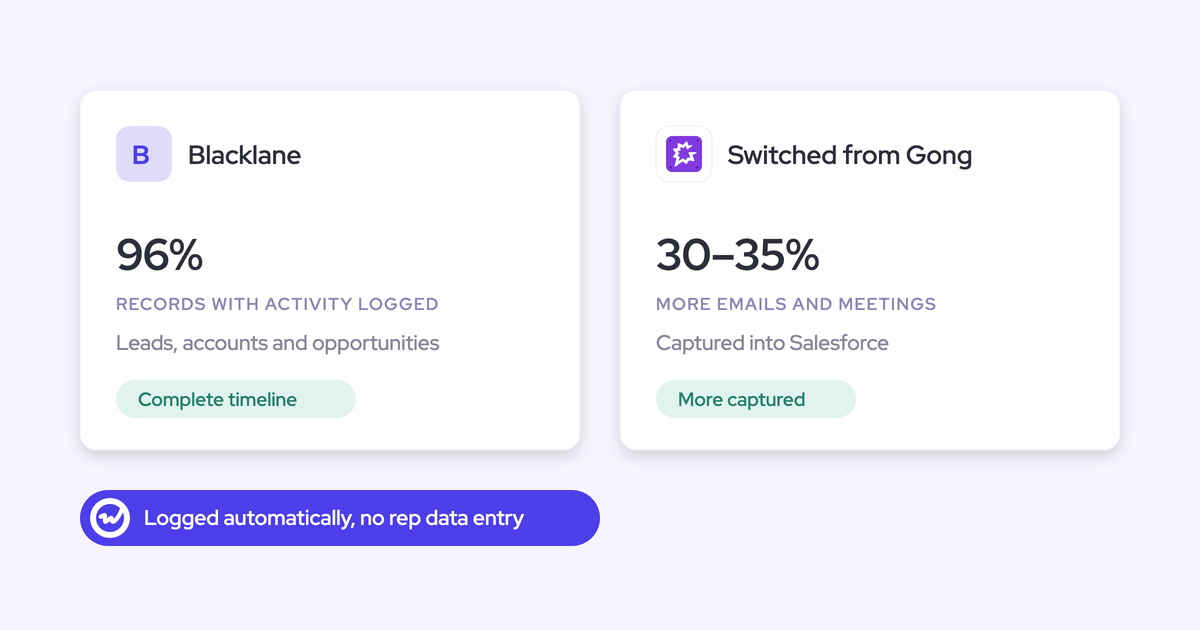

Read in order, our published customer results line up as a chain. Coverage moves first, then pipeline health, then the forecast:
- Coverage. Blacklane went from around 20% of activities unrecorded to 96% of leads, accounts and opportunities with activity logged. Lendz captures virtually 100% of relevant emails. United Fintech saw 3x more captured activity and checked it by hand.
- Pipeline health. HolidayCheck reports about 75% fewer past-due opportunities and over 60% fewer inactive ones.
- Forecast. Zeotap forecasts within 7% by week 4 of the quarter.
- Time to value. Go-live ranged from under an hour to two weeks.
Every number below comes with the product the customer ran and what capture alone can take credit for. Zeotap's 12% win-rate increase is in here too, and we explicitly don't credit it to capture.
Weflow is the Revenue AI Orchestration platform for sales, customer success, and RevOps teams. It's built for Salesforce teams, so the activity and contacts our Salesforce data capture collects stay in your Salesforce, where your reports can read them.
The last section turns these metrics into a scorecard you can run in your own parity trial.
Every Weflow customer result in one table, by layer
The results sort into four layers: coverage, pipeline health, forecast, and time to value. Each row says which Weflow products the customer ran, where the case study states it, and what capture can honestly claim.
| Customer | Before | Result | Layer | Weflow products in use | What capture can claim |
|---|---|---|---|---|---|
| Blacklane | Manual logging from Google Workspace left around 20% of activities unrecorded | 96% of leads, accounts and opportunities have emails, meetings and key contacts logged | Coverage | Weflow Activity and Contact Capture (replaced Einstein Activity Capture) | All of it. This is the capture result. |
| Lendz | Einstein Activity Capture on a customized Salesforce | Virtually 100% of relevant emails captured, with custom logging settings respected | Coverage | Weflow Activity and Contact Capture | All of it. |
| Lendz | Past email history missing from Salesforce | Several months of historical email backfilled | Coverage (history) | Weflow Activity and Contact Capture | All of it. |
| United Fintech | Reps logging manually with Outlook plugins | 3x more captured activities, validated manually as real interactions | Coverage | Weflow Activity and Contact Capture | All of it. |
| HolidayCheck | Not stated in the case study | About 75% fewer past-due opportunities | Pipeline health | Not specified | A share. Complete activity makes stale deals visible, but the case study doesn't isolate capture. |
| HolidayCheck | Not stated in the case study | Over 60% fewer inactive opportunities | Pipeline health | Not specified | A share, on the same terms. |
| Zeotap | Not stated in the case study | Forecast within 7% by week 4 of the quarter | Forecast | Weflow Deal Intelligence and Forecasting, on captured activity | The input only. The forecasting layer and process produce the number. |
| Zeotap | Not stated in the case study | 12% win-rate increase | Win rate | Weflow Deal Intelligence and Forecasting | None. It came from qualification and deal-review discipline. |
| HolidayCheck | New install | Managed package installed and syncing in under an hour | Time to value | Not specified | Install speed. |
| United Fintech | New install | Capture live in under an hour, rolled out centrally via OAuth | Time to value | Weflow Activity and Contact Capture | Install speed. |
| Argus Media | Manual CRM data entry | Onboarding completed within a week | Time to value | Weflow Activity and Contact Capture and Weflow Conversation Intelligence | Shared with Conversation Intelligence. |
| Blockaid | Einstein Activity Capture | Value within two weeks, cleaner Salesforce data | Time to value | Weflow Activity and Contact Capture plus pipeline management | Shared with the pipeline layer. |
Every row is one customer's published figure. Nothing here is averaged or pooled.
How we sourced these numbers and why we skip averages
Every figure in this article comes from a published case study of a named Weflow customer. We report them customer by customer, because that's the only way the numbers hold up when your CFO starts asking questions.
A pooled "customers see X%" figure is easy to write and easy to pick apart. A named customer, a stated baseline and a stated product scope are much harder to argue with.
The ground rules we held to:
- Published sources only. If it isn't in a live case study, it isn't here.
- Named customers only. No anonymized "a fintech company" results.
- Product scope as published. Where a case study doesn't say which Weflow products a customer ran, we write "not specified" and don't fill the gap.
- No averages or medians. The customers measured different things, so combining them would produce a number nobody actually achieved.
- Downstream results framed honestly. Pipeline and forecast numbers are outcomes of a capture-first rollout, never of capture alone.
Coverage: how much activity reached Salesforce once capture ran
Coverage moved from partial to near-complete for three customers who started from different baselines. That's the one link in the chain Weflow Activity and Contact Capture can claim outright.
By coverage we mean activity sitting on the right record, not a count of emails collected. You already know the difference. A tool that pulls 10,000 emails onto the account instead of the deal hasn't fixed your pipeline review.
Partial coverage is also a trap, because it produces reports that look trustworthy and aren't:
"it's worse to have basically incomplete, inconsistent, or inaccurate data than to have no data at all because then you have this illusion of like, oh, I have data and I can trust the data"
— Philipp Stelzer, CPO & Co-founder, Weflow
Blacklane went from ~20% unlogged activity to 96% of records covered
Blacklane is the cleanest before-and-after we have. Its reps logged manually from Google Workspace, and around 20% of activities never made it into Salesforce. After switching from Einstein Activity Capture to Weflow, 96% of its leads, accounts and opportunities have emails, meetings and key contacts logged.
| Before Weflow | After Weflow | |
|---|---|---|
| Figure | Around 20% of activities unrecorded | 96% of records with activity logged |
| What it measures | Share of activities missing from Salesforce | Share of leads, accounts and opportunities with emails, meetings and key contacts |
| How activity got in | Manual logging from Google Workspace | Automatic background capture, with the Chrome extension in Gmail |
| Setup detail | Einstein Activity Capture | Custom exclusion rules keep B2C contacts out of a B2B2C motion |
One thing to notice before you put this in a slide: the two numbers measure different things. Don't subtract one from the other. The useful read is that the activity gap closed and the record coverage got close to total.
"With Weflow, we're now capturing nearly all relevant activities. It's a game changer compared to our previous setup."
— Irina Smirnova, Senior Sales Operations Manager, Blacklane
Lendz captures virtually 100% of relevant emails on its custom setup
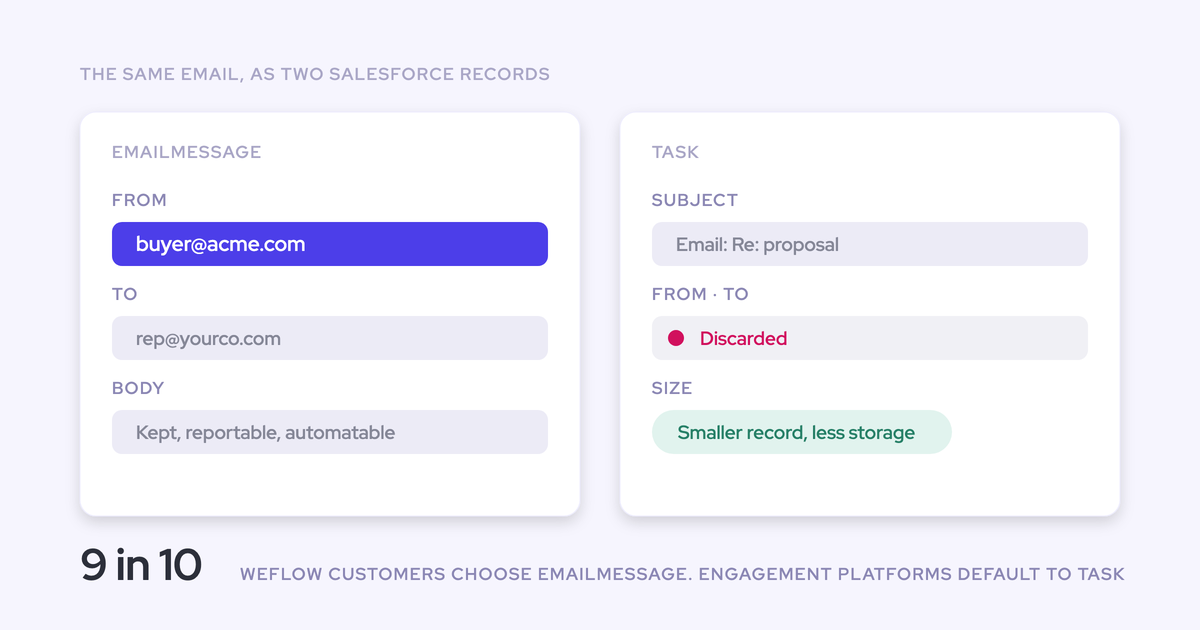
Lendz shows coverage holding inside a customized Salesforce. Weflow captures virtually 100% of its relevant emails while respecting Lendz's custom setup and logging settings, writing to standard email message records from Microsoft 365 and Outlook.
Weflow also backfilled several months of Lendz's historical email. That gave the team a complete picture of past activity and training input for its internal AI models.
The detail Lendz cared about most was people who email from more than one address:
"We try really hard to maintain data quality in our data structure, and we don't want to create duplicate contacts just because someone has two sets of emails that they use. Weflow covers this, which was a big saver for us."
— Erick Mahle, Vice President of Revenue Operations & Digital Transformation, Lendz
United Fintech logged 3x more activities and verified them by hand
United Fintech's captured activities tripled after switching to Weflow. The team's first reaction was that the number had to be wrong, so they checked it manually. The extra activity turned out to be real interactions that had been slipping past reps logging through Outlook plugins.
"We thought it was just wrong data - but we looked manually and realized this is the amount of insight we were missing before."
— Rugile Pudzevelyte, Senior Revenue Operations Manager, United Fintech
Expect this moment in your own rollout. We cover how to handle it in the month-one section below.
Pipeline health: HolidayCheck cut past-due opportunities by about 75%
HolidayCheck reports about 75% fewer past-due opportunities and over 60% fewer inactive ones after adopting Weflow. These are results after adopting Weflow, and the case study doesn't isolate capture from the rest of the rollout, so don't put them in your business case as capture numbers.
| Metric | Reported result |
|---|---|
| Past-due opportunities | About 75% fewer |
| Inactive opportunities | Over 60% fewer |
| Salesforce data quality | Improved, per the case study |
| Weflow products in use | Not specified in the case study |
Here's why complete activity matters to these numbers. A deal is only visibly inactive if the system knows when someone last emailed or met the buyer.
When half the meetings never get logged, every quiet deal looks the same: you can't tell the dead one from the busy one. With the record complete, days-inactive becomes a fact instead of a rep's story, and a past-due close date has nowhere to hide.
"The biggest win is data quality. We finally trust our Salesforce data. It's consistent, reliable, and actionable."
— Bastian Stosic, Head of Media Sales Operations, HolidayCheck
Blockaid, another team that moved off Einstein Activity Capture, described the same shift:
"We saw value within the first two weeks. Our Salesforce data has become much cleaner and reporting is extremely easy"
Forecast accuracy: Zeotap forecasts within 7% by week 4
Automated capture feeds forecast accuracy, but it doesn't produce it. Zeotap's forecast result sits downstream of capture and depends on Weflow Deal Intelligence and Forecasting and the review process built on top. If you're asked "does capture improve forecast accuracy?", the honest answer is that it supplies the input the forecast has to trust.
What Zeotap ran to forecast within 7% by week 4
Zeotap runs Weflow Deal Intelligence and Forecasting on a captured activity record. The team uses custom pipeline views and templates for weekly sales meetings and pipeline inspections, so every review runs on the same data.
The timeframe is the part worth repeating. The figure is within 7% by week 4 of the quarter, not at quarter end. That makes it a claim about how early the forecast gets reliable, not about hindsight.
"With Weflow, we forecast within 7% by week 4 of the quarter."
Zeotap's RevOps lead tied the forecast and the activity tracking together in the same breath:
"We're seeing a marked improvement after starting to use Weflow: we have much better visibility as a management team, our current quarter forecast is always up-to-date, and we are now tracking sales emails and activities a lot better."
Why we don't credit capture with Zeotap's 12% win rate
Zeotap increased its win rate by 12% after adopting Weflow, and that increase came from qualification and deal-review discipline, not from capture. AEs complete a custom ICP scorecard and panel templates to sharpen discovery and qualification. Managers run pipeline inspections on that data every week.
So don't claim it from capture. Win rate is the hardest outcome to prove, and a RevOps-minded exec will challenge it first. One over-attributed number puts every other number in your deck under suspicion.
| Say this | Not this |
|---|---|
| "Blacklane went from around 20% unlogged activity to 96% of records with activity logged." | "Customers see 96% coverage." |
| "HolidayCheck reported about 75% fewer past-due opportunities after adopting Weflow." | "Capture cuts past-due opportunities by 75%." |
| "Zeotap forecasts within 7% by week 4, running Weflow Deal Intelligence and Forecasting on captured activity." | "Activity capture makes the forecast accurate to 7%." |
| "Zeotap's 12% win-rate increase came with ICP scorecards and weekly pipeline inspection." | "Weflow raises win rates by 12%." |
| "Capture gives us a complete activity record the forecast can run on." | "Capture fixes our forecast." |
Time to value: from under an hour to two weeks
Published timelines run from under an hour to two weeks, but they describe three different milestones. Keep them separate when you present them, or someone will hear "live in an hour" and expect a trusted forecast by lunch.
| Customer | Milestone | Timeline |
|---|---|---|
| HolidayCheck | Install and first sync: managed package installed, data syncing | Under an hour |
| United Fintech | Install and first sync: capture rolled out centrally via OAuth | Under an hour |
| Argus Media | Onboarding completed | Within a week |
| Blockaid | First visible value: cleaner data, easier reporting | Within two weeks |
Our technical setup takes 30 to 45 minutes with your Salesforce admin and your Google Workspace or Microsoft admin. Most of the remaining time goes into business logic: exclusions, team configurations, and later the AI templates and forecast design.
That's also why capture goes first in a rollout. It asks nothing of reps and starts working the day you enable it. By the time you agree on a forecast design, you already have several weeks of complete activity for it to run on. Teams that roll out in the reverse order ask reps to submit forecasts on data they already know is wrong.
What teams that replaced Einstein Activity Capture reported
Blacklane, Blockaid, Lendz and ADVISA all moved from Einstein Activity Capture to Weflow, and their case studies name the same problems from before the switch. Fair credit first: Einstein Activity Capture comes with Salesforce, and admins can edit its email-matching logic in Flow Builder. For a team that only needs email headers on a timeline, that's a reasonable place to start.
The problems show up when you try to report on the activity:
| What EAC switchers named | What changed after switching |
|---|---|
| Couldn't report on how many meetings the team had, and Salesforce support couldn't explain it either (Blockaid) | Meetings land on standard Event records your reports read directly; "reporting is extremely easy" (Blockaid) |
| Activities only temporarily stored on Salesforce's side, "not even my own data" (Blockaid) | Activity is written to Task, EmailMessage and Event records in your Salesforce and stays there |
| Unreliable, inconsistent and unreportable (ADVISA) | Server-side capture runs without reps doing anything; most of ADVISA's team doesn't know it's there |
| Attachments not supported (ADVISA) | Weflow can store attachments, with a size cap you set per configuration |
"I also learned that activities are just temporarily stored on Salesforce's side. It's actually not even my own data."
"Most of our team doesn't even know we have Weflow for activity capture. That was a big attraction for me: I didn't need them to set it up or learn anything new."
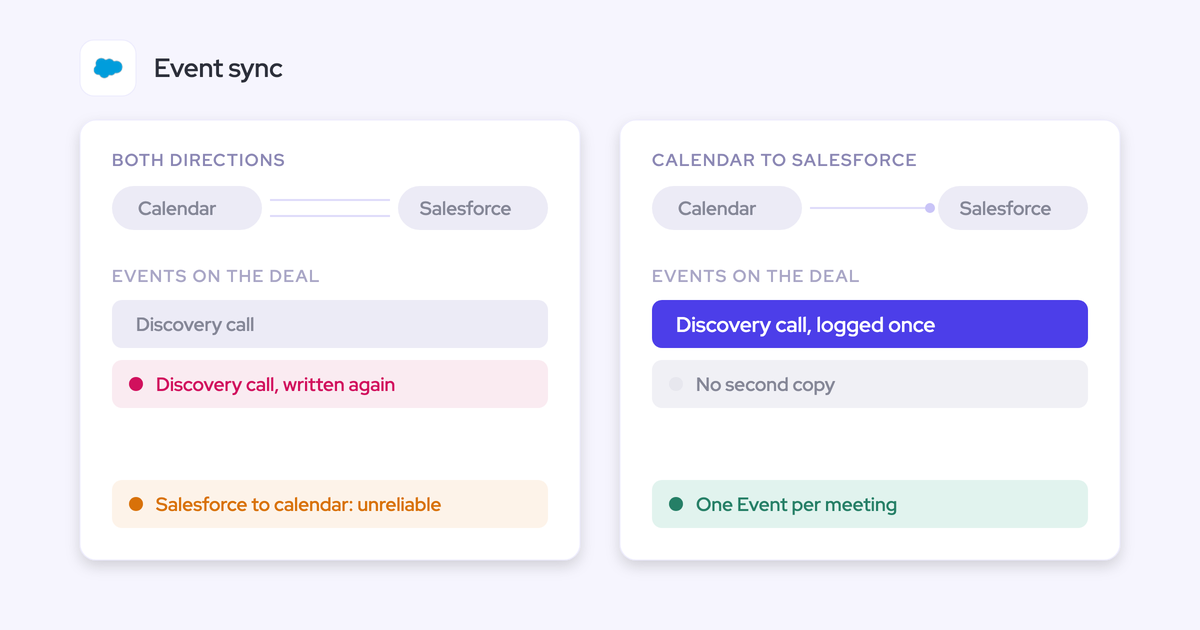
One more pattern from Salesforce's own documentation: when a meeting organizer isn't in a syncing configuration, Einstein Activity Capture gives each syncing attendee a standalone copy of the event. That inflates meeting counts. Weflow logs one parent event per meeting, with child events per attendee, so meeting counts stay clean. You can run both tools side by side during a trial; the FAQ covers the one setting that makes it work.
How Weflow Activity and Contact Capture produced these numbers
The captured record is what everything else in Weflow reads from: days inactive, last and next meeting, per-contact engagement, deal warnings, and Ask Weflow AI's answers about a deal. Each customer result above traces to a specific mechanism, and that's what tells you whether the result transfers to your org.
| Result you saw above | Mechanism behind it |
|---|---|
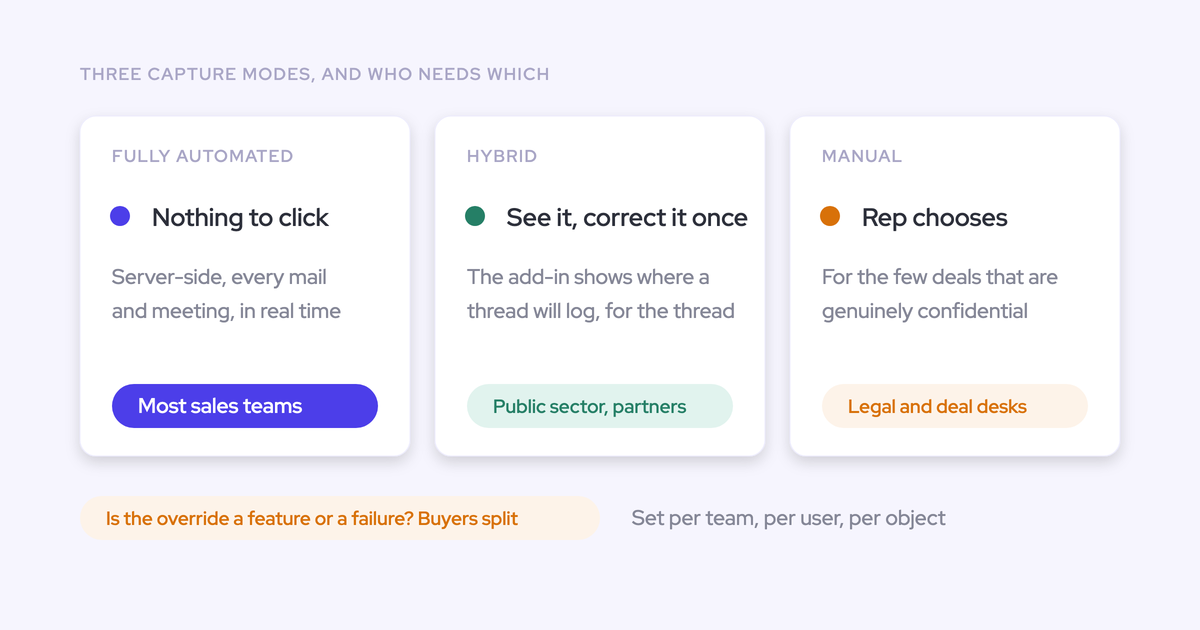
| Coverage without rep effort (Blacklane, ADVISA) | Server-side capture at the mail tenant, through a central app in Microsoft Entra or Google Workspace. It logs inbound and outbound mail and meetings from any client or device. |
| Coverage holding on a custom setup (Lendz) | Configurations per team, user and object. Email lands as a Task or EmailMessage, logging works on custom objects and cases, and matching checks secondary email fields. |
| Activity on the right opportunity | A fixed mapping order that falls back to the account when the opportunity is ambiguous. A rep's correction in Outlook or Chrome follows the rest of the thread. |
| Mapping that improves over time | Opportunity contact roles written as emails log, so later activity from that contact resolves to the deal. |
| Reportable, trusted data (Blockaid, HolidayCheck) | Activity written to standard Task, EmailMessage and Event records in your Salesforce, readable by your reports, flows and BI tools. |
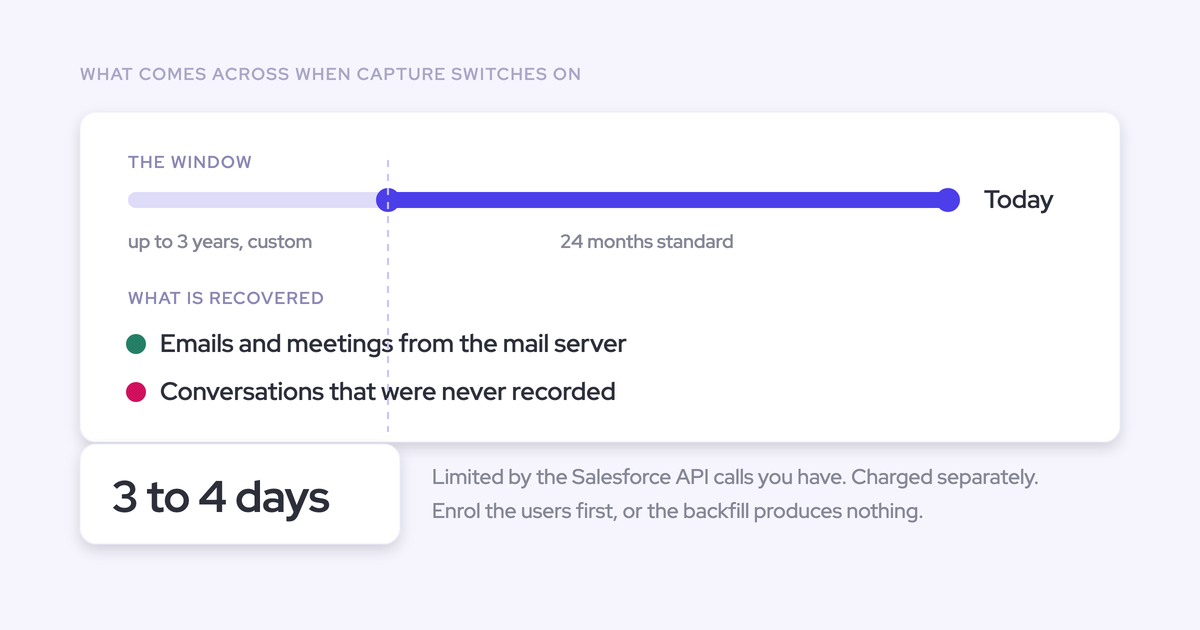
| Nothing lost in rollout (Lendz backfill) | Failed syncs recoverable after the fact, historical backfill, and earlier emails logged automatically once an account is created. |
| Volume you can rely on | A 99.9% activity sync rate. The most common failure cause is an exhausted Salesforce API limit. |
Mapping is the part you know is hard, so here's how it works. Weflow matches on the email address and the Salesforce relationships around it, never on what the email says.
- It finds the contact, lead or custom object holding the address.
- It checks for an opportunity contact role.
- If the account has exactly one open opportunity, it logs there.
- If several are open, it weighs the contact role, opportunity owner, mailbox owner, account relationship and stage.
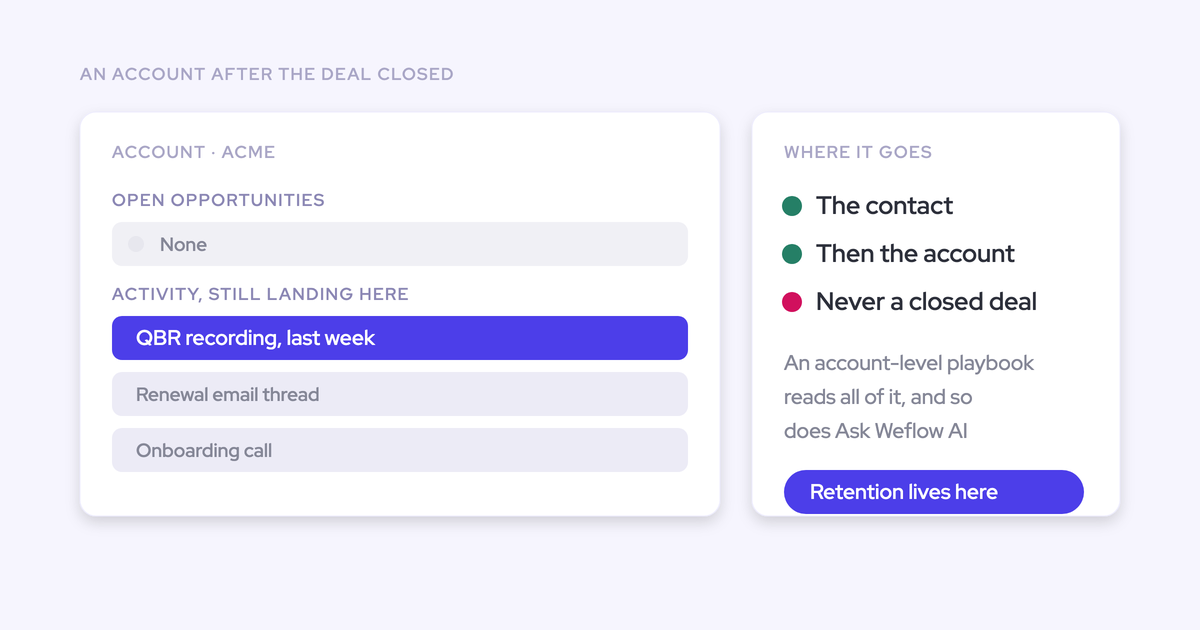
- When the evidence doesn't settle it, Weflow logs to the account instead of guessing, and never logs to a closed opportunity.
We built it this way on purpose. Activity on the account is easy to fix. Activity on the wrong deal quietly corrupts every report that touches it.
The record shows up where reps already work. The Weflow Activity Timeline sits on the Salesforce account, opportunity, contact or lead page, with email threads grouped by conversation:
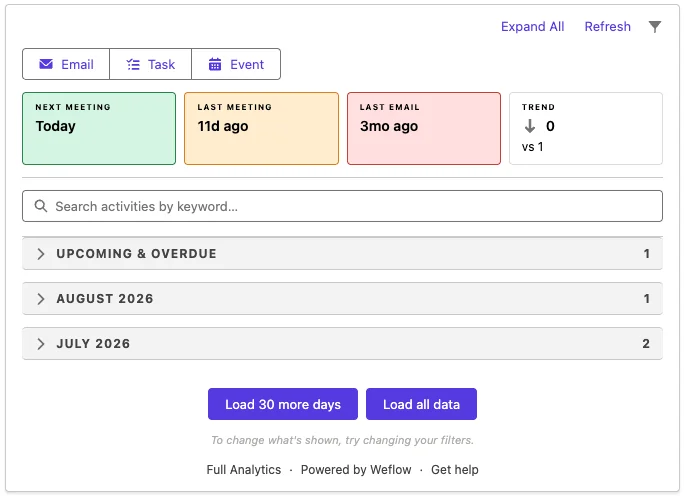
The ownership point is scoped, and the scope matters. For the activity and contact layer, what Weflow captures stays in your Salesforce:
"If you ever stop using Weflow, the data persists. It is your data."
Month one: why your reports can look worse at first
Turning on complete capture exposes CRM problems that were already there. Duplicate accounts, wrong Website fields, shared domains and multiple aliases all stayed hidden while reps were logging selectively. Once everything flows in, they show up all at once, and the jump in volume can look like an error. That's exactly what happened at United Fintech.
The risk is that the new tool gets the blame.
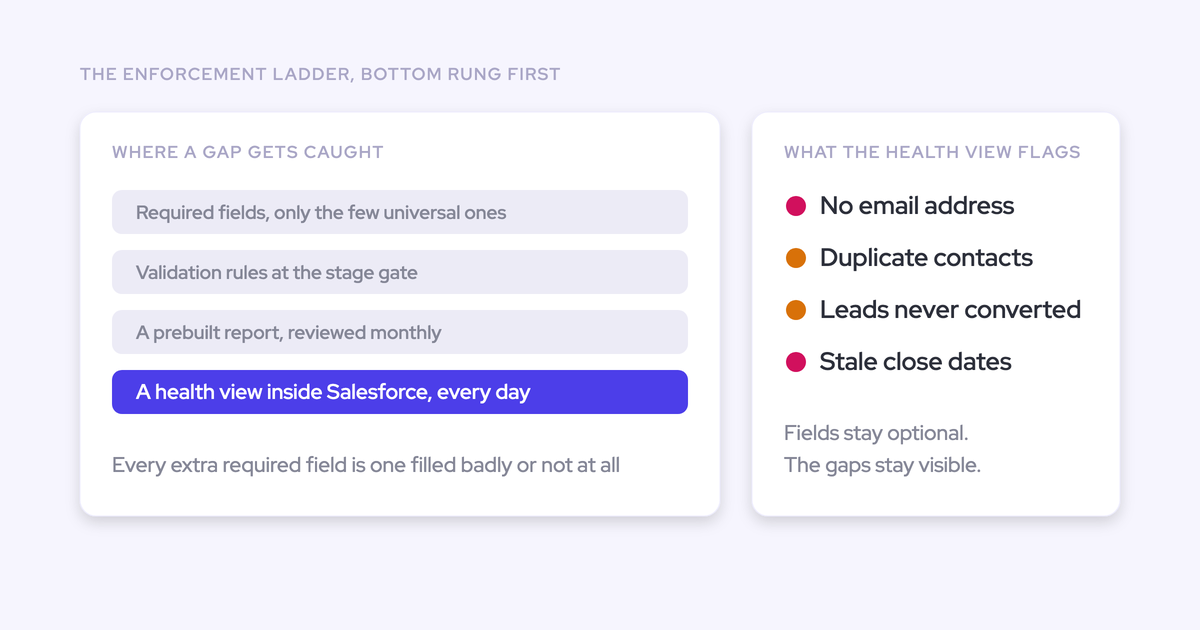
You need a way to prove which side a gap sits on. The Activity Capture Health view in Weflow Analytics does that inside Salesforce. It flags:
- duplicate accounts and duplicate contacts;
- unconverted leads that already have a matching contact;
- contacts with no email address;
- accounts sharing a website domain;
- capture settings that aren't configured yet, including whether Einstein Activity Capture is still active.

| Symptom | Actual cause | Where to check it |
|---|---|---|
| Activity volume jumps two or three times overnight | Interactions that were never logged before | Spot-check a sample against the reps' mailboxes, as United Fintech did |
| Emails pile up on one unexpected account | A wrong or personal domain in that account's Website field | Activity Capture Health: accounts with no website, duplicate accounts by website |
| Activity sits on the account, not the deal | Several open opportunities and no contact role to decide between them | The account timeline; re-map from Outlook or Chrome |
| Duplicate meetings in reports | Leftovers from Einstein Activity Capture's two-way event sync | Settings Health: Einstein Activity Capture detected |
| A rep's activity is missing | Multiple aliases, or a different address in Microsoft and in Salesforce | The warning icon next to that user in the capture configuration |
| New contacts with an email address in the last-name field | The incoming email carried no display name | Expected behavior. Capture reproduces what arrived. |
What to tell leadership before go-live:
- Activity volume will jump, and that's the missing activity arriving.
- Some of what surfaces is old CRM mess, and we'll have a health view that shows exactly which records.
- Per-rep activity counts will shift, most for the reps who logged least.
- Reports built on the old counts won't match history for the first weeks, so judge trends from go-live forward.
What Weflow Activity and Contact Capture can't fix for you
Beyond the CRM data issues above, a few things sit outside what capture does. Put them in your business case now so nobody finds them later.
- Weflow doesn't capture text messages, iMessage or WhatsApp.
- Weflow attaches captured contacts to opportunities as contact roles, but it doesn't infer whether someone is a champion or economic buyer. That stays a judgment call in your sales process.
- Call recording lives in Weflow Conversation Intelligence, not in Weflow Activity and Contact Capture.
- Weflow works exclusively with Salesforce.
- Weflow can't correct a wrong Website field, shared domains or multiple aliases. It exposes them so you can fix them.
If you run HubSpot, or your current capture already passes a one-for-one parity check against your mailboxes, stay where you are.
Weflow Activity and Contact Capture pricing, and what expansion adds
Weflow Activity and Contact Capture costs $19 per user per month, billed annually, with a 10-user minimum. Ask Weflow AI Pro and Agent Builder Free, with 25 agent actions a month, are included in every plan.
Expansion follows the same chain as the results above:
| Layer | Product or bundle | List price per user per month | Customer result it maps to |
|---|---|---|---|
| Capture | Weflow Activity and Contact Capture | $19 | Blacklane, Lendz, United Fintech coverage |
| Conversations | Weflow Conversation Intelligence | $39 | Argus Media, alongside capture |
| Deals and forecast | Weflow Deal Intelligence and Forecasting | $39 | Zeotap's 7% by week 4 |
| Capture and conversations | Weflow Revenue AI Foundation | $49 | Argus Media's product mix |
| Plus deal intelligence | Weflow Revenue AI Business | $59 | Deal intelligence without pipeline analytics and forecasting |
| Full forecasting layer | Weflow Revenue AI Enterprise | $79 | All products, including the forecasting Zeotap runs |
Seats added mid-term are charged pro rata to the end of the term. Bundling capture with Weflow Conversation Intelligence carries roughly a 16% discount against buying the two separately.
The parity trial scorecard to measure your own results
The customer numbers above tell you what's possible. Your own numbers are what get the purchase approved. Measure in three phases: a baseline before the trial, a parity run during it, and output metrics afterwards that you can point to at renewal.
Most teams don't know their own unlogged share. We hear estimates like this on calls all the time, and almost nobody has measured it:
"I imagine we're only capturing, you know, under 25% of most of our activities today."
Run the trial in this order:
- Baseline. Measure your unlogged share, records with activity, and past-due and inactive opportunities before anything changes.
- Technical test. In a sandbox with one user, email an address outside your domain, and create, move, reschedule and delete meetings. Internal mail is excluded, so testing with colleagues logs nothing.
- Parallel run on defaults. Run Weflow next to your incumbent with no templates or custom rules. Set Einstein Activity Capture's event sync to one direction, and turn on compatibility mode for any sequencer.
- Compare one for one. Check whether anything the incumbent caught is missing, and what Weflow caught that it missed.
- Configure. Only then add exclusions, custom objects and contact-creation rules.
| Metric | How to measure it in Salesforce | When |
|---|---|---|
| Unlogged share | For a sample of reps, compare a week of external sent and received email and meetings in their mailboxes with Task, EmailMessage and Event records for the same week | Baseline, trial |
| Records with activity | Share of open leads, accounts and opportunities with at least one email or meeting in your chosen window | Baseline, trial, renewal |
| Inbound coverage | Received emails logged as a share of sent emails logged | Baseline, trial |
| Mapped to the right opportunity | Hand-check a sample of emails on accounts with several open opportunities | Trial |
| Duplicates | Meetings with more than one event per meeting; emails logged by both a sequencer and capture | Trial |
| Contact-role coverage | Share of open opportunities with two or more contact roles | Baseline, trial, renewal |
| Sync failures | Emails and meetings that didn't reach Salesforce, and why | Trial, renewal |
| Past-due opportunities | Open opportunities with a close date in the past | Baseline, renewal |
| Inactive opportunities | Open opportunities with no activity in a threshold that fits your sales cycle | Baseline, renewal |
Leave login rate off the renewal list. Capture works best when nobody opens it, so a falling login count tells you nothing. What proves a background tool is earning its seat is the output: activity still being written, records still complete, and the reports your leadership reads still depending on it.
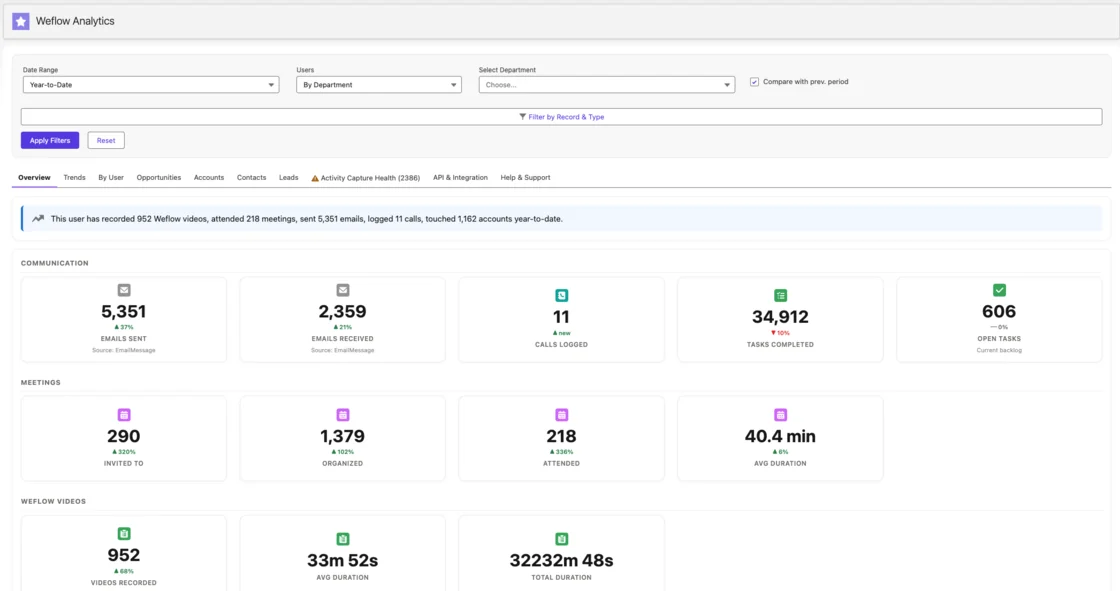
See how Weflow captures activity, updates Salesforce fields from calls, and rolls up your forecast. Book a 30-minute demo.
Where each customer figure is published
- Blacklane reported that manual logging left around 20% of activities unrecorded before Weflow, per the Blacklane case study.
- Blacklane reported that 96% of its leads, accounts and opportunities have emails, meetings and key contacts logged after adopting Weflow Activity and Contact Capture, per the Blacklane case study.
- Lendz reported capturing virtually 100% of relevant emails in Salesforce with Weflow, respecting its custom setup and logging settings, per the Lendz case study.
- Lendz reported that Weflow backfilled several months of historical email data, per the Lendz case study.
- United Fintech reported a 3x increase in captured activities, validated manually, after switching to Weflow, per the United Fintech case study.
- United Fintech reported that Weflow's activity capture was running in under an hour, per the United Fintech case study.
- HolidayCheck reported about 75% fewer past-due opportunities and over 60% fewer inactive opportunities after adopting Weflow, per the HolidayCheck case study.
- HolidayCheck reported installing the managed package and syncing data in under an hour, per the HolidayCheck case study.
- Zeotap reported forecasting within 7% by week 4 of the quarter with Weflow Deal Intelligence and Forecasting, per Weflow's customers page.
- Zeotap reported a 12% win-rate increase after adopting Weflow, tied to qualification and deal-review practices, per the Zeotap case study.
- Argus Media reported completing onboarding within a week, per the Argus Media case study.
- Blockaid reported seeing value within the first two weeks of using Weflow, per the Blockaid case study.
FAQ: results after automating activity capture with Weflow
Can Weflow run in parallel with Einstein Activity Capture during a trial?
Yes, once Einstein Activity Capture's event sync is set to one direction, from the calendar into Salesforce. Left two-way, it pushes logged events back to the calendar, where they get logged again, which produces duplicate meetings. Removing the Einstein permission from users doesn't stop the loop. Duplicates already written aren't cleaned up automatically.
Does Weflow create duplicate activities alongside Outreach, Salesloft, or Apollo?
No. Compatibility mode holds Weflow's sync back by about ten seconds, recognizes the sequencer's tracking pattern, and skips emails the other tool already logged. Outreach, Salesloft, Apollo and Clay ship as presets. If your sequencer sends through a custom tracking domain, add that domain to the patterns, or those emails log twice.
Can Weflow backfill email history we never captured?
Yes. Weflow backfilled several months of historical email for Lendz, and historical backfill of up to 24 months is available as an add-on. Any email or meeting that failed to sync can be recovered and pushed into Salesforce later. And when you create an account after reps have already emailed that company, Weflow logs those earlier emails to it automatically.
Will automatic contact creation fill Salesforce with junk contacts?
Not with the guards on. You can restrict creation to existing accounts, cap contacts per event so a webinar doesn't create two hundred records, and block prefixes like invoice, billing, no-reply and support. Before creating anyone, Weflow looks up the address across contacts, leads, custom objects and secondary email fields. Weflow never creates leads, accounts or opportunities.
How do Salesforce validation rules affect automatic contact creation?
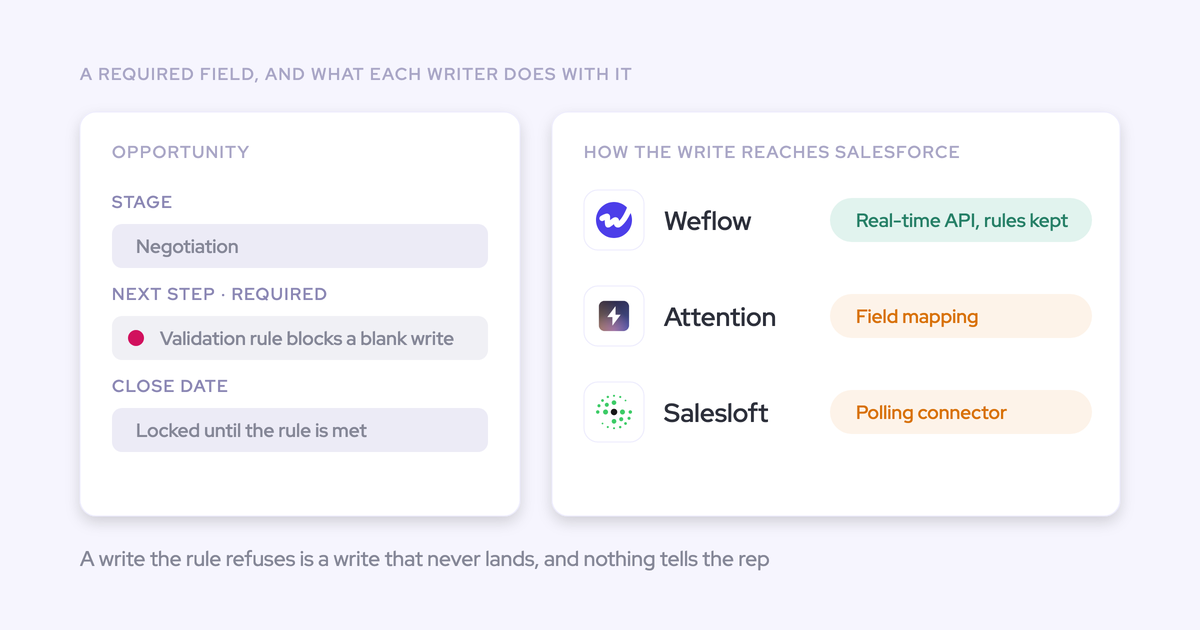
Weflow enriches each contact before writing it, so it arrives with the name, email and whatever fields enrichment found. If a validation rule requires a field enrichment couldn't fill, that contact doesn't save. You can relax the rule for the integration user, or have reps create those contacts by hand from the mail extension, where the full field set is available.
Where does Weflow log an email when an account has several open opportunities?
Weflow weighs the contact role, the opportunity owner, the mailbox owner, the account relationship and the stage. When that doesn't settle it, the email goes to the account, never to a closed opportunity. A rep or admin can move it from the Outlook add-in or Chrome extension, and later replies in that thread follow the correction.
What does our security review need before Weflow reads a mailbox?
Weflow reads no mailbox until a user is enrolled in a capture configuration, so you can finish technical setup while legal review is still open. The integration user gets a least-privilege permission set, without Modify All Data. Sign-in runs only through your Salesforce authentication and its SSO or two-factor. Weflow is SOC 2 Type II certified and GDPR compliant, uses Zero Data Retention for AI processing, and never uses customer data to train AI models.
Does Weflow Activity and Contact Capture cover customer success and account managers?
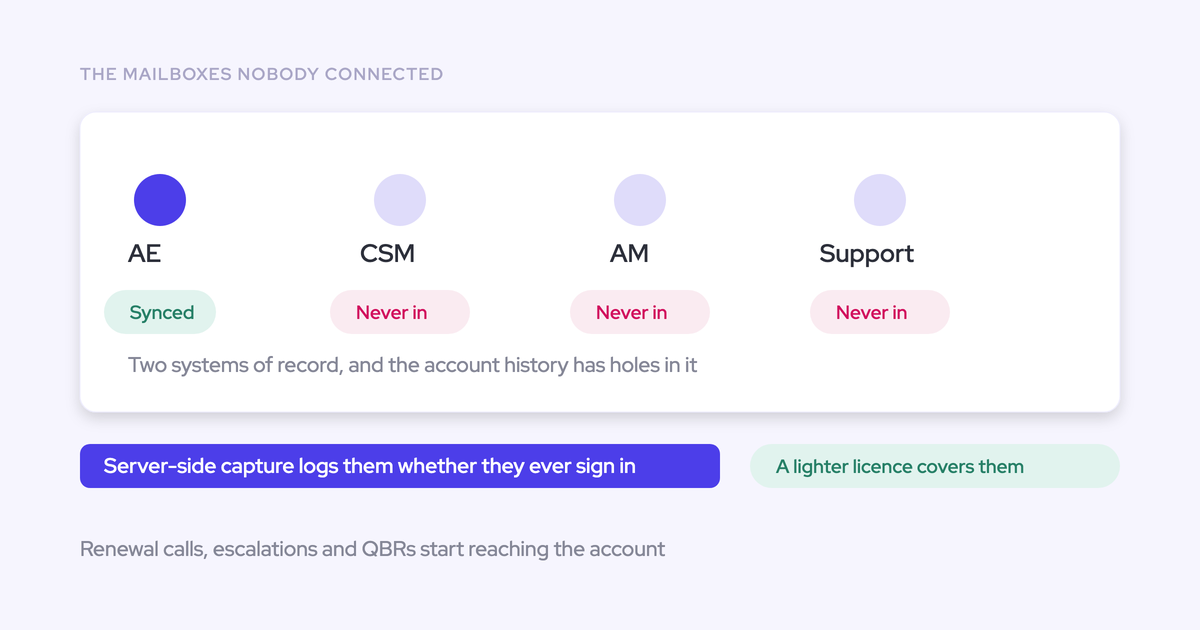
Yes. Capture is configured per team, so customer success can log to different objects and opportunity types than sales, in the same workspace. Post-sale roles are usually uncovered because capture licenses historically followed sequencing seats to BDRs and AEs and stopped there. Putting every customer-facing role on capture is what makes renewal and expansion activity reportable.
Does our activity data stay in Salesforce if we cancel?
Yes, for activity and contacts. Weflow writes them to standard Task, EmailMessage, Event and Contact records in your Salesforce, and they stay after cancellation. Recordings from Weflow Conversation Intelligence and the hourly opportunity snapshots behind pipeline analytics are stored on Weflow's side, so they don't stay in Salesforce the same way.
Does Weflow work with HubSpot?
No. Weflow works exclusively with Salesforce. If you run HubSpot, Weflow isn't the right fit, and neither is it for a Salesforce team whose current capture already passes a one-for-one parity check.