

Weflow vs Nektar: Automatic Contact Creation and Opportunity Contact Roles Compared (2026)
Decide between Weflow vs Nektar for automatic contact creation and opportunity contact roles.




Weflow is the Revenue AI Orchestration platform for sales, customer success, and RevOps teams. Nektar is a background data service for enterprise Salesforce teams. Both create Salesforce contacts and opportunity contact roles automatically, but they decide in opposite ways.
Nektar infers more and asks for more trust:
- Machine-learning affinity scores pick the record, and you see the score, not the rules.
- Self-healing deletes and recreates records it wrote earlier.
- Reps get no interface.
- Contact roles and the rules that limit contact creation sit in its higher Harvest package, which is quote-only.
Weflow writes by a fixed precedence you can read. We include the creation guards and contact roles in the $19 capture seat, and we put the correction step in the rep's inbox.
We build Weflow for Salesforce teams. Weflow Activity and Contact Capture is the module that writes contacts, contact roles and activity into your org. You already know your contact roles are empty. The open question is which tool you'll let write to Contact and OpportunityContactRole, and which failure you'd rather own: a score you can't read, or a readable rule plus a rep who sometimes clicks.
Below you'll find:
- a side-by-side table
- each tool on the same ten capabilities, in the same order
- where each one wins
- what each costs
- a two-week pilot plan
- a choose-if block
Weflow vs Nektar at a glance: what each writes to Salesforce
Both tools create contacts and contact roles. They diverge on four things:
- how they decide where a write goes
- what the entry tier includes
- who corrects a mistake
- how fast they write
| Capability | Weflow | Nektar |
|---|---|---|
| Automatic contact creation | Creates contacts from To and CC when the rep sends. Guards: existing-accounts-only, per-event cap, prefix blocks and a real-time duplicate lookup. Never creates leads, accounts or opportunities. | Creates contacts under the account whose domain matches and fills name, title and phone from signatures. Skips public domains and existing contacts or leads. Contact-limiting rules are Harvest-only. |
| Opportunity contact roles | Creates the OCR when it logs a contact's email to an opportunity where they hold no role. Writes one fixed role value per configuration. Included in the $19 capture seat. | Creates an OCR for every participant on an activity linked to an opportunity, filling Role and Is Primary, and can infer decision maker or sponsor. Harvest only. |
| Matching activity to the right records | Fixed precedence an admin can read: email address, contact role, single open opportunity, weighting, then account. Never reads email content or logs to a closed opportunity. | ML affinity scoring. Admins see the score, not the rules. Ambiguous cases go to the account, and self-healing re-matches later. |
| Rep review and correction | The Outlook add-in and Chrome extension show where an email will log. Reps re-map once per thread, untick logging, or move logged email. No mapping changes from a phone. | Partial. No rep interface or pre-log review. Corrections are Salesforce edits that Nektar learns from. An admin Tracker explains single items read 2 hours to 30 days ago. |
| Historical backfill | 24 months standard, up to three years on request. Run by our team, charged separately, capped at 50,000 Salesforce API calls per day. | Up to 18 months, one-time, at $8 per user per month of history. Creates historical contacts and contact roles. |
| Activity capture setup and rollout | Two managed packages, one integration user with a dedicated permission set and one central mail app. A 30 to 60 minute technical session, two to four weeks of guided rollout, and a free 14-day POC. | Org-level mail connection with sync enabled user by user. The default integration user asks for Modify All Data plus metadata and profile permissions. The first sync can take days. |
| Integrations with other tools | Partial. Mail, calendar, Zoom, Teams, Meet, Slack and the Outreach dialer. Compatibility mode with Outreach and Salesloft. No native warehouse connector. | Partial. Salesforce, Snowflake, Google Workspace, Microsoft 365 and Zoom, plus reads of Teams and Meet data. Other capture tools on the same users get switched off. |
| Access from AI assistants (MCP) | Official read-only MCP connector, enabled per workspace with a separate transcript toggle. Reaches forecast calls and playbooks. Per-rep breakdowns are capped at 25 owners. | Partial. No MCP of its own. Assistants read Nektar's data through Salesforce's MCP once it's written. |
| Raw data access outside the tool | REST API bulk export as JSON or CSV to warehouses and BI tools. No native Snowflake, Databricks or BigQuery connector. | Native Snowflake delivery, including a headless option with no UI. |
| Pricing | Published per seat: $19 capture, bundles at $49, $59 and $79. Billed annually, 10-user minimum. | Partial. Bloom and Harvest are quoted per organization. The only published price is the $8 backfill. |
The sections below take each row in turn, Weflow first and Nektar second, in the same order.
Why Sales Ops ends up choosing between Weflow and Nektar
Salesforce lets an activity relate to an opportunity or an account, not both. The opportunity contact role is the only signal in the CRM that picks the deal. Nothing forces reps to fill it, so on any account with several open opportunities every capture tool falls back to the account. The deal looks dead while the rep is working it.
Weflow and Nektar both fix this by writing contacts and contact roles for you. That runs straight into two things you already carry: automation that once flooded Contact with junk, and validation rules that feed billing and won't be relaxed.
"We do not create contacts, because we have validation rules and we do not want duplicated contacts. This links into our subscription management platform, which is a big, big problem if we do."
The two tools answer that collision in opposite ways. Nektar is inference plus trust. Weflow is readable rules plus inbox correction.
How Weflow Activity and Contact Capture writes to your Salesforce org
Each section here has a twin in the Nektar section, in the same position, so you can read them side by side.
How Weflow creates contacts, and what it never creates
Weflow creates a Salesforce contact when a rep sends an email, from the addresses in To and CC. It doesn't create on receive and it ignores BCC. A thread the rep never answers produces no contacts.
We enrich each new contact before writing it. Enrichment fills first name, last name, title, email, phone and LinkedIn where it finds them, mapped to your own fields. When an email carried only an address, the address goes into Last Name and First Name stays blank. Capture reproduces what arrived and doesn't invent the rest.
You set these guards in the capture configuration, and each one stops creation:
- Existing accounts only: contacts are created only for domains that already match an account, so no orphans appear.
- Per-event cap: a hundred-person webinar doesn't write ninety-nine contacts.
- Prefix blocks: invoice, billing, no-reply and support addresses never become contacts.
- Real-time duplicate lookup: Weflow checks contacts, leads and any custom object with an email field, including secondary email fields, before it creates anything. If the address already exists as a lead, the activity attaches to that lead.
- The rep's tick: clearing it in the Outlook add-in or Chrome extension before sending skips that message.
What Weflow never creates:
- leads (lead conversion stays a manual Salesforce step)
- accounts
- opportunities
Plan around three limits:
- There's no admin review queue. The guards decide, and the rep's tick is the only per-message check.
- A required Contact field that enrichment can't fill for that person blocks that contact from saving.
- Weflow doesn't merge duplicates that already exist in your org.
How Weflow adds opportunity contact roles as it logs email
Weflow creates the opportunity contact role at the moment it logs a contact's email to an opportunity where that contact holds no role. You switch it on in the capture configuration, and it's included in the $19 Weflow Activity and Contact Capture seat.
The effect compounds. Every later email or meeting from that contact resolves to the deal through the contact role, so mapping on that opportunity gets more accurate the longer the deal runs. With the option off, the contact stays unrelated to the deal and the next activity falls back to the account.
- What Weflow writes: the OCR linking the contact to the opportunity, with one fixed role value per capture configuration.
- What it leaves to you: whether that person is the champion, the economic buyer or a detractor.
That's a deliberate stance. A VP of RevOps on a thread might be your champion or your loudest detractor, and the title doesn't say which. Automation can prove a person is active on the deal. The buying role is a judgement your sales process makes. If you want role values inferred, Nektar Harvest goes further here.
How Weflow decides which contact, account and opportunity get the email
Weflow maps every email and meeting by email address and the Salesforce relationships around it, in a fixed order:
- It looks up the address in the primary and secondary email fields and logs to the contact, lead or custom object that holds it, preferring a contact over a lead.
- If the person holds a contact role on a single open opportunity, that opportunity wins.
- If the account has exactly one open opportunity, it picks that one.
- If several are open, it weighs the contact role, the opportunity owner, the mailbox owner, the account relationship and the stage.
- Anything still unresolved logs to the account.
Weflow never reads email content to decide, and never logs to a closed opportunity. We tested content matching and left it out because it wasn't accurate enough.
Each decision runs against your Salesforce data as it stands at that moment. A contact role added between two emails changes where the second one lands.
The account fallback is by design. Logging to the account is easy to fix, and logging to the wrong deal isn't.
The dependency to audit is the account Website field. Domain matching runs on it, so any of these sends every matching email to the wrong account:
- a wrong value in the field
- a domain shared by duplicate accounts
- a personal mail domain typed into it
There's also no nearest-close-date rule. On accounts running a renewal and an expansion in parallel, you separate the lanes with two capture configurations filtered on opportunity type or close date.
How reps check and fix Weflow's mapping from Outlook or Gmail
The Outlook add-in and Chrome extension show the rep which contact, account and open opportunities an email is about to log to. From that panel a rep can:
- pick a different opportunity, account or custom object once, and Weflow applies it to every later reply in the thread (a new thread resets the choice)
- untick logging for that thread
- move an email that's already logged to a different record
- unlink a meeting mapped to the wrong record and re-log it
You set the capture mode per team: fully automated, hybrid (server-side capture plus the add-in), or fully manual. Most customers run hybrid. You can also hand out the add-in with the suppress control removed, so reps see and fix the mapping but can't switch logging off.
Mail sent from a phone is captured and auto-mapped, and a thread mapped on desktop keeps its mapping. Reps can't change mapping from mobile.
If your team wants zero rep clicks, you'll read this panel as rep work, and that's a fair read. In automated mode nobody has to open it. It exists for the moment when the system can't know the answer and the rep can.
How far back Weflow backfills email and meeting history
Weflow backfills 24 months of email and meeting history as standard, and up to three years on request. Our team runs it, and we charge for it separately because it spends your shared Salesforce API allowance.
We cap the backfill at 50,000 API calls per company per day. It pauses at the cap and resumes the next day, so duration grows with volume. One month of history for one user takes about 2,000 to 3,000 API calls. For Blacklane we synced four months of history over one week to protect their daily limits.
Users have to be enrolled in a capture configuration first. Otherwise the backfill has no one to run for.
What it takes to get Weflow capture live for every rep
Getting capture live takes three components and no code:
- Two Salesforce managed packages: one for the core capture objects and fields, and an optional one for email open tracking.
- One integration user with a dedicated permission set.
- One mail app installed centrally in Microsoft Entra or Google Workspace, which you can scope to a single organizational unit.
Reps install nothing for capture to run. The technical session takes 30 to 60 minutes with a Salesforce admin and a mail admin present.
Weflow reads no mailbox until a user is enrolled, so you can finish setup while legal review is still open. Guided rollout typically takes two to four weeks, or four to six in a large org. We don't charge for implementation, and the POC is free for 14 days.

How Weflow runs alongside Outreach, Salesloft and your meeting tools
Weflow runs next to your sequencer and leaves its logging in place. Two settings handle the overlap:
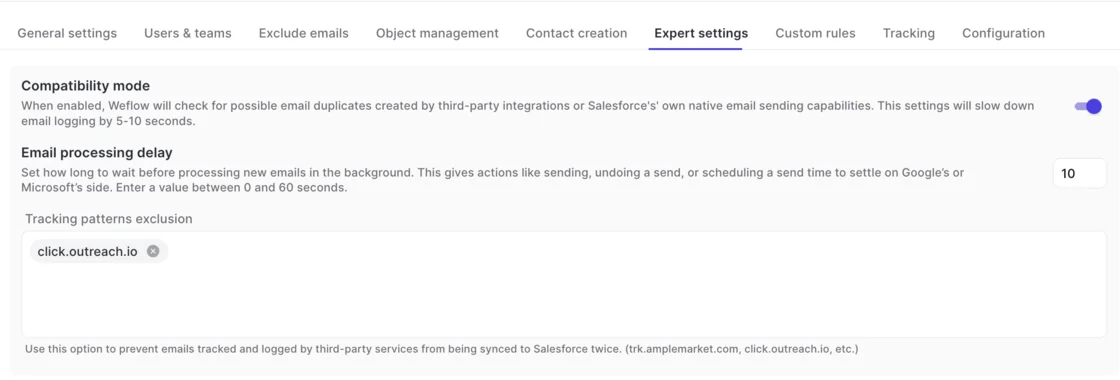
- Compatibility mode holds Weflow's sync back about ten seconds so Outreach or Salesloft can log the email first, then matches on the record ID so the email isn't written twice.
- Tracking patterns, such as click.outreach.io, keep a sequencer's bulk sends out of Salesforce entirely.
Native integrations cover Gmail, Google Calendar, Outlook, Zoom, Teams, Meet, Slack and the Outreach dialer. Weflow isn't an integration platform with a connector catalogue.
How Claude and ChatGPT reach Weflow data through MCP
Weflow has an official read-only MCP connector, so Claude, ChatGPT and other assistants query Weflow data directly. An admin enables it per workspace and uses a separate toggle to choose between full transcripts and AI summaries only.
The connector reaches data that Salesforce's MCP can't, because forecast calls, submissions and targets live in Weflow, not in Salesforce objects. Per-rep breakdowns are capped at 25 owners.
How you move Weflow data into Snowflake, BI or a warehouse
Weflow's REST API bulk-exports transcripts, metadata, scores and signals as JSON or CSV into warehouses and BI tools such as Tableau and Looker. There's no native Snowflake, Databricks or BigQuery connector, so data teams move the data through the API.
How Weflow prices Activity and Contact Capture and its bundles
Weflow publishes per-seat pricing, billed annually with a 10-user minimum.
| Product or bundle | List price per user per month | What it covers |
|---|---|---|
| Weflow Activity and Contact Capture | $19 | Emails, meetings, contacts and contact roles into Salesforce |
| Weflow Conversation Intelligence | $39 | Recording, transcription and AI field updates |
| Weflow Deal Intelligence & Forecasting | $39 | Deal health, pipeline and forecast |
| Weflow Revenue AI Foundation | $49 | Activity and Contact Capture plus Conversation Intelligence |
| Weflow Revenue AI Business | $59 | Foundation plus Deal Intelligence |
| Weflow Revenue AI Enterprise | $79 | All Weflow products, including Forecasting |
Ask Weflow AI and AI usage are included in the seat. Agent Builder is the only consumption-priced item. Every plan includes 25 agent actions a month, then Growth costs $299 a month for 500 actions and Scale costs $999 a month for 2,500.
How Nektar writes contacts, contact roles and activity into Salesforce
These are the same ten capabilities in the same order, drawn from Nektar's own documentation and what buyers tell us in evaluations.
How Nektar creates contacts from domains and email signatures
Nektar creates a contact for anyone on an email or meeting who isn't yet in Salesforce, under the account whose domain matches their address. It takes the domain from the account's Website field or infers it from contacts already on the account.
It never creates contacts for public domains such as gmail.com, and it skips anyone who already exists as a contact or lead. Name, title and phone come from email signatures, and the contact owner is set to the account owner.
Data time travel covers accounts that don't exist yet. Nektar holds the activity, and once the account is created with a website, it creates contacts for everyone it saw on that domain and links their past conversations. An activity can therefore appear in Salesforce weeks after it happened.
Rules that limit which contacts get created, for example by engagement level, are in Harvest. Nektar can create a duplicate when it can't see an existing record, which happens when:
- the existing contact or lead was created in the previous 20 minutes
- the integration user's permissions hide it
- someone creates a duplicate by hand after Nektar created the contact
Nektar resolves duplicates by deleting its own contact and moving the activity and fields to the surviving record. Merges wait 24 hours on purpose and typically complete 25 to 33 hours after the duplicate appears.
How Nektar adds opportunity contact roles in its Harvest package
Automatic opportunity contact roles are a Harvest feature, not a Bloom one. In Harvest, Nektar creates an OCR for every contact who took part in an activity linked to an opportunity, and fills Role and Is Primary.
Guardrails can restrict roles to people likely to influence the purchase. Custom logic can assign decision maker, sponsor or influencer from job title and engagement.
Contact roles that depend on a contact Nektar has to create first take about 2 hours, and up to 18. Nektar learns from reps adding or removing roles by hand.
How Nektar's affinity scoring picks the record, then self-heals it
Nektar picks the contact, account and opportunity with machine-learning affinity models. For each activity it looks for candidate records up to three or four relationship hops away. It scores them on timestamps, shared keywords, common participants, the opportunity owner, and the number and type of paths between records.
Nektar markets over 85% accuracy in matching contacts to opportunities. When the choice between open opportunities is ambiguous, it logs to the account. What you see is the score, not the rules behind it, and one buyer weighing Nektar named that as their main hesitation.
Self-healing re-runs the pipeline as new data arrives and rewrites Salesforce to match. Some teams see that as the product's main strength. Others see it as an audit risk. This is what it can and can't change:
| Record | What self-healing does |
|---|---|
| Earlier activities of a contact newly added to an opportunity | Can move them onto that opportunity and add their other participants as contacts on it |
| Contact roles Nektar created | Can delete them and recreate them on a better-fitting opportunity |
| Activities Nektar created that Salesforce can't re-associate | Can delete and recreate them, which changes the created date |
| Records a person has edited | Leaves them alone and treats the edit as a correction |
| Events a user changed in Salesforce | Doesn't override them, even though the calendar is otherwise the source of truth |
| Records Nektar didn't create | Never deletes them |
What reps and admins can correct when Nektar mis-maps
Nektar has no rep-facing interface, so nobody reviews or excludes an activity before it logs. The correction paths are:
- a rep or admin edits the record in Salesforce, and Nektar treats the edit as a correction and avoids repeating the decision
- an admin searches the Tracker by subject words or participant email to see why one email or event did or didn't reach Salesforce, for items read between 2 hours and 30 days ago
- admins set read rules by date, address or domain, or subject or body keyword to block categories up front
Nektar keeps no browsable log of the activity it read and discarded. That's deliberate, since most of it is personal or non-sales mail.
How Nektar backfills up to 18 months at $8 per user-month
Nektar backfills up to 18 months of email and calendar history as a one-time add-on, priced at $8 per user for every month of history. A 50-user team backfilling 12 months pays $4,800 once, on top of the subscription.
The backfill runs through the live pipeline, so it also creates historical contacts and adds contact roles for that period.
What Nektar's rollout asks of your integration user and IT
Nektar connects to mail at the organization level, and reps install nothing:
- On Google, a Workspace admin installs it from the Marketplace with read-only scopes.
- On Microsoft, a 365 admin authorizes an app that can read mail and calendars in all mailboxes, which you can restrict to a security group through a PowerShell access policy.
An admin then enables sync user by user. Users whose Salesforce and mailbox addresses differ are linked by hand.
The default integration user asks for:
- Modify All Data
- Modify Metadata Through Metadata API Functions
- Customize Application
- Manage Profiles and Permission Sets
- API access, connected with the full OAuth scope
Reduced-privilege paths exist, such as object-level permissions with deletes limited to records the integration user created. Nektar warns they need considerable Salesforce admin expertise, and hiding records from the integration user can cause duplicates and activity on the wrong opportunity. The first sync can take days.
Which tools Nektar connects to, and which it needs switched off
Nektar connects to Salesforce, Snowflake, Google Workspace, Microsoft 365 and Zoom, and reads meeting data from Teams and Meet. It doesn't record calls itself.
Nektar's marketing says it dedupes the overlap with Salesloft and Outreach. Its Salesforce sync documentation says it doesn't deduplicate against other capture tools running on the same users, and that those need to be switched off.
Gong Engage can't be deduplicated at logging, because Gong doesn't write the Microsoft or Google message or event ID into Salesforce.
How AI assistants reach Nektar data without its own MCP
Nektar has no API or MCP server of its own for customers. Assistants such as Claude or Agentforce read Nektar's data through Salesforce's MCP after Nektar writes it, and Nektar's position is that you don't need a second MCP.
How Nektar delivers captured data to Snowflake
Nektar delivers captured data natively to Snowflake, including a headless option with no UI and no rep adoption layer. The option is aimed at AI and data teams building their own GTM agents. Mimecast, for example, built a GenAI insights application on Snowflake on top of Nektar's data.
How Nektar packages and quotes Bloom and Harvest
Nektar sells two packages, Bloom and Harvest, priced per user per month and quoted per organization with volume tiers. There's no platform fee, every plan includes 24/7 CSM support, and the only published price is the $8 backfill.
| Area | Bloom | Harvest |
|---|---|---|
| Activity capture | Background capture, data time travel, self-healing | Everything in Bloom |
| Contacts | Automatic creation and enrichment, stale contact discovery | Adds advanced controls that limit contact creation |
| Opportunity contact roles | Not included | Automatic OCR creation and buyer role identification |
| Meetings | Not included | Attendance, meeting status, activity classification |
| Signals | Us-versus-them tagging, multi-seller and multi-buyer attribution, partner activity classification | Adds contact, opportunity and account engagement scores |
| Data controls | Basic | Advanced controls over contact creation, contact role creation and content privacy |
Where Nektar beats Weflow: inferred roles, zero rep surface, Snowflake
Nektar is the better pick in four situations, and we'd tell you so on a call:
- You want buying roles inferred, not just contact roles created. Harvest can assign decision maker, sponsor or influencer from title and engagement, and its meeting intelligence tags attendees' buying roles. Weflow writes one fixed role and leaves that judgement to you.
- You want zero rep surface. Nektar gives reps nothing to learn, which keeps change management low across thousands of seats. That's a legitimate position.
- You want people and engagement signals. Nektar flags job changes when a work email starts bouncing, scores engagement, and writes more than 30 prebuilt signals from its DAISY agent into Salesforce and Snowflake.
- Your buyer is an AI or data team on Snowflake. Native, headless Snowflake delivery fits a team building its own agents. Weflow gets data there through the API.
The zero-click camp has a real argument, and some of the senior buyers we talk to make it hard:
"Having a rep do that manually is horrific for a sales rep, it kills their productivity."
Where Weflow pulls ahead on contact and contact role writes
You can explain every Weflow write to a rep
Every Weflow write traces to a rule you can name in front of a rep.
| The question you get asked | Weflow | Nektar |
|---|---|---|
| Why did this email land here? | The precedence step that fired: address, contact role, single open opportunity, weighting, or account | An affinity score, with the rules behind it not visible |
| Why the account and not the deal? | No contact role and several open opportunities, so the designed fallback fired | The choice between open opportunities was ambiguous |
| Can we change the logic? | Capture configurations per team: objects, exclusions, owner restrictions, custom rules on any field | Nektar learns from Salesforce edits, but there's no rule set an admin can read or adjust |
| Who can see the decision? | Our support sees the logging logic per email, never the content, and health views show the CRM conditions behind misses | The Tracker, per item, 2 hours to 30 days back |
That's what you need when a rep tells the floor the tool is broken. You can show the rule instead of arguing with a number.
"It does not help when a rep goes, Weflow does not work. And that is where I have tried to explain to them, I really think the majority of this stuff is not a Weflow problem, it is an us problem."
Weflow includes contact creation guards in the $19 capture seat
Weflow includes contact creation guards and contact roles in the $19 capture seat. On Nektar, both need Harvest.
"We can't anticipate the domain of every possible email that we could get. You know, so we, it's not feasible for us to maintain this list to make sure that we don't accidentally add those types of contacts."
A domain list can't solve that, which is why the guards matter more than the create button. At the capture tier, Weflow gives you:
- the existing-accounts rule
- the per-event cap
- prefix blocks
- a real-time duplicate check across secondary email fields
Nektar Bloom does skip public domains and existing contacts or leads. The rules that limit which contacts get created, and the contact roles themselves, sit in Harvest.
The two tools also handle duplicates differently. Weflow looks the address up before it creates anything. Nektar can create a duplicate it couldn't see, then merge it 25 to 33 hours later by deleting its own contact.
Reps fix a wrong Weflow match once per thread, in the inbox
A Weflow rep fixes a wrong match once per thread, in the inbox, at the moment the answer is known.
Server-side capture can't tell which of two open deals a shared contact's email belongs to. The rep knows when they hit send, and Weflow stores that choice against the thread so every reply follows it.
On Nektar the same fix is a Salesforce edit after the activity has landed, usually an hour or more later, and only if someone notices.
The cost is one visible step. We think it's worth paying, because a silent mis-map gets built on. The timeline, the AI deal summary and the deal review all inherit it, and nothing flags the error.
"If there are multiple opportunities, they just don't know where to map it and just randomly assign it to something. This is not acceptable."
Weflow never moves or deletes activity you already reported on
Weflow never moves logged activity on its own. Activity changes place only when a rep or admin moves it from the add-in or extension.
| Situation | Weflow | Nektar |
|---|---|---|
| A contact gets a role on a deal later | New activity logs to the deal, and earlier activity stays where it was logged | Earlier activities can move onto the deal |
| Created dates on logged activity | Unchanged | Change when an activity is deleted and recreated |
| Deletes on its own | Never deletes logged activity | Deletes records it created that nobody has edited, and the default setup asks for Modify All Data |
If you report on activity created this week, snapshot deal engagement, or answer to an audit, records that change created dates under you are a real problem.
The flip side is honest too. With Weflow, an email that landed on the account before the contact role existed stays on the account until someone moves it.
Weflow writes in near real time while Nektar takes hours
Weflow writes to Salesforce almost immediately through the integration user. Compatibility mode adds about ten seconds.
Nektar's documented latency is about an hour, up to 9 in the worst case. When it first has to create the contact, it's about 2 hours, up to 18.
The gap shows up in three places:
- the manager who opens the deal right after the call
- the rep checking the timeline before a same-day follow-up
- any alert that fires on activity
On Nektar, none of those see today's conversation in the same hour.
Weflow deduplicates against Outreach and Salesloft instead of replacing them
Weflow deduplicates against Outreach and Salesloft, so you keep your sequencer's logging. Compatibility mode lets the sequencer log first and matches on the record ID. Tracking patterns keep bulk sends out of Salesforce.
Nektar's sync documentation asks for other capture tools on the same users to be switched off. If your SDRs and AEs live in a sequencer and you aren't going to change that, the difference decides how much of your current setup survives the rollout.
What contact roles, guards and backfill cost on each tool
On Weflow, every line item is published, and contact roles and creation guards are in the capture seat. On Nektar, both require Harvest, and Nektar quotes the price. Backfill is charged separately on both.
| Line item | Weflow | Nektar |
|---|---|---|
| Base capture seat | $19 per user per month, billed annually | Bloom, quoted per organization |
| Opportunity contact roles | Included in the $19 seat | Requires Harvest, quoted |
| Contact-limiting rules | Included: existing-accounts rule, per-event cap, prefix blocks, duplicate lookup | Requires Harvest, quoted |
| Historical backfill | Charged separately, run by our team | $8 per user per month of history, one-time |
| Platform fee | None | None |
| Minimum seats | 10 users | Sells to organizations from 50 Salesforce seats |
| Published list price | Yes, on our pricing page | No, except the backfill |
For a business-case reference point: at roughly 62 seats, Weflow Revenue AI Foundation (capture plus Conversation Intelligence) lands around $36K a year. Volume discounts start around 30 to 40 seats. We can't give you a Nektar total, because Nektar doesn't publish one.
How to pilot Weflow and Nektar against your validation rules
A fair pilot isolates the rule you're testing and checks what each tool refuses to write, not only what it creates.
- Build clean test data. Give each test company a unique domain and each opportunity one clear contact role. Free-mail test addresses match every sender to several accounts, so you'd be measuring your test data instead of the tool.
- List your Contact validation rules and page-layout required fields. Predict which auto-created contacts will fail. Layout-required fields are invisible to any API tool, so they're the most common silent block.
- Check Shared Activities. Relating a meeting to every attendee depends on it, and in a large org turning it on is a change request, not a toggle.
- Agree the integration user permissions with security before day one. Include delete rights. On Microsoft, the Microsoft admin starts the Weflow install from our admin console and consents there.
- Build one account with a renewal and an expansion that share contacts. Watch where each tool logs, and how long it takes to get there.
- Send a webinar-sized invite plus vendor and no-reply mail. Count the contacts each tool creates, and count the ones it refuses.
- Diagnose every miss with the tool's own tooling. Use the Weflow capture health views for duplicates, shared domains and settings. Use Nektar's Tracker for single items read between 2 hours and 30 days ago.
- Run your sequencer alongside. Send through Outreach or Salesloft and count duplicate activities on the timeline.
Our POC is free for 14 days, and the technical setup fits in one session at the start.
Choose Weflow or Nektar by the failure you'd rather own
Choose Weflow if:
- You need to explain every contact, contact role and activity write with a rule a rep can follow.
- You want creation guards and contact roles at the capture tier, at a published $19 per seat.
- You want reps to correct an ambiguous match once per thread, in Outlook or Gmail.
- You report on logged history and need it to stay where it was written.
- You need activity in Salesforce within the same hour, and you're keeping Outreach or Salesloft.
- You see capture as the first module of a wider platform with Weflow Conversation Intelligence and Weflow Deal Intelligence & Forecasting on top.
The failure you own with Weflow: the occasional rep click, and contact roles you have to qualify yourself.
Choose Nektar if:
- You want buying roles such as decision maker or sponsor inferred for you.
- You want zero rep surface and the lowest possible change management.
- Your buyer is an AI or data team that wants headless Snowflake delivery.
- Job-change flags and engagement scores matter more to you than readable matching logic.
- Your security team can grant broad integration user permissions, and you can accept hourly latency.
The failure you own with Nektar: a score you can't read, and records that rewrite themselves after you've reported on them.
If you want to see the inbox mapping panel and the capture settings before you commit to a pilot, walk through the product yourself, no call required.
Weflow vs Nektar FAQ: contact creation and contact roles
Which auto-created contacts will our validation rules reject?
On Weflow, a validation rule that requires a field enrichment couldn't fill for that person stops that contact. Fields required on a page layout block any API tool, because layouts generally aren't exposed through the API.
Where your rules can't change, you have two options. You can relax the rule for the integration user, or you can let reps create the contacts enrichment couldn't complete by hand in the extension, where the full field set is available.
Which Nektar package do we need for opportunity contact roles?
Harvest. Bloom doesn't include automatic opportunity contact role creation or buyer role identification. The advanced rules that limit which contacts and contact roles get created are Harvest-only too.
Can a Salesforce flow change the contact role Weflow writes?
Yes, downstream. A Salesforce flow can fire on what Weflow wrote and reassign the role, or an agent can update the record afterwards. A rep can also create the contact by hand through the mail extension's Salesforce search and set the role there.
What happens to contacts Weflow skips under the existing-accounts rule?
No contact is created, and nothing records the skip. The rep sees no prompt and the admin gets no report. The rep can still create the contact from the Chrome or Outlook extension, and once someone creates the account, Weflow logs the earlier emails to it automatically.
Does either tool read email content to decide where to log?
Weflow maps on the email address and the Salesforce relationships around it, and never reads content to decide the record. Body content matters in one place: tracking patterns, which suppress a sequencer's emails by a string such as click.outreach.io.
Nektar reads full bodies, quoted replies, signatures and headers, and its affinity scoring uses features that include shared keywords.
How do we prove a mis-map is the tool, not our CRM data?
Weflow's Activity Capture Health view inside Salesforce flags the conditions that make capture fail quietly:
- duplicate accounts and contacts
- accounts sharing a website domain
- unconverted leads that match a contact
- contacts with no email
- capture settings that aren't configured yet
Our support team can also see which rule logged or skipped each email, without reading its content. On Nektar, the Tracker explains one item at a time for activity read between 2 hours and 30 days ago.

Can reps change Weflow's mapping from their phone?
No. Mail sent from a phone is captured and auto-mapped by address and domain, and a thread mapped on desktop keeps its mapping. Changing the mapping needs the Outlook add-in or Chrome extension on desktop.
Where does Nektar host our data, and what does that mean under GDPR?
Nektar hosts on AWS in the United States and lists AWS and Microsoft Azure in the US as hosting subprocessors. Its data processing agreement treats personal data from the EEA, the UK and Switzerland as a restricted transfer under Standard Contractual Clauses, with Nektar.ai Pte. Ltd. in Singapore as the importer, and it names no option to keep data in an EU region.
Nektar holds SOC 2 Type II and ISO 27001 and states GDPR compliance. On our side, Weflow is SOC 2 Type II certified and GDPR compliant, and we never use customer data to train AI models.










