Weflow vs Clari for Pipeline Waterfall Analysis: Tracking What Moved In and Out of the Quarter (2026)
Decide if Weflow vs Clari matches on pipeline waterfall analysis and opportunity snapshots.


If you're wondering whether your Clari waterfall survives the move, the short answer is yes, bucket for bucket.
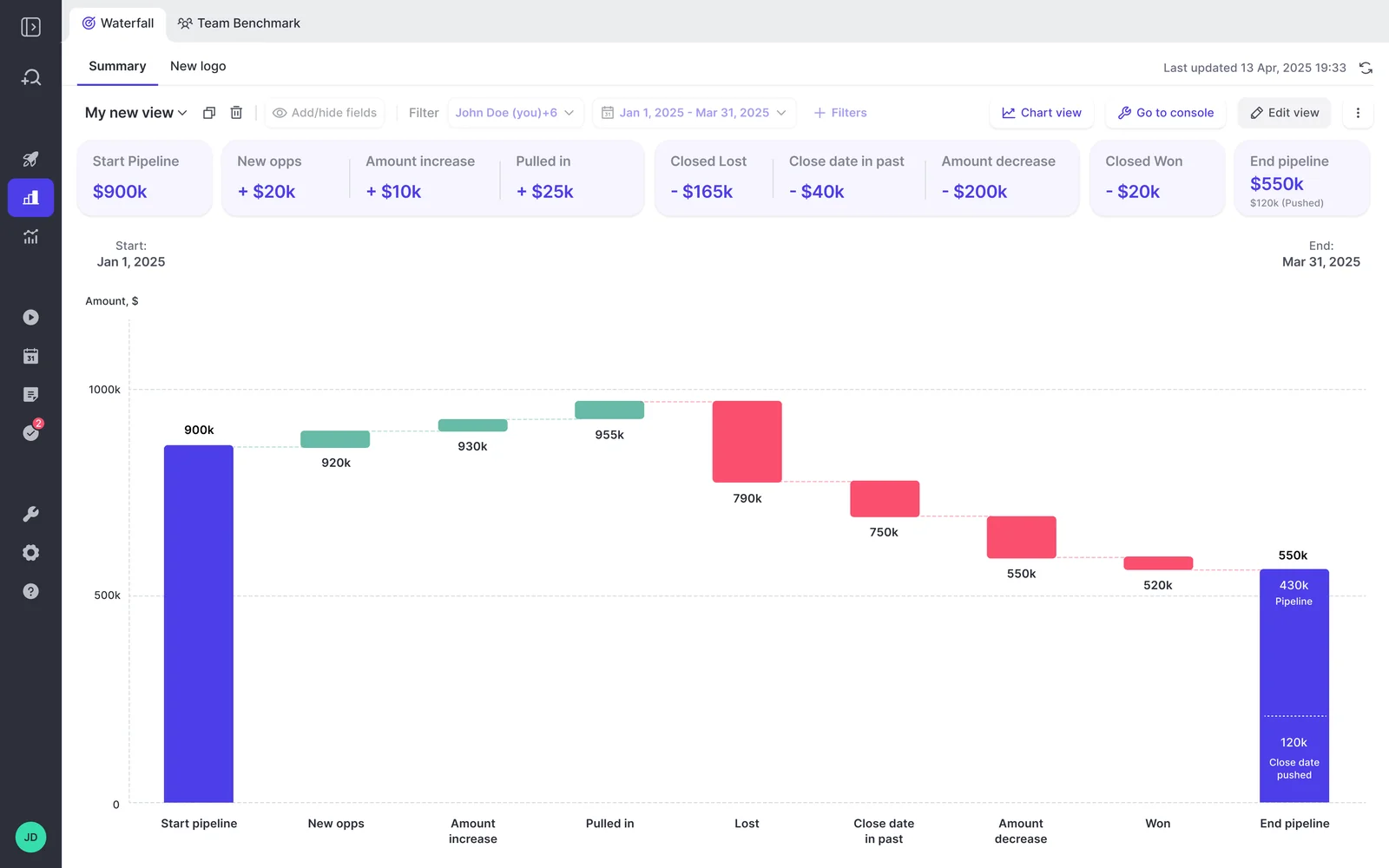
Weflow tracks the same movements you read in Clari today (created, pulled in, slipped, decreased, lost), adds two more (increased and won), and lets you click into every bucket to see the deals behind it.
Weflow is the Revenue AI Orchestration platform for sales, customer success, and RevOps teams. The waterfall lives in Weflow Deal Intelligence & Forecasting and runs on the same forecast configuration as your roll-up, so it reports the same number you already do.
That said, three things don't make the trip: there's no flow view, no trend view comparing this week with the same week in earlier quarters, and new pipeline is dated by Salesforce Created Date, which can misread deals you migrated in.
If you can live with those, the waterfall won't be what holds up your renewal.
Weflow vs Clari pipeline waterfall at a glance
Both tools snapshot your pipeline and give you a waterfall. Where they differ is drill-through to the deals, deal-level access from AI assistants, calculated fields, and published pricing.
| Capability | Weflow | Clari |
|---|---|---|
| Pipeline waterfall | Seven buckets: created, increased, moved in, moved out, decreased, lost, won. Every bucket drills to the opportunities. | Waterfall view, weekly, monthly or quarterly: created, slipped, pulled in, decreased, lost. Categories reportedly groupable by a CRM field. |
| Opportunity snapshots | Every opportunity, every few hours. Salesforce history imported at setup: 12 months by default, up to two years where field history allows. | Time Series Data Hub snapshots opportunity, account and activity data. Clari Forecast keeps a week-by-week history of calls and fields. |
| Prebuilt pipeline metrics | 30+ metrics built on the forecast's own amount field, run per motion. Formula fields for calculated columns. | Win rate, sales cycle, deal size, days in stage, conversion and flow charts. Derived metrics must exist as Salesforce formula fields first. |
| Integrations with other tools | Native: Salesforce, Gmail, Google Calendar, Outlook, Zoom, Teams, Meet, Slack, Outreach dialer. Warehouses and BI through the API. | Salesloft data layer syncs with Salesforce, Dynamics, Snowflake, Databricks, Gmail, DocuSign, ZoomInfo and LinkedIn. |
| Access from AI assistants (MCP) | One read-only connector: per-rep pipeline metrics with the opportunity IDs behind them, forecast calls, summaries, transcripts. | Three narrow servers. The Forecast server gives numbers and snapshots, not the deals behind them. |
| Raw data access outside the tool | REST API bulk export as JSON or CSV to warehouses, Tableau and Looker. | REST and Export APIs, CSV export of forecast history, Salesloft warehouse sync. |
| Pricing | Published. Weflow Deal Intelligence & Forecasting is $39 per user per month, pipeline analytics included. | Quote only. Salesloft publishes its packages, not its prices. |
In short, the gaps that cut against Weflow are the flow view and the same-week trend view. Everything else in this table either matches or runs our way.
Why the pipeline waterfall decides a Clari renewal
The waterfall is usually the one view you can't afford to lose, so it's the first thing to test in any replacement. That's because Salesforce overwrites opportunity fields and doesn't keep pipeline history (calculated and roll-up fields aren't tracked at all).
Without stored snapshots, there's no way to look back and see what slipped, what got pulled in, or when an amount was cut.
It's also why the waterfall tends to stick even when most of Clari doesn't. In practice, most revenue teams open three views: the waterfall, pacing, and the same-day comparison with previous quarters. The rest of the contract often sits idle.
So renewal time turns into an audit, and we hear some version of this on almost every Clari renewal call:
"We mostly use Clari for roll-ups, simple pipeline analytics, and to inspect and the price point for that is crazy high."
— A RevOps leader evaluating a Clari renewal
If that sounds familiar, you don't need a long feature list. You just need to know that the view leadership asks about every week will survive the switch.
How Weflow Deal Intelligence & Forecasting tracks pipeline movement
Weflow builds the waterfall from its own snapshots and its own forecast configuration, which is why it drills to the deals and agrees with the roll-up.
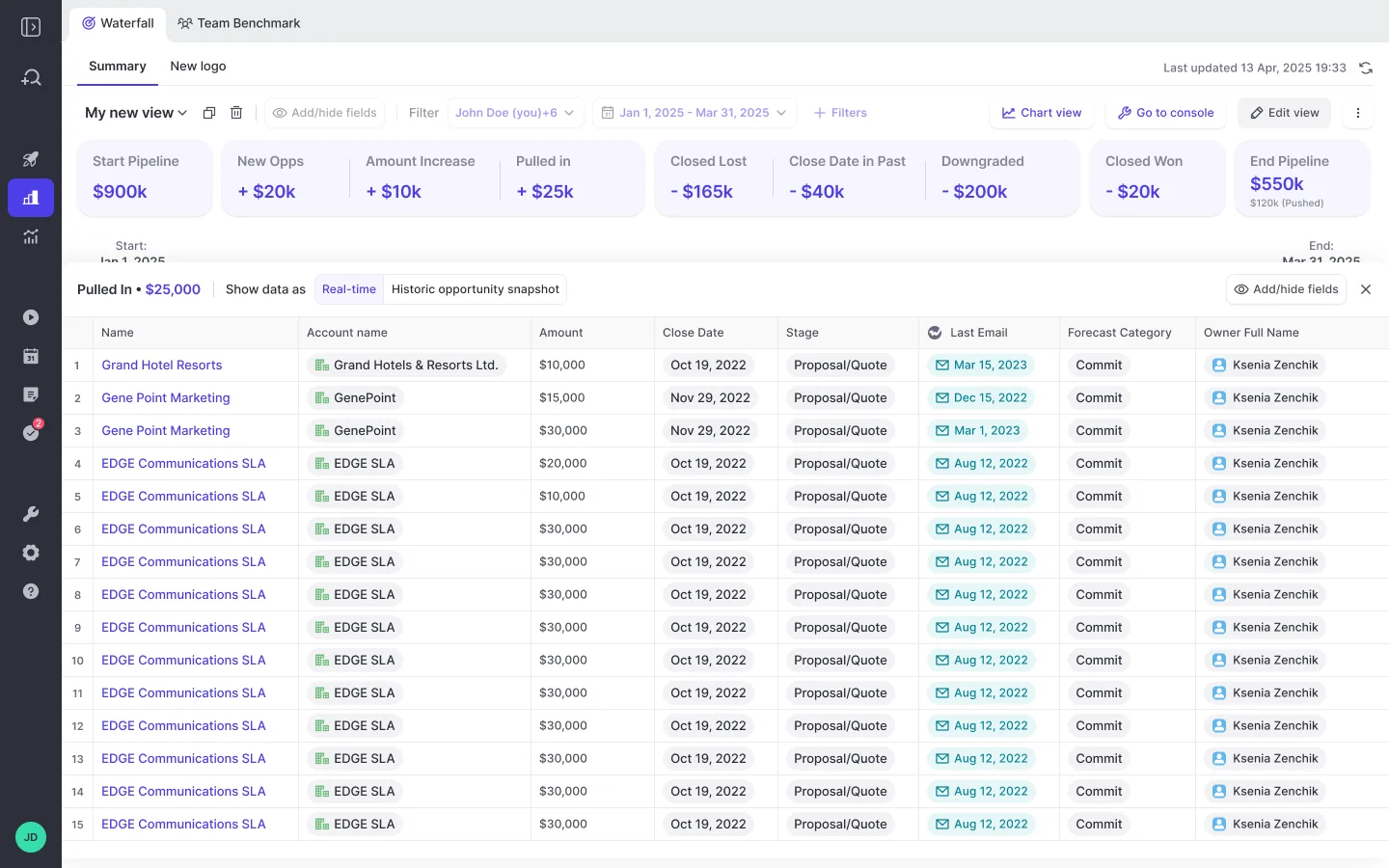
Every Weflow waterfall bucket opens the opportunities behind it
Weflow breaks pipeline movement into seven buckets, and you can click into each one. Here's how they line up with the Clari names your team already knows.
| Weflow bucket | What it counts | Clari name for the same movement |
|---|---|---|
| Created | New opportunities in the period, dated by Salesforce Created Date | Created |
| Increased | Amount raised on deals already in the pipeline | Not named in Clari's documented categories |
| Moved in | Deals pulled in from a later period | Pulled in |
| Moved out | Deals pushed out of the period | Slipped |
| Decreased | Amount cut on open deals | Decreased |
| Lost | Deals closed lost in the period | Lost |
| Won | Deals closed won in the period | Not named in Clari's documented categories |
Each bucket opens the actual deals, with whichever fields you want to see, and that's what answers the question leadership keeps asking:
"One week we have 100k in commit, the next week it's 80k at the global level, and they want to know why. Then I have to click and go deal by deal."
— A sales operations leader on a call with Weflow
With drill-through, you just open the moved-out or decreased bucket, and the deals behind the drop are right there.
And since the waterfall runs on snapshots rather than current state, it also catches chronic slippers, the deals that get pushed every quarter while the total looks stable.
Weflow snapshots every opportunity every few hours, with history from day one
You won't start with empty waterfalls on day one. Weflow imports your opportunity history from Salesforce during setup, then takes its own snapshots from go-live onward and keeps them for as long as your contract runs.
- Cadence: Snapshots run every few hours, so the waterfall reflects this morning, not last week.
- Import depth: 12 months of Salesforce history by default, up to two years where Salesforce field history allows, falling back to opportunity history.
- Custom-field caveat: History for a custom field only imports if Salesforce field history tracking was on for it. If you want a year-over-year view on a custom ARR field, switch tracking on before go-live, or the comparison will start from go-live.
Shorter windows are handy for a quick morning check. Set the waterfall to the last 7 or 14 days to see what's been won, lost, raised or cut recently, so you know which deals to dig into today.
Weflow pipeline metrics run on your forecast's amount field and motions
Building on the forecast configuration also solves a problem we see in a lot of RevOps teams:
"We have like three different versions of the waterfall pipeline happening in our company right now, and we need to get to one single view."
— A RevOps leader on a call with Weflow
Those versions disagree because each one uses its own object, field and filters. In Weflow, the waterfall, pacing, stage conversion and team benchmarks all inherit the forecast configuration you've already agreed on, so they stay in sync:
| Inherited from the forecast configuration | What it means for the waterfall |
|---|---|
| Amount field | Runs on your ARR custom field or converted-currency field, not just standard Amount |
| Date field | Periods line up with the forecast you roll up |
| Record-type filters | Counts the same opportunities the forecast counts |
| Motion | Separate waterfalls for new logo, renewal and expansion |
The waterfall is one of 30+ prebuilt pipeline metrics, alongside coverage, win rate, sales cycle length, stage conversion and deals at risk.
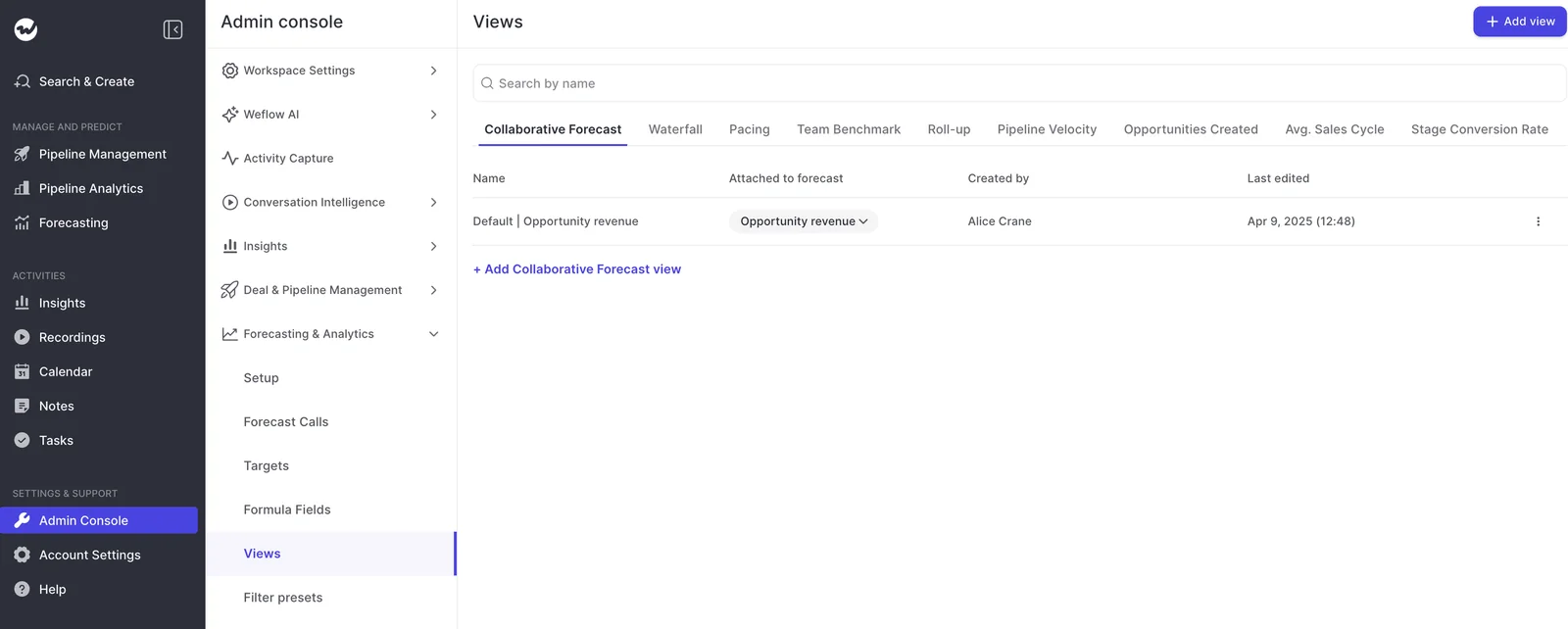
Weflow can also calculate its own fields. An admin picks a group of deals (say, everything in Best Case and Commit), writes a formula over them, and adds the result as a column.
You can click the value to see the deals behind it, and you don't need to create a new Salesforce formula field.
Weflow connects to your stack through native integrations and the API
Weflow connects natively to the tools your reps use every day and reaches BI tools and warehouses through its API. If you're after a big connector catalog, that's only a partial answer, and we'd rather be upfront about it.
- Native integrations: Salesforce, Gmail, Google Calendar, Outlook, Zoom, Microsoft Teams, Google Meet, Slack and the Outreach dialer.
- BI tools: Tableau and Looker are fed through the API.
- Warehouses: There's no native Snowflake, Databricks or BigQuery connector. Data moves into them through the API.
So if you're planning one workflow that pulls from your ERP, finance system and CRM together, Weflow will feed that platform rather than replace it.
The Weflow MCP connector returns pipeline metrics with opportunity IDs
Yes, your AI assistant can get to the deals, not just the totals. Weflow's read-only MCP connector returns per-rep pipeline metrics together with the opportunity IDs behind them, so Claude or ChatGPT can answer the number and then open the deals behind it.
- Returns: Weighted and unweighted pipeline, closed-won amount and count, win rate, average deal size, sales cycle length, coverage, gap to forecast and the opportunity IDs behind them, plus forecast calls, playbook results, call summaries and transcripts.
- Doesn't return: The saved waterfall view itself, so the assistant rebuilds it from the raw records.
Admins turn the connector on per workspace, with a separate toggle for transcripts. The per-rep breakdown caps at 25 owners per request, so in a large org you'll get aggregate answers unless you narrow the question to a team.
The Weflow REST API exports data to BI tools and warehouses
Finance and BI teams can pull data straight from Weflow instead of building yet another waterfall. The REST API bulk-exports Weflow data, including transcripts, metadata, scores and signals, as JSON or CSV, on a schedule or on demand.
It lands in your warehouse, Tableau or Looker already mapped to the right Salesforce accounts, contacts and opportunities, right next to the Salesforce data your finance team already syncs.
How Clari tracks pipeline movement under Salesloft
Clari has been sold under the Salesloft brand since September 2026, so your renewal is now a Salesloft relationship.
Clari's time-series hub and waterfall are genuinely strong. But as an overlay, it can display CRM fields without calculating them, so a lot of the analysis ends up in a BI tool.
Clari's Waterfall view splits movement into created, slipped, pulled-in, decreased and lost
Clari's Waterfall view (in Clari Analytics) shows how pipeline changed between two points, weekly, monthly or quarterly, split into created, slipped, pulled in, decreased and lost.
Clari reportedly lets you group each category by a CRM field: losses by competitor or product, slips by account health, decreases by whether the executive buyer is engaged. It's a useful cut, and one Weflow doesn't offer.
Even so, some teams still rebuild the analysis in Tableau every cycle, using Clari to see what moved and another tool to present it.
Clari's Time Series Data Hub snapshots opportunity, account and activity data
This is where Clari really earns its place. The Time Series Data Hub snapshots opportunity, account and activity data automatically, so you can inspect every pipeline change and see slippage over time.
Clari Forecast also keeps a week-by-week history of every forecast call, quota and field next to the historical CRM totals. That history powers the same-day comparison many teams rely on: where are we on day 35 compared with day 35 of the last three quarters?
Clari's pipeline analytics display Salesforce fields but cannot calculate new ones
Clari comes with ready-made pipeline analytics through Salesloft, including:
- A Deals Analytics Overview with goal attainment, projection, weighted pipeline coverage and a days-in-stage heat map.
- Stage conversion and flow charts.
- Predefined win rate, sales cycle length, average deal size and days in stage.
Anything beyond those has to exist as a Salesforce formula field first. So a best-case-to-worst-case swing or a rep-versus-manager delta turns into a change request, and your CRM slowly fills up with fields whose only job is to feed a Clari column.
Dashboards are the other reason teams export their data:
"Clari is clearly not suited as a reporting tool to present to this type of stakeholders. So we're using Tableau."
— A Clari customer on a call with Weflow
Salesloft's Unified Revenue Data Layer syncs Clari data with warehouses
On paper, Clari is stronger here. Salesloft's Unified Revenue Data Layer syncs revenue data continuously with:
- Salesforce and Microsoft Dynamics
- Snowflake and Databricks
- Gmail and DocuSign
- ZoomInfo and LinkedIn
If a native warehouse sync matters more to you than drill-through, that counts in Clari's favor.
Clari's Forecast MCP server returns forecast numbers, not deal-level data
Your assistant can reach Clari's forecast numbers, but from what we hear on calls, not the deals behind them. Clari runs three separate servers, and each one covers a narrow slice:
- Clari Forecast MCP: Live forecast numbers and historical snapshots, scoped to each user's permissions. Teams report it doesn't return deal-level opportunity data, and users need a Claude or ChatGPT Business or Enterprise subscription.
- Clari Copilot MCP: Copilot call data only, not the forecasting and pipeline layer.
- Salesloft MCP: Read-only access to accounts, people, opportunities and call summaries, but no raw transcripts or cadences. It needs the paid Salesloft Agentic add-on.
Clari exposes REST and Export APIs and CSV forecast history
Clari also offers REST and Export APIs plus a Copilot API, and you can export forecast history as CSV.
What you give up moving the waterfall to Weflow
Moving your waterfall to Weflow means a few trade-offs. Some have workarounds, some don't:
| What you have in Clari | What Weflow does today |
|---|---|
| Flow view | No flow view. You get the waterfall and pacing. |
| Trend view against the same week of earlier quarters | Not available. Comparing this week with the same week last quarter means comparing snapshots by hand. |
| A central pipeline dashboard | Separate views for waterfall, benchmarks and stage conversion, with lighter dashboarding overall and no funnel report, so you'll open several views to see what one Clari dashboard showed. |
| New pipeline dated the way you configured it | New pipeline is dated by Salesforce Created Date, so migrated deals count as new. Workarounds: filter to qualified stages, use 7- or 14-day windows, or have us overwrite the created date in Weflow's copy from a file you supply. |
| Stable views when you edit configuration | Any forecast-configuration change re-runs the history import, and the views show partial numbers for up to a day or two. |
| Enterprise roll-ups of 1,000+ reps | Clari's roll-ups at that scale are more mature. |
| Waterfall categories grouped by a CRM field (reported) | No category grouping. Drill-through shows the fields you pick, and deal views take custom filters on any Salesforce field. |
What Weflow and Clari cost for pipeline analytics
Weflow publishes its seat prices, and pipeline analytics comes with the forecasting licence. Clari doesn't publish prices, so the Clari figures below are estimates until you get a quote.
| Pricing element | Weflow | Clari |
|---|---|---|
| Price model | Per seat, published on our website | Quote only, through a Salesloft Talk to Sales page |
| List prices | Deal Intelligence & Forecasting $39 per user per month; bundles $49, $59 and $79 | Not published; our estimate is $120 to $180 per user per month |
| What's included | Pipeline Analytics (waterfall, pacing, benchmarks) with the forecasting licence, plus Ask Weflow AI Pro and Agent Builder Free | Salesloft Advanced or Elite package contents |
| What costs extra | Only paid Agent Builder tiers above the free 25 actions a month | Forecasting, AI agents and the dialer are add-ons; professional services estimated at $15k to $50k |
| Terms | Annual billing, 12-month minimum term, 10-user minimum | Set in the quote |
Weflow Deal Intelligence & Forecasting costs $39 per user per month
You get the waterfall with Weflow Deal Intelligence & Forecasting on its own or as part of Weflow Revenue AI Enterprise.
- Weflow Deal Intelligence & Forecasting: $39 per user per month
- Weflow Activity & Contact Capture: $19 per user per month
- Weflow Conversation Intelligence: $39 per user per month
- Weflow Revenue AI Foundation: $49 per user per month (capture plus conversation intelligence)
- Weflow Revenue AI Business: $59 per user per month (adds deal intelligence, no forecasting)
- Weflow Revenue AI Enterprise: $79 per user per month (everything, including forecasting and the waterfall)
Everything is billed annually on a 12-month minimum term with a 10-user minimum. There are no implementation fees, and Agent Builder is the only usage-based item.
Clari publishes no prices, so every number is a quote
Salesloft does publish its package structure, though: Advanced and Elite, with Forecasting sold as an add-on to either.
Treat our $120 to $180 per user per month and $15k to $50k services estimates as a starting point for the conversation, and expect your quote to differ.
How we move your waterfall history off Clari
Your waterfall history comes from Salesforce, not from Clari. We set up the forecast configuration first, then import the history, so your RevOps team doesn't get pulled off revenue work. KORE Wireless did exactly that when it rolled out Weflow.
Weflow sets up your forecast configuration, then imports Salesforce history
- We set up your forecast configurations: amount field, stage or forecast-category basis, and record-type filters.
- We import opportunity history from Salesforce field history, 12 months by default and up to two years where field history allows. The import reads the configuration's field mapping, which is why configuration comes first.
- We import the forecast calls your team submitted in Clari, from Clari's API or a CSV.
- Weflow snapshots every opportunity from go-live, so history keeps building from day one.
- You finalize the configuration before sellers see the views, since every later change re-runs the import and leaves a day or two of partial numbers.
You can land Weflow beside Clari before the renewal
If your CFO won't pay for two forecasting tools, you don't have to ask. Start with Weflow Activity & Contact Capture and Weflow Conversation Intelligence, which Clari doesn't replace.
Since Clari reads activity from Salesforce, it actually benefits from the cleaner data Weflow writes there. Then, when your renewal comes up, you can add forecasting from inside an existing relationship.
Just remember to turn Clari's capture off when you turn ours on. Two capture engines running in parallel create duplicate activities.
When to choose Weflow and when to stay on Clari
The choice follows from which views your leadership opens and what you want from the rest of the stack.
| Choose Weflow if | Stay on Clari if |
|---|---|
| You want one waterfall that runs on the same amount field, filters and motions as your forecast. | Your leadership lives in the flow view and the same-week trend view. |
| You need every bucket to drill to the deals, so a commit drop names the three opportunities behind it. | Your weekly reporting runs on Clari's central dashboards. |
| You want snapshots every few hours and a 7- or 14-day morning view. | You run very large hierarchies, where Clari's 1,000+ rep roll-ups are more mature. |
| You want your AI assistant to reach the opportunity IDs behind the pipeline numbers. | You group waterfall categories by CRM field and rely on that cut. |
| You want to consolidate capture, conversation intelligence and forecasting at a published seat price. | Your PE sponsor has standardized on Clari across the portfolio. |
See how Weflow captures activity, updates Salesforce fields from calls, and rolls up your forecast. Book a 30-minute demo.
FAQs about Weflow and Clari waterfalls
Does my Clari snapshot history come with me to Weflow?
Your forecast calls come with you, and your opportunity history comes from Salesforce. Weflow imports your Clari forecast calls via Clari's API or a CSV, and up to two years of opportunity history from Salesforce (12 months by default).
Can the Weflow waterfall run on an ARR or converted-currency field?
Yes, it runs on whatever amount field your forecast uses, including ARR or converted-currency fields. Just make sure Salesforce field history tracking is on for that field if you want year-over-year history.
Can Weflow date new pipeline from a qualified date instead of Created Date?
No, there's no setting for that, but you have three workarounds:
- Filter the view to qualified stages so early-stage records don't count.
- Use 7- or 14-day windows, where the snapshot itself becomes the starting pipeline.
- Send us a file, and we'll overwrite the created date in Weflow's copy of the data.
Do Weflow roll-up numbers update live while the waterfall uses snapshots?
Yes. Forecast views and the roll-up read Salesforce live, so if a rep moves a close date two hours before the forecast call, you'll see it right away. Only history-based views (the waterfall, stage conversion and period-over-period comparisons) run on snapshots.
Is pipeline analytics included in Weflow or sold as an add-on?
It's included with Weflow Deal Intelligence & Forecasting and Weflow Revenue AI Enterprise. Don't confuse it with Pipeline Management, which is a separate product: if that's what you have today, you'll need to add forecasting to get the waterfall.
Who runs the migration from Clari to Weflow?
Weflow runs it. We set up the forecast configurations, import Salesforce history and your Clari forecast calls, and train your team.