Pipeline Waterfall Tools Compared: Weflow, Clari, Avoma, Backstory (People.ai) and Outreach (2026)
Compare Weflow, Clari, Avoma, Backstory and Outreach on pipeline waterfalls and opportunity snapshots.


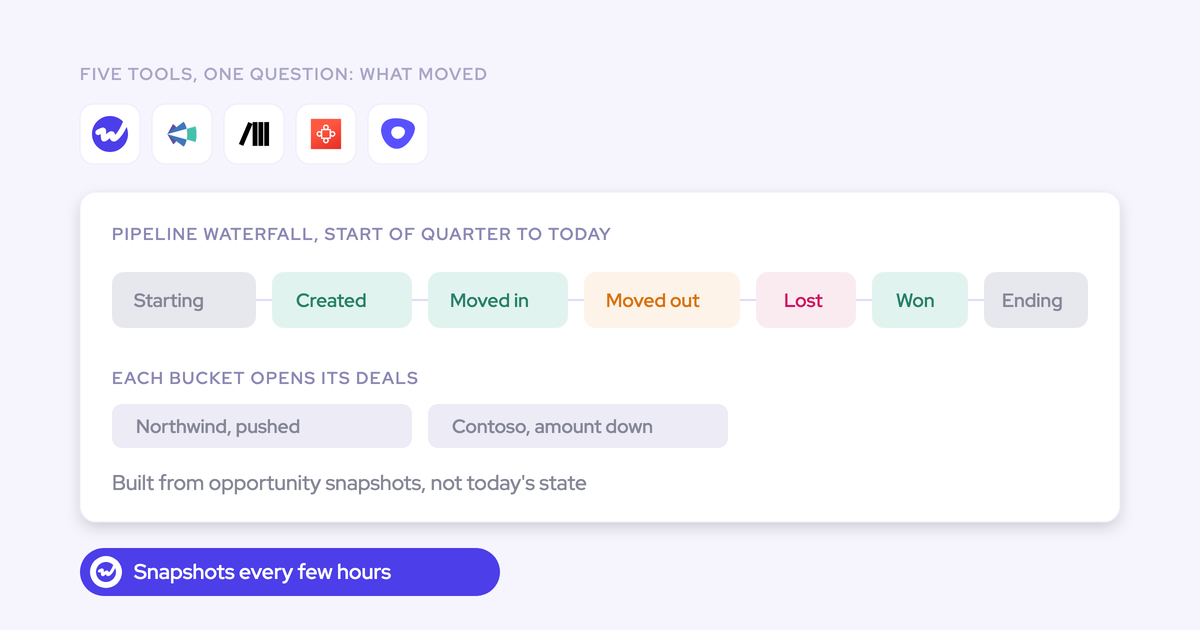

A pipeline waterfall reconciles starting pipeline to ending pipeline by splitting the change into deals created, amounts increased, deals moved into the period, deals moved out, amounts decreased, deals won and deals lost. All five tools in this comparison say they have one. They give you five different answers, because they differ on which two dates you can compare, which buckets you see, and whether each bucket opens to the deals behind it.
One test separates them: "Show me what moved between two dates I choose, and name the deals behind the commit drop." Here's how each tool does on it:
- Weflow: Weflow Deal Intelligence & Forecasting reconciles pipeline between any two dates you choose, through seven buckets that each drill to the opportunities.
- Outreach: its Pipeline Movement report rewinds any window in the last three years, but its waterfall chart covers only the current and last period.
- Clari: its waterfall groups each type of change by any CRM field, and it has a flow view Weflow doesn't.
- Avoma: its Pipeline Walk compares the start of a period with its end.
- Backstory: its Pipeline Changes chart compares consecutive weeks or quarters only.
We build Weflow, so we have a side. We've still scored all five on the same seven criteria, and we say plainly where Clari and Outreach beat us.
How Weflow, Clari, Avoma, Backstory and Outreach compare at a glance
The five tools split hardest on the first row: which dates you can compare, and whether the buckets drill to deals. Everything else follows from how each vendor stores pipeline history.
| Capability | Weflow | Clari (Salesloft) | Avoma | Backstory (People.ai) | Outreach |
|---|---|---|---|---|---|
| Pipeline waterfall | Any two dates; 7 buckets (created, increased, moved in, moved out, lost, decreased, won); every bucket drills to deals | Weekly, monthly or quarterly; each change type groups by a CRM field; separate flow chart over a chosen date range | Pipeline Walk: period start vs end; advanced, regressed or lost; drill-down by stage | Pipeline Changes: consecutive weeks or quarters; new, won, lost, slipped, pulled in or pushed, amount changes; drills to deal pages | Forecast Movement chart: current and last period only; Pipeline Movement report: any window in 3 years |
| Opportunity snapshots | Every few hours; 12 months imported at setup, up to 2 years where field history allows | Time Series Data Hub snapshots opportunities, accounts and activity | Historical vs current deal values per period; snapshot cadence not documented | Weekly forecast snapshots | Historical snapshots behind a 3-year rewind |
| Pipeline pacing | AI projection, team forecast and weighted forecast against pipeline, commit and closed | Against goal or annual target; projection from win rate and deal size | Target attainment, gap to target and coverage; no pacing chart | Progress bar or gap to quota; no pacing chart | Weekly or monthly scorecard vs quota; forecast trends vs won revenue |
| Integrations | Salesforce, Google, Microsoft, Zoom, Teams, Meet, Webex, Slack, Outreach dialer; Tableau and Looker via API | Salesforce, Dynamics, Snowflake, Databricks, Gmail, DocuSign, ZoomInfo, LinkedIn; Zoom, Teams, Meet, Webex | 26 native integrations including 6 CRMs (HubSpot among them), plus Zapier | Email, calendar, 5 meeting platforms, Gong, Slack, Sales Navigator, Transcript API | 90+ marketplace integrations; MCP client for third-party connectors |
| Access from AI assistants (MCP) | Read-only; forecast calls, per-rep pipeline metrics with opportunity IDs, transcripts, playbooks | Clari Forecast MCP with historical snapshots; Salesloft MCP in beta, paid add-on, no forecasts | Claude and ChatGPT; meetings, transcripts, scorecards; Organization plan or API add-on | Claude, ChatGPT, Copilot, Gemini, n8n; account and deal status | 42 tools including Kaia transcripts; Claude, Microsoft Copilot, Agentforce |
| Raw data access | REST API bulk export in JSON or CSV; no native warehouse connector | Forecast history CSV (two years); Salesloft sync to Snowflake and Databricks | REST API and webhooks, 60 requests a minute, Organization plan and above | API for data and analytics; activity export and deletion | API with Kaia transcripts, daily export, Snowflake or Delta Sharing |
| Pricing | $39/user/month standalone or $79 in Revenue AI Enterprise; 10-user minimum | Quote only; our estimate is $120 to $180/user/month | $19 to $39 per recorder seat, plus $29 Revenue Intelligence add-on | Quote only; platform fee per connected person plus AI answers | Quote only; seats plus AI credits; forecasting in Amplify Pro only |
The next two sections explain what each row means and how to test it yourself.
What a pipeline waterfall should actually show you
A pipeline waterfall starts from the pipeline on one date, ends at the pipeline on a later date, and accounts for every dollar in between. It's only useful if every bucket opens to the opportunities inside it. Otherwise it names a problem without naming the deals causing it.
The buckets a full waterfall should show:
- Deals created in the period
- Amounts increased
- Deals moved into the period (pulled in)
- Deals moved out of the period (pushed or slipped)
- Amounts decreased
- Deals won
- Deals lost
The middle buckets carry the value. Deals moved out and amounts decreased are the early warning that a quarter is drifting, and a stable-looking total can hide the same deals getting pushed every quarter.
Why Salesforce can't tell you what moved between two dates
Salesforce stores an opportunity's current state, and every edit overwrites the old value. Calculated and roll-up fields aren't history-tracked at all. Pipeline Inspection shows basic movement over a period (new, won, lost, amounts up or down), and every other movement question becomes a custom report you rebuild each time the question changes.
So any real waterfall needs a stored history. You either take periodic snapshots of every opportunity, or you rebuild daily states from field history. That's why the day-35 question leadership asks every quarter usually ends in a warehouse snapshot project.
Why each vendor's waterfall gives you a different answer
Each vendor built its pipeline history differently, and that build decides which dates and buckets you get. A feature grid shows "waterfall" for all five, so you won't see the difference until you try your own dates.
| Tool | How it stores pipeline history, and what that limits you to |
|---|---|
| Weflow | Snapshots every opportunity every few hours and differences the snapshots, so you pick any two dates. |
| Clari (Salesloft) | Time-series snapshots across opportunities, accounts and activity. The waterfall runs weekly, monthly or quarterly, and the flow chart covers a chosen date range. |
| Avoma | A start-versus-end walk for a period. Avoma doesn't document a snapshot cadence. |
| Backstory (People.ai) | Weekly forecast snapshots, so Pipeline Changes compares consecutive weeks or quarters. |
| Outreach | Historical snapshots behind a three-year rewind in the Pipeline Movement report. Its Forecast Movement waterfall covers only the current and last period. |
When three teams in one company each build a waterfall on a different object, you get exactly what one RevOps leader described to us:
We have like three different versions of the waterfall pipeline happening in our company right now, and we need to get to one single view.
The two-date test to run in every vendor demo
Bring your own data question to every demo. Vendors show their best date range by default, and yours tells you more.
- Pick two dates that matter to you, such as the first day of last quarter and today, and ask the vendor to reconcile starting pipeline to ending pipeline between them.
- Ask them to open each bucket and list the opportunities inside it, with the fields you use in pipeline reviews.
- Bring a real commit drop from your last forecast call and ask which deals explain it.
- Ask which date defines "new pipeline" (Created Date or a qualified date) and how the tool defines "moved in" and "moved out".
- Ask to see day 35 of this quarter against day 35 of the last three quarters.
- Ask how you'd pull the same movement data into Claude, ChatGPT or your BI tool.
Step three is the one leadership cares about. This is how a buyer put it to us:
One week we have 100k in commit, the next week it's 80k at the global level, and they want to know why. Then I have to click and go deal by deal. Or does it already tell you the difference is because of these three deals?
The seven things we checked in every pipeline waterfall tool
Each criterion maps to a problem you already have:
- Waterfall and snapshots answer "what moved."
- Pacing answers "how are we doing at day N."
- Integrations, MCP and raw data access decide whether the waterfall becomes another silo.
- Pricing is what you'll defend at the renewal audit.
| Criterion | The question to ask the vendor | What a strong answer looks like |
|---|---|---|
| Pipeline waterfall | Can I reconcile pipeline between two dates I choose? | Any two dates, every bucket shown separately, every bucket drills to deals. |
| Opportunity snapshots | How often do you snapshot, and how far back does history go on day one? | A stated cadence, plus imported history from before go-live. |
| Pipeline pacing | What does pacing measure progress against? | Closed, commit and pipeline set against the target and the submitted forecast. |
| Integrations | Which parts of my stack connect natively, and what goes through the API? | A named list, and a stated route for everything else. |
| Access from AI assistants (MCP) | Can Claude or ChatGPT read the movement and forecast data, not only call data? | Forecast and pipeline metrics returned with the opportunity IDs behind them. |
| Raw data access | How does this data reach my warehouse or BI tool? | An API or export with documented formats and limits. |
| Pricing | What does the package that includes the waterfall cost per seat? | A published price, a named package and stated minimums. |
Score the definitions as part of the waterfall. A tool that dates new pipeline from Created Date gives a different number from one that dates it from qualification, and a tool that doesn't tell you which it uses will lose your finance team in the first meeting.
Weflow: reconcile pipeline between any two dates you choose
Weflow is the Revenue AI Orchestration platform for sales, customer success, and RevOps teams. We built it for Salesforce teams, and it works exclusively with Salesforce. The pipeline waterfall lives in Weflow Deal Intelligence & Forecasting, next to pacing, roll-up forecasting and the AI projection.
The mechanism is simple. Weflow snapshots every opportunity every few hours and differences those snapshots between the two dates you pick. That's why we aren't limited to consecutive periods.
| Capability | How Weflow handles it |
|---|---|
| Pipeline waterfall | Reconciles starting to ending pipeline through created, increased, moved into the period, moved out, lost, decreased and won. Each bucket drills to the opportunities with whatever fields you choose. |
| Opportunity snapshots | Every few hours, from go-live. At setup we import 12 months of Salesforce history by default, and up to two years where field history allows. |
| Pipeline pacing | The pacing chart shows the AI projection, team forecast and weighted forecast side by side against pipeline, commit and closed. |
| Integrations | Native with Salesforce, Gmail, Google Calendar, Outlook, Zoom, Teams, Meet, Webex, Slack and the Outreach dialer. BI tools such as Tableau and Looker connect through the API. |
| Access from AI assistants (MCP) | A read-only MCP connector gives Claude, ChatGPT and other assistants forecast calls, per-rep pipeline metrics with opportunity IDs, call summaries, transcripts and playbook results. |
| Raw data access | The REST API bulk-exports data as JSON or CSV for warehouses and BI. There's no native Snowflake, Databricks or BigQuery connector. |
| Pricing | $39 per user per month for Weflow Deal Intelligence & Forecasting. Details in the pricing section below. |
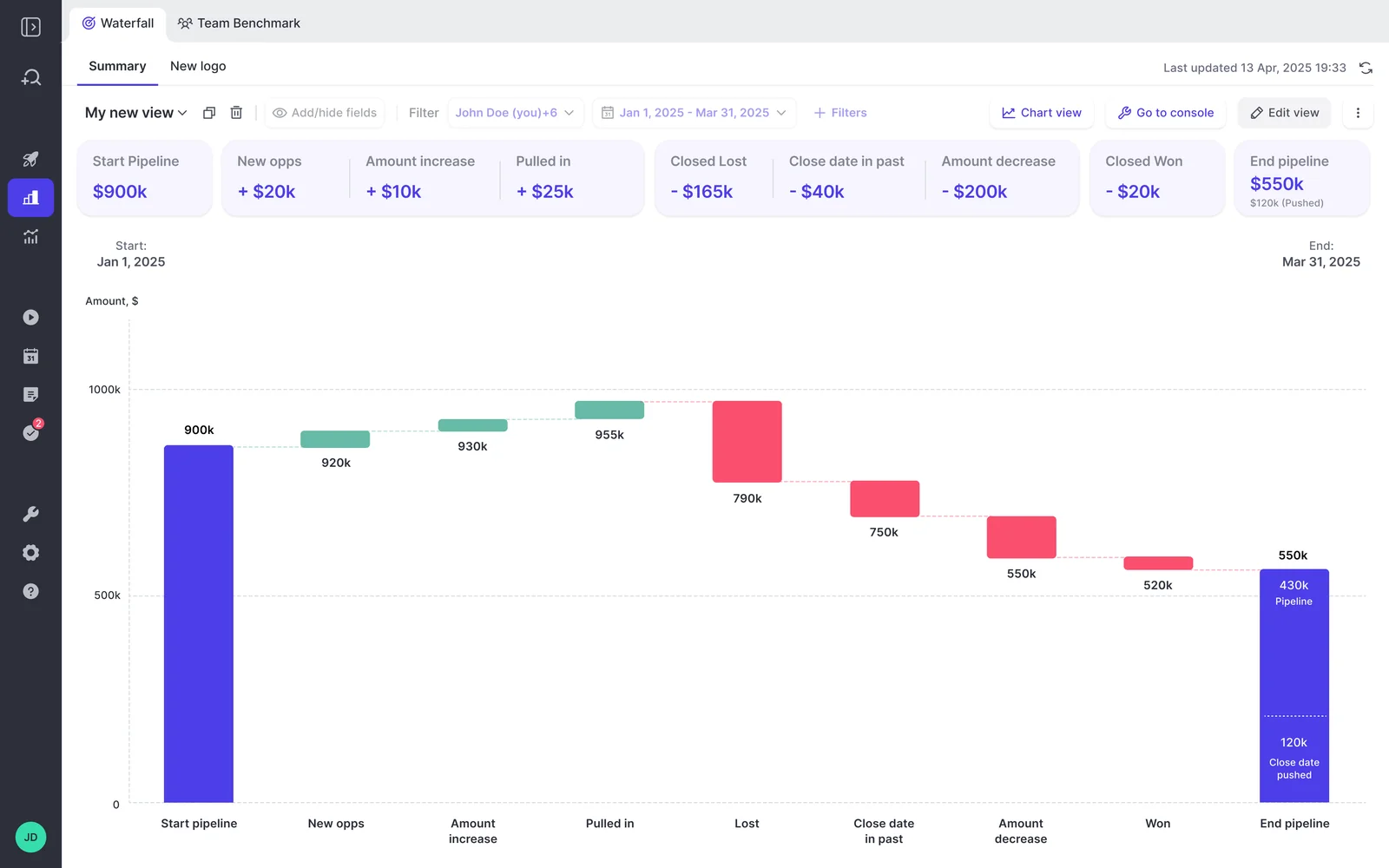
Here's the waterfall for a quarter, from a $900k start to a $550k end, with every step shown as its own bar.
Where Weflow's pipeline waterfall is strongest
- Full reconciliation between any two dates. You choose the start and end, and all seven buckets reconcile the difference. A quarter that opened strong and ended thin shows you exactly which deals pushed out mid-quarter.
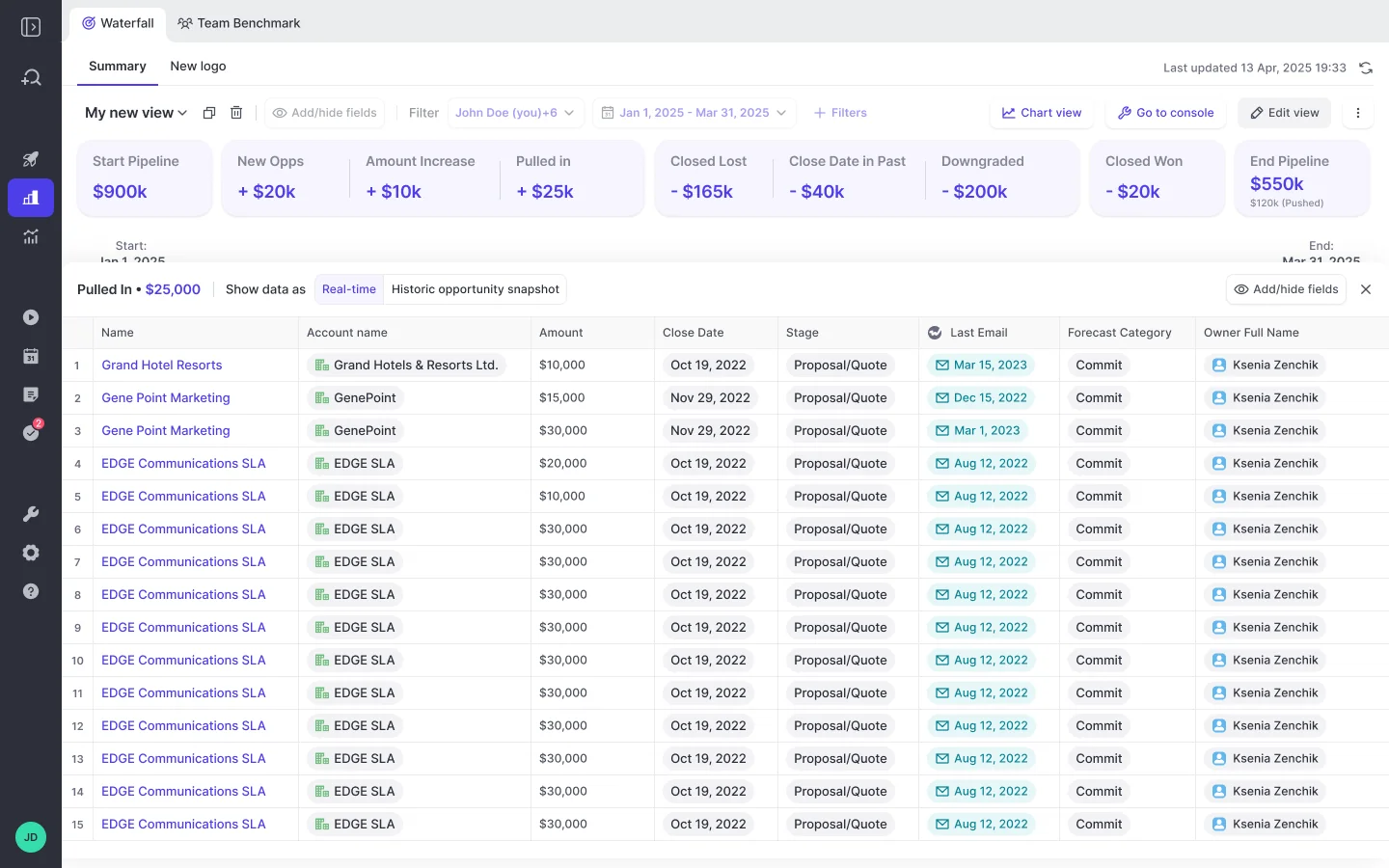
- Every bucket opens to deals. Click "moved out" and you get the opportunities, with the fields you picked, so the commit-drop question has an answer in one click instead of an afternoon.
- History on day one. The Salesforce import gives you 12 months by default, so the waterfall and pacing views work before Weflow has run a single snapshot of its own. The AI projection is ready in 48 to 72 hours once at least six months of history exists.
- Pacing against the forecast, not only the target. The AI projection, team forecast and weighted forecast sit beside pipeline, commit and closed in one chart.
- Slippage signals without custom fields. Weflow tracks days in stage and close-date push count on every opportunity automatically, so the chronically pushed deal stops hiding inside a stable total.
- Movement data reachable from your AI assistant. The MCP connector returns per-rep pipeline value, win rate, coverage, gap to forecast and the opportunity IDs behind each number.
Each bucket's deal list is editable in place, so you can fix a close date while you're looking at why it slipped.
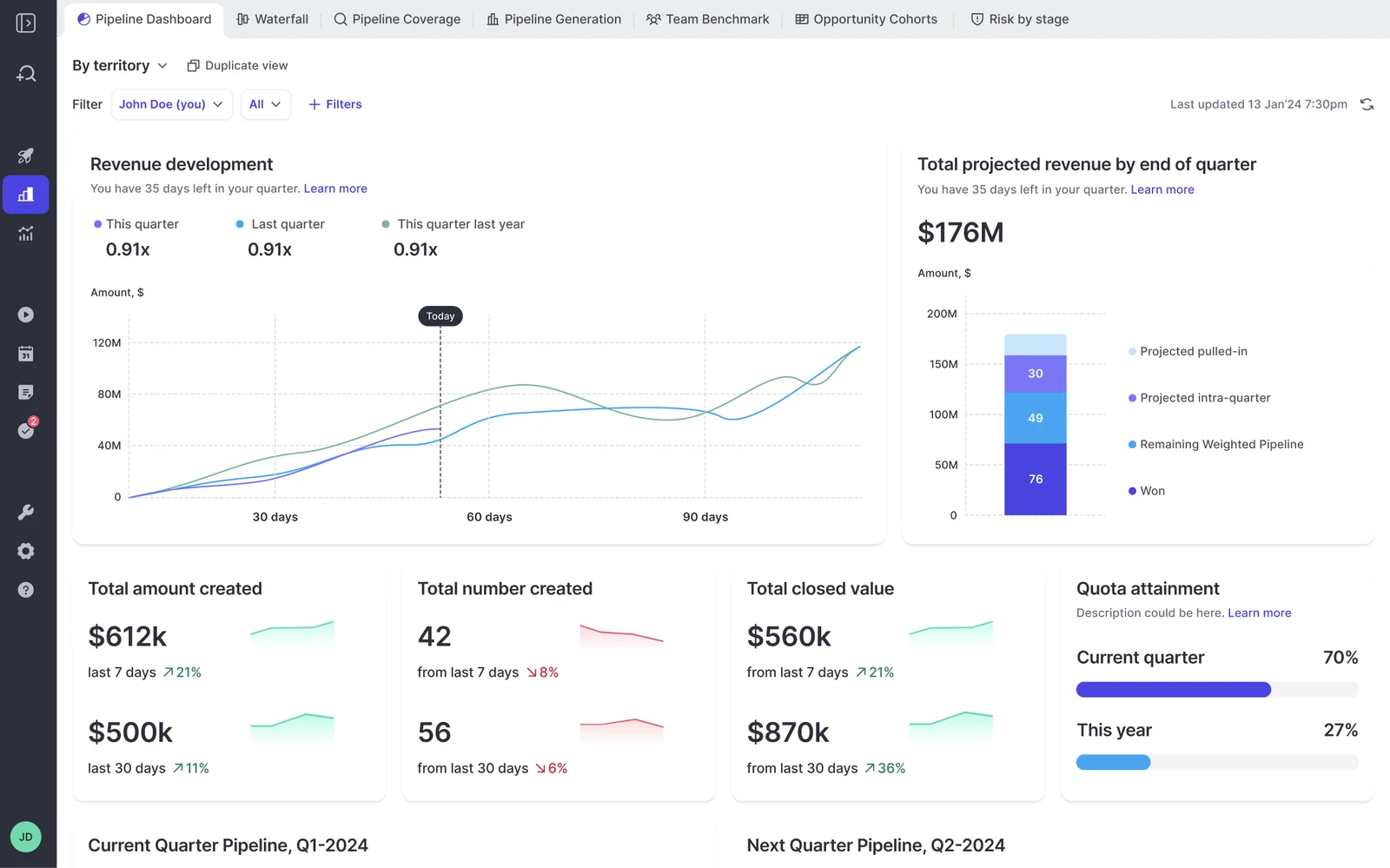
For the day-N question, the pipeline dashboard plots this quarter against last quarter and the same quarter last year, with a marker at today.
Where Weflow falls short and how to plan around it
These are the edges you'll hit, and what to do about each one.
| Limit | How to plan around it |
|---|---|
| No flow (Sankey) view. Clari has one; we don't. | No workaround. If your leadership reviews pipeline in a flow chart, weigh this heavily. |
| "New pipeline" keys off Salesforce Created Date. Migrated deals count as new, and there's no setting to date from a qualified date. | We can overwrite the created date in our copy of the data from a file you supply. Filtering to qualified stages narrows what counts, and in 7- or 14-day windows the problem disappears. |
| Editing a forecast configuration re-runs the history import, and views can be partial or empty for a day or two. | Settle the amount field, stage or category basis and record-type filters before you show the views to sellers. |
| A custom field Salesforce never history-tracked has no past to import. | Switch on field history tracking for that field before go-live, or your year-on-year comparison starts at go-live. |
| Snapshot history lives on Weflow's side, not in Salesforce. Forecast submissions aren't written to Salesforce either. | Pull the history and forecast calls out through the API or the MCP connector if you need them elsewhere. |
| The waterfall ships only with Weflow Deal Intelligence & Forecasting or the Weflow Revenue AI Enterprise bundle, not Weflow Revenue AI Business. | Pick the package for the waterfall, not for the name. |
| Salesforce only. | No workaround. HubSpot teams should look at Avoma. |
| 10-user minimum per product or bundle. | No workaround for smaller teams at standard terms. |
| No native warehouse connector. | Use the REST API to move data into Snowflake, Databricks or BigQuery. |
Clari (now Salesloft): field-grouped waterfalls for enterprise forecasting
Clari has sold under the Salesloft brand since 1 September 2026, after the two companies merged in December 2025. Clari Forecast continues as the platform's forecasting product line, and buying or renewing it is now a Salesloft relationship. Clari's waterfall is mature, and many of you already own it.
| Capability | How Clari handles it |
|---|---|
| Pipeline waterfall | The Waterfall view shows pipeline change weekly, monthly or quarterly, by type of change such as amount decreases, slipped deals and lost deals. Each type groups by a CRM field. Clari's public material doesn't say whether created and pulled-in deals appear as their own buckets. |
| Opportunity snapshots | The Time Series Data Hub snapshots opportunity, account and activity data automatically. Clari Forecast keeps a week-by-week history of every forecast call and field. |
| Pipeline pacing | An annual pacing view tracks year-to-date results against the annual number. Salesloft's Deals Analytics Overview projects closed won against the goal from win rate and deal size, not from submitted forecasts. |
| Integrations | Salesloft's data layer syncs with Salesforce, Dynamics, Snowflake, Databricks, Gmail, DocuSign, ZoomInfo and LinkedIn. Recording integrates with Zoom, Teams, Meet and Webex. |
| Access from AI assistants (MCP) | The Clari Forecast MCP server gives Claude and ChatGPT live forecast data, including historical snapshots. The separate Salesloft MCP server is read-only, in beta and excludes forecasts. |
| Raw data access | Admins export two years of forecast history as a CSV, and Salesloft syncs data to Snowflake and Databricks. |
| Pricing | Quote only. We estimate $120 to $180 per user per month. |
When we'd point you to Clari instead of Weflow
- Your leadership reviews pipeline in a flow chart. Salesloft's Deals Flow Chart traces opportunities from their forecast category at the start of a chosen date range to won, lost, pushed out or idle, with new and pulled-in deals below the line.
- You group waterfall changes by CRM field: losses by competitor, amount decreases by whether the executive buyer is engaged, slips by account health.
- Your executives open the annual pacing view every week.
- You want historical forecast snapshots inside Claude or ChatGPT through the Clari Forecast MCP server, and you already pay for Business or Enterprise plans of those assistants.
- You run a large enterprise roll-up. Clari's roll-up mechanics at 1,000-plus reps are more mature than ours.
Where Clari's pipeline waterfall falls short
- Its public material doesn't confirm created and pulled-in deals as separate waterfall buckets.
- Some teams still rebuild the movement analysis in Tableau every cycle, which means paying for a waterfall and running a second one.
- Pacing runs against goal or the annual target, not against the forecast your team submitted.
- The Salesloft MCP server is read-only, in beta, needs the paid Agentic add-on, and omits forecasts and raw transcripts. The Copilot MCP server reaches call data only.
- Pricing is quote-only, with no free trial, and we estimate professional services implementation fees at $15k to $50k.
The renewal audit we hear about most often goes like this:
We mostly use Clari for roll-ups, simple pipeline analytics, and to inspect and the price point for that is crazy high.
Avoma: a start-versus-end Pipeline Walk for conversation-first teams
Avoma is a meeting-first conversation intelligence tool that records, transcribes and summarizes calls, and it has added CRM sync, deal views and forecasting on top. It sells mainly to small businesses, and it works with both Salesforce and HubSpot.
| Capability | How Avoma handles it |
|---|---|
| Pipeline waterfall | The Pipeline Walk compares pipeline at the start and end of a period and shows which deals advanced, regressed or were lost. You drill into any stage down to individual opportunities. |
| Opportunity snapshots | The walk shows historical and current deal values side by side, and each deal keeps a timeline of health assessments. Avoma doesn't document how often it snapshots opportunities. |
| Pipeline pacing | The forecast board shows target attainment, closed won, gap to target and coverage, and forecast submissions overlay the Pipeline Trend chart. There's no pacing chart against where the team should be by now. |
| Integrations | 26 native integrations across conferencing, six CRMs, dialers and sales engagement tools, Slack, Teams chat and ClickUp, plus Zapier. |
| Access from AI assistants (MCP) | An MCP connector lets Claude and ChatGPT read meetings, transcripts, notes, scorecard results and usage metrics. It needs the Organization or Enterprise plan, or the API Access add-on. |
| Raw data access | A REST API and webhooks cover meetings, recordings, transcripts, notes and scorecards, at 60 requests a minute, on the Organization plan and above. |
| Pricing | $19 to $39 per recorder seat per month billed annually, plus the $29 Revenue Intelligence add-on that pipeline features require. |
When we'd point you to Avoma instead of Weflow
If you run HubSpot, Avoma is on this list and we aren't. It also fits a small, conversation-first team that wants a period walk with drill-down and a forecast overlay, at a published price with free viewer seats and a 14-day trial.
Where Avoma's Pipeline Walk stops short of a waterfall
- The walk is documented for a period, not for any two dates you choose.
- Avoma's forecast guide describes no waterfall of deals created, pulled in or pushed out between chosen dates, and no stage conversion rates.
- It documents no snapshot cadence, so you can't tell how fine-grained the history behind the walk is.
- There's no pacing chart against where the team should be at this point in the period.
- The MCP connector reads meeting data. Its documented tools don't include pipeline movement.
- The API is capped at 60 requests a minute and needs the Organization plan or above.
- Pipeline and forecasting features require the Revenue Intelligence add-on on top of the base seat.
Backstory (People.ai): Pipeline Changes between consecutive weeks or quarters
Backstory, formerly People.ai, is an enterprise revenue intelligence platform built on automatic email, calendar and CRM activity capture. It positions itself as the context layer beneath AI agents, and it sells mostly into companies of about 1,000 to 10,000 employees.
| Capability | How Backstory handles it |
|---|---|
| Pipeline waterfall | Pipeline Changes splits the change between one week or quarter and the next into new, won, lost, slipped, pulled in or pushed, and amount changes. Clicking a deal opens its Backstory page with engagement metrics and the AI deal summary. It works only for opportunity-based forecasts. |
| Opportunity snapshots | Backstory takes a weekly snapshot of each forecast. No page documents per-opportunity field history you can report on. |
| Pipeline pacing | Forecast fields can show closed won as a progress bar or a gap against quota. There's no pacing chart against both target and forecast through the period. |
| Integrations | Native capture from Google Workspace, Microsoft 365, Exchange, Zoom, Webex, Teams, Meet, Gong and Slack, plus Sales Navigator InMails, dialer calls logged to Salesforce and a Transcript API. |
| Access from AI assistants (MCP) | Its MCP server connects Claude, ChatGPT, Microsoft Copilot, Google Gemini and n8n, with tools for account and deal status, recent activity and similar past deals. |
| Raw data access | An API delivers its data and analytics to other systems, with up to five active key pairs, and exports or deletes activity data. |
| Pricing | No published figures. You pay a platform fee per connected customer-facing person plus an allotment of AI answers. |
When we'd point you to Backstory instead of Weflow
- You're a large enterprise that wants an activity-capture context layer feeding your own agents and dashboards.
- You want each waterfall deal to open to a page with engagement metrics and an AI summary.
- You need MCP access across the widest set of assistants: Claude, ChatGPT, Copilot, Gemini and n8n.
Where Backstory's Pipeline Changes chart falls short
- It compares consecutive weeks or quarters only, so "January versus now" isn't a question it answers.
- It works only for opportunity-based forecasts.
- The history behind it is weekly snapshots.
- Backstory's forecasting has only been on the market since October 2025.
- It publishes no price figures.
- It's built for large organizations, which shows in the setup: the forecast hierarchy loads from a CSV and doesn't sync hierarchy changes from Salesforce.
Outreach: a three-year pipeline rewind inside Amplify Pro
Outreach grew out of sequencing and now sells itself as an agentic AI platform for revenue teams. Forecasting sits only in its top package, Amplify Pro. We treat Outreach as a partner: Weflow doesn't do sequencing, and we run alongside Outreach through compatibility mode.
Outreach has two movement views, and they answer different questions. The Pipeline Movement report is the strong one.
| Capability | How Outreach handles it |
|---|---|
| Pipeline waterfall | The Forecast Movement chart shows deals slipped, pulled in, added, won, lost, moved and changed in amount, with each bucket opening to its deals, for the current and last sales period only. The Pipeline Movement report rewinds any window in the last three years and shows which deals were won, lost, moved, slipped or sat idle, by forecast category or stage. |
| Opportunity snapshots | Historical snapshots power the three-year rewind, and the report separates deals already in pipeline at the start from deals added later. |
| Pipeline pacing | A weekly or monthly scorecard paces reps and teams against quota, and Forecast Trends charts the manager's call against the roll-up, AI projection and won revenue. |
| Integrations | More than 90 marketplace integrations, call imports from Orum, Nooks and Gong, and an MCP client for third-party connectors. |
| Access from AI assistants (MCP) | Its MCP server exposes 42 tools, including Kaia meeting summaries and transcripts, to Claude, Microsoft Copilot, Salesforce Agentforce and Glean. |
| Raw data access | The public API returns Kaia transcripts, the daily export sends recordings to your storage, and Data Sharing delivers data to Snowflake or through Delta Sharing. |
| Pricing | Quote only, as seats plus AI credits. Forecasting requires Amplify Pro. |
When we'd tell you to stay on Outreach
If you're on Amplify Pro and the three-year Pipeline Movement report answers your leadership's questions, stay where you are. It rewinds further than our default import, and its pacing and forecast trends are solid.
If you bring Weflow in for capture or conversation intelligence, compatibility mode recognizes Outreach's emails and skips them, so the same message isn't logged to Salesforce twice.
Where Outreach's Forecast Movement waterfall falls short
- The waterfall chart covers only the current and last sales period.
- It charts only auto-calculated, non-formula metrics, so a custom formula-based commit can't be charted.
- Forecasting is Amplify Pro only, priced on quote as seats plus AI credits.
- Teams buy Outreach for sequencing, and our sellers rate its forecasting as weaker than its sequencing.
What each pipeline waterfall tool costs, and what's extra
Only Weflow and Avoma publish seat prices. For every tool, the waterfall sits in a specific package or add-on, and that's the price you're actually comparing.
| Tool | Published price | What the waterfall requires | Minimums, terms and extras |
|---|---|---|---|
| Weflow | Weflow Deal Intelligence & Forecasting $39/user/month; Weflow Revenue AI Enterprise $79/user/month; billed annually | Weflow Deal Intelligence & Forecasting or Weflow Revenue AI Enterprise. Weflow Revenue AI Business ($59) doesn't include it. | 10 users, 12-month term, no implementation fees. Ask Weflow AI Pro and 25 agent actions a month included; Agent Builder Growth is $299/month for 500 actions. |
| Clari (Salesloft) | None; our estimate is $120 to $180/user/month | Clari Forecast; Salesloft sells Forecasting as an add-on to its Advanced or Elite packages | No free trial. We estimate implementation fees at $15k to $50k. The Salesloft MCP server needs the Agentic add-on. |
| Avoma | Startup $19, Organization $29, Enterprise $39 per recorder seat/month billed annually | Revenue Intelligence add-on, $29/seat/month billed annually | Startup up to 25 seats, Organization up to 100, Enterprise 10-seat minimum. API needs Organization or above. Optional $1,000 onboarding. |
| Backstory (People.ai) | None | Backstory Forecasting, Salesforce only | Platform fee per connected customer-facing person plus pre-packaged AI answers. Viewers free. Next term resized to actual use. |
| Outreach | None | Amplify Pro | Seats plus AI credits (Pro includes 100,000). Data Sharing and Connectors are paid add-ons; professional services quoted separately. |
How to pick the right pipeline waterfall tool for your team
Start from the question your leadership asks most often, then filter by CRM and by what you already own.
| If you need… | Shortlist… |
|---|---|
| Reconciliation between any two dates, with every bucket drilling to deals | Weflow |
| Pacing against the submitted forecast and an AI projection | Weflow |
| A flow view and waterfall changes grouped by CRM field | Clari (Salesloft) |
| A pipeline walk on HubSpot | Avoma |
| Movement analysis and you're already on Outreach Amplify Pro | Stay on Outreach |
| An enterprise activity context layer with the broadest MCP client list | Backstory (People.ai) |
| A published seat price before you take a call | Weflow or Avoma |
Whatever you shortlist, run the two-date test before you choose. Your own dates and your own commit drop will tell you more than any feature grid, including ours.
If you want to see the waterfall and the bucket drill-through on your own terms first, walk through the product yourself, no call required.
What changed in pipeline waterfall tools during 2026
- February 2026: Outreach launched a public MCP server, and its public API started returning Kaia transcripts.
- June 2026: Outreach released an MCP client that brings third-party connectors into its Omni assistant.
- August 2026: Salesloft removed transcript retrieval from its MCP server for Claude, so assistants get AI summaries instead of what was said.
- August 2026: Backstory MCP switched to Backstory credentials instead of Salesforce logins, added a fiscal-year forecast view in beta and widened access to Pipeline Changes.
- August 2026: Outreach's Kaia started importing Gong recordings.
- 1 September 2026: Clari and Salesloft consolidated under the single Salesloft brand, nine months after merging in December 2025.
- September 2026: The Clari Forecast MCP server shipped with historical snapshots, so Claude and ChatGPT can read past forecast states.
How we built this pipeline waterfall comparison
Weflow wrote this comparison, and Weflow is one of the five tools in it. We scored every tool on the same seven criteria and the same two-date test, using vendor help centers, release notes and pricing pages, plus our own product documentation and what buyers tell us on sales calls.
Where a vendor publishes no price, the figure is our estimate and we've labeled it. Where a vendor's documentation doesn't settle a behavior, such as whether Clari's waterfall shows created and pulled-in buckets, we've said so instead of guessing.
Frequently asked questions about pipeline waterfall tools
Does Salesforce Pipeline Inspection count as a pipeline waterfall?
Partly. Salesforce Pipeline Inspection shows how pipeline changed over a chosen period: new deals, won, lost, and amounts that went up or down. Any other movement view, such as pulled-in versus pushed deals or day 35 against previous quarters, has to be custom built, because Salesforce doesn't keep history on calculated or roll-up fields.
Which Weflow package includes the pipeline waterfall?
The waterfall ships with Weflow Deal Intelligence & Forecasting at $39 per user per month, or inside the Weflow Revenue AI Enterprise bundle at $79. Weflow Revenue AI Business includes deal intelligence but not pipeline analytics or forecasting. Every plan has a 10-user minimum and annual billing.
How much pipeline history does Weflow have on day one?
Weflow imports 12 months of Salesforce opportunity history by default, and up to two years where field history allows. The AI projection is ready within 48 to 72 hours, provided you have at least six months of history. From go-live, Weflow adds its own snapshots every few hours.
What happens to custom fields Salesforce never history-tracked?
A custom field with no Salesforce field history has no past to import, so comparisons on that field start at go-live. If you want year-on-year comparison on a custom amount field, switch on history tracking for it before go-live.
How does Weflow count migrated deals in new pipeline?
Weflow counts new pipeline from the Salesforce Created Date, so deals migrated into Salesforce all look newly created, and there's no setting to date from a qualified date. We can overwrite the created date in our copy of the data from a file you supply. Filtering to qualified stages narrows what counts, and in 7- or 14-day windows the issue goes away because the snapshot itself becomes the starting pipeline.
Can RevOps, finance, new logo and renewal each get their own waterfall?
Yes. The waterfall inherits each forecast configuration's amount field, date field and filters, and you can run separate configurations per record type or motion, such as new business and renewal. Each configuration gets its own AI projection built from its own history.
How often does Weflow snapshot opportunities, and where does that history live?
Weflow snapshots every opportunity every few hours. The snapshot history lives on Weflow's side, not in Salesforce, and we keep it for as long as your contract runs. Activity and contact data captured by Weflow lands in native Salesforce objects, but pipeline history doesn't.
Will Weflow's history import eat into my Salesforce API limits?
Weflow paces the history import to stay inside your Salesforce API limits, so it loads over time instead of all at once. That pacing is why views can be partial for a day or two after a configuration change.
Can I reach Weflow pipeline data from Claude, ChatGPT or BI?
Yes. The read-only MCP connector returns forecast calls and per-rep pipeline metrics with the opportunity IDs behind them, and per-rep breakdowns are capped at 25 owners per request. The REST API is the route to BI tools and warehouses. Saved views and deal boards aren't exposed, so an external agent rebuilds those filters from the raw records.
Can I run Weflow next to Clari or Outreach until my renewal?
Yes. Most teams in this spot start with Weflow Activity & Contact Capture or Conversation Intelligence, which their current forecasting tool doesn't cover, and expand into forecasting for roughly $10 more per user per month at renewal. Next to Outreach, compatibility mode skips emails Outreach already logged, so nothing lands in Salesforce twice.
Can my Clari forecast history and calculated columns move to Weflow?
Forecast calls your team submitted in Clari import into Weflow from Clari's API or a CSV. Calculated columns are rebuilt as Weflow formula fields over condition groups, such as Best Case plus Commit. Opportunity history comes straight from Salesforce, so the AI projection doesn't wait on the Clari import.
How long until leadership can use the Weflow waterfall?
The order is forecast configurations first, then the history import, then the views. The AI projection is ready in 48 to 72 hours after the import, and full rollout typically takes one to three weeks. Weflow runs onboarding with you, and it pays to settle configurations before leadership sees the views, because each edit triggers a re-import.
What contract terms does Weflow offer?
The standard contract is 12 months, with no shorter term. There's no contractual right to reduce seats mid-term, but you can reassign a seat when someone leaves. Bundle, volume and multi-year discounts apply on top of the published list prices.