
Outreach vs Salesloft Activity Capture: What Each Logs to Salesforce Outside a Cadence (2026)
Learn what Outreach vs Salesloft log to Salesforce outside a cadence and how their gaps differ.


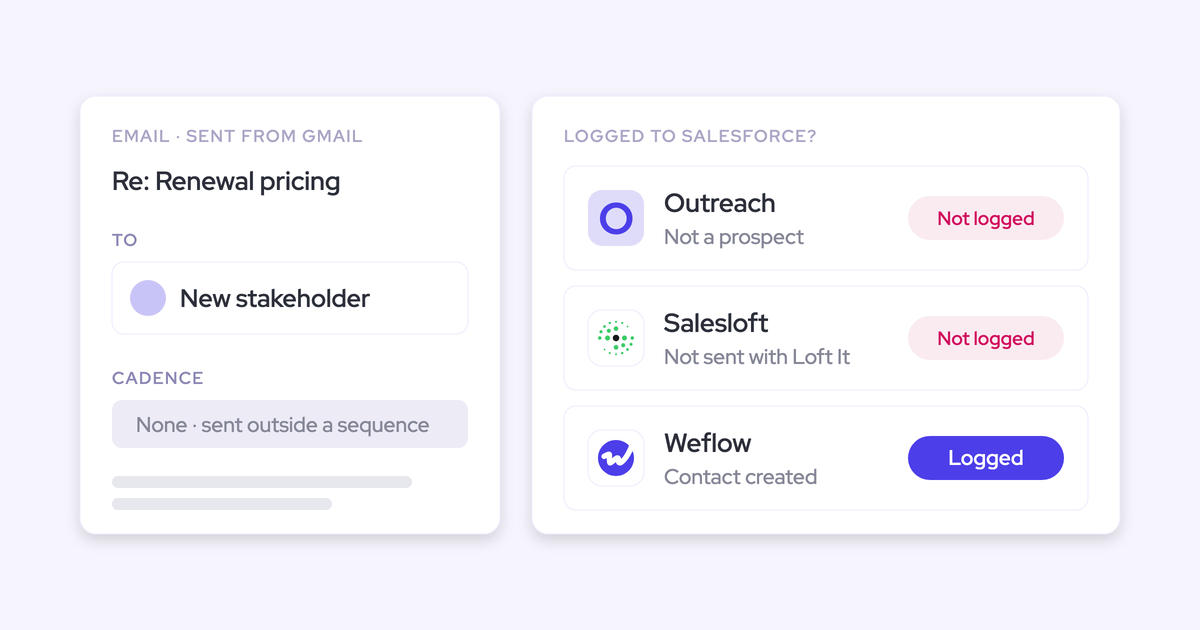

Outside a cadence, Outreach logs synced-mailbox email only for people who already exist as Outreach prospects. It writes that email as Tasks on the lead or contact.
Salesloft logs email only when the rep sends it through Salesloft or toggles Loft It. The normal Send button logs nothing.
Neither tool reliably lands that activity on the opportunity, and neither detects what another tool already wrote to Salesforce.
You probably found this out from a report that won't reconcile. An AE says their emails aren't logging, and it turns out they've been sending from Gmail. A deal looks dormant on the opportunity while the account timeline is busy. That opportunity-level gap is what breaks deal reviews, because the questions a manager asks (when did we last touch this deal, did the buyer reply) only work when activity sits on the opportunity.
Both sequencers are good at sending, and we're not going to argue you out of them. Our recommendation is a split: the sequencer keeps owning sequenced outbound, and a dedicated capture layer running in compatibility mode owns everything else.
What Outreach, Salesloft and Weflow log to Salesforce
The three tools differ most on what they log without a sequence, a toggle or a known prospect, and on where that activity lands.
| Capability | Weflow | Outreach | Salesloft |
|---|---|---|---|
| Automatic email capture | Every enrolled mailbox, inbound and outbound, server side; matched records only; no deliverability-subdomain mail | Synced mailbox, inbound and outbound, existing prospects only, as Tasks on the lead or contact | Only email sent through Salesloft or with Loft It; normal Send logs nothing |
| Automatic meeting capture | Every external meeting to Event, recorded or not | Events with a prospect on the invite, organized by the Outreach user | Per-rep Calendar Sync with a known Salesloft person on the invite, or Loft It |
| Matching to the right records | Primary and secondary email on contacts, leads and custom objects; optional account Website fallback | Prospect's email to the lead or contact; non-prospects never matched | Exact email, Contact then Lead; people with no CRM record stay unlinked |
| Choosing the right opportunity | Contact role, single open opp, then owner, mailbox and stage; account fallback; rep can re-map | Contact role or a "most recent opp" fallback; compose-time picker; sent emails can't move | Most recently modified open opp; CRM Record Selection override costs API calls |
| Automatic contact creation | Contacts from To and CC on send, existing accounts only, capped per event; never leads | Prospects only via Outreach Everywhere or the Outlook add-in with auto-creation on | Salesloft people by default; CRM leads or contacts only via admin rules or by hand |
| Running alongside other loggers | Compatibility mode presets for Outreach, Salesloft, Apollo and Clay; delay plus tracking-pattern skip | Manual Message-ID setup built for People.ai | Switch an activity type off team-wide or hand calls to a dialer; no detection |
| Integrations | Native Salesforce, Google, Microsoft, Zoom, Slack and the Outreach dialer; no native warehouse connector | 90+ marketplace integrations, call imports from Orum, Nooks and Gong, MCP client | Data layer to Salesforce, Dynamics, Snowflake, Databricks and more; dialer call imports |
| MCP access | Read-only connector, per-workspace switch, transcript toggle, 25-owner cap | 42-tool server, read and write, including Kaia transcripts | Read-only beta, paid agent add-on, no transcripts or cadences |
| Raw data access | REST API bulk export in JSON or CSV to BI tools and warehouses | API with Kaia transcripts, daily export, Data Sharing to Snowflake | Self-service REST API with transcripts; Snowflake and Databricks sync |
| Pricing | $19 per user per month for capture, annual, 10-user minimum | Quote-only, seats plus AI credits | No published seat prices; Advanced and Elite plus add-ons |
The gaps both sequencers share get their own table further down, mapped to the symptoms you're seeing.
Why your sequencer became your Salesforce activity capture tool
Your setup isn't misconfigured. Sequencers are built around the prospect and the sequence, so capture is a by-product of sending.
The pattern we see on calls goes like this:
- Sequencing was bought for the SDR and BDR team.
- Capture worked well enough for them, so AEs got seats too, mostly as capture seats.
- The license rollout stopped before customer success, so CSMs log nothing.
- AEs on complex deals drifted back to the inbox, because a fixed cadence adds little when every deal takes a different path.
So coverage follows sequenced mail and licenses, not the inbox or the opportunity. Outreach and Salesloft capture what passes through their own model, which is a narrower surface than where your sellers actually work.
Then someone adds a second tool, both write to Salesforce, and the counts double because neither sequencer detects the other's writes.
What Weflow Activity & Contact Capture logs outside a cadence
Weflow is the Revenue AI Orchestration platform for sales, customer success, and RevOps teams. It's built for Salesforce teams, and Weflow Activity & Contact Capture runs next to your sequencer as the capture layer, not instead of it. Here's what it writes and where it stops, in the same order we use for Outreach and Salesloft.
Which emails Weflow logs to Salesforce, and on which object
Weflow captures inbound and outbound email server side, through a central app installed in Microsoft Entra or Google Workspace. Every enrolled mailbox is covered on any device, with no rep toggle and no per-rep connection to drop.
Enrolment, not login, decides coverage. A CSM who never opens Weflow is still captured, so a low login count doesn't mean capture is failing.
You choose EmailMessage or Task per configuration. About nine in ten of our customers pick EmailMessage, because it carries From, To and Cc and the thread structure.

Weflow logs only email it can match to a Salesforce record. When an account is created after a rep already emailed that company, Weflow logs those earlier emails to it automatically, with no re-sync.
What Weflow doesn't capture:
- Threads where every participant is on an internal domain
- Mail sent from a separate deliverability subdomain, because capture matches on the sender address held in Salesforce
- Personal email accounts, SMS and calls from a personal mobile
Which calendar meetings Weflow logs as Salesforce Events
Weflow logs every external meeting from Google or Microsoft calendars to the Event object, whether or not it was recorded. Recording only adds the summary and AI field updates on top.
It skips calendar entries with no other attendees and no meeting link, and anything the user marks private. We recommend one-way sync from the calendar to Salesforce, because the Salesforce-to-calendar direction is unreliable.
How Weflow matches each email to contacts, leads and accounts
Weflow looks up each address across primary and secondary email fields on contacts, leads and any custom object with an email field. A contact with a business and a personal address resolves either way.
Where no contact exists yet, an optional setting matches the sender's domain against the account's Website field, so the account timeline stays complete before contact records catch up. You configure all of this per team or region.
The risk sits in that Website field. A wrong or shared domain there sends every email involving that domain to the wrong account, and duplicate accounts sharing a domain spread activity across both.
How Weflow picks the opportunity when several are open
Weflow maps an email to a deal by the address and the Salesforce relationships around it, never by reading the content. The precedence is fixed:
- Match the address to the contact, lead or custom object that holds it.
- Check for an opportunity contact role.
- If the account has exactly one open opportunity, pick it.
- If several are open, weigh the contact role, the opportunity owner, the mailbox owner, the account relationship and the stage.
- If the evidence doesn't settle it, log to the account rather than guess.
Weflow never logs to a closed opportunity. The reasoning behind the account fallback: logging to the account is easy to fix, logging to the wrong deal isn't.
Reps correct a match in the Outlook add-in or Chrome extension, and the choice holds for every later reply in that thread. A logged email can also be moved afterwards from the same panel.
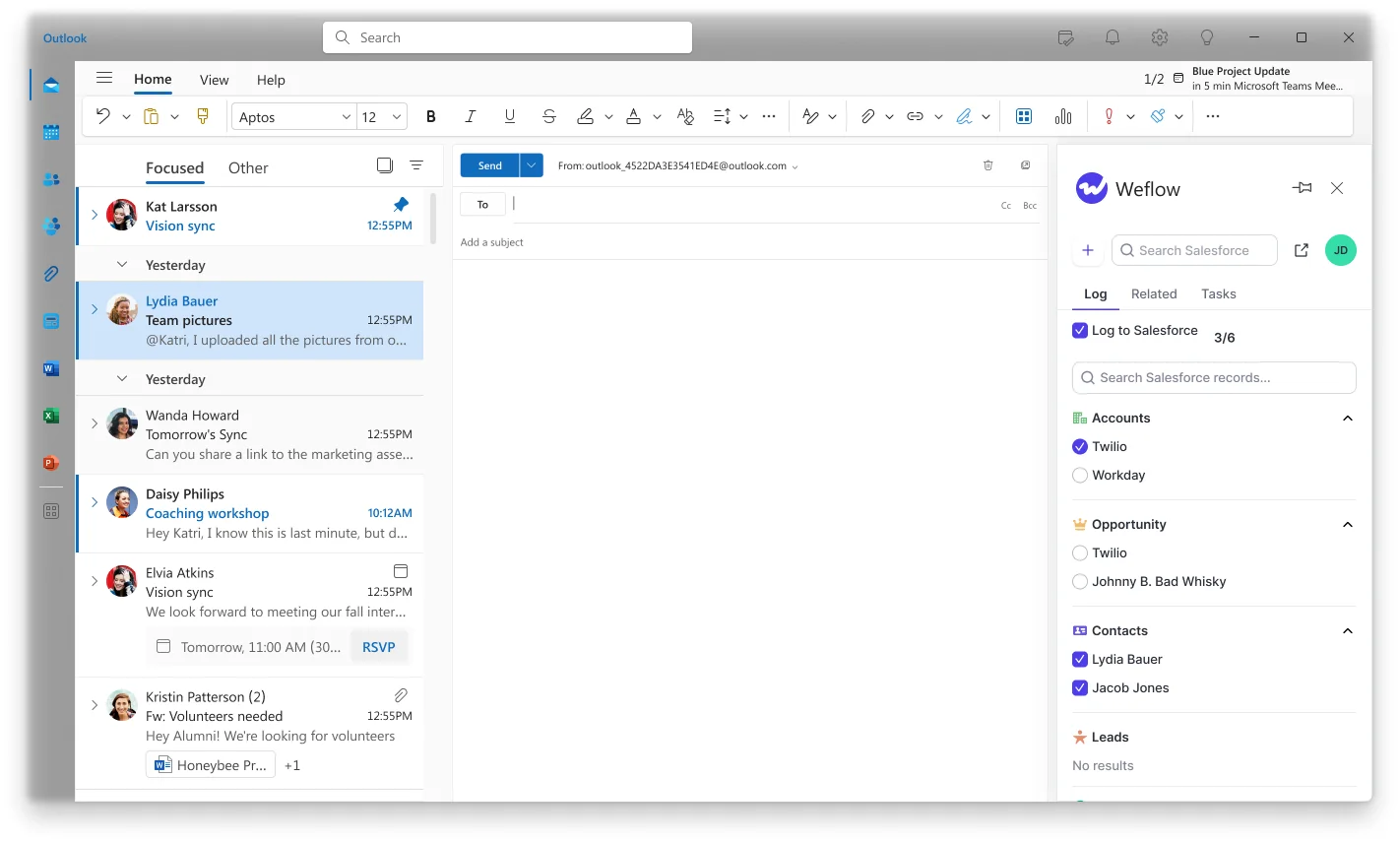
An option creates the opportunity contact role automatically when Weflow logs an email to a contact who has none, so mapping improves as the deal gets worked.
Two limits to know. An email can land on only one opportunity, which is a Salesforce constraint. And there's no rule that picks the opportunity with the nearest close date.
How Weflow creates Salesforce contacts from To and CC recipients
Weflow creates contacts when the rep sends, not when they receive, from addresses in To and CC. It checks contacts, leads and custom objects in real time first, so it doesn't create a duplicate.
The controls:
- Restrict creation to existing accounts, so no orphan contacts appear
- Cap contacts per event, so a 200-person webinar doesn't flood the contact table
- Block standard prefixes such as invoice, billing, no-reply and support
- Let reps clear the tick per email in the Outlook or Gmail extension
- Enrichment fills name, title, email, phone and LinkedIn at no extra charge
Weflow never creates leads, accounts or opportunities. And a validation rule that requires a field enrichment couldn't fill stops that contact from saving.
How Weflow compatibility mode runs alongside Outreach and Salesloft
Compatibility mode holds Weflow's sync back by a configurable delay (0 to 60 seconds, default 10) so the sequencer can log first. Then it checks the message for the sequencer's tracking pattern and skips it if it finds one.
Presets ship for Outreach, Salesloft, Apollo and Clay. Weflow also skips emails Salesforce logged itself from its own composer.
That matters because neither Outreach nor Salesloft detects other tools' writes, so Weflow has to be the one that steps back. The setup steps are in the ownership section below.
Which revenue tools Weflow integrates with natively
Weflow integrates natively with Salesforce, Gmail, Google Calendar, Google Meet, Outlook, Microsoft Teams, Zoom and Slack. With Weflow Conversation Intelligence, it also pulls in Outreach dialer recordings with transcript, summary and coaching.
There's no native Snowflake, Databricks or BigQuery connector, and Weflow isn't an integration platform with a connector catalogue. Outreach is ahead of us here.
How Claude and ChatGPT query Weflow through the MCP connector
Weflow's official MCP connector is read-only and gives Claude, ChatGPT and other assistants playbooks, call summaries, transcripts, forecast calls and pipeline metrics.
An admin switches it on per workspace, with a separate toggle for transcript access. Per-rep breakdowns are capped at 25 owners, so large orgs get aggregate answers unless the question is narrowed to a team.
How you export Weflow activity and transcripts to BI tools
Weflow's REST API bulk-exports transcripts, metadata, scores and signals as JSON or CSV. It feeds BI tools such as Tableau and Looker, and teams move the data into their warehouse through the API.
Because activity lives in native Salesforce objects, your existing Salesforce-to-warehouse pipeline picks it up too.
What Outreach logs to Salesforce outside a sequence
Outreach is excellent at sequencing, and its Salesforce sync is deep: two-way, per-field direction, conflict handling. Its capture works well around known prospects and sequences, and narrowly around the inbox and the opportunity.
Which emails Outreach logs from a synced Gmail or Outlook mailbox
Outreach does log non-sequenced email. A connected Gmail or Outlook mailbox syncs inbound and outbound mail, but only with people who already exist as prospects in Outreach.
Those emails reach Salesforce as Tasks on the lead or contact, one way. There are two mapping modes:
- Standard Task Mapping pushes activity through the lead and contact sync, and covers mailbox email sent outside Outreach.
- Advanced Task Mapping gives emails, calls and tasks their own mappings, and it's the only mode that can push past activity retroactively. Outreach calls it best practice, but it isn't always on by default.
Running both modes for the same activity type creates duplicate Tasks. Forwarding mailboxes don't sync reliably.
History is the gap people hit later. Outreach backfills email only at the moment a mailbox is connected. A stakeholder added as a prospect afterwards never gets the emails exchanged before, and Outreach advises creating the prospect before emailing them. Teams that try to reapply history retroactively tell us it works roughly a fifth of the time.
Which meetings Outreach logs as Salesforce Events by default
Outreach syncs meetings to Salesforce as Events, one way, against the contact, lead or opportunity. By default a meeting must:
- Include an Outreach prospect
- Not be cancelled
- Be organized by the Outreach user
So internal meetings and meetings with no prospect on the invite stay out. A meeting with several Outreach users invited logs once, for the organizer. Without an extra condition, connecting a new user's calendar pushes all of their historical meetings into Salesforce.
How Outreach matches activity to Salesforce leads and contacts
Outreach matches through the prospect's email address to the lead or contact behind it. By default it allows one prospect per email address, which prevents duplicate contacts.
The consequence: a person who isn't a prospect is never matched, so their email never reaches Salesforce.
How Outreach links an email to a Salesforce opportunity
Outreach attaches activity to an opportunity in one of two ways:
- Through an opportunity contact role the prospect holds, synced into Outreach and mapped to its prospect roles
- Through a "most recent opportunity" fallback, a single checkbox in task sync settings
Outreach itself advises leaving the fallback off for teams working several opportunities at once, because it always picks the most recent one. Without contact roles, activity reaches the lead or contact and stops there.
An admin can also switch on a compose-time picker, so reps choose the opportunity in Gmail, Outlook or Outreach's own mail. Reps can move a past call or meeting to a different opportunity. A sent email, though, can't be re-associated, so a wrong match stays wrong.
When Outreach creates a prospect for someone new
Outreach creates a prospect for a new person only when the rep emails through the Outreach Everywhere Chrome extension or the Outreach Outlook add-in, with automatic creation switched on.
The side effect cuts the other way: with the extension creating a prospect for every recipient, personal correspondence from a work mailbox can become prospects and logged activity. Outreach's block list of addresses and domains is the guardrail, and it auto-blocks your own users' domains.
How Outreach coexists with another activity capture tool
Outreach's documented coexistence path is a manual Message-ID setup built for People.ai. It requires Advanced Task Mapping, switching off the standard sync of emails sent within Outreach, mapping the message ID on the Task, and matching setup on the People.ai side.
That's configuration for one named tool, not detection of what another tool wrote. On recording, Outreach tells customers to uninstall other conversation intelligence tools before using Kaia.
Which tools Outreach integrates with beyond Salesforce
Outreach supports more than 90 integrations in its marketplace. Kaia imports call recordings from Orum and Nooks, and since August 2026 from Gong. Its MCP client brings third-party connectors into Omni. This is a genuine strength.
What the Outreach MCP server exposes to AI assistants
Outreach runs a public MCP server with 42 tools: 27 read, 13 write and 2 for schema discovery, including search and fetch of Kaia summaries and transcripts. It works from Claude, Microsoft Copilot, Salesforce Agentforce and Glean.
Every connection needs a licensed Outreach user with Amplify. The catalog has no tool for updating an existing opportunity.
How you get raw data out of Outreach
Since February 2026, Outreach's public API returns Kaia transcripts with participants and timestamps, plus a webhook on new recordings. Kaia Daily Export sends recordings, transcripts and metadata to your SFTP, S3 or Azure storage. Data Sharing delivers Outreach data to Snowflake or through Delta Sharing as a paid add-on.
What Salesloft logs to Salesforce outside a cadence
Salesloft's cadence workflows are strong, and its Task logs carry the email body and direction, which many sequencer logs don't. Its capture logs what the rep chooses to log, through each rep's own connection.
Which emails Salesloft logs when reps skip Loft It
Salesloft logs an email only when the rep sends it through Salesloft or with Loft It from Gmail or Outlook. An email sent with the normal Send button isn't logged.
Loft It is a per-email toggle: in Gmail through the Chrome extension, and as a button in the Salesloft Connect for Outlook add-in. So reps decide, email by email, what reaches Salesforce.
Lofted emails log as Tasks on the lead or contact with the body and direction. Replies to a lofted email log as Reply activities.
The silent failure sits in the connection. Email and call logging run on each rep's own CRM connection, separate from the central field sync. A disconnected rep stops logging while field sync keeps running, so nothing looks broken.
Which meetings Salesloft logs through per-rep Calendar Sync
Salesloft logs calendar meetings automatically once a rep turns on Calendar Sync. The conditions:
- Calendar Sync is a per-rep setting on Google, Office 365 or Exchange.
- At least one guest must already exist as a Salesloft person.
- Otherwise the meeting reaches Salesforce only if the rep lofts the invite or books through Salesloft.
- Private events and events where every guest domain is excluded are skipped.
- Recurring series sync only from Google Calendar, through the Chrome extension or with a mapped Recurrence Type field; Outlook isn't supported.
Calendar Sync never creates new person or CRM records, so a meeting with a brand-new stakeholder stays out.
How Salesloft matches activity to Salesforce leads and contacts
Salesloft matches by exact email address, Contact first, then Lead, and picks the most recently updated record when several share the address. A person with no CRM record stays unlinked unless an admin rule creates one.
How Salesloft picks the opportunity on accounts with several open
By default Salesloft logs to the most recently modified open opportunity. That's predictable, and it's wrong whenever the latest-touched deal isn't the one the email is about.
The override is CRM Record Selection, which an admin switches on so reps pick the record by hand. It works in the dialer, email, the Chrome extension and the Outlook add-in, but not for Insert Availability, and it raises your team's Salesforce API calls.
Teams tell us Salesloft mislinks on accounts carrying a renewal or several professional services opportunities at once. In fairness, automatic logging still saves reps from picking a record on every email.
When Salesloft creates people and Salesforce leads or contacts
Auto-Person Capture, on by default, creates a Salesloft person from the address alone for each To or CC recipient on a lofted email or invite. Those are Salesloft records, not Salesforce ones.
Salesloft creates Salesforce Leads or Contacts only through an admin automation rule or a rep's manual action, and each record costs a CRM API call. It never creates CRM Accounts.
How Salesloft coexists with another tool that logs activity
Salesloft doesn't detect activity another tool already logged. Its Email Message ID field only guards against duplicates among Salesloft's own logs.
Your options are configuration, not detection:
- Switch CRM logging off for a whole activity type, team-wide
- Hand call logging to a third-party dialer that writes back through Salesloft's API
There's no setting that logs only what another tool missed.
Which tools Salesloft integrates with beyond Salesforce
Salesloft's Unified Revenue Data Layer syncs with Salesforce, Microsoft Dynamics, Snowflake, Databricks, Gmail, DocuSign, ZoomInfo and LinkedIn. Conversation Intelligence records Zoom, Teams, Meet and Webex, and imports calls from Aircall, Dialpad, FreshCaller, HubSpot, Orum and the Salesloft Dialer.
What the Salesloft MCP server can and cannot read
The Salesloft MCP server is read-only and in beta, with thirteen tools over accounts, people, users, opportunities, conversations and team data. It requires the paid Agentic add-on.
It excludes cadences entirely, and transcript retrieval was removed, so assistants get AI summaries and key moments rather than what was said. Calls count against your standard Salesloft API limits.
How you get raw data out of Salesloft
Salesloft has a self-service REST API that reads people, accounts, opportunities, activities, emails, meetings, and conversations with media and transcripts, plus webhooks. Bulk data also leaves through the data layer's sync to Snowflake and Databricks. On raw access, Salesloft's API is more open than its MCP server.
What neither Outreach nor Salesloft logs outside a cadence
The same gaps recur in both tools because both are built around the prospect and the sequence. The inbox and the opportunity sit outside that model.
| Gap | In Outreach | In Salesloft |
|---|---|---|
| One-off inbox email to a non-prospect | Not synced; mailbox sync covers existing prospects only | Not logged unless the rep lofts it |
| Meetings organized by someone else or with no known guest | Not logged by default; a prospect must attend and the Outreach user must organize | Calendar Sync skips meetings with no known Salesloft person |
| Activity on the opportunity, not the contact | Needs a synced contact role, or a fallback Outreach advises turning off | Most recently modified open opp; mislinks on renewal and services deals |
| History from before the record existed | Backfill only at mailbox connection | An email nobody lofted at send was never logged |
| Users without a seat (CSMs) | Only connected Outreach users' mailboxes sync | Logging runs on each seated rep's own connection |
| Silent per-rep failures | Forwarding mailboxes don't sync reliably | A disconnected rep stops logging while field sync runs |
| Wrong matches | A sent email can't be re-associated | Reps pick the record before logging, only with CRM Record Selection on |
| Writes from another tool | Manual Message-ID setup for People.ai only | No detection; Message ID guards only its own logs |
Each row is a gap a capture layer covers. It also explains the dormant-looking deal. Salesforce relates an activity to an opportunity or an account, and when no tool can place it on the deal, it lands on the contact or account. The account timeline looks busy, the opportunity looks dead, and no error tells you why.
When Outreach or Salesloft should own your activity capture
If your team is SDR-heavy and nearly every touch runs through cadences, keep capture in the sequencer. Adding a second logger then buys you very little.
The sequencer is the better owner when:
- Most touches are high-frequency outbound inside sequences, against known prospects
- Outreach's open tracking is the reason your users stay, and it lives only in Outreach
- You value Salesloft's Task logs with body and direction, and your reports are built on them
- Your plan depends on Outreach's API and its read-and-write MCP server
- Pre-reply outbound goes from a deliverability subdomain, which only the sequencer logs
And here's what Weflow doesn't do:
- No sequencing, cadences or outbound automation
- No open tracking on sequencer mail
- No capture of mail sent from a separate deliverability subdomain
- Salesforce only, no other CRM
What capture-only seats cost on Outreach, Salesloft and Weflow
Weflow publishes a capture-only price. Outreach is quote-only, priced as seats plus AI credits. Salesloft publishes no seat prices at all.
| Pricing detail | Weflow | Outreach | Salesloft |
|---|---|---|---|
| Pricing model | Per seat, AI usage included; Agent Builder priced per workspace | Seats plus AI credits consumed per action | Packages (Advanced, Elite) plus paid add-ons |
| Published list price | Weflow Activity & Contact Capture $19 per user per month; Weflow Revenue AI Foundation (adds Weflow Conversation Intelligence) $49 | No published seat price | No published seat price |
| Capture-only option | Yes, Activity & Contact Capture as a standalone product | No capture-only package | No capture-only package |
| Minimum and term | 10 users, 12-month term, billed annually; mid-term seats pro rata | Quoted | Quoted |
| What costs extra | Agent Builder beyond the free 25 actions a month ($299 for 500, $999 for 2,500) | Extra credit packs, Data Sharing, Connectors, additional instances, Listener licenses, services | Forecasting, Account Agent, Coaching Agent, Dialer; local numbers $1 per number per month |
The argument you take to the CFO is the seat count. Thirty sequencer seats where five people sequence means you're paying full engagement pricing for twenty-five capture-only users. At renewal, those seats move to a $19 capture product, and the sequencer licenses go only to the people who send sequences.
Keep capture in Outreach, Salesloft, or move it to Weflow
The right capture owner follows where each seller actually works.
Keep capture in Outreach if:
- Nearly every customer-facing touch goes through sequences to existing prospects.
- Your contact roles are populated and synced, so activity reaches the opportunity.
- CSMs and account managers either hold Outreach seats or their activity isn't reported on.
- Kaia, the Outreach MCP server and open tracking are core to your workflow.
Keep capture in Salesloft if:
- Your reps reliably loft what matters and you're comfortable with them choosing what to log.
- Most accounts carry one open opportunity, so the most-recently-modified default lands correctly.
- Your reporting is built on Salesloft's Task logs with body and direction.
- You can watch per-rep connections closely enough to catch a disconnect early.
Add Weflow Activity & Contact Capture alongside your sequencer if:
- AEs, CSMs and managers work from the inbox, and their email never reaches Salesforce.
- Accounts carry renewals and expansions in parallel, and activity needs to land on the right one.
- You're paying engagement seats for people who only need capture.
- You need history for stakeholders emailed before their record existed.
How to split activity ownership between your sequencer and Weflow
The sequencer logs sequenced outbound, Weflow in compatibility mode logs everything else, and every activity type has exactly one owner.
We do plan to continue using Outreach. One of the main reasons for the pilot is to see how these activities will log in Salesforce where there could be duplication.
Which activity types your sequencer keeps and Weflow takes
| Activity type | Owner | Why |
|---|---|---|
| Sequenced outbound email | Sequencer | It owns sequence metrics that exist nowhere else; Weflow skips it by tracking pattern |
| Deliverability-subdomain touches | Sequencer | Weflow doesn't capture mail sent from a separate subdomain |
| Replies and one-off inbox email | Weflow | Nothing else sees them, and they need to land on the opportunity |
| Calendar meetings | Weflow | Every external meeting goes to Event; keep one tool writing meetings so counts don't double |
| Dialer calls | The dialer | Dialers log calls themselves; Weflow Conversation Intelligence can still pull Outreach dialer recordings |
| CSM and AE activity | Weflow | Capture by enrolment, with no sequencer seat needed |
How to set up compatibility mode without double-logging
- Open the Expert settings of your activity capture configuration and switch on compatibility mode with your sequencer's preset.
- Set the email processing delay. The default is 10 seconds; if your mail admin set an undo-send window in Outlook or Google Workspace, raise the delay above it.
- Add your custom tracking domain to the tracking patterns exclusion list. You'll find it in the sequencer's admin console under custom domain.
- Send a sequenced email and a one-off email on a test thread, then look at the Salesforce record. Each should appear once.
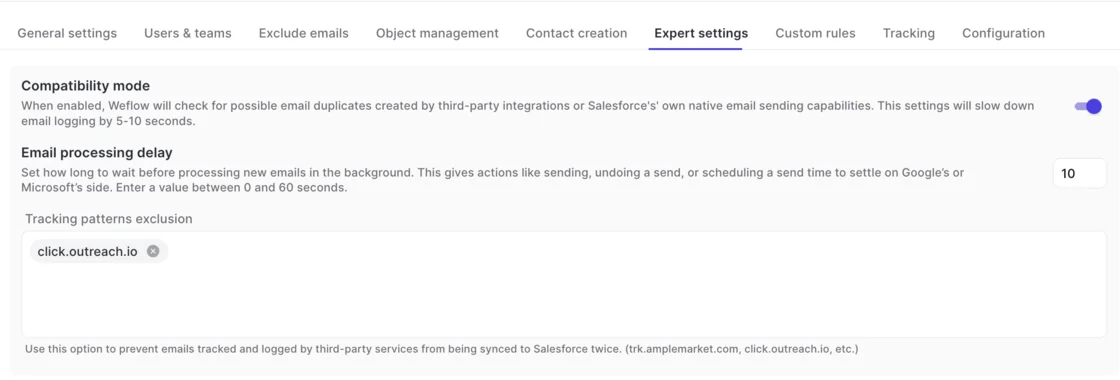
Pitfall: the default pattern recognizes the sequencer's own tracking domain, such as click.outreach.io. A branded custom tracking domain left out of the exclusion list double-logs every sequenced email.
When to switch off your sequencer's Salesforce write-back
You can switch off the sequencer's Salesforce write-back and keep sending through it. Sequencers send through your mail tenant, so Weflow sees that mail and logs it as ordinary activity.
Compatibility mode only matters while two loggers are live. Once write-back is off, there's no duplicate to avoid, and that's the cleaner end state.
What you keep and lose:
- Open tracking and sequence analytics stay inside Outreach or Salesloft.
- Sequenced email moves to Weflow's logging, on the object you chose.
- Pre-reply touches from a deliverability subdomain stop reaching Salesforce, since Weflow doesn't capture them. If those matter to your reporting, keep write-back on and stay in compatibility mode.
What to test in a two-week capture pilot
Two weeks settles the decision if the pilot tests the mechanics that fail silently. Paste these into your plan:
- A sequenced email logs once in Salesforce, not twice.
- An email tracked through your custom tracking domain logs once.
- A one-off Gmail or Outlook email from an AE reaches the right opportunity.
- An account with a renewal and an expansion open logs each thread to the right deal, or to the account where the evidence doesn't settle it.
- A CSM with no sequencer seat gets their email and meetings captured.
- A stakeholder emailed before their account existed gets those emails once the account is created.
- Your Task-based reports and flows still return what they did, given the object you chose.
- Salesforce API usage stays where you expect it while the sequencer keeps polling.
- Capture-health alerts fire when you deliberately break a connection.
See how Weflow captures activity, updates Salesforce fields from calls, and rolls up your forecast. Book a 30-minute demo.
FAQ: running Weflow alongside Outreach or Salesloft
Will moving from Task to EmailMessage break my activity reports?
It can, because a single Salesforce activity report spans Tasks and Events but not EmailMessage. If your reports are built on Tasks, keep Task for that configuration, since you choose the object per configuration. EmailMessage gives you native From, To and Cc and thread structure, and Weflow's own insights read both.
Can Weflow log to the opportunity with the nearest close date?
No, there's no nearest-close-date rule. Weflow prefers the opportunity where the contact holds a contact role. For renewals running next to expansions, separate the lanes by configuration, one for the renewals team and one for everyone else, filtered on opportunity type or a close-date threshold.
How far back does Weflow sync historical email and meetings?
Historical sync-back covers up to 24 months of email, meetings and contacts as standard, and up to three years as a custom window.
Does Weflow read any mailbox before I enrol users?
No. Installing the managed packages, connecting the integration user and adding the workspace app capture nothing. Weflow reads a mailbox only once that user is enrolled in an activity capture configuration, so you can finish technical setup while legal review is still open.
Does Weflow add to the Salesforce API load my sequencer creates?
Weflow writes through the integration user and caches some Salesforce data to keep API calls low. The Weflow Analytics package reports on activity inside Salesforce without consuming any Salesforce API calls.
What happens when validation rules block Weflow contact creation?
Weflow enriches each contact before writing it. If a required field is one enrichment fills and finds, the contact saves. If enrichment can't fill a required field, that contact doesn't save. Your options are relaxing the rule for the integration user or creating those contacts by hand from the mail extension.
How do I know when Weflow capture breaks for a user?
When capture breaks at the connection level, for example the integration user disconnects, Weflow automatically emails your admin and alerts the Weflow customer success manager on your account. Skipped or errored emails and meetings show in the admin console's capture health metrics, with a CSV download.
Inside Salesforce, Activity Capture Health flags the data conditions that make capture fail quietly: contacts with no email, accounts with no website, duplicate contacts and accounts, and unconverted leads matching a contact.

A rep disconnecting their own inbox isn't a failure mode, because capture runs on a tenant-level permission.
How do I keep confidential accounts out of Weflow capture?
Custom rules block logging against an entire Salesforce record based on any field on the object. That's how regulated customers keep confidential accounts, or a risk-averse customer, out of the captured data. Reps can also mark an event or email private to keep it out.
Does Microsoft Entra group assignment limit which mailboxes Weflow reads?
Only when the Weflow app's Assignment required property is set to Yes. With it set to No, Weflow can still subscribe to mailboxes outside the assigned group. When the restriction holds, a user outside it shows a warning icon in the configuration, because the subscription fails.
Does the Weflow Outlook add-in work in classic Outlook?
Classic Outlook for Windows isn't supported. The add-in supports Outlook on the web and the new Outlook for Microsoft 365. Mailbox capture doesn't depend on the client, so only the side panel is affected.
Does the Weflow Activity Timeline show Outreach-logged activity?
No. The Weflow Activity Timeline shows activity Weflow logged. Activity that Outreach writes to Salesforce doesn't appear in it, and stays in the standard Salesforce activity views.








