

Backstory (People.ai) Pricing: What Activity Capture Costs Per Seat (2026)
Learn Backstory (People.ai) 2026 per-seat pricing, AI answer fees, and Weflow comparison.




Backstory, formerly People.ai, doesn't publish prices. It publishes a pricing model with two parts:
- a platform fee for every connected customer-facing person whose activity it ingests, and
- a pre-packaged, org-wide allotment of AI "answers".
Managers, finance and ops use Backstory as free viewers. The only figure in circulation comes from reported quotes of roughly $30 to $50 per user for activity capture. That's a reported range, not a list price, and the answers allotment sits on top of it.
Below, we turn that model into per-seat math you can put in a CFO memo. We follow the order your RFP asks in: what's in the seat, what meters, who's free, and what happens at renewal. Parts of Backstory's model are predictable, and we say so where they are.
Weflow is the Revenue AI Orchestration platform for sales, customer success, and RevOps teams, and we publish our prices. Weflow Activity & Contact Capture is $19 per user per month, billed annually. Ask Weflow AI is included in that seat with no meter on top.
How much Backstory (People.ai) costs per user in 2026
Backstory has no list price. Its pricing page describes the model, and every number comes to you through a proposal.
The reported $30 to $50 per user range covers activity capture as part of the platform fee. Backstory doesn't sell capture as a separate SKU, because every customer gets the full product. So the range answers half the question. The other half is the AI meter, and the range doesn't include it.
| What you're asking | Answer |
|---|---|
| What Backstory publishes | The model: a platform fee per connected person plus a pooled AI answers allotment. No figures. |
| What buyers report being quoted | About $30 to $50 per user for activity capture. These are reported quotes, not list price. |
| What that number leaves out | The AI answers allotment, Signals (priced through your Backstory CSM), and call recording, which Backstory doesn't do |
How Backstory prices: a platform fee plus AI answers
Backstory's cost runs on two meters:
- The platform fee scales with how many customer-facing people you connect.
- The answers allotment scales with how much AI your org consumes.
Backstory sizes both at the start of the term and resizes them at renewal. Each meter has its own sizing problem, so it's worth taking them one at a time.
Who Backstory counts as a connected person, and who's free
Backstory's platform fee follows each connected customer-facing person whose activity it ingests. Viewers don't add to it.
| Who | Effect on the platform fee |
|---|---|
| Reps and other customer-facing people whose email, calendar and calls Backstory ingests | Each one adds to the fee |
| Managers who read dashboards and forecasts | Free |
| Finance | Free |
| Ops and RevOps viewers | Free |
The free viewers are a real strength. The risk sits on the other side of the table, because the connected-person list is the one that grows once you actually build it.
We see this on calls all the time. A rollout starts with a number people have been throwing around, 100 or maybe 150. By the time the list is built, it's 260, and the RevOps leader is the one walking that increase into finance.
"You know, jumping from 150 to over 200 is a big uplift Right. It's a big uplift. I don't think everyone was aware it was going to be that."
On Backstory, every one of those added people raises the platform fee and brings an answers allotment with them. So seat creep moves both meters at once.
What one Backstory AI answer is, and how the allotment pools
A Backstory "answer" is a delivered AI output.
What counts as an answer:
- A risk surfaced on a deal
- A deal summary
- A coaching flag
- A question answered
What doesn't count: reading a dashboard.
Each connected person brings an allotment, and the allotments pool across the organization. That's where sizing gets hard.
The size of your pool follows headcount. Your consumption follows behavior instead:
- how many deals are open,
- how often leaders ask questions,
- how many summaries and risk flags get generated.
You can count seats before you sign. You can't count answers until people start using the product. A pooled allowance also means a few heavy users draw down what everyone else depends on.
How record-selection filters ration Backstory's AI across your deals
To stay within the allotment, Backstory admins choose which accounts and opportunities get AI summaries and insights (SalesAI) at all. The filters re-evaluate daily.
Admins can filter on:
- top-account flags,
- open opportunities,
- closing timelines,
- owners,
- parent accounts.
One part of this is well designed. When a record comes back into scope, SalesAI backfills its history, so the summaries stay continuous.
The cost shows up in adoption. AI that runs only on admin-selected records reaches only part of the team. The rep whose deals fall outside the filter never sees a summary or a risk flag. And the deal nobody prioritized is often the one where an early warning would have mattered.
Buyers we talk to count logins before features, and this is why. A rationed AI layer makes the renewal case harder, because the people who never saw it can't vouch for it.
What True Forward does to your Backstory renewal
Under True Forward, Backstory never cuts off or back-bills usage mid-term. It resizes your next term to actual usage. Both halves of that matter.
| Situation | What happens under True Forward |
|---|---|
| Your team uses more answers than the allotment mid-term | Nothing gets cut off |
| Your mid-term invoice | No back-billing for the overage |
| The size of your next term | Resized to what you actually used |
| Adoption grows over the year | The renewal grows with it |
Within the term, that's genuine predictability, and it's better than a meter that bills you the month you go over. The catch comes at renewal: the more your team adopts, the bigger the next contract.
If you're an existing customer, the number you'll see at renewal is shaped by this year's usage. So model it before Backstory proposes the next term, not after.
Backstory vs Weflow at a glance: capture, AI and pricing
Both vendors capture email automatically. They diverge on AI scope, recording and price transparency.
| Capability | Backstory.ai (People.ai) | Weflow |
|---|---|---|
| Automatic email capture | Server-side from Google Workspace or Microsoft 365, no rep action. Emails reach Salesforce as Tasks, and most activity syncs to the CRM within one business day. | Server-side through a central app in Google Workspace or Microsoft 365, on any device, no rep action. Logs only mail that matches a Salesforce record. Misses personal accounts and deliverability subdomains. |
| Automatic contact creation | Creates missing contacts when the domain matches an account and the Backstory user owns or works the record. Can convert matching leads when switched on. | Creates contacts from To and CC recipients when the rep sends, with existing-account, per-event cap and prefix rules. Never creates leads. |
| Deal risk warnings | Risk in AI summaries, Forecast Headlines and out-of-the-box Signals. Customers can't configure their own warnings yet. | 50+ deal signals plus warnings you build on opportunity fields or computed fields. Warnings are Weflow fields, so they don't report in Salesforce or BI. |
| Ask-anything AI chat | The Assistant answers within one account or opportunity page. Pipeline-wide questions go through MCP or the Slack app. | Ask Weflow AI scopes from one call to the whole system, inherits Salesforce permissions and runs on every deal. One query caps at one million tokens. |
| Activity capture setup and rollout | Admins configure centrally, with no per-rep install. Backstory puts go-live at two to four weeks for most teams. | Two managed packages, one integration user, one mail app. A 30 to 60 minute technical session, then a guided rollout of two to four weeks (four to six for large orgs). No implementation fee. |
| Integrations with other tools | Email, calendar, Zoom, Teams, Meet, Webex, Gong, Slack and Sales Navigator. Reads any dialer that logs to Salesforce, and has a Transcript API. | Salesforce, Gmail, Outlook, Google Calendar, Zoom, Teams, Meet, Slack and the Outreach dialer, plus Tableau and Looker through the API. No native Snowflake, Databricks or BigQuery connector. |
| Access from AI assistants (MCP) | Its own MCP server for Claude, ChatGPT, Copilot, Gemini and n8n, signed in with Backstory credentials. | Read-only MCP connector for Claude, ChatGPT and others, covering playbooks, summaries, transcripts, forecast calls and pipeline metrics. Admin transcript toggle. Per-rep breakdowns cap at 25 owners. |
| Raw data access outside the tool | API delivers data and analytics to other systems, and exports and deletes activity data. | REST API bulk-exports transcripts, metadata, scores and signals as JSON or CSV. Recordings export to your own storage. |
| Pricing | Model published, no figures: platform fee per connected person plus pooled AI answers, with free viewers. Reported quotes of about $30 to $50 per user. | Published: $19 capture, $39 Conversation Intelligence, $39 Deal Intelligence & Forecasting, bundles at $49, $59 and $79. Annual billing, 10-user minimum. Agent Builder per workspace: free tier of 25 actions, then $299 or $999 tiers. |
What Backstory gives you for the platform fee
Backstory's platform fee buys a strong, centrally configured capture and intelligence layer. Its AI is scoped and only partly configurable. Here's what that looks like job by job.
How Backstory captures email and creates Salesforce contacts
Backstory captures inbound and outbound email server-side from Google Workspace or Microsoft 365, with nothing for reps to do. Most activity shows up in Backstory within two hours and syncs to the CRM within one business day.
Backstory writes emails to Salesforce as Tasks and meetings as Events. It has no option to write EmailMessage records, and it doesn't capture attachments. Proposals and contracts exchanged with a buyer stay in the mailbox.
It filters well. Backstory skips emails marked personal or confidential and detects sensitive topics such as HR, medical and legal. For those, it discards the body and leaves a note while still counting the activity.
Backstory creates a Salesforce contact only when all of these hold:
- No matching contact or lead exists.
- The activity carries the person's first name, last name and email.
- The email domain matches an account's domain.
- The Backstory user on the activity owns the account or opportunity, or sits on its team.
A new contact can take up to two hours to appear. Lead conversion is off by default, and Backstory's Technical Success team switches it on per organization.
How Backstory's AI flags deal risk and answers questions
Backstory surfaces deal risk in three places:
- AI summaries on Account 360 and Opportunity 360 pages
- Forecast Headlines, which rank the top three risk themes by the deal value at stake
- Out-of-the-box Signals
The limit is configuration. Customers can't yet build their own warnings on their own slippage patterns.
For questions, Backstory's Assistant works inside one account or opportunity page. Questions across the whole pipeline go to an external assistant over MCP or to the Slack app.
These risk flags, summaries and answered questions are the outputs the answers meter counts. So the AI you're evaluating here is also the AI you're sizing.
How long a Backstory activity capture rollout takes
Backstory admins configure capture centrally, with no per-rep install:
- On Google, a super administrator installs a Marketplace app for the domain.
- On Microsoft 365, an admin grants read-only Graph access once, and capture keeps working when users change passwords.
Backstory puts go-live at two to four weeks for most teams. At onboarding, it analyzes about two years of activity history to set engagement benchmarks.
How Backstory connects to your stack, AI assistants and API
- Backstory connects natively to Google Workspace, Microsoft 365, Exchange on-premises, Zoom, Microsoft Teams, Google Meet, Webex, Gong, Slack and LinkedIn Sales Navigator.
- It reads any dialer or sales engagement call logged to Salesforce as a Call task, and accepts transcripts from other tools through a Transcript API.
- It runs its own MCP server for Claude, ChatGPT, Microsoft Copilot, Google Gemini and n8n, signed in with Backstory credentials.
- Its API delivers data and analytics to other systems and exports and deletes activity data.
- It works natively with Salesforce and connects to Microsoft Dynamics 365 and Oracle through API integrations.
- It ingests recordings and transcripts from conferencing tools and Gong, but doesn't record calls itself.
Where Backstory is the better choice than Weflow
Backstory fits better than Weflow in four situations, and we'd tell you to stay put in any of them.
- You run on Microsoft Dynamics 365 or Oracle, or on several CRMs at once. Weflow works only with Salesforce. Backstory connects to all three.
- You're a large enterprise with a leader-driven motion. If you want answers pushed to leaders in Slack, an LLM over MCP or the CRM, that's what Backstory is built around. Its target is companies of roughly 1,000 to 10,000 employees.
- You want free viewers with nothing to manage. Anyone whose activity Backstory doesn't ingest is free by default. Weflow's viewer seats are free too, but we reallocate between seat types quarterly.
- You value no mid-term cutoff or back-billing. True Forward lets usage run over the allotment within a term without a surprise invoice.
How Weflow handles the same jobs, and where it stops
Weflow does the same capture job and runs everyday AI on every deal instead of a filtered subset. Here's each job in the same order, with our limits stated.
How Weflow Activity & Contact Capture logs email and creates contacts
Weflow Activity & Contact Capture runs server-side through a central app installed in Microsoft Entra or Google Workspace. It logs every email and meeting in near real time, on any device, with no action from the rep.
It logs only activity that matches a Salesforce record and involves an external participant. Internal-only threads never reach Salesforce. You choose whether emails land as EmailMessage or Task records.
There are gaps:
- Capture covers only your corporate mail, so personal email accounts, SMS and personal mobile calls stay out.
- Mail sent from a separate deliverability subdomain isn't logged until the buyer replies on the main domain.
Weflow creates contacts from To and CC recipients when the rep sends, never from BCC. The guardrails:
- Restrict creation to accounts already in Salesforce, so no orphan contacts appear.
- Cap contacts per meeting or thread, so a 200-person webinar doesn't flood the contact table.
- Block standard prefixes such as invoice, billing, no-reply and support.
- Look up the address across contacts, leads, custom objects and secondary email fields before creating anything.
- Let the rep untick a contact in the Outlook or Gmail extension before the email sends.
Two limits here. Weflow never creates leads. And a validation rule that requires a field enrichment couldn't fill will stop that contact from saving.
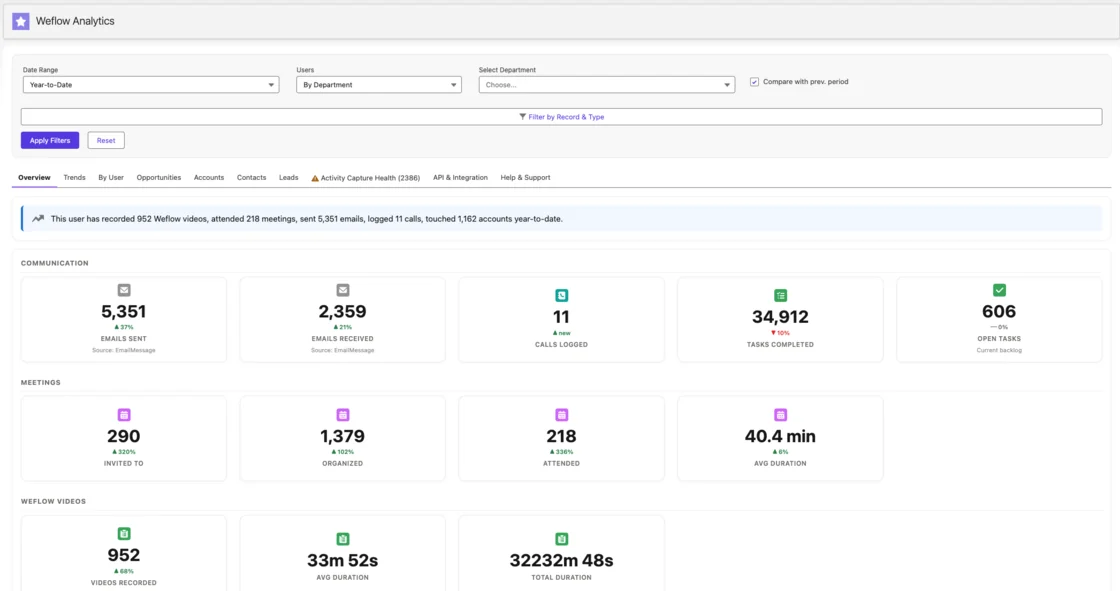
How Weflow flags deal risk and answers with Ask Weflow AI
Weflow ships 50+ deal signals. You can also build your own warnings with AND/OR rules on any opportunity field except text fields, or on computed fields such as days inactive, time in stage and close-date pushes.
Those rules encode your own slippage patterns. A team with a 60-day cycle can treat 14 days of silence as a warning, while a team with a 12-month cycle wouldn't.
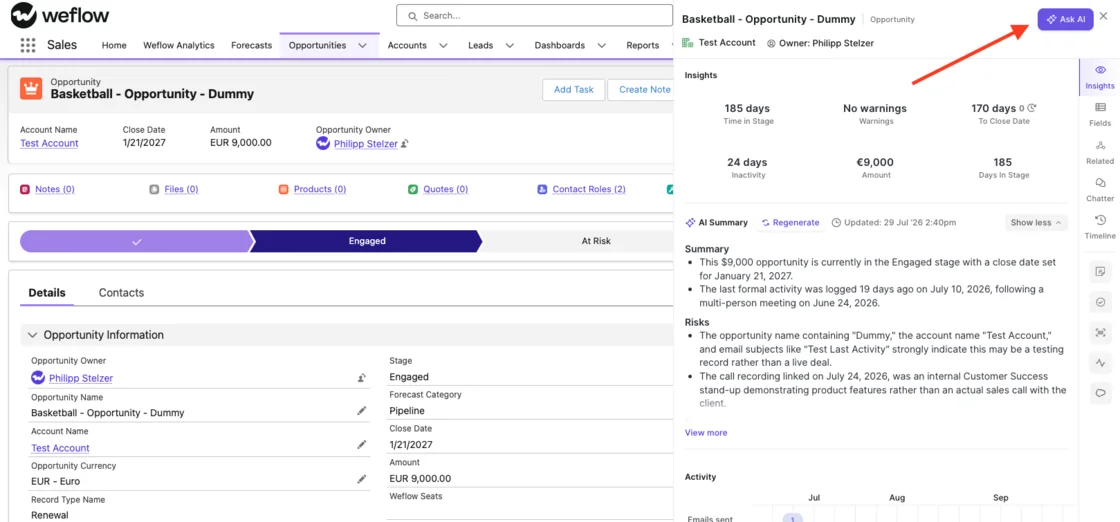
Ask Weflow AI answers plain-language questions across Salesforce records, emails, meetings and transcripts. You can scope it to:
- one call,
- one deal,
- a filtered deal board,
- an account,
- the whole system.
It inherits Salesforce permissions and adds its own guardrails on top. It runs inside the Chrome extension on Salesforce pages too.
Ask Weflow AI runs on every deal, with no record selection deciding which ones get AI. That's the plain difference from Backstory's filters.
Our limits:
- Deal warnings are Weflow fields, so they don't show up in Salesforce reports or BI. The workaround is an agent that writes the assessment into a Salesforce field you create.
- Ask Weflow AI doesn't reach your other knowledge systems, such as process docs or ticketing.
- A single query caps at one million tokens. Questions that sweep the whole book of business belong in an agent.
How long a Weflow activity capture rollout takes
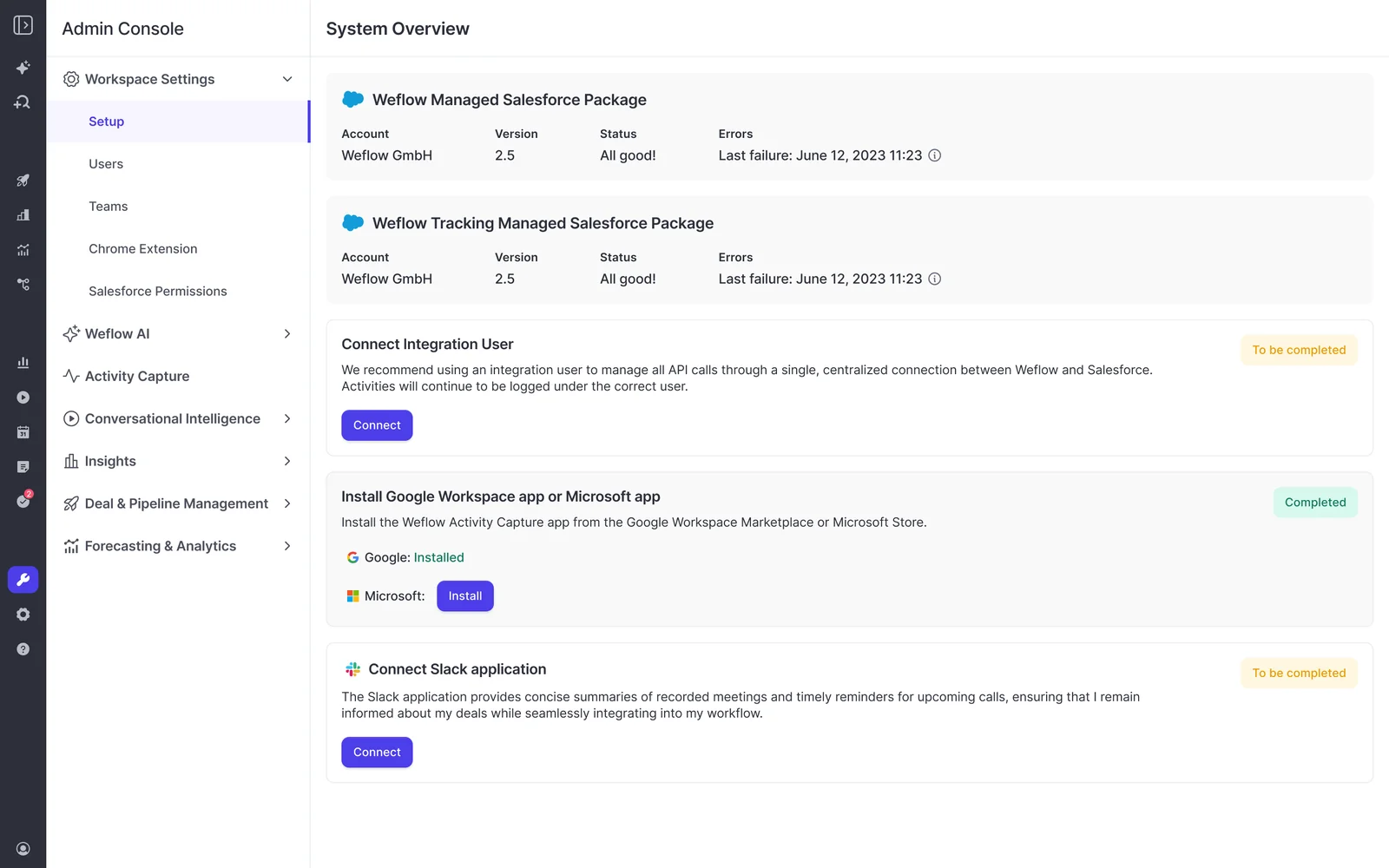
Weflow's install is two Salesforce managed packages, one integration user and one mail app installed centrally. It needs no code and nothing per rep.
- Technical implementation. A single 30 to 60 minute session with your Salesforce admin and your mail admin.
- Configuration. Team structure, methodology, which fields AI should populate, playbooks and deal warnings. This is where most of the time goes.
- Role-based rollout. Separate leadership and rep training, guided by our customer success team.
Time to live is typically two to four weeks, or four to six for a large org. Weflow doesn't charge for implementation.
How Weflow connects to your stack, AI assistants and warehouse
- Weflow integrates natively with Salesforce, Gmail, Google Calendar, Outlook, Zoom, Microsoft Teams, Google Meet and Slack, and pulls Outreach dialer calls in as recordings.
- Weflow Conversation Intelligence records meetings on Zoom, Teams, Google Meet and Webex. The desktop app records without a notetaker joining, including softphone calls that run through the computer.
- Our official read-only MCP connector gives Claude, ChatGPT and other assistants playbooks, call summaries, transcripts, forecast calls and pipeline metrics. An admin switches it on per workspace, with a separate toggle for full transcripts.
- Per-rep breakdowns over MCP cap at 25 owners, so a large org gets aggregate answers unless you narrow the question to a team.
- The REST API bulk-exports transcripts, metadata, scores and signals as JSON or CSV, and feeds BI tools such as Tableau and Looker.
- Weflow has no native Snowflake, Databricks or BigQuery connector. Teams that centralize data in a warehouse use the API.
- Weflow isn't an integration platform. Agents reason over customer-facing data mapped to Salesforce, not your ERP or finance systems.
What Weflow costs per seat, with AI in the seat
Every Weflow product carries a published per-seat price with AI included. Only Agent Builder meters, and it does so in hard tiers.
Weflow's published prices for each product and bundle
Weflow sells three standalone products and three bundles. All are priced per user per month and billed annually.
| Product or bundle | What it includes | Price per user per month |
|---|---|---|
| Weflow Activity & Contact Capture | Email, meeting and contact sync into Salesforce, with activity insights and reports | $19 |
| Weflow Conversation Intelligence | Recording, transcripts, summaries and AI field updates, plus the desktop app and Weflow Mobile Copilot | $39 |
| Weflow Deal Intelligence & Forecasting | Deal signals, warnings, pipeline analytics and forecast roll-ups | $39 |
| Weflow Revenue AI Foundation | Activity & Contact Capture plus Conversation Intelligence | $49 |
| Weflow Revenue AI Business | Revenue AI Foundation plus Deal Intelligence | $59 |
| Weflow Revenue AI Enterprise | All Weflow products, including Forecasting | $79 |
Recording lives in Weflow Conversation Intelligence, not in Weflow Activity & Contact Capture. That's why Weflow Revenue AI Foundation pairs the two. Bought together, they cost about 16% less than the two standalone prices.
Every plan includes Ask Weflow AI and Agent Builder Free.
Which Weflow AI features we never meter, and the one we do
Everything at Weflow is priced per seat except Agent Builder, our only consumption-priced product.
| Feature | How it's charged |
|---|---|
| Ask Weflow AI | In the seat, unmetered, under a fair use policy no customer has reached |
| AI summaries | In the seat, unmetered |
| AI field updates | In the seat, unmetered |
| Recordings and transcripts | In the seat, unmetered |
| AI templates | In the seat, unmetered |
| View-only licenses | Free |
| Agents you build in Claude or ChatGPT over our API or MCP connector | Free, with no agent actions drawn |
| Agents run inside Weflow Agent Builder | Metered in actions, per workspace |
We drew the line there on purpose. Agent Builder is the one product that can be pointed at unlimited data on a schedule, so it's the one that genuinely consumes tokens at scale. Metering the everyday AI is what makes teams ration it.
| Agent Builder tier | Price per workspace per month | Agent actions |
|---|---|---|
| Free (in every plan) | $0 | 25 |
| Growth | $299 | 500 |
| Scale | $999 | 2,500 |
| Enterprise | Custom | Custom volume |
Each tier is a hard boundary you explicitly buy into, so there's no surprise bill. Actions scale with what the agent does:
- A simple lookup is one action.
- A research agent is about three.
- An agent reasoning across transcripts and activity is about five.
Standard workflows such as meeting prep, summaries, field updates and coaching scorecards never draw on the allowance.
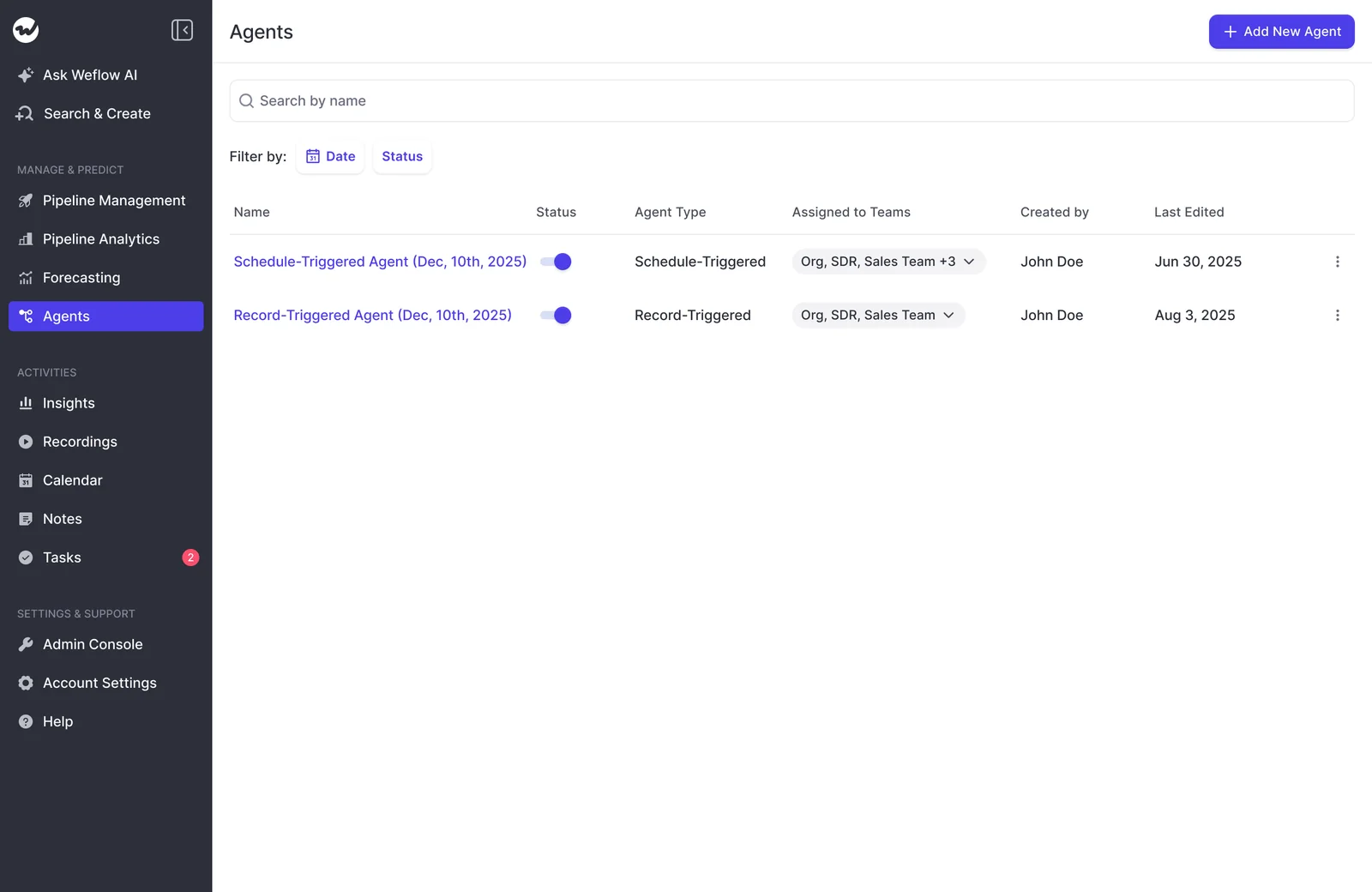
Weflow contract terms: minimums, discounts and seat changes
- The minimum is 10 users per product or bundle.
- Contracts run 12 months. We don't offer shorter terms.
- Three discount layers stack: bundle, volume and multi-year.
- The meaningful volume discount starts around 30 to 40 seats.
- Viewer and analytics seats are free, and you can reallocate between seat types each quarter as your team shifts.
- There's no contractual right to reduce seats mid-term, though you can reassign a seat when someone leaves.
- Weflow charges no platform fee and no implementation fee.
Backstory vs Weflow pricing, line by line on your RFP
Weflow gives you a figure for every line of your RFP. Backstory gives you a model you fill in through a proposal. Buyers now write RFPs specifically to surface the difference:
"Clearly identify any separately charged AI, conversation intelligence, recording, storage or consumption-based components. State whether future AI capabilities may be subject to additional fees."
| RFP line | Backstory.ai (People.ai) | Weflow |
|---|---|---|
| Published prices | None. Every figure comes through a proposal. | Yes, for every product, bundle and Agent Builder tier |
| Unit of the base charge | Platform fee per connected customer-facing person | Per user per month, billed annually |
| What's included in the base charge | The full product. Capture is part of the platform, not a separate SKU. | The product or bundle you buy, plus Ask Weflow AI and Agent Builder Free |
| What meters on top | A pre-packaged AI answers allotment, pooled org-wide. Signals is priced through your CSM. | Only Agent Builder above its free tier, per workspace |
| How the AI meter is bounded | Admins limit AI to selected records with filters. Use above the allotment carries into the renewal resize. | Hard tiers of $299 for 500 actions and $999 for 2,500. Everyday AI isn't metered. |
| Who's free | Viewers such as managers, finance and ops | Viewer and analytics seats, reallocated quarterly |
| Recording | Not offered. Ingests from Zoom, Teams, Meet, Webex and Gong, so recording needs a second tool. | In the Weflow Conversation Intelligence seat, with the desktop app and Weflow Mobile Copilot |
| What happens at renewal | True Forward resizes the next term to actual usage | Seat pricing doesn't move with AI usage. The renewal follows your seat count and plan mix. |
| Mid-term changes | Nothing cut off or back-billed mid-term | No mid-term seat reduction. Seats reassign when someone leaves. |
| Contract minimums | Confirm in the proposal | 10 users per product or bundle, 12-month term |
How to build the per-seat business case for your CFO
Finance prefers a larger predictable line to a smaller variable one. Your memo needs to show which number is which.
Weflow's side computes from published prices. Backstory's side is a set of inputs you get in writing from the proposal.
"There's a lot of companies right now that take AI and then basically have a per seat license fee and then put a consumption fee on top of it, which makes it really unreliable when you price it."
- Split your list into connected people and viewers. Group roles by what each one actually uses. Half the names on a seat list rarely need the full product.
- Size the AI. On Weflow, everyday AI is in the seat, so this line is zero unless you buy an Agent Builder tier. On Backstory, get the allotment size in writing, then find out which records the filters will cover at that size.
- Add recording. Backstory needs a separate recording tool and a second invoice. Weflow's Conversation Intelligence seat carries recording.
- Model the renewal. Backstory resizes to actual usage, so price year two at the adoption you're hoping for. Weflow's year two follows seat count.
Here are our reference points at about 62 seats, at list price before negotiation:
| Plan mix for 62 seats | Annual cost |
|---|---|
| Weflow Activity & Contact Capture only, at $19 | About $14K |
| Weflow Revenue AI Foundation (capture plus recording and CI) for everyone, at $49 | About $36K |
| Mixed plans: most reps on a lighter bundle, a handful of managers on the full platform | About $45K |
| Weflow Revenue AI Enterprise for everyone, at $79 | About $58K |
At 62 seats you're above the 30 to 40 seat volume break, so the quote lands below these list figures. We quote euros and dollars at the same number, which means dollar buyers effectively pay a little less.
If you put Backstory's reported $30 to $50 per user range in the memo as a placeholder, label it as reported quotes. Leave the answers line and the recording line open until the proposal fills them.
Questions to send Backstory before you build the memo:
- What is the platform fee per connected customer-facing person?
- Exactly who on our list counts as connected, and who is a free viewer?
- How many answers does each connected person bring, and what is our pooled total?
- At the proposed allotment, which accounts and opportunities will the record-selection filters cover?
- What does Signals cost?
- On what basis will True Forward resize our next term, and how do you project that number?
- Which recording tool do you assume we'll use, and what does it add per seat?
How to switch from Backstory to Weflow at renewal
The renewal window is your decision point. The main technical decision is which Salesforce object your emails land in.
Start your evaluation before True Forward resizes your next term
Evaluate Weflow before Backstory sizes your next term. Once that proposal is on the table, your leverage shrinks.
- Before Backstory's renewal proposal arrives. Run our free 14-day POC on your own Salesforce org.
- Early in the window. Get your Salesforce admin and mail admin into one 30 to 60 minute session. On Microsoft 365, the Microsoft admin has to start the install from Weflow's admin console, so IT's approval sets your earliest go-live date.
- The following two to four weeks. Configure and roll out by role, with our customer success team leading.
- Before you sign. Treat it as a commitment. Our 12-month term has no mid-term seat reduction.
Choose EmailMessage or Task when you replace Backstory's Tasks
Backstory writes emails to Salesforce as Tasks only. Weflow writes either EmailMessage or Task, chosen per configuration. The captured content is identical either way; the choice changes reporting, storage and access control.
You'll also still see Backstory's Salesforce package and its peopleai-prefixed fields in your org.
| Consideration | EmailMessage | Task |
|---|---|---|
| Activity reporting | Sits outside the activity reporting model, so emails don't appear next to meetings and calls | One report spans tasks and events, so activity reports built on Backstory's Tasks keep working |
| Storage | Roughly seven times heavier per record | Lighter, which matters near your storage limit |
| Thread structure | Native From, To, Cc and thread structure | No thread structure |
| Multiple recipients | One record relates to up to 50 recipients | Less suited to reconstructing who was on a thread |
| Access control | Fewer Salesforce access controls | More Salesforce access controls |
| What Weflow shows | Weflow's insights read it | Weflow's insights read it |
| Who picks it | About nine in ten Weflow customers | Teams with task-based reports they don't want to rebuild |
When to choose Weflow, and when to stay on Backstory
Fit decides this one. Here's how it breaks down.
| Choose Weflow if | Stay on Backstory if |
|---|---|
| You run on Salesforce and want a published per-seat price for your business case | You run on Microsoft Dynamics 365 or Oracle, or several CRMs at once |
| You want everyday AI on every deal, not on admin-selected records | You're a large enterprise whose leaders want answers pushed through Slack, MCP or the CRM |
| You need call recording without a second vendor and a second invoice | You already pay for a recording tool and want Backstory to read its transcripts |
| Your finance team wants AI in the seat, with metering confined to Agent Builder tiers | You're comfortable sizing up front and resizing at renewal, in return for no mid-term cutoff or back-billing |
| You want warnings you configure on your own fields and cycle length | Your EU data residency requirements allow US-only hosting, and multi-CRM support matters more |
If Weflow fits, you can score it without booking a call. Walk through the product yourself, no call required.
Backstory and Weflow pricing questions RevOps leaders ask
Do managers and finance need a paid Backstory seat?
No. Backstory's platform fee follows connected customer-facing people whose activity it ingests. Viewers such as managers, finance and ops use Backstory free, and adding them doesn't raise the fee.
Can Backstory cut off AI or back-bill you mid-term?
No. Under True Forward, Backstory doesn't cut off or back-bill usage above the answers allotment during the term. That usage carries into the renewal, where Backstory resizes your next term to actual use.
Does Backstory record sales calls?
No. Backstory ingests recordings and transcripts that Zoom, Microsoft Teams, Google Meet, Webex and Gong already hold. If you need recording, that's a second tool alongside Backstory.
Does Weflow charge extra for AI summaries or Ask Weflow AI?
No. AI summaries come in the Weflow Conversation Intelligence seat, and Ask Weflow AI comes with every Weflow product and bundle. Neither is metered. Ask Weflow AI runs under a fair use policy that no customer has reached.
What counts as one Weflow Agent Builder action?
Weflow Agent Builder actions scale with what the agent does. A simple lookup is one action, a research agent about three, and an agent reasoning across transcripts and activity about five. Standard workflows such as meeting prep, summaries, field updates and coaching scorecards are never metered.
Do agents built in Claude or ChatGPT on Weflow cost extra?
No. Agents you build in Claude, ChatGPT or a data warehouse over Weflow's public API or MCP connector draw no agent actions. Only actions run inside Weflow's own Agent Builder are metered.
Which Weflow bundle includes call recording?
Recording lives in Weflow Conversation Intelligence, which includes the desktop app and Weflow Mobile Copilot. Weflow Revenue AI Foundation pairs it with Weflow Activity & Contact Capture at $49 per user per month. Weflow Activity & Contact Capture alone doesn't record calls.
Can you reduce Weflow seats in the middle of a contract?
No. Weflow contracts run 12 months with no contractual seat reduction mid-term. You can reassign a seat when someone leaves, and viewer seats reallocate quarterly.
Does Weflow work with Microsoft Dynamics 365 or Oracle?
No. Weflow is built for Salesforce teams and works exclusively with Salesforce. For Dynamics 365, Oracle or multi-CRM orgs, Backstory is the better fit.
Where do Backstory and Weflow host data for EU teams?
Backstory hosts customer data on AWS in the United States, with US-East as primary and US-West for disaster recovery. Weflow stores your data in the region where your Salesforce instance sits, so a European Salesforce org keeps its Weflow data in Europe. Video recordings are the exception, held by Weflow and streamed back.










