Weflow vs Clari for AI Forecast Projection: Data History Needed and Time to First Forecast (2026)
Learn how Weflow vs Clari handle AI forecast history, first forecast timing, and rollout tradeoffs.



If yIf your Clari renewal is coming up, the real question isn't whether a replacement forecasts as well. It's how soon the AI number becomes usable after you switch, and whose history it learns from.
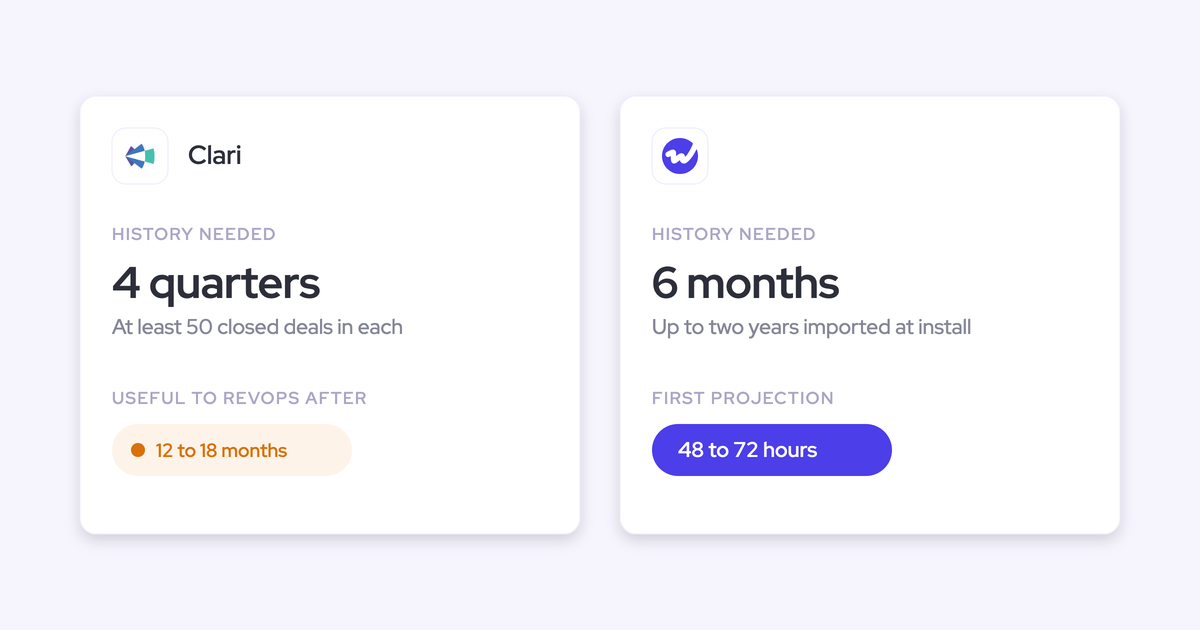
Weflow Deal Intelligence & Forecasting reads the history already in your Salesforce: it imports up to two years at setup, needs at least six months, and has the first projection ready 48 to 72 hours after the import.
Clari Forecast's projection, on the other hand, learns from pipeline it observes after you adopt Clari, and buyers tell us it takes 12 to 18 months before RevOps finds it useful.
Keep in mind that these figures measure different clocks, so we define each one below instead of setting hours against months. Our 48 to 72 hours also holds only if your Salesforce history is usable, so we'll show you how to check yours before you decide.
How Weflow and Clari compare on AI forecasting at a glance
The biggest differences come down to where the AI projection's history comes from, how accuracy is tracked, and whether you can see a price before a sales call.
| Capability | Weflow | Clari (now sold as Salesloft) |
|---|---|---|
| AI forecast prediction | Low, middle and high range from 50+ deal signals and up to two years of imported Salesforce history. Needs six months of history, is ready 48 to 72 hours after the import, refreshes nightly, and shows no range when it isn't confident. No adjustment for ramping reps. | Clari Forecast: lands close to the quarter once running. Buyers report 12 to 18 months before RevOps finds it useful. It looks about three months ahead, and Clari Copilot call data doesn't feed it. Salesloft AI Forecast: new business in the current quarter only. Needs four prior quarters of 50+ closed deals each, plus an engineering evaluation per team. |
| Forecasting setup and rollout | Free onboarding run by Weflow, with a managed service option. RevOps configures fields, hierarchy, formula fields and weighting in the Admin Console. Forecasting takes longer than capture because it encodes your operating cadence. | Admins can now build forecasts themselves. Quotas are re-entered from Salesforce and changed through an Excel round trip, saved views are edited one by one, and each user connects their own Salesforce account. |
| Forecast accuracy tracking | Built in, no setup. Accuracy per rep, manager and team, against a field the admin picks. It grades submitted calls, not the AI model, and needs about a quarter of locked submissions. | Week-by-week history of each forecast call, but no accuracy measure. Teams calculate accuracy by hand or export forecast history as a CSV to a BI tool. |
| Integrations with other tools | Salesforce, Gmail, Google Calendar, Outlook, Zoom, Microsoft Teams, Google Meet, Webex, Slack, the Outreach dialer, and Aircall, CloudTalk and Dialpad. No native warehouse connector. | Salesloft syncs with Salesforce, Microsoft Dynamics, Snowflake, Databricks, Gmail, DocuSign, ZoomInfo and LinkedIn. Recording covers Zoom, Teams, Meet and Webex. |
| Access from AI assistants (MCP) | One read-only connector returns forecast calls, per-rep metrics, targets and the opportunity IDs behind them, plus call data. Per-rep breakdowns cap at 25 owners. | Three separate servers. Forecast gives numbers and snapshots but no deal-level data. Copilot gives calls only. Salesloft needs a paid Agentic add-on and returns no raw transcripts. |
| Raw data access outside the tool | REST API bulk export of transcripts, metadata, scores and signals as JSON or CSV. Forecast submissions come out through the API. | Forecast history exports as a CSV. Salesloft syncs data to Snowflake and Databricks. |
| Pricing | Published. Weflow Deal Intelligence & Forecasting is $39 per user per month, and bundles run $49 to $79. 10-user minimum, annual billing, no implementation fee. | No published seat prices, and every pricing page routes to a sales call. Salesloft sells Advanced and Elite packages with Forecasting as an add-on. |
The first row is what decides most renewals, so the next two sections break it down: where each projection's history comes from, and what each time figure actually measures.
Why RevOps teams weigh Weflow against Clari at renewal
Most teams compare Weflow and Clari inside a renewal window. Clari has been sold under the Salesloft brand since September 2026, and its contract often ends at year end alongside other tools.
That leaves only a few months for the whole plan: pick in Q3, implement in Q4, and go live before the new fiscal year.
As one RevOps leader told us:
"...Apollo's at the end of the year, Clari's at the end of the year. So I have a window here that I'm trying to get the right solutions in."
Most leaders in that position already expect a replacement to cover about 80% of what Clari does, so a feature grid won't sway them. As another put it:
"I don't see your solution being better than Clari. I see your solution being able to do at least 80% of what we had with Clari."
What actually decides it is narrower. In many deployments, the AI prediction is the one part of Clari people still check every quarter, because it tends to land near the number.
So the fear of switching is specific: you lose the projection that finally works and wait another year for a new one to learn.
That makes this a one-axis decision: does the next AI projection work from the history you already have, or does it restart the learning clock?
Where each AI forecast projection gets its history
Weflow's projection reads deals that already happened in your Salesforce, while Clari Forecast learns from pipeline it observes after you adopt Clari. Salesloft AI Forecast also trains on Salesforce history, but it sits behind an explicit gate and an engineering review.
| Weflow AI projection | Clari Forecast projection | Salesloft AI Forecast | |
|---|---|---|---|
| History source | Your Salesforce. Up to two years imported at setup from field history tracking, falling back to Salesforce's opportunity history. | Pipeline history built up after you adopt Clari, per buyers. | Your Salesforce Opportunity, OpportunityHistory and Account objects. |
| Stated minimum history | Six months of opportunity history. | No stated minimum in public or buyer evidence. | Four prior quarters with at least 50 closed opportunities each, an average of at least 10 open opportunities a day this quarter, and an engineering evaluation per team. |
| What the model reads | 50+ signals per opportunity: seasonality, the seller's own win rate, conversion rates, communication cadence, whether a next meeting is booked, and deal health against your sales methodology. | CRM pipeline fields. Clari Copilot call data doesn't feed it. | Opportunity features such as deal size, deal stage and days open. |
| Forward scope | From the current period forward, shown in Pacing. A separate model runs per forecast configuration. | About three months ahead. | New business closing in the current quarter. |
| When it isn't confident | Shows no range and says why. The range widens when the business is changing. | Not stated in public or buyer evidence. | Teams that don't qualify see a weighted pipeline based on stage probabilities instead. |
The "what the model reads" row matters more than it might seem. Clari's forecasting product and Clari Copilot don't share data, so the projection runs on CRM fields that reps only half-maintain. As one Clari customer put it:
"I honestly don't see the value today of having copilot and forecast with Clari because they're not talking to each other."
Weflow's projection, by contrast, reads signals like communication cadence and whether a next meeting is booked.
These come from Weflow Activity & Contact Capture and Weflow Conversation Intelligence, which write every email, meeting and call outcome into your Salesforce. If you run Weflow forecasting without them, the roll-up results will be weaker.
After all, a projection is only as good as the Salesforce history behind it, which is something we learned firsthand:
"...We actually launched a prediction forecast before we had automated Salesforce data capture, and we found that it was not that accurate, which made us realize you have to solve it end to end."
What "time to first forecast" means in Weflow and Clari
There are four clocks here, and each headline figure belongs to a different one. Weflow's 48 to 72 hours is the time to the first AI projection after the history import, while Clari's 12 to 18 months is the buyer-reported time until RevOps trusts the projection.
| Milestone | Weflow | Clari |
|---|---|---|
| First AI projection | 48 to 72 hours after the history import, with six months of history in place. | Not stated in public or buyer evidence for Clari Forecast. Salesloft AI Forecast switches on per team after an engineering evaluation. |
| Full forecasting go-live (cadence, hierarchy, roll-up) | Longer than the roughly two weeks capture and conversation intelligence take, because you're encoding who submits, how often, at what level and against which quota. | Not stated in public or buyer evidence. |
| First scored accuracy baseline | About one quarter of locked submissions. | None in the tool. Teams calculate accuracy by hand or in a BI tool. |
| Projection trusted by RevOps | No buyer-reported figure yet. The range sits beside your roll-up from its first night, so you see the gap every week. | 12 to 18 months after adoption, buyer-reported. |
If you're buying your first forecasting tool, here's what you can realistically expect from Weflow in one fiscal year:
- The AI range lands within days of the import.
- The roll-up cadence goes live once your team agrees how it forecasts.
- The first scored accuracy view arrives after one closed quarter.
If your Salesforce already holds four quarters with 50+ closed deals each, Salesloft AI Forecast can also qualify after its review, though it only covers new business in the current quarter.
How to check your Salesforce history before you switch
Since Weflow's speed depends on your Salesforce history, it's worth checking yours before you decide. These six steps show you what the projection will have to work with.
- Look at field history tracking on the fields you forecast on: In Salesforce Setup, open the Opportunity object and review Set History Tracking for Stage, Amount and any custom ARR or booking amount field. Weflow can only import a custom field's past if tracking was on for it; otherwise, year-on-year comparisons on that field start at go-live.
- Count your closed opportunity history: Run a report of opportunities closed in the last six months, grouped by the record type or opportunity type you'll forecast on.
- Look for skipped stages: Run a stage history report to find deals that jump from the first stage straight to Closed Won. When stages get skipped, every stage-based number, including time in stage and conversion rates, gets less reliable.
- Find out whether stage history survived your last CRM migration: Migrations from a home-grown CRM often carry over each deal's current and final status, but not the path it took. If that's the case, your usable stage history starts at your Salesforce go-live.
- Look at each motion on its own: Since Weflow builds a separate model per forecast configuration, new logo and renewal each need their own history, so a renewal motion that has never run in Salesforce has nothing to learn from yet.
Set three things before go-live:
Switch on history tracking for any custom amount field you'll compare year on year.
- Settle the forecast configuration (amount field, stage or forecast category basis, record type filters), because every later change re-runs the import.
- Grant users field access to the Weflow managed-package fields on the Salesforce user record. Without it, a user sees an empty forecast.
If the history falls short, Weflow shows no range and says why. It doesn't show you a weaker number and let you find out in front of the CRO.
How Weflow Deal Intelligence & Forecasting works, point by point
Forecasting is one of three modular products in Weflow, the Revenue AI Orchestration platform for sales, customer success and RevOps teams.
Built for Salesforce teams, it brings three forecast methods, built-in accuracy tracking and one MCP connector into one place, all configured by your RevOps team.
How Weflow's AI projection returns a range, or none
Weflow's AI projection returns a low, middle and high value, refreshed every night. The range widens when your business is changing (for example, with new products, motions or territories), and when the model isn't confident, it shows no range and tells you why.
Every opportunity is scored on its own signals and its seller's historical win rate, so a large deal that's being poorly worked gets projected down, whatever stage it's in.
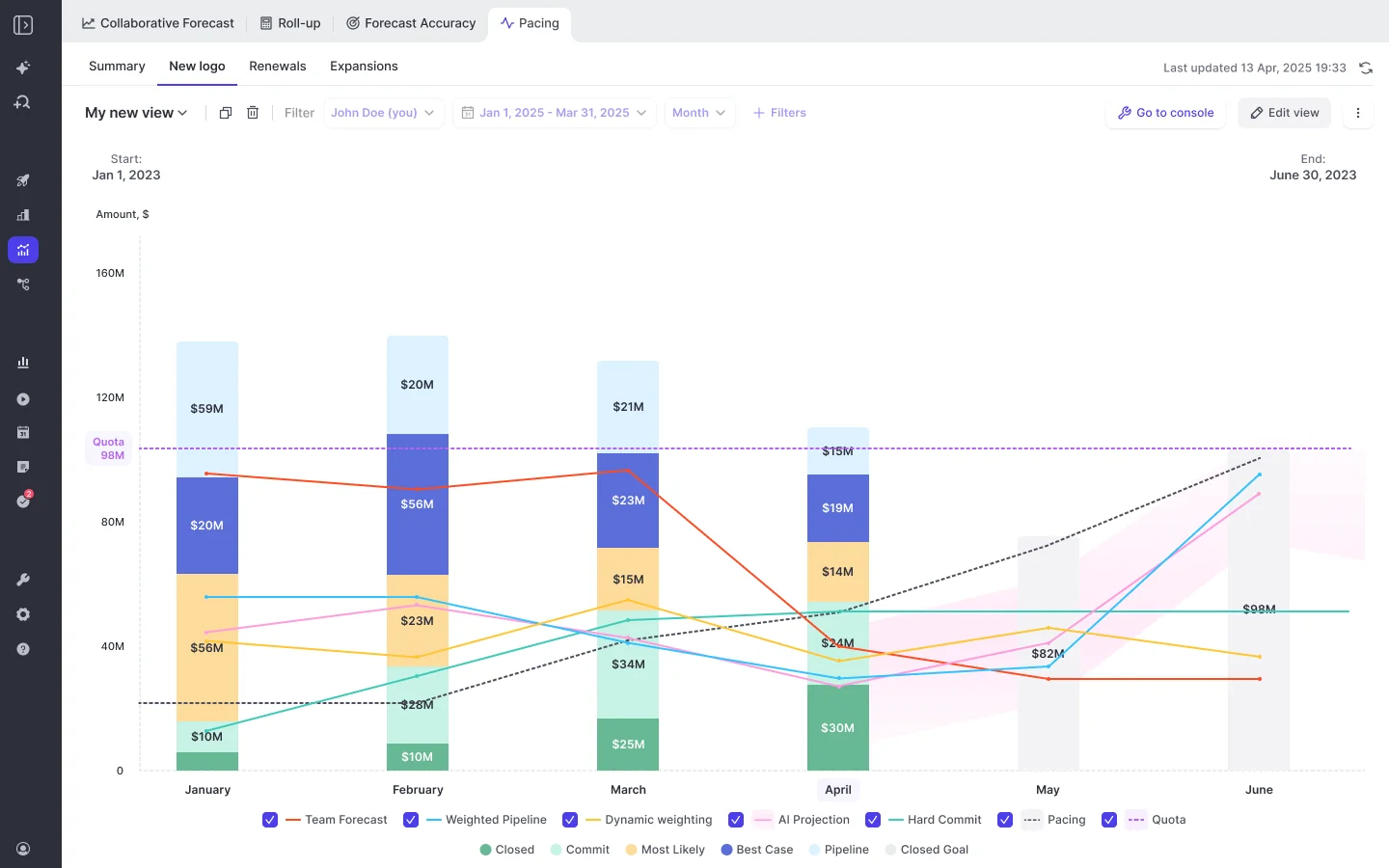
In the Pacing view, the projection sits next to two other numbers: your team's roll-up and a dynamic weighted forecast. We recommend this setup because leaders tell us they already live with three numbers that never converge.
"The AI prediction is not one number, it is actually a mid, high, and base case, so you have a corridor, because the reality is it is a corridor and a lot of things can happen."
| Method | What it tells you | What it can't see |
|---|---|---|
| AI projection | Where history and deal behavior say you'll land, as a range | Judgement from the people working the deals |
| Roll-up | What reps and managers commit to, deal by deal | Stage probability, unless you forecast on a weighted field |
| Dynamic weighted forecast | What the pipeline implies from stage win rates over a rolling window, such as the last 90, 180 or 365 days | Anything about a single deal; it's only accurate across many |
The gaps between the three then become your forecast-call agenda. A rep whose commit sits far above the weighted number is telling you something, and so is one whose call doesn't move all quarter.
And because each forecast configuration gets its own model, renewals aren't projected on new-logo conversion rates. This matters in a renewal-heavy business, where renewals sit in early stages but still close at high rates.
One limitation to keep in mind is that the projection doesn't yet adjust for ramping reps, so a new hire's deals are projected from very little history of their own. The team-level range absorbs this, but read a single new rep's line with that in mind.
How you set up and roll out forecasting in Weflow
Onboarding is free and run by our team. If you don't have the RevOps bandwidth, we also offer a managed service where we do the heavy lifting and your team just answers questions and unlocks access. Here's how the setup works:
- A technical call of under an hour with your Salesforce and mail admins connects the systems.
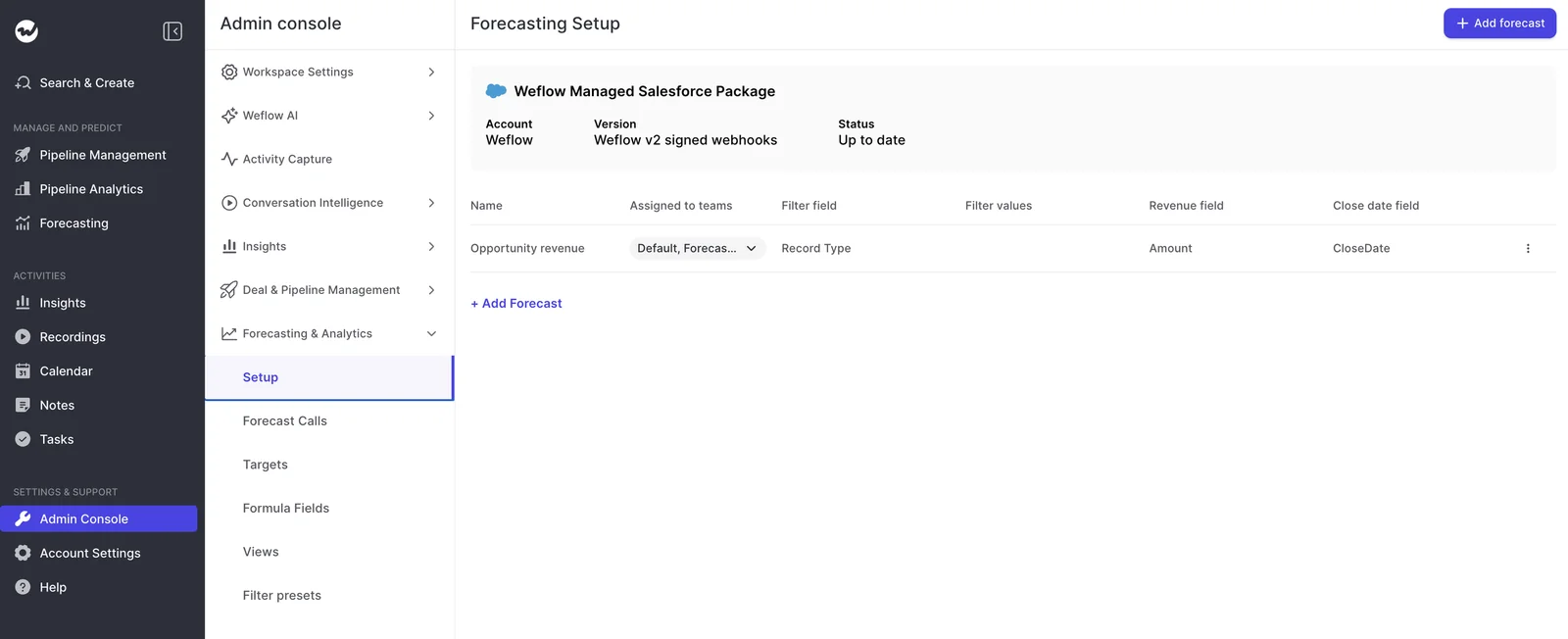
- You build forecast configurations in the Admin Console. Each one maps a revenue field (Amount, a custom currency field or a number field like Quantity), a forecasting field (Stage, Forecast Category or a custom picklist), a date field, and an optional filter such as Record Type.
- You set the hierarchy. It follows the Salesforce Manager field by default, or you can build a Weflow hierarchy by drag and drop, where one person can sit in several teams.
- You add formula fields, targets and the dynamic weighted forecast.
- Weflow runs the history import, which reads your configurations' field mapping (that's why configurations come first).
- You roll out by role, with separate training for leadership and reps.
Forecasting takes longer to set up than capture or conversation intelligence because it isn't just a tool. It encodes your operating cadence: who submits, how often, at deal or manager level, and against which quota and budget.
After go-live, RevOps can change the forecast without a vendor ticket. A new forecast call, formula column or hierarchy change is just an edit your admin makes in the Admin Console.
Just note that each configuration change re-runs the history import. This takes a day or two (longer for a large org), and history-based views show partial numbers while it runs.
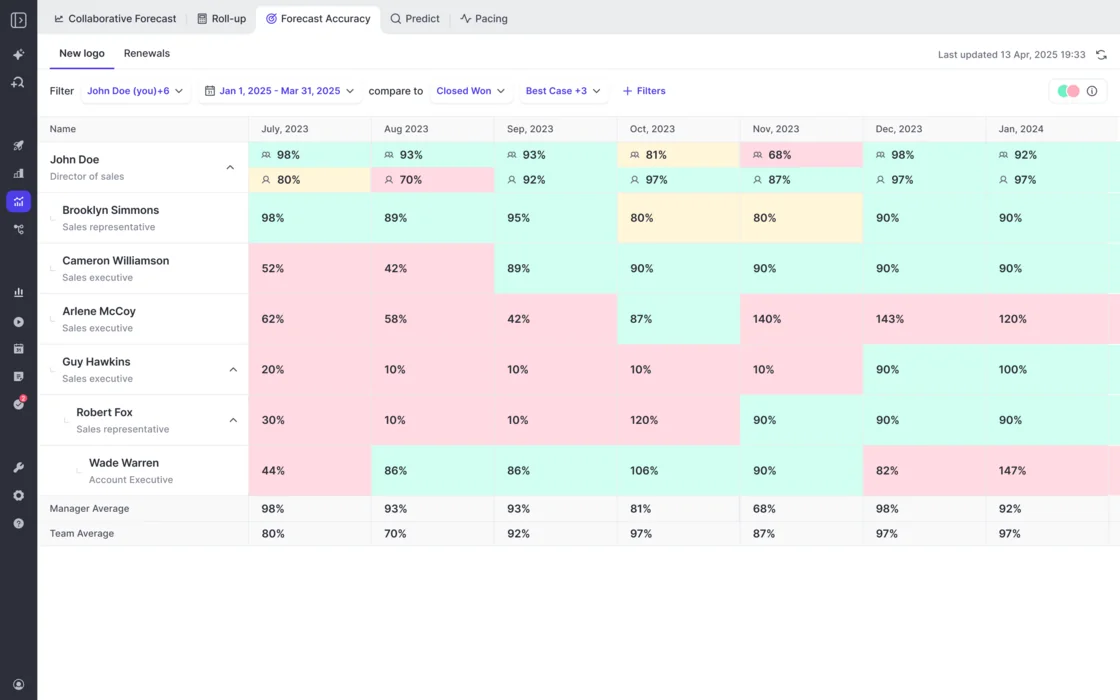
How Weflow tracks forecast accuracy by rep, manager and team
Forecast accuracy tracking is built into the Forecasting module, with nothing to switch on. Your admin chooses the field accuracy is measured against, such as Closed Won, so a team forecasting something other than closed-won revenue can still grade itself.
The accuracy view shows:
- Accuracy per period for each rep, manager and team.
- Manager and team averages on their own rows, so you can read a manager's own call against the team's.
- Reps who closed far more than they forecast, flagged as inaccurate next to reps who closed less. Sandbagging hides pipeline just as over-calling inflates it.
There are two limitations, though:
- It grades the calls people submit, not the AI model. To judge the projection, you watch its range against your submitted calls and closed results.
- It needs about a quarter of locked submissions before rep-level accuracy means anything. In the first weeks, there are submissions but no outcomes to score yet.
This is also why reps should submit their own calls: a forecast entered by one person for everyone only measures that one person.
Which tools Weflow connects to around your forecast
Weflow connects natively to the systems your forecast inputs come from, rather than offering a catalogue of connectors like an integration platform.
- CRM: Salesforce, with live reads for forecast views and edits written back within seconds. Weflow works only with Salesforce.
- Mail and calendar: Gmail, Google Calendar and Outlook.
- Meetings: Zoom, Microsoft Teams, Google Meet and Webex, plus Slack.
- Dialers: The Outreach dialer, which your admin connects directly, and Aircall, CloudTalk and Dialpad, which our team activates.
- BI and warehouse: Tableau and Looker through the API. There's no native Snowflake, Databricks or BigQuery connector, so data reaches a warehouse through the API as well.
What Claude and ChatGPT can read through Weflow's MCP connector
Weflow's MCP connector is a single read-only connection that answers forecast questions and the deal questions behind them.
An admin switches it on per workspace, with a separate toggle that decides whether assistants read full transcripts or only AI summaries. Claude, ChatGPT and any client that supports remote MCP servers all use the same URL.
For a chosen close-date period, scoped to you or your team, it returns:
- Forecast calls, manager forecasts and targets, where you've configured them.
- Per-rep metrics: weighted and unweighted pipeline, closed-won amount and count, win rate, average deal size, average sales cycle length, coverage ratio and gap to forecast.
- The opportunity IDs behind those numbers.
- Call summaries, transcripts and playbook results.
Per-rep breakdowns cap at 25 owners, so a large org gets aggregate answers until you narrow the question to a team. The connector doesn't return email content or Salesforce field values, which is why teams run it alongside a Salesforce connector.
How you get Weflow forecast data out through the API
Teams feed a warehouse or BI tool through Weflow's REST API, which bulk-exports transcripts, metadata, scores and signals as JSON or CSV, on a schedule or on demand.
Forecast submissions, targets and roll-up data live in the Weflow app, not in Salesforce, so if you want to snapshot the roll-up into a BI tool, you'll need to pull it through the API.
How Clari Forecast and Salesloft handle the same points
Clari's forecasting core is strong, and plenty of teams are happy with it. Where it falls short is time to a trusted AI number, the forward horizon, accuracy measurement, admin round trips, and MCP access split across narrow servers.
How Clari's AI projection performs once it is running
To give credit where it's due, once Clari Forecast's projection has matured, buyers tell us it tends to land close to the quarter's actual result.
Getting there is the hard part, though. Buyers report 12 to 18 months after adoption before RevOps finds the projection useful, and even once it's running, it has two limits:
- It looks about three months ahead, so a team that needs a rolling twelve-month forecast has to build it outside Clari.
- Clari Copilot call data doesn't feed it, so it reads only what's in the CRM fields.
Neither public nor buyer evidence states a minimum history for Clari Forecast's projection.
Salesloft AI Forecast is a different product with its own rules. It only predicts new business closing in the current quarter, trains on your Salesforce Opportunity, OpportunityHistory and Account data, and gives each open deal a high, medium or low close probability.
Salesloft switches it on per team after an engineering evaluation. To qualify, a team needs:
- Four prior quarters with at least 50 closed opportunities each.
- An average of at least 10 open opportunities a day in the current quarter.
- Deals enabled, with new business settings, a deal amount field and fiscal quarters configured.
How you set up and change a forecast in Clari
Clari admins can now build a forecast themselves, which is a real improvement over needing Clari's support team. Routine changes, however, are still slow:
- Quotas already set in Salesforce have to be re-entered in Clari, with each parent level set separately.
- Changing a quota means downloading a file, editing it in Excel and uploading it again.
- Adding a global filter means editing every saved view by hand (one team we spoke with had 86).
- Adding a second date, such as a booking date finance sets apart from close date, means rewriting the forecast's formulas.
- Any derived metric has to exist as a Salesforce formula field first, because Clari can't calculate a field.
- A rep who leaves has to stay active until the quarter ends, or their bookings drop out of the roll-up.
- Every user has to connect their own Salesforce account to submit a forecast.
How Clari shows forecast history without an accuracy score
Clari Forecast keeps a week-by-week history of every forecast call, quota and read-only field, next to historical CRM totals, so a leader can see how each number moved through the current or a previous quarter.
What it doesn't compute is accuracy, so comparing what was called with what closed falls to RevOps every month or quarter. For Salesloft Forecast, admins export a two-year Forecast History Report as a CSV and match it against attainment in a BI tool.
Which systems the Salesloft platform connects to
To be fair, Salesloft connects more widely than Weflow on warehouses and CRMs:
- CRM: Salesforce and Microsoft Dynamics. Deals and Forecast run only on Salesforce.
- Warehouse: Snowflake and Databricks.
- Other data: Gmail, DocuSign, ZoomInfo and LinkedIn.
- Meetings: Zoom, Microsoft Teams, Google Meet and Webex.
What Clari's three MCP servers expose to AI assistants
Clari ships a separate MCP server for each product, and each one reaches only its own data. So connecting the whole stack to an assistant means setting up and maintaining three connectors.
| Clari Forecast server | Clari Copilot server | Salesloft server | |
|---|---|---|---|
| What it returns | Live forecast numbers and historical snapshots, scoped to each user's Clari permissions | Copilot conversation data | Accounts, people, users, opportunities, call summaries, extracted fields and key moments |
| What it leaves out | Deal-level opportunity data | Forecast and pipeline data | Raw transcripts, cadences and cadence performance |
| Who switches it on | A Clari admin, in Clari Studio | A Copilot admin, under Copilot Settings | A Salesloft admin, under Settings, Artificial Intelligence |
| What it requires | A Claude or ChatGPT Business or Enterprise subscription | A paid ChatGPT Business or Enterprise plan, or a Claude subscription | The paid Salesloft Agentic add-on |
| Supported clients | Claude and ChatGPT | Claude and ChatGPT, as a custom connector | Claude through the Connectors Directory, ChatGPT on Business or Enterprise |
How you get Clari and Salesloft data out
Forecast history exports as a CSV, available to admins and users with the Export Analytics permission. Beyond that, Salesloft syncs revenue data into Snowflake and Databricks, which suits teams that centralize go-to-market data in a warehouse.
What you give up by leaving Clari for Weflow
Switching comes with real tradeoffs, and you'll want them in your business case before your CRO finds them.
Clari forecasting features Weflow doesn't have yet
- Clari's roll-ups at 1,000+ reps are more mature than ours.
- Clari has a pipeline flow view, while Weflow matches pacing and waterfall but has no flow view.
- Clari's dashboard layer is richer, with widgets such as pipeline build by product family and an annual pacing view against the yearly target. Weflow has no funnel report and no dashboard plotting target against trend.
- Clari compares today's pipeline with the same week in earlier quarters, while in Weflow, a manager compares those snapshots by hand.
- Salesloft Forecast offers account-based forecasting, with a machine-predicted Pace number per account, designed for variable and consumption revenue.
- If your Clari projection is already trained and trusted, that trust is something you give up.
Weflow forecasting limits that apply on any switch
- The AI projection doesn't adjust for ramping reps.
- Weflow doesn't read targets from Salesforce. You enter them or bulk-upload a file, so a team that keeps targets in Salesforce ends up with two copies. That said, Clari re-enters quotas too, so this doesn't set the two tools apart.
- Forecast submissions live in the Weflow app, not in Salesforce, so if your rule is that reps work only in Salesforce, roll-up submission breaks it. The weighted forecast and AI projection still work, though, because both run on CRM data with no rep input.
- Weflow works only with Salesforce.
- Weflow forecasts deal-based revenue only, not consumption revenue.
- If your deal data lives on non-standard Salesforce objects, forecasting isn't always feasible, so we test for that during the trial.
What Weflow and Clari cost for forecasting
Weflow publishes per-seat prices with implementation included, while Clari and Salesloft don't publish seat prices, and both their pricing pages send you to a sales call.
| Weflow | Clari (Salesloft) | |
|---|---|---|
| Pricing model | Per seat. Agent Builder is the only consumption-priced product. | Quote-only. |
| Published list price | Yes, on weflow.ai. | No. clari.com/pricing and salesloft.com/pricing both route to a Talk to Sales page. |
| Forecasting module price | Weflow Deal Intelligence & Forecasting: $39 per user per month. | No published price. Our estimate from deals we see: $120 to $180 per user per month. |
| Bundles or packages | Weflow Revenue AI Foundation, $49 (capture and conversation intelligence). Weflow Revenue AI Business, $59 (adds Deal Intelligence). Weflow Revenue AI Enterprise, $79 (adds Forecasting). | Salesloft Advanced and Elite packages, with Forecasting, Account Agent, Coaching Agent and Dialer sold as add-ons. |
| Minimums and terms | 10 users, annual billing, 12-month standard term. Bundle, volume and multi-year discounts. | Not published. |
| Implementation fees | None. Onboarding is included. | No public pricing. Our estimate: $15k to $50k in professional services. |
| What costs extra (agents and MCP) | Agent Builder beyond the free 25 actions a month: Growth $299 for 500 actions, Scale $999 for 2,500, per workspace. Ask Weflow AI Pro is included in every plan. | The Salesloft MCP server comes with the paid agent add-ons. |
| Trial or pilot option | 14-day free trial, plus a three-month paid pilot for forecasting with an opt-out. | No free trial and no self-serve signup. |
If your CFO won't fund two forecasting tools while the Clari contract runs, you can start with Weflow Revenue AI Foundation for capture and conversation intelligence (a capability you don't have today), then move to Weflow Revenue AI Enterprise at renewal.
For a sense of scale, at roughly 62 seats, Foundation comes to around $36K a year and the full platform around $58K a year, and mixing plans lowers that further.
How a switch from Clari to Weflow plays out
Since your opportunity history lives in Salesforce, the AI learning clock doesn't restart when you leave Clari, but your submission history and accuracy baseline do.
What carries over from Clari and what starts fresh
| Item | On a switch | What happens |
|---|---|---|
| Opportunity history | Comes with you | Weflow imports up to two years from your Salesforce at setup. |
| Past forecast submissions | Starts fresh | Weflow collects from your first submission. Moving mid-quarter breaks nothing except the earlier weeks' submission history. |
| Calculated columns | Rebuilt | You recreate them as Weflow formula fields, such as Best Case plus Commit or net dollar retention. |
| Targets | Rebuilt | You enter them or bulk-upload a file in the Admin Console. |
| Saved views | Rebuilt | You build them as company or personal views in Weflow. |
| Accuracy baseline | Starts fresh | It needs about a quarter of locked submissions in Weflow. |
| Clari Copilot recordings | Comes with you | We import them, and recordings from people who've left go to a colleague you nominate. |
How a Weflow rollout fits your Clari renewal window
Here's the sequence from kickoff to your first locked quarter:
- Technical call, under an hour, with your Salesforce and mail admins.
- Forecast configuration: fields, hierarchy, targets and formula fields.
- History import. Its length depends on how much opportunity data your org holds.
- First AI projection, within 48 to 72 hours of the import.
- Cadence go-live: reps and managers submitting on your schedule.
- First locked quarter, when the accuracy view starts scoring.
You can run Weflow capture next to Clari until renewal. Since Clari reads activities from Salesforce, cleaner capture improves what Clari sees too.
Just turn off Clari's own capture once Weflow is writing activity, because two capture engines running together create duplicate activities.
A two-week trial is enough to prove capture and conversation intelligence, but not forecasting, because that means changing how your team runs its week.
For forecasting, we offer a three-month paid pilot, which is contractually the first three months of a multi-year agreement, with an opt-out at the end.
When to choose Weflow and when to stay with Clari
It comes back to the question we started with: when the AI number becomes usable, and whose history it learns from.
Choose Weflow if:
- You need a usable AI range inside this renewal window, and your Salesforce holds at least six months of usable opportunity history.
- Your Clari projection still isn't trusted, or your renewal motion has never had a forecast of its own.
- You want the AI projection, roll-up and dynamic weighted forecast in one pacing view.
- You currently calculate forecast accuracy by hand every period.
- You want RevOps to change the forecast in an admin console instead of through file round trips.
- You want forecast calls and the deals behind them reachable from Claude or ChatGPT through one connector, at a price you can put in the business case today.
Stay with Clari if:
- Its projection is already running and lands close each quarter.
- A PE sponsor has standardized on Clari across the portfolio(though Weflow capture can still feed Salesforce while Clari keeps the forecast).
- Your org doesn't have six months of usable opportunity history, in which case Weflow would show no range rather than a better one.
- You run roll-ups across 1,000+ reps, or leadership relies on the flow view, dashboard widgets or account-based forecasting.
- Your revenue is consumption-based.
See how Weflow captures activity, updates Salesforce fields from calls, and rolls up your forecast. Book a 30-minute demo.
Weflow vs Clari AI forecast projection: FAQ
What counts as six months of history for Weflow's projection?
It's your Salesforce opportunity history, imported from field history tracking or, failing that, Salesforce's opportunity history. The deal score that feeds the projection needs about six months of closed history to learn what separates won from lost deals in your business.
What does Weflow show when your history isn't enough?
No range, along with the reason why. The roll-up and dynamic weighted forecast keep working, and since Weflow snapshots every opportunity from go-live, your history builds from that day.
How far ahead does Weflow's AI projection look?
From the current period forward, in the Pacing view.
If you need a rolling twelve-month model, it's usually built from team-level rates like average days to close, average deal size and close frequency, and Weflow's per-rep metrics (available through the MCP connector) cover several of those inputs.
Can Weflow forecast renewals separately from new business?
Yes. Weflow builds a separate model for each forecast configuration, so new logo and renewal each get projected from their own history. Pacing, waterfall and the other analytics also run per motion.
Does Weflow's projection handle new territories and new products?
Yes, the range widens to reflect the uncertainty when you add new products, motions or territories.
Can we start with capture and add Weflow forecasting later?
Yes. Many teams start on Weflow Revenue AI Foundation while the Clari contract runs, then move to Weflow Revenue AI Enterprise. Starting with capture also means you'll already have weeks of clean activity data when you design the forecast.
What does a Weflow forecasting pilot look like?
A three-month paid pilot that forms the first three months of a multi-year agreement, with an opt-out at the end. That gives the roll-up a full cycle to run, which a two-week trial can't.
How much RevOps time does a Weflow forecasting rollout take?
The technical call takes under an hour, and most of the remaining time goes into configuration: hierarchy, forecast calls, targets and formula fields.
Capture and conversation intelligence typically go live in about two weeks, while forecasting takes longer because it encodes your cadence. With our managed service, we handle the configuration for you.
Who changes the forecast configuration after go-live?
Your admin does, in the Admin Console, without a vendor ticket. Since each change re-runs the history import (a day or two, longer for a large org), it's best to settle the configuration before you show the views to sellers.
Can we bring Clari Copilot call recordings into Weflow?
Yes. We import them to each person's Weflow user, and recordings from people who've left go to a manager or colleague you nominate. The import starts once your team has signed in to Weflow, so it happens after the training session.