Best sales forecasting software to replace Excel and Google Sheets
Decide which sales forecasting software can replace Excel or Google Sheets fastest and with least rollout risk


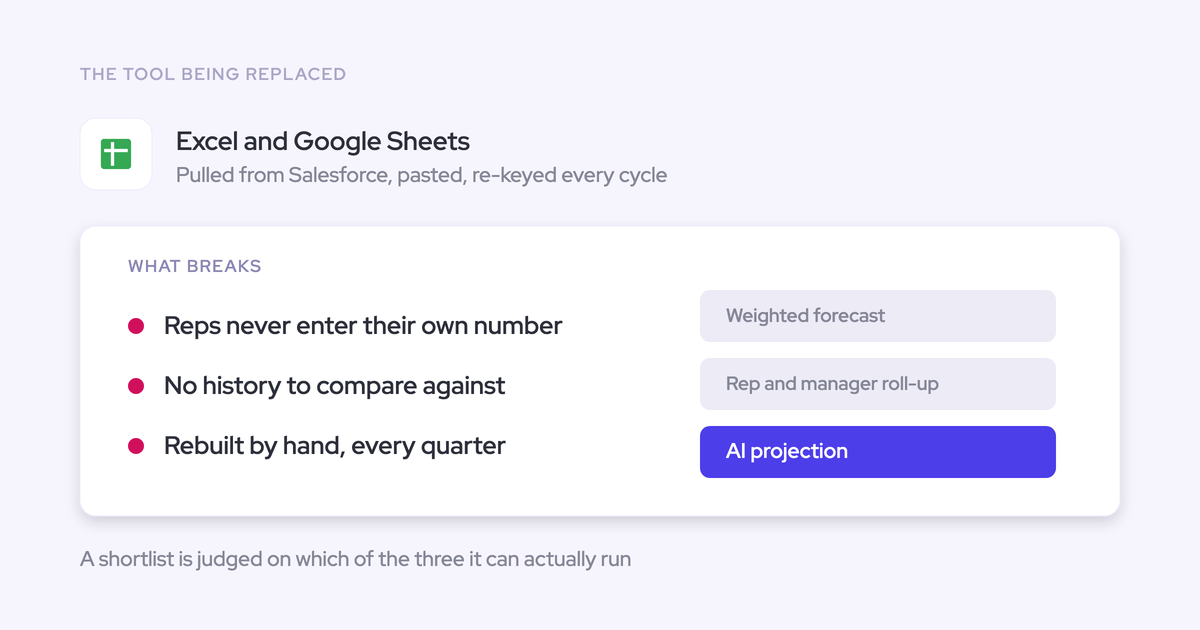

A forecasting tool replaces Excel only if it handles the whole weekly cycle: submissions, manager reviews, overrides, roll-ups, snapshots, and leadership reporting. If RevOps still exports Salesforce data and rebuilds the number afterward, the spreadsheet hasn’t gone anywhere. You’ve added another system to reconcile.
We’d shortlist Weflow for mid-market Salesforce teams, Salesloft Clari Forecast for complex enterprise roll-ups, and Gong Forecast for teams already committed to Gong.
Salesforce forecasting deserves a place too, especially if keeping every forecast interaction inside Salesforce is a hard requirement.
The test is the same for all four: show how next week’s forecast will run, including the work between meetings. The deal inspection behind that number matters just as much as the submission screen.
Weflow is the Revenue AI Orchestration platform for sales, customer success, and RevOps teams. It’s built for Salesforce teams. We’ll examine how Weflow deal reviews connect that inspection to forecasting, while making clear which forecast data stays outside Salesforce.
Sales forecasting software for spreadsheet replacement at a glance
Weflow is our first choice for this mid-market reader because it combines configurable forecasting with the activity and conversation data behind the deals.
That recommendation changes if your primary constraint is enterprise complexity, an established Gong workflow, or Salesforce-only access.
| Option | Best fit | Weekly workflow and history | Salesforce boundary | Rollout and cost |
|---|---|---|---|---|
| Weflow | Mid-market teams replacing manual roll-ups and incomplete deal records | Rep submissions, manager adjustments, configurable locks, opportunity snapshots, and forecast accuracy tracking | Opportunity edits write back. Submissions, targets, and roll-ups stay in Weflow. | Configure the cadence and revenue motions. Weflow Deal Intelligence & Forecasting costs $39 per user per month, billed annually, with a 10-user minimum. |
| Salesloft Clari Forecast | Enterprise teams with complex, established roll-ups | Mature roll-ups, forecast inspection, pipeline waterfall, and pacing comparisons | Validate the exact forecast, conversation, and Salesforce data connections in your proposed package. | Scope configuration ownership and services before signing. Request a complete production quote. |
| Gong Forecast | Teams that already use Gong for conversation intelligence and deal inspection | Management roll-ups, submission status, and inspection of deals behind the call | Validate hierarchy requirements, write-back, and access to forecast history separately. | Requires Gong Foundation plus the forecasting application. Include applicable AI credits in the budget. |
| Salesforce forecasting | Teams that prioritize one workspace and can own configuration internally | Test your required roll-up and adjustment process, then check whether available history answers leadership’s questions. | Forecast interactions remain inside Salesforce. | Check existing entitlements. Budget admin work, historical reporting, testing, and maintenance. |
What must spreadsheet-replacement forecasting software prove?
Spreadsheet-replacement software must remove the collection and reconciliation work, while preserving the flexibility that made the spreadsheet useful.
The awkward cases decide the purchase. Bring the renewal forecast, the manager who also carries a quota, and the extra column leadership requested last week.
Recreate submissions, overrides, and forecast locking
A forecasting system must retain the rep’s judgment separately from the manager’s adjustment and the final locked call.
- Have a rep submit the required categories and periods.
- Have a manager review the supporting deals and adjust the call.
- Test submission on behalf of an absent team member.
- Change a submission before the deadline, then attempt the same change after locking.
- Confirm that the original submission and subsequent adjustments remain distinguishable.
Support each revenue motion and roll-up path
Separate revenue motions need their own forecast logic when their owners, stages, or timing differ. Otherwise, renewals or expansion will return to Excel.
| Requirement | Validation question |
|---|---|
| New business, renewals, and expansion | Can each motion retain its own stages, category mappings, and roll-up? |
| Different owners and horizons | Can sales own current-quarter growth while customer success owns later renewal periods? |
| Overlays and matrix reporting | Can the forecast follow operating ownership without distorting Salesforce roles? |
| Consumption revenue | Does the product forecast account usage, or only opportunity bookings? |
| Revenue versus bookings | Which calculation does finance need, and does it belong in forecasting or a financial planning system? |
Preserve snapshots and measure forecast accuracy
A live pipeline view doesn’t establish what the team called last week. Forecast history must survive later changes to the underlying opportunities.
- Forecast history: Retain submitted values, submitters, periods, and manager adjustments.
- Pipeline history: Preserve enough prior state to explain slips, amount changes, new deals, and pulled-in deals.
- Outcome comparison: Compare the locked call with the agreed actuals field by rep, manager, team, and period.
Agree on the accuracy calculation before comparing vendors. A percentage without its reference date, comparison field, and denominator won’t settle a board question.
Keep Salesforce data complete and traceable
Forecast evaluation needs an explicit boundary between the Salesforce opportunity record and the forecasting application’s own records.
| Salesforce record: inspect this | Forecasting-platform record: inspect this |
|---|---|
| Opportunity amount, stage, close date, and next steps | Submitted call, target, override, and locked value |
| Email and meeting associations with the correct opportunity | Evidence behind deal warnings and predictions |
| Conversation summaries and structured field updates | Conversation artifacts that don’t write back |
| Field history and available historical records | Snapshots, retention, exports, and API access |
We learned this through our own product. Weflow’s early AI forecast struggled before we automated the data underneath it. A model can’t reliably identify a stalling deal when the customer conversations and activity are missing.
Minimize rollout burden and adoption risk
Forecasting adoption needs a named business owner and a weekly responsibility for every participant. A successful integration alone won’t produce either.
| Role | Before launch | During the weekly cycle |
|---|---|---|
| RevOps | Define fields, mappings, hierarchy, permissions, and reporting. | Monitor submissions, reconcile exceptions, and maintain configuration. |
| Reps | Rehearse their actual submission workflow. | Inspect deals and submit their judgment. |
| Managers | Agree on commit criteria and adjustment rules. | Challenge the evidence and own the team call. |
| Finance | Approve revenue definitions, targets, and actuals. | Consume the agreed output without rebuilding its meaning. |
| Sales leadership | Sponsor the process and choose the decision view. | Run the forecast meeting from the new system. |
Make full production costs predictable
The comparable price is the cost of the working production setup, including the people who must use it.
- Required core licenses and forecasting applications
- Minimum seats and access for managers, finance, and viewers
- Implementation, migration, and ongoing professional services
- AI allowances, metered actions, and additional credits
- API access, exports, storage, and historical backfill
- Internal administration and overlapping contracts
Weflow offers standalone forecasting pricing. Gong requires a core license plus an application, while Salesloft’s package documentation separates forecasting from its base packages. Salesforce may avoid a new vendor bill, but your internal build still needs an owner.
Weflow: flexible Salesforce-first forecasting for mid-market teams
Weflow fits teams that want to replace the spreadsheet’s weekly workflow and improve the Salesforce data supporting it. Its strongest distinction is that those two jobs can share one platform.
- Inspect the pipeline. Review opportunity fields, activity, conversation context, and deal warnings before accepting a commit.
- Collect the team call. Reps submit forecasts, managers review and adjust them, and Weflow rolls the calls up the hierarchy.
- Compare the methods. Read the team forecast beside a dynamically weighted forecast and an AI projection.
- Lock and learn. Apply the submission deadline and override window, then compare the retained call with actual outcomes.
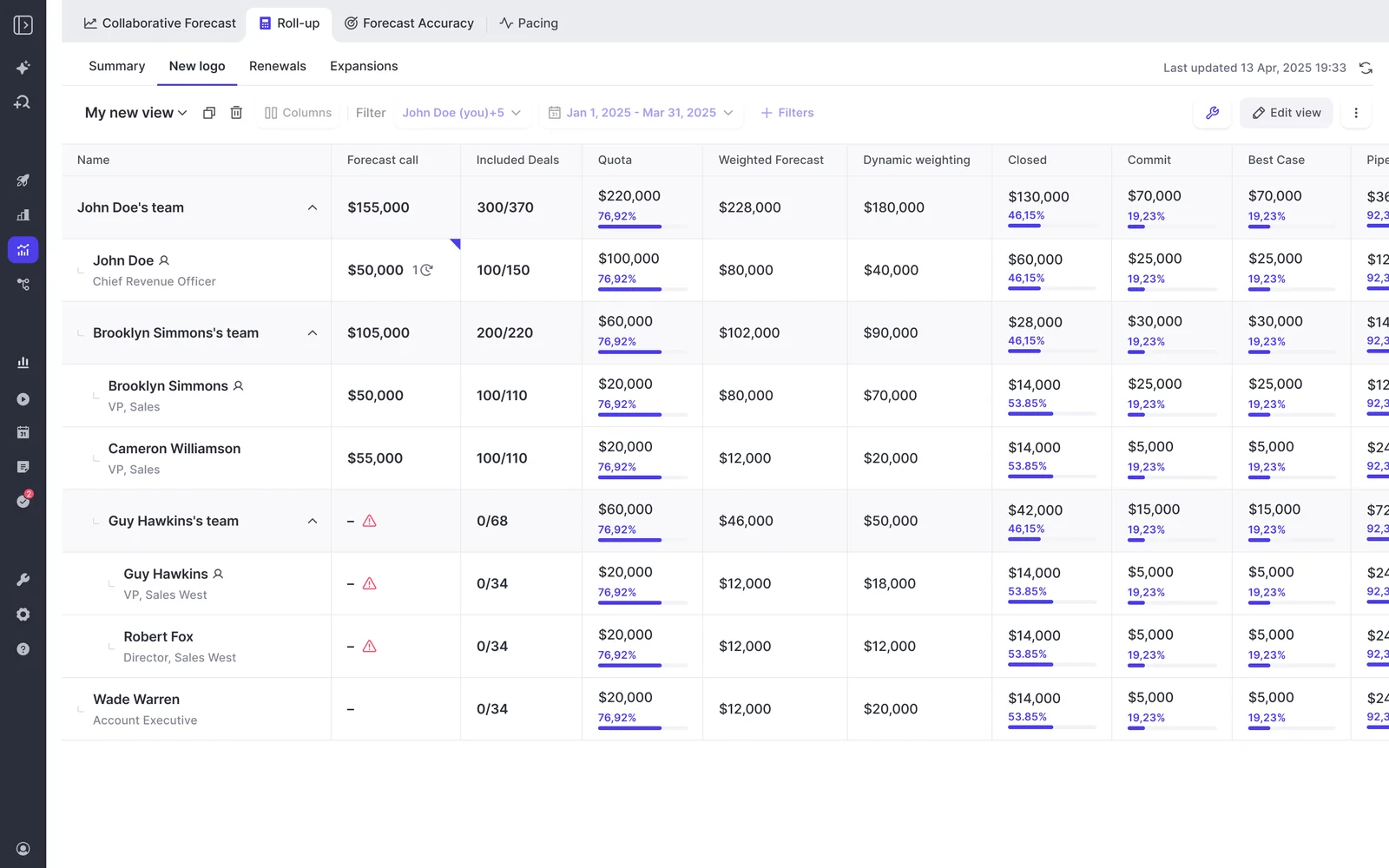
Weflow’s roll-up puts submissions, included deals, quotas, and weighted forecasts beside the team hierarchy. You can see where the forecast lacks a submission before the meeting starts.
| Operational question | Weflow’s answer |
|---|---|
| Can separate motions retain their structure? | Salesforce opportunity record types can retain separate stage paths, forecast-category mappings, and independent roll-ups. |
| What can RevOps configure? | Submission deadlines, resubmission frequency, submitters, override permissions, override windows, and forecast locking. |
| What does the AI projection use? | More than 50 deal-level signals and up to two years of history. It returns a landing range rather than one definitive number. |
| How does accuracy work? | Weflow compares submissions with an admin-selected outcome field and reports accuracy by individual, manager, team, and period. |
| What stays outside Salesforce? | Forecast submissions, targets, and roll-up data live in Weflow. Opportunity edits write back to Salesforce. |
The gap between Weflow’s three forecast methods gives the manager something specific to investigate. A confident team call against weaker deal signals should trigger inspection, not an automatic decision to trust the AI.
Zeotap reports forecasting within 7% by week four of the quarter using Weflow. That’s a customer outcome, not an accuracy guarantee. Zeotap already had a review cadence; improving the underlying pipeline data made that cadence more useful.
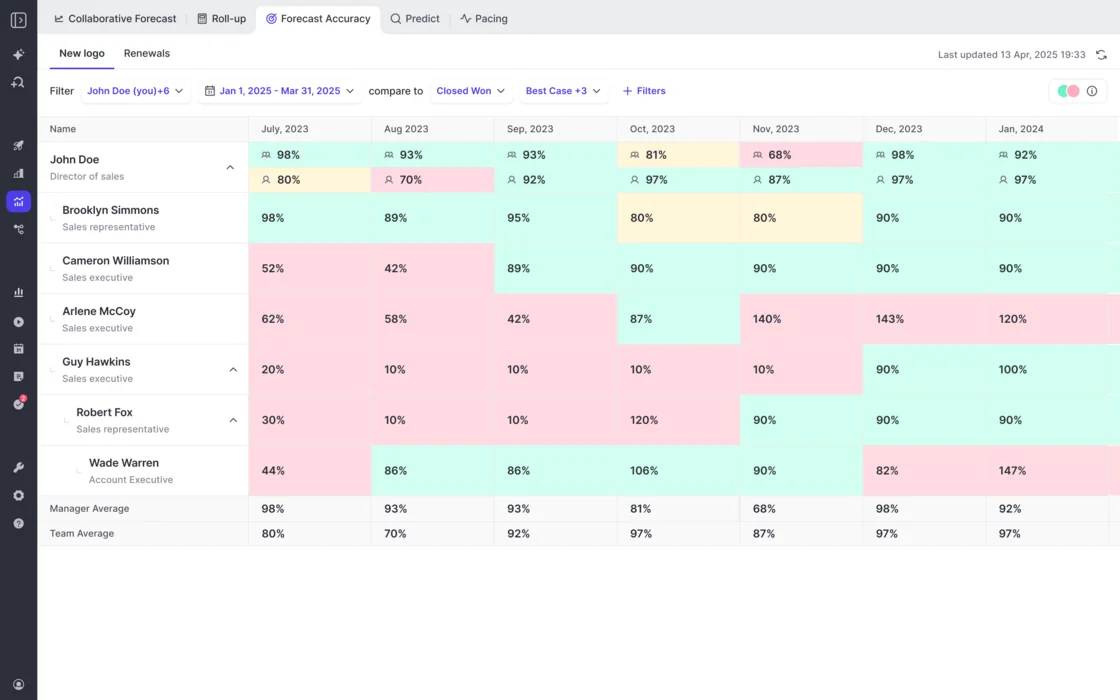
Weflow’s accuracy view retains the comparison by person and period, including manager and team averages. That makes repeated optimism or sandbagging visible over time.
- Best for: Mid-market Salesforce teams that need configurable roll-ups, retained history, and a shared activity and conversation data foundation.
- Not for: Teams requiring every forecast interaction inside Salesforce, non-Salesforce organizations, or buyers seeking built-in sequencing.
- Enterprise boundary: Clari’s roll-ups are more mature for complex organizations above roughly 1,000 reps. Don’t trade away a required enterprise workflow for consolidation.
Pricing: Weflow Deal Intelligence & Forecasting costs $39 per user per month, billed annually, with a 10-user minimum. Weflow Revenue AI Enterprise costs $79 per user per month and includes activity capture, conversation intelligence, deal intelligence, and forecasting.
Weflow includes recordings, transcripts, AI templates, and Ask Weflow AI usage within the relevant products. Agent Builder has a separate action allowance and paid workspace tiers. Don’t confuse predictable forecasting seats with unlimited agent actions.
Salesloft Clari Forecast: mature enterprise roll-ups
Salesloft Clari Forecast deserves the shortlist when complex enterprise roll-ups are the requirement you can’t compromise on. Its forecast inspection, waterfall, and pacing experiences set a standard that experienced Clari users expect replacements to meet.
- Prepare the call. Review pipeline movement and inspect the opportunities supporting the period.
- Submit through the hierarchy. Reproduce your established submission chain, including the month and quarter views managers need.
- Review movement. Use waterfall and pacing comparisons to explain why the outlook changed.
- Deliver the leadership output. Test the final consolidation and reporting path, including any BI export your organization requires.
| Operational question | What matters in the evaluation |
|---|---|
| Where is the strength? | Mature enterprise roll-ups and established forecast inspection interactions. |
| What history matters? | Pipeline waterfall, pacing, and comparisons with the same point in previous quarters. |
| Who changes the configuration? | Have your admin change a forecast column, target, and roll-up requirement during the evaluation. |
| Do the products share the required data? | Demonstrate a conversation-derived signal inside the forecast workflow. A shared vendor name doesn’t prove that connection. |
| What requires product clarification? | Distinguish Salesloft’s documented Forecast capabilities from the exact Clari Forecast product and package in your quote. |
Our buyer conversations make services dependence a buying criterion, not a universal claim about every Clari deployment. Ask which changes your team can make, which require support, and what the response commitment costs.
Consumption forecasting needs the same care. Salesloft documents account-based forecasting with a machine-predicted Pace value and seller overrides. Confirm its availability in the proposed deployment rather than assuming every forecasting product shares it.
- Best for: Enterprise teams protecting complex forecast mechanics, and buyers who want engagement and forecasting from the same vendor.
- Not for: A lean RevOps team that can’t staff the proposed configuration or justify capabilities it won’t use.
Pricing: Request an itemized production quote. Salesloft’s package documentation lists forecasting separately from Advanced and Elite; confirm the commercial requirements for Salesloft Clari Forecast itself, including services and additional modules.
Gong Forecast: forecasting for Gong-centered revenue teams
Gong Forecast makes the most sense when Gong already anchors conversation intelligence and deal inspection. Gong’s deep conversation analytics are a genuine reason to keep the existing workflow intact.
- Inspect the deals. Review activity, warnings, conversation context, and qualification evidence.
- Submit the forecast. Enter the period’s call and inspect the pipeline supporting it.
- Review the hierarchy. Managers see team forecasts and submission status in the roll-up.
- Validate the audit trail. Test retained submissions, adjustments, historical comparisons, and exports against your reporting requirements.
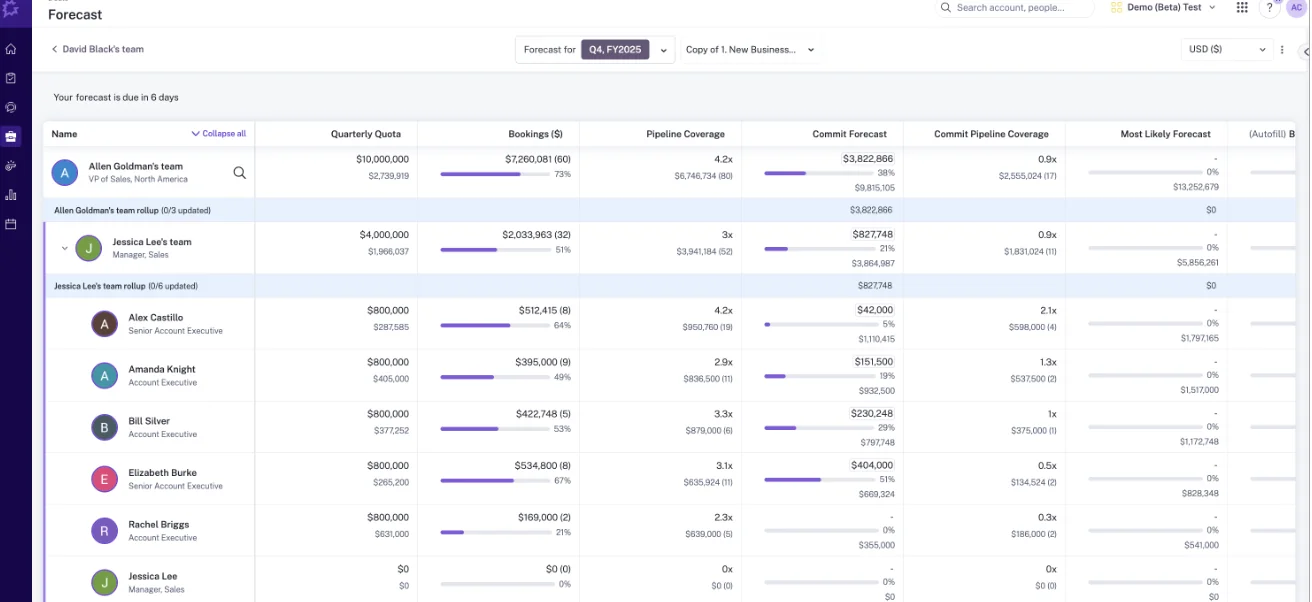
Gong Forecast shows the quarterly roll-up from sales leadership through managers to individual reps, including who has updated. Compare this directly with Weflow’s roll-up using your own hierarchy, not the vendor’s demo organization.
| Operational question | What matters in the evaluation |
|---|---|
| Where is the strength? | Conversation analytics and deal inspection within an existing Gong workflow. |
| Does the hierarchy fit? | Test overlays, regional splits, and reporting lines that differ from Salesforce. Our evaluations have surfaced hierarchy constraints. |
| Does submission match the spreadsheet? | Distinguish inspecting deals behind a submitted number from submitting a separate forecast judgment for each deal. |
| What must you buy? | Gong Foundation plus the required forecasting application. Seats apply by application. |
| What makes costs variable? | Gong meters applicable AI usage through a shared credit pool. Confirm included usage and top-up terms. |
Don’t remove Gong just because another vendor forecasts. Your transcript archive may already support marketing, customer success, and enablement. Those teams need a migration plan too.
- Best for: Teams satisfied with Gong whose forecast requirements fit the demonstrated configuration.
- Not for: Buyers seeking a standalone forecasting purchase without a core platform prerequisite.
Pricing: Compare the combined Foundation and forecasting application cost, plus applicable AI consumption and implementation. A forecasting module price alone understates the production purchase.
Salesforce forecasting: the no-new-vendor baseline
Salesforce forecasting is the right baseline when keeping users in one system matters more than adding a dedicated forecasting workspace. Give it the same operational test as the paid alternatives.
- Define the forecast. Agree on the fields, categories, ownership, and periods the business needs.
- Run the review. Reproduce the required roll-up and adjustment process inside Salesforce.
- Preserve the evidence. Check available history and configure the additional snapshots or reporting your questions require.
- Test leadership reporting. Produce the actual review output without exporting it into a second calculation model.
| Operational question | What matters in the evaluation |
|---|---|
| Where is the strength? | No additional forecasting workspace or vendor relationship. |
| What should you inspect first? | Your org’s enabled forecasting capabilities, entitlements, and existing configuration. |
| Where does internal work grow? | Historical comparisons, movement analysis, unusual revenue logic, and executive reporting. |
| What history already exists? | Inspect enabled field history and other historical records. Don’t assume current opportunity values can reconstruct earlier pipeline states. |
| Who maintains the result? | Your Salesforce and RevOps team, including after a reorganization or a change in reporting requirements. |
We wouldn’t reject Salesforce on a blanket claim that it has no history or can’t support forecasting. The useful question is whether your configured org answers the specific questions that currently force an export.
- Best for: Teams with a Salesforce-only requirement, a compatible forecast process, and internal capacity to maintain it.
- Not for: Teams expecting a dedicated forecasting operating model without configuration or ongoing admin ownership.
Pricing: Confirm what your Salesforce edition already includes. Then price the internal build and maintenance work against a vendor quote. Existing licenses don’t make that labor free.
What does each forecasting tool require before launch?
Go-live readiness means a manager can run a real forecast cycle with trusted inputs. A connected Salesforce integration is only one prerequisite.
| Option | Data and configuration | User actions and owner | Pilot limit and readiness test |
|---|---|---|---|
| Weflow | Validate Salesforce access, record types, fields, quotas, cadence, and permissions. Configure capture and conversation workflows if included. | RevOps owns configuration; leadership owns the cadence. Reps and managers rehearse submissions and adjustments. | A short pilot tests data and mechanics, not sustained accuracy. Launch when a shadow cycle and reporting handoff work. |
| Salesloft Clari Forecast | Map required hierarchy, forecast measures, historical comparisons, integrations, and service-owned changes. | Name the internal business owner and agree on vendor responsibilities. Managers test the full roll-up. | Confirm which product’s AI and data prerequisites apply. Launch after the exact production workflow passes. |
| Gong Forecast | Confirm core and application licenses, CRM mapping, hierarchy, data coverage, and submission configuration. | RevOps coordinates with the existing Gong owner. Forecast participants test their required interactions. | Existing Gong adoption doesn’t prove forecasting adoption. Launch after managers complete the forecast cycle. |
| Salesforce forecasting | Validate entitlements, forecast configuration, permissions, historical records, and reporting design. | The Salesforce admin and RevOps own the build. Leadership agrees to use its output. | A prototype doesn’t prove maintainability. Launch when history and executive reporting work without spreadsheet reconstruction. |
Weflow supports phased rollout. KORE Wireless introduced activity capture, conversation intelligence, coaching, deal intelligence, and forecasting in separate phases, with Weflow handling onboarding and training.
That sequence lets you improve data before changing the forecast meeting. It doesn’t remove the need for leadership ownership.
How to test forecasting software before replacing Excel
Test forecasting software by rehearsing your current cycle with real participants and representative deals. A polished dashboard won’t expose missing handoffs.
Map the current spreadsheet cycle before demos
Start by documenting what the spreadsheet does, including the work only its owner understands.
- Inputs: Name the Salesforce fields, manager judgments, and external data sources.
- Logic: Identify formulas, exclusions, currency treatment, and revenue-motion differences.
- Handoffs: Record who submits, who adjusts, and when each deadline closes.
- Outputs: Collect the leadership view, finance export, commentary, and historical comparison.
- Retirement decisions: Mark which legacy columns should disappear rather than migrate.
Don’t pay to reproduce a formula chain nobody trusts. Agree on the source fields before connecting the replacement.
Run one shadow submission and manager roll-up
A shadow cycle passes when the team completes the forecast without hidden spreadsheet repair.
- Rep submission: Ask a rep to submit from their live pipeline. Pass if the required periods and categories fit without a side calculation.
- Manager review: Challenge a committed deal using activity and next steps. Pass if the manager can inspect the evidence during the conversation.
- Adjustment: Change the manager call. Pass if the original rep judgment remains distinguishable.
- Escalation: Review the next management level. Pass if the roll-up still follows the intended logic.
- Lock: Close the submission window. Pass if later opportunity changes don’t erase what the team called.
Check snapshots, exports, and Salesforce write-back
Data validation must prove both reconstruction and access: what changed, and can your reporting workflow read it?
| Test | Expected evidence | Failure condition |
|---|---|---|
| Move a close date after the snapshot. | Both the prior state and the current state remain identifiable. | The earlier pipeline disappears. |
| Edit an opportunity through the application. | The intended Salesforce field updates with permissions and validation intact. | A second conflicting value needs reconciliation. |
| Retrieve a locked forecast. | The submitted value, period, person, and adjustment remain accessible. | Only the latest total survives. |
| Build the finance export. | The required fields reach the destination in a usable structure. | RevOps must manually recreate missing context. |
Measure adoption work and total operating cost
Measure the work remaining after the demo, especially the steps someone quietly performs on the team’s behalf.
| Scorecard area | Record during the test |
|---|---|
| People | Rep setup, submission effort, manager review effort, and training needs |
| Process | Reminder chasing, manual adjustments, duplicate entry, and report preparation |
| Platform | Admin changes, support tickets, integration monitoring, and export maintenance |
| Commercial | Production licenses, prerequisites, services, AI usage, and contract overlap |
Have someone other than the original spreadsheet owner repeat the admin steps. That’s how you test whether you’ve removed the key-person dependency.
Which forecasting option fits your operating model?
Choose the option that satisfies your hardest operating constraint, then test its trade-off. Don’t start with a universal winner.
| Your situation | Recommended option | Why | Accepted trade-off | Disqualifier |
|---|---|---|---|---|
| Mid-market Salesforce team replacing spreadsheets and incomplete deal data | Weflow | Configurable cadence, three forecast methods, and connected capture and conversation workflows | Forecast submissions and targets stay in Weflow. | Every interaction must happen inside Salesforce. |
| Complex enterprise roll-ups are non-negotiable | Salesloft Clari Forecast | More mature enterprise forecasting mechanics | Validate implementation scope and ongoing configuration costs. | The proposed rollout exceeds your operating capacity. |
| Gong already supports the wider revenue organization | Gong Forecast | Preserves an established conversation and deal-inspection workflow | Core license, application pricing, and applicable AI credits | Required hierarchy or submission mechanics fail the rehearsal. |
| Sequencing and forecasting must come from one vendor | Salesloft Clari Forecast | Salesloft covers engagement alongside forecasting. | Confirm the exact integration and package boundaries. | The required shared workflow doesn’t work in production testing. |
| No new workspace, with admin capacity available | Salesforce forecasting | Keeps the operating process inside Salesforce | Your team owns configuration and historical reporting. | The forecast still requires weekly spreadsheet reconstruction. |
See how Weflow captures activity, updates Salesforce fields from calls, and rolls up your forecast. Book a 30-minute demo.
What changed in sales forecasting software in 2026?
The changes that affect this shortlist concern vendor identity, package boundaries, and AI costs. Each changes what you should ask for in the contract and production demonstration.
| Change | Affected option | Buying implication |
|---|---|---|
| Salesloft and Clari consolidated under the Salesloft brand in 2026, with Clari Forecast continuing as a product line. | Salesloft Clari Forecast | Confirm the accountable team, exact product, and contract scope. Don’t treat older Salesloft Forecast documentation as proof of every Clari Forecast capability. |
| Gong’s current packaging combines a required Foundation license with separately purchased applications and applicable AI credits. | Gong Forecast | Request a production cost model that includes prerequisites and consumption, not an isolated forecasting seat price. |
| Weflow’s current pricing distinguishes standalone forecasting from the full Revenue AI Enterprise bundle. | Weflow | Compare the forecast-only purchase with the cost of replacing capture and conversation products too. |
How we evaluated spreadsheet-replacement forecasting tools
We built this comparison around evidence from 51 buyer calls where spreadsheets were the forecasting incumbent. Those conversations establish the operating requirements; they aren’t a representative market survey.
We combined those requirements with supplied product documentation, competitor evidence, Weflow product information, customer results, and product screenshots. Private-call evidence informs what to test. We use public product evidence where available for competitor capabilities.
- Submission, adjustment, and locking mechanics
- Revenue-motion and roll-up flexibility
- Historical visibility and accuracy measurement
- Salesforce data completeness and access boundaries
- Rollout ownership and recurring adoption work
- Full production cost and configuration dependence
We haven’t claimed a controlled hands-on benchmark or a verified deployment timeline for every vendor.
The shortlist covers four options for replacing spreadsheets. Adding loosely related products would make the decision harder, not better. We also sell Weflow, so our recommendation includes explicit reasons to choose another option.
Sales forecasting software FAQ
The remaining purchase questions concern system boundaries, historical continuity, and what a pilot can actually establish.
Can Salesforce forecasting replace Excel without another vendor?
Yes, if your configured Salesforce workflow covers the submission, review, history, and reporting requirements that currently force an export.
- Test the actual manager roll-up and adjustment process.
- Check whether historical records answer your movement questions.
- Produce the leadership output without a second calculation model.
- Name the admin who’ll maintain it after launch.
Where do Weflow forecasts live relative to Salesforce?
Weflow stores forecast submissions, targets, and roll-up data in Weflow, while opportunity edits write back to Salesforce.
| In Salesforce | In Weflow |
|---|---|
| Opportunity updates, captured activity, transcripts, summaries, and AI field updates | Forecast submissions, targets, and roll-up data |
| CRM records available to Salesforce reporting and automation | Forecast data available through Weflow’s public API for external reporting |
A Salesforce connector alone won’t retrieve Weflow’s forecast submissions. Validate the API fields required for your BI workflow.
Can historical spreadsheet forecasts be migrated?
Historical spreadsheet migration requires vendor validation. Activity backfill or CRM history doesn’t recreate a manager’s past submitted judgment.
- Archive: Keep the original spreadsheets as the historical reference.
- Validate: Ask whether the vendor can import submitters, timestamps, periods, categories, comments, and overrides.
- Don’t assume: A current Salesforce export can’t reconstruct historical values that nobody retained.
Test a representative historical file before making migration a contract assumption.
Can forecast hierarchies differ from Salesforce roles?
Hierarchy flexibility is product-specific. Weflow supports Salesforce role-based roll-ups, but separate revenue motions don’t by themselves prove support for every matrix hierarchy.
- Test a manager who also owns individual opportunities.
- Test overlays and leaders responsible for multiple teams.
- Test different owners for growth and retention.
- Test what happens after a mid-quarter reorganization.
Can a two-week proof of concept validate forecasting?
A two-week proof of concept can test technical fit and forecast interactions. It can’t establish sustained adoption or multi-quarter forecast accuracy.
- Can prove: Data mapping, capture output, field updates, permissions, and interface usability.
- Can rehearse: A submission, manager adjustment, roll-up, lock, and reporting handoff.
- Needs longer: Repeated participation and comparisons between retained calls and actual outcomes.
Start with a process alignment session that includes finance and sales leadership.
Can forecast data feed Tableau or a warehouse?
Weflow exposes roll-up data through its public API. For every shortlisted option, validate the exact export coverage instead of accepting a general API claim.
- Submitted and adjusted forecast values
- Targets, categories, periods, and user identifiers
- Timestamps and retained historical versions
- Authentication, permissions, limits, and refresh requirements
Build one real downstream report before signing.
Does AI forecast deals or aggregate pipeline?
AI forecasting can operate at either level, so ask what the model evaluates before comparing its output with the team call.
| Method | What it does | What to inspect |
|---|---|---|
| Stage-weighted forecast | Applies stage probabilities to deal values. | Whether probabilities reflect recent conversion data or fixed assumptions |
| Deal-level prediction | Evaluates individual opportunities before contributing to the overall outlook. | Signals, missing-data behavior, and explanations for individual deals |
| Aggregate projection | Projects an outcome from broader pipeline and historical patterns. | Whether it can explain risk inside the deals supporting the total |
Weflow’s AI projection uses deal-level signals and returns a landing range. Read that range beside the team and weighted forecasts rather than treating it as the final authority.
Should you switch before an incumbent renewal?
Switch before renewal only when the operational benefit justifies overlapping spend and the replacement is ready.
- Switch now: The current process fails, the shadow cycle passes, and finance approves the overlap.
- Phase now: Improve activity and conversation data while retaining the incumbent forecast until renewal.
- Wait: The current workflow works, the contract blocks savings, or required replacement mechanics remain unproven.
Before setting a cancellation date, have a manager run the next forecast review in the replacement. Retire the spreadsheet only after the team can submit, inspect, adjust, lock, and deliver the number without rebuilding it.