
Weflow vs Clari vs Attention Ask AI: Scope, Sources, and Whether Asking Is Metered
Compare Weflow, Clari, and Attention Ask AI on scope, sources, and whether asking is metered.


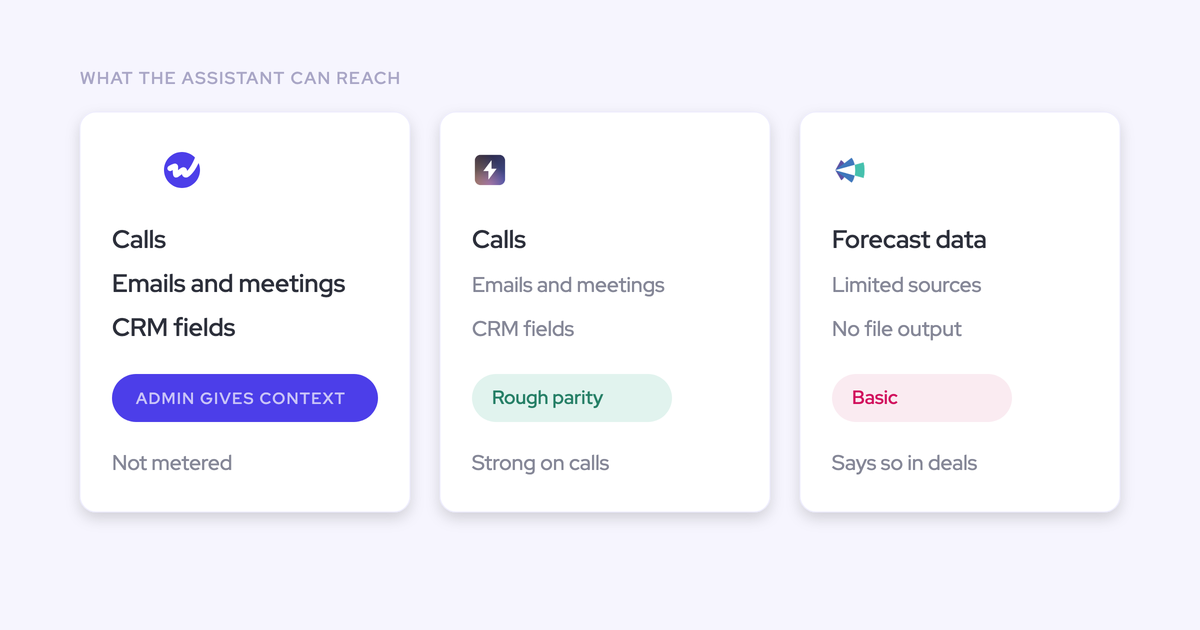

Every tool on your shortlist has the same box now. You type a question, it answers in a tidy paragraph with two deal names in it, and it looks good in all three demos. Then you sit down to write the evaluation doc and there's nothing to score.
"Our AI is better" isn't a claim you can falsify in a two-week trial. So this comparison doesn't argue about the model. It runs on the two things you can actually check before you sign: what each assistant can reach, which is decided by the data layer underneath it, and whether asking costs money every time someone asks.
Fair warning on the conclusion: on the ask-box surface itself, Attention is at rough parity with Ask Weflow AI, and we'll say so before we say anything else. Weflow is the Revenue AI Orchestration platform for sales, customer success, and RevOps teams, and the separation from these two sits underneath the chat, not inside it.
Weflow, Clari, and Attention Ask AI at a glance
The three assistants barely separate on the ask-box surface. They separate cleanly on reach, admin control, and price per question.
| Dimension | Weflow | Clari | Attention |
| What the assistant reads | Salesforce records, captured emails and meetings, call transcripts, attached documents, the public web | A limited set of sources; the forecasting product doesn't read the call data | Conversation data first, with a narrower activity and CRM record beneath it |
| Admin control over sources | Context and Sources: an admin picks which standard and custom Salesforce objects the AI may read, and writes what each object and field means | No equivalent control we've seen on switch calls | No equivalent control described in the product |
| Query scoping | One call, one deal, a filtered pipeline view, an account, or the whole system | Whatever the forecasting surface holds | Scoped around calls and what follows from them |
| Output artifacts | Reports, tables, sales assets, files | No artifact output such as PDF or CSV | Reports and sales assets, at rough parity with Weflow |
| Pricing and metering | $19 to $79 per user per month, published; Ask Weflow AI Pro included in every product and bundle, unmetered under a fair-use policy | Quote-only, no free trial or self-serve; our read is $120 to $180 per user per month plus implementation fees | Not published; our read from deals is that it sits well above Weflow per seat |
| Access from your own Claude or ChatGPT | Official read-only MCP connector, admin-enabled, with a separate transcript-depth toggle | Via Salesloft MCP: Ask about deals, accounts, contacts, conversations, and pipeline status | MCP server, an LLM can read those calls and act on your workspace exactly as a logged-in user would |
| Known ceilings | 1M tokens per query; pipeline views capped at 2,000 records with up to 10 views linked; revenue data only | Cannot calculate a field; derived metrics have to be built in Salesforce first | No roll-up forecasting, no forecast accuracy measurement, no pipeline analytics |
Each of those rows gets unpacked below, in order.
Why scope and pricing are the checkable differences, not the model
Model quality is the one thing you cannot test inside an evaluation window, and every vendor knows it.
You get two weeks, a sandbox with partial data, and a demo org that was configured by someone who wanted the answer to look good. Whatever you conclude about "better AI" in that window is a vibe, not a finding.
Two things survive the same test, though, and both are checkable in an afternoon.
The first is reach. An assistant answering from CRM fields is reading what a rep typed, which is the data you already don't trust. An assistant answering from transcripts, emails and meetings is reading what actually happened.
| Question you'd ask | Answer from CRM fields | Answer from the evidence |
| Why did we lose these deals last quarter? | The reason code the rep picked from a dropdown on the day they gave up | What the buyer said on the call, which is usually a different answer |
| Which open deals are missing qualification? | Which methodology fields are blank | Which criteria have no supporting evidence anywhere in the conversation history |
| Who is the real decision maker on this account? | The contact flagged as primary two years ago | The person actually replying and driving the thread across years of email |
The second is price per question. If asking is metered, the tool gets rationed. Rationed tools don't get adopted, and an assistant nobody uses is a line item with no defense at renewal.
So the honest evaluation question isn't which model is smarter. It's which assistant can see the whole relationship, and what happens to the invoice when the whole team starts using it.
Where Clari and Attention are genuinely strong
Neither of these is on your shortlist by accident, and pretending otherwise would make the rest of this article worthless to you.
Attention's Ask AI is at rough parity with Weflow's
On the box itself, Attention holds its own. It answers questions about calls, deals and pipeline, it produces reports and sales assets, and it runs deeper analytics on top of that.
If your evaluation comes down to typing five questions into both and comparing the paragraphs that come back, you will not find a winner. We don't think you should try.
The separation between Weflow and Attention sits in what feeds the assistant: activity and contact capture, deal intelligence and forecasting, and in-person meeting capture on mobile. That's the argument, and we'd rather make it than pretend the chat window is where the difference lives.
Clari's pipeline waterfall and pacing views earn their reputation
Ask a Clari team which parts of the product they'd miss and you get the same three answers: the pipeline waterfall, the pacing view, and the comparison of where this quarter stands against the same day in previous quarters.
That third one is the hardest to reproduce, because Salesforce stores current state and nothing else. Showing where the quarter stood four weeks ago means snapshotting pipeline over time, which no CRM report can do on its own.
Any replacement gets judged against those three views, not against a feature grid. Buyers tell us as much in plain terms:
I don't like using Salesforce's forecasting itself, probably because Clary got me so hooked on how they work.
What each assistant can actually see
Reach is an architecture question, not a model question. Each of these three assistants sits on a different foundation, so the same question produces three different answers, and no amount of prompting closes the gap.
Ask Weflow AI reads Salesforce, emails, meetings, transcripts, and the web
Ask Weflow AI answers across Salesforce records, captured emails and meetings, and call transcripts, because the capture layer underneath it is already writing all of that into native Salesforce objects. It can also take an attached document and search the public web.
It's scopable, which is the part that makes broad questions usable:
- One call, with the transcript and every linked Salesforce record loaded automatically
- One deal, reasoning across every meeting and email on the opportunity
- A filtered pipeline view, so "which of these are blocked" applies to exactly the deals on screen
- An account, pulling every email, event and transcript attached to it
- The whole system, for questions that span teams and quarters
The queries teams actually run look like this: which competitors came up in the last six months and what happened when they did, which open deals are missing methodology evidence, what the closed-lost deals of the last 90 days have in common, and who the real decision maker is on an account with three years of email history.
It runs inside Weflow and inside the Chrome extension, which means it's available on a Salesforce record page too. A rep asking a question doesn't leave the CRM to do it.

Clari's Ask AI draws on limited data sources
Clari's Ask AI is thin, and the reason is structural rather than a missing sprint.
It draws on a limited set of sources and can't produce artifact outputs like a PDF or a CSV, so what you get back is a short answer you then rebuild somewhere else.
Here's why that won't be fixed by a release. Clari Copilot is the rebranded Wingman, a conversation intelligence product Clari acquired in 2022 rather than built. It transcribes, stores and reviews calls. It doesn't write Salesforce fields, doesn't score a call against a methodology, and doesn't feed the forecasting product.
Same story one level up. Wingman became Copilot, Groove became Groove by Clari, and the Salesloft merger completed in December 2025 added a fourth application. Each arrived with its own data model and its own interface, and none was rebuilt onto a shared foundation.
So the assistant sits on top of a suite whose pieces can't read each other. It's answering from a fragment because a fragment is all there is to read.
Attention's Ask AI reasons outward from the conversation
Attention starts from the call and works outward. That's its heritage and its genuine strength: conversation intelligence is the thing it's good at.
The base underneath is narrower, though. Its AI field updates are basic, its coaching depth is limited, and on the pipeline side it's reporting-first: no roll-up or collaborative forecasting, no forecast accuracy measurement, no pipeline analytics or dashboards.
So the parity concession holds for the ask-box and stops there. Two assistants can be equally articulate while one of them is reading the full activity record and the other is reasoning from the meetings it recorded.
The buyers who feel this describe it the same way every time:
How Weflow's Context and Sources controls what the AI reads
Weflow's Context and Sources lets an admin decide which Salesforce objects the AI may read and what each object and field means, which is the one lever on this list that improves answer quality without touching the model.
It lives in the AI section of the Weflow admin console, alongside Ask AI settings, AI Playbooks, Prompt Templates and Agent Usage. Objects are listed by label and API name, standard and custom alike, and each can be edited or removed.
What you're actually deciding in there:
- Which objects are readable. Your custom objects are as available as the standard ones, and the ones you'd rather the AI never touch stay out.
- What an object means. Object Context is where you tell the AI that your custom renewal object is a renewal, instead of leaving it to infer from a name someone chose in 2019.
- What a field means. Field Context is the difference between an AI that guesses at your qualification picklist and one that knows what a three means on it.
Access is a separate decision in the same console: Ask Weflow AI can be enabled org-wide or restricted to named teams.
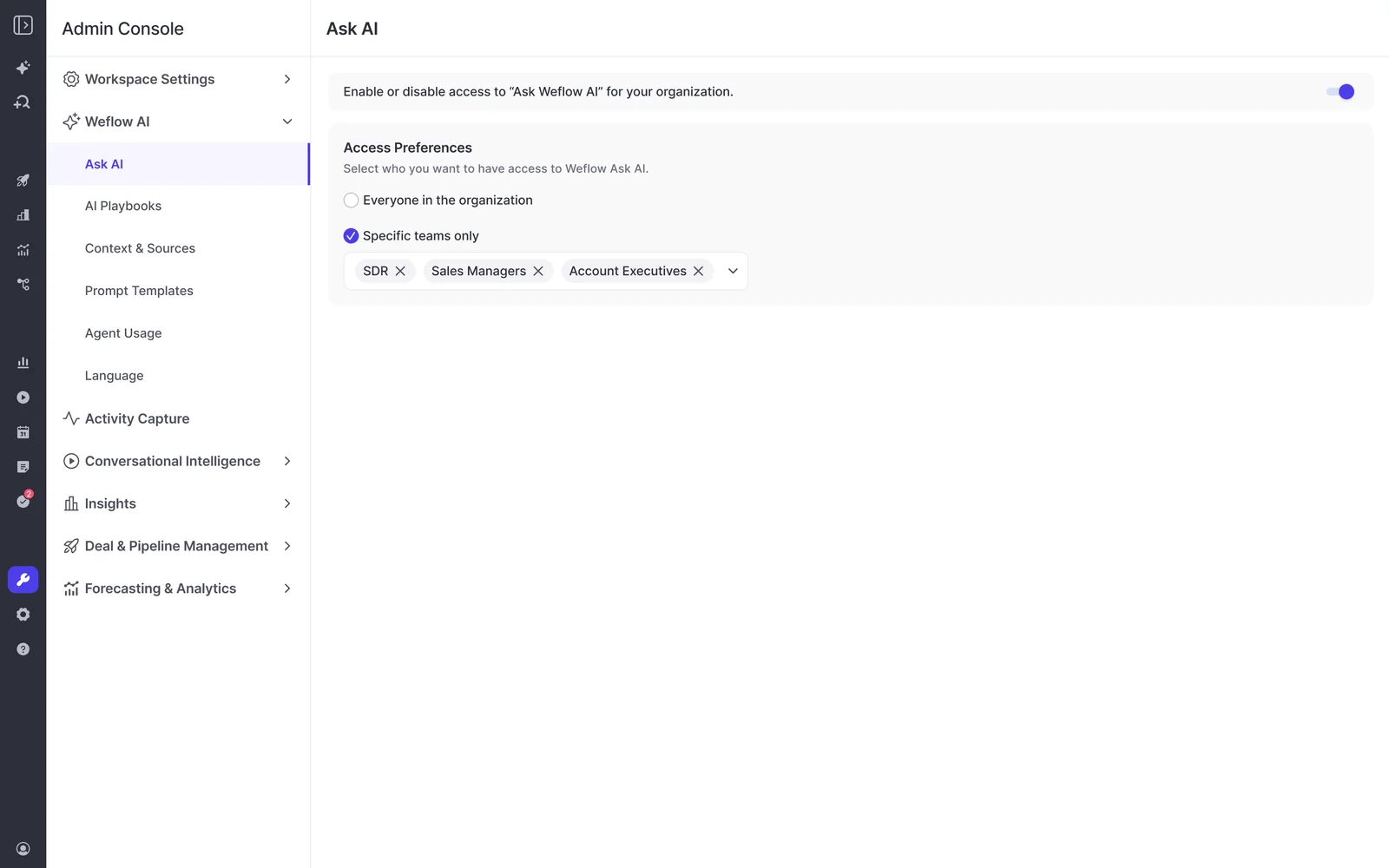
The reason this matters to the person owning the stack: when an answer comes back wrong, you have somewhere to go. You add the missing object, you write the field meaning, and the next answer is better because you configured it. That's a different relationship with a tool than waiting for the vendor's next model upgrade.
What each tool costs and whether asking is metered
Ask Weflow AI is not metered and not priced separately. It comes with every Weflow product and every bundle, governed by a fair-use policy no customer has hit yet.
| Weflow | Clari | Attention | |
| Pricing model | Seat-based, published: $19 to $79 per user per month, annual, 10-user minimum | Seat-based, quote-only, no self-serve signup | Seat-based, not published |
| Cost of the assistant | Included in every product and bundle as Ask Weflow AI Pro | Bundled into a quote you can't see the components of | Bundled; not separable, since conversation intelligence isn't sold standalone |
| Metering on asking | None. Fair-use policy, no customer has reached it | Not disclosed | Not disclosed |
| Implementation fees | None | Our read is $15k to $50k in professional services | Not published |
The reason we make a point of it is that this is now the first question a technical buyer asks, and they ask it because they've been burned:
A metered assistant creates a tax on curiosity. Someone starts watching the usage graph, someone tells the team to be thoughtful about queries, and within a quarter the tool that was supposed to answer questions is the tool nobody asks.
We want to make sure that you have predictable pricing, and it is very, very hard to achieve in the age of AI.
— Philipp Stelzer, Co-founder and CPO, Weflow
One honest boundary, because "nothing is metered" would be a lie: Agent Builder is priced per workspace and has action tiers. Every Weflow plan includes the free tier with 25 agent actions a month. The daily-use surface, the chat, stays unmetered. The FAQ below has the numbers.
Connecting Claude or ChatGPT to Weflow data over MCP
Weflow has an official read-only MCP connector, so Claude or ChatGPT can query Weflow data directly instead of you writing calls against the REST API.
Through it, an assistant reaches Weflow playbooks, call summaries, transcripts and forecast calls. That set is wider than recordings alone and narrower than everything Weflow holds, which is the honest way to describe it.
Setup is three steps and one decision:
- An admin switches on Enable MCP Connector for the workspace.
- The admin sets Allow transcript access. With it off, connected assistants see AI summaries and never the verbatim transcript.
- The user pastes the URL into Claude or ChatGPT as a custom connector.
The console then lists every connected user with their email and the date they connected, so you find out who attached an assistant when it happens rather than during an audit.
We build this way because the direction of travel is obvious from the calls we're on:
We are trying to move to a more AI-native internal stack. We are connecting AI into Salesforce, and this direction makes things standing outside the sales stack even a bigger issue than it has been historically.
We have no evidence either way on whether Clari or Attention offer an equivalent, so we're not claiming anything about them here. Ask them directly, and ask who controls the toggle.
Where Ask Weflow AI stops: ceilings and honest limits
You'll find these in a trial, so here they are first.
- One million tokens per query. Ask Weflow AI answers inside that ceiling, which is generous for a deal, an account or a filtered board, and not enough for "analyze every closed-lost deal this year." Those questions need a narrower scope or an agent, which has no equivalent per-run ceiling.
- Pipeline views cap at 2,000 records, with up to ten views linked in one chat. Big enough for a quarter's pipeline in most mid-market orgs, and a real constraint if you're trying to sweep an entire enterprise book in one question.
- Revenue data only. It reads Salesforce records, captured emails and meetings, transcripts and the web. It does not reach your process documentation, your product guides or your ticketing system, so "how do we handle a mid-term upgrade" is not a question for it.
The practical rule: anything that spans the whole book of business belongs in an agent, not in the chat. And Weflow supplies the revenue context your general assistant is missing rather than replacing that assistant, which is exactly why the MCP connector matters more than pretending the chat can do everything.
Migrating off Clari or Attention, and running tools side by side
Your call history moves. Weflow imports recordings and transcripts from the conversation intelligence platform you're leaving, pulling them through that platform's API, at no extra cost and typically in one to two weeks depending on volume.
That matters beyond tidiness. Because the imported transcripts land in your own CRM, a question about how an objection was handled last quarter still answers after the switch. The alternative most teams have lived through is dumping recordings into a shared drive nobody opens again.
Running two tools during a transition is fine, with one failure mode you have to decide about up front.
This is often a problem when you have multiple providers for CI and AC. They basically both create an event object, which creates a duplicate. So in your reporting you need to deduplicate that, which is really annoying.
— Janis Zech, Co-founder and CEO, Weflow
Two vendors both writing meeting activity into Salesforce is the problem, not coexistence itself. The fix is agreeing which system owns the activity record and which one attaches its summary and field updates to it.
For Clari specifically, that coexistence is genuinely workable. Clari reads activities from Salesforce, so a team committed to Clari for forecasting can run Weflow for capture and give Clari cleaner data to forecast on. Turn on both capture engines and you get duplicates. Pick one.
Choose Weflow if, choose Clari if, choose Attention if
Three honest conditions, argued from the two criteria this whole article runs on.
- Choose Weflow if your problem is that the revenue record is incomplete and split across tools, and you want one assistant reading Salesforce, emails, meetings and transcripts together, with an admin able to govern what it reads and no meter on asking. You're on Salesforce, you're mid-market or scaling into enterprise, and you want the price on a page rather than in a quote.
- Choose Clari if your forecasting motion is entrenched, the waterfall and pacing views are what your leadership actually reads every week, and moving that motion costs more than the assistant is worth to you. Just don't buy Clari for the ask-box; that's not where its value sits.
- Choose Attention if your center of gravity is call follow-through, you want agents acting on what happened in a conversation, and you don't need roll-up forecasting, forecast accuracy tracking or pipeline analytics from the same vendor. It's a good product doing a narrower job well.
And if you're above ten thousand seats with a forecasting process built over four years, the switching cost may simply beat the gain. We'd rather tell you that now than three months into a pilot.
Walk through the product yourself, no call required.
FAQ: evaluating Weflow, Clari, and Attention Ask AI
Who is allowed to ask, and does it inherit Salesforce permissions?
Ask Weflow AI can be enabled org-wide or restricted to named teams from the admin console.
Sign-in runs only through your Salesforce authentication, using OAuth and whatever SSO your org already enforces. There's no email-and-password option and no separate Weflow identity to provision, so deactivating someone in Salesforce removes their Weflow access immediately.
Can a revenue leader see everything without full admin rights?
No, and this one's on us. Weflow has no read-only administrator role today.
Seeing everything in the workspace means granting full admin, which also carries the ability to change templates and permissions. The view-only license doesn't solve it either: it covers watching recordings, not the admin console and not asking questions across the data. If a read-only analyst view is a hard requirement, know that going in.
Do Ask AI answers land somewhere reportable in Salesforce?
Chat answers live in the chat. Weflow-native values like deal warnings and AI Playbook scores are Weflow fields, marked with a W in the interface, and they aren't reportable in Salesforce or pullable into a BI tool by default.
The working pattern is an agent that writes the assessment into a Salesforce field you create. It works, and someone has to build it. If your board deck runs off Salesforce dashboards or Power BI, plan for that step.
Is Weflow's Agent Builder metered, and how is that different?
Yes, and this is the honest edge of the "nothing is metered" claim.
Agent Builder is priced per workspace rather than per user: a Free tier with 25 agent actions per month is included in every Weflow plan and bundle, then Growth at $299 a month for 500 actions, Scale at $999 a month for 2,500, and a custom enterprise package. Ask Weflow AI, the surface people touch every day, isn't metered at all.
What does configuring Context and Sources actually take?
It's admin console work you do yourself: select the objects the AI may read, then write what each object and field means. No services engagement, no professional fees.
For scale, the technical Weflow setup takes 30 to 45 minutes with a Salesforce admin and a mail admin in the room, and configuring the workspace takes about an hour. What stretches an implementation is never the configuration. It's getting two admins on the same call and deciding internally which methodology you're scoring against.
Does running Attention alongside activity capture create duplicate records?
Yes. Both vendors legitimately represent meeting activity, so each writes its own event object into Salesforce and neither knows about the other.
Until you deduplicate, every metric counted per meeting is inflated: meetings per rep, touches per closed opportunity, all of it. The fix isn't technical, it's a decision. One system owns the activity record, the other attaches its summary and field updates to that same record instead of creating a second one.











