

Best Cirrus Insight Alternatives for Mid-Market Companies (2026)
Decide if Weflow or another Cirrus Insight alternative fits your mid-market Salesforce capture needs.


Cirrus Insight logs what your reps already know, onto whatever record was touched last. Email Sync won't log an email unless the person is already in Salesforce. Smart Link files activity by recency. Call transcripts stay in the Meeting AI app. So when you look for an alternative, judge each one on the three cases Cirrus hands back to your reps: people who aren't in Salesforce yet, accounts with several open opportunities, and call content that belongs on the record.
Here's the short answer on who each option suits:
- Weflow suits teams that want capture with no rep action, contacts created from email, rep-correctable opportunity mapping, and calls written into Salesforce, all on one published per-seat price.
- Revenue Grid suits Outlook and Exchange-heavy orgs, including on-prem Exchange.
- Einstein Activity Capture suits teams whose Salesforce edition already includes it and who only need basic background sync.
- Nektar.ai suits orgs above 50 seats that want headless capture and have a data or AI team.
- Gong suits teams whose real need is conversation analytics, not capture.
- Staying on Cirrus Insight makes sense if you depend on Smart Scheduler routing, team scheduling or email blast.
Weflow is the Revenue AI Orchestration platform for sales, customer success, and RevOps teams. We built Weflow Activity & Contact Capture as the foundation layer of that platform, and we put it first in this list. You'll also find every tool's limits, Weflow's included. At the end there's a parity test you can run next week and the per-seat arithmetic at your own Cirrus configuration.
How the five Cirrus Insight alternatives compare at a glance
Basic email sync is where these tools look most alike. They split on contact creation, recording, assistant access and whether you can see a price before a sales call.
| Capability | Weflow | Cirrus Insight | Revenue Grid | Einstein Activity Capture | Nektar.ai | Gong |
|---|---|---|---|---|---|---|
| Automatic email capture | Server side, no rep action, written almost immediately; matched mail only | Email Sync logs only with an existing contact or lead; 15-minute cycle, 5 with Fast Sync | Server-side Sync Engine; 30-minute cycle, up to 120 on quiet mailboxes | Background sync; stored as Task and EmailMessage since Summer '25 | Background, no rep UI; about an hour, up to 9 | Imports matched email; Salesforce export is admin-enabled and forward-only |
| Automatic meeting capture | Every external meeting to Event, recorded or not | Calendar Sync to Events, one or both directions per user | Two-way sync; new meetings arrive within a couple of minutes | Events with up to 50 attendees; copies per attendee when the organizer isn't syncing | Events with attendees; ignores events more than 3 months out | Exports matched meetings as tasks or events once an admin turns export on |
| Inbox extension or add-in | Outlook add-in and Chrome extension; rep re-maps once per thread | Gmail extension and Outlook add-in; create and edit records | Outlook add-in and Gmail extension; rep signs in to Salesforce | None of its own; separate Outlook and Gmail integration | None; no rep-facing interface | Gong Anywhere, requires Gong Engage |
| Automatic contact creation | From To and CC on send, with account, cap and prefix guards; never leads | Never from Email Sync; rep adds each one from the sidebar | Available but off by default; no automatic contact roles | Unavailable under the default mode since Summer '25 | Automatic by domain; contact roles in the Harvest package | Only an inactive Flow for call participants |
| Recording video meetings | Zoom, Teams, Meet, Webex; transcript on a Salesforce record | Meeting Capture at $39; 6 hours per user per week, pooled; transcript stays in Cirrus | Teams and Zoom only, in the $149 Ultimate tier | Not offered; Einstein Conversation Insights is separate | Not offered; reads transcripts Zoom, Teams and Meet already hold | Zoom, Meet, Teams, Webex and seven more |
| Integrations with other tools | Mail, calendar, meeting platforms, Slack, Outreach dialer; no native warehouse connector | Mail, Teams, Zoom links, Zapier, scheduling webhooks | Microsoft 365, on-prem Exchange, Google; more through paid customization | Microsoft and Google mail and calendar, plus Salesforce's own products | Salesforce, Snowflake, Google, Microsoft, Zoom | About 450 listings in the Gong Collective |
| Access from AI assistants (MCP) | Official read-only connector with a transcript toggle | None | MCP server since July 2026, connected manually, no public docs | Only through Salesforce Hosted MCP Servers, which need Flex Credits | None of its own; through Salesforce's MCP | Three record-scoped tools, insights not transcripts, metered in credits |
| Raw data access outside the tool | REST API bulk export as JSON or CSV | Preview REST API, endpoints likely to change | No public activity API; through Salesforce's API | Records through Salesforce APIs; EAC's own store isn't exportable | Snowflake delivery, including a headless option | API capped at 10,000 calls a day; Data Cloud about $5,000 a year |
| Pricing | Published: $19 capture, $49 with recording | Published, à la carte; $27 for core capture | Published tiers at $30, $49, $149; quoted, yearly | Standard in some editions; otherwise $50 Sales Engagement add-on | Quote only | No published prices; AI metered in credits |
The line-by-line cost at your configuration is in the pricing section further down.
Where Cirrus Insight genuinely earns its place
Cirrus Insight is a capable inbox sidebar, and if its strengths are what your team relies on, staying is reasonable. It writes captured email and meetings to standard Task, Event and EmailMessage records, so your existing Salesforce reports read them. It holds SOC 2 Type 1 and Type 2 attestations and hosts its main services on Microsoft Azure in the US and the EU.
Cirrus also does things Weflow doesn't. Smart Scheduler routes web-form leads to a live calendar on your own territory and workload rules. Every one of its 16 capabilities is licensed separately, so you can buy calendar sync for 140 people and recording for 35.
| Capability | How Cirrus Insight handles it |
|---|---|
| Automatic email capture | Email Sync ($5) logs inbound and outbound mail by admin rules when an existing contact or lead is on the email. Reps can also file by hand with Quick File or Custom File. It writes a Task of type Email, or an EmailMessage with Enhanced Email on. |
| Automatic meeting capture | Calendar Sync ($11) writes Events with Salesforce attendees as invitees, in one or both directions per user. You can narrow it to events with an invitee or a Salesforce contact or lead. |
| Inbox extension or add-in | A Chrome extension for Gmail (plus a lighter add-on) and an Outlook web add-in, on one license. The sidebar ($11) lets reps create and edit Salesforce records from the inbox. |
| Automatic contact creation | Email Sync never creates contacts or leads. A rep adds an unknown address from the sidebar, with account and signature details pre-filled. |
| Recording video meetings | Meeting Capture ($39) records Zoom, Teams, Google Meet and other platforms. Recording is capped at 6 hours per licensed user per week, pooled across the organization. |
| Integrations with other tools | Salesforce, Gmail, Outlook and Teams, plus Zoom, Teams and Google Calendar links for meetings booked through Cirrus scheduling. It also offers a HubSpot scheduler embed, Zapier and scheduling webhooks. |
| Access from AI assistants (MCP) | No MCP server or connector. |
| Raw data access outside the tool | A REST API in preview covers scheduling, transcripts, accounts, contacts, deals, Buyer Signals and Email Blasts. Cirrus labels the endpoints likely to change. Transcripts download as text. |
| Pricing | Published and à la carte, with no editions, bundles or minimum. Sidebar, Email Sync and Calendar Sync together cost $27 per user per month. |
Why teams leave Cirrus Insight as they grow
The leaks come from the architecture, not your configuration. Cirrus started as a sidebar for filing email to Salesforce. It later added background sync, scheduling, Meeting AI and engagement as separately priced lines. The core logic is still rep-centric: matching resolves only to people already in Salesforce, and the opportunity choice is a recency rule. That holds up for a small team on simple deals. It shows once your deals multi-thread and your accounts carry several opportunities.
Email Sync never adds the new people on a deal
Cirrus Email Sync logs an email only when an existing Salesforce contact or lead is on it, and it never creates contacts. When a new stakeholder joins the thread, they exist in the rep's inbox and nowhere in Salesforce until the rep clicks Add Contact.
Reps rarely do that, so your CRM shows one champion on a deal that has five people on the thread. Cirrus treats this as deliberate: it argues that user-directed filing keeps the CRM trustworthy. Many deployments therefore rely partly on reps deciding what gets logged. That's a defensible philosophy, but it means your multi-threading reports measure rep discipline, not the deal.
Smart Link files email to the last-touched opportunity
Cirrus Smart Link relates each synced email to the most recently created or edited record of one object type. Cirrus markets it as matching activity to the record it belongs to. The rule it actually runs is recency.
Take an account with a renewal and an expansion open at the same time:
- Yesterday, the account manager moved the renewal's stage.
- Today, the customer's CFO emails about expansion pricing.
- Smart Link files that email to the renewal, because it was touched last.
The expansion opportunity looks dead while the renewal looks busy. Opportunity-level activity reporting breaks on exactly the multi-opportunity accounts you care most about.
Activity reaches Salesforce every 15 minutes unless you pay for Fast Sync
Cirrus syncs on an admin-set cycle with a 15-minute minimum. Fast Sync cuts it to 5 minutes for another $5 per user per month. Cirrus positions Fast Sync as required for teams that book meetings from Salesforce, because a 15-minute gap lets someone book over a slot. Faster cycles also consume more Salesforce API requests, which you have to weigh too.
Call transcripts stay in Cirrus Meeting AI, not Salesforce
Cirrus keeps recordings and transcripts in its own Meeting AI app. Salesforce receives meeting summaries, as enhanced notes or attached files, and suggested opportunity updates for the rep to accept. Even that only happens with CRM Updates, a separate $15 line on top of the $39 recorder.
Recording is also capped at 6 hours per licensed user per week, pooled across the organization. Your team's busiest weeks are the ones most likely to hit that ceiling.
Every capability adds another line to the per-seat bill
À la carte pricing means capture, Fast Sync, Task Sync, recording, Meeting Lifecycle and CRM Updates each stack as their own line. The flexibility is real. So is the drift: the bill grows every time the team asks for one more thing. We show the full arithmetic in the pricing section below.
What to check before you shortlist a Cirrus Insight replacement
Judge every alternative on the cases Cirrus hands back to your reps, and on whether you lose anything. A capture replacement wins on "did it track one for one", not on summaries and scorecards. Paste this into your evaluation doc:
- Contacts are created from email, with guards against floods. Send to a new person at a known account, then send a webinar invite to 200 people, and see what each one creates.
- The ambiguous case resolves correctly and can be corrected. Put one contact on two open opportunities and email them about one deal. Check where it lands and how a rep fixes it.
- Capture runs at tenant level with no rep setup. Enroll users from the admin side and check that nobody has to install or connect anything.
- Call transcripts and fields land on Salesforce records. Record a call, then open the Event and the opportunity in Salesforce.
- There's a published per-seat price that doesn't stack. Price your actual configuration from the vendor's website before the first call.
- History comes across at go-live. Ask for the backfill window in months, and whether it's standard or a paid service.
- AI assistants can reach the data. Connect Claude or ChatGPT through an MCP connector and ask a question about a live deal.
On the ambiguous case, here's how one buyer described their old capture tool:
"If there are multiple opportunities, they just don't know where to map it and just randomly assign it to something. This is not acceptable."
One thing you can leave off the checklist is standard-object storage. Cirrus already writes to Tasks, Events and EmailMessage records, so every serious replacement has to match that.
Weflow logs email, creates contacts and writes calls into Salesforce
Weflow Activity & Contact Capture is the capture layer of the Weflow platform. Weflow Conversation Intelligence adds recording on the same data, and Ask Weflow AI and our MCP connector read what both of them write.
| Capability | How Weflow handles it |
|---|---|
| Automatic email capture | A central app in Microsoft Entra or Google Workspace captures inbound and outbound email server side, for every enrolled user, on any device, with no rep action. It writes to Salesforce almost immediately, as Task or EmailMessage (the admin's choice). Weflow logs only mail that matches a Salesforce record. It doesn't capture personal accounts or mail sent from a separate deliverability subdomain. |
| Automatic meeting capture | Every external meeting lands on the Event object, whether or not it was recorded. Weflow skips entries with no other attendees and anything marked private. We recommend one-way sync from calendar to Salesforce, because the reverse direction is unreliable. |
| Inbox extension or add-in | The optional Outlook add-in and Chrome extension show the contact, account and open opportunities Weflow matched. The rep re-maps once, and Weflow applies that choice to the rest of the thread. Reps can also move already-logged emails to another record from the inbox. An option auto-creates the opportunity contact role, so later activity from that contact resolves through it. |
| Automatic contact creation | Weflow creates contacts from To and CC recipients when the rep sends. Guards restrict creation to existing accounts, cap contacts per event and block prefixes such as billing, support and no-reply. A real-time lookup across contacts, leads and email fields prevents duplicates. Enrichment fills title, phone and LinkedIn at no extra charge. Weflow never creates leads. |
| Recording video meetings | The notetaker joins every external meeting on Zoom, Teams, Google Meet and Webex automatically. The summary and full transcript land on a native Salesforce recording object, and the summary also writes to the Event. AI Field Updates write structured fields, including MEDDIC, MEDDPICC and SPICED. Zoom needs local recording enabled by the admin, the bot has to be admitted from the lobby, and Webex is switched on per workspace. |
| Integrations with other tools | Native integrations with Salesforce, Gmail, Google Calendar, Outlook, Zoom, Teams, Meet, Slack and the Outreach dialer. The API feeds BI tools such as Tableau and Looker. There's no native Snowflake, Databricks or BigQuery connector, and Weflow isn't a connector catalogue. |
| Access from AI assistants (MCP) | An official read-only MCP connector gives Claude, ChatGPT and other assistants playbooks, call summaries, transcripts and forecast data. An admin switches it on per workspace, with a separate toggle for transcript access. Per-rep breakdowns are capped at 25 owners. |
| Raw data access outside the tool | The REST API bulk-exports transcripts, metadata, scores and signals as JSON or CSV. Video files export to your own cloud storage rather than Salesforce. |
| Pricing | Published: $19 per user per month for capture, $49 for the Weflow Revenue AI Foundation bundle with Conversation Intelligence. Annual billing, 10-user minimum. |
What it does well
- It reveals the buying committee. Contacts and contact roles come from email, so multi-threading becomes a number you can report on.
- It handles the ambiguous case at the one moment someone knows the answer. The rep picks the opportunity once, from the inbox, and the whole thread follows.
- It puts call content on the record. The transcript sits on a Salesforce object, and AI summaries and field updates are inside the seat price, not metered.
The admin enrolls users by team from the Activity Capture setup, so coverage doesn't depend on reps installing anything:

Where it stops
- No scheduling, lead routing, email blast or sequencing. Sequencing isn't on our 2026 roadmap.
- No pre-meeting research briefs and no live in-call coaching. Coaching scorecards run after the call.
- A standard minimum of 10 users, on 12-month terms.
- No lead creation. Weflow creates contacts only.
- It logs only activity that matches a Salesforce record. With creation restricted to existing accounts, a new stakeholder at a company that isn't in Salesforce yet creates no contact. When someone creates the account later, Weflow logs the earlier emails to it automatically.
- No native Snowflake connector, the same as Cirrus.
Best for: mid-market Salesforce teams that want capture with no rep action, contacts and contact roles created from email, rep-correctable opportunity mapping, and recording that writes transcripts and fields into Salesforce on one published per-seat price.
Revenue Grid suits Outlook-heavy teams that want server-side sync
Revenue Grid pairs a sidebar with a server-side Sync Engine, at a capture-only tier, and it's strongest in Outlook and Exchange environments.
| Capability | How Revenue Grid handles it |
|---|---|
| Automatic email capture | The Sync Engine saves every inbound and outbound email with non-blocklisted addresses, whether or not the sidebar is open. Sessions run every 30 minutes by default and stretch to 60 or 120 minutes on quiet mailboxes. |
| Automatic meeting capture | Calendar items sync two ways with Outlook or Google Calendar, and a new meeting reaches Salesforce within a couple of minutes. Items created before activation don't sync unless a rep marks them or you buy a bulk sync. |
| Inbox extension or add-in | Outlook add-in and Chrome extension for Gmail. Reps still sign in to Salesforce to use the sidebar. |
| Automatic contact creation | It can create contacts, leads or accounts for unknown participants with domain-matching rules, but both modes are off by default. Free email domains never trigger creation, and contact roles are never created automatically. |
| Recording video meetings | A Teams notetaker, a Dial-In Agent and recordings from a connected Zoom account. The documentation names only Teams and Zoom, and meeting assistance sits only in the Ultimate tier. |
| Integrations with other tools | Microsoft 365, on-prem Exchange and Google Workspace. Third-party API integrations such as Teams and Slack come in a paid customization package. |
| Access from AI assistants (MCP) | An MCP server launched in July 2026 for ChatGPT, Claude, Copilot and custom agents. Customers connect it manually, and it has no public documentation or tool list. The Claude plugin requires Pipeline Assistant, Meetings Assistant or AI Mentor. |
| Raw data access outside the tool | No public API for captured activity or AI outputs. Activity is reachable through Salesforce's own API. |
| Pricing | Published tiers: Activity Capture 360 at $30, Knowledge Capture at $49, Ultimate at $149. All are sold through a quote on a yearly commitment, with a one-time implementation fee. |
What it does well
- Server-side capture that covers on-prem Exchange, which most tools here don't.
- Private cloud deployment and an architecture built for very large user counts.
- Thread auto-saving: save one email, and the whole thread follows with the same linked records.
Where it stops
- The sync cycle is slower than Cirrus's standard 15 minutes.
- An auto-saved email links to an opportunity only when the rep owns it and the contact already holds a role on it. Everything else lands without the opportunity.
- Contact creation is off by default, and contact roles are never automatic.
- The default history at activation is six days.
- Recording means $149 per seat.
Best for: Outlook or Exchange-heavy orgs that want server-side sync plus a sidebar at a capture-only price, including on-prem Exchange, private cloud or very large-scale needs.
Einstein Activity Capture covers basic sync if your edition includes it
Einstein Activity Capture is Salesforce's own background capture. It's the option your leadership will raise first, because some editions already include it.
| Capability | How Einstein Activity Capture handles it |
|---|---|
| Automatic email capture | Captures sent and received email from the connected Microsoft or Google account, connected org-wide or per rep. Since Summer '25 it stores email as Task and EmailMessage records, reachable by reports and flows. Reps on our calls estimate it logs about 80 percent of their activity and say connections drop without explanation. |
| Automatic meeting capture | Syncs meetings as Event records with up to 50 attendees. When the organizer isn't in a syncing configuration, each syncing attendee gets their own copy. |
| Inbox extension or add-in | No side panel of its own. Salesforce sells the Outlook and Gmail integration separately, and running both can log the same email twice. |
| Automatic contact creation | Contact sync pulls address-book contacts. Under Sync Email as Salesforce Activity, the default since Summer '25, Contact Auto-Creation is unavailable, and email from an unknown address isn't logged until someone creates the contact or lead. |
| Recording video meetings | Not offered. Calls belong to Einstein Conversation Insights, a separate feature. |
| Integrations with other tools | Microsoft 365, on-prem Exchange and Google Workspace mail and calendar, plus Salesforce Inbox, Einstein Conversation Insights and Agentforce. No catalogue of dialer, sequencing or BI integrations. |
| Access from AI assistants (MCP) | No MCP server of its own. Assistants reach the records it writes through Salesforce Hosted MCP Servers, which are intended for customers with Flex Credits. |
| Raw data access outside the tool | Task and EmailMessage records are reachable through reports, SOQL and APIs. Salesforce doesn't support exporting the activity data EAC holds in its own store. |
| Pricing | EAC Standard comes with Starter, Pro Suite, Professional and Enterprise editions. The full version comes with Unlimited, Einstein 1 Sales and Agentforce 1 editions, or with the Sales Engagement add-on at $50 per user per month, billed annually. |
What it does well
- It's already in your org, with no new vendor or security review.
- Since Summer '25, email lands as standard Task and EmailMessage records, so the old reporting complaint no longer applies to new setups.
- Admins can edit the email-matching logic in Flow Builder.
Where it stops
- No inbox panel, so reps correct a wrong match on the record in Salesforce.
- No recording.
- No contact auto-creation under the default mode.
- With several open opportunities, the match falls to tiebreakers such as close date and last modified date.
- It doesn't sync attachments.
- It's a paid add-on on most editions. Standard keeps at most six months of activity.
- Salesforce has named Momentum as the future of call recording and activity capture, which puts EAC on a superseded path.
Best for: teams on editions that already include Einstein Activity Capture who need basic background email and calendar sync and nothing else.
Nektar.ai runs headless capture for Salesforce orgs above 50 seats
Nektar.ai is a background data service with no rep-facing interface, sold to organizations with 50 or more Salesforce seats. It writes activities, contacts and contact roles into Salesforce and Snowflake.
| Capability | How Nektar.ai handles it |
|---|---|
| Automatic email capture | Reads email through admin-level Google Workspace and Microsoft 365 connections and writes Tasks, with nothing for reps to install. It captures only when a participant is an existing contact or lead or shares their company domain. Email typically reaches Salesforce in about an hour, up to 9 hours. |
| Automatic meeting capture | Writes calendar events as Salesforce Events with their attendees. It ignores events more than three months ahead until they come within that window. |
| Inbox extension or add-in | Not offered. There's no plugin or rep interface of any kind. |
| Automatic contact creation | Creates missing contacts under the account whose domain matches, fills name, title and phone from signatures, and skips public domains. Rules that limit creation sit in the higher Harvest package. |
| Recording video meetings | Not offered. It reads attendance and the transcripts Zoom, Teams and Meet already hold. |
| Integrations with other tools | Salesforce, Snowflake, Google Workspace, Microsoft 365 and Zoom, plus meeting data from Teams and Meet. That's a short list of connections, not a catalogue. |
| Access from AI assistants (MCP) | No API or MCP server of its own. Assistants reach the data through Salesforce's MCP once Nektar has written it. |
| Raw data access outside the tool | Delivers captured data to Snowflake, including through a headless option. |
| Pricing | Bloom and Harvest are quoted per organization. The only published figure is backfill at $8 per user for every month of history. |
What it does well
- No rep change at all, which keeps rollout friction low across large teams.
- Automatic contacts and, in Harvest, contact roles with buyer-role tagging.
- It holds back activity for companies not yet in Salesforce and links it once the account exists.
Where it stops
- With no inbox extension, reps have nowhere to correct a match.
- When the opportunity is ambiguous, Nektar logs the activity to the account.
- No recording.
- Pricing is quote-only, and contact roles require Harvest.
- Latency rules out same-hour follow-ups or alerts.
- It doesn't deduplicate against other capture tools, so you switch those off first.
Best for: Salesforce orgs above 50 seats with a data or AI team that wants headless capture, automatic contacts and contact roles, and Snowflake delivery, with no rep UI.
Gong fits teams that need conversation analytics, not capture
Gong is a conversation intelligence platform that records and analyzes calls in its own cloud. It has the deepest conversation analytics in the category, but it isn't a like-for-like replacement for Cirrus capture.
| Capability | How Gong handles it |
|---|---|
| Automatic email capture | Imports email server side from each mailbox, keeping only email with a CRM-matching participant. It exports to Salesforce as tasks or events once a tech admin turns export on, and only from that day forward. |
| Automatic meeting capture | Imports calendar meetings and exports them as tasks or events once enabled. It exports only meetings with an external participant who matches a Salesforce contact or lead. |
| Inbox extension or add-in | Gong Anywhere runs in Gmail and Outlook, and both versions need Gong Engage. Without Engage, Gong for Outlook only adds meeting links. |
| Automatic contact creation | Gong's own sync doesn't create Salesforce contacts. An inactive Flow template, once an admin activates it, creates contacts for call participants only, never from email. |
| Recording video meetings | Records Zoom, Google Meet, Teams, Webex and seven other providers on any plan. |
| Integrations with other tools | About 450 integrations and partner solutions in the Gong Collective, including about thirty dialers. |
| Access from AI assistants (MCP) | Three record-scoped tools that return AI insights rather than transcripts. The server is read-only and draws metered credits. |
| Raw data access outside the tool | The API returns transcripts, trackers and scorecards, capped at 3 calls a second and 10,000 a day. Data Cloud warehouse delivery is a separate purchase of about $5,000 a year. |
| Pricing | No published prices. Gong charges per-user licenses plus a platform fee, through a custom proposal. Gong Foundation is mandatory, with applications bought on top. |
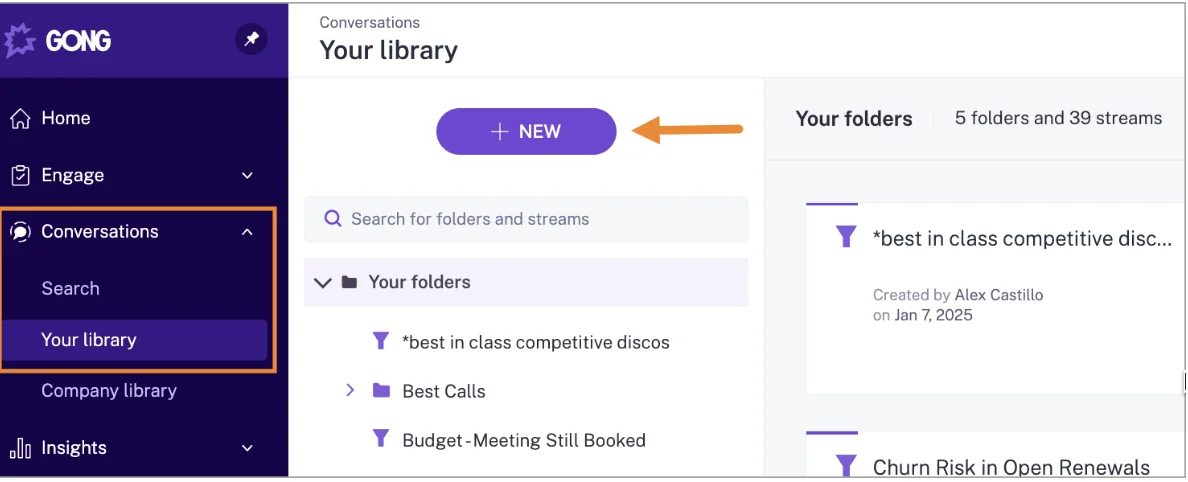
Calls in Gong live in Gong's own library of folders and streams. This is Gong's screen, not Weflow's:
What it does well
- Deep conversation analytics, coaching and deal inspection.
- The widest integration marketplace in this list.
- Recording across eleven meeting platforms and phone calls from about thirty dialers.
Where it stops
- It doesn't create contacts from email, and it has no email or calendar backfill.
- Call transcripts aren't exported to Salesforce.
- The inbox extension requires Engage.
- There are no published prices, and AI usage is metered in credits on top of seats.
Gong gives you the deepest conversation analytics. Weflow gives you the fastest path from conversation to CRM data.
Best for: teams whose real need is conversation analytics and coaching, with a large integration marketplace, and who will solve email capture separately.
What each Cirrus Insight alternative costs per seat
Line-by-line arithmetic beats "cheaper" claims. Here are list prices per user per month for capture alone, and for capture plus recording plus Salesforce write-back.
| Tool | Pricing model | Capture | Capture + recording + write-back | Minimums and terms |
|---|---|---|---|---|
| Weflow | Published per seat; AI summaries and field updates inside the seat | $19 | $49 (Weflow Revenue AI Foundation) | 10 users, 12-month terms |
| Cirrus Insight | Published, à la carte by line | $27; $32 with Fast Sync; $34.50 with Task Sync | $81 ($27 + $39 Meeting Capture + $15 CRM Updates) | No minimum; choice of term and billing |
| Revenue Grid | Published tiers, sold by quote | $30 | $149 (Ultimate; Teams and Zoom recording) | Yearly commitment; one-time implementation fee |
| Einstein Activity Capture | Included by edition, or add-on | Standard included in some editions; full version $50 via Sales Engagement | EAC records nothing; Sales Engagement bundles Einstein Conversation Insights | Billed annually; Standard keeps 6 months of activity |
| Nektar.ai | Quote only, per user with volume tiers | Not published | No recording | Backfill $8 per user per month of history, one-time |
| Gong | Per-user license plus platform fee; AI credits | Not published | Not published; transcripts stay in Gong | Gong Foundation required before any application |
Here's the worked example at 50 seats, on list prices:
- Capture only. Cirrus is $11 sidebar + $5 Email Sync + $11 Calendar Sync = $27, or $32 with Fast Sync. That's $16,200 a year, or $19,200 with Fast Sync. Weflow Activity & Contact Capture at $19 comes to $11,400 a year.
- Capture plus recording and write-back. Cirrus is $27 + $39 + $15 = $81, or $86 with Fast Sync, which is $48,600 a year. The Weflow Revenue AI Foundation bundle at $49 comes to $29,400, with the transcript on a Salesforce record and AI field updates included.
- Add the meeting workflow. Adding Cirrus Meeting Lifecycle ($35) takes the seat to $116. Weflow Conversation Intelligence includes follow-up emails and coaching scorecards in the same $49 seat. It doesn't produce a pre-meeting brief.
Cirrus licenses each line to its own headcount, so if only 15 of your 50 people record, run the numbers with that real split. Weflow mixes bundles by team too. Our published prices are list prices, and volume tiering applies from roughly 30 to 40 seats, so list is the ceiling.
Which tool fits your team, including staying on Cirrus Insight
Each tool fits a distinct situation, and staying is the right call in some of them.
| If your situation is… | Shortlist… |
|---|---|
| You want contacts from email, rep-correctable opportunity mapping and calls written into Salesforce on one published seat price | Weflow |
| You run Outlook or on-prem Exchange, or need private cloud or very large scale, and want capture only | Revenue Grid |
| Your edition already includes Einstein Activity Capture and basic background sync is enough | Einstein Activity Capture |
| You have 50+ seats and a data or AI team, and want headless capture into Salesforce or Snowflake | Nektar.ai |
| Your real need is conversation analytics and coaching, with a large integration marketplace | Gong |
| You depend on Smart Scheduler routing, team scheduling or email blast, or prefer rep-directed filing | Stay on Cirrus Insight |
| You need capture for fewer than 10 people | Stay on Cirrus Insight, which has no minimum |
How to run a fair parity test against Cirrus Insight
Two capture tools on the same user write the same emails and meetings twice. Cirrus Calendar Sync also links a calendar entry to an existing Salesforce Event only when subject, start and end time all match, so differences create duplicate Events. Putting different users on each tool doesn't work either, because activity volumes differ from person to person. The fair test moves a user fully, backfills the period, and compares against what Cirrus logged. Teams that run this well keep the new tool on its defaults:
"We tested it out, made sure it tracked one for one. We kind of ran it out of the box, we did not try to put any of our own use cases for templates. We said we just want to do it one for one."
- Pick a handful of users with representative volume and a test period, such as the last 30 days.
- Save Cirrus activity reports for those users and that period: emails and meetings by user, by account and by opportunity.
- Switch off Cirrus Email Sync and Calendar Sync for those users.
- Enroll the same users in Weflow on default settings, with no templates or custom use cases.
- Backfill the test period. Weflow's backfill checks each email's message ID before writing, so it adds only what Cirrus missed, and that gap is your measure.
- Compare the new numbers against your saved Cirrus reports, user by user and opportunity by opportunity.
Then inspect the three cases Cirrus hands back to reps:
- A new stakeholder on a thread. Check whether a contact appears on the account and as a contact role.
- One contact on two open opportunities. Check which deal the email lands on and how a rep corrects it.
- A recorded call. Check that it lands on its existing Event, with no second meeting record.
Finish with a qualitative check with the users who complained most about Cirrus. They'll tell you quickly whether the gaps they felt are gone.
How to move off Cirrus Insight without duplicates or gaps
Cut over user by user, know how much history each tool brings, and decide on purpose which Cirrus lines survive.
Move each user fully off Cirrus Email and Calendar Sync
Never run two tools writing for the same user. Weflow reads no mailbox until a user is enrolled in a capture configuration. That means you can finish the technical setup ahead of time and switch users on in waves.
- Install the managed package, connect the integration user and add the workspace app in Microsoft Entra or Google Workspace. Nothing is captured yet.
- Clean existing duplicate accounts and contacts. Weflow's Activity Capture Health view inside Salesforce flags duplicate contacts by email, duplicate accounts by website and unconfigured settings.
- For each wave, turn off Cirrus Email Sync and Calendar Sync for those users on the day you enroll them in Weflow.
- Run the backfill for the wave, then spot-check their accounts and opportunities.
Activity Capture Health also checks your Salesforce settings, such as Shared Activities and Enhanced Email, before you go live:

Check how much history each alternative brings across at go-live
History depth differs sharply by tool, and it's often an add-on.
| Tool | History at go-live |
|---|---|
| Weflow | 24 months of email, meetings and contacts as standard, up to 3 years custom |
| Cirrus Insight | Email backfill scoped as a service on request; Calendar Sync reaches back at most 7 days |
| Revenue Grid | Inbox and Sent from the previous 6 days; older mail and calendar items as a custom service that may carry a fee |
| Einstein Activity Capture | Switching to Sync Email as Salesforce Activity can bring in up to 6 months of past email |
| Nektar.ai | Paid backfill at $8 per user per month of history, up to 18 months |
| Gong | No email or calendar backfill |
Decide which Cirrus scheduling and engagement lines you keep
Weflow has no scheduling, lead routing, email blast or sequencing. If your team relies on Smart Scheduler ($20), Team Scheduling ($7), Personal Scheduling ($7) or Email Blast ($12), keep those lines or plan a replacement.
Because Cirrus licenses each capability to its own headcount, you can keep Smart Scheduler for the people who route inbound leads and drop the sync, sidebar and recording lines for everyone else. You'll still be paying for fewer lines than today, and capture moves to the layer that creates contacts and writes your calls into Salesforce.
You can see the re-map panel, the contact-creation guards and the Salesforce writes for yourself. Walk through the product yourself, no call required.
Questions Sales Ops asks before replacing Cirrus Insight
Will my Salesforce activity reports still work after leaving Cirrus Insight?
Yes. Weflow writes email to Task or EmailMessage, whichever the admin chooses, and meetings to Event, so your reporting model stays the same. Cirrus writes a Task of type Email, or an EmailMessage with Enhanced Email on, so match whichever you run today.
The trade-off between the two:
- Task: one activity report can span tasks and events, and Task is the lighter record for storage.
- EmailMessage: carries native From, To and Cc, and one record can relate to up to 50 recipients. About nine in ten of our customers choose it.
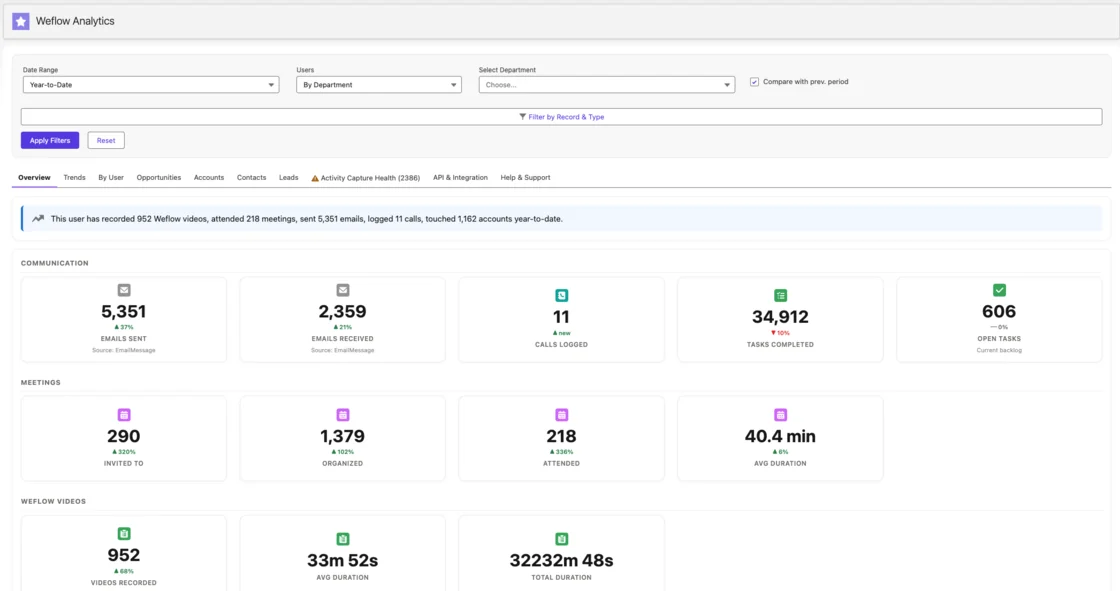
Weflow's own analytics read both, and they run inside Salesforce:
Do reps need to install anything for Weflow to capture activity?
No. Weflow capture runs through a tenant-level app in Microsoft Entra or Google Workspace, and the admin enrolls users centrally. The Outlook add-in and Chrome extension are optional.
The one rep step: users with a Weflow Conversation Intelligence seat sign in once before the notetaker joins their meetings. We hear the reason this matters on almost every capture call:
"A lot of the other ones are like, oh, like get them to like install the thing and do the setup. But I'm like, they're not going to. They're not going to do it. It's just like herding cat."
How do I stop contact creation flooding Salesforce from webinars?
Weflow gives you five controls:
- Restrict creation to existing accounts.
- Cap contacts per meeting or thread, so a 200-person webinar doesn't write 199 contacts.
- Block prefixes such as invoice, billing, support and no-reply.
- Rely on the real-time duplicate lookup across contacts, leads and email fields.
- Let reps clear the tick in the extension before an email sends.
There's no admin review queue where new contacts wait for approval. With the existing-accounts rule on, an email from a company not in Salesforce creates no contact and sends no notice.
What happens to automatic contacts under strict Contact validation rules?
Weflow enriches each contact before writing it, so fields such as title and phone usually arrive filled. When a rule requires a field enrichment couldn't find, that contact doesn't save. You can relax the rule for the integration user, or create those contacts by hand from the extension, where the full field set is available.
Can Weflow import my recordings from Cirrus Meeting AI?
Weflow imports recording libraries from Gong, Chorus, Jiminny and others using an API key from the current provider, then links each recording to the right Salesforce records. Where no API key is available, our team evaluates a raw file export first. Cirrus Meeting AI isn't among the providers we name for this today.
Can I start with Weflow Activity & Contact Capture, then add recording?
Yes. Start at $19 per user per month, then move to the Weflow Revenue AI Foundation bundle at $49 when you add Weflow Conversation Intelligence. The bundle carries roughly a 16 percent discount against buying the two separately, which makes capture first and recording second the cheaper sequence. Recording lives only in Conversation Intelligence, not in capture.
Can I add Weflow seats partway through the contract?
Yes. Weflow charges seats added mid-term pro rata to the end of the term. There's no contractual right to reduce seats mid-term, but you can reassign a seat when someone leaves.
What can Weflow see in our mailboxes and Salesforce?
Weflow reads nothing until a user is enrolled in a capture configuration. Here's what that looks like once they are:
- Threads where every participant is on an internal domain are never logged.
- Events and emails a user marks private stay out.
- Sign-in runs only through your Salesforce authentication and SSO, so deactivating a user in Salesforce removes their Weflow access.
- Our support team sees how Weflow decided to log or skip each email, never the email's content.
Does Weflow create leads like the Cirrus Insight sidebar does?
No. Weflow creates contacts only and never leads. When an address already exists as a lead, the activity attaches to that lead, and lead conversion stays a manual Salesforce step. If you run inbound on leads, keep whatever creates them today.










