

Weflow vs Revenue Grid: Salesforce Email and Calendar Capture Compared (2026)
Learn how Weflow vs Revenue Grid compare on Salesforce email capture, calendar sync, and mapping.



Weflow and Revenue Grid both pass the checkbox test for Salesforce capture. Each has server-side sync, a sidebar in the inbox, and native Task or EmailMessage records. On a clean deal with one owner and one contact role, both land the email on the opportunity.
The difference shows up on the deals your org actually has. Three questions decide it:
- What happens to an email from someone who doesn't own the opportunity?
- What happens to an email to a contact with no opportunity contact role?
- What happens on an account with two open deals?
Here's the short answer.
Revenue Grid links an auto-saved email to an opportunity only when four conditions all hold: the rep owns it, a contact on the email has a contact role on it, it's open, and opportunity linking is switched on. It adds no contact roles on its own, and it auto-saves email in 30-minute sync sessions.
Weflow Activity & Contact Capture takes a different approach:
- It weighs several signals and falls back to the account when they don't settle the choice.
- It can create the missing contact role as it logs.
- It lets the rep correct a whole thread once.
- It writes to Salesforce almost immediately.
Revenue Grid is the better fit in three places: private and on-premises deployment, two-way calendar sync, and putting one email on several records.
Below you'll find the behavior rule by rule, the price at each tier, and a two-week sandbox test plan you can run yourself.
Weflow vs Revenue Grid at a glance: capture, mapping and pricing
Most rows look similar on paper. The ones that split the two tools are opportunity choice, contact creation, latency, data access and pricing.
| Capability | Weflow | Revenue Grid |
|---|---|---|
| Automatic email capture | Server-side app in Microsoft Entra or Google Workspace that writes almost immediately. Misses personal accounts and mail sent from a separate deliverability subdomain. | Server-side Sync Engine that auto-saves in 30-minute sessions, stretching to 60 or 120 minutes on quiet mailboxes. A manual Sidebar save is immediate. |
| Automatic meeting capture | Every external meeting goes to the Event object, recorded or not. One-way calendar-to-Salesforce sync is recommended. | Two-way calendar sync. Salesforce-to-calendar Instant Sync is a paid add-on that doesn't support Google Workspace. |
| Matching activity to the right records | Primary and secondary email fields to contacts, leads, accounts and custom objects, with an optional Website-field domain fallback. | Contacts and accounts, plus opportunities when switched on. Clones an email onto up to ten records, on by default. |
| Choosing the right opportunity | Weighs contact role, opportunity owner, mailbox owner, account relationship and stage, then falls back to the account. One opportunity per email and no close-date rule. | Links only when the rep owns the opportunity, a contact holds a role on it, it's open, and linking is on. Depends on maintained contact roles. |
| Automatic contact creation | On, from To and CC at send, limited to existing accounts by default. Per-event cap, blocked prefixes and a real-time duplicate check. Creates contact roles. Never creates leads. | Two modes, both off by default. One mode creates accounts and contacts or leads for every unmatched participant. No automatic contact roles. |
| Rep review and correction | Outlook add-in or Chrome extension. Re-map once per thread and move already-logged email. No mapping control on mobile. | Sidebar to pick records by hand, re-link and edit a saved email. On phones, runs only in Outlook mobile with Microsoft 365. |
| Integrations | Google, Microsoft, Zoom, Teams, Meet, Slack and the Outreach dialer. No native warehouse connector. | Microsoft 365, Exchange on-premises and Google Workspace. Teams and Zoom recording. Third-party API integrations sit in a paid customization package. |
| Access from AI assistants (MCP) | Official read-only connector, switched on per workspace, with a transcript toggle. Per-rep breakdowns capped at 25 owners. | MCP server launched 13 July 2026 and connected manually. No public documentation or tool list. |
| Raw data access | Public REST API with bulk JSON or CSV export. Captured activity already sits in native Salesforce objects. | No public API for captured activity or AI outputs. Activity is reachable through Salesforce's own API. |
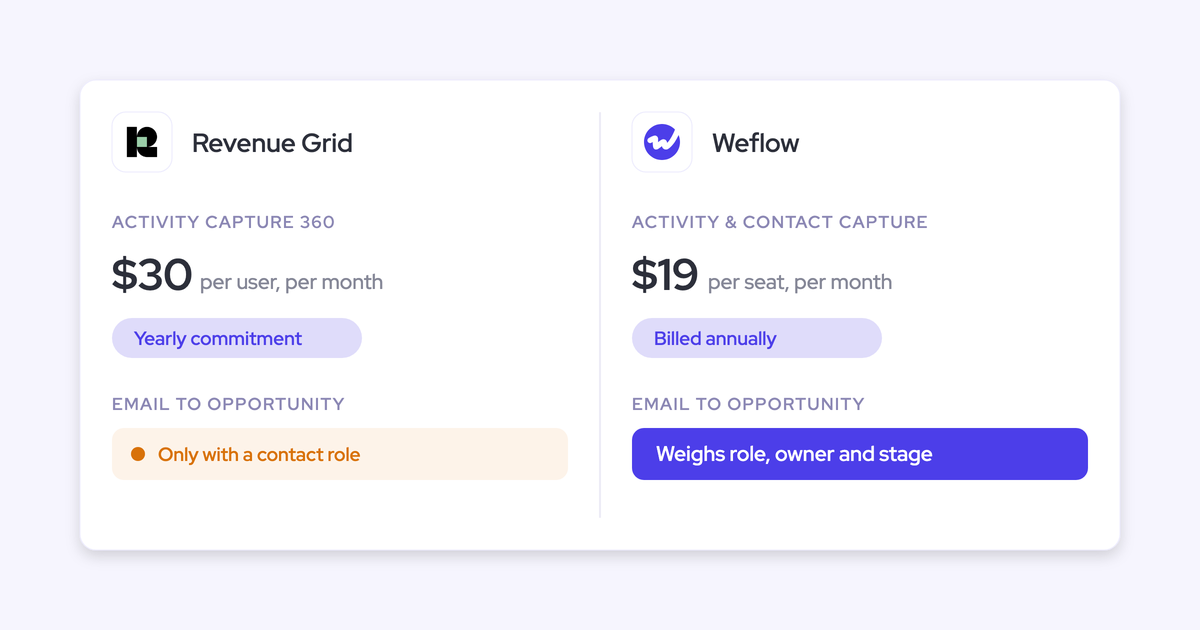
| Pricing | Published: $19 per user per month for capture, bundles from $49. Annual, 10-user minimum. | Published list prices of $30, $49 and $149, sold via quote with a one-time implementation fee. |
Where an ambiguous email lands on Weflow vs Revenue Grid
On a clean single-owner deal, both tools put the email on the opportunity. On the three ambiguous cases below, the outcomes split, and each tool's rule explains why.
Start with the Salesforce constraint every capture tool lives under. An activity relates to one opportunity or to the account, not both. When a tool can't pick the deal, the email lands on the account, and nothing warns you.
The account timeline looks busy while the deal looks dead. On accounts with a renewal, an expansion and a few people working each deal, that ambiguous case is the everyday case. Buyers tell us it's the thing they least tolerate:
If there are multiple opportunities, they just don't know where to map it and just randomly assign it to something. This is not acceptable.
An SE, CSM or manager emails a buyer on someone else's deal
Revenue Grid treats ownership as a gate, so a non-owner's auto-saved email lands without the opportunity. Weflow treats the opportunity owner as one signal among several, so your SE's email can still reach the deal.
| What happens | Weflow | Revenue Grid |
|---|---|---|
| What gets checked | Contact role, opportunity owner, mailbox owner, account relationship and stage, weighed together. | Whether the sending rep owns the opportunity, plus contact role, open status and the linking setting. |
| Where the SE's email lands | On the deal when the signals point to one open opportunity. On the account when they don't. | On the contact and account, without the opportunity. |
| How to correct it | The SE re-maps the thread once in the Outlook add-in or Chrome extension. | The SE saves or re-links the email by hand from the Sidebar. |
| What happens to later replies | They follow the corrected mapping for the rest of the thread. | With thread auto-saving on, a manual save's records apply to the whole thread. |
The consequence for reporting is concrete. On Revenue Grid, deal-team activity on the opportunity only counts what reps save or re-link by hand, beyond the owner's own email.
The buyer on the thread holds no opportunity contact role
Revenue Grid lands the email without the opportunity and never creates the missing role. Weflow can create that role the moment it logs to an opportunity, so the gap closes as the deal gets worked.
| What happens | Weflow | Revenue Grid |
|---|---|---|
| Where the email lands | On the opportunity when the account has exactly one open deal. On the account when several are open and nothing else settles it. | On the contact and account, without the opportunity. |
| Contact role | Weflow creates the opportunity contact role when it logs the email to an opportunity, including after a rep re-maps it. | None created automatically. A rep can create one from the Sidebar where an admin allows it. |
| Later emails from that contact | They resolve to the deal through the new role. | They keep landing without the opportunity until someone adds the role. |
| Effect on contact role coverage | Improves the longer the deal runs. | Stays as good as your team's manual hygiene. |
Weflow creates the role without a type on purpose. A job title doesn't tell you a buying role. A VP of RevOps on the thread could be your champion or your detractor.
The email proves the person is active on the deal, and that's what we record. Whether they're the economic buyer stays a judgment your reps make.
One contact sits on a renewal and an expansion at once
This is the case where Revenue Grid has a real counter-move. Revenue Grid can clone one email onto both deals. Weflow logs one opportunity per email and asks the rep to settle it once per thread.
| What happens | Weflow | Revenue Grid |
|---|---|---|
| When the contact role points at both deals | Logs to the account, then the rep picks the deal once in the add-in and the thread follows. | Can link the email to several records by cloning it, up to ten per email. |
| Can one email sit on two deals | No. One opportunity per email. | Yes, as separate cloned records. |
| Close-date rule | None. The workaround is separate capture configurations per lane, filtered on opportunity type or a close-date threshold. | No close-date rule. The four linking conditions still apply. |
| Meetings | The Event sits on one record. The Weflow recording can link to both deals at once. | Linking one event to several records is a separate option, enabled on request with the managed package. |
Here's the trade-off you're choosing between:
- Cloning: Each clone is its own Task or EmailMessage record. A report that counts records counts the email once per clone, and each clone takes its own storage.
- One record: Your activity counts stay honest, but a rep has to resolve the thread once.
Pick based on whether your reports need the email on both timelines, or need one email counted once.
How Weflow Activity & Contact Capture works, capability by capability
Weflow is the Revenue AI Orchestration platform for sales, customer success, and RevOps teams. Weflow Activity & Contact Capture is the product in it that writes email, meetings and contacts into your Salesforce.
Capture runs server side with no rep action. The mapping rules are stated out loud, and a rep can correct them once per thread. Here's how each piece behaves, and where it stops.
Weflow captures email server side and writes it almost immediately
Weflow captures every enrolled user's email through a central app installed in Microsoft Entra or Google Workspace. It works the same on a phone, a browser or a desktop client, because nothing depends on a plugin being open.
Weflow writes to Salesforce through the integration user almost immediately, not on a batch. That timing matters if you run flows triggered on activity or "last touch" fields, because they react to today's email instead of one from an hour ago.
Weflow only logs mail that matches a Salesforce record:
- Threads where everyone is on an internal domain never reach Salesforce.
- If a rep emails a company before its account exists, Weflow logs those earlier emails once the account is created, with no re-sync.
- Personal email accounts aren't captured.
- Mail sent from a separate deliverability subdomain isn't captured either, so pre-reply sequencer touches from that subdomain stay out of Salesforce.
Weflow logs every external meeting to the Salesforce Event object
Weflow logs every external calendar meeting from Google or Microsoft calendars to the Event object, whether or not it was recorded. Recording adds the summary and field updates on top. The activity trail stays complete even when a recorder wasn't admitted.
Weflow skips two kinds of entries:
- Entries with no other attendees and no meeting link, like a lunch block.
- Events the user marks private.
To relate a meeting to every attendee rather than just the primary contact, your org needs Salesforce's Shared Activities setting on.
We recommend one-way sync from the calendar to Salesforce. Weflow can sync both ways, but the Salesforce-to-calendar direction is unreliable. If your team creates meetings in the calendar, which most teams do, one-way loses you nothing.

How Weflow matches each email to contacts, accounts and custom objects
Weflow matches on the email address, then works outward through the Salesforce relationships around it. It never reads the email's content to decide. We tested that approach and left it out because it wasn't accurate enough.
Weflow matches in this order:
- It looks up the address in primary and secondary email fields.
- It logs to the contact, lead or custom object that holds that address, preferring a contact over a lead.
- It relates the email to the parent account.
- If no contact exists and the domain fallback setting is on, it matches the sender's domain to the account Website field.
You configure these rules per team. A sales team and a CS team can log to different objects and opportunity types without one team's rules leaking into the other's.
One thing in your data can mislead Weflow: the account Website field. Weflow treats any value there as a matching domain, including a personal mailbox domain. A wrong or shared value sends every email involving that domain to that one account.
Duplicate accounts sharing a domain split activity between them. The Activity Capture Health view in Weflow Analytics flags accounts with no website and duplicate accounts by website, so you can fix both before go-live.

How Weflow picks the opportunity, and why it falls back to the account
Weflow picks the only open opportunity when an account has exactly one. When several are open, it weighs these signals:
- whether the contact holds an opportunity contact role, and on which deal;
- who owns the opportunity;
- who owns the mailbox the email came through;
- the account relationship;
- the opportunity stage.
Weflow never writes to a closed opportunity. When the signals don't settle the choice, it logs to the account on purpose.
That fallback is a design choice. An email on the account is easy to fix. An email on the wrong deal quietly corrupts the timeline, the deal review and every AI summary built on it.
Weflow makes each decision against your Salesforce data as it stands at that moment. If someone adds a contact role between two emails, the second one can land on the deal. Logged activity stays where it landed unless a rep or admin moves it.
Two limits apply here:
- One opportunity per email. Correspondence covering two live deals lands on one of them or on the account.
- No nearest-close-date rule. The workaround is separate configurations per lane, for example one for the renewals team and one for everyone else. Restricting logging to the opportunity owner is possible, but we don't recommend it, because it drops everyone else's activity on the deal.
Weflow creates contacts and contact roles behind four guards
Weflow creates contacts automatically from To and CC recipients when a rep sends, not when they receive. BCC recipients aren't included. What stops that from flooding your org is four guards:
- Existing accounts only. Weflow creates a contact only when its domain matches an account already in Salesforce, so no orphan contacts appear.
- A cap per event. A webinar with two hundred invitees doesn't write two hundred contacts.
- Blocked prefixes. Addresses like no-reply, billing, invoice and support never become contacts.
- A real-time duplicate check. Before creating anyone, Weflow looks up the address across contacts, leads, custom objects with an email field, and secondary email fields. If the address exists as a lead, the activity attaches to that lead.
Weflow enriches each contact before writing it, at no extra charge. It fills first name, last name, title, email, phone and LinkedIn into your own fields. Where the email carried no display name, the address goes into the last name field.
When Weflow logs to an opportunity and the contact has no role there, it can create the role, without a type.
That's the answer buyers ask for first. One put the requirement plainly:
I don't want twenty new contacts in there for some prospect I'm just talking to. Only once they're really an account.
A few limits to know:
- Weflow never creates leads, and it doesn't merge duplicates that already exist.
- There's no admin review queue before creation. The rep can clear the tick in the extension before sending.
- With creation limited to existing accounts, someone at a company not yet in Salesforce gets no contact, and nobody is told.
Your reps correct the mapping once per thread in Outlook or Chrome
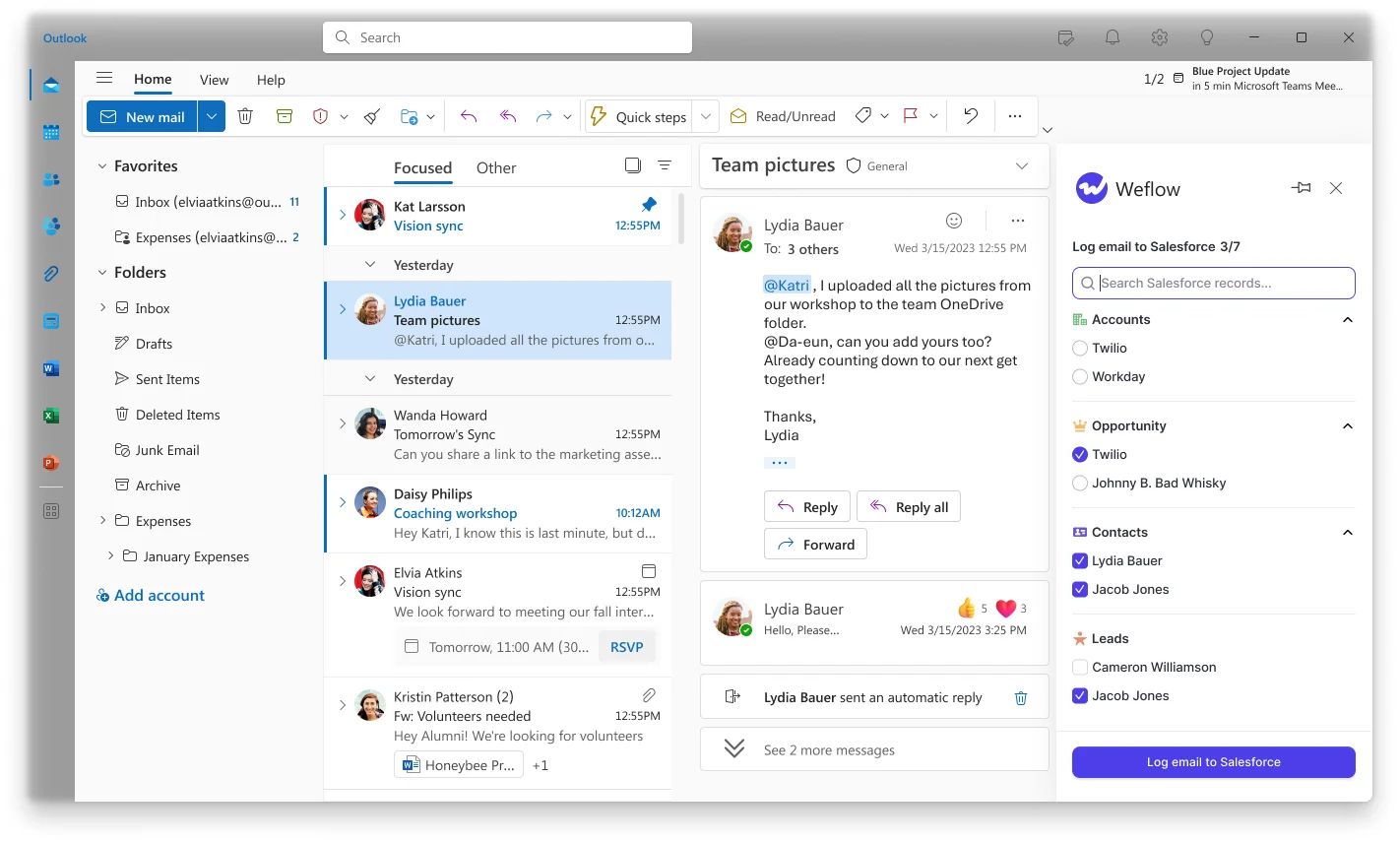
The Outlook add-in and Chrome extension show your rep which contact, account and open opportunity Weflow matched before the email logs. The rep can pick a different opportunity, account or custom object once. Weflow stores that choice against the thread, and every later reply follows it. A new thread starts fresh.
From the same panel, a rep can:
- untick logging for a thread;
- move an email that's already logged;
- move a meeting, which moves both the Event and the recording.
Correcting a meeting from inside the Weflow app moves only the recording, so we tell teams to correct from the mail client.
Buyers split on this. Some see a rep override as what makes automated capture trustworthy. Others see any rep click as the old admin tax coming back.
We built it per thread so the rules handle the common cases, and the rest costs one decision per conversation, not per email. You set the mode per team:
- fully automated;
- hybrid with the add-in;
- fully manual.
You can also hand out the add-in with the suppress control removed.
The limit: reps can't see or change mapping from a phone. Mail sent from mobile is captured and matched automatically, and a thread mapped on desktop keeps its mapping.
Weflow connects to Google, Microsoft, Zoom, Slack and Outreach
Weflow's native integrations cover the mail, calendar and meeting stack most Salesforce teams run:
- Salesforce, Gmail, Google Calendar and Google Meet.
- Outlook and Microsoft Teams.
- Zoom, Slack and the Outreach dialer, whose calls come in as recordings.
- BI tools such as Tableau and Looker, through the API.
Weflow has no native Snowflake, Databricks or BigQuery connector. Teams move data into a warehouse through the API. Weflow isn't an integration platform with a connector catalog.
Claude and ChatGPT read Weflow data through a read-only MCP connector
Weflow has an official, read-only MCP connector for Claude, ChatGPT and other assistants. An admin switches it on per workspace. A separate toggle decides whether assistants can read full transcripts or only AI summaries.
The connector exposes:
- playbooks;
- call summaries;
- transcripts;
- forecast calls;
- pipeline metrics.
The admin console lists every user who connected an assistant and when. Per-rep breakdowns are capped at 25 owners, so a large org gets aggregate answers unless the question is narrowed to a team.
The Weflow REST API bulk-exports activity and conversation data
Weflow's public REST API bulk-exports transcripts, metadata, scores and signals as JSON or CSV into your warehouse or BI tools. Recordings export to your own cloud storage.
Captured email and meetings already sit in native Salesforce objects. You can report on them, export them or read them with any tool, without going through us.
How Revenue Grid Activity Capture works, capability by capability
Revenue Grid Activity Capture is a mature Sidebar plus a server-side Sync Engine, with flexible saving modes. Its opportunity linking is strict, and it depends on ownership and maintained contact roles. Here's how it behaves, according to Revenue Grid's own documentation.
Revenue Grid auto-saves email in 30- to 120-minute sync sessions
Revenue Grid's Sync Engine saves inbound and outbound email to Salesforce whether or not the Sidebar is open. It does this in sync sessions:
- Sessions run every 30 minutes by default.
- After a session with no changes, the gap stretches to 60 minutes, then to 120 minutes on quiet mailboxes.
- Admins can change the base interval.
- A rep's manual save from the Sidebar writes immediately.
You get three saving modes:
- fully automatic for every non-blocklisted address;
- semi-automatic when a rep tags an email or thread with a Salesforce category or folder;
- manual from the Sidebar.
Three blocklists keep personal mail out:
- one each rep manages;
- one admins set centrally;
- a fixed system list of free email domains that only support can change.
For last-touch fields and flows triggered on activity, the interval means an auto-saved email can take half an hour or more to exist in Salesforce.
Revenue Grid syncs calendar items both ways with Salesforce
Revenue Grid syncs calendar items two ways between Outlook or Google Calendar and Salesforce. New meetings reach Salesforce within a couple of minutes. That two-way sync is a genuine strength.
A few conditions come with it:
- Salesforce-to-calendar Instant Sync, which puts a Salesforce event in the calendar within about five minutes, is a paid add-on.
- Instant Sync doesn't support Google Workspace.
- Without it, Salesforce events reach the calendar on the regular sync cycle.
- Calendar items created before activation don't sync unless a rep marks them or you buy a bulk sync service.
How Revenue Grid links saved emails to contacts and accounts
Revenue Grid links saved emails to contacts and accounts, and to opportunities when that setting is on. Every saved activity except a lead-linked one must also link to an account.
Cloning onto several records is on by default. Admins can limit it to chosen object types or turn it off. With cloning off, re-linking an email to a new record unlinks the old one.
Deduplication across colleagues needs setup. When several colleagues auto-save the same email, Revenue Grid keeps one copy only after the InternetMessageId field from its managed package is added and set in admin settings.
Revenue Grid links to an opportunity only when four conditions hold
Revenue Grid states its rule clearly. An auto-saved email links to an opportunity only when all four of these hold:
- The rep owns the opportunity.
- An address on the email belongs to a contact with a contact role on it.
- The opportunity is open.
- Linking to opportunities is switched on in sync settings.
Meetings follow a different path. Revenue Grid's AI assistants link a meeting using the record owner, attendee addresses and the meeting's subject, body or transcript. A meeting they can't link is visible only to its attendees and their managers.
For email, opportunity-level coverage can only be as good as your org's contact role hygiene.
Revenue Grid ships contact creation off and never adds contact roles
Revenue Grid can create records for unknown participants during auto-saving, but both modes ship switched off:
- Domain mode: creates a contact when the address domain matches an account's website and an existing contact's domain. Otherwise it creates a lead.
- Broad mode: creates accounts, and contacts or leads, for every unmatched participant.
Free email domains never trigger creation, and orgs with Person Accounts get person accounts instead of contacts. The Sync Engine can also create records for unresolved meeting attendees.
Revenue Grid doesn't create opportunity contact roles on its own. A rep can create one from the Sidebar where an admin has added the object and allowed creation.
Your reps save and re-link emails by hand from the Revenue Grid Sidebar
The Revenue Grid Sidebar gives reps a lot of manual control. From it, a rep can:
- pick the linked people and records by hand in the Save dialog;
- re-link a saved email;
- edit an email's body after saving;
- keep their own blocklist, and still save a blocklisted email by hand.
With thread auto-saving on, one save applies its records to every past and future email in the thread, including replies from internal or blocklisted participants. The records chosen in the first save stick for the thread.
On phones, the Sidebar runs only as an add-in inside Outlook mobile with Microsoft 365 accounts. Exchange accounts can't use it on mobile, though their mail still syncs server side.
Revenue Grid connects to Exchange on-premises, Teams and Zoom
Revenue Grid covers mail environments many capture tools don't reach:
- Microsoft 365 through Graph or EWS, Exchange on-premises, and Google Workspace.
- A Microsoft Teams notetaker that joins automatically when the organizer is a Revenue Grid user.
- A Dial-In Agent for meetings with a dial-in number.
- Zoom meetings processed through each user's connected Zoom account.
- Calling and SMS on your own Twilio account, with each call logged as a completed Task.
- Third-party API integrations such as Teams and Slack, sold inside a paid customization package.
Revenue Grid launched an MCP server in July 2026 without public docs
Revenue Grid launched its MCP server on 13 July 2026. It gives ChatGPT, Claude, Copilot and custom agents access to relationship history, engagement trends, revenue signals and AI insights.
What's missing today:
- Customers connect it manually.
- It has no public documentation, tool list or pricing tier yet.
- A marketplace listing for Claude is announced but not shipped.
Revenue Grid also has a separate Claude plugin, which needs Pipeline Assistant, Meetings Assistant or AI Mentor enabled.
Revenue Grid has no public API for captured activity
Revenue Grid has no public API for captured activity or its AI outputs. Its only API is the Salesforce Scheduler Adapter's calendar endpoints.
That gap matters less than it sounds. Revenue Grid writes captured email and meetings into Salesforce as Tasks, EmailMessages and Events, so you reach them through Salesforce's own API. What you can't pull directly is the AI layer.
What Weflow and Revenue Grid cost for capture, recording and forecasting
Weflow publishes per-seat prices. Revenue Grid publishes list prices but sells through a quote, with a one-time implementation fee and several on-request fees. The gap widens once you add recording or forecasting.
Capture-only seats: $19 on Weflow, $30 on Revenue Grid
| Line item | Weflow Activity & Contact Capture | Revenue Grid Activity Capture 360 |
|---|---|---|
| List price | $19 per user per month | $30 per user per month |
| Billing | Annual, 12-month term, 10-user minimum | Yearly commitment |
| What's included | Email, meeting and contact capture into Salesforce, contact enrichment, activity insights and reports, Ask Weflow AI Pro, and Agent Builder Free with 25 agent actions a month | Email and calendar capture, historical synchronization, the inbox and calendar Sidebar, online scheduling, admin controls and native Salesforce activity reporting |
| How it's sold | Published price, with volume discounts in the quote | Published list price, sold via quote |
| Trial | 14-day free trial with guided onboarding | 14-day trial of all features |
Adding recording and forecasting: Weflow bundles vs Revenue Grid Ultimate
Revenue Grid puts meeting recording and forecasting only in Ultimate, at $149 for every seat that needs them. Weflow sells them as modular products and bundles, so you add what you need.
| What you need | Weflow path | Revenue Grid path |
|---|---|---|
| Capture plus meeting recording | Weflow Revenue AI Foundation at $49 (Weflow Activity & Contact Capture plus Weflow Conversation Intelligence) | Revenue Grid Ultimate at $149 |
| Capture plus deal intelligence and recording | Weflow Revenue AI Business at $59 | Revenue Grid Ultimate at $149 |
| Capture, recording and forecasting | Weflow Revenue AI Enterprise at $79 | Revenue Grid Ultimate at $149 |
| Forecasting without recording | Weflow Deal Intelligence & Forecasting at $39 alongside capture at $19 | Revenue Grid Ultimate at $149 |
You can also mix plans across your team. Most reps can sit on one bundle while a handful of managers get the full platform. Viewer seats for people who only read dashboards are free.
What each vendor charges beyond the list price
Revenue Grid lists these costs and terms beyond the seat price:
- A one-time fee for implementation and onboarding.
- Historical email sync beyond the default six days or from extra folders, on request and possibly paid.
- Bulk sync of calendar items created before activation, on request and possibly paid.
- Salesforce-to-calendar Instant Sync, on request and possibly paid.
- Customization, a premium success plan and dedicated hosting as separate subscriptions.
Weflow's commercial terms work like this:
- A 10-user minimum per product or bundle, on a 12-month term with no shorter option.
- Seats added mid-term are charged pro rata to the end of the term.
- Seats can't be reduced mid-term, though you can reassign a seat when someone leaves.
- No implementation or platform fees.
- Historical backfill of up to 24 months is available as an add-on.
Where Revenue Grid is the stronger choice
Revenue Grid is the better fit for specific deployment, calendar, multi-record and all-in-one engagement needs. It also works well for orgs whose deals are single-owner with maintained contact roles. If one of these describes you, weigh it heavily.
Revenue Grid runs on-premises, in your Azure or on Exchange on-premises
Revenue Grid is the right call if your security team won't accept a multitenant cloud, or your mail still runs on Exchange on-premises. It deploys on its multitenant cloud, a dedicated cloud, your own Azure tenant or your premises, and it supports Exchange on-premises.
Weflow runs as a central app in Microsoft Entra or Google Workspace, so it doesn't cover those setups.
Revenue Grid can put one email on up to ten records
If your reports need one email to count on two deals, Revenue Grid does it by cloning the email onto up to ten records. Weflow logs one opportunity per email and falls back to the account when the choice isn't clear.
Revenue Grid pushes Salesforce events back to the calendar
Some teams create meetings in Salesforce and need them to appear in reps' calendars. Revenue Grid offers two-way sync, with Instant Sync as a paid add-on outside Google Workspace. Weflow recommends one-way sync from the calendar to Salesforce, because the reverse direction isn't reliable enough for us to recommend it.
Revenue Grid Ultimate bundles sequences and a Twilio dialer
If you want sequencing, calling and capture from one vendor, Revenue Grid Ultimate includes sales cadences and a Twilio-based dialer. Weflow has no sequencing or dialer, and it isn't on our 2026 roadmap. Weflow captures sequencer mail as ordinary activity and runs alongside tools like Outreach.
Revenue Grid works well on single-owner deals with clean contact roles
Revenue Grid's four conditions rarely bite when every deal has one owner who sends all the email and your team keeps contact roles current. In that org, the ambiguous cases above are rare. Weflow's signal weighing and contact role creation pay off when deals have several people on them and roles are patchy.
How to pilot Weflow and Revenue Grid in two weeks
A clean bake-off does four things:
- isolates the inboxes;
- uses test data that doesn't create false ties;
- tests the ambiguous cases;
- measures overrides directly.
Here's the plan in the order you'd run it.
Keep the two tools from logging the same inbox
Two capture tools on one inbox compete for the same emails and write duplicates. Buyers find this out the hard way:
I turned the Outreach sync back on and now we're getting duplicates.
- Give each tool its own pilot users, or disable one tool entirely before testing the other.
- List every other tool already writing activity, such as a sequencer, a scheduler like Chili Piper, or Einstein Activity Capture.
- Switch those off for pilot users, or decide in writing which tool owns which activity.
- On Weflow, turn on compatibility mode or add tracking patterns for any tool that keeps logging.
- Start with one or two test users per role, which is also what Revenue Grid recommends for its own rollouts.
Build sandbox accounts with unique domains and one contact role each
Free-mail test addresses create ties that production rarely has, so the test ends up measuring your test data instead of the tool. Build the sandbox like this:
- Give each test company its own unique domain, not gmail.com or outlook.com.
- Keep public mail domains out of every account Website field.
- Give each test opportunity one clear contact role, then deliberately remove roles only for the cases that test that gap.
- Don't build test accounts with employees' own email addresses, because that pulls their real mailbox onto a fake customer.
- Check the required fields on your Contact page layout before testing creation, because they silently block any external tool.
- Note which of your validation rules on Contact require fields that enrichment might not fill.
Test the ambiguous cases, not the clean ones
Run the same scripted cases on both tools. For each one, record the record the activity landed on and how long it took to appear in Salesforce. The pass criteria below are yours to set, based on how your org reports.
| Test case | How to set it up | What to record | What "pass" looks like for you |
|---|---|---|---|
| Email from a non-owner | An SE or CSM emails a contact with a role on an opportunity owned by someone else. | Landing record, time to write, clicks needed to fix | The email reaches the deal, or lands on the account with a one-step fix. |
| Contact with no role | Email a contact on an account with one open deal, then on an account with two. | Landing record, whether a contact role was created | Later emails from that contact resolve to the right deal. |
| Contact on two open deals | Put one contact's role on a renewal and an expansion. | Landing record, record count, activity count on each deal | The behavior matches how your reports should count the email. |
| Large invite list | Send an invite to 30 or more addresses at an existing account, plus a no-reply address. | Contacts created, duplicates, blocked addresses | Only the people you'd want in the CRM appear. |
| Per-thread correction | Re-map the first email of a thread, then send three replies. | Where each reply lands | Replies follow the correction without further clicks. |
| Duplicate from a sequencer or scheduler | Send from a sequencer and book through a scheduler that also logs. | Number of Task, EmailMessage and Event records per touch | One record per touch. |
Count your own override rate, because no vendor publishes one
You'll be asked how often reps have to override the mapping. Neither vendor publishes that number, and we don't have one to give you either. It depends on how many open deals your accounts carry and how complete your contact roles are.
The pilot is where you measure it:
- Count the total threads each pilot rep had logged per week.
- Count the corrections each rep made in the same week.
- Divide corrections by logged threads, per rep and for the group.
- Split the result by account type, so you see where overrides cluster, such as renewals or partner-led deals.
How to switch from Revenue Grid without duplicate activity
Revenue Grid writes to native Salesforce objects, so the activity it already logged stays in your org when you leave. The work is in the turn-off order.
- Keep your email object. Tell us whether your reports run on Task or EmailMessage, and Weflow logs to the same object.
- Turn off Revenue Grid auto-save first. Two tools saving the same inbox, even briefly, write duplicates.
- Enroll Weflow users after Revenue Grid stops. Weflow reads no mailbox until a user is enrolled, so you can finish setup while Revenue Grid is still running.
- Account for tools that keep logging. Use compatibility mode for a tool that should keep writing, and tracking patterns for sequencer mail that should never reach Salesforce.
- Plan history deliberately. Revenue Grid syncs six days of history at activation by default. On Weflow, historical backfill of up to 24 months is an add-on.
- Leave logged activity alone. Weflow never moves activity on its own once it's logged. Existing Revenue Grid records stay where they are unless you move them.
Which one fits your Salesforce org: Weflow or Revenue Grid
Match your org's shape to the tool whose rules fit it.
| If your org looks like this | Better fit |
|---|---|
| Several people work each deal, including SEs, CSMs and managers, and their email needs to reach the opportunity. | Weflow |
| Accounts carry more than one open opportunity and your contact roles are patchy. | Weflow |
| You run flows or last-touch fields that need email in Salesforce within moments, not on a 30-minute cycle. | Weflow |
| You want contacts and contact roles created automatically, with guards against pollution. | Weflow |
| You want published pricing and a path to Weflow Conversation Intelligence and Weflow Deal Intelligence & Forecasting without changing vendor. | Weflow |
| You need dedicated-cloud, customer-Azure or on-premises deployment, or you run Exchange on-premises. | Revenue Grid |
| You create meetings in Salesforce and need them pushed back to the calendar. | Revenue Grid |
| You want sequencing and a dialer in the same tool as capture. | Revenue Grid |
| Your deals are single-owner and your contact roles are maintained. | Revenue Grid |
| Your reports need one email to appear on two deals at once. | Revenue Grid |
After your pilot, the next step is seeing Weflow's mapping rules run against your own ambiguous cases. See how Weflow captures activity, updates Salesforce fields from calls, and rolls up your forecast. Book a 30-minute demo.
Weflow vs Revenue Grid: questions Sales Ops asks before signing
Which Salesforce objects do Weflow and Revenue Grid write email to?
Both tools log email as either Task or EmailMessage, and both write meetings to Event. The trade-off is the same on either tool:
- Task: A single activity report can span Tasks and Events, and a Task uses less storage.
- EmailMessage: It sits outside that reporting model, but it carries From, To, Cc and thread structure. It's roughly seven times heavier than a Task.
About nine in ten Weflow customers choose EmailMessage. Keep whichever object your reports already use.
How often do reps have to override the mapping?
Neither Revenue Grid nor Weflow publishes an override rate, and we don't have one to quote. Measure it in your pilot with the method above. On Weflow, each correction holds for the whole thread, so one override covers every later reply.
Will Weflow double-log email that Outreach or Chili Piper already logs?
Not if you configure it. Weflow gives you two settings for two different situations:
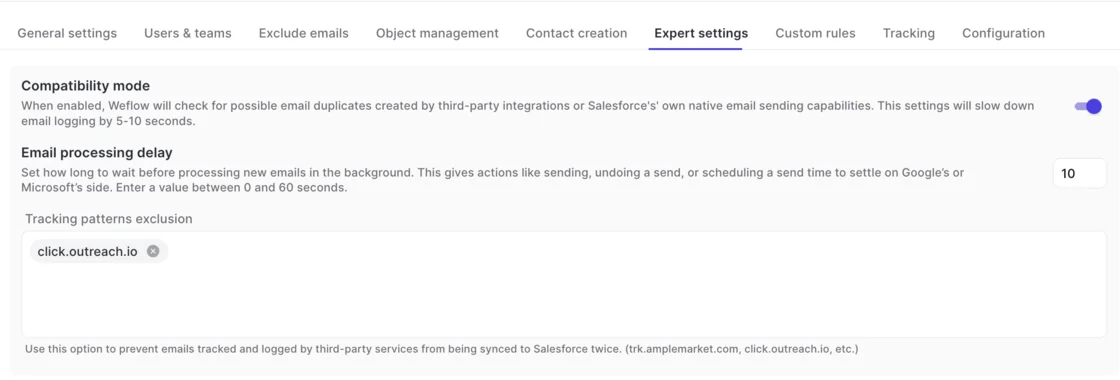
- Compatibility mode: Weflow holds its sync back by about ten seconds so the other tool logs first, then matches on the record id. Use it for a tool that should keep logging.
- Tracking patterns: Weflow skips messages that carry a sequencer's tracking string in the body. Use them when bulk sequencer sends should never reach Salesforce at all.
What integration user and Salesforce permissions does each tool need?
Revenue Grid's Instant Sync and Salesforce Scheduler Adapter need a dedicated integration user with the System Administrator profile. A fully admin-authorized rollout needs a separate paid Salesforce license for a custom service account. Without one, each rep authorizes Salesforce and their mailbox with their own login.
Weflow uses an integration user and a central app in Microsoft Entra or Google Workspace. It reads nothing until a user is enrolled. Users sign in to Weflow only through your Salesforce authentication, so deactivating someone in Salesforce removes their access.
How do validation rules and required layout fields affect contact creation?
Required fields on a Salesforce page layout silently block any external tool from creating a contact, because page layouts aren't exposed through the API. Validation rules are visible to the tool, but they stop a contact when enrichment couldn't fill a required field.
If your rules can't change, you have two options:
- relax the rule for the integration user;
- accept that reps create those few contacts by hand.
Can Weflow and Revenue Grid log email to custom Salesforce objects?
Yes, both can. Weflow logs to any object, including cases and custom objects, and surfaces custom objects in the extension so a rep can link an email directly. You can also restrict logging per object to emails that include that record's owner.
Revenue Grid offers sync rules for standard and custom objects. It also lets reps create records of any object an admin enables in the Sidebar.
Does either tool capture email sent from an alias or a deliverability subdomain?
Capture matches on the address held in Salesforce, so sending addresses that don't match fall out. Weflow doesn't capture mail sent from a separate deliverability subdomain. Contacts with several addresses still resolve through secondary email fields.
A seller who sends from several aliases defeats any capture tool that matches on address. The fix is organizational: move the team onto one sending domain.
What should our security review ask each vendor about stored data?
Revenue Grid's documentation states:
- it stores personal information on Microsoft Azure in the US by default, with data centers in the EU and US;
- it may keep AI-generated content for up to 30 days to detect abuse;
- it doesn't use customer content to train models.
Weflow's activity and contact capture writes to native Salesforce objects and keeps nothing of substance on our side. Weflow Conversation Intelligence stores recordings. Our support team sees how Weflow decided to log or skip an email, but never the email's content.
Weflow is SOC 2 Type II certified and GDPR compliant. It runs Zero Data Retention for AI processing and never uses customer data to train AI models.











