Best Activity Capture Tools for Accounts With Multiple Open Opportunities (2026)
Decide which activity capture tools best map emails to Salesforce opportunities on multi-opportunity accounts.


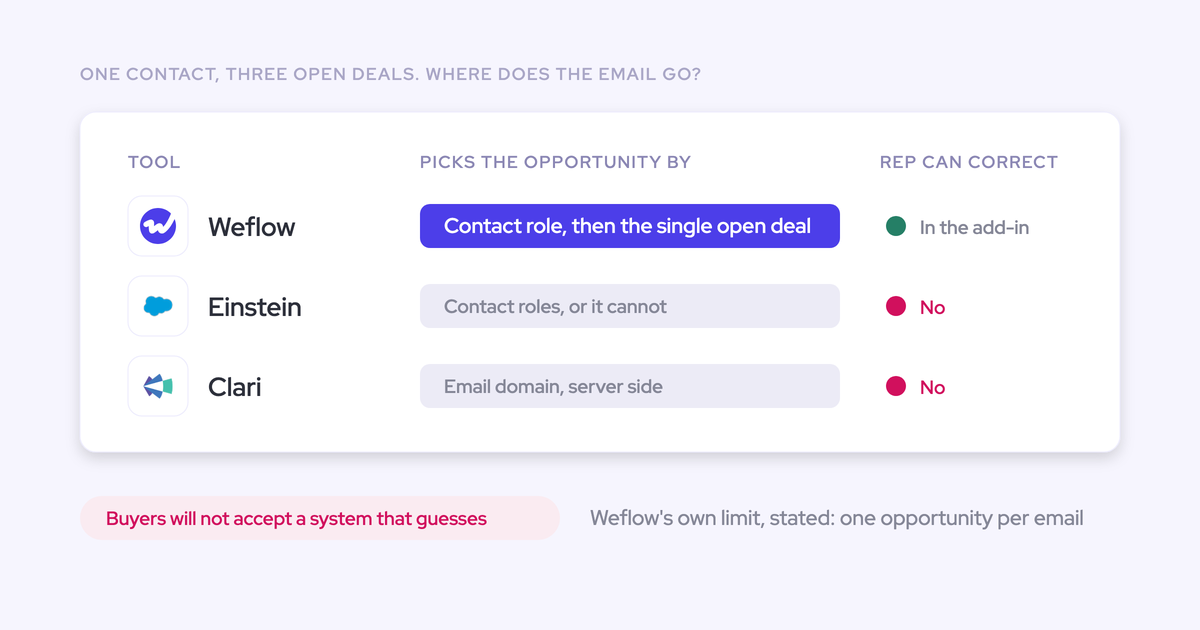

Choose activity capture that automates clear opportunity matches and lets sellers resolve genuine ambiguity once, inside their inbox.
When the same contact belongs to a renewal and an expansion, an email address alone cannot tell you which deal the conversation concerns. A silent guess gives you a populated timeline and an unreliable report.
Your evaluation should separate capture coverage from mapping accuracy. Start with the selection rule, the fallback when several opportunities qualify, and the seller’s correction workflow. Then compare record-level results on your own difficult accounts. If account-level activity already meets your reporting needs, you may not need another product.
Weflow is the Revenue AI Orchestration platform for sales, customer success, and RevOps teams. Built for Salesforce teams, Weflow Activity & Contact Capture combines server-side capture with inbox controls that remember an opportunity selection for the email thread.
That combination is our recommendation for teams that need deal-level reporting without manual logging on every message.
Compare activity capture tools on multi-opportunity accounts
Weflow addresses this requirement through automatic matching and persistent seller corrections. Einstein Activity Capture is the incumbent to evaluate against that workflow; the other candidates need separate consideration because capture, engagement, and conversation intelligence serve different jobs.
The table distinguishes established behavior from gaps in the comparison evidence.
| Product and capture scope | Opportunity selection | Contact-role dependency | Ambiguous matches | Seller control and persistence |
|---|---|---|---|---|
| Weflow Activity & Contact Capture: emails, meetings, and contacts | Prefers a contact over a lead, then a single open opportunity linked through a contact role | Uses opportunity contact roles; can create a missing role when logging an email to an opportunity | Falls back to the account | Outlook and Gmail controls show the proposed mapping; the selected destination persists for the thread |
| Salesforce Einstein Activity Capture (EAC): background email and calendar capture | Uses opportunity contact roles for deal association | Missing roles undermine opportunity matching | Account fallback occurs in observed multi-opportunity setups | Salesforce’s manual logging add-ins operate separately from EAC’s automatic matching |
| Clari Capture: automatic activity capture and Salesforce write-back | Exact multi-opportunity selection rule is not established in the reviewed evidence | Not established | Buyer experience identifies multi-opportunity difficulties, but does not establish the fallback rule | Correction and thread persistence are not established |
| Outreach: engagement workflows and associated activity logging | Contact/account logging does not establish correct deal association | Not established | Buyers report record misalignments; the selection rule is not established | Persistent opportunity correction is not established |
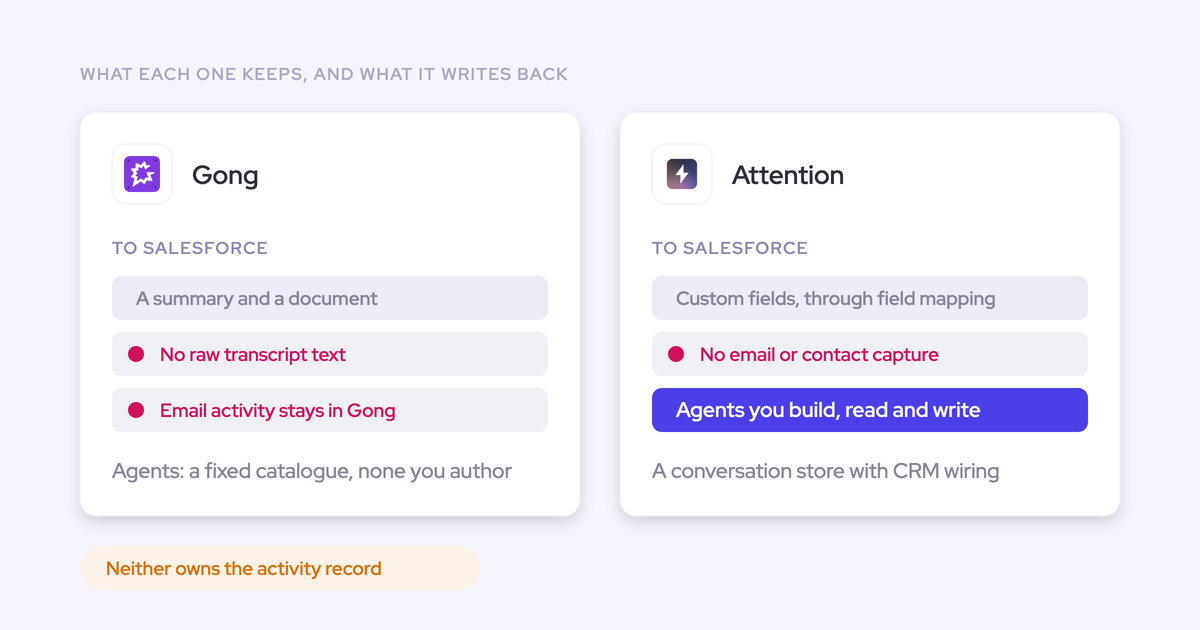
| Gong: conversation intelligence and related revenue workflows | Exact email and meeting selection rules are not established | Not established | Not established | Email-thread correction behavior is not established |
| Momentum: capture and CRM-writing workflows within Salesforce packaging | Exact multi-opportunity selection rule is not established | Not established | Not established | CRM-field approval is established; persistent activity remapping is not |
| Attention: call capture and post-call automation, not standalone email and contact capture | Call association and CRM field updates serve a narrower scope | Not established | Observed calendar-to-opportunity mapping difficulties do not establish a universal fallback rule | No Outlook or Gmail mapping extension in the reviewed product evidence |
Test how tools resolve ambiguous opportunity matches
Evaluate opportunity mapping with a known destination for each interaction. A vendor showing that an email arrived in Salesforce has demonstrated collection, not correct association.
Salesforce Task and Event records have one WhatId for the related business record. That limits direct association; each vendor still controls how it selects the destination and handles uncertainty.
| Criterion | Demonstration | Acceptance condition |
|---|---|---|
| Opportunity selection | Send an email to a contact with one qualifying open opportunity, then repeat with two | The outcome follows an explainable rule and matches the intended deal when the available data identifies it |
| Contact-role dependency | Repeat the interaction with the role present, missing, and assigned to both opportunities | The resulting associations reflect the documented dependency; missing roles do not produce an unexplained deal selection |
| Ambiguity handling | Use the same contact on an open renewal and expansion | The system exposes or safely preserves the unresolved case instead of silently choosing the wrong deal |
| Seller inspection and persistent correction | Select the intended opportunity, send another reply, and start a new thread | The seller can see the destination; replies retain the correction without repeated logging work |
A safe account fallback is preferable to a false opportunity association. But if you need deal-level reporting, the workflow also needs a practical way to resolve that fallback.
Check each tool against your Salesforce opportunity setup
Choose the product for the association model you need, then consider its wider capabilities. Forecasting, coaching, or post-call field updates cannot compensate for an email attached to the wrong opportunity.
Weflow Activity & Contact Capture: correct opportunity mapping
Weflow keeps routine capture automatic and gives sellers control over exceptions in Outlook or Gmail. Your team does not need to open another portal to choose the deal.
Our capture service runs centrally through Google Workspace or Microsoft Entra. The optional inbox controls sit alongside that service, so capture continues when a seller sends from a phone or never opens Weflow.
- Resolve the person. Weflow prefers a matching contact over a lead.
- Resolve the deal. A single open opportunity connected through an opportunity contact role receives the activity. Unresolved matches fall back to the account.
- Let the seller choose. The Outlook add-in or Gmail extension shows the proposed records and lets the seller select a different destination.
- Remember the thread. Later replies retain that selection. A new thread starts a new mapping decision.
- Improve the underlying relationship. An optional setting creates a missing opportunity contact role when Weflow logs an email to the contact and opportunity.
The Weflow Outlook add-in shows the Salesforce records selected for logging directly beside the email.
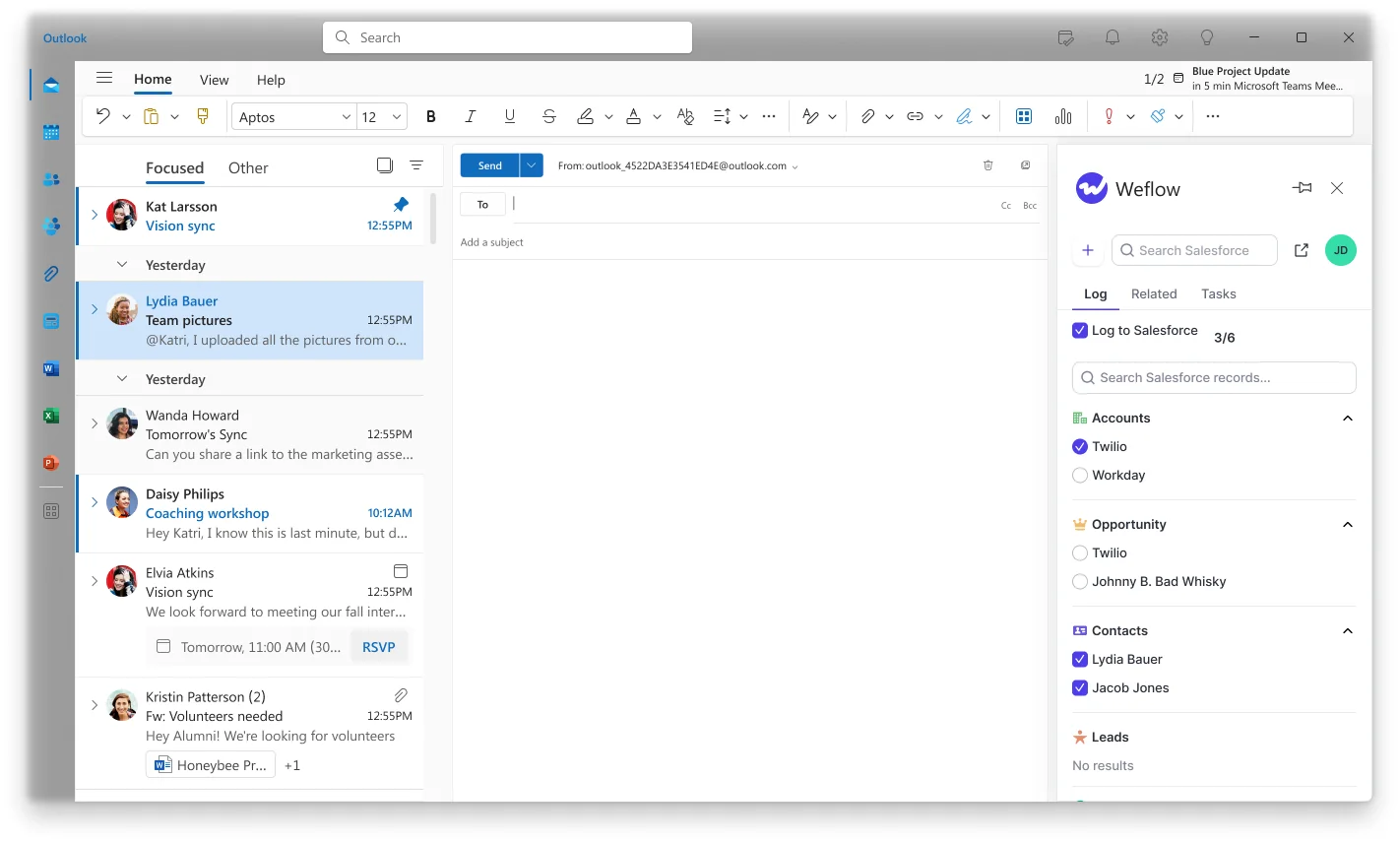
A seller can also unlink an incorrectly mapped meeting and log it to the correct record afterward. Creating contact roles improves future matching, but a contact with roles on two open opportunities still presents genuine ambiguity.
Weflow fits teams that need opportunity-level data and accept occasional seller decisions. Teams that intentionally manage every interaction at account level have less reason to adopt this exception workflow.
- CRM: Salesforce exclusively.
- Deployment: central mailbox configuration, with automated, hybrid, or manual modes by team.
- Data: emails stored as EmailMessage or Task records; meetings stored as Event records.
- Security: SOC 2 Type II, GDPR compliance, Zero Data Retention for AI processing, and no use of customer data to train AI models.
- Commercials: standalone at $19 per user per month, billed annually, with a 10-user minimum. No platform or implementation fees.
Meeting recording belongs to Weflow Conversation Intelligence. Weflow Activity & Contact Capture logs meeting activity without requiring a recording.
Einstein Activity Capture: check opportunity matching and correction
Keep Einstein Activity Capture on your shortlist if your Salesforce entitlement already includes it and your current configuration meets your reporting requirements. An included product that works is a legitimate outcome.
EAC’s opportunity matching depends on contact roles. In the multi-opportunity setups we encounter, missing or overlapping roles leave activity on the account rather than the intended deal.
The Salesforce Outlook and Gmail logging integrations are separate from EAC’s background association engine. Manual logging through an add-in does not establish that EAC will remember that choice for later replies.
Your EAC evaluation needs to distinguish three things:
- Association: where automatic capture places activity when contact roles are missing or overlap.
- Correction: whether changing a record also changes subsequent automatic matching.
- Storage: whether your deployment uses Sync Email as Salesforce Activity.
Salesforce introduced Sync Email as Salesforce Activity in Summer ’25. That means the old claim that all EAC email data sits outside Salesforce’s core records no longer describes every deployment.
- CRM: Salesforce.
- Deployment: background capture with configuration-dependent storage behavior.
- Commercial fit: existing Salesforce entitlements can make EAC the lowest incremental-cost option.
Stay with EAC when its actual associations, correction path, and downstream records satisfy your requirements. Timeline visibility alone does not settle those questions.
Clari Capture (Salesloft): verify how it chooses opportunities
Clari Capture deserves a separate assessment from Clari’s forecasting capabilities. Clari Capture markets automatic activity sync into native Salesforce objects, so describing current Clari capture as data locked entirely outside Salesforce is inaccurate.
We have buyer evidence of difficulty distinguishing several open opportunities on one account. That supports testing the scenario; it does not establish Clari Capture’s exact selection precedence, fallback, or correction persistence.
If your leadership team wants to keep Clari forecasting, you can still change the capture layer. Clari reads Salesforce activity, so Weflow can supply the activity records while Clari continues forecasting.
- Relevant capability: automatic capture and Salesforce write-back.
- Coexistence: one capture engine can feed Salesforce for Clari to consume.
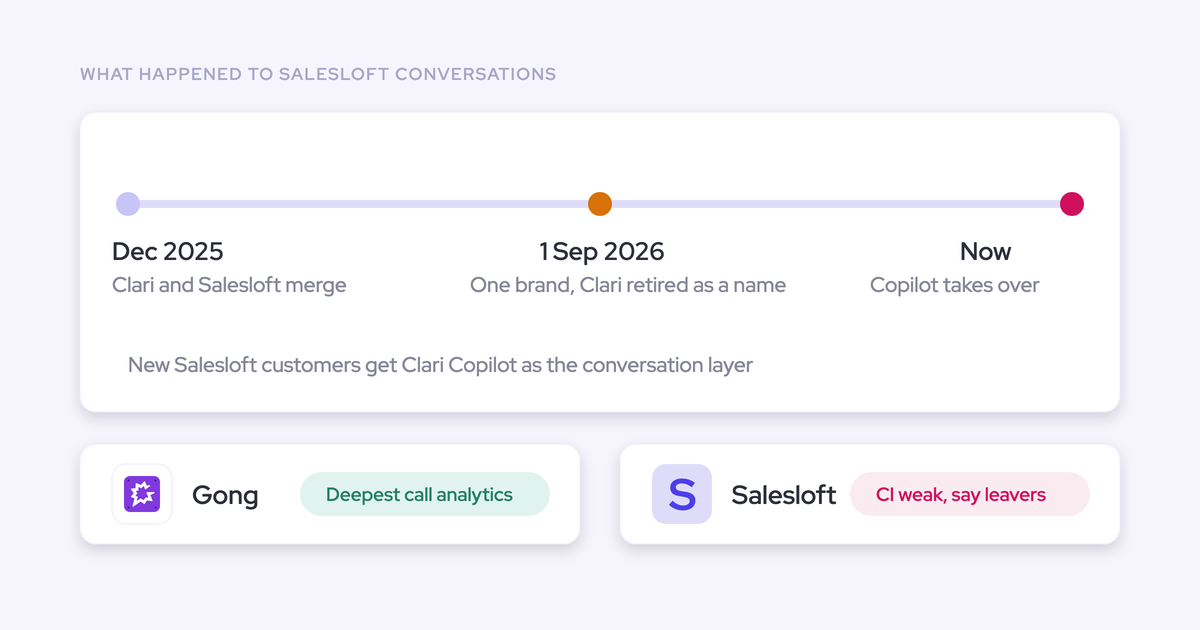
- Commercial context: Salesloft consolidated the company brand on September 1, 2026; Clari Forecast remains a product line.
The operating choice is which system writes each activity. Running two capture engines over the same interactions introduces duplicate-write risk.
Outreach: test opportunity mapping beyond sequenced emails
Keep Outreach for the engagement workflows your sellers use. The separate question is whether its activity logging covers your inbox-based AEs, account managers, and customer success team with the right deal associations.
Buyers have described missing one-off emails and record misalignments in their Outreach setups. Those are coverage and mapping failures, respectively, and you should score them separately.
Use these workflow boundaries to scope the comparison:
- Emails sent through sequences versus one-off messages sent from Gmail or Outlook.
- Activity from licensed engagement users versus customer-facing colleagues without those seats.
- Contact-level logging versus association with the intended opportunity.
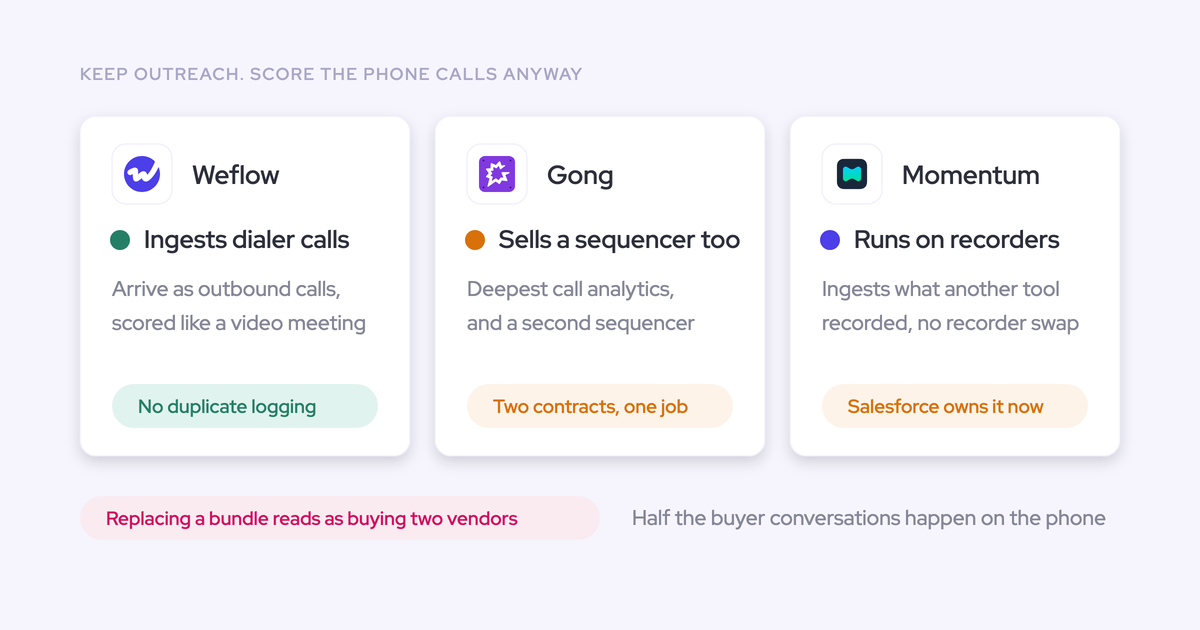
Weflow’s compatibility mode skips activity already logged by Outreach. That lets you retain sequencing while adding mailbox capture without deliberately writing the same email twice.
- Product scope: sales engagement with activity logging.
- Salesforce fit: evaluate deal association separately from successful contact logging.
- Budget fit: distinguish users who need sequencing from users who need email and calendar capture.
Gong: verify activity mapping separately from conversation intelligence
Gong’s conversation intelligence is a reason to retain Gong, not proof that its activity handling solves ambiguous Salesforce associations. A useful call library and a correctly populated opportunity timeline are different outcomes.
The evidence for this comparison does not establish Gong’s exact multi-opportunity email-selection rule or persistent thread-correction behavior. We do not rank those mechanisms as either present or absent.
If Gong already serves coaching and cross-functional transcript access, replacing it creates a broader project than fixing activity capture. Keep that scope separate unless you also want to change conversation intelligence.
- Relevant scope: recorded conversations, call analysis, and revenue workflows.
- Security: Gong holds SOC 2 Type II and certifications including ISO 27001, ISO 27017, ISO 27018, and ISO 27701.
- Commercial model: seats vary by application; certain AI capabilities also use consumption credits.
Price the Gong applications your team actually needs. A broader license does not establish better opportunity mapping.
Momentum: verify opportunity mapping in your Salesforce edition
Momentum is relevant when you want captured information to drive Salesforce field updates and workflows, especially while retaining your current recorder. It integrates with products including Gong, Clari Copilot, Attention, and Salesloft Conversation Intelligence.
Momentum’s CRM-writing controls support automatic updates, confirmation before writing, and filling only empty fields. Those controls govern field changes; they do not establish how Momentum selects between two open opportunities for an email.
Momentum’s current Salesforce packaging matters because the incremental purchase may already sit inside your edition.
- Relevant scope: capture, structured CRM updates, and automation using conversation data.
- Deployment context: Salesforce packaging and integrations with existing recording products.
- Current pricing context: Momentum is included in Salesforce Core, Advanced, and Max sales editions, listed at $195, $395, and $550 per user per month respectively. Those are edition prices, not standalone Momentum prices.
- Other editions: Momentum is a paid add-on for Starter Suite and Pro Suite.
The older Momentum Business and Transformation prices belong to a different commercial route. They are not a substitute for the cost of your current Salesforce entitlement.
Attention: separate call automation from full activity capture
Attention fits post-call automation rather than a standalone requirement to capture emails, meetings, and contacts across your customer-facing team.
Attention can turn call content into CRM updates and actions in other applications. Its call-centric scope does not supply the Outlook or Google Workspace email-and-contact capture layer evaluated here.
Keeping Attention alongside activity capture also requires one owner for the meeting record. We have seen combined deployments where both products create an Event for the same meeting, inflating activity counts.
- Relevant capability: call capture, CRM field extraction, and post-call workflows.
- CRM destinations: documented workflow integrations include Salesforce, HubSpot, Pipedrive, and Zoho.
- Salesforce integration: OAuth and REST API; documented permissions include API Enabled, Customize Application, and Modify All Data.
- Commercials: Attention does not publish a public price; standalone activity and contact capture is not its offering.
Attention can remain your call-automation product while another system captures email and calendar activity. That arrangement needs explicit write ownership to keep one meeting from becoming two records.
Choose activity capture for your existing Salesforce stack
Choose around the records and workflows you need, not around replacing the largest number of vendors. A separate capture layer can improve Salesforce reporting while you retain your sequencer, recorder, or forecasting product.
Match the capture tool to your reporting requirements
Opportunity-level reporting needs a reliable destination and a correction path. Account-level relationship management can tolerate account fallback because the account is the intended unit of analysis.
| Requirement | Suitable approach | Acceptance condition | Reason not to choose it |
|---|---|---|---|
| Deal-level activity across renewals and expansions | Weflow’s hybrid capture workflow | Clear matches automate; sellers resolve exceptions once per thread | Your team needs account-level activity only |
| Account-level visibility with an included incumbent | Retain EAC if the current configuration passes | Usable records, sufficient coverage, and correct account associations | Opportunity reports remain incomplete or wrong |
| Outbound sequencing plus wider mailbox coverage | Outreach or Salesloft alongside Weflow | Compatibility settings prevent overlapping email writes | The second capture layer adds no coverage or mapping benefit |
| Keep an established forecasting process | Clari forecasting consuming Salesforce activity from one capture layer | The forecast reads the intended activity records without duplicates | Changing capture alone would not address the problem you are buying to solve |
| Keep coaching or post-call automation | Retain Gong or Attention while separating activity capture | Each meeting has one activity writer | Overlapping writes inflate reporting |
| Use capabilities already in a Salesforce edition | Evaluate the existing EAC or Momentum entitlement first | The included capability meets the same record-level acceptance criteria | Entitlement exists but the required mapping workflow does not pass |
Compare activity capture costs across your customer-facing team
Price the users who need capture, including customer success and account management. An engagement license bought only to log their email can make the coverage model more expensive than the work requires.
| Candidate | Relevant commercial basis | Budget consequence |
|---|---|---|
| Weflow | Weflow Activity & Contact Capture: $19/user/month, annual billing, 10-user minimum; no platform or implementation fees | You can buy capture without conversation intelligence or forecasting |
| Einstein Activity Capture | Available through Salesforce entitlements | An existing entitlement can avoid another capture purchase if the deployment passes |
| Clari Capture / Salesloft | Part of the existing Salesloft commercial relationship for former Clari products | Separate the capture requirement from the forecasting capabilities you intend to retain |
| Outreach | Engagement licenses already supporting sequencing | Count capture-only users separately from people who need engagement workflows |
| Gong | Application-specific seats, with consumption pricing for certain AI capabilities | The cost per person depends on the applications and AI workloads they use |
| Momentum | Included in Salesforce Core, Advanced, and Max; paid add-on for Starter Suite and Pro Suite | Compare incremental cost, not the whole Salesforce edition price, against a separate capture product |
| Attention | No public price; call automation rather than standalone activity capture | A full email-and-contact requirement still needs a capture layer |
Weflow Revenue AI Foundation combines Weflow Activity & Contact Capture with Weflow Conversation Intelligence for $49 per user per month, billed annually. Choose that bundle when you also need recordings and structured field updates from calls.
- Team size: count every mailbox in scope, not just active application users. Weflow capture does not depend on users signing in.
- Existing commitments: retain capabilities that already work instead of turning a capture project into a whole-stack migration.
- Operating cost: include seller correction effort and the admin time spent reconciling activity reports.
- Salesforce storage: account for the records and attachments you choose to retain.
Prove opportunity mapping in a controlled Salesforce pilot
Run the same interactions against known Salesforce destinations and compare the resulting records. Start with capture parity and mapping, without adding unrelated templates, coaching, or forecasting workflows.
Prevent duplicate activity writes during the pilot
Assign write ownership before enrolling pilot users. A comparison with duplicated activity counts cannot tell you whether the new system improved coverage.
- Inventory every system that writes emails, calls, or meetings into Salesforce.
- Choose the pilot users and records, then configure confidentiality exclusions before capture starts.
- Assign one production writer per activity type. Use isolated test records or environments where you need to compare competing outputs.
- Record the object type and integration identity for each writer so you can separate results in reporting.
- Test duplicate prevention before expanding the pilot.
| Overlap | Write-ownership approach | Boundary |
|---|---|---|
| Weflow with Outreach, Salesloft, Apollo, or Clay | Use Weflow compatibility mode to skip activity already logged by the engagement product | This is specific compatibility behavior, not a blanket promise for every integration |
| Weflow with EAC calendar sync | Set EAC event sync from the mail/calendar system into Salesforce, not bidirectionally | Removing a user’s EAC permission alone does not stop the sync loop; existing duplicates remain |
| Weflow with Clari | Use one capture engine; let Clari consume Salesforce activity | Keeping Clari forecasting does not require two activity writers |
| Activity capture with a separate conversation product | Assign one meeting-activity writer and define where summaries attach | A recording must not count as another meeting |
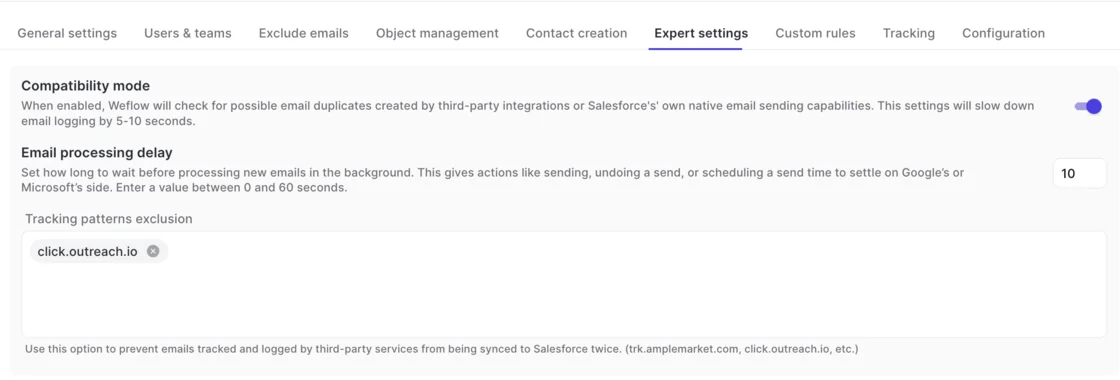
Weflow’s Expert settings include compatibility mode and tracking-pattern exclusions for overlapping email integrations.
Test difficult accounts against expected Salesforce records
Write down the intended association before sending each test interaction. Otherwise, the vendor’s output becomes its own answer key.
| Salesforce setup | Intended association | Acceptable ambiguity handling | Observed association | Correction behavior | Downstream verification |
|---|---|---|---|---|---|
| One contact role on one open opportunity | That opportunity | No ambiguity | Record the destination ID | No intervention | Opportunity activity report includes it |
| Two open opportunities; contact role on only one | The linked opportunity | Apply the documented rule | Record the destination ID | No repeated intervention | Sibling opportunity receives no false touch |
| Same contact on renewal and expansion | The seller’s intended deal | Visible fallback until the seller chooses | Record initial and final IDs | One choice for the thread | Report reflects the final association |
| Several open opportunities; no contact roles | The intended deal after seller selection | Account fallback without a silent guess | Record fallback and correction | Capture any new contact role | Later matching reflects the resulting CRM relationships |
| Reply to a corrected email thread | The previously selected opportunity | Retain the choice | Record the reply’s destination | No new correction | Thread activity stays together |
| New thread with the same contact | The new thread’s intended deal | Apply matching again | Record the new destination | Allow a different choice | No inherited false association |
| Duplicate accounts sharing a domain | The intended customer record | Expose unresolved identity | Record account and opportunity IDs | Measure correction effort | No activity reaches the duplicate customer |
| Confidential account excluded centrally | No captured activity | Exclusion takes precedence | Record any unexpected write | No seller intervention required | No content appears in reports or automation inputs |
| Meeting initially linked to the wrong opportunity | The corrected opportunity | Allow relinking | Record before and after IDs | Unlink and log correctly | One meeting remains in counts |
Score mapping accuracy separately from capture coverage
A pilot passes when it captures eligible interactions, associates them correctly, and preserves corrections without creating duplicate records. More activity rows alone are not evidence of improvement.
Use the mailbox and calendar as the coverage baseline. The incumbent can also miss interactions. Agree on acceptance thresholds before the pilot rather than borrowing an unsupported industry benchmark.
| Metric | Denominator | Acceptance condition | Evidence to retain |
|---|---|---|---|
| Capture coverage | Eligible mailbox and calendar interactions | Meets the agreed coverage target after exclusions | Source interaction matched to Salesforce record ID |
| Incorrect associations | Captured interactions with a known intended destination | No unexplained wrong-deal writes in the acceptance cases | Expected and actual destination IDs |
| Unresolved cases | Interactions requiring opportunity-level association | Fallback volume fits the team’s correction capacity | Fallback reason and final disposition |
| Correction effort | Cases needing seller intervention | Sellers resolve exceptions within the agreed effort limit | Actions and time per correction |
| Thread persistence | Replies in corrected threads | Later replies retain the selected destination | Thread and destination IDs |
| Duplicate writes | Unique source interactions | No duplicate activities from overlapping writers in acceptance cases | Source identifiers and corresponding Salesforce records |
| Report and Flow usability | Required reports and automation paths | Each reads the intended records and associations | Report output and Flow execution results |
Reject silent wrong-deal writes even when coverage looks good. Fix configuration issues and repeat the affected cases before expanding enrollment.
See how Weflow captures activity, updates Salesforce fields from calls, and rolls up your forecast. Book a 30-minute demo.
How we compare activity capture tools in 2026
This comparison focuses on opportunity association, seller control, and usable Salesforce records. It does not rank every capability across seven different product categories.
What changed for activity capture buyers in 2026?
Current Salesforce configuration and product packaging make older activity-capture comparisons incomplete.
- EAC storage: Summer ’25 introduced Sync Email as Salesforce Activity. Existing deployments may require migration through Salesforce Support.
- EAC reporting: Salesforce scheduled legacy Activity 360 Reporting, Activity Metrics, and Activities Dashboard retirement for Summer ’26.
- Clari commercial identity: Salesloft consolidated the company brand on September 1, 2026, while retaining Clari Forecast as a product line.
- Momentum packaging: current Salesforce Core, Advanced, and Max editions include Momentum, changing the incremental-cost comparison.
These changes affect storage, purchasing, and reporting. They do not establish how a product resolves a contact attached to two open opportunities.
How we assess evidence for opportunity-mapping claims
We wrote this comparison at Weflow using product knowledge, public documentation, published customer experience, and buyer conversations. We have not represented the seven candidates as an identical hands-on benchmark.
- Product mechanisms: we state specific behavior where the evidence establishes it.
- Customer experience: an observed failure identifies a useful test case, not a universal product limitation.
- Undocumented behavior: we leave the mechanism unranked rather than inventing an answer.
- Historical claims: older EAC storage experiences do not describe every current deployment.
FAQs: choosing activity capture for multiple open opportunities
The remaining purchase questions concern direct associations, storage, permissions, exclusions, and historical continuity. Each can affect whether captured activity supports the work you intend to do in Salesforce.
Can one Salesforce activity relate to multiple open opportunities?
A Salesforce Task or Event has one WhatId, so its direct related-record association points to one opportunity or another business record. Visibility through an account timeline does not create another direct opportunity association.
For a meeting covering both renewal and expansion, you can choose the primary opportunity or use the account as the intended destination. Weflow inherits this Salesforce constraint.
Can activity capture map emails to Salesforce custom objects?
Weflow’s Outlook add-in and Chrome extension let a seller select a custom object as the email’s destination. Manual destination selection and automatic matching are separate capabilities.
For custom-object acceptance testing, include:
- The actual object and record the seller needs to select.
- The seller’s visibility and the integration user’s write access.
- The resulting relationship in the report or Flow that consumes it.
Can captured activity drive Salesforce reports and flows?
Yes, when capture writes usable Salesforce records. Weflow stores captured emails and meetings in native Salesforce objects, so your reporting and automation can read them.
| Object choice | Practical consequence |
|---|---|
| EmailMessage | Preserves native sender, recipient, and email-thread structure |
| Task for email logging | Supports activity reporting alongside tasks and events, but gives up native email structure |
| Event for meetings | Provides a meeting record with a related Salesforce destination |
Weflow lets you choose EmailMessage or Task in the capture configuration, alongside calendar logging settings.

Record availability is only the first requirement. A Flow reading an activity attached to the wrong opportunity will act on the wrong deal.
Can activity capture log emails sent outside the sequencer?
Weflow captures email at the mailbox-provider level, so one-off messages sent from Outlook, Gmail, or a mobile client remain in scope. Capture does not depend on sending through a sequencer or opening an extension.
Your coverage cases should include inbound email, outbound email, mobile-sent messages, and sequenced messages. Compatibility mode keeps supported engagement-tool activity from producing duplicate writes.
What Salesforce permissions does activity capture need?
Weflow needs access to Account, Contact, and Opportunity because its matching logic reads their relationships. Contact-only access is insufficient for opportunity mapping.
- Contact creation: the integration user needs Create permission on Contact.
- Required fields: automatic contact creation supplies first name, last name, and email. Additional required fields can block creation.
- Private sharing: with Private org-wide defaults, Weflow requires Modify All Records on Account, Opportunity, and Contact for the relevant write and update operations.
- Correction: permissions must support subsequent updates, not merely the first successful activity write.
Object-level Modify All Records differs from the broader Modify All Data permission. Treat the access scope as part of the deployment design.
How can Sales Ops exclude confidential threads and accounts?
Use central exclusions for records that must never enter capture, and seller controls for exceptions within otherwise eligible correspondence. Weflow does not automatically detect sensitive content.
| Central controls | Seller controls |
|---|---|
| Exclude domains and email addresses | Suppress logging for a thread in hybrid mode when the control is enabled |
| Block logging using Salesforce record attributes, such as a confidential flag | Select a different destination when the suggested mapping is wrong |
| Assign manual capture to teams handling sensitive correspondence | Choose explicitly which eligible interactions to log in manual mode |
A confidential account should not depend on a seller noticing every sensitive email. Put that exclusion in the central configuration.
How do aliases and duplicate accounts affect opportunity mapping?
Aliases and duplicate accounts introduce identity ambiguity before opportunity selection begins. They can scatter activity across records or leave the intended destination unresolved.
Alias behavior depends on the setup. Lendz Financial’s Weflow deployment associates multiple email addresses with one contact, so a blanket claim that aliases never work would be wrong.
- Include the addresses people actually send and receive from.
- Identify duplicate contacts and accounts sharing a website domain.
- Separate shared-domain matching from the contact-role test.
- Keep internal, test, and confidential records outside eligible capture.
Weflow’s Activity Capture Health view surfaces duplicate accounts, duplicate contacts, and other CRM conditions that interfere with capture. That helps you distinguish an identity problem from a missing email.
Will switching activity capture tools preserve historical activity?
Weflow’s captured activity and contact records remain in Salesforce after cancellation. That ownership applies to the records we write, not automatically to another vendor’s archive.
Weflow also offers up to 24 months of historical activity backfill as an add-on. Backfill is distinct from migrating another vendor’s stored history or correcting its previous associations.
- Separate existing Salesforce records from history held outside Salesforce.
- Define the historical period you need.
- Keep backfilled activity from duplicating existing records.
- Treat historical remapping as a separate requirement from retention.
Before switching writers, retain a baseline export of the existing activity and associations. Use it to prove that the new setup preserves coverage and improves the destinations your reports depend on.