Weflow vs Microsoft Copilot for Sales Call Recaps in Microsoft Teams (2026)
Weflow vs Microsoft Copilot: which gets Teams call recaps into Salesforce, in any language


If your sellers work in Teams and Salesforce, we recommend keeping Microsoft Copilot for daily work and adding Weflow for the Salesforce recap. Copilot gives a Teams sales call a good recap, but the recap stays inside Teams.
Copilot's Sales agent writes that recap to Salesforce only when a seller clicks Save to CRM. It goes into one field, in a fixed format, and only after someone has set the right transcript language.
Weflow is the Revenue AI Orchestration platform for sales, customer success, and RevOps teams. Built for Salesforce teams, Weflow Conversation Intelligence writes a template-based summary onto the Salesforce Event for the meeting within about a minute of the call. It works in any of 96 detected languages, with nobody clicking.
Microsoft Teams beats Weflow on recording consent: it can keep each participant muted until they agree, and log every choice. If recaps inside Teams are enough, or your legal team makes per-participant consent mandatory, Copilot alone covers you.
Weflow and Microsoft Copilot at a glance for Teams sales call recaps
Weflow and Microsoft Copilot split on where the recap ends up. Weflow writes it into Salesforce automatically, Copilot keeps it in Teams until a seller saves it, and Teams leads on consent.
| Capability | Weflow | Microsoft Copilot |
|---|---|---|
| AI meeting summaries | Admin-defined templates per meeting type and team, written to the Salesforce Event in 30 to 60 seconds | Intelligent recap and Sales tab in Teams, fixed format, saved to Salesforce by a seller's click |
| Transcription and languages | 96 languages detected automatically; Salesforce written in the workspace language | Transcribes the language someone sets; defaults to English, no detection |
| Recording consent management | Opt-in, opt-out or none, chat notice, pre-meeting email, CSV log; no regional variation | Stronger: participants stay muted until they agree, each choice logged, custom pre-join notice |
| Integrations with other tools | Teams, Zoom, Google Meet, WebEx, Salesforce, Outreach dialer; Teams Phone through the desktop app | Teams meetings and Teams Phone only; more than 100 Copilot connectors to business systems |
| Access from AI assistants (MCP) | Read-only connector for summaries, transcripts, playbooks and forecast data | Work IQ MCP server over Microsoft 365 data, billed by usage; no Sales agent insights |
| Raw data access outside the tool | REST bulk export in JSON or CSV; transcripts already in Salesforce | Graph transcript access off by default; sales insights kept in Dataverse |
| Pricing | Public per-seat pricing with AI included, 10-seat minimum | Public per-seat price, as an add-on to a qualifying Microsoft 365 plan |
| Best for | Salesforce teams that need every customer call in Salesforce without clicks, in any language | Microsoft 365 teams happy with recaps in Teams and strict per-participant consent |
For most Teams shops, where the summary lands settles the choice. Weflow writes the summary onto the Salesforce Event automatically after every recorded call, and it detects the spoken language instead of waiting for someone to set it. Microsoft Copilot's Sales agent reaches Salesforce only when a seller clicks Save to CRM.
Microsoft Copilot wins when your legal team requires per-participant consent, because Teams can require and log each participant's consent before recording.
Why teams that already pay for Microsoft Copilot still evaluate Weflow
Teams that already pay for Microsoft Copilot still evaluate Weflow because the two tools do different jobs. Copilot helps a seller with daily work across Microsoft 365. Weflow turns the customer conversation into Salesforce data that RevOps can report on.
What we hear from Teams shops is consistent. Teams records and transcribes, and then the transcript sits there. Nobody syncs it to a central place, maps it to an account or opportunity, or analyzes it.
So the company holds every customer conversation and still can't say which objections keep coming up. These buyers already have a recorder. What they want is the layer that turns the transcript into something the business can query.
Microsoft's own positioning explains the gap. It describes Sales agent, which has also carried the names Viva Sales and Copilot for Sales, as an assistant that brings CRM data and insights into Outlook and Teams. It doesn't describe it as a system that captures sales activity into the CRM.
Keeping Salesforce current therefore stays something the seller invokes, one meeting at a time. Copilot also does no forecasting or deal scoring, which is why companies that own Copilot still buy a revenue-specific layer.
Two details catch buyers out:
- Facilitator, Copilot's note-taking agent for Teams meetings, doesn't work in external meetings, so it takes no notes on customer calls.
- When someone says "we have Copilot", they sometimes mean only the free web chat that comes with Microsoft 365, not the paid license that works over your own data.
It is great if you have the recordings. The real challenge is turning that transcript into structured data back in your CRM. - Philipp Stelzer, CPO & Co-founder, Weflow
How each tool gets a Teams call summary into Salesforce
Microsoft Copilot gets a Teams recap into Salesforce when a seller clicks Save to CRM. Weflow writes its summary onto the Salesforce Event for the meeting automatically, within about a minute of the call ending.
Microsoft Copilot's Sales agent writes to Salesforce only when a seller clicks Save to CRM
Microsoft Copilot's recap is good at what it's built for. Teams intelligent recap gives every recorded and transcribed meeting AI notes, recommended tasks, chapters, topics and speaker timelines.
Sales agent adds a Sales tab in Teams with:
- suggested follow-ups
- the questions asked and who asked them
- competitor mentions tracked in the CRM
- overall sentiment
- talk time and sentiment per speaker
Getting any of that into Salesforce takes a seller's click. When the seller selects Save to CRM, Sales agent writes the AI meeting notes into the Event's Description field, or into one field the admin chose.
Saving to the Event field creates a new Event linked to the record the seller picks. Follow-up items become Salesforce tasks the same way, one Create task click each.
Some calls never reach Salesforce from Copilot at all, and the insights that stay behind don't last:
- Recurring meetings get no Save to CRM button, so a weekly customer call never gets sales insights.
- Meetings with more than one recording get skipped, because Sales agent needs one continuous recorded and transcribed session.
- Calls whose transcript is too short to summarize get no save option.
- The setting to auto-record external sales meetings is off by default, and it covers only meetings Sales agent was added to automatically.
- Microsoft's retention policy for Sales agent deletes meeting insights from Dataverse after 90 days.
Weflow Conversation Intelligence writes a summary per meeting type onto the Salesforce Event
Weflow Conversation Intelligence writes the call into Salesforce without anyone clicking. Within 30 to 60 seconds of the meeting ending, the rep gets the processed recording, an AI summary, a drafted follow-up email and proposed AI Field Updates.
Weflow writes the summary onto the Salesforce Event for the meeting, with a link to the recording. The summary and full transcript also go into Weflow_Recording__c, a native recording object, so you report on them like the rest of your CRM.

You decide the format. Every summary is a prompt an admin can rewrite, and a team can hold as many templates as it wants. Per-team templates let sales, onboarding and customer success each run their own structure.
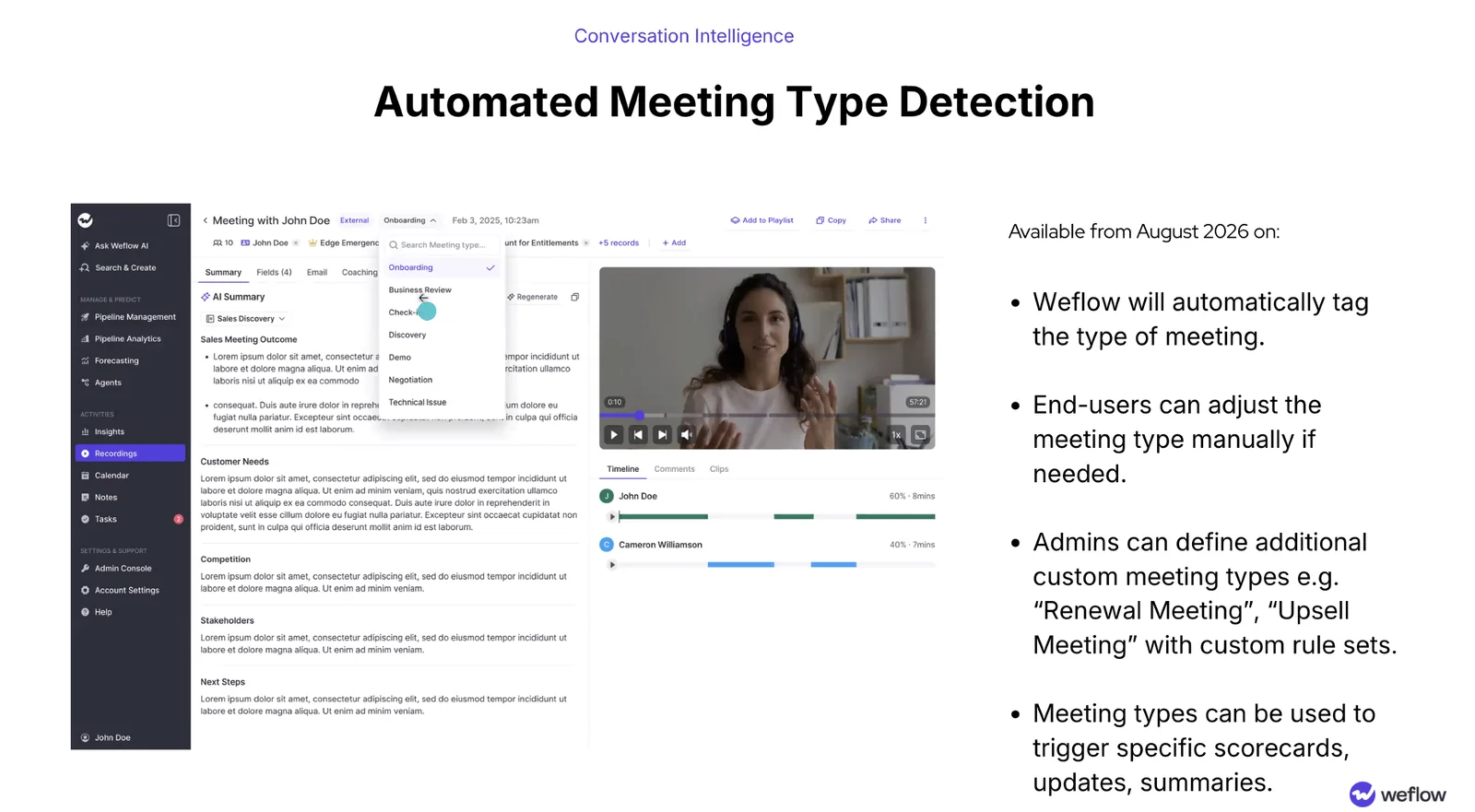
Weflow classifies each recording into one of up to 10 meeting types the admin defines. That way a discovery call and a closing call each get the summary that fits them.
Coverage doesn't depend on rep discipline either. Weflow's notetaker is scheduled onto every external meeting from the calendar, so nobody has to remember to invite it.
Plan for two limits of the Weflow summary:
- The summary lists next steps but can't assign one to a named person. Push next steps through the API into a task system that owns assignment.
- Weflow can't replay a failed summary write to Salesforce. The content survives in the recording object, but the Event write is lost, so test writes against every object before rollout.
What happens to the recap when a Teams call isn't in English
A non-English Teams call works in Copilot only if someone sets the transcript language. Weflow detects the language itself, then writes Salesforce in one language while the customer's follow-up goes out in theirs.
Microsoft Teams transcribes in whatever language someone sets
Microsoft Teams transcribes a meeting in the language someone sets, and it doesn't detect the spoken language. The transcript defaults to English, so a German sales call left on the default comes back as an unusable transcript.
Sales agent builds every sales insight from the transcript, so that call gets no usable summary either. The fix inside Teams is manual: any participant can switch the transcript language during the meeting to match what's being spoken. That works on the calls where the rep remembers.
Teams does one thing here that Weflow doesn't. When a CRO who doesn't speak German reviews that call, an English summary tells them what was concluded. To judge how the rep ran the conversation, they need the transcript itself in their language.
Teams Premium translates the transcript into each participant's language when the organizer holds the license.
Weflow detects the spoken language and writes Salesforce in your workspace language
Weflow detects the spoken language across 96 languages with no manual selection. The output language then follows where the output goes.
Take the same German call with English as the workspace language. The rep gets a German follow-up email they can send as is, and Salesforce gets an English summary. The account stays readable at headquarters, and your reporting still rolls up.
When a manager wants a summary in another language, Ask Weflow AI writes one on request.
We recommend testing this in your trial with your own languages, because a listed count doesn't show how a language holds up on your calls. Record real calls in every language your teams sell in. The check passes when each Salesforce summary reads usably in your workspace language.
Where Microsoft Teams handles recording consent better than Weflow
Microsoft Teams handles recording consent better than Weflow. Teams can hold every participant muted until they agree and log each person's choice, while Weflow notifies guests and lets them opt out.
Microsoft Teams can keep every participant muted until they agree to be recorded
Microsoft Teams gives your legal team two consent controls:
- The participant agreement policy keeps each participant muted, with camera and screen sharing off, until they agree to recording or transcription. The admin turns it on per organizer, and Teams logs each person's choice in the attendance report and the audit log. Teams Rooms, third-party room devices and PSTN callers in one-to-one calls count as consenting automatically.
- The custom pre-join message makes every participant accept a notice, such as a recording notice, before joining. Admins write up to 1,500 characters in up to 5 languages, and Teams logs acceptance for audit. The message applies to internal, external and anonymous participants alike, and it was in public preview when we reviewed it.
Weflow gives guests a chat notice, a pre-meeting email and a consent log
Weflow's consent runs in one of three modes:
- Opt-out records by default and lets guests object. It keeps the recording rate high, and it's the mode most customers pick.
- Opt-in needs every participant to accept first. It works one-to-one but breaks down in groups, where one person forgetting kills the recording.
- None leaves the decision to the seller in the room.
Weflow's notetaker posts a customizable notice in the meeting chat, with a link that lets any participant stop the recording. An optional pre-meeting email lets a guest decline in advance.
If someone opts out, the notetaker leaves and Weflow deletes the recording, transcript and notes. The host can also remove the notetaker mid-call and keep everything up to that point. Consent decisions go into a downloadable CSV log.
Weflow's consent flow stops short in a few places:
- Late joiners on Teams may never see Weflow's chat notice, because Teams can hide chat history from people who arrive late. Keep the pre-meeting email on so they hear about the recording before the call.
- Weflow's consent doesn't vary by the region an account sits in. Give teams that sell into different jurisdictions separate team configurations, and add a customer's domain to the notetaker exclusion list to keep them out entirely.
- Weflow runs no consent flow when the desktop app records, because nothing joins the meeting. Consent is then the rep's own responsibility.
How your call data reaches other tools, AI assistants and your warehouse
Weflow puts call data in Salesforce and opens it to assistants and warehouses. Microsoft Copilot connects to far more business systems but keeps its sales insights inside Microsoft.
Which meeting platforms and business systems each tool connects to
Microsoft Copilot covers only Teams meetings and Teams calls, including phone calls through Teams Phone with a Teams Phone license and calling plan. Copilot doesn't record or summarize Zoom, Google Meet or WebEx.
Beyond meetings, Copilot reaches line-of-business systems through more than 100 Copilot connectors, which is genuinely broader than Weflow.
Weflow records Teams, Zoom, Google Meet and WebEx meetings. It integrates natively with Salesforce, Gmail, Google Calendar, Outlook and Slack, and calls from Outreach's dialer arrive as recordings with a transcript and summary.
Weflow has no Teams Phone integration, so reps record native Teams telephony calls with the Weflow desktop app.
What Claude or ChatGPT can read from each tool over MCP
Weflow's official MCP connector gives Claude, ChatGPT and other assistants read-only access to call summaries, transcripts, playbook results and forecast data. The connector caps per-rep breakdowns at 25 owners.
An admin switches the connector on per workspace, with a separate toggle for full transcripts or summaries only. The connector doesn't return Salesforce field values, and forecast calls never reach Salesforce, so connect it beside Salesforce's own MCP server.
Microsoft's Work IQ, a remote MCP server billed by usage, lets other agents read Microsoft 365 mail, calendar, files and chat. Work IQ doesn't give them Sales agent's sales insights.
How you get transcripts and summaries out of each tool
Weflow's REST API bulk-exports transcripts, metadata, scores and signals as JSON or CSV, and feeds BI tools such as Tableau and Looker.
Weflow has no native Snowflake, Databricks or BigQuery connector, so you move data into the warehouse through the API. Video goes to your own cloud storage through the API, and transcripts already sit in Salesforce.
Microsoft Copilot keeps Sales agent's insights in Dataverse. Apps read Teams transcripts through Microsoft Graph only after an admin turns that access on.
You can build your own recap pipeline on Graph transcripts and an assistant for almost nothing. Getting each recording onto the right Salesforce records is the part internal builds underestimate.
What Weflow and Microsoft Copilot cost a team already on Microsoft 365
Microsoft Copilot is an add-on, so every user also needs a qualifying Microsoft 365 plan. Intelligent recap needs a Copilot or Teams Premium license.
Sales agent comes with the Copilot license rather than as a separate sales seat. Microsoft bills selected Sales agent capabilities per use on top, and they stop when the purchased capacity runs out. Microsoft 365 E7 includes Copilot, so an E7 customer already pays for it.
Weflow prices per seat with AI included. Summaries and Ask Weflow AI carry no usage metering, and Agent Builder is the only consumption-priced product.
| Tool | Model | List price | What the seat includes |
|---|---|---|---|
| Microsoft Copilot | Add-on to a qualifying Microsoft 365 plan, annual commitment | $30 per user per month paid yearly, or $31.50 paid monthly | Copilot in Microsoft 365 apps, chat over work data, 100+ connectors, agents, Sales agent |
| Weflow Conversation Intelligence | Per seat, billed annually, 10-user minimum | $39 per user per month | Notetaker, summaries, Salesforce write-back, desktop app, Mobile Copilot, Ask Weflow AI Pro |
| Revenue AI Foundation | Per-seat bundle, billed annually, 10-user minimum | $49 per user per month | Weflow Conversation Intelligence plus Weflow Activity & Contact Capture |
For a Teams shop the cost is additive. You keep paying for Copilot for daily work across Microsoft 365, and you add Weflow Conversation Intelligence for the Salesforce recap job, on at least 10 seats.
How to roll out Weflow Conversation Intelligence alongside Copilot in Teams
Weflow Conversation Intelligence rolls out next to Copilot without changing anything in Teams. We recommend running the pilot in this order:
- Choose the consent mode and turn the pre-meeting email on. Opt-out keeps coverage high, and the email reaches the Teams late joiners who miss the chat notice.
- Add whole teams to Weflow Conversation Intelligence rather than individual users, because a team added this way updates as its membership changes. Each rep has to sign in to Weflow once before the notetaker joins their meetings.

- Set meeting types and summary templates. Match the types to the meetings you hold, and copy your mandated note format into the template, so the summary on the Event is the note managers already expect.
- Test writes against every object your activities map to before anyone else sees the output. A failed write can't be replayed and fails silently, so an untested permissions gap costs you everything up to the day someone notices.
- Brief reps on the Teams lobby. Weflow's notetaker has to be admitted from the lobby, and it leaves after about 10 minutes if nobody lets it in. A rep can re-trigger it from the Weflow calendar while the call is still running.
- Upload the past recordings you want analyzed as audio or video files. Teams stores recordings in OneDrive and SharePoint. Weflow accepts uploaded audio or video files up to 512MB, never text transcripts, then links each one to Salesforce records.
- Install the desktop app for reps who take Teams Phone calls. Weflow has no Teams Phone integration, so the rep presses Record meeting in the app, which comes with the Conversation Intelligence seat.
Which tool fits your Teams sales calls
Microsoft Copilot fits teams whose recap job ends in Teams, and Weflow fits teams whose recap job ends in Salesforce.
Choose Microsoft Copilot if
- Recaps that live inside Teams are enough, and nobody downstream needs the call as Salesforce data.
- Your legal team requires each participant to agree before recording, with every choice logged per person.
- Teams Phone carries most of your selling, since Copilot recaps those calls natively.
- You want one assistant across email, documents, chat and meetings in Microsoft 365.
- Your sellers want live help during calls: Copilot in Teams answers private questions mid-meeting, and Weflow has no live assistant.
Choose Weflow if
- Every customer call has to reach Salesforce without a seller clicking anything.
- Your teams sell in several languages while headquarters reports in one.
- You run a mandated note format or several meeting types that each need their own summary.
- Your calls also run on Zoom, Google Meet or WebEx.
- Your conversation data has to reach Claude, ChatGPT and your warehouse.
See how Weflow captures activity, updates Salesforce fields from calls, and rolls up your forecast. Book a 30-minute demo.
Questions RevOps teams ask about Weflow and Microsoft Copilot for Teams call recaps
Do we keep the Copilot license if we add Weflow?
Yes. Copilot covers daily work across Microsoft 365, and Weflow takes the Salesforce recap job, so Weflow adds to the license rather than replacing it.
What happens to weekly recurring customer calls?
Copilot's Sales agent produces no sales insights and no Save to CRM button for recurring meetings. Weflow's notetaker is scheduled onto every external meeting from the calendar, so Weflow records and summarizes each occurrence. A rep who wants to skip a series switches it off one occurrence at a time.
Can past Teams recordings come into Weflow?
Yes, as files. Teams keeps recordings in OneDrive and SharePoint, and any Weflow user can upload the audio or video file. Weflow transcribes, summarizes and links it to Salesforce records, but doesn't import text transcripts.
How are Teams Phone calls recorded?
Weflow records Teams Phone calls through its desktop app for Windows and macOS, which captures the system audio and microphone on the rep's computer. The rep starts each recording, and Weflow processes it exactly like a notetaker recording.
Where does the data live, and for how long?
Weflow writes summaries and transcripts into your Salesforce, where they stay as your data even after the subscription ends. Weflow keeps video in its own storage for as long as you subscribe, unless you set a deletion period or export it.
Copilot's Sales agent keeps insights in Dataverse and deletes meeting insights after 90 days. Teams stores transcripts with recordings in OneDrive and SharePoint.
Why not build this on Graph transcripts and an assistant?
You can, and it's cheap to try. Graph transcript access is off by default, though, and the hard part is mapping each call to the right Salesforce records and maintaining that mapping. An in-house build also misses the management layer, so nobody sees how reps work or what they log.
What does the 10-seat minimum mean for a pilot?
Weflow requires at least 10 users per product or bundle, so a pilot runs on 10 or more Conversation Intelligence seats. For evaluations a two-week trial can't cover, Weflow offers a 3-month paid pilot. The pilot is contractually the first 3 months of a multi-year agreement, with an opt-out at the end.