
Best Revenue Intelligence Tools for Microsoft 365 Sales Teams: Outlook and Teams (2026)
Compare 2026 Microsoft 365 revenue intelligence tools on Outlook capture, Teams recording, and consent.


"Supports Microsoft Teams" is a checkbox that hides more than it tells you. Microsoft 365 is three surfaces, and each one has its own permission model:
- Exchange mail and calendar, reached through Graph
- Teams meetings
- Teams chat
A revenue tool can pass one of these and fail the other two. Your Microsoft admin also has to approve each surface the tool touches.
Here's the short answer before the detail. We wrote this list, so you should know whose it is. Weflow is the Revenue AI Orchestration platform for sales, customer success, and RevOps teams. We build it for Salesforce teams, and we scored ourselves on the same tests as everyone else.
- Weflow: Weflow Activity & Contact Capture captures Outlook mail server side through one Entra app and maps it to the opportunity. Weflow Conversation Intelligence records Teams meetings by default, with consent controls. Both have published prices.
- Gong: the deepest conversation analytics and consent profiles by team and region. Pricing is quote only.
- Revenue Grid: capture first, and it supports on-prem Exchange. Recording sits only in its top tier.
- Cirrus Insight: an Outlook sidebar you buy one capability at a time.
- Einstein Activity Capture: basic background sync if you already hold it through your Salesforce edition. It records nothing.
- Chorus: location-aware consent, strongest on Zoom.
Two of the six are capture only: Einstein Activity Capture, and Revenue Grid below its Ultimate tier. So this is a list of capture and conversation layers, not six call recorders.
One limit belongs up front. Weflow doesn't deliver notifications or agent output into Teams chat. That output goes to Slack and email. If your company runs on Teams chat, that's a real gap for you, and we'll name it again wherever it matters.
How the six tools compare on Outlook, Teams and Salesforce
Each tool passes and fails different Microsoft surfaces, so a single checkmark can't tell you which one fits. Here's the whole comparison in one view, one capability per row.
| Capability | Weflow | Gong | Revenue Grid | Cirrus Insight | Einstein Activity Capture | Chorus |
|---|---|---|---|---|---|---|
| Automatic email capture | Server side through one Entra app, inbound and outbound, any device, near real time. Logs only mail that matches a Salesforce record | Imports from each mailbox. Export to Salesforce runs forward only from the day you enable it | Server-side Sync Engine. Auto-saves on a 30-minute cycle, stretching to 120 minutes on quiet mailboxes | Background Email Sync at $5. Logs only when a contact or lead already exists. 15-minute cycle | Background sync of sent and received mail. Reps report about 80% logged, plus silent disconnects | Admin bulk sync into Chorus's own store. No dedicated capture product |
| Inbox extension or add-in | Optional Outlook add-in. Re-map once per thread | Gong Anywhere needs Engage and New Outlook | Outlook Sidebar. Reps sign in to Salesforce to use it | Outlook web add-in, including Outlook mobile | None of its own. The Outlook integration is a separate product | None for CRM context. Its Scheduler add-in only inserts consent links |
| Recording video meetings | Notetaker auto-scheduled onto every external Teams, Zoom, Meet and Webex meeting | Bot on Teams and 10 other platforms, on any plan | Teams notetaker and Zoom, Ultimate tier only. Teams transcripts need a Graph grant | Bot on Teams, Zoom and Meet at $39. 6 hours per user per week, pooled | Not offered. Conversation Insights is a separate product | Auto-joining notetaker, or Teams native recordings imported after the call |
| Recording consent management | Opt-in, opt-out or none. Chat notice with stop link, pre-meeting email, CSV log. Set per team, not per region | Consent profiles per team and region: consent page, audio prompt, pre-call email | No configurable consent. The Dial-In Agent announces itself | No consent controls. The host can remove the bot | Not offered | Location-aware consent page, strong on Zoom. Weak on Teams |
| Activity capture setup and rollout | Two managed packages, one integration user, one Entra app. About 45 minutes, no rep install | Company-wide admin connection. Rollout sold as 8 to 15 hours of paid services | Central provisioning, but reps sign in to the Sidebar. One-time implementation fee | Integration user and service accounts. Per-rep sidebar install, API Enabled per user | Admin step plus a per-user step. Named-user licences only | Admin bulk sync. Email integration set up with your Chorus CSM |
| Integrations with other tools | Salesforce, Outlook, Teams, Zoom, Meet, Slack, Outreach dialer. Output goes to Slack and email only | About 450 marketplace integrations and about 30 dialers | Microsoft 365, on-prem Exchange, Google. Teams and Slack APIs sit in a paid customization package | Zapier and scheduling webhooks | Microsoft, on-prem Exchange and Google. Otherwise Salesforce products only | 19 conferencing tools, 30+ dialers. Slack and Zapier on Enterprise only |
| Access from AI assistants (MCP) | Read-only connector: transcripts, summaries, playbooks, forecast calls | Three record-scoped tools, insights only, metered credits | MCP server since July 2026, connected manually | Not offered | None of its own. Salesforce Hosted MCP Servers, on Flex Credits | ZoomInfo MCP answers from call content. Credit-metered |
| Raw data access outside the tool | REST API bulk export in JSON or CSV. No native warehouse connector | API capped at 10,000 calls a day. Data Cloud costs about $5,000 a year | No public API. Activity reachable through the Salesforce API | Preview REST API. No direct Snowflake connection | Salesforce records through the API. Off-org store not exportable | API on the Enterprise package only |
| Pricing | Published: $19 capture, $39 recording, $49 bundled | Quote only. Foundation licence mandatory | Published at $30, $49 and $149, sold through a quote | Published, line by line | Standard free up to 100 users. Full version through edition or a $50 add-on | No published price |
Einstein Activity Capture and Revenue Grid below Ultimate are capture only, and "Teams" in this table means Teams meetings, not Teams chat.
What to test before you trust "supports Microsoft Teams"
Test each Microsoft surface on its own, then test what IT has to approve. The three surfaces behave differently:
- Exchange through Graph: where mail and calendar capture lives, and where server-side and add-in tools split.
- Teams meetings: lobby rules, Graph transcript access that's off by default, and no native consent prompt.
- Teams chat: the surface where alerts, summaries and agent output either reach your people or don't.
How to check whether Outlook capture runs server side
Server-side capture runs at the tenant level and logs every email without a rep clicking or keeping a personal token alive. It also has to reach the opportunity, not stop at the contact and account.
This is the setup most Microsoft shops start from:
We currently do have the Salesforce to Outlook integration enabled. But even that process is a bit manual. You have to go and actually log that email to a specific record or a specific object, whatever it is in Salesforce.
Here's how to tell real server-side capture from an add-in dressed up as automation:
- Inbound replies: server-side capture logs the reply when it lands. Add-in logging is built around outgoing mail, so the reply, which is the strongest sign a deal is alive, usually goes missing.
- Outlook mobile: send an email from your phone and look for it in Salesforce. Server-side capture sees it. An add-in only sees what passes through the add-in.
- Sync latency: near real time and a 15- or 30-minute cycle are different products when a manager opens a deal before a forecast call.
- One contact on two open opportunities: the native Microsoft and Salesforce integration maps to contact and account only, and you can't customize its matching. A good tool falls back to the account when it can't tell, instead of guessing.
- Optional or required add-in: where logging depends on reps clicking "log to Salesforce", only 24 to 52 percent of activity reaches the CRM. Optional controls help. Required clicks sink the rollout.
How to test Teams meeting recording and consent
Teams has no built-in recording consent dialog, so consent is the vendor's job. Recording also has to run by default, because coverage collapses the moment reps have to invite a bot.
Most Microsoft shops already have transcripts. They just can't use them:
We use Teams for our meetings and you can have the transcription in there, but we do not have a way to sync them to a central repository, and we do not do any analysis on them.
What "records Teams" should mean in practice:
- Auto-scheduling: the notetaker joins every external meeting from the calendar. Per-rep calendar connections rot quietly as tokens expire, and a broken connection looks exactly like a rep with no meetings.
- Lobby admission: a bot on Teams joins as a participant and waits in the lobby. If the customer booked the meeting and the organizer never joins, nobody can admit it.
- Teams transcripts through Graph: Graph access to Teams transcripts is off by default. Any tool that reads them needs your Microsoft admin to switch it on first.
- Notice and opt-out: Zoom has a native consent prompt. Teams doesn't, so consent runs through a pre-meeting email and a chat message with a link to opt out.
- Late joiners: Teams can hide chat history from people who join late, so a notice posted in chat can miss them.
- European legal: counsel in Europe often treats a visible recorder and a notice as the safeguard. A silent background recorder reads as risk, not polish.
What your Microsoft admin has to approve, and how long rollout takes
Your real buyer is two people: you and the Microsoft admin. The tool should need one central grant that IT can scope and prove, with nothing installed per rep.
For larger companies, "the Microsoft admin" can be several teams at once:
there are five different IT teams building in what they would need to do for their piece, because there's security and there's the AI team and there's the Microsoft team.
What to look at in the IT conversation:
- Central Entra app or per-user OAuth: per-user connections break on password resets, MFA prompts and expired tokens, and nobody gets an alert. A central app takes the rep out of the authentication path.
- Provable mailbox scoping: IT wants to restrict which mailboxes the app reads and to see the restriction hold, especially for executive, HR and legal mail.
- Integration user or named licences: an integration user separates capture from any one employee and keeps permissions in one place.
- Who clicks install: some tools need the Microsoft admin to start the connection from the vendor's side, not only approve it in the Microsoft 365 admin center.
- Paid professional services: some vendors sell rollout as a fixed block of consulting hours with an expiry date.
Where the data lands: Teams chat, AI assistants, your warehouse
Look at where alerts and summaries arrive, because Slack-only delivery fails in a Teams org. Then look at whether transcripts and activity reach Salesforce, your AI assistants and your warehouse.
Microsoft shops usually find the delivery gap in the demo, with one short question:
what if we use teams and not slack
What to look for:
- Teams chat or Slack: an alert delivered to a surface nobody opens is an alert nobody reads.
- Native Salesforce records: activity written as EmailMessage, Task and Event records works in your reports, flows and AI. Activity held in a vendor's store doesn't.
- Transcripts or insights only: some MCP servers return the vendor's summary of a call and never the transcript itself.
- Metered or included access: some vendors charge credits when an assistant or the API reaches your data.
- API gating: some vendors put API access behind a top package.
Weflow captures Outlook and Teams meetings into your Salesforce
Weflow is both a capture layer and a conversation layer. Weflow Activity & Contact Capture logs Outlook mail and calendar, and Weflow Conversation Intelligence records Teams meetings. Everything lands in native Salesforce objects you own.
Automatic email capture. Weflow captures every inbound and outbound email and meeting server side, through one central app in Microsoft Entra. It works on any client or device, and the rep does nothing. Writes go to Salesforce through the integration user almost immediately, not in a nightly batch.
Weflow logs only activity that matches a Salesforce record and involves an external participant. Internal-only threads never reach Salesforce. When it maps to a deal, Weflow uses contact roles, opportunity owner, mailbox owner and stage, never logs to a closed opportunity, and never reads the email's content to decide. When the deal is ambiguous, it logs to the account instead of guessing.
Mail from personal accounts isn't captured. Neither is mail sent from a separate deliverability subdomain, because capture matches the sender address held in Salesforce.
Inbox extension or add-in. The Outlook add-in is optional. It shows the contact, the account and the open opportunities Weflow matched. A rep can re-map an email once, and Weflow applies that choice to every later reply in the thread. Reps can also move an email that's already logged without opening Salesforce.
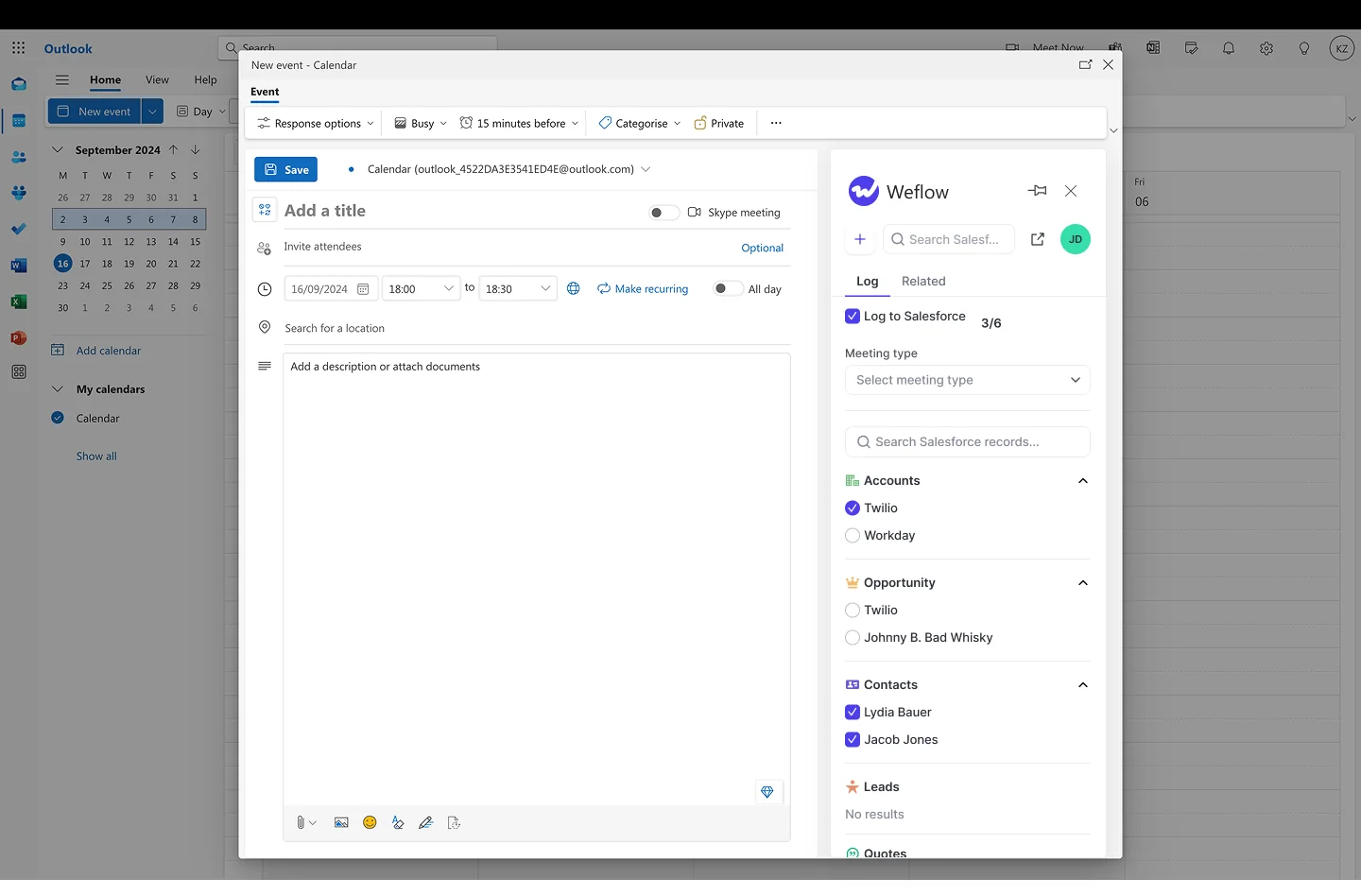
Recording video meetings. The notetaker records Teams, Zoom, Google Meet and Webex meetings. It's auto-scheduled onto every external meeting from the calendar, so the default state is recorded and nobody has to remember to invite it. Only one Weflow notetaker joins per company, however many of your people attend.
On Teams, the notetaker joins as a participant and has to be admitted from the lobby. It leaves after about ten minutes if nobody lets it in, and a rep can send it back in from the Weflow calendar while the call is still running. Webex has to be switched on per workspace.

Recording consent management. Teams has no consent dialog, so Weflow handles consent outside it:
- Opt-in, opt-out or none modes
- A customizable notice in the meeting chat, with a link that stops the recording
- An optional pre-meeting email so a guest can decline in advance
- A downloadable consent log
- Instant deletion of the recording, transcript and notes when a participant opts out
Consent is set per team configuration, not by the region an account sits in. Late joiners on Teams may never see the chat notice, though the notetaker stays visible in the participant list.
Activity capture setup and rollout. The install is two Salesforce managed packages, one integration user and one Entra app, with no code. It's a single admin session of about 45 minutes, with your Salesforce admin and your Microsoft admin in the room. United Fintech had activity capture running in under an hour, rolled out centrally.
The Microsoft admin starts the install from the Microsoft section of Weflow's admin console and consents there. Weflow reads no mailbox until a user is enrolled, so you can finish setup while legal review is still open. Our customer success team guides the full rollout, which typically takes two to three weeks, and implementation is free.
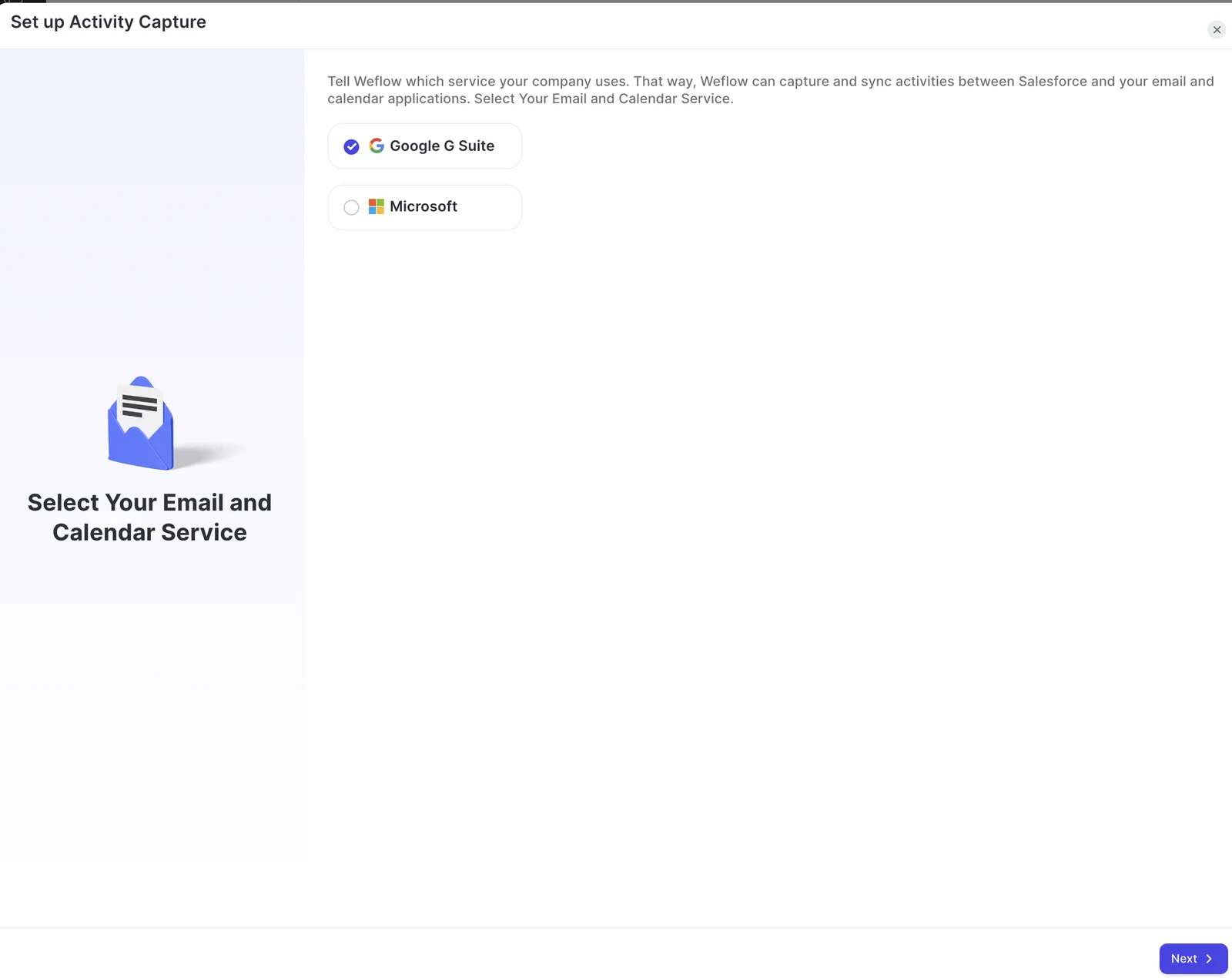
Integrations with other tools. Weflow integrates with Salesforce, Outlook, Teams, Zoom, Google Meet, Slack and the Outreach dialer. It runs alongside Outreach and Salesloft through compatibility mode, so you don't get duplicate activities. Notifications and agent output go to Slack and email only.
Access from AI assistants (MCP). Our official read-only MCP connector gives Claude, ChatGPT and other assistants your playbooks, call summaries, transcripts, forecast calls and pipeline metrics. An admin switches it on per workspace, with a separate toggle for full transcripts. Per-rep breakdowns cap at 25 owners.
Raw data access outside the tool. The Weflow REST API bulk-exports transcripts, metadata, scores and signals as JSON or CSV into your warehouse or BI tools such as Tableau and Looker. Recordings export to your own cloud storage, while transcripts and structured call outputs land in Salesforce. There's no native Snowflake, Databricks or BigQuery connector, so teams move data there through the API.
Pricing. Weflow Activity & Contact Capture is $19 per user per month, Weflow Conversation Intelligence is $39, and the two together as the Weflow Revenue AI Foundation bundle are $49, billed annually.
Where it stops for a Microsoft shop:
- Teams chat isn't an output surface. Notifications, recording-ready alerts and agent reports go to Slack and email only.
- Late joiners on Teams may miss the chat notice, depending on your Teams chat settings.
- Consent is set per team, not per region. Gong's consent profiles and Chorus's location-aware page are stronger if you sell across jurisdictions.
- On-prem Exchange without Microsoft 365 isn't supported.
- The desktop app's recording prompt covers Zoom and Google Meet, not Teams, and desktop recordings carry no consent flow.
Best for: Salesforce teams on Microsoft 365 that want one capture layer for Outlook, mapped to the opportunity, plus Teams meeting recording with consent controls, at a published price.
Gong gives you the deepest analytics and consent by region
Gong is a conversation layer first. It records and analyzes calls in its own cloud, and sells a Foundation core licence with coaching, forecasting, engagement and data export applications on top. Gong invented this category and still has the deepest conversation analytics in it, and its deal boards are a reason teams stay.
Automatic email capture. Gong imports sent and received email from each team member's Office 365 mailbox, keeping only emails with a participant who matches a CRM record. A tech admin can switch on export to Salesforce as tasks or events. That export runs forward only from the day you enable it.
Inbox extension or add-in. Gong Anywhere, the Outlook add-in that shows CRM contacts, updates fields and tracks email, needs a Gong Engage licence and New Outlook. Email tracking works only when an admin installs it for the whole organization. Without Engage, Gong for Outlook only adds meeting links.
Recording video meetings. Gong records Teams, Zoom, Google Meet, Webex and seven other providers, on any plan. On Teams the Gong bot has to join, and a host admits it from the waiting room. Botless recording is available only on Zoom.
Recording consent management. This is where Gong is strongest. Consent profiles set different rules per team and region, and each profile picks among a consent page, an audio prompt and a pre-call email sent 10 to 20 minutes before the meeting. You can let participants refuse recording and still join. Ad hoc recordings bypass Gong's exclude lists entirely.
Activity capture setup and rollout. A Gong admin connects Office 365 for the whole company, with no install per rep. Gong sells the rollout as professional services: the Call Intelligence package is up to 15 hours used within 45 days, and Foundation Quickstart is up to 8 hours used within 30.
Integrations with other tools. Gong's marketplace lists about 450 integrations and partner solutions. It imports calls from about thirty dialers and records on eleven meeting platforms. Its integrations are strong enough that some customers change their own infrastructure to fit Gong.
Access from AI assistants (MCP). Gong ships connectors for Claude, ChatGPT and Microsoft Copilot, which matters in a Microsoft shop. The MCP server exposes three record-scoped tools and returns AI insights, never transcripts. It's read-only, draws metered credits, and needs a paid Gong seat plus a paid AI tool tier.
Raw data access outside the tool. Gong's public API returns transcripts, participants, trackers and scorecards, capped at 3 calls a second and 10,000 a day. Warehouse delivery to Snowflake, Databricks, BigQuery or Redshift needs Data Cloud, a separate purchase of about $5,000 a year.
Pricing. No published prices. Gong prices per user plus a platform fee, quotes every buyer, and makes Foundation mandatory before any application.
Where it stops for a Microsoft shop:
- Pricing is quote only, and Foundation is required before you can buy anything else.
- Rollout is sold as paid professional-services hours that expire.
- Email export to Salesforce runs forward only, and call transcripts aren't exported to Salesforce.
- The MCP server returns insights only, not transcripts, and every call draws credits.
- The Outlook add-in needs Engage and New Outlook.
Best for: teams that want the deepest conversation analytics and consent rules per region, and can absorb quote-based pricing and paid rollout.
Revenue Grid covers Outlook capture, including on-prem Exchange
Revenue Grid is a capture layer, with a conversation layer only in its top tier. It pairs an Outlook Sidebar with a server-side Sync Engine, and it's the most Microsoft-heavy tool here: it connects to Microsoft 365 through Graph or EWS, on-premises Exchange and Google Workspace.
Automatic email capture. The Sync Engine saves every inbound and outbound email with non-blocklisted addresses to Salesforce, whether or not the Sidebar is open. Auto-saved mail arrives in sync sessions every 30 minutes by default, stretching to 60 or 120 minutes on quiet mailboxes. A rep who clicks Save in the Sidebar writes the email immediately.
Inbox extension or add-in. The Sidebar runs as an Outlook add-in, including inside Outlook mobile for Microsoft 365 accounts. Reps still sign in to Salesforce to use it.
Recording video meetings. Revenue Grid has its own Teams notetaker, which joins automatically only when the organizer is a Revenue Grid user. It sits in the background, and its only trace during the meeting is its place in the participant list. Zoom runs through a connected Zoom account, and recording sits only in Ultimate.
Reading Teams transcripts needs your Microsoft admin to turn on transcript API access in the Teams admin center and grant Graph permissions, because that access is off by default.
Recording consent management. Revenue Grid has no configurable consent notices or opt-outs. Admins choose whether the Teams notetaker joins directly or through the lobby, and the separate Dial-In Agent announces that it's recording.
Activity capture setup and rollout. An admin groups users into profiles, provisions them centrally and can mass-install the Sidebar. Every rep still signs in to the Sidebar with their own Salesforce login, and removing every rep step needs a separate paid Salesforce licence for a service account. Implementation is a one-time fee.
Integrations with other tools. Beyond mail and calendar, Revenue Grid records Teams and processes Zoom. API integrations with third-party apps such as Teams and Slack are sold inside a paid customization package.
Access from AI assistants (MCP). Revenue Grid launched an MCP server on 13 July 2026 for ChatGPT, Claude, Copilot and custom agents, covering relationship history, engagement trends, signals and AI insights. Customers connect it manually. Its Claude plugin needs Pipeline Assistant, Meetings Assistant or AI Mentor.
Raw data access outside the tool. Revenue Grid has no public API for captured activity or AI outputs. Activity lives in Salesforce as Task, EmailMessage and Event records, so you reach it through the Salesforce API.
Pricing. Activity Capture 360 at $30, Knowledge Capture at $49 and Ultimate at $149 per user per month, sold through a quote on a yearly commitment.
Where it stops for a Microsoft shop:
- Auto-saved email arrives on a 30-minute cycle, up to 120 minutes on quiet mailboxes.
- Recording is only in Ultimate at $149, and Teams transcripts need an admin Graph grant first.
- There are no configurable consent controls.
- Reps still sign in to the Sidebar.
- Initial sync covers the previous six days; older history is a paid service.
Best for: capture-first teams deep in Microsoft, especially anyone still on on-prem Exchange.
Cirrus Insight sells Outlook capture and recording line by line
Cirrus Insight is mainly a capture layer, with recording available as a separate purchase. It's an inbox add-on for Outlook and Gmail that connects only to Salesforce, sold as 16 separately priced capabilities.
Automatic email capture. The background Email Sync, at $5 per user per month, logs inbound and outbound email by admin rules without the sidebar open. It logs only when an existing Salesforce contact or lead is on the email. It syncs on a 15-minute minimum cycle, or 5 minutes with the $5 Fast Sync add-on.
Inbox extension or add-in. Cirrus runs in Outlook as a web add-in for Office 365, Exchange Online and Exchange 2016 or later, and it opens inside the Outlook mobile app on iOS and Android. The $11 sidebar lets reps create and edit Salesforce records from the inbox.
Recording video meetings. Meeting Capture, at $39, records Teams, Zoom, Google Meet and other platforms with a bot that joins from the calendar invite. Recording is capped at 6 hours per licensed user per week, pooled across the organization. A beta since early 2026 lets an admin auto-invite the bot to every meeting.
Recording consent management. The bot joins as a visible attendee on the inviter's approval alone, and the host can remove it. Cirrus has no configurable consent notices or opt-outs.
Activity capture setup and rollout. An admin connects Salesforce through an integration user and Microsoft 365 through a Graph app that can be limited to a security group. The sidebar needs a per-rep add-in, every user needs the API Enabled permission, and required fields on Task or Event layouts have to change before reps can file.
Integrations with other tools. Cirrus connects to Salesforce, Outlook, Gmail and Teams. It adds Zoom and Teams links to meetings booked through its scheduling, and reaches other tools through Zapier and scheduling-only webhooks.
Access from AI assistants (MCP). Not offered. Cirrus has no MCP server or connector for Claude or ChatGPT.
Raw data access outside the tool. Cirrus has a public REST API in preview covering scheduling, meeting transcripts, CRM records, Buyer Signals and Email Blasts. Transcripts download as text. Captured activity lands in Salesforce, with no direct path to Snowflake.
Pricing. Each capability has its own published per-user price, with no editions or minimum tier.
Where it stops for a Microsoft shop:
- Email Sync logs only when a contact or lead already exists in Salesforce.
- The sync cycle is 15 minutes unless you buy Fast Sync.
- Recording, the meeting workflow and Salesforce write-back are separate lines: $39, $35 and $15.
- Recording is pooled at 6 hours per user per week.
- There are no consent controls and no MCP.
Best for: teams that want an Outlook sidebar, including on mobile, and want to license each capability only for the people who need it.
Einstein Activity Capture syncs Outlook mail, but records nothing
Einstein Activity Capture is Salesforce's own background capture layer. It syncs email, calendar and contacts from Microsoft 365, on-premises Exchange or Google Workspace into Salesforce. It's free for up to 100 users in its Standard version, which is why so many teams already run it.
Automatic email capture. EAC captures sent and received email automatically from the connected account and, since Summer '25, saves it as EmailMessage and Task records. Reps on calls with us estimate it logs about 80 percent of their activity, and connections drop without explanation. Email that matches no Salesforce record isn't logged until someone creates the contact or lead.
Inbox extension or add-in. Not offered. EAC has no inbox panel of its own. Salesforce sells the Outlook side panel as a separate product, the Outlook integration, and using both can log the same email twice.
Recording video meetings. Not offered. EAC doesn't record meetings. Salesforce handles calls in Einstein Conversation Insights, a separate feature you license and combine with it.
Recording consent management. Not offered. Because EAC doesn't record, it has no consent handling.
Activity capture setup and rollout. An admin assigns each user a licence and a permission set, adds them to a configuration and connects Salesforce to Microsoft. Each rep then completes their own setup. EAC can't run on a Salesforce integration user licence, so capture is tied to named users, and data can take up to 24 hours to appear in reports.
Integrations with other tools. EAC connects to Office 365, on-premises Exchange and Google, and works alongside Salesforce Inbox, Conversation Insights and Agentforce. It has no catalogue of integrations with dialers, sequencing, BI or meeting tools.
Access from AI assistants (MCP). EAC has no MCP server of its own. Claude and ChatGPT reach the records it writes into Salesforce through Salesforce Hosted MCP Servers, which are intended for customers with Flex Credits.
Raw data access outside the tool. Email synced as Task and EmailMessage records is reachable through reports, SOQL and the Salesforce APIs. Salesforce doesn't support exporting the activity data EAC holds in its own store, or the insights generated from it.
Pricing. Standard comes with Starter, Pro Suite, Professional and Enterprise editions. The full version comes with Unlimited, Einstein 1 Sales and Agentforce 1, or through the Sales Engagement add-on at $50 per user per month.
Where it stops for a Microsoft shop:
- Connections disconnect without explanation, and repeated support cases don't resolve it.
- Capture is tied to named-user licences, with no integration user.
- Email attachments aren't synced or stored in Salesforce.
- Salesforce now names Momentum as the future of activity capture and call recording.
- Its call partner, Einstein Conversation Insights, has stalled on Teams integration for some customers.
Best for: Salesforce teams that already hold EAC through their edition and need basic background mail and calendar sync, including on on-prem Exchange.
Chorus handles consent well on Zoom, less so on Teams
Chorus is a conversation layer: ZoomInfo's conversation intelligence product, sold as one engagement feature inside the ZoomInfo data platform. Its location-aware consent and its range of dialer and conferencing integrations are real strengths.
Automatic email capture. Admins bulk-sync every user's email and calendar through Microsoft 365 settings. Chorus shows inbound and outbound email on account and deal timelines in its own store, keeping plain text and stripping attachments. Chorus has no dedicated activity capture product, so capture arrives as a side effect of recording.
Inbox extension or add-in. Not offered for CRM context. Chorus's only Outlook add-in is the Chorus Scheduler, which inserts a recording-consent Go-Link into meeting invites.
Recording video meetings. Once calendars are synced, Chorus joins business meetings automatically as a notetaker. On Teams, you can instead import Teams' native recording after the call with no bot, usually within 30 minutes to an hour and at most three hours. On Teams that import replaces the bot.
Recording consent management. Compliance Mode sends attendees to a brandable landing page that adapts to their location and language. Where GDPR applies, each attendee chooses to join with or without recording, and Chorus records only if everyone consents. On Teams the picture changes: consent works poorly enough that one customer built its own integration to pull recordings from Teams after the call.
Activity capture setup and rollout. Admins bulk-sync email and calendars centrally, with no install per rep. Email integration is completed together with your Chorus customer success manager. ZoomInfo documents no time to go live, and IT objections to voice printing have stopped at least one planned rollout.
Integrations with other tools. Chorus integrates with 19 conferencing providers, more than 30 dialers, Salesforce, HubSpot and Microsoft Dynamics, Clari, Gainsight, Slack and Zapier, plus Entra ID for sign-on. Slack and Zapier need the Enterprise package.
Access from AI assistants (MCP). ZoomInfo's MCP server ships as a first-party connector in Claude, ChatGPT and other clients. Since July 2026 it answers account questions from Chorus call recordings, emails and transcripts, with citations. Enrichment and research tools spend credits.
Raw data access outside the tool. API access comes only with the Chorus Enterprise package.
Pricing. No published prices. Chorus is sold on custom plans quoted through sales.
Where it stops for a Microsoft shop:
- Consent on Teams is weak enough that customers build their own workarounds.
- There's no inbox extension and no dedicated capture layer.
- There are no published prices.
- API access sits on Enterprise only.
- ZoomInfo's AI investment is going into its data platform, not the conversation layer.
Best for: Zoom-heavy teams that need location-aware consent and broad dialer coverage, and already buy from ZoomInfo.
What each tool costs a Microsoft 365 sales team
Three of the six vendors publish prices for both capture and recording: Weflow, Revenue Grid and Cirrus Insight. The real spread in cost sits in what each vendor sells separately: platform licences, top tiers, line items, services and history.
| Tool | Published list prices | Capture plus Teams recording seat | What costs extra | Minimums and terms |
|---|---|---|---|---|
| Weflow | Weflow Activity & Contact Capture $19, Weflow Conversation Intelligence $39, per user per month | Weflow Revenue AI Foundation bundle at $49, about 16% below buying both separately | Agent Builder beyond the free 25 actions a month: $299 for 500, $999 for 2,500 | 10 users per product or bundle, 12-month term, billed annually. No implementation fee |
| Gong | No published price. Per-user licence plus a platform fee that scales with users | Foundation licence, priced in a custom proposal | Professional-services packages, Data Cloud at about $5,000 a year, Engage for the Outlook add-in, AI credits beyond the pool | Set in the proposal. Seats added after renewal are paid per application |
| Revenue Grid | $30, $49 and $149 per user per month, sold through a quote | Ultimate at $149, the only tier with recording | One-time implementation fee, history beyond six days, a Salesforce licence for the service account, customization package | Yearly commitment, 14-day trial |
| Cirrus Insight | 16 capabilities priced separately. Sidebar, email and calendar sync total $27 | $27 for capture plus $39 Meeting Capture, so $66. Add $15 CRM Updates for Salesforce write-back | Fast Sync $5, Meeting Lifecycle $35, Live Coaching $125, historical email backfill as a service | No minimum tier. Term and billing frequency chosen in the configurator |
| Einstein Activity Capture | Standard free up to 100 users. Full version through edition or Sales Engagement at $50 | Not possible in EAC alone. It records nothing, so recording means a separate Salesforce purchase | Sales Engagement add-on on most editions for the full version | Follows your Salesforce contract. Standard keeps 6 months of activity |
| Chorus | No published price. Our benchmark: about $8,000 a year including 3 seats, plus about $1,200 per extra seat | Conversation layer only. No capture product to pair it with | Enterprise package for API, Slack and Zapier. ZoomInfo MCP credits | Custom plans |
Watch the AI meter as closely as the seat price. Gong gives each paid seat 2,000 credits a year into a company-wide pool, and the same brief that's free in the Gong interface draws credits when an assistant or the API asks for it. ZoomInfo meters enrichment and research calls over MCP the same way. At Weflow, Ask Weflow AI, summaries and AI field updates sit inside the seat, and Agent Builder is the only consumption-priced product.
Which tool fits your Outlook and Teams setup
The right tool depends on your Microsoft surface and your constraint, not on a ranking. For one situation here, no tool fits fully.
| If your situation is… | Look at… |
|---|---|
| You run on-prem Exchange without Microsoft 365 | Revenue Grid or Einstein Activity Capture. Weflow doesn't support on-prem Exchange |
| Your company runs on Teams chat and needs alerts and summaries delivered there | No clean fit on the evidence we hold. Revenue Grid lists Teams among the API integrations in its paid customization package. Weflow delivers to Slack and email only |
| You sell into several regions with different consent rules | Gong, for consent profiles per team and region. Chorus, if your meetings run on Zoom |
| You want one capture layer for every customer-facing team, plus Teams recording, at a published price | Weflow, with the Weflow Revenue AI Foundation bundle at $49 |
| You're on Unlimited Edition and need only basic background sync | Einstein Activity Capture, accepting no recording, no attachments and no integration user |
| You want to buy each capability only for the people who need it | Cirrus Insight |
| You need the deepest conversation analytics and price isn't the constraint | Gong |
If you're replacing a capture tool, run the new one in parallel on its defaults, with no templates and no custom use cases, and judge it on whether it logged one for one against what you have today. Configuration comes after parity.
Walk through the product yourself, no call required.
What changed for Outlook and Teams revenue tools in 2026
2026 moved several of these tools on AI assistant access and recording, and Salesforce's native path now points somewhere new.
Weflow
- We shipped a desktop app for Windows and macOS that records meetings without a notetaker joining the call. Its recording prompt covers Zoom and Google Meet, not Teams, and desktop recordings carry no consent flow.
- Weflow now tags each recorded meeting with its type automatically, and admins can add custom types that trigger their own scorecards, field updates and summaries.
Revenue Grid
- Call Intelligence dashboards for meeting types, tags and keywords arrived on 3 January 2026.
- A Meeting Recording page with audio playback and transcripts arrived in February 2026.
- Revenue Grid launched an MCP server on 13 July 2026, with a Claude plugin for customers on its AI assistants.
Cirrus Insight
- A beta since early 2026 lets admins auto-invite the recording bot to every meeting across the organization, and transcripts now download as text.
Salesforce
- Salesforce is retiring Activity 360 Reporting, Activity Metrics and the Activities Dashboard in favor of standard activity reports.
- Salesforce names Momentum as the future of call recording and activity capture.
- Einstein Conversation Insights is being renamed Conversation Intelligence, and it's sold inside the Core, Advanced and Max sales editions announced on 3 September 2026.
Chorus
- Since July 2026, ZoomInfo's MCP server includes a conversation intelligence tool that answers account questions from Chorus calls, emails and transcripts.
How we scored these six tools on Microsoft 365
Weflow wrote this, and we know that changes how you read it. We scored all six tools on the same nine capabilities, per Microsoft surface, and we put our own gaps in the same tables as everyone else's.
- Sources: each vendor's public documentation and pricing pages, plus what buyers tell us on evaluation and switching calls.
- Scope: Salesforce teams on Microsoft 365, Outlook and Teams.
- How we define "Teams": Teams meetings. Teams chat as a delivery surface is scored separately, under integrations and in the decision framework.
- Customer-reported verdicts: EAC's unexplained disconnects and the roughly 80 percent logging estimate, Conversation Insights stalling on Teams, the Chorus Teams consent workaround and the Chorus voice-printing objection come from buyers, not vendor documentation.
- Our benchmark: the Chorus price figures are our own read from the market, since ZoomInfo publishes none.
FAQ: revenue intelligence on Microsoft 365, Outlook and Teams
What does our Microsoft admin have to grant to connect Weflow?
Your Microsoft admin starts the install from the Microsoft section of Weflow's admin console and consents there. Approving Weflow's permission request in the Microsoft 365 admin center doesn't complete the connection, and a Salesforce admin can't do it on the Microsoft admin's behalf. The Microsoft admin signs in to Weflow with a Salesforce user, and a temporary Salesforce licence works and can be deactivated afterwards. A screen-share where the Microsoft admin takes control of a Weflow admin's session is the quickest alternative.
How do we keep executive, HR and legal mailboxes out of Salesforce?
Weflow captures only mailboxes paired with an enrolled Salesforce user, and reads nothing until a user is enrolled. Your IT team can also set "Assignment required" on the Weflow enterprise app in Entra and add only the groups you want captured. When the restriction holds, saving someone outside the scope into a configuration shows a warning icon next to that user. Some IT teams add a second layer by scoping the app's Exchange Online access to the same group.
Does Weflow exclude internal emails and free-mail domains from capture?
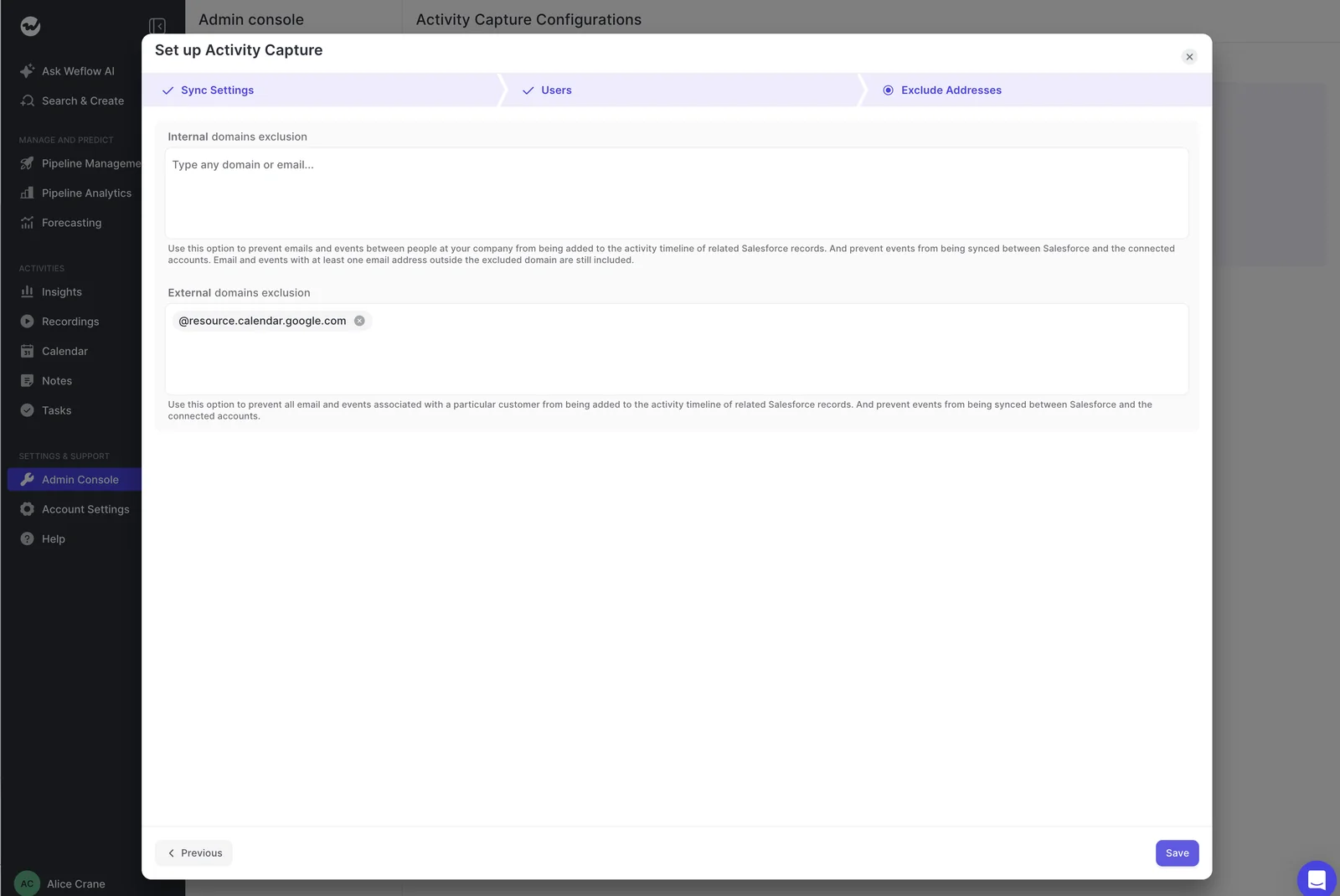
Yes. Weflow never logs an email or meeting where every participant sits on an internal domain, and it logs only activity that matches a Salesforce record. Admins can also exclude supplier domains and noisy free-mail domains centrally, so internal threads never inflate account or opportunity activity.
Does capture include inbound replies, Outlook mobile mail and attachments?
Weflow evaluates inbound mail from a buyer exactly like a rep's outbound mail, so replies land in Salesforce too. Mail sent from Outlook mobile is captured because capture runs on the mail server, but a rep can't change the record it maps to from the phone, and a thread already mapped on desktop keeps that mapping. Attachments log when you switch on attachment logging in the sync settings, with optional size exclusions.
How does Weflow handle recording consent for Teams guests and late joiners?
Weflow posts a recording notice in the Teams meeting chat with a link any participant can use to stop the recording, and an optional pre-meeting email lets guests decline before the call. Teams can hide chat history from late joiners, so someone who arrives after the notetaker may miss the notice, though the notetaker stays visible in the participant list. For European customers, our customer success team advises keeping the notice on and adding the pre-meeting email. When anyone opts out, the notetaker leaves and the recording is deleted instantly.
Will Weflow send notifications and summaries to Microsoft Teams chat?
No. Weflow records and analyzes Teams meetings like Zoom, Google Meet and Webex, but Teams chat isn't a surface Weflow writes into. Notifications, recording-ready alerts and agent output go to Slack and email only.
Can we run Weflow alongside Einstein Activity Capture before switching?
Teams replacing Einstein Activity Capture usually run a parity trial: both tools on, Weflow on its defaults, compared one for one. Weflow offers a free 14-day proof of concept for that. Two capture tools on the same inbox log the same email twice, so a pilot group keeps the comparison clean. For steady state, Weflow's Settings Health check recommends EAC disabled, because EAC creates uneditable activity records that bypass automation.

What happens when one contact sits on two open opportunities?
Weflow weighs the contact role, opportunity owner, mailbox owner, account relationship and stage to pick the deal, and never logs to a closed opportunity. When that evidence doesn't settle it, Weflow logs to the account rather than guessing, because a wrong deal is harder to fix than an account. A rep can resolve it once from the Outlook add-in, and Weflow applies that choice to every later reply in the thread.
Where does Weflow host our data, in the EU or the US?
Weflow is a German company hosted in Frankfurt. We spin up your instance in the region where your Salesforce is hosted, and you can override that to keep data in the EU or UK. Weflow is SOC 2 Type II certified and GDPR compliant, AI processing runs under Zero Data Retention, and customer data is never used to train AI models.
Can we query Weflow data from Claude or ChatGPT?
Yes. Weflow's official read-only MCP connector gives Claude, ChatGPT and other assistants your playbooks, call summaries, transcripts, forecast calls and pipeline metrics. An admin enables it per workspace, with a separate toggle for full transcripts. Captured emails and Salesforce field values are native Salesforce records, so an assistant reads those through a Salesforce connector alongside Weflow's.
How long does Weflow rollout take, and what do reps have to do?
The technical setup is one admin session of about 45 minutes, and the guided rollout typically takes two to three weeks, with no implementation fee. Reps do nothing for activity capture. For recording, each rep signs in to Weflow once with their Salesforce login, because the notetaker doesn't join meetings for a licensed user who has never signed in.
What are Weflow's minimum seats and contract terms?
Weflow requires 10 users per product or bundle, on a 12-month term billed annually, with no shorter term. Seats added mid-term are charged pro rata to the end of the term, and you can reassign a seat when someone leaves, though seat count can't be reduced mid-term. Bundle, volume and multi-year discounts apply, and viewer seats for leaders who only read dashboards are free.







