Gong vs Fireflies for Sales Teams (2026)
Compare Gong vs Fireflies for sales teams: CRM field updates, buyer sentiment, and deal risk signals.


Every conversation intelligence tool records and transcribes well now, so that's not where Gong and Fireflies actually differ. For a sales manager, the useful test is what lands on the Salesforce opportunity after a call without you chasing a rep.
On that test, the two tools sit at opposite ends:
- Fireflies covers the meeting cheaply. Its CRM field updates wait for a rep to review and send each meeting, it logs no email to Salesforce, and it has no forecast.
- Gong goes deepest on conversation analytics. It caps automatic field writes at 20 admin-built extractors and sells coaching, forecasting and warehouse export as separate applications.
- Weflow is a third shape. Weflow is the Revenue AI Orchestration platform for sales, customer success, and RevOps teams. Weflow Conversation Intelligence + AI Field Updates writes calls into Salesforce fields, with each field set to write automatically or wait for review. It sits beside automatic email capture, warnings your managers define and a forecast built on the same data, at a published seat price.
Weflow is built for Salesforce teams and works exclusively with Salesforce. If you run HubSpot, your shortlist is Gong and Fireflies, and this article still shows you how they differ. Each tool gets credit below where it's stronger than we are.
How Gong, Fireflies and Weflow compare for Salesforce teams
The three tools look alike on the recording screen. They split on what happens after the call.
| Capability | Weflow | Gong | Fireflies |
|---|---|---|---|
| CRM field updates | Writes every Salesforce field type except lookups; each field set to automatic or review | AI Data Extractor: up to 20, admin-built, existing fields only, overwrites with newer info | Autofill CRM on Contact, Account and Opportunity fields; writes only after a rep reviews and sends each meeting |
| Coaching scorecards | Every recorded call scored against MEDDIC, MEDDPICC, Challenger or custom templates; included in the CI seat | Six templates scored by AI Call Reviewer; needs the Enable add-on; auto-scores at most three team members per call | Editable AI Skill templates grade each call against your criteria |
| Deal risk warnings | 50+ signals; rules you write on any non-text opportunity field or computed field; not reportable in Salesforce | Eight fixed warnings; you can switch each on or off and change timing | Fixed On Track, At Risk or Slipping state, only for deals with Fireflies-recorded meetings |
| Automatic email capture | Server-side on any device, no rep action; logs mail matched to Salesforce records | Server-side import; exports to Salesforce as tasks or events once an admin enables it, forward only | No email logged to any CRM |
| Forecast submissions and roll-ups | Baseline and best case tied to named deals; roll-up by hierarchy; logged overrides; submissions live in Weflow | Gong Forecast, a separate application: category submissions, trend chart, accuracy report | No forecast submissions or roll-ups |
| Integrations | Salesforce, Google, Microsoft, Zoom, Teams, Meet, WebEx, Slack, Outreach dialer; no native warehouse connector | About 450 integrations and partner solutions, about 30 dialers | More than 100 apps, including dialers, HubSpot, Salesforce and Zapier |
| AI assistant access (MCP) | Read-only connector: transcripts behind an admin toggle, playbooks, forecast calls, pipeline metrics | Three record-scoped, read-only tools; returns insights, not transcripts; draws metered credits | MCP server in Claude's directory, usable from ChatGPT; transcripts, summaries, analytics; no deal or CRM data |
| Raw data access | REST API bulk export in JSON or CSV; BI tools; recordings export to your own storage | API returns transcripts, capped at 10,000 calls a day; warehouse delivery through Data Cloud, bought separately | GraphQL API on every plan, webhooks, Snowflake delivery |
| Pricing | Published: $39 CI seat, bundles $49 to $79; AI field updates and summaries included; 10-user minimum | Quote only: Foundation core licence plus applications, a platform fee and AI credits | Published: $10 to $39 per seat; sales features need Business at $19 plus AI credits |
If you only read one row, read CRM field updates. It decides whether the call becomes deal data or stays a recording someone has to open.
Why sales managers end up choosing between Gong and Fireflies
Most managers land on this shortlist by one of two routes.
- Gong came back too high. Someone priced Gong for the team, finance pushed back on the quote, and someone in the room asked, "can't we just use Fireflies?"
- Fireflies is already there. The team runs Fireflies, maybe because everyone in the company does, and you're wondering whether a sales team has outgrown a meeting notetaker.
Either way, the underlying problem is the same one we hear on almost every sales call: the deal fields are empty.
"The directive we have from our CEO is that our salespeople are not updating our deal fields, they're just not doing it."
A RevOps leader on a call with us
Gong's price needs justifying now because it was set when transcription was expensive. Transcription and summarization costs have collapsed since then, which is why a horizontal notetaker like Fireflies can sell recording at $10 to $19 a seat.
Gong still wins a lot of these decisions, and it earns that. It invented the category, and it's the safe pick.
"I wasn't going to get fired for buying Gong. It wasn't going to happen, right? So it was a very safe choice."
Chris Nethercote, Head of Sales at Weflow, former Gong enterprise customer
Fireflies is horizontal by design. It sells the same product to sales, recruiting, product research, finance and podcasting. Its sales layer, Fireflies for Sales, sits on top of a general meeting recorder.
So the choice looks like expensive versus cheap, and it's a false one. Gong's depth lives in Gong's own cloud and interface. Fireflies stops at the meeting and still needs the rep to press a button. Neither was built around your actual need: the call turning into filled Salesforce fields and deal signals without anyone typing.
What one discovery call puts on your Salesforce opportunity
Take one opportunity. Your rep runs a discovery call with the champion and the buyer's head of operations.
- They talk through the pain, a rough budget and the competitor already in the evaluation.
- They agree a technical demo in two weeks.
- Over the next ten days, the champion and your rep trade four emails about attendees and a security questionnaire.
Here's what each tool puts on that opportunity, using only how each product works.
| Deal layer | Weflow | Gong | Fireflies |
|---|---|---|---|
| Qualification fields (pain, metrics, champion) | Proposed values appear 30 to 60 seconds after the call, with the current value beside each suggestion; AI Playbooks keep cumulative methodology fields current across the whole deal | Written automatically if one of your 20 published extractors covers the field; the newer answer overwrites the old one; AI Deal Reviewer suggests playbook notes inside Gong | Values extracted, but Salesforce stays unchanged until the rep opens the meeting in Fireflies, reviews it and clicks Autofill |
| Next step and close date | Written automatically or held for one-click review, as you set per field | A deal board can fill one text field, such as next steps, with AI suggestions from recent conversations | Same review gate; the automatic sync otherwise writes a summary note to Notes & Attachments |
| Email thread between calls | All four emails logged to Salesforce server-side, no rep action; playbooks read them | Imported into Gong; reaches Salesforce as tasks or events only if an admin turned export on, from that day forward | Not logged; the thread stays in the rep's inbox |
| Risk flag | A rule you wrote fires, such as only one contact on the deal, and shows in forecast submission | Fires only if it matches one of the eight fixed warnings, such as no power | Fixed health state on the Fireflies deal page, because this deal has a Fireflies-recorded meeting |
| Forecast line | The rep's best case names this deal, rolls up to you, and the warning is visible while they submit | The rep submits a category number in Gong Forecast, a separately priced application | No forecast |
Three things make this matter more than any feature grid.
First, your reps will only maintain a handful of fields by hand. One sales leader put the number plainly:
"I do not think I can realistically expect my team to update more than five manual fields with any sense of consistency."
A sales leader on a call with us
Everything past those five has to fill itself, or it stays empty.
Second, AI doesn't need to be perfect to beat an empty field. Buyers tell us they'll take a field that's right nine times out of ten, because the honest alternative is nothing.
"If it is only 90% accurate, then I will take it, I will work with it."
A RevOps leader on a call with us
Third, a lot of deals live in email. A tool that only reads calls leaves those deals blank.
"In our situation, generously, 50 percent will have calls. I'm trying to push them to record more, but there's a ton of activity that happens in email."
A RevOps leader on a call with us
How Weflow turns calls and email into Salesforce data
Weflow writes the call, the email and the deal signals into Salesforce and feeds the forecast from the same data. You control each field. Here's what that looks like, capability by capability, with the limits included.
Weflow AI Field Updates write every Salesforce field type except lookups
Weflow AI Field Updates write values from calls into picklists, number fields, date fields and multi-select fields, not only free text. Before writing to a picklist, Weflow reads the field's allowed values and matches against them, so it never writes a value the field won't accept.
That's what makes the field reportable. A narrative in a text box can't be charted. A qualification score picked from a zero-to-three picklist can. Blacklane runs this way and has 96% of its MEDDIC fields populated in Salesforce.
The first question you'll get from reps is whether the AI will overwrite what they typed. These are the controls that answer it:
- Per field, automatic or review. An unambiguous field like website updates itself, while champion or pain waits for the rep.
- Side-by-side review. In review mode the rep sees the current value beside the suggestion, edits or removes what shouldn't change, and syncs the rest in one click.
- A "nothing new" instruction. You can tell a field's prompt not to update when the call adds no new information, so a quiet call doesn't wipe earlier qualification.
- AI Playbooks for cumulative fields. A playbook reads every email, meeting, transcript and field on the opportunity on a schedule, and keeps the field at the best current answer instead of the latest one.
- Validation rules still apply. A stage change blocked by a rule stays blocked until the fields it depends on are filled.
Our advice: automate the factual fields from day one, keep single-value commercial fields like stage, close date and amount under review, and let playbooks own the cumulative methodology fields.

Two limits. Lookup fields aren't writable. Custom objects are supported, and Weflow support sets them up for you.
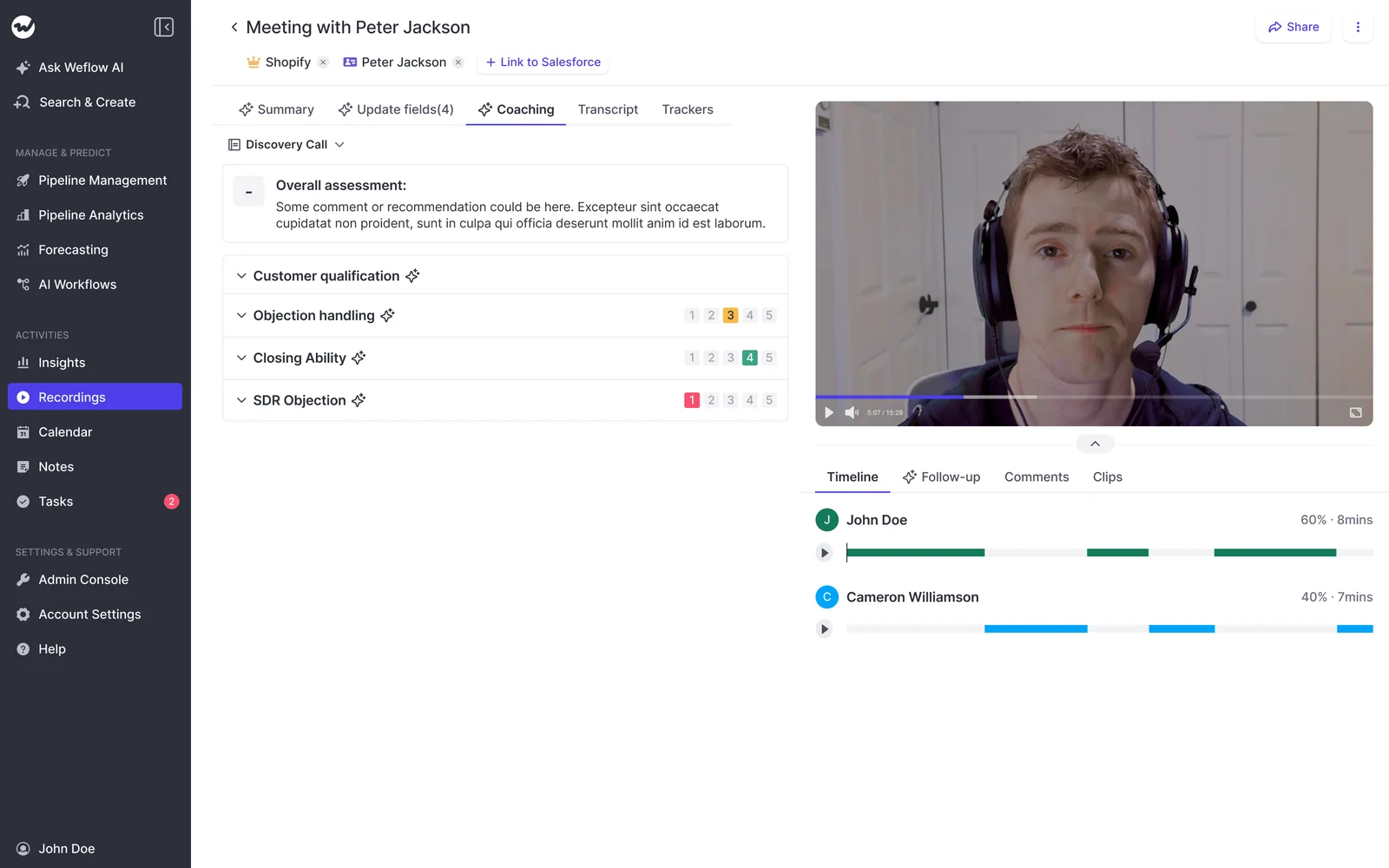
Weflow scores every recorded call against your methodology
Weflow scores every recorded call automatically against your coaching template, and the scorecard is included in the Weflow Conversation Intelligence seat. We ship templates for MEDDIC, MEDDPICC and Challenger, and you can edit them or write your own.
Each criterion is rated on a 1 to 5 scale or as free text. You can override any score the AI gives.
Scores roll up at three levels: the call, the opportunity and the rep over months. That last level is what changes your one-on-ones. You stop picking calls at random and start coaching the rep who scores well on metrics and poorly on champion identification, every time.
Weflow deal warnings run on rules your managers write
Weflow ships 50+ deal signals and lets you build warnings with AND/OR rules on any opportunity field except text fields, plus computed fields Weflow tracks for you, such as days inactive and close-date push count.
You write the warning because only you know what slipping looks like in your cycle. On a 60-day cycle, two weeks of silence is a warning. On a 12-month cycle it isn't.
Typical rules our customers run:
- Close date pushed more than twice
- Only one contact on the deal past discovery
- No activity in 14 days on a deal in commit
The warnings surface inside the forecast submission screen, at the moment a rep decides what to commit. That's the point where a warning still changes the number.
"We had a slipped deal last quarter, and we could have figured that out literally five weeks before if we had been assessing the calls."
A forecast owner on a call with us
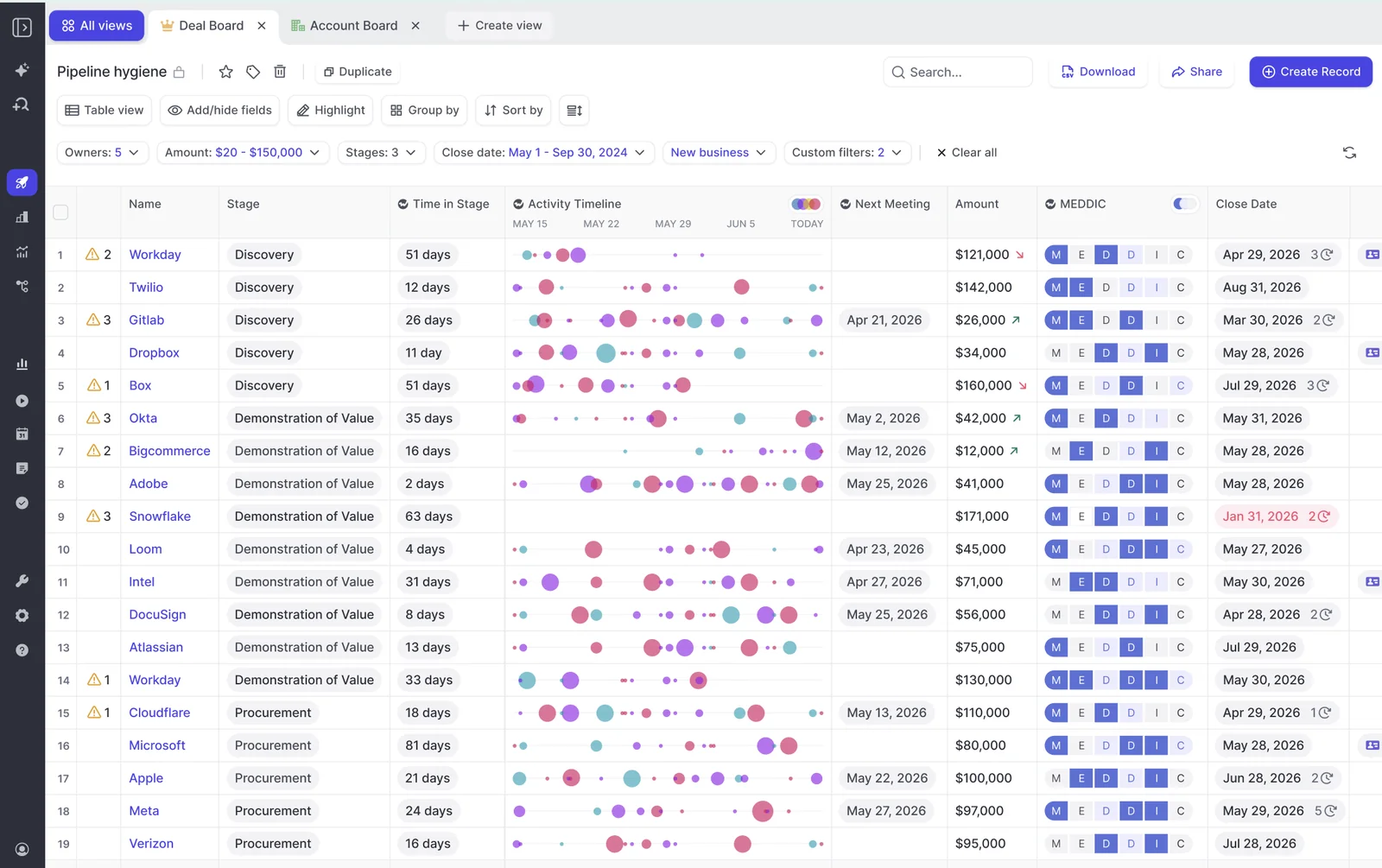
The limit: warnings and playbook scores are Weflow fields, not Salesforce fields, so they don't appear in Salesforce dashboards or BI reports. Today the workaround is an agent that writes the assessment into a Salesforce field you create, which you have to build.
Weflow Activity & Contact Capture logs email without rep action
Weflow Activity & Contact Capture logs sent and received email to Salesforce server-side, through a central app in Google Workspace or Microsoft 365. Mail sent from a phone, a browser or a desktop client is captured the same way, and reps install nothing.
Weflow logs only activity it can match to a Salesforce record, and threads where every participant is internal are never logged. That second point defuses the first objection reps raise, which is that the company is reading their email.
Two gaps to plan around:
- Personal email accounts, SMS and calls from personal mobiles aren't captured.
- Email sent from a separate deliverability subdomain, which sequencing tools often use, isn't logged until the buyer replies to the main domain.
Weflow Deal Intelligence & Forecasting rolls up named deals by hierarchy
In Weflow Deal Intelligence & Forecasting, each rep submits a baseline and a best case, either as a number or by selecting the opportunities behind it, with a comment. Calls roll up to you, your VP and the executive team through the Salesforce role hierarchy or a custom one.
Because the number is tied to named deals, your forecast call runs deal by deal instead of arguing about a total. You can override at the deal or total level, and every override is timestamped, attributed and logged with its rationale. Every version of a submission is kept, so you can see whether a rep's call moved all quarter or never moved at all.
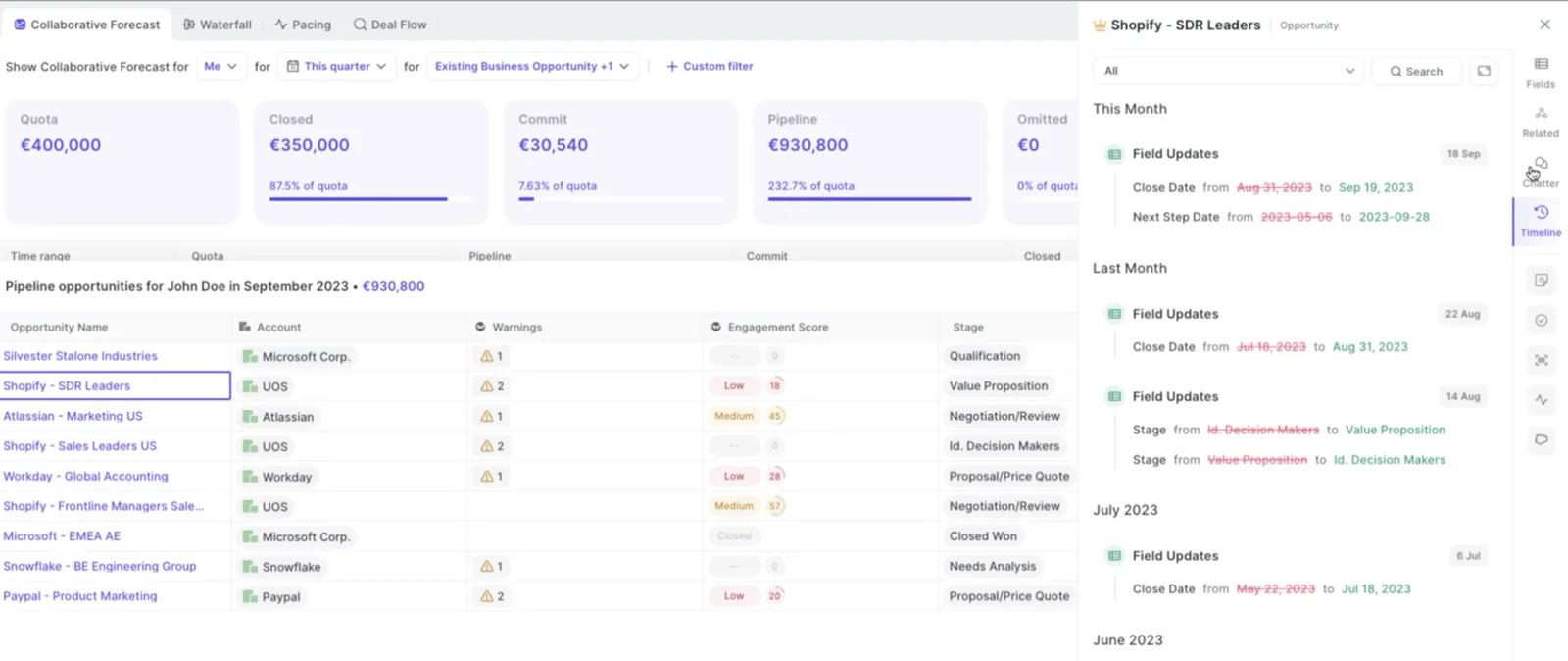
The limit: submissions live in Weflow, not in Salesforce fields, and they're made in the web app, not from a phone.
Weflow hands transcripts to Claude, ChatGPT and your warehouse
Weflow integrates natively with Salesforce, Gmail, Google Calendar, Outlook, Zoom, Microsoft Teams, Google Meet, WebEx and Slack, and pulls in calls from the Outreach dialer. Weflow isn't an integration platform with a connector catalogue, and you'll feel that next to Gong.
Weflow's read-only MCP connector lets Claude, ChatGPT and other assistants reach your conversation and forecast data. An admin switches it on per workspace, and a separate toggle decides whether assistants see full transcripts or only summaries. It returns:
- Call transcripts and summaries
- AI Playbook results
- Forecast calls
- Pipeline metrics per rep, such as win rate, coverage and cycle length, capped at 25 owners per breakdown
Captured emails and Salesforce field values aren't in the connector, because they're already in Salesforce. An assistant reads those through a Salesforce connector, so a team running both sees the record, the forecast and the conversation in one chat.
For a warehouse, Weflow's REST API bulk-exports transcripts, metadata, scores and signals as JSON or CSV, and feeds BI tools such as Tableau and Looker. There's no native Snowflake, Databricks or BigQuery connector, so teams move the data there through the API.
How Gong goes deep on conversations but rations field writes
Gong has the deepest conversation analytics in the category and the broadest ecosystem around it. Its call pages, trackers and topic models are mature, and buyers who chose Gong did so because it judges deals from what's said, not from how fields change.
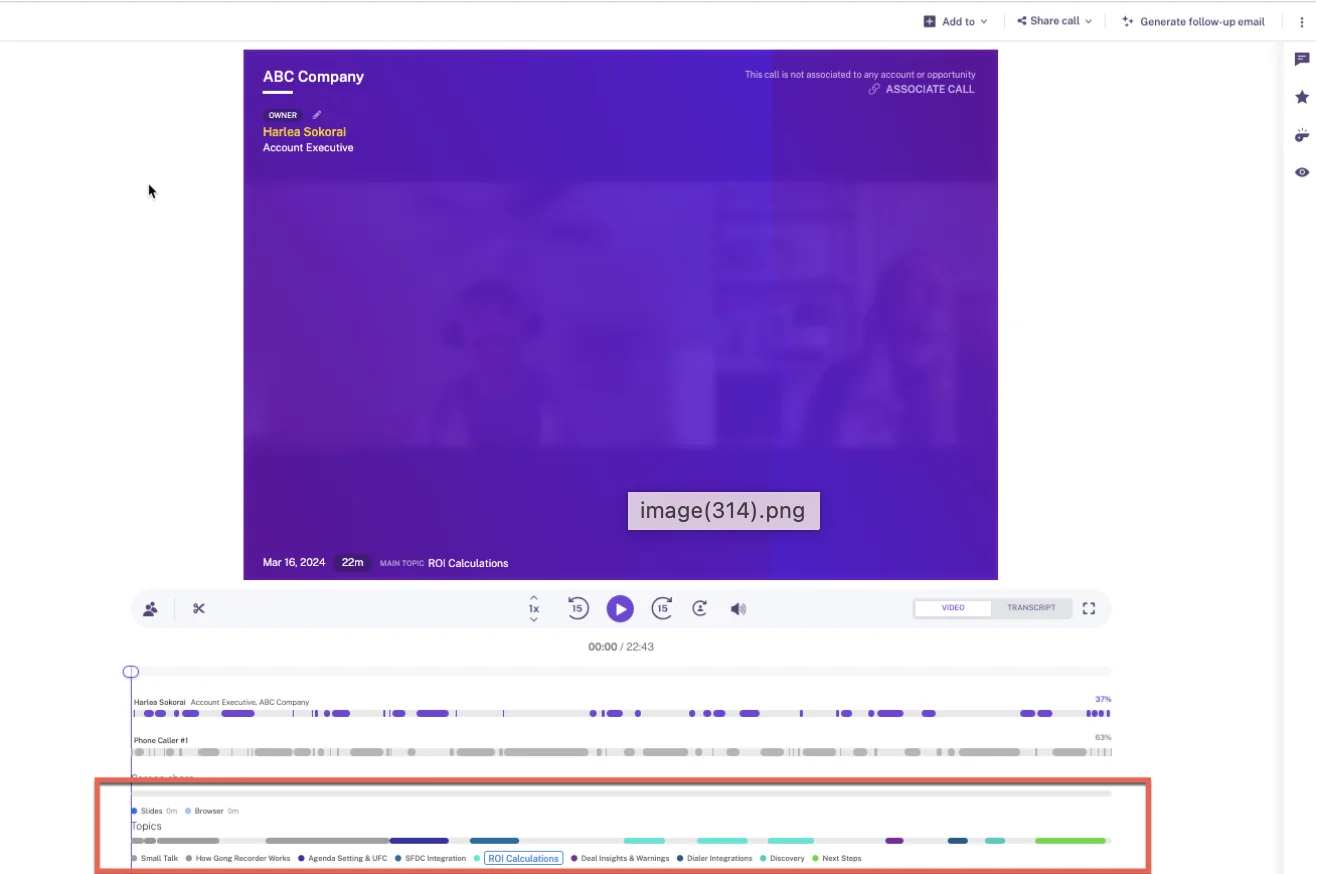
Where Gong is weaker for a sales manager is everything that has to leave Gong: field writes are capped, warnings are fixed, and each layer is its own application.
Gong AI Data Extractor caps you at 20 admin-built extractors
Gong's AI Data Extractor writes answers from calls into CRM fields automatically, with no rep action. That's a real advantage over Fireflies.
The rationing shows up in how it's set up:
- A workspace can publish at most 20 extractors, so a 21st question means retiring one.
- Only a business admin can create them.
- They write only into CRM fields that already exist and are imported into Gong.
- When an extractor finds newer information, it overwrites the previous value.
Outside the extractors, a Gong deal board can fill one text field, such as next steps, with AI suggestions from the current and previous week's conversations. AI Deal Reviewer suggests notes for each playbook element, and the rep reviews them in Gong.
Our customers who came from Gong tell us the richest context stays in Gong's interface, so reps end up working in two systems.
Gong coaching scorecards come with the Enable add-on
Gong offers configurable scorecards, scored by a manager or automatically by AI Call Reviewer, starting from six templates covering discovery, renewals, outbound, demos and general call execution. It's a mature coaching suite.
Getting it running takes three things:
- An Enable Essentials or Enable licence on top of Foundation
- A tech admin switching on automatic call scoring at company level
- Setup and tuning before managers trust the scores
Automatic review scores at most three team members on a call, and Gong AI produces no answers for voicemails or transcripts under 100 words.
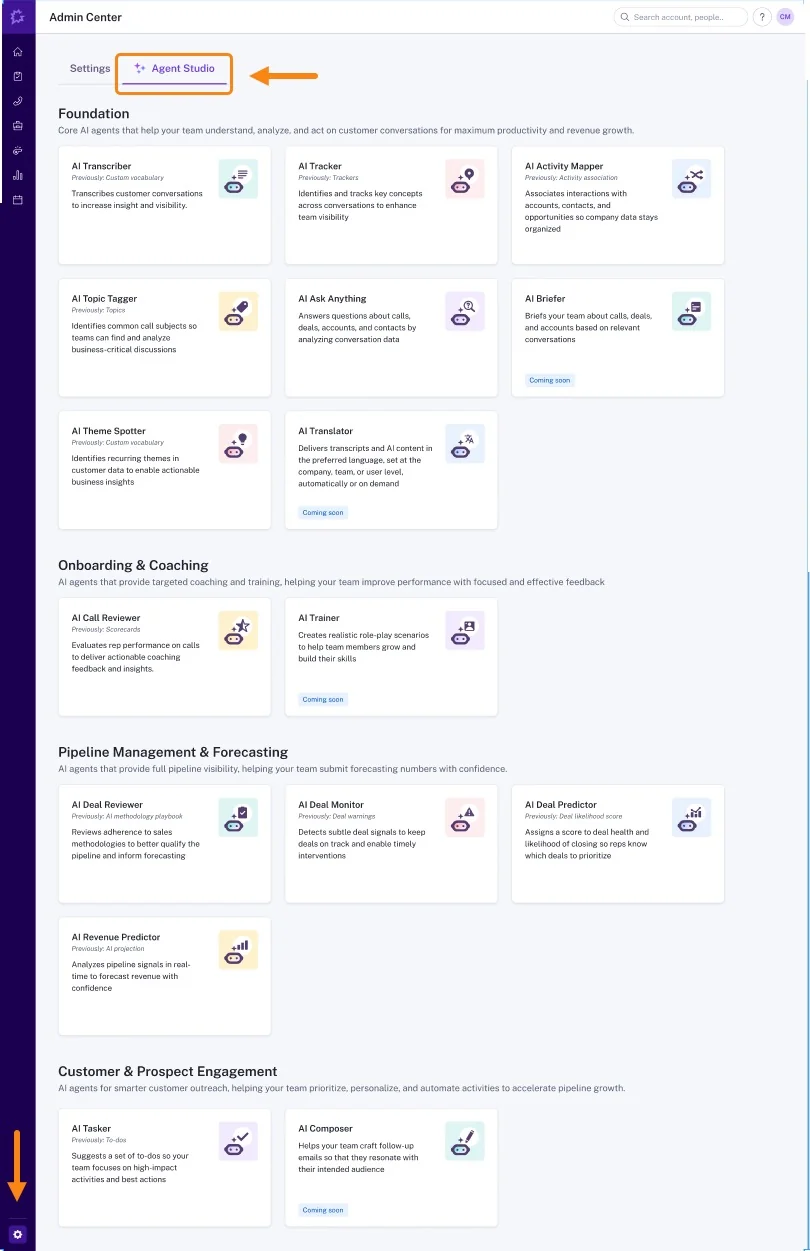
Gong AI Deal Monitor gives you eight fixed warnings
Gong's AI Deal Monitor ships exactly eight deal warnings, all defined by Gong:
- No activity
- Ghosted
- Overdue
- Not enough contacts
- No power
- Pricing not mentioned
- Red flag
- Stalled in stage
You can switch each one on or off and adjust how long before it triggers. You can't define a new one. A risk specific to your motion, like a missing partner sign-off or a required stakeholder, has no way to become a Gong warning.
Gong captures email but exports it to Salesforce selectively
Gong imports sent and received email server-side from Google Workspace or Office 365, company-wide or user by user. It keeps only emails with a participant who matches a CRM record.
Getting that email into Salesforce has conditions:
- A tech admin has to turn export on, and then it's exported as tasks or events.
- Only activity with an external participant matching a Salesforce contact or lead is exported.
- Email export runs forward from the day it's enabled.
- Call transcripts aren't exported.
So anything before export was switched on stays in Gong, and leaves with Gong if you do.
Gong Forecast runs as a separate application on Foundation
Gong Forecast is a capable forecasting application. Reps submit a number per forecast category with notes, managers see team totals and move up and down the hierarchy, and a trend chart tracks the team's and the manager's forecast week by week. The accuracy report compares past submissions with actuals.
Two things to weigh. It's priced on its own line on top of Foundation, so it gets scrutinized at every renewal. And submissions work per category rather than deal by deal.
"Our RevOps team spent too many hours building it out and trying to get it to work super well. So we ended up actually doing most forecasting back in spreadsheets."
Chris Nethercote, Head of Sales at Weflow, former Gong enterprise customer
Gong connects widely but its MCP returns insights, not transcripts
Gong's marketplace lists about 450 integrations and partner solutions, and Gong imports calls from about thirty dialers. If your stack is wide, that breadth is the real thing, and nobody else here matches it.
Gong's MCP server works with Claude, ChatGPT and Microsoft Copilot, but it's narrow:
- Three tools, each scoped to one account, deal or contact at a time
- AI-generated insights only, never raw transcripts
- Read-only
- Every request draws on a credit pool shared across the company
Gong's API does return transcripts, capped at 3 calls a second and 10,000 a day. Getting data into Snowflake, Databricks, BigQuery or Redshift takes Data Cloud, a separately purchased application.
Why Fireflies covers the meeting but waits on the rep
Fireflies is cheap, company-wide meeting notes with unusually open data access. If everyone in your company already uses it, that's a real asset. Its sales layer is a bolt-on, and every write to Salesforce waits on a rep.
Fireflies Autofill CRM waits for a rep to send each meeting
Fireflies Autofill CRM extracts values into standard or custom fields on Contacts, Accounts and Opportunities, with a prompt per field and a choice of append or overwrite. The configuration is flexible.
Autofill never writes to Salesforce on its own. A rep opens each meeting in Fireflies, reviews the values one record type at a time, picks the opportunity and clicks Autofill. A meeting nobody reviews leaves Salesforce unchanged.
That brings back the exact chore that left your fields empty. Autofill also needs the Business plan or above, and each extraction uses one AI credit.
Fireflies scores calls through editable AI Skill templates
Fireflies scores sales calls through AI Skills: editable templates that grade a rep's call against criteria your team sets, after every meeting. You can fill a BANT, MEDDIC or SPICED scorecard this way.
Each call is scored on its own. There's no rollup of methodology across the deal or of a rep's trend over months.
Fireflies Deal Intelligence shows a fixed health state per deal
Fireflies Deal Intelligence lists deals in a table or Kanban view with a health state of On Track, At Risk or Slipping, plus an AI Close Probability. Each deal page tags insights quoted from calls as risk, stakeholder, competitor or pain point.
The health states are fixed, and there are no configurable warnings. Only deals linked to Fireflies-recorded meetings appear, so a deal that runs in email doesn't show up at all.
Fireflies logs no email and offers no forecast roll-ups
Fireflies logs no email to Salesforce or any CRM. Its Gmail and Outlook connection powers Email Assistant, which labels mail and drafts replies in the inbox.
Fireflies also has no forecasting: no submissions, no categories, no roll-ups. Put those two absences together and part of every deal lives outside the tool, and your forecast still lives in a spreadsheet.
Fireflies connects to more than 100 apps
Fireflies lists integrations with more than 100 apps:
- Conferencing platforms including Zoom, Google Meet, Microsoft Teams and Webex
- Dialers including Aircall, JustCall, Outreach, RingCentral, Salesloft and Zoom Phone
- HubSpot and Salesforce
- Zapier for everything else
Fireflies MCP and API hand your assistant full transcripts
Fireflies runs its own MCP server, listed in Claude's connector directory and usable from ChatGPT, that searches and fetches transcripts and summaries. Its GraphQL API is on every plan, and Fireflies can deliver transcripts into your own Snowflake account on Business and Enterprise.
On raw transcript access, Fireflies is more open than Gong. What it doesn't expose is deal or CRM data, because Deal Intelligence and Autofill aren't in the API or MCP tools.
Where Gong and Fireflies beat Weflow today
Some teams are better served by Gong or Fireflies. Here's exactly where.
- Fireflies Live Assist shows notes, suggested questions and answers during the meeting. Weflow has no live in-meeting assistant; everything arrives after the call.
- Gong has AI Trainer for role-play against personas built from your calls. Weflow has no role-play product.
- Gong has the deeper conversation analytics and a deal board managers get attached to.
- Gong has the wider ecosystem, with about 450 integrations and about thirty dialers.
- Gong and Fireflies both support HubSpot. Weflow is Salesforce-only.
- Weflow warnings, playbook scores and forecast submissions don't reach Salesforce reports.
- Weflow has a 10-user minimum, so a team of four is better off elsewhere.
How Gong, Fireflies and Weflow price seats and AI usage
Fireflies is cheap per seat, but its sales layer needs the Business plan plus metered credits. Gong publishes no prices and stacks applications on a mandatory core licence. Weflow publishes its seat prices and includes AI field updates in the seat.
| Weflow | Gong | Fireflies | |
|---|---|---|---|
| Pricing model | Per seat, billed annually, 10-user minimum | Per-user licence per application, plus a platform fee that scales with users | Per seat, annual or monthly |
| Published list prices | Yes: $19, $39, $39 standalone; bundles $49, $59, $79 | None; every buyer gets a custom proposal | Yes: Free, Pro $10, Business $19, Enterprise $39 (annual) |
| What the sales features need | Weflow Conversation Intelligence ($39) or a bundle | Foundation, plus Enable for scorecards and Gong Forecast for forecasting | Business or Enterprise for Autofill CRM and Deal Intelligence |
| What's metered | Only Agent Builder | AI credits for trackers, MCP and API workflows, from a company-wide pool | AI credits for Autofill, AI Skills, Sales Assist and AskFred |
| What costs extra | Agent Builder beyond 25 free actions a month: $299 for 500, $999 for 2,500 | Each application, Data Cloud for warehouse export, credits beyond the pool | Credit packages from $5 for 50 up to $600 for 10,000 a month |
Weflow's products and bundles, per user per month, billed annually:
- Weflow Activity & Contact Capture: $19
- Weflow Conversation Intelligence: $39
- Weflow Deal Intelligence & Forecasting: $39
- Revenue AI Foundation (Activity & Contact Capture + Conversation Intelligence): $49
- Revenue AI Business (Foundation + Deal Intelligence): $59
- Revenue AI Enterprise (all Weflow products, including Forecasting): $79
Ask Weflow AI Pro, AI summaries and AI field updates are included in every seat, so nobody has to ration them.
Here's the list-price arithmetic for 50 seats, for the two vendors that publish prices:
- Fireflies Business: 50 × $19 × 12 = $11,400 a year, plus credits once the pool runs out
- Fireflies Enterprise: 50 × $39 × 12 = $23,400 a year
- Revenue AI Foundation: 50 × $49 × 12 = $29,400 a year
- Revenue AI Enterprise: 50 × $79 × 12 = $47,400 a year
Weflow's volume discounts start around thirty to forty seats, so a 50-seat quote lands below list. Gong is quote-only, so there's no honest Gong figure to put next to these.
The Fireflies line needs a closer look. The Business plan comes with a one-time pool of 30 AI credits for the whole team, and the pool doesn't grow with seats. At one credit per Autofill extraction, 30 credits covers 30 meetings across your whole team. After that, Fireflies moves you automatically to the next paid credit package and charges for it, unless an admin has switched auto-upgrade off.
Our position on Gong: Weflow gives you better AI at half the price. That isn't a thinner product. Gong set its pricing when transcription was expensive, and we built after that cost curve collapsed. We prove it with a side-by-side demo and a trial, not a discount argument.
Switching from Gong or adding to Fireflies without losing data
The two fears we hear most are losing years of call history and ending up with two recorders writing duplicates into Salesforce. Neither has to happen.
Weflow migrates and reprocesses your Gong call history
Weflow imports your Gong recording library at no charge, at libraries in the thousands of recordings, and reprocesses it. Reprocessing matters: your old calls become searchable and scoreable under Weflow, not an archive you can't use.
Where the migrated metadata carries it, we restore the link between each call and its Salesforce account, so historical calls work for win-loss analysis on the same terms as new ones. Calls that only exist as video files can be bulk-imported with a CSV, and Weflow matches them to Salesforce records itself. Your existing tracker set carries over too.
"Weflow ticked all the boxes: GDPR-compliant, tightly integrated with Salesforce, simple to use - and without the heavy price tag of U.S. vendors."
Bastian Stosic, Head of Media Sales Operations, HolidayCheck
The harder part is your reps. Managers get attached to Gong, and reps treat it as a perk. RevOps decides on cost and data; the reps decide whether it sticks. Show them the fields that now fill themselves before you take the old tool away.
Running Weflow alongside a company-wide Fireflies rollout
You can keep Fireflies for the rest of the company and run Weflow for the revenue team. The risk is duplication: when a capture tool and a notetaker both write the same meeting to Salesforce, you get two meeting records, and meetings-per-rep reporting double counts.
Weflow avoids this on its side by writing the call summary onto the one Salesforce Event that actually happened, with a link to the recording. To keep it clean, turn off Fireflies' Salesforce sync for the sales team so only Weflow writes those meetings.
Only one Weflow notetaker joins a meeting per company, however many of your Weflow users attend. A Fireflies recorder is a separate participant the host can admit or decline.
If you'd rather run one recorder company-wide, Weflow sells a lightweight conversation intelligence licence for people who aren't Salesforce users. It gives them the notetaker without the rest of the platform.
Choose Gong, Fireflies or Weflow for your sales team
Choose Gong if:
- Coaching depth is the main reason you're buying, and you want role-play and the deepest conversation analytics.
- Your stack is wide and you need Gong's integration and dialer ecosystem.
- Your first-line managers will actually live in Gong's interface every week, because that's when it pays off.
- You can fund the Foundation licence plus the applications you need, and the AI credits on top.
Choose Fireflies if:
- You need cheap meeting notes across the whole company, not only sales.
- You run HubSpot, or you need live in-meeting help.
- Your team is small and only needs notes, and reps reviewing each meeting before it reaches the CRM is acceptable.
- You want full transcripts in your own assistant or Snowflake at a low price.
Choose Weflow if:
- You run Salesforce and want calls and email to fill deal fields without chasing reps, with each field set to automatic or review.
- You want warnings your managers define, surfaced while reps submit their forecast.
- You want the forecast, the scorecards and the field updates on one data foundation, at a published seat price with AI included.
- You have at least 10 users who need it.
See how Weflow captures activity, updates Salesforce fields from calls, and rolls up your forecast. Book a 30-minute demo.
Gong vs Fireflies FAQ for Salesforce sales managers
What does Gong cost for a 50-person sales team?
Gong doesn't publish prices, so you'll get a custom proposal. The total combines a mandatory Gong Foundation core licence, a seat for each application a person uses (Enable for scorecards, Gong Forecast for forecasting), a platform fee that scales with users, and AI credits for trackers, MCP and API use. Every Gong buyer gets a different number depending on which applications they need.
What happens when Fireflies runs out of AI credits?
Fireflies gives each plan a one-time credit pool shared by the whole team: 30 credits on Business and 50 on Enterprise. When a paying team runs out, Fireflies moves it automatically to the next higher credit package and charges for it. An admin can switch auto-upgrade off, and purchased credits don't roll over.
Will AI field updates overwrite what my reps already typed?
In Weflow, you decide per field. Fields set to review show the rep the current value beside the AI suggestion, so they keep what's right and sync only the change. A field's prompt can also tell Weflow not to update when the call adds nothing new, and AI Playbooks keep cumulative methodology fields current across the whole deal.
How accurate are AI-filled Salesforce fields?
Accuracy depends mostly on how well each field's prompt is written, which is why Weflow ships 250+ pre-built prompts and builds picklist values into the extraction. Most teams we work with accept roughly 90% accuracy, because the alternative is an empty field. When a field comes back confidently wrong, like a metrics field returning the customer's headcount, keep it in review mode and tighten the prompt until the output earns automatic writes.
Do reps have to click anything after a call?
With Fireflies, a rep has to open each meeting, review it and send it before anything reaches Salesforce fields. Gong's extractors write without the rep, but only for up to 20 admin-built fields. With Weflow, automatic fields need no click, review fields take one click to accept, and email capture runs server-side with nothing for reps to install.
How does recording consent work for calls in Europe?
The Weflow notetaker joins as a visible participant, and consent flows are configurable, including a pre-meeting email with an opt-out link on Microsoft Teams and an in-call chat message that lets a participant have the recording deleted. Weflow is a German company, GDPR compliant, and can keep your data in the EU or UK. Your instance runs in the region where your Salesforce is hosted unless you choose otherwise.
What replaces the Gong deal board in deal reviews?
Weflow's deal board shows opportunity, account and contact fields side by side, with the activity timeline, last and next meeting, warnings and per-letter playbook status in one view. Every field stays editable and writes back to Salesforce. Gong's board is well loved, and Weflow's is built for running the review from live Salesforce data.
Does Weflow record phone calls from our dialer?
Weflow pulls in calls from Outreach's dialer with audio, speaker separation, a transcript, a summary and coaching. The Weflow desktop app also records softphone calls that run through the computer, such as Aircall or RingCentral, by capturing system audio. The rep starts that recording from the desktop app.
Does Weflow work with HubSpot?
No. Weflow is built for Salesforce teams and works exclusively with Salesforce. HubSpot teams should look at Gong or Fireflies.
Can Claude or ChatGPT read our call data?
All three tools have an MCP connector. Weflow's is read-only and returns transcripts (behind an admin toggle), playbook results, forecast calls and pipeline metrics. Fireflies' returns transcripts and summaries but no deal data, and Gong's returns AI insights on one record at a time, never transcripts, and draws metered credits.
What are Weflow's contract terms?
Weflow contracts run a minimum of 12 months with a 10-user minimum. You can't reduce seats mid-term, but you can reassign a seat when someone leaves. Seats added mid-term are charged pro rata to the end of the term, and multi-year terms carry a discount.
Can we test Weflow on our own Salesforce data?
Yes. We run a side-by-side demo against the tool you're comparing, then a trial on your own Salesforce data, so you see what lands on your real opportunities before you decide.