Gong vs Jiminny: Sales Coaching and Conversation Intelligence Compared (2026)
Learn how Gong vs Jiminny compare on sales coaching, phone coverage, CRM updates, and Weflow.



Gong and Jiminny both coach reps well. Each one scores calls against a scorecard, records dialer calls and writes something back to your CRM. What separates them is three things the demos usually skip:
- What the score measures. It can score one call, or it can score the whole deal.
- Whether your phone calls get coached at all.
- Where the result ends up. It either stays inside the tool or reaches the Salesforce opportunity you run one-on-ones from.
Here's the short answer:
- Gong fits managers who want the deepest conversation analytics, the deal board many teams forecast from, and broad telephony coverage.
- Jiminny fits coaching-first, phone-heavy teams that want live in-call coaching, a built-in dialer, a flat seat fee, or a CRM other than Salesforce.
- Weflow is a third option for Salesforce teams. It scores every recorded call and builds up the methodology picture on the opportunity, which is the job of Weflow Conversation Intelligence and AI Field Updates.
We're Weflow, so keep that in mind as you read. We point out where Gong or Jiminny is the better pick, and we cover what each tool costs and what switching takes.
How Gong, Jiminny and Weflow compare on coaching and Salesforce
The three tools differ most on scoring scope, phone coverage and where the output lands. They all "do coaching", so that part doesn't separate them. The table puts each capability side by side.
| Capability | Weflow | Gong | Jiminny |
|---|---|---|---|
| Coaching scorecards | Scores every recorded call against configurable MEDDIC, MEDDPICC or Challenger templates. Templates are assigned per team and managers can override scores. Scores roll up per opportunity and per rep | Six templates, scored by a manager or by AI Call Reviewer. Needs Enable Essentials or Enable plus an admin switch. Auto-scores up to three team members per call | Scores every call against a manager-defined scorecard. AI call scoring and coaching are on the Scale tier |
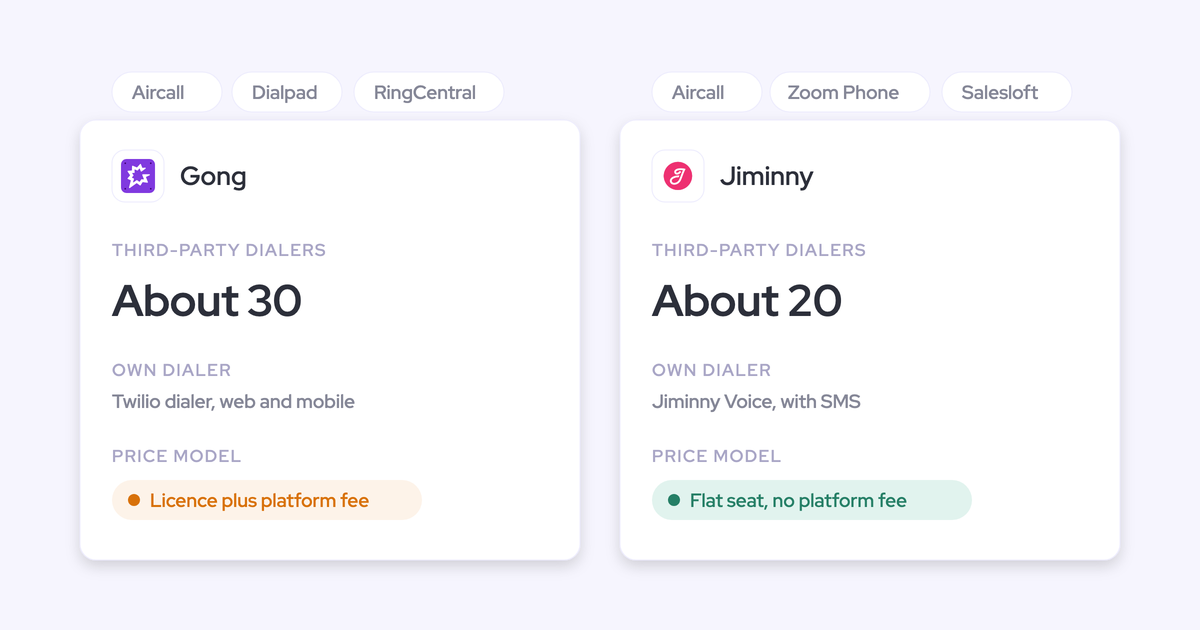
| Phone and dialer calls | Pulls in Outreach dialer calls automatically. The desktop app records any softphone on the computer, but the rep starts it. No built-in dialer, and no mobile carrier calls | Imports from about 30 telephony systems by API and has its own Twilio dialer | Has its own dialer and SMS (Jiminny Voice) and records about 20 third-party dialers |
| CRM field updates | Writes every field type except lookups, including picklists, dates and Stage. Adds to methodology fields instead of overwriting them. Each field is set to write automatically or wait for review | AI Data Extractor writes into existing fields and overwrites them with the latest value. Capped at 20 published extractors, and only admins create them | AI CRM Filling sets fill-empty, overwrite or append per field, on Scale. Synced emails stay inside Jiminny |
| Live in-call help | None. All outputs arrive after the call | Live transcript, a talk alert after 2.5 minutes, and shared notes. Zoom only | Live coaching during calls, on Scale |
| Deal board | Shows opportunity, account and contact fields with last and next meeting and an activity timeline. Edits go back to Salesforce. Part of Weflow Deal Intelligence & Forecasting | Admin-configured board with CRM fields, trackers and warnings. Needs Forecast Essentials or Gong Forecast | Deal Insights table with chosen columns and risk triggers, and edits write back. A deal shows only if its owner is a Jiminny user |
| Integrations | Salesforce, Google, Microsoft, Zoom, Teams, Meet, Slack and Outreach. No connector catalogue | About 450 integrations and partner solutions | About 20 dialers, Zoom, Meet and Teams, Google and Microsoft 365 mail and calendar, Zapier, and many CRMs |
| AI assistant access (MCP) | Read-only connector with playbooks, summaries, transcripts (behind an admin toggle) and forecast data | Three record-scoped tools. Returns AI insights, not transcripts. Credit-metered | Read-only and per-user, on the Scale and Grow tiers |
| Raw data access | REST API bulk export (JSON or CSV) to BI tools and warehouses. No native Snowflake, Databricks or BigQuery connector | API capped at 3 calls a second and 10,000 a day. Warehouse delivery needs Data Cloud, bought separately | REST API with an admin-only organization key, suggested for warehouse and BI use |
| Pricing | Published: $39 for Conversation Intelligence, $49 for Revenue AI Foundation. AI is included in the seat | Not published, quote only. Foundation plus applications, with AI metered in credits | Not published, quote only. Flat per-seat tiers, with only dialer minutes above the allowance metered |
Most of these rows look alike until you test them on your own calls. Three of them decide fit, and the next section turns them into checks you can run in a trial.
Why sales managers end up shortlisting Gong and Jiminny
Teams usually reach this shortlist one of two ways. The first is a Gong renewal where the price no longer matches what the team actually gets out of it. The tool works and the reps like it, but the finance conversation comes around anyway.
"I think Gong's incredibly expensive, and I don't think it's kept up with the market."
Revenue leader, on a call with us
The second is a first purchase. Gong is the safe default, because nobody gets blamed for buying the category leader. Jiminny keeps showing up as the coaching-first option with a flat fee.
Whichever way you got here, transcription is cheap now, and every vendor ships scorecards with "AI coaching" on the homepage. So the label doesn't tell you much. How the tool behaves on your calls does.
Three questions to settle before choosing Gong or Jiminny
Run these three checks in any trial, with your own reps and your own calls.
Does the tool score one call or the whole deal?
A per-call score misjudges reps in long sales cycles. When a rep settles an element on call one, they won't discuss it again on call two, so call two scores low.
"Right now it scores us on an individual call. So if we talk about metrics on the first call and get a four, then on the second call, because it's already been decided, we score a one because we didn't discuss it again. From a coaching standpoint that's not a fair gauge of where someone actually is."
Sales manager, on a call with us
You need two layers, and each answers a different question:
- The call score tells you how one conversation went. That's feedback the rep can use while the call is fresh.
- The opportunity score tells you whether the deal is qualified across every call, email and field. That's the question your pipeline review asks.
To test it, pick a deal with four or more calls on it. Then see whether an element the rep settled early still pulls their score down later.
Does the tool record and coach your phone calls?
If half your conversations happen on the phone and the tool only joins video meetings, half your deals have nothing to coach from.
"...when people say they have a conversation and then something goes sideways in the deal later, there is no way for me to coach to it, because it was a conversation on the phone that we are not able to capture."
Sales manager, on a call with us
Run one real call all the way through to a scorecard, and ask three things:
- Which dialer? Use the one your reps actually use, not the one in the demo.
- Rep-started or automatic? If the rep has to press record, coverage depends on the rep remembering.
- Mobile? Neither iOS nor Android lets a third-party app record a call placed from the phone's own dialer. No vendor captures those calls. A call only gets recorded if it runs through a dialer app or a softphone.
Does the coaching land in Salesforce or stay in the app?
If coaching insight lives in one place and the deal record lives in another, you have two options. You check both before every one-on-one, or you accept a thin Salesforce record. Neither holds up past the first quarter.
After a trial call, open the Salesforce opportunity and look at three things:
- Did the summary land on the meeting that already exists, or did it create a second meeting?
- Are the methodology fields filled in, and did the second call add to them or replace them?
- Are the deal's emails there?
Weflow scores coaching on the deal and writes it to Salesforce
Weflow is the Revenue AI Orchestration platform for sales, customer success, and RevOps teams. It's built for Salesforce teams. For coaching, the relevant module is Weflow Conversation Intelligence, along with the AI Field Updates that write call outcomes into Salesforce.
Weflow scores every recorded call, each opportunity and each rep
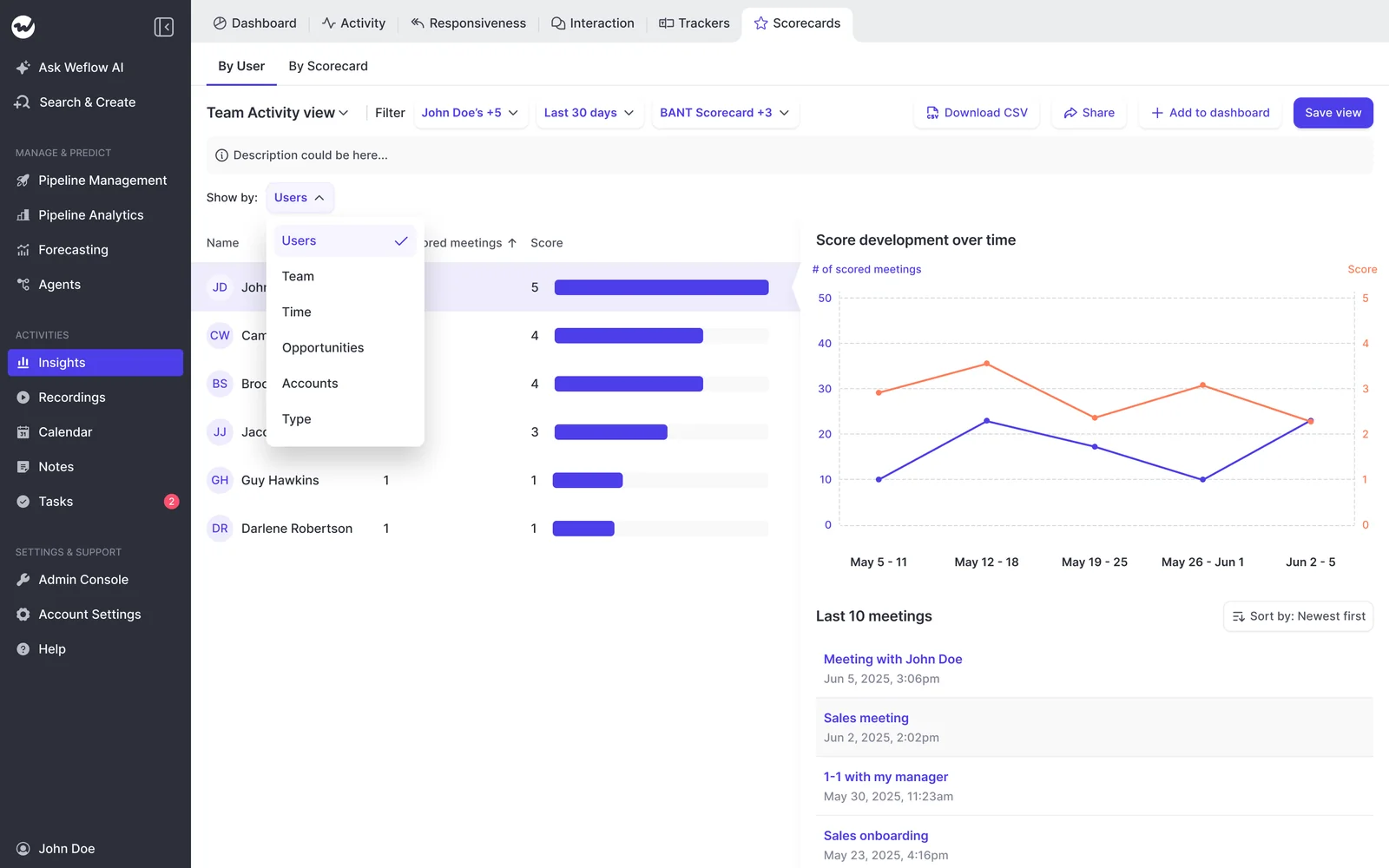
Weflow scores every recorded call automatically against the team's methodology, so you don't have to pick which calls get reviewed. Templates cover MEDDIC, MEDDPICC, Challenger and more. You can edit them or write your own, assign them per team, and override any score.
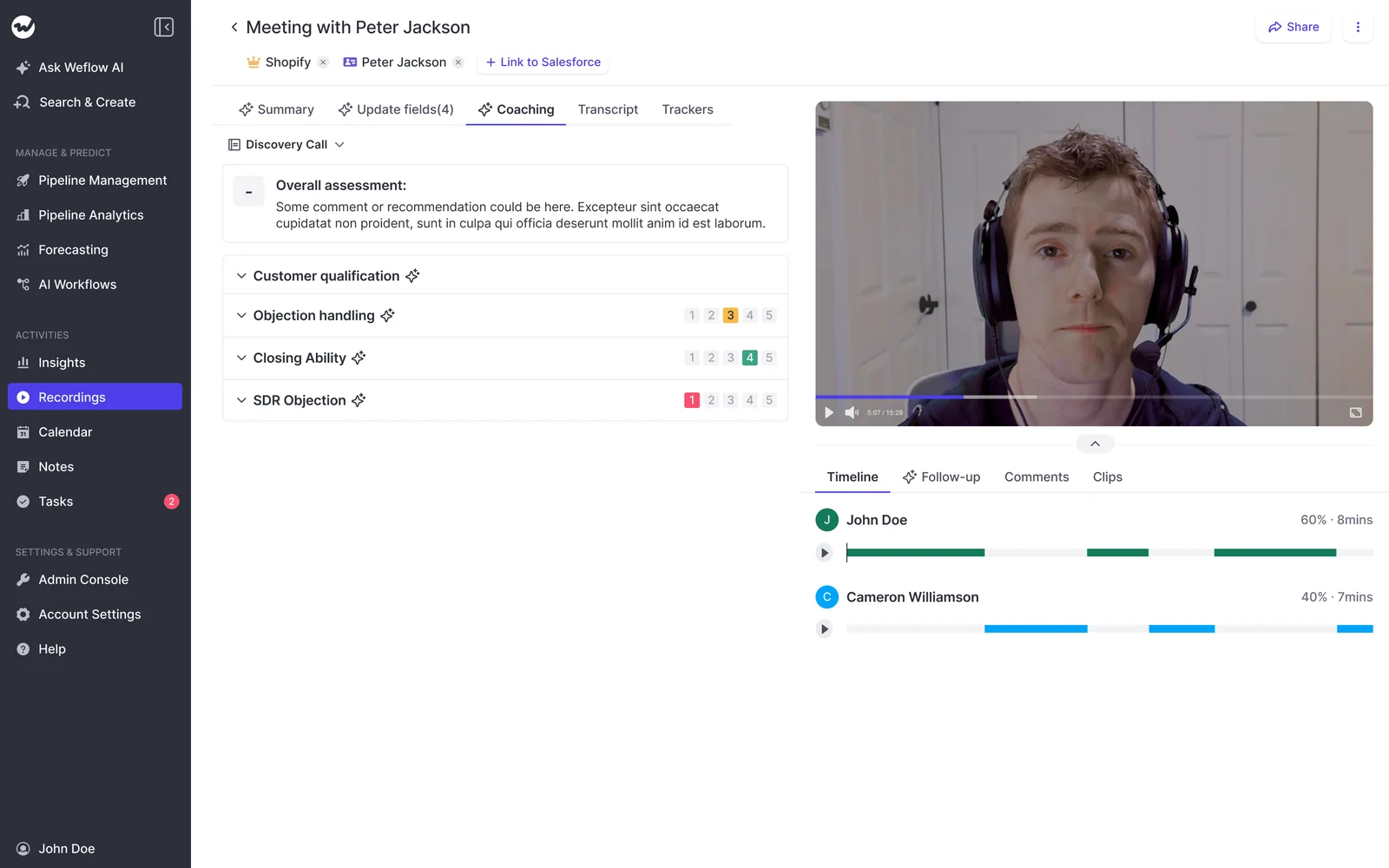
Weflow also tags each meeting by type, such as discovery, demo, negotiation or check-in. Admins can add their own types, like renewal or upsell. The meeting type can trigger its own scorecard, so a renewal call doesn't get scored against the discovery rubric.
Scoring runs at three levels:
| Level | What it answers for you |
|---|---|
| Call | How did this conversation go, and what should the rep change on the next one? |
| Opportunity | Is this deal qualified? AI playbooks read every call, email and field on the deal and rerun when new activity lands. If a rep typed filler into a field, that element is marked "not assessed". |
| Rep over months | Who needs coaching on what? For example, a rep might be strong on economic buyer and weak on decision process across every deal they work. |
The rep level is where coaching moves from anecdote to trend. You stop sampling three calls a week and start from the pattern.
Weflow records dialer and softphone calls, but not mobile carrier calls
Phone calls reach Weflow through three routes, and there's one gap:
- Outreach dialer: Weflow pulls these calls in automatically. Each arrives with the audio, speaker separation, a transcript, a summary and coaching.
- Desktop app: the app records any softphone whose audio runs through the computer, such as Aircall or RingCentral, with no provider integration needed. The rep starts each recording.
- Mobile Copilot: records in-person meetings from the phone.
- The gap: Weflow doesn't capture calls a rep makes on their own mobile carrier line.
Weflow has no built-in dialer. If your team lives on the phone, Jiminny covers more phone setups than we do.
Weflow AI Field Updates add to methodology fields instead of overwriting
When Weflow writes to a methodology field that already has content, it adds to what's there. Your MEDDIC fields fill in over the life of the deal. The last call doesn't overwrite what the first call established.
Here's how field writes behave:
- Write mode per field: an obvious field like a website can update automatically, while a judgment field like champion waits for review.
- Field types: picklists, numbers, dates, multi-selects and the opportunity Stage itself, so you can report on the results.
- Objects: every Salesforce object. Custom objects need setup from Weflow support.
- Limit: no relationship lookup fields.

Within 30 to 60 seconds of the call ending, the summary lands on the Salesforce Event that already exists, with a link to the recording. Weflow Activity & Contact Capture writes the deal's emails into Salesforce too. When you open the opportunity before a one-on-one, it shows what happened.
Weflow gives reps no live help during the call
Weflow has no live in-meeting assistant. Reps can't ask questions during the call, and there are no real-time battlecards when a competitor comes up. The summary, field updates, follow-up email and score all arrive after the call, within about a minute.
That's a real difference, and buyers coming from other tools ask about it. Our view is that a rep reading battlecards mid-call isn't fully listening. You can reasonably disagree.
Weflow Deal Intelligence & Forecasting puts every deal on an editable board
The Weflow deal board puts opportunity, account and contact fields side by side, which a standard Salesforce opportunity report can't do. Each row shows last email, last and next meeting, and the activity timeline. Every field is editable and writes back to Salesforce.
Admins can lock a board template per team, so sales, customer success and leadership each get their own fixed view of the same data.
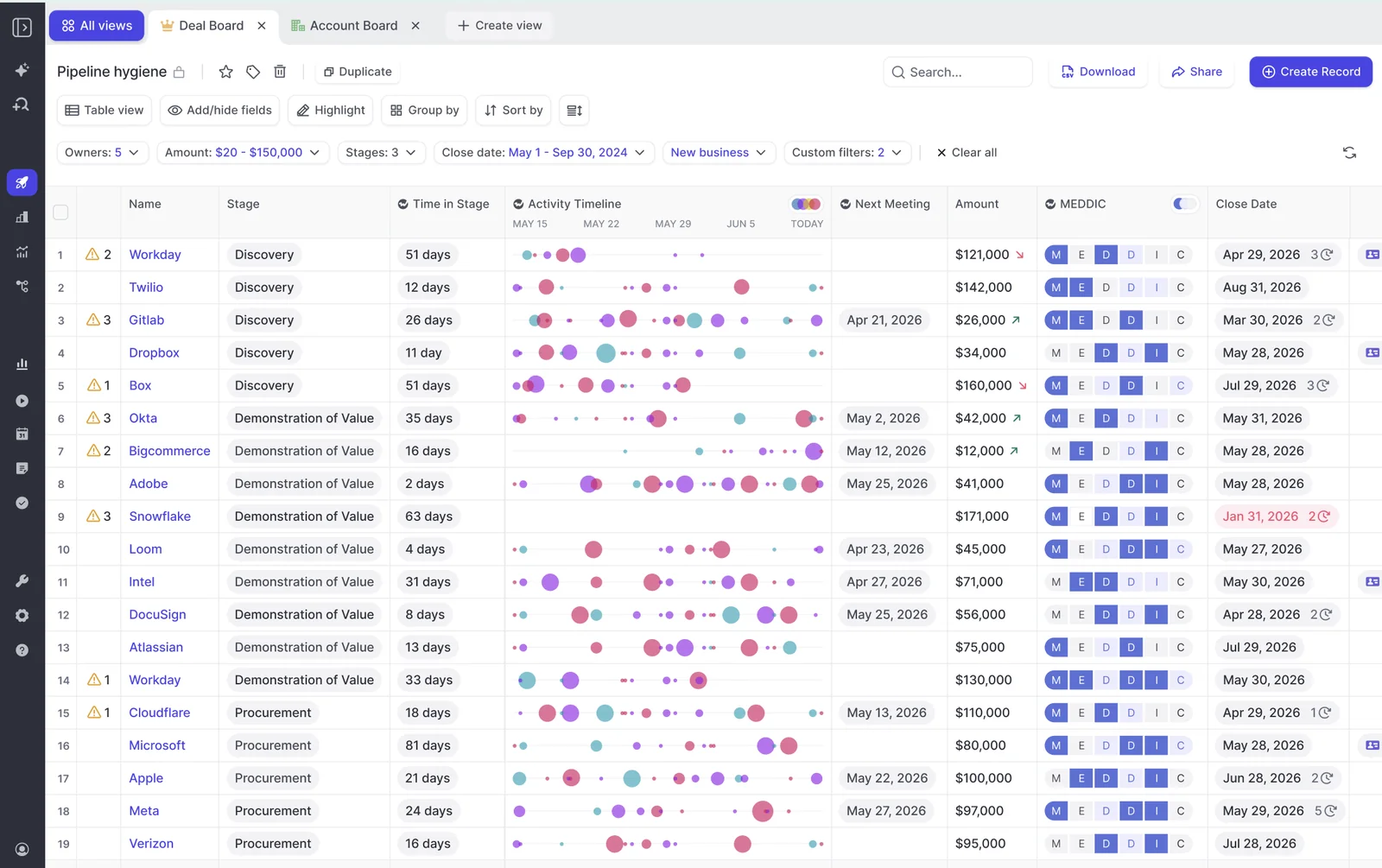
The deal board is part of Weflow Deal Intelligence & Forecasting. It doesn't come with the Conversation Intelligence seat.
Weflow sends transcripts and scores to BI tools and AI assistants
- Integrations: Salesforce, Gmail, Google Calendar, Outlook, Zoom, Teams, Meet, Slack and the Outreach dialer. Weflow works on customer-facing data mapped to Salesforce. It isn't a connector catalogue.
- MCP: a read-only connector gives Claude, ChatGPT and other assistants your playbooks, call summaries, forecast data and transcripts. Transcripts sit behind a separate admin toggle.
- Raw data: the REST API bulk-exports transcripts, metadata, scores and signals as JSON or CSV into BI tools like Tableau and Looker or into your warehouse. There's no native Snowflake, Databricks or BigQuery connector, so the API does that job.
Weflow publishes seat prices and includes AI in the seat
Weflow Conversation Intelligence is $39 per user per month. Revenue AI Foundation, which bundles it with Weflow Activity & Contact Capture, is $49.
Ask Weflow AI, summaries, field updates and scorecards are all included in the seat. Agent Builder is the only consumption-priced product. Billing is annual, with a 10-user minimum. The full side-by-side is in the pricing section below.
Gong gives the deepest conversation analytics, with coaching behind Enable
Gong sells a mandatory core license, Gong Foundation, and you buy applications on top of it. It's also the safe brand. Plenty of buyers have chosen Gong because nobody gets fired for it.
The analytics are deep. Gong's call page breaks each recording into named topics along a timeline, so you can jump straight to the part of the call you care about.
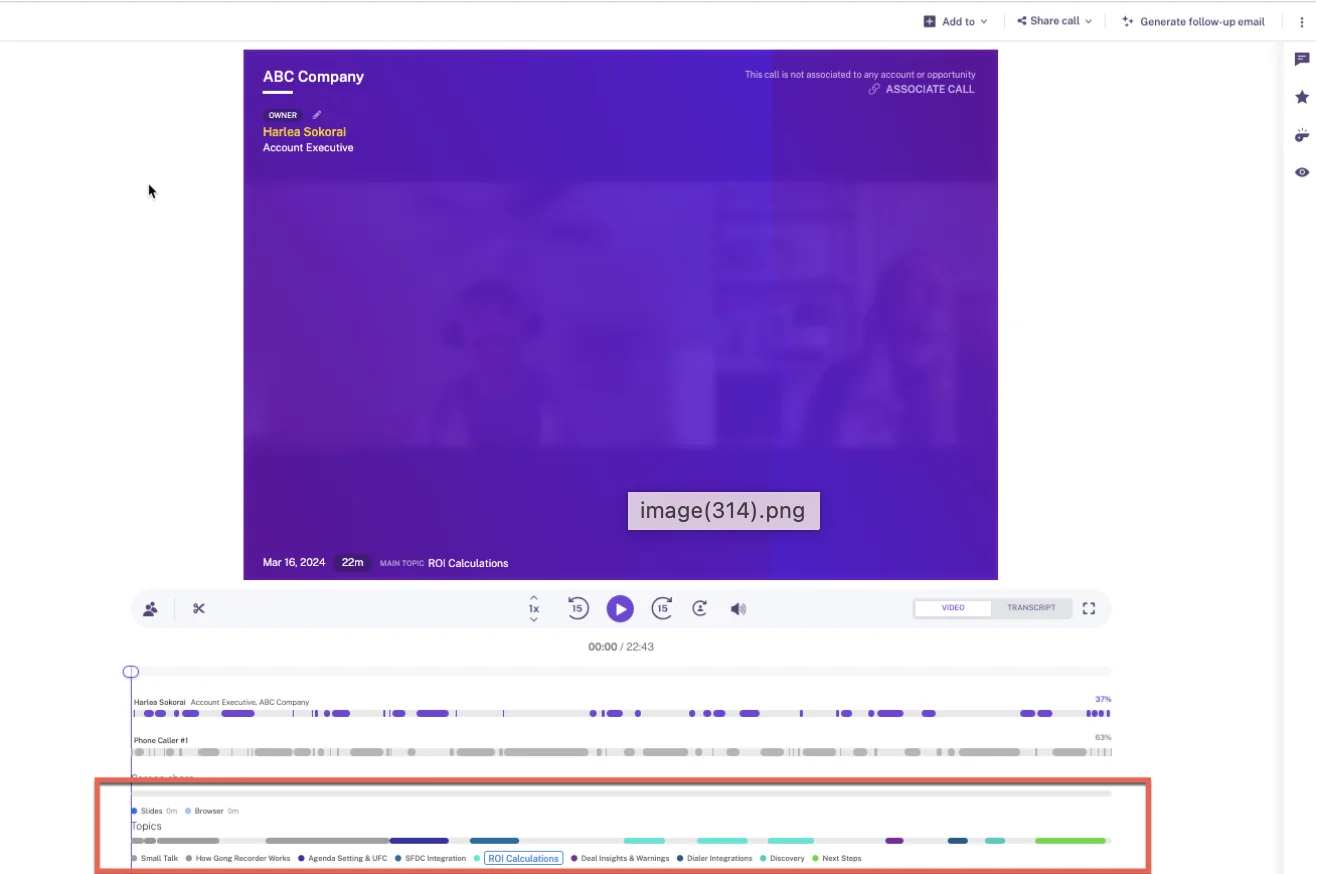
Gong scores calls through Enable, auto-scoring three people per call
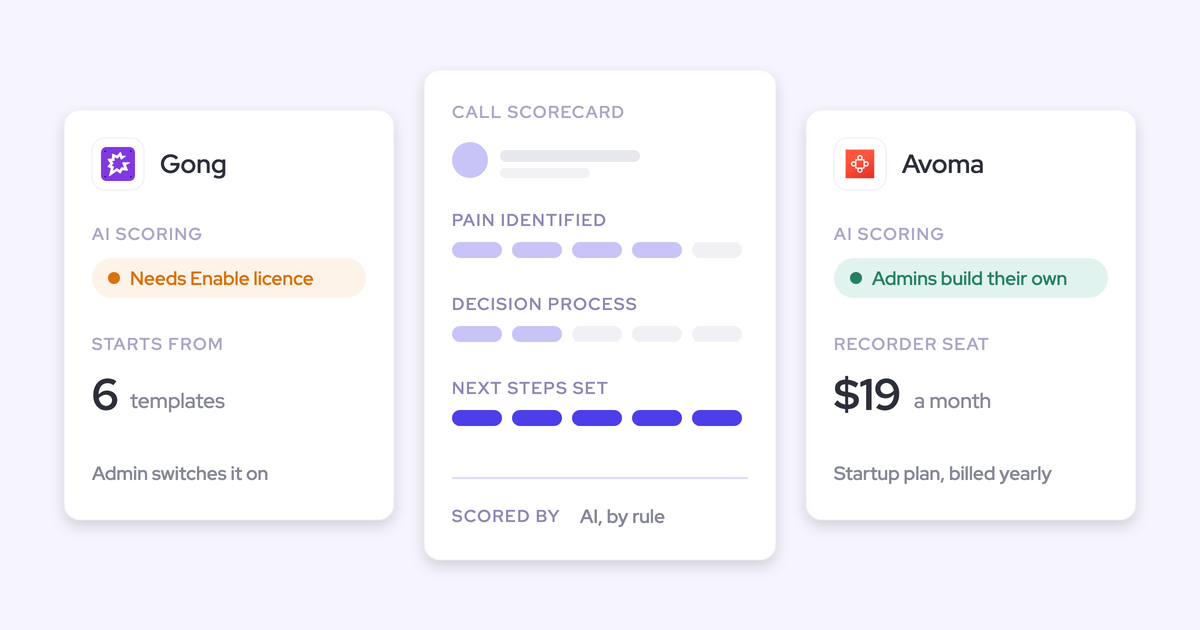
Gong offers six scorecard templates. A manager can score calls, or AI Call Reviewer can score them automatically. Before that happens, there are a few gates and defaults:
- Coaching needs an Enable Essentials or Enable license.
- A tech admin has to switch on automatic scoring at company level.
- Auto-review is on by default, so publishing a template starts AI scoring right away.
- When more than three members of a scored team join one call, at most three get an automatic scorecard.
- A question the scorer skips counts as the lowest value, so an incomplete review reads as a poor one.
Expect real setup and tuning before managers trust the scores. Gong does deserve credit here: it can summarize methodology across every call on an account, and AI Deal Reviewer's seven methodology playbooks sync both ways with the CRM opportunity.
Gong records calls from about thirty dialers plus its own
Gong imports audio from about 30 telephony systems by API, including Aircall, Dialpad, Five9, RingCentral, Talkdesk and Zoom Phone. It also has its own Twilio-powered dialer.
A Gong Engage seat gets the web and mobile dialer. A Foundation seat gets the mobile dialer only. This is a genuine strength, and it's broader than what Weflow covers.
Gong's AI Data Extractor overwrites fields and caps at twenty
Gong's AI Data Extractor writes answers from calls into CRM fields automatically, with no rep action. It has limits:
- It overwrites the previous value whenever it finds newer information.
- A workspace can publish at most 20 extractors.
- Only a business admin can create them.
- It writes only into fields that already exist in the CRM and are imported into Gong.
For a methodology field, overwriting means the field shows the most recent reading. A champion identified on call two can be replaced by a vaguer answer on call five.
On the deal board, Gong can also suggest updates to one text field, such as next steps. AI Deal Reviewer suggests notes for each playbook element.
Gong shows a live transcript and talk alerts, on Zoom only
The Gong app for Zoom gives reps a live transcript, an alert after 2.5 minutes of continuous talking, and notes and bookmarks colleagues can see. It works only on calls scheduled in advance and recorded with native Zoom recording.
Gong's deal board keeps managers hooked, on a forecasting license
The deal board is the feature that keeps teams on Gong. Each deal's activity shows up as a row of bubbles, so you can read momentum at a glance. Many teams run their forecast call straight from it.
The board needs Forecast Essentials or Gong Forecast. A business admin configures it, and edits made on the board sync to the CRM.
If you're thinking about leaving Gong, this daily view is what you have to replace, not only the recordings.
Gong connects widely but meters what AI assistants can reach
- Integrations: about 450 integrations and partner solutions in the Gong Collective.
- MCP: three record-scoped tools that return AI insights, never raw transcripts. The server is read-only and every request draws credits.
- Raw data: the API is capped at 3 calls a second and 10,000 a day. Getting data into a warehouse needs Data Cloud, which is a separate purchase.
Gong quotes every price and meters AI in credits
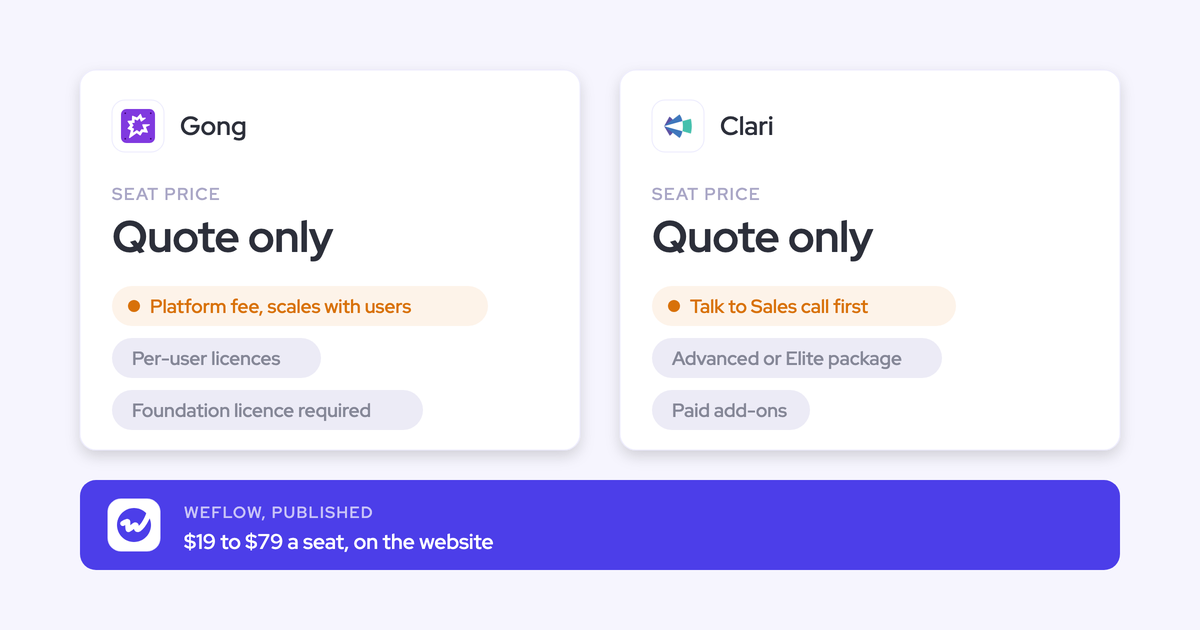
Gong prices per user plus a platform fee that scales with the number of users. It publishes no figures. Foundation is mandatory before any application, and seats are counted per application.
AI usage is metered in credits. Each paid core seat adds 2,000 credits a year to a pool shared across the whole company. The cost side by side is below.
Jiminny leads with coaching, live help and its own dialer
Jiminny is coaching-first conversation intelligence for mid-market teams. It works with Salesforce, HubSpot, Microsoft Dynamics 365, Pipedrive, Zoho and more, and it runs separate EU and US data environments.
Jiminny scores every call against your scorecard on Scale
Jiminny scores every call against a scorecard the manager defines. Coaching, AI call scoring and questions across a whole deal all sit on the Scale tier.
Jiminny tracks methodology adoption by matching each framework's key phrases in calls and reporting how often each rep says them. That tells you whether reps use the language. It tells you less about whether the deal is qualified.
Jiminny runs its own dialer and records about twenty others
Jiminny Voice gives reps a dialer and SMS in a Chrome extension that sits inside Salesforce or HubSpot. Jiminny also records about 20 third-party dialers, including Aircall, Dialpad, RingCentral and Zoom Phone.
On top of that, there's a desktop app, in-person recording from mobile, and Outreach dialer import, which covers outbound calls only. Of the three tools, Jiminny covers the most phone setups.
Jiminny AI CRM Filling writes fields, but emails stay in Jiminny
Jiminny AI CRM Filling writes extracted values to deal, account, contact, lead and task fields. A new call, a new email or a stage change can trigger it. It's on the Scale tier.
For each field, you choose whether it fills only when empty, overwrites, or appends. That per-field choice is a real strength.
Calls log to Salesforce as Tasks or Events. Synced emails stay inside Jiminny. So your opportunity in Salesforce shows the calls and the fields you configured, and you go to Jiminny for the email thread.
Jiminny coaches reps live while the call runs
Jiminny offers live coaching through its Sidekick extension, on the Scale tier. Of the three tools, it's the strongest on in-call help.
Jiminny Deal Insights shows your deals in an editable table
Jiminny Deal Insights is a table of CRM deals. Admins and managers choose the columns, set up to eight risk triggers, and edit fields that write back to the CRM. Two conditions apply:
- A deal shows only when its owner is a Jiminny user.
- A deal's emails show only if each user working the deal lets Jiminny read their mailbox.
Jiminny opens its data through read-only MCP and a REST API
- Integrations: about 20 dialers, Zoom, Meet and Teams, Google and Microsoft 365 mail and calendar, and Zapier.
- MCP: a read-only connector for Claude and ChatGPT on the Scale and Grow tiers. Each user authorizes their own account and sees only what they can already see.
- Raw data: a REST API opened with an organization-level key that only admins can generate. Jiminny suggests it for feeding a warehouse or BI tool.
Jiminny sells flat per-seat tiers but publishes no prices
Jiminny sells three tiers: Capture, Scale and Grow. Each is a flat per-seat fee with no platform fee and no usage credits. Jiminny Voice minutes above the allowance are the one metered item. There's a 14-day trial with no card required, and no published prices.
What Weflow doesn't do that Gong and Jiminny do
Here's where Weflow falls short, stated plainly.
| Area | What Gong or Jiminny does | Where Weflow stands |
|---|---|---|
| Live in-call help | Jiminny coaches reps live on Scale. Gong shows a live transcript and talk alerts on Zoom | None. Everything arrives after the call |
| Built-in dialer | Gong has a Twilio dialer. Jiminny has Jiminny Voice | No dialer. Weflow imports Outreach dialer calls |
| Phone coverage | Gong imports about 30 telephony systems and Jiminny about 20 | Desktop softphone capture works with any provider, but the rep starts it |
| Calls from a phone | Gong's mobile dialer records calls placed through the Gong app | Calls on a rep's own carrier line aren't captured. Mobile Copilot records in-person meetings |
| Individual scores on multi-rep calls | Gong auto-scores up to three team members on one call | Weflow doesn't score individual sellers separately when several reps join the same meeting |
| CRMs other than Salesforce | Jiminny supports HubSpot, Dynamics 365, Pipedrive, Zoho and more | Salesforce only |
| Analytics depth and deal-board habit | Gong's analytics are the deepest in the category, and its deal board is a daily habit for many teams | Weflow's deal board is in Weflow Deal Intelligence & Forecasting. A team used to Gong's bubbles has to build a new habit |
If any of these rows is central to how your team sells, pick Gong or Jiminny.
What Gong, Jiminny and Weflow cost to coach your team
Weflow is the only one of the three that publishes prices. Gong puts coaching behind Enable on top of Foundation and meters AI in credits. Jiminny puts coaching behind Scale and meters only dialer minutes.
| Cost element | Weflow | Gong | Jiminny |
|---|---|---|---|
| Pricing model | Per seat, per product or bundle, billed annually | Per user plus a platform fee that scales with users. Seats are counted per application | One flat per-seat fee per tier. No platform fee |
| Published list prices | Weflow Conversation Intelligence $39. Weflow Activity & Contact Capture $19. Weflow Deal Intelligence & Forecasting $39. Revenue AI Foundation $49, Revenue AI Business $59, Revenue AI Enterprise $79 | Not published, quote only | Not published, quote only |
| What unlocks coaching | Included in the Weflow Conversation Intelligence seat | Enable Essentials or Enable, on top of Gong Foundation | Scale tier |
| What unlocks the deal board | Weflow Deal Intelligence & Forecasting, or a bundle that includes it | Forecast Essentials or Gong Forecast | Deal Insights is on Scale |
| Metered or extra | Agent Builder only: free tier of 25 actions a month, then $299 a month for 500 or $999 a month for 2,500 | AI credits pooled company-wide, with top-ups that expire. Data Cloud is a separate application | Jiminny Voice minutes above 1,350 per user per 30 days, at 2 cents a minute |
| Minimums and term | 12-month term, 10-user minimum | Not published, quote only. Seats added after renewal are priced separately | Not published, quote only |
| Trial | 14-day free trial with guided onboarding | Not published, quote only | 14-day trial, no card required |
For you as a manager, the metering model matters more than the line items. When AI comes with the seat, nobody has to ration who gets summaries, field updates or scorecards. When AI draws on a credit pool, every new team you roll it out to turns into a budget conversation.
What switching off Gong looks like for your team
Your call history comes with you. The harder part is the reps.
Bring your Gong or Jiminny call history with you
Most teams stay on an incumbent because of the archive, not the product. Here's what moving it looks like on your side:
- You share an API key for Gong or Jiminny. You don't export or upload any files.
- Weflow imports your recordings, metadata and transcripts. It reuses transcripts where it can and retranscribes the rest.
- Weflow links each recording to the right Salesforce account, opportunity or contact. If the source API doesn't carry that link, Weflow runs its own lookup to match it.
- Your history becomes searchable and scoreable on the same terms as new calls. Existing tracker sets carry over too, so keyword reporting doesn't restart from zero.
Weflow migrates Gong history at no charge, and it takes about a week. Jiminny also imports from Gong, Chorus, Avoma, Clari Copilot and Fathom, so either move keeps your history.
Win over reps who don't want to leave Gong
RevOps usually decides on cost and data. Your reps decide whether the switch sticks. Plenty of them treat Gong as a perk, and some managers love it.
"There's the RevOps side, where a more cost-effective option with better syncing and stronger data foundations is a no-brainer for us. But then there's the emotional, change-management side from the seller's experience. That's where I'd want to know about companies of a similar size: how they transitioned the reps, the pushback, and what they did."
RevOps leader, on a call with us
Three things help:
- Show parity on what reps use every day: summaries, follow-up emails, search and clips.
- Replace the deal-board habit on day one, so managers don't go looking for the bubbles.
- Roll out in phases instead of all at once.
KORE Wireless evaluated Gong and chose Weflow, then rolled out in five phases: Activity Capture, Conversation Intelligence, Coaching, Deal Intelligence, and Forecasting.
Pick Gong, Jiminny or Weflow based on how you sell
Which tool fits depends on how your team sells.
Choose Gong if:
- You want the deepest conversation analytics in the category.
- Your managers already run deal reviews and forecast calls from Gong's deal board.
- You need calls imported from a wide range of telephony systems, or Gong's own dialer.
- The safe-brand choice matters to your leadership, and the budget is there.
Choose Jiminny if:
- Coaching is the main reason you're buying, and you want reps coached live during calls.
- Your team is phone-heavy and wants a built-in dialer alongside about 20 third-party ones.
- You run HubSpot or another CRM, or a mix of CRMs across the company.
- You want a flat seat fee and a 14-day trial with no card.
Choose Weflow if:
- You run on Salesforce and want every recorded call scored without picking which ones.
- You coach from the deal: opportunity-level scoring that accounts for what earlier calls already settled.
- You want methodology answers that build up in Salesforce fields instead of being overwritten by the last call.
- You want a published seat price with AI included.
See how Weflow captures activity, updates Salesforce fields from calls, and rolls up your forecast. Book a 30-minute demo.
Questions sales managers ask about Gong, Jiminny and Weflow
Will Gong credits or Jiminny dialer minutes push up the bill?
Gong meters AI in credits on automated paths, including question-based AI Trackers, the MCP server and API-based AI workflows. Credits come from a company-wide pool, and top-ups expire at the end of the term.
Jiminny's only metered item is Jiminny Voice: each user gets 1,350 minutes per 30 days, and extra minutes cost 2 cents each.
Weflow includes AI in the seat. Only Agent Builder is consumption-priced.
Is live in-call coaching a must-have for sales managers?
Live coaching matters most for new reps on live calls and for phone-heavy teams where a single call decides the next step. Managers who coach from trends across many calls rely on it less.
Jiminny offers full live coaching on Scale. Gong offers a live transcript and talk alerts on native Zoom calls. Weflow has no live in-call help.
Can I set different scorecards per team and call type?
In Weflow, you assign coaching templates per team, and meeting types such as discovery or renewal can trigger their own scorecard.
Jiminny scores calls against scorecards managers define. Gong starts from six templates under Enable that admins configure and publish.
Can I get each rep's coaching summary by email?
Jiminny sends scheduled AI reports by email, including coaching profiles, on a weekly to quarterly schedule.
Weflow's Agent Builder sends results by email or Slack. Each result links back into Ask Weflow AI, so you can ask a follow-up question without opening the call.
Gong deal boards offer a digest email to subscribers.
Will legal approve a botless desktop recorder?
Some legal teams prefer a visible bot, because the meeting platform asks participants to consent and logs their answer. All three tools use a visible notetaker on most meetings.
Botless recording is optional. Weflow and Jiminny offer it through their desktop apps, and Gong only through native Zoom recording.
Weflow also supports consent flows: a pre-meeting email on Microsoft Teams with an opt-out link, and an in-call chat message. If a participant uses the removal option, all recording data is deleted permanently.
What changes in Salesforce after rollout?
Weflow writes the call summary onto the Salesforce Event that already exists, so you don't end up with two meetings for one conversation. It also respects your validation rules, field dependencies and permissions.
Jiminny connects through each user's OAuth login plus a Chrome extension. It uses about 200 Salesforce API calls per user per day once the first sync settles. Salesforce Professional Edition needs Salesforce's API add-on for Jiminny.
What contract terms, minimums and trials should I expect?
Weflow runs on a 12-month term with a 10-user minimum. Bundle, volume and multi-year discounts apply, and there's a 14-day free trial.
Jiminny offers a 14-day trial with no card. Gong quotes every deal individually. Seats Gong adds at renewal come with existing applications at no extra cost, while seats added after renewal are paid for across every application they need.
Does Weflow work if part of the company runs HubSpot?
No. Weflow works only with Salesforce. If your team runs HubSpot, look at Jiminny or Gong.