Weflow vs Gong for Keyword and Competitor Trackers Across Sales Calls (2026)
Decide between Weflow vs Gong for keyword and competitor trackers, plus win, slip, and loss analysis.


You probably want to know who you're losing deals to, and why. Right now, that answer likely comes from closed-lost reasons reps typed in a hurry, and most of them just say "price."
Weflow and Gong both track keywords and competitors across every recorded call, so that alone won't settle the choice. The real difference is what happens once you start tracking everything you care about.
With Weflow Conversation Intelligence, keyword trackers, AI contextual trackers, and the questions you ask Ask Weflow AI across all your calls are included in the seat price.
On Gong, the AI trackers that catch objections and real competitive evaluations draw from a shared credit pool, and Gong's own advice for saving credits is to switch them off or narrow them down.
Weflow fits the manager who wants competitor share and win, slip and loss themes across every call, broken down by rep and team over time. Gong stays ahead on coaching analytics depth, on jumping to the exact moment in a call, and number of integrations.
How Weflow and Gong compare on trackers, AI access and pricing
Both tools cover every capability below, but they differ in three ways: what's metered, where you can read the results, and what data you can take out of the tool.
| Capability | Weflow | Gong |
|---|---|---|
| Keyword and competitor trackers | Keyword and AI contextual trackers across every recorded call, with exclusion terms and team assignment. Reported by rep, team and region over time. Not metered. | Keyword and smart trackers, filterable by team, user, account type or deal stage. Question-based AI trackers draw credits, results can take up to 24 hours, and Theme Spotter runs are capped each month. |
| Conversation metrics | Talk ratio, longest monologue, longest customer story, interactivity, patience and question rate per rep, with speakers labelled internal or external. No single per-rep coaching overview yet. | The same six metrics per team and rep, with recommended ranges and drill-down from team to rep. Further along on the per-rep coaching view. |
| Call library and clips | Transcript search, filters by linked Salesforce record, automatic chapters, clips and playlists. Search shows which calls mention a term, not where in the call. | Library with folders, clips and playlists. Speaker timeline and clickable topics jump straight to the moment. Library calls are kept indefinitely. |
| Integrations | Salesforce, Gmail, Google Calendar, Outlook, Zoom, Teams, Google Meet, Webex, Slack, Outreach and other dialers, plus an API for BI tools. Salesforce only, with no native warehouse connector. | About 450 integrations and partner solutions, imports from about 30 dialers, recording on 11 meeting platforms, and three native CRMs. |
| Access from AI assistants (MCP) | Read-only connector for Claude, ChatGPT and any remote MCP client. Full transcripts behind an admin toggle, plus tracker hits, summaries, playbooks and forecast data. Not metered. | Three record-scoped tools that return AI insights, not transcripts. Read-only, every request draws credits, and collaborators can't connect. |
| Raw data access outside the tool | REST API bulk-exports transcripts, metadata, scores and signals as JSON or CSV. Recordings export to your own storage. No separate purchase. | Public API returns transcripts, trackers and scorecards at 3 calls a second and 10,000 a day. Warehouse delivery needs Data Cloud, a separate purchase. |
| Pricing | Published. Conversation Intelligence is $39 per user per month billed annually, with a 10-user minimum and free viewer seats. Only Agent Builder is metered. | No published prices. Foundation core licence plus per-application seats, a platform fee and a shared credit pool that expires. |
Why tracker coverage turns into a credit decision on Gong
On Gong, the trackers that tell you why you're losing deals are the ones that cost money to run.
Here's how it got that way:
- Gong set its pricing back when transcription was expensive, and those costs have dropped sharply since.
- To hold that price, Gong layered consumption credits on top of the seat. Three things are metered: question-based AI trackers, the MCP server, and API-based AI workflows.
- Each paid core seat adds 2,000 credits a year to a pool shared by the whole company. The pool resets each contract year, and purchased top-ups expire.
- Credits are based on how much data gets processed, not on the question you ask. A call over ten minutes costs one credit, a shorter call costs half, and each email costs a tenth.
Question-based AI trackers catch topics buyers phrase differently on every call, like objections, or a competitor that only matters when the buyer is actually evaluating it. Gong itself says these trackers have the biggest impact on how fast you use up credits.
To save credits, Gong recommends unpublishing trackers that no longer add value and filtering the rest by team, user, account type, or deal stage, since unpublishing is the only way to stop a tracker from drawing credits.
That turns what your team listens for into a budget decision, usually right when the renewal quote lands.
"…Like Gong is great but I don't think it's 2x value"
— A buyer comparing Gong and Weflow
On Weflow, trackers, Ask Weflow AI, summaries, and AI field updates are all included in the seat. The only thing that's metered is Agent Builder.
| What you're doing | On Gong | On Weflow |
|---|---|---|
| Running keyword trackers | No credits | Included in the seat |
| Running AI trackers that catch a topic however it's phrased | Question-based AI trackers draw from the shared credit pool until you unpublish them | AI contextual matching is a per-tracker checkbox, included in the seat |
| Asking open questions across many calls | Theme Spotter runs are capped each month, and unattended analysis at scale draws credits | Ask Weflow AI Pro is included. Scheduled sweeps run through Agent Builder, with 25 actions a month free |
| Reaching call data from MCP or the API | Every MCP request and API-based AI workflow draws credits | Not metered |
There's also a time cost. Gong tells customers it can take up to 24 hours for a methodology tracker to show results, so every time you tweak a tracker, you wait another day to see whether it worked.
How Weflow tracks competitors, objections and win-loss themes
Here's what you get with Weflow, all inside the seat price, and where you'll run into limits.
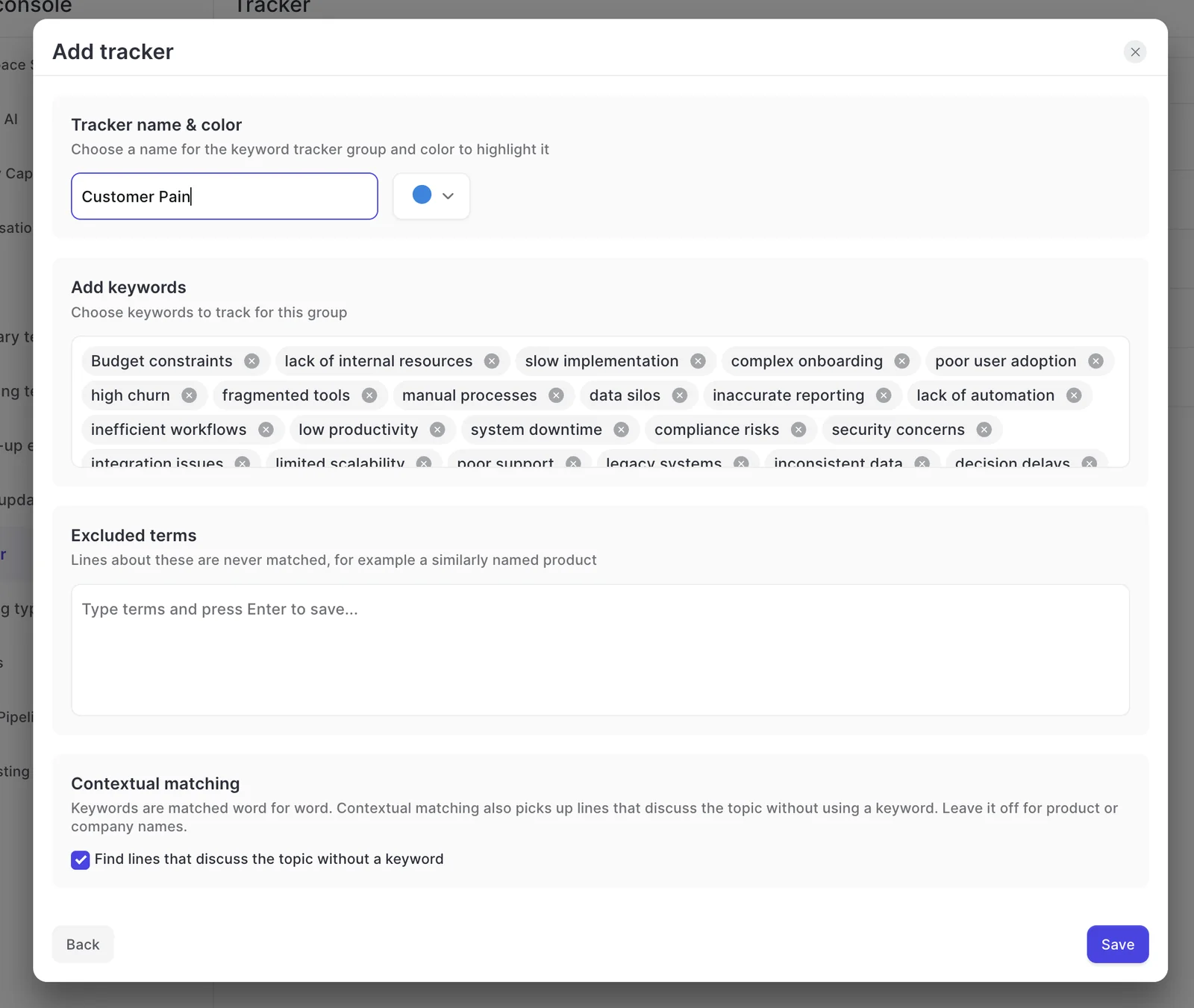
How Weflow keyword and AI contextual trackers count only real mentions
Weflow gives you two kinds of trackers, and you choose which one to use each time you set one up.
| Question | Keyword tracker | AI contextual tracker |
|---|---|---|
| What it matches | The exact words in the keyword list | Lines that discuss the topic without using a keyword |
| Best for | Terms said the same way every time, such as competitor and product names | Things phrased differently on every call, such as objections or a real competitive evaluation |
| How you set it up | Keyword list, excluded terms, assigned teams | Same setup, with the contextual matching checkbox ticked |
Of course, a tracker count is only useful if you can trust it. A tracker that fires on every passing mention looks like data but points you in the wrong direction. To keep false matches out, Weflow gives you three controls:
- Exclusion terms: Lines about a similarly named product, or any other false match, are never counted.
- Exact match for names: Leave contextual matching off for competitor and product names, so only the exact name counts.
- Team assignment: Each tracker only runs for the teams you assign it to.
A tip from setting these up with customers: keep one tracker per thing. A tracker built to catch every variation of a topic tends to fire on passing mentions, and you often don't notice the noise until someone has already made a decision based on it.
One tracker per competitor (and its products) gives you a number you can actually trend, even if a few mentions slip through.
Once a tracker is running, Weflow reports on it in Insights:
- Mentions, meetings and share of all meetings, overall and per rep.
- Roll-ups by rep, team and region, trended over time.
- A leaderboard that ranks topics and, for each one, the reps raising it.
- A development chart of meetings and mentions by month, listing the meetings behind each spike so you can open the calls.
So if a competitor starts gaining ground in one region, you'll see it in the numbers instead of hearing it secondhand from one manager.
There are two limits to keep in mind. Trackers run after the call, so you won't get a live alert when a competitor comes up mid-conversation.
And tracker hits stay in Weflow (you can reach them through the MCP connector and the API) rather than being written into Salesforce fields.
What Weflow conversation metrics show for each rep and team
Weflow measures six interaction metrics on every recorded call, per rep, on the Interaction tab of Insights:
- Talk ratio
- Longest monologue
- Longest customer story, meaning how long the buyer speaks uninterrupted
- Interactivity score
- Patience
- Question rate
You also get meeting volume, average meeting duration, time spent in meetings, and email responsiveness.
Since Weflow labels each speaker as internal or external using Salesforce and calendar data, the metrics separate your team from the customer without anyone having to tag calls. You can save any metric as a view and add it to a dashboard.
The gap is the one-on-one view. Weflow has no single page yet that pulls one rep's calls, scores, and metrics together over time, so today you check metrics in Insights and coaching scores call by call. Gong is further along here.
How you search, clip and share calls in the Weflow library
Weflow search looks inside transcripts, not just recording titles, and ranks calls where a topic was discussed at length above ones where it came up once.
You can also filter by user, period, meeting type, internal or external, and linked Salesforce record, so every call on an account is just one filter away.
Weflow also splits every call into chapters by topic automatically. You can turn any chapter, timeline range, or highlighted transcript passage into a clip, then share it on its own or save it to a playlist, like competitor objections or strong discovery questions.
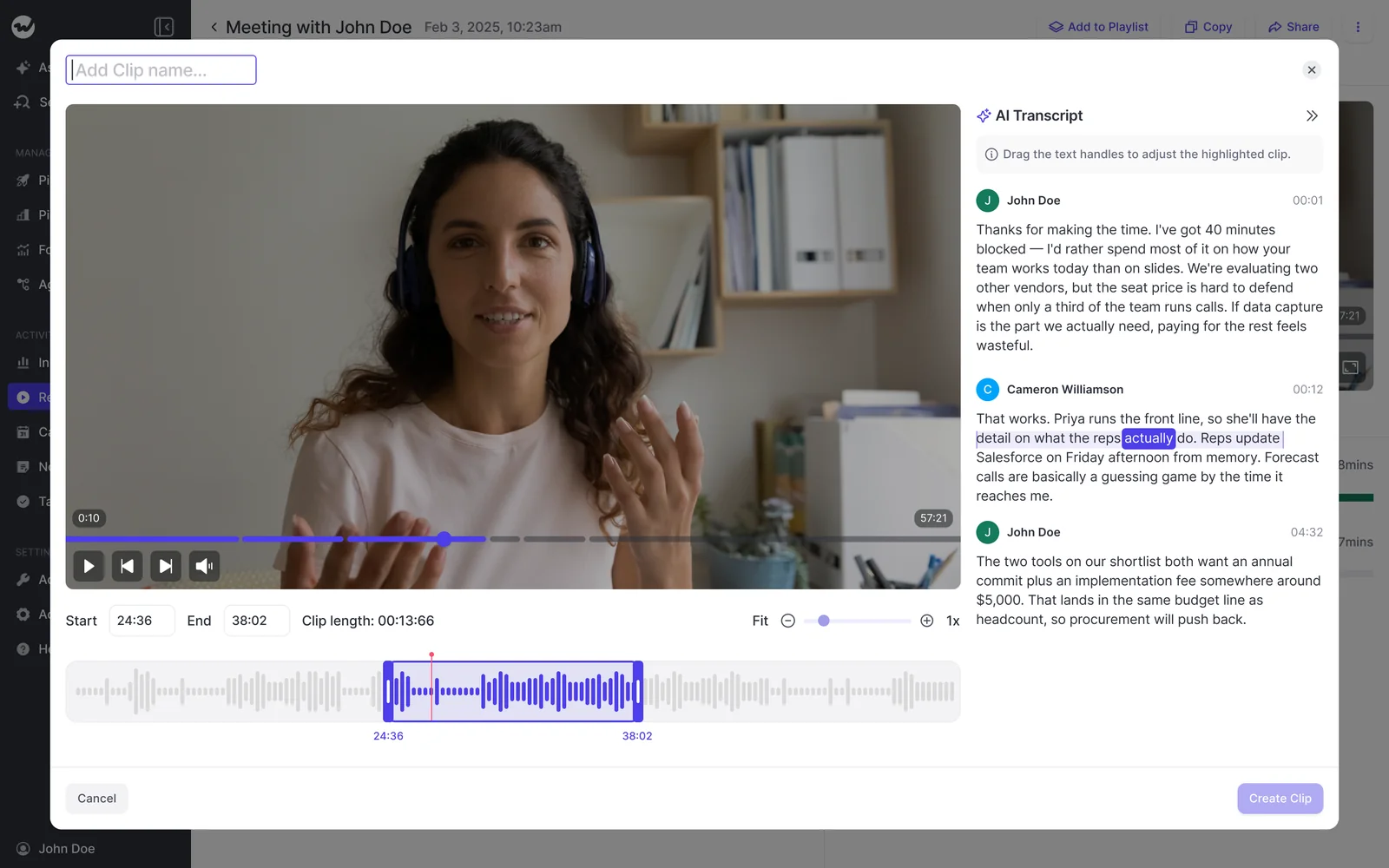
One thing to know: search tells you which calls mention a term, but not where in each call it was said. To find the exact spot, open the recording and search inside it.
If you want every single mention across calls, set up a tracker for the term and read its hits in Insights.
As for who sees what, call visibility follows the Salesforce hierarchy: managers see their reports' recordings, and reps see the meetings they were invited to. There's no per-call private flag, so to share a single call outside the hierarchy, you tag a user.
Which tools Weflow integrates with, and where it stops
Weflow connects natively to the tools a Salesforce sales team runs every day:
- CRM: Salesforce.
- Mail and calendar: Gmail, Google Calendar, Outlook.
- Meetings: Zoom, Microsoft Teams, Google Meet, Webex, plus a desktop app that records without a notetaker joining.
- Dialers: the Outreach dialer, connected by your admin, and Aircall, CloudTalk, Dialpad and Zoom Phone, activated by our support team. The desktop app also records softphone calls that run through the computer.
- Collaboration: Slack.
- BI and AI: the REST API feeds tools such as Tableau and Looker, and the MCP connector serves AI assistants.
Keep in mind that Weflow works only with Salesforce. It also doesn't have native Snowflake, Databricks, or BigQuery connectors, so teams move data into a warehouse through the API. And it isn't an integration catalog with hundreds of connectors.
How Claude and ChatGPT read Weflow transcripts through MCP
Weflow's official MCP connector gives your AI assistant the actual calls, not just a summary of them.
Your admin switches it on per workspace and uses a separate toggle to decide whether connected assistants can read full transcripts or only AI summaries. The connector is read-only and isn't metered.
It works with Claude, ChatGPT, and any AI client that supports remote MCP servers, and the admin console shows every connected user and when they connected.
What the connector returns:
- Full call transcripts, when the admin allows it.
- Call summaries and tracker hits.
- Coaching scores and AI playbook results.
- Forecast calls and per-rep pipeline metrics, with a per-rep breakdown for up to 25 owners.
What it doesn't return is the content of captured emails or the values stored on Salesforce records. Those live in Salesforce, so your assistant reads them through a Salesforce connector. If you connect both, you get the record and the conversation in one chat.
How you bulk-export Weflow transcripts, scores and tracker signals
Weflow's REST API bulk-exports transcripts, metadata, scores and signals as JSON or CSV, on a schedule or on demand. The data comes already mapped to the right Salesforce accounts, contacts, and opportunities, so it lines up with the CRM data in your warehouse.
Recordings export to your own cloud storage, with no separate data product to buy and no metering on the API.
How Gong tracks competitors, objections and win-loss themes
Gong pioneered this category and is mature across every capability here. Where it falls short is metering, limited data access, and depending on Gong to build custom topics.
How Gong keyword and smart trackers work, and which ones draw credits
Gong offers keyword trackers and smart trackers, both included in the Gong Foundation license, and you can filter them by team, user, account type, or deal stage.
| Question | Gong keyword trackers | Gong question-based AI trackers |
|---|---|---|
| What it catches | The words you chose in advance | A question the AI answers on every call, so it catches topics however they're phrased |
| Metered | No credits | Draws from the shared credit pool until unpublished |
| Gong's guidance for cost | None needed | Unpublish low-value trackers, narrow the rest by team, user, account type or deal stage |
There's one more thing to know: a custom topic model needs at least 1,000 hours of recorded calls and has to be built with a Gong Revenue Architect. Without it, you get the base model: call setup, small talk, next steps, pricing, and wrap-up.
That said, if your team is happy with keyword trackers, none of this affects you.
What Gong conversation metrics show, and where Gong coaching goes deeper
Gong measures the same six metrics per team and per rep, on any plan. Stats update twice a day, and you can start from the team average and drill down to each rep and their calls.
Gong also suggests recommended ranges, like a rep talk ratio near 43 percent and a longest monologue under two and a half minutes.
One catch: interactivity, question rate, and longest customer story are calculated for everyone from your company on the call together, not per person.
Overall, Gong's coaching analytics go deeper, especially the per-rep overview managers bring to one-on-ones. If you bought Gong for coaching, you'll notice the difference.
How the Gong call library and topic timeline take you to the moment
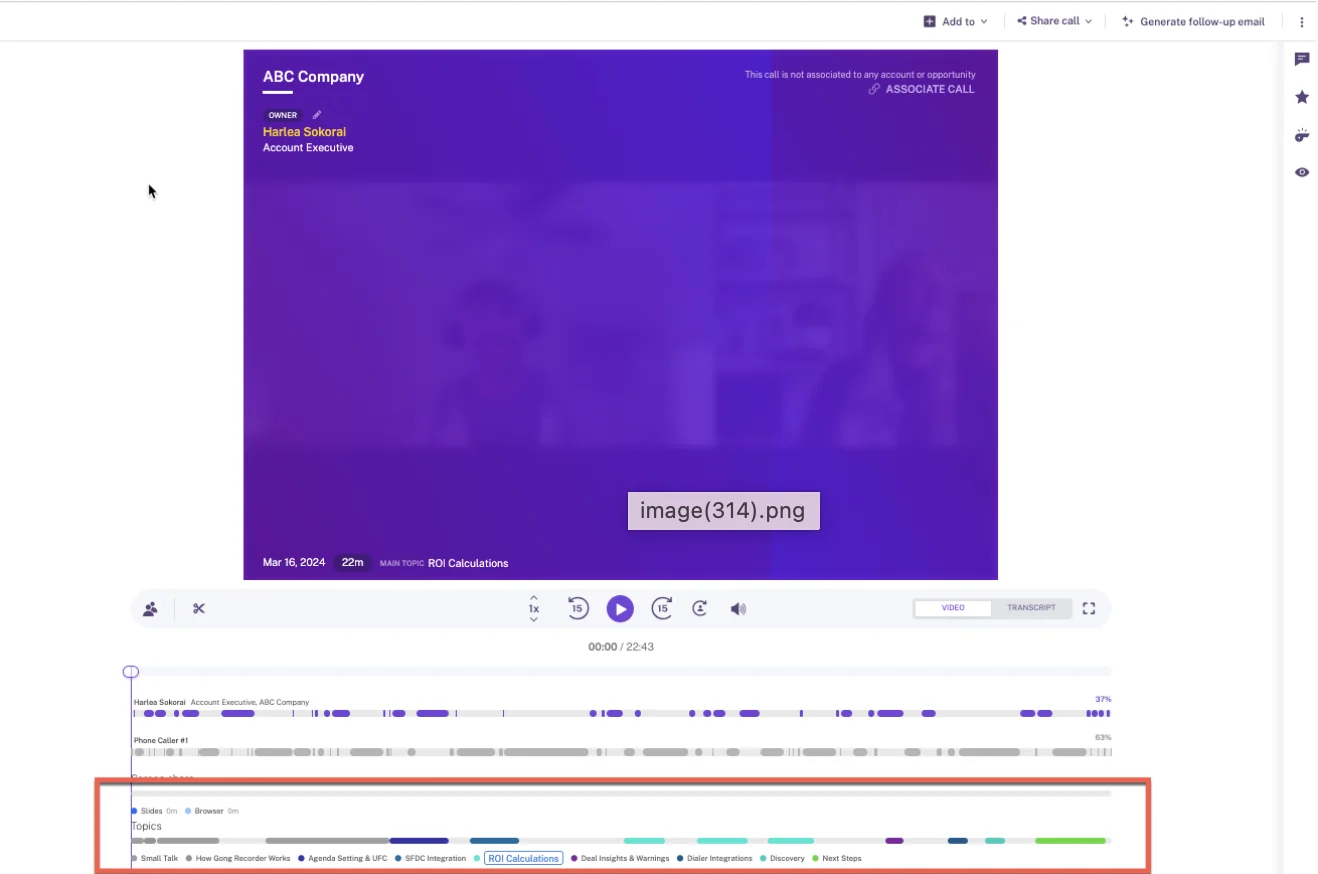
This is one of Gong's most-loved features, and your reps likely rely on it. The speaker timeline shows when each person spoke, and the topics below the recording are clickable, so one click takes you to the moment a topic was discussed.
Gong's library has folders, clips, and playlists, and any team member can add calls one at a time or in bulk. Calls saved to the library are also exempt from Gong's three-year retention policy and kept indefinitely.
Which tools Gong connects to through its integration ecosystem
Gong's integration ecosystem is broader than ours, and teams often build their stack around it. Some even switch tools to fit Gong, like moving from Google Meet to Zoom because Zoom works more smoothly with it.
Of course, every tool chosen that way makes it harder to leave later.
Gong's marketplace, the Gong Collective, lists about 450 integrations and partner solutions across:
- CRM: Native Salesforce, HubSpot and Microsoft Dynamics 365.
- Telephony: Imports from about 30 dialers.
- Web conferencing: Recording on 11 meeting platforms.
- Email and calendar.
- BI and data, enrichment, and workflow automation.
- MCP servers.
What Claude and ChatGPT get from the Gong MCP server
Gong's MCP server connects to Claude, ChatGPT, and Copilot, but it gives them Gong's interpretation of your calls rather than the calls themselves. It offers three tools, each working on one record at a time:
- ask_account answers a question about a single account
- ask_deal answers a question about a single deal
- generate_brief returns a predefined summary for an account, deal or contact
The server is read-only, private calls are excluded, and every request draws credits. To connect, you need a paid Gong seat plus a paid tier of the AI tool, and collaborator accounts can't connect at all.
In practice, teams find workarounds. Some route transcripts through Salesforce so Claude can read them there, while some reps copy transcripts out of Gong and paste them into Claude by hand.
How you get Gong transcripts out through the API and Data Cloud
Gong's public API returns transcripts, participants, topics, trackers, and scorecards, but it's capped at 3 calls a second and 10,000 a day. That daily limit is the one you'll hit when syncing a large call history.
To send data to Snowflake, Databricks, BigQuery, or Redshift, you need Data Cloud, a separate application that costs about $5,000 a year.
How you find loss reasons you never set a tracker for
Keyword trackers only find words someone chose in advance, but the reason you're losing deals is often the one nobody thought to track.
"It'd be hard to put a tracker around it, because I don't know what they're going to say. What if there's something that I would never even think to track that they're saying? I don't want to put those guardrails on it."
— A revenue leader on a call with Weflow
On Gong, Ask Anything and Agent Studio can answer questions about an account or a deal, and agents you run by hand don't draw credits.
The limits come in when you want to ask open-ended questions across all your calls: Theme Spotter runs are capped each month, running the same analysis automatically draws credits, and custom topic models depend on Gong.
On Weflow, one Ask Weflow AI question can cover many recordings at once, and Agent Builder can run the same sweep on a schedule. That turns "why did we lose this quarter?" from a once-a-year project into a monthly check-in.
Here's an example of what a sweep can uncover. One advertising company ran an LLM across a week of call transcripts to pull out the key objections.
The biggest blocker turned out to be how the buyer's accounting team handled advertising budgets, not price or path to power, and that was a problem the company could actually fix.
Here's how to run a monthly loss-reason sweep in Weflow:
- Pick last month's recordings from deals that closed lost or slipped (you can filter the recordings list by period and linked Salesforce record).
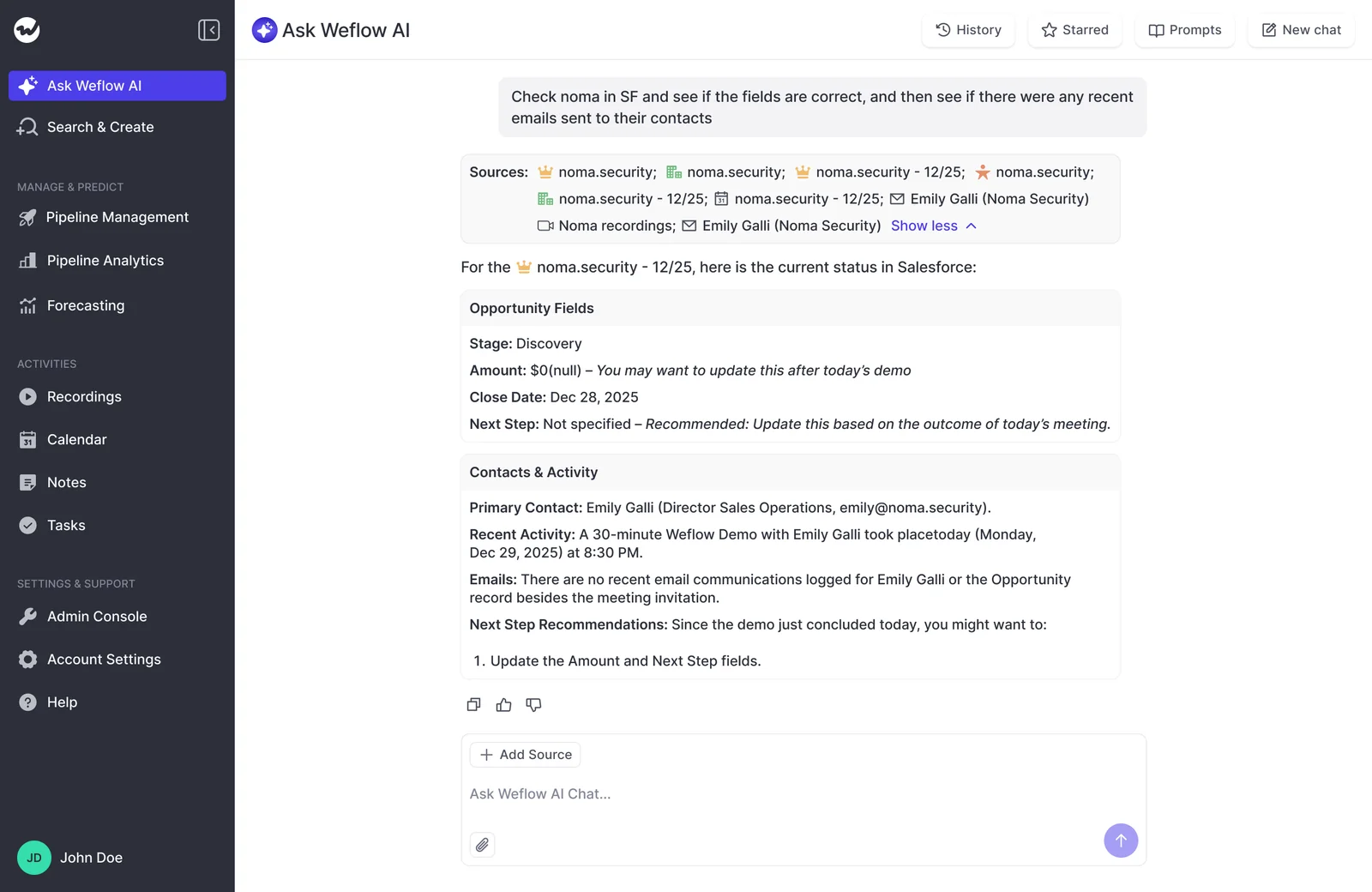
- Add those recordings as sources to one Ask Weflow AI chat.
- Ask open questions. Why did buyers say no? How often is price the real reason? Which competitors were they actually evaluating?
- Open the sources behind the answer. Ask Weflow AI lists every call and record it drew from.
- Turn each recurring reason into a tracker, with contextual matching on, so it's counted on every call from now on.
- Build an Agent Builder agent that reviews the month's recordings on a schedule and posts the findings to a Slack channel as a PDF or CSV. Agent runs use your Agent Builder actions, and you get 25 a month free.
Step five is where the value adds up over time: the sweep finds the reason, the tracker counts it, and next month you can see whether your fix moved the number.
What Weflow and Gong cost at your seat count
Weflow publishes its per-seat prices, with AI included and only agents metered. Gong shares its pricing model but not a price list. That model includes a mandatory Foundation licence, per-application seats, a platform fee, and metered credits.
| Item | Weflow | Gong |
|---|---|---|
| Pricing model | Per seat, per product or bundle | Foundation core licence plus applications, priced per user, plus a platform fee that scales with users |
| Published list price | Yes, on weflow.ai | No, figures come only in a custom proposal |
| Included in the seat | Trackers, Ask Weflow AI Pro, summaries, AI field updates, Agent Builder Free | Keyword and smart trackers, Ask Anything, calls, coaching, forecasting, agents run by hand |
| Metered or extra | Agent Builder beyond 25 actions a month, priced per workspace | Question-based AI trackers, MCP, API-based AI workflows, Data Cloud |
| Seat rules | 10-user minimum, free viewer seats, pro-rata seats mid-term | Seats assigned per application, seats added after renewal paid separately |
What Weflow Conversation Intelligence costs per seat
- Weflow Conversation Intelligence: $39 per user per month, billed annually, with a 10-user minimum. Ten recording reps come to $4,680 a year at list price.
- Included with the seat: Ask Weflow AI Pro, Agent Builder Free with 25 agent actions a month, Mobile Copilot and the desktop app.
- Viewer and analytics seats: Free for leaders and managers who only read recordings and dashboards. You can reallocate between seat types each quarter.
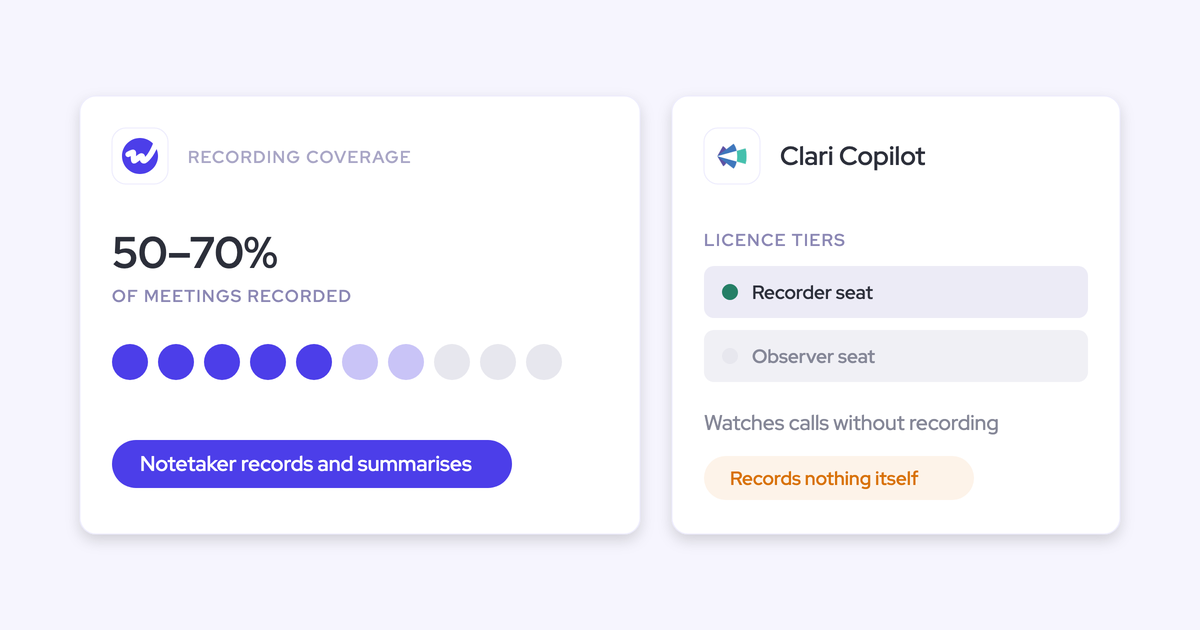
- Conversation Intelligence Light seat: Records and transcribes meetings for people without a Salesforce licence, such as marketing or product. Nothing syncs to the CRM, and the data is reachable through the API and MCP connector.
- Agent Builder tiers, per workspace: Free with 25 actions a month, Growth at $299 a month for 500 actions, Scale at $999 a month for 2,500 actions, and a custom Enterprise package.
- Bundles: Weflow Revenue AI Foundation at $49 adds Activity & Contact Capture. Weflow Revenue AI Business at $59 adds Deal Intelligence. Weflow Revenue AI Enterprise at $79 adds Forecasting.
- Mid-term seats: Charged pro rata to the end of the term, so you can add people as you hire them.
How a Gong renewal proposal adds up
A Gong proposal builds up its cost in layers:
- Gong Foundation: The mandatory core license. No application can be bought without it.
- Seats per application: A person who needs Foundation and Forecast Essentials takes a seat in each, so one person's cost is the sum of every application they use.
- The platform fee: Scales with the number of users.
- The shared credit pool: 2,000 credits a year per paid core seat, shared company-wide.
- Data Cloud: A separate application if you want Gong data in your warehouse.
Timing also affects the price. Seats added at renewal are matched at no extra cost, but every seat added after renewal is paid separately, across every application it needs.
For reference, one Gong renewal proposal we've seen came to about $80,000 a year for 45 licenses, with forecasting making up only about $10,000 of that.
How you move Gong trackers, recordings and reps to Weflow
Switching doesn't mean starting from zero, but tracker history is limited, so it helps to plan the order.
How your Gong tracker set and recordings carry over to Weflow
- Carry over your tracker set: Your existing Gong trackers move across, so keyword reporting doesn't start from scratch.
- Set trackers up before enrolling users: A tracker only counts calls recorded after it's created, so trackers in place on day one build history from the first call.
- Import your recordings: Weflow pulls recordings and transcripts through the Gong API with an API key and re-links them to Salesforce records. If you've already exported your library, Weflow imports the files instead.
- Reprocess for late trackers: If you add a tracker later, our Customer Success team can reprocess the last two weeks of calls for it. This isn't self-serve and doesn't go back any further.
What changes for reps moving from Gong to Weflow
Gong is often your team's comfort zone. Managers like it, reps often see it as a perk, and the habit they'll miss most is jumping straight to a moment in a call.
"That's where I'd want to know about companies of a similar size: how they transitioned the reps, the pushback, and what they did."
— A RevOps leader planning a move off Gong
| On Gong you did | In Weflow you do |
|---|---|
| Clicked a topic on the timeline to land on the moment | Open the automatic chapter for that topic |
| Searched for a competitor across calls | Search transcripts to find the calls, or read every mention through tracker hits in Insights |
| Clipped a moment for coaching | Clip from a chapter, a timeline range or a highlighted transcript passage, then add it to a playlist |
| Asked Gong's AI about a deal | Ask Weflow AI on the recording or the Salesforce opportunity, with transcripts, emails and fields as sources |
| Worked deals in Gong and in Salesforce | Work from the Salesforce record, where Weflow writes call outcomes into fields |
When it comes to the rollout, we recommend treating recording as a leadership decision backed by enablement, rather than putting it to a vote in a four-week pilot. That's the route teams coming off Gong have taken.
KORE Wireless, for example, evaluated Gong, chose Weflow, and rolled out in phases, with our team running onboarding (including live training with a Portuguese translator for its Brazil team).
Technical setup takes 30 to 45 minutes with your Salesforce admin and your Google or Microsoft admin, and full time to value, including templates and team rollout, is one to three weeks.
Which Gong-connected tools and call readers need a new path
Gong usually serves more than just your sales team, so before you switch, list everyone and everything that pulls data from it:
- Gainsight health scores: If Gainsight pulls recordings from Gong, that feed has to be rebuilt against Weflow's REST API, which exports transcripts in bulk.
- Enablement and roleplay tools: Weflow's API and MCP connector pass call data to them.
- Product and marketing readers: People who only read calls get free viewer seats. People without a Salesforce license who need to record get the Conversation Intelligence Light seat.
- AI assistants: Anyone using Claude or ChatGPT on call data connects through the Weflow MCP connector, with transcripts available behind the admin toggle.
- Who sees which calls: Visibility follows the Salesforce hierarchy, and admins can override it with a custom Weflow hierarchy or Teams.
Should you stay on Gong or move your trackers to Weflow?
It mostly comes down to one question: are you having to ration your tracker coverage?
Stay on Gong if these describe your team
- Your team is happy with keyword trackers and stays within its credit pool.
- You bought Gong for coaching depth and the per-rep coaching overview.
- Your reps rely on the speaker timeline and clickable topics to jump to the moment in a call.
- Gainsight, enablement tools or product teams are wired to Gong, and rebuilding those feeds isn't on this year's plan.
- You need Gong's integration breadth, or you run a CRM other than Salesforce.
Move to Weflow if your tracker coverage is being rationed
- You run on Salesforce.
- You want every competitor and objection tracked across all calls, read by rep and team over time, without unpublishing anything to stay on budget.
- You want to find loss reasons nobody predefined, with corpus-wide questions and scheduled sweeps.
- You want transcripts reachable from your own assistant without metering.
- You want a published seat price you can put in the business case.
The best way to decide is to test it on your own data. Bring your current Gong tracker set, run it on your own calls in Weflow, and compare the counts side by side.
FAQ: Weflow vs Gong trackers: Questions sales managers ask
Can Weflow import years of Gong recordings, and will new trackers run on them?
Yes, Weflow imports Gong recordings through the Gong API or from exported files and re-links them to Salesforce records. New trackers only count calls recorded after they're created, but our Customer Success team can reprocess the last two weeks of calls for them.
Can I jump to the exact moment a competitor was mentioned in Weflow?
Not from search, which shows which calls mention a term rather than where. To see every mention, set up a tracker for the competitor and read its hits in Insights, or use automatic chapters to get to the part of the call where the topic came up.
Does Weflow alert reps live when a competitor comes up on a call?
No. Trackers run after the call, once the recording is processed, and Weflow doesn't offer a live in-meeting assistant or real-time battlecards.
Do Weflow tracker results show up in Salesforce fields?
No. Tracker hits stay in Weflow, where you can reach them through the MCP connector and the REST API. What Weflow does write into Salesforce is AI field updates, summaries, and transcripts.
When should we time the switch against our Gong renewal?
Before you sign. Gong matches seats added at renewal, but any seat added after renewal is paid separately across every application, so switching is cheapest before the new contract starts.
How does the 10-user minimum work if only part of my team records?
Weflow's 10-user minimum applies per product or bundle, and it counts full seats for the people who record. Managers and stakeholders who just read calls and dashboards use free viewer and analytics seats, and you can rebalance seat types each quarter.