
Weflow vs Gong: What an AI Assistant Can Actually Read Through Each MCP Connector
Learn what AI assistants can read in Weflow vs Gong MCP connectors and where that data lives.


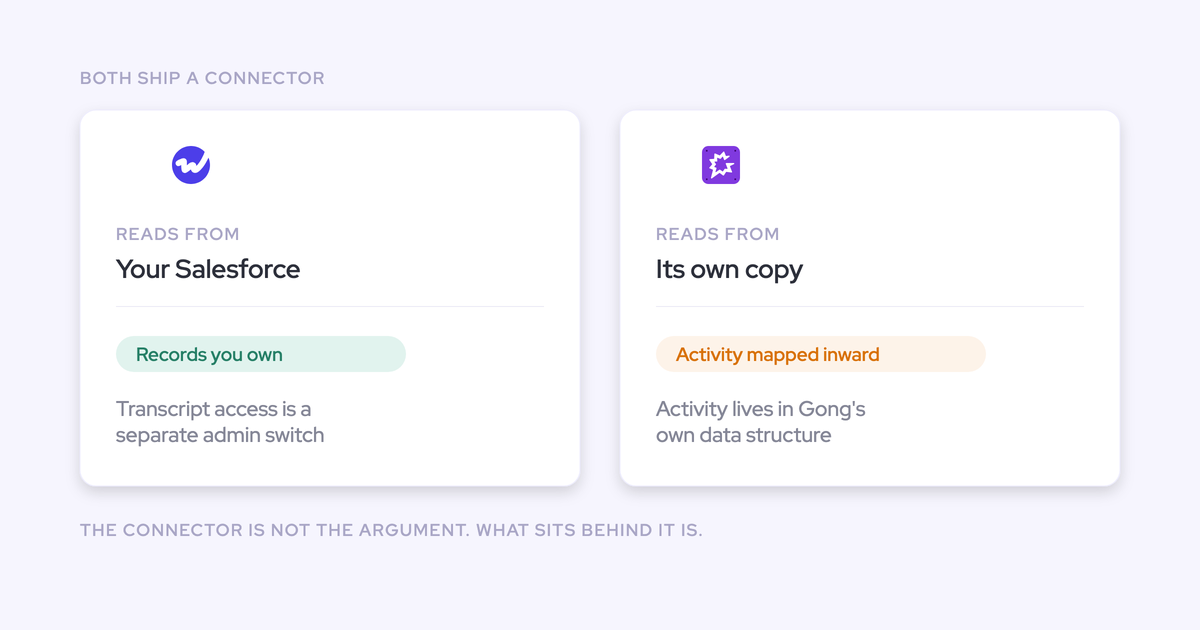

Both Gong and Weflow have an MCP connector. That question is settled, and it decides nothing.
You already know why it matters. Your CRO stopped asking RevOps for a report and started pointing an assistant at whatever endpoint releases the data, which is how deal reviews now happen in a chat window on a Tuesday instead of a dashboard on a Thursday. So the vendor line item isn't "has MCP" anymore. It's what the connector hands over, and whose copy of the data it's reading.
This article answers those two questions side by side. Weflow is the Revenue AI Orchestration platform for sales, customer success, and RevOps teams, so we have an obvious stake in the answer, which is why the Gong claims here come from Gong's public documentation and from what we see on switch calls with teams leaving Gong. Where Gong's documentation doesn't state something, we say it doesn't state it rather than claiming the capability is missing.
Weflow vs Gong MCP connectors at a glance
| Dimension | Weflow | Gong |
| What an assistant reads through the connector | Weflow playbooks, call summaries, transcripts and forecast calls, through read-only tools in Claude, ChatGPT and other LLMs | Gong data and Gong Agents, through Gong's MCP endpoint for external AI agents |
| Transcript vs summary control | A separate admin toggle: with transcript access off, connected assistants get AI summaries and never the verbatim transcript | Gong's public documentation doesn't describe a separate transcript-level control for MCP access. Ask Gong to confirm in writing before your security review does |
| Admin visibility of connected assistants | The admin console lists every connected user with their email and the date they connected | Not described in Gong's public documentation. Worth asking who can see the list and where |
| Where the underlying data sits at rest | Captured emails, meetings and contacts land in native Salesforce objects in your own org. Video recordings sit with Weflow, in the region your Salesforce instance sits in | Recordings, transcripts and intelligence live in Gong's own cloud. Gong maps captured activity into its own data structure |
| What reaches Salesforce | Task, Event and EmailMessage records, plus AI-written values in standard and custom fields | An AI summary and a document, rather than the raw transcript text |
| What remains at contract end | The native Salesforce records stay. They're your records in your org | Access to recordings, transcripts and intelligence goes with the subscription |
| How AI access is priced | Seat-based, with Ask Weflow AI, AI summaries and AI field updates included. Agent Builder is the one consumption-priced component | Per-seat licences plus a $5,000 per year platform access fee, with consumption pricing for AI on top of the seat. Coaching and forecasting are separately priced modules |
| Routes beyond MCP | Full REST API with bulk export of transcripts, metadata, scores and signals as JSON or CSV, BI connectors such as Tableau and Looker, and an exportable audit log | Whatever Gong's API exposes, it exposes Gong's copy of the data. Check the export scope against what your warehouse actually needs |
Two rows in that table do the real work: what the connector exposes, and where the data behind it sits. The rest of this article unpacks both.
Why "we have MCP" no longer separates Gong and Weflow
Every revenue vendor shipped an MCP endpoint within about a year of each other, so the endpoint stopped being a differentiator the moment the second vendor had one.
What changed underneath is who's buying it. An MCP connector used to be a developer's convenience. Now it's the thing a revenue leader personally cares about, because the question they have this week isn't on any dashboard and commissioning a view for it would eat the RevOps roadmap.
We hear the same sentence on evaluation calls, in slightly different words every time:
The answer is yes on both sides of your shortlist. Which means the useful evaluation starts one layer down: what comes back through the connector, who decides how deep it reaches, and whose database it queried to get there.
What each MCP connector lets an AI assistant read
"Connected" is not one thing. An assistant that can search call recordings is a different purchase from one that can answer a question about the forecast, and the only way to tell them apart is a concrete list.
Hold both vendors to the same standard: name the data types, name the read/write boundary, and get it in writing.
What Claude can reach through Weflow's MCP connector
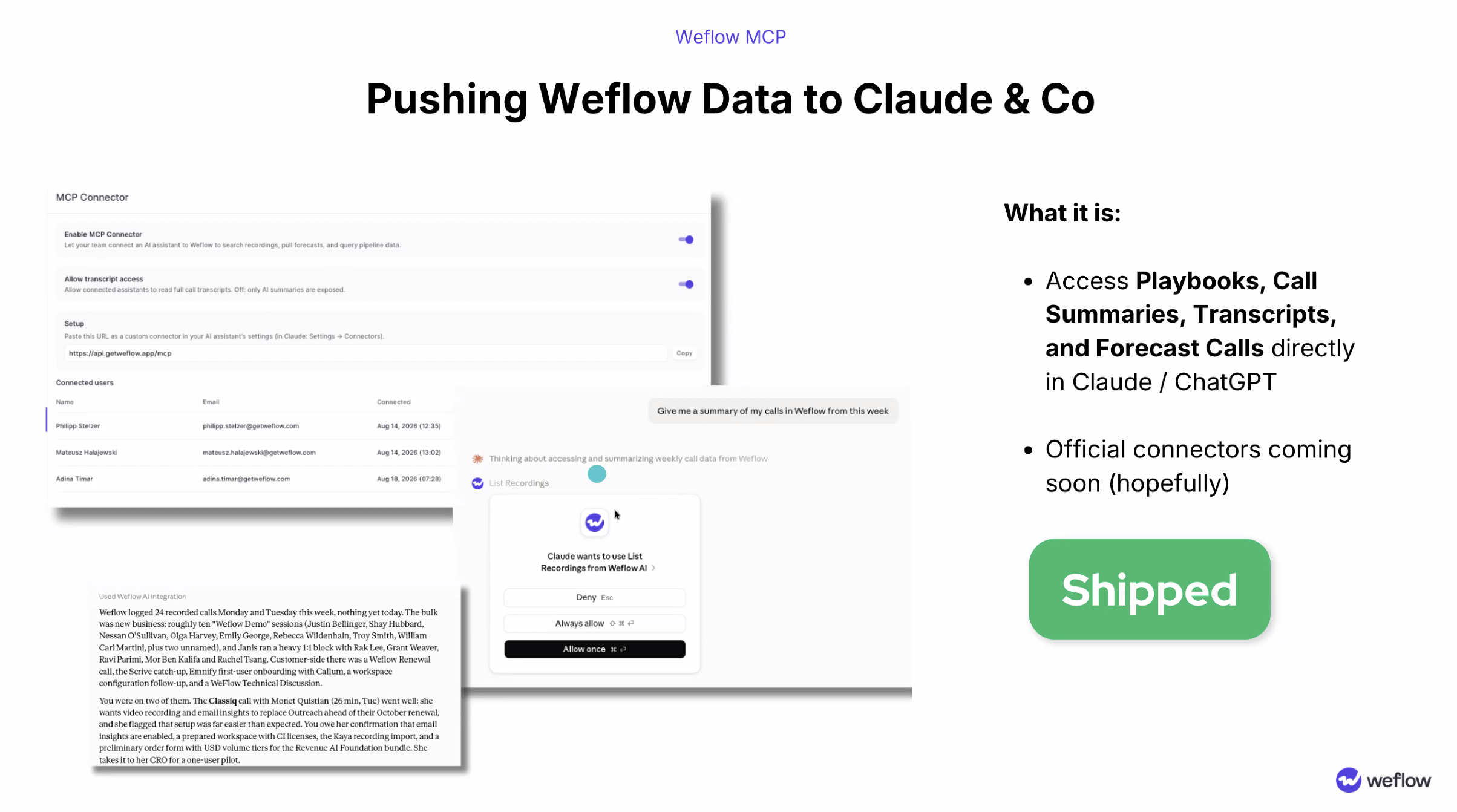
Weflow's MCP connector exposes four things to a connected assistant:
- Weflow playbooks, including the methodology output on a deal, so an assistant can answer a qualification question rather than just find the call where it came up.
- Call summaries generated from recorded meetings.
- Call transcripts, when an admin has allowed transcript access.
- Forecast calls, which is what lets an assistant answer a pipeline question instead of only a conversation question.
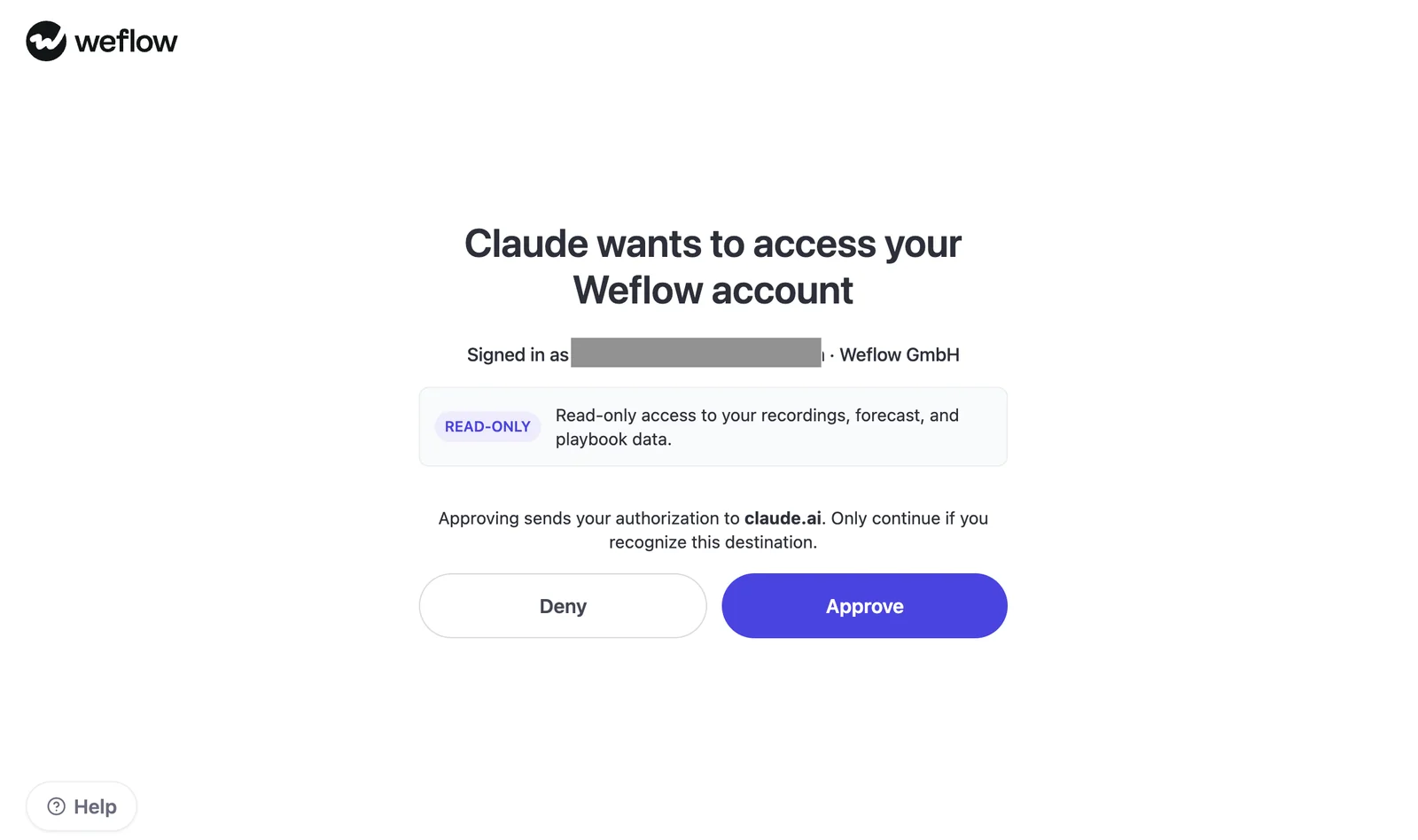
The tools are read-only. An assistant can query recordings and automated AI playbook data inside Claude, ChatGPT and other LLMs, and it cannot write anything back through the connector.
Setup is deliberately boring. An admin enables the connector for the workspace, and on the assistant side someone pastes a URL in as a custom connector. Consent is required before anything is read.
If your team wants something programmatic rather than conversational, the connector isn't the route. Weflow's REST API supports scheduled or on-demand bulk export of transcripts, metadata, scores and signals as JSON or CSV, which is what a warehouse or an internal agent framework should be pointed at.
What Gong's MCP endpoint exposes, per Gong's public documentation
Gong offers an MCP endpoint that connects Gong Agents with external AI agents, and it ships in-platform AI agents for revenue teams alongside it. That's a real, working capability, and a team building agent workflows can integrate Gong directly instead of writing a bridge.
What Gong's public documentation doesn't do is enumerate the exposed surface at the level a security reviewer needs. It doesn't describe a separate control for verbatim transcripts, and it doesn't describe an admin view of which users have attached an assistant.
We're not claiming those controls are absent. We're saying we can't verify them from what Gong publishes, so put both questions to Gong in writing and get the answer into your vendor file. That's the same standard you should hold us to.
One thing is stated plainly enough in Gong's own architecture, though: whatever the endpoint exposes, an assistant connected to Gong is reading Gong's copy of your revenue data.
Can you let assistants read summaries but not transcripts?
On Weflow, yes, and it's two separate admin decisions rather than one.
Enable MCP Connector turns the endpoint on for the workspace. Allow transcript access decides how deep it goes. With that second toggle off, a connected assistant sees AI summaries and never the verbatim transcript, which is exactly the shape of answer a security reviewer is looking for when they ask whether an LLM can pull what a customer actually said word for word.
The console also lists every connected user with their email and the date they connected, so an admin sees who has attached an assistant instead of discovering it during an audit. And because the only way to sign in to Weflow is through your Salesforce authentication, there's no separate Weflow identity to deprovision: deactivate the user in Salesforce and their access goes with it.
Admin control over who reaches the AI at all sits in the same console, per team.
Here's the checklist we'd hand a reviewer. Run it against every vendor on the shortlist, including us.
| The reviewer's question | What to demand as the answer |
| Can an assistant pull verbatim transcripts? | A named admin control that separates transcript access from summary access, not a policy statement |
| Who turned the connector on? | Workspace-level enablement by an admin, not per-user self-service |
| Who has connected an assistant, and when? | A list in the console showing user email and connection date |
| Can the assistant change anything? | Read-only tools, confirmed in the consent scope the user sees |
| What happens when someone leaves? | Access tied to the identity provider you already control, so deprovisioning is one action |
Where the data behind each connector actually lives
An assistant connected to Gong reads Gong's copy. An assistant connected to Weflow reads records that already sit in your own Salesforce, plus Weflow's own layer on top.
That difference is invisible on a connector spec sheet and it decides almost everything downstream.
Gong's copy in Gong's cloud vs records in your Salesforce
| Question | Gong | Weflow |
| Where does captured activity land? | Mapped into Gong's own data structure, in Gong's cloud | Native Salesforce objects in your org: Task, Event, EmailMessage, plus standard and custom fields |
| What reaches Salesforce? | An AI summary and a document | The activity records themselves, and AI-written field values including picklists, numbers, dates and multi-selects |
| What is an MCP-connected assistant reading? | Gong's copy, held by Gong | Weflow's layer over data that already lives in your CRM |
| What survives the contract ending? | Recordings, transcripts and intelligence sit behind the subscription | The Salesforce records persist, because they were always yours |
Buyers who have lived through this describe it in the same terms every time:
To be fair to Gong, this is a design choice with real upside. Holding everything in one structure is why Gong's analytics are as deep as they are. The cost lands somewhere else, and it lands on you.
Why raw text in Salesforce decides what your agents can build
A summary is somebody else's interpretation of the call. Raw, queryable text in a system you own is a corpus your own models can work on.
That distinction is the whole build-versus-query question. If you want an agent to read every conversation on every opportunity at a given stage and check which CRM fields contradict what was said, you need the text. A summary field can't answer it, and neither can a document attachment.
Gong sends an AI summary and a document to Salesforce rather than the raw transcript text, so the customer's own agent has nothing to run across. Weflow's captured activity and extracted values land in native Salesforce objects, which means your warehouse, your BI tool, your Salesforce automations and your internal agent framework all read the same records without anyone reconciling two versions of the truth.
"We use the native objects in Salesforce. If you ever stop using Weflow, the data persists. It is your data. That is very, very important in everything we do."
— Janis Zech, Co-founder and CEO, Weflow
One customer on a switch call put the practical version better than we do:
Where Gong is genuinely stronger: analytics depth and in-platform agents
Gong invented conversation intelligence and still has the deepest conversation analytics in the category. Transcription runs across 96+ languages, which matters if your sellers work in markets a newer vendor hasn't proven itself in.
Gong also ships in-platform AI agents for revenue teams, so a team that wants the assistant experience inside the product they already live in gets it without connecting anything. And Gong has a sales engagement product that Weflow doesn't have at all: no cadences, no dialer, no sequencing.
Prospects tell us this without prompting, and we'd rather repeat it than pretend:
So here's the honest version of the case. If your team is happy working inside Gong's platform, doesn't need the conversation data sitting in Salesforce, and isn't building its own agents on the underlying text, the MCP connector on its own is not a reason to move. Switching costs you a change management exercise to solve a problem you don't have.
Weflow's own ceilings: what its MCP access doesn't reach
Things you'll hit on Weflow that our sales team wouldn't volunteer on a first call:
- Deal warnings and AI Playbook scores are Weflow fields, not Salesforce fields. They're marked with a W in the interface, and they can't be reported on in a Salesforce dashboard or pulled into Power BI as they are. The workaround is an agent that writes the assessment into a Salesforce field you create, which works but has to be built.
- The connector reaches revenue data, not your knowledge base. Ask Weflow AI and the MCP connector read Salesforce records, captured emails and meetings, and the public web. Your process documentation, product guides and ticketing system stay outside it. Weflow supplies the revenue context a general assistant lacks, and it does not replace that assistant.
- There is no read-only administrator role. Seeing everything in the workspace means granting full admin, which also carries the ability to change the configuration. If your analysts want a complete view without edit rights, today that's a choice between two imperfect options.
- Video recordings sit with Weflow, not in Salesforce. The structured data, activity and field values land in your org. The video files themselves are held by Weflow and streamed back, in the region your Salesforce instance sits in, because Salesforce is a poor place to store large files.
- Salesforce only. No HubSpot, no Dynamics, no Pipedrive. If your CRM roadmap includes moving off Salesforce, this is a hard gate rather than a roadmap item.
How Weflow and Gong price AI and assistant access
The two pricing models differ in shape, and shape matters more than the sticker to a budget owner who has to defend the line next year.
| Cost element | Weflow | Gong |
| Entry point | Activity & Contact Capture at $19 per user per month, Conversation Intelligence at $39, Deal Intelligence & Forecasting at $39, all billed annually with a 10-user minimum | A high-priced foundation seat that has to be bought before any module is added, plus a $5,000 per year platform access fee |
| Bundles | Revenue AI Foundation $49, Revenue AI Business $59, Revenue AI Enterprise $79, per user per month | Coaching and forecasting sold as separate modules on top of the foundation seat |
| AI usage | Included in the seat. Recordings, transcripts, AI field updates and Ask Weflow AI aren't metered | Consumption pricing for AI sits on top of the per-seat licence |
| The one metered component | Agent Builder, priced per workspace: Free with 25 agent actions a month in every plan, Growth $299 a month for 500 actions, Scale $999 a month for 2,500 | Not stated in Gong's public documentation |
| Where the price is published | On weflow.ai, with volume discounts negotiated during the sales process | Quote-based |
The consequence is simple. A metered AI line means your invoice grows exactly as adoption succeeds, which turns every conversation about rolling assistant access wider into a cost conversation rather than a value one. We've watched teams ration access to their own data because of it.
Weflow meters the one product that genuinely consumes tokens at scale and leaves the daily AI surfaces alone. That's a deliberate tradeoff, not generosity: predictable pricing is what finance approves.
Migrating from Gong: does your call history stay queryable?
Your archive doesn't die at cutover. Weflow imports and reprocesses an existing recording library, at volumes in the thousands of recordings, so the historical calls stay searchable and scoreable under the new system.
The migration runs in three steps:
- Import and map. Recordings come across through Gong's API or by CSV, and get mapped to the right Salesforce records.
- Reprocess and configure. The imported transcripts run through Weflow AI, and the workspace gets configured: templates, methodology, field mappings.
- Roll out. Role-based training for reps, managers and admins.
The import costs nothing extra and typically takes one to two weeks depending on volume. Alongside it, historical email and meeting sync-back covers the previous 12 to 24 months and takes three to four days, with the real constraint being the Salesforce API calls your org has available that week, not our side of the job.
The technical setup itself is a 30 to 45 minute call with a Salesforce admin and a mail admin in the room. What stretches an implementation is deciding what the system should do, which methodology to score against and which fields to write, because that's a change management conversation rather than a configuration task.
Choose Weflow if, choose Gong if
The decision keys on one question: do you need the data behind the connector to sit in your own Salesforce and feed your own agents, or are you content working inside the vendor's platform?
Choose Weflow if:
- You need a separate, checkable admin control over whether connected assistants read verbatim transcripts, and a list of who has connected one.
- Your own agents, warehouse or BI tool need to build on the underlying activity and conversation data, not just chat with it.
- You've watched a vendor's data become unreachable at contract end and want the records to persist in Salesforce because they're yours.
- You need predictable pricing, with AI usage in the seat rather than metered on top.
- You run on Salesforce and intend to keep running on Salesforce.
Choose Gong if:
- Your team works inside Gong's platform and is happy there, and the conversation data doesn't need to live in your CRM.
- You want the deepest conversation analytics in the category, and your teams sell in enough languages that broad transcription coverage is a real requirement.
- You want in-platform AI agents rather than access from an outside assistant.
- You need sales engagement, cadences and a dialer from the same vendor. Weflow doesn't do those at all.
- Nothing else in your stack is blocked by the conversation data sitting in a vendor cloud.
If you want to check any of this yourself rather than take our word for it, walk through the product yourself. The admin console, the toggles and the exposed surface are all in there.
FAQ: Weflow vs Gong MCP evaluation questions
Is the Weflow MCP connector read-only, or can assistants write back?
Read-only. The connector exposes read-only tools that let a connected assistant query recordings and automated AI playbook data, and the consent screen states that scope before access is granted. Nothing an assistant does through MCP writes to Weflow or to Salesforce.
Can a data warehouse or BI tool use the same data without MCP?
Yes, and for anything programmatic it's the better route. Weflow provides a full REST API with scheduled or on-demand bulk export of transcripts, metadata, scores and signals as JSON or CSV, plus BI connectors such as Tableau and Looker and an exportable audit log of field write-backs and configuration changes. The captured activity also sits in native Salesforce objects, so anything already reading your CRM sees it without an integration.
What security posture does Weflow's MCP connector inherit?
Weflow holds SOC 2 Type II certification and is HIPAA, GDPR and CCPA compliant, with Zero Data Retention for AI processing and no customer data used to train models. Data is stored in the region where your Salesforce instance sits, so a European org keeps its Weflow data in Europe. ISO 27001 is in progress with a target of December 2026, so treat it as a commitment rather than a certification, and Weflow is not FedRAMP certified.
What happens to the data if you stop using Weflow?
The Salesforce records persist, because they were written into your own native objects: Task, Event, EmailMessage and the standard and custom fields Weflow populated. What goes with the contract is the Weflow layer, meaning the video recordings Weflow holds and the Weflow-only fields such as deal warnings and playbook scores. If you're leaving, bulk export through the REST API before the contract ends.
Does Weflow's connector reach knowledge systems beyond revenue data?
No. Ask Weflow AI and the MCP connector read Salesforce records, captured emails and meetings, and the public web. Process documentation, product guides and support tickets stay outside it. Weflow gives your assistant the revenue context it doesn't otherwise have, and your assistant keeps doing everything else.
Where do the Gong claims in this comparison come from?
Gong's public documentation, and what we observe directly on calls with teams migrating off Gong. Where Gong's documentation doesn't describe a capability, such as a transcript-level access control for MCP or an admin list of connected assistants, we've said it isn't described rather than claiming it doesn't exist. Ask Gong for both answers in writing and hold us to the same standard.











