

Best Attention Alternatives for Mid-Market Companies (2026)
See which Attention alternative fits mid-market companies: Weflow, Gong, Avoma, Jiminny, Momentum.


Attention turns a sales call into action better than most tools we compete against. Salesforce teams start looking elsewhere because of what happens between calls: the emails, the meetings nobody recorded, the contacts on the thread, and the forecast.
In Attention, most of that never becomes Salesforce activity that your reports and your own AI can read.
The difference comes down to two approaches. Attention is conversation-first: a call happens, AI understands it, and actions follow. A data-foundation approach starts from the whole relationship, so every email, meeting and contact, the call fields and the forecast all land in the record you own.
We built Weflow on the second approach. Weflow is the Revenue AI Orchestration platform for sales, customer success, and RevOps teams. Weflow Conversation Intelligence + AI Field Updates writes what's said on a call into the same Salesforce record that capture already filled.
The short answer, by what you need:
- Weflow: the complete Salesforce revenue record, with conversation intelligence and a forecast roll-up on top, at published seat prices.
- Gong: the deepest conversation analytics and the safe category-leader choice.
- Avoma: low published seat prices, built mainly for smaller teams.
- Jiminny: coaching-first, across several CRMs.
- Momentum: Salesforce teams moving to the new Core, Advanced or Max editions.
- Stay with Attention: if your real goal is automating call follow-through or building agents on raw transcripts.
What Attention does better than most conversation intelligence tools
Attention leads the category on making conversation data reachable by agents. If that's what you liked about it, you're right to like it.
- The widest MCP server we've seen in conversation intelligence. It has 68 read-write tools across 15 groups and returns raw transcripts. Usage is governed by rate limits rather than credits, and an external assistant can hand questions to Attention's own Super Agent.
- A programmable builder. Workflows carry routers, loops, storage, HTTP request steps and custom Node.js and TypeScript code. A step can also call OpenAI or Anthropic directly.
- Prebuilt agents and suggested actions. Attention names agents such as a Knowledge Base Builder, a Follow-Up Email Automator and a Deal Risk Monitor, and says more than 100 exist. After each call it suggests next actions to reps, such as emails, documents and decks.
- In-call help. Since June 2026, the desktop app shows live talk-track and battlecard prompts during a call.
- Multi-CRM support. Attention maps fields to Salesforce and HubSpot itself, and its team sets up mappings for other CRMs on request.
Attention's recommended first workflow shows the shape of the product. A trigger fires when a conversation is analyzed, and actions chain from there.
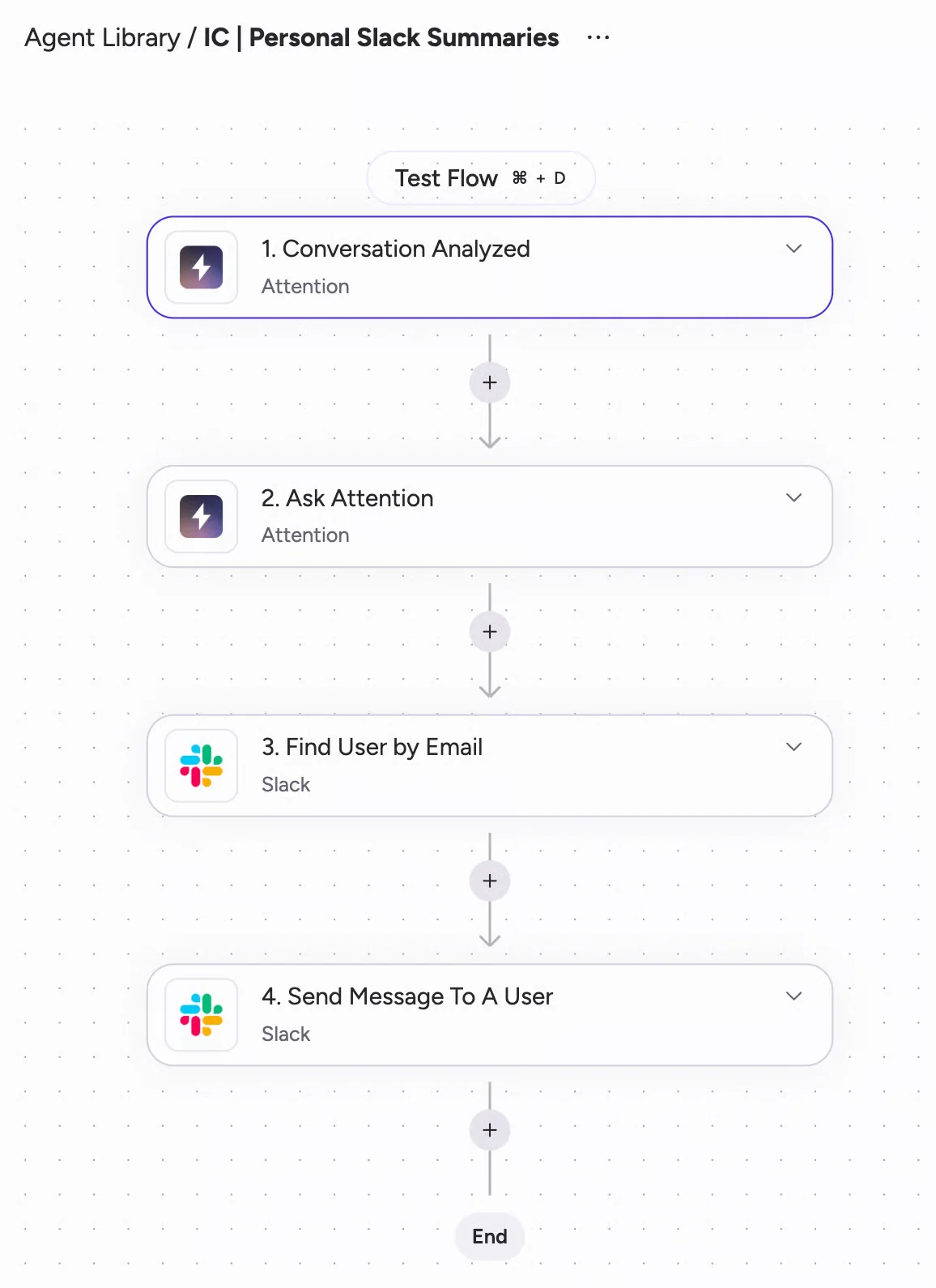
All of this runs on the conversation. Attention's call-level analysis reads transcripts and uses CRM data only to choose which calls to read. That's why the gaps show up between calls.
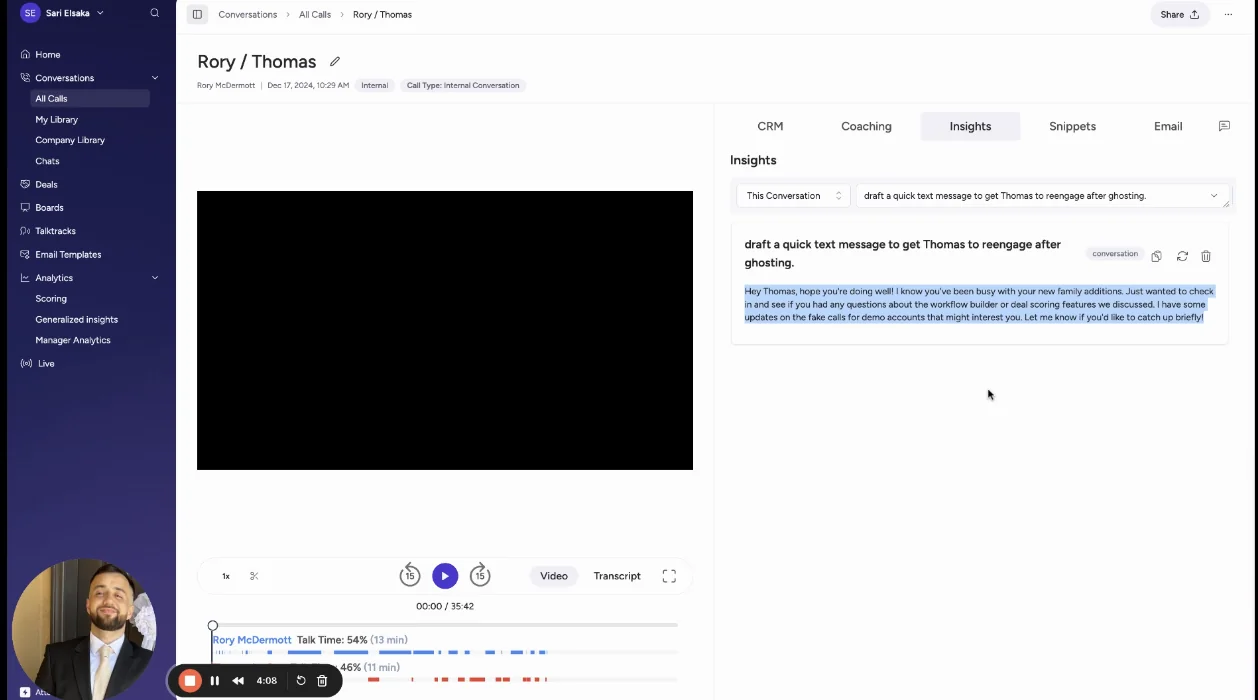
The Insights tab on an Attention conversation makes the point visually. You scope a question to this conversation or the entire deal, and the Account option sits greyed out.
Why Salesforce teams leave Attention: five operational reasons
Teams leave Attention over where the data lives, not over the quality of its AI.
Emails and meetings stay in Attention, not in Salesforce
Attention imports email into its own store and ties each message to an account and deal there. Each rep connects Gmail or Microsoft 365 individually.
Those emails aren't Salesforce activities. If you want them on the Salesforce timeline, you build a workflow on Attention's New Email Imported trigger and maintain it yourself. The imported email record also carries no attachments.
The result: your Salesforce record gets extracted call values, not the full activity history. Activity reports, engagement metrics and any AI reading Salesforce see half the relationship.
A second capture tool duplicates every meeting in Salesforce
The usual fix is pairing Attention with a separate activity capture tool. That writes two records into Salesforce for one meeting, because each vendor creates its own event and neither knows about the other.
Meetings per rep and touches per closed opportunity stay inflated until someone deduplicates them in reporting. Our co-founder describes the pattern he sees on calls:
"This is often a problem when you have multiple providers for CI and AC. They basically both create an event object, which creates a duplicate. So in your reporting you need to deduplicate that, which is really annoying."
Buyers who have lived with this put the requirement plainly:
"I don't want separate tools collecting data and duplicating meetings inside Salesforce. If I want to question the state of a deal, all the information should be in one place, no matter how many activity capture or conversation recording tools I use."
— RevOps leader, on a call with Weflow
Your forecast still runs outside Attention
Attention's forecast grid has columns that users enter, columns rolled up from deals and columns computed from the CRM. Its documentation covers no manager overrides, no submission history and no hierarchy roll-up of the figures users enter.
Its MCP forecasting tools only read and edit the category setup. None of them read forecast numbers or record a rep's submission.
That matches what we see in deals. We meet Attention in conversation intelligence evaluations, never in forecasting ones. Teams running Attention keep a spreadsheet or a separate forecasting tool next to it.
Attention's default field sync puts accuracy risk on RevOps
The fields look filled, but some of them aren't telling you anything:
- Automatic sync is the recommended default. On that setting, nobody sees an extracted value before it lands on the opportunity.
- Empty findings become sentences. When a call has nothing for a field, Attention writes prose explaining the absence. On a demo call, the Economic Buyer field read: "The conversation does not provide explicit information about the most important decision maker or the person who needs to greenlight buying the product." Every report reads that as populated data.
- New fields need a second setup. You map each new Salesforce field by hand in Attention, and it fills only on future calls. Every schema change becomes two tasks in two systems.
- The connection needs broad permissions. The Salesforce integration requires the connecting user to hold Modify All Data, which overrides sharing rules and object-level permissions.
Attention can't record on Windows, browser Teams or in person
Recording coverage depends on the laptops your team uses and where your meetings happen:
- Apple Silicon Mac only. The desktop app has no Windows build and no Intel Mac build. Mixed fleets end up running the bot for some users and the desktop app for others.
- Full Disk Access. The app needs it on macOS, and it's the permission a laptop-fleet policy is most likely to refuse.
- No Teams in the browser. The app can't read the meeting URL from a browser tab. For those meetings, automatic recording, calendar matching and CRM export don't run.
- No mobile app. Field meetings and in-person conversations never reach the record.
- Dropped connections end recordings. When the network drops, the recording stops and doesn't restart on its own. The part of the call during the outage is gone.
What to check before you pick an Attention alternative
Judge alternatives on the Salesforce integration and rep disruption. Every tool on this list transcribes well, so the transcript tells you little.
Kyle Norton put the dependency plainly:
"You have to get the basics in place or else you just get sloppy outputs."
A scorecard built on that idea:
- Email capture: email reaches Salesforce as native activity with no rep setup.
- One meeting record: a recorded meeting attaches to the existing meeting activity instead of creating a second one.
- Governed field updates: picklist, number and date fields get written, review or auto-write is set per field, methodology fields append, and validation rules and permissions are respected.
- Forecast: a roll-up with manager overrides and a history of submissions.
- Recording coverage: in-person meetings and the laptops your team actually uses are both covered.
- Agent and assistant access: you know what you keep, and what you give up, compared with Attention's MCP and builder.
- Raw data: transcripts and activity are reachable through an API or export.
- Rep impact: the switch removes a step for reps rather than adding one.
- Pricing: a published price you can put in front of finance.
Trial the Salesforce integration, not the demo. That's where these tools actually differ.
Attention and five alternatives compared on nine capabilities
The tools diverge most on email capture, the forecast, in-person recording and pricing. They appear in a fixed order, not ranked, and Weflow publishes this comparison.
| Capability | Weflow | Attention | Gong | Avoma | Jiminny | Momentum |
|---|---|---|---|---|---|---|
| CRM field updates from conversations | Every field type except lookups; review or auto-write per field; methodology fields append | Prompt per mapped field; auto-sync default; new fields fill forward only | AI Data Extractor, up to 20, overwrites values | Smart Topics to mapped opportunity and account fields; no review step | AI CRM Filling on deals, accounts, contacts, leads and tasks; auto or review | Autopilot; write, confirm or fill-if-empty per extraction |
| Automatic email capture | Server-side, no rep setup, native Salesforce activity; one meeting record | Per-user mailbox into Attention's store; Salesforce needs a workflow | Server-side import; Salesforce export once enabled, forward only | Gmail and Outlook sync with the Revenue Intelligence add-on; logs as a Salesforce Task | Per-user sync; emails stay in Jiminny | None; reads emails already logged as Salesforce Tasks |
| Recording in-person meetings | Mobile Copilot recordings and voice notes | No mobile app | Mobile app audio recording | Mobile app audio or file upload | Mobile app, including offline | No mobile app; upload only |
| Forecast submissions and roll-ups | Baseline and best case on named deals; overrides logged; every version kept | Forecast grid; no documented overrides, history or hierarchy roll-up | Per-category submissions up the hierarchy; accuracy report | Submissions, manager roll-up and history (add-on) | None; Deal Insights table instead | None; feeds an existing forecasting tool |
| Prebuilt AI agents | Three Agent Builder templates; newer product | Named agents, 100+ claimed; suggested next actions | 18 Agent Studio agents across four packages | Agent templates from note-taking to risk detection | Four scheduled AI reports and daily deal emails | Six prebuilt agents |
| Integrations with other tools | Salesforce, Google, Microsoft, Zoom, Webex, Slack, Outreach dialer; API to BI tools | 200+ claimed; workflow steps in Gmail, Salesforce, HubSpot, Snowflake and more | About 450 in its marketplace; about 30 dialers | 26 native plus Zapier | About 20 dialers, eight CRMs, Zapier | Five CI tools, seven dialers, Slack or Teams |
| Access from AI assistants (MCP) | Read-only connector; transcripts behind an admin toggle; forecast and pipeline data | 68 read-write tools, raw transcripts, rate limits | Three read-only tools, insights only, metered credits | Read tools plus three write tools; Organization plan or add-on | Read-only connector on Scale and Grow tiers | Through Salesforce's Hosted MCP Server |
| Raw data access outside the tool | REST API bulk export as JSON or CSV; no native warehouse connector | Transcripts via MCP and API keys; Snowflake and HTTP workflow steps | API at 10,000 calls a day; Data Cloud costs extra | REST API and webhooks at 60 requests a minute; Organization plan and up | REST API with an admin-generated key | API off by default; 100 requests per 15 minutes |
| Pricing | Published: $19 to $79 per seat | Not published | Model published, no prices | Published: $19 to $39 per seat plus add-ons | Not published; flat per-seat fee | In Salesforce Max at $550; standalone $69 and $99 |
Weflow: email, calls and forecast on one Salesforce platform
Weflow builds on the complete Salesforce record. Every email, meeting and contact lands as native activity, calls add AI field updates to that same record, and the forecast rolls up on top.
It's built for mid-market Salesforce teams that want capture, Conversation Intelligence + AI Field Updates and a forecast roll-up on one platform, at published seat prices.
How Weflow handles the nine capabilities Attention buyers check
| Capability | What Weflow does |
|---|---|
| CRM field updates from conversations | Writes picklist, number, date and multi-select fields, and every other field type except lookups. You set auto-write or review per field. Methodology fields such as MEDDIC append instead of overwrite, and scheduled playbooks keep cumulative fields at the current best answer across every call and email. Writes respect validation rules, field dependencies and permission sets. Custom objects need a setup by our support team. |
| Automatic email capture | Captures every email and meeting server-side through a central app in Google Workspace or Microsoft 365, on any device, with no rep setup. Activity lands in native Salesforce objects, matched to the right record. A meeting becomes one Salesforce activity whether or not it was recorded, and recording adds the summary and field updates to that same activity. Mail from personal accounts or separate deliverability subdomains isn't captured. |
| Recording in-person meetings | Weflow Mobile Copilot on iOS and Android records in-person meetings and takes voice notes afterwards. Both are processed like a recorded call and synced to Salesforce. |
| Forecast submissions and roll-ups | Reps submit a baseline and best case tied to named deals, and the call rolls up the hierarchy. Managers override with a logged rationale, every version is kept, and accuracy is tracked against actuals. Submissions happen in the web app. |
| Prebuilt AI agents | Weflow Agent Builder ships three starting templates: a pipeline snapshot, a meeting recap bundle and a deal risk PDF. Their prompts are deliberately basic and meant to be rewritten. Agents deliver to Slack, email or PDF. |
| Integrations with other tools | Native integrations with Salesforce, Gmail, Google Calendar, Outlook, Zoom, Microsoft Teams, Google Meet, WebEx, Slack and the Outreach dialer. The API feeds BI tools such as Tableau and Looker. |
| Access from AI assistants (MCP) | A read-only MCP connector gives Claude, ChatGPT and other assistants playbooks, call summaries, transcripts, forecast calls and pipeline metrics. An admin switches it on per workspace, with a separate toggle for transcript access. |
| Raw data access outside the tool | The REST API bulk-exports transcripts, metadata, scores and signals as JSON or CSV into a warehouse, and recordings export to your own storage. |
| Pricing | Published per-seat pricing, with AI included in the seat. Details are in the pricing section below. |
The Weflow desktop app records meetings without a notetaker on Windows, on Intel Macs and on Apple Silicon Macs.
Field updates are prompts you control per field, including whether a field writes to Salesforce automatically.

Our co-founder explains why this matters for the reader coming from Attention:
"Everything we do has a bi-directional Salesforce integration that is real time and API based, that respects all your validation, field dependencies, permission sets. And that is actually quite different to for example Gong or Attention, that typically have to do field mapping."
Because the record holds emails, meetings, contacts and calls together, Ask Weflow AI answers a deal question from all of them at once. Compare it with the Attention Insights scope shown earlier.

Where Attention stays ahead of Weflow
- MCP: Attention's MCP server is wider and read-write. Ours is read-only.
- Builder: Attention's builder is more programmable, with code and HTTP steps. Weflow Agent Builder is our newest product and less mature than the rest of the platform.
- Agent output: Weflow agents deliver to Slack and email. They don't write their conclusions back into Salesforce fields; field updates and playbooks do that.
- CRM support: Weflow works only with Salesforce, so it's no fit for HubSpot teams.
- Warehouse: we have no native Snowflake, Databricks or BigQuery connector. Teams use our API to move data there.
- Forecast storage: forecast submissions live in Weflow and aren't written to any Salesforce field.
- Contract: we require a 10-user minimum and a 12-month term.
Gong: the deepest call analytics, kept in Gong's cloud
Gong has the deepest conversation analytics in the category, a mature forecast and the largest integration marketplace. It's the safe category-leader choice.
The tradeoff is that the data sits in Gong's own store, and its AI is metered in credits.
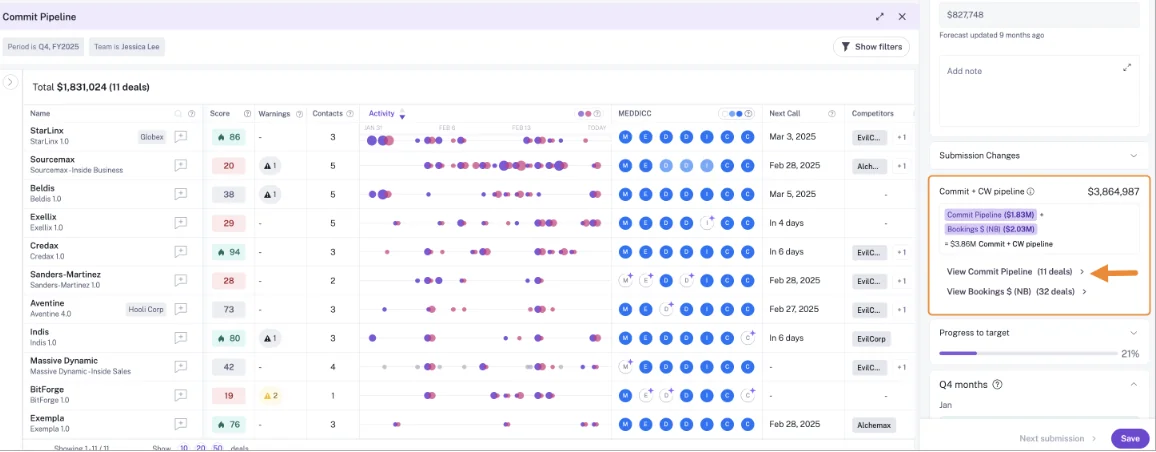
Gong's forecast is where it's furthest ahead of Attention. Reps submit per category, and managers see the deals behind each number.
How Gong handles the nine capabilities Attention buyers check
| Capability | What Gong does |
|---|---|
| CRM field updates from conversations | AI Data Extractor writes call answers into existing CRM fields automatically and overwrites them when newer information appears. A workspace can publish up to 20 extractors, and only a business admin creates them. Deal boards can fill one text field with AI suggestions. |
| Automatic email capture | Imports email server-side from Google Workspace or Office 365, keeping only messages that match a CRM record. Email exports to Salesforce as tasks or events once an admin enables it, from that day forward. Call transcripts aren't exported. |
| Recording in-person meetings | The mobile app records scheduled and in-person meetings as audio on any plan. |
| Forecast submissions and roll-ups | Reps submit per forecast category with notes. Managers see team totals up and down the hierarchy, a weekly trend chart and an accuracy report against actuals. |
| Prebuilt AI agents | Agent Studio holds 18 agents in four groups, spread across four separately purchased packages. Several are existing features renamed as agents. |
| Integrations with other tools | About 450 integrations and partner solutions in its marketplace, imports from about 30 dialers, and recording on 11 meeting platforms. |
| Access from AI assistants (MCP) | Three read-only, record-scoped tools that return AI insights rather than transcripts. Every MCP request draws metered credits. |
| Raw data access outside the tool | The API returns transcripts, trackers and scorecards, capped at 3 calls a second and 10,000 a day. Warehouse delivery needs Data Cloud, a separate purchase of about $5,000 a year. |
| Pricing | No published prices. Licenses are per user, plus a platform fee that scales with users, on top of a mandatory Foundation license. |
Where Gong falls short for teams leaving Attention
- Agent access shrinks. Teams that liked Attention's open MCP lose raw transcripts on Gong, and the same brief that's free in Gong's interface costs credits through MCP or the API.
- The license stacks. Gong Foundation is mandatory, and seats are assigned per application, so one person's cost is the sum of every application they touch.
- Field updates overwrite. Extractors are capped at 20 and replace earlier values, so a methodology field reflects the latest call rather than the whole deal.
- The data stays in Gong. Transcripts, email from before export was enabled, and activity with no matching contact or lead don't reach the Salesforce record you own.
Avoma: published low seat prices for smaller teams
Avoma publishes low per-seat prices and adds forecasting and email sync as paid add-ons. It suits smaller teams on Salesforce or HubSpot.
Avoma's center of gravity is small businesses and solo operators, not mid-market revenue teams. It started as a meeting recorder and added CRM depth afterwards.
How Avoma handles the nine capabilities Attention buyers check
Field updates, email sync and forecasting all depend on Avoma's Revenue Intelligence add-on.
| Capability | What Avoma does |
|---|---|
| CRM field updates from conversations | Writes Smart Topic notes automatically into admin-mapped Salesforce or HubSpot fields on opportunities and accounts, with no review step before the sync. |
| Automatic email capture | Syncs Gmail and Outlook email for members with the Revenue Intelligence add-on, through an org-wide connection or each member's inbox, and can log it to Salesforce as a Task. |
| Recording in-person meetings | Records in-person meetings as audio from its mobile app, or from a file uploaded afterwards. |
| Forecast submissions and roll-ups | Reps and managers submit per pipeline and period, managers approve and roll up, and every change is kept in a history. |
| Prebuilt AI agents | Agent templates for note-taking, CRM entry, follow-up, sequences, roleplay, coaching, battle cards, win-loss, forecasting and risk detection. |
| Integrations with other tools | 26 native integrations across conferencing, CRMs, dialers and sales engagement tools, plus Slack, Microsoft Teams chat, ClickUp and Zapier. |
| Access from AI assistants (MCP) | An MCP connector for Claude and ChatGPT that reads meetings, transcripts, notes and scorecards and can set a meeting's outcome, purpose and privacy. It needs the Organization or Enterprise plan or the API Access add-on. |
| Raw data access outside the tool | A REST API and webhooks for meetings, recordings, transcripts, notes and scorecards, limited to 60 requests a minute, on the Organization plan and up. |
| Pricing | Published: $19, $29 and $39 per recorder seat a month billed annually, with $29 add-ons for Revenue Intelligence and Conversation Intelligence. |
Where Avoma falls short for mid-market Salesforce teams
- No custom objects: field mapping works only on standard opportunity and account records.
- No review step: extracted notes sync to fields automatically.
- Add-on dependence: Revenue Intelligence is a paid add-on, and it carries field updates, email sync and forecasting.
- Small-team focus: the product is built around smaller teams, with one forecast configuration per organization.
Jiminny: coaching-first call recording across many CRMs
Jiminny suits coaching-first mid-market teams on any of several CRMs. You get live coaching, a built-in dialer and a flat per-seat fee.
It works with Salesforce, HubSpot, Microsoft Dynamics 365, Pipedrive, Zoho, Copper, Close and Bullhorn, and runs separate EU and US data environments.
How Jiminny handles the nine capabilities Attention buyers check
| Capability | What Jiminny does |
|---|---|
| CRM field updates from conversations | AI CRM Filling writes call and email information into Salesforce or HubSpot fields on deals, accounts, contacts, leads and tasks. It triggers on a new call, email or stage change, and runs automatically or after rep review. |
| Automatic email capture | Reads each user's mailbox every 15 minutes once that user turns on email sync, keeping emails that match CRM records. Those emails stay in Jiminny and never reach Salesforce. |
| Recording in-person meetings | The mobile app records in-person meetings, including offline, for users with a Recorder role. |
| Forecast submissions and roll-ups | Not offered. Reps and managers don't submit forecast calls. Deal Insights is a table of CRM deals with risk alerts used for pipeline reviews. |
| Prebuilt AI agents | Nothing Jiminny calls an agent. It offers four scheduled AI reports that the customer success manager turns on, plus a daily email on each followed deal. |
| Integrations with other tools | Records calls from about 20 dialers and meetings on Zoom, Google Meet and Microsoft Teams, reads Google and Microsoft 365 mailboxes and calendars, and syncs with Zapier. |
| Access from AI assistants (MCP) | A read-only MCP connector for Claude and ChatGPT on the Scale and Grow tiers, authorized per user. |
| Raw data access outside the tool | A REST API opened with an organization-level key that only admins can generate, suggested for warehouse and BI feeds. |
| Pricing | No published prices. Each tier is a flat per-seat fee with no platform fee or usage credits. |
Where Jiminny falls short for teams leaving Attention
- Same email gap: emails are never logged to Salesforce. That's the gap you're leaving Attention over.
- No forecasting: you'd still run the forecast in a spreadsheet or another tool.
- Per-user setup: each rep signs in with their own account before Jiminny sees their mail or meetings.
- No published prices: sizing the business case means a sales conversation.
Momentum: Salesforce's own layer for writing call data to fields
Momentum, now part of Salesforce, writes structured call data into Salesforce fields and pushes output to Slack or Microsoft Teams. It can run on top of an existing recorder, Attention included.
It suits Salesforce teams moving to the new Core, Advanced or Max editions. Its governance is careful: Smart Quarantine screens transcripts for sensitive content before anything is shared.
How Momentum handles the nine capabilities Attention buyers check
| Capability | What Momentum does |
|---|---|
| CRM field updates from conversations | Autopilot writes call values into Opportunity, Account, Lead, Event and Contact fields. Each extraction writes automatically, waits for confirmation, or writes only when the field is empty, and fields can append with a timestamp. |
| Automatic email capture | Not offered. It reads emails only from Salesforce Tasks a team has already logged, once Momentum support sets up ingestion. Its Outlook and Google integrations connect calendars, not mailboxes. |
| Recording in-person meetings | Not offered. There's no mobile app, so an in-person conversation reaches Momentum only as an uploaded file. |
| Forecast submissions and roll-ups | Not offered. Momentum positions itself as feeding an existing forecasting tool such as Clari or Gong. |
| Prebuilt AI agents | Six prebuilt agents: Deal Execution, Customer Retention, Sales Coaching, AI CRO, SmartClips and Account Brief. |
| Integrations with other tools | Five conversation intelligence tools (Gong, Chorus, Clari Copilot, Attention and Salesloft), seven dialers and contact centers, Slack or Microsoft Teams, and the Outlook calendar in early beta. |
| Access from AI assistants (MCP) | No MCP server of its own. Assistants reach its data through Salesforce's Hosted MCP Server, over the records Momentum writes. |
| Raw data access outside the tool | An API that returns meetings with full transcripts and recording links. It's off by default, switched on through support, and capped at 100 requests per 15 minutes. |
| Pricing | Included in Salesforce's Max edition at $550 per user per month, announced for Core ($195) and Advanced ($395), and a quoted add-on on Starter and Pro Suite. |
Where Momentum falls short for teams leaving Attention
- No email capture: email threads and the contacts in them don't reach Salesforce through Momentum.
- No mobile recording: field and in-person meetings stay off the record.
- No forecast: you still need a separate forecasting tool.
- Limited raw access: the API is off by default and rate-limited.
- Edition packaging: bundled Momentum comes with the new editions. Legacy Enterprise and Unlimited customers reach it by moving edition.
What each Attention alternative costs, and what costs extra
Only some vendors publish prices, and the extras differ: platform fees, credits, add-ons and edition bundling. Attention publishes no pricing, so there's no independent figure to compare against.
| Tool | Pricing model | Published list prices | What costs extra | Minimums and terms |
|---|---|---|---|---|
| Weflow | Per seat, AI included in the seat | Weflow Activity & Contact Capture $19; Weflow Conversation Intelligence $39; Weflow Deal Intelligence & Forecasting $39; Weflow Revenue AI Foundation $49; Weflow Revenue AI Business $59; Weflow Revenue AI Enterprise $79 (per user per month, billed annually) | Only Weflow Agent Builder is metered: 25 actions a month free, $299 for 500, $999 for 2,500, custom Enterprise. Ask Weflow AI, summaries and field updates are in the seat. | 10-user minimum; 12-month term; seats added mid-term pro rata |
| Attention | Negotiated contract | Not published | No published credits or metered AI; the MCP server uses rate limits | Not published |
| Gong | Per-user license plus a platform fee that scales with users | Not published | Applications on top of Foundation; AI credits for trackers, MCP and API workflows; Data Cloud at about $5,000 a year | Foundation license mandatory |
| Avoma | Per recorder seat plus add-ons | Startup $19, Organization $29, Enterprise $39 (annual); viewer seats free | Revenue Intelligence and Conversation Intelligence add-ons at $29 each; optional onboarding at $1,000 | Startup up to 25 seats; Organization up to 100; Enterprise 10-seat minimum |
| Jiminny | Flat per-seat fee per tier | Not published | Dialer minutes above the allowance at 2 cents a minute | Not published; 14-day free trial |
| Momentum | Salesforce edition bundle or standalone per seat | Max $550 (included); Core $195 and Advanced $395 (announced); standalone Business $69 and Transformation $99 | Conversation Intelligence add-on at $30; quoted add-on on Starter and Pro Suite; Agentforce for Sales from $125 on Core and Advanced | Annual billing on the editions |
Seat prices only compare cleanly once you know what AI usage each vendor meters on top.
Which Attention alternative fits your team, and when to stay
The right choice depends on your primary need. For some teams, the right answer is staying with Attention.
| Your situation | Best fit |
|---|---|
| You want every email, meeting, contact, call field and the forecast in Salesforce on one platform, at published seat prices | Weflow |
| You want the deepest conversation analytics and a mature forecast, and accept data in Gong's cloud and metered AI | Gong |
| You're a smaller team on Salesforce or HubSpot and price is the first filter | Avoma |
| Coaching matters most, you want live coaching and a dialer, and you don't need a forecast | Jiminny |
| You're moving to Salesforce Core, Advanced or Max and want field writes and Slack output on your existing recorder | Momentum |
| You run HubSpot or another CRM | Attention, Gong, Avoma or Jiminny (Weflow and Momentum are Salesforce-only) |
| Your goal is automating call follow-through, or building agents on raw conversation data through a wide read-write MCP and a programmable builder | Stay with Attention |
How to switch from Attention without losing reps or history
A switch holds up internally when it removes a step for reps and keeps your history connected to Salesforce.
Can your Attention call history move to Weflow?
Weflow imports existing recordings using only an API key from your current provider. Our documentation names Gong, Chorus and Jiminny, plus other providers. Attention isn't on that named list today.
Imported recordings are re-linked to Salesforce records. Where the provider's API carries the Salesforce association, we use it. Where it doesn't, we run our own lookup to match each recording to the right account, opportunity or contact.
If no API key is available, our team evaluates a raw file export instead.
Can Weflow run alongside Attention without duplicate meetings?
Weflow logs every meeting as one Salesforce activity, whether or not it was recorded. Recording adds the summary and AI field updates onto that same activity rather than creating a second event.
Your meeting counts stay clean, and activity-based warnings such as days inactive hold up even when recording coverage is below 100 percent.
How to pitch a second change to reps who just adopted Attention
We hear this worry often, sometimes in almost these words:
"We just got another new tool called Attention, and I know that in our team there is some resistance to more tools. I want to be super clear when I get them to start using Weflow, and see that I can sell it to them with confidence."
— RevOps admin, on a call with Weflow
A rollout that works for that team:
- Lead with what reps stop doing. Capture runs server-side, so nobody connects a mailbox or installs a plugin, and the duplicate meetings and manual email logging go away.
- Answer the privacy question first. Internal-only emails and meetings are never logged, so capture covers customer conversations, not internal threads.
- Start with a small pilot group. Get the field update templates and auto-write settings right before anyone else sees them.
- Have each recorded user sign in once. The notetaker only joins meetings for users who've logged in to Weflow, while capture runs for everyone in the background.
- Run a short session for the pilot, and record it. People in other time zones can catch up without a second live session.
- Expand in phases. KORE Wireless rolled out capture first, then conversation intelligence, coaching, deal intelligence and forecasting.
See how Weflow captures activity, updates Salesforce fields from calls, and rolls up your forecast. Book a 30-minute demo.
Attention alternatives: frequently asked questions
How much does Attention cost compared with its alternatives?
Attention publishes no pricing, so a direct comparison isn't possible before a sales call. Weflow and Avoma publish per-seat prices, and Momentum's price appears in Salesforce's edition pricing and on its own site. Gong and Jiminny publish their pricing models but no figures. The pricing section above has the detail.
Does any Attention alternative match its MCP server and builder?
No alternative on this list matches Attention's breadth: 68 read-write tools, raw transcripts and rate limits instead of credits. Weflow's MCP connector is read-only and reaches transcripts, playbooks, forecast calls and pipeline metrics. Gong's has three read-only tools that return insights and draw credits. Avoma's reads meetings and transcripts and adds three write tools, Jiminny's is read-only, and Momentum relies on Salesforce's Hosted MCP Server.
Which Attention alternatives record on Windows and in person?
The Weflow desktop app runs on Windows, Intel Macs and Apple Silicon Macs, and Weflow Mobile Copilot records in-person meetings and voice notes. Jiminny's desktop app runs on Windows and Apple Silicon Macs, and its mobile app records in person. Gong and Avoma both record in-person meetings from their mobile apps. Momentum and Attention have no mobile app.
How does Weflow control AI field updates in Salesforce?
You set each field to auto-write or wait for review. The controls work like this:
- Methodology fields append to existing content instead of overwriting it.
- Scheduled playbooks keep cumulative fields at the current best answer across the whole opportunity.
- Writes respect validation rules, field dependencies and permission sets.
- Every field type is writable except lookup fields.
- Custom objects need a setup by our support team.
- The update view shows what changed, but doesn't mark whether a value came from the call or a web search.
What are Weflow's minimum seats, contract term and seat rules?
Weflow requires a minimum of 10 users per product or bundle, on a 12-month term. Seats added mid-term are charged pro rata to the end of the term. You can't reduce seats mid-term, but you can reassign a seat when someone leaves.
How do Attention and Weflow compare in a security review?
Attention holds a SOC 2 Type II attestation covering Security, Confidentiality and Availability, and runs a separate EU instance. Weflow is SOC 2 Type II certified and GDPR compliant, uses Zero Data Retention for AI processing, and never uses customer data to train models. You choose where Weflow stores your data, including Frankfurt, New York or Sydney. ISO 27001 is in progress, not yet certified.
Which Attention alternatives work with HubSpot?
Gong, Avoma and Jiminny all work with HubSpot, and Jiminny also supports Dynamics 365, Pipedrive, Zoho, Copper, Close and Bullhorn. Weflow and Momentum work only with Salesforce.
Who runs onboarding when you switch from Attention to Weflow?
Weflow runs onboarding itself, not a third-party partner. At KORE Wireless, we ran the whole onboarding across a five-phase rollout, including live training with a real-time Portuguese translator for the team in Brazil.










