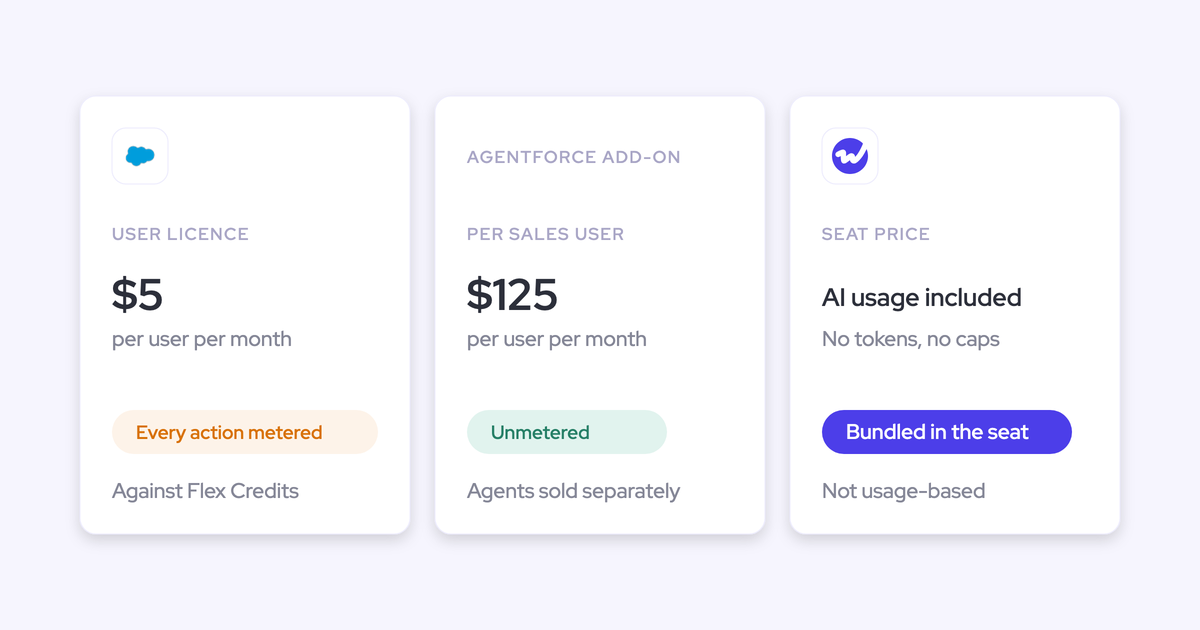
Gong vs Attention: Conversation Intelligence, Agents and Salesforce Write-Back (2026)
Decide between Gong vs Attention for conversation intelligence, agents, and Salesforce write-back.


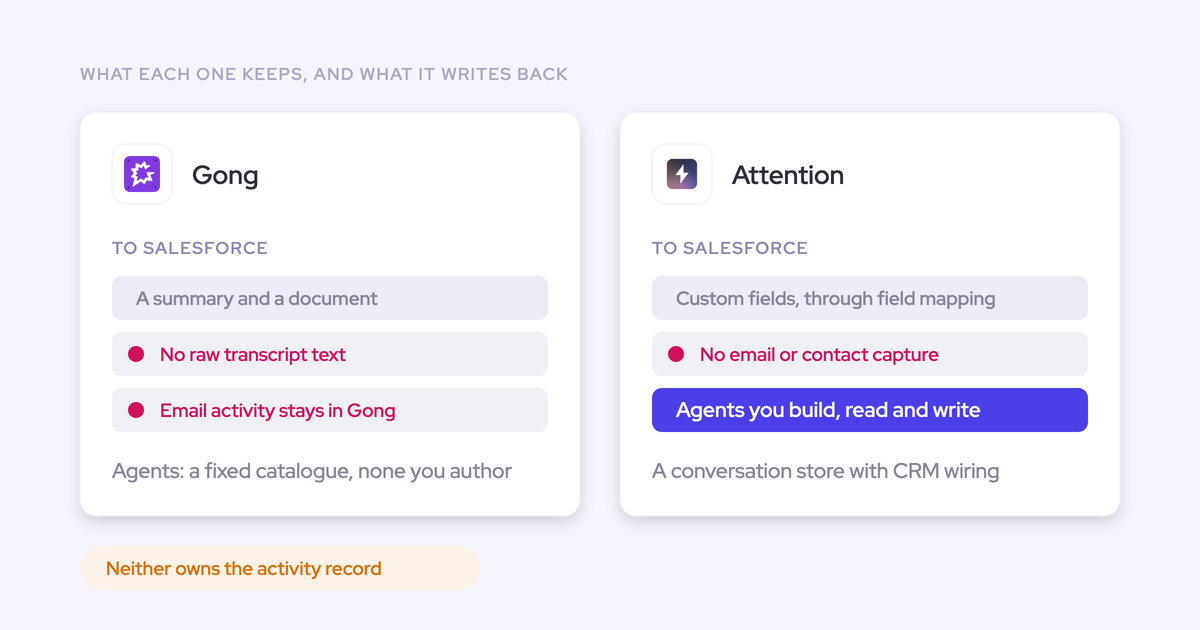

Choose Gong when conversation analytics and continuity across your existing revenue suite matter most. Choose Attention when you want programmable workflows that turn conversations into actions.
Both offer AI and Salesforce write-back. The difference is what their AI can read, how you control its actions, and what becomes reusable data outside the product.
Weflow belongs on the shortlist when you need broader revenue context and structured Salesforce data. Weflow is the Revenue AI Orchestration platform for sales, customer success, and RevOps teams. Built for Salesforce teams, Weflow Conversation Intelligence + AI Field Updates connects conversation outcomes to the records your reporting, automations, and other AI use.
Gong vs Attention: which fits your Salesforce stack?
Gong fits teams prioritizing analytical depth and suite continuity. Attention fits teams that want more control over conversation-triggered automation and can own the configuration behind it.
| Dimension | Gong | Attention |
|---|---|---|
| Conversation analytics | Deep conversation analytics, account-level methodology summaries, and an established coaching and call-library workflow. | Conversation and deal-level analysis, configurable scorecards, and prompts you can test against calls. |
| AI reasoning scope | Calls and emails feed capabilities such as AI Data Extractor. The accessible context depends on the agent. | Analysis centers on transcripts, scorecards, and intelligence items. CRM values help select and route conversations. |
| Workflow programmability | Named Agent Studio capabilities with configuration and application-specific entitlements. | Branching, loops, storage, HTTP requests, and custom Node.js and TypeScript steps. |
| Salesforce output | Summaries and documents reach Salesforce, alongside AI field-update capabilities whose scope depends on the Gong applications you use. | Prompt-based CRM field extraction with automatic sync or rep-triggered writes. |
| Permission boundaries | Different agents use different access models. Personal MCP access follows the connecting user’s Gong permissions. | Salesforce integration requires broad administrative permissions. MCP also exposes role-governed administrative actions. |
| External data reuse | MCP returns generated insights and consumes Gong credits. | MCP exposes raw transcripts, full-text search, and read/write operations across the conversation store and administration. |
Gong and Attention reach the same shortlist because both promise to remove work after a call. The architectural choice is whether you want to configure capabilities inside an established suite or build more of the workflow yourself.
We’d make that choice before comparing summary quality. It determines who maintains the system after the pilot.
How do Gong and Attention capture customer conversations?
Gong and Attention offer different recording routes, and those routes change the consent process and the work your reps must do.
| Capture route | Environment | Operating dependency | Consent behavior |
|---|---|---|---|
| Gong recording with Zoom | Zoom meetings | A visible recording flow within the meeting environment. | Participants receive a recording acceptance prompt, with acknowledgment recorded. |
| Attention desktop recording | Zoom, Google Meet, and Microsoft Teams on Apple Silicon Macs | The desktop app needs microphone, screen recording, accessibility, and Full Disk Access permissions. | A recording-notice chat message is a beta option enabled per organization on request. |
Attention’s desktop route removes the recorder from the participant list. It also makes meeting-URL detection critical: without the URL, automatic recording, calendar matching, opportunity assignment, and CRM export stop.
Attention captures a mixed audio stream through its desktop app, which reduces speaker-label accuracy compared with separate participant streams. That matters when your extraction prompt needs to distinguish a buyer’s commitment from a seller’s suggestion.
For recording coverage, make these acceptance criteria part of the pilot:
- Customer-hosted meetings and changed meeting links still produce the expected recording.
- Your managed laptops support the required recording permissions.
- Participants receive the notice and opt-out behavior your legal team requires.
- The recording reaches the correct calendar event and Salesforce relationship.
A visible recorder isn’t automatically a drawback. For a buyer whose counsel needs explicit acknowledgment, the consent interaction is part of the requirement.
What can Gong and Attention agents read and do?
Gong agents provide defined capabilities within the Gong suite. Attention gives you more programmable workflow steps around conversation data.
Separate three questions: what the agent reads, what it can execute, and whose permissions authorize that work. An agent count answers none of them.
Which data can Gong and Attention analyze?
Gong analyzes conversations and emails through its agent capabilities. Attention’s analysis centers on the conversation record, while CRM values help retrieve and route that record.
| Data or analytical scope | Gong | Attention |
|---|---|---|
| Conversation content | Call analytics, topic tagging, summaries, trackers, and extraction. | Transcripts feed insights, scorecards, extraction prompts, and workflows. |
| Email context | AI Data Extractor can draw on non-private emails as well as calls. | The documented analysis engine reads transcripts, scorecard results, and intelligence items. |
| CRM context | CRM entity association connects activity to the relevant records within Gong. | CRM values select conversations and receive extracted output; they aren’t the complete analytical corpus. |
| Aggregation | Supports methodology summaries across an account’s calls. | The Insights selector offers a single conversation or an entire deal’s calls. Account scope is unavailable in the supplied interface. |
Gong’s analytical depth earns its place here. A manager reviewing a long sales cycle needs to understand patterns across conversations, not open each recording in turn.
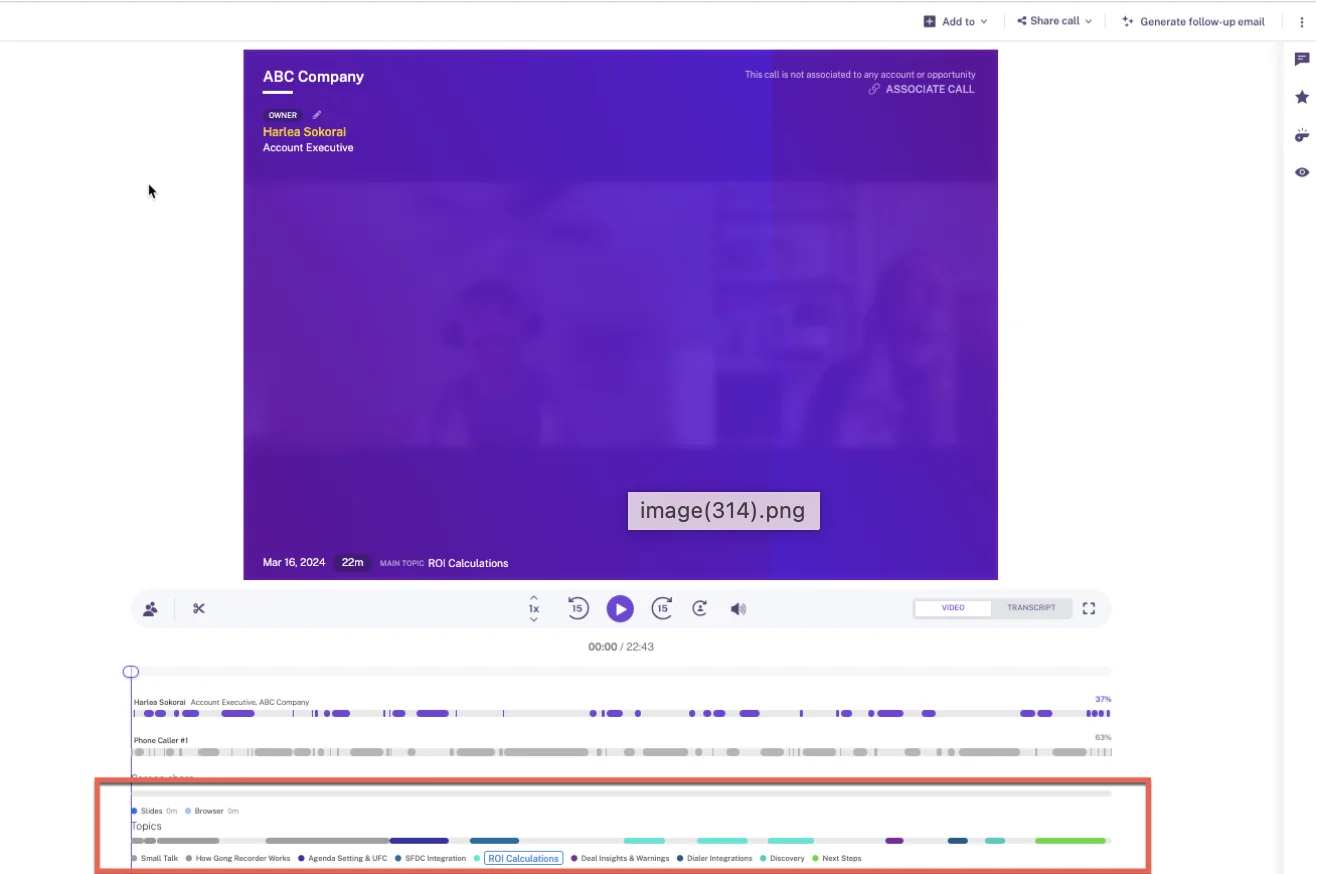
Gong’s call page segments a recording into named topics alongside the speaker timeline, giving a reviewer a direct route to the relevant discussion.
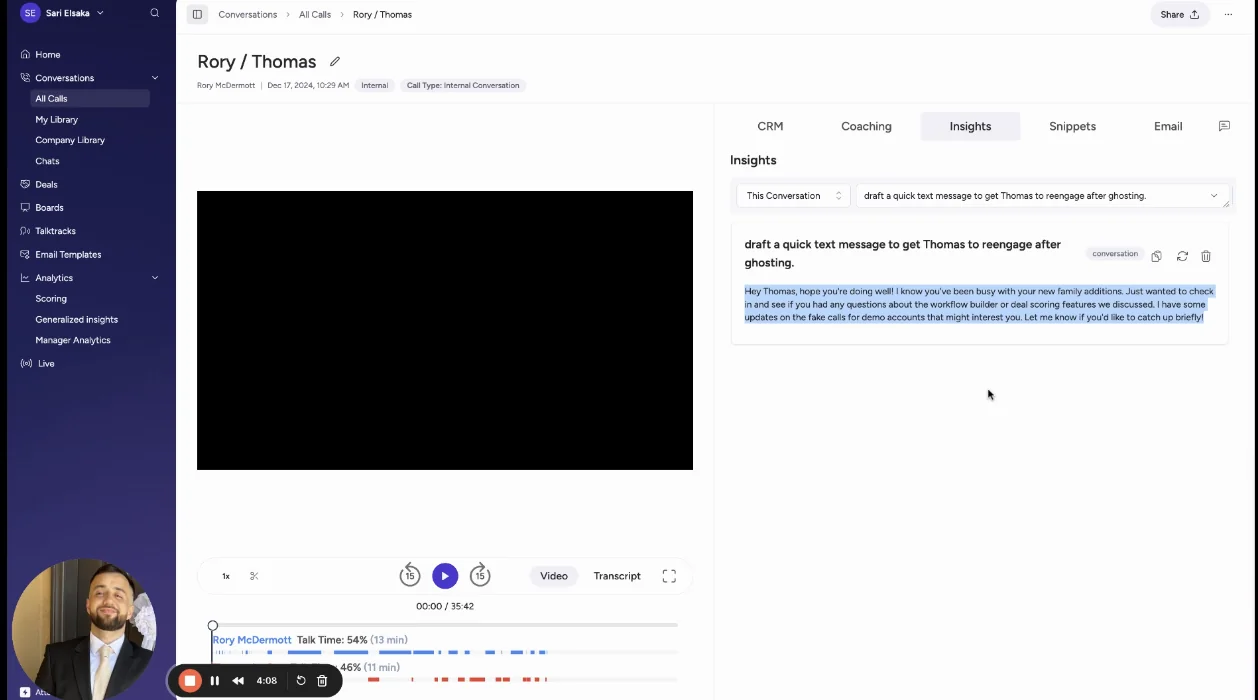
Attention’s conversation-first scope works well for questions such as what the buyer said about the decision process. A question about opportunity-history changes requires data beyond those conversations.
Attention’s Insights selector makes that scope visible: you can ask about the current conversation or the deal’s conversations.
How much can you customize Gong and Attention workflows?
Attention offers more general-purpose programming inside its workflow builder. Gong organizes automation around named agents and the applications that supply their actions.
Take one follow-up scenario: extract a decision criterion, produce a follow-up, and route an internal update after a discovery call.
| Workflow step | Gong | Attention |
|---|---|---|
| Extract the outcome | Use AI Data Extractor and the available field-update capabilities. | Write a field-extraction prompt and test it against a real call. |
| Generate follow-up content | AI Composer requires a Gong Engage license. | Use a prompt-driven email template or an Ask Attention workflow step. |
| Route the result | Available actions follow the selected Gong capability and application entitlement. | Branch on conditions, send Slack messages, call an external API, or run custom code. |
| Aggregate multiple calls | Use Gong’s analytical and agent capabilities for the supported scope. | Loop through calls and collect outputs in workflow storage. |
Attention includes a Slack-summary workflow template that chains a Conversation Analyzed trigger to an Ask Attention step and a Slack message.
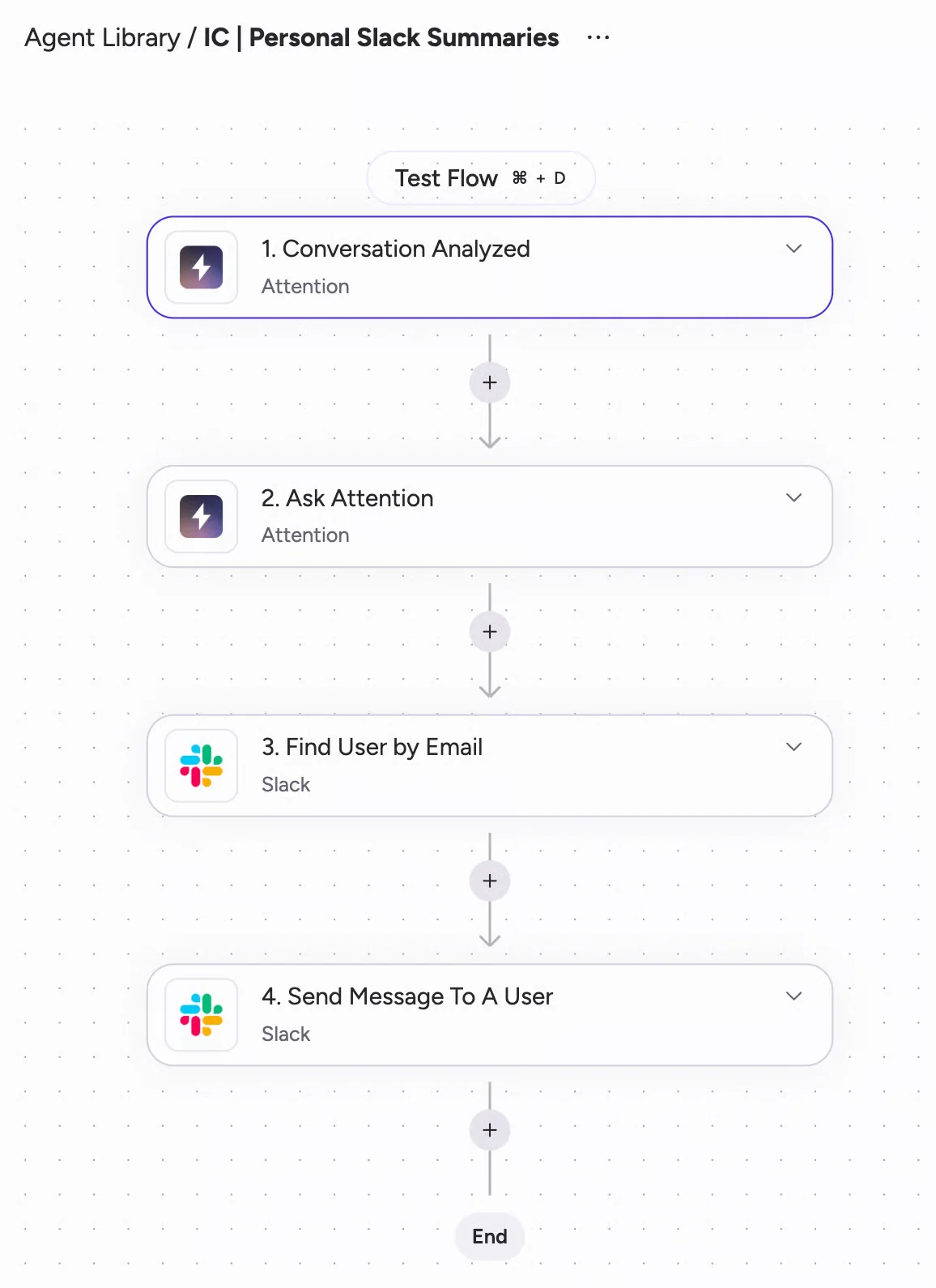
That flexibility is useful when your process doesn’t fit a predefined action. It also creates maintenance work. Once a workflow includes TypeScript and external API calls, someone owns software.
- Assign an owner for prompts, credentials, and code.
- Retest extraction when Salesforce fields or picklist values change.
- Keep test calls for common outcomes and failure cases.
- Track downstream API changes alongside workflow changes.
Whose permissions do Gong and Attention agents follow?
Gong’s permission behavior varies by agent. Attention’s external access includes administrative write operations, making the authorized role consequential.
| Access surface | Authorization and scope | Consequence for your team |
|---|---|---|
| Gong AI Data Extractor | Can analyze non-private calls and emails that the configuring business admin cannot open. | An admin can receive an extracted value without access to the underlying conversation. |
| Gong AI Builder | Excludes calls its creator cannot access. | The creator’s call access limits the material available to the agent. |
| Gong personal MCP connection | Each user connects with their own Gong credentials and existing permissions. | The external assistant doesn’t expand that user’s Gong visibility. |
| Attention administrative MCP access | An assistant holding the admin role can configure surfaces including users, roles, scorecards, and integrations. | The connection grants operational control as well as data retrieval. |
Gong AI Data Extractor and Gong AI Builder don’t share one permission-inheritance model. Your security review needs to account for derived answers, not just whether someone can play the source recording.
What do Gong and Attention write to Salesforce?
Both Gong and Attention support Salesforce output, including AI field updates. The useful distinction is the stored result and the controls around the write.
A summary, a vendor link, and a populated qualification field serve different purposes. Your reporting and Salesforce flows need the right one.
Which Salesforce records can Gong and Attention update?
Gong sends summaries and documents to Salesforce and offers AI field updates. Attention extracts values through field-specific prompts and writes those values through its Salesforce integration.
| Output | Gong | Attention |
|---|---|---|
| Conversation summary | Sends an AI summary and document into Salesforce. | Uses configurable prompts to extract conversation output into mapped CRM fields. |
| Structured field values | Supports AI field updates, with capability depth tied to the Gong applications in use. | Supports prompt-based field extraction and CRM sync. |
| Raw conversation text | The supplied Salesforce output route sends a summary and document rather than the raw transcript as stored text. | Raw transcripts remain accessible through Attention’s conversation store and MCP. |
We wouldn’t describe Gong as a product that can’t update Salesforce fields, it just does it in a superficial way, focusing mostly on storing the data inside Gong's knowlege.
How do Gong and Attention control Salesforce writes?
Attention supports automatic CRM sync and workflows that write after a rep action. Its documented Salesforce connection requires API Enabled, Customize Application, and Modify All Data permissions.
| Control | Gong | Attention |
|---|---|---|
| Extraction configuration | AI Data Extractor and field-update capabilities provide the extraction path. | Field-specific prompts include a test-against-call control. |
| Write initiation | The selected Gong capability and application determine the available workflow. | A conversation-finish trigger can write automatically; a configured rep action can initiate the write instead. |
| Record association | AI Activity Mapper handles CRM entity association. | Desktop recording depends on meeting-URL detection for calendar matching and opportunity assignment. |
Attention’s Modify All Data requirement matters because it grants record access beyond normal sharing boundaries. That’s a different authorization question from which fields you intend to populate.
We recommend starting interpretive field updates with human review. Let the extraction earn automatic writes through observed results, especially for stage changes or qualification judgments.
- Use permitted picklist values in the extraction prompt.
- Include an account with multiple open opportunities in the pilot.
- Exercise validation rules with values that should fail.
- Run the recorder alongside your existing activity logger and count the resulting meetings.
Salesforce activities have one WhatId relationship. One Event can relate to one opportunity, even when the conversation covers a renewal and an expansion.
What can you reuse outside Gong and Attention?
Attention exposes raw conversation data and broad actions through MCP. Gong’s MCP route exposes generated insights under its authorization and credit model.
Live access during a subscription and ownership after cancellation are separate requirements. An assistant connection gives you a retrieval path; it doesn’t preserve your archive when that connection ends.
What can external AI access through Gong and Attention?
Attention is the stronger fit when your external assistant needs raw transcripts and programmable actions against the conversation store.
| MCP capability | Gong | Attention |
|---|---|---|
| Returned content | Generated insights rather than raw transcripts through the MCP route. | Raw transcripts and full-text conversation search. |
| Operations | Retrieves Gong-generated intelligence for external assistants. | Read and write operations across conversation and administrative surfaces. |
| Authorization | Personal access uses each user’s Gong credentials and permissions. | Administrative operations depend on the authorized role. |
| Usage model | MCP activity consumes Gong credits. | MCP documentation specifies rate limits without a consumption charge. |
Raw transcripts let your own assistant inspect what someone actually said rather than rely on another model’s summary.
The same access expands the consequences of an authorized connection. An assistant that can change roles or integrations needs a different governance policy from one that can only retrieve a call.
How do you preserve Gong workflows when switching?
Preserve the consumers of your Gong archive before you move the files. Marketing, customer success, and enablement may depend on access paths that never appear in the sales team’s requirements.
| Asset | What the transition must preserve |
|---|---|
| Recordings and transcripts | Readable content, a durable destination, and a route for the people who use it. |
| Metadata | Meeting date, participants, owner, and account or opportunity relationships. |
| Clips and libraries | The training and reference workflows behind shared links and curated collections. |
| Prompts and scorecards | The evaluation criteria and expected outputs, rebuilt in the new configuration. |
| Workflow history | A record of prior actions where your operating or audit process depends on it. |
| Salesforce records | The stored values, relationships, and automations that must continue working after cutover. |
We see this dependency in switching conversations: sales uses the archive for next steps, marketing uses it to understand buying intent, and customer success uses it for requests and renewal context. Moving recordings alone doesn’t preserve that work.
- Name the teams and integrations that consume Gong data.
- Move a sample archive and exercise each access path.
- Rebuild the prompts, scorecards, and automations those teams need.
- Cut over recording and activity writes without creating duplicate Salesforce records.
When should Weflow join your conversation intelligence shortlist?
Add Weflow when your AI needs conversations, emails, activity history, contacts, and Salesforce context together, and you want structured outputs stored in Salesforce.
We combine Weflow Activity & Contact Capture, Weflow Conversation Intelligence, and Weflow Deal Intelligence & Forecasting as modular products. You can buy the capability you need without adopting a sales engagement product.
| Your requirement | Weflow capability | Boundary that matters |
|---|---|---|
| Reason beyond recorded calls | Ask Weflow AI reads conversations, linked Salesforce fields, contacts, and related activity history. | The available context follows the connected data and the user’s Salesforce permissions. |
| Populate qualification and operational fields | AI Field Updates map transcript extraction to Salesforce fields, with more than 250 pre-built prompts and custom templates. | Lookup relationship fields aren’t supported. |
| Control automatic writes | Reps can review suggested values beside current values, or admins can enable automatic updates. | Prompts and field mappings must fit your field types and validation rules. |
| Keep reusable conversation text | Salesforce recording records hold summaries and full transcripts. Activity and contact data also lands in Salesforce. | Video files and pipeline-history snapshots remain in Weflow’s infrastructure. |
| Deliver agent analysis | Agent Builder delivers conclusions through email and Slack. | Agent delivery and AI Field Updates are separate mechanisms. |
| Keep a specialist engagement stack | Compatibility Mode supports working alongside engagement tools. | Weflow doesn’t provide sales engagement or a live in-meeting assistant. |
Ask Weflow AI brings the linked revenue record into the answer. You can inspect sources across the opportunity, account, contacts, emails, calendar, and recordings.

For field extraction, you control the prompt and whether Weflow updates Salesforce automatically. That lets you keep judgment-heavy fields in review while automating clearer outputs.

We also have an operational limit worth knowing before rollout: a failed post-call summary or field write doesn’t automatically replay. The content remains in the recording record, but recovering the missed destination write requires manual work.
Keep Gong if its conversation analytics and established suite workflows decide the purchase. Choose Attention when programmable conversation workflows and raw-transcript MCP access matter more than a broader captured revenue record.
What do Gong, Attention, and Weflow actually cost?
Weflow Conversation Intelligence costs $39 per user per month, billed annually, with a 10-user minimum. Comparing that with Gong or Attention requires pricing the workflow scope, including applications, consumption, and maintenance.
| Cost driver | Gong | Attention | Weflow |
|---|---|---|---|
| Product scope | Seats attach to the core license and individual applications. | Conversation analysis and programmable workflow configuration form the operating scope. | Standalone products and named bundles have published seat prices. |
| Agent access | Capabilities span Foundation, Enable, Forecast, and Engage entitlements. | Custom prompts, branching, API calls, and code determine the workflow you maintain. | Agent Builder includes a free workspace allowance, then paid action tiers. |
| AI consumption | Gong credits add consumption exposure. Tracker breadth affects usage. | MCP uses rate limits without a documented consumption charge. | Recordings, transcripts, AI templates, and Ask Weflow AI usage aren’t token-metered. |
| Operating work | Manage application assignments, agent configuration, and credit usage. | Maintain extraction prompts, workflow logic, credentials, and custom code. | Configure templates, field mappings, permissions, and capture rules. |
| Platform and implementation fees | Part of the commercial scope of the agreement. | Part of the commercial scope of the agreement. | Weflow charges no platform or implementation fees for annual contracts above $10K |
Gong’s application model matters when one person needs capabilities across the suite. AI Composer and AI Tasker require Gong Engage; coaching and deal-review agents have their own application requirements.
Credit usage creates a second variable. Gong identifies AI Tracker configuration as a major consumption driver, so tracking every concept across every conversation has a budget consequence.
| Weflow option | Price per user per month, billed annually | Included scope |
|---|---|---|
| Weflow Conversation Intelligence | $39 | Conversation Intelligence, Mobile Copilot, Ask Weflow AI, and Agent Builder Free. |
| Revenue AI Foundation | $49 | Weflow Activity & Contact Capture and Weflow Conversation Intelligence. |
| Revenue AI Business | $59 | Activity & Contact Capture, Conversation Intelligence, and Deal Intelligence. |
| Revenue AI Enterprise | $79 | Activity & Contact Capture, Conversation Intelligence, Deal Intelligence, and Forecasting. |
Weflow includes free view-only licenses (up to one per recording license). Cross-functional access to recordings and insights doesn’t require a paid seat for every viewer.
Agent Builder pricing applies per workspace, not per user:
- Free: 25 agent actions per month.
- Growth: $299 per month for 500 actions.
- Scale: $999 per month for 2,500 actions.
- Enterprise: a custom action package.
Use one commercial scope across your finalists: recording seats, viewer access, required applications, expected automation volume, archive migration, and configuration ownership. Otherwise, a lower quote may simply buy less of the workflow.
How to choose between Gong, Attention, or Weflow
Gong, Attention, and Weflow fit different operating priorities. Choose the trade-off your team can sustain after implementation.
| Platform | Choose it when | Trade-off you accept | Reason to rule it out |
|---|---|---|---|
| Gong | Conversation analytics, account-level insight, and continuity across established suite workflows matter most. | Application-specific entitlements, credit management, and intelligence centered in Gong. | Your required external AI workflow depends on raw transcript retrieval through MCP. |
| Attention | You want programmable conversation-triggered workflows and external access to raw transcripts. | Your team owns more prompt, workflow, and code maintenance. | Your AI must reason over a broader CRM and activity record rather than conversation-derived data. |
| Weflow | You need captured activity and conversations together, with structured fields and transcript text in Salesforce. | You keep specialist engagement tools and configure the Salesforce mapping and governance. | Your organization doesn’t use Salesforce. |
See how Weflow captures activity, updates Salesforce fields from calls, and rolls up your forecast. Book a 30-minute demo.
Gong vs Attention: frequently asked questions
The remaining buying questions concern packaging, engagement dependencies, agent write-back, and operational security.
Can I buy conversation intelligence without a broader revenue suite?
Weflow Conversation Intelligence is available as a standalone product. Revenue AI Foundation combines it with Weflow Activity & Contact Capture when you also need email, meeting, and contact capture.
Gong supports conversation-intelligence deployments, but agent access spans separately licensed applications. Attention doesn’t offer conversation intelligence as a standalone product in the supplied packaging.
Can I keep my dialer when replacing Gong?
You can separate conversation intelligence from your engagement stack. Weflow works alongside specialist engagement products rather than replacing their sequencing and dialing functions.
Weflow imports Outreach dialer recordings. Our desktop app can also record softphone audio running through the computer, including Aircall or RingCentral; the rep starts that recording.
If Gong currently supplies your dialer and engagement workflows, those capabilities need their own replacement. Moving the recording archive doesn’t move the outbound motion.
Can Weflow agents write their conclusions into Salesforce?
No. Weflow Agent Builder delivers conclusions through email and Slack rather than writing them directly into Salesforce fields.
Weflow Conversation Intelligence uses AI Field Updates to extract transcript values and write mapped Salesforce fields. That’s a separate mechanism, with manual review or automatic updates.
Which security controls should I test in Gong and Attention?
Evaluate operational controls alongside formal compliance documentation. Gong has an established certification set, including SOC 2 Type II and ISO certifications; certification alone doesn’t explain how your team handles a deletion or access request.
- Consent: distinguish recording notice from the legal basis for processing and analysis.
- Residency and retention: identify where conversation data lives and how retention settings govern it.
- Deletion: follow a request through recordings, transcripts, exports, and downstream copies.
- Sharing: Attention snippet links default to access by anyone holding the link unless the sharer selects the company-only restriction.
- Derived access: include agent answers and exports, not just recording playback. Gong includes private scorecards in API and CSV exports despite their call-page visibility settings.
Make approval depend on the workflow your team will operate: a consent objection, a restricted user’s question, and a deletion request carried through to completion.