
Agent Builders Compared: Weflow, Attention, Momentum, and What Gong Ships Instead
Compare Weflow, Attention, Momentum, and Gong by what agents can read and where output lands.



You've sat through four or five demos now, and every one of them had a slide with the word "agent" on it. Every vendor site says they have an agent builder.
None of it tells you which claims are real, and the demos don't separate them either, because all four products can be described with the same sentence: build a multi-step agent, run it on a schedule, get output.
The comparison that actually separates them: what data can each vendor's agents reason over, and where does the output land.
That's the axis we'll compare on, and we'll be honest about it.
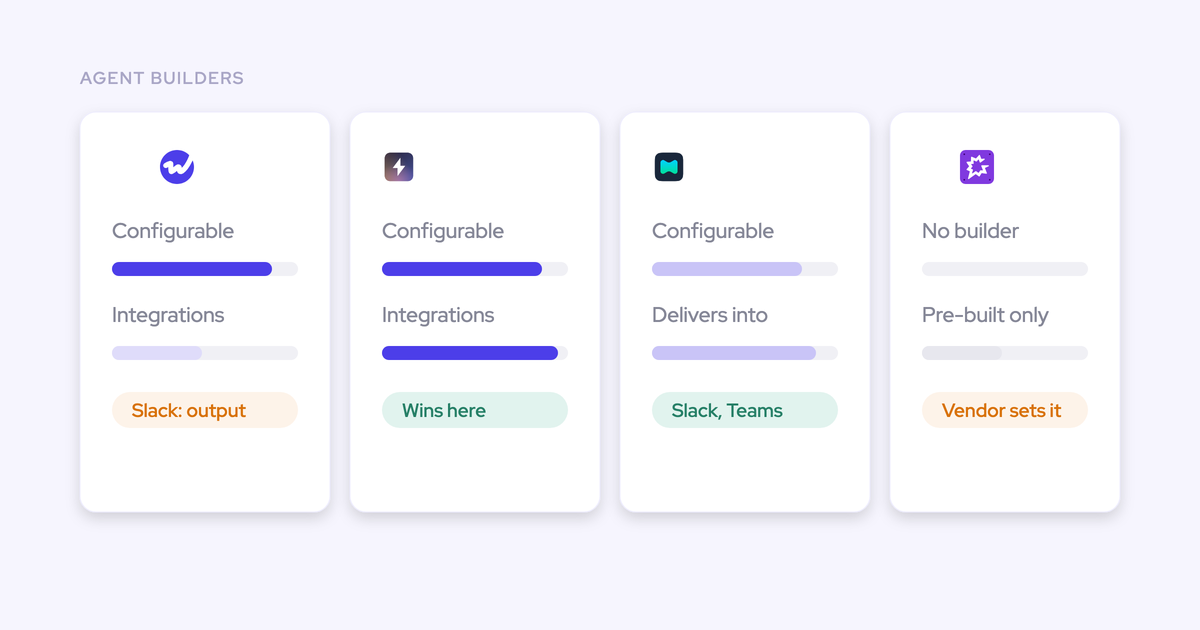
- Attention leads on builder flexibility and integration breadth.
- Momentum delivers into Teams as well as Slack.
- Gong's pre-built set is a defensible design choice.
- And Weflow, the Revenue AI Orchestration platform for sales, customer success, and RevOps teams aims for flexibility with the Agent Builder.
Why "do you have an agent builder" no longer separates vendors
AI hit the tooling layer of the revenue stack about two years ago. Agent builders are the newest thing in that layer, and the least standardized, so every conversation intelligence and revenue tool bolted one on and put it at the top of the homepage.
The result is that the claim carries no information. Four vendors say "agent builder" and mean four different products.
What makes this worse is that the demo doesn't fix it. Every vendor shows you the same happy path: a trigger, a prompt, output in Slack. You nod, you take notes, and at the end of the week your notes from four vendors are interchangeable.
The thing that would separate them, what the agent is actually allowed to look at, never comes up, because no vendor volunteers the boundary of their own data.
The comparison: what agents read, where output lands
Two criteria decide this, and you already believe both of them.
An agent is only as good as the data it can reason over. An agent running on an incomplete record doesn't fail loudly. It answers, the answer reads well, and nobody can tell which deals it silently knew nothing about. That's the quiet failure mode, and it's why the order matters: the data layer before the agent layer, every time.
An agent is only as useful as the place its output arrives. Nobody senior is logging into a fifth portal to read what your agent produced. Output has to land in Salesforce, in Slack, in an inbox, or as a PDF. We hear this framed the same way over and over:
Take those two criteria into your next demo and ask the vendor to answer them directly. Can your agent answer a question whose evidence lives outside a call? Where exactly does the answer go? Both questions have short answers, and the short answers differ by vendor.
Weflow vs Attention vs Momentum vs Gong at a glance
Six dimensions where these four genuinely diverge. Every cell is specific enough to check.
| Dimension | Weflow | Attention | Momentum | Gong |
| Builder model | Configurable builder: trigger, Salesforce lookup, prompt, delivery. Three starting templates meant to be rewritten | Configurable builder with general-purpose steps: routers, loops, storage, HTTP requests, custom Node.js and TypeScript | Multi-step workflow and agent builder at rough parity with Weflow's | No builder. Eighteen named pre-built agents in Agent Studio |
| What agents reason over | Weflow transcripts and live Salesforce records plus their attached activities, emails, calls and transcripts, with optional web search and uploaded documents | Transcripts, scorecard results and intelligence items. CRM fields filter which calls to read and receive extracted values, but are not analyzed | Conversation data written into Salesforce objects, then whatever Agentforce reads from the CRM | Gong's own conversation, deal and forecast data, scoped by each agent's design |
| Output destinations | Native Salesforce objects, Slack, email, PDF report | 200+ integrations claimed, including Salesforce, HubSpot, Slack, Gmail, Google Sheets, Notion, Snowflake, Linear | Salesforce fields, plus Slack and Microsoft Teams channels | Inside Gong, plus CRM writes and an MCP endpoint |
| Where the data lives | Native Salesforce objects you own. If you stop using Weflow, the data persists | Attention's own store, with raw transcripts retrievable over 68 MCP tools | Written into Salesforce objects and Data Cloud, which is the point of the product | Gong's cloud. Salesforce receives an AI summary and a document, not the raw transcript text |
| Pricing model | Seat-based. Agent Builder priced per workspace: Free tier with 25 agent actions a month in every plan, Growth $299/month for 500, Scale $999/month for 2,500 | No published pricing. No credits or metering documented anywhere; MCP usage is governed by rate limits | Sold only inside Agentforce packaging, as part of the Agentforce 1 Sales Edition bundle or as an add-on | Core Foundation licence plus per-application seats, plus AI credits pooled company-wide at 2,000 per paid core seat per year |
| Independence | Independent | Independent | Owned by Salesforce, positioned as the data foundation beneath Agentforce | Independent |
What each vendor's agents can actually reason over
Four products, four different points on the data-foundation axis. That position, not the builder interface, decides which questions you can put to each one.
Weflow: calls, emails, meetings, contacts, and live Salesforce records
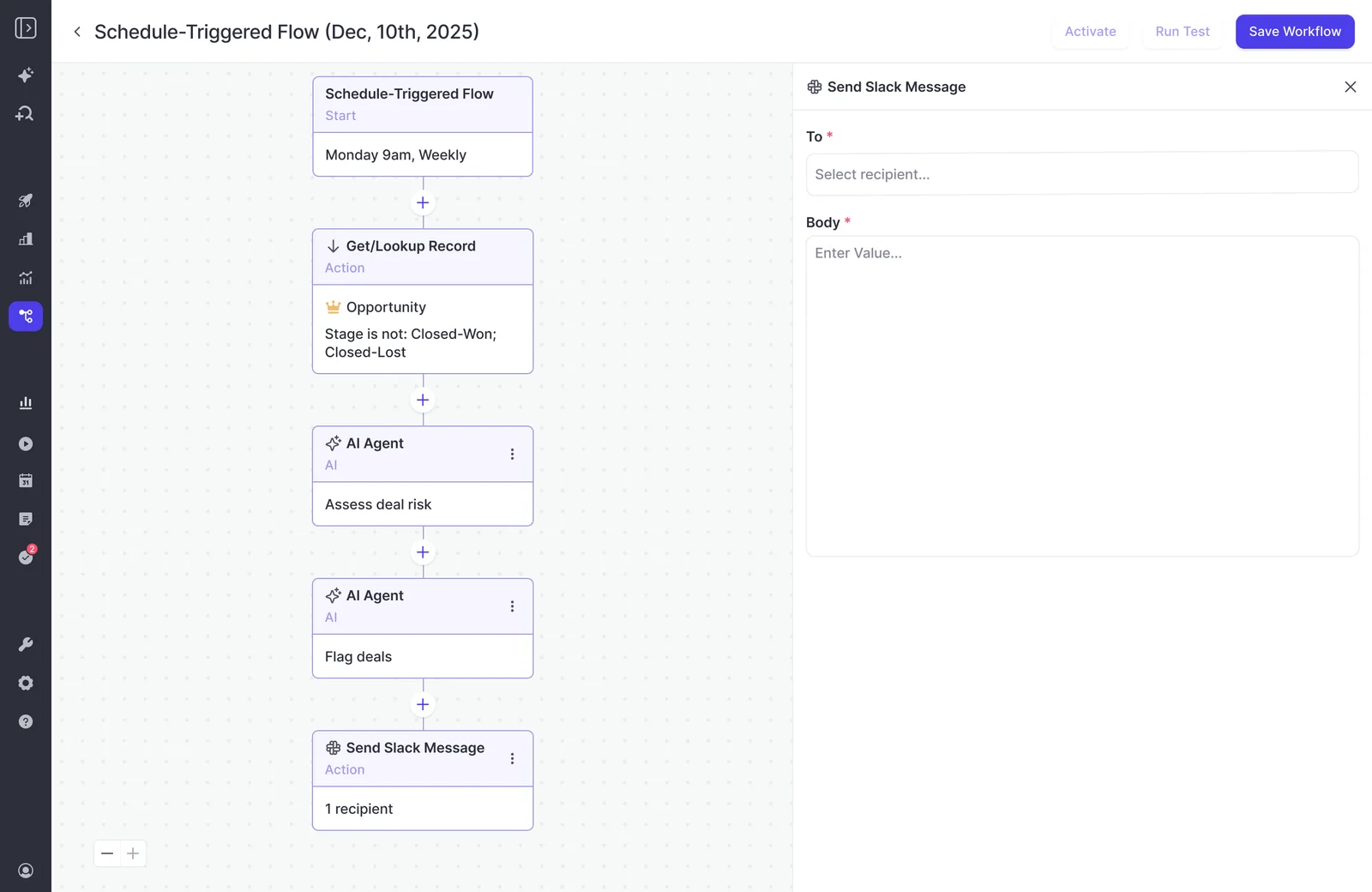
A Weflow agent is four steps, and the second one is the one that matters.
- Trigger: a schedule with day, time and timezone, or a record change.
- Lookup: reads Salesforce accounts, contacts, leads or opportunities with field-level filters. Live, not from a snapshot, so a change made a minute ago is in the run.
- Agent step: a free-text prompt. The agent reads the activities, emails, calls and transcripts attached to whatever the lookup pulled, can search the web, and can take an uploaded document such as a methodology guide as grounding.
- Delivery: email with an attached PDF report, a Slack message, or a write into a Salesforce field.
The lookup step is doing more work than it looks like. An agent that retrieves a constrained record set before the AI step produces materially better output than the same prompt run without one.
We see this on onboarding calls constantly: the same prompt that returns a strong answer in the chat returns an empty or unusable report from an agent with no lookup. Naming the object, the stage and the date window is what tells the model what it's allowed to look at.
Because the lookup runs against Salesforce rather than against a call archive, the questions aren't limited to what happened on a call. Pipeline movement, opportunity history, activity that was never a meeting: all of it is in scope, because it's all hanging off the record the lookup returned.
Attention: the conversation record, with the CRM as a filter
Attention's agents reason over the conversation record. That's the architecture, and it's a coherent one.
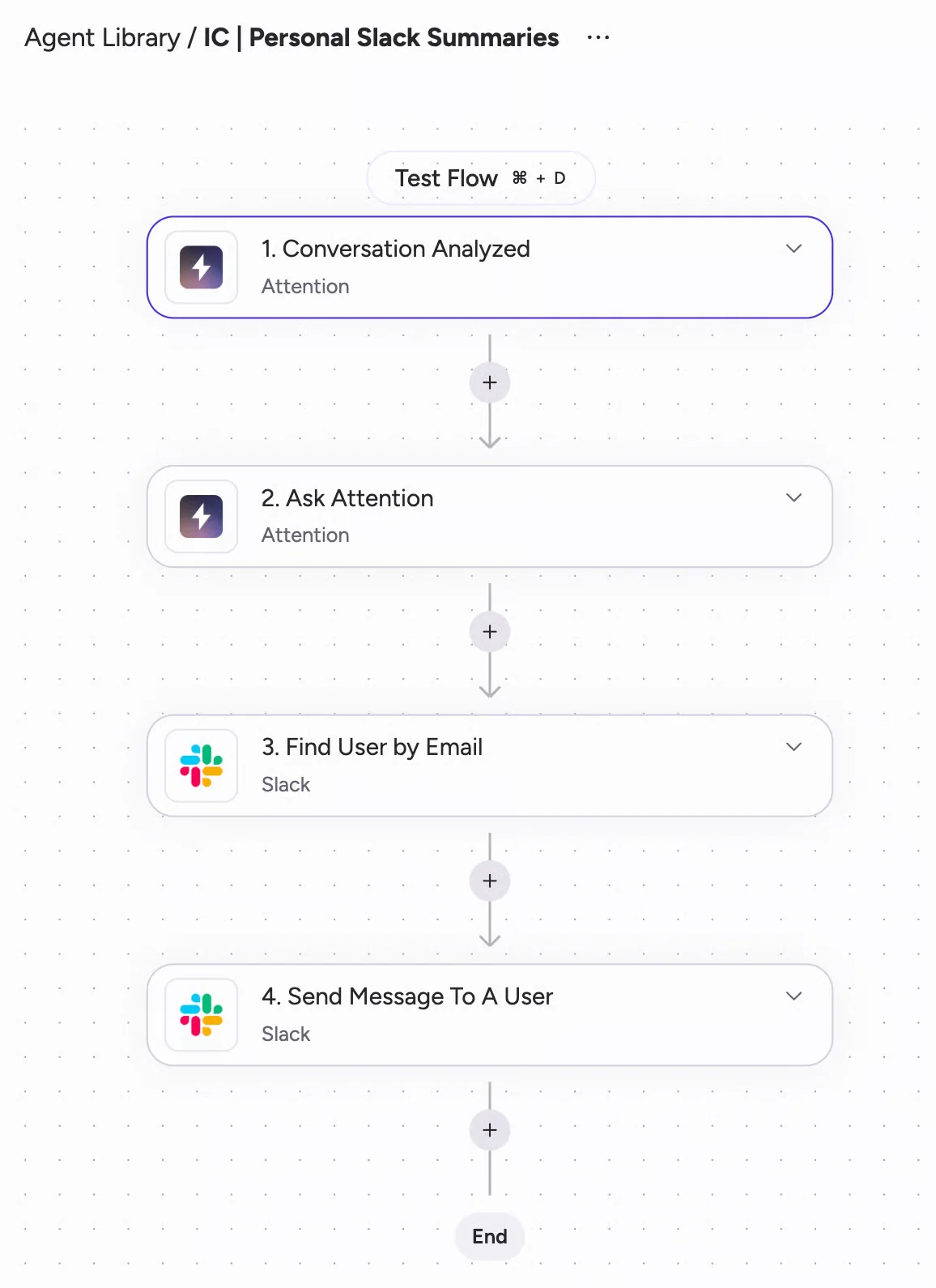
The Builder makes it concrete. A workflow is one trigger plus chained action steps, and the trigger that matters is Conversation Analyzed, which fires when a call finishes processing. Its payload is what the workflow gets to think with:
- The conversation, its owner, and the associated deal and linked CRM records
- The AI-extracted intelligence items
- The scorecard results, including their summary text
The reasoning steps, Ask Attention, or Ask OpenAI and Ask Anthropic if you'd rather run your own provider over your call data, take that conversation data and summarise it, extract from it, or draft the follow-up.
Plenty of things can start an Attention workflow: schedules, a Salesforce record update, an inbound webhook, an imported email. But starting a workflow and feeding its reasoning are different jobs, and only conversation data does the second one. CRM fields appear in two places, and neither is the reasoning side:
- On the retrieval side, they filter which calls a step reads.
- On the write side, extraction prompts fill them with values pulled from the call. The widest scope an extraction can take is one deal's calls: a deal-scoped field summarises across every conversation linked to the opportunity, and that's the ceiling.
So a question whose answer lives in opportunity history, in pipeline movement, or in an activity that never touched a call can't be asked of Attention at all. This isn't a defect. Attention is a conversation database with CRM wiring, built deliberately that way, and it's excellent at the thing it's built for. It just decides which questions are available to you.
Momentum: the Salesforce data layer inside Agentforce
Momentum's builder reaches rough parity with Weflow's. You can build multi-step workflows in minutes, deploy agents to research, analyze and generate, and none of that will separate the two products.
What separates them is upstream. Salesforce acquired Momentum and now positions it as the data foundation beneath Agentforce Sales, not as a conversation intelligence product.
Momentum's own design says the same thing. It writes conversation output into Salesforce objects rather than holding it. It runs on top of whatever you already record with, including Gong, Chorus, Clari Copilot and Attention, because the recorder isn't the point. And it ships no MCP server of its own, because Salesforce's hosted one already answers questions against the org.
So what Momentum's agents reason over, in the end, is the CRM Momentum populated, read by whatever Agentforce sends at it. Which makes the evaluation a platform decision rather than a product one.
Gong: eighteen pre-built agents bounded by Gong's roadmap
Gong ships pre-built agents rather than a configurable builder. Agent Studio holds eighteen named agents in four groups, covering conversation intelligence, deals and forecasting, workflow automation, and content creation.
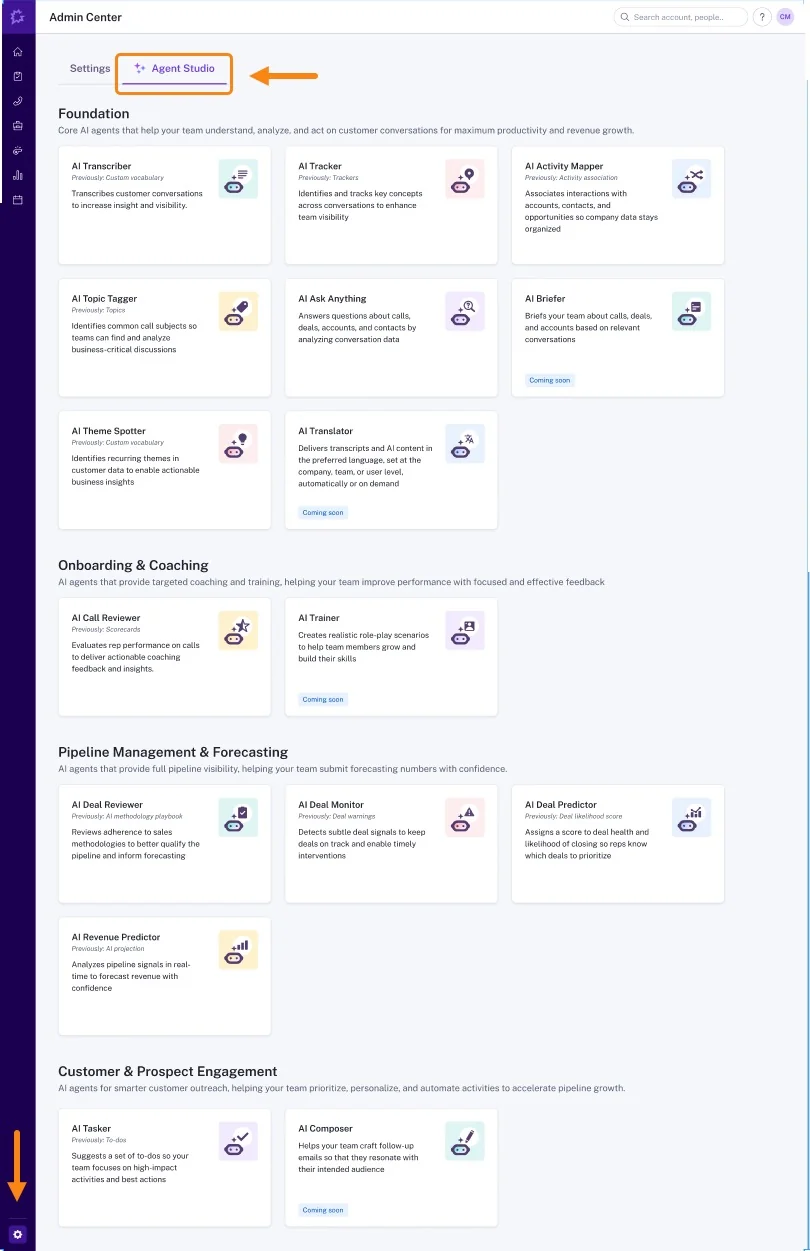
Read the catalogue carefully and a few things stand out. Several agents are long-standing Gong features renamed:
- AI Transcriber is the custom vocabulary list.
- AI Tracker is smart trackers.
- AI Activity Mapper is CRM entity association.
- AI Topic Tagger is topic models.
AI Builder is the one most likely to mislead you on a scan. It doesn't build agents. It generates content assets: scorecards, enablement documents, battlecards, FAQs and call scripts, drawn from a subset of your calls.
The consequence of the pre-built design is simple. What an agent can be asked to do is bounded by what Gong built, so the question your team needs to ask about your own motion may not be on the list.
Where Attention, Momentum, and Gong are the stronger choice
Each of the other three wins somewhere real. Here's where.
Attention: builder flexibility and integration breadth
Attention's builder is more flexible than ours, and it isn't close on the general-purpose steps.
Routers branch on if/else logic, loops iterate over lists, storage aggregates output across steps, an HTTP step calls any API, and a custom code step runs Node.js and TypeScript with named inputs from earlier steps. That's a general automation platform, not a conversation intelligence add-on.
The destination set is wider too. Attention claims more than 200 integrations, with workflow steps acting directly inside Gmail, Google Sheets, Google Docs, Salesforce, HubSpot, Pipedrive, Asana, Airtable, Notion, Linear, Snowflake and Slack. Its workflows can also call Ask OpenAI or Ask Anthropic as steps, so a company standardized on one model provider runs its own model over its call data.
Two honest caveats. A workflow with code in it is software, and it needs someone who can maintain it, which is a real cost on a two-person RevOps team. And almost nothing in Attention ships pre-built: scorecards start empty, email templates hold an instruction rather than copy, every CRM field extraction is a prompt you write. A team with strong operations gets a sharp system fast. A team without one gets a blank page.
Choose Attention if your goal is automating what comes out of sales calls, into the widest possible set of destinations, and you have the operations muscle to write the instructions.
Momentum: delivery into both Slack and Microsoft Teams
Momentum pushes field automations, coaching output and call clips into Slack and Microsoft Teams channels, and its stated mandate is full automatic execution with no visit to its own interface. No other tool in this comparison matches the Teams side.
That removes the objection that has killed Slack-native tools in Microsoft-first orgs for years. If your company runs on Teams, this is a genuine edge and nobody here beats it.
Momentum's governance design is also unusual in this category, and worth crediting. Smart Quarantine screens every transcript across eight categories of sensitive content and pauses the pipeline entirely where it has high confidence, notifying the meeting host before anything gets distributed. Consent is collected before the meeting by rewriting the calendar invite. Both need a Momentum representative to switch on and an AI licence, but they're built into the product rather than left to policy.
Choose Momentum if you're a Microsoft-first org that wants output in Teams, or you've already committed to the Agentforce path.
Gong: pre-built agents that need no configuration
There's a real argument for the curated set, and it's the argument a small team should take seriously.
Writing good agent prompts is work. A prompt that doesn't name whose competitors, whose deals and which dates it means will answer from the wrong context. The prompts that work are long and specific: the entity, the period, the constraints, and what to exclude. That's not a sentence somebody types between meetings.
Gong's eighteen agents skip that entirely. They cover the common questions, they're already written, and nobody on your team owns agent design.
Choose Gong if you're already in a Gong estate, the common questions are the ones you need answered, and you'd rather have zero build effort than a higher ceiling.
Where Weflow pulls ahead: the full revenue record, owned output
Weflow agents reason over the complete revenue record, not just the conversation record, and that changes the class of question you can ask.
The plays our customers actually run are whole-book plays, and they're only possible because the lookup runs against Salesforce:
- Monthly closed-lost analysis that reads every lost opportunity in the period and surfaces which competitors appeared and which objections recurred. Not the reason code a rep picked from a dropdown under time pressure, which is almost always "price" and almost always wrong.
- Monday morning pipeline pass that names the deals needing action and pre-writes the follow-up.
- Weekly risk scan before the forecast call, reading forecast category and close date across the quarter.
- Scheduled executive report delivered as a PDF in an inbox on a schedule, with an agent that can write its assessment into a Salesforce field you created so it reaches the dashboards the board reads.
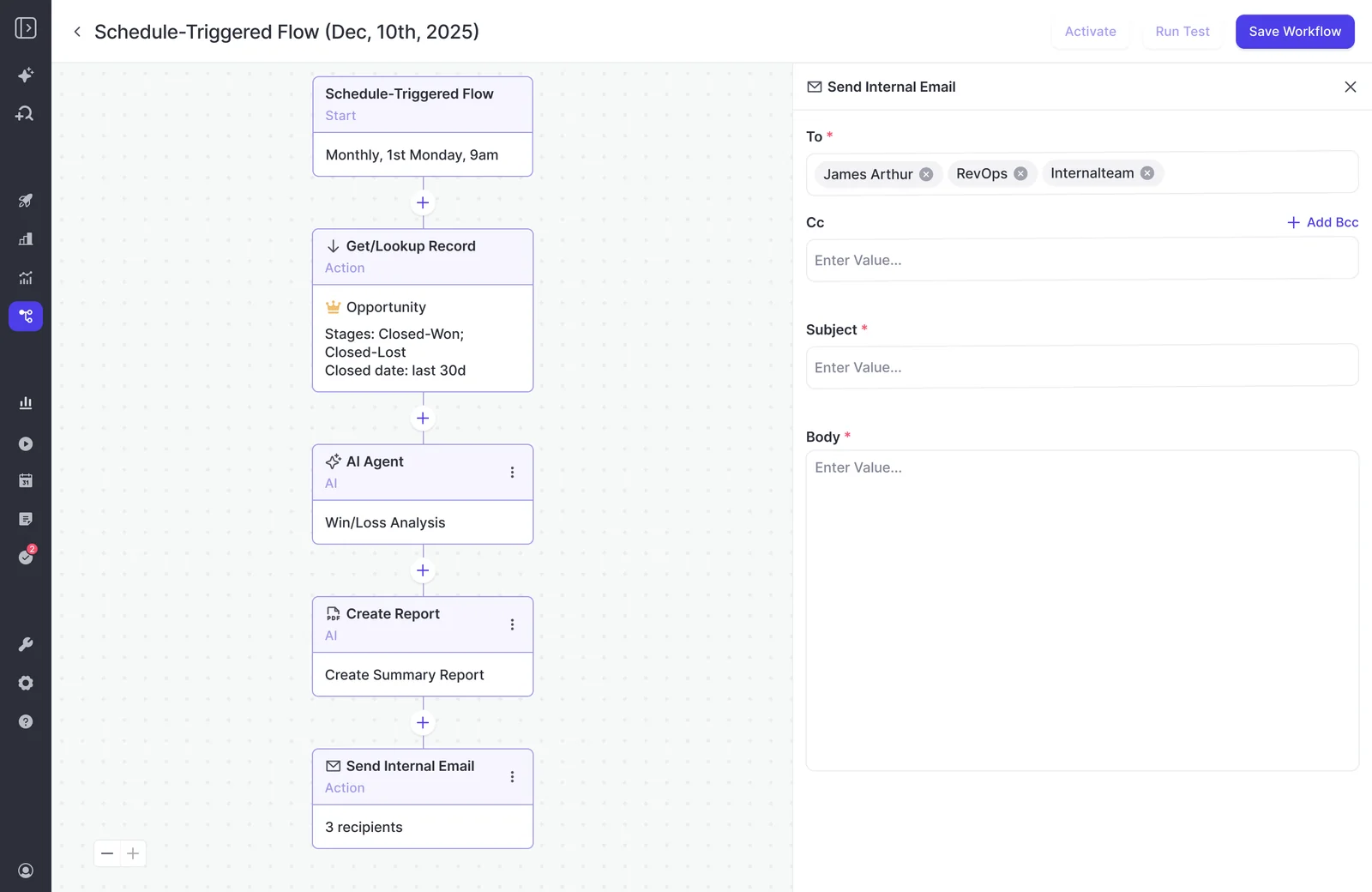
On the fan-out problem: this is the one that kills scheduled reporting programs. Ops gets asked for a weekly pipeline report per account manager, finds each workflow is scoped to one set of record owners, and realizes two people would have to build 150 workflows. So the reports go out generic or not at all.
Weflow's delivery step takes teams and roles as recipients, not just named individuals, so a report definition can be assigned to a team rather than rebuilt per person.
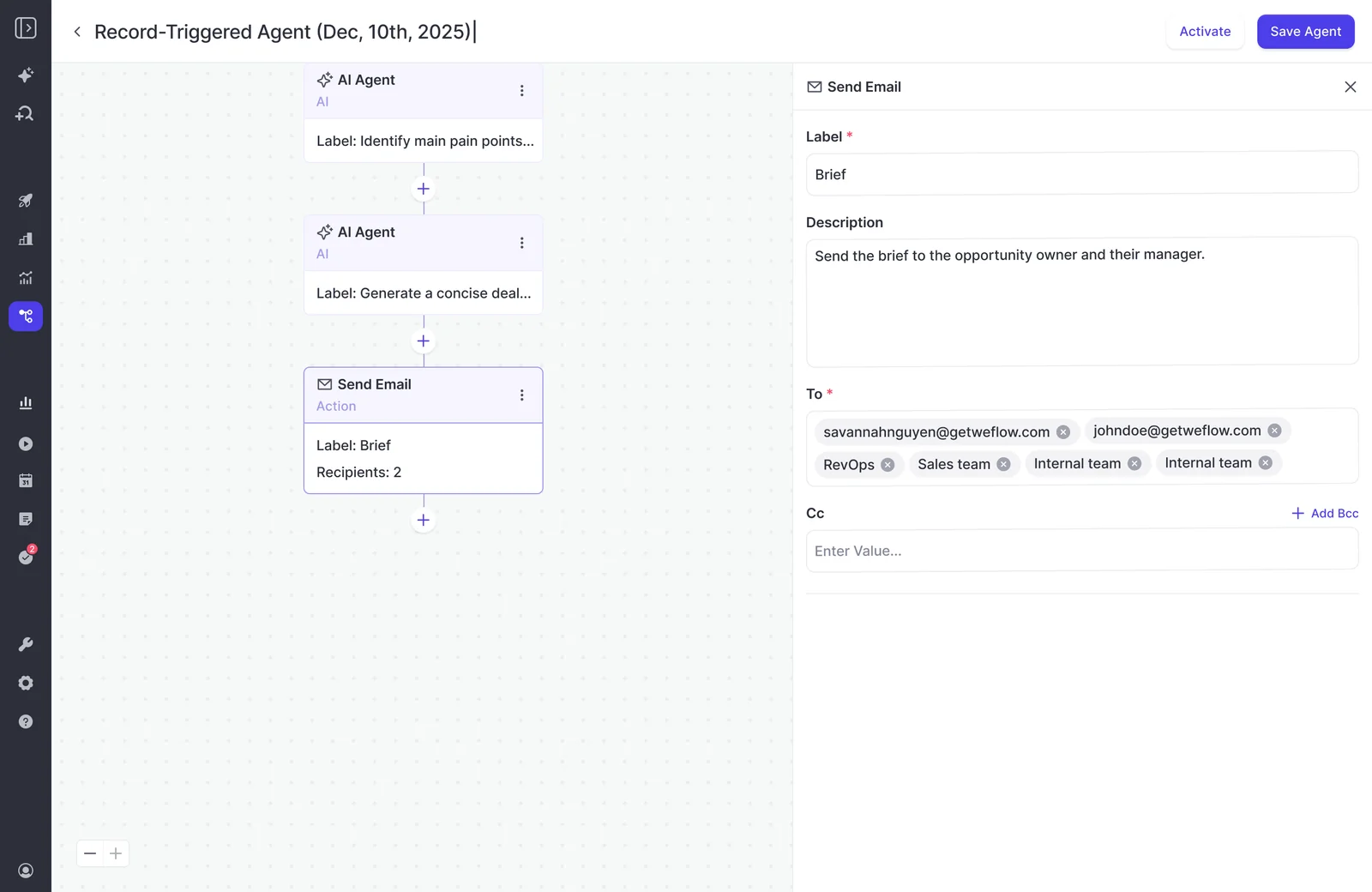
Then there's what happens to the output. Everything Weflow writes lands in native Salesforce objects.
"We use the native objects in Salesforce. If you ever stop using Weflow, the data persists. It is your data. That is very, very important in everything we do."
— Janis Zech, Co-founder and CEO, Weflow
That matters more at renewal than at purchase. Anyone who's tried to leave a conversation intelligence vendor knows the shape of it: years of calls, objections and coaching examples living inside the product you're trying to escape.
The last piece is control, and it's the thing this reader asks for most directly. Kyle Norton, CRO at Owner.com, put the objection better than we do:
"I wanted control. And I really felt like Gong was a walled garden, and they wanted to have you do everything that you wanted to do inside that platform. And I didn't want to do that. I wanted to write my own prompts, build my own workflows. I wanted to have that trigger into Salesforce or Slack or whatever surface we wanted."
— Kyle Norton, Chief Revenue Officer at Owner.com
Weflow's builder is configurable end to end: you write the prompt, you set the trigger, you choose the destination. Three templates ship, and they carry deliberately basic prompts meant to be rewritten.
Where Weflow falls short today
Three edges, stated plainly.
- Slack is an output destination only. Weflow agents deliver into Slack, and the Slack app posts recording summaries and forecast-call reminders. Weflow cannot read Slack messages as an input source. If deal context lives in your Slack channels, an agent can't reach it.
- Agent configuration is admin-only. Only admins can configure agents in the current release. Granting an individual non-admin the permission is coming but not shipped. That means every agent idea in the business queues behind whoever holds admin.
- Agent Builder is our newest and least mature product. Activity & Contact Capture, Conversation Intelligence, and Deal Intelligence & Forecasting are established. Agent Builder has been rolling out to existing customers and is not at that level yet. Data-driven action orchestration is not fully solved by anyone, including us.
One more worth knowing before you configure anything: predefined AI Playbooks re-evaluate every three hours, but only for opportunities created or changed after the playbook was configured. Deals that predate it stay empty until someone regenerates them. Agent lookups read Salesforce live, so agents don't have this problem, but the playbooks do.
What each agent builder actually costs
The four pricing models are as different as the architectures, and this reader has learned to read AI pricing for the second number.
| Tool | Pricing model | What's published | What it means for the invoice |
| Weflow | Seat-based, with Agent Builder priced per workspace | Bundles from $49 to $79 per user per month. Agent Builder Free tier with 25 agent actions a month in every plan; Growth $299/month for 500 actions; Scale $999/month for 2,500 | Predictable. Ask Weflow AI, AI summaries and AI field updates are in the seat and never metered. Agent actions are the one variable line |
| Attention | Not published | Nothing. No pricing page, no pricing entry in the site navigation, no credits or tokens documented in the product docs. MCP usage is governed by rate limits | Unknown until you ask. That's an absence of evidence, not a hidden meter, and the only way to find out is a call |
| Momentum | Salesforce packaging only | Sold inside the Agentforce 1 Sales Edition bundle (Momentum plus Agentforce for Sales plus Slack Enterprise+) or as an add-on to Agentforce for Sales | There's no route to buying the capture and field-writing layer on its own. Budget for an Agentforce conversation, with whoever owns the Salesforce contract |
| Gong | Mandatory core licence plus per-application seats, plus pooled AI credits | Gong Foundation is required; Enable, Forecast, Engage and Data Cloud are bought on top. Each paid core seat contributes 2,000 credits a year to a company-wide pool that resets annually | The eighteen agents span four separately purchased packages, and seats are per application. One person needing agents across all four groups costs four seat prices |
Two things worth pulling out of that table.
First, Gong's credit pool is company-wide, not per person. Heavy use by a few people consumes the allowance everyone else depends on, and you can't size the pool to the teams that need AI without buying more seats. Purchased top-ups expire at the end of the term.
Second, Gong's own guidance is that AI Tracker configuration drives credit consumption hardest, and its recommended remedy is to unpublish trackers that no longer provide value and filter the rest by team, user, account type or deal stage. That makes the breadth of your conversation tracking a budget decision.
Our position on this is deliberate. Everything at Weflow is priced per seat except Agent Builder, which is the only consumption-priced product, because it's the one that genuinely consumes tokens at scale. As Philipp puts it:
"We want to make sure that you have predictable pricing, and it is very, very hard to achieve in the age of AI."
— Philipp Stelzer, Co-founder and Chief Product Officer, Weflow
Choose Weflow, Attention, Momentum, or Gong: a decision guide
- Choose Weflow if you want agents that reason across every deal in Salesforce, not just the calls, with output landing in native Salesforce objects you keep, plus Slack, email and PDF. Best fit: a mid-market Salesforce team that wants one platform covering capture, conversation intelligence and forecasting, at a predictable seat price.
- Choose Attention if the job is automating call follow-through into the widest possible destination set, you want general-purpose workflow steps including custom code, and you have the operations capacity to write every prompt and scorecard from scratch.
- Choose Momentum if you're Microsoft-first and need output in Teams, or you've already committed to the Agentforce path and want the conversation data foundation that feeds it. Understand that you're opening a Salesforce commercial conversation, not buying a point solution.
- Choose Gong if you're inside a Gong estate, the common questions are the ones your team needs answered, and you'd rather have curated agents that need no configuration than a builder nobody has time to run.
One caution that applies whichever way you go: this reader is right to be suspicious of a vendor that claims everything. Ask each of the four where they started and where they expanded to. A vendor equally good at everything has told you nothing you can check.
Walk through the product yourself, no call required.
Frequently asked questions about revenue AI agent builders
Can non-admins build agents in Weflow?
Not today. Configuring agents is admin-only in the current release, which is a deliberate governance choice given how much data a single agent can reach and how much it can do in one run. Granting the permission to an individual non-admin is on the roadmap but has not shipped.
Can I vet agent output privately before executives receive it?
Yes, and it's a normal way to run a rollout. The delivery step is configurable, so an admin sets themselves as the only recipient, runs the agent for a cycle, tunes the prompt, and adds senior recipients only once the output holds up.
We hear the reasoning behind this constantly, and it's sound: sending an AI-generated report to a technical CEO is a one-shot credibility event, and there's no second first impression.
Why not build this with Claude connected to Salesforce?
You'd get a recognizable share of the output, and it costs almost nothing to try, which is why it's a genuine alternative rather than a strawman. An assistant connected to Salesforce plus transcripts from your conferencing tool reproduces some of this using seats you already pay for.
What the build doesn't produce is the complete activity record underneath it, capture reliability when a meeting gets rescheduled or nobody recorded it, the security posture procurement will ask for, or anyone to maintain it when it breaks.
The vendor case here is about the foundation and the assurance, not about the AI.
If Momentum is Salesforce, is this just the Agentforce decision?
Essentially, yes. Momentum is sold only inside Agentforce packaging, so evaluating it means evaluating Salesforce's native path and opening a commercial conversation with whoever owns the Salesforce contract.
The relevant comparison then becomes Weflow versus Agentforce, where the differences are data location and pricing model: Weflow keeps data in your Salesforce at a predictable seat price, Agentforce stores it on an AWS instance outside the CRM and prices by token.
Do Weflow agents read historical deals or only new ones?
Agent lookups read Salesforce live, so historical opportunities are fully in scope. Point an agent at every closed-lost deal from the last twelve months and it reads them.
The known gap is elsewhere: predefined AI Playbooks score only opportunities created or changed after the playbook was configured, so existing pipeline stays blank until those records are regenerated.
Which destinations can Weflow agents deliver output to?
Native Salesforce objects, Slack, email, and PDF reports attached to email. Slack is delivery-only today, so an agent can post into a channel but cannot read Slack messages as an input source.











