

Cirrus Insight vs Einstein Activity Capture: Salesforce Email Sync Compared (2026)
Decide between Cirrus Insight vs Einstein Activity Capture for Salesforce email sync in 2026.




If you're reading this, a capture change has probably landed on you. The legacy Salesforce Outlook plugin is going away, Einstein Activity Capture is dropping connections in production, or you've hit the 100-user Standard ceiling. You'll spend the migration effort either way, so the real question is where you land.
Here's the short verdict. Neither obvious option handles the cases that fail silently.
- Einstein Activity Capture is automatic, but it misses two things. Under Sync Email as Salesforce Activity, it doesn't log email from senders who aren't in Salesforce yet. On accounts with several open deals, it picks the opportunity through contact roles and account-level tiebreakers.
- Cirrus Insight gives reps real control from the inbox, but that control depends on reps using it. Its background sync only logs email when a contact or lead already exists, and Smart Link maps to whichever record was touched most recently.
- Weflow Activity & Contact Capture is a third path. Capture runs server-side with no rep action, and an optional inbox layer lets reps correct a mapping once per thread.
If you're under 100 users on Enterprise, your accounts carry one open deal at a time, and your contact roles are maintained, stay on Einstein Activity Capture Standard. Every Einstein Activity Capture fact below reflects setups made after the Summer '25 release, not the older off-org behavior.
Weflow, Cirrus Insight and Einstein Activity Capture at a glance
The Einstein Activity Capture column reflects setups made after Summer '25, where Sync Email as Salesforce Activity is the default.
| Capability | Weflow Activity & Contact Capture | Cirrus Insight | Einstein Activity Capture |
|---|---|---|---|
| Automatic email capture | Captures inbound and outbound mail server-side through a central app in Microsoft 365 or Google Workspace, on any device, with no rep action. Logs only mail that matches a Salesforce record. Misses personal accounts and deliverability subdomains. | Background Email Sync ($5) logs by admin rules, but only when an existing contact or lead is on the email. Runs on a 15-minute cycle, or 5 minutes with Fast Sync. | Captures sent and received mail in the background through org-level or user-level OAuth. Reps on our calls estimate it logs about 80% of activity, and connections drop without explanation. |
| Automatic meeting capture | Logs every external meeting to the Event object, whether or not it was recorded. Skips entries with no attendees and private entries. We recommend one-way calendar-to-Salesforce sync. | Calendar Sync ($11) writes Events with Salesforce attendees as invitees, in one or both directions per user. Links an existing Event only on an exact subject, start and end match. | Syncs meetings to Event records with up to 50 matched attendees. When the organizer sits outside the sync configuration, each syncing attendee gets their own copy. |
| Matching to the right records | Fixed order: address, contact role, then the single open opportunity. With several open, it weighs owner, mailbox owner and stage. Never logs to a closed opportunity, and falls back to the account when the evidence doesn't settle it. | Looks up every address against contacts and leads. Smart Link relates the email to the most recently created or edited record of one object type. Thread-level mapping needs a rep to file the first email by hand. | Contact roles first, then account-level tiebreakers. The rule is editable in the Activities: Match Email to Records flow or with Apex. |
| Automatic contact creation | Creates contacts from To and CC when a rep sends. Can be restricted to existing accounts, capped per event and deduplicated against secondary email fields. Never creates leads. | Partial: Email Sync never creates contacts. A rep adds them from the sidebar, with the account and signature details pre-filled. | Partial: syncs contacts from address books only. Contact Auto-Creation is unavailable under Sync Email as Salesforce Activity, and email from unknown senders isn't logged. |
| Inbox extension or add-in | Optional Outlook add-in and Chrome extension for Gmail that show which records an email will log to. | Chrome extension for Gmail and an Outlook web add-in, including Outlook mobile. The sidebar creates and edits Salesforce records. | Not offered: no inbox panel. Salesforce sells the Outlook and Gmail side panel as a separate product. |
| Rep review and correction | Reps re-map once per thread, untick logging per email and move already-logged email. No mapping control from a phone. | Partial: reps choose what they file by hand, but can't re-map email the background sync already logged. | Reps correct the match on the email record inside Salesforce, and the flow won't overwrite it. Users can exclude addresses and domains. |
| Integrations | Partial: Salesforce, Gmail, Google Calendar, Outlook, Zoom, Teams, Meet, Slack and the Outreach dialer. No native warehouse connector. | Partial: Salesforce, Gmail, Outlook and Teams, plus Zoom, Teams and Google Calendar links for scheduling, Zapier and scheduling webhooks. | Partial: Microsoft 365, on-prem Exchange and Google Workspace, alongside Salesforce Inbox, Einstein Conversation Insights and Agentforce. No third-party catalogue. |
| Access from AI assistants (MCP) | Official read-only MCP connector for Claude and ChatGPT, switched on per workspace with a separate transcript toggle. | Not offered: preview REST API and webhooks only. | Partial: no MCP server of its own. Salesforce Hosted MCP Servers reach its records and need Flex Credits. |
| Raw data access | Native Salesforce records, plus REST API bulk export as JSON or CSV. No native Snowflake, Databricks or BigQuery connector. | Partial: activity lands on standard Salesforce objects. Preview REST API, no direct warehouse connection. | Partial: Task and EmailMessage records are reachable through reports, SOQL and the APIs. Its own activity store isn't exportable. |
| Pricing | Published: $19 per user per month, billed annually, 10-user minimum, 12-month term. | Published, à la carte: sidebar, email and calendar sync total $27 per user per month. Fast Sync adds $5. | Standard is included in Starter, Pro Suite, Professional and Enterprise. The full version comes with Unlimited, or with Sales Engagement at $50 per user per month. |
Why you're choosing between Cirrus Insight and Einstein Activity Capture
You're choosing between these two because one is the default Salesforce hands you and the other is the mid-market inbox tool everyone names next. On our calls, the switch usually starts with one of three triggers:
- The plugin sunset. Salesforce is retiring its Outlook add-in and moving those teams onto Einstein Activity Capture, a tool many of them never chose and already distrust.
- Einstein Activity Capture failing in production. Connections drop, part of the activity never lands, and reps get blamed for the gaps.
- The 100-user and contact wall. Standard stops being free past 100 users, and teams discover it never creates the contacts nobody has time to add.
The pair you end up comparing looks like this:
| Dimension | Einstein Activity Capture | Cirrus Insight |
|---|---|---|
| How capture runs | Automatically in the background | Background sync plus manual filing from the sidebar |
| Inbox surface | None of its own | Full sidebar in Gmail and Outlook |
| New stakeholders | Not logged until someone creates the contact or lead | Not logged until a rep adds them from the sidebar |
| Multi-opp accounts | Contact roles, then account tiebreakers | Most recently touched record, or a rep files the thread |
| Who carries the gaps | The admin, after the fact | The rep, in the moment |
Both options leave a problem only a person can resolve. Salesforce relates an activity to one opportunity or one account, never both, so no fully automatic rule can settle which of two open deals an email belongs to. Every tool either guesses, falls back to the account, or asks a human.
What Summer '25 fixed in Einstein Activity Capture, and didn't
Summer '25 fixed the biggest complaint about Einstein Activity Capture. Setups made after that release write captured email as native Task and EmailMessage records, so reports, Flow, SOQL and the APIs can use it.
We made the old argument ourselves for years, that Einstein Activity Capture data isn't real Salesforce data. For setups that haven't switched, it still holds. For new setups it no longer does, and an admin who tests in a sandbox will catch anyone repeating it.
Here's what changed and what didn't:
| Area | Pre-Summer '25 setups (not switched) | Sync Email as Salesforce Activity setups |
|---|---|---|
| Where email lives | On the Activity Platform only. It shows on the timeline but isn't available to reports or other platform tools. | As Task and EmailMessage records in the org |
| Reports, Flow and SOQL | Not available for email | Available, like any other Salesforce data |
| Activity Platform processing | The only copy of the email | Email still passes through it and is held there for up to 30 days |
| Activity 360, Activity Metrics, Activities Dashboard | Kept until the org switches or the retirement lands | Not available. Reporting moves to standard activity reports with Email Message as the primary object |
| Contact Auto-Creation and Suggestions | Available | Unavailable |
| Past email on switching | No backfill until the org switches | Switching brings in up to six months of past email |
Meetings were never the issue: Einstein Activity Capture stores them as Event records in the org either way.
The tradeoff is the one most admins miss. The default that made email reportable also switched off contact auto-creation. Older setups also have a rebuild ahead, because the objects behind Activity 360 retire with it.
Test email sync on the three cases that fail silently
Test capture on what it drops without telling you, not on its feature list. The cases that hurt are the ones where nothing errors and a live deal simply looks dormant.
"...this kind of checkbox item a lot of companies offer, but very few do very well. So, yeah, the devil is really in the detail as always."
Run these three tests in your sandbox:
- Coverage. Find out whether capture connects centrally or rep by rep. Then find out what happens when a rep's token expires or they ignore a re-authentication prompt, and whether anyone gets told.
- The unknown sender. Email someone who isn't in Salesforce yet. Check whether they become a contact and whether their email logs.
- The multi-opp account. Email a contact on an account with a renewal and an expansion open. See which deal the email lands on, who decided, and what happens when the tool can't tell.
Then probe the edge cases:
- one contact on two open opportunities
- one address that sits across several accounts
- a rep sending from personal aliases
One admin described the multi-opp failure to us like this:
"If there are multiple opportunities, they just don't know where to map it and just randomly assign it to something. This is not acceptable."
A silent wrong mapping is worse than no mapping. Nobody sees the error, and it gets built into reports and forecast calls.
How Weflow Activity & Contact Capture syncs email and meetings
Weflow is the Revenue AI Orchestration platform for sales, customer success, and RevOps teams. Weflow Activity & Contact Capture is its capture layer, built for Salesforce teams. It runs server-side, writes into native Salesforce objects, and adds an optional inbox layer for reps who want to see or correct a mapping.
Weflow captures every enrolled mailbox server-side, no rep login
Weflow captures email and meetings at the mail tenant level, so coverage doesn't depend on any rep staying connected. You install one central app in Microsoft Entra or Google Workspace, and Weflow captures inbound and outbound mail and calendar meetings from every enrolled user.
That covers mail sent from a phone, a browser or a desktop client alike. Writes go to Salesforce through the integration user almost immediately, not on a batch cycle.
A rep who never logs in is still captured. If capture breaks at the connection level, for example when the integration user disconnects, Weflow emails your admin and alerts the customer success manager on your account. Skipped or errored emails and meetings show in the admin console's capture health metrics, with a CSV download.
United Fintech had capture live in under an hour, rolled out centrally. ADVISA runs it fully automated with no Outlook add-in at all:
"Most of our team doesn't even know we have Weflow for activity capture. That was a big attraction for me: I didn't need them to set it up or learn anything new."
Weflow doesn't capture:
- On-premises Exchange. Weflow requires Microsoft 365 or Google Workspace.
- Personal channels. Personal email accounts, SMS and calls from a personal mobile stay outside capture.
- Deliverability subdomains. Mail sent from an alternate sending domain doesn't match the address in Salesforce, so capture picks the thread up once the buyer replies to the main domain.
- Unmatched or internal mail. Weflow logs only activity that matches a Salesforce record, and threads where every participant is internal never log.
For meetings, we recommend one-way sync from the calendar to Salesforce. The Salesforce-to-calendar direction is the unreliable one, and teams that create meetings in their calendar lose nothing by leaving it off.

Weflow logs to the account when it can't tell the deal
Weflow follows a fixed matching order, and when the evidence doesn't settle which deal an email belongs to, it logs to the account. It never guesses. It maps on the email address and the Salesforce relationships around it:
- It looks up the address in primary and secondary email fields, then logs to the contact, lead or custom object that holds it.
- It checks for an opportunity contact role.
- If the account has exactly one open opportunity, it picks that one.
- If several are open, it weighs the contact role, the opportunity owner, the mailbox owner, the account relationship and the stage.
- It never logs to a closed opportunity.
- If none of that settles it, it logs to the account.
Weflow never reads the email's content to decide. We tested content-based matching and left it out because it wasn't accurate enough. The principle behind the account fallback is simple: an email on the account is easy to fix, and an email on the wrong deal isn't.
An optional setting creates the opportunity contact role when an email logs to a deal. Every later email from that contact then resolves through the role, so mapping gets sharper the longer the deal runs.
The condition that breaks matching is your account Website field. Weflow matches domains against it, so duplicate accounts sharing one domain will split activity between them. Activity Capture Health flags those duplicates inside Salesforce.

Weflow creates contacts from To and CC when reps send
Weflow creates Salesforce contacts automatically from the To and CC fields when a rep sends. New people join the thread, your rep replies, and the contacts appear attached to the matched account and opportunity.
That's what makes multi-threading reportable. Without it, the CRM shows one champion on a deal that really has five people on the thread.
You control creation with these guards:
- Existing accounts only, so capture can't create orphan contacts
- A cap per event, so a 200-person webinar doesn't fill your contact table
- A real-time duplicate check across contacts, leads and custom objects, including secondary email fields
- Enrichment before write, filling name, title, phone and LinkedIn at no extra charge
- Blocked prefixes such as invoice, billing, no-reply and support
- A per-email untick in the extension before sending
Here's where creation stops:
- Weflow never creates leads. If an address already exists as a lead, the activity attaches to that lead.
- A validation rule that requires a field enrichment couldn't fill will block that contact from saving.
- BCC recipients and threads the rep never answers create nothing.
- With the existing-accounts rule on, a sender from a domain that matches no account creates no contact, and nobody gets notified.
- There's no admin review queue before creation.
Reps re-map a thread once in Outlook or Chrome
Reps can see and fix a mapping from the Outlook add-in or the Chrome extension without it turning into per-email admin. The panel shows the contact, the account and the open opportunities Weflow matched. A rep can pick a different opportunity, account or custom object.
That choice holds for the whole thread. Every later reply in both directions logs to the same record. A rep can also move an email that has already logged, straight from the inbox.
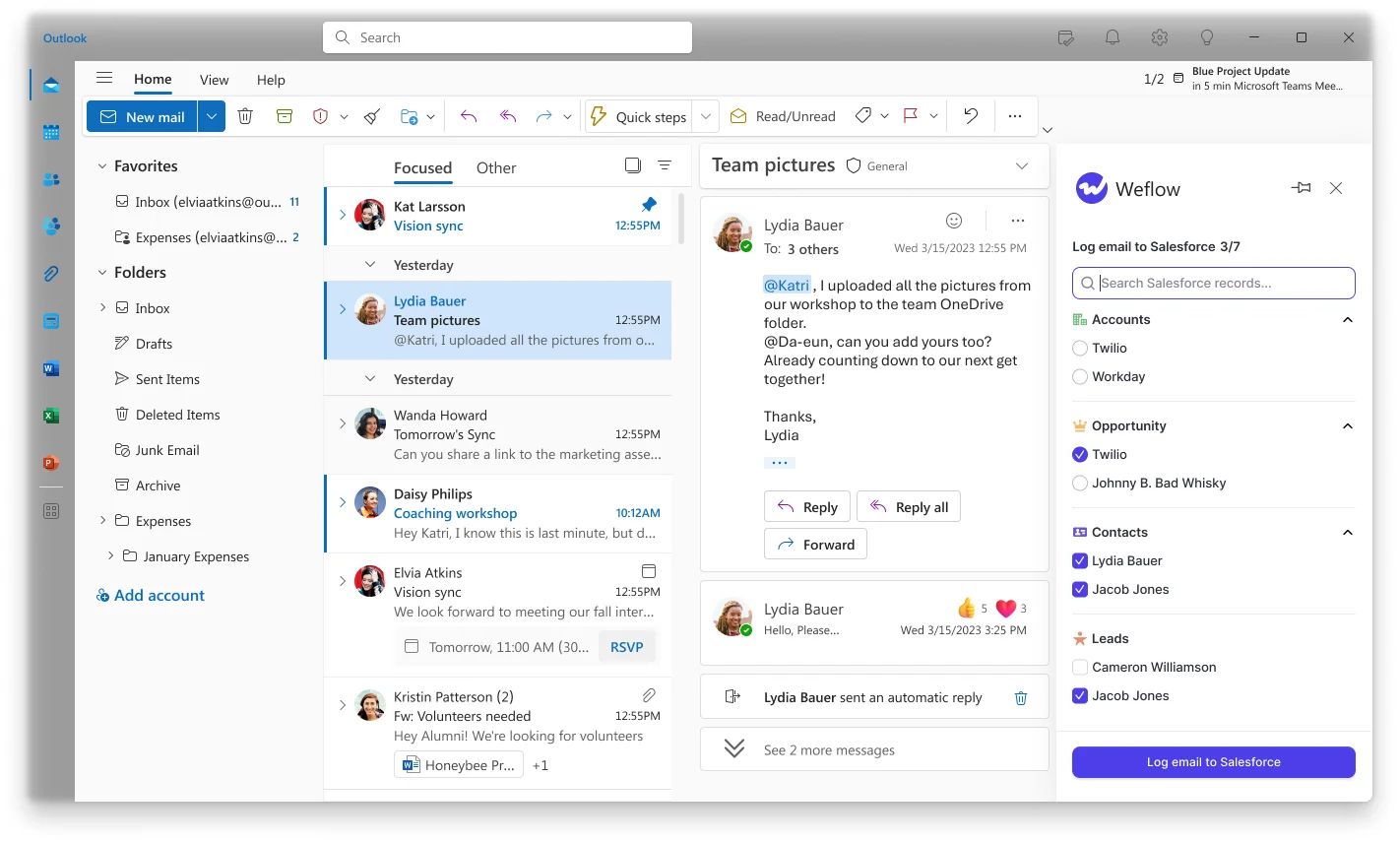
We hear two camps on this. Some leaders see a rep override as the thing that makes capture trustworthy. Others see any rep click as the old logging bargain in new clothes.
Weflow serves both through three modes, set per team:
- Fully automated: no add-in and no rep clicks
- Hybrid: automated capture plus the add-in for review and correction, which is what most of our customers run
- Manual: nothing logs unless someone ticks it, often used for leadership mailboxes
You can also hand out the add-in with the suppress control removed, so reps see the mapping but can't switch logging off. One limit: mapping can't be changed from a phone.
Weflow sends data out through its API and MCP connector
Your captured data stays reachable outside Weflow because it lives as native Salesforce records in your org.
- Native records. Emails land as Task or EmailMessage, your choice, and meetings as Event. Your reports, flows and BI tools read them without going through Weflow.
- REST API. Bulk export as JSON or CSV feeds BI tools such as Tableau and Looker, or a warehouse.
- MCP connector. An official read-only connector lets Claude, ChatGPT and other assistants query Weflow data. An admin switches it on per workspace, with a separate toggle for transcript access.
- Integrations. Weflow connects natively to Salesforce, Gmail, Google Calendar, Outlook, Zoom, Teams, Google Meet and Slack. It runs alongside Outreach and Salesloft through compatibility mode.
- Limits. There's no native Snowflake, Databricks or BigQuery connector, so teams move data there through the API. Saved views don't go out through the API or MCP.
What Weflow Activity & Contact Capture costs
Weflow Activity & Contact Capture costs $19 per user per month, billed annually. You need a minimum of 10 users on a 12-month term, and seats added mid-term are charged pro rata to the end of the term. Ask Weflow AI Pro and Agent Builder's free tier come included, and the seat-count math sits in the cost section below.
How Cirrus Insight syncs email and meetings to Salesforce
Cirrus Insight is an inbox add-on for Gmail and Outlook that connects only to Salesforce. You buy it as 16 separately priced capabilities.
Cirrus Insight syncs only emails with a known contact or lead
Cirrus Insight's Email Sync runs in the background without the sidebar open, but it only logs an email when an existing Salesforce contact or lead sits on the To, CC or From line. Admins set the rules: contacts, leads, person accounts, or a replies-only mode for threads a rep already filed. Filters can restrict sync to owned records or block domains and wildcard patterns.
The sync runs on a 15-minute minimum cycle. Fast Sync cuts it to 5 minutes for $5 more, at the cost of extra Salesforce API requests.
Calendar Sync writes Events in one or both directions, set per user. It pairs a calendar entry with an existing Salesforce Event on subject, start and end time. An Only Sync to Organizer setting stops several internal attendees from each logging the same meeting.
Cirrus gets the connection model right. It can connect through a Salesforce integration user on the free Integration User licence, with admin-approved service accounts in Google Workspace or Microsoft 365. You can also connect each user individually, but those connections break on password resets, MFA prompts, token expiry and conditional access changes.
Coverage gaps to plan for:
- Email with no existing contact or lead on it doesn't log to a person record.
- Activity takes 15 minutes or longer to land without Fast Sync.
- Task Sync can't run through a Microsoft 365 service account, so it depends on each user's own connection.
- A calendar entry whose subject differs from an existing Event can sync as a duplicate.
Cirrus Insight Smart Link picks the most recently touched record
Cirrus Insight's Smart Link relates each synced email or event to the most recently created or edited record of one object type the admin chooses: asset, campaign, case, contract, opportunity or order. On an account with three open deals, the email lands on whichever deal someone edited last, not the one the conversation is about.
Thread-Based Smart Link fixes this for a thread, on these conditions:
- A rep files the first email by hand, and later emails in the thread follow.
- It needs the Save Email IDs setting and the Pro plan or higher.
- It's fully supported only with Enhanced Email. On orgs logging email as Tasks, it's in beta and needs two custom text fields on Activities.
Underneath sits Salesforce's own rule: one Related To record per email. An email about two deals ends up on one of them.
Cirrus Insight adds new contacts only when a rep clicks
Cirrus Insight's Email Sync never creates contacts or leads. A new stakeholder's email stays off the person record until a rep adds them.
The rep side is well built. An unrecognized address gets an Add Contact or Add Lead action in the sidebar, with the account pre-filled from the domain and the title, phone and company pulled from the signature. Unlike Weflow, Cirrus can create leads.
A domain fallback relates the email to a matching account when no contact exists, but it still creates no contact. People who appear on a recorded call are a separate path through CRM Updates, which Cirrus sells at $15 per user per month.
Cirrus Insight's sidebar puts filing and record edits in the inbox
The sidebar is where Cirrus Insight is strongest, and if your reps want to work Salesforce from the inbox, it's the better tool for that job. From Gmail or Outlook, reps can:
- file an email in one click, file it to an extra record such as an opportunity or case, or file several at once
- create and edit contacts, leads, accounts, opportunities, cases, tasks, events and custom object records
- see related lists, activity history and a worklist of the day's tasks
- use the same sidebar in the Outlook mobile app on iOS and Android
- add scheduling and templates, sold as separate lines
Cirrus treats rep-directed filing as a deliberate choice, arguing that capturing everything produces a CRM nobody trusts. The limit is that reps can't re-map an email the background sync already logged.
Cirrus Insight offers a preview API but no MCP connector
You reach Cirrus Insight's captured activity mostly through Salesforce, because that's where Cirrus writes it.
- Email lands as a completed Task of type Email, or as an EmailMessage when Enhanced Email is on. Meetings land as Events.
- The Platform REST API is in preview, and Cirrus labels its endpoints likely to change before general availability.
- Webhooks fire only on Smart Scheduler bookings and organization configuration changes, not on synced email or meetings.
- There's no MCP server or connector for Claude or ChatGPT.
- There's no direct Snowflake connection. As with Weflow, activity reaches a warehouse from Salesforce.
How Cirrus Insight prices email sync line by line
Cirrus Insight prices each capability per user per month, with no bundles and no minimum tier. You set a user count on each line, so calendar sync for everyone and the sidebar only for reps is a valid purchase.
| Capture line | Price per user per month |
|---|---|
| Salesforce Sidebar | $11 |
| Email Sync | $5 |
| Calendar Sync | $11 |
| Sidebar, email and calendar together | $27 |
| Fast Sync (5-minute cycle) | +$5, bringing the total to $32 |
| Task Sync | +$2.50, bringing the total to $34.50 |
How Einstein Activity Capture syncs email and meetings
Einstein Activity Capture is Salesforce's own background sync. Standard comes with most Sales Cloud editions, and the full version comes with Unlimited or through add-ons such as Sales Engagement.
Einstein Activity Capture syncs in the background, until a connection drops
Einstein Activity Capture captures sent and received email automatically from the connected Microsoft or Google account. An admin can connect the whole org through OAuth, or each user connects their own account.
It supports Microsoft 365, Google Workspace and on-premises Exchange, which Weflow doesn't. Hybrid Exchange deployments aren't supported. Calendar-to-Salesforce event sync typically lands within 5 minutes.
Coverage is where our calls turn critical. Reps estimate it logs about 80% of their activity, and admins describe connections that drop for no visible reason:
"EAC just got disconnected for no reason. We talked with the support multiple times, like a thousand times I would say. So it hasn't been fixed, so that's why we are looking for a new alternative."
Failure modes to test for:
- Connections drop without explanation, and each drop is a silent hole in the record.
- Einstein Activity Capture can't run through a Salesforce integration user licence, so capture ties to named user licences.
- When a meeting's organizer is outside the sync configuration, each syncing attendee gets their own copy of the event.
- Resetting sync can create duplicate events.
- An address that belongs to both a user and a contact matches to the user, not the contact.
- Data can take up to 24 hours after setup to appear in standard reports.
Einstein Activity Capture follows contact roles, then account tiebreakers
Einstein Activity Capture picks the opportunity through contact roles first. If no contact role matches, it falls back to the opportunities on the related account and applies tiebreakers in this order:
- Exclude opportunities whose close date is more than 60 days before the email.
- Prefer an opportunity whose owner is on the email.
- Prefer an account owned by a matched user.
- Prefer an opportunity created within 60 days after the email.
- Prefer an opportunity whose create-to-close window contains the email date.
- Prefer open over closed.
- Prefer the earlier close date.
- Prefer the most recent LastActivityDate, then the most recent LastModifiedDate.
Salesforce gives credit where it's due here. The whole rule lives in the Activities: Match Email to Records flow, which you can edit in Flow Builder or extend with Apex. That covers blocking emails, matching custom email fields or relating to custom objects.
The catch is the input. The rule is only as good as the contact roles your reps maintain, and where those are half-filled, the tiebreakers pick the deal.
Einstein Activity Capture doesn't log email from unknown senders
Under Sync Email as Salesforce Activity, Einstein Activity Capture doesn't log email that matches no Salesforce record. Contact Auto-Creation and Contact Suggestions aren't available in that mode, and it's been the default for every setup since Summer '25.
So a new stakeholder's correspondence stays out of Salesforce until someone creates the contact or lead. Only new email after that point syncs. Contact sync from users' address books still works, up to 50,000 contacts per user, but it only reaches people a rep saved.
Einstein Activity Capture has no inbox panel for corrections
Einstein Activity Capture runs entirely in the background, so reps correct a wrong match on the email record inside Salesforce. The matching flow won't overwrite that manual change.
Salesforce sells the Outlook and Gmail side panel as a separate product, the Outlook and Gmail integration. If a rep clicks Log Email there while Einstein Activity Capture is also capturing, the same email can log twice.
Einstein Activity Capture data stays reachable inside Salesforce only
Einstein Activity Capture's records are reachable wherever Salesforce data is, and nowhere else. Storage and reporting are covered in the Summer '25 section above.
- Task and EmailMessage records work in reports, flows, triggers, SOQL and the Salesforce APIs.
- Einstein Activity Capture has no MCP server of its own. Claude and ChatGPT reach its records through Salesforce Hosted MCP Servers, which are intended for customers with Flex Credits and may be billed by usage.
- Salesforce doesn't support exporting the activity data held in Einstein Activity Capture's own store, or the insights generated from it.
What Einstein Activity Capture Standard and full versions cost
Einstein Activity Capture Standard is free, but it's the reduced version, and it stops at 100 users.
| Detail | Standard | Full version |
|---|---|---|
| Included with | Starter, Pro Suite, Professional and Enterprise | Unlimited, Einstein 1 Sales and Agentforce 1, or the Einstein for Sales, Sales Engagement or Revenue Intelligence add-ons |
| Users | Free for up to 100 | Licensed per user |
| Activity retention | 6 months | 24 months by default |
| Activity Metrics and Activity 360 | Not included | Included, but retiring and unavailable to post-Summer '25 setups |
| Price | $0 | Sales Engagement lists at $50 per user per month, billed annually |
The roadmap is the part nobody can price yet. Salesforce has named Momentum as the future of call recording and activity capture in Salesforce, with no migration path, end-of-life date or pricing consequence announced for Einstein Activity Capture.
What each tool costs as you approach 100 users
Einstein Activity Capture Standard costs nothing until you pass 100 users or need the full feature set. Then the price jumps to about $50 per user per month. Cirrus Insight and Weflow scale in a straight line from the first seat.
| Cost detail | Weflow Activity & Contact Capture | Cirrus Insight | Einstein Activity Capture |
|---|---|---|---|
| Pricing model | Published per-seat price | À la carte, per capability per user | Included in your edition, or bought through an add-on |
| List price for capture | $19 | $27 for sidebar, email and calendar | $0 for Standard, about $50 for full through Sales Engagement |
| What costs extra | Historical backfill beyond the default, and Conversation Intelligence for meeting recording | Fast Sync, Task Sync, scheduling and templates | The full version, and the side panel sold separately |
| Minimums and terms | 10 users, 12 months, pro rata additions | No minimum tier. Term and billing set in the configurator | Tied to your Salesforce contract |
| Per user per month, under 100 users | $19 | $27, or $32 with Fast Sync | $0 on Enterprise |
| Per user per month, over 100 users | $19 | $27, or $32 with Fast Sync | About $50, unless your edition includes the full version |
| Yearly list price at 120 users | $27,360 | $38,880 | About $72,000 |
These totals use list prices only. Weflow applies volume discounts above that, with the meaningful breakpoint starting around 30 to 40 seats.
Unlimited Edition changes the math. You already hold full Einstein Activity Capture through the edition, so adding another capture tool means paying twice for the function. The saving comes from dropping a redundant licence line, not from the edition you keep anyway.
What "free" really costs is the risk of rebuilding your activity reporting later. Teams hit the 100-user wall right when leadership already reads reports built on the free tool. Older setups face a rebuild either way as Activity 360 retires.
Which email sync tool fits your Salesforce org
Choose Weflow Activity & Contact Capture if capture must run without reps
- Your accounts regularly carry more than one open opportunity, and you'd rather log to the account than to the wrong deal.
- You need new stakeholders created as contacts from email automatically, with guards on the contact table.
- You want central, integration-user capture that keeps running when a rep never logs in, with alerts when a connection breaks.
- You want reps able to correct a mapping once per thread, without making it mandatory.
- It doesn't suit you if you're on on-premises Exchange, if you depend on leads being created automatically, or if you have fewer than 10 seats.
Choose Cirrus Insight if reps want to work Salesforce from the inbox
- What you want is the inbox workflow: filing, creating and editing records, plus scheduling and templates, from the sidebar.
- Your reps need that sidebar in the Outlook mobile app.
- You want to buy capability by user group, line by line.
- You accept that reps carry contact creation and thread mapping by hand.
Stay on Einstein Activity Capture if you're small and single-deal
- You're under 100 users on Enterprise, so Standard costs nothing.
- Your accounts carry one open deal at a time, and your contact roles are maintained.
- Or you run on-premises Exchange, which Weflow doesn't support.
- You accept that Salesforce hasn't said what Momentum means for Einstein Activity Capture.
Run a parity test without duplicating Einstein Activity Capture events
Set Einstein Activity Capture's event sync to one direction before anything else. Then move whole users to the new tool and backfill, so you're measuring what Einstein Activity Capture missed instead of creating duplicates.
The teams that switch successfully test the boring part first. One admin told us how they ran it:
"We tested it out, made sure it tracked one for one. We kind of ran it out of the box, we did not try to put any of our own use cases for templates. We said we just want to do it one for one."
Here's the sequence we recommend:
- Set Einstein Activity Capture event sync to calendar-to-Salesforce only. A two-way sync loops events back out to the calendar and writes them again once a second tool is also logging. Removing the Einstein permission from users isn't enough, and duplicates already written stay until you delete them.
- Leave the new tool on its defaults. No templates and no custom rules until parity is settled.
- Move a test user fully to the new tool. Running both on the same user writes every email twice. Putting different users on each tool doesn't work either, because activity volume varies from person to person.
- Backfill the test period with message-ID deduplication. Weflow's backfill checks each email's message ID before writing, so everything it adds is what Einstein Activity Capture missed.
- Compare against saved Einstein Activity Capture reports. Save them before the switch so you have a clean baseline.
- Check with the reps who complained most. They know which threads went missing.
If you're testing in a sandbox, keep in mind that one user can't sync to several orgs with Einstein Activity Capture at once. Remove the user from the sandbox configuration before adding them in production.
The same parity logic applies to a Cirrus Insight trial. Move whole users, compare against saved reports, and keep subject lines consistent, since Cirrus links existing Events only on an exact subject, start and end match.
Walk through the product yourself, no call required.
Questions Sales Ops ask before switching email sync tools
Does Salesforce Unlimited Edition already include full Einstein Activity Capture?
Yes. Unlimited, Einstein 1 Sales and Agentforce 1 editions include the full version, and Sales Engagement is included in Unlimited. Teams have bought separate capture licences on top without realizing it, because nothing in Salesforce flags the overlap.
Should email land in Salesforce as Task or EmailMessage?
It's mostly a reporting decision. A single activity report can span Tasks and Events but not EmailMessage. An EmailMessage carries native From, To, CC and thread structure, can relate to up to 50 recipients, and weighs roughly seven times more than a Task.
- Weflow: the admin chooses per configuration, and about nine in ten of our customers pick EmailMessage.
- Cirrus Insight: writes a Task of type Email, or an EmailMessage when Enhanced Email is on.
- Einstein Activity Capture: writes both, with no setting to pick one.
Which tools sync email attachments into Salesforce?
- Weflow: attachment logging is a per-configuration setting with a size cap. ADVISA now stores its email attachments in Salesforce this way.
- Cirrus Insight: Automatic Attachment Sync is a beta that support switches on, up to 25 MB per file, and it skips CSV, PowerPoint and archives. Otherwise attachments arrive only when a rep files them.
- Einstein Activity Capture: doesn't sync or store attachments, including under Sync Email as Salesforce Activity.
Can I log email to Salesforce custom objects?
- Weflow: logs to any object, including custom objects, and surfaces them in the extension so a rep can link an email directly.
- Cirrus Insight: File Anywhere covers objects with a direct contact relationship, and Email Sync can relate email to custom objects that have an Email field.
- Einstein Activity Capture: works through editing the matching flow or adding Apex.
Which tools work with on-premises Microsoft Exchange?
- Weflow: doesn't. It requires Microsoft 365 or Google Workspace.
- Cirrus Insight: works with Exchange 2016 or later through its Outlook web add-in.
- Einstein Activity Capture: supports on-premises Exchange through Microsoft Entra ID, a certificate-based service account, or per-user connections. Hybrid deployments aren't supported.
What happens to email sync when reps work from their phones?
- Weflow: captures mail sent from a phone like any other, because capture runs on the mail server. Reps can't see or change the mapping there, though a thread mapped on desktop keeps its mapping.
- Cirrus Insight: the sidebar opens inside the Outlook mobile app when installed as the Outlook add-in.
- Einstein Activity Capture: captured emails and events can't be accessed in the Salesforce mobile app.
How do these tools handle other apps writing Events to Salesforce?
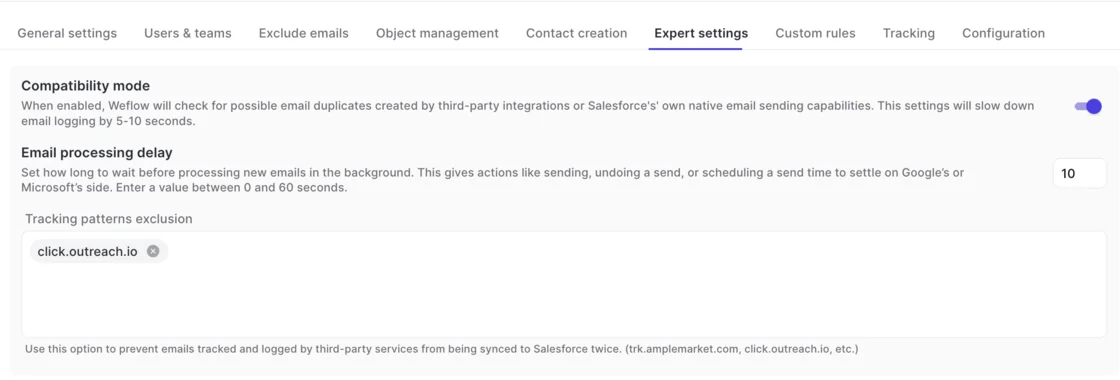
- Weflow: writes one Event per meeting. The recording lives on its own recording object and writes its summary to that same Event. Compatibility mode checks for email duplicates from third-party integrations and Salesforce's own sending.
- Cirrus Insight: links an existing Event only when subject, start and end all match, and may create a duplicate when any of them differ.
- Einstein Activity Capture: with event sync set both ways, it creates a duplication loop once another tool writes Events. Setting it to one direction fixes that.
How far back can each tool backfill email history?
- Weflow: offers historical backfill of up to 24 months as an add-on, deduplicated by message ID.
- Cirrus Insight: sells email backfill as a service scoped on request. Calendar Sync settings reach back at most seven days.
- Einstein Activity Capture: switching to Sync Email as Salesforce Activity brings in up to six months of past email.
What should my security review check for each tool?
- Weflow: SOC 2 Type II, GDPR compliance, Zero Data Retention for AI processing, and customer data never used to train AI models. Weflow reads no mailbox until a user is enrolled. Our support team sees the logging logic for each email, not its content. Sign-in runs only through your Salesforce authentication.
- Cirrus Insight: holds SOC 2 Type 1 and Type 2 attestations, hosts on Azure in the US and EU, and keeps client data for up to 90 days after a contract ends unless you ask for it back.
- Einstein Activity Capture: sits under Salesforce's ISO 27001 certification but isn't named in its SOC 2 scope for Einstein services. Salesforce keeps de-identified data derived from captured activity for up to 2 years unless your admin opts out, and holds email on the Activity Platform for up to 30 days.
What contract terms come with each tool?
- Weflow: a 12-month term with a 10-user minimum. Seats added mid-term are pro rata. You can't reduce seats mid-term, but you can reassign them when someone leaves.
- Cirrus Insight: you choose the term and billing frequency in its pricing configurator.
- Einstein Activity Capture: follows your Salesforce edition and contract.
What do I tell reps about Salesforce's "email not connected" warning?
Tell them not to connect anything. Salesforce prompts each user to link their own mailbox and shows a warning when they haven't, and that warning doesn't know about tenant-level capture. Admins in their first weeks with server-side capture ask us exactly this:
"Our users are saying that red icon, your emails are not connected to Salesforce, because Salesforce is trying to get you to connect your email directly. How should we be advising our users on what they connect in Salesforce versus the capture we have set up?"
What settles reps is seeing it work. In the Weflow add-in or extension, a rep sees that an email logged and to which record, and a rep who can check stops filing tickets.










