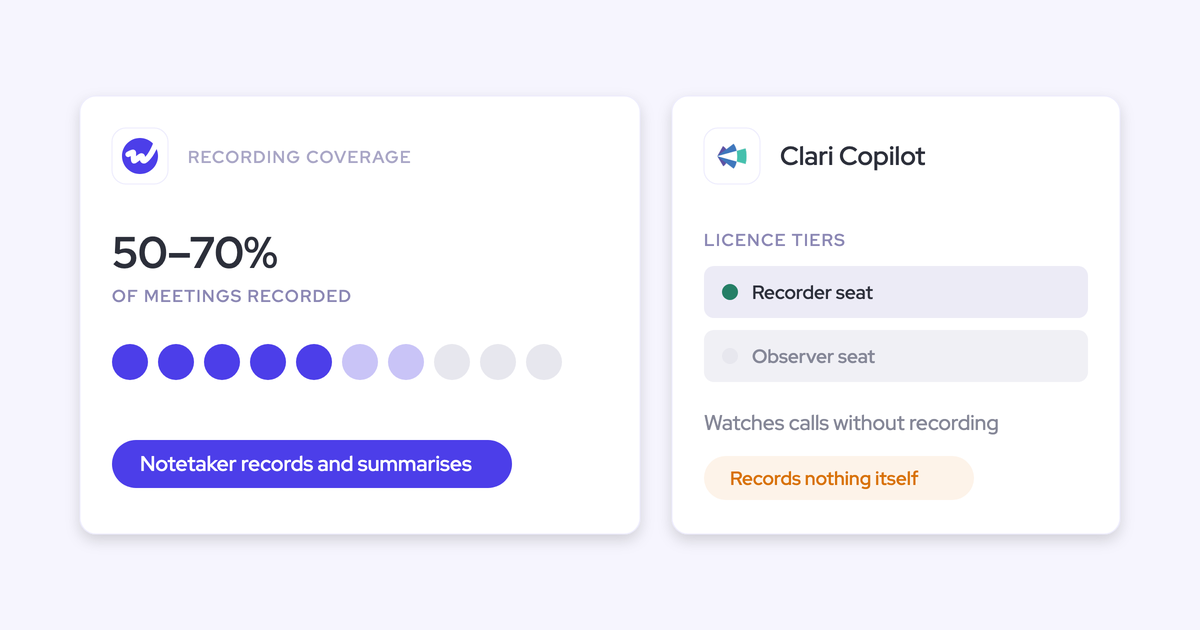
Weflow vs Clari for Pipeline Pacing Against the Submitted Forecast (2026)
Learn how Weflow vs Clari compare on pipeline pacing, quota coverage, and roll-up forecasting in 2026


If your leadership team checks every week how the quarter is pacing against the forecast your reps submitted, you can keep doing that in Weflow.
Our pacing chart compares three forecasts side by side, splits them by deal type, and links every number back to the deals your reps picked.
Two Clari views don’t have a Weflow equivalent yet: the annual year-to-date view and the “day 35 versus the last three quarters” comparison.
Weflow is the Revenue AI Orchestration platform for sales, customer success, and RevOps teams. Pacing, roll-ups and pipeline analytics live in Weflow Deal Intelligence & Forecasting, built for Salesforce teams.
You've likely already decided that Clari's price doesn't match the three or four views you use. Below, we compare both tools side by side: what each chart shows, how forecast calls work, what each one costs and what you’d give up by switching.
Weflow vs Clari at a glance: pacing, roll-ups, data, price
Here's how Weflow and Clari (now sold as Salesloft) compare on the seven things forecasting teams use every week.
| Capability | Weflow | Clari (Salesloft) |
|---|---|---|
| Pipeline pacing | One chart sets the AI projection, team forecast and weighted forecast against Pipeline, Commit and Closed. It runs per motion and drills to the deals. There's no flow view and no same-day-prior-quarter trend view. | The annual view tracks year-to-date results against the annual number. Salesloft's Deals Analytics Overview charts closed won and a projection against the goal. Neither sets progress against the team's submitted forecast. |
| Forecast submissions and roll-ups | Reps submit a baseline and a best case tied to named opportunities. Every version is kept, and the custom hierarchy needs no placeholder users. Submissions happen in the web app only and aren't written to Salesforce fields. | The top-down forecast view, inline editing and Quick Submit set the UX benchmark. A call is a number with notes, and the roll-up follows the Salesforce hierarchy with placeholder users for sub-totals. |
| Prebuilt pipeline metrics | 30+ metrics, including waterfall, coverage, win rate, stage conversion and deals at risk. Gap, attainment, coverage and formula columns are computed in Weflow. | Salesloft ships a six-tile Deals Analytics Overview, flow and conversion charts, and predefined win rate, cycle length and deal size. Any metric Clari must compute needs a Salesforce formula field first. |
| Integrations with other tools | Native integrations with Salesforce, Google and Microsoft mail and calendar, Zoom, Teams, Meet, Webex, Slack and dialers. There's no native Snowflake, Databricks or BigQuery connector, so warehouse delivery runs through the API. | Salesloft's Unified Revenue Data Layer syncs with Salesforce, Dynamics, Snowflake, Databricks, Gmail, DocuSign, ZoomInfo and LinkedIn. Recording covers Zoom, Teams, Meet and Webex. |
| Access from AI assistants (MCP) | One read-only connector returns the latest submitted call, the live pipeline, the delta, coverage, targets and the opportunity IDs behind them. | Three separate servers. Forecast returns numbers and snapshots without deal-level data. Copilot covers calls only. Salesloft needs a paid add-on and returns no raw transcripts. |
| Raw data access outside the tool | The REST API bulk-exports transcripts, metadata, scores and signals as JSON or CSV. Forecast calls are read over MCP today. | REST, Export and Copilot APIs, a forecast history CSV, and native sync to Snowflake and Databricks. |
| Pricing | Public per-seat prices. Deal Intelligence & Forecasting is $39 per user per month, with no implementation fees. | No published seat prices. Forecasting is an add-on to Salesloft's Advanced and Elite packages. |
Why pacing decides whether you renew Clari
When renewal comes around, most teams find they only use a handful of Clari's views, and pacing is the one leadership opens every week. So any replacement has to match it before anything else matters.
We hear this on renewal calls all the time:
"We mostly use Clari for roll-ups, simple pipeline analytics, and to inspect and the price point for that is crazy high." (a Clari customer, on a call with us)
These buyers aren't expecting Weflow to beat Clari at forecasting. They just want parity:
"I don't see your solution being better than Clari. I see your solution being able to do at least 80% of what we had with Clari." (a Clari customer, on a call with us)
That's a fair bar. In the end, the decision usually comes down to price and to what Clari can't do, so that's where we'll focus.
Clari has also operated under the Salesloft brand since 1 September 2026, and several customers have told us account management has slowed since the merger.
How Weflow paces the quarter against your submitted forecast
In Weflow, you pace against two things at once: the call your team submitted, which is tied to named deals, and two independent forecasts that don't rely on anyone's opinion. Your admin controls the setup, so none of it needs a professional-services ticket.
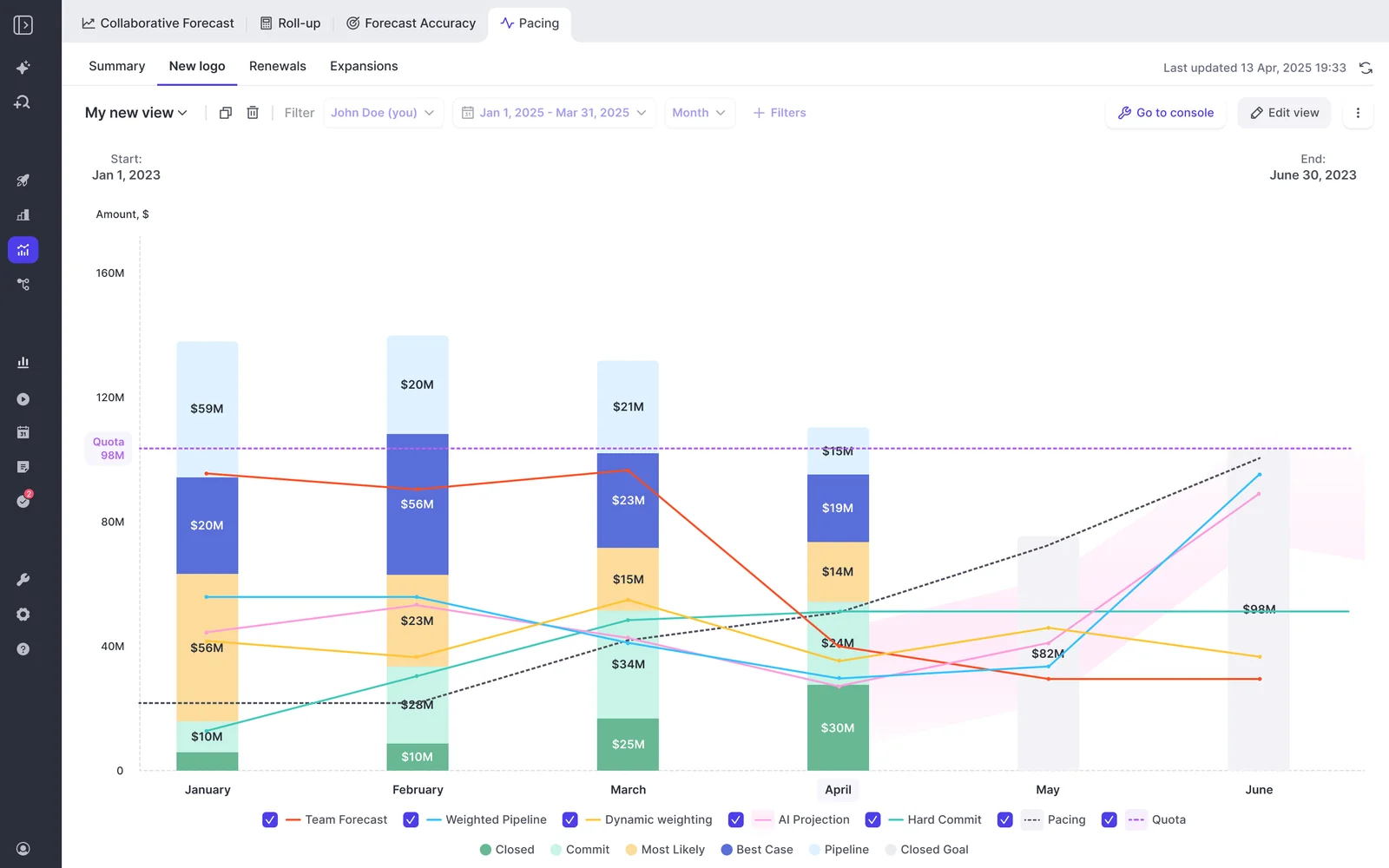
Weflow's pacing chart puts three forecasts against pipeline, commit and closed
The pacing chart shows three forecasts side by side, against Pipeline, Commit and Closed for the period:
- Team forecast: The roll-up of what reps and managers submitted. It tells you what the people closest to the deals believe.
- Weighted forecast: Built from historic stage close rates. It tells you what the pipeline mathematically supports.
- AI projection: Reads more than fifty deal signals and up to two years of history, and returns a landing range instead of a single number. It tells you what deal behavior predicts.
Unlike a stage probability, the AI projection looks at seasonality, rep performance, conversion rates, communication cadence, whether a next meeting is booked and whether the deal is healthy against your methodology.
So if a large deal isn't being worked well, its projection drops.
The gap between the three forecasts becomes the agenda for your forecast call. If a rep's submission sits well above the weighted number, that's worth a conversation, and you can click from the chart straight into the deals behind it.
Every chart also runs per motion, so new logo, renewal and expansion each get their own pacing. Each Salesforce record type keeps its own stage path and forecast-category mapping, and you can carry one combined quota alongside separate targets per deal type.
If you're coming from Clari, think of pacing as our version of Pulse, built on opportunity snapshots taken every few hours.
Weflow ties every forecast call to the deals behind it
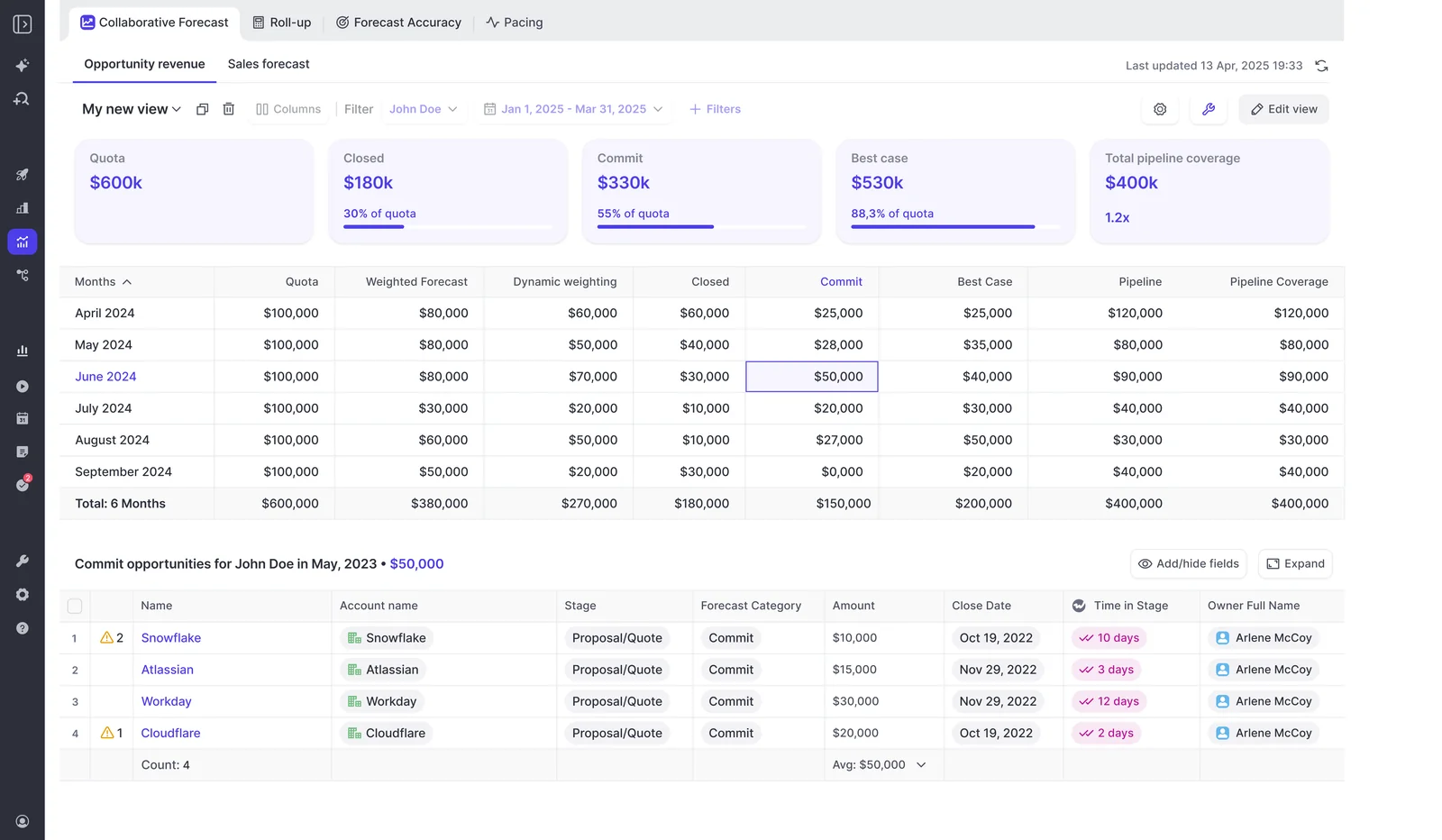
Yes, you can open the commit and see the deals. In Weflow, reps submit a baseline and a best case, either as a total or by selecting the specific opportunities behind each figure, with a comment.
The question we hear most from Clari teams is whether they can see the deals behind a commit:
"Am I able to submit for Q3 forecast by selecting the deals I want to include, not just putting in a number?" (a prospect, on a call with us)
Yes, you can. Reps submit a baseline and a best case, either as a total or by picking the opportunities behind each number, and add a comment. A few more details:
- A manager submitting for the team picks the individual deals behind the call, including deals their reps own.
- Every submission is versioned, so you can see whether a rep's call moved during the quarter or never moved at all.
- Deadlines can lock the field, and calls roll up to manager, VP and executive automatically.
Weflow ties the submitted forecast to named Salesforce opportunities, so pacing against the submitted forecast means pacing against specific deals. In Clari, the deals behind a call sit in a free-text notes field.
There are two limits to keep in mind. You can only submit in the Weflow web app, and submitted calls stay in Weflow instead of being written to Salesforce fields.
That makes the forecast the one exception, since activity, transcripts, summaries and AI field updates all land in native Salesforce objects.
You arrange Weflow's forecast hierarchy yourself, without placeholder users
You don't have to bend Salesforce roles to get the sub-totals leadership wants. Weflow uses your Salesforce role hierarchy by default, but your admin can switch to a custom one instead:
- You arrange which team reports into which by drag and drop, and one person can sit in several teams. That's handy for a customer success manager who carries both an expansion and a renewal number
- Each team appears as its own roll-up line. A VP sees account managers and account executives as separate sub-totals, with no inactive users in Salesforce.
- Targets and submission history belong to the person, so they follow a rep who changes teams, with no new user record and no lost history.
- A manager can carry both an individual target and a team target, and the team target can be set on its own instead of summed from below, so you can keep the usual buffer between your number and your team's.
- Your admin sets the cadence, deadlines, reminders, and who may submit and adjust in a self-serve admin console.
Keep in mind that the custom hierarchy only includes people who've signed in to Weflow at least once, which reps do through activity capture or conversation intelligence.
If you stick with the Salesforce hierarchy, every Salesforce user shows up as a line, and you can't filter out a whole role.
Weflow calculates coverage, gap and formula columns without Salesforce fields
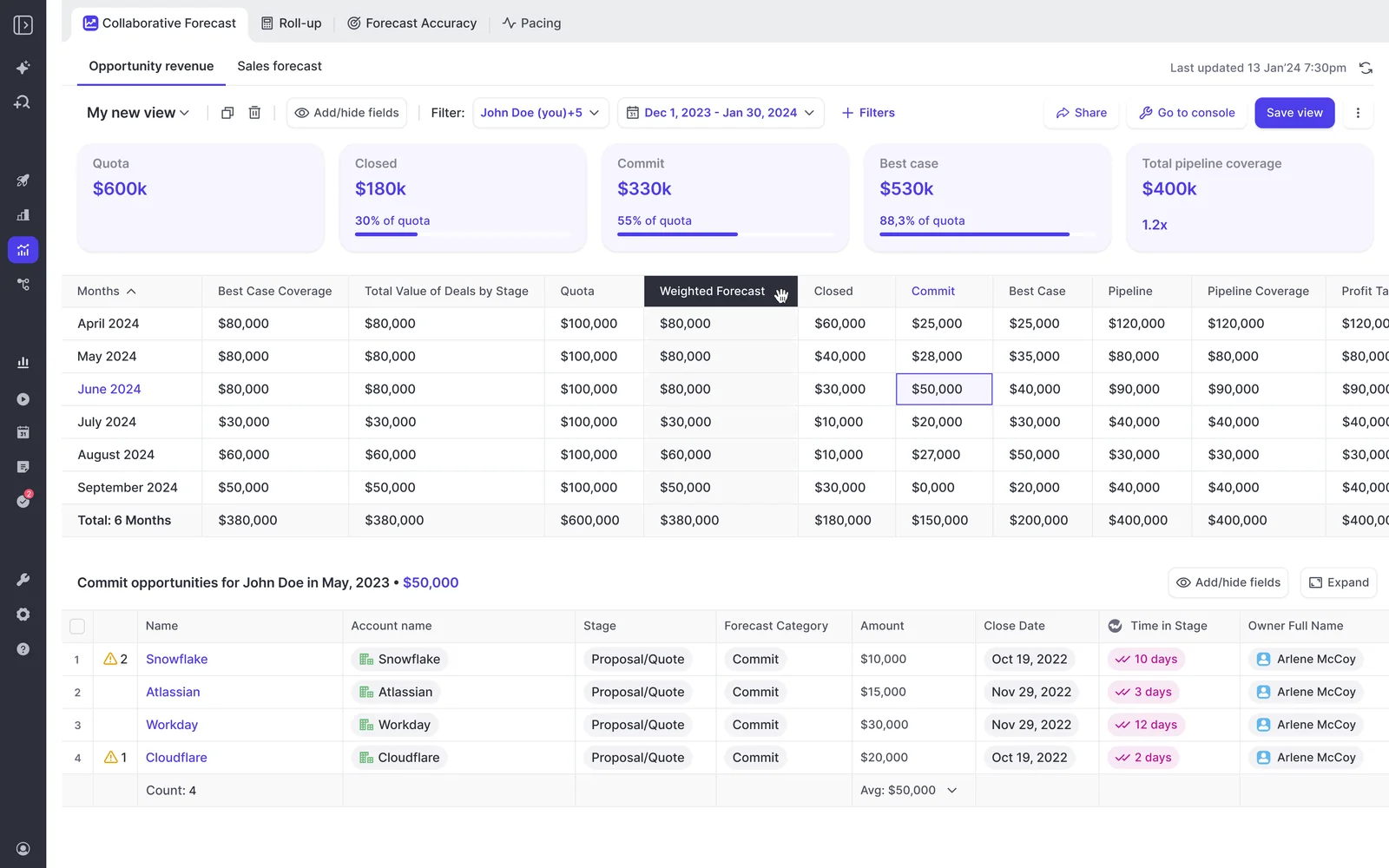
You won't need to create a new Salesforce field every time you want a column. Weflow comes with 30+ prebuilt pipeline metrics, including waterfall, coverage, win rate, stage conversion, sales cycle length, pipeline velocity, team benchmarks and deals at risk.
The forecast sheet also calculates these columns for you:
- Gap to each forecast call.
- Target attainment and gap to target.
- Pipeline coverage and commit coverage.
- Win rate, average deal size, average contract value and sales cycle length.
- The Salesforce weighted forecast, as its own column.
- Admin formula columns built from conditional groups, such as churn plus contraction over Omitted and Closed Lost deals.
You can drag columns to pick and reorder them. The summary tiles at the top are tied to your forecast categories, though, so you can hide or reorder them but not add a formula.
Weflow connects to your calendar, meeting, dialer and BI tools
Weflow integrates natively with:
- Salesforce
- Gmail, Google Calendar, Outlook and Microsoft Teams
- Zoom, Google Meet and Webex
- Slack
- Dialers: The Outreach dialer, which your admin connects directly, plus Aircall, CloudTalk, Dialpad and Zoom Phone, which our team activates
Weflow also works alongside Outreach and Salesloft engagement tools, so you don't have to replace them.
For BI and warehouse delivery, you'll go through the API, since there's no native Snowflake, Databricks or BigQuery connector. If your stack is built around warehouse sync, Salesloft's data layer reaches further.
Claude and ChatGPT read forecast calls through the Weflow MCP connector
Your team can ask Claude or ChatGPT whether you're forecasting above your own pipeline. For any close-date period, the Weflow MCP connector returns the latest submitted call next to the live pipeline total and the gap between them.
For each rep in scope, the connector also returns:
- Coverage ratio and gap to forecast
- Targets, where you've set them
- Win rate, cycle length and deal size
- The opportunity IDs behind the numbers
That one connector covers both forecast and deals, and it works with any client that supports remote MCP servers. Your admin switches it on per workspace, with a separate toggle that decides whether assistants see full transcripts or only AI summaries.
There are a couple of limits. The per-rep breakdown caps at 25 owners, and saved views aren't available, so the assistant rebuilds filters from the raw records instead of pulling up your deal board by name.
How to get Weflow data into Tableau or your warehouse
Weflow's REST API bulk-exports transcripts, metadata, scores and signals as JSON or CSV into BI tools such as Tableau and Looker and into your warehouse. Recordings export to your own cloud storage.
For now, forecast calls are only available through the MCP connector, though API access for submissions is on the roadmap. If your board deck pulls snapshotted forecasts into Tableau, you'll want to plan around that.
How Clari paces the year and rolls up the forecast
Clari does top-down forecast UX and time-series history really well. The main difference is that its pacing measures progress against the target, not the submitted call, and its structure is tied to the Salesforce hierarchy.
Clari's Pulse and annual view pace results against the target
Many leadership teams open Clari's annual view every week. It adds up the quarters already closed and shows, week over week, how the year is pacing against the annual target, so leaders who forecast by quarter can still see where the year will land.
Salesloft's Deals Analytics Overview charts closed won and a projected amount against the goal through the goal period, beside weighted pipeline coverage and a days-in-stage heat map. The projection comes from win rate and deal size.
Clari's Time Series Data Hub snapshots opportunity, account and activity data automatically.
That's what powers the same-day-prior-quarter comparison, which Clari buyers often name as one of the three views they actually use.
But neither the annual view nor the Deals Analytics Overview paces against the forecast your team submitted.
Clari Forecast records each call as a number with notes
Clari's forecast view is the UX benchmark any replacement gets measured against, us included. A CRO sees each direct report's commit and best case at a glance and drills down.
Reps edit deals inline from shared views, and Quick Submit updates every month and week of a quarter in one action.
Clari Forecast also keeps a week-by-week history of every call next to the historical CRM totals.
Where it falls short is submission. Forecasters can't select the deals behind their call, so they list them in the notes field, and managers can't open the submitted number to see the opportunities behind it.
Each level's judgement on a deal (say, the AE's commit and the manager's upside) is stored as its own field on the Salesforce opportunity, so a multi-level roll-up means adding one more field per level.
Clari's roll-up follows the Salesforce hierarchy and its placeholder users
If you've struggled with Clari's hierarchy, that's mostly a Clari limit, not your setup. As one former customer told us:
"The biggest limitation we had on Clari is that it was very dependent on the Salesforce hierarchy." (a former Clari customer, on a call with us)
Here's what that means in practice:
- Deals roll up by opportunity owner, so a rep whose deals belong to different managers needs workarounds.
- To show account managers and account executives as separate lines under a VP, teams add an inactive placeholder user to the Salesforce role hierarchy for each sub-total.
- A rep who changes teams carries their numbers into the new team. The usual workaround, a new Salesforce user, wipes their forecast history.
- A rep who leaves has to stay active until the quarter ends, or their booked deals drop out of the forecast.
- Leaders see what each direct report submitted, not what the reps beneath them said.
- Overlay roles and opportunity splits need extra work, and territory roll-ups read only Enterprise Territory Management fields.
- Changes to targets, forecast calls, roll-up logic or view columns go through professional services.
Salesloft ships pipeline analytics, but Clari can't calculate a field
Salesloft gives you ready pipeline analytics:
- A six-tile Deals Analytics Overview.
- A Flow Chart showing how deals moved between forecast categories.
- A Conversion Rate Chart comparing each rep's stage conversion with the team average.
- Predefined win rate, sales cycle length, average deal size and days in stage.
Clari Inspect adds deal health scoring from activity and engagement data.
Derived columns are where things get harder. Clari displays only what already exists in the CRM, so any metric Clari itself has to compute, such as commit against manager call, must exist as a Salesforce formula field first.
It also can't compare two date fields, so views that depend on one date falling after another have to be hard-coded by quarter.
Clari connects to the stack through Salesloft's data layer
If your stack is warehouse-centered, Clari reaches further than we do. Salesloft's Unified Revenue Data Layer syncs continuously with Salesforce, Microsoft Dynamics, Snowflake, Databricks, Gmail, DocuSign, ZoomInfo and LinkedIn.
Recording covers Zoom, Teams, Google Meet and Webex.
Clari splits AI assistant access across three MCP servers
Clari runs a separate MCP server for each product, and each one is fairly narrow, so no single connector can tie a call to its deals:
- Clari Forecast server: Returns live forecast numbers, the hierarchy and historical snapshots, but no deal-level opportunity data. Users need a Claude or ChatGPT Business or Enterprise subscription.
- Clari Copilot server: Reaches Copilot call data only, not the forecast or pipeline layer.
- Salesloft server: Read-only, requires the paid Agentic add-on, and returns call summaries but no raw transcripts and no cadences.
Clari exports data through REST, Export and Copilot APIs
Clari offers REST, Export and Copilot APIs, and Salesloft syncs data natively to Snowflake and Databricks. Admins can export a Forecast History Report covering two years of submitted forecasts as a CSV, which is how teams measure forecast accuracy in a BI tool.
Even so, many teams still rebuild the board number outside Clari:
"Clari is clearly not suited as a reporting tool to present to this type of stakeholders. So we're using Tableau." (a Clari customer, on a call with us)
What Weflow and Clari cost for a forecasting team
Weflow publishes its per-seat prices, and Clari doesn't. Here's how they compare.
| Cost line | Weflow | Clari (Salesloft) |
|---|---|---|
| Pricing model | Per seat, billed annually, 10-user minimum. Agent Builder is the only consumption-priced product, priced per workspace. | Quote-only. clari.com/pricing and salesloft.com/pricing both redirect to a Talk to Sales booking page. |
| Published list price | Per user per month: Weflow Activity & Contact Capture $19, Weflow Conversation Intelligence $39, Weflow Deal Intelligence & Forecasting $39. Bundles: Revenue AI Foundation $49, Revenue AI Business $59, Revenue AI Enterprise $79. | None published. Our estimate is $120 to $180 per user per month. |
| Forecasting price | $39 per user per month for Deal Intelligence & Forecasting, Pipeline Analytics included. Also part of Revenue AI Enterprise at $79. | Forecasting is an add-on to Salesloft's Advanced and Elite packages, at an unpublished price. |
| Implementation or professional services | No implementation fees and no platform fees. | Our estimate is $15k to $50k in implementation fees. There's no public services pricing. |
| What costs extra | Agent Builder beyond the free tier of 25 actions a month: Growth at $299 for 500 actions, Scale at $999 for 2,500. Historical activity backfill up to 24 months is an add-on. | Forecasting, AI agents and the dialer are add-ons. MCP access to Salesloft needs the Agentic add-on. |
| Contract term | 12 months standard. Multi-year discounts are 10% for two years and 20% for three. An early opt-out after three months is available as a negotiated concession. | Not published. |
| Trial | 14-day free trial with guided onboarding. | No free trial and no self-serve signup. |
To help you compare against your own Clari bill, here's what Weflow looks like at about 62 seats:
- Capture plus conversation intelligence lands around $36K a year.
- The full platform lands around $58K a year.
- Putting most reps on a lower bundle and only forecasting managers on the full platform comes to roughly $45K.
Based on our $120 to $180 estimate, the same 62 seats on Clari would cost about $89K to $134K a year before services. Compare that with your actual invoice, services fees included.
Which Clari views don't carry over to Weflow
Weflow covers roll-ups, pacing, waterfall and deal inspection, but some Clari views and behaviors aren't available yet:
| Clari view or behavior | What you get in Weflow today |
|---|---|
| Flow view | No flow view. The waterfall shows created, moved in, moved out, lost, decreased and won, with drill-through to deals. |
| Same-day-prior-quarter trend ("day 35 versus the last three quarters") | No trend view. Weflow keeps the snapshots, so you can compare this week with the same week last quarter by hand. |
| Annual year-to-date pacing view | No annual view. An annual target splits across months, and pacing runs per period. |
| Central configurable dashboard | Separate views (waterfall, pacing, team benchmark, stage conversion and others) instead of one dashboard, so you open several reports. |
| Funnel report and target-versus-trend dashboard | Not available. |
| Table of monthly pacing inside a quarterly call | Reps can split a quarterly call by month, but the split is visible only in the edit dialog. |
| Weekly targets | Monthly is the finest grain. |
| Deal-count targets | Targets are amounts only, and the live forecast view has no opportunity count. |
| Forecast calls in Salesforce fields | Calls live in Weflow and are read over MCP. The weighted forecast and AI projection still run off your CRM data. |
| Opportunity splits and overlays | Not supported. A deal counts in full for its owner. |
How to switch from Clari without paying for two forecasting tools
If you plan the switch in the right order, your CFO never pays for two forecasting tools and RevOps keeps the quarter's data.
Technical setup takes 30 to 45 minutes with your Salesforce and Google or Microsoft admins, and most teams see full value within one to three weeks, with our team handling onboarding.
- Start on capture and conversation intelligence while the Clari contract runs: These products don't overlap with your forecasting line item, and since Clari reads activity from Salesforce, it gets cleaner data in the meantime. Just don't run two activity capture engines at once, or you'll end up with duplicate activities.
- Configure and compare the forecast privately: Forecasting is a separate license, so reps already on capture won't see anything until you assign it. Settle the amount field, category basis and record-type filters first, since every configuration change re-runs the historical import.
- Import your Clari Copilot recordings after the team signs in: Each recording lands on its Weflow user. For people who've left, you name a colleague and we reassign their calls during the import.
- Switch submissions at a period boundary: Weflow uses the same opportunity data, so switching mid-quarter won't break anything, but you'll lose the earlier weeks' submission history. Switching at a boundary keeps that history clean.
- Agree terms: 12 months is standard, and you can negotiate an early opt-out after three months if the forecast doesn't land.
Choose Weflow if, stay on Clari if
Choose Weflow if:
- You mostly use Clari for roll-ups, pacing, waterfall and deal inspection.
- You want the submitted call tied to named deals, with three forecast methods on one pacing chart.
- You want a hierarchy your admin controls, with no placeholder users and no professional-services tickets.
- You want coverage, gap and formula columns without new Salesforce fields.
- You want a public per-seat price.
Stay on Clari if:
- Your board ritual is the same-day-prior-quarter comparison or the annual year-to-date view.
- You run heavy custom dashboards.
- You need split-credit or overlay forecasting.
- A PE sponsor has standardized on Clari. If that's you, you can still run Weflow for capture and conversation intelligence next to Clari and let Clari read the cleaner Salesforce data.
Want to see it on your own pipeline? Book a 30-minute demo, and we'll show you how Weflow captures activity, updates Salesforce fields from calls and rolls up your forecast
FAQs RevOps leaders ask before replacing Clari Forecast
Can Weflow read targets from Salesforce or a custom target object?
No. You enter targets in Weflow, or our team loads them from a CSV on request. If your BI reports also pull targets from Salesforce, you'll need to keep both copies in sync.
Is the Weflow roll-up weighted by stage probability?
No, the roll-up adds up the chosen amount field on the selected deals. If you want probability built into the submitted number, you can forecast on a weighted Salesforce field instead.
How do manager and CRO calls sit beside the rep's call in Weflow?
Each manager submits their own call, which sits next to the reps' calls in the roll-up, so you can see the rep's number, the manager's call and any override.
Adjusting a rep's call needs a separate permission, and every override is timestamped, attributed and logged with a reason.
Why do Weflow pacing numbers look empty after a configuration change?
Every time you change the forecast configuration, Weflow re-runs the historical import. Since it's paced to stay within your Salesforce API limits, it can take a day or two, so it's best to settle the configuration before showing the views to sellers.
Will reps push back on selecting deals for every forecast call?
Some might. Your admin decides whether reps submit a number, the deals behind it, or both, and reminder emails take reps straight to the submission. Selecting deals is what lets you review the forecast deal by deal instead of debating a total.
How does Weflow measure forecast accuracy against submitted calls?
Accuracy tracking is on by default for every Forecasting customer. Your admin picks the field to measure against, such as Closed Won, and Weflow reports accuracy per period for each manager, team and individual.
It compares the result with the average of every call submitted in the period, so reps aren't graded on their first call alone.
Can Weflow show next quarter's pipeline before this one closes?
Yes. The out-quarter pipeline view filters by target quarter, segment and stage, so managers can check next quarter's coverage while the current one is still open.