Weflow vs Gong for Pipeline Reviews: Deal Boards, Deal Risk Warnings and Qualification Gaps (2026)
Weflow vs Gong for pipeline reviews: compare deal boards, risk warnings, and qualification gaps.


If your team lives in Gong's deal board bubbles, you'll feel the switch, and that's fair.
Gong still wins on the visual momentum view, on field change flags (the old value, the new value and when it changed), and on the sheer number of integrations.
Where Weflow Deal Intelligence & Forecasting pulls ahead is the review itself. You get warnings your team defines, qualification gaps judged across emails and calls (not just fields), and risk shown to reps when they submit their forecast, so you don't have to chase them.
And it's a published $39 per user per month, while Gong doesn't publish prices at all.
Below, we'll run the same weekly pipeline review through both tools, from prep to commit, then look at cost, what switching takes, and when to stay or switch.
Weflow Deal Intelligence & Forecasting vs Gong at a glance
| Capability | Weflow | Gong |
|---|---|---|
| Deal board | Opportunity, account and contact fields in one view, plus computed activity columns. Live Salesforce data, every edit written back. The look is plainer and spreadsheet-style. | Visual momentum bubbles and field change flags (old value, new value, when it moved). Requires Forecast Essentials or Gong Forecast. |
| Deal risk warnings | Rules you write with AND/OR logic on fields, computed signals and AI Playbook scores. They show in the forecast submission screen. Not reportable in Salesforce dashboards without an agent-built field. | Eight Gong-defined warnings in AI Deal Monitor. You can toggle and re-time them, but you can't define new ones. |
| Qualification methodology capture | AI Playbooks fill and judge each element across emails, meetings, transcripts and fields, then write to Salesforce. Existing deals need one bulk run, and playbooks read only Weflow recordings. | AI Deal Reviewer: seven playbooks plus custom ones. The AI suggests notes, the rep reviews them and the manager validates them. No weighted methodology deal score. |
| Deal summaries across all interactions | A deal-level AI summary across every meeting, next to communication velocity and everyone involved. Generated on demand. | AI Briefer combines conversations, emails, CRM data and the web. It also gives a methodology summary across an account's calls. |
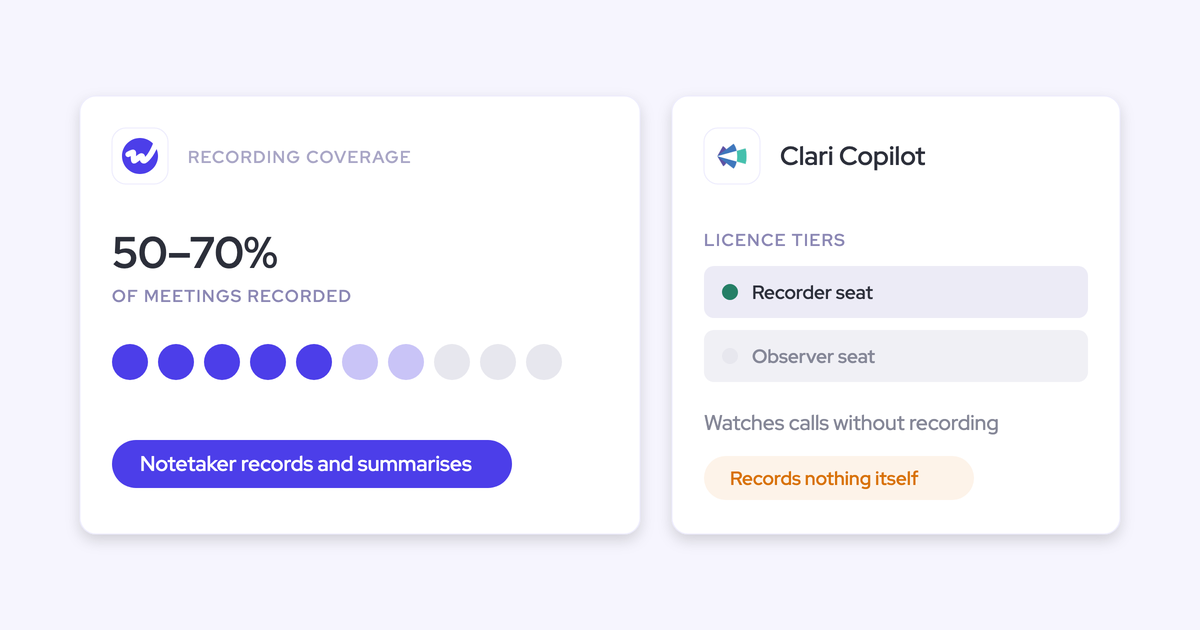
| Integrations with other tools | Salesforce, Google, Microsoft, Zoom, Slack and the Outreach dialer, with more dialers activated by our team. No native warehouse connector and no connector catalogue. Salesforce only. | About 450 marketplace listings, roughly thirty dialers and eleven meeting platforms. |
| Access from AI assistants (MCP) | A read-only connector for Claude, ChatGPT and other MCP clients. It returns playbooks, summaries, transcripts (behind an admin toggle) and forecast metrics, with no metering. No saved views. | Three record-scoped tools that return insights only, never transcripts. Read-only and credit-metered. |
| Raw data access outside the tool | REST API bulk export of transcripts, scores and signals as JSON or CSV, for BI tools and warehouses. Recordings go to your own storage. | API returns transcripts, capped at 3 calls per second and 10,000 per day. Warehouse delivery needs Data Cloud, a separate purchase. |
| Pricing | Published: $39 per user per month for Deal Intelligence & Forecasting, bundles at $49, $59 and $79. Annual billing, 10-user minimum. | No published prices. Foundation licence plus applications, seats counted per application, and credits for MCP and AI Trackers. |
In short, Gong gives you a better picture of momentum, and Weflow gives you a better-prepared review, built on your own risk rules and the evidence inside Salesforce.
Gong's deal board is the bar we have to clear
Most managers don't stay on Gong for the recordings; they stay for the board. Our own Head of Sales bought Gong twice before joining us, and he puts it plainly:
"Like the deal board specifically, the reason why I stuck with it was like the bubbles, like, you sort of get like addicted to the bubbles."
— Chris Nethercote, Head of Sales at Weflow, former Gong enterprise customer
Gong is also the safe buy. Nobody gets fired for choosing it, which is a big reason teams renew on multi-year terms:
"I wasn't going to get fired for buying Gong. It wasn't going to happen, right? So it was a very safe choice."
— Chris Nethercote, Head of Sales at Weflow, former Gong enterprise customer
But at renewal, your favorite view becomes a line item, and RevOps starts asking whether it's worth the price. The doubt usually sounds something like this:
"Like Gong is great but I don't think it's 2x value"
Still, switching only makes sense if your pipeline review gets better, not just cheaper. So we'll judge both tools on three tests:
- Warnings you can define: The tool flags risk based on your own slippage patterns, cycle length and required stakeholders, not a generic model.
- Gaps judged across all evidence: It shows what each deal still lacks, using emails as well as calls and fields, so you don't have to open deals one by one.
- Risk visible to the rep before the call: Reps see the warning themselves, before you have to send a chase email.
And there's one more test managers tell us they run on every demo: can you get through the whole review without opening anything else?
How Weflow Deal Intelligence & Forecasting runs a pipeline review
We built Weflow to run your review on your own rules and on evidence. Here's each capability, in the same order as the Gong section below, with its limits called out where they apply.
The Weflow deal board puts opportunity, account and contacts in one view
Weflow's deal board shows opportunity, account and contact fields side by side, something a standard Salesforce opportunity report can't do.
That matters because review prep usually means juggling three tabs: one report for stage time, one for last activity, and the rep's story for everything else. Managers tell us that adds up to about an hour per team, every week.
On top of your Salesforce fields, the board adds columns that Weflow calculates from captured activity:
- Follow-up speed after each meeting, in bands from within an hour to later than 24 hours.
- Engaged buyer contacts, and whether that number is rising.
- Reply rate on email.
- Last and next meeting, days inactive, close-date pushes, deal age and multi-threading over 30 days.
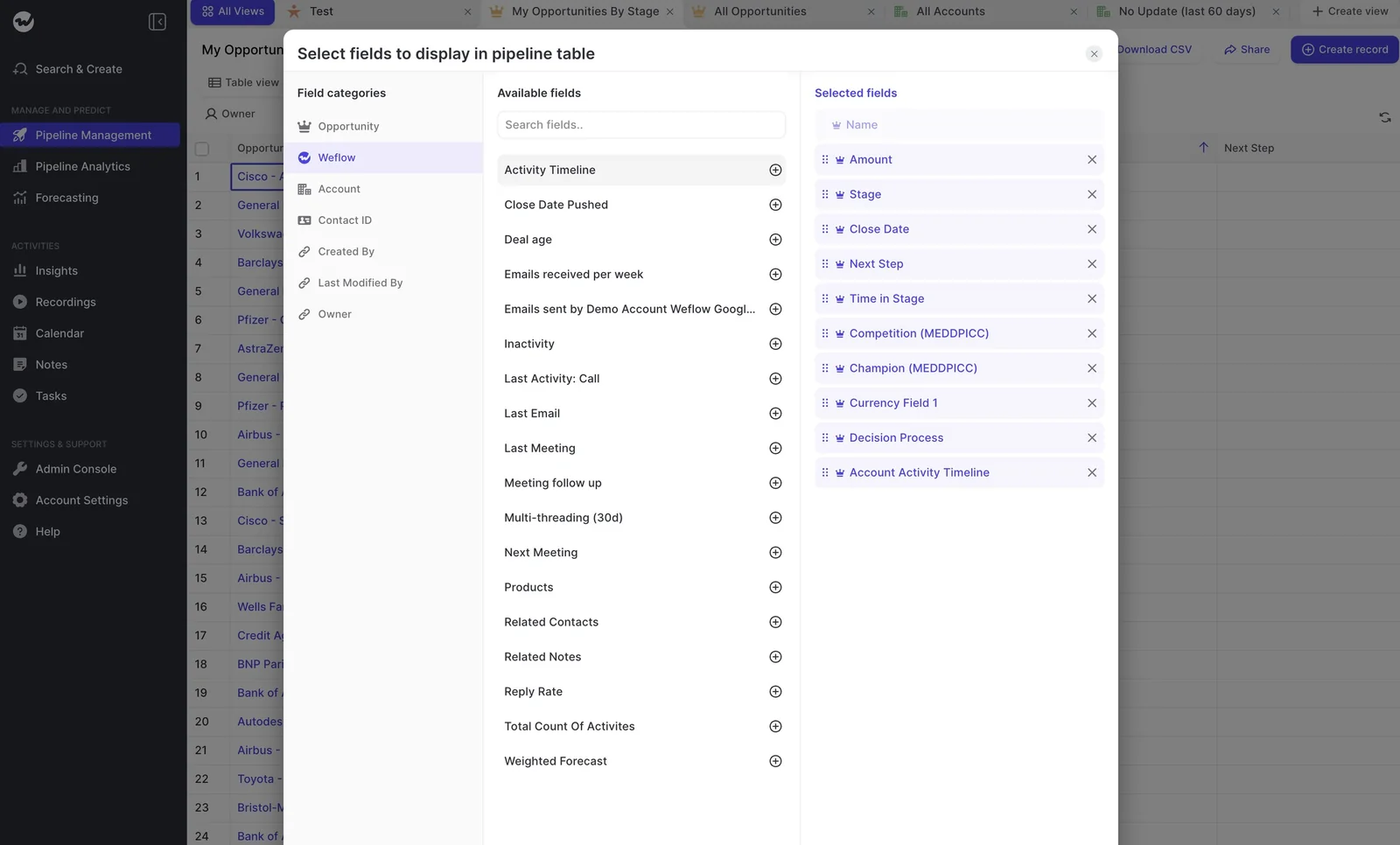
The board pulls live Salesforce data, and every edit writes straight back. Admins can also publish company boards that everyone sees from their first login, so every manager reviews from the same view.
Users can't change a company board's fields, but they can duplicate it and build their own version.
The honest limitation? The look. Some buyers find our interface a bit plain:
"the UI looks very simple, it just looks like a spreadsheet type view. It doesn't have the consumer feel of some of the other applications."
It's built to be worked in, not admired, and no, it doesn't have Gong's bubbles.
Weflow deal risk warnings follow the rules your team writes
With Weflow, you write your own deal risk warnings using AND/OR rules. Each rule can pull from three kinds of input:
- Any non-text opportunity-related field.
- Weflow's computed fields, such as days inactive, close-date pushes, days in stage and multi-threading.
- AI Playbook scores, for example "BANT score low and close date pushed".
Since a warning only works when it reflects how your deals actually slip, you set thresholds per team. For example:
- A team with a 60-day cycle might flag any deal that's been silent for 14 days, while a team with a 12-month cycle wouldn't.
- Another rule might flag any deal under 10,000 whose close date has been pushed.
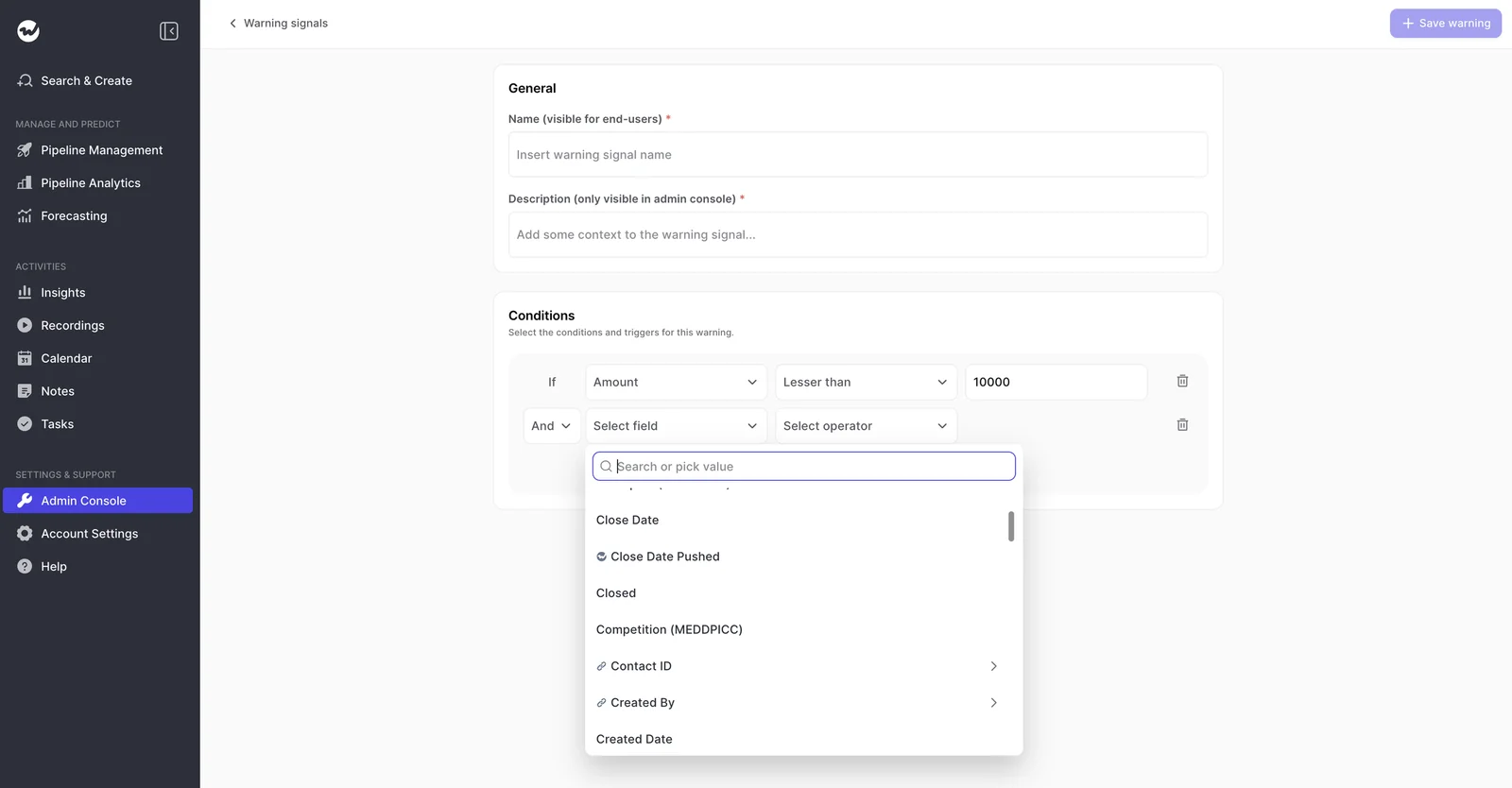
Days inactive only counts buyer emails and meetings, so editing a field or adding a note won't make a dead deal look alive (unlike Salesforce's Last Modified date).
Warnings also show up in the forecast submission screen, right when the rep picks their commit deals. That's where you stop unhealthy pipeline, before the number is already wrong. IDnow, for example, cut slipped deals by 60% using Weflow's deal warnings.
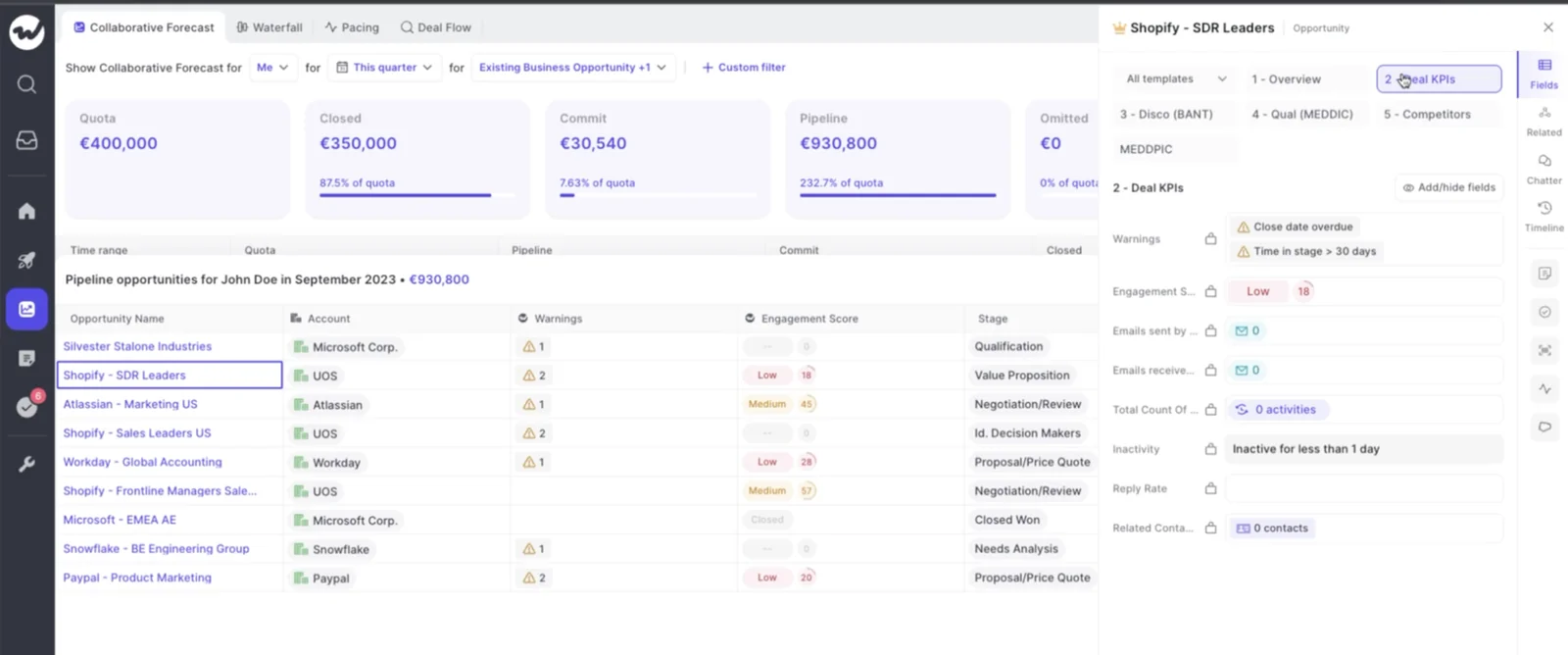
The catch is that warnings are Weflow fields, not Salesforce fields. To get them into a Salesforce dashboard or BI report, you'd need an agent that writes the assessment into a custom Salesforce field.
Weflow AI Playbooks judge MEDDIC gaps across emails and calls
Weflow AI Playbooks read every email, meeting, transcript and CRM field on the opportunity, then run each methodology element through two steps:
- The playbook fills the element from the deal's evidence.
- It judges how well that element is actually established.
That second step also checks what reps type in. So if someone fills a MEDDIC field with filler just to get past a validation rule, the playbook marks it as not assessed, not complete.
| Element state | What the playbook shows | What you do in the review |
|---|---|---|
| Established | The evidence supports the element. | Ask about the next step from here. |
| Partial | The element is partly supported, with a note on what's missing. | Ask the rep to close the named gap. |
| Never discussed | Nothing supports it, for example "no relevant data on the economic buyer". | Treat it as a risk on any deal in commit. |
Reading email is what makes the difference here. On one test opportunity, neither the champion nor the decision maker ever came up on a call; both came through email. A tool that only reads calls would have missed them completely.
Instead of a magic score, you see the evidence status for each element, and the playbook writes its results to the Salesforce fields you choose.
About thirty templates come out of the box, including MEDDIC, MEDDPICC, SPICED and BANT, or you can build your own framework by writing evaluation criteria for each element.
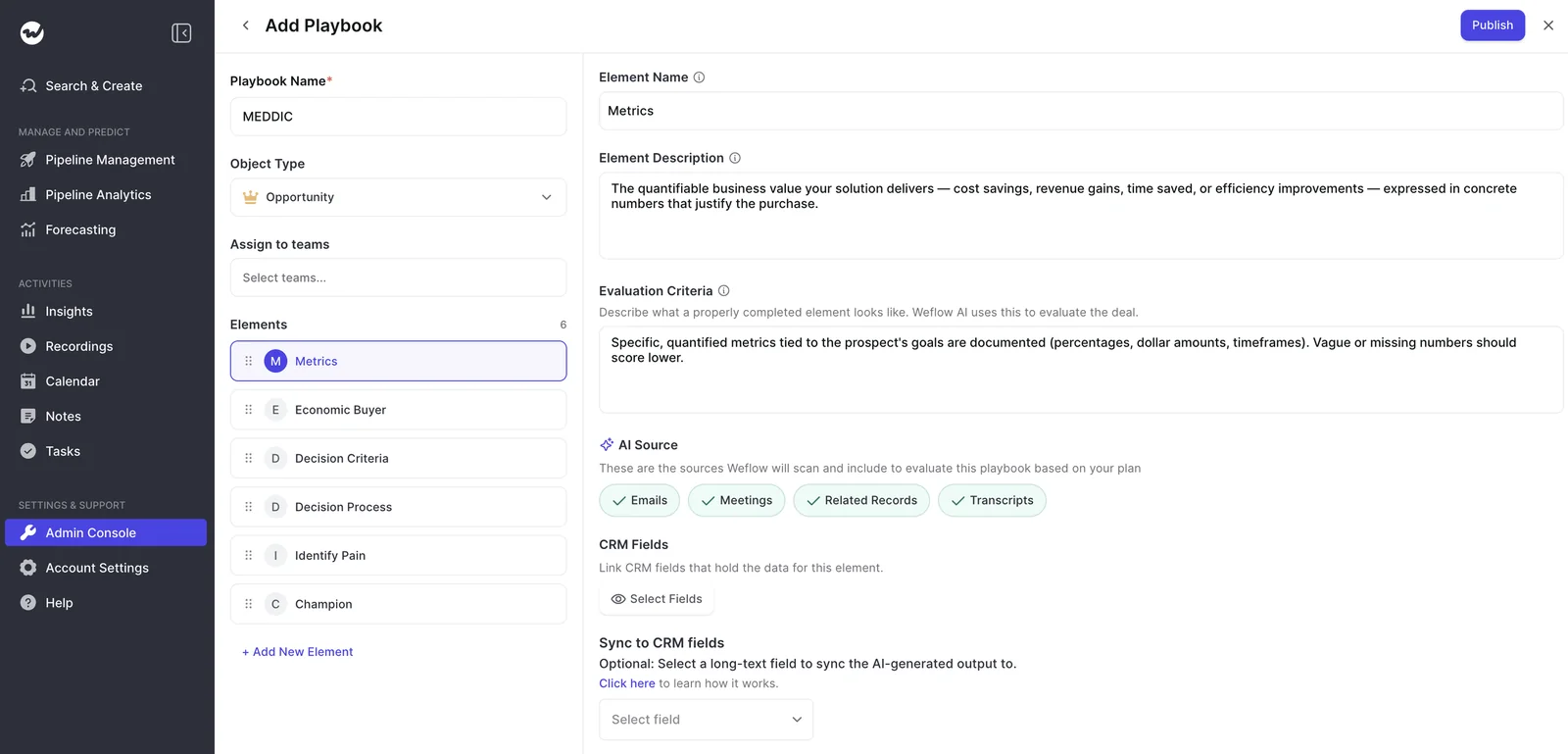
Playbooks rerun whenever new activity lands on the deal, or every three hours otherwise. There are two limits to know about:
- Your existing pipeline gets scored only after someone runs the bulk generate step.
- Playbooks read transcripts only from meetings Weflow recorded.
Weflow deal summaries read every meeting on the opportunity
Weflow's deal-level AI summary looks across every meeting on the opportunity, not one call at a time, and gives you pros, cons, next steps and risks.
It sits right next to communication velocity (based on the emails actually sent and received) and a list of everyone involved in the deal.
That way, you can read a deal without the rep in the room. You generate the summary on demand and refresh it whenever the deal moves. Here's how KORE Wireless describes the shift:
"It's no longer third-party hearsay from reps or sales leaders. It's now proof in front of us – AI summaries that tell us we're not talking to the economic buyer, that we're single-threaded, whatever it might be."
— Scott Jones, SVP of GTM Revenue Intelligence & Enablement, KORE Wireless
Weflow connects to your stack through native integrations and its API
Weflow integrates natively with:
- Salesforce
- Gmail, Google Calendar and Google Meet
- Outlook and Microsoft Teams
- Zoom and Slack
- The Outreach dialer, which your admin connects directly
Our team activates more dialers on request.
Here's where Weflow is narrower than Gong. We don't have a connector catalog or a native Snowflake, Databricks, or BigQuery connector, so warehouse teams move data through the API. Weflow also only works with Salesforce.
Claude and ChatGPT reach Weflow data through the MCP connector
Weflow's official MCP connector is read-only and gives Claude, ChatGPT and any other remote MCP client access to:
- AI Playbook results
- Call summaries
- Transcripts, behind a separate admin toggle
- Forecast metrics per rep, such as coverage, win rate and gap to forecast, with the opportunity IDs behind them
There's no metering, either, so a manager working in Claude can ask which reps are short on coverage this quarter without burning through a credit pool.
The one limit is that an assistant can't pull up a saved deal board by name, so it has to rebuild the filter from the raw records.
Weflow exports transcripts, scores and signals through its REST API
Weflow's REST API bulk-exports transcripts, metadata, scores and signals as JSON or CSV, ready for BI tools like Tableau and Looker or your data warehouse, alongside your Salesforce data. Meeting recordings export to your own cloud storage.
In other words, you own everything Weflow generates and can take it anywhere, no separate data product required.
How Gong runs a pipeline review on its deal board
Gong's board is excellent at showing momentum and change, while its risk and methodology layers are prebuilt and rely on people to validate them.
Gong's deal board shows momentum bubbles and field change flags
Gong plots each deal's activity as a row of bubbles, so you can read momentum at a glance. It's fast and habit-forming, which is why many teams run their forecast call straight from the board.
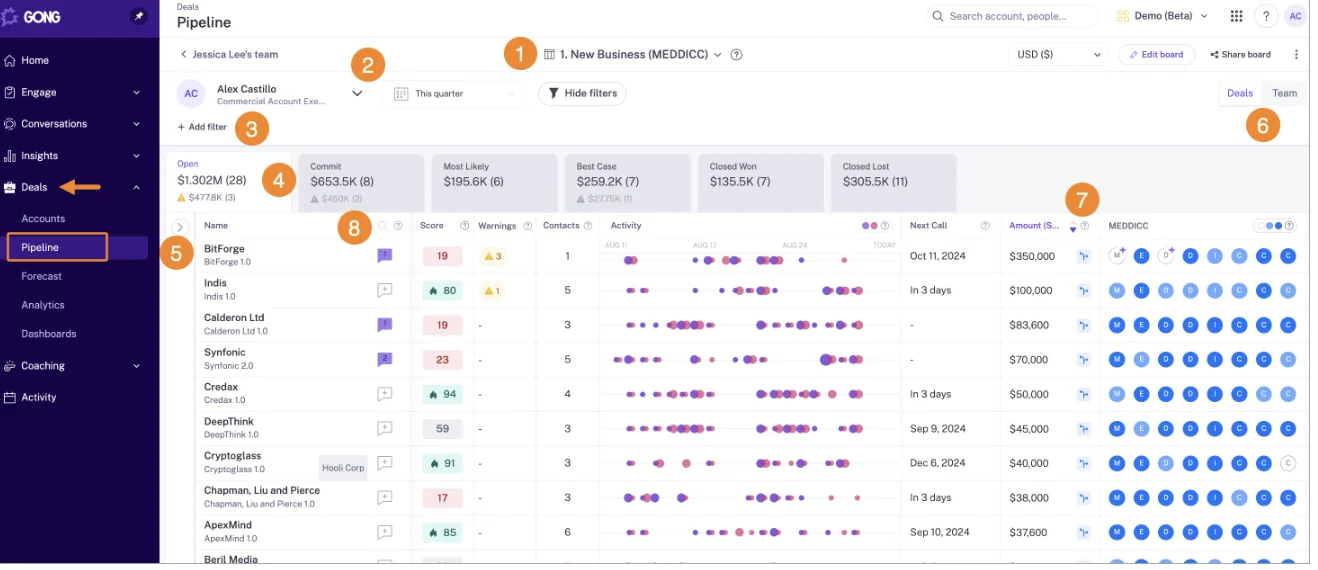
Its change flags show which fields changed, the old and new values, and when the change happened. Many teams use Salesforce to see what the pipeline is and Gong to see why it changed, and on this point, Gong is ahead of us.
The board is flexible, too:
- A business admin configures filters, tabs and columns from any CRM field imported into Gong.
- Columns can add trackers, warnings, playbooks and briefs.
- Users edit CRM fields from the board, and the change syncs back.
- Boards can be scoped by team member role, opportunity team or splits.
- Deal likelihood scores appear on the board if you hold a Gong Forecast seat and enough closed history.
Just keep in mind that the board requires Forecast Essentials or Gong Forecast.
Gong AI Deal Monitor gives you eight fixed deal warnings
Gong's AI Deal Monitor has exactly eight warnings, all defined by Gong:
- No activity
- Ghosted
- Overdue
- Not enough contacts
- No power
- Pricing not mentioned
- Red flag
- Stalled in stage
You can switch each one on or off and change when it triggers, but you can't define new ones. Gong also decides what evidence counts, like which references to pricing count as pricing being mentioned.
So if your deals tend to slip because of a missing partner sign-off, a compliance step or a required stakeholder, there's no way to turn that into a warning. You'll have to catch it by eye, deal by deal.
Gong AI Deal Reviewer suggests methodology notes for rep and manager
Gong's AI Deal Reviewer comes with seven methodology playbooks (MEDDICC, BANT, SPIN, Challenger, SPICED, Solution Selling and Sandler), which you can customize, or you can build your own.
Element status is colour-coded on the board, and both status and notes sync two ways with the CRM opportunity.
The workflow relies on people at every step:
- The AI suggests notes for each element.
- The rep reviews them.
- The manager validates them.
There's no weighted methodology deal score, so teams that want one have to build it separately in Salesforce with RevOps and IT.
Tuning is slow, too. Gong tells customers to allow up to 24 hours for a methodology tracker to show results, so each iteration takes about a day.
And while Gong shows you element status, judging the gaps across your pipeline is still up to you.
Gong AI Briefer builds deal briefs from calls, emails and CRM
Gong's AI Briefer builds briefs for an account, deal or contact by combining conversations, emails, CRM data and information from the web.
You can also ask for a methodology summary across every call on an account, which comes in handy on long cycles where qualification is spread across many conversations.
Gong's marketplace lists about 450 integrations and partner apps
This is the clearest place where Gong leads. The Gong Collective lists about 450 integrations and partner solutions across CRM, telephony, web conferencing, BI, enrichment and workflow automation.
It also imports calls from roughly thirty dialers and records on eleven meeting platforms, so if your stack runs on several dialers and conferencing tools, Gong covers more of it than we do.
Gong's MCP server answers one record at a time, on credits
Gong's MCP server exposes three tools:
ask_account, which answers a question about one accountask_deal, which answers a question about one dealgenerate_brief, which returns a structured brief
It's read-only and returns AI insights, never raw transcripts. Every request draws credits from a company-wide pool, so a question about a whole team's pipeline has to be pieced together one record at a time, with each call metered.
Gong's API and Data Cloud move data outside Gong
Gong's public API returns transcripts, participants, trackers and scorecards, capped at 3 calls per second and 10,000 per day.
To send data to Snowflake, Databricks, BigQuery or Redshift, you'll need Data Cloud, a separate application we've seen priced at about $5,000 a year.
One weekly pipeline review in Weflow and Gong, prep to commit
Here's how the same Monday review plays out in each tool. You'll notice the difference before the call even starts.
| Step | Weflow | Gong |
|---|---|---|
| 1. Prep: picking the deals to talk about | You open the company board for this quarter. Flagged deals carry the reason they were flagged, next to playbook status and engagement columns. | You open the board and read the bubbles for momentum. Then you scan change flags since last week to see what moved. |
| 2. Spotting risk by your own rules | Warnings fire on your thresholds: your silence window, your push count, your required stakeholders. | Eight warnings fire on Gong's definitions. Patterns specific to your motion are yours to spot by eye. |
| 3. Finding what each deal still lacks | Each element shows established, partial or never discussed, judged from email and calls, with the missing item named. | Element status and AI-suggested notes wait for rep review and your validation, deal by deal. |
| 4. The rep seeing risk before the call | The rep has already seen the warnings in the forecast submission screen. | Warnings sit on the board and in a digest email for subscribers. The rep sees them if they open the board or subscribe. |
| 5. Choosing commit deals | The rep picks commit with the warnings in view. You start the call from the deals where data and rep disagree. | You challenge commit on the call, using what you read from momentum and change flags. |
With Weflow, the deals worth discussing (and what each one is missing) are already on the board when you join the call. Since the rep has seen the risk first, the conversation feels like help, not surveillance.
That frees you up for the most useful agenda of all: the gap between what the data says and what the rep says:
"Or if you disagree with what the AI is saying, give me a clear answer on why."
— Kelly Lewis, RevOps and sales leadership coach, co-host of The Revenue Insiders podcast
What Weflow Deal Intelligence & Forecasting and Gong cost
Weflow publishes per-seat prices, with AI included in every seat. Gong doesn't publish prices, and its board sits on an application you buy on top of a mandatory Foundation license, with MCP and AI Tracker usage metered in credits.
| Weflow | Gong | |
|---|---|---|
| Pricing model | Per seat, published on our website. Volume discounts apply in the quote. | Per-user licence plus a platform fee that scales with users. Prices come only through a custom proposal. |
| List price for the deal board | Weflow Deal Intelligence & Forecasting at $39 per user per month. Weflow Revenue AI Business at $59 and Weflow Revenue AI Enterprise at $79 add capture and Conversation Intelligence. | Not published. |
| What the board requires | Weflow Deal Intelligence & Forecasting, standalone or in a bundle. | Gong Foundation plus Forecast Essentials or Gong Forecast, with a seat counted in each application. |
| AI usage | Ask Weflow AI Pro, summaries, field updates and playbooks are included in the seat with no usage caps. | Each paid core seat adds 2,000 credits a year to a shared pool. MCP, AI Trackers and API-based AI workflows draw on it. |
| What costs extra | Agent Builder beyond the free 25 actions a month: $299 a month for 500 actions, $999 for 2,500. | Credit top-ups, which expire at term end. Data Cloud for warehouse delivery. Each extra application per seat. |
| Contract basics | Annual billing, 12-month minimum term, 10-user minimum per product or bundle. Seats added mid-term are pro rata. | Seats added at renewal come at no extra cost. Seats added after renewal are paid across every application they need. |
Our pitch is simple: better AI at half the price of Gong. The savings come from when the product was built, not from cutting capability, since Gong set its prices back when transcription was expensive.
For a sense of scale, one Gong renewal proposal a buyer shared with us came to about $80,000 a year for 45 licenses, with forecasting making up about $10,000 of that.
Weflow's model really pays off with mixed seats, where different teams sit on different products: Capture for everyone, Conversation Intelligence for customer-facing teams, Deal Intelligence & Forecasting for the people who run the review.
For a team of about 62 seats, putting most reps on Capture plus Deal Intelligence and a handful of managers on the full platform comes to roughly $45,000 a year. With everyone on the full platform, it's about $58,000.
What changes when you move pipeline reviews off Gong
The switch works best when Weflow records your calls, your open pipeline is scored up front, and you time the move to your Gong renewal and roll it out on one shared board.
Keeping Gong as the recorder weakens Weflow AI Playbooks
If Gong stays as your recorder, playbooks judge each deal from the CRM record, emails and meeting metadata, without reading what was said on calls. Weflow will still show the fields Gong writes into Salesforce on its boards and sidebar.
So keeping Gong for recording saves you from changing your workflow, but it takes the conversation evidence out of the gap analysis, which is the main reason to move the review in the first place.
Your open pipeline gets scored after one bulk generate run
Once you set up a playbook, it automatically scores new and changed opportunities. But the deals already in your pipeline (the ones you want scored first) stay empty until someone selects them and runs Generate AI Playbooks in bulk.
Make that run part of setup, not a week-two task.
You'll also want to decide where the results land. A newly assigned playbook starts as a reference in the Signals tab and doesn't write anything, but once you designate Salesforce fields, it writes to them automatically, with no approval step.
If you'd like to check the output against your reps' view first, point it at test fields.
Time the switch against your Gong renewal date
Gong's seat mechanics reward lining things up with your renewal date: seats taken at renewal come at no extra cost, while seats added afterward are paid across every application they need.
On our side, Weflow's shortest term is 12 months, and we can negotiate an early opt-out after three months.
- Write down the Gong renewal date and which applications sit on top of Foundation.
- Run a side-by-side trial on your own Salesforce data while Gong is still live.
- Build your warnings with the sales leader in the room, since every threshold is a judgment about your business.
- Roll out in data order: activity capture first, then Conversation Intelligence, then deal intelligence, then forecasting.
- Go live on the review before the renewal decision, so you're comparing two working reviews.
Bring reps along with one shared company deal board
RevOps usually wins the cost argument, but it's the reps who decide whether the switch sticks:
"There's the RevOps side, where a more cost-effective option with better syncing and stronger data foundations is a no-brainer for us. But then there's the emotional, change-management side from the seller's experience."
Start everyone on one or two company boards they see from first login, mixing Salesforce fields with Weflow's computed columns, and keep training short.
As Zeotap's VP of Revenue Operations, Chris MacKinnon, put it, they "did one set of training with the team, and they got everything we would want them to get."
Then give reps the argument that actually resonates: they'll see the warning on their own deal before you do. And most reps tell us they'd rather fix a deal before the chase email arrives.
When to choose Weflow and when to stay on Gong
| Choose Weflow if | Stay on Gong if |
|---|---|
| Your slippage patterns depend on your cycle length, push thresholds or required stakeholders, and you want warnings built on them. | Your team lives in the bubbles, and the momentum view is how your managers think. |
| You want MEDDIC gaps judged across emails and calls, with filler caught, instead of validating notes deal by deal. | Gong's eight warnings already cover the ways your deals slip. |
| You want reps to see risk at forecast submission, before you chase. | Field change flags on the board, with old and new values, are central to your review. |
| RevOps wants published per-seat pricing, AI included in the seat, and unmetered MCP access. | Your stack depends on many dialers and meeting platforms that Gong's marketplace covers. |
| You're willing to record calls in Weflow, so playbooks read the full conversation. | Nobody is questioning the renewal, and the board's value to your team clears the price. |
See how Weflow captures activity, updates Salesforce fields from calls, and rolls up your forecast. Book a 30-minute demo.
FAQ: Weflow vs Gong for pipeline reviews
What does Weflow Deal Intelligence & Forecasting include at $39 per user?
You get:
- Editable deal boards
- 50+ deal signals and configurable warnings
- Pipeline analytics such as waterfall, pacing and coverage
- Forecasting with AI predictions, roll-ups and deal-by-deal submissions
- Ask Weflow AI Pro and Agent Builder Free with 25 agent actions a month
Call recording and transcripts aren't included; they come with Weflow Conversation Intelligence or a bundle.
Can Weflow deal warnings show up in Salesforce dashboards?
Not natively, since warnings are Weflow fields. The workaround is an agent that writes the assessment into a custom Salesforce field, which updates each time the agent runs.
Do reps see Weflow deal warnings, or only managers?
Yes, reps see them on deal boards and in the forecast submission screen. Everyone sees each warning's name, but only admins see its description.
Can I see what changed in my pipeline since last week?
Yes. Weflow snapshots opportunity data every few hours and builds a pipeline waterfall from starting to ending pipeline (created, increased, moved in, moved out, lost, decreased and won), and you can drill into each bucket to see the opportunities behind it.
Does Weflow handle opportunity splits like Gong's deal board?
No. Weflow rolls each deal up through its opportunity owner, so a split deal counts in full for that owner, and Salesforce opportunity splits and overlay forecasting aren't supported. If split credit drives your review, that's worth weighing up.
How long does Weflow setup take, and who builds the warnings?
Technical setup takes 30 to 45 minutes with a Salesforce admin and a Google Workspace or Microsoft admin. Getting to full value takes one to three weeks, mostly spent on templates, warning rules and pipeline views. Your admin builds the warnings in the admin console.
What contract terms does Weflow offer?
Our shortest term is 12 months, and we can negotiate an early opt-out after three months. Seats added mid-term are charged pro rata, you can reassign seats when someone leaves, and multi-year terms come with a discount.
Can we try Weflow on our own Salesforce data first?
Yes. Weflow offers a 14-day free trial with guided onboarding, and we'll run side-by-side demos against your current setup.