How to Run an Exception-Based Pipeline Review in Weflow
Learn how to run an exception-based pipeline review in Weflow with deal warnings and pipeline health data


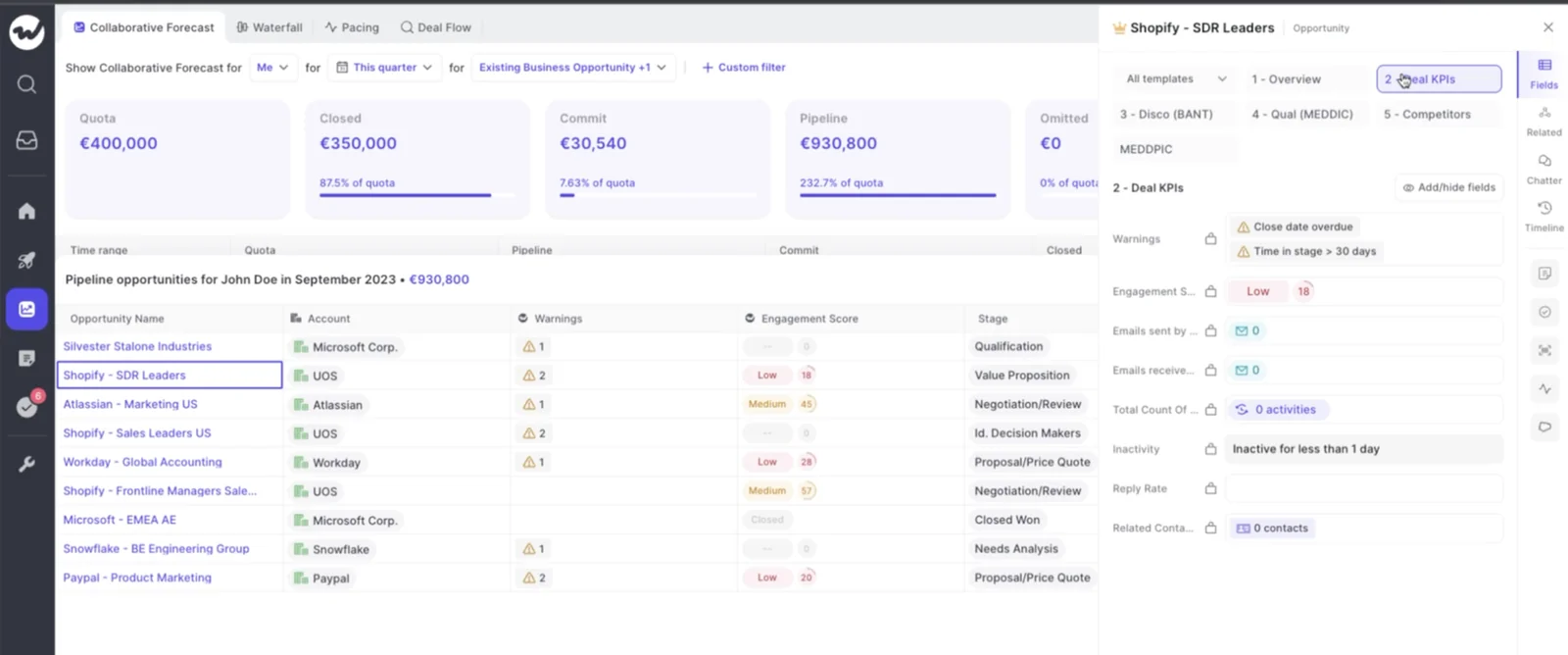
An exception-based pipeline review gets built before anyone joins the call. You agree your team's slippage patterns with your sales leader. You build them as deal warnings in Weflow Deal Intelligence & Forecasting and assign them to the team. Reps see the flags first.
On Monday you open a deal board filtered to what fired. You spend the hour on the gap between what Weflow says about each deal and what the rep says, and every flagged deal leaves the room with a task or a decision.
This changes the shape of the meeting, not just the screen. The reconciliation work ("is this deal real, when did you last speak to them") leaves the room, because the warning answered it before anyone joined.
Weflow is the Revenue AI Orchestration platform for sales, customer success, and RevOps teams. You already have it, so we'll skip the pitch. Below are the ten steps, with the limits stated where they apply.
How an exception-based review changes your Monday pipeline meeting
An exception-based pipeline review covers only the deals that broke your team's own rules, and the rep has already seen those flags before the meeting starts. Everything else stays off the agenda, because nothing about it needs a conversation.
| Part of the meeting | Status-update review | Exception-based review in Weflow |
|---|---|---|
| How prep happens | You rebuild each deal from a stage-duration report, a last-activity report and the rep's story | Warnings fire on captured activity all week, and an optional agent briefing lands before the call |
| Which deals get discussed | Every deal, rep by rep | Only deals with a warning |
| Who sees risk first | You, and then the rep through your chase email | The rep, on the same board and at forecast submission |
| What you ask | "What's up with this deal?" | "Why is the warning wrong?" |
| Where reconciliation happens | Out loud, in the meeting | Before the meeting, in the data |
| How each deal ends | "Okay, next" | A task, a field edit or a close-lost decision |
That's fair. A nicer view of the same pipeline doesn't change Monday. The social dynamic is what changes it.
When Weflow makes the claim that a deal has gone quiet, the rep isn't defending their competence. They're correcting evidence. The disagreement between the system and the rep becomes the agenda.
What you need before your first exception-based review
You need four things in place, and most teams can have them this week:
- A licence that includes Weflow Deal Intelligence. That's Revenue AI Business, Revenue AI Enterprise or Weflow Deal Intelligence & Forecasting. The package section below covers which one adds what.
- Weflow Activity & Contact Capture running underneath. Days inactive, contact count and last and next meeting are calculated from captured emails and meetings. Without capture, those fields have nothing to count.
- Admin console access. Warning signals and pipeline templates are configured there, so whoever administers Weflow for your team needs to be involved in steps 2, 3 and 5.
- Your sales leader's time for the thresholds. Every threshold is a judgement about your business. Your sales leader owns that judgement, and your admin configures it.
It also helps to have a rough sense of your closed-won cycle. How long do deals that close usually spend in each stage? How often does their close date move?
Weflow tracks days in stage and close-date push count on every opportunity automatically, so you don't need custom Salesforce fields for either. If nobody has the benchmark written down, start from what your sales leader knows and tighten it after a few weeks.
Set up deal warnings that match your own sales cycle
Weflow deal warnings are rules you write, not a risk model we ship. A warning only means something when it encodes your cycle.
Setup happens once: decide the patterns, build them as rules, assign them to teams.
Step 1: Agree your slippage patterns with your sales leader
Start with the failure modes your team already argues about in the room, and turn each one into a single warning. Silence for 14 days means something on a 60-day cycle and nothing on a 12-month one, so the number always comes from your cycle, never from someone else's.
Five warnings is a good starting set:
| What you see in the room | Weflow warning rule | What sets the threshold |
|---|---|---|
| Close date keeps moving | Push count above a set number | How often close dates move on deals that still close |
| Deal gone quiet | Days inactive above a set number | Your cycle length, because quiet on a short cycle is louder |
| Single-threaded | Contact count below a set number | How many people are typically involved in deals you win |
| Stuck in stage | Days in stage above a set number | Time in that stage on your closed-won deals |
| Late stage, weak qualification | A required methodology field still empty at or past a set stage | The stage where your methodology says that answer must exist |
The target is a list that stays empty when things are on track.
Step 2: Build each warning in Weflow with AND/OR rules
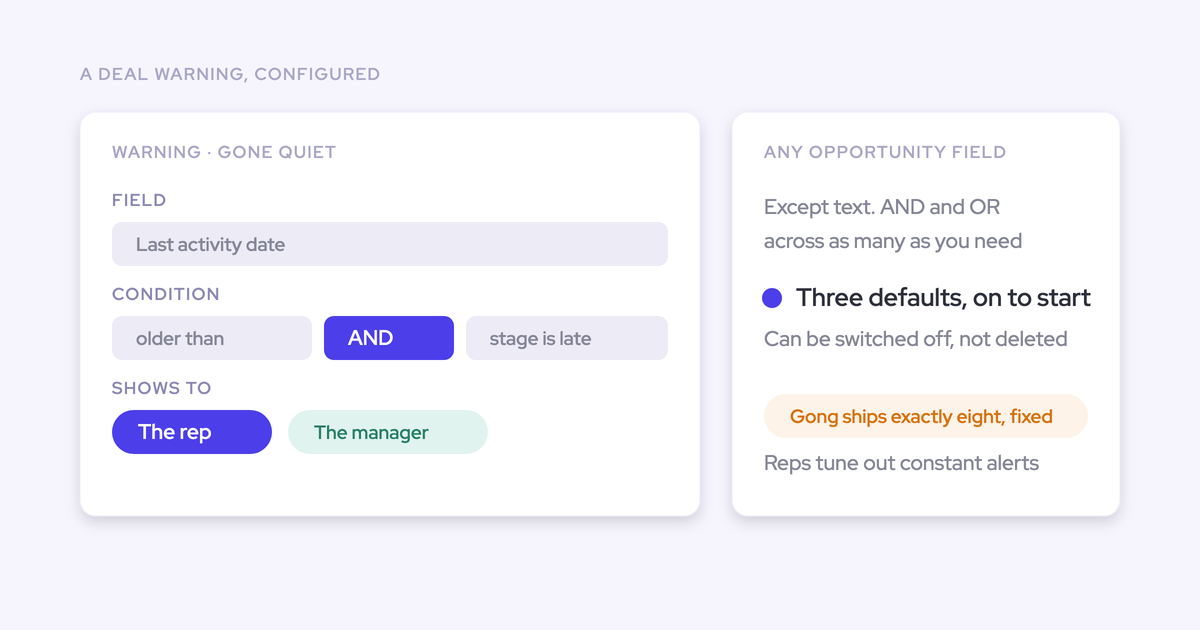
Each warning is a rule built in the admin console. It can combine any opportunity-related field (except text fields) with Weflow's computed fields: days inactive, push count, days in stage, contact count, and last and next meeting.
Here's one worked example, "Close date keeps moving in late stage":
- Open warning signals in the admin console and create a new signal.
- Name it after what the rep will see, so the flag explains itself on the board.
- Add the first condition: push count greater than 2.
- Add a second condition with AND: stage at or beyond the stage where a moving date should worry you, for example Proposal.
- Save the signal. It doesn't fire yet, which is what Step 3 fixes.
Text fields can't drive a rule. If you want to catch "no next step", build it on next meeting instead of the Next Step text field. That's a stronger signal anyway, because a booked meeting is harder to fake than a sentence.
Weflow's days inactive counts only emails and meetings, so editing a field or a note on an opportunity doesn't make it look alive. Salesforce's Last Modified date moves whenever anyone touches the record. That's how a neglected deal passes a Salesforce report and still gets caught by a Weflow warning.
Step 3: Assign the warnings to each team so they fire
A warning does nothing until you assign it to a team.
- Assign each signal to the teams it applies to. Different teams can carry different sets.
- Set the inactivity threshold per team, so a short-cycle team and an enterprise team each get the number that fits.
- Review the three default signals Weflow ships with. You can deactivate them but not delete them, so turn off any that don't match your motion.
Fewer warnings that mean something beat more warnings that fire on everything.
Build the Weflow deal board your review runs from
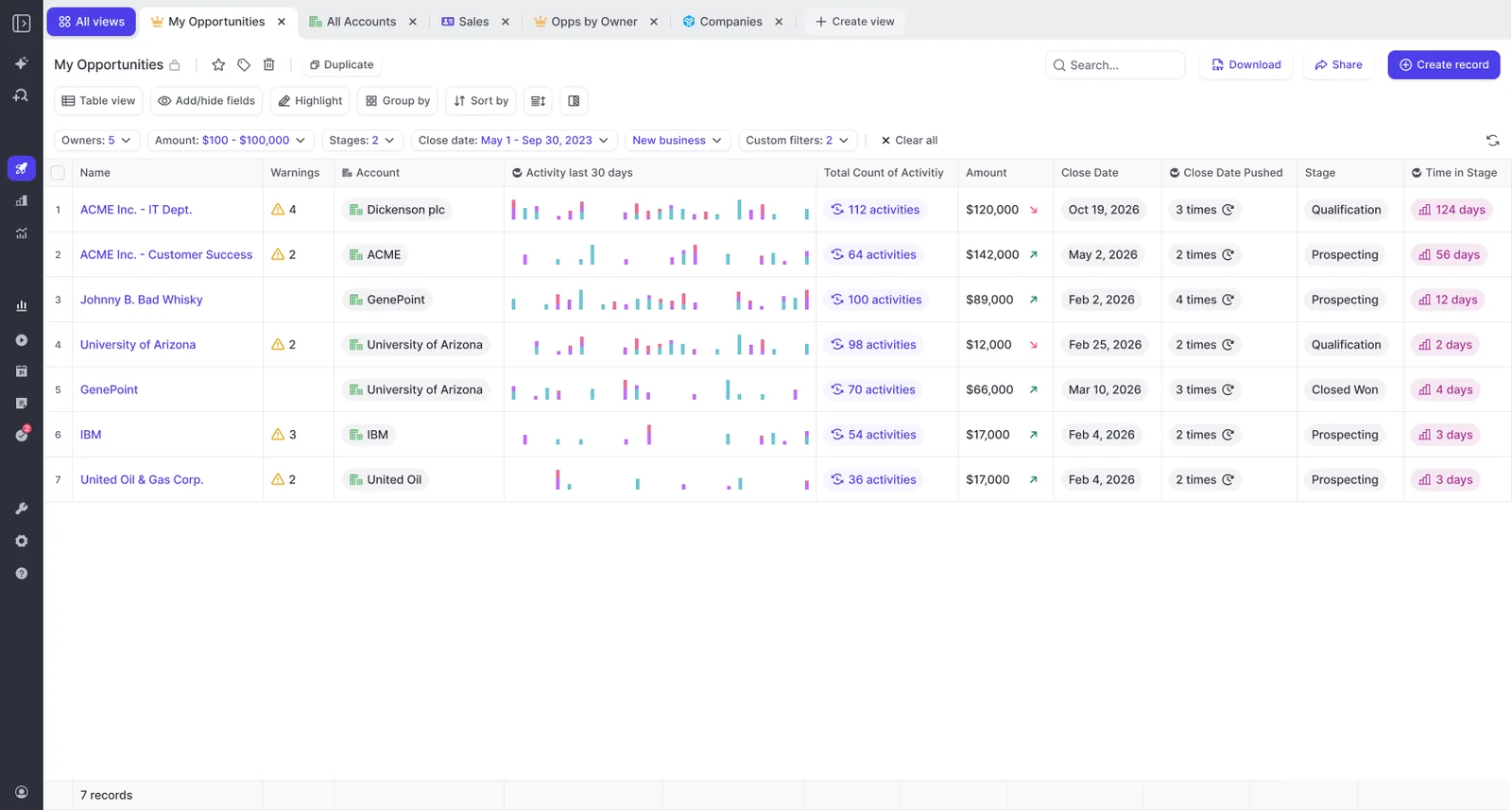
Your review runs from one Weflow deal board, filtered to deals with warnings and locked as the team's template. Nobody opens a second report.
Step 4: Add the columns that answer your review questions
Pick columns by the question each one answers in the meeting:
- "Has anyone spoken to the buyer?" Days inactive and last meeting.
- "Who's involved?" Contact count, plus contact fields such as role.
- "Is it moving?" Days in stage and push count.
- "Is there a next step?" Next meeting.
- "What does it look like over time?" The activity timeline, which shows sent mail, received mail, meetings and tasks and clicks through to the messages.
A Weflow deal board can show fields from the opportunity, its account and its contacts side by side. A standard Salesforce opportunity report can't, because its report type binds the objects, so a contact's role or engagement never sits in an opportunity column. That's why you've been running two reports and a rep briefing.
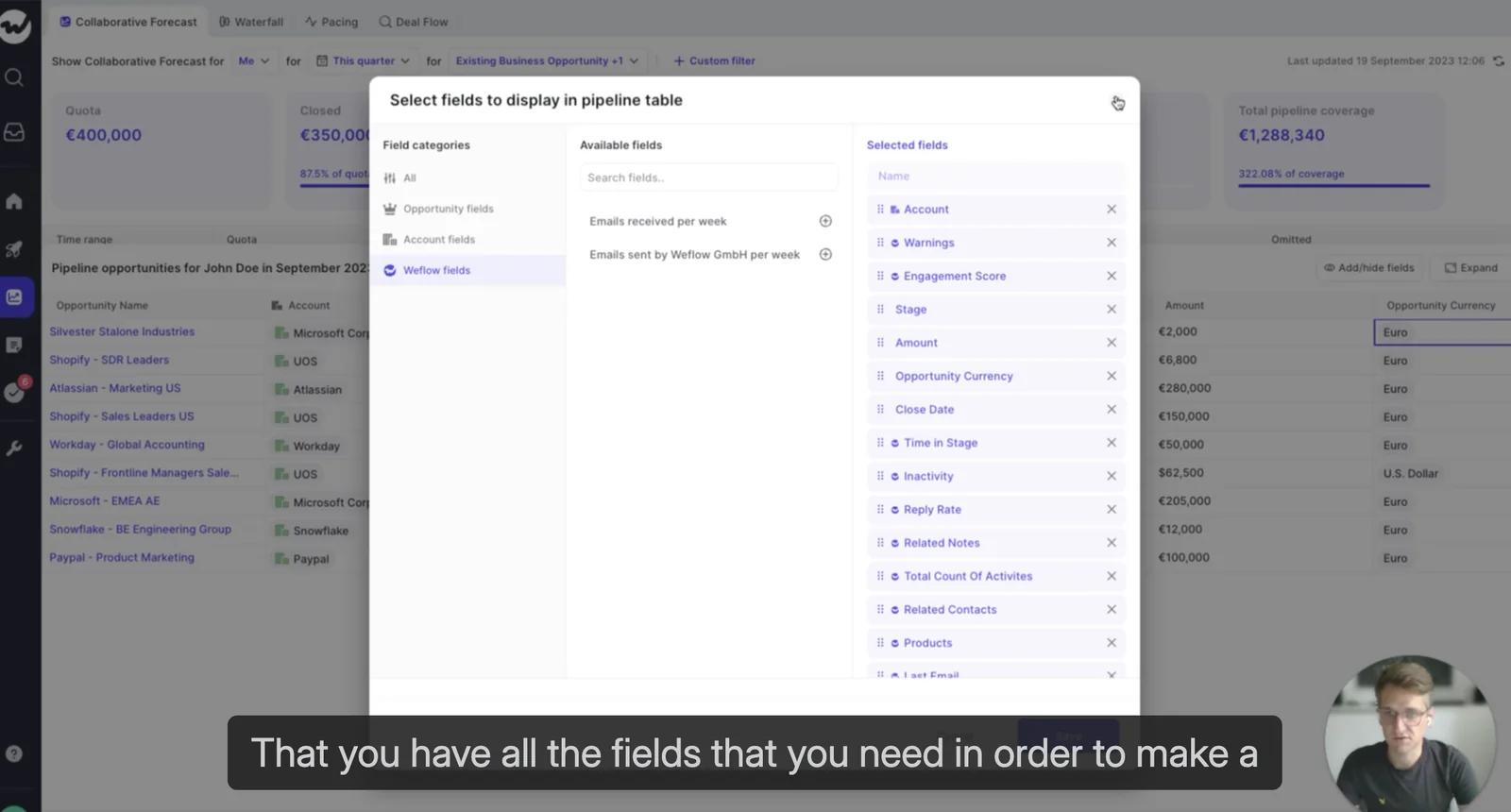
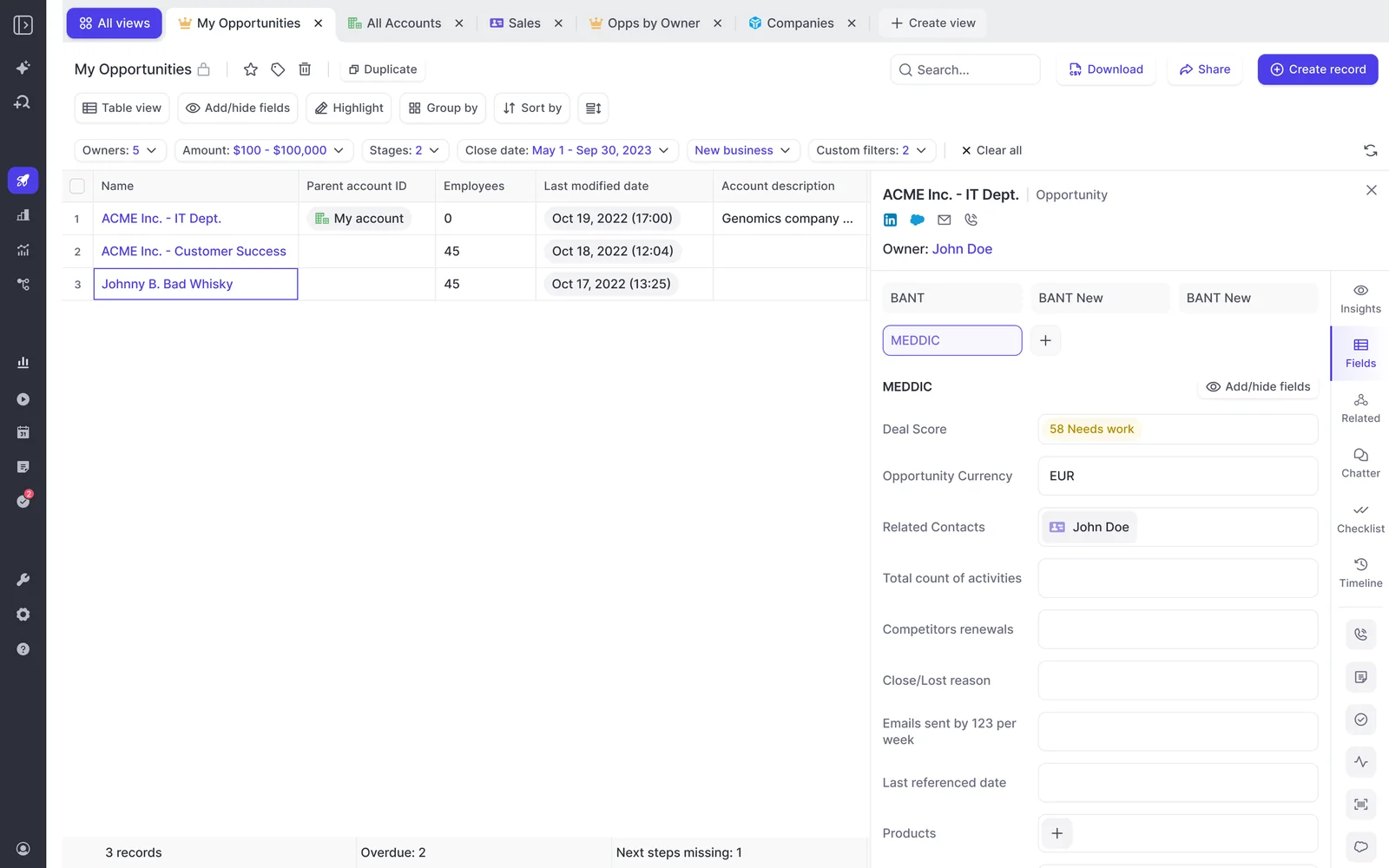
Weflow fields carry a W marker in the field picker and on the board. Every field stays editable and writes back to Salesforce, so the board you review from is also the board you fix things on.
Step 5: Save a warnings-only view as your team template
Make the filtered board the one view everyone reads in the review:
- Filter the board to deals with warnings.
- Save it as a pipeline template.
- Assign the template to the team.
A pipeline template locks the field set for the teams it's assigned to. Reps see your columns and can't add or remove them. They can only duplicate the view to build their own, so the shared reference doesn't drift.
Let the prep happen before anyone joins the call
By Monday, reps have already seen and acted on their own flags, and a written briefing can land without you building it.
Step 6: Show reps the same warnings so they act first
Reps work the same board and see the same flags you do. That's the difference between a warning and surveillance.
When the only person who sees the red flag is the manager, the rep hears about slippage from your chase email. A deal signal turns into a performance conversation. When the rep sees it first, they fix it before anyone asks.
- Assign the warnings-only template to the reps as well as the managers.
- Set one expectation: before the review, every flag is either cleared or has a one-line reason the rep will defend in the room.
- Use the review to discuss what's left.
Warnings also appear in the forecast submission screen, at the moment the rep chooses which deals to commit. An unhealthy deal gets questioned before it enters the number, not discovered in a report after the number is already wrong.
HolidayCheck saw the behavior change quickly:
"The visibility alone changed behavior. Reps come into meetings already aware of what's overdue or inactive. They're more proactive now, because they can actually see what needs attention."
— Bastian Stosic, Head of Media Sales Operations at HolidayCheck
Step 7: Schedule a pre-review risk scan with Weflow Agent Builder
A Weflow Agent Builder agent can run a scheduled risk scan before your review and deliver it to Slack or email. This step is optional. It replaces the written prep you'd otherwise do on Friday afternoon.
- Trigger: set the day, time and timezone, for example the morning of your review.
- Lookup: pull your team's open opportunities with field-level filters, such as close date this quarter. Lookups read Salesforce live, so an update a rep made a minute ago is in the run.
- Prompt: start from the deal risk PDF template and rewrite its basic prompt. Ask it to name the deals that need action and say why, from their emails, calls and transcripts.
- Delivery: send it to a Slack channel or by email, with a PDF attached if you want one.
- Test: do a test run first. The output shows in Ask Weflow AI, so you can tighten the prompt before it goes to anyone.
Agents run on a time schedule only, not on changes to a Salesforce record. Treat the scan as a briefing. A deal that slips on Tuesday shows up in next week's run and on the warnings board straight away.
Spend the meeting where Weflow and your rep disagree
The agenda is the gap between what Weflow says about each flagged deal and what the rep says. Where the two agree, you talk about the next step. Where they don't, the rep explains why the system is wrong, and every flagged deal ends in an action.
Step 8: Read each flagged deal's AI summary and playbook first
Before the rep says anything, spend thirty seconds getting the deal's real state:
- Open the deal from the warnings board.
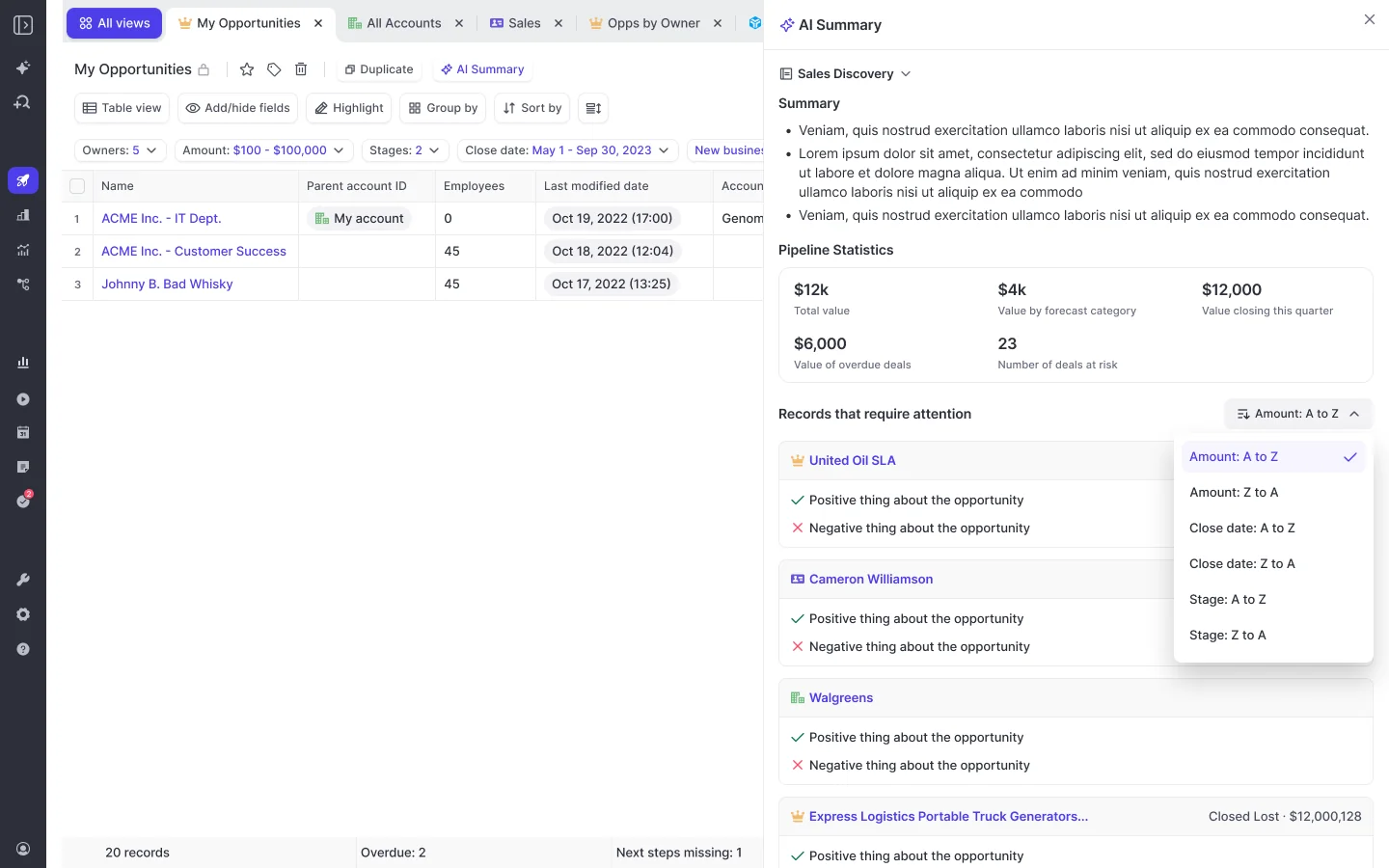
- Generate the AI summary. It reasons across every meeting on the opportunity and sits next to communication velocity and everyone involved.
- Scan the AI Playbook for elements marked partially established or never discussed.
- Check the buying committee: who's actually emailing and meeting, not just who's attached.
The deal summary is generated when you ask for it, not kept current automatically. Generate it as you open each deal, and regenerate it if something changed since.
Weflow AI Playbooks judge evidence, not field completion. A rep who fills a MEDDIC field with filler to get past a validation rule sees that element marked as not assessed rather than complete. A late-stage deal with weak methodology shows up as the exception it is.
Step 9: Ask the rep why the warning is wrong
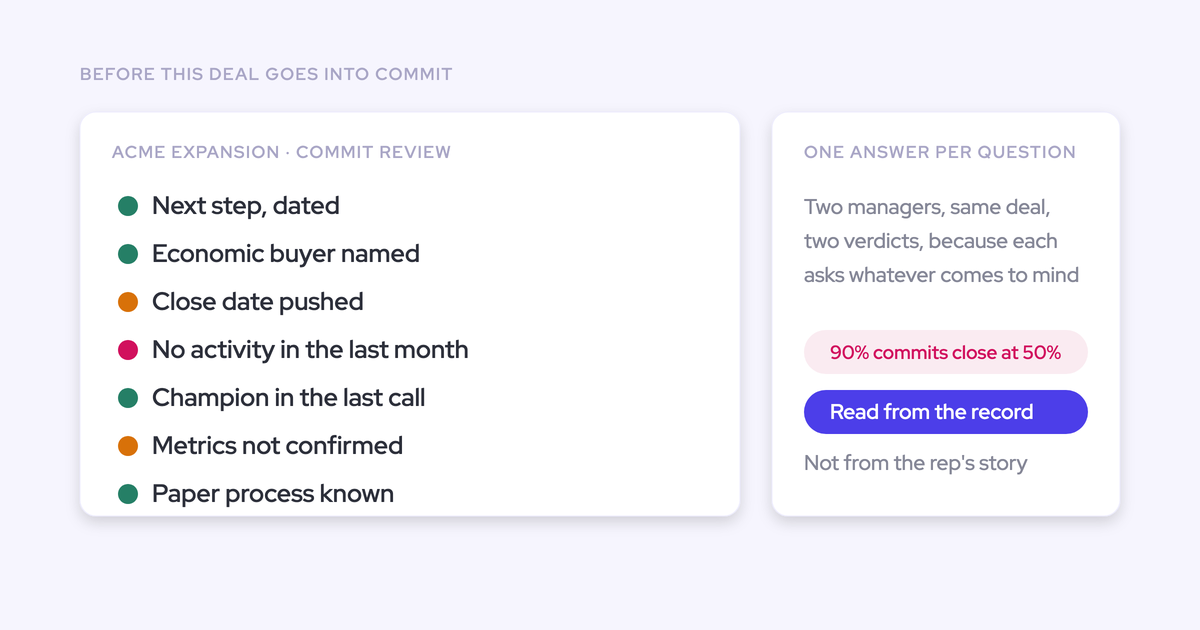
"Why is the warning wrong?" replaces "what did you miss?" Because the system made the claim, the rep defends or corrects evidence instead of defending themselves.
| Instead of asking | Ask |
|---|---|
| "What's happening with this one?" | "Weflow says nobody's emailed or met them in three weeks. What's it missing?" |
| "Is this still closing this month?" | "The date has moved three times. What's different about this date?" |
| "Who are you working with there?" | "One person is replying. Who else needs to be in the thread?" |
| "Are you sure it's qualified?" | "The playbook has no economic buyer evidence. Where did you confirm it?" |
Kelly Lewis describes the frontline manager's job in exactly these terms:
"You're looking for what is the system telling me, and then what is my rep telling me, and what is the disconnect? So that's where I can focus. And that's where I think it's really important to know that AI is telling me this. When I get on my weekly forecast call and we go through the deals and I ask questions, I'm not just reading the news, I can ask better questions to understand this is where we are in MEDDPICC, and do you know what to do next because that's where you're at. Or if you disagree with what the AI is saying, give me a clear answer on why."
— Kelly Lewis, RevOps and sales leadership coach; co-host, The Revenue Insiders podcast
Mallory Lee makes the same point from the RevOps seat. The step you remove is the counting:
"Instead of debating it, you can just say, what's the most important deal? AI is telling us that this one is the most important deal. Do you agree?"
When the rep disputes a flag and nobody can tell who's right, use Ask Weflow AI on the pipeline view as the tiebreaker. Its answers list the emails, calls and records it read. AI Playbook results don't cite sources, so Ask Weflow AI is where you go for the evidence. It reads up to 2,000 records per view.
Step 10: End every flagged deal with a task or decision
Each flagged deal leaves the room with one of three outcomes, or it comes back next week:
- A task. Create the Salesforce task from the pipeline view while you're on the deal, with the rep as owner and a date.
- A field edit. Fix the close date, stage or amount on the board. The edit writes back to Salesforce under your validation rules. Champion and Economic Buyer are set by a person, by picking the contact in the deal board sidebar, because AI can't fill lookup fields.
- A close-lost decision. If the deal is dead, close it in the meeting.
The third outcome matters more than it looks. Dead deals that stay open inflate the pipeline, and they stretch your average cycle length, so the benchmark you set your warnings against gets wrong too.
"I think often pipeline bloat, how I call it, is one of the really the cancers in the system. So how do you know whether deals are real or not?"
What teams got from running reviews on Weflow warnings
Teams that review on warnings see inactive and past-due pipeline shrink, and inspection becomes a weekly routine instead of a quarter-end scramble.
- HolidayCheck reduced inactive opportunities by over 60% and past-due opportunities by about 75%. That's Steps 2 and 6: inactivity measured from real buyer interaction, visible to reps first.
- Zeotap runs weekly sales meetings and pipeline inspections on custom pipeline views and templates, and increased win rate by 12%. That's Steps 4 and 5, plus the qualification discipline behind Step 8.
- Blockaid moved off Einstein Activity Capture and uses Weflow's deal signals, warnings and opportunity snapshots to catch risk early.
"Weflow provides extraordinary visibility into pipeline health and progression, allowing us to act on risks early and make the right decisions."
Mistakes that turn deal warnings into noise
Noise is what kills this system. Reps already ignore emails and tasks, and a board that flags half the pipeline gets tuned out inside a week. Most failures come from a handful of avoidable choices:
- Shipping every warning on day one. Start with the five from Step 1 and add one only when a missed deal proves you needed it.
- Borrowing thresholds from another team's cycle. An enterprise team's 30-day inactivity window will never fire on a transactional team. Set inactivity per team, as in Step 3.
- Hiding flags from reps. If only managers see warnings, they read as surveillance and the rep shows up defensive. Give reps the same template.
- Judging activity by Last Modified. A field edit isn't a buyer conversation. Build inactivity on Weflow's days inactive, which counts only emails and meetings.
- Treating the scheduled agent as a live alert. It runs on a schedule. The warnings board is the live view, and the agent is the briefing.
- Letting the freed hour become a longer pipeline review. Richard Harris makes the point on our podcast that a pipeline review and a sales meeting are two different meetings, and the pipeline review tends to swallow the sales meeting. Put the time you get back into coaching your reps, not into inspecting more deals.
Coming from Gong: replace the deal board, not just recordings
If your managers live in Gong, the deal board is the habit you have to replace, and Gong's board is good. Our own Head of Sales bought Gong twice before joining us, and he's honest about why he stayed:
"Like the deal board specifically, the reason why I stuck with it was like the bubbles, like, you sort of get like addicted to the bubbles. It's like this nice UI thing, but it kind of gives you this good, like momentum of the deal."
— Chris Nethercote, Head of Sales at Weflow, former Gong enterprise customer
Here's Gong's pipeline board, the view your managers are used to reading:
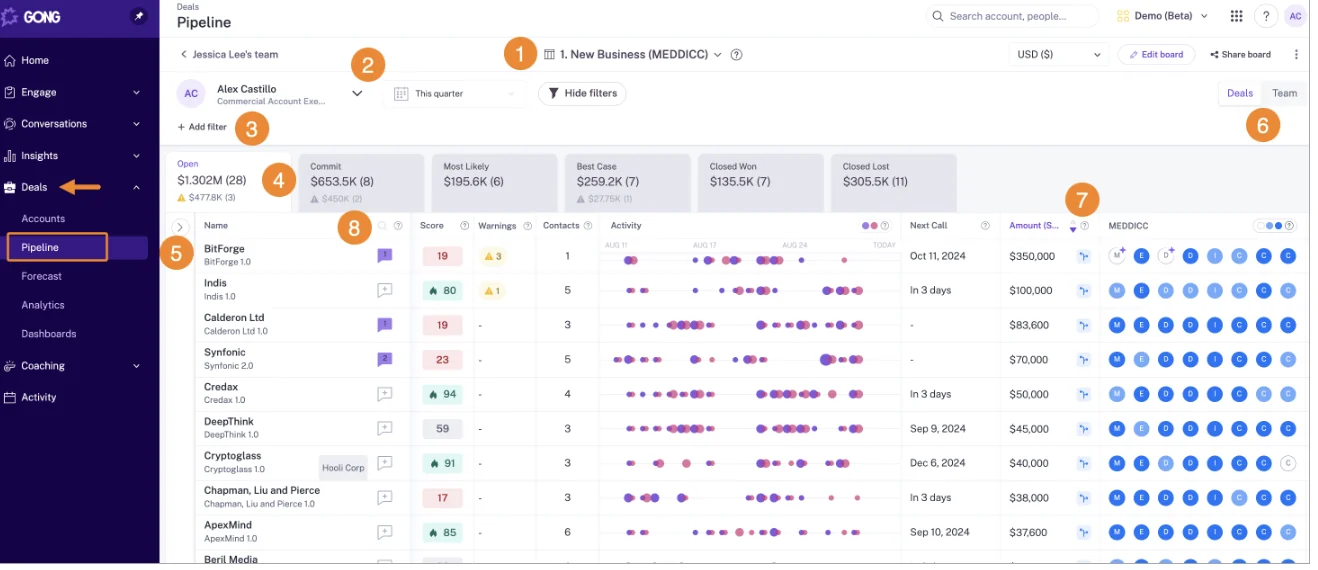
Gong's AI Deal Monitor has exactly eight warnings, all defined by Gong:
- no activity
- ghosted
- overdue
- not enough contacts
- no power
- pricing not mentioned
- red flag
- stalled in stage
You can switch each one on or off and change how long it waits before it triggers. You can't add your own. A compliance step, a required stakeholder or a partner sign-off can't become a warning.
Weflow warnings are authored. That's the line, and it matters most for teams whose slippage looks different from the eight patterns Gong chose. On the board, the rolling activity timeline takes over the bubbles' job: sent and received mail, meetings and tasks against each deal, clickable through to the messages.
If your eight Gong warnings fit your motion and your managers run the week from the bubbles without friction, you already have a strong board. Stay where you are. Switching makes sense when your review keeps fighting the warnings you can't write.
Your call history comes with you. The FAQ below covers how.
What Weflow Deal Intelligence won't do in your review yet
Know these limits before you promise your VP anything:
- Warnings and playbook scores stay inside Weflow. They're Weflow fields (marked W), so they don't reach Salesforce dashboards or BI tools. The workaround is an agent that writes the assessment into a custom Salesforce field you create, and someone has to build it.
- AI can't set Champion or Economic Buyer. Lookup fields and contact roles are a person's job, done from the deal board sidebar.
- The deal summary is generated on request. It isn't pre-built for every record.
- Agents run on a schedule. They don't trigger on changes to a Salesforce record.
- The waterfall and pipeline analytics need Forecasting. Deal Intelligence in Revenue AI Business doesn't include them.
- View-only licences exclude the deal board. They cover recordings and the insights panel, not pipeline management or forecasting.
Which Weflow package you need for exception-based reviews
Revenue AI Business includes Weflow Deal Intelligence, which covers everything in Steps 1 to 10: views, AI deal scoring, warnings and buying committee intelligence. It excludes pipeline analytics and forecasting. Revenue AI Enterprise or Weflow Deal Intelligence & Forecasting adds them.
| What you get | Package |
|---|---|
| Deal warnings and the deal board (table or Kanban) | Revenue AI Business, Revenue AI Enterprise, Weflow Deal Intelligence & Forecasting |
| AI deal scoring and buying committee intelligence | Revenue AI Business, Revenue AI Enterprise, Weflow Deal Intelligence & Forecasting |
| Warnings in the forecast submission screen | Revenue AI Enterprise, Weflow Deal Intelligence & Forecasting |
| Waterfall, pacing and pipeline analytics | Revenue AI Enterprise, Weflow Deal Intelligence & Forecasting |
| Ask Weflow AI | Included across all Weflow products and bundles |
| Weflow Agent Builder | Included across all Weflow products and bundles |
Weflow Deal Intelligence & Forecasting costs $39 per user per month, billed annually. It includes Ask AI Pro and the Agent Builder Free tier with 25 agent actions per month.
The bundles also include Weflow Activity & Contact Capture, which feeds the computed fields your warnings run on:
- Revenue AI Business is $59 per user per month.
- Revenue AI Enterprise is $79 per user per month.
- All plans are billed annually with a 10-user minimum.
If you want to see your Monday before you configure it, walk through the product yourself.
FAQ: exception-based pipeline reviews in Weflow
Who should set the deal warning thresholds, RevOps or the sales leader?
The sales leader should judge the thresholds, because each one is a call about how your business sells. RevOps or your Weflow admin then builds and assigns the warnings in the admin console. Setting thresholds without the sales leader is the fastest route to warnings nobody trusts.
Do reps see the same Weflow deal warnings as their manager?
Yes. Reps see Weflow deal warnings on the same deal board when you assign them the template, and again in the forecast submission screen when they choose which deals to commit. That's what lets them act before the review instead of hearing about it in it.
Do warning signals apply to everyone automatically?
No. Weflow warning signals only take effect once you assign them to a team. Different teams can carry different signals, and the inactivity threshold is set per team.
Can I turn off Weflow's default warning signals?
Yes. Weflow ships three default warning signals, and you can deactivate any of them. You can't delete them. Turn off any default that doesn't match your motion so it doesn't add noise to the board.
Can Weflow deal warnings show up in a Salesforce dashboard?
Not directly. Weflow deal warnings and AI Playbook scores are Weflow fields, so Salesforce reports and BI tools can't read them. The workaround is a Weflow agent that writes the assessment into a custom Salesforce field you create, which your dashboards can then report on.
How does the Weflow AI deal score work before we have closed history?
The Weflow AI deal score is trained on your own closed deals, so it needs about six months of closed history to score accurately. Once it has that, it trains within a few days and recalculates every opportunity from 0 to 100 nightly, with an explanation of what drives each score. Until then, run your review on the warnings, which only need your rules and captured activity.
Do edits on the Weflow deal board respect our validation rules?
Yes. Edits on the Weflow deal board write back to Salesforce in real time through the API. They respect your validation rules, field dependencies and permission sets. A change that Salesforce would reject gets rejected from the board too.
Can I create and assign tasks during the pipeline review?
Yes. You can create Salesforce tasks, notes and activities directly from a Weflow pipeline view while you're reviewing the deal. Making the task with the rep as owner before moving to the next deal is how Step 10 keeps the same flags from coming back.
Can executives get a read-only Weflow deal board?
Not on a view-only licence. Weflow's view-only licences are unlimited and cover recordings and the insights panel, but they don't include pipeline management or forecasting. An executive who needs the deal board needs a paid seat.
What happens to our Gong call history if we switch?
Weflow migrates your Gong call history at no charge. The migration keeps the link between each call and its Salesforce account, and Weflow reprocesses the recordings so they're searchable and scoreable like calls recorded natively. Recordings that only exist as video files can be bulk-imported with a CSV, and Weflow matches them to Salesforce records itself.