Weflow vs Attention for Meeting Prep and Deal Summaries Across Emails and Calls (2026)
Decide between Weflow vs Attention for meeting prep and deal summaries across emails, calls, and Salesforce.


You probably prep for your next meeting by opening the recording, your inbox and the Salesforce opportunity in three tabs. The real difference between Weflow and Attention is what your brief already holds before you ask for anything.
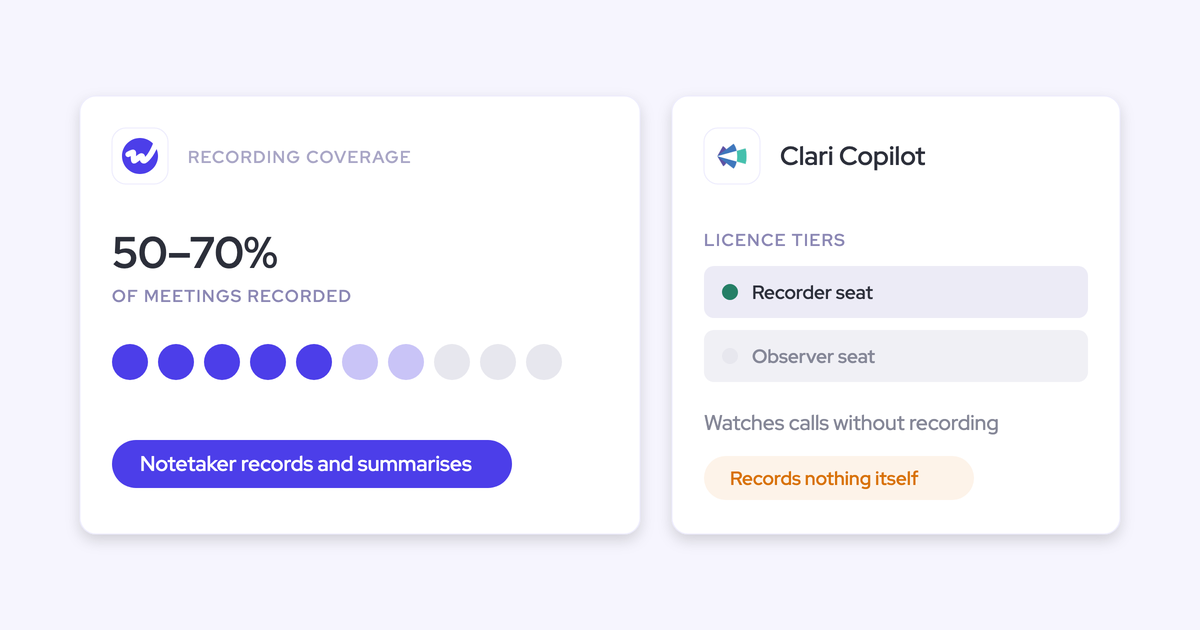
Attention starts from your calls. It only pulls in email when you ask its Super Agent, and only for reps who've connected their mailbox. Weflow is the Revenue AI Orchestration platform for sales, customer success, and RevOps teams.
Weflow is built for Salesforce teams, so your brief starts from every email, meeting, transcript and field already on the record, and you can widen it to the whole account.
One click on "Prepare meeting" hands the meeting to Ask Weflow AI, and you don't connect anything yourself.
Go with Attention if you want live help during calls, read-write access from Claude, or agents that act on what happened after a call. Go with Weflow if what's missing is the full picture before the meeting.
Weflow vs Attention at a glance for meeting prep
| Capability | Weflow | Attention |
|---|---|---|
| Deal summaries across all interactions | Reads the record's emails, meetings and call transcripts and returns pros, cons, next steps and risks. Generated on demand from the Salesforce panel. | Deal-scoped fields and Insights summarize every call on the opportunity. Email and CRM data only come in when you ask Super Agent. |
| Ask AI chat | Scoped to a call, deal, filtered board, account or the whole system. It inherits Salesforce permissions. It doesn't reach product docs or ticketing. | Insights runs at This Conversation or Entire Deal, and the Account option is greyed out. Super Agent searches Salesforce and HubSpot accounts and reads imported email. |
| Automatic email capture | Runs server-side at the mail tenant on any device and writes to Salesforce in near real time. Logs only mail that matches a Salesforce record. | Captures email for each rep who connects Gmail or Microsoft 365. Email lands in Attention's own store without attachments. Logging it to Salesforce is a workflow you build. |
| Integrations with other tools | Native connections to Salesforce, Google, Microsoft, Zoom, Teams, Meet, Slack and dialers. Salesforce only, and not an integration platform. | Calendars, Zoom Phone and Aircall imports, two-way Slack, and workflow steps in CRMs, Google Workspace, Notion, Snowflake and more. |
| Access from AI assistants (MCP) | Official read-only connector for summaries, transcripts, playbooks and forecast data. It doesn't return captured email content or field values. | Read-write MCP server with 68 tools that returns raw transcripts. Rate-limited, with no consumption charge. |
| Raw data access outside the tool | REST API bulk export in JSON or CSV, BI connectors, and recordings exported to your own storage. No native warehouse connector. | Transcripts, scorecards and insights through MCP and API keys. Workflows send data to Snowflake or any API. |
| Pricing | Published per seat: $19, $39 and $39 for the standalone products, $49 to $79 for bundles. Billed annually, 10-user minimum. | Not published. |
Why Attention starts from calls and Weflow from the record
Both tools put AI on your calls, but they start from different places, and that shapes what you see when you sit down to prep.
Attention is built conversation-first: a call happens, the AI makes sense of it, and actions follow. It can reason over email and CRM data too, but only when you ask Super Agent.
Weflow starts from the record instead. Along with your calls, we capture your emails, meetings and contacts, and combine them with the Salesforce data you already have.
| Question | Attention (call-first) | Weflow (record-first) |
|---|---|---|
| Where data starts | The recorded conversation | Every email, meeting, contact, transcript and Salesforce field on the record |
| Where it lands | Attention's own store, with call outputs mapped into CRM fields | Native Salesforce objects your reports and automations already read |
| What's there by default | The deal's calls | The whole record, up to the account |
| What you ask for | The email side, through Super Agent | Nothing extra, though you can ask follow-up questions |
So the real question is which problem you're solving: automating follow-through after calls, or getting a complete record so your brief is whole.
What Weflow and Attention show you before the next meeting
Let's say you're meeting your champion tomorrow at 10. Budget came up in an email last week, and their boss's name came up two calls ago. Here's what each tool gives you the night before.
| Step | Weflow | Attention |
|---|---|---|
| 1. Open the deal | Open the opportunity in Salesforce. The Weflow Chrome extension shows the AI summary and Ask AI on the record page. | Open the deal's conversations in Attention. |
| 2. Ask for prep | Click "Prepare meeting" on the calendar entry. Ask Weflow AI opens with the meeting already attached as context. | Run an Insights template such as Deal risks at Entire Deal scope, or type your own question. |
| 3. What the brief contains | Prior emails, meetings, recordings and Salesforce data, including that budget email. | An answer based on the deal's calls. Email only comes in when you ask Super Agent. |
| 4. On a renewal account | Point Ask Weflow AI at the account to pull in every email, event and transcript on it. | Insights stops at the deal, because the Account option is greyed out. Super Agent can search CRM accounts on request. |
| 5. What you had to connect or ask | Nothing. Your admin installed the central mail app, and the calendar entry framed the question. | Your own mailbox connection, plus a separate Super Agent question for email. |
| 6. Tracing an answer to its source | Answers list their sources, so you can jump to the call, transcript or email behind a claim. | Insights answers show the scope they ran at. Cross-call analysis through its MCP server returns references to specific calls. |
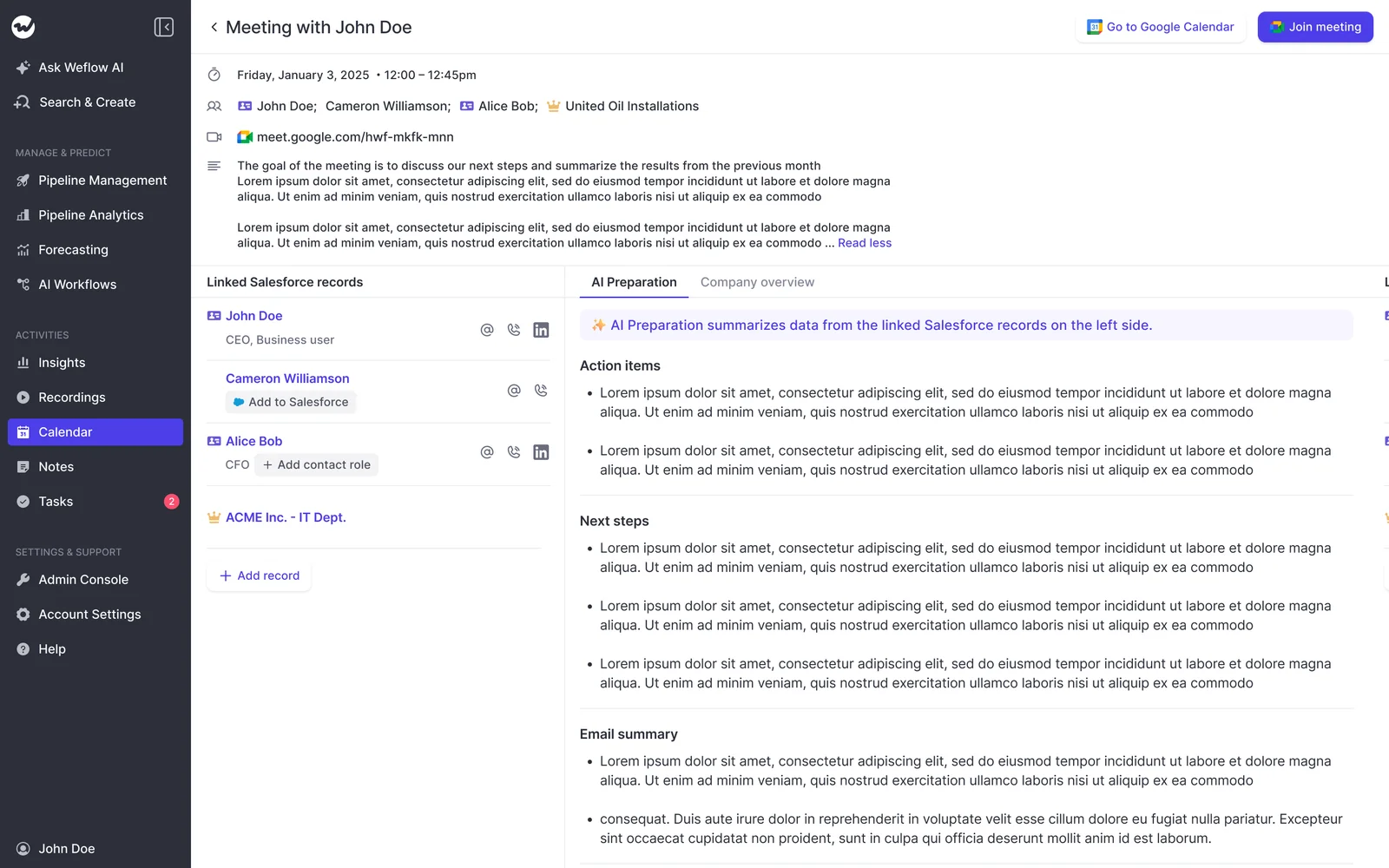
The big change is that you're no longer stitching the deal together yourself from three tabs at 9pm, or trying to remember which of yesterday's ten people mentioned the budget cycle.
"And, you know, as someone who's also spending a lot of time selling, I actually don't wanna go back to a time where I don't have automated summaries of my meetings because the reality is when I have five back to back meetings, each of these, like, thirty to forty five minutes long, and I speak to basically ten different people, then, yeah, it's just no chance I can remember everything. So I need that. I need to have that automated summary."
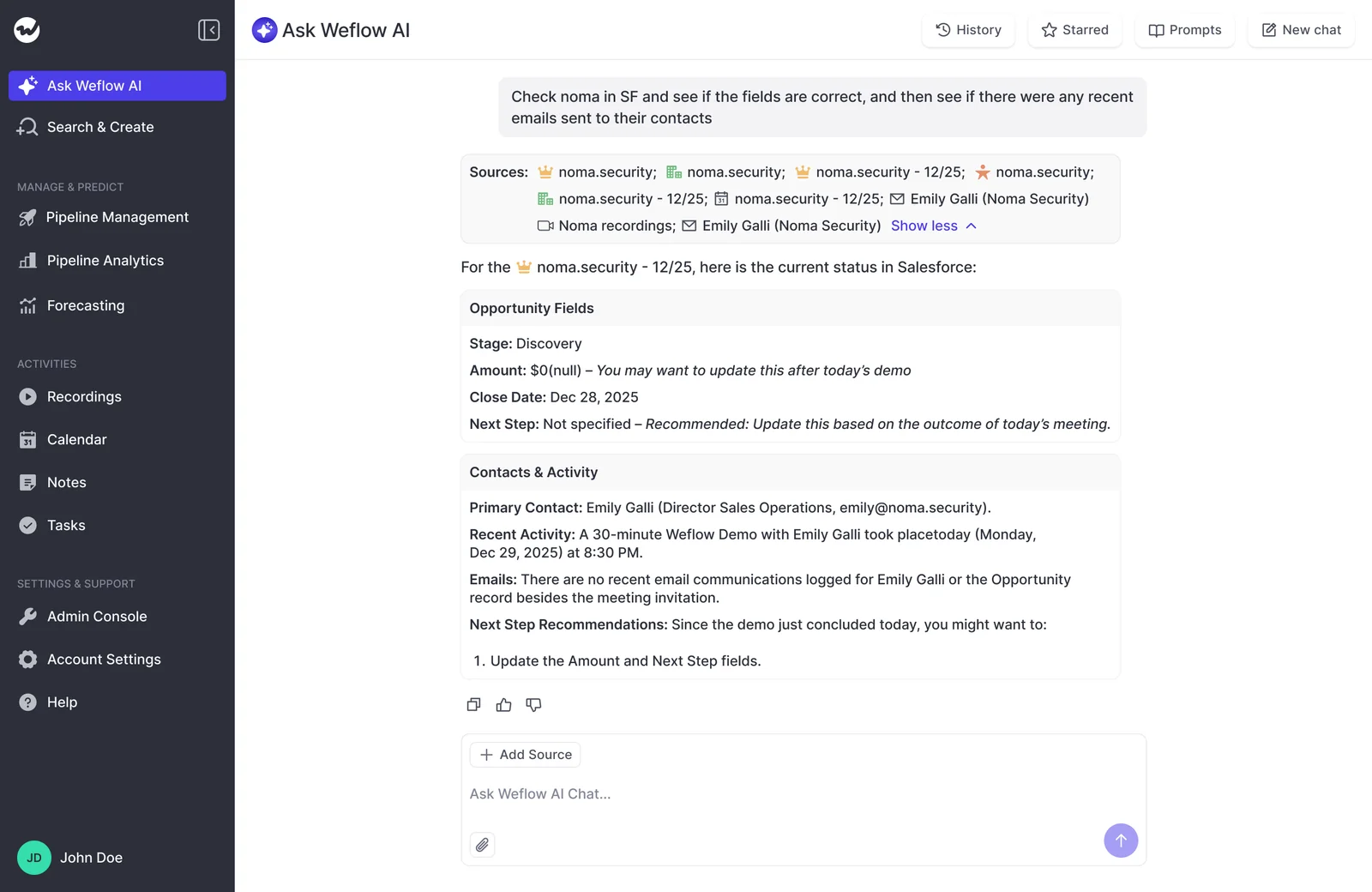
Of course, you'll only trust a brief in front of a buyer if you can check it. That's why Ask Weflow AI shows where each point came from, so you can correct it or dig deeper before you walk in.
"I love being able to go right to the call, transcript or email and see where something was said that the AI is referencing."
— Scott Jones, SVP of GTM Revenue Intelligence & Enablement, KORE Wireless
Where Attention is the stronger choice for your team
Attention comes out ahead in four areas. If one of them is your main problem, it's probably the better fit.
- Live help during the call: Since its June 2026 release, Attention's desktop app shows live talk-track and battlecard prompts while you're on the call. Weflow doesn't offer live in-meeting help; your summary, field updates and follow-up email arrive once the call ends.
- Automating what happens after calls: Attention ships ready-made agents, like a Follow-Up Email Automator and a Deal Risk Monitor, that put the next move on each deal in front of you to approve.
- Deep access from Claude: Attention's MCP server is read-write, returns raw transcripts and carries no consumption charge. Weflow's connector is read-only.
- Breadth of workflow destinations: Attention workflows push call data into CRMs, Google Workspace, Notion, Snowflake and many more tools. Weflow isn't an integration platform.
How Weflow builds your prep and deal summaries in Salesforce
Everything your brief draws on is already on the Salesforce record, and you didn't have to log any of it.
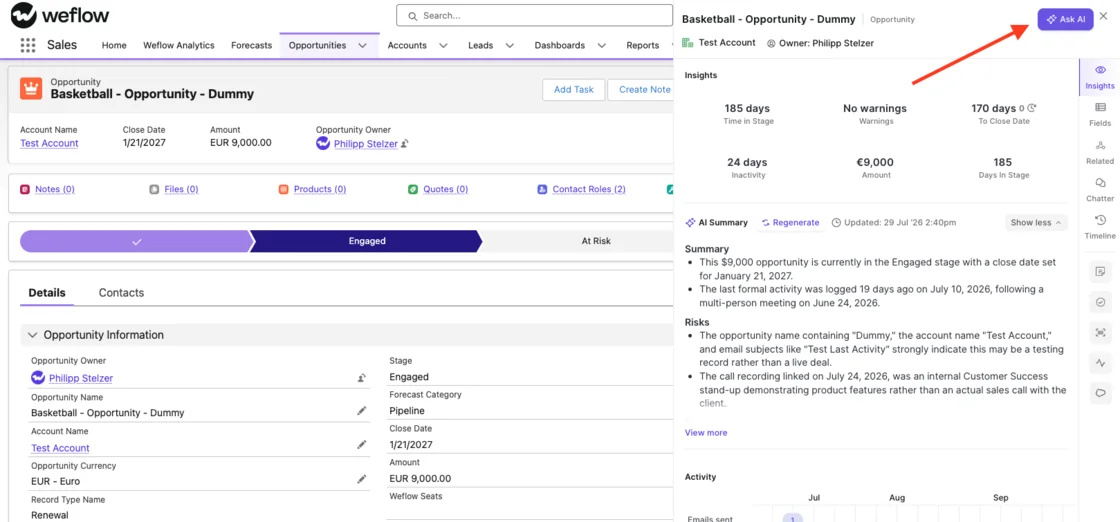
Weflow's deal summary reads every email, meeting and transcript
Rather than looking at one call at a time, Weflow's deal summary reads every email, meeting and call transcript on the opportunity and gives you:
- Pros and cons of the deal
- Next steps
- Risks
Next to it, you'll see everyone involved in the deal and its communication velocity, which is based on the emails actually sent and received, so it reflects the real relationship rather than your memory of it.
You generate the summary from the Salesforce panel whenever you need it and can regenerate it any time.
On top of that, each call summary lands on the Salesforce Event in your team's template 30 to 60 seconds after the meeting ends, with a link to the recording.
Ask Weflow AI preps meetings across a deal or account
With "Prepare meeting" on the Weflow calendar, you skip the setup. There's no need to describe the deal or gather context because the calendar entry already supplies it.
- Open your calendar in Weflow and find tomorrow's meeting.
- Click "Prepare meeting".
- Ask Weflow AI opens with a Meeting context chip already attached.
- It builds a brief from prior emails, meetings, recordings and Salesforce.
- Ask follow-up questions in the same thread, such as what the economic buyer said last time.
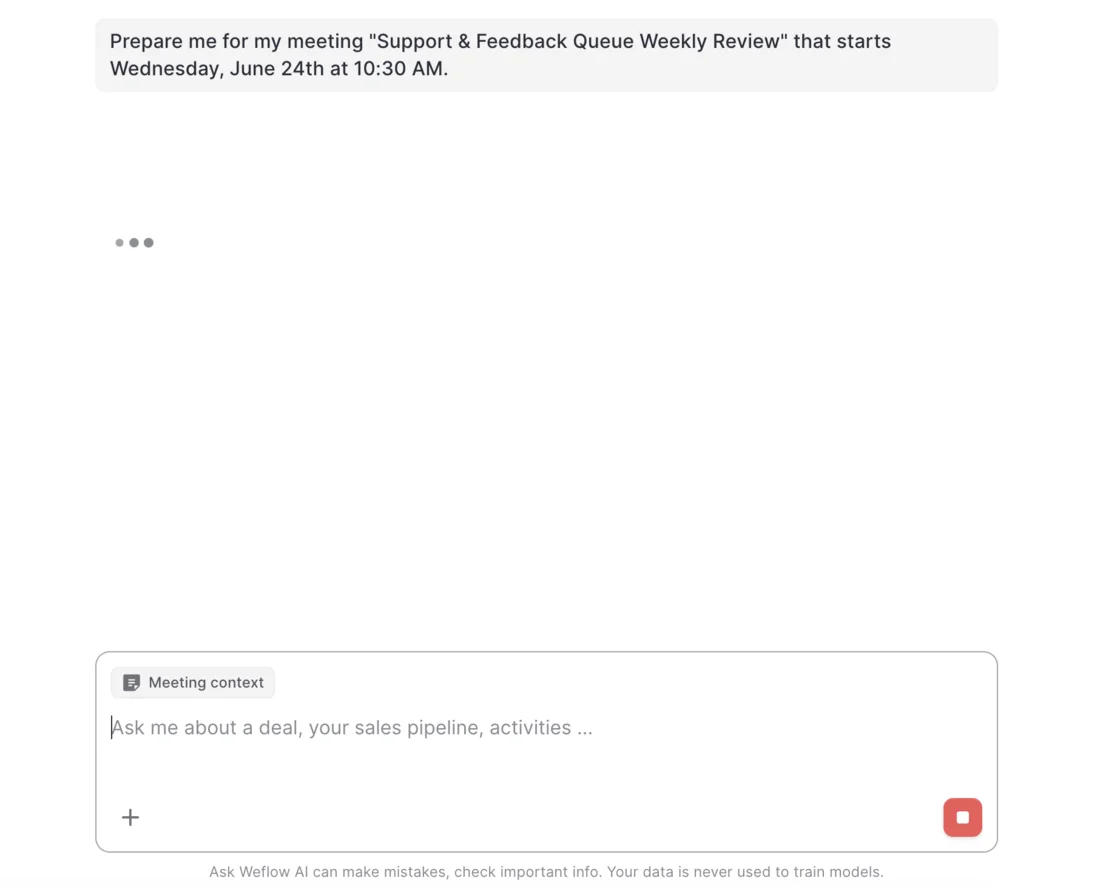
You can point Ask Weflow AI at a single call, a deal, a filtered deal board, an account or the whole system. Account scope is especially handy for renewals and expansions, since it pulls every email, event and transcript on that customer into one question.
It works inside Salesforce too: the Chrome extension brings Ask AI and the AI summary onto Salesforce record pages. And because Ask Weflow AI signs in with your Salesforce token, it only returns data you already have access to, with its own guardrails added on top.
"And the same is true with meeting prep. Everybody does the same thing for the meeting. You get basically briefed instead of you clicking on thousands of different things."
One limitation: Ask Weflow AI can't access your product docs, process guides or ticketing system.
Weflow captures your email without you connecting a mailbox
Weflow Activity & Contact Capture runs server-side at the mail tenant through a central app your admin installs in Microsoft Entra or Google Workspace.
That means emails you send from your phone, a browser or Outlook all get captured the same way and written to Salesforce in near real time, not in a nightly batch.
There's no mailbox for you to connect (or forget to connect). Your admin enrolls you, and you're done.
| Question | Weflow | Attention |
|---|---|---|
| Where capture runs | At the mail tenant, server-side | Per user, once that user connects a mailbox |
| Who sets it up | Your admin, once for the team | Each rep, with an admin report flagging who hasn't |
| Devices and clients covered | Any device, any client | Whatever mailbox the rep connected |
| Where email lands | Native Salesforce records | Attention's own store, tied to an account and deal |
| Getting it into Salesforce | Automatic | A workflow the customer builds |
A few things Weflow won't capture:
- Mail that doesn't match a Salesforce record.
- Internal-only threads.
- Personal email accounts, SMS and calls from a personal mobile.
- Mail sent from a separate deliverability subdomain.
Weflow connects to your meeting, mail and dialer tools
Weflow connects natively to the tools you already work in:
- CRM: Salesforce
- Email and calendar: Gmail, Google Calendar and Outlook, through Google Workspace or Microsoft 365
- Meetings: Zoom, Microsoft Teams, Google Meet and Webex, plus a desktop app that records without a bot
- Chat: Slack and Microsoft Teams chat, with Slack channel summaries written to the Salesforce record
- Dialers: Outreach, connected by your admin, plus Aircall, CloudTalk, Dialpad and Zoom Phone, activated by our team
- AI assistants: Claude, ChatGPT and any remote MCP client
- BI: Tableau and Looker
Just keep in mind that Weflow only works with Salesforce and isn't an integration platform with a connector catalogue.
Claude and ChatGPT read Weflow data through a read-only connector
If your company lives in Claude, Weflow's official MCP connector brings your call data there. An admin turns it on per workspace, and a separate toggle controls whether assistants see full transcripts or just AI summaries.
| Data | Through the Weflow connector |
|---|---|
| Call summaries | Returned |
| Full transcripts | Returned when the transcript toggle is on |
| AI Playbook results, tracker hits, coaching scores | Returned |
| Forecast calls and pipeline metrics | Returned, with per-rep breakdowns for up to 25 owners |
| Captured email content | Not returned. It comes through Salesforce's own connector |
| Salesforce field values | Not returned. It comes through Salesforce's own connector |
| Writing data back | Not supported. The connector is read-only |
Inside Weflow, though, Ask Weflow AI reads captured email alongside Salesforce data. So the full email-plus-calls brief lives in Weflow, and from Claude you'd pair our connector with Salesforce's.
You pull raw Weflow data out through the REST API
Weflow's REST API bulk-exports transcripts, metadata, scores and signals as JSON or CSV, which you can feed into BI tools like Tableau and Looker or move into Snowflake, Databricks or BigQuery.
Recordings export to your own cloud storage, and transcripts and call outputs sit in Salesforce.
There's no native warehouse connector, though, so getting data into your warehouse runs through the API.
How Attention builds prep and deal summaries from your calls
Attention's AI is strong on calls and can reach email and CRM data. The email side arrives per connected rep, into Attention's own store, and gets reasoned over when you ask.
Attention's deal fields and Insights summarize a deal's calls
Attention's CRM fields come in two scopes: a conversation field reads only the current call, while a deal field reads every call linked to the opportunity, so a value like next step reflects the whole run of calls.
Insights ships five templates (Long summary, Short summary, Closing attempt, Deal risks and Active listening recap) that you can run against one call or a whole deal's calls.
Attention also scores each deal from the content of its calls and updates the score as the deal moves.
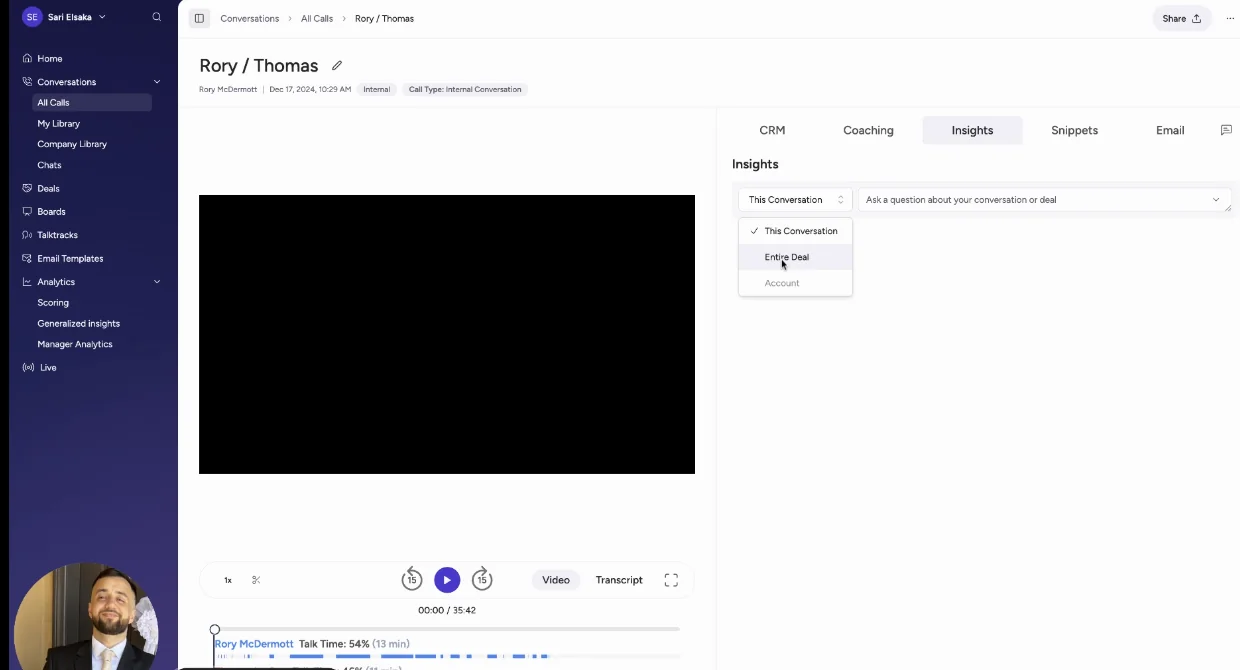
Above is Attention's CRM tab, where extracted fields wait for review before syncing. The catch is that the deal view is built only from the deal's calls, and the templates are Attention's own rather than your team's.
Attention answers in Insights and reaches email in Super Agent
Attention's Insights tab takes free-form questions, with a scope selector beside the prompt box.
| Scope option | What it does |
|---|---|
| This Conversation | Runs the question against one call |
| Entire Deal | Runs it against every call in that deal's library |
| Account | Visible in the menu, greyed out, can't be selected |
For email, you go to Super Agent. Since its April 2026 release, it:
- Searches Salesforce and HubSpot accounts, including child accounts under a Salesforce parent.
- Runs pipeline queries, including filters to closed deals.
- Reads and analyzes imported email and chat threads.
- Searches the web and queries Snowflake data.
Attention imports email for each rep who connects a mailbox
Attention pulls Gmail through Google's read-only Gmail scope, after a Workspace admin marks it as a trusted app.
Microsoft 365 email comes in per user through an OAuth link, but the connection defaults to calendar only, so each rep has to opt in to email.
An admin connection report shows which reps haven't connected their calendar, email or both.
Imported emails stay in Attention's store, tied to a CRM account and deal. Each record carries sender, recipients, subject, a snippet and a link to the body, with no attachments.
To get those emails onto Salesforce timelines, you'll need to build a workflow on Attention's New Email Imported trigger.
Attention's workflows push call data into many other tools
Attention's workflow builder has a wide reach, with more than 200 integrations according to Attention. Destinations include:
- CRMs: Salesforce, HubSpot, Pipedrive, Zoho.
- Google Workspace: Gmail, Google Sheets, Google Docs.
- Productivity: Asana, Airtable, Notion, Linear.
- Data: Snowflake.
- Chat: Slack, both ways, with @Attention answering in channels.
- Telephony: Zoom Phone and Aircall calls, imported after the call.
- Logic and code: Routers, loops, HTTP requests to any API, and Node.js or TypeScript code steps.
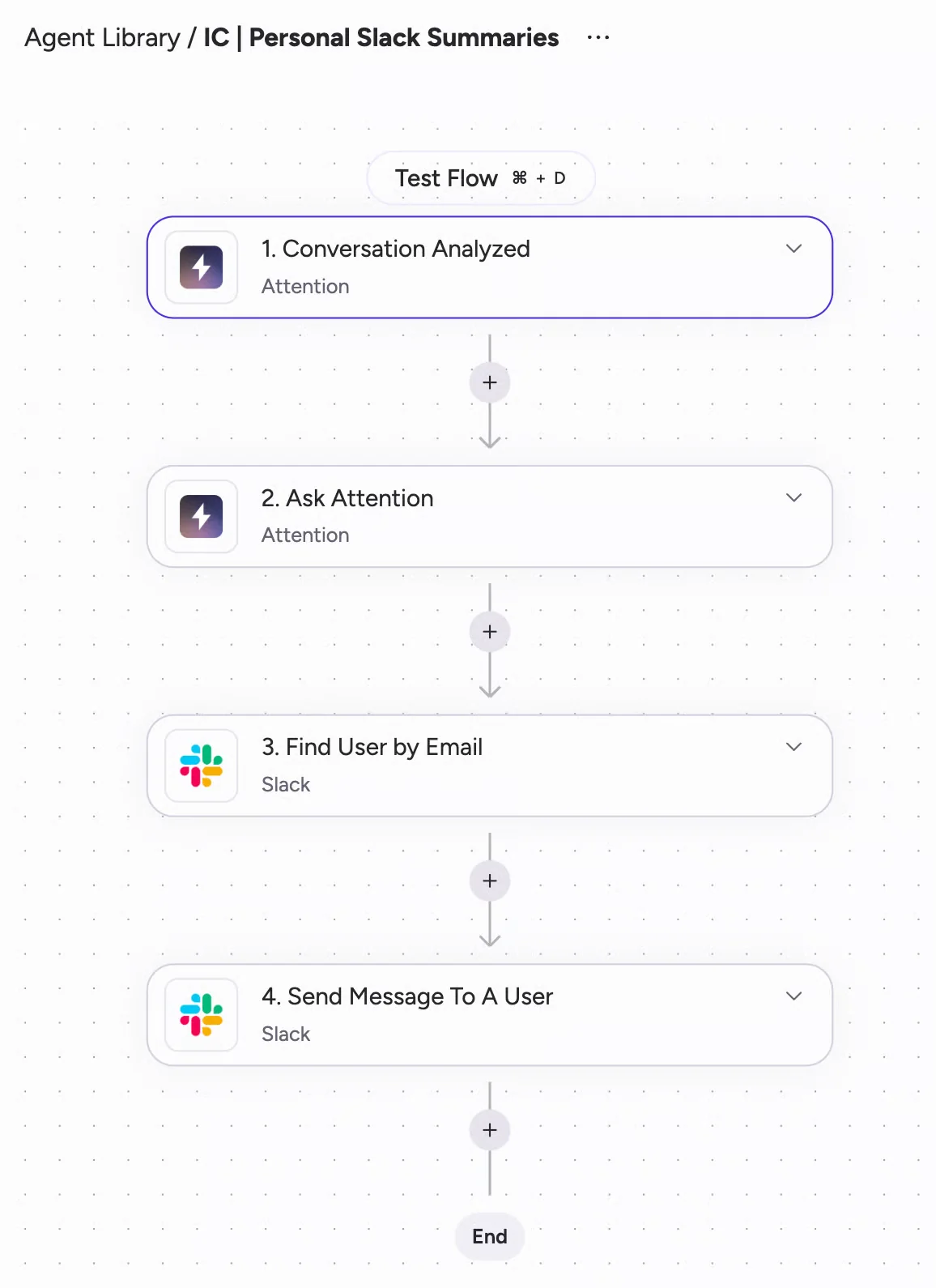
Above is Attention's Builder canvas running its Slack summary template. All that power comes with upkeep, though: a workflow with code in it is software, and someone on your team has to own it.
Attention's MCP server lets Claude read and write call data
Attention's MCP server exposes 68 tools across 15 groups, with both read and write access. It returns raw transcripts, lets you run full-text searches inside them, and can analyze up to 25 calls or a whole deal in one request or hand questions off to Super Agent.
Every call runs under the caller's own permissions, except org-level API keys, which carry full organization access. It works with Claude, ChatGPT and IDE agents, and usage is rate-limited with no consumption charge.
Write access cuts both ways, though. Nine of those tools are flagged as destructive, like deleting a user or revoking an API key.
You pull raw Attention data out through MCP and workflows
Attention exposes transcripts, scorecard results and AI insights through its MCP server, with API keys for programmatic use.
Workflows send data to Snowflake or to any API through an HTTP request step. Its API also exports calendar meetings to a warehouse, one row per meeting.
What Weflow and Attention cost per seat in 2026
Weflow publishes seat-based prices, with Ask AI Pro in every plan and no caps on Ask AI prompts. Attention publishes no pricing.
| Item | Weflow | Attention |
|---|---|---|
| Pricing model | Per seat, AI usage included | Negotiated contract |
| Standalone products | Weflow Activity & Contact Capture $19, Weflow Conversation Intelligence $39, Weflow Deal Intelligence & Forecasting $39, per user per month | Not published |
| Bundles | Revenue AI Foundation $49, Revenue AI Business $59, Revenue AI Enterprise $79, per user per month | Not published |
| Included in every plan | Ask AI Pro and Weflow Agent Builder Free with 25 agent actions a month | Not published |
| Usage limits | No caps on recordings, transcripts, AI templates or Ask AI prompts | No published credits or metering. MCP usage runs on rate limits |
| What costs extra | Weflow Agent Builder, the only consumption-priced item, per workspace: Growth $299 for 500 actions, Scale $999 for 2,500, Enterprise custom | Not published |
| Minimum and billing | 10 users, billed annually | Not published |
Every plan includes Ask Weflow AI, which powers "Prepare meeting." But for your brief to cover both email and calls, you'll need both data sources: Weflow Activity & Contact Capture and Weflow Conversation Intelligence.
Together, they make up Revenue AI Foundation at $49. Revenue AI Business at $59 adds Weflow Deal Intelligence, with deal boards and deal signals.
Moving from Attention to Weflow without losing your history
Your email history comes with you, and a side-by-side trial stays clean as long as one tool owns the meeting event.
What history comes across when you switch to Weflow
Weflow backfills historical email and meetings into Salesforce, so your deals don't start empty. For example, we synced four months of Blacklane's emails and meetings, batched over one week to protect their daily Salesforce API limits.
Your Attention transcripts, meanwhile, stay accessible through Attention's API and MCP server.
How to trial both without duplicate meetings in Salesforce
If both tools write meeting events, you'll end up with two records for every meeting, and any report on meetings per rep or per closed deal stays inflated until someone cleans it up. Here's how to avoid that from the start:
- Agree before day one which tool writes the meeting activity to Salesforce.
- Pick a pilot group, and keep each pilot rep on one recorder.
- Test Weflow's writes against every object your activities map to before the pilot starts, not just one.
- Run the night-before prep on a handful of live deals and compare what each brief held without asking.
When to pick Weflow and when to pick Attention
It comes down to what's missing for your team: the complete picture before the meeting, or automation and live help around the call.
| Pick Weflow if… | Pick Attention if… |
|---|---|
| You want the brief to start from every email, meeting, transcript and field on the record. | You want live talk tracks and battlecards during the call. |
| You prep renewals and expansions and need answers across the whole account. | Your main goal is agents acting on what happened after calls. |
| You don't want each rep connecting a mailbox, and you want email to land in Salesforce. | Your team works in Claude and wants read-write access with raw transcripts. |
| You run on Salesforce, which Weflow requires. | You want workflows pushing call data into many tools, and you have someone to maintain them. |
| You want published seat prices with AI usage included. | You run on HubSpot, Pipedrive or Zoho rather than Salesforce. |
Walk through the product yourself, no call required.
FAQ: Weflow and Attention for meeting prep
Do I have to install anything or connect my own mailbox?
No. Your admin installs one central app and enrolls you. The Chrome extension and Outlook add-in are optional extras that show you what's about to be logged and let you override it.
Can I edit or regenerate a Weflow summary that got something wrong?
Yes. You can regenerate a call's summary, transcript and field suggestions any time, or switch to another template and regenerate. In review mode, field values only reach Salesforce when you press Update.
Will Weflow write my call note in my manager's required format?
Yes. Your team can keep as many summary templates as it needs, so your admin can match a required note format exactly, and you stop retyping notes every evening.
Does Weflow log my internal emails with colleagues?
No. Weflow never logs threads where everyone is on an internal domain, and filters them out before anything reaches Salesforce. Your admin can turn on logging for internal meetings, but internal email always stays excluded.
"I found that the transparency part of how much weflow captures on their email was concerning a few people a little bit."
— From one of our customer calls
That internal-domain rule is the answer to that worry.
Does Ask Weflow AI read our product docs or sales playbooks?
No. Ask Weflow AI reads Salesforce records, captured emails and meetings, and the public web, but not your other knowledge systems.
You can still attach a document to a question, and we build a workspace system prompt covering your value proposition, buyers and competitors from material you send us.
How well do Weflow summaries hold up across languages and accents?
Weflow transcribes 96 languages and detects the spoken language automatically. Your follow-up email comes out in the meeting's language, and the Salesforce summary in your workspace language.
Strong accents can make summaries messier, so we test your team's templates on calls from that region before rollout.
What are Weflow's minimum seats and contract term?
You'll need at least 10 users per product or bundle, on a standard 12-month term billed annually.