Which conversation intelligence tools fit your Outreach dialer stack? (2026)
See which conversation intelligence tools fit your Outreach dialer stack and how to test call coverage.


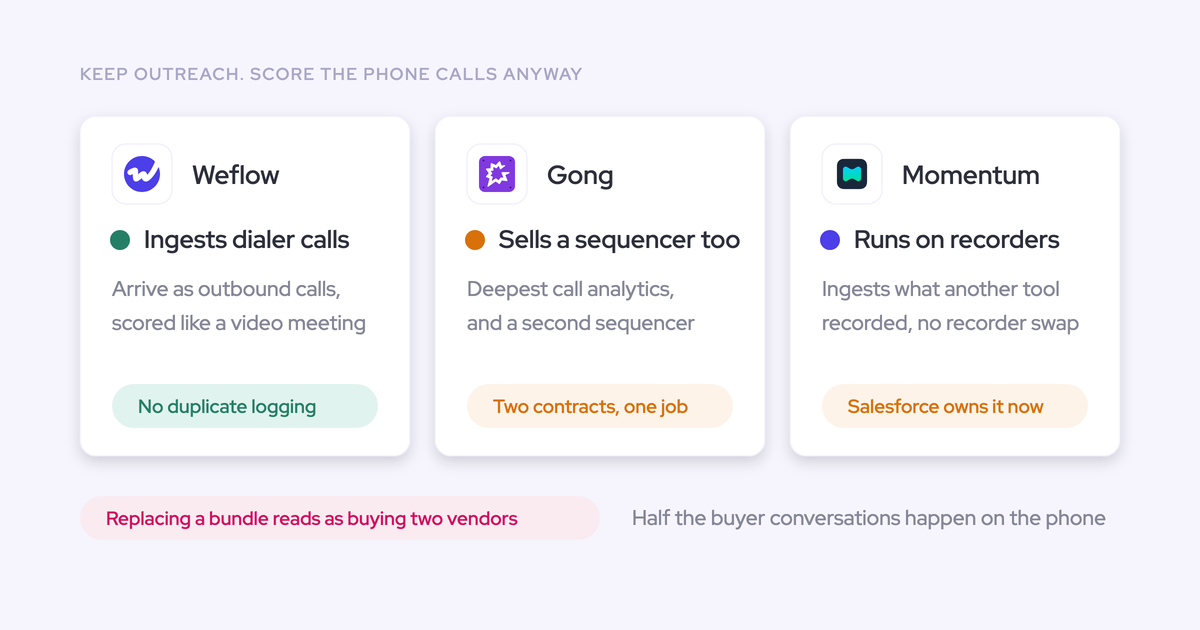

If you’re keeping the Outreach dialer, evaluate Outreach Kaia, Weflow, and Gong first. Keep Kaia if its coaching and Salesforce outputs meet your requirements. A specialist earns its place by closing a specific gap without changing how reps dial or creating duplicate Salesforce activities. Momentum and Salesloft need an additional check: how will your Outreach recordings reach them?
Start with one real call. Follow its recording, coaching output, record associations, and field updates into Salesforce. Then run the sync again. You should still have one call activity, attached to the right records, with no extra logging work for the rep. An integration logo doesn’t establish any of that.
Weflow is the Revenue AI Orchestration platform for sales, customer success, and RevOps teams. We’re built for Salesforce teams. Evaluate Weflow Conversation Intelligence + AI Field Updates if you want post-call coaching and structured Salesforce updates from Outreach recordings. Choose Gong for deeper conversation analytics, subject to the same compatibility test.
Compare conversation intelligence options for your Outreach dialer
Weflow, Outreach Kaia, Gong, Momentum, and Salesloft represent different architectures. Inclusion here doesn’t mean each has a verified, direct Outreach recording route.
| Vendor | Role alongside Outreach | Established recording route | Principal capability fit | Compatibility question to resolve |
|---|---|---|---|---|
| Weflow | A specialist intelligence layer while Outreach retains cadences and dialing. | Weflow pulls Outreach dialer recordings in as outbound calls. | Post-call coaching, scorecards, and structured Salesforce field updates. | Which system creates the call activity, and how does duplicate prevention behave in your configuration? |
| Outreach Kaia | Conversation intelligence within your existing engagement vendor. | Outreach’s own conversation intelligence offering; confirm coverage for your dialer call types. | Keeping the workflow and commercial relationship with Outreach. | Does your entitlement deliver the phone-call coaching and Salesforce outputs you need? |
| Gong | A specialist conversation intelligence purchase without replacing Outreach. | Confirm the supported Outreach ingestion route before approving the architecture. | Deep conversation analytics and account-level conversation analysis. | Do ingestion, activity ownership, and structured field writes work with the packages you’re buying? |
| Momentum | A downstream workflow layer that can use another vendor’s recordings. | Documented recorder and dialer integrations, plus uploads. Outreach isn’t in the documented connector list reviewed here. | CRM automation and coaching from existing transcripts. | What supported route brings Outreach recordings into Momentum without recurring manual uploads? |
| Salesloft | An engagement suite with potential overlap with the Outreach stack you’re keeping. | Meeting-platform integrations, a Teams bot, manual uploads, and the Salesloft dialer. | Engagement, conversation intelligence, and coaching within Salesloft. | Can Salesloft ingest Outreach calls automatically without requiring a dialer change? |
Set pass-or-fail requirements for your Outreach integration
Your conversation intelligence finalist must preserve the Outreach workflow and produce trustworthy Salesforce records. Strong analytics won’t compensate for duplicate activities or incorrect opportunity associations.
| Requirement | How to assess it | Disqualifying result |
|---|---|---|
| Eligible call ingestion and preserved metadata | Test each required call type. Compare the called person, owner, timestamp, duration, and disposition against Outreach. | A required call type disappears, or missing metadata prevents reliable association. |
| One activity writer and correct mapping | Count Salesforce activities before and after processing. Inspect contact, account, and opportunity associations, then repeat the sync. | The same call creates another activity or attaches to the wrong deal without a correction path. |
| Useful coaching and controlled field updates | Apply a phone-call scorecard. Review extracted next steps, picklist values, and stage criteria against the recording. | The output stops at summary text, invents qualification evidence, or writes consequential changes without the controls you require. |
| Lawful coverage without disruptive rep work | Have legal approve the recording rules. Observe the rep’s actual steps from dialing through processing. | The workflow bypasses consent requirements or depends on repeated manual exports and logging. |
| Sustainable operation and total cost | Review permissions, API consumption, error handling, implementation ownership, seat roles, and AI charges. | The integration exceeds your operational capacity or the required workflow costs more than the approved budget. |
Check each vendor against your Outreach requirements
Evaluate each vendor for the gap you need to close while Outreach stays in place. Suite breadth matters only when you’ll use it.
Use Weflow Conversation Intelligence to update Salesforce from Outreach calls
Weflow pulls Outreach dialer recordings into the same processing flow we use for recorded meetings. Each established outbound import includes the called person’s name, audio, speaker separation, transcript, summary, and coaching output.
You can apply AI Field Updates, scorecards, search, and post-call workflows to those recordings. That lets you evaluate phone calls alongside scheduled meetings without replacing Outreach’s dialing workflow.
For Salesforce automation, Weflow extracts structured values rather than stopping at a summary:
- Write next steps and methodology answers into standard or custom fields, excluding lookup relationships.
- Match picklist and multi-picklist output against the field’s allowed values.
- Suggest opportunity Stage changes using exit criteria you define in the prompt.
- Compare suggested values with current CRM values before approving writes, or enable automatic updates.
Keep stage changes under review initially. A valid picklist value can still describe the wrong sales stage, so test the evidence behind the extraction.

Weflow’s Compatibility Mode supports coexistence with engagement platforms. You should still require us to demonstrate activity ownership, association, and duplicate prevention in your Outreach configuration. Recording ingestion alone doesn’t prove those behaviors.
Our coaching is post-call. Weflow doesn’t provide live battlecards or an assistant you can question while the call runs. Gong remains the stronger option if your priority is the deepest conversation analytics.
- CRM support: Salesforce only.
- Other recording coverage: Zoom, Google Meet, Microsoft Teams, Webex, and in-person recording through Mobile Copilot.
- Deployment: Salesforce managed package, integration access, and recording configuration. Confirm Outreach-specific access and rollout requirements with us.
- Security: SOC 2 Type II, GDPR compliance, Zero Data Retention for AI processing, and no customer data used to train AI models.
Pricing: Weflow Conversation Intelligence costs $39 per user per month, billed annually, with a ten-user minimum. Free view-only licenses (up to one per recording license) are included. Routine recordings, transcripts, AI templates, and Ask Weflow AI prompts aren’t credit-metered; Agent Builder has separate action allowances.
Keep Outreach Kaia when bundled conversation intelligence is enough
Keep Outreach Kaia if it delivers the coaching and Salesforce outputs you need. You don’t need a second vendor just because a specialist offers more features.
Outreach’s strength is sequencing and outbound execution. Kaia brings conversation intelligence into that existing relationship, which gives you a useful baseline for evaluating any additional purchase.
Run your acceptance test against Kaia first:
- Check which Outreach dialer calls your entitlement captures and analyzes.
- Ask managers to assess the phone-call coaching against their actual rubric.
- Inspect the Salesforce output: summary text, structured fields, and opportunity associations.
If Kaia passes, staying with Outreach avoids another integration to operate. If it fails, document the missing outcome. That’s the business case for a specialist.
- CRM support: Validate Kaia’s Salesforce behavior separately from your existing Outreach activity sync.
- Deployment: Confirm activation, recording access, and admin requirements for your package.
- Certifications: Request Outreach’s current security documentation and confirm the scope covers the services you’ll enable.
Pricing: Check your contract for Kaia entitlement, required upgrades, seat roles, and AI charges. Don’t assume your existing Outreach subscription includes every capability shown in a demo.
Choose Gong for conversation analytics after proving Outreach compatibility
Choose Gong when deeper conversation analysis is the capability worth paying for. Gong’s conversation analytics are a genuine strength, including methodology summaries across calls on an account.
Gong’s call page also separates a recording into named topics along the timeline. That helps a manager locate the discussion they want to review.
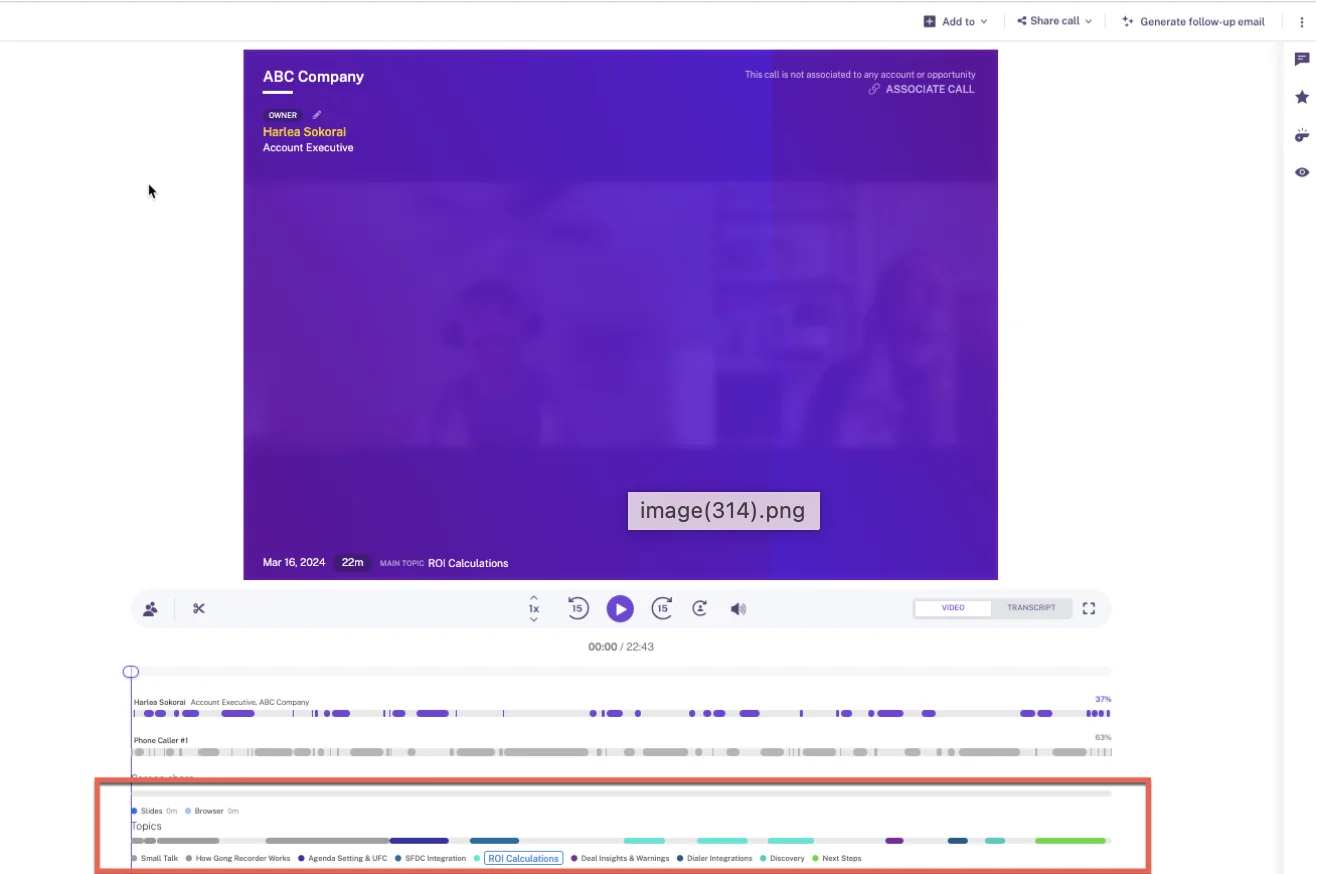
For your stack, that analytics depth must sit behind a working Outreach ingestion route. Ask Gong to demonstrate the call arriving, the correct Salesforce associations, and the final activity count.
Test field updates using the exact Gong packages in your quote. Don’t approve a workflow demonstrated with applications you won’t purchase.
- CRM support: Evaluate Gong’s Salesforce integration against your required objects and field writes.
- Deployment: Confirm the Outreach connection, implementation owner, permissions, and expected rollout work.
- Certifications: Gong holds SOC 2 Type II and ISO 27001, ISO 27017, ISO 27018, and ISO 27701 certifications.
Pricing: Gong requires Gong Foundation before you can purchase additional applications. Seats attach to applications, so coaching requirements can add another seat line item. Gong also meters eligible AI usage through credits; confirm which proposed workflows consume them.
Verify how Momentum receives Outreach recordings
Evaluate Momentum as a downstream workflow layer until you establish how it receives your Outreach calls. Momentum can work with an existing recorder, so you may not need to replace the conversation store you already use.
Momentum documents integrations with Gong, Chorus, Clari Copilot, Attention, and Salesloft Conversation Intelligence. Its documented dialer list includes Aircall, CloudTalk, Dialpad, Orum, RingCentral, Vonage Contact Center, and Zoom. That list doesn’t establish direct Outreach support.
Momentum’s automation deserves consideration once the capture route works:
- Its Coaching Agent scores competencies and supplies feedback with examples from the conversation.
- CRM conditions can determine which coaching competencies apply.
- Autopilot supports automatic writes, confirmation, or filling only empty fields.
Don’t treat manual upload as proof of an automated integration. Momentum’s upload path has a five-file-per-user daily limit, so it isn’t a substitute for a supported production feed or bulk migration plan.
- CRM support: Momentum writes conversation outputs into Salesforce. Confirm the objects and fields your workflow requires.
- Deployment: Identify the recording source and every dependency between Outreach and Momentum.
- Certifications: Request the current security documentation covering your purchase route and deployment.
Pricing: Momentum’s capture and CRM-writing capabilities appear in Salesforce’s Core, Advanced, and Max sales editions. Check your existing entitlement and the availability of the specific coaching and automation features you need before budgeting a separate purchase.
Check Salesloft’s capture routes before adding it alongside Outreach
Salesloft needs to prove a supported Outreach recording route before you evaluate it as a dialer companion. Its broader engagement capabilities overlap with the Outreach workflows you’ve already decided to keep.
Salesloft Conversations documents four capture routes:
- API integrations with Zoom, Microsoft Teams, Google Meet, and Webex.
- A Microsoft Teams recording bot.
- Manual uploads.
- The Salesloft dialer.
Those routes don’t establish automatic ingestion from Outreach. Ask for a demonstration using your dialer, rather than accepting a Salesloft dialer recording as an equivalent test.
Salesloft offers conversation intelligence and coaching within its engagement suite. Its own recording governance includes domain exclusions and dialer area-code rules, but those controls don’t prove coverage or consent handling for imported Outreach calls.
- CRM support: Salesloft syncs with Salesforce and Microsoft Dynamics 365. Confirm the conversation-specific writes you need.
- Deployment: Review connector-user access, individual activity connections, and CRM API consumption.
- Certifications: Salesloft documents SOC 2 and ISO 27001 scopes and advertises ISO 27701 certification.
Pricing: Salesloft’s Advanced and Elite packages include Conversations and Coaching alongside engagement capabilities. The dialer and certain AI agents are separate add-ons. Ask for a quote that identifies the overlap with Outreach rather than valuing every bundled feature as a new benefit.
Compare conversation intelligence costs while keeping Outreach
Compare the cost of the complete workflow, including the Outreach subscription you’re retaining. A lower conversation intelligence seat price doesn’t settle the question if the setup requires another recorder or paid implementation work.
| Vendor | Packages and seats | Billing and AI usage | Implementation and overlap |
|---|---|---|---|
| Weflow | Weflow Conversation Intelligence: $39 per user per month. Ten-user minimum; free view-only licenses (up to one per recording license). | Annual billing. Routine recording, transcription, AI templates, and Ask Weflow AI prompts aren’t metered. Agent Builder includes 25 actions per month, with paid workspace tiers beyond that allowance. | No platform or implementation fees. Confirm onboarding scope. Add activity capture only where you need coverage beyond Outreach. |
| Outreach Kaia | Confirm your current entitlement, any upgrade, and manager or viewer access. | Contract-specific. Request written terms for AI allowances and overages. | Establish whether enabling the required features adds cost or implementation work to your existing contract. |
| Gong | Gong Foundation plus applications required for your coaching and automation workflows. Seats apply per application. | Quote-dependent seat costs and terms. Eligible AI features consume a shared credit pool. | Confirm implementation ownership and fees. Exclude engagement capabilities you won’t use while retaining Outreach. |
| Momentum | Check Salesforce edition entitlements and the licenses required for your selected capabilities. | Confirm commercial terms through your purchase route rather than relying on legacy standalone pricing. | Include any upstream recorder, ingestion work, and ongoing workflow administration. |
| Salesloft | Advanced or Elite, plus any required add-ons. Confirm seat minimums and access roles. | Quote-dependent. Verify AI allowances and charges for the chosen agents. | Price the engagement overlap and any additional work needed to receive Outreach recordings. |
Before you compare quotes, separate these costs:
- Users: Recorders, coaches, admins, and viewers don’t necessarily need the same license.
- Usage: Distinguish everyday analysis from scheduled agents and other metered workloads.
- Rollout: Include migration, field configuration, training, and the person accountable for implementation.
- Overlap: Identify capabilities you already pay Outreach to provide.
- Operation: Account for monitoring, permissions maintenance, and sync remediation.
If you also need inbox and post-sale coverage, Weflow’s Revenue AI Foundation combines Weflow Activity & Contact Capture with Weflow Conversation Intelligence for $49 per user per month, billed annually. Don’t add it just to duplicate activity Outreach already captures correctly.
Choose a conversation intelligence setup that keeps Outreach
Choose among technically qualifying options by the gap you need to close. If a vendor can’t demonstrate your required call path, keep the purchase conditional.
| Primary requirement | Conditional best fit | Team or seat considerations | Budget implications | Remaining purchase condition |
|---|---|---|---|---|
| Structured Salesforce updates and post-call coaching | Weflow | Salesforce-only; ten-user minimum with free view-only access. | Standalone conversation intelligence pricing without routine AI credit metering. | Prove activity ownership, opportunity mapping, and field-update controls. |
| Meet the requirement without adding a vendor | Outreach Kaia | Check the users and capabilities your contract includes. | Compare any upgrade with the full cost of a specialist. | Kaia passes the same coaching and Salesforce output tests. |
| Deep conversation analytics | Gong | Match application licenses to the managers and reps who need them. | Budget required applications, eligible AI consumption, and implementation. | Demonstrate the Outreach route using the quoted package. |
| Automate outputs from a recorder you’ll retain | Momentum | Confirm recording-source dependencies and Salesforce entitlements. | Include the upstream recorder and automation licenses. | Establish a supported Outreach feed without recurring manual uploads. |
| Use Salesloft capabilities despite retaining Outreach | Salesloft, only after proving architectural fit | Identify which users would need both engagement environments. | Account for duplicated suite spend. | Prove automatic Outreach ingestion and a division of responsibilities worth operating. |
Prove your Outreach-to-Salesforce workflow before signing
Use a proposed two-week evaluation to test the complete call path in your configuration. This is an evaluation design, not a deployment promise.
Use the first week to establish access, record ownership, and representative calls. Spend the second on repeated syncs, ambiguous records, failed writes, and manager review. Start security and legal review in parallel.
Assign one writer to each Salesforce call activity
Give one system responsibility for creating each Salesforce call activity. Other systems may enrich that record or update related fields, but you need to agree on those responsibilities before enabling overlapping writes.
| Responsibility | Owner to record in the pilot | Verification method |
|---|---|---|
| Call recording | Confirm Outreach’s recording responsibility for the tested dialer route. | Locate the source recording and verify that approved recording rules applied. |
| Salesforce activity creation | Name exactly one writer. | Inspect the activity ID and creation history; repeat the sync. |
| Contact, account, and opportunity association | Name the mapping owner and correction owner. | Compare associations with the intended records, including accounts with multiple open opportunities. |
| Conversation storage | Document the host of audio, transcripts, and summaries separately. | Check access, exports, retention, and what reaches Salesforce. |
| Structured field updates | Assign the intelligence system and the approval owner. | Review proposed values, approvals, final writes, and validation failures. |
Keep recording records separate from activity counts in your test. A record that stores a transcript isn’t necessarily a second call activity; inspect the objects your reports actually count.
Trace an Outreach call from recording to Salesforce
Trace one representative Outreach call through every checkpoint before expanding the pilot. An imported recording proves ingestion, not the final Salesforce outcome.
- Record the starting state. Note the intended contact, account, opportunity, existing field values, and activity count.
- Place the call in Outreach. Follow the approved recording policy and document every action the rep takes.
- Inspect ingestion. Check the called person, audio, speaker separation, and transcript. Verify owner, disposition, timestamps, and other required metadata separately.
- Measure processing latency. Record when the source recording becomes available, when the intelligence system receives it, and when outputs reach Salesforce.
- Review coaching. Use a rubric appropriate to the call type and sales stage. Don’t penalize an early outbound call for missing late-stage procurement detail.
- Inspect associations. Confirm the call reaches the intended records. Test the correction path if it doesn’t.
- Review field suggestions. Compare the extracted evidence with the recording and current CRM values. Include a picklist and a field with validation dependencies.
- Check the final state. Confirm the expected activity-count increase for one call, inspect the field writes, and repeat processing to test for duplicates.
For methodology fields, write down what doesn’t count. Company headcount may be a number, but it isn’t automatically evidence of measurable customer value.
Test Outreach sync edge cases before expanding the pilot
Test imperfect records and failed syncs before rollout. Your integration needs a predictable recovery path, not just a successful demonstration.
| Scenario | Expected behavior to agree | Observed result to record | Remediation owner |
|---|---|---|---|
| Repeated sync or reconnect | Reprocessing doesn’t create another call activity. | Activity IDs and counts before and after. | Named integration owner. |
| Multiple open opportunities | The system follows an agreed mapping rule or exposes ambiguity for correction. | Selected opportunity or fallback record. | RevOps and vendor implementation owner. |
| Missing contact or account | The system handles the missing match without silently attaching the call to an unrelated record. | Skipped association, creation behavior, or review item. | Salesforce admin. |
| Invalid or conflicting field value | The workflow respects validation and your overwrite policy. | Suggested value, write result, and error visibility. | Field owner and Salesforce admin. |
| Recording exclusion | No prohibited recording or unsupported conversation-derived output appears. | Activity visibility and recording status separately. | Legal and recording administrator. |
| Permission failure | The team can detect the failed write and recover after correcting access. | Error, affected record, and retry result. | Salesforce admin and vendor support. |
| API pressure | The integration stays within the agreed allowance and recovers predictably after interruption. | API consumption, backlog, and recovery behavior. | Integration owner. |
Approve the purchase only when you can check these outcomes:
- Required, legally recordable call types reach the intelligence system.
- One call produces one counted Salesforce activity, including after retries.
- Associations and field writes match your agreed rules.
- Managers find the coaching useful for the calls your team makes.
- Reps keep dialing in Outreach without recurring manual transfer work.
- Access, operating costs, and remediation responsibilities have named owners.
See how Weflow captures activity, updates Salesforce fields from calls, and rolls up your forecast. Book a 30-minute demo.
How we assess conversation intelligence tools for Outreach
We distinguish established product capabilities from configuration-dependent behavior and unverified requirements. An undocumented Outreach route means you need confirmation, not that the route is impossible.
We wrote this comparison at Weflow for teams retaining Outreach. We cover shortlist options rather than treating every conversation product as a suitable dialer companion.
- Evidence: Product documentation, our product knowledge, competitor research, and recurring evaluation concerns.
- Compatibility standard: Recording ingestion through coaching and structured Salesforce updates, with one counted call activity.
- Testing boundary: We haven’t certified every vendor across every Outreach and Salesforce configuration.
- 2026 edition: Reconfirm packaging, entitlements, and connector behavior before signing.
FAQ: Adding conversation intelligence to the Outreach dialer
Resolve call coverage, access, and retention separately from the feature comparison. Each can change whether the proposed setup fits your organization.
Does Weflow ingest inbound and outbound Outreach calls?
Weflow’s established Outreach route pulls recordings in as outbound calls, including the called person’s name. We don’t have enough evidence here to extend that claim to inbound calls or every Outreach call type. Confirm your required types with us and include them in the pilot.
How quickly does Weflow process an Outreach recording?
We haven’t established an Outreach-specific processing time for this comparison. Measure source-recording availability, ingestion, coaching output, and Salesforce writes separately during your pilot. Set an acceptable delay based on when managers and reps need the output.
Does Weflow provide live assistance during Outreach calls?
No. Weflow provides summaries, field updates, follow-ups, and coaching after processing the recording. We don’t offer live in-call battlecards or an assistant that answers questions during the call.
What happens when an Outreach call cannot be recorded?
Without a recording or transcript, Weflow can’t extract what the customer said or score that conversation. Check ordinary call-activity logging separately; it doesn’t depend on having conversation content.
Have legal approve the recording rules for your markets. A desktop recorder isn’t a consent workaround.
Which Salesforce permissions does Weflow need for Outreach calls?
Required access depends on the enabled workflow and your Salesforce configuration. Review the integration user and user-facing access separately with your Salesforce admin.
- Object and field permissions for associations and intended writes.
- Managed-package recording access, because those records can contain full transcripts and summaries.
- Validation rules, field dependencies, and private sharing settings.
- API capacity and how failed writes become visible.
Private org-wide defaults need particular attention. Weflow’s documented integration setup requires Modify All Records on Account, Opportunity, and Contact in that configuration. Confirm the scope with us during security review rather than assuming read access will support updates.
Can we import historical recordings without replacing Outreach?
Historical migration is a separate requirement from ongoing Outreach ingestion. Confirm the source, export format, volume, metadata preservation, and mapping with us before including migration in the purchase.
Don’t assume activity-history backfill also imports historical call recordings. Request a sample migration and agree on its cost and scope.
What conversation data stays accessible after canceling Weflow?
Weflow’s Salesforce data and hosted conversation assets need separate exit plans.
- Native Salesforce activities, contacts, and field values: These remain in your Salesforce org after cancellation.
- Transcripts and summaries on package records: Confirm continued access and export requirements before changing or uninstalling the managed package.
- Hosted recordings and Weflow-only data: Confirm export availability, retention periods, and post-contract access. Don’t assume a recording link will remain usable indefinitely.
Before signing, export one representative call and its Salesforce outputs. Check that your team can still use the information without opening Weflow.