
Weflow vs Chorus vs Gong for in-person sales meetings
Compare Weflow vs Chorus vs Gong for in-person sales meetings and Salesforce updates from field reps.


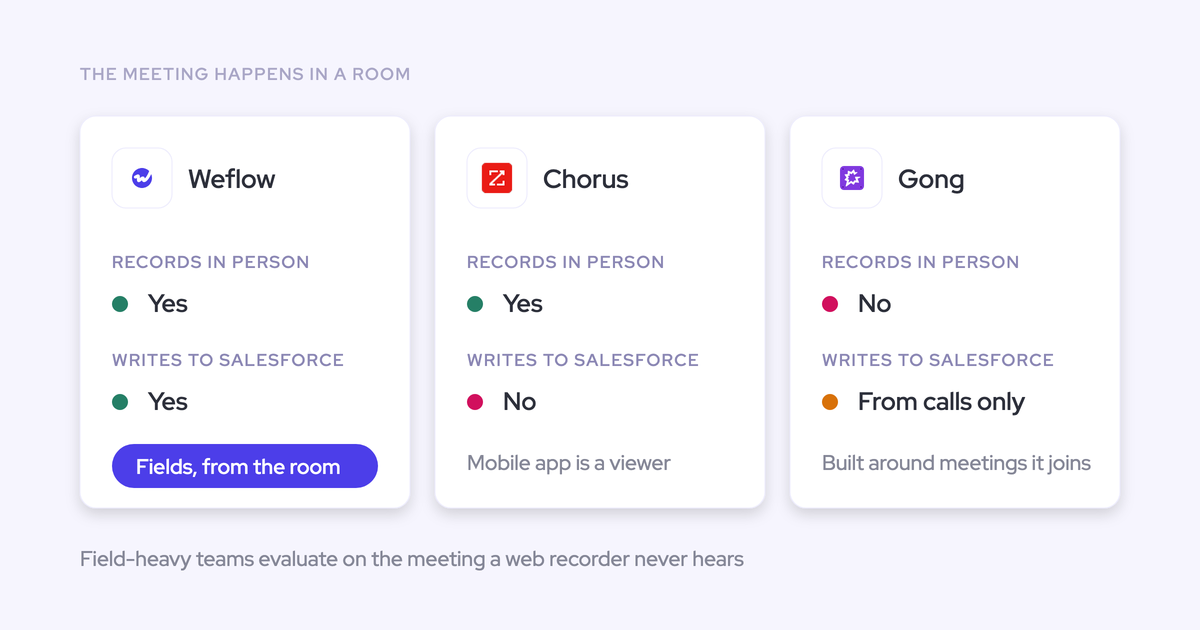

Choose field-sales conversation intelligence by what reaches Salesforce after the meeting. A recording helps you hear what happened. Structured next steps, qualification fields, and coaching evidence remove the work you’d otherwise chase your reps to finish.
Your reps meet customers on-site, carry company phones, and keep notes wherever they can. A mobile recorder has to fit that day. It also has to handle consent, process the conversation, and associate the outputs with the correct deal.
This comparison follows that complete workflow. We’ll separate confirmed capabilities from questions you still need to test, especially around mobile devices, offline recording, and Salesforce mapping.
The buying question is practical: which option keeps deal execution current without making Salesforce and the conversation product two competing places to work?
At a glance: Weflow vs Chorus vs Gong
Shortlist Weflow for structured Salesforce updates, Chorus for manager-led coaching programs, and Gong for deeper conversation analytics. Gong’s current in-person workflow still needs verification before we can recommend it for this specific use case.
Weflow is the Revenue AI Orchestration platform for sales, customer success, and RevOps teams. It’s built for Salesforce teams, with Mobile Copilot included in Weflow Conversation Intelligence.
| Evaluation area | Weflow | Chorus | Gong |
|---|---|---|---|
| In-person capture | Mobile Copilot records and processes in-person conversations. | Supports in-person and mobile recording. | Current recording workflow requires verification. |
| Field conditions | Confirm current iOS availability, offline behavior, and speaker separation. | Confirm supported devices, offline behavior, and speaker separation. | Confirm recording versus playback capabilities on each operating system. |
| Post-meeting outputs | Transcripts, summaries, field updates, follow-up email drafts, and coaching outputs after processing. | In-person recording is supported; the reviewed evidence identifies a customized-summary limitation. | Conversation intelligence is established; mobile-specific output availability needs testing. |
| Salesforce writeback | AI Field Updates populate structured fields. Test mobile record association and existing activity handling. | Reviewed evidence shows no Salesforce field updates from in-person recordings. General tracker sync is a separate capability. | Verify current structured writeback and record association from an in-person recording. |
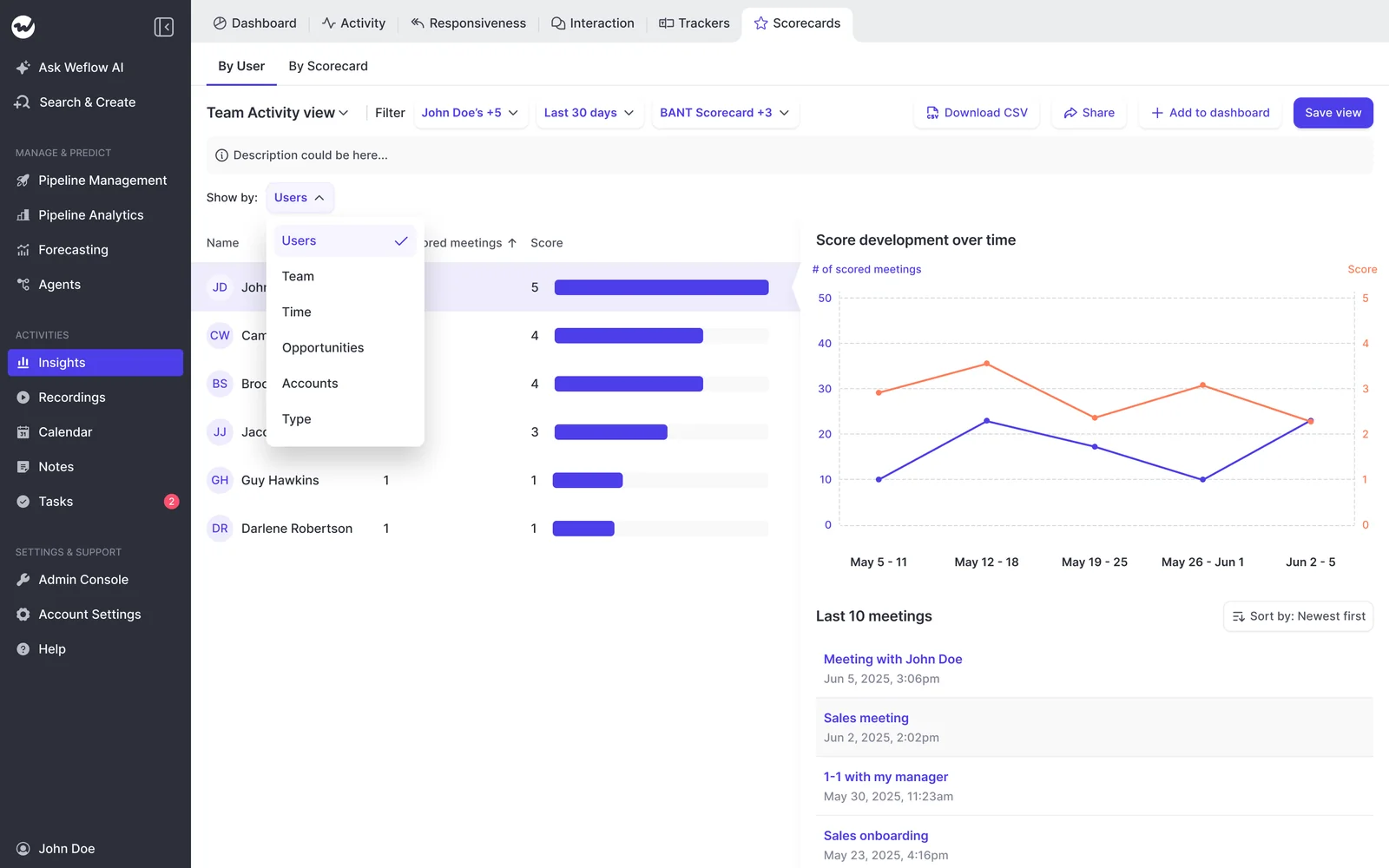
| Manager signals | Methodology scoring across calls, opportunities, and reps. | Dated coaching initiatives, team comparisons, and deal inspection. | Deep conversation analytics and account-level methodology summaries. |
| Rollout burden | Salesforce configuration plus mobile deployment. Background activity capture doesn’t remove the rep’s mobile recording step. | Demonstrate rep setup and Salesforce package requirements. | Demonstrate rep setup, access requirements, and required applications. |
| Pricing and packaging | $39 per user per month, billed annually, for Weflow Conversation Intelligence. Mobile Copilot is included. | Obtain a current quote covering mobile recording and coaching. | Gong Foundation plus any required applications. Obtain a workflow-specific quote. |
What should field-sales conversation intelligence complete?
Field-sales conversation intelligence should carry an in-person meeting from recording through usable Salesforce data and manager action. We’d evaluate every vendor against these five requirements.
How reliably can reps capture in-person meetings?
Mobile availability matters only if reps can record on their company phones under actual field conditions. A desktop recording demo doesn’t answer that question.
- Can the rep start a new recording without a video link or meeting bot?
- Does recording work on each operating system and device your company supports?
- What happens when connectivity drops, the screen locks, or a phone call interrupts the meeting?
- Can the transcript distinguish speakers around one table, including multiple sellers?
- Which languages work for mobile recordings, and how does the product handle language changes?
- How does the rep document consent and stop recording when someone declines?
What usable outputs appear after each meeting?
A completed recording should leave the rep reviewing usable outputs rather than rebuilding the meeting from memory. Inspect the actual result of processing.
- Check the transcript against what participants said, including speaker attribution.
- Read the summary for customer needs, decisions, and unresolved questions.
- Inspect action items for an owner and timing where the conversation established them.
- Review the follow-up draft for promises the customer or rep never made.
- Count the corrections and copying steps needed before the outputs become useful.
Does Salesforce receive structured, correctly mapped data?
Salesforce integration earns its place when the right fields change on the right record without inflating your activity reports. A connector logo proves none of that.
| Salesforce test | Acceptable evidence |
|---|---|
| Structured field updates | Next steps and qualification values appear in the intended fields, not only in a summary. |
| Opportunity association | The recording reaches the intended opportunity when an account has multiple open deals. |
| Existing meeting activity | One real meeting produces one reportable meeting activity. |
| Custom fields and objects | The vendor demonstrates your required destinations, field types, and permissions. |
| Review and validation | You can inspect suggested changes and test required fields, picklists, and stage dependencies. |
Can managers coach across calls, deals, and reps?
Managers need evidence at the level where they make decisions. A useful call score doesn’t automatically produce a useful deal review.
| View | What the manager needs |
|---|---|
| Individual call | Find the question the rep missed and the conversation behind the score. |
| Opportunity or account | Inspect qualification across the relationship rather than reconstructing it recording by recording. |
| Rep | Identify repeated weaknesses and choose a specific coaching priority. |
Keep the rep’s judgment in the process. Ask why they believe someone is a champion, then compare their answer with the recorded evidence.
What does rollout demand from reps and budget?
Rollout fit depends on the work each person must do and the access each role actually needs. Price the operating model before you price the seats.
- Separate centrally managed setup from installation, authentication, and recording actions each rep must complete.
- Confirm where reps review outputs and where managers inspect deals.
- List recording users, managers, enablement users, and view-only stakeholders separately.
- Request minimum seats, annual commitments, required applications, and implementation fees.
- Identify which AI actions carry allowances or consumption charges.
- Assign ownership for Salesforce activities when a dialer or engagement product also logs them.
Weflow: field recordings become Salesforce updates
Weflow’s field-sales advantage is Conversation Intelligence + AI Field Updates: the recording becomes structured data your team can use in Salesforce.
| Quick spec | Weflow |
|---|---|
| CRM support | Salesforce only. |
| Mobile packaging | Mobile Copilot is included in Weflow Conversation Intelligence. |
| Pricing | $39 per user per month, billed annually, with a 10-user minimum. |
| Deployment considerations | Salesforce access, managed package configuration, templates, permissions, and mobile setup. |
| Best fit | Field teams that want post-meeting Salesforce updates and evidence for coaching. |
How Weflow records in-person sales meetings
Mobile Copilot records in-person conversations without a video meeting link. The rep still needs to start the recording and follow your consent process.
- Prepare the company phone. Deploy the mobile app and confirm authentication on the devices you’ll use.
- Handle consent. Follow your approved in-person notice and consent procedure before recording.
- Record the conversation. Use Mobile Copilot for the meeting in the room.
- Inspect the processed outputs. Weflow produces conversation outputs after processing, not during the meeting.
The supplied product context identifies Android as live and gives an April 2026 launch target for iOS. A target isn’t confirmation of release. Verify current iOS availability, offline capture, interruptions, and speaker separation before rollout.
How Weflow updates the correct Salesforce record
Weflow AI Field Updates extract conversation content into specific Salesforce fields. Correct record association remains a separate acceptance test, especially when one customer has several open opportunities.
- Check the recording’s association. Confirm the intended account, opportunity, and meeting activity before trusting downstream updates.
- Configure the extraction. Map prompts to next steps, methodology fields, or stage criteria using your team’s definitions.
- Review suggested values. Compare AI suggestions with current Salesforce values before enabling automatic updates.
- Test field behavior. Weflow reads allowed picklist values and respects Salesforce validation rules and field dependencies.
- Inspect the management output. Methodology scoring gives managers call, opportunity, and rep-level evidence.
Weflow’s prompt editor includes an Auto-update Salesforce option. Keep consequential changes, especially opportunity stage, under review until the extraction has earned your trust.

Weflow Activity & Contact Capture uses opportunity contact roles to resolve activity mapping and falls back to the account when ambiguity remains. Don’t assume that background mapping establishes every mobile recording association.
- Test an account with multiple open opportunities.
- Confirm how a rep selects or corrects the mobile recording’s association.
- Verify that an existing Salesforce meeting doesn’t become a duplicate activity.
- Test your custom fields, required values, and review permissions.
Weflow also distinguishes a per-call field update from an AI playbook. The field update reflects one conversation; the scheduled playbook evaluates the wider record to maintain a cumulative answer.
Where Weflow fits and falls short
Choose Weflow when the priority is post-meeting Salesforce execution. Rule it out if you need another CRM or live in-meeting guidance.
| Choose Weflow when | Consider another option when |
|---|---|
| You want structured qualification and next-step updates in Salesforce. | Your team uses HubSpot, Dynamics, or another CRM. |
| You want coaching evidence across calls, opportunities, and reps. | You need individual seller scoring when multiple reps attend the same meeting. |
| You want post-meeting summaries, follow-up drafts, and reviewable field suggestions. | You require a live assistant or real-time battlecards. |
| You value Salesforce outputs that persist after leaving Weflow. | You require recording files themselves to reside directly in Salesforce. |
Weflow’s rep-level scorecard analytics show score development over time. Use that view to choose a coaching topic, then inspect the calls behind it.
Chorus: in-person capture without Salesforce field updates
Chorus supports in-person recording, but the reviewed evidence shows that those recordings don’t update Salesforce fields or attach to a customized summary. That leaves a material part of the field-sales workflow manual.
| Quick spec | Chorus |
|---|---|
| CRM support | Salesforce integration is established; verify any other required CRM. |
| Mobile packaging | In-person capture is supported. Confirm licensing and device coverage. |
| Pricing | A current field-sales quote is required. |
| Deployment considerations | Demonstrate mobile setup. Salesforce tracker sync requires the managed package. |
| Best fit | Teams prioritizing structured coaching programs and conversation review. |
How Chorus captures in-person sales conversations
Chorus can create in-person recordings, rather than only play existing recordings on mobile. The exact rep workflow still needs a demonstration on your company phones.
- Ask the rep to create a new recording without a conferencing link.
- Run your approved consent process and record a representative conversation.
- End the recording and inspect processing, speaker attribution, and available outputs.
Verify these details in the demo:
- Current iOS and Android recording support.
- Offline recording, upload recovery, and interruption handling.
- Mobile language coverage and access to coaching features after processing.
What Chorus sends to Salesforce afterward
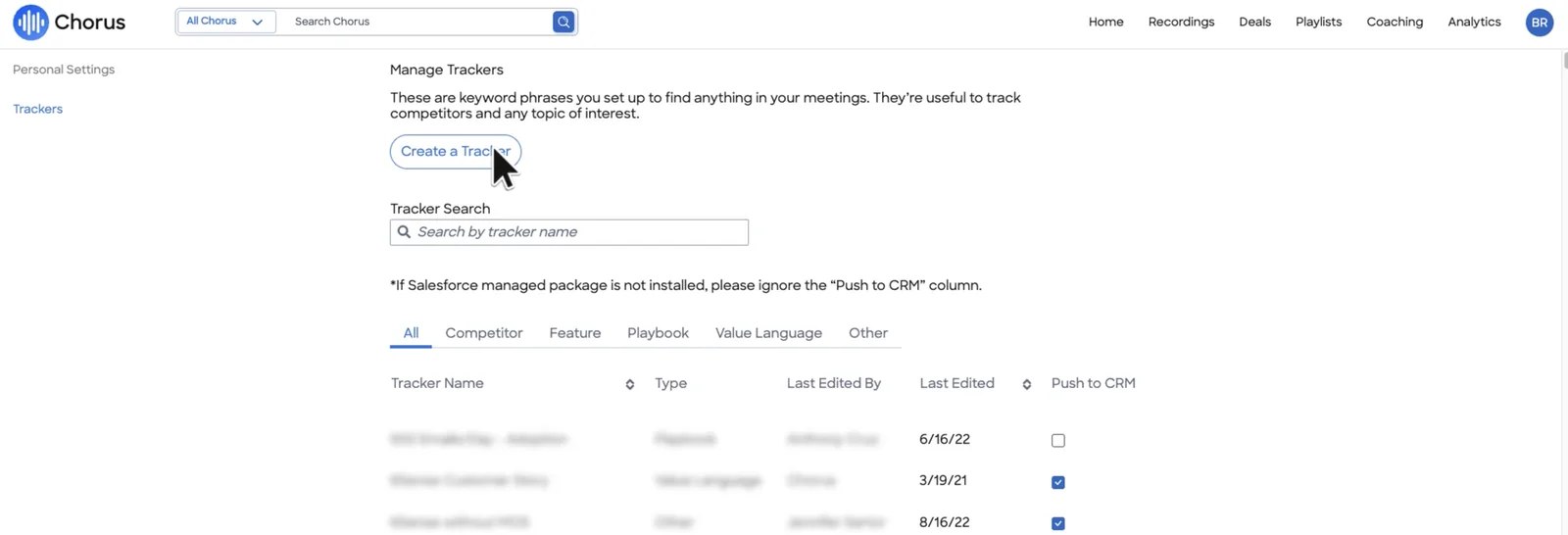
Chorus tracker sync sends keyword signals to Salesforce, not extracted qualification values. Don’t confuse a tracker named Next Steps with an update to your opportunity’s next-step field.
| Post-meeting output | Salesforce destination or remaining action |
|---|---|
| In-person recording | Recording is supported; demonstrate its Salesforce association and access path. |
| Structured field values from the in-person meeting | The reviewed evidence shows no automatic field updates. The team still enters those values. |
| Customized summary attached to the in-person recording | The reviewed evidence identifies this as unsupported. |
| Keyword tracker hits | General tracker sync requires the Salesforce managed package. Verify whether your mobile recordings feed this path. |
Chorus’s tracker manager explicitly conditions Push to CRM on the Salesforce managed package. Its output differs from Weflow’s field-mapped extraction prompt shown above.
Where Chorus fits and falls short
Chorus deserves a place on the shortlist when managers run defined coaching programs. Its initiatives have a beginning, participating teams, progress measures, and an end.
| Fit | Limitation to accept or test |
|---|---|
| Role-specific coaching initiatives with score trends and leaderboards. | Confirm that in-person recordings participate in the required coaching workflow. |
| Deal inspection using activity timelines, next calls, CRM fields, and tracker signals. | A deal board doesn’t establish structured Salesforce writeback from mobile conversations. |
| Conversation review across calls and external email. | Managers still need a process for maintaining qualification fields. |
Gong: verify the current in-person workflow
Keep Gong in the evaluation for its conversation analytics, but don’t treat those strengths as proof of mobile recording or Salesforce execution. We don’t have enough current mobile evidence to rank Gong for this workflow.
| Quick spec | Gong |
|---|---|
| CRM support | Salesforce integration is established. Mobile-specific writeback requires verification. |
| Mobile packaging | Confirm current recording capabilities and required licenses. |
| Pricing | Gong Foundation is mandatory; applications add to the core license. |
| Deployment considerations | Verify device support, recording setup, record association, and application access. |
| Best fit | Teams prioritizing deep analytics, provided Gong passes their field-meeting tests. |
Gong’s proven strengths beyond mobile capture
Gong’s conversation analytics justify serious consideration. Teams already using those capabilities should test whether a replacement preserves the workflows they rely on.
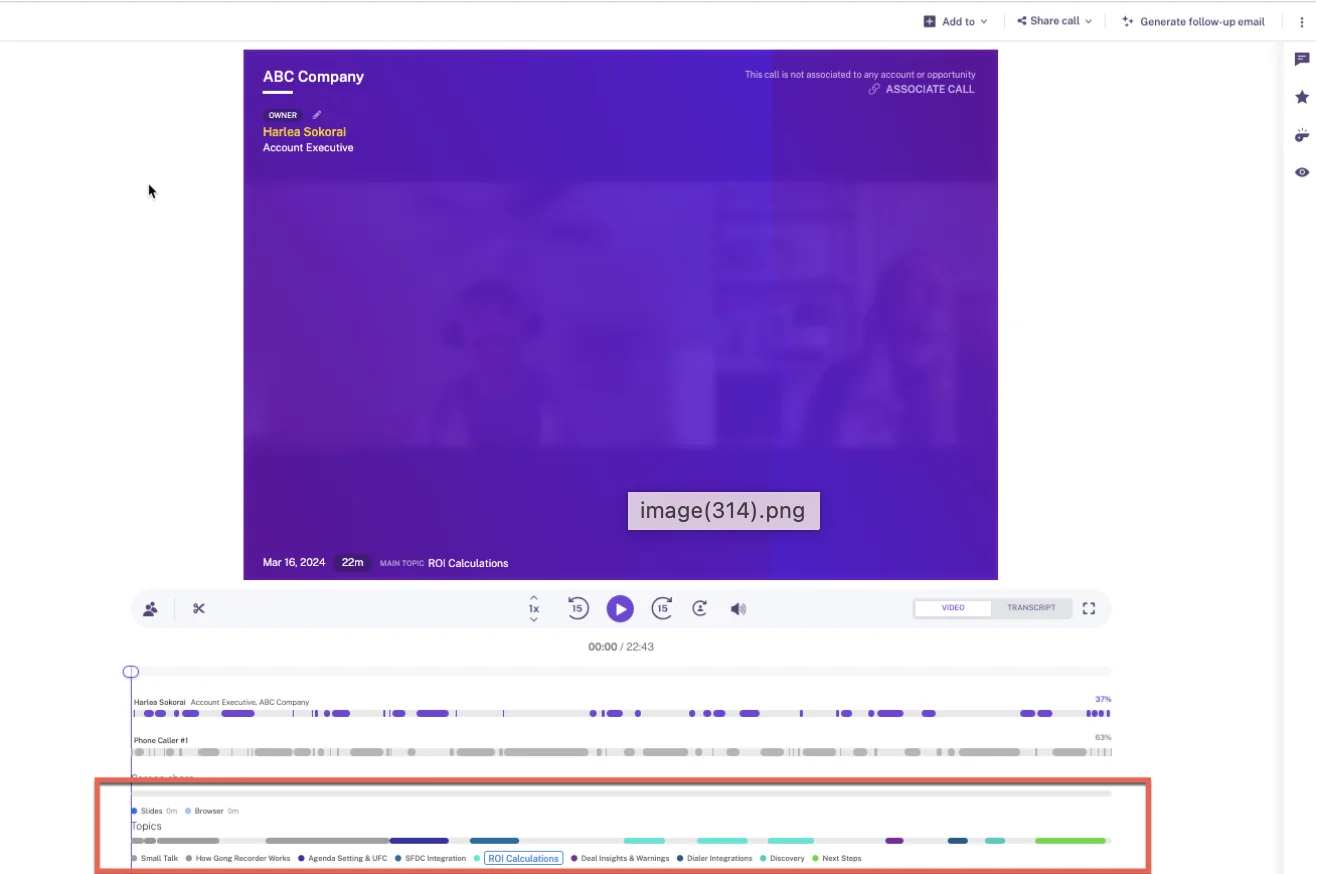
- Gong provides deep conversation analysis, including topic segmentation across recordings.
- Gong supports account-level methodology summaries rather than restricting every question to one call.
- Gong offers a sales engagement product, which matters if you’re evaluating a broader stack change.
Gong’s call page shows named topics along the recording timeline. That’s useful review functionality, but this screen doesn’t establish in-person capture.
Which Gong mobile details remain unverified?
Gong must demonstrate capture, Salesforce handling, and packaging for the in-person use case before those capabilities influence the recommendation.
| Claim to verify | Acceptable proof | Pilot test |
|---|---|---|
| New mobile recording | A demonstration on each supported company device. | Record without a video link. |
| Offline and interrupted capture | Documented behavior plus device testing. | Lose connectivity, lock the screen, and restore the connection. |
| Consent and speakers | A demonstrated in-person process. | Test opt-out handling and multiple participants. |
| Structured Salesforce updates | Actual field changes from the mobile recording. | Populate your next-step and methodology fields. |
| Record association | Correct account, opportunity, and activity links. | Use an account with multiple open deals. |
| Packaging | A written quote naming required products and usage terms. | Confirm every pilot capability exists in the proposed contract. |
When should field-sales teams keep Gong shortlisted?
Keep Gong shortlisted when its analytics matter enough to justify proving the field workflow. Remove Gong from this use case if it can’t meet a requirement you’ve defined as mandatory.
| Keep Gong shortlisted when | Remove Gong from this evaluation when |
|---|---|
| Your managers depend on its conversation analytics and account-level review. | Gong can’t demonstrate recording on required company devices. |
| Your existing Gong deployment serves several teams and switching would disrupt them. | The proposed workflow leaves mandatory Salesforce updates manual. |
| Gong proves the complete mobile workflow in your Salesforce environment. | Required applications or usage costs exceed your approved budget. |
What does each field-sales deployment cost?
Weflow publishes a usable starting price for this workflow. Chorus and Gong need written quotes that name mobile capabilities, manager access, and everything required to complete the Salesforce update.
| Cost component | Weflow | Chorus | Gong |
|---|---|---|---|
| Price status | Weflow Conversation Intelligence: $39 per user per month, billed annually. | Current price requires verification. | Current price requires a quote. |
| Required products | Weflow Conversation Intelligence for recording. Revenue AI Foundation adds Weflow Activity & Contact Capture at $49 per user per month. | Confirm required products in the quote. | Gong Foundation plus required applications. |
| Mobile inclusion | Mobile Copilot is included. | Requires verification. | Requires verification. |
| Seat minimum | 10 users. | Requires verification. | Requires verification. |
| Commitment | Published rates use annual billing. | Confirm contract term. | Confirm contract term. |
| Platform fees | No platform fees. | Requires verification. | Confirm any platform fees in the quote. |
| AI usage | Recordings, transcripts, and conversation AI processing are included. Agent Builder has separate action allowances and paid tiers. | Confirm usage terms. | Some AI surfaces use a shared credit pool. Confirm which proposed workflows consume credits. |
| Role-based access | Free view-only licenses (up to one per recording license). Confirm whether each manager’s required actions need a paid seat. | Confirm recording, coaching, and viewer roles. | Confirm core and application seats by role. |
| Implementation | Confirm implementation fees and onboarding availability. | Confirm owner, scope, and fees. | Confirm implementation owner, scope, and any partner fees. |
Don’t treat Gong credits as a charge on every recording. The documented metered surfaces include AI trackers and programmatic access; the proposed workflow determines the exposure.
For Weflow, distinguish the technical connection from a completed rollout. Technical setup takes 30–45 minutes with the relevant admins; template configuration and team rollout typically take 2–3 weeks.
Which tool fits each field-sales priority?
Choose according to the work you need to remove. Our recommendation is Weflow for Salesforce execution, Chorus for defined coaching programs, and a conditional Gong shortlist for analytics depth.
| Primary need | Shortlist choice | Rationale | Trade-off | Proof before purchase |
|---|---|---|---|---|
| Structured Salesforce updates after field meetings | Weflow | Mobile Copilot connects conversation capture with AI Field Updates. | Salesforce only; post-meeting processing. | Your devices, mappings, fields, and review process. |
| Time-boxed coaching programs | Chorus | Initiatives support role-specific development and progress tracking. | Reviewed in-person workflow leaves Salesforce field updates manual. | Mobile recordings feeding the coaching initiative. |
| Deep conversation analytics | Gong, conditionally | Established analytics and account-level conversation review. | Current field workflow and total packaging remain unresolved. | Complete mobile-to-Salesforce demonstration. |
| Live in-meeting guidance | No recommendation from this evidence | Weflow doesn’t provide live assistance or battlecards. | A separate verified evaluation is necessary. | Live guidance during an actual in-person meeting. |
| A CRM other than Salesforce | Exclude Weflow | Weflow works exclusively with Salesforce. | This Salesforce-focused comparison can’t settle another CRM’s fit. | Your CRM’s field and object support. |
How to run a two-week field-sales pilot
A two-week pilot can prove capture and post-meeting workflows once setup and consent approval are complete. It can’t establish forecast accuracy or lasting coaching improvement.
Start security review alongside technical preparation. Otherwise, your testing window disappears while the configured product waits for approval.
Use the same meetings and Salesforce records
Comparable meeting scenarios and Salesforce records make vendor results useful. Don’t let one vendor demonstrate an easy account while another handles your hardest mapping case.
- Select reps with different company phones and field-meeting conditions.
- Include a straightforward opportunity and an account with multiple open deals.
- Define the expected next steps, qualification evidence, and field destinations before testing.
- Use equivalent scripted internal meetings for controlled comparisons, followed by approved customer meetings.
- Keep other activity-writing systems consistent across tests and document which system owns each activity.
Test the full post-meeting workflow
Follow each recording until a manager can inspect the deal without asking the rep to rewrite the meeting.
- Start the recording and document consent handling.
- Observe capture under the device and connectivity conditions your reps face.
- Measure processing time and inspect the transcript, summary, and follow-up draft.
- Check participant, account, opportunity, and existing activity association.
- Review proposed field values, corrections, and successful Salesforce writes.
- Open the manager’s coaching view and identify a specific action from the evidence.
Include a deliberately weak qualification conversation. An AI system should preserve missing evidence, not turn an ambiguous answer into a confident champion or business-impact claim.
Set pass-fail criteria before recording begins
Agree on acceptance thresholds before the first demo result arrives. The table below is a proposed scoring sheet, not a claim about vendor performance.
| Metric | Proposed threshold | Evidence source | Owner | Result |
|---|---|---|---|---|
| Rep effort | Within the action and time limits your team sets before testing. | Observed recording and review workflow. | Sales manager | Pass / fail |
| Capture reliability | Every required device and field scenario passes. | Recording playback and test log. | IT and pilot reps | Pass / fail |
| Consent | Every recording follows approved policy. | Consent evidence and opt-out test. | Privacy owner | Pass / fail |
| Processing | Outputs arrive within your agreed follow-up window. | Recording and completion timestamps. | Sales manager | Pass / fail |
| Record mapping | No wrong-opportunity writes in the test set. | Salesforce record inspection. | Salesforce admin | Pass / fail |
| Duplicate activities | One reportable meeting activity per real meeting. | Salesforce activity report. | RevOps | Pass / fail |
| Field quality | Required fields meet your agreed correction tolerance; unsupported claims fail. | Transcript-to-field review. | Manager and admin | Pass / fail |
| Manager usability | The manager identifies a coaching action without reconstructing the conversation manually. | Observed deal review. | Sales manager | Pass / fail |
Bring the difficult Salesforce case to the demo: multiple opportunities, required fields, and an existing activity capture provider. That’s where you’ll learn whether the purchase removes work.
See how Weflow captures activity, updates Salesforce fields from calls, and rolls up your forecast. Book a 30-minute demo.
How was this field-sales comparison researched?
This comparison uses Weflow product information, buyer workflow evidence, competitor documentation, and reviewed product screens. It isn’t a hands-on mobile benchmark or a market-wide ranking.
The evidence supports Weflow’s mobile capture and field-update capabilities, Chorus’s in-person recording limitation, and Gong’s broader analytics strengths. We’ve kept device-specific and mobile workflow unknowns explicit.
What counts as an in-person-ready workflow?
An in-person-ready workflow must demonstrate all five steps for your deployment. A product’s general conversation intelligence capabilities don’t establish its mobile behavior.
- Capture a new conversation on the required company phone.
- Support your approved consent and opt-out procedure.
- Produce usable post-meeting outputs.
- Associate and write the required data correctly in Salesforce.
- Give the manager evidence for deal inspection or coaching.
Which vendor claims still require verification?
Current mobile release status and behavior remain purchase gates across this shortlist. The supplied Weflow context includes an April 2026 iOS launch target, which we haven’t treated as a confirmed release.
| Vendor | Open verification | Effect on the decision |
|---|---|---|
| Weflow | Current iOS availability, offline behavior, mobile speaker separation, consent mechanics, and exact record-association workflow. | Required-device or mapping failures would override the Salesforce-update recommendation. |
| Chorus | Current device support, offline behavior, packaging, mobile coaching access, and any change to the reviewed in-person writeback limitation. | Verified structured writeback would change the comparison. |
| Gong | Current in-person recording, operating-system support, offline behavior, outputs, Salesforce writeback, association, and packaging. | No definitive mobile recommendation until these pass verification. |
| All vendors | Historical recording migration, metadata preservation, and applicable retention controls. | Archive requirements can block a switch even when new recordings work. |
What changed since the last review?
- April 2026 mobile milestone: The supplied Weflow product context targets an iOS launch in mid-April. Current availability still requires confirmation.
- Future updates: Changes to mobile capture, Salesforce writeback, packaging, pricing, or the recommendation should carry a verification date.
Frequently asked questions
Use these answers to resolve the operational questions that often survive a product demo.
Can Weflow record without a video meeting link?
Yes. Weflow Mobile Copilot records in-person conversations without a conferencing link or meeting bot.
The rep starts the mobile recording and follows your consent process. Confirm the supported app version and workflow on your company phones before deployment.
Can Chorus update Salesforce from in-person meetings?
The reviewed Chorus evidence shows that an in-person recording can’t update Salesforce fields or attach to a customized summary.
- Recording: Chorus supports in-person capture.
- Structured Salesforce updates: The reviewed workflow leaves those manual. Chorus’s general tracker sync is a different capability and requires the Salesforce managed package.
Does Gong support in-person recording on mobile?
We haven’t verified Gong’s current in-person mobile recording workflow. That’s an evidence gap, not a claim that Gong lacks the capability.
- Ask Gong to create a new recording on each required operating system.
- Run the demonstration without a video meeting link.
- Follow that recording through processing and structured Salesforce updates.
Do these mobile meeting recorders work offline?
Offline behavior remains unverified for Weflow, Chorus, and Gong in this comparison. Mobile availability doesn’t establish offline capture.
- Start an approved test recording without connectivity.
- Continue through a screen lock or interruption.
- Restore connectivity and check recording completeness, processing, and duplicate handling.
How should reps handle in-person recording consent?
Reps should follow a documented process approved for the regions and customer situations where they sell. A video meeting’s consent dialog doesn’t establish an in-person process.
- Give the required notice and obtain consent where your policy requires it.
- Document consent using the approved method.
- Stop or avoid recording when a participant declines.
- Confirm deletion and escalation procedures before rollout.
This is operational guidance, not legal advice. Have your legal or privacy team approve the process.
Can Weflow update custom Salesforce fields and objects?
Yes. Weflow supports AI extraction into standard and custom Salesforce fields and objects, except lookup relationship fields.
Weflow offers side-by-side suggested and current values, with manual review or automatic updates. Test the destinations you need rather than accepting a standard opportunity demo.
- Check custom object access and target record association.
- Test picklists, required fields, and validation dependencies.
- Keep stage changes and interpretive qualification fields under review during the pilot.
Will these tools create duplicate Salesforce meetings?
Duplicate meetings are a risk whenever multiple systems write the same activity. No vendor should pass your evaluation until one real meeting produces one reportable Salesforce meeting activity.
| Cause | Prevention test |
|---|---|
| Activity capture and conversation intelligence each create a meeting. | Inspect the existing activity before recording and count meeting activities afterward. |
| A dialer or engagement product overlaps with another writer. | Assign activity ownership and test the exact overlap. |
| A retry creates another activity. | Repeat the interrupted processing or sync scenario and inspect Salesforce. |
Weflow’s compatibility mode can prevent overlapping email logging with engagement products. That capability doesn’t prove mobile meeting deduplication; test meetings separately.
Where are Weflow recordings and Salesforce outputs stored?
Weflow writes structured outputs into Salesforce and hosts recording files separately. Leaving Weflow doesn’t remove the structured data already written to your Salesforce org.
| Data | Storage and ownership |
|---|---|
| Structured Salesforce outputs | Field values remain in your Salesforce records. The managed package also makes transcripts and executive summaries available through its recording object. |
| Recording files | Weflow hosts the files rather than storing them directly in Salesforce. Confirm recording residency, retention, deletion, and export terms. |
Ask your Salesforce admin to review recording-object access explicitly. Access to a transcript carries different confidentiality implications from access to a meeting date.
Can historical recordings be migrated into a new tool?
Historical migration requires confirmation for the source and destination involved. A request to import an archive doesn’t prove that every recording, transcript, or association will transfer.
- Confirm export and import support for the recording and transcript formats.
- Check whether timestamps, participants, owners, and permissions survive.
- Verify account and opportunity associations after import.
- Ask whether imported recordings support new scoring and field extraction.
- Confirm export fees, import limits, and the migration owner.
Before ending the incumbent contract, migrate a representative sample and open it from the intended Salesforce record. Sign off on the archive only after that works.







