
Revenue Grid Pricing: Tiers and What Each Includes (2026)
Learn Revenue Grid pricing tiers, what $30/$49/$149 include, and which Salesforce seats need Ultimate.


Revenue Grid lists three tiers per user per month: Activity Capture 360 at $30, Knowledge Capture at $49 and Revenue Grid Ultimate at $149. Each tier is sold through a quote on a yearly commitment. Meeting recording, forecasting and AI pipeline predictions only appear at $149.
Two things decide the bill that actually reaches finance. The first is where that $149 cliff falls for your seat mix. The second is the set of lines outside the tier price: a one-time implementation fee, sync services enabled on request, customization subscriptions and, for an admin-authorized rollout, an extra Salesforce license.
This page maps every tier, itemizes every extra cost we could find in Revenue Grid's own pricing page and docs, and credits Revenue Grid where it fits better. It then re-prices the same buying scenarios against our published rate card. Weflow is the Revenue AI Orchestration platform for sales, customer success, and RevOps teams. It's built for Salesforce teams, and capture is sold as its own module, Weflow Activity and Contact Capture, priced separately from recording and forecasting.
Revenue Grid's three tiers and what each one costs
Revenue Grid publishes three list prices: $30, $49 and $149 per user per month. Each tier includes everything in the one below it, and every tier goes through a quote on a yearly commitment.
| What you get | Activity Capture 360 | Knowledge Capture | Revenue Grid Ultimate |
|---|---|---|---|
| List price per user per month | $30 | $49 | $149 |
| Email and calendar capture into Salesforce | Included | Included | Included |
| Inbox and calendar Salesforce sidebar | Included | Included | Included |
| Scheduling links and in-mail time slots | Included | Included | Included |
| AI chat and search (AI Mentor) | Not included | Included | Included (RG Mentor) |
| Meeting recording (Meetings Assistance) | Not included | Not included | Included |
| AI pipeline predictions (True Pipeline) | Not included | Not included | Included |
| Forecasting | Not included | Not included | Included |
| Deal Guidance, Team Analytics, relationship intelligence | Not included | Not included | Included |
| Sales Cadences | Not included | Not included | Included |
A few terms sit outside the table:
- Plan changes go through Revenue Grid support.
- A separate founder pricing offer gives qualifying customers early-access rates on the AI capabilities.
- Revenue Grid's pricing information describes the free trial inconsistently. We cover that in the FAQ.
What you get on the $30 Activity Capture 360 tier
Activity Capture 360 is Revenue Grid's capture-only tier. It includes:
- Automated email and calendar capture into Salesforce.
- Historical synchronization, as the tier description lists it.
- The inbox and calendar Salesforce sidebar.
- Online scheduling with in-mail time slots.
- Admin controls.
- Native Salesforce activity reporting.
It has no AI chat, no meeting recording, no pipeline predictions and no forecasting.
One line needs a second look: "historical synchronization." Revenue Grid's docs say the first sync covers Inbox and Sent mail from the previous six days only. Older email, other folders and pre-activation calendar items run as a custom service that may carry a fee. We cover that in the extra costs section below.
What the $49 Knowledge Capture tier adds
Knowledge Capture is the AI chat tier. It doesn't include recording. The $19 step-up adds three things:
- AI chat and search across captured sales data, through AI Mentor.
- What Revenue Grid calls a "revenue-grade data lake."
- Record assistance.
Meeting recording, pipeline predictions, forecasting and deal guidance all still sit one tier up.
What the $149 Revenue Grid Ultimate tier adds
Revenue Grid Ultimate is where every gated capability lives. It bundles:
- True Pipeline, an AI re-evaluation of the pipeline.
- Meetings Assistance, covering preparation, recording and capture of outcomes, and reports.
- Forecasting.
- Relationship intelligence.
- Team Analytics.
- Deal Guidance.
- Sales Cadences.
- RG Mentor.
Why recording or forecasting moves a seat to Revenue Grid Ultimate
On Revenue Grid, the tier cliff decides your bill more than the list price does. Everything beyond capture and AI chat sits only in the $149 tier. A seat that needs recording also pays for cadences, relationship intelligence and team analytics, whether that person uses them or not.
This is the math that worries most Sales Ops leads we talk to. Say five account executives need recording and the other twenty-five only need their email in Salesforce. If the whole team lands on Ultimate, you've bought a $149 tier for five people and applied it to thirty. Revenue Grid doesn't document whether tiers can be mixed per seat.
| Capability you need | Lowest Revenue Grid tier that includes it |
|---|---|
| Email and calendar capture | Activity Capture 360, $30 |
| AI chat and search | Knowledge Capture, $49 |
| Meeting recording | Revenue Grid Ultimate, $149 |
| Pipeline predictions | Revenue Grid Ultimate, $149 |
| Deal guidance | Revenue Grid Ultimate, $149 |
| Forecasting | Revenue Grid Ultimate, $149 |
Revenue Grid costs you won't see in the tier price
Revenue Grid prices several services outside the tier, and most of them have no published amount. That means the real total only comes together in the quote.
Buyers who've been burned before now write this into the RFP. Here's how one buyer put it:
"Clearly identify any separately charged AI, conversation intelligence, recording, storage or consumption-based components. State whether future AI capabilities may be subject to additional fees."
— Requirement from a buyer RFP we answered
| Cost item | Published amount | When it applies | Source |
|---|---|---|---|
| Implementation and onboarding | Not published | One time, at the start | Revenue Grid pricing page |
| Email history beyond six days or from extra folders | Not published, may carry a fee | At activation, if you want older mail | Revenue Grid docs and pricing page |
| Salesforce-to-calendar Instant Sync | Not published, described as a paid add-on | If Salesforce events must reach calendars fast | Revenue Grid docs |
| Bulk sync of pre-activation calendar items | Not published, may carry a fee | At activation | Revenue Grid docs and pricing page |
| Customization | Not published | Separate subscription | Revenue Grid pricing page |
| Third-party API integrations | Not published | Inside the paid advanced customization package | Revenue Grid pricing page |
| Signal configuration | Not published | Separate subscription | Revenue Grid pricing page |
| Premium success plan | Not published | Separate subscription | Revenue Grid pricing page |
| Dedicated hosting | Not published | Separate subscription | Revenue Grid pricing page |
| Salesforce license for a service account | Salesforce's price, not Revenue Grid's | Admin-authorized rollout | Revenue Grid docs |
The one-time Revenue Grid implementation and onboarding fee
Revenue Grid charges a one-time fee for implementation and onboarding, and it doesn't publish the amount. That makes it the first line to price in the quote, because it lands in year one alongside the seats.
Historical sync, Instant Sync and bulk calendar sync on request
Revenue Grid enables three capture services on request, and each one may carry an extra fee:
- Email history beyond six days. The first sync saves Inbox and Sent mail from the previous six days. Anything older, or from other folders, runs as a custom service. Without that service, a rep reaches older history by tagging emails with the Salesforce category or saving them one at a time from the Sidebar.
- Salesforce-to-calendar Instant Sync. This puts Salesforce events on the calendar within about five minutes. It needs the Revenue Grid managed package, a remote site setting and an integration user with the System Administrator profile. It doesn't support Google Workspace. Without it, Salesforce events reach the calendar on the regular sync cycle.
- Bulk sync of pre-activation calendar items. Calendar items created before activation don't sync unless a rep marks them or you buy this service.
Customization, API integrations and other add-on subscriptions
These are the recurring lines that sit on top of seats:
- Customization, sold as a separate subscription.
- Signal configuration, sold as a separate subscription.
- A premium success plan.
- Dedicated hosting.
- Third-party API integrations, for example with Teams and Slack. These sit inside the paid advanced customization package, which also covers historical synchronization and data migration.
The extra Salesforce license for an admin-authorized rollout
A fully admin-authorized Revenue Grid rollout needs a separate paid Salesforce license for a custom service account. On top of that, Instant Sync and the Salesforce Scheduler Adapter need a dedicated integration user with the System Administrator profile.
You can skip the service account. In that case each rep authorizes Salesforce and their mailbox with their own login. Revenue Grid itself calls that option lower in scalability and higher in user-side error risk.
| Factor | Admin-authorized, with service account | Per-rep authorization |
|---|---|---|
| Extra Salesforce license | One paid license for the service account | None |
| Who authorizes mailbox and Salesforce access | The admin, through Graph app-only access, Exchange impersonation or a Google service account | Each rep, with their own login |
| Error risk, per Revenue Grid | Lower | Higher on the user side |
| Reps sign in to Salesforce for the Sidebar | Yes | Yes |
Setup work Revenue Grid Ultimate needs in Salesforce and Teams
Revenue Grid Ultimate's forecasting and recording both depend on Salesforce and Microsoft configuration that you own. That's effort to budget alongside the fees.
Collaborative Forecasts settings Revenue Grid forecasting depends on
Revenue Grid builds its forecasts and reports on Salesforce Collaborative Forecasts. Before Ultimate's forecasting works the way finance expects, your org needs these settings:
- Collaborative Forecasts turned on. Without it, the reports still appear but quota doesn't show.
- Opportunity-based forecast types only. Revenue Grid supports no other kind.
- The Salesforce default forecast date range set to Quarter, so quotas display correctly.
- A rollup method chosen by the admin, either single category or cumulative.
- One forecast manager assigned per role in the forecast hierarchy.
Two of these behave destructively, so they're worth knowing before go-live:
- Switching the rollup method deletes the adjustments for every active forecast type.
- A role with no forecast manager drops out of Revenue Grid's forecasts and statistics, along with every role below it.
Teams and Zoom permissions Revenue Grid recording depends on
Recording needs approvals from your Microsoft and Zoom admins, in this order.
For Microsoft Teams:
- A Microsoft admin turns on transcript API access with speaker attribution in the Teams admin center. Graph access to Teams transcripts is off by default.
- The admin grants Chat.Read, OnlineMeetings.Read, OnlineMeetingTranscript.Read.All and OnlineMeetingArtifact.Read.All through the app-only Microsoft 365 connection of a Revenue Grid profile.
- Meetings Assistant starts reading Teams transcripts.
For Zoom:
- Revenue Grid support switches on the Zoom integration for your tenant.
- On a dedicated instance, you create a private Zoom OAuth app with cloud recording and audio transcription enabled, then give Revenue Grid its credentials.
- Every user connects their own Zoom account.
A Revenue Grid implementation manager runs the AI assistant rollout itself. You configure the firewall, grant the Teams or Zoom access and send over any custom CRM fields. Each user then signs in through a Registration Wizard link. The first person to sign in gets admin rights, so Revenue Grid recommends the CRM admin goes first.
Revenue Grid and Weflow side by side, capability by capability
Buyers compare Revenue Grid and Weflow head to head as activity and email sync for Salesforce in the mid-market. Across the same eight capabilities, the two tools differ most on four:
- Sync timing.
- Which meeting platforms get recorded.
- Where forecasts live.
- Where the pricing gate falls.
| Capability | Weflow | Revenue Grid |
|---|---|---|
| Automatic email capture | Server side through a central app in Microsoft 365 or Google Workspace, for every enrolled user on any device. Writes to Salesforce almost immediately and logs only mail that matches a Salesforce record. | Server-side Sync Engine saves every non-blocklisted email whether or not the Sidebar is open. Auto-saved email arrives every 30 minutes by default, or every 60 to 120 minutes on quiet mailboxes. |
| Inbox extension or add-in | Outlook add-in and Chrome extension for Gmail show which records an email will log to, let a rep re-map a thread, and carry Ask Weflow AI. | Sidebar as an Outlook add-in and a Chrome extension for Gmail. Reps sign in to Salesforce to use it. |
| Recording video meetings | Zoom, Microsoft Teams, Google Meet and Webex. Webex is enabled per workspace, and Zoom needs local recording plus host approval. | Teams notetaker, Dial-In Agent and connected Zoom recordings on Ultimate. The docs name only Teams and Zoom as recording sources. |
| Forecast submissions and roll-ups | Baseline and best case tied to named deals, rolled up the hierarchy, with logged overrides and every version kept. Submitted in the web app and not written to Salesforce fields. | Adjusted commit and best case with a note, rolled up the Salesforce forecast hierarchy. Managers adjust on the Salesforce Forecasts tab. Needs Collaborative Forecasts and the Ultimate tier. |
| Integrations with other tools | Native integrations with Salesforce, Gmail, Google Calendar, Outlook, Zoom, Teams, Meet, Slack and the Outreach dialer. BI tools via the API. Salesforce only, with no native warehouse connectors. | Microsoft 365, Exchange on premises and Google Workspace. Markets Siebel, Oracle, SAP, Workbooks and Creatio. Third-party API integrations sit in the paid customization package. |
| Access from AI assistants (MCP) | Official read-only connector covering playbooks, summaries, transcripts, forecast calls and pipeline metrics. Switched on per workspace, with a separate transcript toggle. Per-rep breakdowns are capped at 25 owners. | MCP server launched July 2026, connected manually, with no public docs or pricing tier. The Claude plugin needs Pipeline Assistant, Meetings Assistant or AI Mentor. |
| Raw data access outside the tool | REST API bulk-exports transcripts, metadata, scores and signals as JSON or CSV. Recordings export to your own storage. | No public API for captured activity or AI outputs. Activity is reachable through Salesforce's API, and AI insights through the MCP server. |
| Pricing | Published per-seat rate card: $19, $39 and $39 for the products, and $49, $59 and $79 for the bundles. Billed annually with a 10-user minimum. Only Weflow Agent Builder meters. | $30, $49 and $149 list per user per month, each sold through a quote on a yearly commitment. A one-time implementation fee comes on top. |
How Revenue Grid handles capture, recording, forecasting and data
Revenue Grid is a capable capture tool, and its depth beyond capture is tier-gated. Here's what each capability does and which tier you need for it.
Revenue Grid saves email automatically on a 30-minute sync cycle
Revenue Grid's server-side Sync Engine saves every inbound and outbound email with a non-blocklisted address to Salesforce, whether or not the Sidebar is open. It's available from the $30 tier.
The timing is the detail that matters. Auto-saved email arrives in sync sessions every 30 minutes by default. After a quiet session, the gap stretches to 60 minutes, then to 120 minutes, until a change appears or someone clicks Force sync. Admins can change the base interval, and a manual Save from the Sidebar writes immediately.
Revenue Grid captures email in three modes:
- Fully automatic saving of every non-blocklisted email.
- Semi-automatic saving when a rep marks an email or thread with a Salesforce category or folder.
- Manual saving from the Sidebar.
Emails save as completed Tasks, or as EmailMessage records when Enhanced Email is on.
Revenue Grid's Sidebar runs in Outlook and Gmail
Revenue Grid's Sidebar runs as an Outlook add-in and as a Chrome extension for Gmail, and reps still sign in to Salesforce to use it. On phones it isn't a standalone app. It runs only inside Outlook for iOS and Android, with Microsoft 365 accounts.
Revenue Grid records Teams and Zoom meetings on Ultimate
Meeting recording is a Revenue Grid Ultimate capability. Revenue Grid records through three routes:
- A Microsoft Teams notetaker that joins automatically when the organizer is a Revenue Grid user. Only one notetaker joins, even when several colleagues are invited.
- A Dial-In Agent that calls into any meeting whose invite carries a dial-in number. It waits in the lobby and can announce that it's recording, using one fixed US number.
- Recordings and transcripts pulled from each user's connected Zoom account.
Revenue Grid also records Twilio calls placed from its own platform or its widget in Salesforce. Its documentation names no meeting platform other than Teams and Zoom as a recording source.
Revenue Grid forecasts run on Salesforce Collaborative Forecasts
Revenue Grid's forecasting lives inside Salesforce's forecast model, and it's an Ultimate capability. Here's how it works:
- Reps submit adjusted commit and best case figures with a note.
- The forecast table keeps the first and latest submission in the period, and a hover on each figure shows when it changed.
- The roll-up follows the Salesforce forecast hierarchy, and managers adjust on the Salesforce Forecasts tab.
The org settings this depends on are covered in the setup section above.
Revenue Grid integrations beyond Salesforce, and which ones cost extra
Revenue Grid connects to more CRMs and mail servers than Weflow does. Third-party app integrations, though, are a paid line.
| Connection | How it's priced |
|---|---|
| Microsoft 365 (Graph or EWS) | Included |
| Microsoft Exchange on premises | Included |
| Google Workspace | Included |
| Teams and Zoom recording | Ultimate tier |
| Twilio calling | Ultimate tier, with usage paid directly to Twilio |
| Siebel CRM | Separate rate card, $25 per user per month up to 200 users |
| Oracle Sales Cloud, SAP Hybris Cloud, Workbooks, Creatio | Marketed, with no published price |
| HubSpot forecast types on the Pipeline page | Read alongside Salesforce |
| Third-party API integrations, such as Teams and Slack | Paid advanced customization package |
Revenue Grid's MCP server and Claude plugin
Revenue Grid launched an MCP server on 13 July 2026. It gives ChatGPT, Claude, Copilot and custom agents access to relationship history, engagement trends, revenue signals and AI insights. Customers connect it manually, and it has no public documentation, tool list or pricing tier.
The Claude plugin is more clearly gated. It's available only to organizations with Pipeline Assistant, Meetings Assistant or AI Mentor enabled.
Revenue Grid has no public API for captured data
Revenue Grid's only API is the Salesforce Scheduler Adapter's calendar endpoints. Captured emails and meetings live in Salesforce as Tasks, EmailMessages and Events, so your warehouse reaches them through Salesforce's own API. AI outputs leave Revenue Grid only through the MCP server.
Where Revenue Grid is the stronger choice
There are situations where you should pick Revenue Grid over Weflow. Revenue Grid fits better if you:
- Run a CRM other than Salesforce. Revenue Grid markets Siebel, Oracle, SAP, Workbooks and Creatio integrations, and lists Siebel at $25 per user per month for up to 200 users. Weflow works only with Salesforce.
- Run Exchange on premises. Revenue Grid connects to it directly.
- Want two-way calendar sync and scheduling links on a $30 tier. Activity Capture 360 includes scheduling with in-mail time slots. Weflow has no scheduling pages and recommends one-way calendar sync.
- Want cadences and calling bundled with forecasting. Ultimate includes Sales Cadences and Twilio calling. Weflow has no sequencing, cadences or dialer.
- Want forecasting inside Salesforce Collaborative Forecasts. Revenue Grid builds on it, while Weflow keeps forecast submissions in its own app.
How Weflow handles the same capabilities
We sell each of these capabilities as a separately priced module, which is the whole reason the bill looks different. Here's what Weflow does on the same seven capabilities, limits included.
Weflow Activity and Contact Capture logs email server side, near real time
Weflow Activity and Contact Capture runs at the mail-tenant level, through a central app installed in Microsoft Entra or Google Workspace. It covers every enrolled user on any device, with no action from the rep. It writes to Salesforce through the integration user almost immediately. Revenue Grid's default, by contrast, is a 30-minute session.
It logs only mail that matches an existing Salesforce record, so internal-only threads never land in the CRM. If an account gets created later, Weflow logs the earlier emails to it automatically.
Here's what it won't capture:
- Personal email accounts, SMS or calls placed from a personal mobile.
- Email sent from a separate deliverability subdomain.
- Mailboxes of people who aren't Salesforce users.

Weflow's Outlook add-in and Chrome extension for Gmail
Our Outlook add-in and Chrome extension are optional layers on top of server-side capture. They show the rep which Salesforce records an email will log to, and let them re-map it once. Weflow then routes the rest of the thread to that record. The Chrome extension also carries Ask Weflow AI on Salesforce record pages, so a rep can ask questions without leaving the CRM.
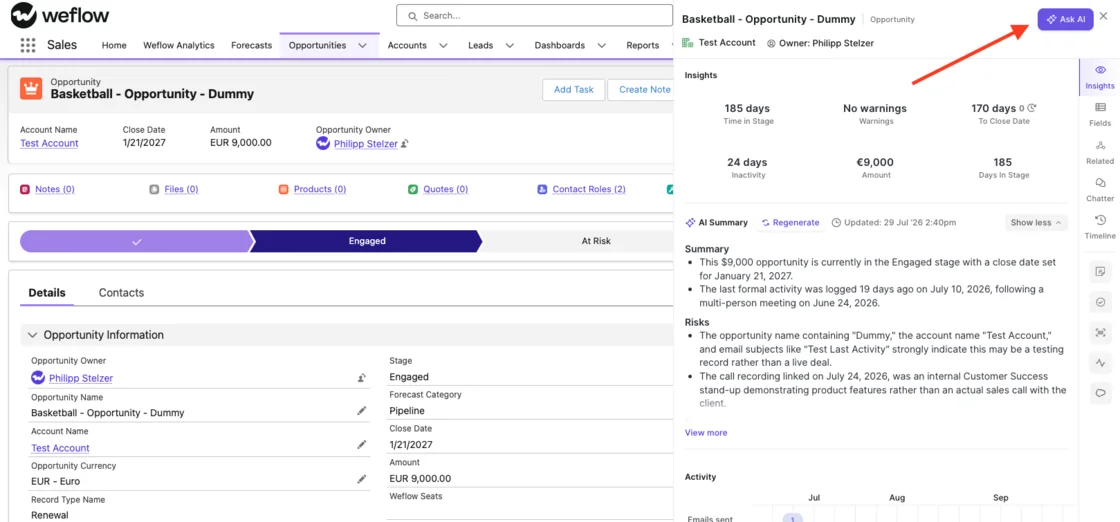
Weflow Conversation Intelligence records Zoom, Teams, Google Meet and Webex
Weflow Conversation Intelligence schedules its notetaker onto every external meeting from the calendar, so nobody has to remember to invite it. It records on Zoom, Microsoft Teams, Google Meet and Webex.
Each platform has a setup note:
- Webex isn't on by default. You enable it per workspace.
- Zoom needs local recording enabled by your Zoom admin, plus host approval.
- On Teams and Meet, the bot is admitted from the lobby.
- The Windows and macOS desktop app records without a bot joining, and it's included in the Conversation Intelligence seat.
Recording lives in Weflow Conversation Intelligence, not in capture. A team that wants recordings needs that product, either standalone or in a bundle.
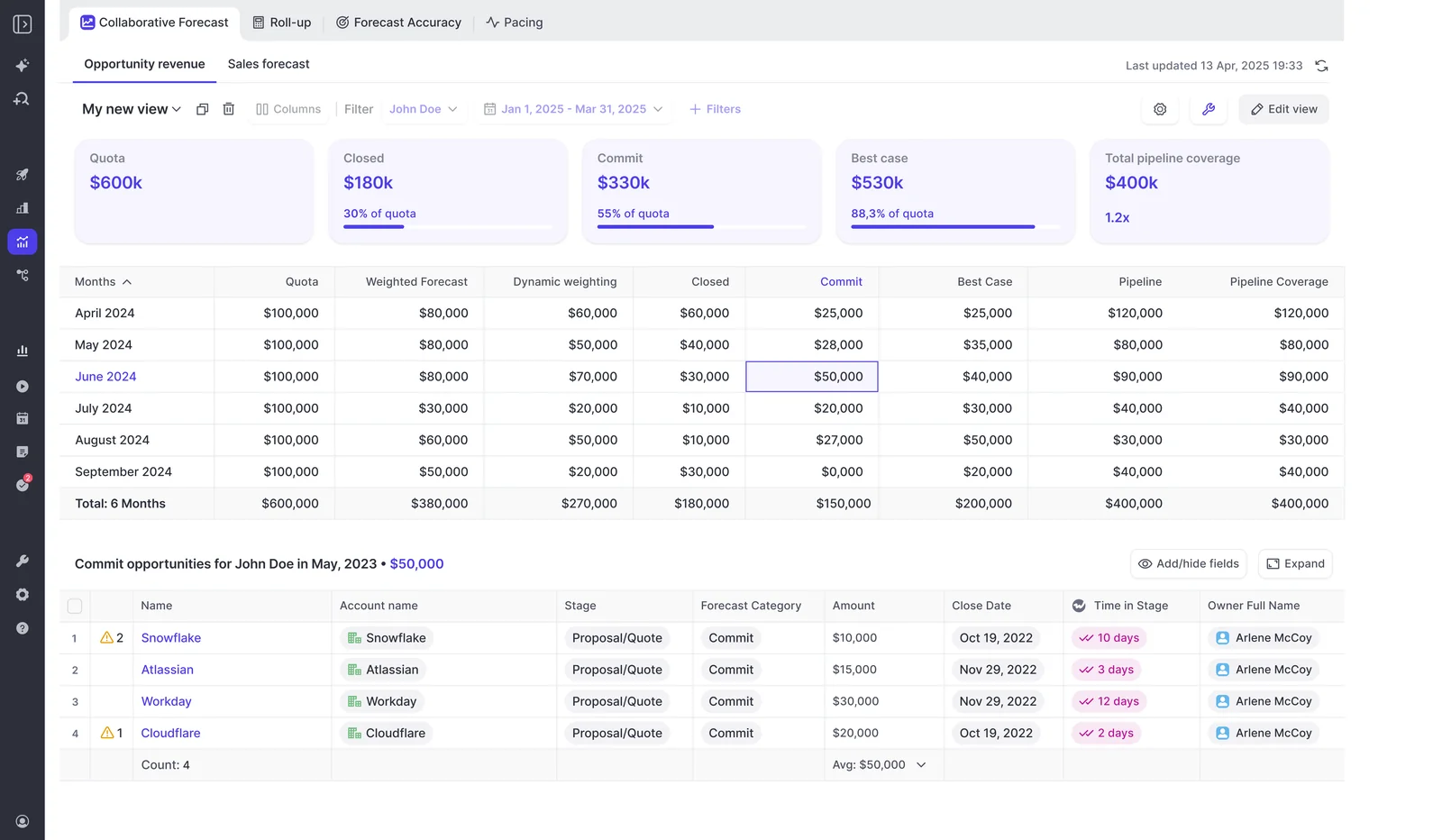
Weflow forecast submissions roll up but stay outside Salesforce
In Weflow, each rep submits a baseline and a best case tied to named opportunities, with a comment. Calls roll up the Salesforce role hierarchy by default, or a custom hierarchy you build in Weflow. Manager overrides are timestamped, attributed and logged with rationale, and every version is kept.
There are two limits here:
- Forecast submissions live in the Weflow app and aren't written to any Salesforce field.
- Submission happens in the web app only.
That's the opposite design choice to Revenue Grid's Collaborative Forecasts approach. If your rule is that every number lands in Salesforce, this is the part of Weflow that breaks it.
Weflow integrations, and where Weflow stops
Weflow integrates natively with the core revenue stack and reaches BI tools through its API.
| Connects natively | Doesn't do |
|---|---|
| Salesforce | Any CRM other than Salesforce |
| Gmail, Google Calendar, Outlook | Native Snowflake, Databricks or BigQuery connectors (teams use the API) |
| Zoom, Microsoft Teams, Google Meet | An integration platform with a connector catalog |
| Slack | Sequencing, cadences or a dialer |
| Outreach dialer recordings | Reliable Salesforce-to-calendar sync (we recommend one-way) |
Weflow's MCP connector for Claude and ChatGPT
Weflow has an official read-only MCP connector. It gives Claude, ChatGPT and other assistants access to playbooks, call summaries, transcripts, forecast calls and pipeline metrics.
An admin switches it on per workspace. A separate toggle decides whether assistants can read full transcripts or only AI summaries. Per-rep breakdowns are capped at 25 owners, so a large org gets aggregate answers unless the question is narrowed to a team.
The connector doesn't return captured email content or Salesforce field values. Assistants read those through a Salesforce connector instead. Agents you build outside Weflow on the API or MCP aren't metered.
Weflow's REST API exports transcripts, scores and signals
Weflow's REST API bulk-exports transcripts, metadata, scores and signals as JSON or CSV, and it feeds BI tools such as Tableau and Looker. Recording video files export to your own cloud storage, while transcripts land in Salesforce. An exportable audit log records field write-backs and configuration changes.
What Weflow costs: the published per-seat rate card
Every Weflow price is public, per user per month and billed annually. Discounts come from three places: bundles, volume and multi-year terms.
Weflow products and bundles, priced per user per month
| Product or bundle | Price per user per month | What it contains |
|---|---|---|
| Weflow Activity and Contact Capture | $19 | Email, meeting and contact sync into Salesforce, with activity insights and reports |
| Weflow Conversation Intelligence | $39 | Recording, transcripts, AI summaries, Salesforce field updates, Mobile Copilot and the desktop app |
| Weflow Deal Intelligence and Forecasting | $39 | Deal and pipeline health, pipeline analytics and forecasting |
| Weflow Revenue AI Foundation | $49 | Activity and Contact Capture plus Conversation Intelligence |
| Weflow Revenue AI Business | $59 | Foundation plus deal intelligence, without pipeline analytics and forecasting |
| Weflow Revenue AI Enterprise | $79 | Business plus the full forecasting layer |
What a Weflow seat includes, and the one product that meters
Only Weflow Agent Builder is priced by usage. Everything else is in the seat.
We built it this way because of what buyers tell us on calls. Here's one we hear in some form all the time:
"I can't have explosive token usage. We can't afford to say, oh, it cost 200 grand, I spent 400 grand."
— A prospect on a call with us
| Item | How it's priced |
|---|---|
| Ask Weflow AI Pro | In every plan, unmetered, under a fair use policy no customer has reached |
| AI summaries and AI field updates | In the seat |
| Recordings and transcripts | In the seat, no usage caps |
| Weflow Agent Builder Free | 25 actions per month per workspace, in every plan |
| Weflow Agent Builder Growth | $299 per month per workspace for 500 actions |
| Weflow Agent Builder Scale | $999 per month per workspace for 2,500 actions |
| Weflow Agent Builder Enterprise | Custom volume |
| Viewer seats | Free, capped at the number of recording licenses |
Weflow contract terms: minimum, term and seat changes
- The minimum is 10 users per product or bundle.
- The minimum term is 12 months, and no shorter term is offered.
- Seats added mid-term are charged pro rata to the end of the term.
- There's no contractual right to reduce seats mid-term, though seats can be reassigned when someone leaves.
- The volume discount breakpoint starts around 30 to 40 seats.
- Bundling capture with Conversation Intelligence carries roughly a 16% discount against buying both standalone.
- Weflow charges no implementation or platform fee. Historical backfill of up to 24 months is an add-on.
Revenue Grid vs Weflow pricing for four real buying scenarios
Compared list price to list price, the gap between Revenue Grid and Weflow comes from where each vendor puts the tier gate. These are list prices on both sides, and quotes and discounts can move either number.
Pricing models, terms and extra costs compared
| Term | Revenue Grid | Weflow |
|---|---|---|
| How prices are published | Three public list prices, with every tier sold through a quote | Full rate card public, with discounts set in the sales process by contract size |
| Term | Yearly commitment | 12-month minimum, billed annually |
| Minimum seats | Not stated | 10 users per product or bundle |
| Plan changes | Through support | Seats added mid-term pro rata, no mid-term reduction |
| Metering | No token pricing published. Founder pricing offer on AI. Twilio usage paid to Twilio. | Only Weflow Agent Builder |
| One-time fees | Implementation and onboarding, amount not published | None |
| Add-on services | Customization, signal configuration, premium success, dedicated hosting, on-request sync services | Historical backfill up to 24 months, Agent Builder paid tiers |
| Salesforce-side requirement | Paid service-account license for an admin-authorized rollout, plus a System Administrator integration user for Instant Sync | Writes to Salesforce through an integration user |
| Viewer seats | Not stated | Free, capped at recording licenses |
Capture, AI chat, recording and forecasting priced on each list
| What you need | Revenue Grid | Weflow |
|---|---|---|
| Capture only | $30 (Activity Capture 360) | $19 (Weflow Activity and Contact Capture) |
| Capture and AI chat | $49 (Knowledge Capture) | $19 (Ask Weflow AI Pro included) |
| Capture and recording | $149 (Revenue Grid Ultimate) | $49 (Weflow Revenue AI Foundation) |
| Capture, recording and forecasting | $149 (Revenue Grid Ultimate) | $79 (Weflow Revenue AI Enterprise) |
The Revenue Grid add-on lines from the extra costs section sit on top of these numbers.
Mixing plans by role across a 62-seat team
Seat lists grow between the first estimate and the final count, and the person running the rollout is the one who has to explain the jump to finance. One buyer described it this way on a call:
"You know, jumping from 150 to over 200 is a big uplift Right. It's a big uplift. I don't think everyone was aware it was going to be that."
— A buyer on a call with us
On Weflow, you can mix plans by role, so you don't pay full price for people who only need a background feed. Take a team of about 62 seats:
| Weflow setup for about 62 seats | Approximate annual cost |
|---|---|
| Activity and Contact Capture plus Conversation Intelligence on every seat | About $36K |
| Full platform on every seat | About $58K |
| Most reps on the capture and deal intelligence bundle, a handful of managers on the full platform | About $45K |
Leaders who only read dashboards take free viewer seats. Revenue Grid doesn't document whether its tiers can be mixed per seat.
When to pick Revenue Grid and when to pick Weflow
| Situation | Choose Revenue Grid if | Choose Weflow if |
|---|---|---|
| CRM | You run Siebel, Oracle, SAP, Workbooks or Creatio, or need Exchange on premises | You run Salesforce |
| Seats that need recording | Nearly every seat needs recording and the rest of Ultimate | Only some seats need recording, and the rest only need capture |
| Forecast location | The forecast has to live in Salesforce Collaborative Forecasts | You're fine with forecast submissions living in Weflow, read over MCP or the API |
| Cadences or dialer | You want sequencing and Twilio calling in the same tier as forecasting | You already run sales engagement elsewhere |
| Published, fixed number | You're comfortable assembling the total in a quote | You need a published rate card for the finance case |
| Calendar direction | You need Salesforce events pushed to calendars, or scheduling links | Meetings are created in the calendar and synced one way to Salesforce |
| Term flexibility | You prefer handling plan changes through support on a yearly term | You want mid-term seat additions at pro rata, accepting no mid-term reduction |
How to run a clean Revenue Grid vs Weflow bake-off
Two capture tools on the same inbox compete for the same emails and produce duplicate or conflicting logs. Before you test, switch one off or use Weflow's compatibility mode. Then run it like this:
- Pick a small test group. Revenue Grid recommends one or two test users per role or profile before provisioning everyone. Use the same people for both tools.
- Do the Weflow technical setup first. Weflow reads no mailbox until a user is enrolled in an activity capture configuration. You can install the managed packages, connect the integration user and add the workspace app while legal review is still open.
- Run one tool at a time on a given inbox. Disable the other tool's capture for that user, or turn on compatibility mode, so each email logs once.
- Compare the same time window. Revenue Grid's initial sync covers six days of Inbox and Sent mail, so judge both tools on mail from after activation.
- Measure what finance and managers will feel. Look at how long a sent email takes to reach Salesforce, whether it lands on the right opportunity, and whether meetings on your real conferencing platforms get recorded.
- Price your actual seat mix. Group roles by what they use, count the seats that need recording, and add every extra-cost line to the Revenue Grid total.
On the Weflow side, setup is usually a short session with your Salesforce admin. Here's what one customer said:
"It took less than an hour to install the managed package and start syncing data. Everything was live immediately."
— Bastian Stosic, Head of Media Sales Operations at HolidayCheck

See how Weflow captures activity, updates Salesforce fields from calls, and rolls up your forecast. Book a 30-minute demo.
Revenue Grid pricing FAQ
Can you mix Revenue Grid tiers, Ultimate for managers and Activity Capture 360 for reps?
Revenue Grid doesn't document per-seat tier mixing. Its pricing says each tier includes the one below it and is sold through a quote. Whether a split seat mix is possible gets settled in that quote.
Does Revenue Grid offer a free trial?
Revenue Grid's pricing information isn't consistent on this point. One description of its plans includes a 14-day trial of all features before purchase. Another summary of the same tiers states no trial.
Does every Revenue Grid plan include call recording?
No. Meeting recording sits in Revenue Grid Ultimate at $149 per user per month. Activity Capture 360 and Knowledge Capture don't include it.
Is any part of Revenue Grid or Weflow priced by usage?
Revenue Grid's published pricing shows no token-based charges. It runs a founder pricing offer for its AI capabilities, and Twilio call usage is paid directly to Twilio. On Weflow, only Weflow Agent Builder is consumption-priced, per workspace, and everything else is in the seat.
Which Revenue Grid tier unlocks the MCP server and Claude plugin?
The Claude plugin needs Pipeline Assistant, Meetings Assistant or AI Mentor enabled. Revenue Grid hasn't published a pricing tier for its MCP server.
Does Revenue Grid price differently for non-Salesforce CRMs?
Yes. Revenue Grid sells its Siebel CRM and email integration at $25 per user per month, billed annually, for up to 200 users. Above that, there's an Enterprise plan on quote.
How do you change or upgrade a Revenue Grid plan?
Plan changes go through Revenue Grid support. Every plan runs on a yearly commitment.
What do free Weflow viewer seats cover?
Weflow viewer seats are for leaders and managers who only consume dashboards. They're free, capped at the number of recording licenses you hold, and can be reallocated between seat types each quarter.
Where does Weflow's volume discount start?
Weflow's volume discount breakpoint starts around 30 to 40 seats. It stacks with the bundle discount and the multi-year discount.







