
Gong vs Weflow for sales call follow-up: Email drafts, next steps, and Salesforce updates
Decide between Gong vs Weflow for post-call email drafts, next steps, and Salesforce updates.


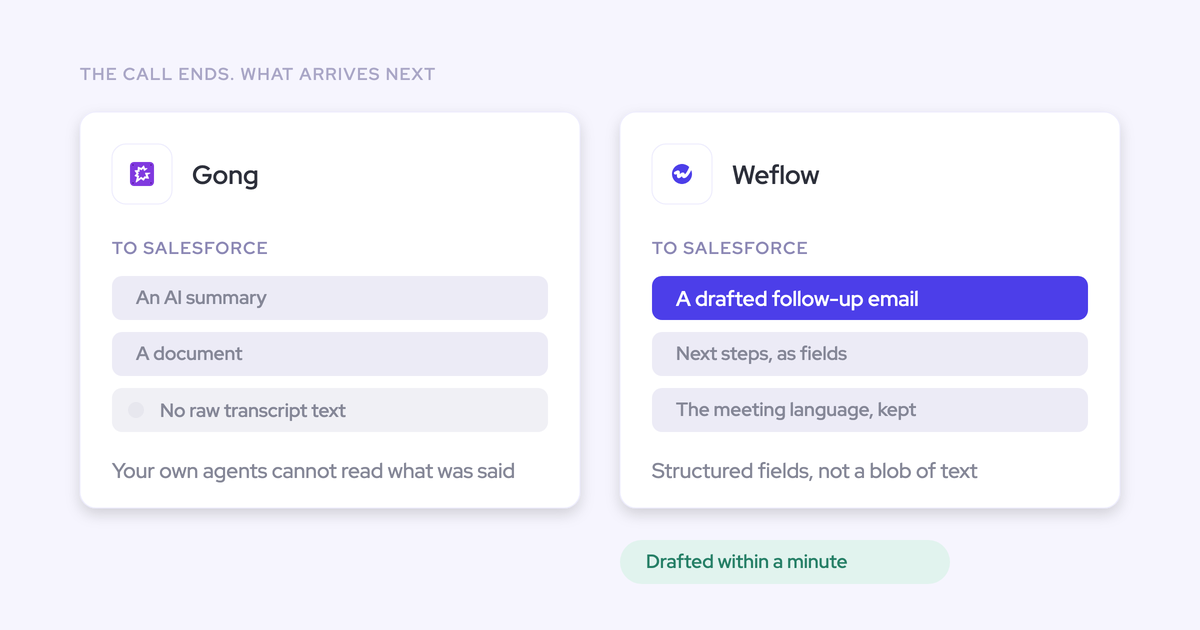

Compare Gong and Weflow on what the rep finishes after a call: a customer-ready email, accurate next steps, and a Salesforce record that reflects the same commitments. A polished summary doesn’t prove any of those jobs are done.
You’ve probably seen the gap. The rep sends a follow-up from memory, Salesforce still shows last week’s next step, and you chase an update before the deal review. Another draft in another interface won’t fix that unless the workflow also gets the agreed actions onto the right record.
We recommend testing both products against the same call and opportunity. This comparison focuses on that deal execution workflow, including the rep’s corrections, the sending path, and the resulting Salesforce changes.
Gong vs Weflow post-call workflow at a glance
Weflow connects transcript-based email drafting with reviewable Salesforce field updates. Gong’s conversation analytics and engagement capabilities deserve consideration, but don’t assume those capabilities establish its exact post-call write-back behavior.
Weflow is the Revenue AI Orchestration platform for sales, customer success, and RevOps teams. It’s built for Salesforce teams and works exclusively with Salesforce.
| Workflow dimension | Gong | Weflow |
|---|---|---|
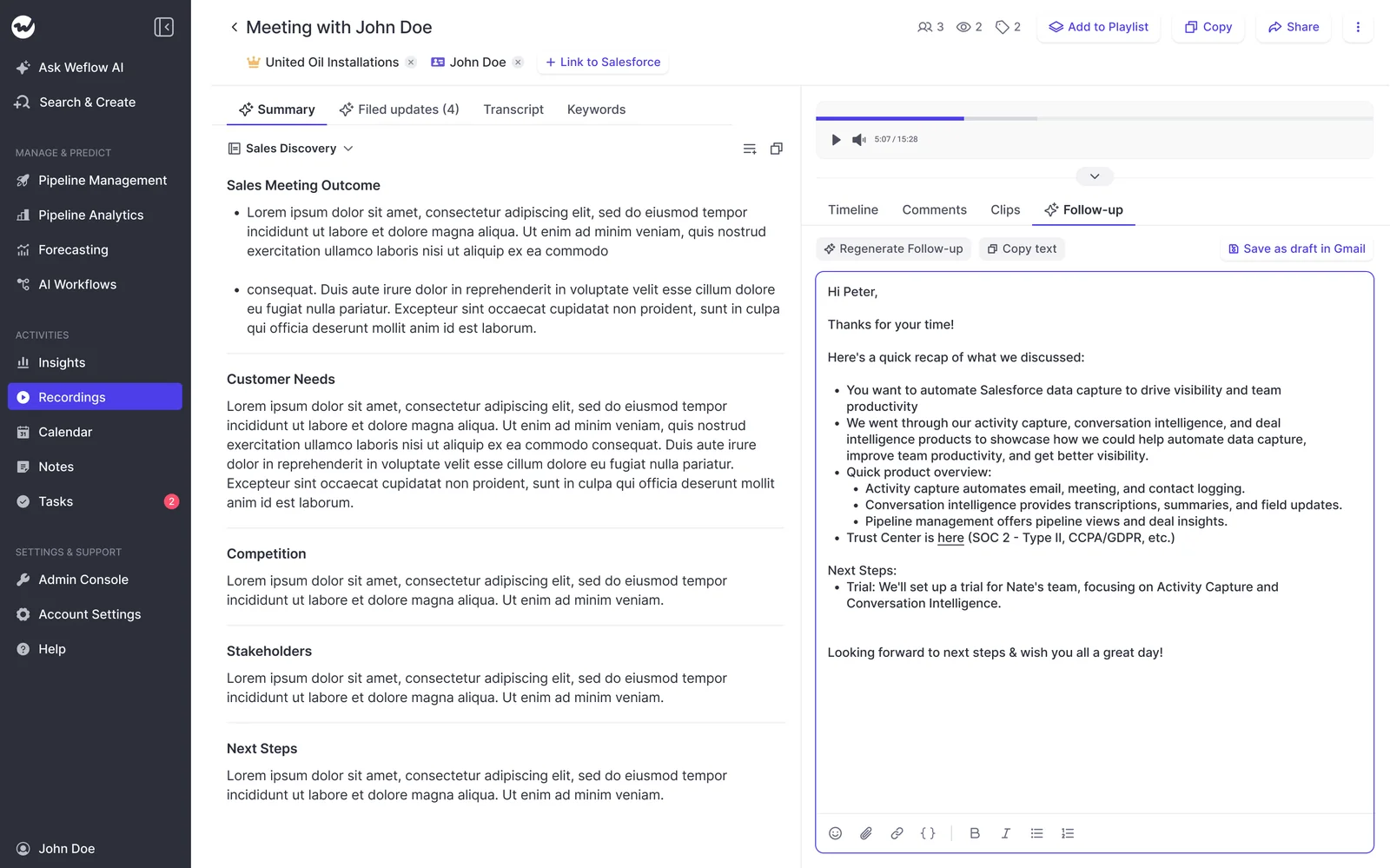
| Draft availability and location | Gong offers AI Composer. Confirm the transcript-to-follow-up workflow and draft location in your licensed configuration. | The post-meeting view displays a generated follow-up beside the call summary, with Regenerate, Copy text, and Save as draft in Gmail controls. |
| Review and sending | Demonstrate editing, approval, and sending separately. Don’t infer the sending path from AI Composer’s availability. | Reps review the draft before sending. Weflow doesn’t automatically send customer emails on their behalf. |
| Configuration and context | Test available prompts, templates, and CRM context in the proposed package. | Follow-up templates and custom prompts, with mapped Salesforce fields supplying deal context. |
| Next-step extraction | Confirm whether extracted commitments become suggestions, tasks, or Salesforce field values. | AI Field Updates extract next steps from transcripts and target specific Salesforce fields. |
| Salesforce write-back | Inspect the actual destination and data type. A summary or linked document doesn’t establish structured next-step write-back. | Writes structured field values and stores the conversation summary and full transcript in Salesforce. |
| Correction and traceability | Test approval, rejection, correction, and access to supporting conversation evidence. | Reps compare current and suggested values, then accept, edit, or reject them. Test the source-checking path separately. |
| Processing time | Measure call completion to usable draft and completed CRM update. | Use the same measurements. We don’t have a controlled side-by-side benchmark to report. |
We haven’t verified Gong’s complete current email-drafting and next-step write-back flow. Treat those questions as demonstration requirements, not evidence that Gong lacks the capabilities.
Why Salesforce managers compare Gong and Weflow
Salesforce managers compare Gong and Weflow because recording the conversation hasn’t removed the work that follows it.
Gong may already have internal support from people who’ve used it before. That familiarity matters. But your reps still need to show what happens between ending the call and leaving an accurate opportunity record behind.
The failure to watch for is reconciliation: the rep reads a summary, rewrites the customer email, then retypes commitments into Salesforce. Each transfer creates another chance to change an owner, omit a deadline, or overstate what the buyer agreed.
Scope: This comparison covers email drafts, next steps, and Salesforce updates. It doesn’t rank the full forecasting, coaching, or engagement capabilities of Gong and Weflow.
How should sales teams test Gong and Weflow?
Test Gong and Weflow with identical call content, equivalent Salesforce starting values, and the same acceptance criteria.
Ask RevOps to control the setup. If both products write into one live opportunity during the test, the first update can change the second product’s input.
Choose one representative sales call and opportunity
Choose a call that contains explicit commitments and some ambiguity, rather than a clean vendor demo.
- Use a recording you have permission to process in both products, or arrange a controlled test call.
- Include a buyer action, a seller action, and a deadline the participants actually agreed.
- Include a tentative suggestion that shouldn’t become a commitment.
- Start with an existing next step in Salesforce so you can inspect replacement behavior.
- Include the custom fields and stage requirements your team uses.
- Give both configurations equivalent CRM context and record associations.
Have the rep and manager agree on the correct outputs before either product generates them. That gives you an answer key.
Define pass criteria for email, next steps, and CRM
A Gong or Weflow output passes only when it preserves the call’s meaning and works in its destination.
| Artifact | Pass criteria | Reason to fail |
|---|---|---|
| Customer email | Correct recipients, commitments, tone, and timing; no internal-only context. | Invented promises, incorrect names, or substantial rewriting. |
| Next steps | Actions, owners, and deadlines match the call; uncertainty stays explicit. | A suggestion becomes an agreement, or the wrong person owns an action. |
| Salesforce record | The correct opportunity receives usable values in the intended fields. | Content reaches the wrong record, stays only in a summary, or fails validation. |
Don’t award accuracy points because a field contains something. A plausible value that misrepresents the deal creates more work than an empty field.
Record processing time, edits, clicks, and CRM changes
Measure the work through completion, not just how quickly Gong or Weflow generates text.
| Measurement | Gong test entry | Weflow test entry |
|---|---|---|
| Configuration | Record licensed applications and enabled settings. | Record product, templates, and review settings. |
| Draft readiness | Record elapsed time from call end. | Record elapsed time from call end. |
| Rep effort | Count edits, clicks, copies, and interface changes. | Count edits, clicks, copies, and interface changes. |
| Customer email completion | Record when the reviewed email is ready to send. | Record when the reviewed email is ready to send. |
| CRM completion | Record when the correct values appear in Salesforce. | Record when the correct values appear in Salesforce. |
| Recovery | Document how the rep corrects an incorrect suggestion. | Document how the rep corrects an incorrect suggestion. |
Separate processing delay from active rep time. A fast draft that takes extensive correction doesn’t reduce post-call admin.
Which creates better follow-up drafts: Gong or Weflow?
The better follow-up draft preserves the agreed actions with less rep editing. We won’t declare a Gong-versus-Weflow drafting winner without comparing those outputs.
Judge meaning before style. A concise email that assigns the wrong deadline fails, however natural it sounds.
Where do Gong and Weflow surface email drafts?
Weflow surfaces the follow-up email beside the post-meeting summary. Gong’s exact access path needs confirmation in the configuration you’re evaluating.
| Access step | Gong | Weflow |
|---|---|---|
| Reach the draft | Ask the demonstrator to start from the rep’s normal post-call screen. | Open the post-meeting view and review the follow-up panel beside the summary. |
| Revise the output | Demonstrate the available editing and regeneration controls. | Regenerate the draft or take the text into the rep’s editing and sending workflow. |
| Move toward sending | Identify the application and license required for the demonstrated path. | Use Copy text or Save as draft in Gmail. Test your team’s actual mail environment. |
Weflow’s post-meeting screen shows the summary and follow-up together, so the rep can compare the draft against the extracted call outcomes.
How configurable are Gong and Weflow email drafts?
Weflow supports unlimited follow-up templates, custom prompts, and mapped Salesforce context. Configuration still needs to reflect how your team sells.
| Configuration dimension | Gong evaluation | Weflow evaluation |
|---|---|---|
| Use-case prompts | Verify which prompts and templates admins can change. | Configure custom prompts for different follow-up use cases. |
| Deal context | Show which Salesforce values enter the draft. | Map Salesforce fields that supply relevant deal context. |
| Team, meeting type, and stage | Demonstrate template selection and any automatic routing. | Test how reps select the appropriate follow-up template. Don’t assume template availability means automatic routing. |
| Language | Test the actual meeting language and requested output language. | Test language preservation in the generated email, separately from transcription. |
| Maintenance | Identify who owns template changes and rollout. | Assign an owner for prompts, field mappings, and corrections from reps. |
Keep prompts specific about commitments. Tell the draft to preserve uncertainty and exclude internal qualification commentary from customer-facing copy.
How do Gong and Weflow handle rep approval?
Weflow leaves customer-facing sending with the rep. Verify Gong’s review and sending controls directly rather than treating generation as approval.
| Gong demonstration sequence | Weflow review sequence |
|---|---|
|
|
Don’t remove the review step to improve the demo’s click count. The rep still owns what the customer receives.
Does Gong or Weflow write next steps to Salesforce?
Weflow AI Field Updates extract next steps from call transcripts and write them to specific Salesforce fields. We haven’t established Gong’s exact current next-step write-back behavior.
Ask for the field change, not an integration slide. Content visible inside Salesforce can still be a link, embedded view, or document rather than a value your reports and automations can use.
What do Gong and Weflow send to Salesforce?
Weflow stores conversation content in Salesforce and separately updates configured fields. Those outputs serve different jobs.
| Output | Weflow destination and use | What to verify in Gong |
|---|---|---|
| Summary and transcript | The Salesforce recording object holds the summary and full transcript for customer-owned access and downstream use. | Which content reaches Salesforce as stored text, a document, or a link. |
| Next steps | Configured Salesforce fields hold extracted action details for deal reviews and reporting. | Whether Gong populates structured fields, which fields, and under what approval rules. |
| Qualification and stage criteria | Separate prompts target methodology fields and other sales-process fields. | Whether the demonstrated capability extracts values, suggests them, or writes them. |
| Stage | AI Field Updates can target Opportunity Stage, subject to Salesforce controls. | Whether stage updates form part of the proposed workflow. |
Weflow holds video files outside Salesforce and streams them back. Don’t confuse Salesforce transcript storage with ownership of a downloaded video archive.
How do Gong and Weflow handle incorrect updates?
Weflow lets reps compare current Salesforce values with suggested values, then accept, edit, or reject each suggestion before write-back.
| Correction step | Gong test | Weflow test |
|---|---|---|
| Inspect | Show the current CRM value beside any proposed replacement. | Compare current and suggested values. |
| Correct | Demonstrate editing and rejection before a write. | Edit the suggestion or reject it. |
| Verify the source | Show how the rep reaches the supporting conversation. | Check the transcript and measure the effort required. Don’t assume every suggestion has a direct timestamp link. |
| Complete | Confirm the accepted value in Salesforce. | Write accepted changes back and confirm the Salesforce result. |
Keep interpretive fields under review first. Stage changes deserve particular care because a wrong extraction can change the sales process, not just a note.
How do custom Salesforce fields affect write-back?
Weflow supports standard and custom Salesforce field updates except lookup relationships. Salesforce validation rules, dependencies, and permissions still apply.
Weflow reads the allowed values for picklists and multi-select picklists before matching its output. That prevents invented choices, but your org’s dependent fields still need testing.
| Edge case | Expected result | Gong observed result | Weflow observed result |
|---|---|---|---|
| Custom next-step field | Writes the agreed action to the intended field. | Record field and saved value. | Record field and saved value. |
| Restricted picklist | Uses an allowed value. | Record selected value. | Record selected value. |
| Stage validation rule | Doesn’t bypass required exit criteria. | Record rejection or successful update. | Record rejection or successful update. |
| Field-level restriction | Respects the user’s access. | Record behavior under restricted permissions. | Record behavior under restricted permissions. |
| Lookup relationship | Requires explicit capability verification. | Demonstrate if required. | AI Field Updates don’t support lookup relationships. |
Weflow’s prompt editor exposes an Auto-update Salesforce option. Leave stage suggestions under human review while you test extraction and validation behavior.

Do Gong and Weflow align email, next steps, and CRM?
Neither product should earn a consistency claim merely because it generates all three outputs. Compare each artifact against the same commitments.
| Check | Customer email | Extracted next steps | Salesforce record |
|---|---|---|---|
| Action | States what the parties agreed to do. | Captures the same action. | Stores that action in the intended field. |
| Owner | Assigns responsibility correctly. | Separates buyer and seller responsibilities. | Preserves the owner without implying an unsupported lookup update. |
| Timing | Uses the agreed deadline. | Doesn’t invent a date where none exists. | Matches the deadline in the email. |
| Wording | Uses customer-facing language. | Preserves certainty and conditions. | Doesn’t turn tentative interest into qualification evidence. |
| Destination | Addresses the intended customer. | Relates to the correct deal. | Updates the correct opportunity and fields. |
Test a correction across artifacts too. Editing an email doesn’t establish that either product also changes its extracted next steps or Salesforce suggestions.
Where Gong remains stronger for sales teams
Gong remains the stronger choice when deep conversation analytics or an integrated sales engagement product carries more weight than this narrow post-call workflow.
- Conversation analysis: Gong’s depth matters when managers need to inspect patterns across conversations rather than review individual summaries.
- Sales engagement: Gong Engage covers a category Weflow doesn’t offer. Replacing that capability requires a separate decision.
- Established adoption: Familiar screens, existing coaching libraries, and working integrations have value. A slightly better draft won’t necessarily justify disrupting them.
Language requirements also deserve a call-level test. Transcription coverage alone doesn’t establish follow-up quality in the languages your team uses.
Where Weflow reduces post-call reconciliation
Weflow reduces reconciliation by turning the transcript into both a follow-up draft and reviewable Salesforce field suggestions.
The rep checks extracted values instead of authoring every update from scratch. Meanwhile, the summary and full transcript live in Salesforce, where your team can use the conversation alongside the opportunity record.
That advantage matters most when:
- Your deal reviews depend on structured next steps and qualification fields.
- Reps already have a sending workflow they want to keep.
- You want human approval without manual re-entry of every Salesforce value.
There are boundaries. Weflow doesn’t provide sequencing, automatically send customer emails, or offer a live in-meeting assistant. Prompt quality and record mapping still need an owner.
What do Gong and Weflow post-call workflows cost?
Weflow Conversation Intelligence costs $39 per user per month, billed annually, with a 10-user minimum. Compare that with a Gong quote covering the exact workflow you tested.
| Cost component | Gong | Weflow |
|---|---|---|
| Core purchase | Gong Foundation is the prerequisite for optional applications. Obtain a current quote. | Weflow Conversation Intelligence: $39 per user per month, billed annually. |
| Email application dependency | Gong AI Composer requires Gong Engage. Confirm whether that dependency applies to the specific follow-up path demonstrated. | Follow-up generation is part of Weflow Conversation Intelligence. Reps use their email workflow to send. |
| Activity capture | Confirm which capture and Salesforce logging capabilities the quote includes. | Revenue AI Foundation combines Weflow Activity & Contact Capture and Weflow Conversation Intelligence for $49 per user per month, billed annually. |
| AI usage | Gong uses credits for certain AI surfaces. Confirm whether the tested workflow consumes them; don’t assume every draft does. | Recordings, transcripts, and AI templates aren’t metered. Agent Builder has separate action allowances and paid tiers. |
| Minimum and commitment | Confirm seat minimums and contract term in the quote. | 10-user minimum and annual billing. |
| Platform and implementation fees | Confirm platform fees, implementation scope, and any partner charges. | No platform or implementation fees. |
| View-only access | Confirm entitlements for managers and cross-functional viewers. | Free view-only licenses (up to one per recording license) included. |
At the minimum seat count, Weflow Conversation Intelligence’s annual list-price commitment is $4,680. Budget internal time for prompts, permissions, testing, and training even when implementation carries no vendor fee.
What makes switching from Gong risky?
Switching from Gong risks disrupting access to history and workflows that teams beyond sales already depend on.
Marketing may read transcripts for customer language. Customer success may use them for handoffs. A successful replacement has to preserve those working paths, not just record tomorrow’s calls.
Which Gong call history must remain accessible?
Inventory Gong’s historical assets before you commit to cancellation. Retention inside an active subscription doesn’t establish access after it ends.
| Asset | Owner to involve | Usage and destination to confirm | Verification |
|---|---|---|---|
| Recordings and transcripts | RevOps and sales leadership | Active-deal context, customer history, and approved archive. | Test export and retrieval. |
| Clips and coaching libraries | Enablement | Onboarding and recurring training. | Open a sample outside Gong. |
| Shared links | Team owners | References in Salesforce, documents, and customer-success systems. | Identify links that need replacement. |
| Generated insights and scores | Managers and analysts | Historical reporting and coaching comparisons. | Confirm export scope and readable format. |
Don’t assume Weflow can import every Gong artifact or preserve every link. Agree on migration scope and prove retrieval before cutover.
Which Gong integrations and workflows need rebuilding?
Map Gong dependencies by the work they perform, not just by the connected application’s name.
| System or workflow | Dependency to inspect | Acceptance check |
|---|---|---|
| Salesforce | Record associations, summaries, fields, embedded views, and activity logging. | The intended records remain usable without duplicate meetings. |
| Engagement | Gong Engage sequences, sending, and rep task workflows. | An explicit replacement exists for anything Weflow doesn’t provide. |
| APIs and assistants | Transcript retrieval, generated briefs, and external queries. | Each consumer can retrieve the information it needs. |
| Reporting | Activity counts, conversation metrics, and historical comparisons. | Reports retain a clear definition across the change. |
| Cross-functional access | Marketing, enablement, product, and customer-success consumption. | Each team tests its normal access path. |
During parallel testing, assign one writer for each Salesforce activity type. Two recorders shouldn’t turn one customer meeting into two reported meetings.
How should teams phase a Gong-to-Weflow switch?
Phase the switch around verified outputs and access, with a stop point before you remove Gong.
- Inventory first. Confirm renewal deadlines, historical assets, integrations, and engagement dependencies.
- Configure a pilot. Set templates, permissions, record mapping, and human review. Start security review in parallel.
- Run the same-call test. Proceed only when emails, next steps, and Salesforce changes meet your acceptance criteria.
- Prove continuity. Have cross-functional users test historical retrieval and replacement workflows.
- Train and cut over. Teach the correction path as well as the normal path. Remove Gong only after owners approve their dependencies.
A marginal drafting improvement isn’t enough to justify unresolved migration risk.
Should you choose Gong or Weflow for follow-up?
Choose Weflow when reviewable Salesforce follow-through is the deciding requirement. Choose Gong when conversation analytics, engagement, and established workflows matter more.
| Choose Gong if | Choose Weflow if |
|---|---|
| Your team’s essential workflows center on Gong’s analytics and engagement capabilities. | Your essential outcome is a reviewed email and structured Salesforce updates from the same call. |
| Your current post-call workflow passes the test, and switching adds more disruption than value. | The test shows less re-entry and correction work, and you’ve resolved migration dependencies. |
Choose Gong when conversation analytics comes first
Keep or choose Gong when its analytical depth is central to how your managers work.
- Your team actively uses Gong’s conversation analysis rather than mainly recording and summarizing calls.
- Gong Engage supports an established engagement motion you don’t want to replace.
- Your verified post-call workflow already produces accurate emails and Salesforce updates with acceptable rep effort.
Choose Weflow when Salesforce follow-through comes first
Choose Weflow when the purchase needs to remove re-entry between the conversation and the Salesforce opportunity.
- Your team runs on Salesforce and needs next steps, qualification details, and stage criteria in specific fields.
- Your reps want to review suggestions instead of typing each update from scratch.
- You’ll keep customer-facing sending with the rep and use a separate engagement product where needed.
- Your pilot proves the workflow with your prompts, permissions, and validation rules.
Bring one representative call and the Salesforce fields your managers inspect. Make those the demonstration.
See how Weflow captures activity, updates Salesforce fields from calls, and rolls up your forecast. Book a 30-minute demo.
Gong vs Weflow post-call follow-up FAQs
The remaining Gong-versus-Weflow questions concern exact workflow access, controls, and contract terms. Verify those in the configuration you’ll purchase.
Does Gong generate follow-up emails from call transcripts?
Gong offers AI Composer, but we haven’t verified its complete current transcript-to-follow-up flow. Ask Gong to generate a customer-facing draft from your test call and demonstrate where the rep reviews and sends it.
Does Gong write sales call next steps to Salesforce?
We haven’t verified Gong’s exact current next-step write-back behavior. Ask Gong to populate your intended Salesforce field and show the approval path. A summary, task, or linked document doesn’t prove the same capability.
Does Weflow send follow-up emails automatically?
No. Weflow generates reviewable follow-up drafts but doesn’t automatically send customer emails on the rep’s behalf. The post-meeting view includes Copy text and Save as draft in Gmail controls.
Can Weflow use Salesforce context in email drafts?
Yes. Weflow follow-up templates can use mapped Salesforce fields for deal context alongside the transcript. Configure those mappings deliberately so customer-facing drafts don’t include internal-only information.
Can Weflow update custom Salesforce fields?
Yes. Weflow AI Field Updates support custom Salesforce fields, except lookup relationships. Updates remain subject to Salesforce validation rules, field dependencies, and permissions.
Can Weflow users approve Salesforce updates before write-back?
Yes. Weflow shows current and suggested Salesforce values side by side. Users can accept, edit, or reject suggestions before writing accepted changes back.
Does Gong Engage change Gong’s follow-up workflow?
Gong AI Composer requires a Gong Engage license. That establishes an application dependency, but it doesn’t establish that every Gong follow-up path requires Engage. Ask Gong to identify the exact entitlement for the workflow demonstrated.
How quickly do Gong and Weflow process calls?
We don’t have controlled side-by-side results to publish. Measure both products from call completion to usable draft and completed Salesforce update, then repeat with short, long, and multilingual calls relevant to your team.
What happens to Gong recordings after cancellation?
Post-cancellation access depends on Gong’s applicable contract and export arrangements. Gong’s standard in-subscription retention policy doesn’t establish access after cancellation. Confirm export scope, deadlines, costs, and retrieval before the contract ends.
Is Weflow available without Salesforce?
No. Weflow works exclusively with Salesforce. If your team uses another CRM, remove Weflow from this shortlist before investing time in the proof of concept.







