Weflow vs Gong: What Actually Gets Written Into Your Salesforce Fields
Learn how Weflow vs Gong write AI field updates from call transcripts into Salesforce fields



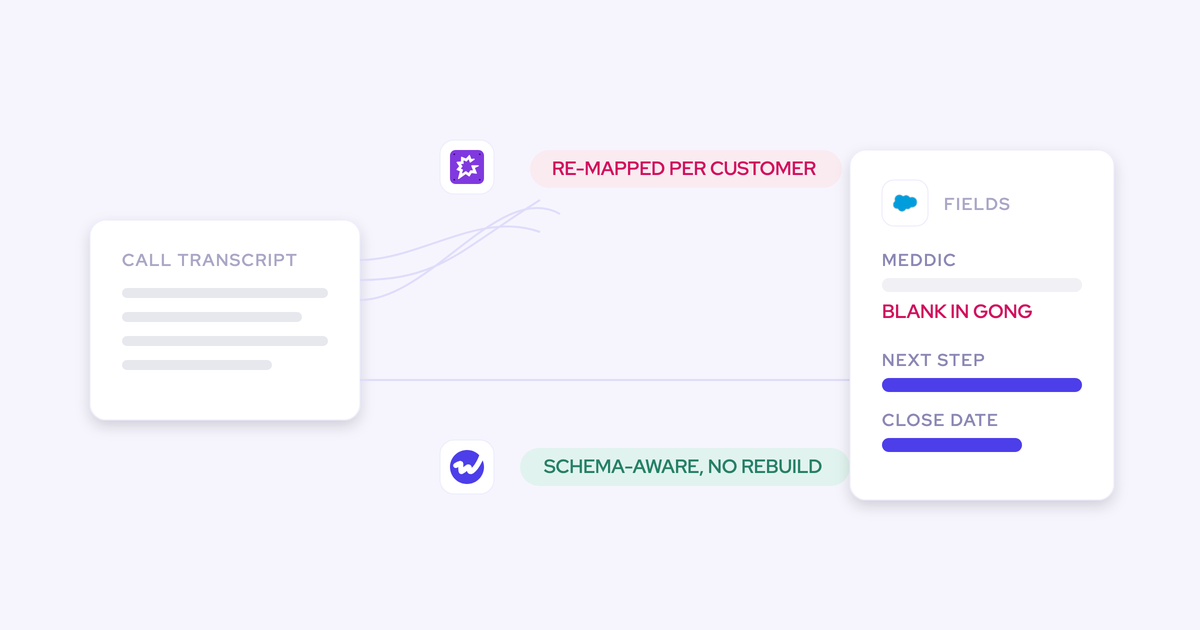

"Gong writes to Salesforce." "Weflow writes to Salesforce." Both are true, and they describe two different mechanisms. Gong's is a per-field mapping an admin builds and maintains against each org's schema. Weflow's is a real-time, bi-directional API integration that reads the schema before it writes into it.
That difference is what decides whether your MEDDIC fields, your picklists, and your custom objects come back filled after a call or stay blank while a summary lands in a text box. It's also the difference between conversation data you can report on and conversation data you can only read. If deal execution is the job you're buying for, the write path is the product.
So this compares the two write paths field by field. It credits what Gong genuinely does better, and it names Weflow's own limits, because you're going to find them in a trial anyway.
Weflow vs Gong Salesforce field writing at a glance
| Dimension | Gong | Weflow |
|---|---|---|
| Integration mechanism | Configured per-field mapping between Gong fields and CRM fields, built and maintained by an admin against each org's schema | Real-time, bi-directional API integration that respects validation rules, field dependencies and permission sets on every write |
| What lands in the field | An AI summary and a document rather than the raw transcript; structured methodology values are left to the rep | Picklist, multi-select, number, date and text values extracted from the transcript (every Salesforce field type except lookup relationships) |
| Objects reached | Standard objects; custom objects only where the relationship to the account or deal is one-to-one and the record already exists. Gong creates no fields and no records | Standard and custom objects, with per-object logging controls including restricting a custom object to activity involving its owner |
| Methodology fields | Insights are surfaced on the call; the rep types the MEDDIC field afterwards | Filled from the transcript by AI Field Updates, using 250+ pre-built prompts across MEDDIC, MEDDPICC, SPICED, BANT and custom frameworks |
| When two calls disagree | No setting for overwrite, append or leave alone. The field holds whichever answer arrived last | A per-call update reflects that call; a scheduled AI Playbook re-reads every email, meeting, transcript and field on the record and holds the current best answer |
| Review and admin control | Extraction writes only into fields an admin has already built in Salesforce and imported into Gong | Suggestions show the previous value beside the proposed one and sync on confirmation; field-level write permissions per object; read-only mode kills the write path while capture keeps running |
| Where the conversation data lives | Gong's own data layer, with a summary and document pushed to Salesforce | Native Salesforce objects: a recording object holding the summary and full transcript, plus an indexing object, owned by you after the subscription ends |
Why Sales Ops evaluates Gong on field mapping, not transcription
Because transcription stopped being a differentiator, and you already know it. Every tool in this category transcribes well. What separates them is what happens in the ninety seconds after the call ends.
Buyers who have been through one of these purchases skip the transcript demo entirely and trial the Salesforce integration instead.
"Look at the Salesforce integration, trial it. That is often something that most CI providers don't start with. They see it as an afterthought."
Janis Zech, CEO and co-founder of Weflow
What they trial, specifically:
- Does the recorded meeting write into the one meeting activity that already exists, or does it create a second event?
- Does every participant get linked to the right contact or lead?
- Does the activity relate to the account and to the correct opportunity when three are open?
- Does it populate structured fields, or drop a summary into a long-text box?
That last one is the whole evaluation for most Sales Ops teams. The qualification fields the process depends on, MEDDICC, next step, close date, procurement contact, are the fields reps fill in last and worst, usually the night before the forecast call and from memory. Across the Salesforce orgs we connect to, the methodology fields are almost always empty before anything is deployed.
So the blunt question is the right question: which fields does this write, who maps them, and does an admin see the change before it lands.
How Gong's field mapping writes to Salesforce
Gong is a conversation platform that holds its own data layer. Salesforce write-back runs through configured field mapping on top of that, and every behavior downstream follows from the design.
Gong's AI is capable, and its agent set is broad. What it isn't is schema-aware, and it isn't authored by you.
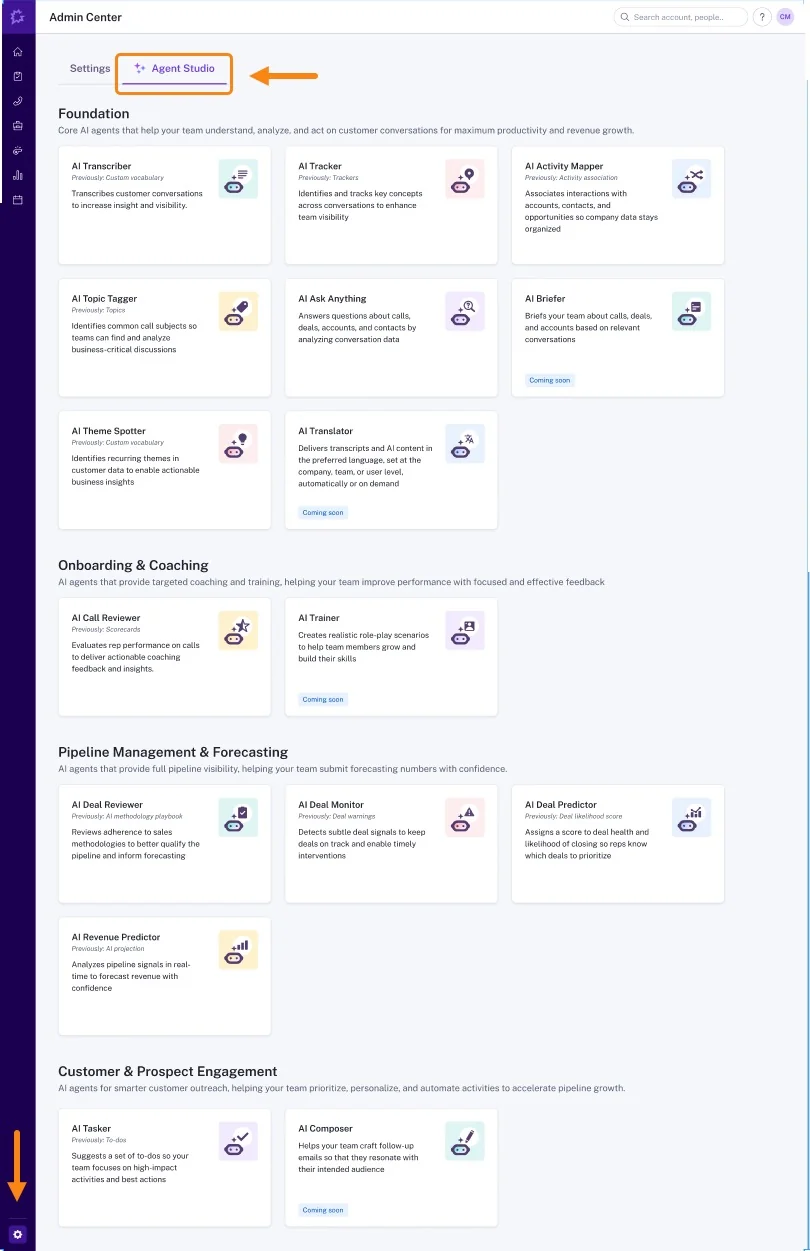
That's Gong's Agent Studio: a fixed catalogue of named agents, several badged coming soon, with no control to author a new one. AI Data Extractor is the one that writes fields.
Mapping is static, schema-blind, and rebuilt per org
Field mapping is a static per-field configuration. It doesn't read your org before it writes.
That means it has no view of the things that actually govern a write in a mature Salesforce org: validation rules, dependent picklists, record types, required fields, permission sets. It has to be built against each customer's schema by hand, and it has to be maintained there when the schema changes.
Which is why the complaint we hear is always about the mapping and never about the transcript:
"The mapping of fields is a nightmare in Gong, and they really haven't overcome that properly."
Note what that second one says. They did the prompt work. The prompts weren't the constraint.
Writes reach standard objects and pre-built fields only
Gong writes into fields that already exist in Salesforce and have already been imported into Gong. It doesn't create fields, and it doesn't create records.
The concrete boundaries:
- Existing fields only. A Salesforce admin builds the field first, then imports it, then the extractor can target it. A deal-target extractor can't even be saved without a field mapping.
- Standard objects. Custom objects are reachable only where the relationship to the account or deal is one-to-one and the record already exists.
- Summary, not values. What reaches Salesforce is an AI summary and a document, not the raw transcript text and not a selected picklist value.
- Methodology stays manual. Gong surfaces the insight on the call. Updating the MEDDIC field is a step the rep performs afterwards, by hand, which is the step that has never once happened reliably at any company we've walked into.
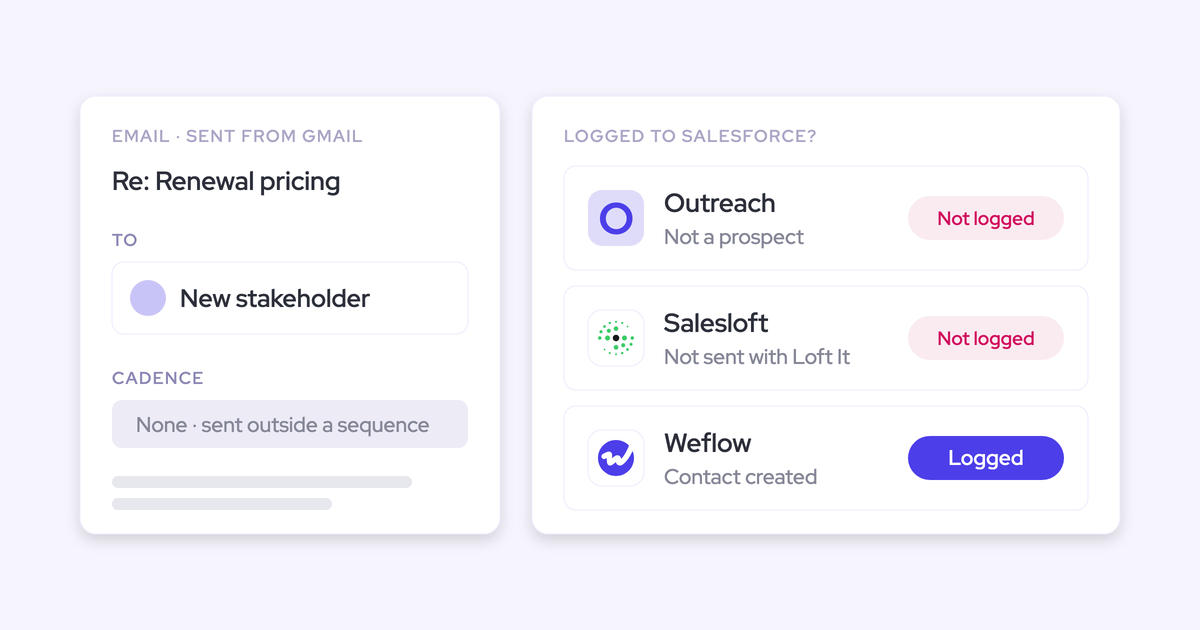
There's also no add-in inside the mailbox where a rep can see and correct which Salesforce records an email is being mapped to. Mapping accuracy isn't a model problem when three opportunities are open on one account. It's an information problem, and the rep is the only one who has the answer.
No control when a later call contradicts a field
This is the gap nobody advertises, and it's the one that should decide your evaluation.
Monday's call names one competitor. Wednesday's call names another. There is no setting in Gong that decides whether the field is overwritten, appended to, or left alone, so Salesforce ends up holding whichever answer arrived last.
For a field that a report, a routing rule, or an agent reads, that's worse than an empty field. An empty field is honest. A confidently wrong field with nothing marking it as uncertain gets built on, and then defended in a pipeline review by someone who has no idea where the value came from.
Where Gong is genuinely the stronger choice
Gong invented this category and it is still ahead in the places where owning the data layer is the point.
- Conversation analytics depth. The deepest analytics in the category, including topic tagging across the length of a call and sales rep coaching based on calls.
- Account-level methodology summaries. You can ask Gong for a methodology summary across every call on an account, not call by call. On a long enterprise cycle that's the view a manager actually needs, and a team that lives in it will feel its absence.
- Sales engagement. Gong Engage is a product Weflow does not have. If your motion is sequencing-led and you want it from one vendor, that's a fair reason to stay.
- Compliance posture. SOC 2 Type II, ISO 27001, 27017, 27018 and 27701, CSA STAR, EU-US Data Privacy Framework. Anyone telling you Gong is weak on certifications is wrong and you can check it in an afternoon.
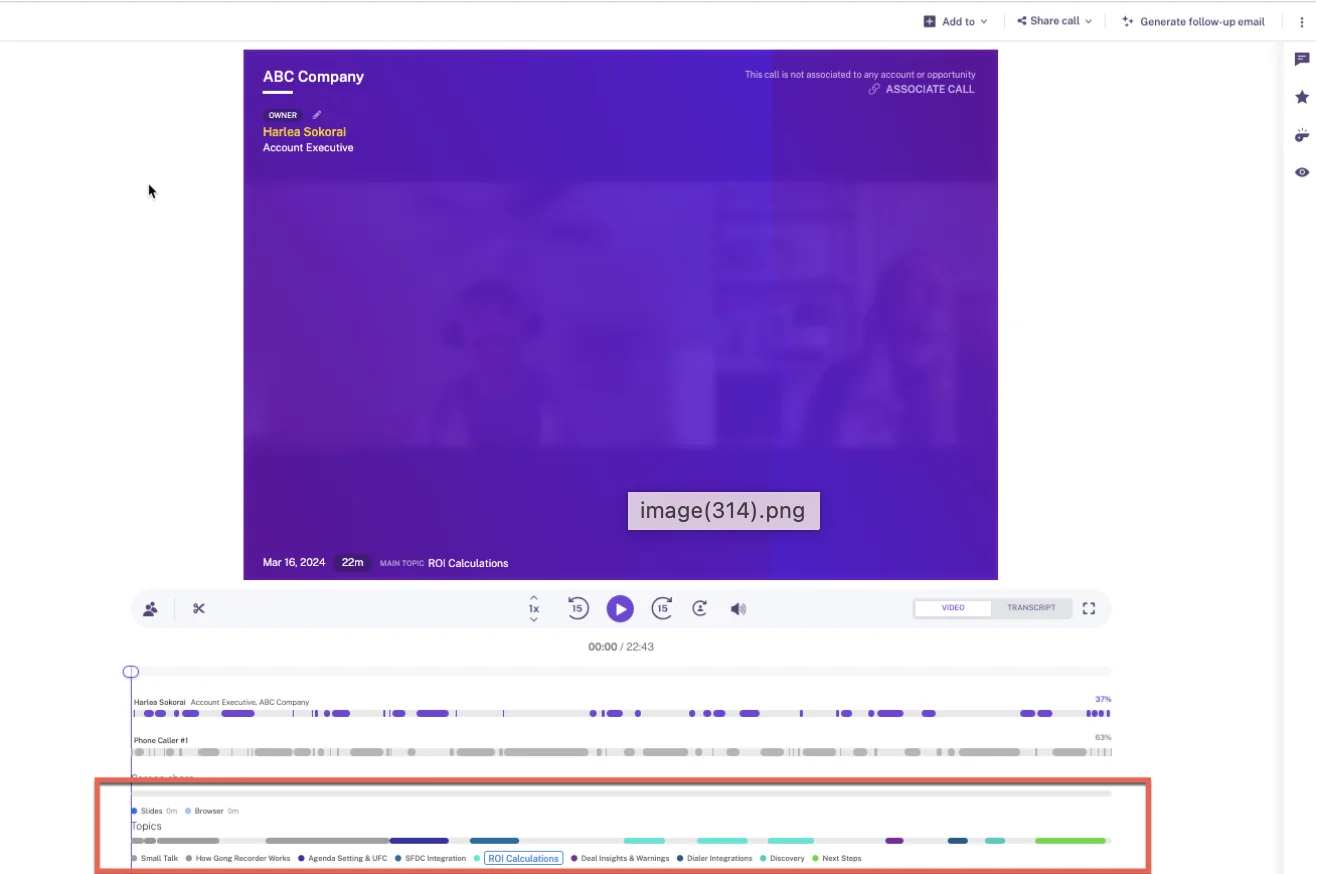
That's Gong's call page, with the topic track segmenting the conversation into named subjects.
How Weflow writes Salesforce fields through a real-time API
Weflow is the Revenue AI Orchestration platform for sales, customer success and RevOps teams, built for teams that run on Salesforce. There is no static field mapping in the write path, which is the reason it can't degrade into a mapping rebuild: it reads the schema it's writing into, every time.
"Everything we do has a bi-directional Salesforce integration that is real time and API based, that respects all your validation, field dependencies, permission sets. And that is actually quite different to for example Gong or Attention, that typically have to do field mapping."
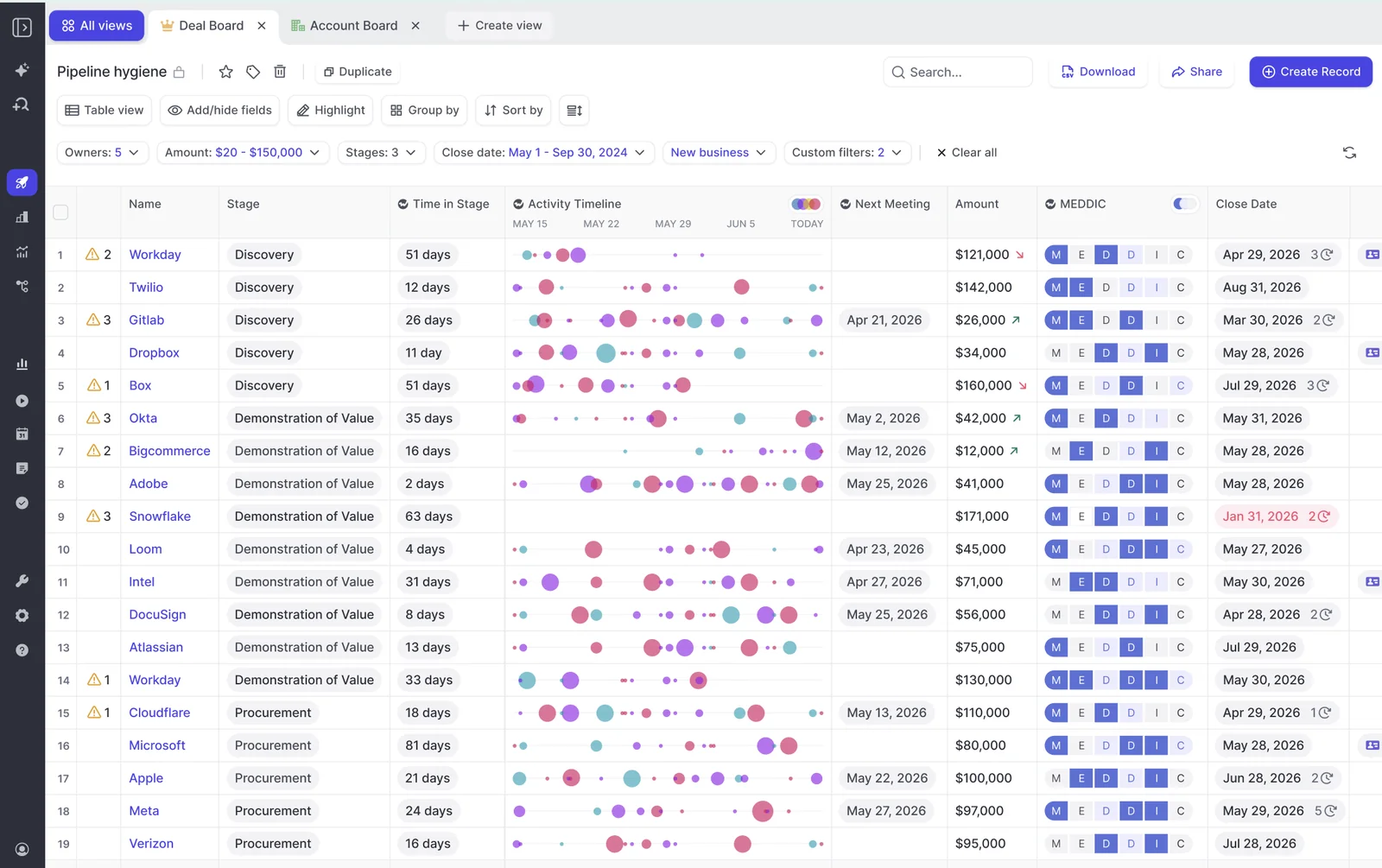
The distinction matters in one place above all: AI Field Updates. Where Gong surfaces an insight and leaves the field to the rep, Weflow writes the extracted value into the Salesforce field itself and shows the admin what it's about to change.
Schema-aware writes respect picklists, validation, and permissions
Before Weflow writes to a picklist or multi-picklist, it reads the field's allowed values and matches its output against them. So it never writes a value the field rejects.
That sounds small. It's the difference between a working integration and a demo.
Ask a model to fill a picklist and it will happily invent a value. The write then fails silently, or the value lands in a field it was never valid for and pollutes your reporting. This is the wall many teams hit when building it themselves.
One honest install-day detail while you're in there: the Weflow integration user needs create permission on Contact, and any field marked required on the Contact object will block automatic contact creation, because Weflow supplies first name, last name and email. A required Title or Account field is the most common cause of contact creation quietly failing after an otherwise clean install. Check the object's required fields before go-live and it never happens.
Structured values on custom objects, not text in a box
Weflow writes picklists, numbers, dates and multi-select values, to standard and custom objects. Every Salesforce field type except lookup relationships.
Here's why that decides your dashboard. Salesforce long-text fields are not queryable through the API. Anything written into one cannot be extracted, reported on, or automated against. It sits in the record looking useful and no flow, report, BI tool or agent can read it.
A narrative in a text field can't be grouped or charted. A value selected from a picklist can.
- Score qualification strength as a 0 to 3 picklist and you get a chart.
- Track competitors mentioned as a multi-select and you get a win-rate cut by competitor.
- Write the number into a number field and your forecast reads it without anyone retyping it.
The conversation data itself lands the same way. Weflow writes it into two native Salesforce objects: a recording object holding the summary and the full transcript, plus an indexing object. Reportable, permissioned, queryable alongside everything else in the CRM, and still yours when the subscription ends.
"We use the native objects in Salesforce. If you ever stop using Weflow, the data persists. It is your data. That is very, very important in everything we do."
Admins and reps approve AI field updates before they sync
Nothing writes without confirmation. AI Field Updates arrive as suggestions showing the previous value beside the proposed one, the user accepts, edits or rejects each one, and required fields stay locked until someone confirms them.
That's deliberate. You've told us, in more or less these words, that a tool which maps wrongly and invisibly is worse than one that maps nothing.
Three admin controls sit above the rep:
- Field-level write permissions per object. Pick which fields users may edit on Opportunity, Contact, Account and Lead; every other field on that object becomes read-only. Most teams keep Close Date editable and lock Stage, Amount and Owner. Worth knowing: selecting no fields for an object leaves them all editable, so opening the screen and saving nothing changes nothing.
- Read-only mode. One switch severs every record creation and field update flowing from Weflow into Salesforce, while capture and conversation intelligence keep running.
- Auto-update per field. Automation is set on the individual field's prompt, not globally, so you can automate the unambiguous ones and keep a human on anything interpretive.

One thing to watch for: the comparison view shows what changed, not where the value came from. The field-update agent can be permitted to search the web where the answer wasn't in the call, and that permission is set in the prompt for each field. If you want a field restricted to conversation data only, write the restriction into its prompt.
Contradictory calls are handled by playbooks, not last-write-wins
Weflow maintains a Salesforce field two different ways on purpose, and picking the right one per field is the whole answer to the Monday-versus-Wednesday problem.
- A field update runs after a single call and reflects that call. Right for anything point-in-time: what the next step is, what stage the deal is in, what was agreed.
- An AI Playbook runs on a schedule across every email, meeting, related record, transcript and field on the opportunity, and keeps the field at the current best answer rather than the most recent mention. Right for anything cumulative: the champion, the metric, the economic buyer, the qualification score. It re-evaluates every few hours, and where nothing supports a criterion it says so instead of guessing.
A champion discussed differently across five calls is badly served by the fifth call. That's the case for a playbook, and it's the control Gong doesn't expose.
Playbooks can also be attached to the account object, not only the opportunity, which is what makes methodology scoring work for CS and renewals where the picture spans several deals at once.
Weflow's limits to test before you switch
Four things you'll hit. Better you hear them now than in week two.
- Field-update accuracy depends on how well each prompt is written. This is real work, not a checkbox. A metrics prompt with no exclusions will happily return the customer's headcount: that's a number, it satisfies the validation rule, and it tells a seller nothing. A champion prompt will name an internal employee until you tell it not to. What to do: start from the 250+ pre-built prompts, then spend the onboarding session testing each one against real past calls and adding what doesn't count. Over-specified prompts perform worse than simple ones, which surprises most teams.
- Predefined AI Playbooks only score opportunities created or changed after the playbook was configured. New deals fill in, and the existing pipeline (the part you actually wanted scored) stays blank until someone regenerates it. It's invisible at rollout because the board looks like it's working. What to do: ask us for a backend batch run over your open pipeline as part of onboarding rather than regenerating record by record.
- Deal warnings and AI Playbook scores are Weflow fields, marked with a "W" in the interface, not Salesforce fields. So a deal flagged at risk inside Weflow can't be pulled into a Salesforce dashboard or Power BI as-is. What to do: if the board reads that score, create the Salesforce field and build an agent to write the assessment across. It works, and it has to be built.
- A Salesforce activity carries a single WhatId. One email or meeting can relate to exactly one opportunity, so a conversation covering two live deals with the same customer lands on one of them or falls back to the account. That's a platform constraint every capture tool inherits, including ours. What to do: plan account-level inspection alongside opportunity-level inspection if your customers routinely run several deals at once.
What Weflow and Gong actually cost
The two price models are shaped differently, and the shape matters more than the headline number.
| Weflow | Gong | |
|---|---|---|
| Pricing model | Published list price per user per month, billed annually, 10-user minimum | Quote-based, not published |
| Entry structure | Conversation Intelligence standalone at $39/user/month. Bundles from $49 (Revenue AI Foundation), $59 (Revenue AI Business), $79 (Revenue AI Enterprise) | Gong Foundation core licence is mandatory, then applications on top: Enable Essentials, Forecast Essentials, Gong Forecast, Gong Engage, Data Cloud. No application sells without Foundation |
| Seats | One seat per user, plus view-only licenses (up to one per recording license) at no cost | Seats assigned per application, so one person needing deal functionality consumes a Foundation seat and a Forecast Essentials seat |
| What's included | Conversation Intelligence includes Mobile Copilot, Ask Weflow AI and Agent Builder | The eighteen Agent Studio agents are spread across four separately purchased packages |
| AI metering | No usage charges. Unlimited recordings, transcripts, AI processing and deal signals | Credits meter question-based AI Trackers, the MCP server and API-based AI workflows. Cost is set by data volume processed: a call over ten minutes is one credit, ten minutes or under is half, each email a tenth |
Two consequences worth sitting with.
First, the credit model turns the breadth of your conversation tracking into a budget decision. Gong's own guidance is that tracker configuration has the largest effect on consumption, and the recommended remedy is to unpublish trackers that no longer provide value and filter the rest by team, user, account type or stage. That's a reasonable answer. It's also a new question you have to keep answering.
Second, buyers commonly land at around twice the total with Gong. That's not a capability gap at the lower price, it's when the product was built. Transcription was expensive when Gong set its pricing, and inference costs have collapsed since. Better AI at half the price is an artifact of timing, not of corners cut.
"We had our third call with Gong because they refused to tell us pricing until now."
We publish ours.
Switching from Gong: what moves and what you keep
The switch is asymmetric, and the asymmetry is about data rather than effort.
Gong maps captured emails and meetings into its own data structure. The recordings, the library, the flows built around them, the years of conversation history: that accumulated inside Gong, and it doesn't come back to Salesforce cleanly.
"Gong is getting all the data into Gong. If you ever stop using Gong, getting it back into Salesforce is not so easy."
"I really felt like Gong was a walled garden, and they wanted to have you do everything that you wanted to do inside that platform. And I didn't want to do that. I wanted to write my own prompts, build my own workflows. I wanted to have that trigger into Salesforce or Slack or whatever surface we wanted."
Kyle Norton, Chief Revenue Officer at Owner.com
Weigh that honestly against the strengths section above. If your enablement library and your call flows are load-bearing, leaving them behind is a genuine cost, and a team that's had Gong for four years will feel it.
The technical path itself is short:
- Integration, 30 to 45 minutes, with a Salesforce admin and a mail admin in the room at the same time. Getting those two people onto one call is what turns a one-hour job into a two-week one.
- Workspace configuration, about an hour. Teams, recording preferences, consent flows, domain and object logging rules.
- Prompts and methodology. Start from the pre-built library, map each field, test each prompt against real past calls. This is where the change management conversation lives, because you're deciding what the system should assert about a deal.
- Historical sync-back. The previous 12 to 24 months of email and meeting history, three to four days to complete. The real ceiling is the Salesforce API calls your org has available, which are shared with every other integration, so a backfill can stall because something unrelated is eating the quota.
- Transition overlap. Decide which tool owns the meeting activity before both are running. More on that in the FAQ.
Everything Weflow writes lands in native Salesforce objects from day one, which means the same exit problem doesn't exist on the way out of Weflow. That's the point of the architecture, not a marketing line.
"I've worked with Gong before, but Weflow's simplicity and real-time sync are game-changing. Whether I update a deal in Salesforce or Weflow, it's instantly reflected everywhere."
Bastian Stosic, Head of Media Sales Operations at HolidayCheck
Choose Weflow if, choose Gong if
| Choose Weflow if | Choose Gong if |
|---|---|
| The evaluation is won or lost on the Salesforce write path: structured methodology fields filled from the transcript, custom objects reached, picklists respected | Your center of gravity is conversation analytics depth and aggregated call insight, and the CRM field is a nice-to-have |
| Your org is opinionated: dependent picklists, validation rules, record types, permission sets that a static mapping will fight | You sell in many languages and need 96+ language transcription at scale |
| You want an admin to see and approve every AI write, with field-level permissions and a read-only kill switch | Managers rely on account-level methodology summaries across every call on an account |
| You need the transcript and summary as native Salesforce records your reports, flows and agents can read, and that survive the subscription | You want sequencing and engagement from the same vendor and Gong Engage is part of the motion |
| You want a published price, no platform fee, and no credit meter on automated AI | Your Gong library, flows and years of recordings are load-bearing enough that leaving them behind costs more than the licence |
See how Weflow captures activity, updates Salesforce fields from calls, and rolls up your forecast. Book a 30-minute demo.
Weflow vs Gong field updates: frequently asked questions
Does Weflow handle custom methodologies or only MEDDIC?
Custom too. Weflow ships 250+ pre-built prompts covering MEDDIC, MEDDPICC, SPICED, BANT, Challenger, SPIN and Command of the Message, with unlimited templates on top.
The mechanism is what makes custom frameworks work: each prompt is written against a specific Salesforce field, so any framework you've modeled as fields can be filled. Blending attributes from two frameworks into one score is fine, because the prompt is anchored on the field, not on framework purity.
Can an admin lock which Salesforce fields the AI may edit?
Yes, three ways. Field-level write permissions per object let you name the editable fields on Opportunity, Contact, Account and Lead, and everything else on that object becomes read-only. Required fields never write without confirmation. And read-only mode severs the entire write path from Weflow into Salesforce while capture and recording keep running.
The one gotcha: selecting no fields for an object leaves them all editable, so the permissive state is the default.
Will Weflow double-log meetings if we still run Gong during transition?
It will if you let both tools write the meeting, and this is the single most common reporting mess we see during an overlap.
"If you record a meeting, it's not another meeting. It's the same meeting."
Janis Zech, CEO and co-founder of Weflow
When an activity capture tool and a conversation intelligence tool both create an event object for one meeting, you get two events for one conversation. Meetings-per-rep and meetings-per-opportunity are then quietly inflated, and you're deduplicating in the reporting layer forever.
So decide which tool owns the meeting activity before both run, and turn the other one's meeting write-back off. Weflow's Object Management settings control logging per object (Account, Contact, Lead, Opportunity, Case and custom objects each have their own toggle), and Weflow runs alongside engagement tools like Outreach and Salesloft in compatibility mode for the same reason.
Who writes the prompts behind each field, and how long does setup take?
There is no field mapping to build, so nobody spends a week mapping. Each field is configured with a prompt instead, starting from the pre-built library and refined during onboarding.
Technical integration is 30 to 45 minutes with a Salesforce admin and a mail admin. Workspace configuration is about an hour.
The honest dependency is prompt quality, not mapping maintenance. Budget real time in onboarding for reviewing each field's prompt against past calls, and expect the useful corrections to come from whoever reads the output daily, usually a sentence added or a few words removed.
Where do recordings and transcripts live, and what about EU data residency?
Weflow spins up your instance in the region where your Salesforce is hosted, and that can be overridden to keep data in the EU or UK. Weflow is a German company hosted in Frankfurt. Transcripts and summaries land as records in your own Salesforce, so residency for that content follows your CRM. Video recordings are the exception: Weflow holds them and streams them back, because Salesforce is a poor place for large files.
On the certificate side: SOC 2 Type II, HIPAA, GDPR, CCPA, zero data retention for AI processing, and customer data never used to train models. Not FedRAMP, so US government contractors requiring it aren't a fit.
Fair comparison with Gong: its certification set is strong, and the distinction here is residency and ownership behavior rather than certificates. Gong customers choose between a US and an EU data centre at the point of becoming a customer, and the default is the US. Choosing EU storage doesn't confine processing to the EU: Gong processes data in the United States, Israel and Ireland. That's the detail that shows up in a data protection assessment, not the ISO list.