Weflow vs Attention for MEDDIC Deal Reviews: Where the Score Comes From and What Gets Written to Salesforce (2026)
Learn how Weflow vs Attention derive MEDDIC scores and what gets written to Salesforce.


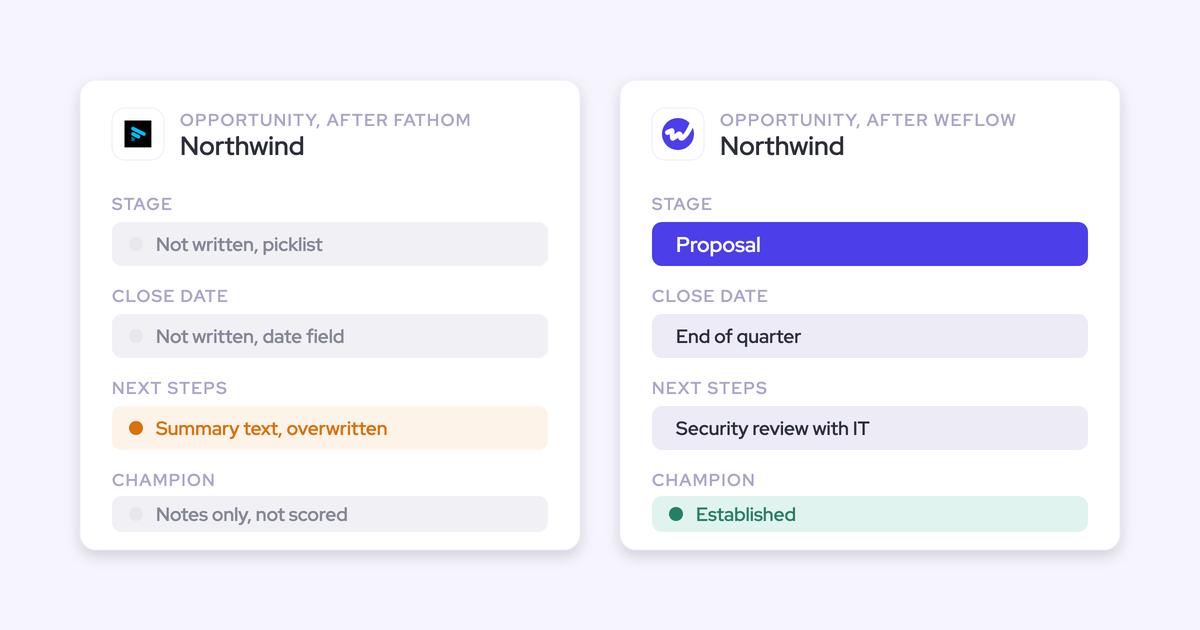
Weflow and Attention both fill MEDDIC fields from your conversations. The difference is the evidence each one reads and how each one writes. If you run your deal reviews off the Salesforce opportunity, that difference decides whether the Economic Buyer field is something your manager can trust.
Attention fills MEDDIC fields from calls, either the current call or every call linked to the opportunity. On its recommended setting it syncs automatically and nobody reviews the value first. Where it finds nothing, it writes a paragraph describing what wasn't discussed.
Weflow AI Playbooks read every email, meeting, transcript and existing field on the opportunity. They judge how well each element is established, including what your reps typed. On methodology fields, our AI field updates add to what's there instead of overwriting it. We built it this way for teams running deal reviews off the Salesforce opportunity.
We also cover where Weflow falls short. The playbook score itself isn't reportable in Salesforce, and your existing open pipeline doesn't get scored automatically at rollout.
Weflow vs Attention for MEDDIC: the side-by-side comparison
The feature checklist looks nearly identical, but the tools read different evidence and write different things into your fields.
| Capability | Weflow | Attention |
|---|---|---|
| Qualification methodology capture | AI Playbooks fill each MEDDIC element from every email, meeting, transcript and field on the deal, then judge how well it's established. | Grades calls against pre-built MEDDIC, BANT or SPICED scorecards or your own criteria. Deal-scoped fields read every call on the opportunity. |
| CRM field updates from conversations | Writes every Salesforce field type except lookups, and you set auto-write or review for each field. | One written prompt per mapped Salesforce or HubSpot field. Auto-sync is the recommended default, and empty findings arrive as prose. |
| AI deal scoring | A 0 to 100 win-likelihood score, recalculated nightly, trained on your own closed deals and shown with its drivers. | Scores each deal from its call content and from indicators you define. |
| Deal summaries across all interactions | A deal-level summary across every meeting on the opportunity. Playbooks also read emails and fields. | Deal fields and Insights cover a deal's calls only. Email and CRM reasoning happens on request in Super Agent chat. |
| Coaching scorecards | Every call is scored against templates such as MEDDIC, MEDDPICC or Challenger, rolled up per call, opportunity and rep. | Natural-language criteria with weights, a configurable scale, and a test against a past call before you save. |
| Writes its own insights into the CRM | Activity, transcripts, summaries, field updates and playbook element content land in Salesforce. The playbook score, deal warnings, agent outputs and forecast submissions stay in Weflow. | Writes extracted call values into mapped Salesforce or HubSpot fields, either after the call or when a rep clicks Update CRM. |
| Integrations with other tools | Native email, calendar, Zoom, Teams, Meet, Slack and Outreach dialer connections. The API and MCP reach BI tools and assistants. No native warehouse connectors. | Calendars, Zoom Phone, Aircall and Slack, plus workflow steps inside Gmail, Notion, Snowflake, HubSpot and many more tools. |
| Access from AI assistants (MCP) | A read-only official connector for playbooks, summaries, transcripts and forecast data, switched on per workspace. | A read-write server with 68 tools that returns raw transcripts. It's rate-limited, with no consumption charge. |
| Raw data access outside the tool | The REST API bulk-exports transcripts, metadata, scores and signals. Recordings export to your own storage. | Raw transcripts, scorecard results and insights through MCP and API keys. Workflows can push data to Snowflake or any API. |
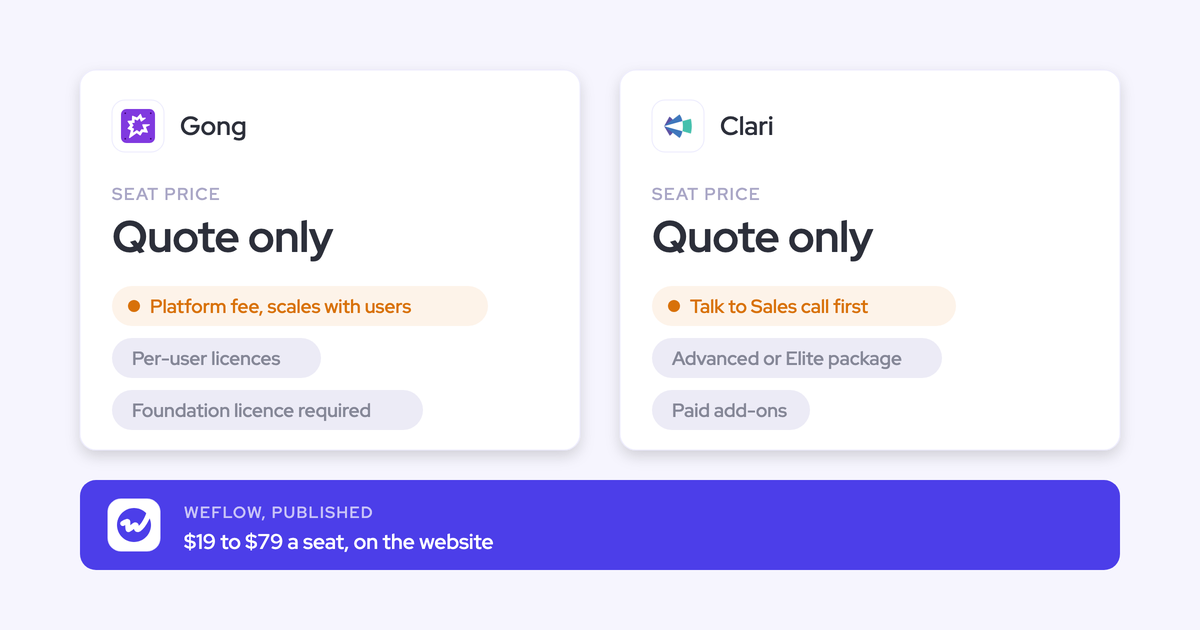
| Pricing | Published per-seat prices from $19 to $79 per user per month, billed annually, with a 10-user minimum. | No published pricing. |
Why RevOps teams shortlist Weflow and Attention for MEDDIC
Attention usually arrives through a conversation intelligence evaluation. It's the third competitor we meet most often, and it shows up when the deal is about calls, not forecasting. Both tools promise MEDDIC fields filled from conversations, so they end up side by side on the same shortlist.
Weflow is the Revenue AI Orchestration platform for sales, customer success, and RevOps teams. It's built for Salesforce teams, and it starts from the full record: emails, meetings, contacts, calls and the fields you already maintain. Attention starts from the call and reasons outward. So the choice is whether you're automating call follow-through or completing the deal record your review reads.
Follow one Economic Buyer field through Weflow and Attention
Picture a late-stage opportunity with several recorded calls. The CFO who signs off was introduced in an email thread with the champion and never came up on a call. Weeks ago, a rep typed "TBD, will confirm" into Economic Buyer to clear a validation rule.
That deal shape is common. One RevOps leader put it this way when testing on their own pipeline:
"On one of our test opportunities, the champion was never talked about on the call, and the decision maker was never talked about on the call either. All of this came through email. If we only captured the calls, that information would never get captured."
A RevOps leader on a sales call with us
What Attention reads and writes for Economic Buyer
Attention reads the calls, so it doesn't see the CFO in the email thread. Here's the path on this deal:
- The call ends. Attention processes the recording through its intelligence layer.
- Extraction runs. A conversation-scoped field reads the current call. A deal-scoped field reads every call linked to the opportunity. Neither reads the email thread where the CFO appeared.
- The value syncs. On the recommended auto-sync setting, the value writes to the mapped field and nobody reviews it. On manual sync, the rep sees a CRM tab with a checkbox per field and picks what to push.
- The field fills with prose. Because no call named a buyer, Economic Buyer gets a paragraph narrating the absence.
On one of Attention's own demo calls, the Economic Buyer field held this:
"The conversation does not provide explicit information about the most important decision maker or the person who needs to greenlight buying the product"
Economic Buyer field content on an Attention demo call
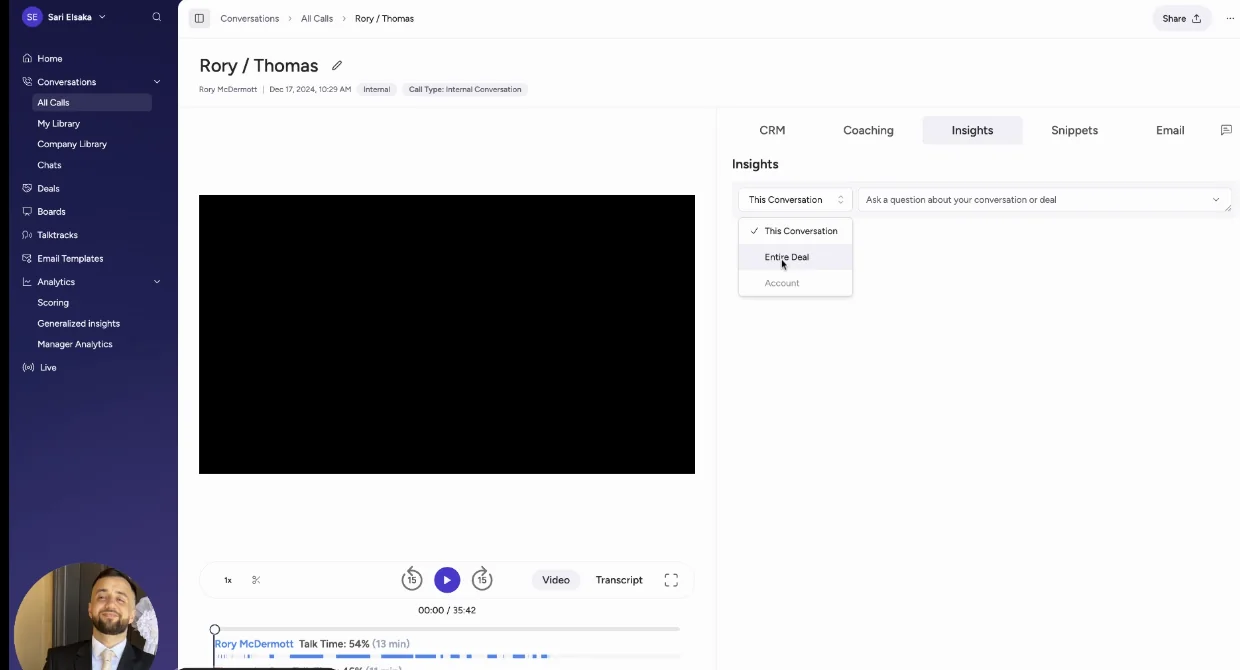
That paragraph reads as a populated field to every Salesforce report and to every AI that reads the record later. Your deal review sees Economic Buyer as filled on a deal where a real buyer exists in email.
What Weflow reads and writes for Economic Buyer
Weflow reads the whole opportunity, so the email thread counts as evidence. Here's the same deal, in the same order:
- Activity lands. Weflow Activity & Contact Capture logs the email thread against the opportunity, and Weflow Conversation Intelligence records the calls. The playbook reruns when new activity arrives, and otherwise every three hours.
- The first pass fills the element. The AI Playbook reads every email, meeting, transcript, related record and field on the opportunity, and it finds the CFO in the thread.
- The second pass judges quality. "TBD, will confirm" isn't evidence. Filler on its own gets marked not assessed, not complete. With the email thread behind it, the element shows as established or as partial, with a note on what's still missing.
- The field gets written. The element content goes into your Economic Buyer field in Salesforce. Per-call AI field updates add to methodology fields instead of replacing them, so earlier qualification survives later calls. A rep can override the value, and Weflow checks the override for plausibility against the deal.
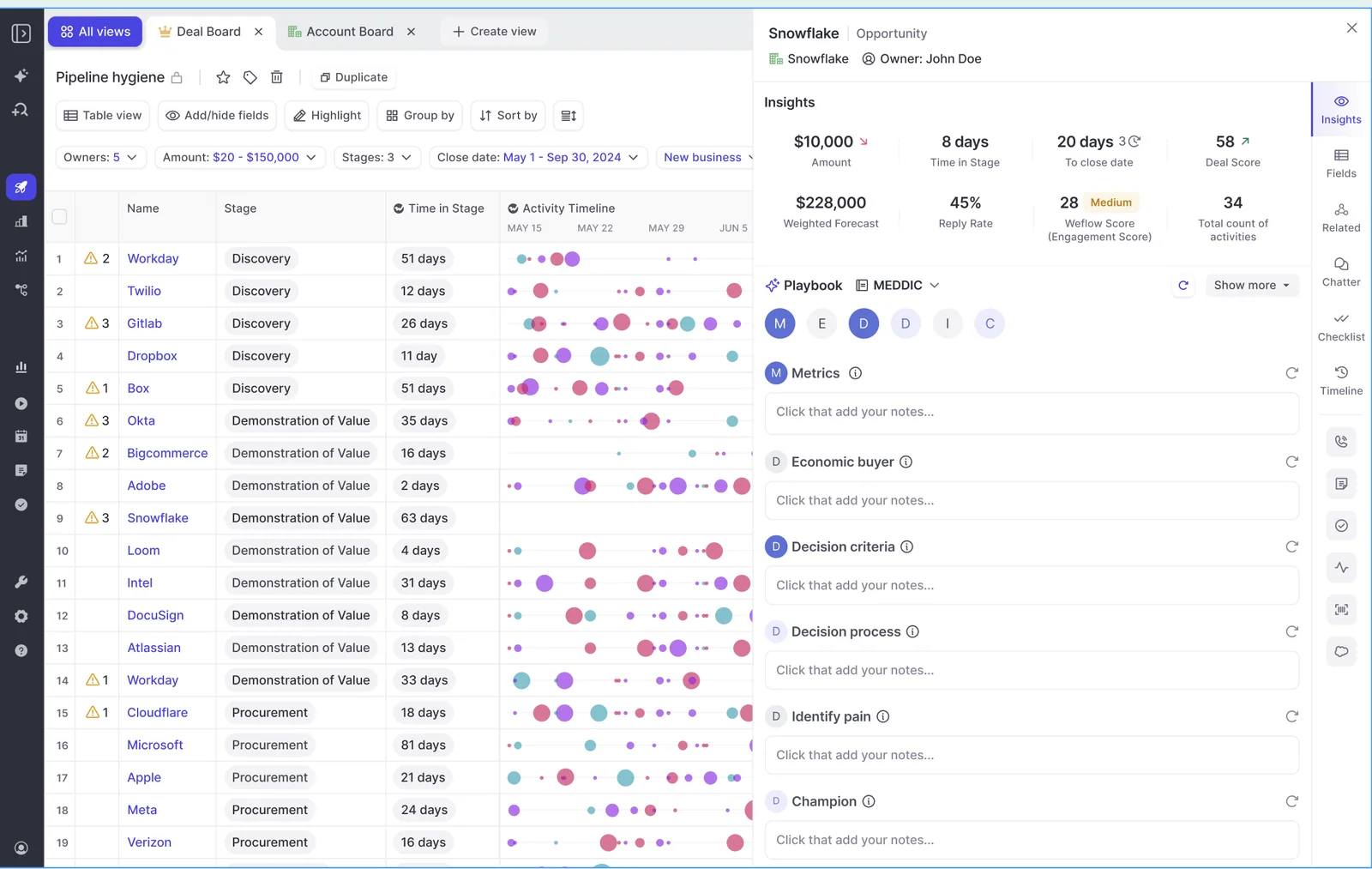
The element content reaches Salesforce, but the playbook's rating of that element stays in Weflow.
| On this deal | Attention | Weflow |
|---|---|---|
| Evidence read | The current call, or every call linked to the opportunity | Every email, meeting, transcript, related record and field on the opportunity |
| When it runs | When the conversation finishes, or when a rep clicks Update CRM | When new activity lands, otherwise every three hours, on opportunities created or changed after setup |
| Economic Buyer appears only in email | The field write misses it. Super Agent can find it if someone asks in chat | Found in the thread and written from it |
| Nothing found anywhere | Prose describing the absence lands in the field | The panel says no relevant data was found and marks the element never discussed |
| Who reviews before the write | Nobody on the recommended auto-sync. The rep on manual sync | The admin sets auto-write or review for each field |
| The rep's typed text | Attention's CRM sync docs describe no append or overwrite rule | Judged by the second pass, with filler marked not assessed. Field updates append on methodology fields |
| What the manager sees in review | A filled field, whether or not a buyer was named | Per-letter status showing what's evidenced and what's missing, plus the field content in Salesforce |
How Weflow scores MEDDIC and writes it to Salesforce
Everything below works against the Salesforce fields you already track, not a scorecard in a separate portal.
Weflow AI Playbooks score MEDDIC from every email, call and field
An AI Playbook runs two passes over each opportunity. The first fills every element of your methodology from the deal's evidence. The second judges how well each element is actually established, and that includes text a rep typed by hand.
The panel shows each element in one of three states:
- Established: the evidence supports the element.
- Partially established: there's evidence, plus a note on what's missing, such as metrics named but not quantified.
- Never discussed: nothing on the deal supports it yet.
You assign playbooks per team. Around thirty methodology templates ship with Weflow, and you can map your own prompt to each element, so a house framework works the same way as MEDDIC. Each playbook also returns a next-step recommendation. It evaluates one record at a time, an account or an opportunity. For a team view, you read across the deal board.
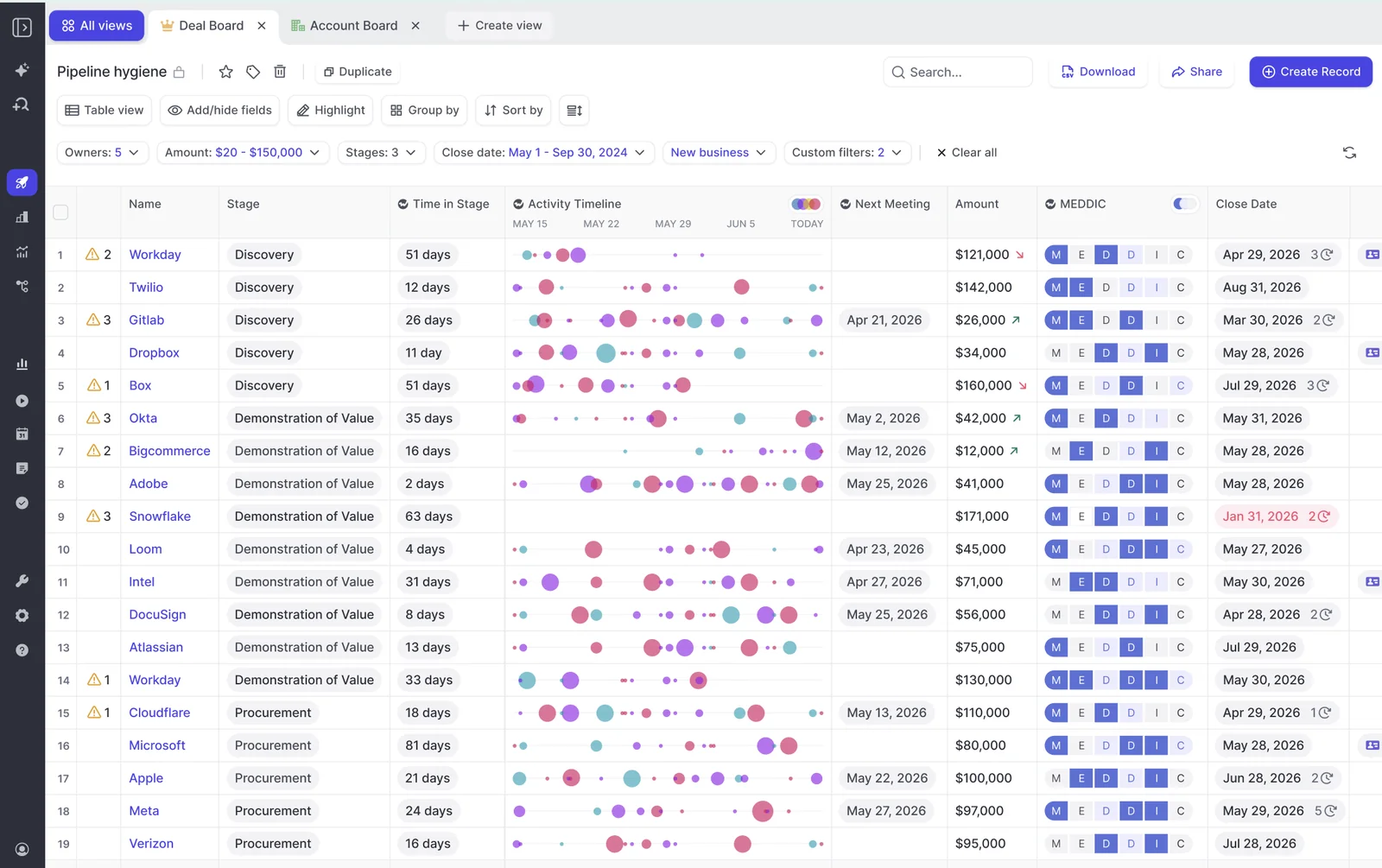
Weflow AI Field Updates write call values into any Salesforce field type
AI field updates write to every Salesforce field type except relationship lookups. That covers text, picklists, numbers, dates and multi-selects. Before writing a picklist, Weflow reads the field's allowed values, so it never writes a value the field won't accept.
Validation rules still apply. If a rule blocks a stage change until five fields are filled, those fields are updatable the same way, so what was said on the call satisfies the gate. On methodology fields, updates add to the existing text. Standard objects work out of the box. Custom objects need setup by Weflow support.
You set auto-write or review for each field. Here's how we'd start:
| Field kind | Recommended write mode |
|---|---|
| Unambiguous fields, such as website or billing address | Auto-write from day one |
| Interpretive methodology fields, such as champion, pain or economic buyer | Review first, then automate once the output has earned it |
| Single-value commercial fields, such as stage, amount or close date | Review after each call, because one misheard sentence overwrites the value |
Weflow scores each deal's odds from your own closed deals
Separately from the playbook, Weflow scores every opportunity from 0 to 100 on its likelihood to close won. The score is recalculated nightly, trained on your own opportunity history, and shown with the drivers behind it.
It needs about six months of closed history to score accurately. Keep it distinct from the methodology assessment. One tells you how likely the deal is to close, the other tells you what's evidenced.
Weflow summarizes the whole opportunity, not the last call
The deal-level AI summary reasons across every meeting on the opportunity. It sits next to communication velocity, computed from the emails actually sent and received, and every person involved in the deal.
A manager can see multi-threading and momentum without opening a single recording. Playbooks extend the same view to emails and fields.
Weflow keeps rep coaching scores separate from deal qualification
Per-call scoring punishes reps in long cycles for not re-asking questions that are already settled. We hear this from managers constantly:
"Right now it scores us on an individual call. So if we talk about metrics on the first call and get a four, then on the second call, because it's already been decided, we score a one because we didn't discuss it again."
A sales leader on a call with us
Weflow scores methodology at three levels, and it never blends the coaching score into the deal signal:
| Level | What it measures | Who uses it |
|---|---|---|
| Call | How one conversation went against the coaching scorecard | The rep, right after the call |
| Opportunity | Whether the deal is qualified, from every interaction on it | The manager in deal review and forecast calls |
| Rep over months | Which elements a seller establishes well or poorly across all their deals | Frontline managers and enablement |
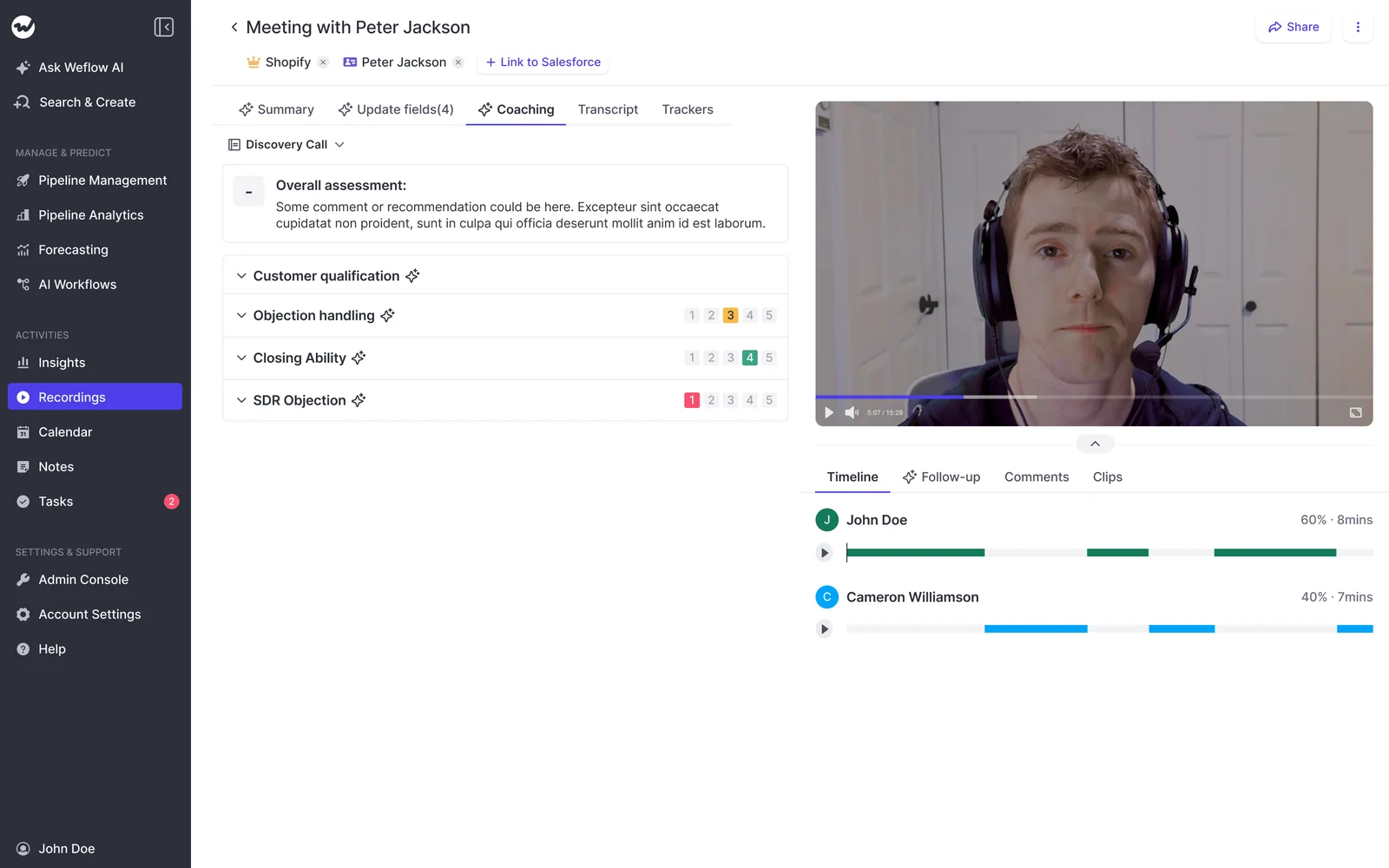
What Weflow writes to Salesforce, and what stays in Weflow
Most of what Weflow produces lands in your Salesforce org. The ratings don't.
| Output | Where it lives |
|---|---|
| Emails, meetings and contacts | Salesforce |
| Call transcripts and summaries | Salesforce, on the recording object, with the summary also on the Event |
| AI field updates | Salesforce, in the fields you map |
| Playbook element content | Salesforce, in your methodology fields |
| Playbook score | Stays in Weflow |
| Deal warnings | Stays in Weflow |
| Agent outputs | Stays in Weflow, delivered by email or Slack |
| Forecast submissions | Stays in Weflow |
Anything that stays in Weflow isn't reportable in Salesforce dashboards or your BI tool. Weflow fields carry a W in the interface, so you can tell at a glance what will reach a report.
If your board deck needs the rating, the route is a Salesforce field you create for it, filled by a build of your own. The REST API exports scores, so the data is reachable, but you'll need to build that connection.
Which tools Weflow connects to around Salesforce
- Email and calendar: Gmail, Google Calendar and Outlook.
- Meetings: Zoom, Microsoft Teams, Google Meet and WebEx, plus a desktop app that records without a bot.
- Calls: the Outreach dialer, and softphones such as Aircall or RingCentral through the desktop app.
- Collaboration: Slack.
- BI and assistants: Tableau and Looker through the API, and Claude or ChatGPT through MCP.
Weflow works only with Salesforce. It has no native Snowflake, Databricks or BigQuery connector, and it isn't an integration platform with a connector catalogue.
How Claude and ChatGPT read Weflow data through MCP
Weflow's official MCP connector gives Claude, ChatGPT and other assistants read-only access to playbooks, call summaries, transcripts, forecast calls and pipeline metrics. An admin switches it on per workspace, and a separate toggle decides whether assistants see full transcripts or only summaries.
Per-rep breakdowns cap at 25 owners. Neither the connector nor Weflow agents can write to Salesforce fields.
How you get transcripts and scores out of Weflow
The REST API bulk-exports transcripts, metadata, scores and signals as JSON or CSV, on a schedule or on demand. Recordings export to your own cloud storage.
Teams that centralize data in Snowflake, Databricks or BigQuery use the API to move it there, because there's no native connector.
How Attention scores MEDDIC and writes it to your CRM
Attention is conversation-first. The call is the unit, and its scorecards, field extraction and agents all build on what was said.
Attention grades calls against MEDDIC scorecards and deal-scoped fields
Attention ships pre-built MEDDIC, BANT and SPICED scorecards. You can also write criteria in your own words, so a house framework fits. Several scorecards can run on one call, assigned by role, region, deal stage or product.
For CRM fields, a deal-scoped field summarizes every call linked to the opportunity instead of only the latest one. In both cases the evidence is calls.
Attention writes call values into mapped Salesforce or HubSpot fields
- Each field gets its own written prompt, a label, a type of free text or picklist, and a scope.
- On manual sync, the CRM tab shows every extracted field with a checkbox, so the rep picks what to push.
- Auto-sync is the recommended default. You set it once in the workflow, and it applies to the whole team.
- New fields are mapped by hand in Attention and fill only on future calls.
- Picklists get a valid option. Free-text fields get whatever the model produced, including prose about missing information.
Attention scores deals from call content and indicators you define
Attention scores each deal from its sales calls: rep behavior, buyer engagement and conversation patterns. You add your own score indicators with written criteria for the lowest and highest score, and you choose which ones count toward the deal score.
That's a partial answer to deal scoring. The score reflects what your team defines as good, applied to call content, and it updates as the deal progresses.
Attention summarizes a deal's calls; Super Agent reaches email on request
Attention's Insights tab and deal-scoped fields span every call in a deal. Account scope appears in the Insights menu but can't be selected yet.
Since April 2026, Super Agent searches Salesforce and HubSpot accounts, runs pipeline queries and reads imported email and chat threads. That reasoning happens when someone asks in chat, not in the field write.
Attention scorecards use natural-language criteria you can test first
Scorecard setup is where Attention is strong:
- You write, in plain language, what a minimum and maximum score look like for each criterion, with an optional midpoint.
- Each criterion carries a weight, and you set the scale per scorecard.
- A Test Your Prompt control runs a criterion against a past call before you save it.
- You target scorecards by team and call tag, so discovery calls get discovery criteria.
- When you connect a CRM, Attention drafts suggested scorecards, field configurations and call tags for you to review.
What Attention writes to Salesforce, and under which permissions
Attention writes extracted values to the fields you map, in real time when a conversation finishes or when a rep clicks Update CRM. It connects through an OAuth app on the Salesforce REST API, and the connecting user must hold:
- API Enabled
- Customize Application
- Modify All Data
Modify All Data lets the user read and edit every record of every object, regardless of sharing rules or object and record-level permissions. Attention's access is limited to that user's permissions, so your security review will be assessing the broadest data permission Salesforce has.
Attention's workflow builder reaches far beyond the CRM
Attention's builder works like a general automation platform. It has routers for if/else logic, loops, storage across steps, an HTTP request step and a custom Node.js or TypeScript step. Workflows can call OpenAI or Anthropic models directly as steps.
Actions run inside other tools, including:
- Gmail, Google Sheets and Google Docs
- Salesforce, HubSpot, Pipedrive and Zoho
- Slack, Notion, Asana, Airtable and Linear
- Snowflake
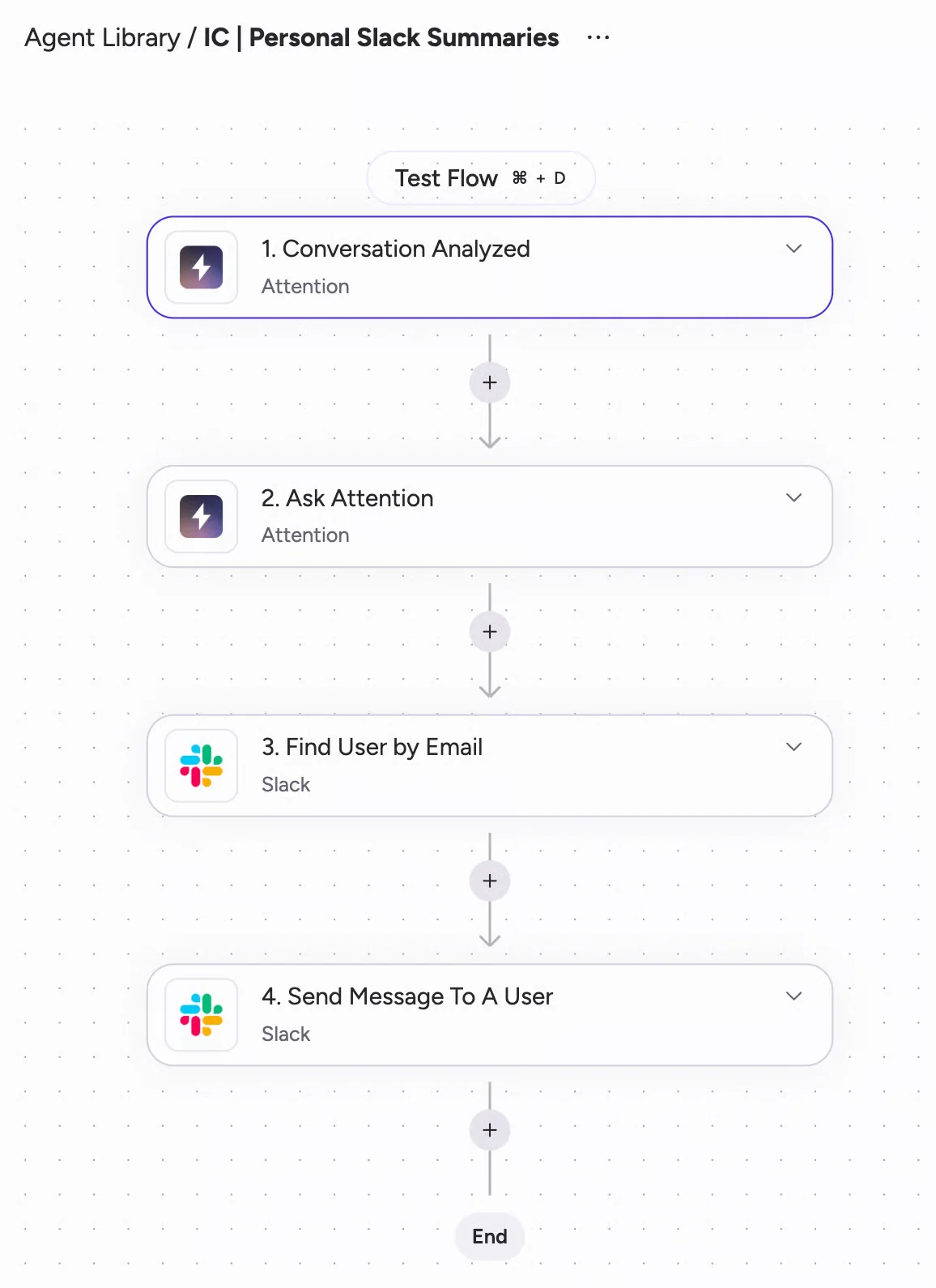
Attention also imports Zoom Phone and Aircall calls and supports HubSpot both ways. A workflow with code in it is software, though, so someone on your team has to maintain it.
Attention's read-write MCP server gives assistants raw transcripts
Attention runs the widest MCP server we've seen from a conversation intelligence vendor: 68 tools across 15 groups, read and write. It returns raw transcripts, runs AI analysis across up to 25 calls or a whole deal, and hands questions to Super Agent. Admins can even reconfigure scorecards and teams through an assistant.
Usage is rate-limited, with no consumption charge. Calls run under the caller's own permissions. The exception is org-level API keys, which carry full organization access with no user binding.
How you get raw transcripts and scores out of Attention
Transcripts, scorecard results and AI insights are available through the MCP server and through API keys for programmatic use. Workflows can also push data to Snowflake or to any API through the HTTP step.
What Weflow and Attention cost for a MEDDIC rollout
We publish our prices, and Attention doesn't publish any.
| Pricing | Weflow | Attention |
|---|---|---|
| Pricing model | Per seat, with AI usage included in the seat | Negotiated contract, and pricing questions go to a demo |
| List prices | Weflow Activity & Contact Capture $19. Weflow Conversation Intelligence $39. Weflow Deal Intelligence & Forecasting $39. Weflow Revenue AI Foundation $49. Weflow Revenue AI Business $59. Weflow Revenue AI Enterprise $79. All per user per month | Not published |
| Minimums and terms | 10-user minimum, 12-month contract billed annually, 14-day free trial | Not published |
| What's metered | Only Agent Builder: free with 25 actions a month, $299 for 500, $999 for 2,500, or a custom Enterprise package | No published credits or metered AI. MCP usage is rate-limited |
AI Playbooks belong to Weflow's deal intelligence, next to the deal board. To score MEDDIC from emails and calls, you want capture, conversation intelligence and deal intelligence together, and that's Weflow Revenue AI Business at $59 per user per month.
Our sales team positions Weflow at roughly half of what Attention charges. That's our read from deals, and Attention's lack of a rate card means there's no public number to hold it against.
How to score MEDDIC on your existing open pipeline
Neither tool scores your existing open pipeline automatically at rollout, and the fix is different for each.
Backfilling open opportunities with Weflow AI Playbooks
Playbooks refresh automatically only on opportunities created or changed after you configure them. Deals that predate the playbook stay blank until someone regenerates them. Here's how we'd plan the first month:
- Assign playbooks per team and map each element to the MEDDIC fields you already have in Salesforce.
- Write exclusions into each prompt. For example, internal employees can't be the champion, and headcount doesn't count as a metric.
- Start interpretive fields such as champion and economic buyer under review, and let unambiguous fields write automatically.
- Before your first deal review, regenerate the open opportunities record by record, or ask Weflow to run a batch in the backend.
- Make pressing regenerate part of the deal review ritual for anything that hasn't changed recently.
Why new Attention fields fill only from future calls
Attention field mapping is manual and forward-only. Calls you've already recorded aren't revisited when you add a field, so a new MEDDIC field starts empty and fills as new calls happen. Every schema change in Salesforce also means a mapping task in Attention. If the mapping is missed, the field stays blank and nothing reports an error.
Choose Weflow or Attention: which fits your deal review
Choose Weflow if:
- Your deal review reads MEDDIC fields on the Salesforce opportunity.
- Your deals run through email, or only some of your opportunities ever have a recorded call.
- You need rep-typed filler caught, not counted as complete.
- You want methodology fields to accumulate, with review set field by field.
- You want published, per-seat pricing with AI included.
Know where Weflow stops:
- It works with Salesforce only.
- The playbook score isn't reportable in Salesforce.
- Existing pipeline needs a regenerate or a batch run.
- The MCP connector is read-only.
- There's a 10-seat minimum.
Choose Attention if:
- You run HubSpot, or a mix of HubSpot and Salesforce.
- Call-level scorecards you write and test in plain language are the main thing you need.
- You want a general-purpose workflow builder acting across Slack, Gmail, Notion and Snowflake after every call.
- You want a read-write, agent-accessible store of raw transcripts.
- Your real goal is automating call follow-through rather than completing the Salesforce record.
See how Weflow captures activity, updates Salesforce fields from calls, and rolls up your forecast. Book a 30-minute demo.
FAQ: Weflow vs Attention for MEDDIC in Salesforce
Which Weflow product includes AI Playbooks for MEDDIC scoring?
AI Playbooks are part of Weflow's deal intelligence and sit on the deal board. Because they read emails and transcripts as well as fields, they pair with Activity & Contact Capture and Conversation Intelligence. Weflow Revenue AI Business bundles all three at $59 per user per month.
Can I report on the Weflow playbook score in Salesforce?
No. The element content writes to your Salesforce fields, but the playbook score and deal warnings stay in Weflow. To report on the rating, create a Salesforce field for it and fill it through your own build on the Weflow REST API, which exports scores.
Will Weflow or Attention overwrite what reps already typed?
Weflow's AI field updates add to methodology fields instead of replacing them. The playbook judges rep-typed text rather than taking it at face value. Single-value fields like amount can only be overwritten, which is why we recommend review on those. Attention's CRM sync docs describe no append or overwrite rule for existing text.
Can we map our own house framework and existing field names?
Yes, in both tools. In Weflow, you map your own prompt to each element and write to the fields you already have. In Attention, you write scorecard criteria and a prompt for each mapped field in natural language.
What happens on deals with no recorded calls?
Weflow playbooks still run, because they read emails, meetings and fields on the opportunity. Attention's field extraction runs from calls, so a deal with no recorded call gets no extracted values.
Can reps still self-assess and get pressure-tested on MEDDIC?
Yes, in Weflow. Reps type notes into the playbook panel or override a field, and Weflow checks the override for plausibility against the deal. That's the balance Julien Cerutti designed for when he built his own inspection bot:
"...a rep can say, hey, my champion's a three. I got this, this, and this, and it'll say, your champion isn't a three. You don't have these things. So it's actually pressure testing, which was a big thing I focused on in designing that."
What Salesforce permissions does each tool's integration user need?
Attention's connecting user needs API Enabled, Customize Application and Modify All Data. Weflow logs through the Salesforce REST API, which must be enabled, and users need write access to the recording object. Weflow's integration respects your existing controls:
"Everything we do has a bi-directional Salesforce integration that is real time and API based, that respects all your validation, field dependencies, permission sets."
Will running either tool with our activity capture create duplicate Events?
Running Attention next to a separate activity capture tool creates two Event records for the same meeting, because each vendor writes its own. Janis Zech described the problem this way:
"This is often a problem when you have multiple providers for CI and AC. They basically both create an event object, which creates a duplicate. So in your reporting you need to deduplicate that, which is really annoying."
With Weflow, one vendor owns both capture and conversation intelligence. The call summary lands on the same Salesforce Event the meeting created.
Can I tell whether a field value came from the call or the web?
Not in Weflow today. The field update view shows the previous and new values but not the source. Web search is off by default and set per prompt, so a field restricted to conversation data never reaches the web.

Can we query MEDDIC data from Claude or ChatGPT?
Yes, in both tools. Weflow's official MCP connector is read-only and returns playbooks, summaries, transcripts and forecast data. Attention's MCP server is read-write, returns raw transcripts and can change workspace settings through an assistant with the admin role.