Fathom vs Fireflies: AI Meeting Notes and Salesforce Sync Compared (2026)
Decide whether Fathom or Fireflies is better for AI meeting notes and Salesforce field sync.



Fathom and Fireflies both transcribe and summarize calls well, so on notes they're a tie. What separates them is what reaches Salesforce.
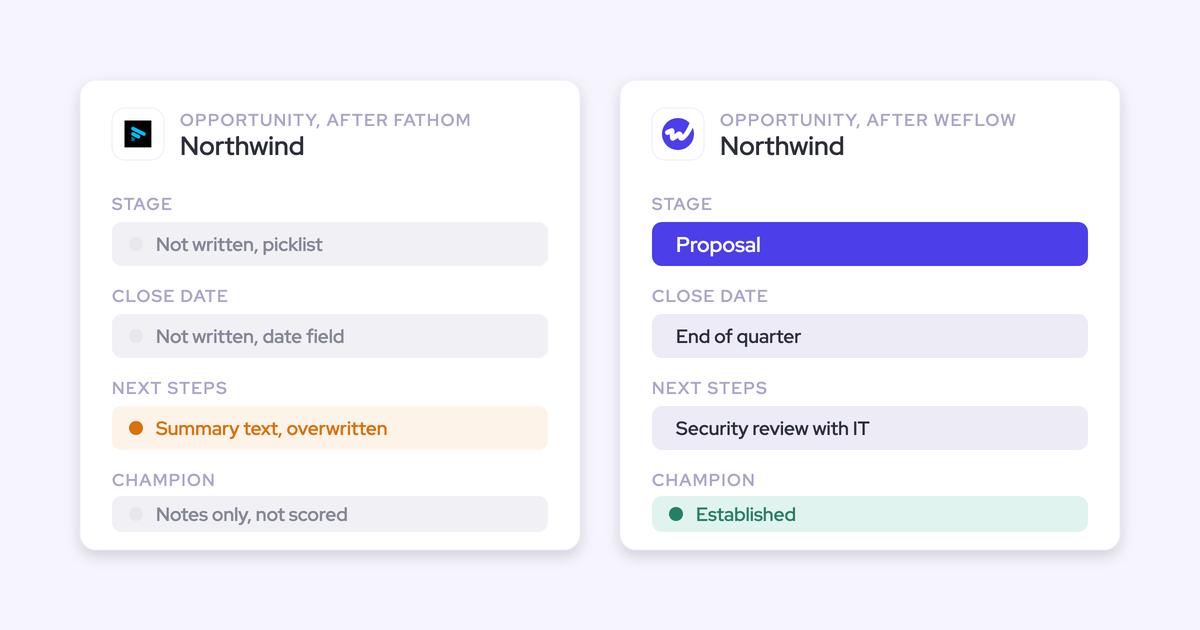
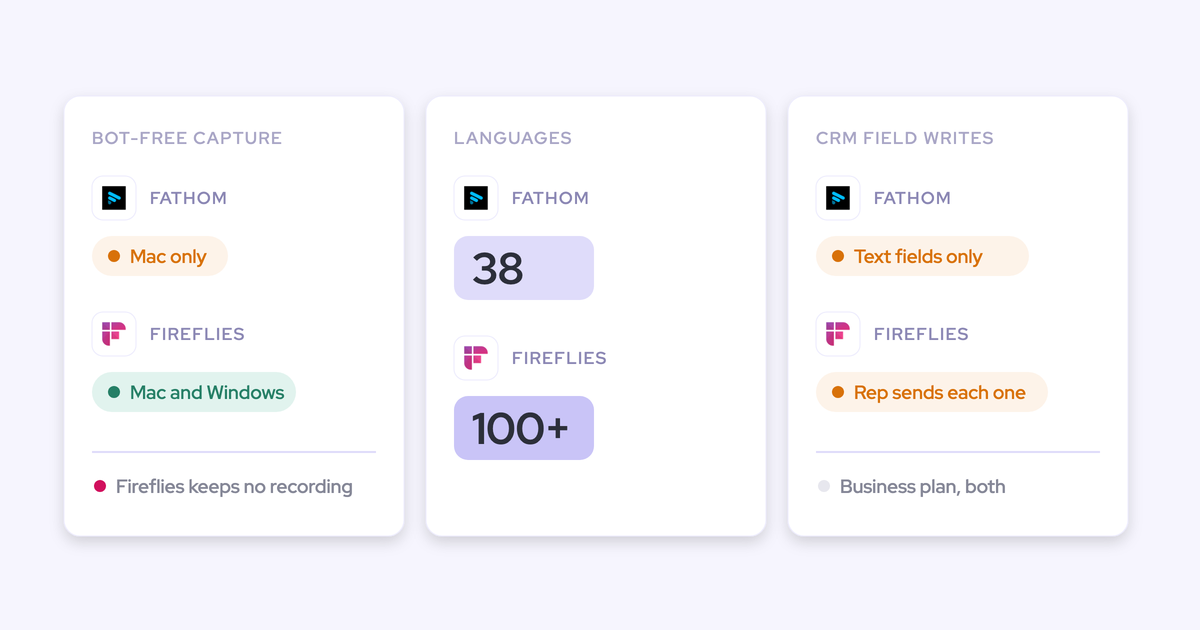
- Fathom writes to Salesforce automatically, but only as text in Opportunity text fields, and each new meeting overwrites what the field held.
- Fireflies writes extracted values into the fields you configure, but only after a rep opens the meeting in Fireflies, reviews the values and clicks send.
Below, we walk through what one discovery call leaves on one opportunity in each tool, field by field. We also cover a third option, Weflow Conversation Intelligence + AI Field Updates, for managers who need fields to fill automatically and in typed form, with automatic or review set per field. Weflow is the Revenue AI Orchestration platform for sales, customer success, and RevOps teams, built for Salesforce teams.
Weflow isn't the right pick for everyone. If you're on HubSpot or have fewer than 10 sellers, stay on Fathom or Fireflies. We'll say where each one fits.
Fathom vs Fireflies vs Weflow on summaries, Salesforce fields and pricing
The three tools differ most on how call content reaches Salesforce fields and what you pay to turn that on. Summaries and transcription are close.
| Capability | Weflow | Fathom | Fireflies |
|---|---|---|---|
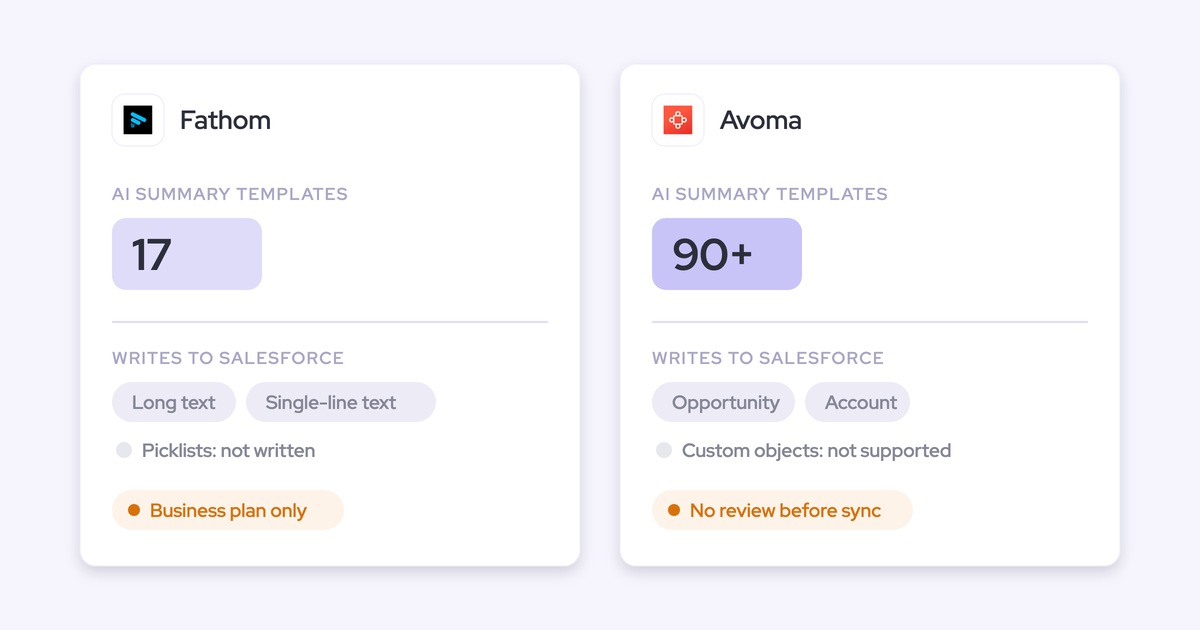
| AI meeting summaries | Written to the Salesforce Event within 30 to 60 seconds, from as many admin templates as you want, varied by detected meeting type | 17 templates, including MEDDPICC and SPICED. Org-wide custom templates on Business. Logged as a Task on the Contact | 18+ templates with workspace or group defaults. Logged as a note with a link back to Fireflies |
| CRM field updates from conversations | Any field type except lookups. Automatic or review set per field. Methodology fields append | Business plan only. Text fields only, from H3/H4 headings. Overwritten each meeting | Business plan and up. Configured Contact, Account and Opportunity fields. Writes only when a rep reviews and sends, at one credit per meeting |
| Recording without a bot joining | Windows and macOS desktop app. The rep starts each recording, and the consent flow doesn't run | Mac only. Bot-free video is a Zoom beta | Mac and Windows. Keeps no audio or video file and labels speakers generically |
| Ask-anything AI chat | Ask Weflow AI across Salesforce records, emails, meetings and transcripts, inheriting Salesforce permissions | Full team history only on Business. Team plan searches two weeks of team calls | AskFred across meetings, connected apps and the web. Deal data visible to the whole workspace by default |
| Transcription and languages | 96 languages, auto-detected. Salesforce summaries in the workspace language | 38 languages. Summaries translate into six | 100+ languages, one dominant language per meeting. Multi-language mode in beta |
| AI follow-up emails | Drafted from the transcript with Salesforce fields. Not sent, recipients not filled | Drafted from action items and copied into your email client | Drafted after every sales call. Email Assistant drafts inbox replies |
| Integrations with other tools | Salesforce, Gmail, Outlook, calendars, Zoom, Teams, Meet, Webex, Slack, Outreach dialer. No native warehouse connector | 30 listed, including Salesforce, HubSpot, Slack and Zapier. No dialer, sequencing, warehouse or BI tool | 100+ apps, including dialers whose recordings it transcribes |
| Access from AI assistants (MCP) | Official read-only connector: playbooks, summaries, transcripts, forecast data. Per-workspace switch with a transcript toggle | Official connector on every plan, limited to meetings the user can see | Own MCP server with transcripts, summaries and analytics. No deal or CRM data |
| Raw data access outside the tool | REST API bulk export in JSON or CSV. Transcripts live in Salesforce objects | Public API and webhooks on every plan. API keys are per user | GraphQL API on every plan, webhooks and Snowflake delivery |
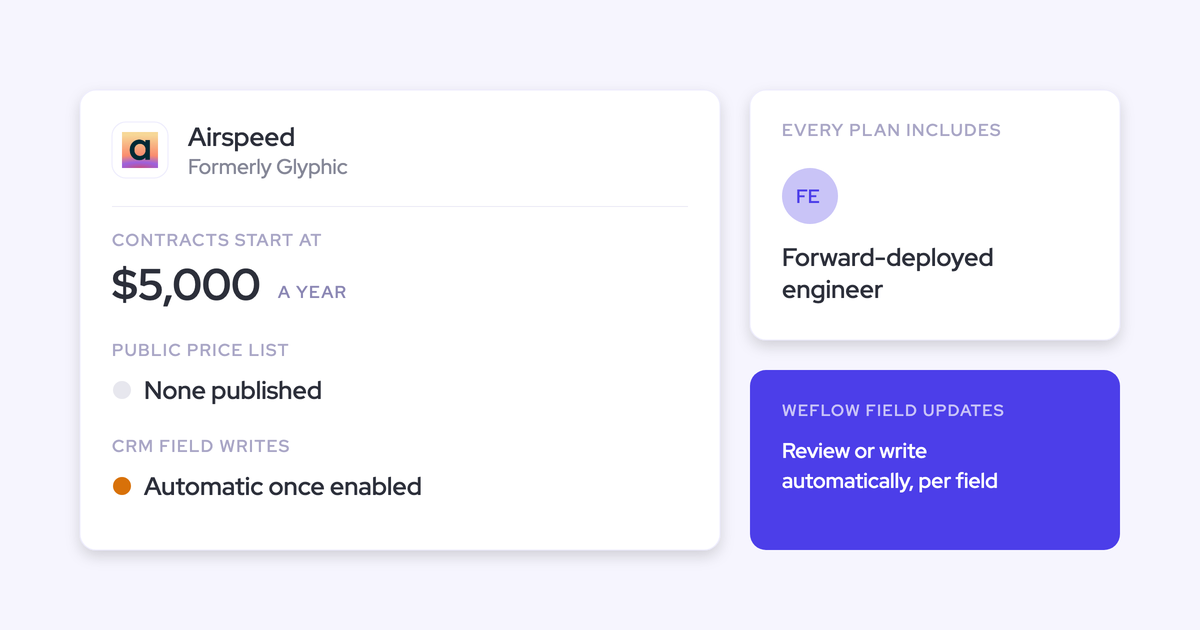
| Pricing | $39 per seat per month, billed annually. No credits. 10-seat minimum, 12-month term | Free for individuals. Business is $25 per user per month annual ($34 monthly) | Business is $19 per seat per month annual ($29 monthly), plus AI credits |
The one-call walkthrough below shows the field-updates row in practice, on a single opportunity.
Why the Salesforce write, not the transcript, decides Fathom vs Fireflies
Fathom and Fireflies were both built as notetakers for every team and every meeting. Fireflies sells the same product to sales, recruiting, venture capital, healthcare and more. Fathom is now owned by Superhuman, and its announced roadmap runs through Superhuman's email, docs and agents.
For a notetaker, the CRM is one destination among many. That's why Salesforce depth sits on the Business plan in both tools. Each then makes one trade-off:
- Fathom writes automatically, but only overwritten text.
- Fireflies writes structured values, but only when a rep reviews and sends.
If you need automatic and structured at once, neither gives you a deal record you can review before a one-on-one. That's a design choice in both products, not a setup mistake on your side.
We have Fathom. We just don't grab insights from that and put it in there.
A sales leader on a call with us
There's a second gap underneath. Neither Fathom nor Fireflies logs email to Salesforce, so the deal record stays partial whatever the notetaker writes.
What you'll see in Salesforce after one discovery call
Take one discovery call on one open opportunity. The buyer names their pain and a champion, mentions a competitor they're looking at, gives a rough budget and a target date, and agrees a next step. Here's what each tool leaves on that opportunity.
The opportunity record, field by field, after the first call
The same call produces three very different opportunity records.
| Salesforce destination | Weflow | Fathom | Fireflies |
|---|---|---|---|
| Activity record carrying the summary | Summary on the Salesforce Event within about a minute, shown on the opportunity activity timeline | Logged-call Task on the Contact. Action items become Tasks on every open opportunity linked to the Contact | Note in Notes & Attachments on the Contact, optionally on the Account and every open opportunity, with a link back to Fireflies |
| Next step (text) | Written from the call, automatically or after review, depending on how you set the field | Filled automatically if an admin mapped a Next Steps heading to the field (Business plan) | Extracted value waits in Fireflies until a rep reviews and sends |
| Pain / champion (methodology text) | Added to any existing text in the field | Filled from the mapped heading, then overwritten by the next meeting | Held for rep review. Appends or overwrites once sent, per your field setting |
| Stage (picklist) | Matched against the field's allowed values. Can move when exit criteria are met. Validation rules still apply | Not written. Fathom can't fill picklists | Extracted into the configured field, held for rep review |
| Close date (date) | Written as a date | Not written. Fathom can't fill date fields | Extracted into the configured field, held for rep review |
| Amount (number) | Written as a number, and can be calculated from the seat count and price discussed | Not written. Fathom can't fill number fields | Extracted into the configured field, held for rep review |
| Competitors (multi-select) | Written as values from the field's allowed list | Not written | Extracted into the configured field, held for rep review |
| The email thread on the same deal that week | Logged to Salesforce with Weflow Activity & Contact Capture, a separate product | Not captured. Fathom records meetings only | Not logged. Fireflies doesn't write email to any CRM |
With typed fields, you can filter the pipeline by stage, competitor or close date and build a report on them. A text field holding a summary section can be read, but it can't be grouped or charted.
What happens when the rep never opens the notetaker
Picture the busy week, when nobody clicks anything after their calls. Any step that depends on the rep is the step that gets skipped, so this is the scenario to plan for.
- Fireflies: the summary note still lands, because every meeting syncs once a configuration is saved. The Autofill fields stay unchanged, because a meeting nobody reviews writes nothing to fields.
- Fathom: on automatic sync, the mapped text sections still land in the Opportunity fields. Picklists, dates and numbers stay as they were.
- Weflow: the summary lands on the Event, and every field you set to automatic writes itself. Only the fields you set to review wait for the rep.
What the second call does to fields already filled
This is where trust gets won or lost. Reps who watch their own notes disappear stop maintaining the field.
When the tool populates the fields in Salesforce, does it take into account any information already in the fields? Eg rep could have already updated some fields with additional information.
A revenue leader evaluating AI field updates
| Tool | What happens to existing content on the second call |
|---|---|
| Fathom | Each mapped text field is overwritten by the new meeting, and content over the field limit is cut |
| Fireflies | Each field appends or overwrites, as set per field, but only after a rep reviews and sends |
| Weflow | Methodology fields append to existing text. AI playbooks keep cumulative fields at the best current answer across every call and email on the deal. The review view shows the old value beside the new one |
Our advice: automate fields that build up over a deal, like champion, pain and metrics, plus fields with one obvious answer, like website or address. Appending means early qualification survives later calls.
Keep single-value fields under review: stage, amount, close date and next step. They hold one value, they move the forecast the moment they change, and one misheard sentence can overwrite them. A rep's check after the call takes seconds.
How Weflow Conversation Intelligence + AI Field Updates works
Weflow Conversation Intelligence + AI Field Updates records and transcribes customer calls and turns them into Salesforce data: summaries on the Event, and values in your fields. We built it for the Salesforce write, the test this comparison turns on. It works only with Salesforce.
How Weflow writes call summaries onto the Salesforce Event
Within 30 to 60 seconds of a meeting ending, Weflow writes the AI summary onto the Salesforce Event, with a link to the recording. It shows on the opportunity activity timeline, so you read the call from the deal without leaving Salesforce.
Every summary is a prompt your admin can rewrite, and you can keep as many templates as you want. Weflow detects whether a call was a discovery, a demo or a closing conversation and applies a different summary to each. Admins run up to ten meeting types, including their own.
One limit: the summary lists next steps but can't assign one to a named person.

How Weflow AI Field Updates fill picklists, dates and methodology fields
Weflow AI Field Updates take values from the call and write them into Salesforce fields in their native type. That's what makes the output reportable instead of readable only.
- Field types: every type except relationship lookups, including picklists, numbers, dates and multi-selects. Standard objects work out of the box. Custom objects need setup by Weflow support.
- Picklists: Weflow reads the field's allowed values first, so it never writes a value the field doesn't accept.
- Automatic or review: set per field. Website and address can write themselves while champion, pain and stage wait for a check, for the same rep.
- Methodology fields: an update adds to the existing text instead of replacing it, so MEDDIC or SPICED fields build up over the deal.
- Stage: can move when the exit criteria in your prompt are met on the call. Validation rules still apply.
- Prompts: 250+ pre-built prompts cover MEDDIC, MEDDPICC, SPICED, BANT and more.
- Limit: a field value isn't marked as coming from the call or from a web search. If you want a field limited to the conversation, you write that into its prompt.

How the Weflow desktop app records meetings without a bot
The Weflow desktop app runs on Windows and macOS. It records Zoom, Google Meet and Microsoft Teams meetings from system audio and microphone, with video where there is one, and nothing joins the call.
The recording goes through the same pipeline as a notetaker recording, so field updates, summaries and follow-ups all work. Because it captures system audio, it also records softphone calls on tools like Aircall or RingCentral.
Two limits:
- The rep starts each recording, either with Record meeting or by accepting a prompt when joining Zoom or Google Meet ad hoc. Teams doesn't get the prompt.
- Weflow's consent flow doesn't run for desktop recordings, so consent is the rep's responsibility under local law.
What Ask Weflow AI answers across calls, emails and deals
Ask Weflow AI answers plain-language questions across Salesforce records, captured emails, meetings and transcripts. You can point it at one call, one deal, a filtered deal board, an account or everything.
It inherits Salesforce permissions and adds its own guardrails on top, so a rep never sees a deal they couldn't open in Salesforce. It doesn't reach your other knowledge systems, like process docs or ticketing.
Questions managers ask it:
- Which competitors came up in the last six months, and what happened when they did?
- Which open deals are missing methodology information?
- What do our closed-lost deals from the last 90 days have in common?

How Weflow transcribes and writes back in 96 languages
Weflow transcribes 96 languages and detects the spoken language automatically. The follow-up email comes out in the meeting's language, so a German call gets a German email. The summary written to Salesforce comes out in your workspace language, so your CRM doesn't fragment into several languages.
What Weflow's AI follow-up email does, and what it leaves to reps
Weflow drafts a follow-up email from the transcript, using templates that can pull Salesforce fields for deal context. It doesn't send the email and doesn't fill in recipients. The rep copies it into their mail client and adds the addresses.
Which tools Weflow connects to beyond Salesforce
Weflow integrates natively with:
- Gmail, Outlook and Google Calendar
- Zoom, Microsoft Teams, Google Meet and Webex
- Slack
- The Outreach dialer, whose calls arrive as recordings with transcript, summary and coaching
The API feeds BI tools such as Tableau and Looker. There's no native Snowflake, Databricks or BigQuery connector, and Weflow isn't an integration platform with a connector catalog.
How Claude and ChatGPT reach Weflow data through MCP
Weflow's official read-only MCP connector gives Claude, ChatGPT and other assistants your playbooks, call summaries, transcripts and forecast data. An admin switches it on per workspace, with a separate toggle for full transcripts. Per-rep forecast breakdowns are capped at 25 owners, so large orgs get aggregates unless the question is narrowed to a team.
How you get Weflow data out through the REST API
The REST API bulk-exports transcripts, metadata, scores and signals as JSON or CSV. Video files export to your own cloud storage.
Transcripts and structured outputs already sit in Salesforce objects, which means you own them and they stay in your CRM after the subscription ends.
What Weflow Conversation Intelligence costs per seat
Weflow Conversation Intelligence is $39 per seat per month, billed annually. It includes:
- Ask Weflow AI Pro
- Mobile Copilot
- The desktop app
- Agent Builder's free tier
There are no credits. The minimum is 10 seats on a 12-month term. Email capture needs Weflow Activity & Contact Capture at $19, or the Revenue AI Foundation bundle at $49, which includes both. Team totals are in the cost section below.
How Fathom handles meeting notes and Salesforce sync
Fathom is one of the most widely used AI notetakers: hundreds of thousands of companies use it, and it was HubSpot's Most Used App of the Year for 2025. Superhuman acquired it in September 2026. It's strong on summaries and has a free entry point. Its Salesforce field writes are overwritten text on the Business plan.
How Fathom summarizes calls from 17 templates
Fathom summarizes every call from 17 templates, including MEDDPICC, BANT, SPICED and Sandler, and users can add their own instructions. Org-wide custom templates need Business.
In Salesforce, the summary lands as a logged-call Task on the matched Contact. Each action item becomes a Task on every open Opportunity linked to that Contact.
How Fathom writes summary sections into Opportunity text fields
On Business, Fathom writes sections of its AI deal summary into Opportunity fields. An admin maps a heading, such as Pain Points or Next Steps, to a field once for the whole team. Sync runs automatically by default, or manually through a Sync to CRM button.
The limits:
- Text fields only, from H3 or H4 headings.
- Each meeting overwrites the field, and content over the field limit is cut.
- No picklists, numbers, dates or checkboxes.
- Below Business, CRM sync is capped at three users per email domain.
How Fathom records meetings without a bot on Mac
Fathom offers bot-free capture from its Mac desktop app as an alternative to its meeting bot. Bot-free video is a limited beta on Zoom. In bot-free mode, a summary builds live during the call.
Windows users stay on the bot. Fathom doesn't record phone calls.
How far back Fathom's AI search reaches on each plan
Since 1 September 2026, Fathom limits how far back cross-meeting search reaches. Questions about a single call work on every plan.
| Plan | Search reach |
|---|---|
| Free | Two weeks of your own calls |
| Premium and Team | Your own calls without limit. Team scope on Team covers two weeks of team calls |
| Business | All team history |
How Fathom transcribes in 38 languages
Fathom transcribes in 38 languages and translates summaries into Spanish, Portuguese, German, French, Italian and Dutch.
How Fathom builds the follow-up email from action items
Fathom drafts a follow-up email from the action items it detects in the meeting. You copy it into your own email client to send.
Which tools Fathom integrates with, and which it doesn't
Fathom's directory lists 30 integrations, including Salesforce, HubSpot, Slack, Zapier, Claude and ChatGPT. It lists no dialer, no sequencing tool and no data warehouse or BI tool. Fathom captures meetings only, not email.
How Claude and ChatGPT reach Fathom calls through MCP
Fathom has an official MCP connector for Claude and ChatGPT on every plan. It's limited to the meetings the connecting user can see.
How you get Fathom transcripts out through its public API
Fathom's public API and webhooks are on every plan. Keys belong to individual users, with no org-level keys, so a key reads only the calls its owner can see.
Which Fathom plan you need for Salesforce field writes
Business, at $25 per user per month billed annually ($34 monthly), is the plan for field writes, Deal View, AI scorecards and org-wide templates. Free and lower plans suit individuals and small teams. Team totals are in the cost section below.
How Fireflies handles meeting notes and Salesforce sync
Fireflies is a horizontal notetaker sold to every function, from sales to recruiting to healthcare, and it claims use across more than a million companies. It's broad on integrations and languages. Its structured field writes happen only when a rep reviews and sends, on Business or Enterprise, with credits.
How Fireflies summarizes meetings from 18+ templates
Fireflies summarizes every meeting from 18+ templates. You can build custom ones, and admins set workspace or group defaults. Each extra summary section costs one AI credit per meeting.
In Salesforce, the summary lands as a note in Notes & Attachments, with a link back to Fireflies. Two things to know:
- The note attaches to every open opportunity on the contact, without choosing one.
- Meetings captured with the Chrome extension or Add to Live, and internal-only meetings, land on the [email protected] placeholder record instead of a customer record.
How Fireflies Autofill CRM waits for a rep to send
Fireflies Autofill CRM extracts values into configured Contact, Account and Opportunity fields, standard or custom. Each field gets its own prompt and an append or overwrite choice. It doesn't support custom objects.
After each call, the rep has to:
- Open the meeting in the Fireflies notepad.
- Review and edit the extracted values, one record type at a time: Contacts, then Accounts, then Opportunities.
- Pick which open opportunities to update.
- Click Autofill to send.
Each extraction costs one AI credit. A meeting nobody reviews leaves Salesforce fields unchanged.
How the Fireflies desktop app records meetings without a bot
The Fireflies desktop app for Mac and Windows records from system audio with no bot. It covers Zoom, Meet, Teams, phone calls and softphones like Aircall.
The trade-offs: it keeps no audio or video file, labels speakers only as Speaker 1 and Speaker 2, and Sales Assist doesn't run in no-bot mode.
What Fireflies AskFred answers, and who sees deal data
AskFred answers questions across your meetings, connected apps such as Gmail, Slack and HubSpot, and the web. You choose the model from Anthropic, OpenAI or Google.
Once a CRM is connected, Fireflies Deal Intelligence is visible to every workspace member by default. Admins restrict it by hand, and nothing maps it to Salesforce permissions.
How Fireflies transcribes in more than 100 languages
Fireflies transcribes in more than 100 languages and auto-detects one dominant language per meeting. A multi-language mode for speakers who switch languages mid-call is in beta.
How Fireflies drafts follow-ups after calls and unanswered emails
Fireflies drafts a follow-up email after every sales call for the rep to review and send. Its Email Assistant also drafts replies in the inbox, including follow-ups on unanswered emails. It never sends on its own, it uses credits, and it logs nothing to the CRM.
Which tools Fireflies integrates with, dialers included
Fireflies lists integrations with more than 100 apps. That includes dialers whose recordings it transcribes: Aircall, JustCall, Outreach, RingCentral, Salesloft, Zoom Phone and others. It doesn't log email to Salesforce.
How Claude and ChatGPT reach Fireflies through its MCP server
Fireflies runs its own MCP server, listed in Claude's connector directory and usable from ChatGPT. It exposes transcripts, summaries and analytics, not deal or CRM data. Fireflies' zero data retention doesn't cover what those assistants receive.
How you get Fireflies data out through its API and Snowflake
Fireflies offers a GraphQL API on every plan, with rate limits by plan, plus webhooks and delivery into your own Snowflake account. Transcript syncing to Snowflake needs Business or Enterprise.
Which Fireflies plan runs Autofill CRM, and what credits add
Autofill CRM needs Business, at $19 per seat per month annual ($29 monthly), or Enterprise, at $39, annual only.
Credits come in a one-time pool shared by the whole team, and the pool doesn't grow with seats. Add-on packs run monthly. When credits run out, Fireflies auto-upgrades you to the next package unless an admin turns that off. Team totals are in the cost section below.
What Fathom, Fireflies and Weflow really cost a sales team
All three publish their prices, but the real cost sits in a different place for each one:
- Fathom: the Business plan gate for field writes.
- Fireflies: Business plus a credit pool that auto-upgrades.
- Weflow: a higher seat price with no credits, a 10-seat annual minimum, and email capture as a separate product or bundle.
| Cost factor | Weflow | Fathom | Fireflies |
|---|---|---|---|
| Pricing model | Per seat, AI usage included. Only Agent Builder is consumption-priced | Per seat, no usage credits on the core product | Per seat plus AI credits |
| Plan needed for Salesforce field writes | Weflow Conversation Intelligence | Business | Business or Enterprise |
| List price per seat on that plan | $39 per month, billed annually | $25 annual / $34 monthly | Business $19 annual / $29 monthly. Enterprise $39, annual only |
| What costs extra | Email capture: Weflow Activity & Contact Capture at $19, or Revenue AI Foundation at $49 for both. Agent Builder beyond 25 actions a month | Enterprise for SSO, SCIM and custom retention | Credits beyond the one-time pool (30 on Business), in packs from $5 for 50 to $600 for 10,000 a month. Auto-upgrade when the pool runs out |
| Minimum seats and term | 10 seats, 12 months | Two users on team plans, monthly or annual | Business monthly or annual. Enterprise annual only |
| 10 seats per year at list price | $4,680 (Conversation Intelligence) or $5,880 (Revenue AI Foundation with email capture) | $3,000 annual / $4,080 monthly | $2,280 annual / $3,480 monthly on Business, before extra credits |
That last row is list-price arithmetic: seat price × 10 seats × 12 months, with no discounts.
Fathom's number is honest, but it only buys text writes. Below Business, you don't get field writes, and CRM sync stops at three users per domain.
Fireflies' number moves with use. A 10-seat Business team shares 30 credits, and each Autofill extraction uses one. That's three reviewed meetings per rep before you're buying packs or getting auto-upgraded.
Weflow costs the most per seat. In return, field updates, summaries and Ask Weflow AI never draw from a meter.
Running Weflow alongside Fathom or Fireflies, or replacing them
Many managers pick a notetaker knowing they'll revisit it within a year.
I am hoping that whatever I pick would be an interim decision, because there might be a platform that brings it together.
A sales leader piloting notetakers
You don't have to move everyone at once. You can keep a notetaker where it fits and move only the teams whose work lands in Salesforce.
One thing to plan for: if two tools both write the same meeting to Salesforce, you get two records. That inflates meetings-per-rep reports, so decide which tool owns the meeting activity.
Keeping a notetaker for teams outside sales
Weflow sells a lightweight conversation intelligence license for people who aren't Salesforce users. A whole company can run one recorder while only customer-facing teams carry full seats.
Different teams can also sit on different Weflow products. Every plan includes unlimited view-only licenses, so product or leadership can review recordings without a paid seat. That's what makes replacing a company-wide Fireflies realistic, instead of running two recorders side by side.
What happens to the call history you already have
Weflow reads your CRM through the Salesforce API. Any Fireflies history synced into Salesforce in structured form stays usable, and you can keep Fireflies while adding Weflow's capture and deal intelligence layers.
Fathom transcripts are reachable through Fathom's public API, with per-user keys. Each key reads only the calls its owner can see.
Choose Weflow, Fathom or Fireflies: which fits your team
Start with one question: must your Salesforce fields fill without a rep acting, and in typed form? Team size, CRM and budget decide the rest.
Choose Weflow if Salesforce fields must fill without chasing reps
- Your team runs on Salesforce with 10 or more seats.
- You want methodology, picklist, date and number fields filled from calls, with automatic or review set per field.
- You want methodology fields to build up across the deal, not reset each call.
- You want email in the deal record alongside calls.
Where it stops:
- Salesforce only.
- 10-seat minimum on a 12-month term, at a higher seat price.
- No live in-call help.
- Desktop recordings are rep-started, with no consent flow.
- The follow-up email isn't sent for you.
- Failed writes can't be replayed.
Choose Fathom if you want cheap, automatic summaries in your CRM
- You want a free or low-cost notetaker your team already knows.
- Strong templates, including MEDDPICC and SPICED, matter more to you than typed fields.
- You want summaries pushed to the CRM with no rep step.
- You're HubSpot-heavy, or below Weflow's 10-seat minimum.
Where it stops:
- Field writes are text-only and overwritten, on Business.
- Bot-free capture is Mac only.
- No email capture.
- API keys are per user.
- Fathom trains its own models on de-identified data unless you opt out.
- Its roadmap is set by Superhuman's suite.
Choose Fireflies if reps will review and send every meeting
- You want one recorder across many functions, not just sales.
- You need dialer recordings transcribed.
- You sell in many languages, with 100+ supported.
- You want strong consent controls.
- Your reps will review and send structured updates after every meeting.
Where it stops:
- Field writes need Business or Enterprise, plus credits.
- Nothing reaches fields without a send.
- No custom objects.
- Notes land on every open opportunity, or on the placeholder record.
- No email logging.
- Deal data isn't permissioned by Salesforce.
The proof that settles it is your own deal, filled field by field from one of your calls. See how Weflow captures activity, updates Salesforce fields from calls, and rolls up your forecast. Book a 30-minute demo.
Questions sales managers ask about Fathom, Fireflies and Salesforce
Which opportunity does a call attach to when a contact has several open deals?
Fireflies attaches the meeting note to every open opportunity on the contact, and only Autofill asks the rep to choose. Fathom logs the summary on the Contact and creates action-item Tasks on every open Opportunity linked to it. In Weflow, the rep can reassign the deal in the field update view, and the AI reanalyzes the call for the selected opportunity.
Do Fathom, Fireflies and Weflow work with HubSpot?
Fathom and Fireflies both work with HubSpot. Fathom maps summary headings to deal fields, and Fireflies runs Autofill and Deal Intelligence on HubSpot. Weflow is Salesforce-only, so HubSpot teams should look elsewhere.
What seat minimums and contract terms does each tool have?
Fathom's team plans have a two-user minimum, billed monthly or annually. Fireflies Business bills monthly or annually, and Enterprise is annual only. Weflow has a 10-seat minimum and a 12-month term, with no shorter term.
What happens when a Salesforce sync fails?
In Weflow, a failed summary or field write can't be replayed, because the update fires once when the call ends. The content survives on the Weflow recording object, so you can copy it across. That's why we test writes against every object your activities map to before rollout.
In Fathom, validation rules and required fields can block writes, and the manual Sync button pushes calls one at a time.
Do bot-free recordings still ask participants for consent?
Weflow's notetaker runs a consent flow, but desktop app recordings don't, so consent is the rep's responsibility under local law. Fathom emails a consent request 24 hours before scheduled external meetings, and sends nothing for same-day or impromptu ones. In Fireflies no-bot mode, an audio message, a chat message on Mac and a camera badge are on by default.
Is our call data used to train AI models?
Weflow never uses customer data to train AI models and runs Zero Data Retention for AI processing. Fireflies doesn't train on meeting content and holds zero data retention agreements with its AI vendors. Fathom trains its own models on de-identified customer data unless you opt out.
Where is call data stored, and can it stay in the EU?
Weflow is a German company hosted in Frankfurt. It sets up your instance in the region where your Salesforce is hosted, and you can override that to keep data in the EU or UK. Fathom stores all data in the US. Fireflies stores in the US by default, and Enterprise customers can bring their own EU storage while processing stays in the US.
Does Superhuman owning Fathom change anything for Salesforce teams?
The Fathom product and logins didn't change after the September 2026 acquisition. The announced roadmap runs through Superhuman's email, docs and agents, with CRMs as one destination among several. It doesn't mention deeper Salesforce field writes.
Do any of these tools help reps live during the call?
Weflow has no live in-call assistant. Everything arrives after the call: summary, field updates, follow-up and scorecard. Fathom's bot-free mode builds a summary live during the call. Fireflies offers real-time Sales Assist, but not in no-bot mode.