Best Tools That Keep Salesforce Contact Data Clean Automatically (2026)
Compare tools that keep Salesforce contact data clean automatically, including Weflow and Einstein EAC



Shortlist Weflow if you need one owner for automated Contact creation and activity capture in Salesforce. Keep your existing capture setup if it already produces complete, correctly related records your reports and automations can use. The deciding factor is what happens when an unfamiliar email address reaches your CRM.
We’d judge that write path before comparing feature lists. Does the system recognize an existing Lead? What happens when an Account has several open Opportunities? Will another integration log the same meeting? Here, “keep clean” means preventing new gaps, duplicates, and incorrect relationships. Enrichment and merging existing duplicates are separate jobs.
Weflow is the Revenue AI Orchestration platform for sales, customer success, and RevOps teams. Built for Salesforce teams, Weflow Activity & Contact Capture addresses the capture foundation. This comparison explains where that approach fits alongside seven alternatives.
Compare tools for cleaner Salesforce contact data
Mailbox-and-calendar capture and call-driven Contact creation cover different parts of your customer relationships. Start with the interactions you need in Salesforce, then compare how each option creates and relates records.
| Tool | Capture scope | Contact creation and duplicate controls | Opportunity relationships | Salesforce storage and access | Pricing and commitment |
|---|---|---|---|---|---|
| Weflow Activity & Contact Capture | Microsoft 365 and Google Workspace emails, meetings, and Contacts. | Creates Contacts against existing Accounts; checks Leads and Contacts; caps creation per event. | Uses contact roles and CRM relationships; supports automatic contact-role creation and remembered thread corrections. | Writes Contacts, Tasks or EmailMessages, and Events into Salesforce. Those records remain after cancellation. | $19 per user/month, billed annually; 10-user minimum. |
| Salesforce Einstein Activity Capture (EAC) | Email and calendar capture. | Depends on opportunity contact roles for deal attribution. | Historical customer deployments include activity held outside core Salesforce records; configuration matters. | Existing Salesforce entitlements can include EAC, including Unlimited Edition. | |
| Revenue Grid | Email and activity synchronization; a mid-market alternative. | ||||
| Cirrus Insight | Email and activity synchronization; a mid-market alternative. | ||||
| Backstory.ai (People.ai) | Background capture for enterprise teams. | ||||
| Nektar | Background capture for enterprise teams. | ||||
| Clari Capture | Automatic activity capture and synchronization. | Clari markets write-back to native Salesforce objects and exposes public APIs. | |||
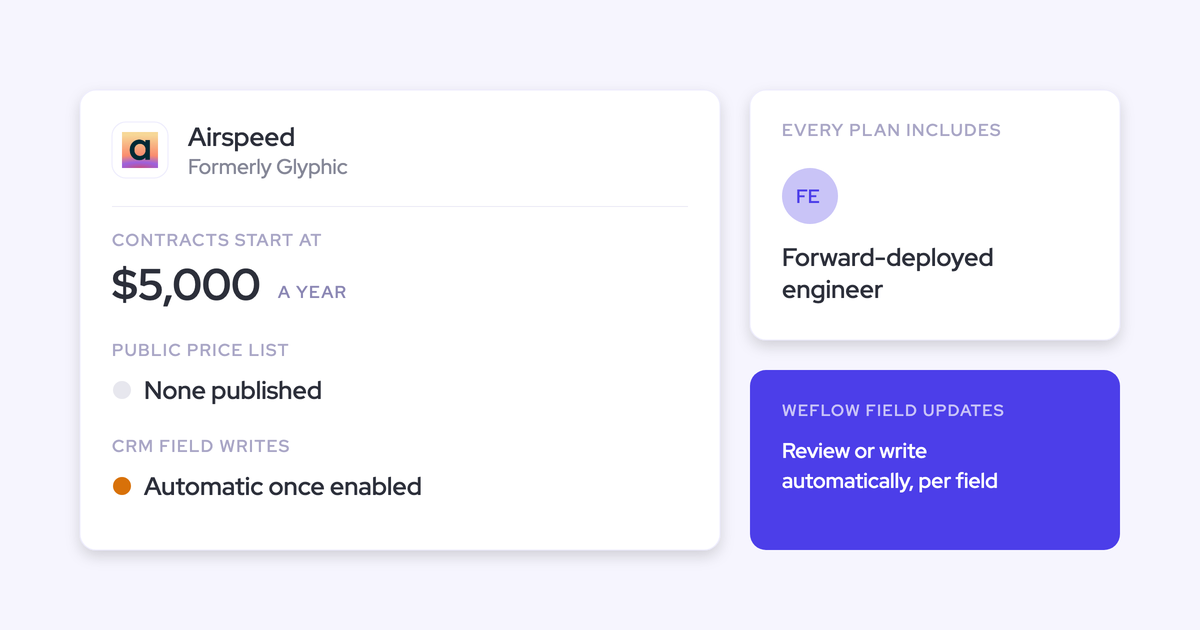
| Airspeed | Recorded-call output; email reading provides context rather than automatic CRM email logging. | Creates Contacts, with Lead creation as a fallback when no Account matches. Deduplicates call activities against existing records. | Matches through participants, Contacts, Accounts, and timing. Opportunity contact-role creation is in beta. | Writes fields, Tasks or Events, Notes, and action items. Airspeed holds the underlying conversation assets. |
What should Salesforce contact capture prevent?
Salesforce contact capture should prevent missing people, duplicate records, incorrect relationships, and unwanted correspondence from entering your reporting. More captured records alone don’t establish better data.
We evaluate capture at the point where it writes to Salesforce. That’s where an automation either preserves your rules or creates the next support ticket.
| Criterion | Failure it must prevent | How to assess it |
|---|---|---|
| Capture coverage and operational continuity | Missing incoming emails, unrecorded meetings, and silent gaps when users disconnect. | Compare eligible mailbox and calendar activity with Salesforce output. Include users who never open the capture application. |
| Contact creation and duplicate safeguards | A second Contact for an existing person, a Contact duplicating a Lead, or mass creation from a large invitation. | Use existing Leads, duplicate Contacts, unknown domains, aliases, and a large attendee list as test cases. |
| Opportunity relationships and correction paths | Activity assigned to the wrong deal or left without a usable relationship. | Test Accounts with several open Opportunities. Correct one thread and inspect the next reply. |
| Salesforce record ownership and coexistence | Activity visible on a timeline but unavailable to automation, or duplicate writes from overlapping products. | Inspect the actual objects, query the records, run a Flow, and reconcile meeting counts across existing writers. |
| Privacy and deployment controls | Confidential correspondence entering Salesforce or automation failing against permissions and validation rules. | Exercise record-field exclusions, required fields, integration-user permissions, and enrollment boundaries before expanding access. |
Over-capture deserves the same attention as missing activity. A personal email attached to a customer Account looks like a legitimate record until someone opens it.
Which Salesforce contact capture tool fits your stack?
Choose the capture owner around the work your team does outside Salesforce. Inbox-led selling needs mailbox coverage; a call-driven workflow observes a narrower set of interactions.
Weflow’s recommendation here rests on its documented creation, mapping, and storage controls. The other profiles stay within the behavior we can substantiate rather than treating every Salesforce integration as equivalent.
How does Weflow Activity & Contact Capture create Salesforce contacts?
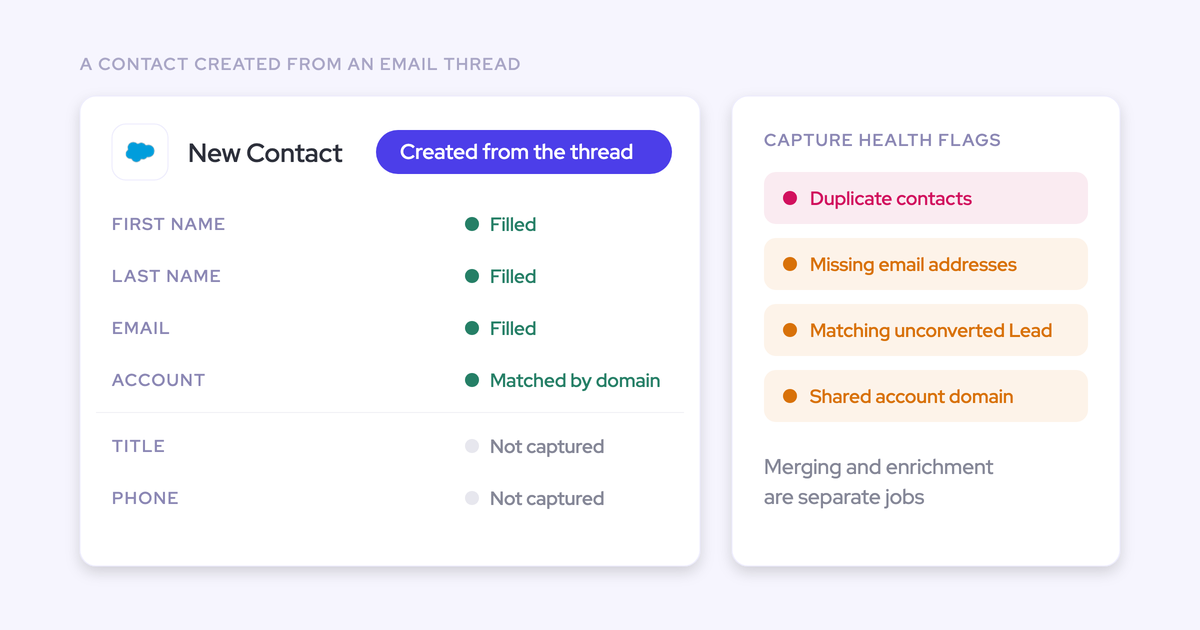
Weflow creates Salesforce Contacts from email threads and calendar invitations when an email domain matches an existing Account. It never creates Accounts, Leads, or Opportunities.
The creation process includes several guards:
- Weflow checks existing Leads and Contacts before creating a Contact. If the address belongs to a Lead, capture attaches the activity to that Lead.
- Duplicate protection works alongside Salesforce’s duplicate rules.
- A per-event creation cap prevents a large invitation from producing an unrestricted batch of Contacts.
- An optional setting creates an opportunity contact role when Weflow logs an email against a Contact and an Opportunity that lacks that relationship.
That last step matters beyond the first email. The contact role gives later correspondence a relationship to follow, so your team doesn’t have to rebuild the same connection manually.
Mapping favors a defensible fallback. Weflow uses email addresses and Salesforce relationships to assign activity. It doesn’t read email content to decide which Opportunity owns the message.
For deal mapping, Weflow considers:
- Existing opportunity contact roles.
- Whether the Account has one or several open Opportunities.
- Opportunity ownership, mailbox ownership, Account relationships, and stage.
Weflow doesn’t automatically map activity to closed Opportunities. When the evidence doesn’t resolve an open deal, it logs to the Account instead of guessing.
You can correct the mapping through the Outlook add-in or browser extension. Weflow remembers an email-thread correction for later replies, so an exception doesn’t become recurring logging work.
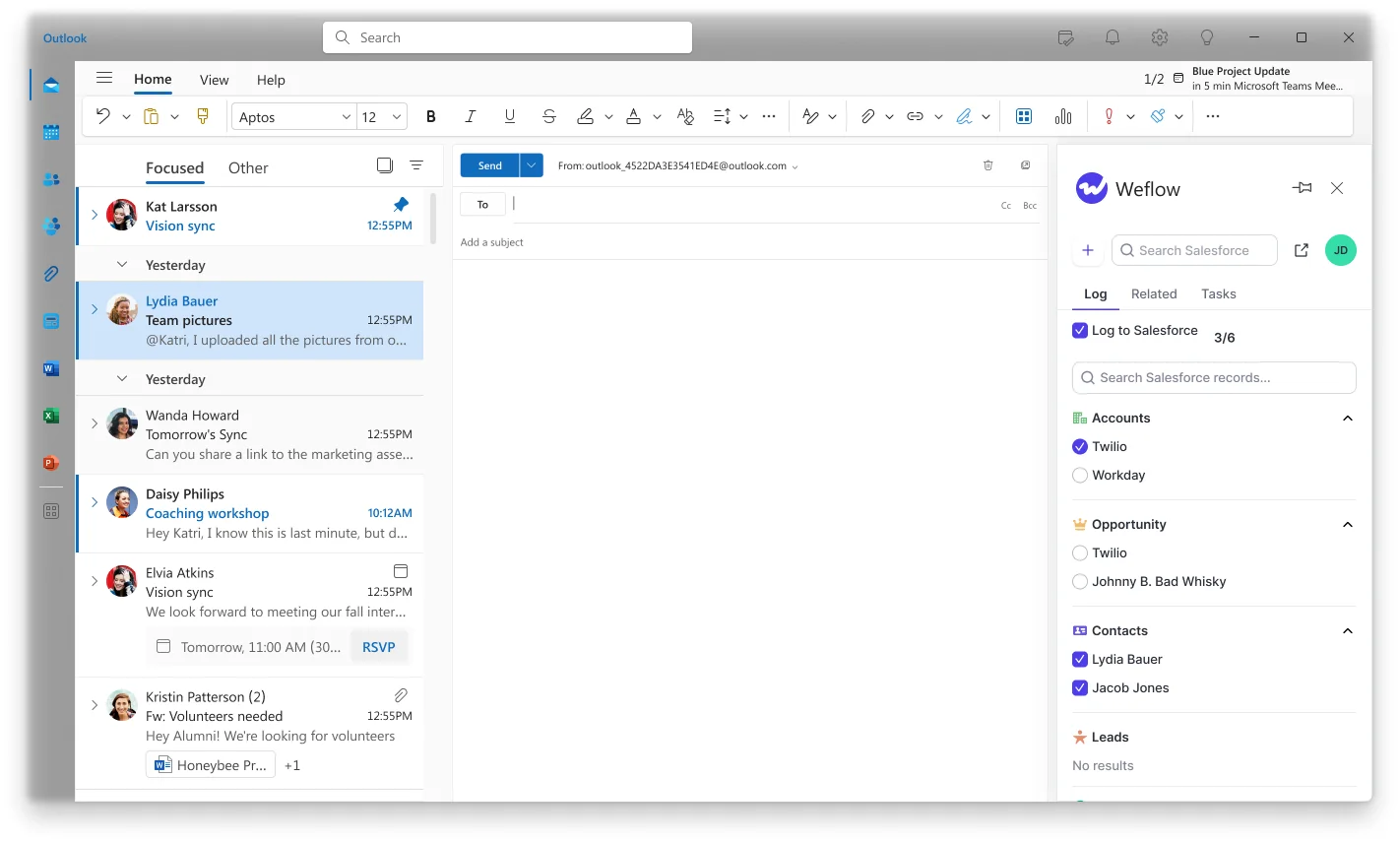
You control what enters Salesforce. Our admins can exclude capture using Account or Contact fields, including confidential, personal, country, and test flags. Domain exclusions handle a different boundary, such as internal correspondence.
Compatibility Mode skips activity that Outreach, Salesloft, Apollo, or Clay already logged. Central enrollment also lets capture run for people who never sign into Weflow.
The output remains usable in your CRM. Weflow writes emails as Tasks or EmailMessages and meetings as Events. Contacts and activity records remain in your Salesforce after cancellation.
The email-object choice affects reporting. Tasks fit into activity reports alongside Events; EmailMessage preserves native sender, recipient, and thread information. Choose around the reporting you need to run.
Activity Capture Health surfaces conditions that interfere with capture inside Salesforce. It flags duplicate Accounts and Contacts, missing email addresses, matching unconverted Leads, shared Account domains, and incomplete capture settings.

The limits matter before rollout. Automatically created Contacts contain first name, last name, and email, alongside the Account relationship. Validation rules requiring additional values can block creation.
- Weflow identifies capture-related data issues; it isn’t a general enrichment or duplicate-merging product.
- Capture requires Account and Opportunity access as well as Contact access because creation and mapping depend on those relationships.
- Multiple mail tenants require separate capture configurations and coordinated internal-domain exclusions.
- Call recording belongs to Weflow Conversation Intelligence, not Weflow Activity & Contact Capture.
Choose Weflow when you need background capture with visible correction controls and Salesforce-owned records. It doesn’t fit a requirement to create inbound Leads automatically or refresh an entire contact database.
Blacklane’s published result shows the relevant outcome: after adopting Weflow, 96% of its Leads, Accounts, and Opportunities had emails, meetings, and key contacts logged. That measures record coverage, not a universal capture-accuracy guarantee.
| CRM support | Salesforce only. |
|---|---|
| Email and calendar | Microsoft 365 and Google Workspace. |
| Deployment prerequisites | Salesforce and mail-system administration, integration-user access, and capture enrollment. Shared Activities enables multi-contact activity relationships. |
| Security | SOC 2 Type II; GDPR compliance. Weflow uses Zero Data Retention for AI processing and never uses customer data to train AI models. |
| Price and commitment | $19 per user/month, billed annually, with a 10-user minimum. No platform or implementation fees. |
| Capture plus conversation intelligence | Revenue AI Foundation costs $49 per user/month, billed annually. |
Does Einstein Activity Capture meet your Salesforce contact requirements?
Salesforce Einstein Activity Capture can remain the right choice when your existing entitlement and configured output satisfy your reporting and relationship requirements. Replacing an included capability needs a specific operational reason.
EAC captures email and calendar activity. Its opportunity attribution depends on opportunity contact roles, so empty roles leave a gap between a healthy Account timeline and a useful deal record.
- Existing Salesforce entitlements can remove the need for another capture purchase. Unlimited Edition includes EAC.
- EAC’s email exclusions operate on addresses and domains rather than message content.
- Customers who moved to Weflow have reported repeated connection resets and reporting restrictions in their previous EAC deployments. Those experiences describe their setups, not every current configuration.
Keep EAC when it already gives you the records and continuity you need. Replacement makes sense when missing relationships, recurring disconnections, or inaccessible activity data prevent the workflows you own.
| CRM support | Salesforce. |
|---|---|
| Mapping dependency | Opportunity contact roles. |
| Commercial consideration | Edition and existing entitlements affect incremental cost. Unlimited Edition already includes EAC. |
How does Revenue Grid handle Salesforce contact creation?
Revenue Grid is a relevant mid-market alternative for Salesforce email and activity synchronization. That capture job deserves a separate assessment from automatic Contact creation.
An email can reach Salesforce without adding the person your buying-committee report needs. We don’t equate email synchronization with controlled Contact creation in this comparison.
- Revenue Grid belongs in the email-and-activity synchronization shortlist.
- A broad Salesforce integration claim doesn’t establish the creation safeguards or opportunity relationships behind a write.
| Salesforce use case | Email and activity synchronization. |
|---|---|
| Competitive segment | Mid-market. |
Can Cirrus Insight capture Salesforce contacts without rep clicks?
Cirrus Insight is a mid-market email and activity synchronization alternative. For your automation requirement, the distinction is whether capture runs in the background or depends on a seller taking action.
A mail-side interface can make logging easier without removing the logging dependency. We treat that as a different workflow from automatic capture with optional corrections.
- Cirrus Insight is relevant when your evaluation centers on email and Salesforce activity workflows.
- Convenient manual logging and adoption-independent capture shouldn’t receive the same assessment.
| Salesforce use case | Email and activity synchronization. |
|---|---|
| Competitive segment | Mid-market. |
Can Backstory.ai (People.ai) govern Salesforce capture at scale?
Backstory.ai (People.ai) is an enterprise background-capture alternative. Its relevance here is organizational capture rather than a seller’s individual logging workflow.
At enterprise scale, administrative continuity deserves as much weight as collection. An acquisition adds mail domains, a new business unit adds exclusions, and private sharing settings change the permissions a capture service needs.
- Enterprise background capture puts Backstory.ai (People.ai) in the relevant competitive set.
- Team size alone doesn’t establish fit for your Salesforce permissions, privacy boundaries, or overlapping activity writers.
| Salesforce use case | Background activity capture. |
|---|---|
| Competitive segment | Enterprise. |
How does Nektar maintain Salesforce contact relationships?
Nektar is an enterprise background-capture alternative. For this decision, relationship completeness matters more than the number of people a capture system discovers.
A Contact attached to an Account can still leave an Opportunity without usable activity. Teams with renewals, expansions, and new business on the same Account feel that distinction in every deal review.
- Nektar belongs in the enterprise capture shortlist.
- Contact presence and opportunity attribution are separate outcomes in our evaluation.
| Salesforce use case | Background activity capture. |
|---|---|
| Competitive segment | Enterprise. |
Where does Clari Capture write Salesforce activity?
Clari Capture markets automatic activity synchronization to native Salesforce objects. Clari also exposes public APIs, so the blanket claim that Clari keeps all activity outside Salesforce is inaccurate.
If you already use Clari, its capture offering belongs in your stack review. Native-object write-back addresses an important storage requirement, but it doesn’t alone establish Contact creation or mapping behavior.
- Clari’s current capture positioning includes Salesforce record storage.
- Clari’s REST and Export APIs provide access beyond its interface.
- Clari Forecast’s enterprise roll-ups are a separate strength; they don’t substitute for evaluating capture output.
| Salesforce behavior | Clari markets automatic synchronization to native Salesforce objects. |
|---|---|
| Access | Public REST and Export APIs; a separate Copilot API. |
| Stack context | Relevant to teams already evaluating or using Clari. |
How does Airspeed create Salesforce contacts from calls?
Airspeed creates missing Salesforce Contacts from recorded calls and falls back to creating a Lead when no Account matches. That makes it a call-driven option, not a replacement for continuous mailbox-and-calendar capture.
Airspeed writes call output into Salesforce through several paths:
- Standard and custom field updates on Contacts, Accounts, Opportunities, and custom objects.
- Call activities as Tasks or Events, with summaries.
- Action items as Tasks and supporting Notes.
Airspeed’s Smart logging mode uses Tasks for telephony calls and Events for video meetings. It deduplicates against existing activities using date, title, and related records.
Opportunity matching uses participants’ Contacts, Accounts, and timing. Automatic opportunity contact-role creation is in beta and Salesforce-only.
- Airspeed suits a requirement to create records and update fields from captured conversations.
- Airspeed reads email as optional user-level context but doesn’t automatically log those emails into Salesforce.
- Airspeed holds transcripts, recordings, insights, and other conversation assets in its own system. Salesforce receives the written outputs.
Choose this route when recorded calls are the source you need to process. Email-only stakeholders and meetings outside the recorded-call workflow leave a separate capture requirement.
| CRM support | Salesforce and HubSpot. |
|---|---|
| Salesforce prerequisites | Read access to matching objects and write access to synced records. Shared Activities supports multi-contact Events. |
| Security | SOC 2 Type II; GDPR and HIPAA compliance. |
| Exit behavior | Support provides a CSV export containing recording links that expire. |
Choose Salesforce contact capture by need, size, and budget
Choose around your hardest constraint: the records you need, the deployment you can administer, and the cost you can justify. Seat count influences the contract, but Salesforce behavior should decide the shortlist.
| Primary need | Team and deployment shape | Budget or contract constraint | Recommended path | Disqualifier |
|---|---|---|---|---|
| Controlled Contact creation and deal-level activity. | Salesforce teams using Microsoft 365 or Google Workspace. | Annual contract with at least 10 paid users. | Weflow Activity & Contact Capture. | Required automatic Lead creation or Contact validation rules incompatible with the available fields. |
| Continue adequate existing capture. | A team whose current EAC output supports its workflows. | EAC already sits in the Salesforce entitlement. | Keep EAC. | Persistent coverage, relationship, or reporting gaps. |
| Capture inbox activity alongside outbound sequencing. | Reps use Outreach, Salesloft, Apollo, or Clay as well as their inboxes. | The engagement contract remains in place. | Weflow with Compatibility Mode and explicit activity ownership. | A requirement to replace the sequencing or dialing product itself. |
| Create Contacts and update Salesforce from calls. | A call-led workflow with existing conversation capture. | Value centers on conversation processing rather than a standalone capture purchase. | Airspeed is a relevant call-driven option. | Continuous email and calendar capture is the primary requirement. |
| Consolidate within a Clari-oriented stack. | An existing Clari deployment. | Renewal scope includes capture. | Include Clari Capture in the evaluation. | Surrounding platform features outweigh the capture results in the decision. |
| Refresh stale attributes and repair existing duplicates. | Any team with an established cleanup backlog. | Budget must support prevention and repair. | Combine capture with separate enrichment or duplicate-merging capabilities. | Expecting a capture subscription to perform all three jobs. |
We’d prioritize Weflow when you need automatic capture without giving up the ability to correct exceptions. The Account fallback is deliberate: incomplete deal attribution is visible and repairable; confidently assigning activity to the wrong Opportunity can mislead every report built on it.
Test Salesforce contact capture before signing a contract
A two-week capture pilot can show whether your records arrive, relate correctly, and support the workflows you intend to run. Give the pilot a defined write boundary before enrolling a broad group.
Prepare Salesforce for a controlled capture pilot
Prepare the pilot around the Salesforce conditions most likely to break creation or mapping. A clean demo Account won’t expose the problems you’ll inherit in production.
- Approve the environment and first write. Establish the sandbox-to-production sequence where sandbox testing is available. Name the admin who authorizes production enrollment.
- Set integration-user access. Include the objects and relationships capture needs. In private-sharing orgs, Weflow requires Modify All Records on Account, Opportunity, and Contact for its documented write path.
- Review Contact validation dependencies. Identify required fields and downstream billing or subscription processes before changing any rule.
- Carry over exclusions. Include internal domains, confidential records, personal Contacts, test records, and acquisition-related domains.
- Assign ownership to existing writers. Record which system creates each email, meeting, call activity, and summary.
- Use representative records. Include duplicate domains, an existing Lead, several open Opportunities, multiple attendees, and a post-sale call unrelated to a deal.
- Name the recovery owner. Give someone responsibility for pausing enrollment, correcting mappings, and removing unwanted pilot records.
Weflow doesn’t read a mailbox until you enroll the user in an activity capture configuration. Installing packages and connecting the integration user doesn’t start capture.
Measure whether Salesforce capture passes your acceptance tests
Measure correct, usable capture rather than raw record volume. Set pass conditions before the pilot so a high email count can’t obscure privacy failures or wrong Opportunity assignments.
| Test scenario | Expected behavior | Salesforce verification method | Observed result | Buyer-defined pass condition |
|---|---|---|---|---|
| New participant at an existing Account. | The system creates an eligible Contact and relates the activity. | Inspect the Contact, Account relationship, and activity record. | Record IDs and exceptions. | Eligible participants appear with the required relationships. |
| Existing Lead or Contact. | Capture reuses the existing person rather than creating a duplicate. | Compare person records before and after capture. | New records and reused IDs. | No unintended duplicate in the test set. |
| Several open Opportunities. | Mapping follows the agreed rules or uses a safe fallback. | Inspect the activity’s Related To value and contact roles. | Correct, fallback, or incorrect. | No unsupported assignment to the wrong deal. |
| Corrected email thread. | Later replies retain the correction. | Inspect the next captured reply. | Original and corrected relationships. | The correction persists without repeated rep action. |
| Excluded record or correspondence. | The system makes no unwanted write. | Search activity and person records. | Writes found or absent. | No excluded content enters Salesforce. |
| Connection, permission, or validation failure. | The admin can identify the gap and its cause. | Compare source activity with capture health and Salesforce errors. | Detection and recovery details. | The owner can diagnose and resolve the failure. |
| Activity also logged by another product. | One meeting or email doesn’t inflate reporting. | Reconcile Tasks, Events, and EmailMessages. | Duplicate records by source. | Counts reconcile under the agreed ownership model. |
| Report, Flow, and API access. | Your intended workflows can read captured records. | Run the report, Flow, and API query. | Output and execution results. | Each required workflow uses the captured data. |
| Storage and API consumption. | Capture stays within your operating budget. | Measure storage growth and org-wide API consumption. | Daily usage and growth. | Consumption fits the allocation you approved. |
Pause expansion if excluded correspondence lands in Salesforce or activity repeatedly maps to the wrong deal. More coverage doesn’t compensate for those failures.
See how Weflow captures activity, updates Salesforce fields from calls, and rolls up your forecast. Book a 30-minute demo.
What changed for Salesforce capture buyers in 2026?
Current packaging and write-back behavior make older comparisons an unreliable basis for a purchase. Three updates affect this shortlist:
- Clari Capture includes native-object write-back in its current positioning. An older comparison that says Clari offers no Salesforce write-back or public API misses that capability.
- Airspeed’s automatic opportunity contact-role creation is in beta. Its recorded-call Contact creation and beta relationship automation have different availability status.
- Salesforce announced new sales editions effective September 3, 2026. Core, Advanced, and Max replace Enterprise, Unlimited, and Agentforce 1 Edition for new purchases. Existing customers retain legacy pricing, so older contracts and new quotes don’t describe the same package.
The commercial consequence is specific: compare the incremental capture purchase with what your contract already includes, rather than using the Salesforce edition name as a proxy for capability.
How we chose these Salesforce contact capture tools
We chose tools that appear in Salesforce activity-capture evaluations, plus Airspeed as an adjacent call-driven route to Contact creation. This is a fit-based comparison, not a laboratory ranking.
Weflow publishes this article and sells one of the options. Our recommendation rests on creation controls, mapping behavior, Salesforce storage, coexistence, and deployment boundaries.
- Documented behavior comes from supplied product documentation, commercial information, and competitor research.
- Customer experience explains operational failures and published outcomes. It doesn’t establish universal behavior across every edition or configuration.
- Unassessed details remain blank in the comparison table. Blank cells don’t mean a product lacks a capability.
Our evidence supports deeper assessments of Weflow and Airspeed than of Revenue Grid, Cirrus Insight, Backstory.ai (People.ai), or Nektar. We haven’t assigned those alternatives unsupported prices, deployment estimates, or technical rankings.
Salesforce contact capture FAQs
The remaining purchase questions concern three boundaries: what capture creates, what Salesforce permits, and which data you retain.
Will contact capture refresh job titles or merge existing duplicates?
Contact capture doesn’t inherently refresh job titles or merge duplicates. Weflow prevents new capture gaps and applies creation safeguards; enrichment and duplicate merging address different problems.
| Job | What it changes |
|---|---|
| Capture | Adds eligible people and interactions from ongoing correspondence. |
| Enrichment | Refreshes or adds attributes such as job title and company information. |
| Duplicate merging | Repairs existing duplicate records and consolidates their relationships. |
Can Salesforce validation rules block automatic Contact creation?
Yes. Salesforce validation rules can reject automatically created Contacts when required values aren’t available. Weflow’s creation path supplies first name, last name, and email, with the matched Account relationship.
Your rollout decision needs to account for:
- Fields that Salesforce requires before saving a Contact.
- Whether an approved integration-user exception preserves the purpose of the rule.
- Downstream systems that depend on complete Contact records.
Don’t weaken a billing or subscription control merely to increase Contact counts. Keep creation off where the downstream risk outweighs the visibility gain.
Can one Salesforce meeting relate to several open opportunities?
A Salesforce Event has one Related To field, so the same Event can’t directly relate to several Opportunities. Shared Activities adds multiple Contact relationships; it doesn’t remove that Opportunity constraint.
| Record | Relationship behavior |
|---|---|
| Salesforce calendar Event | One Account or Opportunity relationship through Related To. |
| Weflow recording object | Can link the conversation to several Salesforce records. |
In Weflow, changing the mapping through the mail extension moves both the Event and recording. Changing it in the recording view moves only the recording, preserving the underlying activity assignment.
Can we keep Einstein Activity Capture during a migration?
Yes. Weflow can run alongside Salesforce Einstein Activity Capture, but EAC’s event sync must run one way, from the mail and calendar system into Salesforce. Bidirectional event sync can create duplicate meetings.
- Assign ownership of the meeting Event before overlapping capture.
- Change the EAC sync direction; removing a user’s EAC permission alone doesn’t stop the loop.
- Clean up duplicates already written. Changing the configuration doesn’t remove them.
With the appropriate setup, Weflow can add call summaries to Events EAC already creates.
What happens to captured Salesforce data after cancellation?
Weflow’s captured activity and Contacts remain in your Salesforce after cancellation. They’re customer-owned Salesforce records, not a timeline that disappears with application access.
That retention statement applies to the activity and contact layer. Weflow holds video recordings and opportunity snapshots separately, so those assets have a different storage and exit path.
Can we backfill Salesforce activity when switching capture tools?
Weflow offers historical activity backfill of up to 24 months as an add-on. Backfill restores available email and calendar history; it can’t recreate conversations nobody recorded.
Treat historical writes as a separate migration step:
- Define the date range and users in scope.
- Apply exclusions before importing history.
- Reconcile historical writes with activities already in Salesforce.
- Inspect mapping on Accounts that now have different open Opportunities.
Start with a bounded historical slice. Expand once its record counts, relationships, and storage impact meet the same acceptance conditions as live capture.