Best Salesforce activity capture tools in 2026: a RevOps buyer's guide
Compare the best Salesforce activity capture tools in 2026 for reporting, mapping, and data ownership.


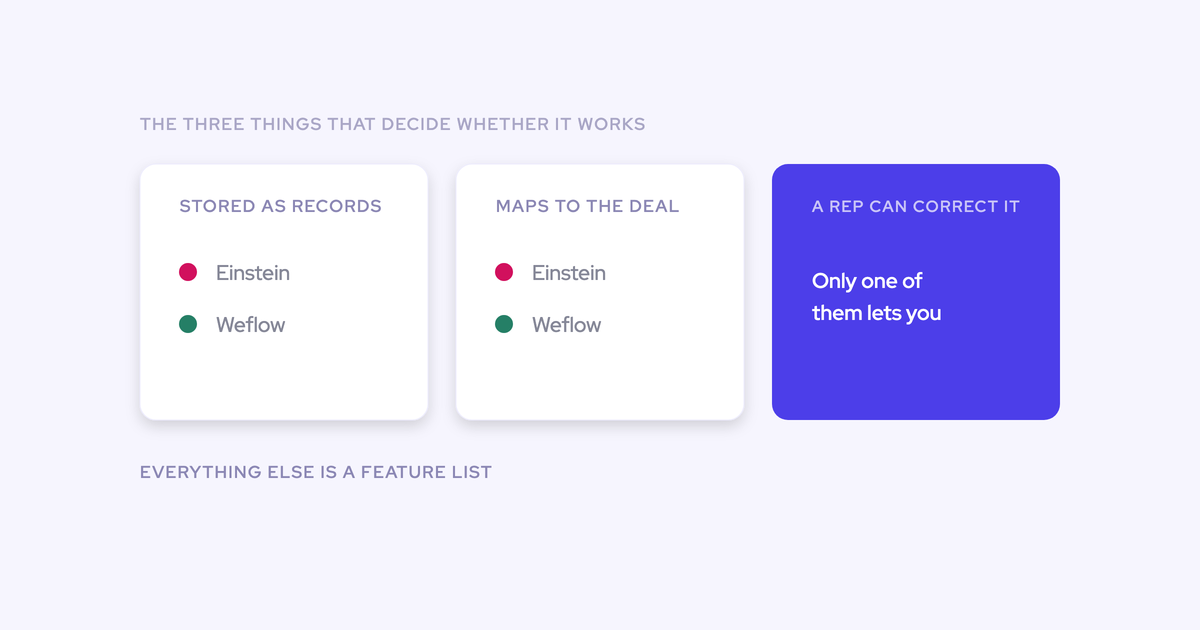

You've already been burned once. Maybe Einstein Activity Capture logged half the emails and none of the contacts, maybe you found out in year three that Outreach was writing tasks and not capture. Either way you've stopped believing demos and you've written a requirements list.
So this roundup runs every serious tool against the five requirements RevOps teams actually write down, starting with the one that eliminates most of the field before price comes up: does the captured activity become a native Salesforce record you own, can report on, and can trigger a flow from. Everything downstream, from deal hygiene to opportunity-level engagement reporting, depends on that answer.
Weflow is the Revenue AI Orchestration platform for sales, customer success, and RevOps teams, built for Salesforce teams, and yes, it's row one here. We'll argue why from mechanism and name the things it doesn't do. Einstein Activity Capture gets real credit where it's earned it. And the article ends with a two-week pilot plan, because nobody should buy capture on a demo.
How the top Salesforce activity capture tools compare at a glance
The field diverges on storage and mapping, not on feature lists. Most tools capture something. Far fewer turn it into an opportunity-level record you own.
| Tool | Where activity is stored | Email direction | Opportunity mapping | Contact creation | Best for |
| Weflow | Native EmailMessage, Task and Event records in your org | Incoming and outgoing, captured server side at the mail tenant | Automated mapping plus a rep-facing extension to see and correct the record | Creates contacts and sets opportunity contact roles | Teams that need opportunity-level activity reporting and want to own the data |
| Einstein Activity Capture | Native records after the opt-in migration; the legacy external store and its reporting retire in Summer '26 | Both directions | Follows opportunity contact roles; falls back to the account when several deals are open | No | Small teams on standard objects with one open opportunity per account |
| Clari Capture | Feeds Clari's engagement layer; Clari can also read activity from Salesforce | Server-side capture | Domain matching, which misattributes when an account carries several open deals | Verify on your own org, we won't claim either way | Clari-committed teams, ideally reading a cleaner capture layer underneath |
| Revenue Grid | Verify against requirement one in a trial | Verify in a trial | Verify in the ambiguous case, not the clean one | Verify with dedup rules on | Mid-market teams running a head-to-head bake-off |
| Cirrus Insight | Verify against requirement one in a trial | Verify in a trial | Verify in the ambiguous case | Verify | Smaller Salesforce orgs wanting lighter email sync |
| People.ai (Backstory.ai) | Verify ownership and export terms in the contract | Background capture at enterprise scale | Ask how it decides, and whether a human can correct it | Ask | Enterprise orgs buying background capture as a point solution |
| Nektar | Verify ownership and export terms | Background capture | Ask how it decides, and whether a human can correct it | Ask | Enterprise orgs comparing point solutions |
| Momentum | Calendar events into Salesforce only | No email capture | Unreliable event-to-opportunity mapping, no add-in or extension to fix it | No contact capture | Teams already committed to the Salesforce Agentforce path |
| Gong | Gong's Revenue Graph; captured data can't trigger Salesforce flows and doesn't stay if the contract ends | Limited add-in and extension coverage | Not built as a capture layer | Not the reason teams buy it | Conversation intelligence and coaching |
The five requirements RevOps teams write down before the demo
These five aren't a framework we invented. They're what burned buyers put on paper before they take a vendor call, then run two or three vendors against in a short pilot.
"This should be reportable. I should be able to sync both incoming and outgoing emails, and they should be permanently stored in Salesforce so I can analyze them via Looker."
Requirement one is a gate. Fail it and the other four don't matter, because price never gets discussed.
Native-object storage: activity data you own and can build on
If an activity isn't a record in the core Salesforce database, it can't be queried, can't trigger a flow, can't be read inside a flow, and can't be exported to Looker, Tableau or Power BI. It also doesn't stay when the contract ends.
That's an ownership question dressed up as a feature question, and buyers say it in exactly those terms.
"With Einstein Activity Capture, I was trying to report on how many meetings we have. I got on a call with Salesforce support, who was just as confused as I was. I also learned that activities are just temporarily stored on Salesforce's side. It's actually not even my own data."
How to test it: don't accept "yes, it syncs to Salesforce." Ask the vendor to prove a flow can read what they write, then build the flow yourself in the sandbox.
Incoming and outgoing email, not just sent mail
The reply is the half of the record that proves a deal is alive. A tool that syncs one direction gives you an outbound activity log and calls it capture.
You end up with accounts showing plenty of touches and no way to tell whether a human ever wrote back, so managers judge engagement on volume. Reply rate, email velocity and time-to-follow-up after a meeting are the leading indicators worth having, and all three need both directions.
How to test it: send a thread from a personal-style external address, have someone reply, and check what landed on the record. Then check it from your phone.
Opportunity mapping when an account has several open deals
This is the requirement that decides most evaluations, and it comes from a constraint in Salesforce itself: an activity can be related to an opportunity or to an account, not both.
So when a tool can't determine the opportunity, it falls back to the account. No error, no warning. The account timeline looks healthy and the deal looks dormant.
Now put a normal org on top of that. New business, renewal, upsell and existing business run as separate opportunities under one parent account, with the same contacts on more than one of them. There's no one-to-one link for an algorithm to follow. The ambiguous case is the common case.
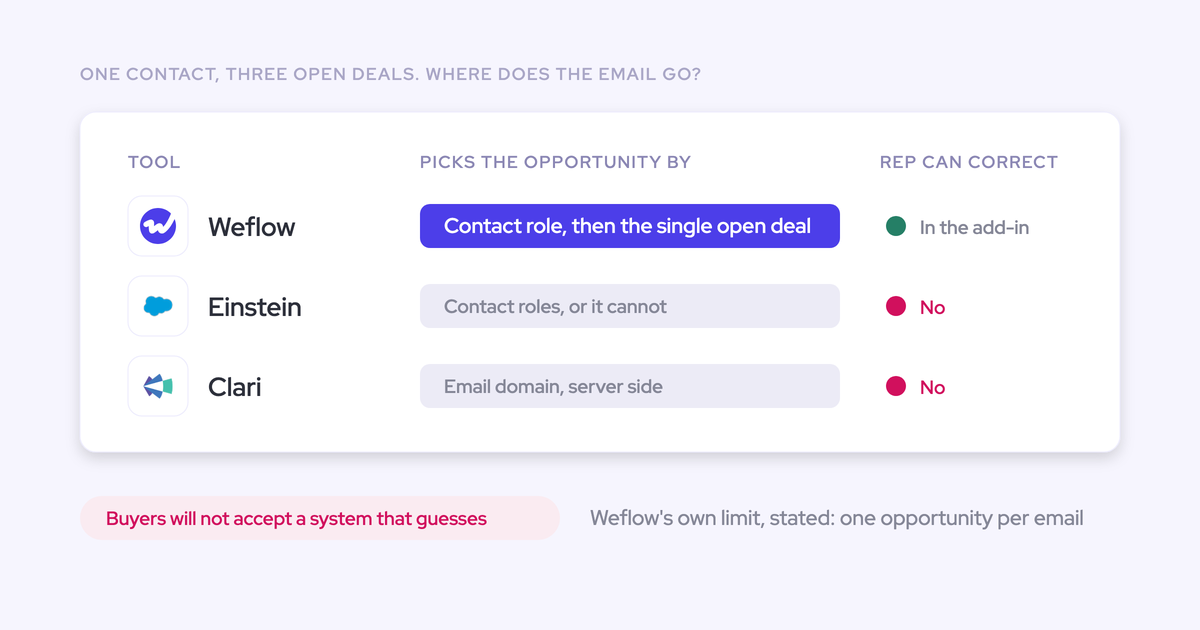
Einstein resolves it through opportunity contact roles, which is one of the least maintained objects in any CRM. That's why we treat "we follow contact roles" as the wrong answer: it makes your opportunity activity data a function of a hygiene practice nobody enforces.
How to test it: pick an account with three open opportunities, run a real thread through it, and ask two questions. Which record did it land on, and can a rep see and change that from inside their mailbox?
Automatic contact creation for the buying committee
Enterprise deals involve four to six people, and creating each of them as a contact by hand has no payoff for the rep, so it doesn't happen. The buying committee stays in the inbox and multi-threading becomes unmeasurable.
And a contact list isn't multi-threading. A deal with six contact roles and one person replying to email is single-threaded, which you only see if the activity is attached to the people.
How to test it: check whether contacts get created with a dedup check against existing records and leads first. Your org is already full of the same person three times over. Anything auto-writing is guilty until proven safe.
Self-serve activity reporting inside Salesforce
You need to build your own reports where leadership already looks, without exports and without a standing negotiation over the API limit.
That second part is not a footnote. Every integration in the stack draws on the same daily allowance, and when one eats it, three others break differently on the same afternoon while nobody can tell which one caused it.
How to test it: ask where the reports live and what they consume. If the answer is a vendor dashboard, you've bought a second place to look, not a reporting layer.
What changed in Salesforce activity capture for 2026
Some of what you know about this category is out of date, and one of the changes is why your inbox is full of vendor emails right now.
- Einstein Activity Capture moved to native records. The old complaint that EAC activity sat on an external AWS store and couldn't be reported on has been answered by an opt-in "Sync Email as Salesforce Activity" setting. Existing orgs have to actively migrate through Salesforce Support, and the legacy Activity 360 reporting, Activity Metrics and Activities Dashboard retire in Summer '26.
- Salesforce is sunsetting the native Outlook add-in and pushing those teams onto EAC. If that's you, this isn't an upgrade, it's a forced evaluation.
- Momentum was acquired by Salesforce and folded into Agentforce 360, so evaluating Momentum now means evaluating Salesforce's native path rather than a point solution.
Give the EAC migration its due: native records is the right architecture and it fixes the loudest complaint about the product. It also came with a bill. Teams who had built velocity reports, flows and custom fields against the old structure had to rebuild them.
The lesson for a buyer isn't "EAC is bad." It's that your reporting layer sits on someone else's architecture decisions unless the activity lives in objects you control.
Why Outreach, Salesloft, and the Outlook add-in aren't capture
Two-thirds of Salesforce orgs run capture through either EAC or the manual add-in, and a good share of the rest believe their sequencer is doing it. Here's why neither of the latter two makes the shortlist.
Sales engagement platforms log tasks, so reply rate is uncomputable
Outreach, Salesloft and Apollo log activity to the Salesforce task object rather than to EmailMessage and Event. The task object discards the from and to, so sent and received can't be separated and reply rate can't be calculated at all.
The activity also lands on the contact or the account rather than the opportunity, because the mapping was never built. Ask the deal-review questions, when did we last touch this deal, how many touchpoints have we had, do our follow-ups get replies, and there's nothing to answer with.
None of this is a knock on the products. Capture isn't what they're for. The problem is that a team can have full sequencing coverage and believe capture is solved.
"We use Outreach activity capture right now and it misses a lot. It has record misalignments that impact data quality."
The Salesforce add-in logs outgoing mail and is being sunset
Manual logging tops out somewhere between 24% and 52% of activities reaching the CRM. Up to three quarters of the interaction record is missing, and the gaps aren't random: the busiest reps in the busiest weeks log least.
The mechanics explain it. The flow is built for outgoing mail, so an inbound reply has to be logged after the fact by opening the thread. Logging one email to a custom object can take four clicks. At thirty or forty emails a week, that's not a workflow.
Worse for you specifically: every user authenticates individually, the connection breaks, and reps don't re-authenticate. Capture degrades one rep at a time with no central signal. You find out when the reporting looks wrong, and by then the activity is gone.
The 9 best Salesforce activity capture tools in 2026
Same five questions, put to every tool. Where we don't have a verified answer, we say so rather than filling the gap.
Weflow: server-side capture with rep-correctable opportunity mapping
Weflow Activity & Contact Capture clears all five requirements, and the reason is architectural rather than a longer feature list.
Capture runs server side at the mail tenant level, through a central app installed in Microsoft Entra or Google Workspace. It logs incoming and outgoing email and every meeting in real time, from any client or device, with no action from the seller and no per-rep plugin to silently de-authenticate.
Everything lands in native Salesforce objects you own: EmailMessage, Task, Event, and your custom objects. An admin chooses whether an email logs as an email message or a task, whether attachments are stored and at what size cap, and which objects each team writes to.

Then the mapping problem. No algorithm can decide which of two open opportunities an email belongs to when the same contact holds a role on both, so Weflow doesn't pretend otherwise. It runs a hybrid model: automated mapping, plus a Chrome extension and Outlook add-in where the rep sees the suggested record and corrects it from inside their mailbox.
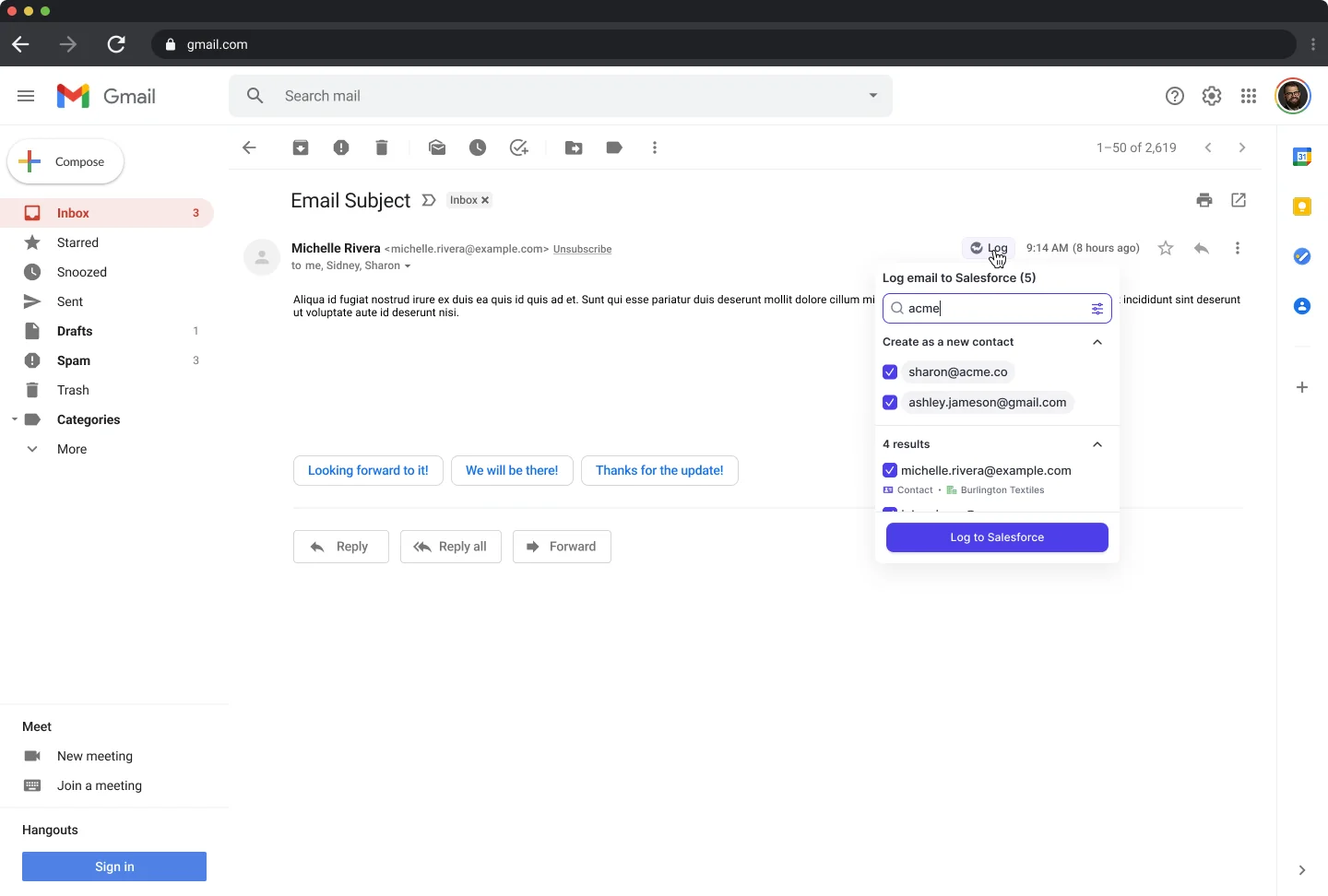
The rest of the requirement list:
- Contacts: created automatically from threads and invites, with opportunity contact roles set, so multi-threading becomes measurable.
- Reporting: the Weflow Analytics package runs natively inside Salesforce and consumes no Salesforce API calls, which is what makes continuous activity reporting viable at enterprise scale. Activity Capture Health flags duplicate accounts, duplicate contacts, non-converted leads, accounts sharing a domain, and capture settings that aren't configured right.
- Coexistence: compatibility mode recognizes activity already logged by Outreach, Salesloft, Apollo or Clay and skips it, so you don't get duplicates while you consolidate.
- Control: configurations are scoped per team, per user and per object, with domain exclusions and custom rules that can block logging against an entire Salesforce record based on any field. That's how regulated teams keep NDA accounts out of the captured set.
- Price: $19 per user per month, billed annually, 10-user minimum.
"3x increase in captured activities since switching to Weflow, validated manually as real interactions previously slipping through the cracks."
— Rugile Pudzevelyte, Senior Revenue Operations Manager at United Fintech
Where Weflow isn't the answer:
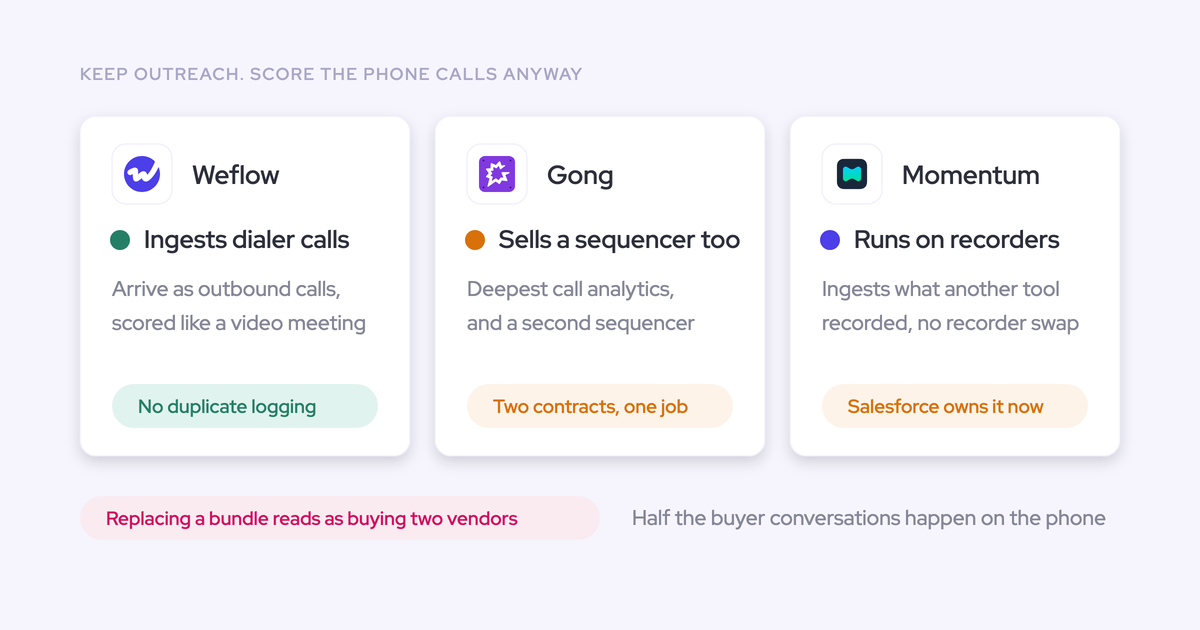
- No VoIP or phone-call capture. If your motion is phone-heavy, your dialer logs its own calls and you'll keep relying on it.
- Call recording is a separate product. It lives in Weflow Conversation Intelligence at $39 per user per month, not in the capture product. Buy capture expecting recordings and week one goes badly.
- Salesforce only. No HubSpot, no Dynamics, no Pipedrive. And no FedRAMP, so US government contractors that mandate it aren't a fit.
Einstein Activity Capture: the default that stops being free
EAC deserves more credit than it usually gets in vendor content. It's now on native records, it's bundled, and for a small team on standard objects with one open opportunity per account and no custom reporting needs, it's a reasonable answer. Don't rip it out to prove a point.
The limits show up as soon as any of those conditions break:
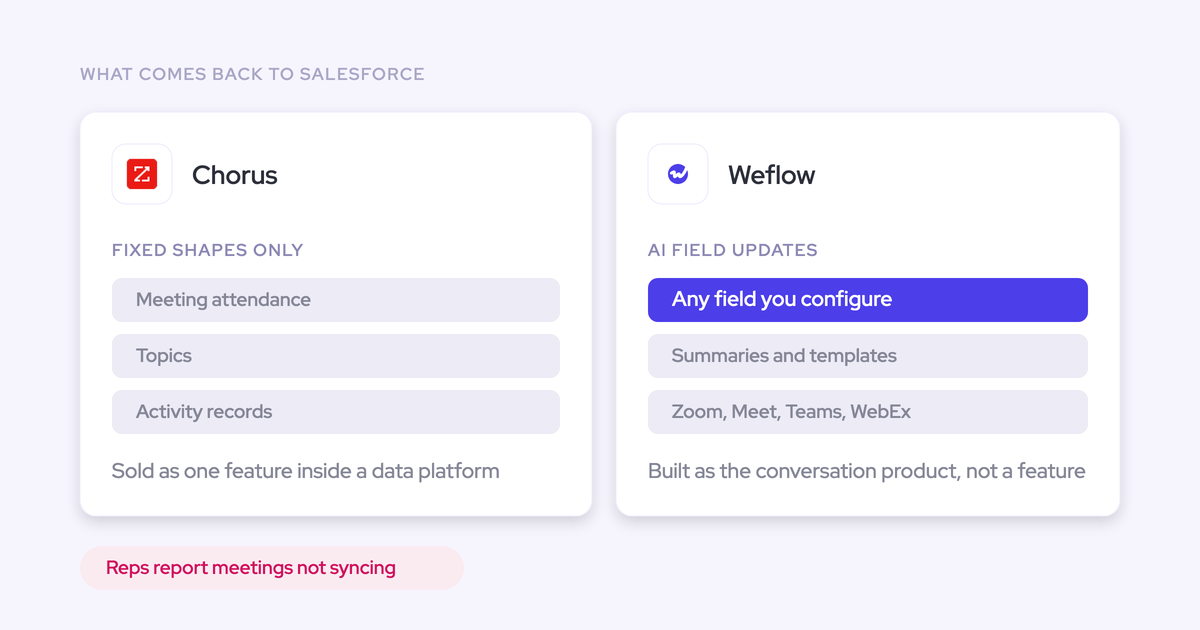
- No contact creation. The buying committee stays in the inbox and engagement reporting has nothing to hang off.
- Opportunity mapping via contact roles. It works when an account has exactly one opportunity and fails when it has several, with no UI anywhere to see or fix the mapping. The Outlook and Gmail add-in is a separate service that isn't connected to EAC, so a rep's manual correction never feeds back into the matching.
- No attachments, and no admin choice between the email message and task object.
- Weak on mobile, which is where field reps actually work.
- A silent failure mode in orgs running a Salesforce community: where the same email address exists as both a user and a contact, it logs nothing at all.
- Price: free up to 100 users, then about $50 per user per month above that. You hit that step at the exact moment you scale, having built all your reporting on it.
"We relied on Einstein Activity Capture for years - but the reliability was very inconsistent. It would work, but then it wouldn't. I got tired of being asked, 'Why isn't Salesforce working?'"
— Leslie Phillips, Director of Operations at ADVISA
Clari Capture: engagement scoring built on domain-matched mapping
Clari's engagement timeline and consolidated engagement score look right, and the pipeline waterfall, pacing view and same-day-last-quarter comparison are genuinely the features revenue teams use.
The capture underneath is the weak point. Clari Capture maps activity server side using the email domain, so emails are missed when a contact isn't mapped to the right account, and activity is misattributed once an account carries several open opportunities. Server-side matching alone has no way to choose between two open deals with the same contacts.
That quietly poisons the deal-health signals built on top, which is the part buyers don't see until they check a deal by hand.
If leadership is committed to Clari, don't fight it. Clari reads activities from Salesforce, so the sensible pattern is one capture layer feeding Salesforce and Clari consuming the cleaner data. What you must not do is run two capture engines at once: that's the duplicate-activity failure, and it's on you rather than on either vendor.
Revenue Grid: email and activity sync for mid-market teams
Revenue Grid is a frequent mid-market head-to-head, and it's the tool most likely to end up in your bake-off alongside Weflow.
We're not going to score it against the five requirements from secondhand knowledge. Test it yourself, and test it in the ambiguous case rather than the clean one.
One practical warning for the bake-off itself: two capture tools pointed at the same inbox compete over the same emails and produce conflicting or duplicate logging. Disable one before testing the other, or run one in compatibility mode, otherwise you'll be scoring the collision rather than the tool.
Cirrus Insight: lighter email sync for smaller Salesforce orgs
Cirrus Insight sits in the same mid-market bracket as Revenue Grid and is generally the lighter option, aimed at smaller Salesforce orgs that want email sync more than an activity data foundation.
Three questions decide it for you: what happens to a thread on an account with three open opportunities, does it create contacts with a dedup check, and where do the reports live. A thin honest entry beats a padded one, so that's ours.
People.ai: enterprise background activity capture at scale
People.ai (Backstory.ai) is one of the two enterprise point solutions we see in capture evaluations, built for background capture across large orgs where nobody is going to install anything per rep.
Press it on two things before the feature conversation. First, ownership: where do the records live, are they native Salesforce objects, and what happens to the history if the contract ends. Second, correction: when the mapping is wrong on a multi-deal account, who fixes it and where.
Nektar: enterprise activity capture point solution
Nektar is the other enterprise point solution in the same bracket. Same evaluation, same order: storage first, mapping second, contacts third.
Add a fourth for anything running at your scale: what does it consume from the daily API allowance, and can you watch that number during the trial.
Momentum: calendar sync, now part of Salesforce Agentforce
Momentum syncs calendar events to Salesforce and stops there. It doesn't capture emails or contacts from Outlook or Google Workspace, its event-to-opportunity mapping is unreliable, there's no add-in or extension to correct it, and it isn't sold standalone.
The record ends up showing that a meeting happened and nothing about the conversation around it.
Salesforce acquired Momentum to extend Agentforce 360 with conversation data from Zoom and Google Meet, so evaluating it now is evaluating Salesforce's native path. Which makes it the Agentforce decision, not a separate one.
Gong: activity logging that lives in Gong's Revenue Graph
Gong does log activity to Salesforce, so logging on its own isn't why teams look elsewhere. And Gong is strong at what it's for: account-level methodology summaries across every call on a deal are genuinely useful, and few tools match that view.
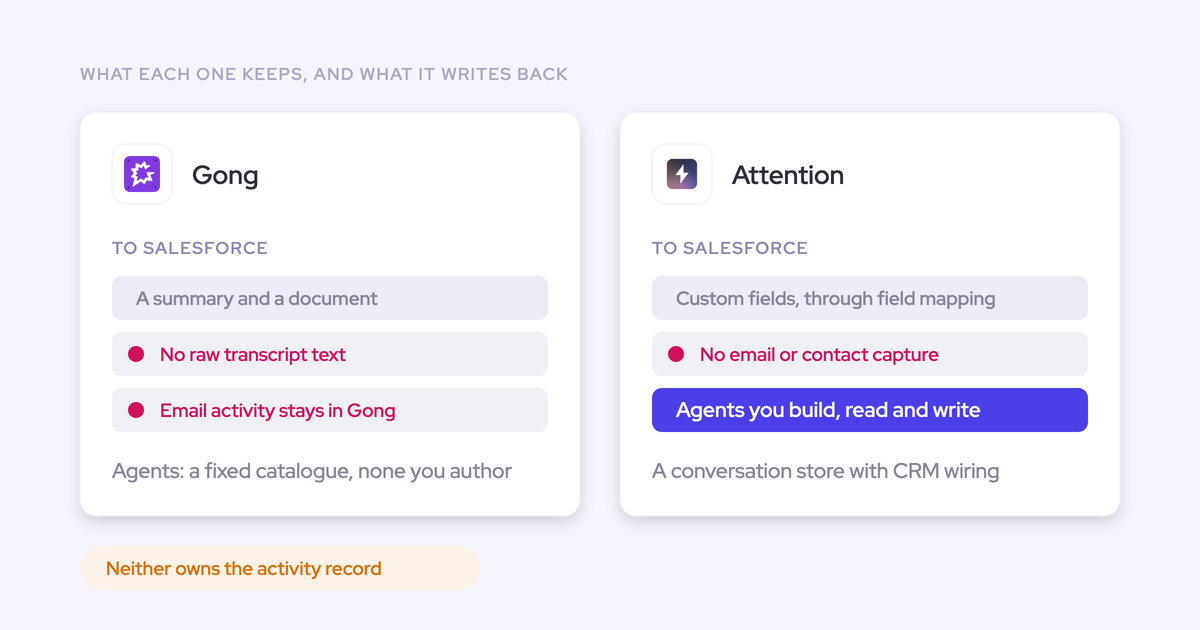
The capture question is about ownership. Captured calls sit in Gong's proprietary Revenue Graph rather than native Salesforce objects, so that data can't trigger Salesforce flows and doesn't stay in your org if the contract ends. Its Outlook add-in and Chrome extension coverage for email and calendar is limited compared with dedicated capture tools.
Which is requirement one, failed. Buy Gong for conversation intelligence and coaching. Don't buy it as your capture layer.
Which activity capture tool fits your team
The right answer follows from your situation, not from a score out of ten.
| Your situation | Best fit | Why |
| Under 100 seats, standard objects, one open opportunity per account, no custom reporting | Einstein Activity Capture | It's bundled, it's now on native records, and none of its gaps bite you yet. Stay put. |
| Crossing 100 seats and re-evaluating | Weflow | EAC steps to about $50 per user per month above 100 users; Weflow Activity & Contact Capture is $19, with contact creation and mapping correction included. |
| Three or four tools all writing activity into Salesforce | Weflow with compatibility mode | It skips activity already logged by Outreach, Salesloft, Apollo and Clay, so you consolidate onto one layer without a duplicate cleanup project. |
| 20 to 30% of your logging goes to custom objects | Weflow | Standard-object-only tools can't replace your setup, and this is the most common reason a capture evaluation fails on functionality rather than price. |
| Committed to Clari for forecasting | Weflow underneath, Clari on top | Clari reads activities from Salesforce. One capture engine feeding cleaner data improves both. Two capture engines gives you duplicates. |
| Phone-heavy motion | Your telephony provider | RingCentral, 8x8 and Aircall ship their own Salesforce integrations and log calls out of the box. Weflow doesn't capture VoIP. |
| Mid-market, want a real bake-off | Weflow against Revenue Grid or Cirrus Insight | Run all three against your written list, one inbox at a time, and score the ambiguous cases. |
How to pilot an activity capture tool in two weeks
Don't buy on the demo. The demo always looks the same, and capture fails in week six, not week one. Two weeks in a sandbox against your written list settles it.
- Write the requirements first, then take the calls. Reportable, incoming and outgoing, permanently stored in Salesforce so BI can read it, mapped to the right object including custom objects, reports you can build yourself. Share the same list with two or three vendors.
- Connect to a sandbox, not production. You want to test how the tool authenticates and writes before anything touches live records.
- Run the ambiguous case on day one. Pick an account with three open opportunities, push a real thread through it, and see which record it lands on. Then have a rep correct the mapping from their mailbox and check it holds for the rest of the thread.
- Test an inbound reply from a device that isn't a desktop. Phone, browser, whatever your field team actually uses. This is where plugin-based capture quietly fails.
- Point it at a thread your existing tools already logged. If you run Outreach, Salesloft or EAC, this is the duplicate test. Note that EAC set to sync events in both directions will duplicate every event once a second tool writes; switching its event sync to one direction resolves it without turning EAC off.
- Check contact creation against your dedup rules. Does it check for an existing contact and lead before creating one? Does it respect field-level security and your role hierarchy? Salesforce is already full of rubbish; the question is what stops the tool adding to it.
- Hold a thread back. Test excluding a domain, and test a rule that blocks logging against a whole record based on a field. Roughly one in ten deals is confidential enough that this decides the rollout.
- Watch the API number every day of the pilot. If it climbs, you've found a rollout blocker before it takes out three other integrations on a Tuesday afternoon.
- Build one report and one flow. A report on emails received per opportunity, and a flow that fires when a meeting is booked. If both work, the tool passed requirement one properly.
Setup shouldn't eat the pilot. Weflow's technical setup runs 30 to 45 minutes with a Salesforce admin and a Google Workspace or Microsoft admin, and United Fintech had capture live in under an hour, rolled out centrally through OAuth.
See how Weflow captures activity, updates Salesforce fields from calls, and rolls up your forecast. Book a 30-minute demo.
Frequently asked questions about Salesforce activity capture
Does Einstein Activity Capture store activity as native Salesforce records now?
Yes, once you opt in. Salesforce introduced a "Sync Email as Salesforce Activity" option that writes activity to native records, and existing orgs have to actively migrate through Salesforce Support rather than being moved automatically. The legacy Activity 360 reporting, Activity Metrics and Activities Dashboard retire in Summer '26. Teams that had built reporting against the old external store had to rebuild it.
What does Einstein Activity Capture cost above 100 users?
EAC is free up to 100 users and costs about $50 per user per month above that. For comparison, Weflow Activity & Contact Capture is $19 per user per month billed annually, with a 10-user minimum.
Can I run activity capture alongside Outreach or Salesloft without duplicates?
Yes, if the capture tool deduplicates. Weflow's compatibility mode recognizes activity already logged by Outreach, Salesloft, Apollo and Clay and skips it, so both can run during a consolidation. Without dedup, the same email lands twice under different objects and your meetings-per-rep reporting inflates.
Do activity capture tools map to custom Salesforce objects?
Some do, most don't, and it decides evaluations. Roughly 20 to 30% of Weflow customers log activity to custom objects alongside standard ones, and for those teams a standard-object-only tool can't replace the existing setup at any price. Put custom-object mapping on the requirements list before the first call if it applies to you.
Can I test an activity capture tool in a Salesforce sandbox?
Yes, and you should. Connecting to a sandbox first lets you test authentication, the write path and your flows without touching production records. It's also where you run the multi-opportunity mapping test, which is the one that actually separates the tools.
Do I keep my captured activity data if I switch tools?
It depends entirely on where the activity was stored. Records written to native Salesforce objects, EmailMessage, Task and Event, stay in your org because they're yours. Data held in a vendor's own layer, like calls in Gong's Revenue Graph, doesn't. That's the whole reason requirement one comes before price.