
Best revenue intelligence tools for Claude and ChatGPT: MCP and API access compared
Compare revenue intelligence tools for Claude and ChatGPT by MCP, API access, evidence, and scope.


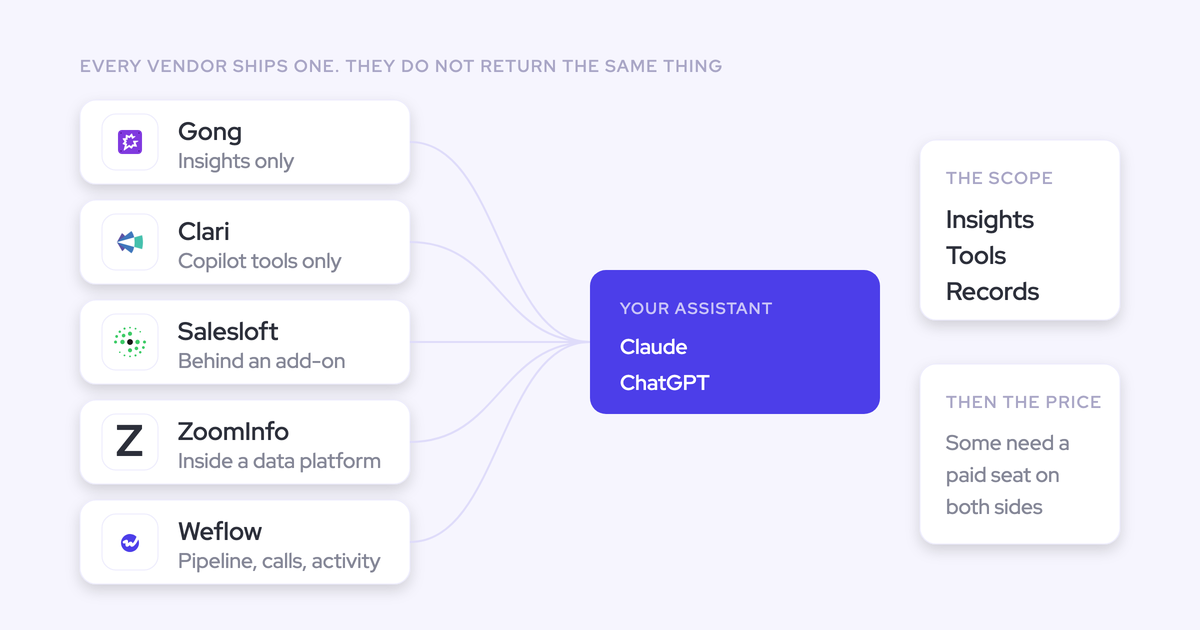

Choose a revenue intelligence connector by what your assistant can retrieve, not by whether the vendor supports MCP. A connector that returns a generated answer about one deal serves a different job from one that exposes transcripts, team metrics, and forecast submissions.
Your shortlist needs to separate those jobs before renewal. Can Claude inspect the evidence behind an answer? Can ChatGPT compare a portfolio? Whose permissions apply, and what happens to the bill when leadership starts using the connection every day?
We compare eight native MCP and indirect access paths below. The test is whether they support your actual workflows, from AI-powered deal reviews to forecast inspection, without creating an access problem or another integration RevOps has to maintain.
Revenue intelligence access options at a glance
Weflow fits conversation-plus-forecast questions, Attention provides the broadest documented read/write conversation access in this comparison, and Gong serves single-record generated insights. Salesforce is the baseline for questions your CRM already contains enough data to answer.
Weflow is the Revenue AI Orchestration platform for sales, customer success, and RevOps teams. It works exclusively with Salesforce.
| Option | Access route | Accessible context | Source evidence | Analysis scope | Write scope | Authorization | Commercial model | Best fit |
|---|---|---|---|---|---|---|---|---|
| Weflow | Native MCP | Playbooks, conversations, forecast calls, and revenue metrics | Summaries and optional full transcripts; opportunity IDs behind metrics | Conversation retrieval and rep-level aggregates across the selected scope | Read-only | User authorization, workspace enablement, separate transcript control | Published seat pricing; confirm MCP entitlement and request limits | Salesforce teams combining conversation and forecasting context |
| Gong | Native MCP | Account and deal answers; account, deal, and contact briefs | Generated insights, not raw transcripts or email bodies | One record per tool call | Read-only insight tools | Personal access by default; shared access for organization-level agents | Paid Gong seat, eligible paid assistant tier, and pooled credits | Existing Gong customers seeking record-level answers |
| Salesloft | Native MCP, beta | Accounts, people, users, opportunities, conversations, and team context | Record data, conversation summaries, and recording retrieval; no transcript retrieval | Search and record lookup; validate aggregation requirements | Read-only | Authenticated user's Salesloft permissions | Agent add-on access; requests use standard API limits | Teams already working in Salesloft |
| Attention | Native MCP | Calls, transcripts, scorecards, AI insights, and workspace administration | Raw transcripts and matching search snippets | Cross-call search and downstream assistant analysis | Read, write, configuration, and destructive administration | Role-dependent workspace access | Quote-based; documented rate limits, no published MCP consumption tariff | Raw conversation access and custom agent workflows |
| ZoomInfo | Native MCP | B2B company/contact intelligence, intent, news, and research | Data records and synthesized briefings; no Chorus call evidence | Search, enrichment, audiences, and research | Data and research operations; not a Chorus management route | Signed-in ZoomInfo account permissions through OAuth | License plus applicable data and AI action credits | External account and contact intelligence |
| Salesforce | Direct Salesforce MCP | Data available in the Salesforce org | CRM records and stored conversation fields, subject to connector support | Depends on the selected server's query tools | Verify the selected server's operations | Verify identity, sharing, and field-level enforcement | Confirm Salesforce, connector, assistant, and API requirements | Questions whose evidence already lives in Salesforce |
| Momentum | Indirect access through Salesforce MCP | Conversation-derived data Momentum writes to Salesforce | Whatever the destination records retain and expose | Comes from the Salesforce access path | Comes from the Salesforce access path | Comes from the Salesforce access path | Confirm Momentum terms plus Salesforce and assistant costs | Keeping the recorder while making its output usable in CRM |
| Jiminny | REST API or Zapier bridge; no native MCP documented in the supplied evidence | Conversation data through supported endpoints or automation actions | Verify transcript, metadata, and export availability | Depends on the integration you build | Depends on available API or automation operations | Your bridge must enforce the intended access model | Confirm vendor access, automation charges, and maintenance costs | Narrow workflows with an internal integration owner |
How to evaluate MCP access to revenue data
Evaluate each connector as a data-access contract: what enters the assistant, under whose identity, through which operations, and at what cost. We wouldn't approve a renewal on a successful demo without those answers.
What revenue data and evidence can the assistant retrieve?
Separate source evidence from generated output before comparing vendors. Attention returns raw transcripts through MCP, while Gong returns generated insights; those outputs give your external model different amounts of room to investigate.
| Data type | How to test access |
|---|---|
| CRM records | Request an opportunity ID, named fields, and its related account. Check the values against Salesforce. |
| Raw conversation evidence | Request the passage supporting a buyer objection, including the speaker and source call. |
| Generated summaries or playbooks | Ask which underlying conversations informed the output and whether you can retrieve them separately. |
| Forecast context | Request the submitted forecast, target, period, and opportunity IDs behind the supporting metrics. |
| Third-party intelligence | Separate market intent and enrichment from evidence about your own customer relationship. |
A summary is useful for meeting preparation. It isn't a substitute for the transcript when you need to challenge how another model interpreted the buyer.
Can it analyze across records and time periods?
Test analytical scope at the level leadership actually asks questions. Gong's MCP tools work on one record at a time, so cross-deal analysis requires the calling assistant to coordinate multiple requests.
- Compare several opportunities on the same account to test whether the connector keeps their evidence separate.
- Ask for a team's results to distinguish native aggregates from record-by-record retrieval.
- Apply a date window and check which date the connector uses: call date, close date, or another field.
- Request a historical comparison to determine whether the source retained the required snapshots or submissions.
- Check pagination and completeness before accepting a claim about the entire portfolio.
What can the connector write or administer?
Classify operations by consequence rather than labeling the whole connection “read/write.” Attention exposes administrative and destructive operations alongside retrieval, which demands a different approval model from Weflow's read-only MCP connection.
| Operation tier | Examples | Approval requirement |
|---|---|---|
| Read | Retrieve a transcript or forecast metric | Approve the data scope and external destination. |
| Write | Update an operational record | Require review for consequential changes and retain an audit trail. |
| Configuration | Change a scorecard, role, or integration setting | Restrict access to designated administrators. |
| Destructive administration | Delete a user or disconnect a CRM account | Require explicit approval and test the recovery procedure. |
Don't infer MCP write access from the vendor's CRM integration. Weflow writes Salesforce fields through its field-update workflows, but its MCP consent grants read-only access.
How are user access and AI clients governed?
Approve the identity model before approving the available tools. Gong's personal-access and shared-access integrations illustrate why: one follows the individual's permissions, while the other provides a common organization-wide authorization context.
- Confirm whether each person authenticates individually or shares a service-account identity.
- Test record sharing and field-level restrictions using a restricted user, not just an administrator.
- Separate source-system permissions from interface controls such as hidden list views.
- Verify the exact Claude, ChatGPT, or Copilot plan and client version your company uses.
- Check whether admins can inspect connections, disable access, and revoke individual users.
- Review the external assistant's retention and training settings separately from the revenue vendor's policies.
Weflow inherits Salesforce permission sets, field-level security, and role hierarchy. It doesn't inherit restrictions created only through list-view availability or Lightning component visibility.
How are licenses, requests, and AI usage charged?
Model the cost of adoption, including repeated questions and automated requests. Gong meters MCP analysis through credits, while Salesloft counts MCP calls against its standard API limits.
| Cost category | What to establish |
|---|---|
| Revenue-platform seats | Which users need paid seats, including executives and cross-functional readers? |
| Connector entitlement | Does access require an add-on, agent package, or specific contract? |
| External assistant | Does the existing corporate subscription support the connection? |
| Consumption | Does the meter count requests, processed calls, emails, enrichment, or agent actions? |
| API and rate limits | Does assistant traffic compete with production integrations? |
| Internal ownership | Who maintains authentication, retrieval logic, monitoring, and permission tests? |
Native MCP and indirect AI-access options
Native MCP reduces the integration work needed to connect an assistant. An indirect Salesforce or API route can still fit, but you need to price the work and ownership that the route leaves with your team.
1. Weflow MCP for Salesforce revenue orchestration
Weflow MCP fits teams that need conversation evidence and forecast context in the same external assistant. Its accessible data includes playbooks, call summaries, transcripts, and forecast calls.
- CRM support: Salesforce exclusively.
- Deployment: An admin enables MCP for the workspace. Users add the custom connector in their assistant and authorize access.
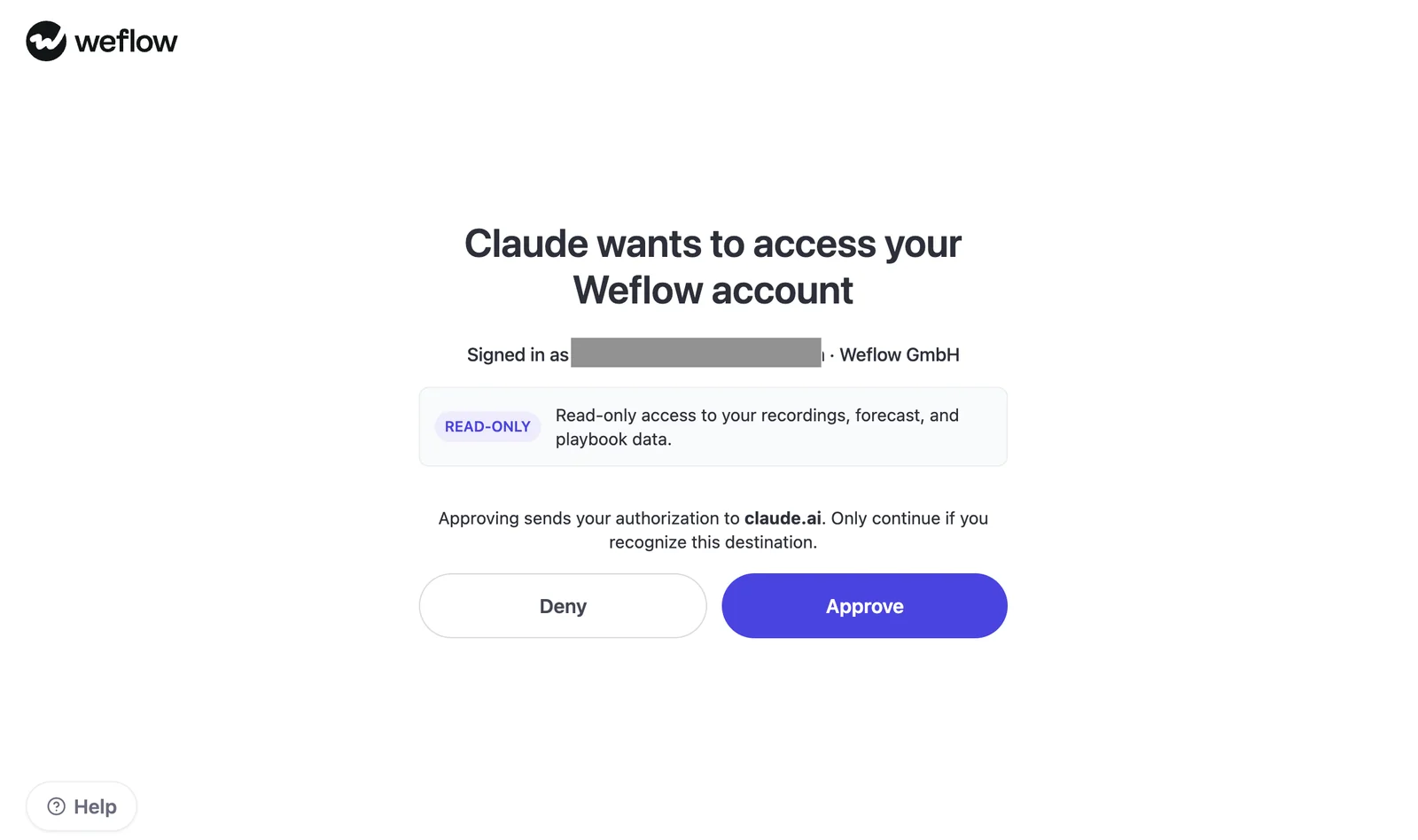
- Operations: Read-only access to recording, forecast, and playbook data.
- Governance: Admins independently control full-transcript access and can see connected users and connection dates.
- Clients: Claude and ChatGPT. Verify the required assistant tier during evaluation.
Weflow's OAuth consent screen makes the read-only boundary explicit before a user approves Claude's connection.
Where Weflow is strong: The connector returns computed revenue metrics with the opportunity IDs behind them. You can inspect the aggregate and then investigate the deals contributing to it.
- Weighted and unweighted pipeline, closed-won amounts, and opportunity counts.
- Win rate, average deal size, average contract value, and sales-cycle length.
- Coverage ratio and gap to forecast.
Weflow computes these metrics using its forecast configuration. Don't assume they'll match a Salesforce report that uses different filters, periods, or forecast definitions.
The transcript toggle gives security a separate decision about evidence depth. With transcript access disabled, connected assistants receive AI summaries rather than verbatim call text.
Limits: Weflow isn't a general-purpose integration platform, and its MCP connector doesn't expose every capability available inside Weflow. Forecast submissions, targets, forecast calls, and tracker hits also don't all live in Salesforce.
That distinction matters for portability. Customer-owned Salesforce records remain a separate access route, but they aren't a complete export of Weflow's application context.
Pricing: Weflow publishes annual seat pricing with a 10-user minimum.
| Product or bundle | Price per user/month | Relevant scope |
|---|---|---|
| Weflow Conversation Intelligence | $39 | Conversation recording, transcription, and AI field updates |
| Weflow Deal Intelligence & Forecasting | $39 | Deal management, pipeline analytics, and forecasting |
| Revenue AI Foundation | $49 | Activity & Contact Capture plus Conversation Intelligence |
| Revenue AI Business | $59 | Revenue AI Foundation plus Deal Intelligence, excluding pipeline analytics and forecasting |
| Revenue AI Enterprise | $79 | All three products, including pipeline analytics and forecasting |
Weflow includes recordings, transcripts, AI summaries, AI field updates, and Ask Weflow AI usage in the seat. Agent Builder has a separate action-based model.
Confirm MCP entitlement, eligible user types, and technical request limits for your package. Included in-product AI usage doesn't establish every connector term.
- Best for: Salesforce teams combining conversation evidence, playbooks, and forecast context under workspace controls.
- Not best for: Non-Salesforce teams or buyers prioritizing broad MCP administration and write operations. Attention is stronger for that requirement.
2. Gong MCP for single-record revenue insights
Gong MCP serves generated answers about individual accounts and deals. Its three documented tools don't expose Gong's full conversation archive as raw evidence.
| Tool | What it returns | Practical boundary |
|---|---|---|
| ask_account | An answer about one account | Doesn't accept a portfolio as one request |
| ask_deal | An answer about one deal | Cross-deal analysis requires separate calls |
| generate_brief | A structured account, deal, or contact brief | Uses a predefined structure rather than a free-form question; contacts require a CRM contact ID |
- Evidence: Generated insights, not raw transcripts, email bodies, or activity lists.
- CRM relationship: Uses Gong's account and deal context; verify your CRM's record mapping.
- Deployment: Admin-configured integrations for supported AI clients.
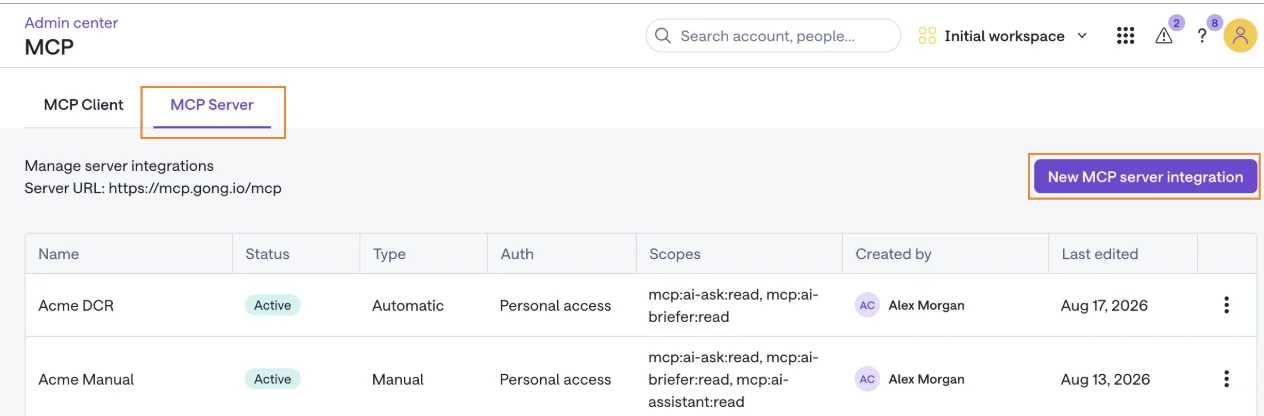
- Governance: Personal access follows each user's Gong permissions. Shared access serves backend or reporting agents with a common organization-wide scope.
Gong's MCP administration screen shows each integration's authorization context and scopes. Keep personal and shared configurations distinct during security review.
| Platform strength | MCP scope |
|---|---|
| Gong has the deepest conversation analytics among these revenue intelligence options. | External assistants receive a narrower set of generated, record-level answers. |
| Existing teams can keep their established conversation workflows. | Independent transcript analysis requires another access path. |
Pricing and availability: Each connecting user needs a paid Gong seat and an eligible paid assistant plan. Gong collaborator accounts can't connect.
- Claude supports Pro, Max, Team, and Enterprise.
- ChatGPT supports Plus, Pro, Business, Enterprise, and Edu.
- Microsoft Copilot requires the documented Copilot Studio or Microsoft 365 Copilot extensibility setup.
Each paid core seat contributes 2,000 annual credits to a shared company pool. MCP requests consume credits based on the underlying data processed, so question count alone won't predict cost.
Best fit: Stay with Gong when its in-product analytics already justify the contract and your external assistant mainly needs account or deal briefings. Test another route if raw evidence and recurring portfolio analysis drive the purchase.
3. Salesloft MCP for read-only revenue execution data
Salesloft MCP provides read-only search and retrieval over Salesloft records. Its documented beta exposes 13 tools, but neither cadences nor cadence performance belong to that scope.
- Data: Accounts, people, users, opportunities, conversations, and current-user/team context.
- Evidence: Conversation summaries and recording retrieval. Transcript retrieval is no longer part of the server.
- CRM support: MCP works without a Salesforce connection because it reads data held in Salesloft.
- Deployment: Claude Desktop through the connector directory; ChatGPT Business or Enterprise through a custom connection.
- Governance: Requests run as the authenticated user and follow Salesloft record permissions.
Where Salesloft is strong: Existing Salesloft customers can expose their working account and opportunity context without building a separate retrieval service.
Every request uses the Salesloft API and counts against the organization's standard limits. Admins can revoke an individual's API key or disable MCP across the organization.
Limits: Search tools don't establish that the server provides native portfolio analytics. Test aggregation, pagination, and the required historical windows.
Salesloft–Clari boundary: Salesloft and Clari operate under the Salesloft brand following the September 1, 2026 consolidation. Clari Forecast remains a product line, but the documented MCP tool list doesn't establish access to former Clari Forecast submissions or roll-ups.
Pricing and availability: Salesloft includes MCP with its agent add-ons. Confirm the package, beta terms, and API headroom in your renewal quote.
Best fit: Teams already working in Salesloft that need read-only revenue execution context. Require a demonstrated forecast request before treating the connector as a Clari Forecast access path.
4. Attention MCP for broad read/write access
Attention provides the widest documented conversation-intelligence MCP surface in this comparison: 68 tools across 15 groups, including raw transcripts and workspace administration.
- Evidence: get_call_details returns transcripts, scorecard results, and AI insights.
- Search: search_calls supports full-text transcript search and returns matching snippets.
- Deployment: A hosted MCP server with Claude and ChatGPT among the documented clients.
- CRM boundary: Attention supports multiple CRM integrations, but CRM configuration access doesn't make MCP a general reader of live CRM records.
- Governance: Available actions depend on the connected user's role. Admin access carries substantial authority.
| Operation group | Examples | Buying implication |
|---|---|---|
| Retrieval | Transcripts, snippets, scorecards, and AI insights | Your assistant can reason directly from call evidence. |
| Configuration | Teams, users, roles, scorecards, labels, and CRM integrations | Custom agents can administer parts of the workspace. |
| Destructive operations | User deletion, API-key revocation, and CRM disconnection | Admin tokens require explicit action controls and approval boundaries. |
Where Attention is strong: Choose Attention when your priority is handing source conversations to an external model and building workflows around them.
Limits: A broad tool catalog raises the governance burden. Forecast-category administration also isn't proof of a complete forecasting data surface; test the actual submissions and metrics you need.
Pricing: Attention doesn't publish a public rate card. Its MCP documentation describes per-second, hourly, and daily rate limits rather than a consumption tariff.
Don't turn that documentation gap into a promise of free usage. Confirm commercial terms and custom limits with Attention.
Best fit: Teams with an engineering or RevOps owner who wants raw-data access and controlled write operations.
5. ZoomInfo MCP for B2B intelligence, not Chorus calls
ZoomInfo MCP exposes its B2B data graph, not the Chorus conversation archive. Its 19 tools cover intelligence retrieval and research, with no tool returning Chorus transcripts, recordings, or scorecard results.
| What ZoomInfo MCP exposes | What it doesn't expose |
|---|---|
| Company/contact search and enrichment | Chorus call recordings |
| Buyer intent, business events, news, and audiences | Raw Chorus transcripts |
| Generated account and contact research briefings | Specific-call interrogation or Chorus scorecard results |
ZoomInfo's research agents can incorporate CRM and conversation context into synthesized briefings. That doesn't give your assistant direct access to the underlying call.
- CRM relationship: Third-party intelligence comes first; verify any customer-CRM inputs used by research agents.
- Deployment: Official distribution includes Claude, ChatGPT, Perplexity, and several coding-assistant clients.
- Authorization: OAuth follows the signed-in ZoomInfo account's permissions and entitlements.
- Governance: Customers must disable model training in their external AI client before connecting ZoomInfo data.
Pricing: Search and lookup tools don't consume the enrichment credits described in the documentation. Enrichment spends bulk data credits, while research agents spend AI action credits.
The existing ZoomInfo license, API limits, and feature availability still apply.
Best fit: Account research, enrichment, and market intelligence. A Chorus customer seeking transcript access needs a separate route.
6. Salesforce MCP for direct CRM access
Salesforce MCP is the first route to test when the required evidence already lives in Salesforce. A revenue vendor's connector must justify what it adds beyond those records.
- Data: The org's records, subject to the selected server's tools and supported objects.
- Evidence: Stored fields and related records, including conversation output that another product writes there.
- Deployment: Specify the exact Salesforce MCP implementation and authentication configuration.
- Governance: Test object access, sharing, field-level security, and service-account behavior.
- Pricing: Confirm required editions, assistant plans, API consumption, and any connector-specific charges.
| Covers when stored and exposed | Still requires another source or process |
|---|---|
| Opportunity amounts, stages, owners, and close dates | Missing customer activity and uncaptured conversations |
| Conversation-derived Salesforce fields | Vendor-only forecast submissions or tracker results |
| Historical records your org retained | Past pipeline states nobody saved |
Where Salesforce is strong: A direct connection keeps CRM questions close to their system of record and gives your existing assistant access to data you already own.
Limits: The evidence available here doesn't establish one universal Salesforce MCP tool list, write scope, or price. Verify those details for the implementation you intend to buy or build.
Best fit: Teams with sufficient CRM data and an owner for query definitions, access tests, monitoring, and maintenance.
7. Momentum through Salesforce MCP, not native MCP
Momentum's external-AI route runs through the Salesforce records it populates rather than a native Momentum MCP server.
- Your existing conversation system captures the call.
- Momentum processes conversation data and writes useful output to Salesforce.
- The assistant retrieves that output through Salesforce MCP.
Where Momentum is strong: Momentum integrates with existing conversation systems, including Gong, Chorus, Clari Copilot, Attention, and Salesloft Conversation Intelligence. You can preserve the recorder while changing what happens after the transcript exists.
- CRM dependency: This comparison's indirect route depends on Salesforce.
- Evidence: The assistant receives what Momentum writes and Salesforce exposes. Verify whether that includes the source text your questions need.
- Governance and operations: The Salesforce connection determines assistant permissions and write scope.
- Separate API: Momentum's API requires support activation, uses an API key, and allows 100 requests per 15-minute window.
- Pricing: Confirm Momentum terms alongside Salesforce, assistant, and integration costs.
Limits: Don't score Momentum's API as a native MCP server or assume its entire conversation context appears in CRM fields.
Best fit: Teams keeping their current recorder and using Salesforce as the external assistant's data source.
8. Jiminny through REST API or Zapier, not MCP
Jiminny offers an indirect external-AI route through REST API or Zapier, rather than a native MCP endpoint documented in the evidence for this comparison.
- Product role: Conversation intelligence with transcription, coaching scorecards, and call libraries.
- Salesforce context: Account and Opportunity mapping, plus meeting-note and action-item write-back.
- Deployment: Build an API integration or automation bridge for the assistant.
- Governance: Your integration owner must validate authorization, data filtering, logging, and revocation.
- Pricing: Confirm API entitlement, Zapier requirements, and internal maintenance costs.
Limits: The available evidence doesn't establish the exact transcript endpoints, API quotas, or supported assistant clients. Request those details before approving a bridge.
- Works if: You need a bounded workflow and have someone accountable for maintaining it.
- Avoid if: Your requirement is a supported native connector with documented retrieval tools and minimal internal integration work.
Does Salesforce MCP make vendor connectors redundant?
Salesforce MCP makes a vendor connector redundant only when Salesforce holds and exposes all the evidence your questions require. Weflow's forecast submissions, targets, forecast calls, and tracker hits show why that condition doesn't always hold.
| Question | Start with | Reason |
|---|---|---|
| Which opportunities close this quarter, and who owns them? | Salesforce MCP | The required values belong to CRM records. |
| What did each manager submit against target? | The forecasting vendor's connector | The submission and target may live outside Salesforce. |
| What did the buyer say about procurement? | The route exposing the relevant transcript | A populated summary field may omit the passage you need. |
| Which low-coverage reps have deals with unresolved buyer objections? | Both, where necessary | The answer joins forecast definitions, deal records, and conversation evidence. |
Weflow stores transcripts and executive summaries on its Salesforce recording object, so Salesforce access can cover part of the conversation requirement. Weflow MCP provides a more direct retrieval route alongside application-level forecast context.
Check both paths during security review. Disabling transcript access in one connector doesn't remove permissions another connector already has to the Salesforce recording object.
We'd start with a data inventory. Name each required value, its authoritative source, and its access route before adding another connection.
Which revenue data access option fits your stack?
Choose by the evidence you need first, then by deployment and cost. There isn't a universal winner across conversation archives, forecast context, and third-party intelligence.
Which option fits your primary revenue data need?
Weflow belongs on the shortlist for Salesforce conversation-plus-forecast workflows; Attention for raw conversation access; ZoomInfo for external intelligence.
| Primary need | Suitable options | Decisive proof-of-concept question |
|---|---|---|
| Conversation and forecast context together | Weflow | Can the assistant return coverage, gap to forecast, and the underlying opportunities, then inspect relevant call evidence? |
| Raw transcripts and configurable actions | Attention | Can it retrieve the supporting passage and restrict administrative actions by role? |
| Record-level generated insights | Gong | Does an account answer resolve the question without needing the transcript? |
| Existing revenue execution records | Salesloft | Which account, opportunity, and conversation records can the user retrieve? |
| Market and account intelligence | ZoomInfo | Which intelligence does the assistant return, and which requests spend credits? |
| CRM-first analysis | Salesforce; Momentum through Salesforce | Does the CRM contain sufficient evidence without another vendor connection? |
| A narrow custom conversation workflow | Jiminny API or Zapier | Can the bridge retrieve the required output with an acceptable maintenance burden? |
Which option fits your operating scale?
Assess scale through analytical breadth and permission complexity, not employee count. An executive asking organization-wide questions creates a different requirement from a rep preparing for one meeting.
| Operating pattern | Options to test | Main constraint |
|---|---|---|
| Individual account or deal research | Gong, Salesloft, Weflow | Personal permissions and evidence depth |
| Team-level revenue inspection | Weflow; Salesforce where the data supports it | Metric definitions, scope, and historical completeness |
| Cross-call analysis and custom agents | Attention | Retrieval completeness, rate limits, and administrative authority |
| Cross-functional archive access | Weflow or Attention; validate incumbent API routes | Preserving access for marketing, CS, product, and leadership |
| Existing recorder with CRM-centered analysis | Momentum through Salesforce | Which source evidence reaches the CRM |
Clari's large-enterprise forecasting mechanics remain more mature than Weflow's. If your forecast depends on years of specialized configuration, validate that operational fit separately from MCP access.
Which option fits your pricing tolerance?
Compare how the contract behaves when usage grows. A predictable seat price and a usage meter create different rollout decisions, even when the pilot costs look similar.
| Pricing preference | Relevant options | Trade-off |
|---|---|---|
| Published seat pricing for core revenue capabilities | Weflow | Annual commitment and minimum seats; confirm connector-specific entitlement and limits. |
| Metered external analysis inside an incumbent | Gong | Shared credits require monitoring as request breadth and frequency grow. |
| Package entitlement plus API allowance | Salesloft | MCP traffic shares operational API capacity. |
| Negotiated pricing with documented rate controls | Attention | Rate limits are visible; commercial usage terms still need confirmation. |
| Usage tied to enrichment and research | ZoomInfo | Cost depends on which tools assistants call. |
| More internal ownership using existing systems | Salesforce, Momentum's indirect route, Jiminny bridges | Include maintenance and permission testing in total cost. |
How should you test MCP before signing?
Run the same questions, roles, and usage scenarios against every shortlisted route. A vendor-selected briefing demonstrates connectivity; your test needs to demonstrate a working revenue workflow.
1. Write your revenue questions before enabling MCP
Start with decisions your team already makes. Weflow, Gong, and Attention should face the same evidence requirements, even when their retrieval methods differ.
- Deal decisions: Identify an unresolved objection and the agreed next step.
- Management decisions: Compare coverage and cycle length across reps.
- Forecast decisions: Explain the difference between a submitted number and its supporting pipeline.
- Customer decisions: Find renewal risks and repeated product requests in conversation evidence.
Include a question where you already know the correct answer. That's how you catch confident errors before the assistant reaches an executive.
2. Test record, portfolio, and time-window questions
Repeat one business question at increasing scope. Gong's single-record tools and Weflow's rep-level metrics should produce visibly different request patterns.
| Test level | Example question | What to record |
|---|---|---|
| Record | What risk did the buyer raise on this opportunity? | Sources and correctness |
| Portfolio | Which opportunities in this team's pipeline show the same risk? | Record coverage, pagination, and request count |
| Time window | How did that risk change between the selected periods? | Date interpretation and available history |
An assistant coordinating many record-level calls can still produce a useful answer. Measure that orchestration rather than calling it native portfolio analysis.
3. Verify source evidence and data freshness
Require traceable answers and observable freshness. A Weflow metric with opportunity IDs lets you inspect its inputs; apply the same traceability requirement to every connector.
| Acceptance check | Pass condition | Observed behavior |
|---|---|---|
| Record identity | The answer identifies the correct account, opportunity, or call. | Record IDs and discrepancies |
| Evidence | The source supports the claim, or the answer clearly identifies generated output. | Source passage or output type |
| Freshness | A controlled source update appears within your agreed tolerance. | Source-update and retrieval times |
| Completeness | The result covers the intended dataset or states its limits. | Returned scope and missing records |
| Reproducibility | A repeat request uses explainable definitions and scope. | Differences and explanations |
4. Test access across multiple user roles
Run permission tests outside the admin account. Weflow's Salesforce inheritance and Gong's personal-access model still need validation against your actual configuration.
| Role | Scenario | Required result |
|---|---|---|
| Restricted rep | Request another team's protected opportunity. | No unauthorized record or derived disclosure. |
| Manager | Request team aggregates and drill into supporting records. | Both operations follow the approved scope. |
| Administrator | Disable transcript access where supported. | The assistant stops receiving full transcript text through that route. |
| Service account | Run an organization-wide request. | Only the intended workload can use the broader authorization. |
| Departing user | Revoke access and retry the connection. | New retrieval fails as expected. |
5. Measure costs under realistic request volume
Test repeated use and broad questions, not just a handful of prompts. Gong's data-processing credits and Salesloft's API allowance make request behavior part of the buying decision.
| Worksheet input | Low adoption | Expected adoption | High adoption |
|---|---|---|---|
| Users | Pilot group | Planned rollout | Cross-functional expansion |
| Questions | Occasional record lookup | Daily preparation and reviews | Recurring portfolio questions |
| Automation | Manual prompts | Selected scheduled workflows | Repeated unattended workloads |
| Measurements | Seats and baseline requests | Credits, API use, latency, and retries | Throttling, top-ups, and maintenance effort |
Keep the external assistant's costs separate. A revenue vendor's included AI allowance doesn't pay for Claude or ChatGPT.
6. Verify revocation, retention, and export procedures
Test the exit before signing the entry. Weflow's customer-owned Salesforce records provide a durable data route, but recordings and application-only context require their own retention and export review.
- Security should approve individual revocation, workspace shutdown, and credential rotation.
- Legal should confirm what the external assistant stores and which training restrictions apply.
- Procurement should document post-cancellation access and export deadlines.
- RevOps should test an export containing transcripts, timestamps, participants, and CRM links.
- Cross-functional owners should confirm that downstream consumers can still reach the archive they use.
A connector proof of concept can validate access without proving forecast accuracy. Evaluating a forecasting process requires the team to run its submission and review cadence.
See how Weflow captures activity, updates Salesforce fields from calls, and rolls up your forecast. Book a 30-minute demo.
What changed in revenue intelligence MCP access in 2026?
The clearest dated change for an older vendor matrix is Salesloft's brand consolidation with Clari. A shared brand changes the commercial relationship, but it doesn't prove that one MCP server reaches every product.
| Date or version | Vendor or product | Documented change | Buying implication |
|---|---|---|---|
| September 1, 2026 | Salesloft and Clari | The combined company adopts the Salesloft brand; Clari Forecast continues as a product line. | Evaluate the Salesloft relationship while verifying forecast access separately. |
| Version 1.4.0; calendar date not supplied | Attention MCP | Full-text transcript search joins the server. | Test source-text search rather than evaluating Attention only as a summary-retrieval route. |
| Change date not supplied | Salesloft MCP | Transcript retrieval no longer appears in the documented server scope. | Don't reuse an older matrix that assumes raw transcript access. |
| Change date not supplied | Gong credits | MCP is one of the explicitly metered AI access paths. | Separate external assistant consumption from included in-product AI usage. |
The undated changes above matter to a 2026 evaluation, but the supplied evidence doesn't establish their launch dates. Reconfirm the tool list and commercial terms before contracting.
How we compared these MCP and API options
We compared documented external access, not the total feature count inside each product. Weflow appears first because this article serves Salesforce teams evaluating conversation and forecast access, not because it wins every criterion.
- Inclusion: Native revenue-data MCP servers plus credible Salesforce, API, or automation routes.
- Dimensions: Accessible data, evidence depth, analytical scope, operations, authorization, clients, pricing, and maintenance.
- Evidence: Supplied vendor documentation, Weflow product information, product screens, and buyer evaluation knowledge.
- Date scope: A 2026 comparison incorporating the documented September brand consolidation. No live verification date or hands-on benchmark is claimed.
- Unknowns: Undocumented prices, endpoints, entitlements, and limits remain items to verify rather than inferred capabilities.
- Indirect routes: Momentum and Jiminny remain separate from native MCP options because the integration owner and access contract differ.
Frequently asked questions
The recurring evaluation mistakes involve product boundaries, permission assumptions, and costs hidden behind the connection step. These answers keep those distinctions explicit.
Does Clari have its own MCP connector?
Evaluate the documented Salesloft MCP server rather than assuming a separate Clari connector. Salesloft and Clari operate under the Salesloft brand following the September 2026 consolidation.
The Salesloft tool list doesn't establish access to former Clari Forecast data. Ask for a live retrieval of the forecast submissions, targets, and roll-ups you need.
Does ZoomInfo MCP expose Chorus calls and transcripts?
No. ZoomInfo MCP exposes B2B intelligence and generated research, not Chorus recordings, transcripts, or scorecard results.
A research agent can use conversation context in a synthesis without making the underlying conversation available to your assistant.
Can Gong MCP analyze multiple deals at once?
Not through a single documented tool call. Gong's ask_deal and ask_account tools each address one record, while generate_brief creates a structured brief for one record.
Your assistant must coordinate separate requests for cross-deal analysis. That adds retrieval work and credit consumption.
Does Weflow MCP work with Claude and ChatGPT?
Yes. Weflow MCP gives Claude and ChatGPT read-only access to supported recording, playbook, and forecast data.
An admin enables the workspace connection and independently decides whether assistants can retrieve full transcripts. Verify the required assistant plan and user entitlement before rollout.
Is Weflow MCP useful alongside Salesforce MCP?
Yes, when the questions require Weflow context that doesn't live in Salesforce, including forecast submissions, targets, forecast calls, and tracker hits.
Salesforce alone may be sufficient for CRM-record questions. Test both routes against the required evidence before adding a second connector.
Are revenue intelligence MCP connectors read-only?
No. Weflow and Salesloft provide read-only MCP access, and Gong exposes read-only generated-insight tools. Attention also exposes write, configuration, and destructive administrative operations.
Evaluate each server's actual tools. A vendor's broader CRM write-back capability doesn't establish MCP write access.
Does every user need paid vendor and AI licenses?
The requirements vary. Gong explicitly requires a paid Gong seat and an eligible paid assistant tier; collaborator accounts can't connect.
For Weflow, Salesloft, Attention, and ZoomInfo, confirm connector entitlement, user eligibility, and assistant requirements separately. Free viewing access inside a product doesn't automatically include external-AI access.
Can historical transcripts be migrated before switching?
Migration depends on the source export, destination ingestion, and metadata each route preserves. MCP access alone doesn't establish a bulk migration capability.
- Confirm export rights for transcripts, recordings, summaries, and metadata.
- Test whether the destination preserves speakers, timestamps, and CRM relationships.
- Validate permissions and downstream access for marketing, CS, product, and leadership.
- Complete a sample migration before committing to cancellation.
Put a successful archive-access test into the switching criteria. The new connector has to preserve the work people already depend on, not just answer the next demo question.







