
Best ZoomInfo Chorus alternatives for Salesforce teams: Recording, write-back, and migration
Compare ZoomInfo Chorus alternatives for Salesforce teams on recording, write-back, and migration.


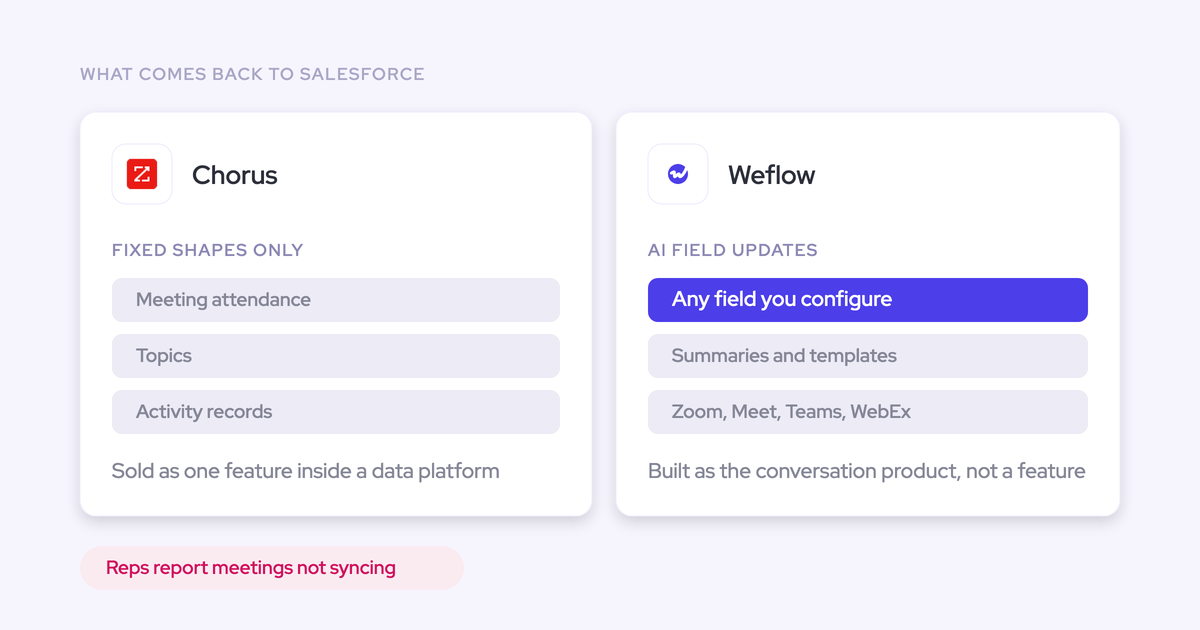

The right Chorus replacement must capture eligible conversations reliably and turn them into configurable Salesforce updates. A better transcript won’t fix missing opportunity activity, empty qualification fields, or reps typing next steps after every call. For a RevOps leader approaching renewal, the decision comes down to what happens after the meeting ends.
Your shortlist also has to survive the switch. Historical calls need usable record links, marketing and customer success need continued access, and your engagement platform mustn’t create duplicate activity. We separate full conversation-intelligence replacements from narrower recording and automation options below. Chorus deserves credit for its coaching initiatives, and fixing its configuration can be the right answer.
Weflow is the Revenue AI Orchestration platform for sales, customer success, and RevOps teams. It’s built for Salesforce teams, with post-call deal execution centered on turning conversation evidence into CRM fields your team can use.
Why Salesforce teams reconsider ZoomInfo Chorus
Salesforce teams reconsider Chorus when useful conversation intelligence still leaves the CRM incomplete. But a missing recording and a missing Salesforce activity aren’t the same failure. Diagnose each before buying a replacement.
| Replacement trigger | What to verify before switching |
|---|---|
| Meetings or recordings don’t consistently reach Salesforce. | Check affected users, integration permissions, record matching, and package configuration. Separate a recording failure from a write-back failure. |
| The listener misses last-minute meetings. | Reproduce an ad hoc meeting. Inspect calendar discovery, listener admission, and the recovery path while the call remains active. |
| Reps still fill custom qualification fields manually. | Distinguish predefined outputs and tracker hits from configurable extracted values. Ask Chorus to populate your actual methodology fields. |
| Conversation data and activity capture remain separate. | Chorus captures external email as well as calls, but it doesn’t offer a dedicated activity and contact capture product. Inventory what reaches Salesforce and through which system. |
| Coaching works, but the wider stack still requires manual work. | List the coaching initiatives managers use before replacing them. Compare the cost of keeping those workflows against the work required to reproduce them. |
Buyers have described sporadic Chorus sync gaps while explicitly questioning their own setup. Treat those reports as reasons to test, not proof that every Chorus deployment fails.
Chorus remains a strong choice for time-boxed coaching programs. Managers can launch initiatives for named teams, track scores and improvement areas, compare performance, and close the initiative. Don’t discard that operating model without checking what replaces it.
How should Salesforce teams evaluate Chorus alternatives?
Apply two gates: can the alternative capture the conversation, and can it turn the conversation into configurable Salesforce values? Then test mapping, historical access, and operating cost. A vendor that passes only the recording gate hasn’t solved your Salesforce problem.
How reliably does it capture eligible conversations?
Measure recording coverage against meetings your team actually intended and had permission to record. Calendar events with video links aren’t a useful denominator on their own.
- Scheduled meetings: Test your actual mix of Zoom, Microsoft Teams, Google Meet, and Webex. Include recurring meetings and customer-hosted calls.
- Last-minute meetings: Create an ad hoc call, change a meeting link shortly before the start, and test whether a rep can initiate recording.
- Failure handling: Leave the recorder in the lobby, decline recording, and remove it mid-call. Check whether each outcome has a distinct explanation.
- Recovery: Ask the rep to send the recorder back into an active meeting. Confirm what the recording captures from that point onward.
- Other channels: Test phone calls and in-person meetings separately. Video-meeting support doesn’t establish telephony coverage.
- Consent: Have legal review the actual experience on each meeting service, including notices, opt-outs, and deletion behavior.
Weflow reports skipped-recording reasons, including opt-outs and failure to admit the notetaker. That makes a coverage gap diagnosable; it doesn’t make every meeting recordable.
How configurable is Salesforce field write-back?
Configurable Salesforce write-back means the administrator chooses the destination field and defines what evidence qualifies as its value. A summary or keyword hit doesn’t establish that capability.
| Evaluation dimension | Vendor question | Acceptable proof |
|---|---|---|
| Objects and field types | Which standard fields, custom fields, and objects can this workflow update? | A working update to your chosen Salesforce records, with unsupported field types identified. |
| Extraction instructions | Can we define our own methodology and exclusions? | A prompt that distinguishes a business-impact metric from an unrelated number such as headcount. |
| Existing values | Does the update preserve, append to, or replace rep notes? | Before-and-after values from a populated field, including a call that adds no new evidence. |
| Human approval | Can we review suggestions before writing them? | A reviewer compares the suggested value with the existing value and accepts or rejects it. |
| Picklists and stage gates | How do allowed values, dependencies, and validation rules affect updates? | Tests covering an allowed value, an unsupported value, and a blocked stage change. |
| Cumulative context | Does the update reflect one call or the whole deal? | A test where an earlier call and a later email provide different evidence. |
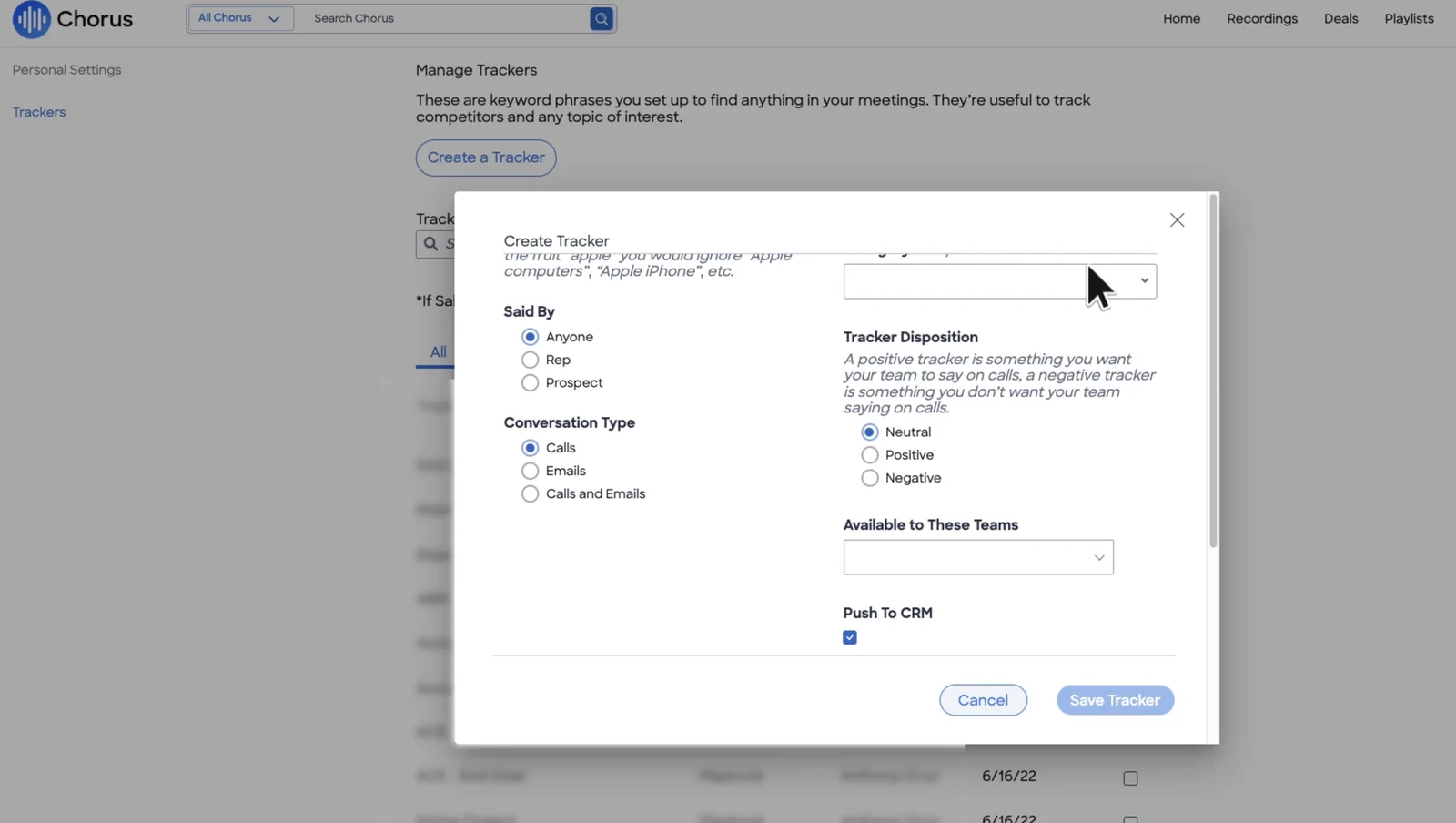
Chorus supports configurable keyword trackers across calls and emails. Its tracker write-back sends a mention signal to Salesforce and requires the Salesforce managed package.
Weflow AI Field Updates lets admins write extraction instructions against Salesforce fields and choose whether to auto-update them. For an opportunity stage, that means defining the customer evidence required for the transition.

How does it map activity without duplicates?
Require an explicit mapping order and one owner for each Salesforce activity type. “We match by account” isn’t enough when an account has several open opportunities.
- Resolve the person. Test an existing Contact, a Lead, and an attendee who doesn’t exist in Salesforce.
- Resolve the deal. Test one open opportunity, several open opportunities, and populated versus missing opportunity contact roles.
- Inspect the fallback. Confirm whether ambiguous activity stays on the Account, enters an exception queue, or requires manual selection.
- Correct a mistake. Have a rep change an incorrect association and verify the result in Salesforce.
Weflow prefers a Contact over a Lead and logs activity only to open opportunities. A single open opportunity where the person holds a contact role takes precedence; unresolved matching falls back to the Account. Reps can override the mapping through the mail add-in.
- Assign email logging ownership between Weflow and Outreach or Salesloft.
- Inspect Salesforce Event records for duplicate meetings.
- Include Salesforce Einstein Activity Capture (EAC) in the writer inventory if it’s active.
- Test duplicate behavior again after changing any integration’s sync settings.
Can it preserve Chorus history and access?
A viable Chorus migration preserves usable history, not just downloadable files. Your sales team may own the contract while marketing, customer success, and product depend on the archive.
- Must preserve: Recordings, transcripts, timestamps, participant details, and the clips or playlists teams still use.
- Must remap: Salesforce record associations, former-employee ownership, access groups, and links used by other systems.
- Must verify: Export availability, import formats, migration fees, retention, deletion procedures, and access after each contract ends.
Don’t accept an import demonstration as proof of automatic Salesforce linking. A Chorus-to-Weflow migration surfaced imported calls without Account or Opportunity links, alongside ownership questions for former employees.
What will pricing and administration really require?
Compare the cost of the working deployment, including the people who maintain it. Configurable prompts and mappings need an owner after onboarding ends.
- Commercial cost: Paid seats, viewer access, annual commitments, minimums, AI allowances, storage, API charges, and renewal terms.
- Migration cost: Export work, bulk import, archive validation, overlapping contracts, and rebuilding downstream access.
- Ongoing administration: Prompt maintenance, scorecards, field mappings, permission changes, exception handling, and rep training.
Assign RevOps ownership of the extraction definitions and Salesforce admin ownership of permissions and validation. Managers should review whether methodology answers mean anything in a deal review. A populated field can still contain the wrong answer.
ZoomInfo Chorus alternatives at a glance
Weflow, Gong, and Attention belong on the shortlist for replacing Chorus’s central conversation workflow. Momentum, Fathom, Fireflies, and Granola solve narrower problems and need a separate decision about the work they leave behind.
| Alternative | Replacement type | Recording approach | Salesforce write-back depth | Activity/contact coverage | Migration posture | Pricing visibility | Best fit |
|---|---|---|---|---|---|---|---|
| Weflow | Core conversation replacement | Meeting bot; Mobile Copilot for in-person meetings | Configurable field extraction, review, and scheduled AI playbooks | Dedicated Weflow Activity & Contact Capture product | Recording upload available; validate historical links and ownership | Public: $39/user/month for Weflow Conversation Intelligence; $49 for Revenue AI Foundation | Salesforce updates plus capture consolidation |
| Gong | Core conversation replacement | Conversation recording and analysis | Salesforce activity logging; prove required field behavior | Logging exists; inspect contact creation and mapping separately | Confirm Chorus asset coverage and linking | Confirm a current quote and module scope | Mature conversation intelligence |
| Attention | Core conversation replacement | Conversation intelligence with targeted scorecards | Test object support, field mappings, and existing-value behavior | Separate capture requires meeting-writer coordination | Confirm import scope and permissions | Confirm current pricing and packaging | Coaching by team and call type |
| Momentum | Post-call automation overlay | Consumes existing recorders and other supported sources | Post-call, event-triggered, and bulk Salesforce automation | Don’t assume it replaces mailbox and contact capture | History migration available; scope bulk transfer separately | Confirm current Salesforce packaging and charges | Keeping Chorus while improving CRM output |
| Fathom | Lightweight recording option | Recording and note-taking | Salesforce integration needs an exact workflow test | Don’t treat note-taking as a dedicated capture layer | Verify archive import and downstream access | Confirm the plan required for your Salesforce workflow | Recording and summaries with fewer CI requirements |
| Fireflies | Standalone conversation archive | Recording and transcripts | Verify structured transcript delivery and field extraction separately | Confirm additional capture requirements | Archive remains a separate data-location decision | Confirm current plan and usage terms | Teams comfortable with a separate transcript destination |
| Granola | Botless note-taking option | Notes without a participant bot | Don’t assume configurable Salesforce write-back | Not a substitute for dedicated activity capture | Verify shared-history and export requirements | Confirm team pricing and administration features | Meetings where bot admission is the binding constraint |
Weflow prices above require annual billing and a 10-user minimum. For other vendors, settle the required plan and current commercial terms before comparing totals; an unconfirmed price isn’t evidence of savings.
Full Chorus replacements for Salesforce teams
These alternatives can take over the central recording and conversation-intelligence role. “Full replacement” here doesn’t mean every Chorus capability has an identical equivalent.
Weflow as a ZoomInfo Chorus alternative: configurable Salesforce updates
Choose Weflow when replacing Chorus must also remove manual Salesforce updates and reduce separate capture tooling. Its strongest argument starts with the fields your team needs after a call.
- What it is: Weflow combines modular conversation intelligence, activity capture, and deal intelligence and forecasting products. It works exclusively with Salesforce.
- Recording: Weflow Conversation Intelligence supports Zoom, Google Meet, Microsoft Teams, and Webex. Mobile Copilot captures in-person meetings. The meeting bot still needs admission.
- Salesforce behavior: AI Field Updates supports standard and custom fields except lookup relationships. Admins can review suggestions or enable automatic updates. Weflow checks picklist output against allowed values and respects Salesforce validation rules.
- Activity coverage: Weflow Activity & Contact Capture syncs emails, meetings, and contacts from Google or Outlook. Compatibility mode avoids duplicating sequencer-owned email activity.
- Strengths: Configurable methodology extraction, customer-owned Salesforce records, coaching scorecards, clips, playlists, and shared conversation access.
- Limitations: No live in-call assistant and no strict botless meeting-recording option. Don’t assume parity with Chorus’s dated coaching initiatives or automatic linking of imported history.
- Pricing: Weflow Conversation Intelligence costs $39 per user per month. Revenue AI Foundation combines Weflow Conversation Intelligence and Weflow Activity & Contact Capture for $49. Both require annual billing and at least 10 users.
- Best for: A Salesforce-based RevOps team that wants call evidence to populate its own methodology fields and reporting.
Weflow maintains fields in two ways. A per-call update reflects that conversation; a scheduled AI playbook can consider emails, meetings, transcripts, existing fields, and related records. Use the broader context for cumulative answers such as qualification evidence across a long deal.
The setup still needs judgment. Define what counts as a champion, what doesn’t count as a metric, and which stage changes require review. We recommend keeping consequential stage updates under human approval until the extraction earns trust.
Gong as a Chorus alternative: mature conversation intelligence
Shortlist Gong when preserving a mature conversation-analysis workflow matters more than consolidating the Salesforce data path. Account-level analysis is a concrete strength: Gong can summarize methodology evidence across every call on an account.
- What it is: Gong is a conversation platform with its own data layer and additional revenue products.
- Recording: Gong covers the central conversation workflow. Test your meeting services, ad hoc calls, admission rules, and recovery requirements.
- Salesforce behavior: Gong logs activity to Salesforce. Require a demonstration of your custom qualification fields rather than assuming either complete write-back or no write-back.
- Activity coverage: Inspect mapping depth, contact creation, and opportunity contact roles separately from basic activity logging.
- Strengths: Mature conversation intelligence and account-level methodology analysis across multiple calls.
- Limitations: A Gong purchase doesn’t by itself prove that your Salesforce mapping and data-ownership requirements are met. Forecasting also carries a separate price.
- Pricing: Get a current quote separating conversation intelligence, forecasting, and any other required products.
- Best for: Teams prioritizing conversation analysis and willing to validate the wider Salesforce stack separately.
Don’t replace Chorus with Gong solely because one Chorus sync failed. Make Gong demonstrate the exact post-call workflow that triggered the review.
Attention as a Chorus alternative: team-specific scorecards
Shortlist Attention when different teams need different coaching criteria applied automatically. Its scorecards can target named teams and call tags such as Discovery or Closing.
- What it is: Attention is a conversation-intelligence option with team- and call-specific scoring workflows.
- Recording: Include scheduled, ad hoc, and customer-hosted calls in the pilot rather than judging recording from a prepared demo.
- Salesforce behavior: Test your objects, field types, approval requirements, and existing-value behavior directly.
- Activity coverage: Plan separately for any dedicated mailbox and contact capture requirement.
- Strengths: Scorecards apply automatically to matching team and call-tag combinations, so managers don’t choose a template for every call.
- Limitations: Deployments combining Attention with separate activity capture have produced duplicate Salesforce meeting records. Agree which system writes the Event.
- Pricing: Confirm current seat pricing, included workflows, and migration costs.
- Best for: Teams whose replacement decision centers on targeted coaching and who can govern a multi-vendor capture setup.
Attention’s scorecard targeting is worth testing against your selling motions. It won’t settle who owns email capture, contact creation, or meeting deduplication.
Partial Chorus alternatives for narrower needs
Partial alternatives make sense when you deliberately keep or remove part of the Chorus workflow. The mistake is buying a narrower product and discovering afterward that nobody owns the missing work.
Momentum: Salesforce automation layered over existing recorders
Choose Momentum when Chorus recording works and the unmet requirement is Salesforce automation. Momentum can consume Chorus conversations without asking the team to change recorder first.
- What it is: A Salesforce automation layer that works with existing conversation sources, including Chorus, Gong, Attention, and others.
- Strengths: Its automation can run after calls, on Salesforce events using deal history, and in bulk across matching records.
- Limitations: An overlay inherits the source recorder’s coverage and transcript quality. It won’t recover a conversation Chorus never captured.
- Salesforce boundary: Momentum supports Sales Cloud; don’t assume support for other Salesforce clouds.
- What remains required: A dependable recording source and a separate decision about activity and contact capture.
- Pricing: Confirm current Salesforce packaging, migration services, and usage charges.
- Best for: Teams that want better Salesforce output while avoiding a recorder migration.
Momentum can migrate historical conversations, but its manual upload path has a five-file-per-user daily limit. Scope a bulk migration route instead of treating manual upload as the transfer plan.
Fathom: lightweight recording with Salesforce trade-offs
Choose Fathom when recording and summarization cover most of the requirement. Keep it on a RevOps shortlist only if the Salesforce workflow survives testing.
- What it is: A lightweight recording and note-taking option.
- Replaces: Basic meeting recording, transcripts, and post-call notes.
- Strengths: A narrower scope suits teams that don’t need to reproduce Chorus’s broader coaching program.
- Limitations: Buyers have reported problems with Salesforce sync, context, coaching, and field mapping. Those are deployment reports, not a universal failure rate.
- Does not replace by assumption: Dedicated activity capture, your methodology-field workflow, or the existing coaching operating model.
- Pricing: Confirm the current plan that includes the Salesforce behavior you need.
- Best for: Teams that mainly need meeting notes and accept responsibility for the remaining CRM workflow.
Ask Fathom to update an already-populated qualification field and associate the meeting with the correct open opportunity. That test matters more than comparing summary wording.
Fireflies: standalone recording and transcript archive
Choose Fireflies when a separate recording and transcript archive is an acceptable destination. It’s a narrower decision than buying one system to maintain the Salesforce record.
- What it is: A standalone conversation-recording and transcript system.
- Replaces: Recording and searchable conversation history requirements, subject to your archive and access tests.
- Strengths: Teams can keep conversation history in a dedicated destination without adopting a broader revenue workflow.
- Limitations: Recordings and transcripts held in Fireflies don’t automatically establish configurable Salesforce field updates.
- What remains required: A verified transcript-to-Salesforce path and any additional capture or extraction workflow.
- Pricing: Confirm current team-plan pricing, storage terms, and AI allowances.
- Best for: Teams comfortable keeping the archive separate and managing its downstream data path.
Data-location decision: Weflow can use historical conversation data when transcripts reach Salesforce in a structured form. That doesn’t establish a ready-made Fireflies migration connector or automatic historical mapping.
Granola: botless notes when meeting bots are blocked
Choose Granola when admitting a meeting bot is the constraint you can’t change. Treat botless notes as a distinct operating choice, not proof of Chorus feature parity.
- What it is: A botless note-taking option that doesn’t require a participant recorder.
- Replaces: The need to admit a visible notetaker for the note-taking workflow.
- Strengths: Removes the bot-admission step that can prevent a conversation from being captured.
- Limitations: Don’t assume a shared Chorus-style archive, configurable Salesforce updates, or organization-wide coaching from personal note-taking capability.
- What remains required: A separate decision about shared history, CRM updates, governance, and activity capture.
- Pricing: Confirm current team pricing and the administration features your organization needs.
- Best for: Teams whose recording policy or meeting hosts rule out participant bots.
Botless capture doesn’t remove consent or privacy obligations. Have legal approve the actual capture and processing workflow before deployment.
What does replacing ZoomInfo Chorus really cost?
Replacing Chorus costs the sum of licenses, migration, overlap, and ongoing administration. Compare complete deployment patterns, especially when a lower seat price leaves another product or internal workflow necessary.
| Deployment pattern | Licenses required | Migration overlap | Implementation work | Usage charges | Internal owner | Pricing unknowns |
|---|---|---|---|---|---|---|
| Weflow for conversation intelligence and capture | Revenue AI Foundation at $49/user/month, annually; 10-user minimum | Chorus archive and pilot access | Permissions, capture rules, prompts, mappings, and testing | Recordings, transcripts, and core AI usage included; Agent Builder has action-based tiers | RevOps and Salesforce admin | Historical migration and any optional backfill scope |
| Conversation intelligence plus separate capture | Gong or Attention plus the required capture product | Recorder and capture cutovers | Two configurations and explicit Event ownership | Confirm across both vendors | RevOps plus both integration owners | Current quotes, module boundaries, and migration fees |
| Chorus plus Momentum | Retained Chorus contract plus automation | No immediate recorder cutover | Source connections, field automation, and monitoring | Confirm current packaging | Salesforce automation owner | Combined renewal cost and automation charges |
| Lightweight recorder plus custom workflow | Recorder, extraction service, and any capture product | Archive transfer and workflow validation | Build and maintain extraction, mapping, retries, and schema changes | Confirm recorder and AI processing terms | Named technical owner | Engineering time, maintenance, and metering |
For an illustrative 20-user team, Weflow Conversation Intelligence costs $9,360 annually. Revenue AI Foundation costs $11,760 annually for the same seat count. Those are license calculations, not complete migration budgets.
Weflow doesn’t charge platform or implementation fees. Internal rollout work still takes time, and Agent Builder is the pricing exception to unlimited core AI usage: its included Free tier provides 25 agent actions per month, with paid workspace tiers beyond that.
Use your actual Chorus renewal quote as the baseline. Savings against a generic incumbent benchmark won’t survive procurement scrutiny if your contract has different bundles or discounts.
Which Chorus alternative fits each replacement scenario?
Choose the path that fixes your binding constraint without removing a workflow the team depends on. Keeping Chorus is reasonable when coaching works and configuration explains the symptoms.
| Primary need | Salesforce requirement | Acceptable tool count | Migration tolerance | Recommended path |
|---|---|---|---|---|
| Custom methodology fields plus complete activity | Configured extraction and dedicated capture | One vendor for conversation intelligence and capture | Ready for a controlled archive migration | Weflow with Revenue AI Foundation |
| Mature conversation analysis | Validate exact write-back separately | Additional products acceptable | Prepared to rebuild archive access | Shortlist Gong |
| Coaching by team and call type | Field updates plus coordinated Event writing | Separate capture acceptable | Can validate scorecards and history | Shortlist Attention |
| Better CRM output without replacing recording | Automation over existing transcripts | Retain Chorus and add an overlay | Low | Evaluate Momentum alongside Chorus |
| Basic recording and summaries | Narrow CRM needs or owned custom workflow | Separate archive acceptable | Can simplify existing CI requirements | Evaluate Fathom or Fireflies |
| No meeting bots | Separate Salesforce workflow acceptable | Additional workflow acceptable | Can change the archive model | Evaluate Granola; exclude Weflow for a strict botless requirement |
| Time-boxed coaching initiatives | Current outputs meet requirements | Keep the existing stack | Low | Keep Chorus and correct the configuration |
How do you migrate from Chorus without losing history?
Migrate Chorus in three controlled phases: preserve the archive, establish Salesforce mapping, and cut over the live workflow. RevOps should own acceptance, with IT, legal, and the replacement vendor responsible for their parts.
What must you export before Chorus access ends?
Inventory every Chorus asset people still use before agreeing to a termination date. Request export confirmation for each asset type; don’t assume clips, playlists, or sharing permissions travel with a recording.
- Conversation assets: Recording files, transcripts, timestamps, summaries, clips, and playlist membership.
- Organizational metadata: Original owner, participants, meeting date, team, Salesforce IDs, and access restrictions.
- Downstream consumers: Shared links, enablement libraries, marketing research, customer-success workflows, and any API-dependent process.
Have each consuming team open a sample of the exported history. Counts alone won’t reveal an unreadable transcript or a missing clip that onboarding depends on.
Keep Chorus access until the archive owner signs off on completeness and the replacement access path. If an asset can’t migrate, document where it will remain and who can retrieve it.
How should imported calls map to Salesforce records?
Define historical mapping separately from live activity mapping. A past call may belong to a closed opportunity, while Weflow’s live activity mapping targets open opportunities.
| Source metadata | Target Salesforce record | Mapping rule | Exception path | Validation owner |
|---|---|---|---|---|
| Existing Salesforce record ID | Original Account, Contact, or Opportunity | Prefer the preserved ID after checking the record still exists. | Queue deleted, merged, or unavailable records. | Salesforce admin |
| Participant email | Contact or Lead | Match identity before inferring the account. | Review duplicate identities and missing records. | RevOps |
| Account plus meeting date | Historical Opportunity | Use original links where available; don’t default to today’s open deal. | Review multiple plausible opportunities. | Deal owner or manager |
| Former employee identity | Historical attribution and current custodian | Preserve original attribution while assigning an active access owner. | Document calls with no matching user. | IT and RevOps |
| Original access restrictions | Conversation access | Recreate approved access rather than granting everyone visibility. | Hold restricted calls out of the bulk release. | IT and legal |
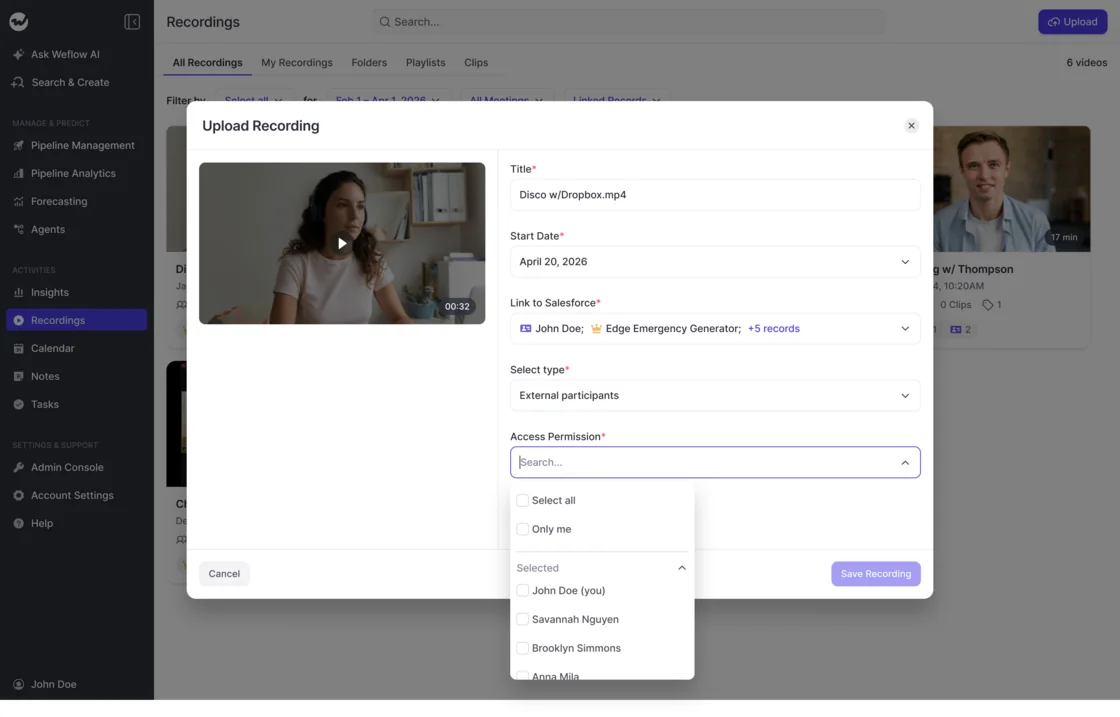
Weflow’s manual recording upload supports Salesforce record linking and access selection. That gives you a correction path, but a bulk migration still needs agreed matching rules and an exception queue.
How long should Chorus and its replacement overlap?
Keep Chorus until the replacement passes capture, write-back, history, and access checks. A two-week pilot can validate live workflows; it isn’t a promise that every archive migration finishes in two weeks.
- Enter the pilot: Select a representative cohort, establish baseline metrics, and assign one Salesforce writer per activity type.
- Run controlled comparisons: Use equivalent meeting samples or approved parallel capture. Don’t let both systems write uncontrolled Events and field updates.
- Validate the archive: Sample imported history, resolve mapping exceptions, and test access with non-sales users.
- Approve cutover: Stop Chorus recording and write-back only after the agreed acceptance checks pass. Keep a documented rollback owner and procedure.
- End access: Confirm export completeness, retention obligations, and any outstanding deletion requests before the contract closes.
What should a two-week Chorus replacement POC measure?
A two-week Chorus replacement POC should measure capture completeness, Salesforce correctness, and the work people still perform. It can validate activity capture and conversation intelligence, not forecast accuracy over a quarter.
Set every target before testing. Use your current Chorus deployment as the baseline, and include the failure cases that triggered the review.
| Test | Baseline | Target | Sample | Owner | Evidence source | Pass/fail decision |
|---|---|---|---|---|---|---|
| Recording coverage | Recorded meetings divided by eligible meetings | Team-defined coverage threshold | Scheduled, ad hoc, and customer-hosted calls | RevOps | Calendar plus recording logs | Meets threshold with exclusions documented |
| Salesforce sync success | Expected versus completed writes | Agreed completeness and latency | Recorded calls across pilot users | Salesforce admin | CRM records and sync evidence | Required outputs arrive within the agreed window |
| Record mapping | Correct, ambiguous, and incorrect links | Agreed matching and exception rules | Accounts with multiple open opportunities | RevOps | Contact roles and activity associations | Matches or falls back as specified |
| Field accuracy | Manual quality and current completeness | Field-specific acceptance criteria | Methodology, picklist, and stage fields | Sales manager | Transcript and before/after values | Values reflect qualifying evidence |
| Approval effort | Current post-call entry time | Agreed review effort | Interpretive fields requiring approval | Pilot reps | Review log and timed samples | Review costs less effort than the current workflow |
| Duplicate activity | Existing duplicate count | No new duplicates in controlled tests | Sequencer emails and recorded meetings | Salesforce admin | Task, EmailMessage, and Event records | Each activity follows its ownership rule |
| Rep effort | Current logging, correction, and follow-up work | Agreed reduction without lost controls | Normal pilot workdays | Sales manager | Rep observations and timed tasks | No new recurring workaround |
| Failure diagnosis | Time to explain a missed recording or write | Agreed diagnosis and recovery process | Opt-out, lobby, validation, and mapping failures | RevOps and vendor | Reason codes and recovery evidence | Owner can explain and act on each miss |
For Weflow, test recording-object permissions as part of the pilot. The Salesforce recording object holds transcripts and executive summaries, so access is a confidentiality decision, not a routine installation checkbox.
Frequently asked questions
Weflow’s final qualification depends on your recording policy, Salesforce controls, and historical access requirements. Resolve these before signing.
Is Weflow a complete ZoomInfo Chorus replacement?
Yes, for teams replacing core recording, transcription, searchable history, coaching scorecards, clips, and playlists while adding configurable Salesforce updates. Weflow doesn’t provide a live in-call assistant or an equivalent guarantee for every Chorus coaching initiative. It fits best when Salesforce data automation drives the switch.
Can Weflow update custom Salesforce fields from calls?
Yes. Weflow AI Field Updates extracts values into standard and custom Salesforce fields, except lookup relationships. Admins configure the prompts and destinations. Weflow checks picklist values and respects validation rules; test dependent fields, stage gates, and existing rep notes before enabling automatic writes.
Can admins approve Weflow field updates before write-back?
Yes. Weflow supports manual review with suggested and current Salesforce values side by side, as well as automatic updates. Start interpretive fields in review mode and confirm reviewer permissions during setup. Keep stage changes under review until the output meets your acceptance criteria.
Does Weflow require a meeting bot to record?
Yes. Weflow’s video-meeting notetaker joins as a participant and must be admitted. A rep can send it back into an active call from the Weflow calendar if it leaves the lobby, but recovery won’t capture the missed portion. Weflow doesn’t meet a strict botless-recording requirement.
Can Weflow coexist with Outreach or Salesloft?
Yes. Weflow’s compatibility mode recognizes sequencer tracking patterns and skips those emails so both systems don’t write the same email activity. Assign capture ownership explicitly and test meeting Events separately. Compatibility mode isn’t a blanket deduplication promise for every record type.
Where does Weflow store recordings and transcripts?
Weflow stores video recordings in its own infrastructure. The Salesforce recording object holds the full transcript and executive summary, while call-derived values go into the configured CRM fields. Review recording retention and Salesforce object access separately because those assets have different storage and access paths.
What Weflow data remains in Salesforce after cancellation?
Customer-owned Salesforce activity records, contacts, and field values remain after you stop using Weflow. Don’t assume continued access to Weflow-hosted video recordings. Confirm export arrangements and preserve transcript-bearing package records before any package removal.
See how Weflow captures activity, updates Salesforce fields from calls, and rolls up your forecast. Book a 30-minute demo.







