
Salesloft vs Weflow pricing 2026: Advanced, Elite, add-ons, and AI usage
Compare Salesloft vs Weflow pricing in 2026: seats, add-ons, AI usage, and Clari Forecast costs.


Salesloft publishes what Advanced and Elite include, but not enough pricing to approve a complete budget. Forecasting, Account and Coaching Agents, and the Dialer sit outside the base packages. Their prices are not publicly disclosed. A package comparison tells you what to request, not what your organization will spend.
We’d audit the renewal by user group before negotiating the seat rate. Who runs cadences? Who submits a forecast? Which managers will use coaching? Then add AI allowances, telephony, services, and overlapping contracts. That gives you a budget you can defend against actual work, rather than a feature list multiplied by revenue headcount.
Weflow is the Revenue AI Orchestration platform for sales, customer success, and RevOps teams. Built for Salesforce teams, Weflow connects activity, conversation, deal, and forecast workflows through modular products with published prices. It doesn’t replace Salesloft cadences or dialing. That boundary matters to the comparison.
Salesloft vs Weflow pricing at a glance
Salesloft uses quote-led packages plus add-ons; Weflow publishes module and bundle prices, with usage pricing confined to Agent Builder.
| Decision dimension | Salesloft | Weflow |
|---|---|---|
| Base packaging | Advanced and Elite include engagement, conversation intelligence, Deals, coaching, and Ask Salesloft. Elite adds enterprise controls. | Three standalone products and three Revenue AI bundles let you buy capture, conversation intelligence, and deal intelligence or forecasting. |
| Published seat prices | Advanced and Elite prices are not publicly disclosed. Request minimum commitments and any platform charges. | Standalone products cost $19 or $39 per user/month. Bundles cost $49, $59, or $79 per user/month, billed annually with a 10-user minimum. |
| Forecasting | A separate add-on. Confirm the exact product and entitlement, including whether the quote covers Clari Forecast. | Included in Weflow Deal Intelligence & Forecasting at $39 per user/month and Revenue AI Enterprise at $79. |
| AI pricing | Ask Salesloft comes with both packages. Account and Coaching Agents cost extra; request their usage allowances and overage rules. | Ask Weflow AI, summaries, and AI field updates sit within the relevant seat price. Agent Builder has workspace-level action tiers. |
| Engagement and telephony | Cadence and Rhythm belong to the base packages. The Dialer requires an add-on, with regional and number-related variables. | No sequencing or dialer. Keep Salesloft or budget for another engagement provider. |
| Deployment scope | Ask whether each add-on permits role-specific seats and whether minimums apply across the account. | Modular adoption supports phased deployment. Compatibility mode supports coexistence with Salesloft. |
| Services and access | Implementation, migration, ongoing administration, and viewer entitlements need written confirmation. | No platform or implementation fees. Free view-only licenses (up to one per recording license) support stakeholders who only need to review information. |
Why are Salesloft and Clari now one evaluation?
Salesloft and Clari merged in December 2025 and consolidated under the Salesloft brand on September 1, 2026. Clari Forecast continues as a product line within the combined platform.
Your former Clari renewal now belongs in the same commercial review as Salesloft. But one vendor relationship doesn’t settle your entitlement, migration, or administration questions.
The integration work has progressed. Clari Copilot is replacing Salesloft Conversations in phases, and Copilot outputs feed Salesloft workflows. New implementations require unified Okta sign-on.
Ask the account team to demonstrate the deployment you’ll receive. Don’t assume an existing customer gets the same configuration or migration schedule as a new buyer.
What do Salesloft Advanced and Elite include?
Advanced and Elite share the main execution workflows. Elite adds enterprise administration capabilities, not every separately priced product.
What both Salesloft packages include
Salesloft Advanced and Elite both include Cadence, Rhythm, Conversations, Deals, coaching, and Ask Salesloft, alongside the supporting execution capabilities below.
| Workflow | Shared package entitlement |
|---|---|
| Buyer engagement | Cadence, Sales Email, calendaring, and automation. |
| Daily prioritization | Rhythm organizes the seller’s workflow. |
| Conversation review | Conversations and coaching. Confirm your organization’s transition to Clari Copilot. |
| Deal management | Deals supports deal inspection and management. Forecasting remains a separate add-on. |
| AI assistance | Ask Salesloft provides conversational assistance. Account and Coaching Agent entitlements remain separate. |
| Operations and reporting | CRM sync and analytics support execution and measurement. |
Included coaching and the separately priced Coaching Agent aren’t interchangeable labels. Have Salesloft identify which workflow each line on your quote enables.
What Salesloft Elite adds over Advanced
Salesloft Elite adds multi-team support, sandbox environments, and CRM signals for custom objects. Buy the upgrade against an operating requirement you can name.
| Elite capability | Operational requirement | Who should evaluate it |
|---|---|---|
| Multi-team support | Administering a deployment across distinct teams. | Organizations whose team structure exceeds the Advanced configuration. |
| Sandbox environments | Testing configuration changes outside production. | Teams with formal release and change-control processes. |
| CRM signals for custom objects | Using custom-object signals to drive Plays. | Teams whose engagement workflows depend on data beyond standard CRM objects. |
Salesloft’s custom-object signals feed Plays; they don’t mean Salesloft Deals supports custom objects. Validate the destination of the signal before using it to justify Elite.
Which Salesloft products still cost extra?
Salesloft lists Forecasting, the Account Agent, the Coaching Agent, and the Dialer as add-ons to Advanced and Elite. Each needs its own price, seat scope, and adoption case.
Salesloft Forecasting remains a separate add-on
Salesloft Forecasting requires a separate quote, and neither base package makes its cost disappear.
| Item | What to establish |
|---|---|
| Published price | Not publicly disclosed. |
| Packaged scope | The add-on lists automatic roll-ups, forecast submission, and AI-driven next actions. |
| Product identity | Confirm whether the order form covers Clari Forecast, Salesloft forecasting capabilities, or both. |
| User scope | Request separate counts and rates for submitters, managers, administrators, and viewers. |
Salesloft AI Forecast is a specific prediction capability for new-business deals closing in the current quarter. It requires a data evaluation before activation. Don’t treat that name as proof of a Clari Forecast entitlement.
- Ask Salesloft to demonstrate new business, renewals, expansion, and churn as separate requirements.
- Confirm the hierarchy, submission process, overrides, and forecast fields your deployment will use.
- Identify which existing configuration and historical data will transfer.
Salesloft Account and Coaching Agents cost extra
Salesloft includes Ask Salesloft in both packages but sells the Account Agent and Coaching Agent separately. Their dollar prices aren’t publicly disclosed.
| Capability | Commercial status | Usage question | Likely users to evaluate |
|---|---|---|---|
| Ask Salesloft | Included in both packages. | What limits govern questions, source access, and usage? | Sellers and managers using account or meeting context. |
| Account Agent | Separate add-on covering Buyer Identification, Account Research, and Person Research agents. | What counts as a research action, and what allowance comes with the purchase? | SDRs and sellers doing account research. |
| Coaching Agent | Separate add-on covering the Sales Strategist agent. | How do licensed users, scheduled analyses, and usage limits affect cost? | Reps and managers adopting the coaching workflow. |
| MCP server | Salesloft lists access with agent add-ons. | Which add-on grants access, and what API and external AI subscription requirements apply? | Approved users querying Salesloft through an external assistant. |
Clari Copilot AI Themes also has a monthly analysis allowance. That’s a specific metered capability, not evidence that every Salesloft AI feature uses the same charging model.
Salesloft Dialer adds regional and number variables
Salesloft sells the Dialer separately, with regional calling modules and number-related charges. Ask for a telephony schedule alongside the software quote.
| Line item | Documented treatment | Quote requirement |
|---|---|---|
| North America | Unlimited Talk and Text North America covers calls to the +1 country code, subject to fair usage. | Module price, eligible seats, SMS terms, and fair-use policy. |
| Europe | Unlimited Talk Europe covers designated European countries, subject to fair usage. | Module price, destination list, and out-of-scope calling charges. |
| LocalDial numbers | $1 to provision a new area-code number, plus $1 per number per month of use. | Expected number inventory and provisioning charges. |
| Unlimited LocalDial | Removes monthly LocalDial number charges for US area codes. | Plan price and the treatment of non-US numbers. |
| Call recordings and storage | Salesloft’s Dialer pricing guide lists both without additional charges. | Retention, download, and exit terms. |
The regional module prices aren’t publicly disclosed. Don’t use the published number charges as a substitute for the missing Dialer quote.
How should RevOps audit a Salesloft quote?
Build the Salesloft cost model in four passes: role allocation, AI exposure, transition costs, and adoption. Keep each assumption visible so finance can challenge it.
Map Salesloft modules to actual user groups
Allocate Salesloft seats according to the work each group performs. A revenue employee isn’t automatically an engagement-platform user.
| User group | Base package need | Forecasting need | Agent need | Dialer need |
|---|---|---|---|---|
| SDRs | Cadences, email execution, and Rhythm. | Confirm whether the role submits any forecast. | Test account and person research in daily prospecting. | Price seats for reps who place calls. |
| AEs | Separate cadence users from sellers working mainly in their inbox. | Identify actual forecast submitters. | Validate research or coaching use by sales motion. | Count users who depend on Salesloft calling. |
| Managers | Determine inspection and coaching access requirements. | Price roll-up, override, and submission responsibilities. | Confirm who reviews and acts on coaching output. | Don’t assume managers need calling seats. |
| CS and account management | Check whether customer workflows use cadences. | Validate renewal and expansion submission requirements. | Test coaching against post-sale work. | Allocate only where calling happens in Salesloft. |
| RevOps and executives | Distinguish administration from review-only access. | Separate configuration, submission, and viewing roles. | Identify administration and external AI access needs. | Request admin access without assuming a calling entitlement. |
These are allocation requirements to negotiate, not confirmed Salesloft licensing rights. Get role-specific assignment terms in writing.
The waste we see starts quietly: a team buys sequencing for SDRs, then extends licenses to everyone for activity capture. At renewal, check cadence usage before accepting another company-wide seat count.
Separate seat prices from AI usage limits
A Salesloft AI budget needs the license price and the usage rule. An allowance without an overage policy leaves the cost model unfinished.
| Fixed-cost fields | Usage-sensitive fields |
|---|---|
| Package, licensed users, per-seat rate, and contract term. | Included actions, analyses, runs, or other billing units. |
| Agent add-on price and minimum commitment. | Whether allowances apply per user, team, or organization. |
| External AI client subscriptions, where required. | API limits, reset dates, carryover rules, and usage visibility. |
| Committed annual spend. | Contractual overage rule: stop, throttle, require approval, or charge automatically. |
We’d reject an unbounded consumption assumption in either vendor’s budget. Adoption shouldn’t surprise finance.
Add services, migration, and contract overlap
First-year Salesloft cost includes the work and overlap needed to reach the new deployment, not just the annual seat commitment.
- Request implementation, configuration, training, and migration fees separately.
- Budget internal RevOps, Salesforce admin, IT, and enablement time.
- Identify work that will still require paid professional services after launch.
- List existing Salesloft and Clari end dates, notice periods, and remaining commitments.
- Confirm any co-terming credits rather than assuming the merger creates them.
- Include data export and archive work before retiring an application.
First-year total cost = base licenses + add-ons + usage charges + telephony variables + services + internal rollout cost + incremental contract overlap.
Keep overlap incremental. Don’t count the same legacy commitment twice.
Compare annual cost with module adoption
Compare Salesloft’s annual cost with active workflows, not account access. A manager opening a dashboard and a rep submitting a forecast represent different adoption signals.
| Worksheet field | What to record |
|---|---|
| Module and annual allocation | Use the quoted line item. For bundled capabilities, document an allocation method without double-counting the bundle. |
| Licensed users | The number you must pay for under the contract. |
| Expected active users | People expected to perform the required workflow within a defined review period. |
| Required workflow | For example, running cadences, submitting forecasts, or completing coaching reviews. |
| Owner | The internal leader accountable for adoption. |
| Annual cost per active user | Allocated annual module cost divided by expected active users. |
For automated capture, measure coverage and correct Salesforce mapping instead of logins. Weflow can capture activity for enrolled users who never sign in, so login counts would misread successful deployment as poor adoption.
What must Salesloft confirm before signature?
Every Salesloft term that changes price, entitlement, or implementation belongs in writing. Send these questions with the revised seat model.
- Package economics: What are the Advanced and Elite seat rates, minimum seat count, minimum ACV, platform fees, and renewal increase terms?
- Seat assignment: Can we assign each add-on only to relevant users, and what minimums or reassignment restrictions apply?
- Forecasting: Which named forecasting product does the quote include, and which revenue motions and user roles does that entitlement cover?
- AI allowances: What does each billing unit mean, how much usage is included, and what happens when we reach the allowance?
- MCP access: Which purchase grants access, and what API limits and external client subscriptions will we need?
- Telephony: What will regional calling, SMS, LocalDial, number provisioning, and out-of-scope destinations cost?
- Services: Which implementation, migration, training, and ongoing configuration tasks cost extra?
- Legacy agreements: How will our existing Salesloft and Clari terms change, and can we co-term without paying twice for overlapping coverage?
- Administration: Which applications, sign-on configuration, permissions, and admin surfaces will remain separate?
- Support: Who owns our deployment and account, and what assistance will we receive if adoption stalls?
- Exit: Which recordings, transcripts, activity records, and forecast history can we export, in what format, and by what deadline?
What does Weflow cost by module and AI usage?
Weflow’s standalone products start at $19 per user/month, and Revenue AI bundles start at $49. Annual billing and a 10-user minimum apply.
Weflow has no platform or implementation fees. Agent Builder is the usage-priced exception to the seat model.
Weflow standalone modules and Revenue AI bundles
Weflow lets you buy individual products or bundled coverage. All prices below are USD list prices per user/month, billed annually with a 10-user minimum.
| Product or bundle | Included scope | Seat price | Best-fit rollout |
|---|---|---|---|
| Weflow Activity & Contact Capture | Email, meeting, and contact capture into Salesforce. | $19 | Cover inbox-based users without buying engagement functionality. |
| Weflow Conversation Intelligence | Recording, transcription, summaries, AI field updates, coaching, and Mobile Copilot. | $39 | Turn customer conversations into usable CRM data. |
| Weflow Deal Intelligence & Forecasting | Deal health, pipeline analytics, forecast submissions, roll-ups, and accuracy tracking. | $39 | Replace or establish the deal inspection and forecast process. |
| Revenue AI Foundation | Weflow Activity & Contact Capture plus Weflow Conversation Intelligence. | $49 | Start with the activity and conversation data foundation. |
| Revenue AI Business | Revenue AI Foundation plus Deal Intelligence, without Forecasting. | $59 | Add pipeline and account inspection while retaining the current forecast. |
| Revenue AI Enterprise | All three Weflow products, including Forecasting. | $79 | Run capture, conversation intelligence, deal inspection, and forecasting together. |
Revenue AI Business doesn’t include forecasting. Moving from Revenue AI Foundation to Revenue AI Enterprise adds $30 per user/month at list price; Business to Enterprise adds $20.
Free view-only licenses (up to one per recording license) cover stakeholders who need to review information. Capture enrollment and working access are separate requirements, so don’t treat a viewer as a free capture seat.
Confirm your mixed-product allocation, any volume discounts, and optional historical backfill in the final quote. Weflow offers historical backfill of up to 24 months as an add-on.
Included Weflow AI versus metered Agent Builder
Weflow includes daily AI capabilities in the relevant product seat rather than charging per question or recording. Agent Builder uses a separate workspace-level action allowance.
| AI capability | Pricing treatment |
|---|---|
| Ask Weflow AI | Included in the seat, without prompt-based metering. |
| Recordings and transcripts | Unlimited with Weflow Conversation Intelligence. |
| AI summaries, templates, and field updates | Included with the relevant product rather than charged per extraction. |
| Agent Builder | Metered by agent actions per workspace, not by paid user. |
| Agent Builder tier | Workspace price | Monthly action allowance |
|---|---|---|
| Free | Included in every Weflow plan and bundle. | 25 agent actions. |
| Growth | $299/month. | 500 agent actions. |
| Scale | $999/month. | 2,500 agent actions. |
| Enterprise | Custom package. | Confirm the contracted allowance. |
The free allowance means 25 monthly agent actions, not 25 agents per user. Before budgeting automation, confirm how the workflow consumes actions and what happens at the tier limit.
Agent Builder output can go to email and Slack. Salesforce field updates use Weflow’s field-update and AI playbook mechanisms; don’t assume every agent output writes directly into a CRM field.
Where is Salesloft the stronger choice?
Salesloft is stronger when engagement execution and dialing need to share a vendor, or when mature Clari forecasting supports complex enterprise requirements.
Salesloft unifies cadences, Rhythm, and dialing
Salesloft gives cadence users an execution environment that Weflow doesn’t replace. A lower intelligence quote won’t offset losing the workflow your SDRs use all day.
Retain Salesloft when:
- Reps depend on Cadence and Rhythm to organize daily outreach.
- Salesloft calling and its associated workflows are operating requirements.
- One vendor for engagement and telephony matters more than buying those capabilities separately.
Weflow provides neither sequencing nor a dialer. A complete Salesloft exit requires another home for both.
Clari suits complex enterprise forecast roll-ups
Clari’s enterprise forecast roll-ups are more mature than Weflow’s, particularly for organizations with large, deeply configured forecasting processes.
Stay with Clari when the existing process works and a replacement can’t demonstrate your required mechanics. Test:
- Hierarchy and roll-up structures across teams and products.
- Splits, date logic, and separate revenue motions.
- Pipeline waterfall, pacing, and historical comparison views.
- Submission, override, and board-reporting requirements.
We wouldn’t ask you to trade a working enterprise forecast for a pricing advantage alone. Reproduce the requirements on your data before discussing a cutover.
Where does Weflow give RevOps more cost control?
Weflow gives RevOps more control over purchasing scope and the data the team keeps. You can price capture separately from engagement and use the resulting Salesforce records in your own reporting and automation.
Weflow publishes modular seat prices
Weflow’s published module prices let you build the first budget without waiting for a sales proposal. Procurement can inspect the scope and arithmetic before negotiating discounts.
The commercial benefit is clearest for users who need activity capture but don’t run cadences. Their requirement has a standalone $19 price instead of depending on an engagement-package quote.
Published pricing doesn’t remove contract review. Confirm paid users, product assignments, optional add-ons, and Agent Builder usage before approval.
Weflow supports phased adoption by user group
Weflow supports starting with capture and conversation intelligence while an existing forecasting contract runs to renewal. That avoids asking finance to fund two forecasting systems immediately.
- Establish coverage: Assign Weflow Activity & Contact Capture to users whose inbox activity needs a dependable Salesforce record.
- Add conversation workflows: Introduce Weflow Conversation Intelligence where call summaries, field updates, and coaching have an owner.
- Evaluate forecasting at the contract window: Add forecast coverage after validating requirements and agreeing on the cutover.
Keep the first purchase focused on an uncovered need. Buying unused replacement modules early recreates the renewal problem you’re trying to solve.
Weflow keeps revenue data usable in Salesforce
Weflow writes captured activity and structured call outcomes into customer-owned Salesforce records. Your reporting, automations, and AI can use those records without relying solely on the Weflow interface.
Admins map AI outputs to Salesforce fields and choose the field-update behavior. That gives RevOps a concrete output to validate: the value in the record.

| Data | Destination and ownership boundary |
|---|---|
| Captured activity and structured field updates | Customer-owned Salesforce records that remain available independently of the Weflow application. |
| Summaries and full transcripts | A managed-package recording object in Salesforce. Review permissions and preservation requirements before uninstalling the package. |
| Video recordings | Weflow stores the files and streams them back. Include recording export in exit planning. |
| Forecast calls, submissions, targets, and tracker hits | These remain in Weflow rather than Salesforce objects. Review their access and portability separately. |
Data ownership has boundaries. We don’t claim that every Weflow application artifact lives in Salesforce.
How can Weflow coexist with Salesloft?
Weflow can coexist with Salesloft by dividing responsibility for engagement and data capture. Compatibility mode prevents Weflow from duplicating recognized sequencer emails that Salesloft already logs.
That’s a configured responsibility split, not a promise to deduplicate every activity from every application.
Keep Salesloft where cadences and dialing matter
Keep Salesloft seats for users whose daily work depends on its engagement capabilities. Audit the rest against their actual workflows.
| User or workflow | Coexistence boundary |
|---|---|
| SDRs and cadence-driven AEs | Retain Salesloft for outreach execution and the activity it owns. |
| Salesloft Dialer users | Retain calling and its recording workflow in Salesloft. |
| Inbox-based AEs, account managers, and CS | Evaluate Weflow capture and conversation coverage without assuming they need a Salesloft engagement seat. |
| Managers and cross-functional viewers | Determine which application they need to work in and where review-only access is enough. |
Coexistence saves money only if the contract lets you reduce or avoid overlapping licenses. Model the hybrid invoice before calling it consolidation.
Move capture and intelligence to Weflow by phase
Introduce Weflow around contract windows and validate each data-writing responsibility before expanding.
- Pilot capture: Select a defined user group, configure exclusions and opportunity mapping, and enable compatibility mode. Check that recognized Salesloft emails don’t produce duplicate Salesforce records.
- Add conversation intelligence: Assign recording ownership, set permissions, and configure summaries and AI field updates. Verify recording coverage and the resulting CRM values.
- Validate forecasting: Agree on motions, hierarchy, deadlines, overrides, and accuracy measurement. Run the submission process before retiring the incumbent.
Weflow’s roll-up view makes forecast submissions visible across the team hierarchy. Use that workflow to test who submits and who reviews, rather than treating a populated dashboard as proof of adoption.
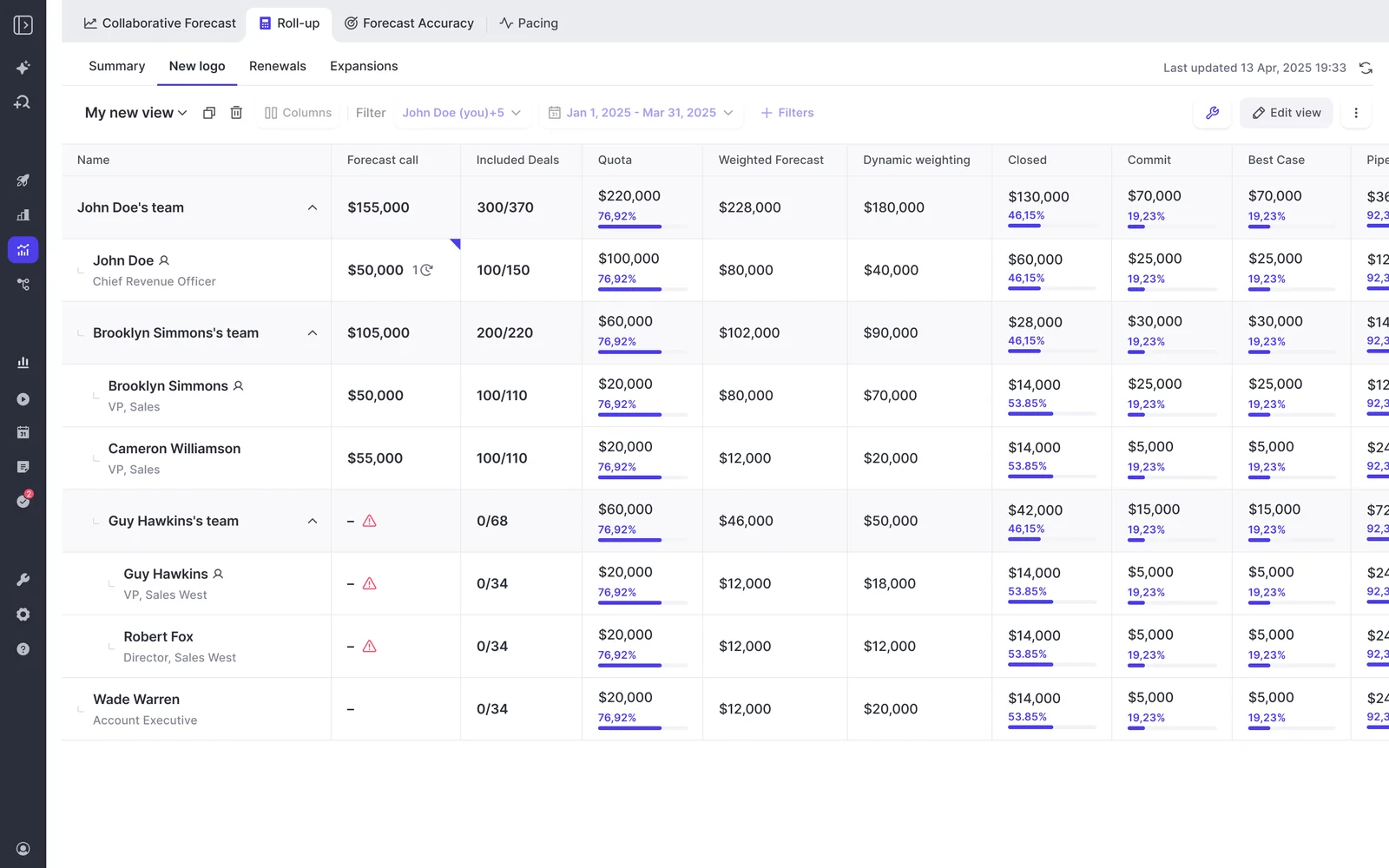
A two-week pilot can test capture and conversation outputs. It can’t establish whether a forecasting cadence will hold. Set the forecast evaluation period around the process you need to prove.
Assign a rollout owner before changing licenses
Name an internal owner for each adopted Weflow or Salesloft workflow before signing the new contract. Vendor onboarding can handle implementation work; your team still owns the operating process.
| Workflow | Proposed internal owner | Adoption signal | Review checkpoint |
|---|---|---|---|
| Activity capture | RevOps and Salesforce admin. | Coverage, correct mapping, and no duplicate writes for pilot users. | Before adding the next user group. |
| Conversation intelligence | Enablement and frontline managers. | Usable summaries, accepted field updates, and completed coaching reviews. | At the pilot decision. |
| Forecasting | Revenue leadership with RevOps and finance. | On-time submissions, reviewed overrides, and a recorded forecast position. | After the agreed forecast evaluation cycle. |
| Cadences and dialing | Sales development or sales leadership. | Active execution by the users retaining Salesloft seats. | Before finalizing renewal quantities. |
Don’t judge a lower quote as a successful migration. Judge whether the named users perform the work without RevOps rebuilding the process outside the application.
Should you renew Salesloft, coexist, or choose Weflow?
Renew Salesloft for engagement-led consolidation, coexist when different user groups need different workflows, and choose Weflow when capture and revenue intelligence drive the purchase.
| Decision test | Renew Salesloft | Coexist | Choose Weflow |
|---|---|---|---|
| Best fit | Cadences, Rhythm, and dialing anchor daily execution, or mature Clari forecasting meets critical requirements. | Some users need Salesloft engagement while others need capture and intelligence. | Salesforce-based capture, conversation data, deal inspection, and forecasting are the primary requirements. |
| Trade-off accepted | Quote-led pricing and separately scoped add-ons. | Two vendors with explicit ownership of activity writes and workflows. | Sequencing and dialing remain outside Weflow. |
| Budget test | Expected module adoption justifies the full invoice, including services and AI allowances. | Retained Salesloft scope plus Weflow costs less than the coverage being replaced or avoided. | Modular seats, Agent Builder, optional add-ons, and any engagement provider fit the approved budget. |
| Disqualifying condition | Most paid users need only capture, and the vendor won’t offer workable allocation terms. | Contract minimums prevent savings or nobody owns the integration boundaries. | You require a non-Salesforce CRM, an included dialer, or forecast mechanics Weflow hasn’t demonstrated. |
Salesloft pricing FAQ
Salesloft’s package documentation establishes the entitlement baseline. Prices, user allocation, usage terms, and legacy transitions still need confirmation in your quote.
Is Salesloft Advanced or Elite pricing public?
Salesloft Advanced and Elite dollar prices aren’t publicly disclosed. Request the per-seat rate, minimum commitment, any platform fee, contract term, and renewal increase terms.
Is Salesloft Forecasting included in Advanced or Elite?
No. Salesloft lists Forecasting as an add-on to both packages. Confirm the named forecasting product, supported revenue motions, and required user licenses.
Are Salesloft AI agents included in either package?
Salesloft sells the Account Agent and Coaching Agent as separate add-ons. Ask Salesloft, the conversational assistant, comes with both packages. Request the agent price and usage allowance separately.
Is the Salesloft Dialer included in either package?
No. Salesloft lists the Dialer as an add-on. The complete budget should include regional modules, applicable SMS terms, LocalDial, number charges, and any out-of-scope calling costs.
Can Salesloft add-ons use role-specific seats?
Don’t assume Salesloft permits role-specific add-on allocation without written confirmation. Request a schedule showing minimums and assignment rights for SDRs, forecast submitters, managers, viewers, and administrators.
Are Clari Forecast and Salesloft AI Forecast identical?
No. Clari Forecast is the forecasting product line within the combined Salesloft platform. Salesloft AI Forecast is a specific current-quarter new-business prediction capability. Confirm both product scope and commercial entitlement on the order form.
What happens to legacy Salesloft and Clari contracts?
Salesloft’s brand consolidation doesn’t establish your customer-specific transition terms. Confirm:
- Which legacy entitlements remain and which package replaces them.
- Whether renewal dates can align and what credits apply.
- Who owns migration, configuration, and historical data preservation.
Does Salesloft charge implementation or services fees?
Salesloft’s services charges require a quote; don’t assume the seat rate includes them. Ask for implementation, migration, training, ongoing configuration, and support scope as separate line items.
Is the Salesloft MCP server included?
Salesloft lists MCP server access with its agent add-ons. Don’t assume Advanced or Elite alone grants access. MCP calls use the organization’s API allowance, and external AI clients have their own subscription requirements.
Can Weflow avoid duplicate Salesloft activity logging?
Yes. Weflow compatibility mode recognizes sequencer tracking patterns and skips supported emails that the engagement provider logs. Configure the responsibility split and test it; meeting and call logging need their own ownership rules.
Does Weflow replace Salesloft cadences and dialing?
No. Weflow doesn’t provide sequencing or a dialer. Retain Salesloft for those workflows or include another provider in the replacement budget.
How is Weflow AI usage priced?
Weflow includes Ask Weflow AI, summaries, and AI field updates within the relevant seat price. Agent Builder is the usage-priced component, with 25 monthly workspace actions included in every plan.
Paid Agent Builder tiers start at $299/month for 500 actions and $999/month for 2,500 actions. Compare the allowance with your planned workflows before choosing a tier.
Bring your renewal quote and user-group allocation to the evaluation. See how Weflow captures activity, updates Salesforce fields from calls, and rolls up your forecast. Book a 30-minute demo.







