
Best RevOps MCP options for Claude and ChatGPT: 8 data routes compared
Compare 8 RevOps MCP options for Claude and ChatGPT by data, evidence, permissions, and actions


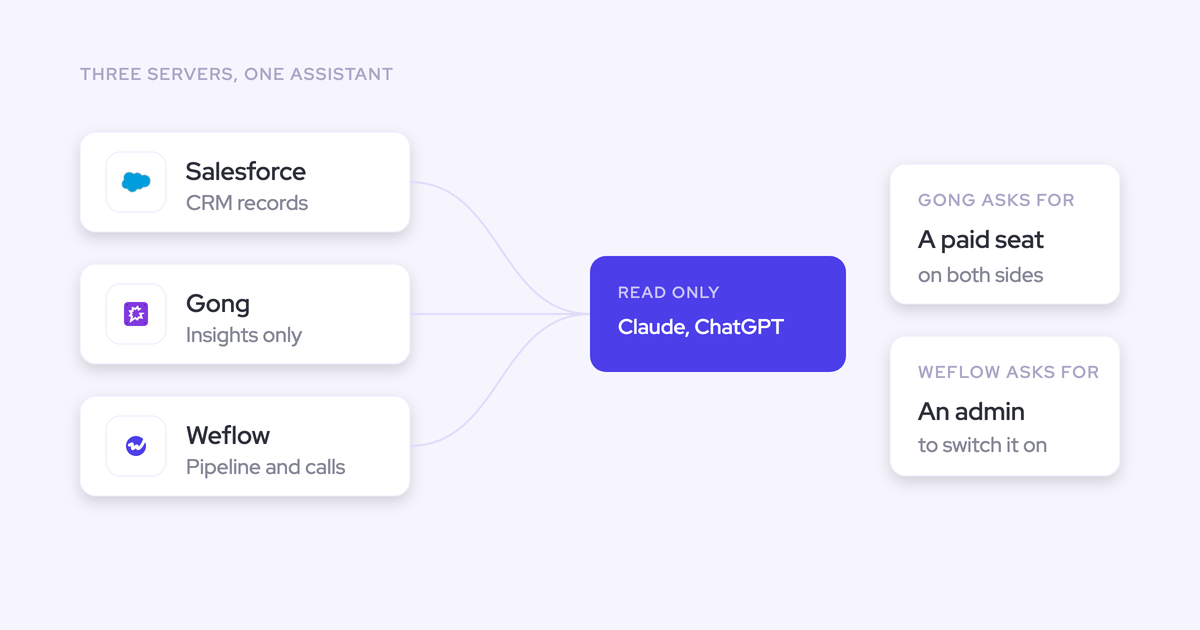

Choose your RevOps MCP connections by the questions they must answer and the actions they must support. Salesforce is the direct CRM route. Conversation and forecasting connectors expose different slices of the customer record, with different permissions and costs. Connecting everything won’t fix missing data, and choosing the server with the longest tool list won’t guarantee a useful answer.
Your approval decision needs to cover what comes back, whether you can inspect the evidence, and who can access it. That applies whether leadership wants portfolio analysis or your managers want the context behind Weflow deal reviews. Start with those requirements before approving another connection.
Weflow is the Revenue AI Orchestration platform for sales, customer success, and RevOps teams. For Salesforce teams that need both CRM access and Weflow’s forecast and conversation context, we recommend evaluating Salesforce MCP and Weflow MCP together. Keep Salesforce responsible for CRM records and actions, and use Weflow for the additional revenue context.
RevOps MCP options at a glance
The eight routes below solve different access problems. Treat unavailable details as procurement questions, not implied capabilities.
| Option or route | Primary data scope | Evidence returned | Query level | Read/write capability | Permission model | Access requirements | Pricing or metering | Best fit |
|---|---|---|---|---|---|---|---|---|
| Weflow MCP | Playbooks, summaries, transcripts, forecast calls, rep metrics | Source transcripts when enabled; generated outputs and metrics with opportunity IDs | Conversation, playbook, forecast, and rep-level metrics | Read-only | Workspace enablement and separate transcript control; validate user scope during pilot | Weflow access, admin enablement, supported assistant connection | Seat-priced products; confirm MCP entitlement and limits | Forecast and conversation context alongside Salesforce |
| Salesforce Hosted MCP Servers | CRM records, schema, and Salesforce processes | Stored records and field values, including generated content already in CRM | Individual records and filtered record sets | CRUD and supported process invocation | Salesforce sharing and visibility rules | Enterprise Edition or above for basic hosted MCP; configured client authorization | Basic CRUD and process usage currently unmetered; separate Agentforce capabilities can consume credits | CRM retrieval and Salesforce actions |
| Attention MCP | Calls, transcripts, analysis, scorecards, workspace administration | Raw transcripts, matching snippets, and generated insights | Individual calls, searchable call collections, and workspace resources | Read-write, including administrative and destructive operations | Role-dependent access; review admin credentials separately | Attention access and assistant setup; confirm commercial entitlement | Rate limits documented; contract pricing unpublished | Broad conversation access and agent-driven operations |
| Gong MCP | Account and deal questions; account, deal, or contact briefs | Generated insights only; no raw transcripts, message bodies, or activity lists | One named record per tool call | Read-only | Personal access inherits Gong permissions; private calls excluded | Paid Gong seat and supported paid assistant plan | Shared Gong credit pool on top of seats | Existing Gong users consuming generated deal insights |
| Clari Copilot MCP | Copilot conversation data | Exact payload and raw-transcript availability need confirmation | Copilot scope; portfolio behavior needs confirmation | Write capabilities not established in the reviewed material | Admin enablement documented; detailed inheritance needs confirmation | Copilot admin approval; Claude subscription or ChatGPT Business/Enterprise | Confirm Copilot entitlement, MCP charges, and limits | Existing Copilot customers accessing conversation context |
| Salesloft MCP | Accounts, people, users, opportunities, conversations, and teams | Platform records, recording retrieval, and generated conversation summaries; no transcript retrieval | Search and individual-record lookup | Read-only | Authenticated user’s Salesloft record permissions | Salesloft Agentic add-on; supported Claude or ChatGPT connection | Seat plus add-on; standard organizational API limits apply | Installed Salesloft record access |
| ZoomInfo MCP | Companies, contacts, enrichment, intent, news, and research | Direct intelligence data and synthesized research briefings | Search, lookup, enrichment, and account/contact research | Data and research operations; no CRM-write capability established here | Signed-in account’s existing entitlements | GTM.ai or Enterprise license; OAuth connection | Search/lookup tools are free; enrichment and research consume different credits | External intelligence alongside CRM context |
| Momentum through Salesforce MCP | Momentum-generated data written into Salesforce | Whatever source material or generated fields persist in CRM | Salesforce record queries | Salesforce MCP capabilities, not a separate Momentum action surface | Salesforce access rules | Momentum entitlement plus Salesforce Hosted MCP eligibility | Salesforce packaging and usage terms govern the route | CRM-resident conversation outputs without another MCP server |
How should RevOps compare MCP servers?
Evaluate MCP against an approved workflow, not a vendor demonstration. A connection that answers one deal question might still fail your weekly portfolio review.
Which revenue data can the MCP server expose?
Inventory the data your assistant needs before checking connector availability. Salesforce MCP can retrieve CRM records, but it can’t recover conversations or forecast submissions that never reached Salesforce.
- CRM: Can the assistant retrieve the required standard objects, custom objects, fields, and relationships?
- Conversations: Can it retrieve transcripts, summaries, participants, and links to the associated opportunity?
- Forecasting: Does access include submissions, targets, configuration, and calculated metrics?
- Activity: Can it inspect emails and meetings, or only consume a summary derived from them?
- External intelligence: Does the workflow need enrichment, intent, or company research beyond your customer records?
Does it return source evidence or generated insights?
Require source evidence when your assistant needs to challenge or extend a vendor’s interpretation. Generated insights are useful for briefings, but they don’t give the receiving model the same freedom to analyze.
| Source evidence | Generated output |
|---|---|
| Transcript text lets you inspect what someone said. | A summary reflects the source vendor’s selection and interpretation. |
| Message bodies preserve wording and context. | An account insight can omit exchanges the vendor judged less relevant. |
| Record IDs let you trace an aggregate back to opportunities. | A score without supporting records makes reconciliation harder. |
| Gong MCP doesn’t return raw transcripts; Attention MCP does, and Weflow MCP does when an admin enables transcript access. | Gong MCP fits workflows that accept generated account and deal insights as the input. |
Can it query portfolios or only individual records?
Test the level at which your business makes decisions. Gong MCP works on individual named records, while Weflow MCP returns rep-level pipeline metrics with underlying opportunity IDs.
- Record: Retrieve the current state of one opportunity.
- Account: Inspect context across the customer relationship.
- Rep: Compare pipeline, outcomes, and coverage for one seller.
- Team: Check whether the connector returns team scope directly or requires repeated calls.
- Portfolio: Test filtering, completeness, and reconciliation across the required period.
Separate a native aggregate from an assistant stitching together individual results. The latter adds requests, cost exposure, and opportunities to miss records.
Can the MCP server write or trigger actions?
Approve retrieval and action permissions separately. Weflow MCP is read-only; Salesforce Hosted MCP supports CRM operations and Salesforce process invocation.
| Read-only | Operational actions | Administrative or destructive actions |
|---|---|---|
| Retrieve records, transcripts, summaries, or metrics. | Create or update CRM records; invoke supported processes. | Delete resources, revoke credentials, or change workspace administration. |
| Test confidentiality, evidence quality, and query scope. | Test validation rules, approvals, failure handling, and write ownership. | Require a separate access decision and tightly restricted credentials. |
| Weflow, Gong, and Salesloft document read-only MCP access. | Salesforce is the stronger route for CRM writes and process execution. | Attention exposes administrative and destructive operations through MCP. |
How are permissions, access, and costs governed?
Review authorization and commercial exposure together. A connector can preserve record permissions while still giving a small group enough usage to consume a shared allowance.
- Access control: Test a restricted user, a manager, and an administrator against known private records.
- Administration: Confirm who enables connections, sees connected users, restricts transcripts, and revokes access.
- Commercial model: Identify every required seat, assistant subscription, add-on, credit pool, and API allowance.
- Approval checklist: Record the permitted data, evidence type, query level, actions, access owner, and cost owner before rollout.
Which RevOps MCP options are worth evaluating?
Start with the route closest to your required data. Add another connector only when it contributes missing evidence, business context, or actions.
Weflow MCP server for forecast and conversation context
Weflow MCP connects Claude and ChatGPT to playbook outputs, call summaries, transcripts, and forecast calls. Its value extends beyond finding recordings: it also returns rep-level pipeline and performance metrics.
The metrics include weighted and unweighted pipeline, win rate, coverage, forecast gap, average deal size, and sales-cycle length. Weflow returns the underlying opportunity IDs, so you can investigate the records behind the number.
- Clients and CRM: Claude and ChatGPT; Weflow works exclusively with Salesforce.
- Query scope: Conversations, playbooks, forecast context, and metrics for reps in scope. Validate broader analysis against your intended questions.
- Actions: Read-only. Weflow’s separate Salesforce field-update capabilities don’t make its MCP server writable.
- Setup: An admin enables MCP per workspace. Users add the connector URL in the assistant and authorize access.
- Administration: A separate toggle controls full-transcript access. The console lists connected users, their emails, and connection dates.
- Permissions: Weflow applies Salesforce permission sets, field-level security, and role hierarchy. Test the MCP path separately, including recording access.
- Cost: Weflow publishes seat pricing. Confirm MCP entitlement, supported assistant plans, and rate limits rather than assuming every license includes identical access.
- Security: Weflow maintains SOC 2 Type II and GDPR compliance, with Zero Data Retention for AI processing. Weflow doesn’t use customer data to train AI models.
Weflow’s Claude consent screen makes the read-only boundary explicit before a user approves access.
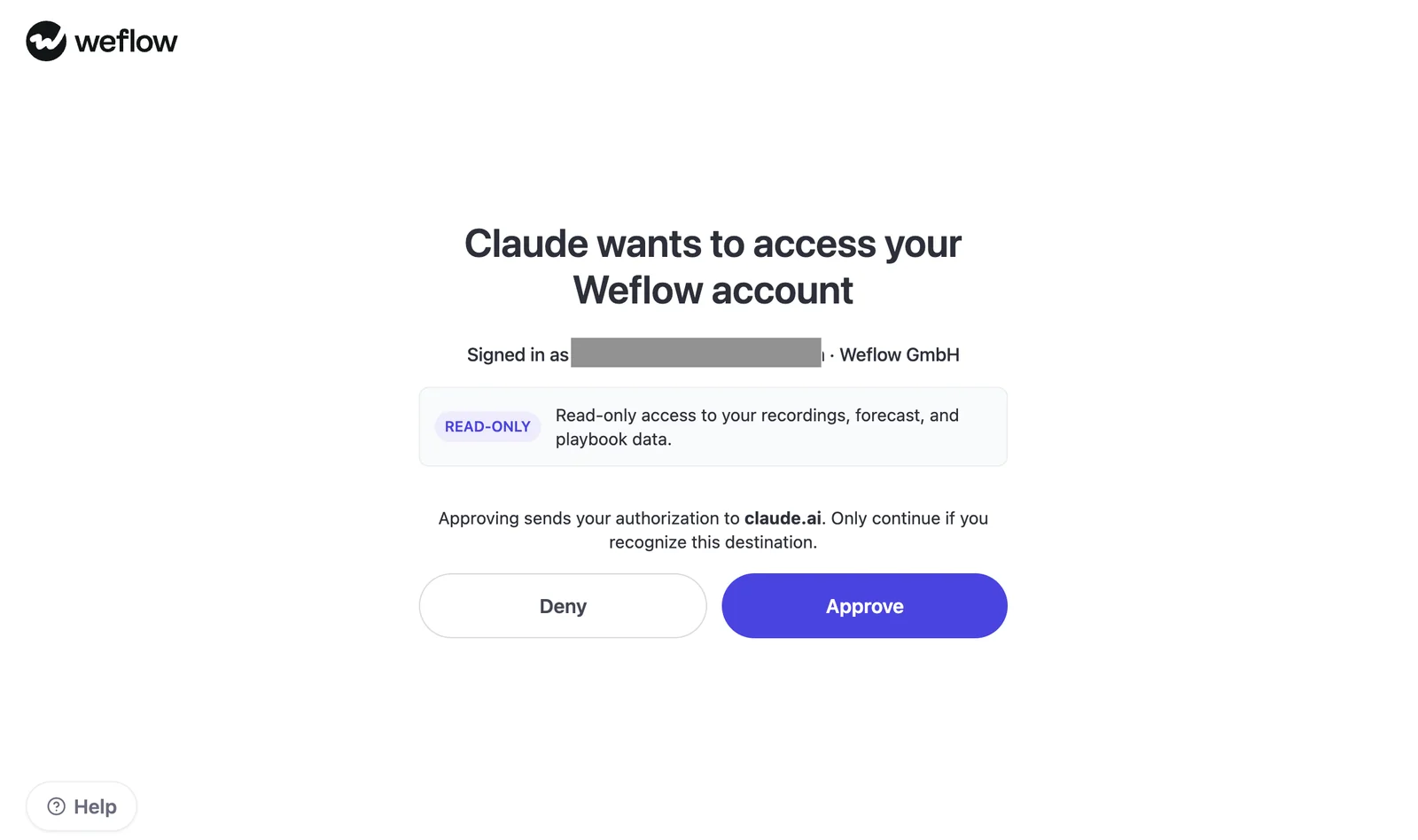
The governance detail to watch: hiding Salesforce list views or Lightning components isn’t the same as restricting underlying data permissions. Weflow doesn’t inherit those interface restrictions.
- Best for: Salesforce teams that need external assistants to inspect forecast and conversation context.
- Not best for: Teams that require MCP-driven writes, non-Salesforce CRM support, or a general-purpose connector across finance and ERP systems.
Salesforce Hosted MCP Servers for CRM access and actions
Salesforce Hosted MCP Servers are the direct route to CRM records, schema, and supported Salesforce actions. Start here when your use case centers on data already in Salesforce.
- Clients: The Salesforce in Claude experience uses Hosted MCP Servers. Confirm the supported connection method for your ChatGPT deployment.
- Data and query scope: Objects, required fields, individual records, and filtered record lists.
- Actions: Create, read, update, and delete operations, plus supported Salesforce processes such as Flow and Apex.
- Setup: Salesforce administration and client authorization are required. Approve the specific access path and permitted actions.
- Permissions: Salesforce sharing and visibility rules govern access.
- Deployment and security: Validate the hosted connection against your org’s controls. The reviewed material doesn’t establish a separate MCP-specific certification claim.
| Basic hosted MCP access | Additional Agentforce capabilities |
|---|---|
| Included in Enterprise Edition and above without an Agentforce license or add-on. | Agentforce Actions through MCP and Data 360 queries consume Flex Credits. |
| CRUD and Salesforce-process usage types are currently unmetered. | Agentforce Agents require their own dedicated licenses. |
| Current access terms don’t guarantee permanently unmetered usage. | Agentforce for Sales packaging is separate from basic hosted MCP eligibility. |
Best fit: CRM-centered analysis and Salesforce automation. The ceiling is the data your org contains: an accurate query against an incomplete activity history still produces an incomplete answer.
Attention MCP server for broad conversation access
Attention has the broadest conversation-intelligence MCP surface among the options reviewed here. It returns raw transcripts and exposes write operations across conversation and workspace resources.
- Clients: Claude and ChatGPT.
- Data: Calls, transcripts, scorecard results, AI insights, snippets, and workspace resources.
- Query level: Individual-call retrieval and full-text transcript search with matching snippets.
- Actions: Read-write operations extend into teams, users, roles, scorecards, integrations, and API keys.
- CRM boundary: Attention’s workflow integrations don’t make its MCP server a general CRM-read interface.
- Setup and permissions: Review authenticated roles and credentials. Confirm authentication setup and private-call behavior before approval.
- Cost and deployment: Published documentation describes rate limits across multiple time windows. Exact allowances depend on configuration; pricing and MCP entitlement need a quote.
- Security: The supplied MCP evidence doesn’t establish a certification set. Request the current security documentation.
Governance boundary: A call-search connection and an administrator connection deserve separate approvals. Attention exposes operations such as deleting users, disconnecting CRM accounts, and revoking API keys.
Best fit: Teams building on raw conversation evidence and broad agent access. Attention’s breadth earns a place on the shortlist, but don’t interpret undocumented consumption charges as a guarantee of free usage.
Gong MCP server for generated deal insights
Gong MCP suits teams that want Gong’s account and deal interpretation inside an external assistant. It doesn’t expose the underlying transcripts, message bodies, or activity lists.
Gong’s conversation analytics are a genuine strength. The narrower MCP interface is a separate consideration from the depth of Gong itself.
- Clients: Claude, ChatGPT, and Microsoft Copilot have native connectors.
- Data and query level:
ask_accountandask_dealanswer questions about one named record.generate_briefreturns a structured account, deal, or contact brief. - Actions: Read-only, with no create, update, or delete operations in Gong or the CRM.
- Setup: An admin configures registration and authorization context. Changing either later requires replacing the integration and reconnecting users.
- Permissions: Personal access uses each user’s Gong credentials and existing permissions. Private calls remain excluded.
- CRM relationship: The connector answers through Gong’s account and deal context. Contact briefs require the CRM contact ID.
- Cost: A paid Gong seat, supported paid assistant plan, and shared Gong credits. Collaborator accounts can’t connect.
- Security: Gong holds SOC 2 Type II and multiple ISO certifications. Storage region and processing location require separate review.
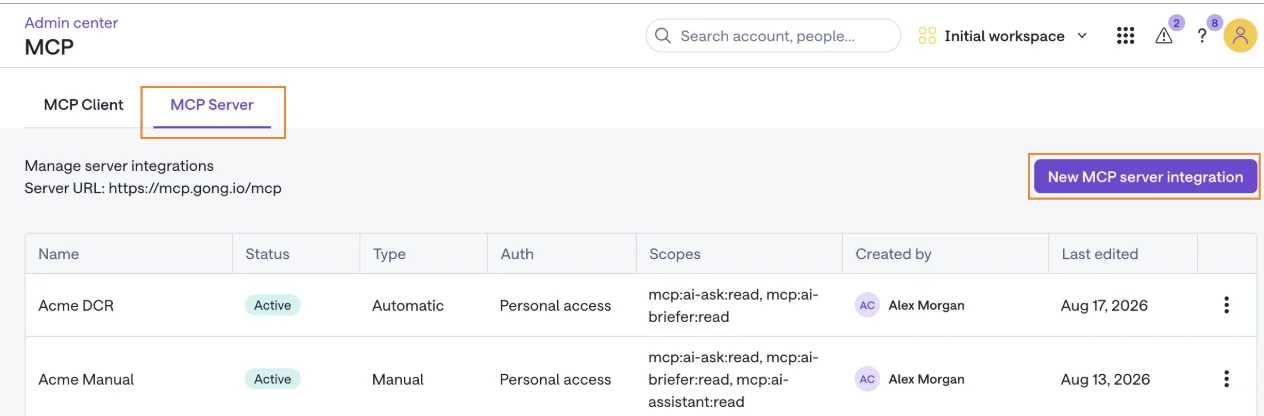
Gong’s MCP administration screen shows registration type, authorization context, and read scopes for each integration. Set those choices before users connect.
- Works well when: Your team already trusts Gong’s generated insights and mainly asks account-by-account or deal-by-deal questions.
- Becomes limiting when: You need raw evidence, direct portfolio queries, or write operations. Broader analysis requires the calling assistant to assemble individual results.
Clari Copilot MCP server for conversation data
Clari Copilot MCP exposes Copilot conversation tools, not the wider Clari forecasting and pipeline products. Don’t approve it on the assumption that a Clari connection makes the forecast available.
- Clients: Claude through a subscription and ChatGPT through Business or Enterprise.
- Setup: A Copilot admin enables Copilot tools for MCP under Settings and AI Features.
- Scope: Copilot conversation data. Exact payloads, transcript retrieval, and query granularity need confirmation.
- Actions: The reviewed release information doesn’t establish write support.
- CRM and permissions: Confirm CRM dependencies, private-call handling, role inheritance, and individual revocation.
- Cost: Confirm required Copilot seats, MCP entitlement, and usage limits.
- Deployment and security: Request current implementation and security documentation; the release note alone doesn’t settle these controls.
Scope boundary: Clari’s mature enterprise roll-ups don’t prove forecast access through Copilot MCP. Existing Copilot customers should test conversation access first and request a separate demonstration for any forecasting requirement.
Salesloft MCP server for platform-record access
Salesloft MCP provides read-only access to Salesloft records under the authenticated user’s permissions. It works without a Salesforce connection, but it excludes cadences and cadence performance.
- Clients: Claude Desktop through the connector directory, with web and mobile limitations; ChatGPT Business or Enterprise through a custom connection.
- Query level: Search and by-ID lookup across supported records.
- Setup: An admin enables MCP under Artificial Intelligence settings. The connection uses Dynamic Client Registration OAuth.
- Commercial requirement: The Salesloft Agentic add-on sits above the base platform seat.
- Permissions and revocation: Calls follow the user’s record permissions. Admins can revoke a user’s API key or disable MCP organization-wide.
- Limits: Requests count against standard organizational API limits.
- Deployment and security: Salesloft describes MCP as a beta capability within its existing SOC 2 and ISO 27001 scopes. Salesloft states that it doesn’t cache data outside Salesloft or use it for model training.
| Included scope | Excluded scope |
|---|---|
| Accounts, people, users, opportunities, and team context | Cadences and cadence performance |
| Conversation records, recording retrieval, and generated summaries | Raw transcript retrieval |
| Authenticated record searches and lookups | Record creation, updates, and deletion |
Best fit: Existing Salesloft customers querying supported platform records. If your main requirement is outbound cadence analysis, this connector doesn’t cover the data you need.
ZoomInfo MCP server for go-to-market intelligence
ZoomInfo MCP adds company, contact, intent, and research data to an assistant. It isn’t a Chorus conversation connector.
- Clients: Claude and ChatGPT, plus other supported AI clients through a shared OAuth endpoint.
- Data: Company and contact search, enrichment, intent, business events, news, audiences, and research briefings.
- Query level: Search and lookup operations, with account- and contact-level research agents.
- Evidence: Direct data tools return intelligence records. Research agents return synthesized briefings.
- Actions and CRM: The reviewed scope doesn’t establish CRM-write actions. Research synthesis can incorporate CRM and conversation context, but doesn’t return call transcripts.
- Setup and permissions: A GTM.ai or Enterprise license and OAuth authorization; the signed-in account’s entitlements apply.
- Cost: Search and lookup tools are free. Enrichment consumes bulk data credits; research agents consume AI action credits.
- Deployment and security: Existing plan limits apply. Confirm assistant-side controls and current security terms during review.
Best fit: External intelligence beside a CRM or conversation connector. A Chorus customer should verify transcript access separately rather than expecting ZoomInfo MCP to expose the call archive.
Momentum data through Salesforce Hosted MCP Servers
This route isn’t a standalone Momentum MCP server. The assistant queries Salesforce records containing Momentum-generated data.
- Clients: The clients supported by your Salesforce Hosted MCP deployment.
- Data and evidence: Momentum outputs that persist in Salesforce. Don’t assume every upstream recording or transcript reaches an accessible field.
- Query level and actions: Salesforce record queries and approved Salesforce actions.
- CRM: Salesforce is the access route and system the assistant queries.
- Setup: Configure Momentum’s capture and field-writing behavior, then authorize Salesforce MCP.
- Permissions: Salesforce access rules govern the resulting CRM records.
- Cost: Momentum appears in Salesforce sales-edition packaging. Confirm both Momentum entitlement and Hosted MCP eligibility in your contract.
- Deployment and security: Review the upstream recording source as well as Salesforce. The supplied evidence doesn’t establish one security policy covering every source.
Momentum’s strength is working with an existing recorder, including Gong, Clari Copilot, or Attention. That lets you retain the recording workflow while adding structured CRM outputs.
Best fit: Teams that want assistants to read conversation-derived Salesforce data without adding another MCP server. Anything Momentum doesn’t write into Salesforce remains outside this route.
What does MCP access actually cost?
Total MCP access cost includes the source system, required modules, the assistant, consumption, and administration. An included connector can still require paid access on both sides.
| Route | Source seat | Module or add-on | Assistant plan | Usage model | Limits | Pricing availability | Scaling risk |
|---|---|---|---|---|---|---|---|
| Weflow | Products from $19/user/month; conversation intelligence and forecasting products each $39 | Bundles from $49; confirm MCP entitlement | Confirm supported Claude or ChatGPT tier | Core AI seat-priced; Agent Builder has separate consumption pricing | MCP-specific limits need confirmation | Public product pricing; annual billing and 10-user minimum | Don’t assume view-only licenses include MCP access |
| Salesforce | Eligible Salesforce edition | No Agentforce add-on for basic hosted MCP | Confirm client and plan | Basic CRUD/process operations currently unmetered; selected Agentforce operations use credits | Validate org allowances and future metering terms | Edition pricing public; contract governs entitlement | Moving into Agentforce actions changes the cost model |
| Attention | Quoted | Confirm MCP entitlement | Confirm supported tier | Rate limits documented; consumption charges not established | Multiple rate windows; custom limits available through support | No public rate card in reviewed material | Contract ambiguity and throttling |
| Gong | Paid Gong seat | Confirm required applications | Supported paid Claude or ChatGPT plan | Shared credits for MCP requests | Credit availability constrains usage | Seat and top-up prices require a quote | Broad questions and repeated analysis consume the shared pool |
| Clari Copilot | Confirm Copilot seat requirements | Confirm MCP entitlement | Claude subscription; ChatGPT Business/Enterprise | Not established in reviewed release information | Confirm rate and API limits | Request a quote | Unclear access charges until contracted |
| Salesloft | Salesloft seat | Agentic add-on | Supported Claude connection; ChatGPT Business/Enterprise | Requests use the Salesloft API | Standard organizational API limits | Add-on pricing requires confirmation | More seats plus competition for API capacity |
| ZoomInfo | GTM.ai or Enterprise license | Existing feature entitlements apply | Confirm client plan | Bulk data credits for enrichment; AI action credits for research | Existing API and plan limits | Confirm contracted allowances and credit prices | Successful research adoption consumes more credits |
| Momentum through Salesforce | Salesforce contract and Momentum entitlement | Edition-dependent inclusion or add-on | Salesforce-supported client plan | Salesforce MCP usage terms | Salesforce limits apply to this route | Salesforce edition pricing public; verify contract | Edition upgrades or additional Agentforce capabilities |
Weflow’s Revenue AI Foundation costs $49 per user per month, Revenue AI Business costs $59, and Revenue AI Enterprise costs $79, billed annually. Revenue AI Enterprise includes forecasting; Revenue AI Business includes deal intelligence without forecasting.
Keep Agent Builder consumption separate from MCP access in the cost model. Weflow’s published core AI pricing doesn’t establish an MCP-specific allowance by itself.
- Count everyone who needs connector access, including executives and cross-functional users.
- Calculate incremental assistant costs rather than charging the project for subscriptions you already own.
- Test narrow and broad questions against the same account to observe consumption differences.
- Include administration, monitoring, and maintenance in annual ownership cost.
- Get overage, renewal, and usage-limit terms in writing before expanding access.
Which MCP route fits each RevOps requirement?
Choose the smallest combination that covers your approved data and actions. A second connector earns its place when it supplies context the first cannot retrieve.
| Requirement | Recommended route | Why it fits | Limiting condition | When to add another connector |
|---|---|---|---|---|
| CRM records and field updates | Salesforce Hosted MCP | Direct record and action access | Depends on CRM completeness and permissions | When conversations or forecasts live elsewhere |
| Raw conversation analysis | Attention; Weflow for Salesforce-centered revenue context | Transcript access rather than summaries alone | Authorization and transcript availability | When CRM writes or external intelligence are required |
| Generated deal briefings from an existing Gong deployment | Gong MCP | Uses Gong’s account and deal interpretation | Individual-record queries and credits | When source evidence or CRM actions are required |
| Weflow forecast submissions and rep metrics | Weflow MCP | Uses Weflow forecast context and returns opportunity IDs | Read-only; metrics follow Weflow configuration | When you need authoritative CRM fields or writes |
| Conversation and workspace administration | Attention MCP | Broad read-write surface | Higher-risk admin operations require tighter controls | When the workflow needs CRM records beyond Attention’s scope |
| Existing Copilot conversation access | Clari Copilot MCP | Uses the installed conversation product | Doesn’t establish broader Clari forecast access | When the workflow spans CRM or forecasting |
| Salesloft platform records | Salesloft MCP | Searches supported records under user permissions | No cadences, transcript retrieval, or writes | When those excluded domains matter |
| Enrichment and buyer research | ZoomInfo MCP | External company, contact, and intent intelligence | Credit-metered enrichment and research | When internal relationship context matters |
| Momentum outputs already in Salesforce | Salesforce Hosted MCP | Queries CRM-resident outputs directly | Only reaches persisted data | When source evidence remains in the recorder |
- Lean RevOps team with dependable CRM data: Start with Salesforce and your approved assistant.
- Salesforce team with formal forecasting and conversation requirements: Pilot Salesforce plus Weflow.
- Existing Gong, Copilot, or Salesloft customer: Test the installed connector against your requirements before making replacement an additional project.
- Team building autonomous conversation workflows: Evaluate Attention’s breadth, with separate approval for administrative access.
When should Salesforce and Weflow MCP run together?
Run Salesforce and Weflow MCP together when the assistant needs both CRM records and revenue context that lives in Weflow. Weflow forecast calls, submissions, and targets don’t fully exist in Salesforce records.
What Salesforce MCP contributes to the architecture
Salesforce MCP should own questions and actions whose authority comes from Salesforce records and processes.
- Retrieve current Account, Contact, and Opportunity records.
- Inspect schema, required fields, and stored relationships.
- Query activity and structured conversation outputs already in Salesforce.
- Create or update records through approved actions.
- Invoke permitted Salesforce Flow or Apex processes.
What Weflow MCP adds beyond Salesforce records
Weflow MCP adds forecast context, playbook outputs, and direct conversation retrieval. Its rep metrics follow Weflow’s forecast configuration rather than your Salesforce forecast setup.
| Context required | Preferred MCP route |
|---|---|
| Weflow forecast calls, submissions, and targets | Weflow MCP |
| Rep pipeline, coverage, win rate, and forecast gap with opportunity IDs | Weflow MCP |
| Weflow playbook outputs and call summaries | Weflow MCP |
| Direct transcript retrieval, subject to the transcript toggle | Weflow MCP |
| Current structured field values written into Salesforce | Salesforce MCP |
Weflow also stores transcripts on its Salesforce recording object. The direct Weflow path is convenient, but the second route creates a governance obligation: disabling Weflow MCP transcript access doesn’t automatically restrict Salesforce access to that object.
How to divide overlapping MCP queries
Set an explicit source policy before executives encounter conflicting numbers. Salesforce and Weflow can produce different totals because they use different filters, periods, or forecast definitions.
| Question type | Authoritative source | Fallback | Conflict rule |
|---|---|---|---|
| Current opportunity amount, stage, or owner | Salesforce record | Weflow context, followed by record verification | Use the current record value and identify stale context |
| Submitted Weflow forecast | Weflow forecast submission | No assumed Salesforce equivalent | Preserve submission period and configuration |
| Weflow rep coverage or forecast gap | Weflow metric | Reconcile underlying Salesforce opportunity IDs | Compare definitions before comparing totals |
| What a customer said | Authorized source transcript | Stored Salesforce transcript; summary if neither path permits source access | Label summaries as interpretation and preserve call context |
| CRM update | Approved Salesforce action | Human review | Assign one write owner; Weflow MCP remains read-only |
| Salesforce MCP responsibility | Weflow MCP responsibility |
|---|---|
| Authoritative CRM records, schema, writes, and processes | Weflow forecast context, playbook outputs, conversation retrieval, and rep metrics |
Is Salesforce plus Claude enough without a vendor?
Salesforce plus Claude is enough when the required data already exists in Salesforce and someone owns the connection’s operation. A revenue platform needs to justify the capture and context underneath the answer.
| Decision area | Internal Salesforce-plus-assistant route | Revenue-platform route |
|---|---|---|
| Capture coverage | Depends on existing logging and recording systems | Adds managed capture where the selected product supports it |
| Available context | CRM-resident data plus separately connected sources | Can include platform-specific forecasts and conversation outputs |
| Actions | Salesforce MCP supports approved CRM operations | Depends on connector; Weflow MCP is read-only |
| Permission design | Your team owns configuration and testing | Vendor controls help, but your team still validates each access path |
| Maintenance | Your team maintains extraction, mappings, and failure handling | Vendor maintains supported product behavior |
| Procurement | May reuse existing contracts, subject to internal approval | Requires vendor and security review |
| Ownership cost | Subscriptions plus internal engineering and operating time | Contract cost plus administration and any usage charges |
When Salesforce plus Claude is sufficient
Choose the Salesforce-only route when your intended workflow stays within a dependable CRM record.
- Your required activity, conversation outputs, and fields already reach Salesforce reliably.
- Your questions don’t depend on vendor-only forecast submissions or intelligence.
- Your Salesforce permissions express actual confidentiality requirements.
- Your team can maintain mappings and handle schema changes.
- You have an owner for monitoring, exceptions, and user support.
If those conditions hold, another revenue platform may add cost without closing a meaningful gap. Keep the architecture simple.
When capture and context justify a revenue platform
Add a revenue platform when missing data or ongoing maintenance prevents the internal route from meeting your acceptance criteria.
- Emails and meetings routinely fail to reach the correct opportunity.
- Conversation summaries exist, but structured qualification fields stay empty.
- Forecast questions require submissions, targets, or definitions outside Salesforce.
- Your internal extraction workflow breaks on field changes, picklists, or validation rules.
- Nobody has capacity to own the system after the prototype works.
We built Weflow’s capture foundation after our early forecast prediction exposed the same problem: a model couldn’t judge deal movement without enough activity and conversation data. Connecting another assistant doesn’t remove that dependency.
Weflow’s field updates check Salesforce picklist values before writing. Scheduled AI playbooks can evaluate the opportunity’s broader history rather than treating the latest call as the complete answer.
That’s the build-versus-buy test: compare the cost of maintaining dependable context with the cost of buying it. Don’t pay a vendor merely to put another chat box around the same incomplete records.
How should RevOps pilot an MCP architecture?
Pilot the answer, the authorization, and the operating cost. Successful OAuth setup proves a connection, not a safe revenue workflow.
- Define approved use cases. Separate executive questions, seller research, and agent actions.
- Establish expected source data. Select records and conversations your team can verify manually.
- Test record and portfolio queries. Check completeness, filters, date ranges, and repeated-call requirements.
- Inspect evidence and IDs. Trace answers to transcripts, records, or clearly labeled generated outputs.
- Test restricted records. Use accounts with known differences in permissions, including private conversations.
- Validate permitted actions. For writable routes, test validation failures and required approvals in a controlled environment.
- Measure usage. Observe API limits, credits, and throttling under representative workloads.
- Test revocation. Remove access and attempt a new request through an existing connection.
- Document routing rules. Assign an authoritative source and owner to each data type and action.
A short pilot can validate retrieval and capture behavior. It can’t prove forecast accuracy improvement without running the forecast cadence and comparing submissions with outcomes.
| Approval gate | Pass | Fail |
|---|---|---|
| Answer quality | Matches verified source data and identifies missing context | Confident answers conceal gaps or contradict known records |
| Traceability | Returns usable evidence or clearly identifies generated interpretation | Reviewers can’t explain the answer’s basis |
| Permissions | Restricted users cannot retrieve protected material through any approved path | An alternate connector bypasses the intended restriction |
| Actions | Writes stay inside the approved scope and handle failures visibly | Unexpected changes occur or failures disappear |
| Revocation | New requests fail after access removal | Previously connected users retain access |
| Cost | Expected usage fits a documented allowance and budget | Costs or limits remain unexplained |
See how Weflow captures activity, updates Salesforce fields from calls, and rolls up your forecast. Book a 30-minute demo.
Recent changes in RevOps MCP access
MCP scope and commercial terms are changing quickly enough to affect an approval already in progress. Reconfirm the live tool manifest and contract before rollout.
| Date or release marker | Vendor | Change | RevOps implication |
|---|---|---|---|
| August 2026 release notes | Clari Copilot | Custom MCP connections for Claude and ChatGPT, with admin enablement | Validate Copilot conversation access without assuming broader Clari forecast access |
| August 2026 release notes | Salesloft | MCP distribution through Claude and ChatGPT, requiring the Agentic add-on | Add commercial entitlement to the approval checklist |
| Attention MCP version 1.4.0; calendar date not specified | Attention | Full-text transcript search added | External assistants can retrieve matching source snippets |
| Date not specified in reviewed material | Gong | Credit model includes MCP and API-based AI workflows | Budget external access separately from manual in-product use |
| Date not specified in reviewed material | Salesforce | Separate hosted MCP usage types for CRUD and Salesforce processes, currently unmetered | Distinguish current basic access from paid Agentforce operations and future metering |
How we evaluated these RevOps MCP options
- Inclusion: Routes that expose relevant CRM, conversation, forecast, or go-to-market intelligence to external assistants.
- Evidence: Supplied vendor documentation, product releases, Weflow product evidence, and implementation knowledge.
- Criteria: Data scope, evidence type, query level, actions, and governance with total access cost.
- Indirect access: Momentum appears as a Salesforce-routed option, not a standalone MCP server.
- Unknowns: We mark missing plan, permission, pricing, or implementation details rather than treating them as included.
- Review timing: The evidence includes August 2026 releases, but doesn’t provide a single last-verified date across all vendors.
Our recommendation favors Salesforce plus Weflow when both CRM and Weflow-specific context matter. Salesforce alone, Attention, or an installed vendor’s connector can be the better choice for a narrower requirement.
Frequently asked questions
The final approval questions usually concern access paths, offboarding, and what happens after data reaches the assistant. Test those boundaries before expanding the pilot.
Which Claude and ChatGPT plans support MCP connectors?
Supported plans differ by vendor. Gong lists Claude Pro, Max, Team, and Enterprise, plus ChatGPT Plus, Pro, Business, Enterprise, and Edu. Clari Copilot requires a Claude subscription or ChatGPT Business/Enterprise; Salesloft documents ChatGPT Business/Enterprise and a Claude Desktop connection. Confirm current plan support for Weflow, Attention, ZoomInfo, and your Salesforce connection method before buying additional assistant seats.
Can admins revoke one MCP user without disabling everyone?
Revocation granularity depends on the connector. Salesloft documents per-user API-key revocation and an organization-wide toggle; Weflow documents connected-user visibility and workspace enablement, but the supplied MCP evidence doesn’t establish an individual connection-revocation control. Test whether credential removal blocks fresh requests through an existing session.
Can MCP expose private calls or restricted records?
MCP can expose any data the authorized access path permits. Gong personal access preserves user permissions and excludes private calls; Salesloft follows the authenticated user’s record permissions. Weflow’s transcript toggle governs its MCP route, so separately review Salesforce access to the recording object. Hiding a screen isn’t a substitute for restricting the underlying data.
Will multiple MCP connectors duplicate Salesforce records?
Read-only connectors don’t create duplicate Salesforce records. Duplicate answers can still occur when two routes expose related context, while duplicate activities usually originate in overlapping capture systems. Assign one write owner per workflow and test capture behavior separately from MCP retrieval.
What happens to transcripts when changing MCP vendors?
Changing an MCP connection doesn’t migrate the transcript archive. Confirm storage location, export rights, retention, and migration support before terminating the source contract. Weflow stores transcripts on its Salesforce recording object, while video recordings remain with Weflow, so treat those assets separately and verify the package-uninstallation process before removing anything.
Does MCP access use customer data for model training?
MCP doesn’t establish a shared training or retention policy across vendors. Weflow doesn’t use customer data to train AI models and applies Zero Data Retention to its AI processing. Those commitments don’t automatically govern Claude or ChatGPT after an authorized transfer; review the assistant plan and model-provider terms separately.
Can an MCP server trigger Salesforce Flow or Apex?
Salesforce Hosted MCP supports Salesforce process invocation, including Flow and Apex, subject to the configured access and permissions. Weflow, Gong, and Salesloft MCP are read-only, so they can inform an action but can’t execute it through those connectors. Before approving automation, test one permitted process, one denied operation, and the behavior after revocation.







