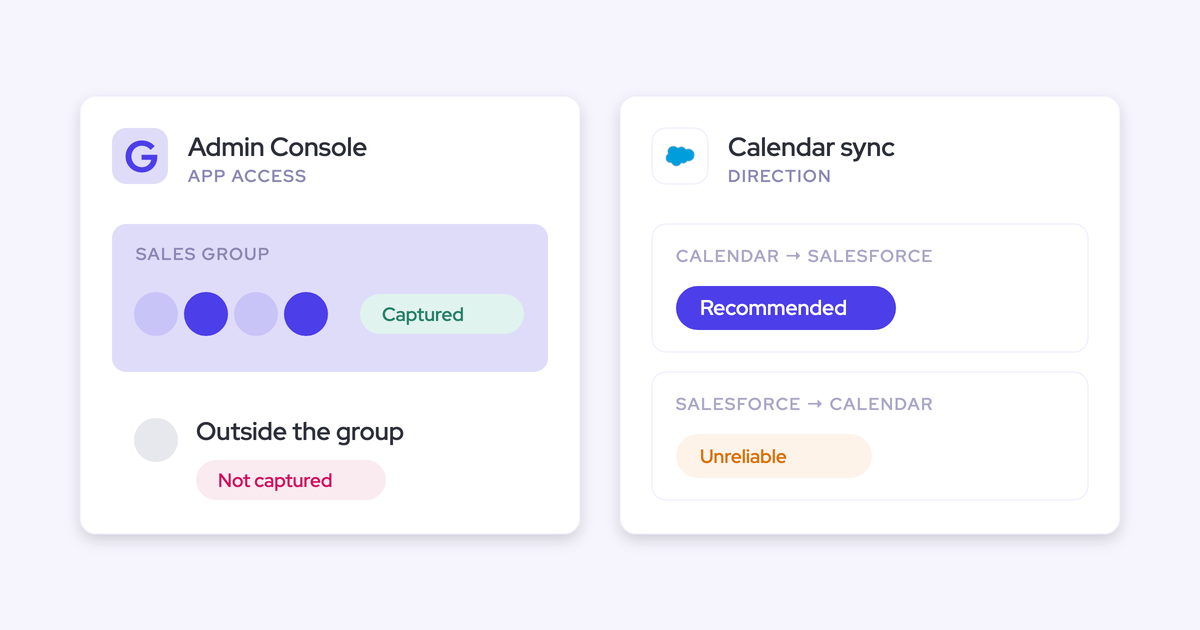
Activity capture evaluation checklist: 5 failure tests to run before rollout
Learn the 5 failure tests for an activity capture pilot before rolling out Weflow or Einstein Activity Capture


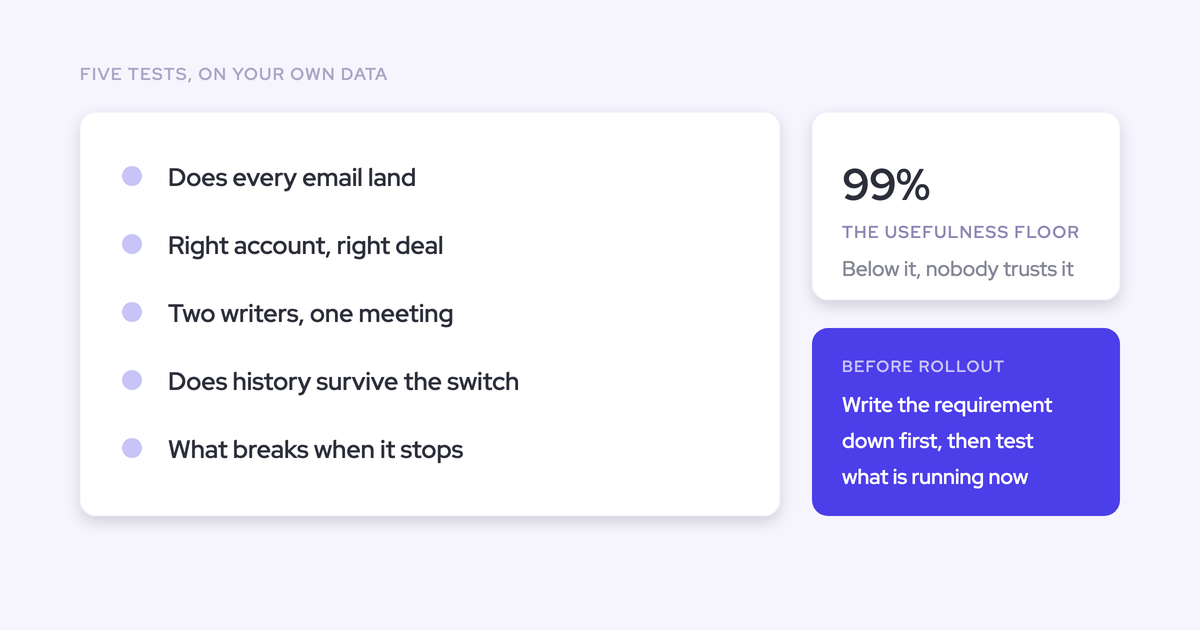

An activity capture pilot should prove five things: the candidate captures the right interactions, maps them correctly, creates usable Salesforce records, avoids duplicate writes, and preserves activity through cutover. A convincing demo proves none of those on your Salesforce configuration.
You’re protecting the reports that sales leadership already reads. A missing email makes a deal look quiet. A wrong opportunity match makes an unrelated deal look active. Both errors travel into deal reviews and forecasting without announcing themselves.
Use this protocol to evaluate each shortlisted candidate against the same source activity and acceptance criteria. Start with capture parity. Keep summaries, scorecards, and other advanced features out of the decision until the underlying records pass.
Complete, correctly mapped activity also supports workflows such as Weflow Deal Hygiene. Those workflows need trustworthy deal records before they can act on them.
Prepare a defensible activity capture pilot
Freeze the pilot scope, baseline, and approval gates before capture begins. Otherwise, every configuration change moves the target you’re trying to measure.
Your pilot charter should make these decisions explicit:
| Requirement | Owner | Evidence and approval gate |
|---|---|---|
| Users, mailboxes, teams, and exclusions | RevOps and IT | Approved enrollment list with a named mail tenant for every user |
| Salesforce environment and access | Salesforce admin | Sandbox connection, integration permissions, and approved test records |
| Expected capture and mapping | RevOps | Source baseline with expected Salesforce destinations |
| Success criteria | RevOps and sales leadership | Signed scorecard, including blocking failures and retest rules |
| Activation and cutover | IT and Salesforce admin | Named approvers, writer inventory, and rollback owner |
Select users, mailboxes, and Salesforce edge cases
Select pilot users for the failure cases they expose, rather than their willingness to try software. A pilot made entirely of friendly desktop users won’t tell you what happens in the field.
- Users and teams: Include sales, customer success, field sellers, and anyone who needs stricter capture controls.
- Mailboxes: Cover the Google Workspace or Microsoft environments you operate, including separate tenants and mobile clients.
- Salesforce records: Include duplicate contacts, shared account domains, incomplete opportunity contact roles, and required Contact fields.
- Selling motions: Test new business, expansion, renewal, implementation, and escalation conversations.
- Object model: Include custom objects, nonstandard record types, and parent-child account hierarchies.
Build a source-of-truth activity baseline
Use the mailbox and calendar as the baseline, not the incumbent’s activity count. Your current capture system may already miss interactions.
Create the expected destination before sending each controlled interaction. Keep excluded interactions in the ledger too, with an expected result of no write.
| Source interaction | Participants | Expected activity type | Expected Salesforce destination |
|---|---|---|---|
| Outbound email about a specific deal | Pilot seller and known contact | Chosen email object, linked to the intended Opportunity | |
| Customer implementation meeting | CS manager and customer contact | Meeting | Event linked to the Account or approved post-sale record |
| Sensitive-account email | Pilot user and excluded customer | No captured activity | No Salesforce write |
| Reply from a new stakeholder | New participant at a known account | Email and, if configured, Contact | Approved activity destination and correct Account association |
Retain source identifiers, timestamps, and expected relationships. Subjects alone won’t distinguish repeated messages or recurring meetings.
Set pilot duration and pass/fail thresholds
Plan around two weeks of testing, then extend the pilot if required scenarios haven’t occurred or defects still need retesting. Elapsed time alone doesn’t make the result meaningful.
We recommend the following acceptance gates. These are evaluation criteria, not a vendor service guarantee.
| Metric | Recommended threshold | Evidence required | Remediation rule |
|---|---|---|---|
| Controlled capture cases | Every eligible interaction captured within the agreed sync window | Source-to-record reconciliation | Retest every failed case after correction |
| Observed capture coverage | At least 99% of eligible source interactions, with every miss explained | Numerator and denominator by activity type and team | No recurring failure pattern or unexplained gap at approval |
| Mapping | No unresolved wrong-opportunity assignments | Expected-versus-actual record IDs | Accept a documented fallback only if it meets the business requirement |
| Privacy and duplicate writes | No prohibited capture or unintended duplicate activities | Exclusion tests and record-level duplicate checks | Block rollout until the affected cases pass |
| Usability and continuity | Every required downstream workflow and recovery drill passes | Report outputs, Flow results, exports, and recovery evidence | Retest before production expansion |
Set a minimum sample for each activity type before activation. Size it to cover every required scenario and repeat the ambiguous cases; don’t let a large outbound-email sample hide missing inbound mail.
Separate technical setup from capture activation
Treat access provisioning, mailbox reading, and Salesforce writing as separate approval gates. Ask each vendor exactly which action starts capture.
- Provision access: IT approves the enterprise application; the Salesforce admin approves the integration user and package footprint.
- Configure without enrollment: Prepare object choices, user scope, exclusions, and attachment policies.
- Hold for approval: Security and legal confirm which test data the integration may process.
- Activate the sandbox test: The Salesforce admin confirms the first write reaches the intended environment.
- Approve limited production: RevOps signs off on test results and the current writer configuration.
Run security and commercial review in parallel
Start security, legal, and procurement work alongside technical preparation. A successful pilot shouldn’t sit idle while someone starts collecting vendor documents.
| Workstream | Owner | Required evidence | Decision gate |
|---|---|---|---|
| Security and legal | Security lead and legal | Data-processing terms, subprocessors, residency, retention, and approved controls | Before processing unapproved customer data |
| Salesforce access | Salesforce admin | Permission matrix and successful restricted-user tests | Before production writing |
| Mailbox administration | IT | Scopes, tenant enrollment, revocation, and monitoring procedure | Before capture activation |
| Commercial review | Procurement and RevOps | Comparable quote and renewal terms | Before rollout approval |
Confirm permissions, exclusions, residency, and AI scope
Validate the access model against your actual security policy before testing capture quality. A candidate that requires permissions you can’t grant won’t become a fit through configuration work.
- Salesforce access: Request required object permissions, field access, and the reason for each write permission. Test record visibility through the API, not just the Salesforce interface.
- Mailbox access: Confirm tenant-level and user-level scopes, enrollment boundaries, and the revocation process.
- Sensitive records: Test exclusions against existing Contacts and Accounts as well as unknown domains. Don’t assume those controls behave identically.
- Residency and retention: Document where email content, attachments, logs, and any recordings reside, including deletion terms.
- AI governance: Confirm whether capture can operate without AI processing and what administrators must disable.
List-view restrictions and hidden Lightning components aren’t substitutes for API-level permissions. Include a restricted user in the test and inspect what that user can actually access.
Normalize pricing, implementation, and renewal terms
Compare the full deployment cost, including the work required to leave the incumbent. An included Salesforce entitlement isn’t a removable saving if you’re keeping the edition that provides it.
| Commercial item | Incumbent baseline | Candidate requirement |
|---|---|---|
| Seats and minimums | Separate included entitlements from additional paid licenses | Quote the same users and identify minimum commitments |
| Product scope | List the capture, recording, and engagement functions you currently use | Identify every required product and add-on |
| Billing term | Record the current commitment and cancellation window | Confirm annual or monthly billing and expansion rules |
| Implementation | Estimate decommissioning and reporting changes | Confirm vendor fees and internal administration work |
| History and storage | Identify export work and retained data | Price backfill, attachment storage, and retention requirements |
| Renewal and exit | Identify notice dates and any overlap cost | Confirm renewal increases, notice requirements, and data-exit terms |
Avoid pilot designs that hide capture failures
A weak pilot makes missing activity look like a configuration detail. Remove these sources of ambiguity before you score any candidate.
| Pilot mistake | Corrective action |
|---|---|
| Testing only clean demo records | Include your duplicate domains, competing opportunities, and post-sale conversations |
| Using the incumbent as the denominator | Reconcile both systems independently against mailbox and calendar evidence |
| Running overlapping writers without approval | Use separate environments or an explicitly supported coexistence configuration |
| Changing rules without recording the change | Version the configuration and separate pre-change results from retests |
| Starting with AI output | Prove capture and mapping before enabling optional intelligence |
| Counting timeline entries as proof | Inspect Salesforce objects, relationships, and downstream outputs |
| Removing failed interactions from the denominator | Keep eligibility fixed and classify each failure |
Test 1: Does capture match source activity?
Capture passes when every controlled eligible interaction produces the expected Salesforce activity within the agreed sync window. Unexpected writes matter just as much as missing ones.
- Setup: Freeze the source ledger, exclusions, object choices, and sync window.
- Procedure: Generate the interaction matrix, then reconcile each source item.
- Evidence: Keep source identifiers, Salesforce record IDs, timestamps, and exclusion results.
- Failure: Flag unexplained misses, prohibited capture, altered content, and persistent delays.
- Diagnostic owners: IT checks mailbox access; the Salesforce admin checks writes; the vendor investigates processing.
Run a controlled email and meeting matrix
Generate interactions across the clients, directions, and participant patterns your team uses. Mobile email belongs in the same test as desktop email.
| Test | Client or source | Interaction and variation | Expected result |
|---|---|---|---|
| Inbound email | External mailbox to pilot user | Known contact, then a new stakeholder at a known account | Capture both eligible messages; verify configured contact creation separately |
| Outbound email | Browser, desktop, and phone | Send, reply, and forward | Same capture policy across clients, with correct direction and participants |
| Attachments | Supported email clients | Messages inside and outside the configured size policy | Capture or exclude files exactly as configured |
| External meeting | Google or Microsoft calendar | Internal and external organizers; multiple internal attendees | Correct meeting representation without inflated meeting counts |
| Recurring meeting | Calendar | Edit one occurrence, reschedule, and cancel | Correct handling of each occurrence without stale duplicates |
| Internal meeting | Calendar | Same-domain and cross-tenant colleagues | Include or exclude according to the approved internal-domain policy |
| Excluded interaction | Email and calendar | Sensitive existing customer and unmatched personal address | No prohibited Salesforce write |
| Calendar response | Email client | Accept and decline notifications | Suppress or retain according to the configured policy |
Reconcile source activity against Salesforce records
Match each source interaction to its Salesforce result. A total count can look correct when one item is missing and another appears twice.
| Reconciliation field | What to record |
|---|---|
| Source | Message or event identifier, participants, and source timestamp |
| Expected result | Object, business destination, and expected fields or intentional exclusion |
| Actual result | Salesforce record IDs, relationships, and write timestamp |
| Status | Matched, missing, delayed, altered, unexpected, or duplicated |
| Evidence | Saved query, export, or restricted-access screenshot reference |
Calculate capture coverage as unique eligible source interactions captured divided by all eligible source interactions. Report mapping accuracy separately so an email on the wrong Opportunity doesn’t earn a clean pass.
Classify every miss before scoring the tool
Every mismatch needs a cause, an owner, and a retest.
- Was the interaction eligible? Check the frozen enrollment and exclusion rules.
- Could the integration read it? Inspect mailbox access and source availability.
- Could the candidate resolve a destination? Check contacts, domains, opportunity contact roles, and mapping precedence.
- Did Salesforce reject the write? Inspect permissions, required fields, validation rules, and the actual API response.
- Does the record exist but disappear downstream? Check report filters, relationships, and user visibility.
Record the cause category, remediation, configuration version, and retest result in the defect log. Configuration failures still block rollout until you fix them, even when the vendor didn’t cause them.
Test 2: Does activity map to the right record?
Mapping passes when activity reaches the intended record or an explicitly accepted fallback. A wrong opportunity match is worse than an empty opportunity timeline because reports treat the wrong match as truth.
- Setup: Create ambiguous records and write down the expected destinations first.
- Evidence: Compare expected and actual record IDs, including any contact-role changes.
- Pass: Correct assignments and a workable correction path for ambiguity.
- Fail: Silent wrong-deal assignments or a fallback that cannot support your required deal reporting.
- Owner: RevOps defines the business destination; the Salesforce admin and vendor explain the mapping.
Create ambiguous opportunity and contact-role cases
Test several open opportunities on the same Account. That’s where a capture demo stops resembling your pipeline.
| Salesforce setup | Interaction | Expected behavior to agree before testing |
|---|---|---|
| One open Opportunity with a matching contact role | Email about that deal | Map to the intended Opportunity |
| Several open Opportunities, with a role on only the intended deal | Email from that contact | Apply the documented precedence |
| Same contact holds roles on competing deals | Thread about one deal | Expose ambiguity or use an approved fallback and correction path |
| No opportunity contact roles | Customer email | Use a documented fallback rather than inventing a deal association |
| Matching Lead and Contact | Email from the shared address | Apply documented Lead-versus-Contact precedence |
| Duplicate Accounts sharing a domain | Email from a new stakeholder | Show how the candidate handles the unresolved Account match |
| Contact also exists as a community user | Email involving that person | Capture without silently dropping the interaction |
Inspect both the activity relationship and the contact roles after the test. Automatic role creation changes the inputs for subsequent mapping, so record what the candidate added.
Test corrections across threads and recurring meetings
A correction workflow passes only when the user can fix the mapping and understand what happens next. An override on one message doesn’t prove the rest of the thread follows it.
- Open the proposed or completed mapping as a pilot rep.
- Change the destination to the correct Salesforce record.
- Send a reply, add a participant, and reopen the thread from another client.
- Correct a meeting, then update a later occurrence in the series.
- Inspect the original records, subsequent records, and any audit evidence.
Record whether each correction applies to one interaction, the thread, or the series. If reps must repeat the correction, count that work in the rollout decision.
Challenge custom objects, hierarchies, and post-sale records
Test mapping against the business’s actual record model. Correct child-account capture doesn’t automatically produce correct parent-account reporting.
| Scenario | What to test | Blocking failure |
|---|---|---|
| Custom object | Automatic or manual association to the object reps already use | The old extension must remain solely to support that object |
| Parent-child Account hierarchy | Correct child association and the required parent-level report | A touched account appears dormant because the report ignores child activity |
| Renewal and expansion | Separate record types and competing opportunities | Activity from one motion pollutes another |
| Implementation or escalation | Account-level or approved post-sale mapping | The conversation attaches to an unrelated sales opportunity |
Test 3: Can Salesforce use every captured record?
Captured activity passes this test when your required reports, flows, exports, and BI queries can use it. Timeline visibility alone isn’t proof of record usability.
- Setup: Select pilot records from each activity type and object configuration.
- Evidence: Save object queries, report outputs, Flow results, and external query results.
- Pass: Every required use case works under the permissions of its actual user.
- Fail: A required workflow depends on data that exists only in a vendor interface.
- Owner: Salesforce administration and the BI owner.
Confirm each candidate’s Salesforce storage model
Document the actual Salesforce objects each candidate writes. EmailMessage and Task support different reporting needs, so don’t treat the choice as a storage preference alone.
| Record choice | What it changes | Proof to collect |
|---|---|---|
| EmailMessage for email | Preserves native email details such as From, To, Cc, and thread structure | Populated fields, relationships, and a report or query that reads them |
| Task for email | Supports combined activity reporting with tasks and events, with less native email structure | Required email fields and direction remain available for your intended analysis |
| Event for meetings | Supports meeting activity in Salesforce; attendee relationships affect counting | Meeting identity, parent-child structure where applicable, and report counting logic |
| Vendor-hosted activity | May require separate access, export, or retention arrangements | Exact downstream access and exit behavior |
For each object, record editability, retention, and what remains after cancellation. A screenshot of a Salesforce page doesn’t answer those questions.
Verify Einstein Activity Capture storage in your org
Judge Salesforce Einstein Activity Capture (EAC) on your enabled configuration, not its historical storage model. Legacy EAC activity storage differs from the newer opt-in Sync Email as Salesforce Activity behavior.
- Record the EAC configuration, enrolled users, and event sync direction.
- Check whether Sync Email as Salesforce Activity is available and enabled.
- Generate a new test email and inspect whether it produces queryable Salesforce records.
- Run the same inspection on historical activity. Don’t assume a setting change converted existing history.
- Document reporting access, automation behavior, retention, and any migration steps Salesforce requires for your org.
Keep the configuration evidence with the test result.
Test reports, flows, exports, and BI access
Execute the downstream workflows the business case promises. Don’t accept an architecture diagram in place of a working query.
| Use case | Test action | Expected output |
|---|---|---|
| Salesforce activity reporting | Count pilot emails and meetings by user and business destination | Totals reconcile to unique eligible source interactions |
| Opportunity engagement | Report activity on the intended Opportunity | Only the correct deal receives the engagement signal |
| Salesforce Flow | Run a safe test Flow that reads the captured record | The Flow retrieves the required fields and performs its approved action |
| Export | Export pilot activity with relationships | Usable records, IDs, timestamps, and required content |
| BI access | Query through the organization’s actual BI connection | The analyst reproduces the agreed Salesforce result |
| Restricted-user access | Repeat relevant tests with a limited-permission user | No missing required access or unauthorized visibility |
Measure email and attachment storage impact
Project storage from the pilot’s observed Salesforce footprint. Native records give you control, but they also consume capacity your admin must manage.
- Measure record growth separately for emails, meetings, and contacts.
- Track attachment storage separately from activity record storage.
- Project volume using enrolled users, observed activity, and the required retention period.
- Include historical backfill in the projection.
- Test how a retention process identifies captured records without deleting unrelated activity.
If your org is near its allocation, storage approval belongs in the go/no-go decision. Don’t leave it as cleanup work after rollout.
Test 4: Do competing writers duplicate activity?
Coexistence passes when every interaction has one authoritative write path and reports count it correctly. Several Salesforce records can legitimately represent one meeting, so inspect the relationship model before labeling every extra row a duplicate.
- Setup: Inventory current writers and obtain an approved overlap design.
- Evidence: Record the source interaction, creating system, Salesforce IDs, relationships, and business count.
- Pass: No duplicate business activity, conflicting updates, loops, or omissions.
- Stop condition: Pause the test when unsupported overlapping writes appear.
- Owner: Salesforce administration, with each system’s administrator.
Inventory every current Salesforce activity writer
Inventory writers across departments, not just the sales stack. Customer success and support may operate separate capture paths.
| System category | Activity to inspect | Configuration to record |
|---|---|---|
| Einstein Activity Capture | Email and calendar activity | Users, objects or storage mode, and sync direction |
| Outreach or Salesloft | Sequenced emails, calls, and tasks | Logging rules, tracking patterns, and Salesforce destination |
| Conversation intelligence | Meeting activity and recording metadata | Whether the system creates its own Event |
| Dialer | Call records | Call identifier, Task or other destination, and update behavior |
| Support system and custom automations | Customer threads and generated tasks | Write triggers, integration identity, and responsible team |
| Manual logging | Emails, meetings, and tasks | Extensions and rep workflows that will remain active |
Test supported coexistence without duplicate writes
Run concurrent capture only when the vendors approve the exact configuration. A request for a side-by-side evaluation doesn’t make overlapping production writes safe.
- Reproduce the proposed coexistence settings in a sandbox or approved isolated scope.
- Generate email through both the mailbox and the engagement workflow.
- Create a meeting with multiple internal attendees, then reschedule it.
- Inspect every resulting record and any calendar write-back.
- Confirm that exclusions or duplicate checks didn’t suppress the interaction entirely.
For EAC replacements, use a planned cutover as the default. Changing event sync direction can address a calendar loop, but it doesn’t prove that two capture systems can safely write the same emails and meetings.
Assign one owner to each activity type
Assign write ownership where the activity originates, with documented exceptions. Keeping a forecasting system as a reader doesn’t require keeping its capture engine active.
| Activity | Primary writer | Rule for other systems |
|---|---|---|
| Ordinary inbox email | Selected capture system | Read the resulting records; avoid duplicate logging |
| Sequenced email | Engagement system under the approved design | Capture system skips confirmed overlap without losing replies |
| Calendar meeting | Selected meeting-activity writer | Recording system must not inflate meeting counts |
| Dialer call | Dialer | Other systems consume the call record |
| Manual task | Rep or designated automation | Keep it distinct from automatically captured interactions |
Test 5: Can cutover preserve activity continuity?
Cutover passes when you can account for activity before, during, and after the switch, then recover a failed write without creating duplicates. An activation timestamp alone doesn’t prove continuity.
- Setup: Freeze the runbook, historical boundaries, source ledger, and rollback authority.
- Evidence: Save the last incumbent result, first candidate result, transition reconciliation, and recovery output.
- Pass: No unexplained gap, lost required history, or duplicate replay.
- Fail: The team cannot identify or recover activity from the transition window.
- Owners: IT controls mailbox access; the Salesforce admin controls writes; RevOps approves expansion.
Prove writes in sandbox before production
Prove configuration in a Salesforce sandbox, then repeat the essential tests in limited production. Sandbox success doesn’t verify production permissions or validation rules.
- Sandbox: Test object creation, mapping, exclusions, and downstream automation using approved test data.
- Connection change: Document any reconnection or reconfiguration required to move environments. Confirm the destination org before activation.
- Production admin test: Use designated test records and verify actual production writes.
- Live pilot group: Expand only after the Salesforce admin signs off on the production evidence.
Sequence incumbent shutdown and candidate activation
Define the shutdown and activation sequence before the cutover window. Name who checks each step, not just who clicks the button.
| Timing | Action | Owner | Verification or stop condition |
|---|---|---|---|
| Before the window | Save configurations, record counts, and source activity boundaries | RevOps and Salesforce admin | Rollback settings and evidence are accessible |
| Incumbent shutdown | Disable the retiring write paths | Incumbent administrator | No unexpected continued writes or calendar loops |
| Candidate activation | Enroll only the approved production scope | IT and candidate administrator | Correct tenant, users, objects, and exclusions |
| Immediate validation | Send controlled inbound and outbound email; create a meeting | Pilot users and Salesforce admin | Expected records appear without prohibited or duplicate writes |
| Transition reconciliation | Compare source activity across the change window | RevOps | Every eligible interaction has an accounted-for result |
| Expansion gate | Approve additional users or pause | RevOps lead | No unresolved blocking failure |
Tell reps which connections to use and which prompts to report. Salesforce mailbox warnings can confuse users when a separate server-side capture system already handles their activity.
Verify historical retention and backfill boundaries
Separate retained Salesforce records from recoverable mailbox history. Backfill from a mailbox isn’t the same as migrating every field the incumbent stored.
| Historical data | What to verify | Evidence required |
|---|---|---|
| Existing Salesforce activity | Records and relationships remain after disabling the incumbent | Before-and-after queries |
| Vendor-hosted history | Retention, export options, and access after termination | Contract terms and a usable sample export |
| Mailbox backfill | Supported date range, available source data, objects, and retained fields | Sample backfill with source reconciliation |
| Overlapping history | How the candidate detects activity that already exists | Duplicate checks across the overlap window |
Write the earliest recoverable date into the business case. Don’t promise complete history when source availability or product limits leave a known boundary.
Test failed-sync recovery and rollback
Rehearse recovery with a safe, controlled failure before relying on it in production. A vendor’s promise to investigate isn’t evidence that replay preserves the right relationships.
- Introduce an approved sandbox issue, such as a validation rule that blocks a test write.
- Confirm how the failure reaches an administrator and whether the source item remains identifiable.
- Fix the cause, then ask the candidate to retry or backfill the interaction.
- Verify the recovered content, timestamp, destination, and duplicate behavior.
- Rehearse stopping candidate writes before restoring the incumbent’s approved configuration.
Rollback restores capture ownership; it doesn’t automatically remove records the candidate already wrote. Identify those records before attempting cleanup, and preserve evidence for reconciliation.
How Weflow and Einstein Activity Capture handle the tests
Weflow and Salesforce Einstein Activity Capture should meet the same acceptance gates. Neither product earns a pass because a feature appears in its documentation.
Weflow is the Revenue AI Orchestration platform for sales, customer success, and RevOps teams. Built for Salesforce teams, Weflow writes captured activity into Salesforce records that customers can report on, use in flows, export, and retain.
| Failure test | Weflow | Einstein Activity Capture | Proof and configuration caveat |
|---|---|---|---|
| Capture parity | Central capture through Microsoft Entra or Google Workspace; background capture doesn’t depend on reps opening an extension | Test enrolled mailbox connections and actual capture behavior, including disconnect recovery | Reconcile eligible source interactions across clients; connection status alone isn’t proof |
| Ambiguous mapping | Documented precedence, account fallback, and hybrid mailbox controls for rep correction | Opportunity mapping depends on contact-role relationships; the Salesforce mail add-in is separate from EAC’s matching | Test competing opportunities, correction behavior, and required custom objects |
| Record usability | Configurable EmailMessage or Task logging for email and Salesforce records for activity | Legacy storage and newer activity syncing differ; inspect the enabled mode | Run reports, Flow tests, and BI queries against actual records |
| Competing writers | Compatibility settings support duplicate checks and tracking-pattern exclusions for engagement overlap | Event sync direction affects coexistence and calendar-loop risk | Compatibility with an engagement workflow doesn’t establish safe EAC overlap |
| Continuity | Failed-sync investigation and backfill; historical email sync-back up to 24 months as an add-on | Verify current retention, recovery, and historical access for the configured mode | Prove the transition window and sample history before approving cutover |
United Fintech reported a 3x increase in captured activities after switching to Weflow and manually validating the interactions. That validation matters: a higher count only proves improvement after you rule out duplicates.
Validate Weflow against your Salesforce constraints
Weflow fits this protocol when your permissions, mapping needs, and mailbox topology support the deployment. These are the checks we’d expect your admin to challenge.
- Required fit: Weflow works exclusively with Salesforce. Correct mapping requires Account and Opportunity read access; automatic contact creation requires Contact create permission.
- Potential blocker: Weflow isn’t a fit if your security model permits Contact-only access.
- Contact creation: Test required fields and validation rules against the fields Weflow supplies. Inspect rejected writes rather than assuming contact creation succeeded.
- Mapping: Weflow prefers a Contact over a Lead, maps to a single qualifying open Opportunity through contact roles, and falls back to the Account when unresolved.
- Configurable fit: Automated, hybrid, and manual modes let teams choose different capture and correction policies. Test custom objects and post-sale rules explicitly.
- Privacy: Use the appropriate custom rule to exclude an existing Salesforce customer record. Don’t rely on domain exclusion alone.
Weflow’s email settings let admins choose the Salesforce object and attachment policy. Your pilot should test calendar capture choices before broad enrollment.

Weflow’s compatibility settings include duplicate checks and tracking-pattern exclusions. Use them to test supported engagement workflows, not as a blanket reason to leave another capture engine running.
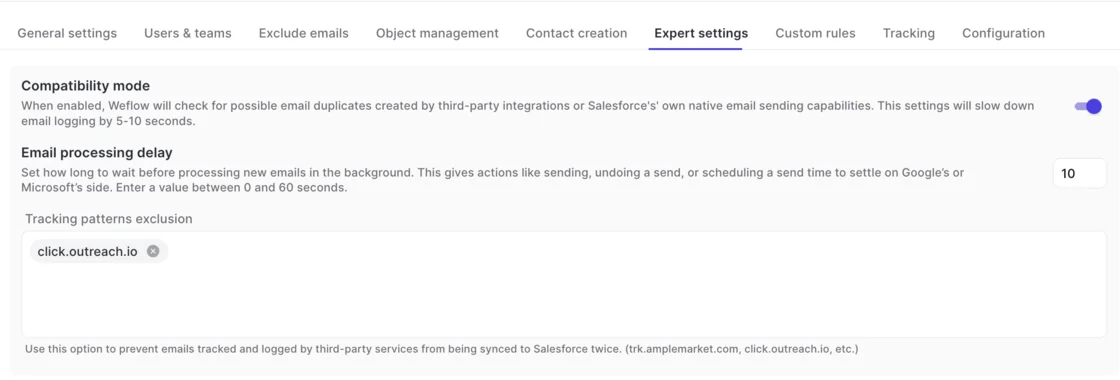
Weflow reads no mailbox until a user joins an activity capture configuration. Package installation, integration-user connection, and enterprise-application setup can precede capture activation.
Weflow Activity & Contact Capture costs $19 per user per month, billed annually, with a 10-user minimum. Weflow charges no implementation fee; include the historical-backfill add-on and your internal migration work in the comparison.
Validate Einstein Activity Capture’s current configuration
Keep EAC if its configured behavior passes the requirements you actually have. Replacing reliable background visibility with a larger project needs a business reason.
- Verify the active email storage mode and event sync direction.
- Reconcile inbound and outbound capture against source activity.
- Test multiple opportunities, contact-role gaps, and multi-attendee meetings.
- Execute required reporting, Flow, BI, and historical-access tests.
- Review actual entitlements and incremental license costs with your Salesforce account team.
| Stay if | Switch if |
|---|---|
| You need background timeline visibility and EAC delivers it reliably | Unexplained gaps repeatedly undermine the activity record |
| Your current storage and reporting configuration meets downstream requirements | Required reports, flows, exports, or retention fail in your org |
| Your mapping model is simple and passes the ambiguous cases you encounter | Wrong or unresolved mapping prevents required deal-level analysis |
| Administration and rep connection requirements remain manageable | Connection recovery or correction work makes the setup operationally unreliable |
Turn pilot evidence into a rollout decision
Approve candidates through hard gates, not an average feature score. A good dashboard cannot compensate for prohibited capture or wrong-opportunity activity.
Your decision should identify what passed, what remains unproven, and who owns each remaining action. An untested requirement stays open.
Approve, remediate, or reject each candidate
Assign a disposition to every finding before recommending rollout. Separate a fixable org configuration from a product constraint, but require proof for both.
| Finding | Owner | Required action | Disposition |
|---|---|---|---|
| All required tests pass with traceable evidence | RevOps | Approve the signed cutover scope | Approve |
| Permission or validation issue has a permitted fix | Salesforce admin | Apply the fix and rerun affected tests | Remediate, then decide |
| Vendor defect has a demonstrated correction | Vendor and RevOps | Repeat the failing case and related regression tests | Remediate, then decide |
| Required access conflicts with security policy | Security and RevOps | Confirm that no approved deployment resolves the conflict | Reject |
| Wrong mapping, prohibited capture, or duplicate writes remain unresolved | Vendor and Salesforce admin | Stop production expansion | Reject the current configuration |
| History or recovery remains unproven | IT and vendor | Complete the continuity drill | Hold approval |
Package the decision for IT and sales leadership
Give stakeholders a short decision memo backed by the reconciliation ledger. Lead with operational risk and the rollout recommendation.
- Recommendation: Approve, remediate, or reject, with the specific deployment scope.
- Evidence: Capture coverage, mapping results, downstream tests, duplicate checks, and continuity results.
- Salesforce impact: Permissions, storage projection, reporting changes, and automation dependencies.
- Rep impact: Correction steps, authentication behavior, connection warnings, and support guidance.
- Commercial and security status: Full cost, contract terms, completed approvals, and remaining blockers.
- Execution: Cutover owner, stop conditions, rollback authority, and monitoring responsibility.
| Approver | Signs off on |
|---|---|
| RevOps leader | Business requirements and test evidence |
| Salesforce admin and IT | Access, production writes, continuity, and recovery |
| Security, legal, and procurement | Data handling and commercial terms |
| Sales leadership | Rep workflow and the reporting changes the rollout introduces |
Bring the failed cases to the vendor conversation. You’ll learn more from how a candidate handles your ambiguous Opportunity than from another clean demo.
See how Weflow captures activity, updates Salesforce fields from calls, and rolls up your forecast. Book a 30-minute demo.
Activity capture evaluation FAQ
Evaluate adjacent channels, AI scope, and exit terms separately from email and calendar parity. Passing the core capture test doesn’t prove those capabilities.
Does activity capture include call recording?
Don’t assume it does. Email and calendar capture, dialer activity, and meeting recordings can belong to different products.
Weflow includes meeting recording in Weflow Conversation Intelligence, not Weflow Activity & Contact Capture. Revenue AI Foundation combines both products.
- Confirm which sources each quoted product captures.
- Identify which system writes the call or meeting activity.
- Price recording separately from basic capture if you need it.
Can activity capture be deployed without AI?
Separate capture procurement from AI activation, then require technical confirmation of the boundary. Weflow sells Weflow Activity & Contact Capture separately, but standalone packaging alone doesn’t settle an AI-governance review.
- Which features process data with AI during the proposed deployment?
- Can administrators keep optional AI features disabled?
- What processing continues when those features are off?
- Does the approved configuration match the contract and security review?
Weflow’s trust commitments include SOC 2 Type II, GDPR compliance, Zero Data Retention for AI processing, and no use of customer data to train AI models.
How should multiple mail tenants be evaluated?
Test each mail tenant as a separate administration boundary. A successful Microsoft 365 or Google Workspace connection doesn’t prove the same setup covers an acquired company.
- Document each tenant’s application approval and administrator.
- Verify user assignment to the correct capture configuration.
- Test messages between sibling companies as internal traffic.
- Validate exclusions against existing Salesforce records as well as domains.
- Check how administrators monitor failures across tenants.
Weflow requires capture configuration per mail tenant, with users assigned within the appropriate domain scope. Don’t assume one consolidated administrative view across tenants; confirm the operating model before approval.
How should field and in-person activity be tested?
Add field channels to the source baseline and score each separately. Capturing email sent from a phone doesn’t prove mobile call capture or in-person recording.
| Channel | Test |
|---|---|
| Mobile email | Send and reply from the actual phone client; inspect Salesforce records and mapping |
| Phone call | Confirm the supported dialer or logging path; inspect the resulting call record |
| In-person meeting | Test calendar activity separately from consent, recording, and processing |
| Manual field activity | Create and correct the record from the device the rep carries |
Weflow Mobile Copilot records and processes in-person meetings. Validate device availability and the required Weflow Conversation Intelligence scope during the pilot.
What monitoring should continue after rollout?
Monitor source-to-record health, not application logins. Background capture can work correctly even when nobody opens the product.
| Signal | Owner | Suggested review | Response |
|---|---|---|---|
| Source activity without expected writes | RevOps | Daily during rollout, then a documented recurring sample | Investigate deviations from the accepted capture threshold |
| Connection or permission failures | IT and Salesforce admin | On alert and during rollout checks | Restore access and reconcile the affected window |
| Wrong mappings and increased account fallback | RevOps | Weekly and after object-model changes | Inspect roles, duplicates, and mapping configuration |
| Duplicate activity | Salesforce admin | After any writer change and in recurring audits | Pause overlap and restore authoritative ownership |
| Storage growth | Salesforce admin | Against the approved capacity plan | Adjust attachment or retention policy before capacity runs out |
What happens to captured data after cancellation?
Records written into Salesforce and content hosted by a vendor can have different exit behavior. Weflow’s captured activity records persist in Salesforce after you stop using Weflow; that doesn’t mean every platform output or hosted recording lives there.
- Query retained activity and relationships after disabling capture.
- Export required vendor-hosted content before access ends.
- Confirm retention and deletion terms for each data category.
- Check package dependencies before uninstalling anything.
- Verify that reports and flows still work without the vendor application.
Make the data-exit test part of approval. Your next capture evaluation should start with usable history, not a reconstruction project.