How Weflow Decides Which Salesforce Opportunity an Email or Meeting Belongs To
Learn how Weflow maps emails and meetings to the right Salesforce opportunity—and when it logs to the account.


Weflow is the Revenue AI Orchestration platform for sales, customer success, and RevOps teams. It's built for Salesforce teams, so everything it captures lands in native Salesforce objects you own. The question we get first on almost every capture evaluation is how Weflow knows which opportunity an email or meeting belongs to.
Here's the short answer. Weflow picks the opportunity with a fixed, published order of rules. The rules run on the email address and the Salesforce relationships around it, never on what the email says.
When that evidence can't settle which open deal an email belongs to, Weflow logs to the account on purpose instead of guessing. Your rep then resolves the real ambiguity once per thread, from inside Outlook or Gmail.
No tool can map perfectly when three live deals share one person, and we won't pretend otherwise. Below you'll find the full order, step by step, exact enough to test in a sandbox, plus where every common multi-opportunity case lands. If you're new to how automated Salesforce data capture with Weflow works overall, start there and come back.
Why every Salesforce capture tool has to pick one opportunity
Salesforce lets an activity relate to one opportunity or to the account, not several. An email can carry many contacts, but only ever one deal.
The only native link between a contact and a deal is the opportunity contact role. Reps rarely fill it in, because nothing forces them to and no report they run depends on it. So on an account with a new business deal, a renewal and an expansion open at once, Salesforce itself often holds no signal that says which deal an email is about.
Every capture tool therefore falls back somewhere, and each picks a different rule:
- Some use the most recently modified or most recent opportunity.
- Some use the earliest close date.
- Some attach the activity to every open deal the contact touches.
- Einstein Activity Capture documents a chain: contact roles first, then the account's opportunities, ranked by tiebreakers such as close date, owner and last activity.
None of these fallbacks raises a warning. The data looks fine until a manager opens a deal before a review and reads it as dormant.
So here's the rule Weflow uses, in full.
The exact order Weflow follows to choose an opportunity
Weflow Activity & Contact Capture resolves every email and meeting with the same seven steps, in this order:
- Weflow looks up each external address in the primary and secondary email fields, and logs to the contact, lead or custom object that holds it.
- If the address exists as both a contact and a lead, Weflow prefers the contact.
- Weflow checks whether that contact holds an opportunity contact role on an open opportunity.
- If the account has exactly one open opportunity, Weflow logs to that opportunity.
- If several opportunities are open, Weflow weighs the contact role, who owns the opportunity, who owns the mailbox, the account relationship and the stage.
- Weflow never logs to a closed opportunity.
- If the choice is still unresolved, Weflow logs to the account.
Inside a thread, the first message sets the mapping. If a rep corrects it in the add-in, that choice holds for every later reply in both directions.
There's no "the AI decides" step anywhere in that list. That's deliberate, and we explain why below.
Where Weflow logs an email in each multi-opportunity case
Every common case has a predictable destination, and the account is a designed outcome, not an error. Use this as a lookup against your own messiest accounts.
| Situation | Where Weflow logs it | Which rule decides |
|---|---|---|
| The account has one open opportunity | That opportunity | Step 4 |
| The contact holds a role on exactly one of several open opportunities | The opportunity with the role | Steps 3 and 5 |
| The contact holds roles on several open opportunities | The opportunity the owner, mailbox owner, account relationship and stage point to; the account if they don't separate the deals | Steps 5 and 7 |
| No contact roles, several open opportunities | The opportunity the remaining signals point to; the account if they don't separate the deals | Steps 5 and 7 |
| Only closed opportunities on the account | The account | Steps 6 and 7 |
| Sender isn't a contact, but their domain matches the account's Website field (domain matching on) | The account | Account-domain matching |
| Sender matches no contact, lead or account domain | Not logged | Weflow only logs what it can match |
| One contact buying for several sub-accounts or properties | The deal the contact's roles and account point to; the account if several qualify, until the rep picks the property's deal once for the thread | Steps 3, 5 and 7, then the rep's choice |
| Renewal and expansion share the same primary contact | See the renewal and expansion section below | Steps 3, 5 and 7, plus capture lanes |
Two things stay constant across every row. The email always logs to the matched contact or lead, and it always relates to a record you can find.
Why Weflow logs to the account instead of guessing
This is the design choice skeptical buyers push on hardest, so here's the reasoning in two parts.
A wrong account is easy to fix, a wrong deal gets built on
When Weflow can't tell two open deals apart, it logs to the account. That's a stated principle, not a silent failure.
A wrong deal is worse than no deal. It quietly inflates one opportunity's activity, starves its sibling, feeds the wrong context into AI summaries, and makes the inactivity column lie. Nobody notices until a rep defends a "dead" deal in a review.
An account-level entry is visible and correctable. Since release 3.24, the Weflow activity timeline on the account shows activity logged to its child records too, so a manager reading the account sees everything across its deals. The rep moves the thread to the right deal once, and the record is right from then on.
Why Weflow doesn't read the email to choose the deal
Weflow tested matching on what the email says and left it out, because it wasn't accurate enough. Content can mention the renewal and the expansion in the same paragraph. An address and a contact role can't.
We know a senior camp sees any rep click as failure.
That's a fair position, and we take it seriously. Our answer is that the person who has to defend the report needs a rule they can predict and explain to sales leadership. A model that's right most of the time and silently wrong the rest gives you nothing to explain when it misses.
There's a privacy side to this too. Because mapping doesn't depend on content, Weflow's support team troubleshoots with the logging logic for each email, never the message itself.
How your reps correct a mapping once for the whole thread
When the ambiguity is real, the rep resolves it once per thread, from the mailbox they already work in, and can fix it after the fact.
Re-map a thread from the Outlook add-in or Chrome extension
The Outlook add-in and the Chrome extension for Gmail show the rep where an email is about to log before it does. Here's what the rep does:
- Open the thread. The side panel shows the matched contact, the account and the open opportunities Weflow found.
- Pick a different opportunity, account or custom object if the match is wrong.
- Carry on. Every later reply in that thread, inbound and outbound, routes to the same record without the rep touching it again.
- Start a new thread to reset the choice.
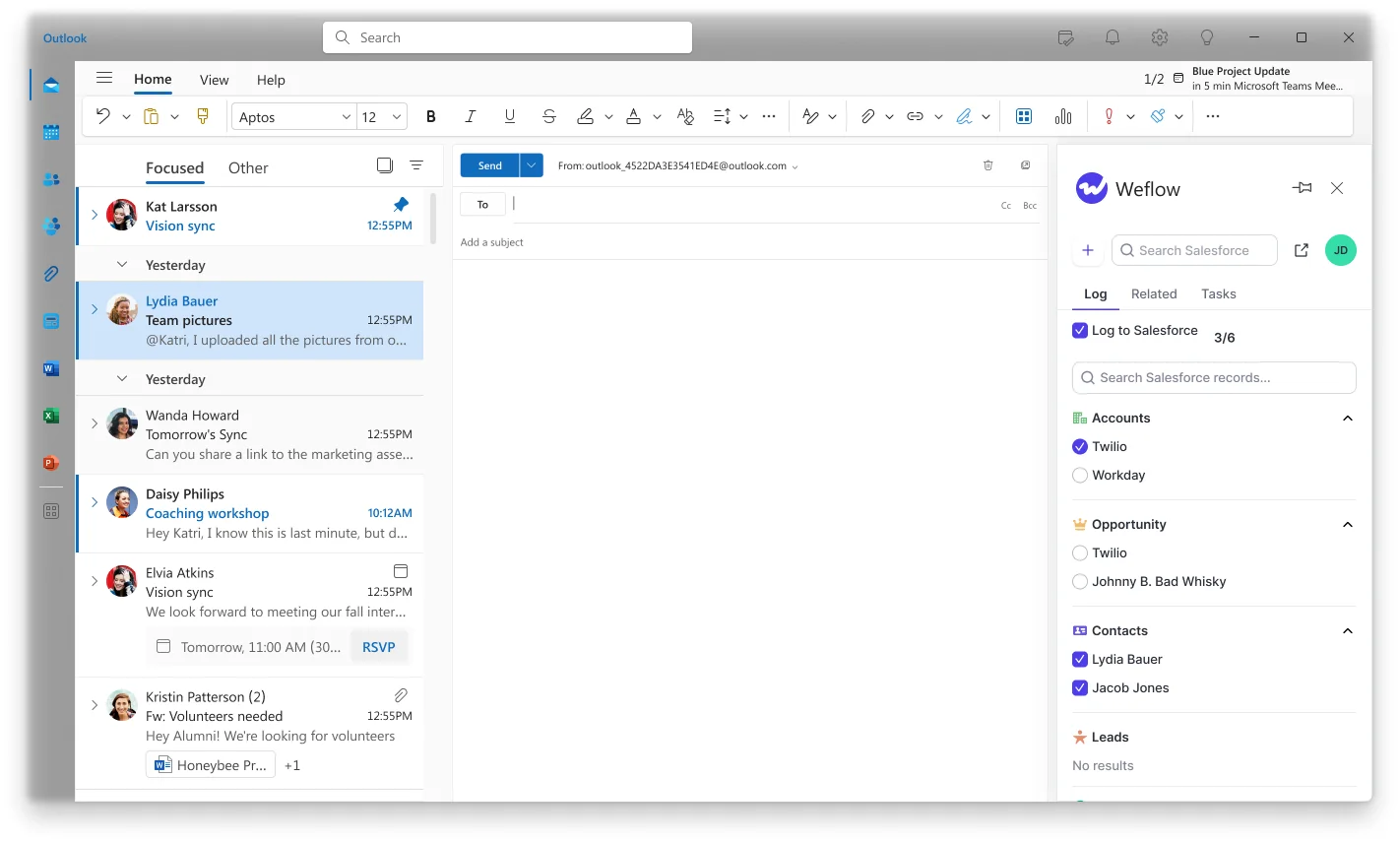
Capture runs in one of three modes per team: fully automated, hybrid or fully manual. Most of our customers run hybrid, where capture happens server side and the add-in adds this correction layer on top. Hybrid also lets a rep untick logging for a thread, and you can hand out the add-in with that control removed if you want reps to see the mapping but not suppress it.
For contrast, Einstein Activity Capture lets a rep correct the match on the email record in Salesforce, and its matching flow respects that manual change. It has no inbox panel of its own. Salesforce sells the Outlook and Gmail side panel as a separate product.
Move an email that Weflow has already logged
A rep or admin can move an already-logged email to a different record from the same panel. Weflow does this by deleting the logged email and logging it again, because Salesforce doesn't allow a sent EmailMessage record to be edited, even through the API. Emails stored as Tasks go through the same flow.
Your reports stay stable as long as you know which date they're built on:
| Report built on | Effect of moving an email |
|---|---|
| Message date | Unaffected, because Weflow keeps the email's original message date |
| Created date | The email shows on the day it was corrected |
| Meeting due date | Unaffected, because the event's due date is the date that counts for meetings |
Not every tool lets you do this. Outreach can re-associate past calls and meetings, but not a sent email, so an email logged to the wrong opportunity stays there.
How Weflow maps a meeting and its recording differently
Meetings follow the same matching rules as emails. The difference is that a recorded meeting produces two Salesforce records, and they follow different linking rules.
| Calendar Event | Weflow recording | |
|---|---|---|
| What it is | A native Salesforce Event, one per meeting | A Weflow custom object in Salesforce |
| How many records it links to | One opportunity or account, because Salesforce allows only one | Several at once, such as two opportunities, or an opportunity and its account |
| Correcting from the Outlook add-in or Chrome extension | Moves | Moves |
| Correcting inside the Weflow app | Stays where it was, on purpose | Moves |
| What the opportunity activity timeline reads | This record | Not this record |
So make meeting corrections from the Outlook add-in or Chrome extension. That keeps the Event and the recording on the same deal, so the timeline and the AI summaries agree. We keep the Weflow app correction scoped to the recording so someone working in the recording view can't accidentally rewrite a Salesforce activity record.
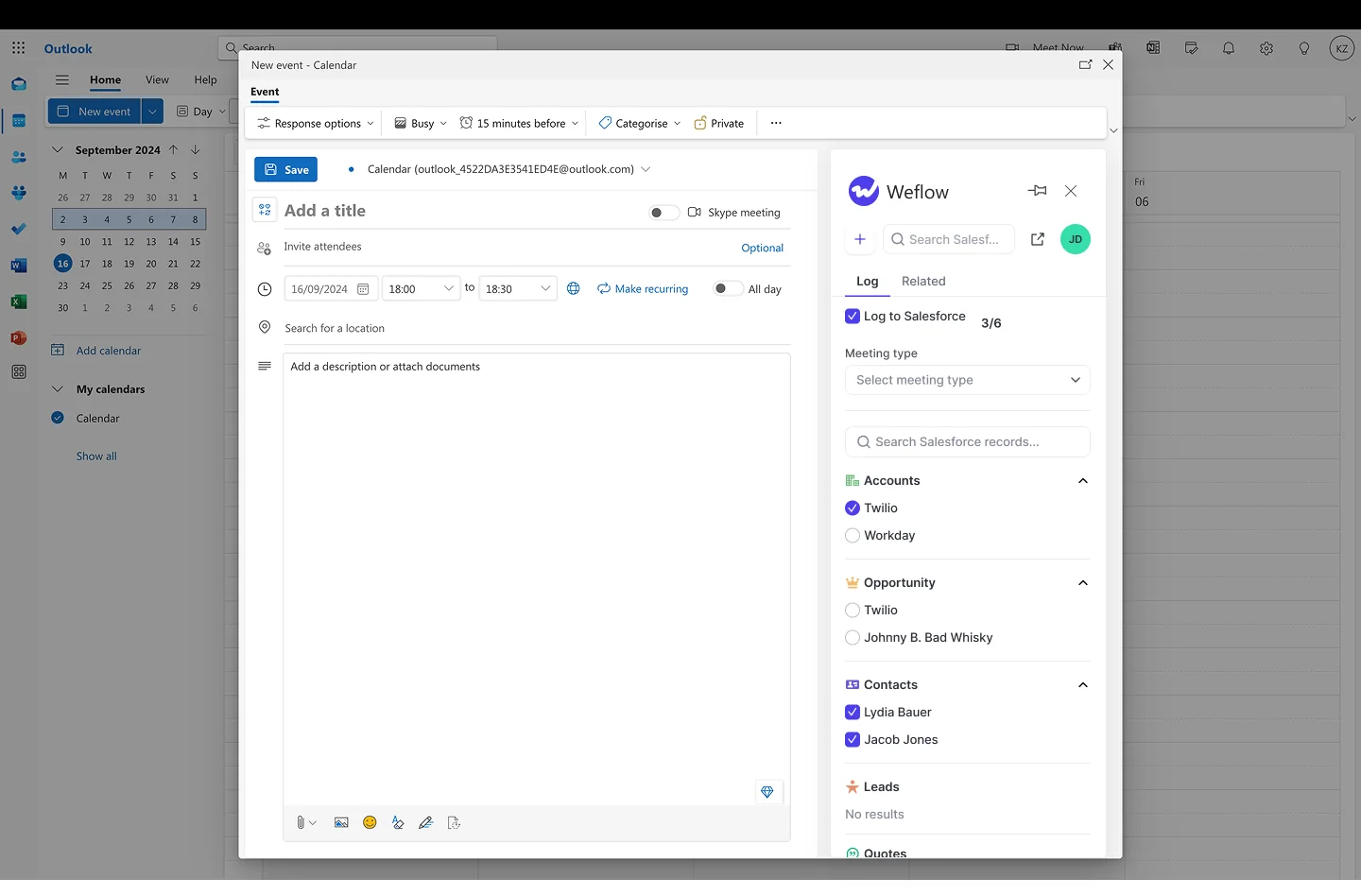
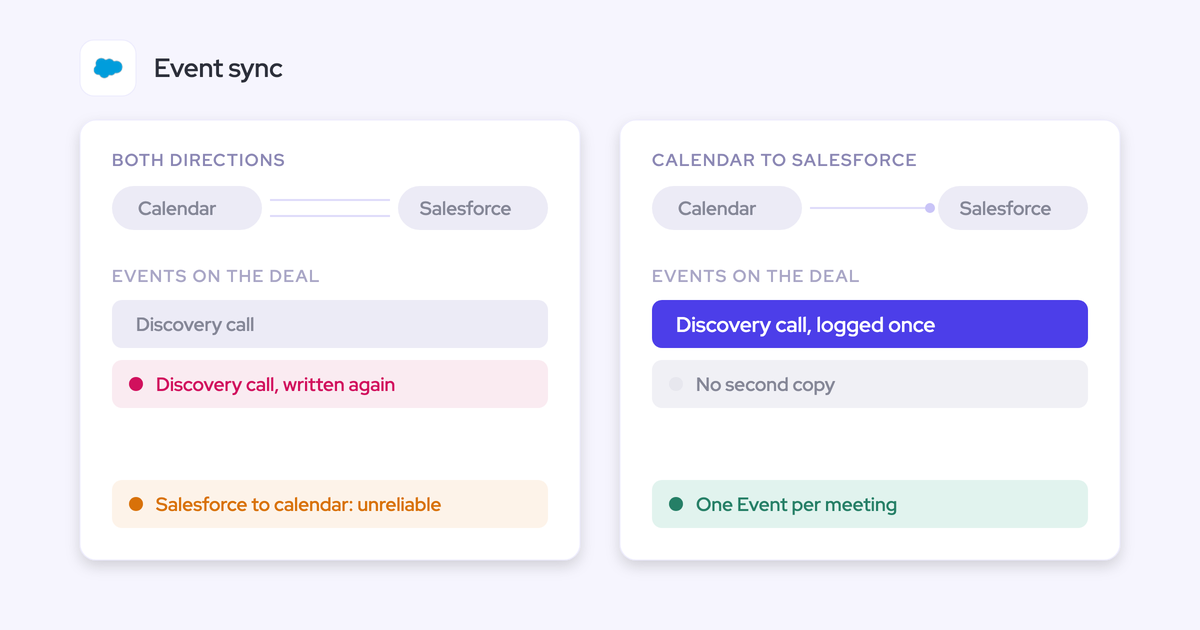
The multi-link recording is useful when one call covers both a renewal and an expansion. The recording can sit on both deals, while the Event sits on one. Weflow also creates a single Event per meeting and updates it, so you don't get the duplicate you'd see from a separate recorder plus a separate capture tool.
What happens when Salesforce changes between two emails
These timing rules matter most when you're testing, because they explain results that otherwise look inconsistent:
- Weflow evaluates each new email and meeting against Salesforce as it stands at that moment. It caches some data to keep API calls low, but it doesn't reuse the decision it made for an earlier email.
- A contact role added, an opportunity closed or a contact moved between two emails changes where the second one logs.
- Weflow never moves activity on its own once it's logged. When a contact becomes a contact role later, their new emails and meetings log to that opportunity, and earlier activity stays where it was logged.
- Logged activity only changes place when a rep or admin moves it in the Outlook add-in or Chrome extension.
- When you create an account after a rep has already emailed people at that company, Weflow logs those earlier emails to it automatically, with no re-sync.
How Weflow writes contact roles so mapping improves over time
If your opportunity contact roles are half empty, every capture tool's accuracy is capped by that gap. Weflow can close the gap as reps work, instead of inheriting it forever.
With automatic contact role creation on, here's the loop:
- Weflow maps an email from a contact to an opportunity, either by its rules or by the rep's choice in the add-in.
- If the contact has no role on that opportunity, Weflow creates one at the moment the email is logged.
- The next email or meeting from that contact resolves to the opportunity through the role.
So the mapping gets more accurate the longer a deal is worked. Left off, the contact stays unrelated to the opportunity and the next activity falls back to the account or whichever rule fires.
Weflow links the person to the deal, but it doesn't decide whether they're the champion or the economic buyer. A job title doesn't tell you a buying role, so that stays a human judgment. Your contact role coverage goes up; the quality of the role labels is still yours.
Einstein Activity Capture reads the contact roles already on an opportunity, but it never adds them. Contact roles stay a manual Salesforce task there.
Renewal and expansion on one contact: what Weflow does
This is the hardest case, and the one where we have a real gap. Here's what happens and how our customers configure around it.
Why the contact role can point at both deals
The primary contact role usually gets copied onto every opportunity on the account. So when your customer's ops lead sits on both the renewal and the expansion, the contact-role signal points at both.
Weflow has no rule that picks the opportunity with the nearest close date. That's the rule teams ask for first, and we don't offer it. The remaining signals (owner, mailbox owner, account relationship, stage) decide, or the email falls back to the account until the rep picks.
Split renewals and new business into separate capture lanes
Weflow lets you run as many capture configurations as you have teams, each scoped by users and by Salesforce field values. Use that to separate the two motions:
- Create one activity capture configuration for your renewals team.
- Filter it to renewal opportunities, using opportunity type or a close-date threshold.
- Create a second configuration for everyone else, filtered to new business and expansion.
- Assign users to the configuration that matches the deals they work.
You can also restrict logging to opportunities where the opportunity owner is on the email. We don't recommend it for this case:
- It drops activity from everyone else on the deal, such as solutions engineers, managers and CSMs.
- That loss shows up in exactly the multi-threading picture you bought capture to see.
What Weflow's opportunity mapping won't do
These are the limits we'd want to know if we were in your seat, plus the teams who should stay where they are.
The limits to plan your rollout around
- One opportunity per email. Weflow follows Salesforce here, so correspondence covering two deals lands on one of them or on the account.
- The Website field drives domain matching. Any value there acts as a matching domain, including a personal mailbox domain. If a free-mail domain sits in one account's Website field, every email involving it from any connected mailbox logs to that account. Fix the field, exclude the domain, and delete what was already written.
- No mapping control on mobile. Weflow captures email sent from a phone like any other, but the rep can't see or change the mapping there. A thread already mapped on desktop keeps its mapping.
- Sending addresses Salesforce doesn't know aren't captured. Mail from a separate deliverability subdomain or an alias that doesn't match the address on the Salesforce user doesn't log.
- No override-rate figure. Weflow publishes no number for how often reps re-map. The rate depends on your contact role coverage and how many deals share a contact, so it comes out of your pilot.
When Einstein Activity Capture is the better fit
If your team wants to hand-code its own tiebreakers, including close date, Einstein Activity Capture lets you. Its matching runs in an editable flow in Flow Builder, and you can extend it with Apex. Its documented tiebreaker chain and its correction on the email record are real strengths.
And if your accounts genuinely carry one open opportunity at a time, every tool lands the email on the right deal most of the time. You'll see less difference from switching on mapping alone.
Which Weflow Activity & Contact Capture settings to turn on first
For multi-opportunity accounts, a short set of settings gets most email onto the right opportunity from day one.
| Setting | What it does for opportunity mapping | When to turn it on |
|---|---|---|
| Hybrid mode with the Outlook add-in or Chrome extension | Lets reps see and fix ambiguous matches once per thread | Day one, for every team with multi-opportunity accounts |
| Automatic contact role creation | Writes the role on the mapped opportunity so later emails resolve through it | Day one |
| Automatic contact creation, restricted to existing accounts | Gets new stakeholders on threads into Salesforce so they can be matched | Day one, with a per-meeting cap |
| Account-domain matching for unknown senders | Logs email from people not yet in Salesforce to the account | Once your Website fields and duplicate accounts are cleaned up |
| Separate renewal and new-business capture lanes | Keeps renewal and expansion threads apart when they share a contact (see the renewal section above) | When renewal and expansion run on the same accounts |
| Compatibility mode and tracking patterns | Stops double logging when a sequencer also writes to Salesforce | Before go-live if Outreach, Salesloft or Apollo also logs |
How to test Weflow's opportunity mapping in a Salesforce sandbox
Most misleading sandbox results come from the test data, not the tool. Set the test up so it isolates the rule you're checking:
- Give each test company its own unique domain in the Website field. Free-mail domains such as gmail.com or outlook.com match every test sender to several accounts at once and create ties you'd rarely see in production.
- Put one clear contact role on each test opportunity, then add the edge cases one at a time: two open deals, a shared contact, no roles.
- Send to and from an address outside your company domain. Mail between two internal addresses is excluded, so a test between colleagues logs nothing.
- Create, move, reschedule and delete meetings. Creating one only proves the create permission; moving and deleting prove the update rights that otherwise fail weeks after go-live.
- Change Salesforce between two emails (add a contact role, close an opportunity) to watch the per-email evaluation rules work.
- Open Activity Capture Health in Weflow Analytics inside Salesforce. It flags duplicate accounts, accounts sharing a website domain, duplicate contacts, non-converted leads and capture settings that aren't configured for optimal capture.
- Run a parity pilot against your incumbent with Weflow on defaults, before you configure anything. Judge it on one question: did anything get lost?

Bring your messiest accounts to the call and we'll walk them through these rules with you before you set up the pilot. See how Weflow captures activity, updates Salesforce fields from calls, and rolls up your forecast. Book a 30-minute demo.
Questions RevOps teams ask about Weflow's opportunity mapping
How often will our reps have to override the mapping?
Weflow publishes no override-rate figure. The rate depends on your contact role coverage and how many open deals share a contact, so a parity pilot on your own accounts is how you size it. Because a correction holds for the whole thread, you're counting conversations, not emails.
How clean do our contact roles need to be before go-live?
Empty roles don't stop capture, but they push ambiguous cases to the account until a rep picks. Automatic contact role creation raises coverage as reps work, so the ceiling moves up over time. Audit role coverage on your largest multi-opportunity accounts first, because that's where the fallback shows up most.
Do meetings follow the same rules, and do we need Shared Activities?
Meetings follow the same matching logic as emails, and inbound activity is evaluated exactly like outbound. Relating a meeting to every attendee, not just the primary contact, needs the Salesforce Shared Activities setting on. In a large org that's a change request rather than a toggle, so raise it early.
Who at Weflow can see the content of our emails?
Weflow's support team sees how each email was logged or skipped, including which rule decided it, but not the email's content. Only you see what the message says. Weflow is SOC 2 Type II certified and GDPR compliant, runs Zero Data Retention for AI processing, and never uses customer data to train AI models.
What happens with partners, agencies and resellers on another domain?
Domain matching can't resolve these, because the person in the meeting doesn't share a domain with the account the deal belongs to. A partner contact appearing on a customer thread is created against that customer's account. You can exclude partner domains or partner account types, block specific records with custom rules, and let the rep re-map the thread in the add-in.
How does Weflow handle contacts with several email addresses?
Weflow matches on both primary and secondary email fields, so a contact with a business and a personal address resolves either way without creating a duplicate. Our customer Lendz relies on this to keep one contact record per person. Contacts who move between companies, or keep the same address at a new employer, still need a manual fix.
How do we find duplicate accounts that share a website domain?
Activity Capture Health flags accounts sharing the same website domain, alongside duplicate contacts and accounts, inside Salesforce. Duplicate accounts on one domain are the pattern that breaks mapping, because capture can't tell which of two identical accounts an email belongs to. Clean those before you switch on account-domain matching.
Will post-sale customer success calls land on renewal opportunities?
They can, if a CSM's call includes someone who holds a contact role on a renewal. Give your CS team its own activity capture configuration, scoped to the objects and opportunity types it should log to. That keeps implementation and escalation calls from landing as evidence on a renewal deal.
Should we store emails as Tasks or EmailMessage records?
It's a reporting choice you make per configuration:
- Task: one activity report can span tasks and events, so emails sit alongside meetings and calls. It's also lighter on storage.
- EmailMessage: carries native From, To and Cc plus thread structure, which you need to separate sent from received and calculate reply rates in Salesforce.
Weflow's own insights read both, so the choice only affects reporting inside Salesforce.
Will Weflow double-log emails Outreach or Salesloft already logs?
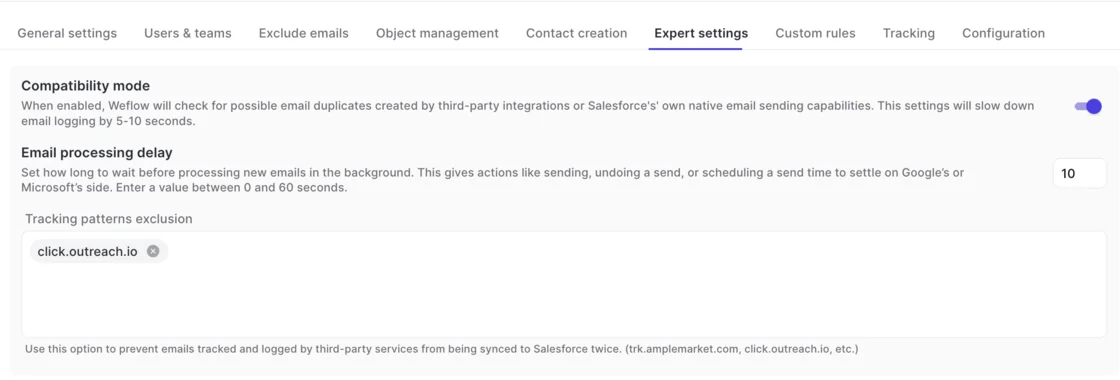
Not with compatibility mode on. Weflow holds its sync back by about ten seconds so the other tool can log first, then matches on the record ID so the same email isn't written twice. Tracking patterns, such as click.outreach.io, suppress a sequencer's emails entirely.
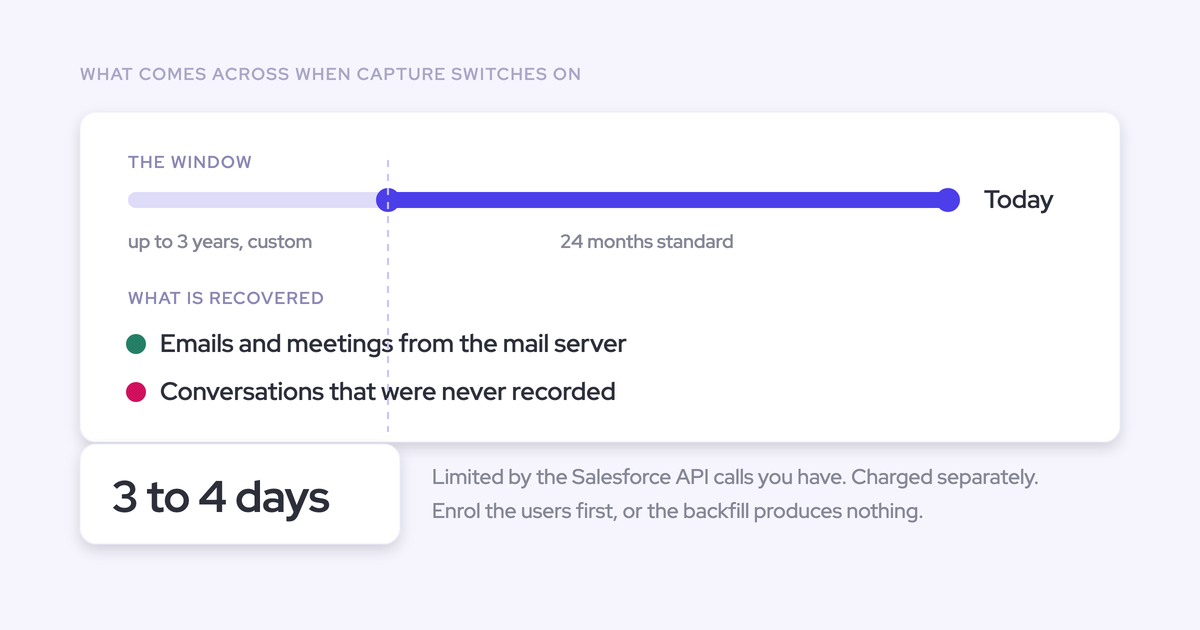
Is historical activity synced when we switch to Weflow?
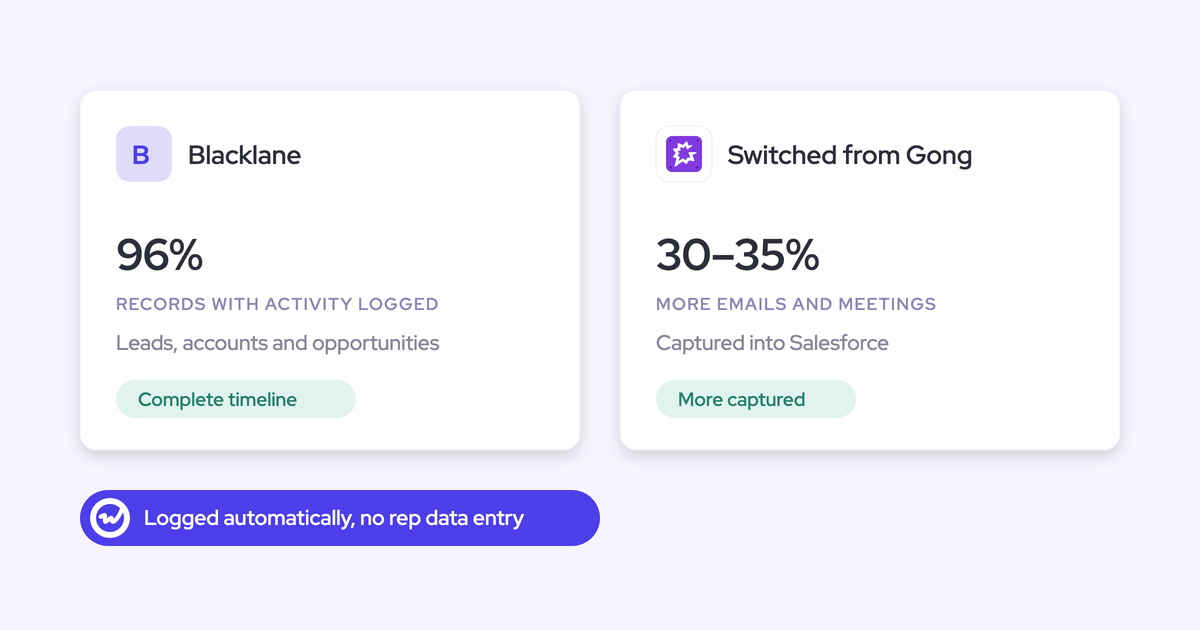
Yes. Weflow syncs historical emails and meetings back into Salesforce, batched to protect your daily Salesforce API limits. For Blacklane, we synced four months of history over one week.
Can Weflow log emails to custom objects and cases?
Yes. You enable objects under Object Management, supply the object label and the fields you want shown, and the object appears in the add-in so reps can link an email to it. For Cases, Weflow can also match on patterns in the email subject to find the right Case automatically.
Do we need Weflow Conversation Intelligence for meeting recordings?
Yes. Recording lives in Weflow Conversation Intelligence, not in Weflow Activity & Contact Capture. Without it, meetings still log as Salesforce Events through capture; recording adds the summary and AI field updates on top. Revenue AI Foundation bundles the two.
What does Weflow Activity & Contact Capture cost compared with Einstein Activity Capture?
Weflow Activity & Contact Capture is $19 per user per month, billed annually, with a 10-user minimum. It includes Ask Weflow AI Pro and Agent Builder Free with 25 agent actions per month.
Einstein Activity Capture pricing depends on your edition:
- Standard: included with Starter, Pro Suite, Professional and Enterprise editions, free for up to 100 users.
- Full version: sold inside the Sales Engagement add-on at $50 per user per month, billed annually.
- Already included: Unlimited Edition and Agentforce 1 Sales Edition carry the full version.