Weflow Integration User in Salesforce: Which Permissions It Needs and Why
Learn which Salesforce permissions a Weflow integration user needs and why it doesn't need Modify All Data.


Weflow doesn't need Modify All Data. Weflow is the Revenue AI Orchestration platform for sales, customer success, and RevOps teams. In Salesforce, it runs on a dedicated API-only integration user built from three pieces:
- the Minimum Access API Only Integrations profile
- the Salesforce API Integration permission set license
- a purpose-built Weflow permission set
There's one exception, and we'll state it plainly. If your org-wide defaults are Private, the integration user also needs Modify All Records on Account, Opportunity and Contact.
The rest of this guide is the brief you hand your security reviewer. For every grant, we cover three things:
- what Weflow Activity & Contact Capture uses it for
- what silently breaks if you cut it
- whether it's safe to narrow
Most of these permissions exist so activity lands on the right deal record, which is what deal hygiene depends on. Cut the wrong one and nothing errors. The data just quietly goes to the wrong place.
Does Weflow need Modify All Data in Salesforce?
No. Weflow avoids Modify All Data because that grant lets an integration change any record in your org, regardless of sharing rules. We treat that as a security risk.
Instead, we work out a least-privilege permission set with each customer during setup. The integration user can touch only the records and fields capture writes to. The broadest grant we ask for is the Private OWD exception, which has its own section below.
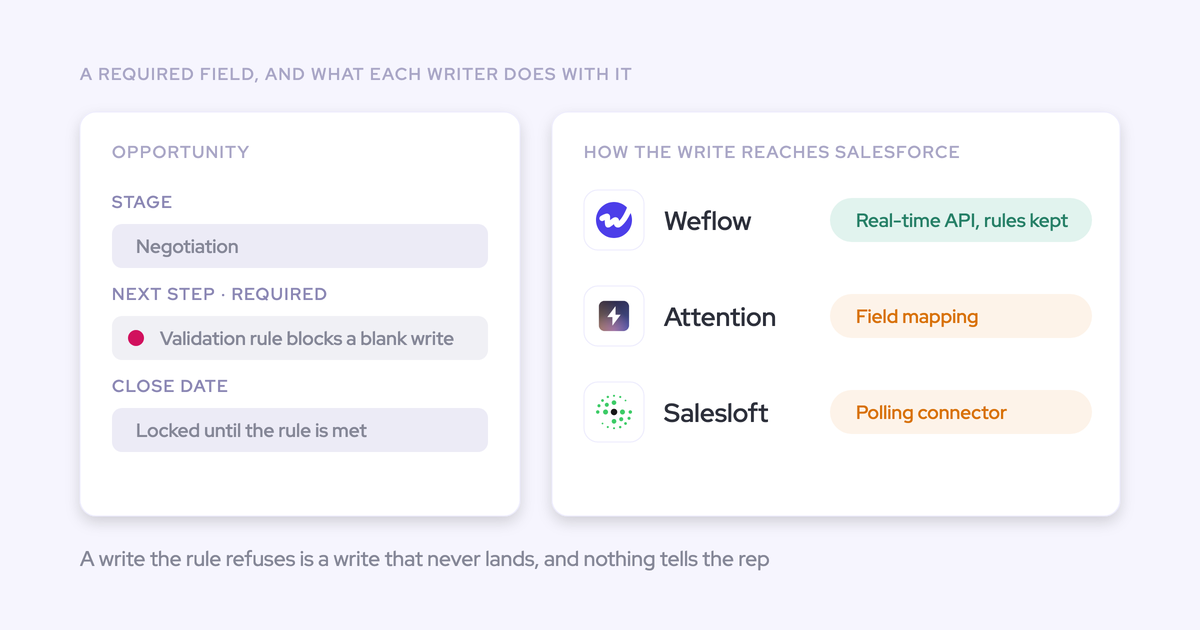
If you've reviewed other capture or conversation tools recently, our ask will look smaller than you're used to. The published setup docs of several vendors ask for more:
- Attention requires the authenticating user to hold API Enabled, Customize Application and Modify All Data.
- Nektar's default integration user gets Modify All Data plus metadata and profile permissions, including Manage Profiles and Permission Sets.
- Backstory (People.ai) asks for View All Data and View All Users, places the user at the top of the role hierarchy, and recommends the System Administrator profile.
- Chorus needs a System Administrator profile or equivalent, and doesn't support the API-only integration license.
- Revenue Grid's Instant Sync needs a dedicated integration user with the System Administrator profile.
Credit where it's due: Nektar and Backstory both document reduced-privilege options. Their own docs also warn that those options take considerable admin expertise, or leave you troubleshooting sync failures caused by insufficient access. We'd rather the least-privilege setup be the default than the expert path.
Every permission the Weflow integration user gets, at a glance
The full Weflow permission surface is small and nameable. Delete applies only on Event. This is the table to paste into your security ticket.
| Permission or object | Access level | What Weflow capture uses it for | What breaks if you cut it | Safe to narrow? |
|---|---|---|---|---|
| Minimum Access API Only Integrations profile | Base profile | Gives Weflow an API-only identity that nobody logs in as | A full user license pressed into service tends to time out, and an admin's own login can't be the integration user | It's already the minimum profile |
| Salesforce API Integration permission set license | Assigned to the user | Lets the API-only user hold the Weflow permission set | The integration user can't carry the permissions below | No |
| Account | Read, Edit | Checks a new contact's email domain against existing accounts before creating the contact | Contact creation fails, because Weflow only creates a contact when its domain resolves to an account | No |
| Contact | Read, Edit, plus Create | Creates and enriches contacts found on email threads and in meetings | New people on threads never become contacts | Yes: scope field-level edit to the eight fields Weflow writes |
| Opportunity | Read, Edit | Attaches activity and AI summaries to the right deal | Activity can't reach the deal and stays on the account | No |
| Opportunity Contact Role | Read, Edit | Decides which deal an activity belongs to | Emails land on the account instead of the deal, with no error | No |
| Lead | Read, Edit | Lets the sync match and log activity to lead records you already have | Weflow can't write activity to existing leads | Weflow never creates leads, so this grant only covers matching and logging |
| Event | Full access, including Delete | Logs meetings, updates them when they move, and removes them when they're deleted from the calendar | Missing access on a single field fails the whole event | No |
| The three Weflow custom objects | Edit | Writes the recording, linking and event data the managed package defines | Weflow can't store its own capture data in your org | No |
| System permissions: update email messages, edit tasks, access activities, edit events | Granted in the permission set | Lets the background sync write emails, tasks and events as activity records | Weflow can't write those activity types | No |
| Modify All Records on Account, Opportunity and Contact | Only if OWD is Private | Lets Weflow update activity on records the integration user doesn't own | The first activity logs, but later updates fail at random | Not under Private OWD |
Create this as a separate permission set rather than editing an existing one. That keeps Weflow's access auditable on its own.
Why Weflow needs each Salesforce object permission
Contact-only access doesn't restrict Weflow's scope. It degrades mapping.
We see the instinct all the time on setup calls. The admin reasons that emails and meetings resolve through the contact, so the contact should be enough. The logic actually runs the other way: activity reaches an opportunity through the contact's role on it, and contacts get created against accounts.
So the useful question for your reviewer isn't "how much access does the vendor want". It's "which objects does the mapping logic have to read to produce a correct answer".
Opportunity Contact Role decides which deal gets the activity
An email or meeting reaches a deal through the contact's role on that opportunity. Weflow reads the Opportunity Contact Role to make that assignment, so both Opportunity and Opportunity Contact Role have to be readable for it to happen at all.
Activity attached to an opportunity then rolls up to the account. The reverse doesn't work.
Cut either object and Weflow still logs the email. It just lands on the account. Nothing errors, and the first sign is a rep asking why their deal shows no activity.
| What you cut | What you see |
|---|---|
| Opportunity Contact Role | Emails land on the account rather than the deal |
| Opportunity | No activity or summaries on deals at all |
| Edit on either | Activity matches, but Weflow can't write the link or the summary |
Weflow creates contacts only when the domain matches an account
Account access is a guardrail, not scope creep. When a new person shows up on a thread, Weflow creates them as a contact only if their email domain resolves to an existing account.
That check is what keeps unknown people and orphan records out of your CRM. It needs Account access to run.
Weflow never creates leads. If you run inbound on leads, you keep whatever creates them today, and Weflow Activity & Contact Capture attaches activity at the account and contact layer underneath.
Required Contact fields without a default block contact creation
This is the most common silent failure after an otherwise clean install. A required Contact field that has no default value blocks Weflow from creating the contact.
Here's how it works. At creation, Weflow supplies first name, last name and email. Across create and enrich, it writes eight fields in total: first name, last name, email, account, website, LinkedIn URL, title and phone.
When a required field has a default in Salesforce, Weflow fills it with that default. When it doesn't, the creation fails.
A required picklist such as lead source is the classic case, because Weflow can't decide that value on its own. You have two fixes:
- Set a default value on the required field in Salesforce.
- Add a flow that sets a value on contacts created by the Weflow integration user.
You can find all of this before go-live by checking the Contact object's required fields.
Full Event access stops whole meetings failing to log
Event is the one object where Weflow needs full access, every field and record type it writes. Missing access on a single Event field, such as location, makes the whole event fail to log.
Emails keep working while this happens. So it looks like calendar capture is broken, when it's really one field-level permission. Missing full Event access is the single most common cause of a first-day sync failure we see.
Delete applies here and nowhere else. A calendar deletion has to propagate, so when a rep cancels a meeting, Weflow removes the event it logged.
If Event has several record types, set a default one in Weflow. Without a default, Weflow can't decide which record type to use, and the log fails.

Why Private org-wide defaults need Modify All Records
If your OWD is Private, the Weflow integration user needs Modify All Records on Account, Opportunity and Contact. Read, Edit and View All aren't enough.
With those three alone, the integration user can create the first event or email on a record it doesn't own. It can't update that activity afterwards.
The failure looks random. An AI summary written to an opportunity succeeds. The same summary written to an account fails with an insufficient access error.
So whether a meeting gets its summary in Salesforce depends on what the activity happened to map to. Nobody sees an error. The summary still exists in the Weflow recording object, and you find the gap only when someone asks why some meetings have summaries and others don't.
| Action | With Read, Edit and View All | With Modify All Records |
|---|---|---|
| Create the first activity on a record it doesn't own | Works | Works |
| Update that activity when the meeting changes | Fails | Works |
| Write an AI summary to an account | Can fail with insufficient access | Works |
| Delete records | Not possible | Possible, and Weflow only deletes events it logged incorrectly |
Your security team will push back because Modify All Records includes delete. That's true, and we won't pretend otherwise.
Here's what Weflow actually does with it: Weflow never deletes an opportunity. It deletes an event it logged incorrectly. That's the sentence to take into the review.
Which Salesforce user, license and role Weflow runs as
The Weflow integration user is a dedicated, long-lived, API-only identity that nobody logs in as. Most setup traps live in getting that identity right.
Run Weflow on an API-only integration user, not a person
The setup is the Minimum Access API Only Integrations profile plus the Salesforce API Integration permission set license, with the Weflow permission set on top. It already fits the 2026 Salesforce rule.
That change caught a lot of admins out. Salesforce stopped integration users from doubling as normal platform users, put them under phishing-resistant MFA requirements, and did it at short notice. Teams sharing one user between a person and an integration, or across several tools, found connections broken.
"set this up on a true integration user, not my personal account"
— Salesforce admin during a Weflow setup call
That instinct is right. Two shortcuts fail:
- A full user license pressed into service as an integration user tends to time out.
- An admin's own login can't be the integration user, because a login that's also an active Weflow user is blocked from that role.
For context, Einstein Activity Capture can't run on an integration user license, so its capture stays tied to named user licenses. Weflow's capture runs on one service identity, which keeps the permission model in one place.
Place the integration user high in the role hierarchy
Ownership stays with the person who did the work. When the Weflow integration user creates an email or meeting, Weflow hands the record to the normal user as owner, so your reporting by owner and your audit trail stay intact.
That handoff is why the role matters. If the new owner sits higher in the hierarchy than the integration user, the integration user can lose the right to update the record. A logged meeting that later moves then can't be updated.
A role isn't strictly required, but we recommend one high in the hierarchy for exactly this reason.
Connect the integration user with a password, not SSO
You connect the Weflow integration user by signing in with its own Salesforce username and password. If that sign-in goes through SSO, or you still have a Salesforce session open in the browser, Salesforce authenticates you instead.
Weflow then returns an error that the Salesforce user is already connected to a Weflow member and can't be used as an integration user.
Fix the user's credentials first:
- Give the integration user a password, with SSO not enforced for it.
- Verify the user's email address before connecting.
- Use a mailbox the company keeps long term, not one person's address, and make sure it doesn't belong to an existing Weflow user.
Then fix the sign-in itself:
- Close every Salesforce session, or use a private window.
- Choose your org's custom domain on the login screen.
- Sign in with the integration user's credentials.
This is a real limit: the integration user signs in with a password. Your people still sign in to Weflow through Salesforce OAuth and whatever SSO your org enforces.
What the Weflow managed packages create in your org
The required Weflow managed package creates three custom objects. A second package is optional.
| Object or package | What it holds | Who should get access |
|---|---|---|
| Recording object | The executive summary and full transcript of each recorded conversation | Only profiles that should read what was said on calls |
| Linking object | Part of the core capture data model in the required package | Users who work with Weflow data in Salesforce |
| Event object | Part of the core capture data model in the required package | Users who work with Weflow data in Salesforce |
| Optional second package | Email open tracking fields on the email or task object, a Lightning component with last email, next meeting and activity trend, and a prebuilt activity report | Install it only if you want open tracking and those views |
The recording object deserves its own decision. It's what makes transcripts available inside Salesforce for reporting and for your own automations.
It's also the most sensitive thing the package creates. Profile access to it means access to what was said on every call it holds, not just the fact that a call happened.
So treat it as a confidentiality decision, not a configuration step. You set it per profile, and the package doesn't grant it for you.
How Weflow respects your Salesforce permission model
Users see in Weflow what they see in Salesforce. Weflow applies field-level security, permission sets and role hierarchy as the signed-in user, so a field someone can't see or edit in Salesforce isn't visible or editable in Weflow either.
A few more controls sit on top of that:
- Ask Weflow AI only returns data the user can already reach in Salesforce, and it adds its own guardrails on top, so it can withhold things a user could find directly.
- Sign-in to Weflow runs only through Salesforce authentication, so deactivating someone in Salesforce removes their Weflow access immediately.
- Weflow's support team sees how Weflow decided to log or skip each email, never the email's content.
Weflow applies Salesforce permission changes within about an hour
Weflow reads your Salesforce configuration through the API and caches it for about an hour. A permission, validation rule or field dependency you change in Salesforce takes effect in Weflow within that hour.
There's no second configuration to keep in step. The tradeoff is timing: if you test a change right after saving it, you may see the old behavior. Wait the hour, then test.
Rebuild list-view and Lightning visibility rules inside Weflow
Weflow doesn't inherit visibility you enforce through list-view restrictions or Lightning component visibility. Those controls aren't part of the Salesforce permission model, so Weflow can't see them, and its boards can show records your Salesforce interface was hiding.
This matters most in orgs where portal or community users sit under the role hierarchy. To reproduce the restriction in Weflow:
- Create the pipeline and account views centrally.
- Assign those views per team.
- Switch off users' ability to build their own views.
- Control data export from views with its feature flag.
Which Weflow write controls to switch on first
The permission set governs what the integration user can touch. Weflow gives you three more controls to narrow writes further. If you're cautious, these are where we'd start:
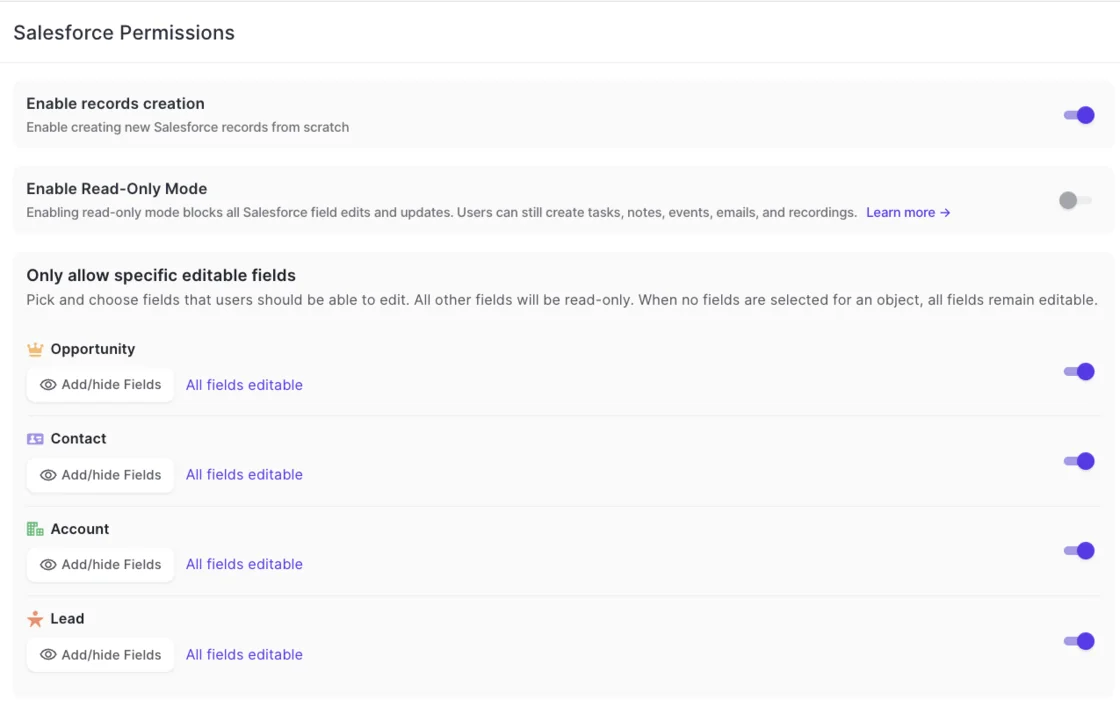
- Read-only mode blocks every record creation and field update flowing from Weflow into Salesforce. It deliberately doesn't block the activity layer, so users can still create tasks, notes, events, emails and recordings, and capture keeps running. You'll find it under Admin Console, Salesforce Permissions, next to a separate toggle for whether new Salesforce records can be created at all.
- Per-object field write locks let you pick which fields users can edit in Weflow on Opportunity, Contact, Account and Lead, and every other field on that object becomes read-only. They govern edits users make in Weflow, not what capture writes. The default is permissive: select no fields and everything stays editable, so saving the screen without changes changes nothing. A common starting shape keeps Close Date editable and locks Stage, Amount and Owner.
- Scoped Contact field-level edit limits the integration user's edit access on Contact to the eight fields Weflow writes, instead of every field on the object.
How to set up and test the Weflow integration user
The technical setup is one admin session of about 45 minutes, with a Salesforce admin and a mail or IT admin present. There's no code to deploy. Then you run a test plan that covers more than "did it log".
Set up the Weflow integration user in this order
- Install the required Weflow managed package. Add the optional tracking package only if you want email open tracking.
- Install the Weflow connected app under Setup, Connected Apps OAuth Usage. Nobody can sign in to Weflow until it's installed. Relax IP restrictions on the connected app for the install.
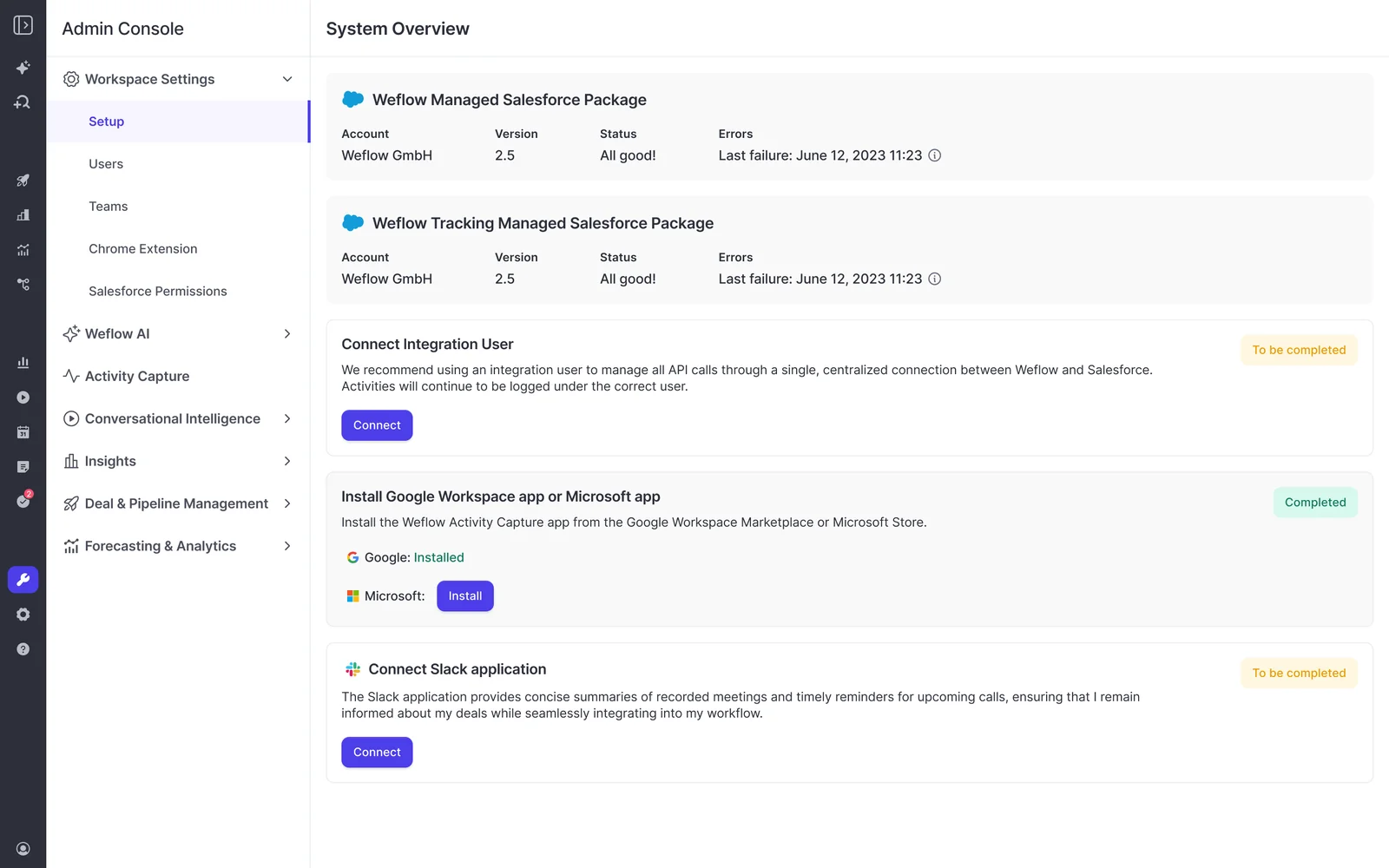
- Create the integration user on the Minimum Access API Only Integrations profile, with the Salesforce API Integration permission set license and a long-term company mailbox as the username email.
- Create the Weflow permission set as a separate set and assign it to the integration user.
- Assign the integration user a role high in the role hierarchy.
- If your OWD is Private, add Modify All Records on Account, Opportunity and Contact.
- Check the required fields on Contact, and set defaults or a flow for any that have none.
- Connect the integration user from a private window, on your custom domain, with its own password.
- If Event has several record types, set a default Event record type in Weflow.
- Have your mail admin install the Weflow app centrally in Microsoft Entra or Google Workspace, scoped to the users you'll capture. For Microsoft, the Microsoft admin starts the install from the Microsoft section of Weflow's admin console.
Test meeting updates, reschedules and deletes, not just creates
Permission to create an event isn't permission to update it. A missing update right otherwise surfaces weeks later, when a logged meeting changes. In your sandbox, check each of these:
- Move a meeting. This proves the integration user can update an event it already logged.
- Reschedule a meeting. This proves updates work after ownership has passed to the rep.
- Delete a meeting. This proves the Event delete right propagates calendar deletions.
- Check a summary lands on an account, not just an opportunity. This proves your Private OWD setup covers accounts.
- Trigger contact creation on an account whose Contact object has required fields. This proves your defaults or flow work.
After any config change, wait about an hour before retesting, so you're testing the new setup rather than the cached one.
How to finish setup before legal signs off
Yes, you can do the technical setup while legal is still reviewing. Installing the packages, connecting the integration user and adding the mail app capture nothing.
Weflow reads no mailbox and writes nothing to Salesforce until you enroll a user in an activity capture configuration. Enrollment is the switch.
| Step | What Weflow reads or writes |
|---|---|
| Install the managed packages | Nothing captured |
| Install the connected app | Nothing captured |
| Connect the integration user | Nothing captured |
| Install the mail app in Entra or Google Workspace | Nothing captured |
| Enroll a user in an activity capture configuration | Capture starts for that user: email and calendar are read, activity is written to Salesforce |
Once a user is in a capture configuration, capture starts whether or not they've ever signed in, because the connection runs server to server. So hold enrollment until sign-off, then add your first team.

Keep a reference next to your sandbox while you work through the setup: grab our Free Salesforce Activity Capture Cheat Sheet.
FAQ: Weflow integration user permissions
Does Weflow ever delete records in Salesforce?
Weflow deletes events, and only events. The Event delete right exists so calendar deletions propagate. Under Private OWD, Modify All Records includes delete on Account, Opportunity and Contact, but Weflow uses it only to remove events it logged incorrectly and never deletes an opportunity.
Does the Weflow integration user count against our API-only license entitlement?
Yes, it uses one. Orgs are entitled to a set number of API-only integration licenses, and each connected tool needs its own. The rule worth keeping is one integration, one user, so revoking or auditing one tool never touches another.
Can a plus alias of my email be the integration user?
It works for setup, but we don't recommend it. A plus alias ties the connection to you, and it breaks if you leave. Use a mailbox the company keeps long term.
Do we need to install the Weflow connected app or relax IP restrictions?
Yes, both. Install the Weflow connected app under Setup, Connected Apps OAuth Usage, because nobody can sign in to Weflow until it's there. Relax IP restrictions on the connected app for the install.
How much Salesforce API capacity does Weflow use?
Weflow uses only the Salesforce REST API. The managed package uses webhooks to capture field changes, which cuts API calls, and Weflow doesn't depend on field history tracking. Weflow also caches your org's configuration for about an hour, so rendering a field doesn't cost an API call each time.
Can Weflow support staff read our email content?
No. Weflow's support team sees the logging logic for each message: whether it synced, and which rule skipped it. Only your team sees what the message says.
Should we turn off Einstein Activity Capture when Weflow goes live?
Yes. Two capture engines running in parallel create duplicate activities, and new Weflow customers routinely disable Einstein Activity Capture during onboarding. Weflow's Activity Capture Health view checks for it and recommends disabled as the target state.

Does Weflow have a read-only admin role?
No. Seeing everything in the Weflow workspace requires full admin, which also carries the ability to change configuration. A Weflow admin doesn't need to be a Salesforce admin, so you can keep the two roles separate.