How Weflow Creates Salesforce Contacts and Opportunity Contact Roles From Email and Calendar
Learn when Weflow creates Salesforce contacts and opportunity contact roles from email and calendar


Weflow Activity & Contact Capture creates Salesforce contacts, and only contacts, for new people your reps email or meet. It never creates leads, accounts or opportunities.
Here's what has to be true before a contact appears:
- A rep sends to that person in To or CC.
- Weflow has checked the address against your contacts, leads and custom objects.
- Creation falls within the caps and account restrictions you set.
Weflow writes eight fields and never forces a contact past a required field. It can also add an opportunity contact role, with a fixed value, as reps log email to a deal. There's no admin review queue, and we'll show you where that matters.
If you own the org, you know the trade you're usually offered. Leave creation off, and the deal shows one contact while six people sit on the thread, right up until the champion leaves. Turn it on with loose rules, and you spend a quarter deleting vendors, recruiters and webinar attendees.
Weflow is the Revenue AI Orchestration platform for sales, customer success, and RevOps teams. It's built for Salesforce teams, and everything it creates lands in your own Salesforce objects. This page covers one part of Salesforce data capture with Weflow Activity & Contact Capture: the exact rules behind contact and contact role creation, written so you can test each one in a sandbox before you switch it on.
What Weflow creates in Salesforce, and what it never creates
Weflow Activity & Contact Capture creates Salesforce contacts under a small set of named rules, and it never creates leads, accounts or opportunities. Here's the full rule set in one place.
| Rule area | What Weflow does | What it does not do |
|---|---|---|
| Records created | Creates contacts only. If an address already exists as a lead, the activity attaches to that lead. | Never creates leads, accounts or opportunities. Never converts leads. |
| Trigger | Creates contacts when a rep sends an email. Detects attendees on calendar invites and caps them per event. | Doesn't create contacts from mail the rep only receives, or from threads the rep never answers. |
| Recipients | Covers addresses in To and CC. | Ignores BCC. |
| Duplicate lookup | Looks up the address in real time across contacts, leads and custom objects with an email field, including secondary email fields. Salesforce's own duplicate rules still apply. | Doesn't merge duplicates already in your org. |
| Volume guards | Lets you restrict creation to existing accounts, cap contacts per meeting or thread, block standard prefixes, exclude domains, and let reps untick creation per email. | Has no admin queue for approving contacts before they're created. |
| Fields written | Writes first name, last name, email, account, website, LinkedIn URL, title and phone. | Writes nothing else on the contact. |
| Required fields | Satisfies them with a Salesforce default, enrichment, or a flow you add. | Never forces a contact through. If a required field can't be filled, that contact isn't created. |
| Contact role creation | When an email is logged to an opportunity and the contact has no role there, an option creates the role at that moment. | Doesn't move activity that was logged before the role existed. |
| Role value | Sets a fixed value per configuration. | Never infers champion, economic buyer or any other role from a title. |
What triggers Weflow to create a new Salesforce contact
Weflow creates a contact when a rep sends, not when they receive. Two settings sit underneath that: "create new contact on first log" has to be on, and the person's domain can't be on your exclusion list.
| Situation | What Weflow does |
|---|---|
| A rep emails a new person in To | Creates the contact |
| A rep's email has a new person in CC | Creates the contact |
| A new person sits in BCC | Creates nothing |
| Someone emails the rep, and the rep never replies | Creates nothing |
| The "create new contact on first log" setting is off | Creates nothing |
| The person's domain is excluded | Creates nothing |
| Everyone on the thread is on your internal domain | Logs and creates nothing |
We tie creation to the send because a reply is the one signal you get for free that a rep is actually working with someone.
A buyer who loops their CFO and legal lead into a thread is adding people to the deal. A cold inbound pitch or a recruiter the rep ignores isn't. So the unanswered email creates nothing, and nobody has to write a rule for it.
Calendar invites follow the same caps. Weflow detects attendees on invites and limits how many contacts a single event can create.
How Weflow checks whether a person already exists in Salesforce
Before it creates a contact, Weflow looks up the email address in real time across your org. Here's what the lookup covers:
- Weflow checks contacts by their primary email address.
- Weflow checks secondary email fields too, so someone already in Salesforce under a second address doesn't get a second record.
- Weflow checks leads. If the address matches a lead, the activity attaches to that lead, no contact is created, and lead conversion stays a manual Salesforce step.
- Weflow checks any custom object with an email field.
- Your Salesforce duplicate rules still run on top of Weflow's lookup.
The secondary email check is the one that catches the case most tools miss: the person who uses two addresses. Lendz's RevOps lead put it this way:
"We try really hard to maintain data quality in our data structure, and we don't want to create duplicate contacts just because someone has two sets of emails that they use. Weflow covers this, which was a big saver for us."
Erick Mahle, Vice President of Revenue Operations & Digital Transformation, Lendz Financial
Weflow doesn't merge duplicates that already exist. Deduplicating the org is a separate job, and it's yours, but the pre-go-live section below shows you where to find them.
How Weflow keeps webinar attendees and no-reply senders out
You control volume with a short set of admin settings, plus one control your reps hold at the moment they send. Here's each one, what it stops, and how we'd set it on day one.
| Control | What it stops | Recommended at go-live | Trade-off |
|---|---|---|---|
| Existing accounts only | Contacts from companies that aren't in Salesforce: vendors, recruiters, one-off inbound | On | A new stakeholder at a company with no account yet creates no contact, and nobody gets told |
| Cap per meeting or thread | A 100-person webinar turning into 99 contacts | On, set just above your largest real buying meeting | Attendees beyond the cap aren't created |
| Prefix blocks | Invoice, billing, no-reply and support addresses becoming people | On | Covers standard prefixes, so other shared mailboxes need an address exclusion |
| Domain exclusions | Domains that match an account but shouldn't create contacts, such as free-mail and supplier domains | Add free-mail domains and the suppliers you buy from | Needs updating when your supplier list changes |
| Per-email untick | Creation on one email a rep knows shouldn't create, cleared in the Outlook add-in or Chrome extension before sending | Available to reps | Only works when the rep notices |
| Full switch-off | All automatic creation for a team | Off only for the teams described further down | That team loses multi-threading visibility |
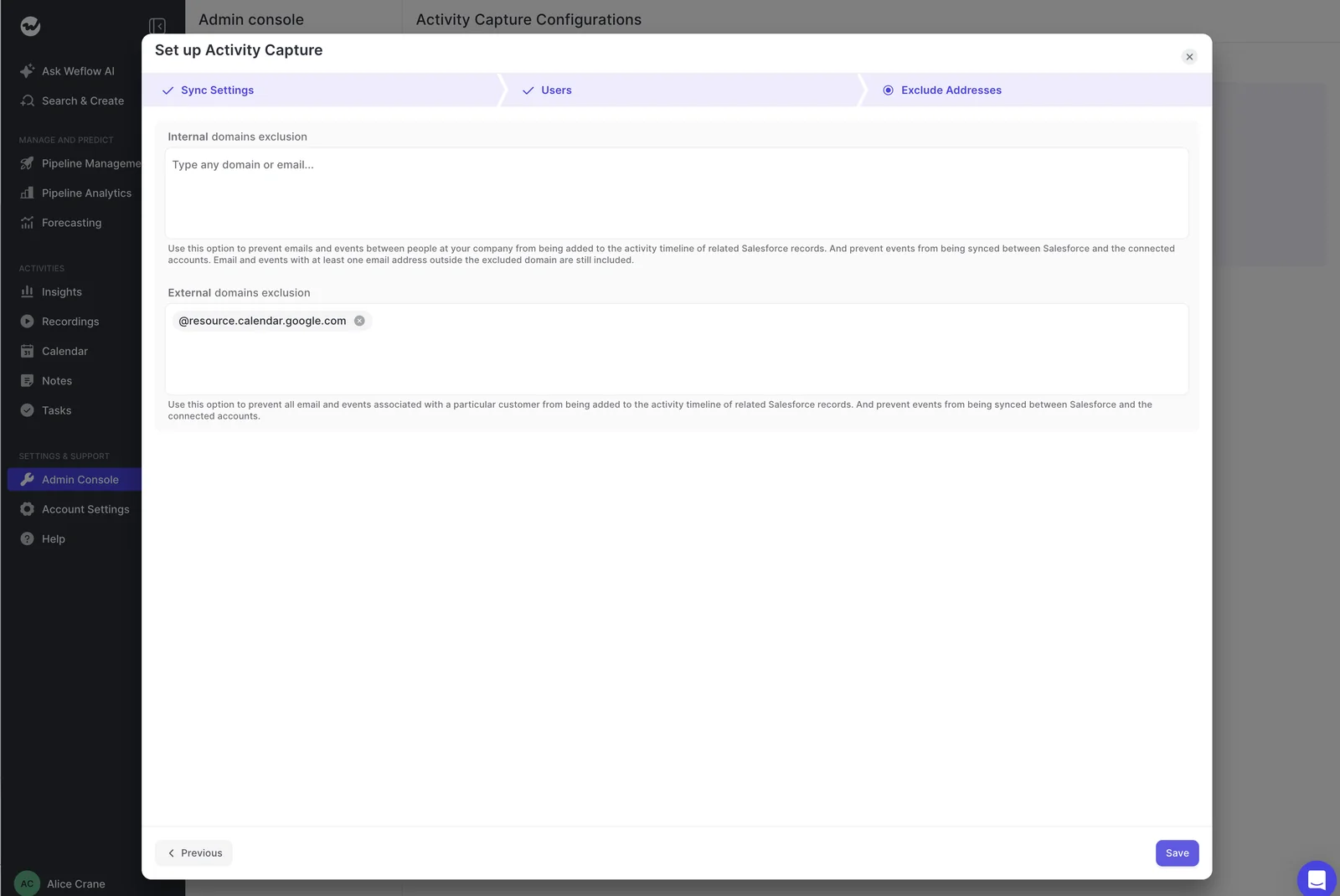
The question we hear first is whether you'll have to maintain a domain list for every possible sender. You won't.
Weflow logs nothing for a sender who matches no contact, lead or account domain in Salesforce. With existing-accounts-only on, it creates nothing for them either. So your exclusion list only needs the domains that do match an account and still shouldn't create contacts. That's a short list, not an endless one.
Which eight fields Weflow writes on a new Salesforce contact
Weflow writes eight fields on a new contact and nothing else: first name, last name, email, account, website, LinkedIn URL, title and phone. Name and email come from the thread. Title, phone and LinkedIn come from enrichment where it finds them.
Where the name and email address come from
Weflow takes the name from the display name the email or calendar invite carried. Most mail clients send one alongside the address. Some don't, and people copied into a thread often arrive as an address alone.
When there's no display name, Weflow leaves first name blank and puts the address in last name. Here's how the same person lands both ways:
| Field | Arrived as "Jane Smith <[email protected]>" | Arrived as "[email protected]" |
|---|---|---|
| First name | Jane | Blank |
| Last name | Smith | [email protected] |
| [email protected] | [email protected] | |
| Account | Matched by domain | Matched by domain |
It looks like a bug in a contact list, and it isn't one. Capture reproduces what arrived. No tool can recover a name that was never sent, and we'd rather tell you that than invent one.
What enrichment fills in before the contact is saved
Weflow enriches the contact before it writes it to Salesforce, filling title, phone and LinkedIn where it finds them. You set the field mapping, so the values land in your own fields rather than in a vendor object.
That answers most of the thin-contact problem. A name and an address prove someone exists. A title tells you whether the deal is multi-threaded at the right level.
Set your expectations honestly, though. Waterfall enrichment services typically match around 70 to 80 percent of contacts, depending on industry and where people are based. So a share of new contacts will arrive with name and email only. Any workflow keyed on job title needs a fallback for them.
Weflow fills in the identity of a person it found on a thread. It doesn't enrich firmographics the way a data provider does.
How Weflow handles required Contact fields and validation rules
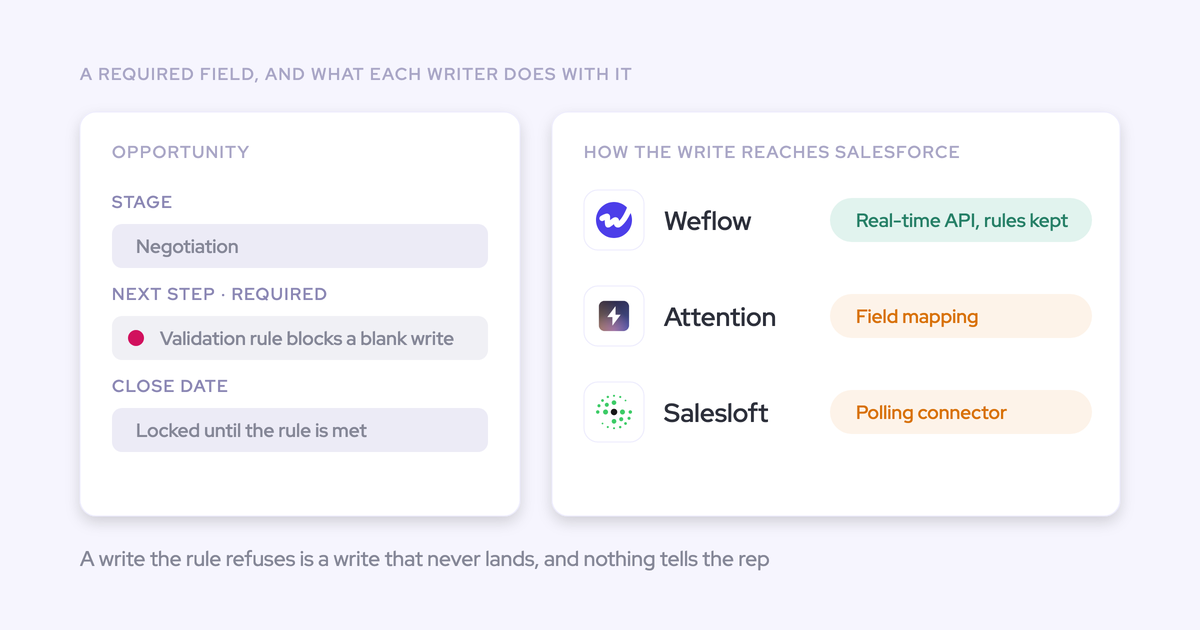
Weflow works within your required fields and validation rules rather than around them. A required Contact field gets filled by a Salesforce default value, by enrichment, or by a flow you add. If none of those fills it, Weflow doesn't create that contact.
| Required field situation | How it gets satisfied | What happens if it can't |
|---|---|---|
| Required picklist, such as lead source | A default value in Salesforce, or a flow that sets it on contacts the integration user creates | Creation is blocked for every contact |
| Required title or phone | Enrichment, when it finds the value for that person | Creation is blocked for that person only |
| Required field with a Salesforce default | Weflow writes the default | Not applicable |
| Required custom field with no default that enrichment can't fill | A flow on integration-user-created contacts | Creation is blocked for every contact |
| Validation rule requiring a field Weflow didn't fill | Relax the rule for the integration user, or fill the field by default or flow | The contact doesn't save |
A required Title field is the most common cause we see of contact creation failing after an otherwise smooth install. It's an org setting, and you can find it before go-live.
If your contacts feed a billing or subscription system and those rules can't change, expect some creations not to save. You can relax the rule for the integration user only, or create those contacts by hand from the extension.
How to prepare your Salesforce org before switching creation on
Most failures that get blamed on a capture tool already live in the org's configuration, and you can find almost all of them before a single rep is enrolled.
Check required fields, Website values and duplicates first
- Grant the Weflow integration user create on Contact, and scope its field-level edit access to the eight fields Weflow writes.
- List the object-level required fields on Contact. For each one, set a default value or add a flow that fills it on contacts created by the integration user.
- Review the validation rules that would fire on contacts the integration user creates. Decide which ones can exclude the integration user and which can't.
- Audit the Website field on your accounts. Weflow matches on it, so a personal mail domain or a shared domain there sends every email from that domain to one account.
- Find duplicate accounts sharing a domain, and duplicate contacts. Activity Capture Health in Weflow Analytics flags both, plus unconverted leads that already match a contact.
- Check whether Shared Activities is on, so meetings relate to every attendee and not just the primary contact. In a large org, that's a change request rather than a toggle, so raise it early.

Test contact creation in a sandbox with external addresses
Weflow reads no mailbox until a user is enrolled in a capture configuration, so you can finish setup and test with one person first.
- Enroll one user and send from them to an address outside your company domain. Internal-only mail is excluded, so a test between colleagues logs nothing and looks broken.
- Give each test account its own unique domain. Never use a free-mail domain like gmail.com, because every test sender then matches several accounts at once.
- Give each test opportunity one clear contact role.
- Have the test contact reply on a thread, then reply as the rep, adding a new person in CC to trigger creation.
- Open the created contact. You'll see which of the eight fields saved, and whether a required field blocked it.
How Weflow adds opportunity contact roles as reps email buyers
When Weflow logs an email to an opportunity and the contact on it has no role there, an option creates the opportunity contact role at that moment. Reps don't add anyone by hand, so contact roles fill in as a by-product of normal correspondence.
Why a contact role decides which deal an email lands on
Salesforce lets an activity relate to one opportunity or to the account. Contact roles are how a capture tool tells which opportunity it is. In most orgs they're empty, because nothing forces reps to fill them.
Here's the chain, and why it gets better the longer it runs:
- A contact has no role, and the account has several open deals. Their email falls back to the account, and the deal looks dead.
- The email gets logged to the right opportunity, either because only one deal fits or because the rep picks it in the Outlook add-in or Chrome extension.
- Weflow creates the contact role on that opportunity.
- Every later email and meeting from that contact resolves to the opportunity through the role.
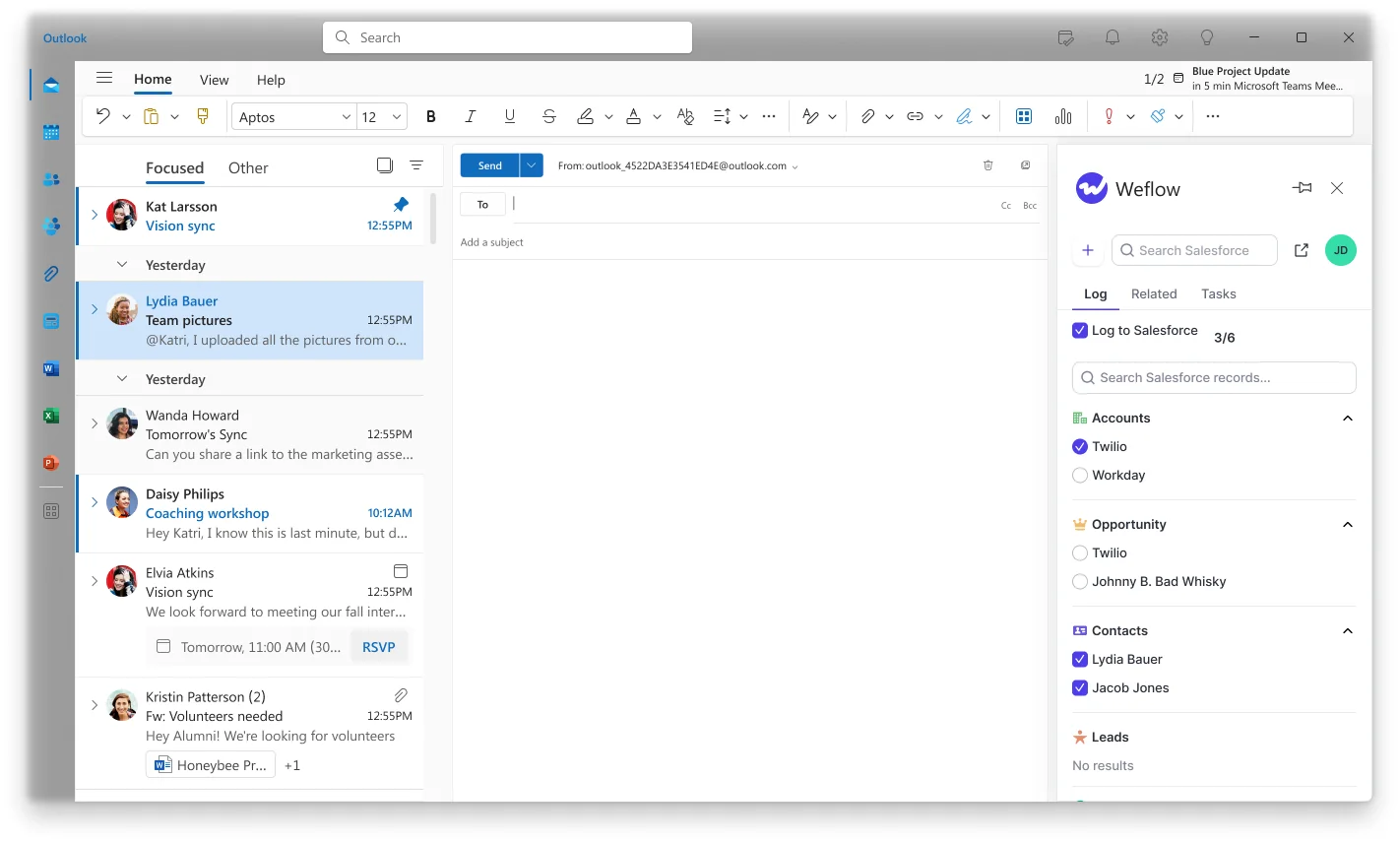
Weflow doesn't move activity on its own. Anything logged before the role existed stays where it landed, unless a rep or admin moves it from the add-in or extension.
This is what your sales leader actually gets. Once roles fill in, multi-threading stops being something reps claim and becomes something you can report on, deal by deal, before a champion leaves.
Why Weflow sets a fixed role instead of guessing champions
Weflow sets the contact role to a fixed value per configuration and never infers it from a job title. That's a deliberate choice.
A VP of RevOps on a thread might be your champion or your loudest detractor, and a title can't tell you which. The activity proves one thing: this person is active on the deal. That's what Weflow records. Champion and economic buyer stay a judgement for the rep or your playbook.
We'd rather leave a field to a person than fill it with a confident guess that ends up in a deal review. As our co-founder puts it:
"It's worse to have incomplete, inconsistent, or inaccurate data than to have no data at all, because then you have this illusion that you can trust the data."
So contact role coverage improves automatically. Contact role quality is still a human call.
When to keep Weflow contact creation switched off
Automatic contact creation is worth having on for most revenue teams, but not all. Because capture configurations are scoped per team, you can switch it off for one group and leave it on for everyone else.
| Situation | What happens with Weflow | What to do instead |
|---|---|---|
| You need a human to approve contacts, as public sector teams often do, or most meeting attendees aren't buyers but share the customer's account | There's no review queue. Existing-accounts-only won't filter these people out, because they all sit under the same account. | Keep creation off for that team, and let reps create contacts by hand from the Outlook add-in or Chrome extension |
| Contact rules can't relax because contacts sync into billing or subscription systems | Contacts that enrichment can't complete won't save | Relax the rule for the integration user only, or create those contacts by hand, where the full field set is available |
| Existing-accounts-only is on, and a new stakeholder appears at a company not yet in Salesforce | No contact is created, and nobody is told | The rep creates the contact from the extension. Once someone creates the account, Weflow logs the earlier emails to it automatically. |
| Your inbound motion runs on leads | Weflow never creates leads, and attaches activity to leads that already exist | Keep your existing lead creation tooling |
If you'd like to walk your own Contact required fields, validation rules and billing-sync constraints past someone who knows these rules inside out, bring that list to a call. See how Weflow captures activity, updates Salesforce fields from calls, and rolls up your forecast. Book a 30-minute demo.
FAQ: Weflow contact and contact role creation
Does Weflow charge extra for contact creation or enrichment?
No. Contact creation and enrichment are part of Weflow Activity & Contact Capture at $19 per user per month, with enrichment at no extra charge. It's also included in the Revenue AI Foundation, Business and Enterprise bundles. All plans are billed annually, with a 10-user minimum.
What permissions does the Weflow integration user need?
The integration user needs create permission on Contact and field-level edit on the fields Weflow writes. You can scope that edit access to the eight fields rather than granting edit on every Contact field.
Can Weflow limit contact creation to contacts on open opportunities?
No. The account-level restriction Weflow offers is existing accounts only. You combine it with the per-event cap, prefix blocks and domain exclusions to control volume.
How do I see which contacts Weflow created or skipped?
Weflow creates contacts as the integration user, so a standard Salesforce contact report filtered on Created By shows everything it created. Activity Capture Health flags duplicate contacts, duplicate accounts and accounts sharing a website domain. Skipped contacts aren't reported anywhere.
Can I roll out contact creation by team or region?
Yes. Capture configurations are scoped per team, per user, or by a Salesforce field value such as billing region. Contact creation and the per-event cap are set in each configuration, so you can phase creation in one team at a time.
Will Outreach, Salesloft or Einstein Activity Capture create duplicate contacts alongside Weflow?
Salesloft's Auto-Person Capture creates person records inside Salesloft, not Salesforce contacts. Einstein Activity Capture's Contact Auto-Creation isn't available under Sync Email as Salesforce Activity, the default since Summer '25. Whatever another tool has already created in Salesforce, Weflow's lookup checks existing contacts and leads before it creates anything. For duplicate activities rather than contacts, compatibility mode lets an engagement tool like Outreach log first.
How does Weflow handle partner, agency and consultant contacts?
A partner or consultant on a customer thread is created against the customer's account, with the same fixed role as everyone else. You correct it downstream: a Salesforce flow that reassigns what Weflow wrote, an agent that updates the record afterwards, or the rep creating the contact by hand in the extension.
Can reps control contact creation from their phone?
Mail a rep sends from their phone is captured like any other, because capture runs on the mail server. There's no mapping or creation override on mobile, since those controls live in the Outlook add-in and Chrome extension. A thread the rep already mapped on desktop keeps that mapping.
How does Weflow protect personal data when it creates contacts from email?
Weflow is SOC 2 Type II certified and GDPR compliant. It runs Zero Data Retention for AI processing and never uses customer data to train AI models. When it creates a contact, it writes only the eight named fields, into your own Salesforce.