Only 24-52% of sales activity reaches Salesforce when logging is manual. Here's what it breaks.
Learn what manual logging breaks in Salesforce when only 24-52% of sales activity is captured.




You opened a report, sorted by a field you were told was mandatory, and found a column of single characters. Half the opportunity fields blank. Every methodology field empty across the whole pipeline.
Here's the number underneath what you're looking at. Where activity logging depends on a rep opening the Outlook add-in and clicking "log to Salesforce," only 24% to 52% of activities ever reach the CRM. The qualification fields are worse: across the Salesforce orgs we connect to, sales methodology fields are almost always empty before something automates them.
So this isn't a discipline problem, it's a capture problem. Below is the diagnosis: where the numbers come from, why the mechanics hold in almost every org, what the gaps break downstream, and what actually moves completion, which comes down to automatic Salesforce data capture for the activity half and AI extraction for the qualification half.
How much sales activity actually reaches Salesforce
A minority of it, when a human has to click. That's the headline, and the scope matters: the 24-52% range applies to teams whose logging depends on the Salesforce Outlook add-in or Gmail extension.
Three findings carry the rest of this article.
| Finding | Figure | Scope |
| Activity that reaches the CRM under manual logging | 24% to 52% | Teams relying on the Salesforce Outlook add-in or Gmail extension. Up to three quarters of interactions never land. |
| Sales methodology field completion before automation | Almost always empty | Observed across the Salesforce orgs Weflow connects to. MEDDIC, MEDDPICC, SPICED and equivalents. |
| Orgs running on the two weakest capture methods | Around two thirds | 30% on Einstein Activity Capture, 30% on manual add-in logging, per a practitioner poll. |
The reliability bar worth measuring against is near-total: roughly 99% of emails, meetings and contacts landing in the CRM. Anything materially below that can't safely carry a report, a flow or a deal signal, because the missing activity could always be the one that changes the answer.
Where the 24-52% capture figure comes from
These are observed figures, not survey marketing. Weflow connects to hundreds of Salesforce orgs and sees what was in the CRM before we touched it, which is where the capture rates and the field-completion patterns come from.
- The 24-52% capture range: capture rates observed on teams whose activity logging runs through the Salesforce Outlook add-in or Gmail extension. Treat it as a range, not a point estimate, because it moves with email volume and how many reps have quietly lost their connection.
- The methodology-field finding: what the qualification fields look like across connected orgs at the point of implementation. It's a pattern, stated as a pattern: almost always empty.
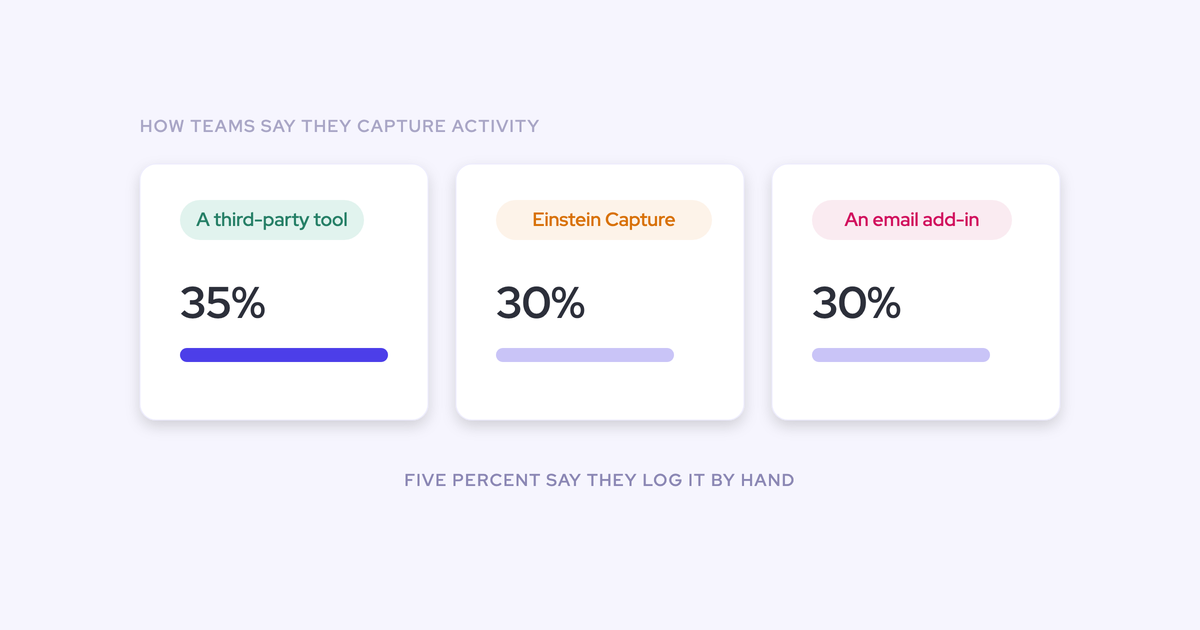
- The 35/30/30/5 split: a poll of RevOps practitioners asked how they capture activities in Salesforce. 35% named a third-party tool, 30% named Einstein Activity Capture, 30% named the Salesforce Outlook or Gmail add-in, 5% named something else.
That's one org's audit of its own instance, not a benchmark. If you're building a slide for your CFO, quote the capture range and the methodology-field pattern. Both hold up under questioning.
Why manual logging guarantees empty Salesforce fields
The arithmetic makes near-complete capture impossible, whatever the rep intends. The system asked a human to do machine work, and the machine work loses.
The click tax: four clicks per email, forty emails a week
The native logging path is per message, and every message is a small errand:
- Open the add-in in Outlook or Gmail.
- Search for the Salesforce record.
- Pick the right one.
- Click log to Salesforce.
That's two or three clicks against a contact, and four against a custom object. Now multiply.
A rep sending thirty or forty emails a week is looking at well over a hundred clicks of pure documentation. Plenty of reps send that many in a day.
Two details make it worse than the click count suggests.
The flow is built for outgoing mail. An incoming reply can only be logged after the fact, by opening the thread and using the add-in again. Replies are the strongest evidence a real conversation exists, and they're the first thing to go missing.
And the connection is per user. Each rep authenticates individually, the connection breaks, and they don't reconnect. There's no central signal that it happened, so capture degrades one mailbox at a time and you find out when a report looks wrong.
Why the gaps sit on your busiest reps and hottest deals
Data entry happens in leftover time, and the reps selling the most have the least of it. So the emptiest records belong to your best performers.
The same logic applies inside a single deal. When the deal gets hard, the week fills with calls, escalations and a procurement thread, and that's exactly the week nothing gets logged. The record ends up missing the last three conversations that decided the outcome.
This is why partial capture is worse for reporting than no capture. An empty timeline tells you to go and ask. A half-full one reads as complete and produces confident numbers that are wrong in ways nobody can see.
Why sales methodology fields are almost always empty
Because they ask for sentences, not clicks. Logging an email is one action a rep resents. Writing a defensible answer for "negative economic impact" is a paragraph of thinking after a call that already ran over.
"The sales methodology fields in Salesforce are almost always empty before they start using Weflow. Even the data capture doesn't work as expected. This is a very common reason we see that makes RevOps switch to Weflow."
— Janis Zech, CEO and Co-founder of Weflow
Look at the gap between what the field asks for and what actually gets typed into it the night before the forecast call.
| What the field asks for | What gets typed at 6pm on Thursday |
| Economic buyer: who signs, what they care about, whether you've met them | The champion's name, from memory |
| Metrics: the quantified business case, in the customer's numbers | "Cost savings" |
| Decision criteria: how they'll compare you, and against whom | Blank |
| Next step: the specific commitment and its date | "Follow up" |
Part of it is naming, too. The field says "pain" and the rep asked about challenges, struggles and priorities, so the answer exists in the conversation and never matches the box.
The consequence for you is bigger than hygiene. You can roll out a methodology, train every manager on it, and still be unable to inspect a single deal against it from CRM data. The framework stays a slide.
How teams capture activity today, and why each method leaks
Completion rate is predicted by capture method more than by anything about the team, and around two thirds of orgs are on a method that structurally can't get there.
The 35/30/30/5 split tells you where everyone is sitting. What it doesn't tell you is that each method loses a different part of the record.
| Method | Share of orgs | How much reaches the CRM | Opportunity-level mapping | Native reportable records | Contact creation |
| Salesforce Outlook or Gmail add-in | 30% | 24-52%, outgoing mail mostly, replies rarely | Whatever the rep picks, when they pick | Yes, for what actually gets logged | No |
| Einstein Activity Capture | 30% | Higher volume, but activity often lands on the account only | Depends on opportunity contact roles, which are among the least maintained records in any org, and breaks once an account has more than one open opportunity | Historically stored outside the core database and unreportable; Salesforce moved this toward native records around the start of 2026, with existing orgs needing to migrate | No |
| Sales engagement platform used as the capture layer | Part of the 35% third-party bucket | Good on sequenced touches, blind to everything else | Maps to the contact, not the opportunity | Logs to the task object, which discards from and to, so reply rate can't be calculated | No |
| Advanced third-party capture tool | Rest of the 35% | Near-total is achievable; test it rather than assume it | Server-side matching plus a way for the rep to correct a thread | Yes, into EmailMessage, Event and Task | Yes, with dedup guards |
Two honest notes on that table.
Einstein Activity Capture is a reasonable fit for a small team that needs no customization, and Salesforce has closed the storage gap. Weak contact capture and opportunity mapping are what remain, and they're the two things opportunity-level reporting depends on.
Outreach, Salesloft and Apollo are good at what they're built for. Using them as your company-wide capture layer is the expensive accident: sequencing gets bought for the BDRs, capture happens to work, and three years later twenty five people hold full sequencing seats to log email.
What incomplete Salesforce data costs downstream
Every number you publish inherits the gaps, and the inheritance compounds quarter over quarter.
Leadership stops trusting the forecast, and finance builds its own
This is the political cost, and it's the one that's hardest to reverse.
Once the dashboards run on a record that's missing the hard conversations, leadership stops believing them. Finance exports the pipeline, applies its own weighted averages, and a second number goes upstairs. Sometimes finance turns out to be the more accurate of the two.
"It creates a big gap of trust. People don't trust what they see in the dashboards. And then it's like, why do we have them if no one trusts them?"
— Mallory Lee, VP Revenue Operations at PhoneBurner
Now two forecasts run in parallel and the sales org has lost the authority to speak about its own business. No better roll-up model wins that back. What leaders ask for first is proof the deal data underneath is complete, because the model was never the thing they stopped trusting.
Pipeline metrics inherit the gaps and stop being trustworthy
The quieter cost is that your standard metrics become wrong in unknowable directions.
- Average sales cycle length: reps won't close deals lost, so dead opportunities sit in the pipeline with a close date that keeps moving. Your cycle benchmark is partly measuring corpses, and you use that benchmark to judge whether live deals are late.
- Win rate: computed against a pipeline that includes deals nobody has worked since spring.
- Activity benchmarks per rep: ranked on who logs, not who works.
- Engagement and multi-threading: the CRM shows one champion on a deal that has five people on the thread, because reps almost never add a new participant by hand.
- Meetings per rep and per opportunity: inflated wherever two tools write the same meeting twice under different objects.
The fix for the stalling half isn't a nudge campaign. It's having days in stage and push count sit on the deal automatically, so the hygiene conversation happens on evidence instead of a manager's suspicion.
Any AI you deploy answers confidently from missing data
You're being asked for an AI strategy while sitting on a record an AI would answer wrong from, with total confidence and no visible tell.
Everyone assumes you can point a model at Salesforce and ask it for the truth. The first attempt teaches the real lesson: the agent inherits whatever the data is. Half the meetings missing, the methodology fields blank, the same account in there three times.
"Going from gut based to data driven has nothing to do with AI. It is a data capture problem."
— Janis Zech, CEO and Co-founder of Weflow
That's the argument to take upstairs. Capture isn't a project competing with the AI mandate for budget, it's the precondition of it. Reorder the two and the AI project produces confident nonsense on schedule.
Why more mandatory fields won't fix completion rates
Because enforcement changes what gets typed, not what gets captured. You already know how this ends: the required field gets one character and the report still can't be read.
You'll hear the counterproposal anyway, usually from someone who has never maintained a validation rule. Three things happen when you take it.
- Fields get filled badly instead of not at all, which is harder to spot in a report than a blank.
- Validation rules become maintenance debt. Each one collides with an integration, a page layout, or a flow you'll debug in six months.
- Field sprawl gets worse. Every additional field is another place for data to be missing, and it overwhelms the admin team, not just the rep.
Our own advice is to start with two or three dependencies and validation rules, and stop there if the data quality holds. Anything more and you're buying maintenance for no completion gain.
What a prospect said to us in January is the whole point, and most RevOps leaders reading this already believe it:
as long as it's a manual process, it won't be 100%, it won't be close to it actually
The only completion rate that moves is the one where the manual step is gone.
What fills the fields: automated capture plus AI Field Updates
The fix has two halves because the problem has two halves. The activity record has to fill itself server-side, and the qualification record has to fill itself from the conversation.
Weflow is the Revenue AI Orchestration platform for sales, customer success, and RevOps teams, and this is the mechanism underneath the diagnosis: how the orgs that closed the gap closed it. It's controlled automation, not blind automation, and the guardrails are the part that decides whether it helps you or adds to the mess.
Server-side activity capture with nothing for reps to click
Capture runs from the mail tenant, not from a rep's add-in. The mail app is installed once into Microsoft Entra or Google Workspace and scoped to licensed users, so nobody grants anything and nobody can opt out.
The properties that separate real capture from what you probably have:
- Nothing for a rep to click, and no per-user connection to break silently.
- Native Salesforce objects: emails land on EmailMessage, meetings on Event, so a flow can read them, a report can group them, and Looker or Power BI can export them.
- Configured per team, per user and per object, so sales and CS can log to different objects without one team's rules leaking into another's.
- Exclusions that hold: internal domains, partner domains, attachment size caps, and custom rules that block logging against an entire Salesforce record based on any field on the object.
- Historical backfill up to 24 months from the mail server, so in-flight deals don't look artificially dead on day one.
- The bar is near-total, roughly 99% of emails, meetings and contacts, because anything less can't safely carry automation.

How Weflow AI Field Updates write MEDDIC fields from calls
Weflow AI Field Updates extract structured values from the call transcript and write them into the specific Salesforce fields your team already reviews against, rather than dropping a summary blob into a text box.
That distinction is the whole thing. A summary in a vendor UI leaves your MEDDIC fields exactly as empty as they were, and now you have two versions of the truth.
How it runs in practice:
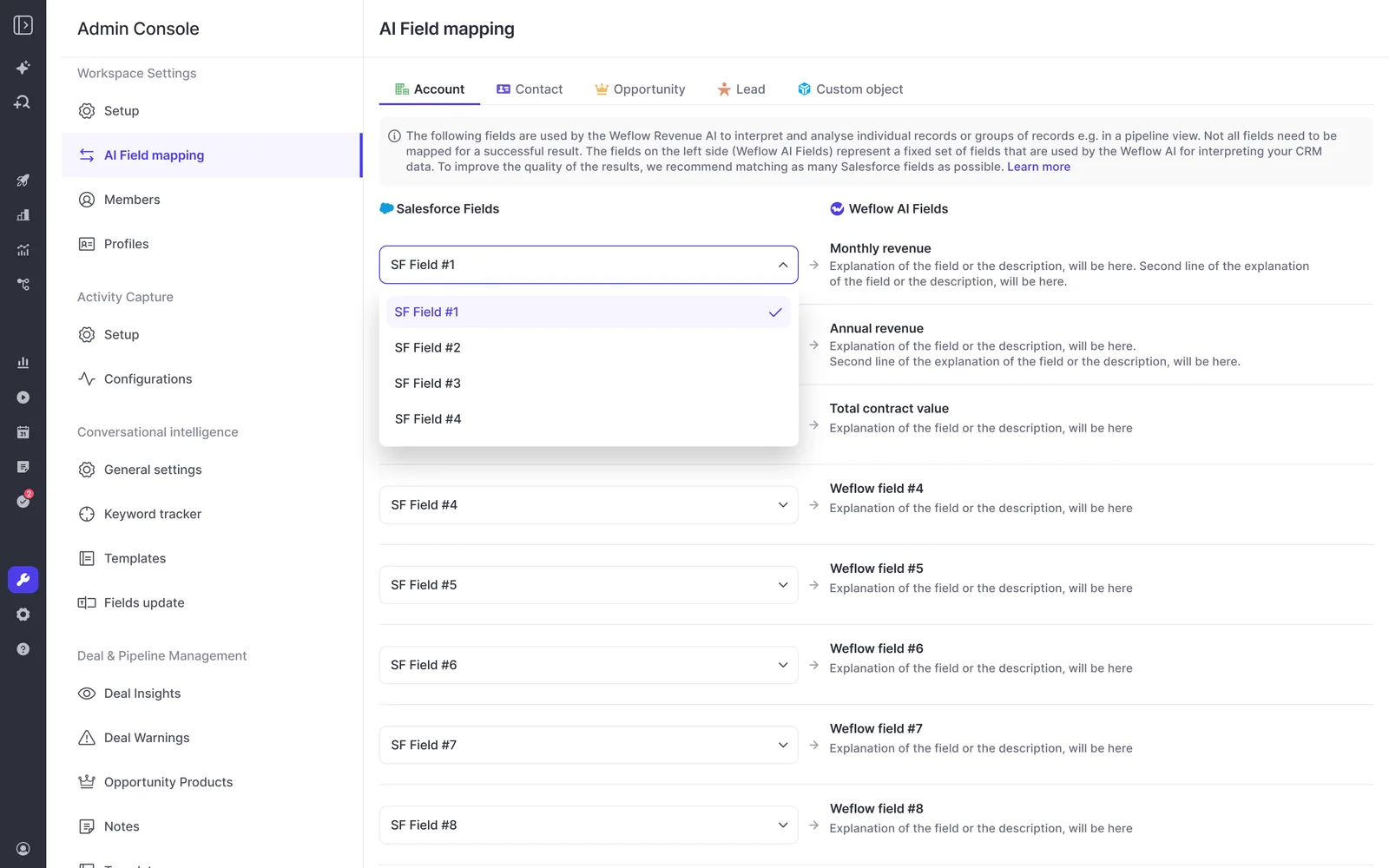
- An admin maps each Salesforce field to its own prompt in the admin console. Reps never see the mapping and can't add fields, so no new sprawl.
- Within 30 to 60 seconds of a call ending, the rep gets the summary, a drafted follow-up email, and the proposed field updates.
- The current value sits beside the suggested value. Accept, edit or reject each one, then write them all back with one click. Fully automatic mode is available where you want it.
- Picklists and multi-picklists work because the allowed values are engineered into the prompt, and a model can compute a derived value like an amount from the seat count and price discussed on the call.
- Around thirty methodology templates ship with it, plus 250+ prebuilt prompts covering MEDDIC, MEDDPICC, SPICED and BANT, and a proprietary in-house framework gets encoded the same way.
Blacklane ended with 96% of MEDDIC fields populated in Salesforce. That's the shift worth naming: methodology compliance stops being a behavior problem and becomes a by-product of having the conversation.
The guardrails that stop automation making the mess worse
You've watched a tool create a second contact for someone already in the org under a different address, and cleaning that up cost more than the automation saved. Fair.
So judge a capture tool on what it refuses to create, not what it creates. Ours refuses these:
- Existing accounts only. Weflow creates contacts, never accounts, leads or opportunities, so capture can't spawn orphan records.
- A cap on contacts per event, so a ninety-person webinar doesn't write eighty-nine contacts into your org.
- Deduplication on top of Salesforce's own duplicate rules, rather than instead of them.
- A lead check before contact creation. If the address already exists as a lead, activity attaches to that lead, and conversion stays a manual Salesforce step.
- Rep review of field values, current beside suggested, with accept, edit or reject per field.
- Field selection in the admin console, invisible to reps.
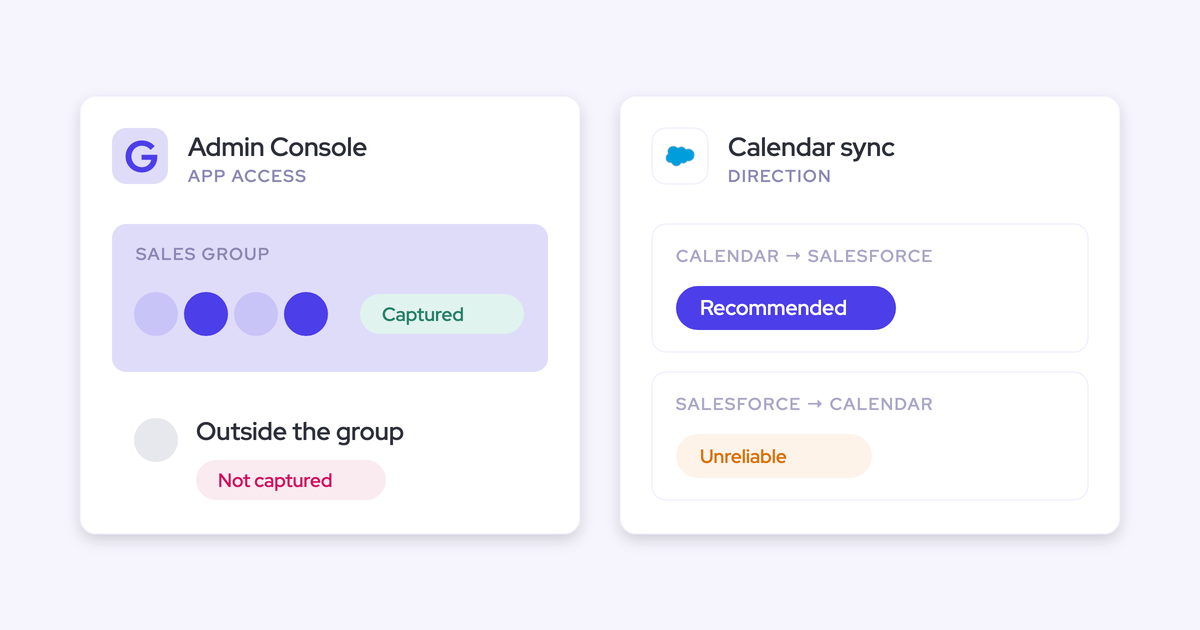
- Compatibility mode when another tool already logs email: Weflow delays its sync, checks for the other tool's tracking pattern, and skips the message rather than writing it twice. If you run Einstein Activity Capture in parallel, set its event sync to one direction first or every meeting gets written twice.
What stays the rep's job by design
Automation fixes capture and extraction. It doesn't fix judgment, and it shouldn't pretend to.
Three things stay with the rep: what they're actually selling, when they think it closes, and how confident they are. Those are the calls only the person in the room can make, and cutting the rep's job back to exactly those three is the goal, not a limitation.
The other honest catch: near-total capture takes configuration. Mapping rules, domain exclusions, custom objects, and a decision per team about which object an email lands on. Technical setup is a 45 to 60 minute session with a Salesforce admin and a mail admin, and capture is typically live in two to three weeks. The configuration is where the real time goes.
Get the free Salesforce Activity Capture Cheat Sheet and audit your own setup against it before you talk to any vendor.
The key findings, ready to cite
- Where activity logging depends on a rep clicking log to Salesforce in the Outlook add-in or Gmail extension, only 24% to 52% of activities reach the CRM, so up to three quarters of the interaction record is missing.
- Across the Salesforce orgs Weflow connects to, sales methodology fields such as MEDDIC and MEDDPICC are almost always empty before automation, which makes methodology adherence impossible to inspect or coach from CRM data.
- Asked how they capture activities in Salesforce, 35% of RevOps practitioners named a third-party tool, 30% named Einstein Activity Capture, 30% named the Salesforce Outlook or Gmail add-in, and 5% named something else.
- Around two thirds of Salesforce orgs therefore run on Einstein Activity Capture or manual add-in logging, the two methods with the weakest capture rates and the least reporting flexibility.
- Logging a single email to a custom Salesforce object through the add-in takes up to four clicks, against two or three for a contact, and applies per message.
- Activity capture is only useful above roughly 99% of emails, meetings and contacts reaching the CRM, because partial capture produces confident-looking reports on an incomplete record.
- Einstein Activity Capture attributes activity to an opportunity through opportunity contact roles, so it fails as soon as an account carries more than one open opportunity.
- Sales engagement platforms log activity to the Salesforce task object, which discards the from and to information and makes reply rate impossible to calculate.
FAQ: Salesforce field completion and activity capture
How is automated capture different from Einstein Activity Capture?
Three structural differences decide it. Einstein Activity Capture attributes activity to opportunities through contact roles, which most orgs don't maintain, and it gives up entirely once an account has several open opportunities. It doesn't create contacts, so your buying committee stays in the inbox. And its activity historically wasn't stored as records in the core Salesforce database, which is why teams couldn't report on it, export it, or trigger a flow from it. Salesforce moved that toward native records around the start of 2026, with existing orgs needing to migrate through support.
You don't have to switch it off to evaluate an alternative. Set its event sync to one direction, from calendar into Salesforce, and both can run during a transition.
What happens when an account has multiple open opportunities?
Server-side matching alone can't answer it, and this is where fully automated tools quietly fail. Nothing in an email says whether it belongs to the renewal or the expansion, and domain matching can't see the difference.
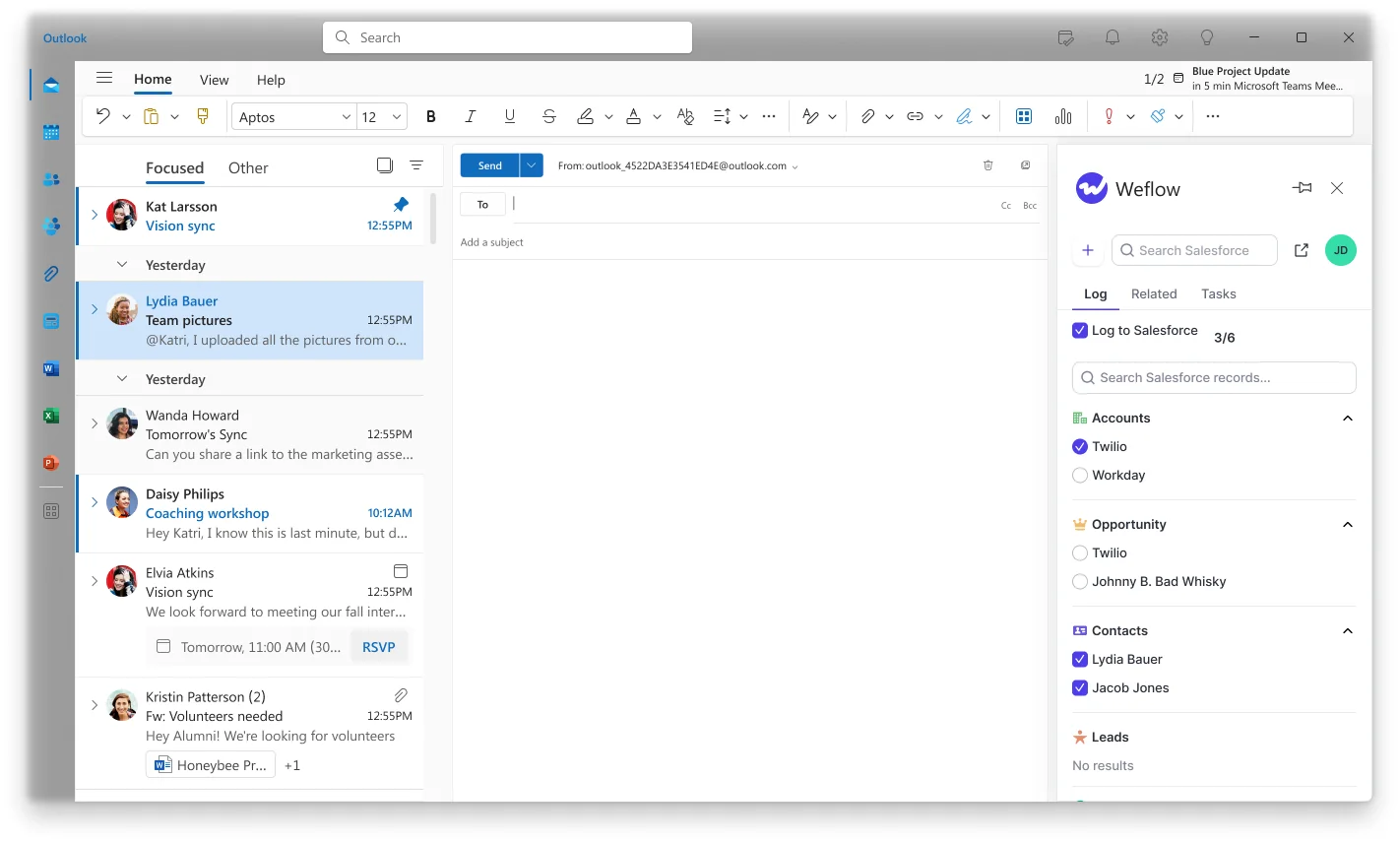
Weflow uses a hybrid model: capture stays automatic, and the Outlook add-in or Chrome extension shows the rep which records the thread matched, letting them remap it once. That choice is stored against the thread, so every later reply routes to the same record without anyone touching it again. It resolves the ambiguity at the only moment the answer is actually known.
Does automated capture respect custom objects and validation rules?
It has to, and this is the test most capture evaluations actually fail on. Between 20% and 30% of our customers log activities to custom Salesforce objects alongside the standard ones, because that's how their business runs in Salesforce.
Ask three questions of any vendor: can capture be configured per team, per user and per object; does it write to your custom objects; and does it respect your validation rules, field dependencies and permissions rather than forcing a generic data model. Weflow is built entirely on the Salesforce API and works only with Salesforce, which is why there's no field mapping step at setup.
What does fixing activity capture cost, and how disruptive is rollout?
Weflow Activity & Contact Capture is $19 per user per month, billed annually. Advanced capture tooling generally lands around that mark, which makes this the cheapest project on your roadmap next to CPQ or marketing automation.
It's also the lowest change-management project you own. Capture runs server-side, so there's nothing for a rep to adopt, no new habit, no training deck. Technical setup is one 45 to 60 minute session with a Salesforce admin and a mail admin, and capture is typically live in two to three weeks including configuration. Weflow doesn't charge for implementation.
How do I prove the before and after to leadership?
Because captured activity lands as native Salesforce records, completeness itself becomes reportable. You can build the report you couldn't build before: activities per rep, activities per opportunity, meetings booked next week, field completion over time.
Backfill up to 24 months so the timeline doesn't start blank, and the before-and-after sits in one chart instead of a story. Days in stage and push count are tracked automatically too, so the second slide, the one about stalling deals, doesn't need custom fields and a flow to exist.
If you want the number that lands with a CFO, run it as one report: what share of interactions was in the CRM in Q3, and what share is in it now.