How to Pilot Weflow in a Salesforce Sandbox and Move the Setup to Production
Learn how to pilot Weflow in a Salesforce sandbox and reconnect the setup in production.


You can make your first Weflow write in a Salesforce sandbox, exactly the way IT asked. What you can't do is promote that sandbox setup to production. Weflow has no sandbox of its own, so going live is a reconnect.
In practice, the reconnect looks like this:
- You install the managed packages, integration user, permission set and Microsoft Entra app again in production, on one assisted 45 to 60 minute call.
- Our team copies your teams and templates from the sandbox workspace, and we can move your sandbox recordings too.
- Nothing you configured during the pilot gets rebuilt by hand.
Weflow is the Revenue AI Orchestration platform for sales, customer success, and RevOps teams. We built it for Salesforce teams, so everything it captures lands in native Salesforce objects. That's why your IT team treats it as change-managed. The part that writes first in a pilot is Weflow Activity & Contact Capture, the piece responsible for keeping deal records complete with captured activity.
Each stage of IT's sequence answers a different question. Below is the plan to hand them: what each stage proves, the sandbox test cases, the mailbox scope test, and the cutover checklist.
Your Weflow sandbox setup reconnects to production, it doesn't promote
A Weflow workspace is created against whichever Salesforce org you point it at. A sandbox workspace and a production workspace are two separate workspaces with separate configuration. There's no metadata deployment between them.
If you plan for the reconnect up front, it shows up as a line item in the plan IT signed. If you don't plan for it, it looks like rework.
What Weflow's team copies from your sandbox to production
Most of what you built during the pilot carries across, and our team does the copying:
- Teams: Weflow's team copies the teams you set up in the sandbox workspace to the production workspace.
- Templates: Weflow's team copies your AI summary and field-update templates across in the same step.
- Recordings: We can move Weflow Conversation Intelligence recordings made in the sandbox to production, so pilot calls aren't lost.
What you install again in Salesforce production and Microsoft Entra
The only thing you redo is the technical connection, once per environment. Put these items in your change ticket for production now, so IT sees them as planned.
| Item | Where it's installed | Who does it |
|---|---|---|
| Weflow managed packages | Salesforce production org | Your Salesforce admin, on the assisted call |
| Integration user | Salesforce production org | Your Salesforce admin, on the assisted call |
| Permission set | Salesforce production org | Your Salesforce admin, on the assisted call |
| Weflow Activity Capture enterprise app, with "Assignment required" set to Yes | Microsoft Entra | Your mail admin, on the assisted call |
Which question each stage of the Weflow pilot answers
A sandbox proves mechanics, not value. Reps won't work from an environment they have no reason to touch, so a sandbox never produces the real activity a value test needs. The fix is to stop asking each stage to answer every question and give it the one it can answer.
| Stage | The question it answers | What it can't prove |
|---|---|---|
| Before you start (IT and legal sign off) | Can we install at all? Covers the security list, the data terms and the setup call. | Anything about how Weflow writes |
| Stage 1: Salesforce sandbox (IT signs off) | Is the write path controlled? Covers permissions, record types, mapping and sync direction. | Value, because nobody works in the sandbox |
| Stage 2: one admin on production with dummy records (IT signs off) | Does the production connection behave like the sandbox, and does mailbox scope hold? | Value, because one admin isn't a team |
| Stage 3: pilot group on live data (IT, legal and the business sign off) | Does Weflow capture one for one on real activity, and is it worth rolling out? | Forecasting, which needs more than one cycle |
This table is the plan to hand IT.
What to line up before installing Weflow in a sandbox
Four things decide whether your pilot starts on time, and none of them is technical work in Weflow. They're people, paperwork and terms.
Who needs to join the Weflow technical setup call
The setup call needs a Salesforce admin and a mail admin in the room at the same time. Book both calendars before you book ours.
- Salesforce admin: admin rights in the sandbox to install the managed packages, create the integration user and assign the permission set.
- Mail admin: rights to add and configure the Weflow Activity Capture enterprise app in Microsoft Entra (or the Google Workspace admin app).
- Test users: at least one sandbox user whose email address matches their Microsoft or Google address exactly.
Check your security clearance requirements before the sandbox install
Some organizations can't install anything in a sandbox until the vendor is on an approved list. If that's you, the paperwork comes before the trial, and it's better to know on day one than on day ten.
Weflow holds these trust credentials:
- SOC 2 Type II
- GDPR compliance
- Zero Data Retention for AI processing
- Customer data never used to train AI models
Weflow isn't FedRAMP certified. If your approved list requires a public-sector cloud clearance like that, it blocks a sandbox install, and it's better to settle that before you plan the trial.
Start the technical setup while legal review is still open
Weflow reads no mailbox until a user is enrolled in an activity capture configuration. Installing the packages, connecting the integration user and adding the workspace app grant access, but they capture nothing and write nothing to Salesforce.
Enrollment is the switch. That means you can finish the whole technical setup while legal is still reviewing, and flip the switch the day they sign.
Put pilot data deletion and retention terms in writing
Legal's "no real customer data" position has a contractual answer, not a technical one. A sandbox full of fake data won't satisfy the business, and we hear the bind on calls all the time.
The way through is retention and deletion terms for pilot data, agreed between your legal team and ours before live data flows. The terms should cover:
- Which data the pilot captures: emails, calendar events, contacts, and Weflow Conversation Intelligence recordings and transcripts.
- Where that data sits: activity written into your Salesforce objects, and anything Weflow holds on its side.
- What happens to captured data if the pilot ends without a contract, including deletion and its timing.
- What happens to it if the pilot converts.
Stage 1: prove the write path in your Salesforce sandbox
Stage 1 answers IT's actual objection, which is to the first write rather than to the tool.
One test user, the right test cases and a scope test give IT proof that the write path is controlled before anyone on the sales team is enrolled.
Connect Weflow to your Salesforce sandbox
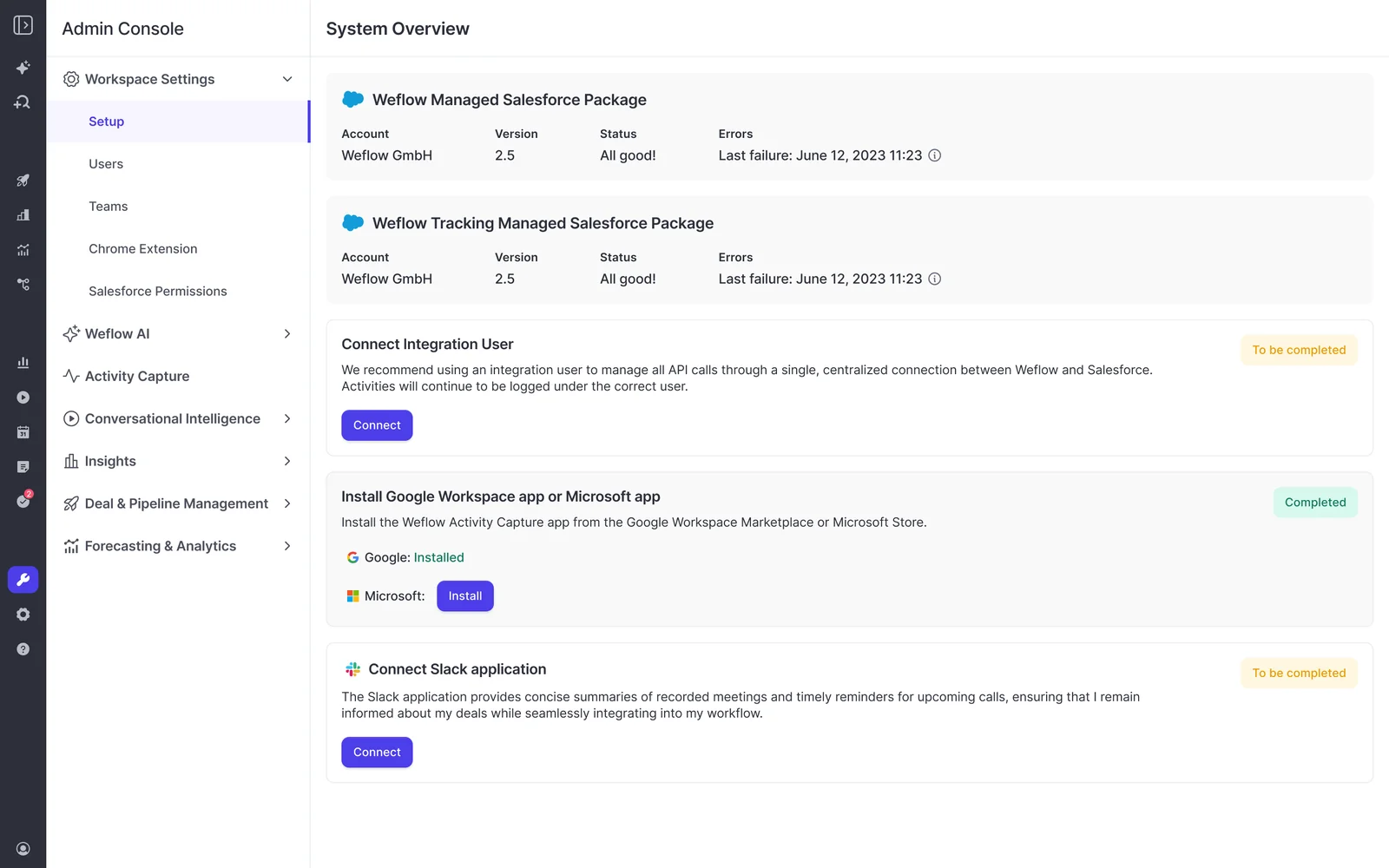
Weflow's team runs this sequence with you on the setup call. Enrollment comes last because that's where reading begins.
- Salesforce sandbox: create the Weflow workspace against your sandbox org and install the Weflow managed packages.
- Salesforce sandbox: connect the integration user and assign the permission set.
- Microsoft Entra: your mail admin installs the Weflow Activity Capture enterprise app, sets "Assignment required" to Yes and assigns the pilot group.
- Weflow admin console: create an activity capture configuration. Choose your mail service, set the sync settings (email object type, calendar sync direction, record type) and add your internal domains to the exclusions.
- Weflow admin console: enroll one test user. Weflow starts reading that one mailbox from this moment.
Run the test cases that catch permission and mapping gaps
Most failed sandbox tests we see are test-design problems. Mail between colleagues gets excluded as internal, free-mail domains create mapping ties, and a meeting that's only created never tests update rights. The tool looks broken when the test was the problem.
Use this table as the test checklist you hand IT.
| Test case | How to set it up | What it proves | False failure it avoids |
|---|---|---|---|
| Email to an external address | Send to and receive from an address outside your company domain | Inbound and outbound email both log | Internal-only mail is excluded by design, so a colleague-to-colleague test logs nothing |
| Unique domain per test account | Give each test account its own domain in the Website field, never a shared gmail.com or outlook.com | Domain matching lands email on the right account | Shared free-mail domains match one sender to several accounts and create ties |
| One contact role per opportunity | Set one clear contact role on each test opportunity | Email lands on the deal, not just the account | Ties between open opportunities that push email to the account level |
| Contact creation | Email a test address whose domain sits on exactly one test account | Weflow creates the missing contact on the right account | A domain on no account, or on several, gives the contact nowhere clear to go |
| Meeting created | Create a meeting with an external attendee | The create permission on events works | Testing only internal meetings, which stay unlogged when internal meeting logging is off |
| Meeting moved, rescheduled and deleted | Move the same meeting, reschedule it, then delete it | Update and delete rights on events work | A create-only test that passes, then fails weeks after go-live |
| Custom object logging (if you use it) | Run one email or meeting against a record on your custom object | Mapping covers your real object model | Signing off on standard objects only, then finding the gap in production |
That last row matters more than it looks. Roughly 20 to 30% of our customers log activity to custom Salesforce objects as well as standard ones, and it's the most common reason a capture evaluation fails on functionality.
The sync settings step is where you set the email object, calendar sync direction, record type and whether internal meetings log at all. Check those settings against your test results before you blame mapping.

Prove to IT that Weflow only reads pilot mailboxes
Assigning a group to Weflow's Entra app only restricts access when "Assignment required" is set to Yes. With it set to No, Weflow can still subscribe to mailboxes outside the assigned group, guest accounts included. Adding a group under Users and groups looks like a restriction, but on its own it isn't one.
Weflow reads a mailbox by creating a Microsoft Graph subscription the moment you save a user into an activity capture configuration. That gives you a test anyone can run:
- In Microsoft Entra, open the Weflow Activity Capture enterprise app and set "Assignment required" to Yes.
- Under Users and groups, assign only the pilot group.
- In the Weflow admin console, add a user from outside that group to an activity capture configuration and save.
- Look for a warning icon next to that user, then take them back out of the configuration.
A warning icon means the subscription failed and the scope holds. The same icon also appears when a user's email address differs between Microsoft and Salesforce, so run the test with an out-of-scope user whose address matches in both.
Some IT teams add a second layer by scoping the app's Exchange Online access to the same group's mailboxes. You'll rerun this test in production at Stage 2.
Stage 2: reconnect Weflow to Salesforce production with this checklist
Order matters at cutover. Two live workspaces running against the same users conflict, so the sandbox goes quiet before production goes live.
- You or Weflow: switch off activity capture and Weflow Conversation Intelligence on the sandbox workspace.
- Salesforce admin: install the Weflow managed packages in production on the assisted call.
- Salesforce admin: connect the production integration user and assign the permission set.
- Mail admin: set up the Entra connection for production, with "Assignment required" set to Yes and the pilot group assigned.
- Weflow: copy your teams and templates from the sandbox workspace to production, and move sandbox recordings if you want them.
- You: enroll one admin against dummy records in production and rerun the Stage 1 test cases.
- You and mail admin: rerun the mailbox scope test in production and record the result for IT.
The connection call takes 45 to 60 minutes with your Salesforce admin and mail admin present. Weflow's team runs it.
Stage 3: roll Weflow out to a live pilot group
Stage 3 is where the business case gets made. A pilot group defined in Salesforce, running cleanly next to your existing tools and judged on parity, gives IT and the business an answer they both trust.
Define the pilot group in Salesforce with a dynamic team
Weflow Activity & Contact Capture runs only for Salesforce users, and each mailbox pairs with one Salesforce user. A dynamic team pulls members from Salesforce by manager, role or a field condition, and Weflow re-checks it hourly. Your pilot group lives in Salesforce, and widening it is a Salesforce change, not a Weflow one.
The simplest version is a checkbox:
- Add a pilot checkbox field to the Salesforce User object.
- Tick it for each pilot user in Salesforce.
- In Weflow, build a dynamic team on that checkbox.
- Add the team to your activity capture configuration with licenses attached.
Pilot users don't have to sign in to Weflow to be captured. A user shown as pending is still captured server to server. Signing in only matters if they want to see the insights.
Keep your Entra group in step with the Salesforce checkbox. A common setup refreshes the mail-side group from Salesforce so the two lists always match. A typical pilot is one team of 5 to 10 people.

Set Einstein Activity Capture event sync to one direction first
A bidirectional Einstein Activity Capture (EAC) event sync creates a loop:
- EAC logs an event to Salesforce.
- It pushes the event back out to the calendar.
- It logs the event again.
Add a second capture tool to that loop and you get duplicate meetings. Removing the Einstein permission from users doesn't stop it.
You don't have to switch EAC off to run Weflow next to it. You change one setting before the pilot goes live:
- In your Einstein Activity Capture configuration, set event sync to one direction only, from your mail and calendar system into Salesforce.
Duplicates already written don't clean themselves up. Until you deal with them, a rep can show thirteen meetings a week in one view and eight in another.
With the setting changed, Weflow adds call summaries and codings onto the events EAC already creates. Once parity is proven, most of our customers switch EAC off during onboarding. Weflow's Activity Capture Health tab checks your Salesforce settings and shows whether EAC is still detected.

Let compatibility mode skip emails Outreach or Salesloft logged
If your reps sequence, this is the first question they'll ask:
"All my activities are already logged through Outreach. Is there any conflict with weflow? Is it gonna double log into Salesforce?"
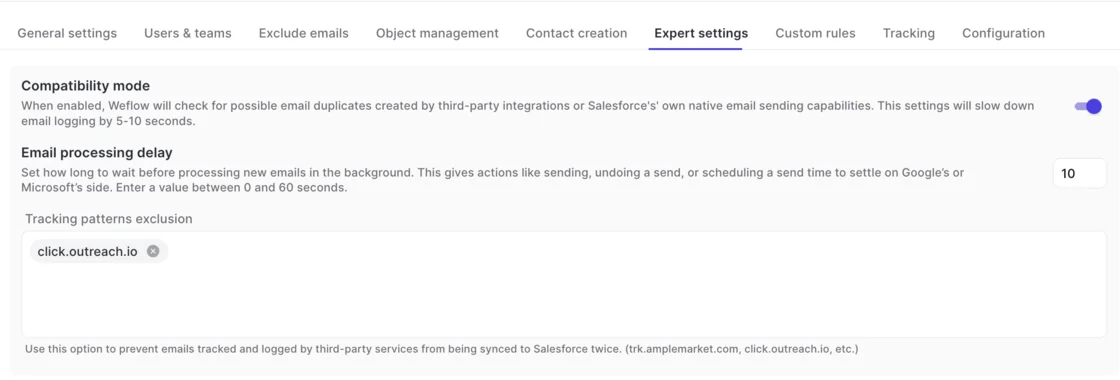
It won't. Compatibility mode reads the sequencer's tracking pattern in the email body and skips the message, so only one system writes it to Salesforce. It also checks for duplicates from Salesforce's own email sending. The trade-off is that email logging slows by five to ten seconds.
Compatibility mode covers activity already logged by these tools:
- Outreach
- Salesloft
- Apollo
- Clay
Judge the pilot on one-for-one parity before any features
When you replace a capture tool, the risk you're managing is a hole in the activity record that nobody spots for months. So the pilot that wins is the boring one. Run Weflow on its defaults next to the incumbent, with no templates and no custom use cases, and check that it tracked one for one.
Summaries, templates and scorecards come after parity, not before. Agree these parity checks as your success criteria before the pilot starts:
- Every inbound and outbound email the incumbent logged also appears in Salesforce from Weflow.
- Meetings land on the right records, opportunities included.
- Moved, rescheduled and deleted meetings show the change in Salesforce.
- Missing contacts are created on the right accounts.
- No duplicates appear against EAC or your sequencer.
- Activity on custom objects logs where your setup expects it.
- Activity sits as permanent native records you can report on and send to your BI tool.
Mistakes that break the move from sandbox to production
The cutover failures that hurt are structural, and every one of them has a known fix.
| Mistake | What to do instead |
|---|---|
| Leaving the sandbox workspace live after production goes live, so both workspaces run against the same users and conflict. | Switch off activity capture and Weflow Conversation Intelligence on the sandbox workspace as the first step of cutover. |
| Assuming one activity capture configuration covers several Microsoft mail tenants. | Create one configuration per tenant, because users can only be assigned to a configuration covering their own domain. |
| Forgetting that mail between sibling companies is internal to the group but external to each tenant, so group traffic lands in the CRM. | List every other entity's domain in each configuration's internal-domain exclusions. |
| Expecting capture to stitch together one seller who sends from several email aliases. Matching runs on the address, so each alias becomes a separate identity, and no vendor solves this. | Consolidate sellers onto one email domain. It's an organizational fix, not a tool setting. |
| Letting a user's email address differ between Microsoft and Salesforce, which makes the subscription fail and shows a warning icon. | Align the address in both systems before you enroll the user. |
| Letting the Entra pilot group drift from the Salesforce pilot team, so enrolled users fail the scope check. | Refresh the mail-side group from Salesforce so the two lists always match. |
What Weflow's implementation team handles during your sandbox pilot
You're not running this pilot alone. Setup is white-glove during the trial, Weflow runs onboarding itself rather than handing it to a partner, and we don't charge for implementation. The work runs against a mutual action plan with named owners on both sides.
What Weflow handles:
- The technical setup call in the sandbox, and again in production.
- Copying teams and templates from the sandbox workspace to production at cutover.
- Moving sandbox recordings to production.
- Configuration: team structure, methodology, which custom fields AI populates, and templates.
- Role-based rollout and training once the pilot converts.
- Troubleshooting on logging logic. Our support panel shows whether each email synced and which rule skipped it, but never the email's content.
What you provide:
- A Salesforce admin and a mail admin for the connection calls.
- Test users, test data and the success criteria.
- Access approvals from IT and legal.
If RevOps bandwidth is your real blocker, we offer a managed option. Weflow does the heavy lifting, and your team only answers questions and unlocks access.
"I made a deliberate choice to let Weflow own end-to-end onboarding rather than pull my team off revenue-generating work. That's exactly the kind of partnership leverage I was looking for."
Scott Jones, SVP of GTM Revenue Intelligence & Enablement, KORE Wireless
KORE Wireless ran its beta in a Salesforce sandbox, the same path this guide describes:
"The feedback was immediate and unambiguous. Within days the beta users were asking when it was coming back and pushing to get it into production."
Scott Jones, SVP of GTM Revenue Intelligence & Enablement, KORE Wireless
Pick the 14-day free trial or the 3-month paid pilot
The 14-day trial fits the three stages for capture. Weflow Activity & Contact Capture and Weflow Conversation Intelligence act on the meetings and emails already happening, so they show visible output within a day of being switched on.
Weflow Conversation Intelligence trials less cleanly than capture. A small pilot group that has never been recorded can push back, and the trial turns into a vote on being tracked. Pick a pilot team that's comfortable with recording.
Forecasting is a different case. Weflow Deal Intelligence & Forecasting changes how your team runs its week: submissions, roll-up paths, commit criteria and a forecast call. Behavior doesn't change in two weeks. Your existing Salesforce forecast settings don't carry over either, so you set forecasting up in Weflow. That's what the 3-month paid pilot is for, and it also answers the worry we hear on almost every evaluation:
"not locked in for a year if this goes sideways"
| 14-day free trial | 3-month paid pilot | |
|---|---|---|
| What it proves | Weflow Activity & Contact Capture and Weflow Conversation Intelligence on your own Salesforce and your own activity | Everything in the trial, plus a forecasting motion that has run for a cycle |
| Format | Sandbox proof of concept or opt-out pilot | Contractually the first three months of a multi-year agreement |
| Typical scope | One team of 5 to 10 people | Sized to the forecasting motion you're testing |
| Setup included | White-glove implementation at no cost | Implementation at no cost |
| Pricing and success criteria | Agreed before the trial starts | Pricing set in the multi-year agreement you sign up front |
| Cost | Free | A small bill for the three months |
| Exit terms | Walk away at the end of the trial | Opt-out at the end of month three |
| Best for | Capture replacements and parity checks | Forecasting evaluations, and procurement teams that won't justify an unpaid proof of concept |
What Weflow Activity and Contact Capture costs after the pilot
Weflow Activity & Contact Capture lists at $19 per user per month, billed annually. These are the terms that apply once the pilot converts:
| Term | What applies |
|---|---|
| List price | $19 per user per month for Weflow Activity & Contact Capture, including Ask Weflow AI and Agent Builder |
| Billing | Annual, in USD or EUR, with final pricing quote-based and volume discounts for larger teams |
| License minimum | 10 licenses on paid contracts, which is why one- or two-user tests run on the free trial |
| Platform fee | None on contracts of $10,000 or more; contracts below that carry a variable, quote-based platform fee |
| Implementation | No charge |
| Seats added mid-term | Charged pro rata to the end of the term, not at a full-period price |
| Adding Weflow Conversation Intelligence | The Revenue AI Foundation bundle at $49 per user per month, about 16% below buying both products standalone |
| Multi-year terms | 10% off for a 2-year term, 20% off for a 3-year term |
Pro-rata seats mean you don't have to over-buy at signature to cover the rollout after the pilot. Starting with capture and adding Weflow Conversation Intelligence later also costs less than doing it the other way round, because of the bundle pricing.
Frequently asked questions about piloting Weflow in a Salesforce sandbox
Does Weflow have its own sandbox environment?
No. Weflow has no separate sandbox environment. You point a Weflow workspace at your Salesforce sandbox, and production gets its own workspace, connected again on a 45 to 60 minute call.
Do call recordings from the sandbox move to production?
Yes. Weflow's team can move Weflow Conversation Intelligence recordings made in the sandbox workspace to your production workspace at cutover, along with the teams and templates it copies across.
Can production show historical activity on day one of the pilot?
Yes. With a sync back, Weflow writes months of past emails and meetings into your production Salesforce on day one, so the pilot runs on real history instead of a blank timeline. Historical backfill goes back up to 24 months as an add-on.
Does Weflow read any mailbox before we enroll users?
No. Weflow reads no mailbox and writes nothing to Salesforce until you enroll a user in an activity capture configuration. Installing the packages, connecting the integration user and adding the app capture nothing, so setup can finish while legal review is open.
Who at Weflow can see our email content during troubleshooting?
Nobody at Weflow. Our support team sees how Weflow decided to log or skip each email, including which rule, such as compatibility mode, skipped it. Only you can read what a message says in your own mailbox or Salesforce.
How do pilot users sign in to Weflow?
Pilot users sign in to Weflow only through your Salesforce authentication: OAuth with whatever SSO your Salesforce org enforces, or Salesforce two-factor. Weflow doesn't support email and password login. Deactivating a user in Salesforce removes their Weflow access immediately.
Can we test Weflow forecasting in the sandbox pilot?
Not in a meaningful way. Weflow Deal Intelligence & Forecasting proves itself across forecast cycles, which takes closer to three months, and your existing Salesforce forecast settings don't carry over. Use the 3-month paid pilot, starting with an alignment session on the process with your finance owner in the room. Weflow's AI projection needs at least six months of Salesforce opportunity history and is ready 48 to 72 hours after that history is imported.
Can we pilot Weflow with only one or two users?
Yes, on the 14-day free trial. Paid Weflow contracts start at 10 licenses, so a test with one or two people runs as a trial rather than a small seat purchase.
What changes if we run several Microsoft mail tenants?
Weflow Activity & Contact Capture needs one configuration per mail tenant, and each configuration has to exclude every sibling entity's domain as internal. Weflow Conversation Intelligence setup accepts a single tenant, so a multi-tenant group has no single administrative view across tenants.