How to Tell Whether Weflow Activity Capture Is Working: Sync Health, Admin Alerts and Recovering Missed Emails
Learn how to check Weflow Activity Capture health, spot admin alerts, and recover missed emails in Salesforce.


When an email doesn't show up in Salesforce, it's one of four problems, and each one has its own signal in Weflow:
- A connection-level break, like the integration user disconnecting, emails your admin and alerts your Weflow CSM.
- Skipped and errored messages appear in the admin console's capture health metrics, with a CSV download.
- CRM data conditions, like duplicates and unconverted leads, appear in the Activity Capture Health view inside Salesforce.
- Designed skips are emails Weflow is configured not to log, and you check them against the rules.
Anything that failed to sync, our support team can push into Salesforce later, whether it failed a week or a month ago.
Weflow is the Revenue AI Orchestration platform for sales, customer success, and RevOps teams. This guide covers the capture layer behind automated Salesforce data capture with Weflow, written as a runbook you can work through with one user and one email open.
We'll be upfront about the two edges. Designed skips raise no alarm. And failed AI summary and field-update writes can't be replayed, so recovery stops at activity sync.
Four reasons activity goes missing, and where each shows up
Start by sorting the gap into one of these four rows, because each has a different owner and a different fix.
| Cause | Where the signal shows up, and who hears about it | Can you get it back? |
|---|---|---|
| Connection break: capture stops for the whole org or a configuration | Weflow emails your admin and alerts your CSM automatically | Yes, support backfills the failed syncs |
| Message-level error: individual emails or meetings fail to write | Capture health metrics in the admin console, with a CSV for the period you pick | Yes, support corrects the rule and backfills |
| CRM data condition: duplicates, unconverted leads, contacts without email | Activity Capture Health view and the Lightning component, inside Salesforce | Fix the data, and future activity matches; pre-account emails log once the account exists |
| Designed skip: exclusions, internal mail, private flags, unmatched addresses | Nowhere by default; you check it against the capture rules | Not a failure, so there's nothing to recover; change the rule if it shouldn't skip |
The six steps below run in that order, broadest cause first.
Why a rep can't silently disconnect Weflow capture
The failure most Sales Ops teams know best is the per-user connection. The Salesforce extension for Outlook and Gmail needs every user to authenticate individually, the connection breaks, users ignore the re-authentication prompt, and nothing errors. Einstein Activity Capture connections drop the same way, and we hear from teams who've opened support case after support case about it.
The admin usually finds out last.
Weflow Activity and Contact Capture runs on a tenant-level permission granted once in Microsoft Entra or Google Workspace. Reps aren't in the authentication path at all. An active mailbox keeps being captured even if its owner never logs in to Weflow.
| Per-user connection | Weflow tenant-level capture | |
|---|---|---|
| What connects the mailbox | Each rep's own sign-in | One Entra or Google Workspace app, approved by IT |
| What breaks it | A rep ignoring a re-auth prompt, an expired token | A connection-level break, such as the integration user disconnecting |
| Who notices | Usually a rep or manager, in a report | Your admin and your CSM, by automatic email |
| When you find out | Weeks later, in the pipeline review | When the break happens |
| Rep who never opens the tool | Drops out of capture | Keeps being captured |
The other half of reliability sits on the Salesforce side. An exhausted Salesforce API limit is the most common reason a sync fails. Weflow uses only the Salesforce REST API, and the managed package uses webhooks to pick up field changes, which keeps our API consumption down.
What you need before running the capture health checks
The steps assume you have this access. The last two usually need IT.
- Admin access to the Weflow admin console, where capture configurations, enrolled users and capture health metrics live.
- Salesforce admin rights, plus visibility of the Weflow integration user that writes captured activity.
- The Weflow managed package installed, which carries the Activity Capture Lightning component.
- Weflow Analytics in Salesforce, which holds the Activity Capture Health view and the Settings Health check.
- Visibility of the Weflow Activity Capture enterprise app in Microsoft Entra, including its Assignment required setting and assigned groups (IT).
- Or, on Google, visibility of the group the Weflow app is approved for in Google Workspace (IT).
How to check Weflow activity capture health in six steps
Each step rules out a wider cause before you spend time on a narrower one: the connection, then the user, the messages, the CRM data, the rules, and finally the records themselves.
Step 1: Confirm the integration user is connected and alerts reach you
A connection-level break is the only failure that stops capture for everyone at once, so rule it out first. When it happens, for example when the integration user disconnects, Weflow automatically emails your admin and alerts the CSM who owns your account.
- Check that the Weflow integration user is active in Salesforce and still connected.
- Find out who's set as the admin on your Weflow account. In an inherited setup, that's often the person who built it and has since left.
- Make sure the admin is someone who reads that inbox today, so the alert lands with the person who owns capture.
If the connection is up and nobody's been alerted, the gap is narrower than the whole org. Move to the user.
Step 2: Find enrolled users with a mailbox warning icon
Users drop out silently when the mail side and the Salesforce side disagree about who they are. Weflow catches this with a warning icon next to any enrolled user whose mailbox subscription fails.
- Open Activity Capture in the Weflow admin console and go through the user list of each capture configuration.
- Note every user with a warning icon.
- Work through the causes in the table below for each flagged user.
- Compare the enrolled list with who should be captured. Weflow only captures Salesforce users, and only those enrolled in a configuration, so anyone missing from that list logs nothing and shows no icon.
| Cause of the warning | Where to fix it |
|---|---|
| User is outside the group assigned to the Weflow app in Entra | Microsoft Entra, Users and Groups on the Weflow Activity Capture app |
| User isn't a member of the group the Weflow app is approved for | Google Workspace group membership |
| Email address differs between Microsoft and Salesforce | The Salesforce user record, or the mailbox address |
| User belongs to a different mail tenant than the configuration | A separate capture configuration for that tenant |
One Entra detail matters for scope. Assigning a group only restricts which mailboxes Weflow can read when the app's Assignment required property is set to Yes. With it set to No, Weflow can still subscribe to mailboxes outside the group, so a user outside your intended scope won't show a warning. To test the restriction, add someone outside the group to a configuration and save: the warning icon appears when it holds.
Aliases are the one cause no capture tool fixes. Matching runs on the address, so a seller who sends from three aliases is three identities. Consolidating onto one domain is the only real fix.
Step 3: Download skipped and errored messages from capture health
This step turns "my emails aren't showing up" into a list. The admin console's capture health metrics show the emails and meetings Weflow skipped or errored on for a period you choose, and you can download them as a CSV.
- Open capture health metrics in the admin console.
- Set the period to cover the rep's complaint, plus a margin either side.
- Download the CSV.
- Split it in two: errors go to support for recovery, skips go to Step 5.
When errors cluster in a short window across many users, look at your Salesforce API limit first, since it's the most common sync-failure cause and other integrations draw on the same allowance.
Step 4: Check the Activity Capture Health view for CRM-side causes
This is the step that settles "is it Weflow or is it us."
Weflow shows the CRM conditions that make capture fail quietly in three places inside Salesforce:
- Activity Capture Health view, in Weflow Analytics, for org-wide counts.
- The Activity Capture Lightning component, from the managed package, for the record in front of you.
- Settings Health check, in Weflow Analytics, for the org's own activity configuration.
| Condition | Which check flags it | What it does to capture |
|---|---|---|
| Duplicate accounts | Activity Capture Health view, Lightning component | Weflow can't tell which of two identical accounts an email belongs to |
| Accounts sharing a website domain | Activity Capture Health view | Activity spreads across the accounts and breaks activity-to-opportunity mapping |
| Duplicate contacts | Activity Capture Health view, Lightning component | Activity splits between two records for the same person |
| Non-converted leads, including leads that already match a contact | Activity Capture Health view, Lightning component | Activity attaches to the lead, so the contact and the deal look dormant |
| Contacts with no email address | Lightning component | Nothing to match on, so nothing logs to that person |
| Capture settings not yet configured for optimal capture | Activity Capture Health view | Missing activity that nobody attributes to configuration for months |
| Shared Activities, Enhanced Email, Einstein Activity Capture detected | Settings Health check | Weflow needs the first two enabled; EAC creates uneditable records that bypass automation, so disabled is the recommended state |

Pay the most attention to the Website field. Weflow matches activity to an account on that field, so whatever sits there behaves as a matching domain. A personal mailbox domain typed into one account's Website field pulls every email from that domain, from every captured mailbox, onto that account.
The reverse fails quietly too. An account with a missing or wrong website doesn't match new senders unless existing contacts on it already carry their domain.
Automated capture tends to expose existing hygiene problems. Weflow didn't create the duplicates. It started writing activity into a CRM that already had them, and the reports moved.
One CRM-side cause none of these views flags: validation rules on Contact. Weflow enriches a new contact before writing it, and if a required field is one enrichment couldn't fill for that person, Salesforce rejects the save. You can relax the rule for the integration user, or accept that those contacts get created by hand.
Step 5: Match one missing email against the designed skip rules
Most single-email tickets end here. A rep forwards one message that didn't log, and it's usually a skip working as designed, not a failure.
| Skip rule | What the rep sees | How to confirm it | What to change if it shouldn't skip |
|---|---|---|---|
| No matching Salesforce record | Nothing logged anywhere | Search the sender's address and domain in Salesforce | Create the account or contact; earlier emails then log on their own |
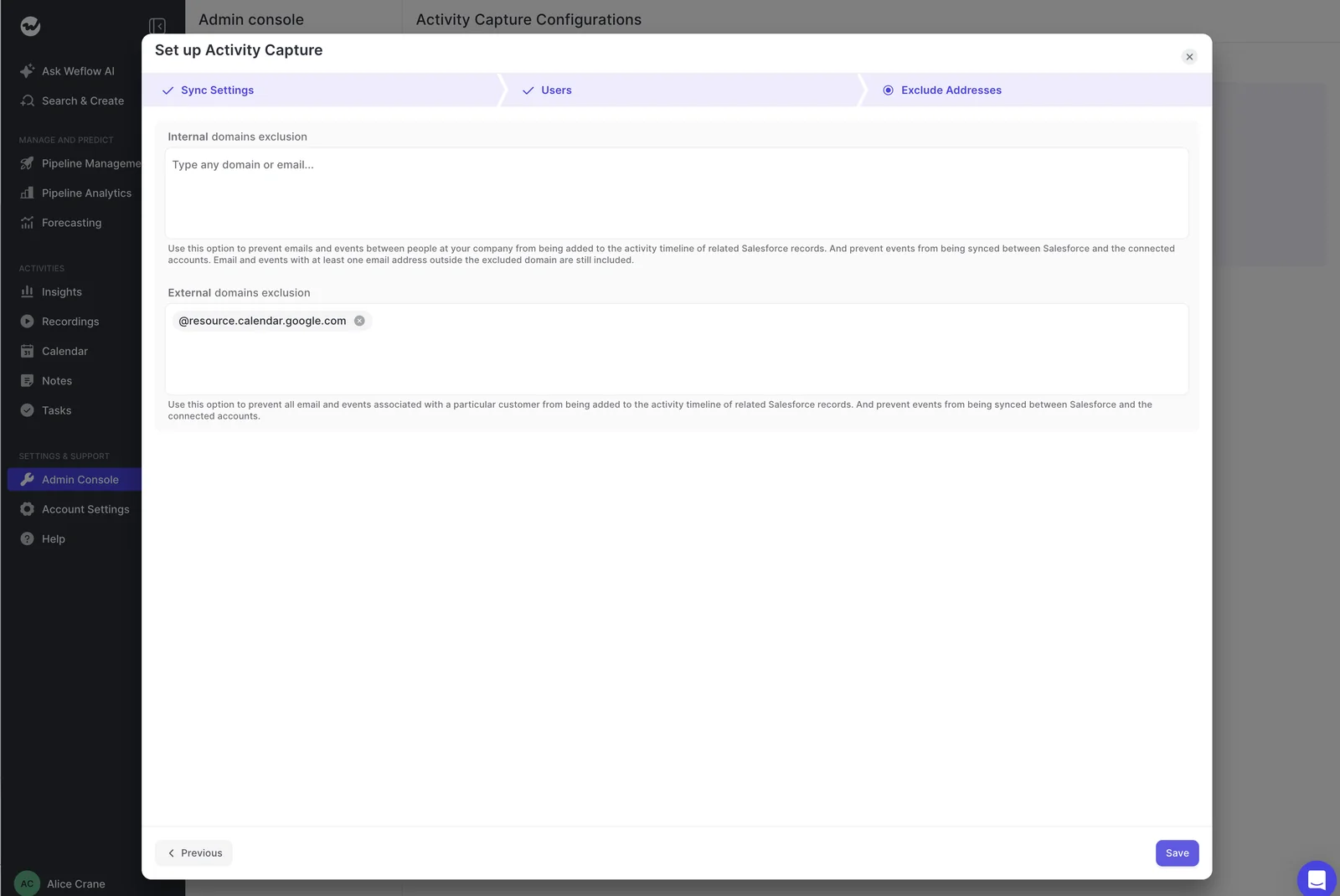
| Domain exclusion | Nothing logged for anyone at that domain | Check the exclusion lists in the capture configuration | Remove the domain from the list; exclusions can't be overridden per email |
| Internal mail | Emails between colleagues never log | Every address on the thread is your own domain | Nothing; internal mail is excluded by design |
| Private flag, or no other attendees and no meeting link | That event or email is missing | Ask the rep whether it was marked private | Unmark it before it's processed; a record already written stays in Salesforce |
| User not enrolled | Nothing logs for that person at all | The user isn't in any capture configuration | Enroll them in the right configuration |
| Contact creation limited to existing accounts | The email logs, but no new contact appears | The sender's domain matches no account | Create the account, or create the contact from the Outlook add-in or Chrome extension |
| Own-instance or company-name block | Nothing logs to an internal or test record | The record name matches your Salesforce instance or a blocked name | Adjust the company-name filter if it catches a real customer |
| Sent from inside Salesforce | One copy, not two | An Email Message from Salesforce's composer already exists | Nothing; replies on the thread still log |
| Compatibility mode tracking pattern | The engagement tool's copy is the only one | The email carries a tracking pattern on the exclusion list | Nothing; this prevents duplicates with Outreach and similar tools |
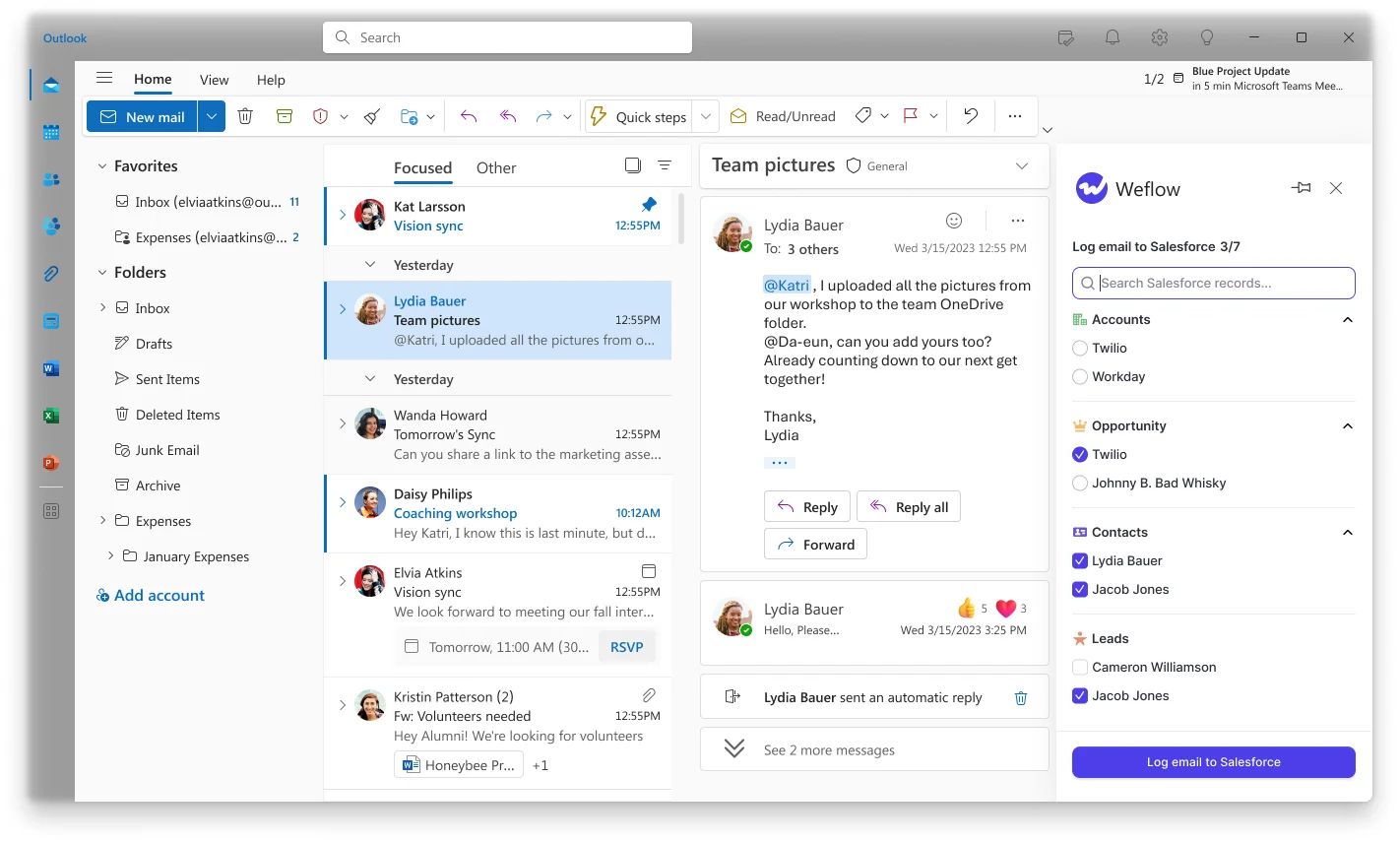
Also check whether "missing" means missing from the opportunity. When Weflow can't settle which open opportunity an email belongs to, it logs to the account instead of guessing, and the rest of the thread follows that first decision. The email sits on the account timeline, the rep looks at the deal, and the deal looks quiet. Moving it in the Outlook add-in or Chrome extension fixes the thread from then on.
If none of the rules explains it, send it to support. Our support team sees the logging decision for each message: whether it synced, and which rule skipped it.
Step 6: Audit what Weflow wrote using Salesforce report filters
Every record Weflow creates is traceable back to it, which is how you audit one rep or reconcile Weflow against another tool during a parity run.
- Emails Weflow logs as Email Messages carry a message ID beginning
W_, so a report filtered on that prefix shows exactly what Weflow logged. - Emails logged as Tasks have no message ID field, so filter Tasks by the Weflow integration user in Created By.
- Weflow activity views filter to inactive users too, which surfaces activity still owned by reps you've deactivated and accounts that look untouched because their owner left.
- The Insights area in Weflow lists each user's captured emails, for a quick check without building a report.
To audit one rep, run the W_ report for their name and the period, run the Task report on Created By, and compare both with their capture health rows from Step 3. That gives you what logged, what skipped and what errored, side by side.
How to get missed emails back into Salesforce
Failed syncs aren't permanent holes, which is what makes phased rollout safe. Recovery runs through our support team and covers activity sync only.
Ask Weflow support to backfill emails that failed to sync
Any email or meeting that failed to sync can be pushed into Salesforce later, whether the failure was a week or a month ago. It's a support request, not a self-serve button.
- Send support the affected users and dates, using the errored rows from your Step 3 CSV.
- Support inspects why each match failed, using the per-message logging decision.
- Support corrects the rule that caused it.
- Support backfills the records into Salesforce.
Emails sent before the account existed log on their own
You don't need a ticket for this one. Until an account exists, Weflow logs nothing for the people at that company, because it only logs what it can match. Once you create the account, Weflow logs those earlier emails to it automatically, with no re-sync.
Re-enrolling a user or re-running sync-back creates no duplicates
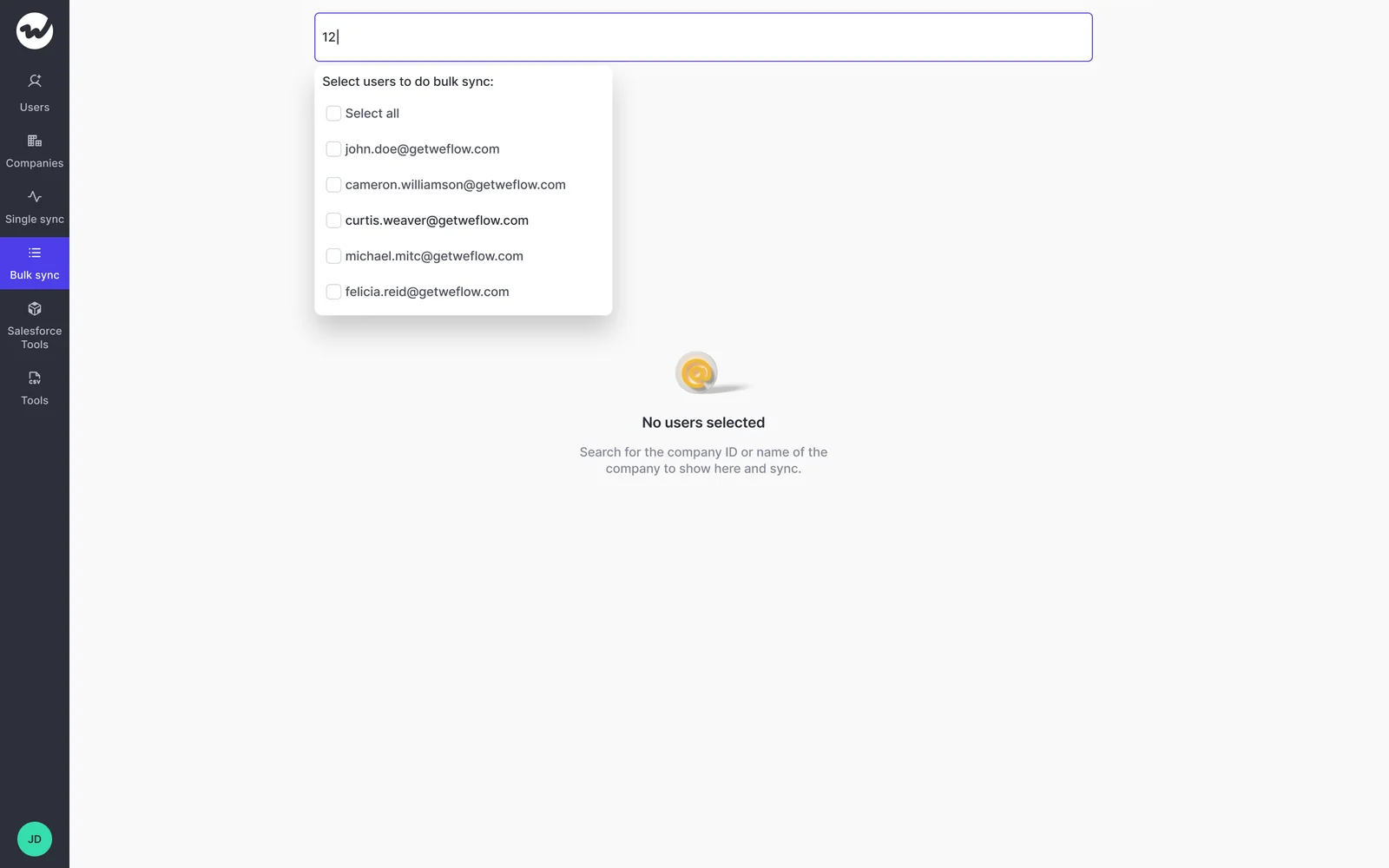
Weflow tracks what it's already written. Removing a user from capture keeps the activity already logged for them, and adding them back or running a historical sync-back doesn't create duplicates. You can restructure teams or re-run a backfill without a cleanup job afterwards.
Failed AI summaries and field updates can't be replayed
Recovery stops at activity sync. If an AI summary or an AI field update fails to write to Salesforce, it can't be replayed afterwards. Keep the two separate when you report on capture health, so a recovered email isn't read as a recovered field.
What Weflow capture doesn't alert on or cover
These are the things you'd otherwise find out the hard way:
- Alerts go to your admin and CSM, not to the rep. The rep's confirmation is the Outlook add-in or Chrome extension, which shows what logged and where.
- The Outlook add-in isn't supported on classic Outlook for Windows. Capture itself doesn't depend on the client; the side panel does.
- Designed skips raise no alarm. With contact creation limited to existing accounts, an email from an unknown domain creates no contact and tells no one, so a new stakeholder stays invisible until someone creates the account.
- Some channels sit outside capture. WhatsApp, Microsoft Teams chat, Google Chat, Slack channels and calls from a rep's own mobile line don't reach Salesforce through Weflow.
- Meeting counts mean scheduled, not attended. A meeting nobody declined counts even if nobody joined, unless it was recorded, because the recording is what proves it happened.
- Out-of-office replies log like any other email. There's no reliable marker to filter them; meeting accept and decline responses can be excluded with an expert setting.
If your team's gaps live in those uncaptured channels, sync health won't fix them. That's a coverage decision, and you should make it knowing where your deals actually happen.
What to tell reps about Salesforce's red "not connected" icon
In the first weeks of a rollout, this is the ticket that floods in.
Salesforce's prompt doesn't know about tenant-level capture, so it warns reps whose mail is being captured the whole time. Reps shouldn't connect anything. Running the Salesforce for Outlook extension alongside Weflow logs the same email twice.
What settles it is giving reps a place to check. The Outlook add-in and Chrome extension show what a message logged to, so a rep who's worried can look instead of asking.
| Say | Don't say |
|---|---|
| "Ignore the red icon. Your email is captured centrally." | "Connect your email in Salesforce to be safe." |
| "Open the Weflow add-in on any email to see where it logged." | "If it's not in Salesforce, log it by hand." |
| "If something didn't log, send me the email and I'll check which rule applied." | "Weflow must be broken." |
| "On classic Outlook, the add-in panel may not load. Capture still runs." | "Reinstall the add-in until it works." |
How to test Weflow capture in a sandbox or EAC parity run
If you're evaluating, test the paths that fail weeks after go-live, not the ones that work on day one. Weflow reads no mailbox until a user is enrolled, so you can finish the technical setup before anyone is captured.
- Start with one user in a sandbox.
- Send email to and from an address outside your company.
- Give each test company its own unique domain on the account Website field.
- Give each test opportunity one clear contact role.
- Create a meeting, then move it, reschedule it and delete it.
- Before enrolling anyone who's also in Einstein Activity Capture, set EAC event sync to one way, from the calendar into Salesforce, or switch that user off in EAC.
- Run the parity check with Weflow on its defaults, no templates or custom rules, and judge it one for one against the incumbent.
- Audit the results with the
W_and Created By filters from Step 6.
The pitfalls we see most in tests:
- Internal-only test mail looks broken. Email between two colleagues is excluded as internal, so it logs nothing.
- Free-mail test domains create fake mapping failures. Test accounts carrying gmail.com or outlook.com match every test sender to several accounts at once, so the test measures your test data.
- Create-only meeting tests miss permissions. Creating a meeting proves the create permission; moving and deleting it proves the update rights.
- Two-way EAC event sync loops. When EAC and Weflow both write the same meeting, external attendees can get repeated calendar notifications, not only duplicate events in Salesforce.
We also recommend one-way calendar sync on the Weflow side, from Google Workspace or Microsoft 365 into Salesforce. The Salesforce-to-calendar direction is the unreliable one, and teams that create meetings in their calendar lose nothing.
How to show leadership that capture is healthy every week
Login and adoption numbers are the wrong proof. Background capture works best when nobody opens it, so a falling login count can mean it's doing exactly its job. The signals that matter are whether activity is still being written and whether records are complete.
| Metric | What it tells leadership |
|---|---|
| Weflow logins or add-in installs | Misleading: low numbers are normal for background capture |
| Meetings per rep | Meetings scheduled, not attended, unless recorded |
| Emails and meetings written per user, week over week | Whether capture is still running for every enrolled user |
| Skipped and errored messages for the week | Whether any failures need recovery |
| Users with a mailbox warning icon | Whether anyone has dropped out of capture |
| Duplicates and unconverted leads in Activity Capture Health | Whether CRM data is getting cleaner or worse |
Insights reports in the Weflow app can't be scheduled or emailed. For a standing weekly view, build it in the Weflow Analytics package inside Salesforce and use Salesforce's own report subscriptions. An agent built in Agent Builder can also send a written activity report on a schedule, as text rather than charts.
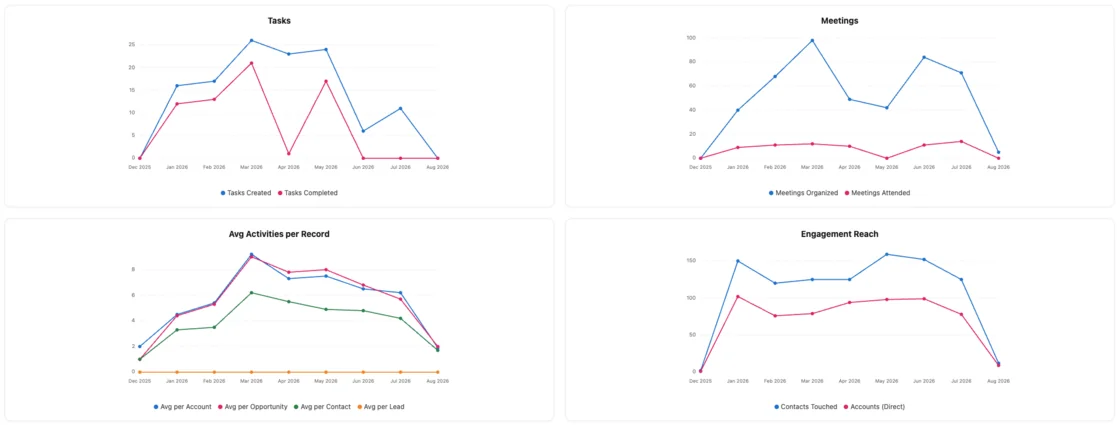
Put the trend in front of your CRO once a week, and the "is the data accurate" question gets answered before anyone asks it. To keep the setup details next to this runbook, grab our free Salesforce Activity Capture Cheat Sheet.
FAQ: Weflow activity capture health and recovery
Who gets the alert when Weflow capture breaks?
When capture breaks at the connection level, Weflow automatically emails your Weflow admin and alerts the CSM who owns your account. Reps don't get the alert. They confirm their own logging in the Outlook add-in or Chrome extension.
How does the Salesforce API limit affect Weflow sync?
An exhausted Salesforce API limit is the most common reason a Weflow sync fails, and it accounts for most of the gap behind our published 99.9% activity sync rate. Weflow uses only the Salesforce REST API, with webhooks in the managed package, to keep consumption down. Every other integration in your org draws on the same limit, so heavy integrations elsewhere affect everyone.
Does Weflow support read our emails when troubleshooting?
No. Weflow support sees the logging decision for each message, whether it synced and which rule skipped it, but not the content. If a message's subject matter matters to the diagnosis, you read it on your side.
Will I need a dedicated person to troubleshoot capture at high volume?
The work scales with signals, not message volume. Connection breaks alert you, the capture health CSV lists failures for any period, the Activity Capture Health view counts CRM-side causes, and support sees the decision behind any single message. You work the exceptions rather than auditing the whole flow.
Should I turn off Einstein Activity Capture when Weflow goes live?
Yes. Weflow's Settings Health check recommends Einstein Activity Capture disabled, because EAC creates uneditable activity records that bypass automation. During a parity run, set EAC event sync to one way or switch each Weflow user off in EAC before enrolling them, so you avoid notification loops and duplicate events.
Does removing a user from capture delete their logged activity?
No. Removing a user keeps everything Weflow already logged for them, and adding them back or re-running a historical sync-back creates no duplicates.
Why does a new contact show an email address as the last name?
The email or invite arrived with an address and no display name. Weflow enrichment fills the name in roughly 70% of those cases. When it can't, the address goes into the last name field and the first name stays blank. It's a visible pattern, not a bug: Weflow reproduces what arrived and adds what enrichment finds.
Is Activity Capture Health in the managed package or Advanced Analytics?
The Activity Capture Lightning component, which flags contacts with no email, duplicates and unconverted leads on a record, ships in the managed package. The Activity Capture Health view is a Weflow Analytics view, and we document it as part of the Advanced Analytics package.
What does Weflow Activity and Contact Capture cost?
Weflow Activity and Contact Capture is $19 per user per month, billed annually, with a 10-user minimum. It includes Ask Weflow AI Pro and Agent Builder Free, with 25 agent actions per month.