How to Run Weflow Activity Capture Across Several Teams, Regions and Mail Tenants
Learn how to run Weflow Activity Capture across teams, regions, and multiple mail tenants.


Yes, one Weflow workspace can run activity capture for every team, region and function in your group. Membership comes from Salesforce. Dynamic teams pull people in by manager, role or a checkbox on the user record, and Weflow re-checks that checkbox every hour. Capture configurations then set the logging rules per team or region. Joiners, leavers and transfers follow your Salesforce org chart, so nobody maintains a second user list.
The hard boundary is the mail tenant:
- Each Microsoft 365 or Google Workspace tenant needs its own capture configuration.
- Users can only be assigned within their own domain.
- Every configuration has to list every sibling company's domain as internal.
- There's no single admin view across tenants.
Weflow is the Revenue AI Orchestration platform for sales, customer success, and RevOps teams. This guide covers the Salesforce data capture side, Weflow Activity & Contact Capture. It maps your group onto three layers (tenant, configuration, dynamic team), then rolls capture out one unit at a time. You've already decided you want automatic capture. This is about whether the structure holds once you're past unit one.
How Weflow's three layers map onto your group structure
A multi-entity group maps onto three Weflow layers. Each one is scoped by something different and changed by a different person.
| Mail tenant | Capture configuration | Dynamic team | |
|---|---|---|---|
| What it decides | Whose mailboxes Weflow is allowed to read | What gets logged, where, and how | Who is in scope |
| Scoped by | One Microsoft 365 or Google Workspace tenant and its domain | Users, plus Salesforce field values such as billing region | Salesforce manager, role or a field condition on the user record |
| Who changes it, and where | That tenant's Microsoft or Google admin, in Entra or the Google Admin console | Sales Ops, in Weflow's admin console | HR, IT or the Salesforce admin, on the Salesforce user record |
| What happens when the org changes | An acquisition on its own tenant means a new connection and a new configuration | A new region or function means a new configuration | A joiner, leaver or transfer flows through from Salesforce with no action in Weflow |
| How often it changes | Rarely: at an acquisition or a tenant merger | When a unit's logging rules change | Whenever someone updates a Salesforce user record |
The split matters because the layer that changes most often lives in the system you already maintain. HR and IT keep Salesforce user records current anyway. Since Weflow dynamic teams read those records, coverage follows the org chart without a weekly cleanup in a second admin console.
The other two layers change at the pace of your business, not your headcount.
Each mail tenant needs its own capture configuration
Weflow is configured per mail tenant. Activity capture takes one configuration per tenant, and you can only assign a user to a configuration that covers their own domain. Weflow Conversation Intelligence setup accepts a single tenant selection. There's no administrative view that spans tenants.
Here's where the line falls:
| Element | Scope |
|---|---|
| Dynamic teams built from Salesforce | Whole workspace |
| Custom rules on Salesforce fields | Whole workspace, evaluated against your Salesforce records |
| Salesforce records and sign-in | Whole workspace (one Salesforce org) |
| Capture configuration | Per mail tenant |
| User assignment | Per tenant, own domain only |
| Internal-domain exclusions | Per configuration, maintained in each one |
| Weflow Conversation Intelligence tenant selection | One tenant |
| Admin view | Per tenant, no cross-tenant view |
For a group that grew by acquisition, an acquired entity on its own tenant is a new configuration, not a new team. That's real overhead, and it scales with the number of tenants.
Every new tenant adds a configuration of its own. It also adds a domain line to every configuration you already run. If you're running many tenants under one admin, weigh that maintenance honestly before you commit to a design.
What each business unit needs before capture goes live
Each unit needs four things before you can enroll its users. Its mail-side approval, not the product, sets the earliest go-live date.
- A Salesforce admin and that tenant's mail admin. On Microsoft 365 that's a Microsoft admin. On Google Workspace it's a Google Workspace admin. The Microsoft admin needs a Salesforce user to reach Weflow's admin console. A temporary Salesforce license works and can be deactivated afterwards without affecting capture.
- The tenant connected to Weflow. You can't create a capture configuration until the tenant is connected.
- Its users exist as Salesforce users. Weflow pairs each mailbox with one Salesforce user, so a mailbox with no Salesforce user behind it never syncs.
- Integration user permissions for every object the unit logs to. Weflow uses a least-privilege permission set and doesn't need Modify All Data. The integration user needs full access to Event and Task, including every field and record type Weflow writes. If Event has several record types, you set a default in Weflow. In orgs with Private org-wide defaults, it also needs Modify All Records on Account, Opportunity and Contact.
- Shared Activities, if you want meetings related to every attendee. Many orgs have it off. In a large org, turning it on is a change request, so raise it early.
- Enhanced Email, if you'll install Weflow's analytics package. The package install fails without it. That package carries the Activity Capture Health view you'll use later to spot silent gaps.
- One technical session per tenant. The integration takes 30 to 45 minutes with both admins present. Workspace configuration takes about an hour after that.
Weflow reads no mailbox until a user is enrolled in a capture configuration. Installing the packages, connecting the integration user and adding the mail app grant access without capturing anything. You can finish the technical setup while a unit's legal review is still open.
What stretches the timeline is getting two admins from two teams onto the same call, once per tenant. Agreeing what each unit's rules should be takes time too. Neither is a configuration task.
Build each unit's Weflow capture structure in five steps
Build each unit in this order: tenant, teams, configuration, sibling exclusions, ring-fencing. The order matters because no configuration can exist until its tenant is connected.
Step 1: Connect each Microsoft 365 or Google Workspace tenant
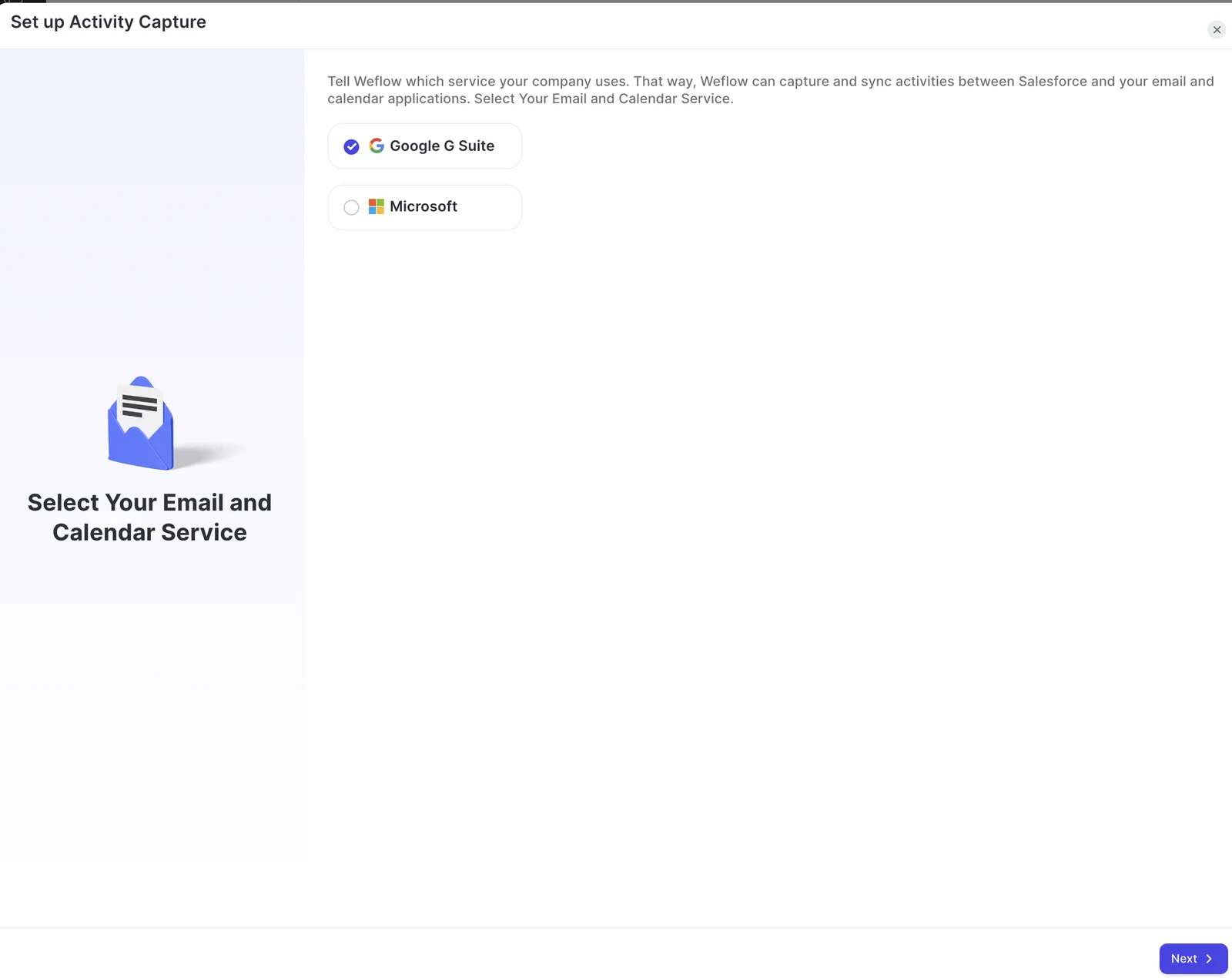
Weflow captures server side, through one app installed centrally in Microsoft Entra or Google Workspace. Reps don't install or authorize anything.
Microsoft 365
- Give the Microsoft admin access to Weflow's admin console with a Salesforce user. If that's slow to arrange, the Microsoft admin can take control of a Weflow admin's session over screen-share.
- Have the Microsoft admin start the install from the Microsoft section of Weflow's admin console and consent there. Approving the permission request in the Microsoft 365 admin center alone doesn't complete the connection, and a Salesforce admin can't do it for them.
- In Entra, open the Weflow Activity Capture enterprise app and set Assignment required to Yes. Without it, a group assignment doesn't restrict anything, and Weflow can still reach mailboxes outside the group, guest accounts included.
- Add the user groups for this unit under Users and Groups. Some IT teams also scope the app's Exchange Online access to the same group's mailboxes as a second layer.
Google Workspace
- Have the Google Workspace admin approve the Weflow app for the whole organization or for a named group.
- If you use a group, make sure every person you'll enroll in capture is a member. Anyone outside it isn't captured.
- Keep the group refreshed from Salesforce, so the mail-side list and your Weflow teams stay in step.
To check the scope holds, add one user outside it to your first configuration and save. A warning icon next to that user means the restriction is working.
Step 2: Build dynamic teams from Salesforce manager, role or checkbox
Weflow dynamic teams pull users from Salesforce by manager, role or a field condition, and those teams drive enrollment. A rep who moves team in Salesforce moves in Weflow automatically.
| Option | Best for | Example in a multi-entity group |
|---|---|---|
| Manager | Units that map to a reporting line | Everyone under the regional VP for Brazil |
| Role | Functions that cut across units | Every customer success role, in any opco |
| Field or checkbox | Explicit on/off control fed by HR or IT | A "captured" checkbox on the Salesforce user record |
| Manual | Small groups no rule describes cleanly | A cross-unit deal desk or an M&A integration team |
- Pick the Salesforce attribute that defines each unit or function.
- Create one dynamic team per unit or function from that attribute.
- If you use a checkbox, add it to the Salesforce user object and let HR or IT feed it. Weflow re-checks it hourly, so new starters are subscribed and leavers dropped without anyone opening Weflow.
- Point Weflow Conversation Intelligence recording at the same teams, so recording coverage follows the org chart too.
- Fill teams manually only where no dynamic rule fits.
A disabled Salesforce user consumes no license. Leavers stop costing you when IT disables them, not when someone remembers to tidy up Weflow.
To test it, tick the checkbox on a test user and check that they appear in the team within the hour.

Step 3: Create one capture configuration per team, region or function
A Weflow capture configuration is scoped by user and by Salesforce field values such as billing region. That's what stops one unit's rules from leaking into another's.
Each configuration sets:
- which objects activity logs to
- whether an email lands as an email message or a task
- exclusions
- attachments and their size cap
- whether calendar accept and decline replies are suppressed
- whether contacts are created, and how many per event
- the mode
Here's how a group with two tenants might lay it out:
| Configuration | Scope | Logs to | Mode |
|---|---|---|---|
| EMEA new business (tenant A) | EMEA sales team, billing region EMEA | Opportunity, falling back to account when unclear | Hybrid |
| US new business (tenant A) | US sales team, billing region Americas | Opportunity, falling back to account when unclear | Hybrid |
| Renewals (tenant A) | Renewals team, opportunity type Renewal | Renewal opportunities | Hybrid |
| Customer success (tenant B) | CS team on the acquired domain | Account | Fully automated |
| Leadership (tenant A) | Executive team | Only what they choose to log | Fully manual |
- Inside each connected tenant, create one configuration per team, region or function.
- Set the scope: the dynamic team, plus any Salesforce field values that narrow it.
- Choose the objects to log to, and email message or task.
- Decide on attachments and calendar-reply suppression.
- Decide on contact creation. If your Contact validation rules require fields enrichment can't fill, some automatic contacts won't save.
- Set the mode: fully automated, hybrid with the add-in, or fully manual.
- Where renewal and new-business work overlap on the same accounts, split them into separate configurations. Filter on opportunity type or a close-date threshold.
Weflow has no rule that picks the opportunity with the nearest close date. Separate lanes are what keep renewal and expansion activity apart when the same contact sits on both deals.
Most of our customers run hybrid. Capture runs server side, and the add-in shows reps where an email is about to land and lets them re-map it.

Step 4: List every sibling company's domain as internal
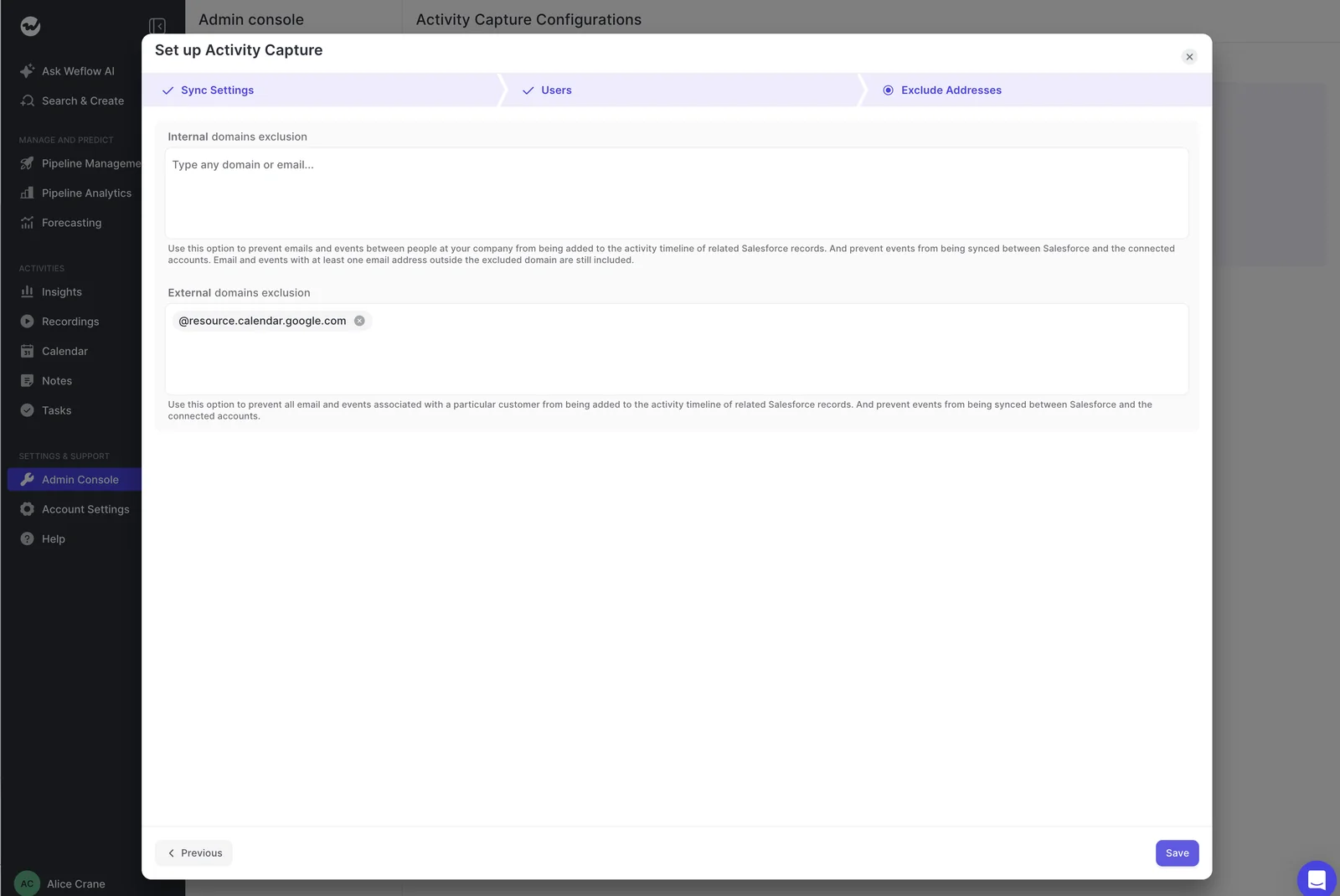
This is the trap multi-entity groups fear most, and the fear is fair. Mail between two sibling companies is internal to the group but external to each tenant. Unless every configuration lists every other entity's domain as internal, the group's own traffic lands in Salesforce as customer activity.
- List every domain each entity sends from, including legacy domains from acquisitions.
- In every configuration, add the domains of all the other entities as internal.
- When you add an entity, give its new configuration the full list. Then add its domains to every existing configuration.
- Let Weflow's instance-name match block logging to your own internal records. It's automatic.
- Add the company-name filter for old company names, which covers inherited orgs where the instance name doesn't resemble the company.
For a group of three entities, the list looks like this:
| Configuration | Domains to list as internal |
|---|---|
| Parent company (parentco.com) | parentco.com, opco-legacy.com, dachunit.de |
| Acquired opco (opco-legacy.com) | opco-legacy.com, parentco.com, dachunit.de |
| DACH unit (dachunit.de) | dachunit.de, parentco.com, opco-legacy.com |
| Fourth entity, added later | Its own domain plus all three above, and its domain added to the three rows above |
The same list also controls recording. Weflow's notetaker only tries to join meetings with at least one attendee outside the configured internal domains, so group-only meetings stay unrecorded.
To test it, send an email between two sibling entities and check that nothing logs in Salesforce.
Step 5: Keep leadership mailboxes and confidential accounts out
Legal usually raises this one before anyone else does.
Weflow handles it with controls that work on the person and on the Salesforce record:
| What you want to keep out | The control that does it |
|---|---|
| Leadership mailboxes | Put the leadership team on fully manual mode |
| A board member already in Salesforce as a contact | A custom rule on a contact field |
| A confidential account | A custom rule on a confidential flag |
| A whole country | A custom rule on billing country |
| Personal contacts | A custom rule on a personal flag |
| Internal test accounts | Instance-name matching, the company-name filter, or a custom rule on a test flag |
Domain exclusion and custom rules look interchangeable, but they aren't. Domain exclusion only blocks records that don't already exist in Salesforce. A board member's domain on the exclusion list won't stop their existing contact from being logged against. A custom rule on that contact's record will.
Roll out unit by unit without double logging
Go live one unit at a time: prove it in sandbox, cut over cleanly from whatever that unit runs today, then backfill its history at the pace your Salesforce API limits allow.
KORE rolled Weflow out in five phases, starting with Activity Capture. Weflow ran live training with a real-time Portuguese translator for KORE's Brazil team.
Step 6: Test each unit in a Salesforce sandbox first
Sandbox is where you catch permission, record-type and exclusion gaps before real users hit them. Test these cases:
- Send email to an address outside the company. Mail between colleagues is excluded as internal, so a test with them logs nothing and looks broken.
- Use a personal address as a test contact, with that domain on a test account's website field, so contact creation gets exercised too.
- Create, move, reschedule and delete meetings. Creating one only proves the create permission. A missing update right otherwise shows up weeks later, when a logged meeting changes.
- Check every object the unit logs to. Missing access on a single Event field, such as location, makes the whole event fail while emails keep working.
- Send mail between two sibling entities and confirm nothing lands.
Then cut over in this order:
- Switch activity capture and conversation intelligence off on the sandbox workspace. Running both workspaces against the same users causes conflicts.
- Set up production: the managed packages, the integration user and the Microsoft Entra connection.
- Have Weflow's team copy your teams and templates from sandbox to production, so you don't rebuild the pilot by hand. Sandbox recordings can move to production too.
Step 7: Switch off the incumbent capture tool unit by unit
Two capture engines on the same user create duplicate activity. Each unit has to move fully to Weflow, with the incumbent off for those users, before you judge the result.
- List every tool capturing for the unit today: Einstein Activity Capture, a sequencer, a notetaker.
- Schedule the cutover. Teams often pick a weekend, because two notetakers can't sit in the same customer meeting.
- Turn the incumbent off for that unit's users and enroll them in Weflow.
- Backfill the gap. Weflow checks each email's message ID before writing, so the backfill adds only what the old tool missed.
- Compare against saved reports from the old tool.
- Leave tools that only read Salesforce activity in place. Clari, for example, can keep forecasting from the activity Weflow writes.
Running both tools on one user is a false test, because both write the same emails and meetings. Splitting users between tools doesn't work either, since activity volume differs from person to person.
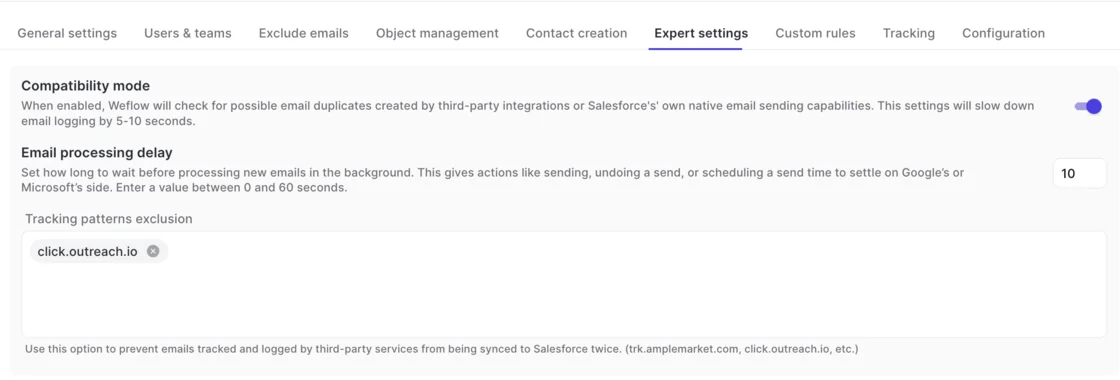
Units that run Outreach, Salesloft, Apollo or Clay keep them. Weflow's compatibility mode skips activity those tools already logged. Tracking-pattern exclusions stop sequencer-tracked mail from syncing twice.
Step 8: Backfill each unit's history within your Salesforce API limits
Weflow backfills historical emails and meetings for up to 24 months, per user for a chosen period or for the whole org. It works backwards in rolling windows. It can't recover conversations that were never recorded, so the sooner a unit starts recording, the less you lose for good.
Your daily Salesforce API allowance sets the pace, along with whatever other integrations draw from it. Here's what to plan around per user:
| Measure | Typical figure |
|---|---|
| Processing time for one month of one user's history | About 15 to 20 minutes |
| Salesforce API calls for one month of one user's history | About 2,000 to 3,000 |
| Salesforce API calls for a single email | Up to about 50 |
| Maximum history | 24 months |
A multi-month backfill across a whole sales team takes weeks rather than days. Running users one at a time is faster than a whole team at once. To prioritize, choose which users go first. You can't prioritize by opportunity.
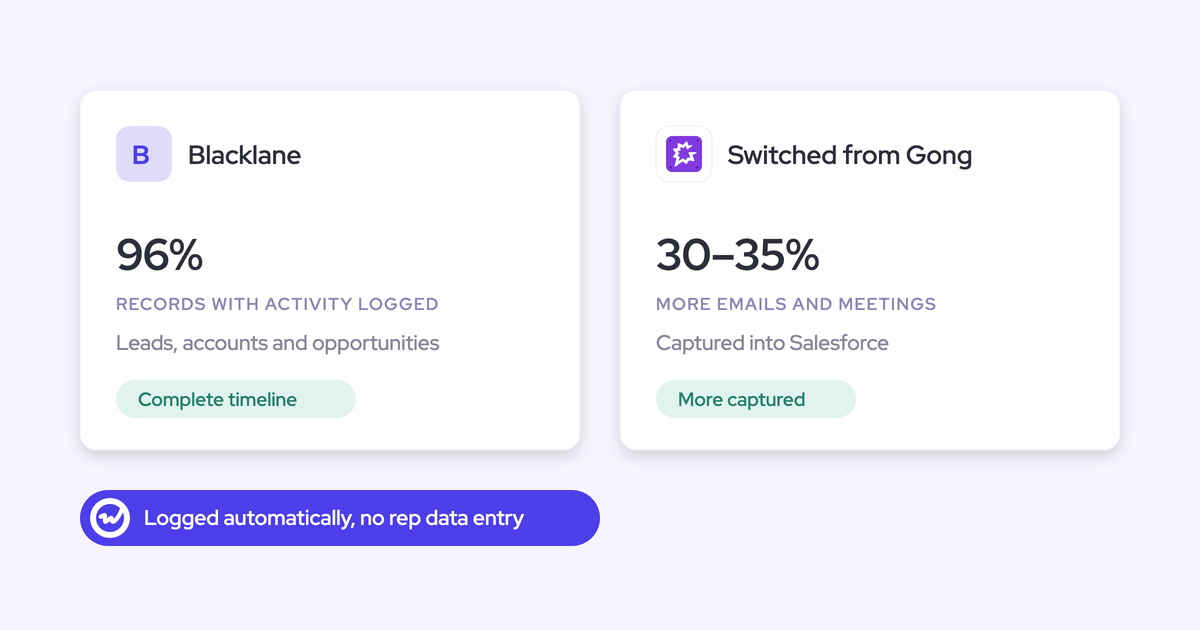
Where compatibility mode is on, Weflow skips most of a sequencer-heavy user's history as already logged. Blacklane's 4 months of history ran in batches over one week to protect its daily API limits.
How to find users who silently fall out of capture
Whole cohorts can drop out of capture with no error. Each cause has a specific place to look, so a quiet unit is diagnosable rather than a mystery.
| What you see | Cause | Where to check | Fix |
|---|---|---|---|
| Google user enrolled, connection warning, nothing logs | Not in the approved Google group | Group membership in the Google Admin console | Add them, and refresh the group from Salesforce |
| Warning icon next to a Microsoft user | Outside the Entra assignment scope | Users and Groups on the Weflow enterprise app | Add their group to the app |
| Warning icon, user is in scope | Email address differs between Microsoft and Salesforce | The two addresses side by side | Align the Salesforce user's email |
| Acquired staff look inactive | Sending from a legacy domain or alias that doesn't match their Salesforce user | Ask each one which address they send from | Match the address, or capture them in that domain's own configuration |
| Activity lands on the account or nowhere | Duplicate accounts or contacts, contacts without email, unconverted leads | Activity Capture Health in Salesforce | Clean the records it flags |
| Missing activity after a new install | A capture setting not configured for optimal capture | The settings check in Activity Capture Health | Correct the setting it names |
| Emails and meetings logged, no recordings | Licensed user never signed in to Weflow | The Weflow user list (status External) | Have them sign in once |
Activity Capture Health runs inside Salesforce. When a rep says capture isn't working, it shows whether the fault sits in the capture or in the CRM data underneath.

Don't use login count as your health metric. Users sit in one of three states:
- External: enrolled in capture and never signed in
- Pending: invited and not yet logged in
- Active: using the application
External users are captured exactly like everyone else. Server-side capture works best when nobody has to open it, which is the design.
"Most of our team doesn't even know we have Weflow for activity capture. That was a big attraction for me: I didn't need them to set it up or learn anything new."
The one exception is recording. Weflow's notetaker doesn't join meetings for a licensed user until they sign in once, so build that sign-in into each unit's go-live.
What Weflow can't fix for a multi-entity group
These limits come on top of the tenant boundary. Better to know them now than to find them in sandbox.
- Recording consent doesn't adapt by region. Consent is set as opt-in, opt-out or none per configuration, and it applies as configured. If two regions need different consent behavior, put them in separate teams with separate configurations. To leave one customer out of recording entirely, add their domain to the notetaker exclusion list.
- One person sending from several aliases defeats address-based matching. No capture tool solves this, and buyers who checked found Einstein Activity Capture no better. The fix is organizational: consolidate onto one domain.
- Opcos on another CRM can't be covered. Weflow works only with Salesforce. In a mixed group, you deploy on the Salesforce side.
- Classic Outlook for Windows isn't a supported client for the Outlook add-in. Mailbox capture doesn't depend on the client, so emails and meetings still log. What varies is the side panel reps use to see and change the match. Acquired units still on classic Outlook get a consistent add-in experience only after they move to the new Outlook.
Who owns the configuration once every unit is live
Membership largely runs itself because it lives in Salesforce. The per-team setups don't, and they go stale without a named internal owner.
| What | Who keeps it current |
|---|---|
| Joiners and leavers | Salesforce, through dynamic teams |
| Transfers between teams | Salesforce, through dynamic teams |
| Licenses for leavers | Salesforce: a disabled user consumes no license |
| Access to Weflow | Salesforce authentication: deactivating a user removes access immediately |
| Capture configurations per unit | A named owner |
| Sibling-domain lists | A named owner, updated at every acquisition |
| Custom exclusion rules | A named owner |
| Weflow Conversation Intelligence templates per team | A named owner |
| Each tenant's Entra or Google group scope | That tenant's mail admin |
Templates need the most attention. Weflow runs separate AI templates per team, so sales, onboarding and CS each keep their own structure and write to different objects. That flexibility degrades if nobody tends it.
Hand over the three-layer map to your successor:
- Each tenant, its domains, and the mail admin who controls its scope
- Each configuration, with its scope, objects, mode and consent setting
- The sibling-domain matrix, and the rule that every acquisition updates every configuration
- Every custom rule and the reason it exists
- Each team's Conversation Intelligence template and the object it writes to
- The Salesforce attribute that defines each dynamic team
For a reference you can pass to the next owner, grab our free Salesforce Activity Capture Cheat Sheet.
How Weflow Activity & Contact Capture pricing works across waves
You buy for the units going live now and add the rest as they come on.
| Item | Detail |
|---|---|
| Weflow Activity & Contact Capture list price | $19 per user per month |
| Billing | Annual |
| Minimum | 10 users |
| Seats added mid-term | Charged pro rata to the end of the term |
| Disabled Salesforce users | Consume no license |
| Implementation | No implementation fee |
| Meeting recordings | Need Weflow Conversation Intelligence; the Revenue AI Foundation bundle ($49 per user per month) pairs the two |
Because mid-term seats are pro rata, later waves don't force you to over-buy at signature. You don't have to hold an acquired unit's go-live until renewal to keep the commercials clean.
Frequently asked questions about multi-tenant Weflow rollouts
Can Weflow Conversation Intelligence record users across several mail tenants?
No. Weflow Conversation Intelligence setup accepts a single tenant selection. Activity capture works differently: each tenant gets its own capture configuration, so every tenant can run capture.
How do we add a newly acquired company with its own Microsoft 365 tenant?
Treat it as a new tenant, not a new team:
- Have the acquired company's Microsoft admin start the install from Weflow's admin console and consent there.
- Set Assignment required to Yes on the Weflow enterprise app in Entra.
- Create a new capture configuration for that tenant.
- List every existing entity's domains as internal in the new configuration.
- Add the new entity's domains as internal in every existing configuration.
Does compatibility mode work for units that use Outreach or Salesloft?
Yes. Weflow's compatibility mode skips activity that Outreach, Salesloft, Apollo or Clay already logged, so Salesforce doesn't get duplicates. It slows email logging by five to ten seconds while it checks.
What happens to logged activity when someone moves to another team?
New activity follows their new team and configuration as soon as Salesforce reflects the move. Earlier activity stays on the record it was logged to. A rep or admin can move individual emails from the Outlook add-in or Chrome extension.
Can we finish the technical setup before legal signs off on a unit?
Yes. Weflow reads no mailbox until a user is enrolled in a capture configuration. The packages, the integration user and the mail app can all be in place while the review is still open, and enrollment is the switch.