How to Improve Salesforce Data Quality Without Adding a Single Field for Reps to Fill
Learn how to improve Salesforce data quality without adding fields reps have to fill.



You've already run the enforcement playbook. Required fields, validation rules, a page layout redesign, training, maybe a slice of comp tied to hygiene. And the fields leadership reports on still come in late, thin, or empty.
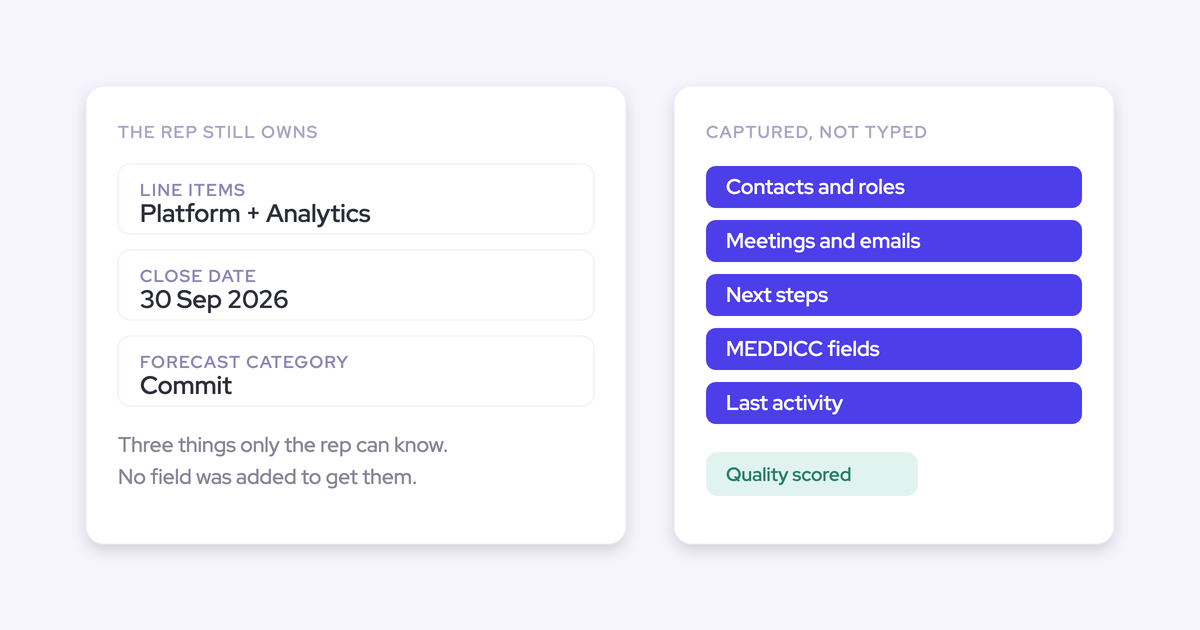
The fix is subtraction. Cut the rep's data job down to the three judgments only a human can supply, delete the field sprawl nobody can explain, and derive everything else from what already happened in emails, meetings, and calls. That's the job automatic Salesforce data capture and AI field updates do.
The outcome this method produces: at the end of the week the record is right, and nobody got chased. Below is the sequence, what it costs, and where it breaks.
Why adding Salesforce fields makes your data worse
Every field you add lowers the quality of the ones you already have, because rep attention is fixed and admin competes with selling.
Reps spend somewhere between 50 and 70 percent of their time on things that aren't selling. Adding a field doesn't create new capacity for it. It just moves which fields get skipped.
Enforcement has a hard ceiling, and it's worth naming precisely, because it's the argument you'll need upstairs.
| What enforcement reliably gets you | What it structurally can't reach |
|---|---|
| The fields that gate payment. Commission is the only incentive strong enough to force entry. | Everything upstream of that gate: activity, contacts, qualification detail. |
| A higher completion rate on required fields. | Content worth reading in them. Reps type whatever clears the rule. |
| Compliance in quiet weeks. | The biggest deals. The rep with the most pipeline has the least admin time, so the gaps concentrate exactly where the deal got hard. |
| Consistent picklist values. | Consistent meaning. "Qualified" is a different bar for every rep, and a filled field invites a decision an empty one wouldn't. |
That last row is the dangerous one. Roughly 65 percent of organizations report significant data missing from their CRM, according to Salesforce's own State of Data and Analytics research. Partial data still renders a chart, and leadership still acts on it.
Buyers say the same thing on calls, and they've usually said it to themselves first:
And the sprawl itself has a cost nobody budgets for. Ten currency fields next to the standard amount, three forecast category fields, a wall of stage flags nobody can explain. The org got better at describing deals, not at judging them.
"If you hit the limit of custom fields you can add to your CRM, you know it's time to just throw the whole CRM into the trash and start a new one."
What you need before you start cutting fields
This is an admin-side project. Reps get asked for nothing, which is the whole point.
- A field inventory for Opportunity, Account, Contact and Lead, with last-used and populated-percentage data, so you can see what's actually carrying weight.
- The short list of reports and dashboards leadership genuinely reads. Usually five to ten, not fifty.
- Salesforce admin access, plus your Google Workspace or Microsoft 365 admin in the loop. Those are two different people on two different teams, and getting them into one call is what turns a one-hour job into a two-week one.
- A written definition of which tool owns which activity today: the sequencer, the scheduler, the CRM add-in, whatever is already writing to Salesforce.
- Field history tracking switched on, and a way to snapshot opportunity data. Almost every pipeline report you'll want later is a comparison of the same pipeline at two points in time.
Step 1: Cut rep data entry down to three fields
The only data a rep should hand-enter is the three judgments a machine can't make:
- What they're selling. The line items and the amount.
- When they believe it closes. The close date, to the best of their knowledge.
- How confident they are. The forecast category or commit call.
Everything else already exists somewhere. The emails happened. The meetings happened. The new contact on the thread exists. The qualification detail was said out loud on a call last Tuesday.
Write that down as policy before you touch a page layout. It's the sentence you'll use every time somebody asks for another field, and it's the standard the rest of the steps are built to meet.
Step 2: Remove custom fields that standard objects already cover
You won't lose the reporting you depend on, because most of what pipeline reporting needs is already carried by standard Salesforce fields. Amount, stage, close date, created date, owner, record type, opportunity type. A large number of the metrics teams build custom fields for are calculations over that small set, not separate stored values.
Unwind the sprawl in this order:
- Audit against report usage, not against opinion. For each custom field, find the reports, dashboards, flows and integrations that read it. A field nobody reads is not a reporting dependency, it's a habit.
- Map each survivor to a standard field or a calculation. Keep custom fields deliberately, mainly for methodology criteria your reviews actually read.
- Deprecate before you delete. Pull the field off the page layout, leave the data in place, and wait a quarter. Anything that breaks, breaks loudly and recoverably.
- Re-run the reports leadership reads. If the number matches, the field is gone for good. If it doesn't, you've found a real dependency and you keep one field, not five.
One rule while you're in there: treat long text fields as dead ends.
"Long text fields in Salesforce are not queryable for an API. Data just sits there. You cannot do anything with it on an automated basis."
The richest thing a rep writes is the deal context, and the moment it lands in a long text field no flow, report, BI tool or agent can read it. Anything you plan to analyze gets modeled as a picklist, number, date or multi-select instead.
Step 3: Automate activity capture so no one logs by hand
Nothing downstream works until emails, meetings and contacts land on the record without a rep clicking anything.
Rep-dependent logging caps out at a level that makes reporting useless. Where logging depends on the rep hitting "log to Salesforce" in an Outlook add-in or Gmail extension, only 24 to 52 percent of activity reaches the CRM. And the gaps aren't random: the busiest reps in the busiest weeks log least.
The native alternative has a different failure. Einstein Activity Capture maps activity to an opportunity through opportunity contact roles, which are among the least maintained objects in any org, and it only works cleanly when an account carries exactly one open opportunity. New business plus renewal plus upsell under one parent account, and the activity falls back to the account. So opportunity-level activity reporting, the reason you wanted capture, is the one thing you can't do.
Write the requirements down before you talk to any vendor. A capture layer has to:
- Run server-side, with nothing for the rep to click and no per-user extension to re-authenticate.
- Sync incoming and outgoing email, so reply rate is calculable. Replies are the evidence a real conversation exists.
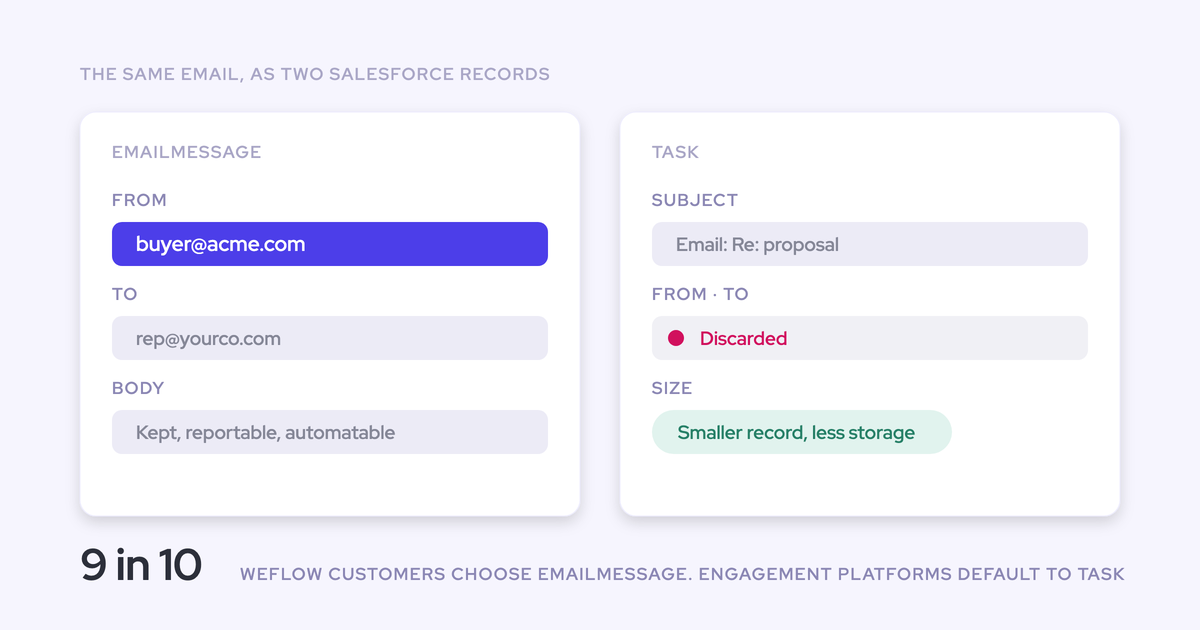
- Store activity permanently in native Salesforce objects (EmailMessage, Event, Task), so your own reports, flows and BI can read it.
- Map to the right record, including the opportunity and custom objects, and let someone correct a wrong match.
- Report its own coverage, so a silent gap shows up as a gap rather than as an idle rep.
Weflow is the Revenue AI Orchestration platform for sales, customer success, and RevOps teams, built for Salesforce teams, and Weflow Activity & Contact Capture is what meets that list: server-side capture from Outlook or Google into native Salesforce records, with a browser and Outlook extension reps use to see and fix which record an activity landed on.

Set the bar numerically so you can tell whether it worked.
"Reliably means ninety nine percent or more of activities stored in your CRM. Anything less and you cannot run reports on it."
Step 4: Replace typed status fields with computed deal signals
The fields leadership actually wants, is this deal moving, is it stale, is it slipping, should never be typed at all. They're all derivable from captured activity and snapshots.
| The field teams build today | The computed signal that replaces it |
|---|---|
| "Days in stage" custom field plus a flow to populate it | Days in stage, tracked on every opportunity automatically |
| "Close date pushed?" checkbox, or a counter nobody increments | Total close-date push count |
| "Last contact date" and "next step date", typed from memory | Last meeting, next meeting, days inactive, from real calendar and email data |
| "Engagement level" picklist, which is the rep's opinion in a dropdown | Activity velocity, reply rate, and a rolling four-week activity timeline on the deal |
| "Single threaded?" flag | Per-contact engagement across the buying committee |
Derived fields can't be gamed and can't go stale. That's data quality by construction rather than by compliance.
Weflow enriches any Salesforce view with those computed fields, so you don't build and maintain them yourself, and warnings can be written as rules against any Salesforce field or any of the computed ones.
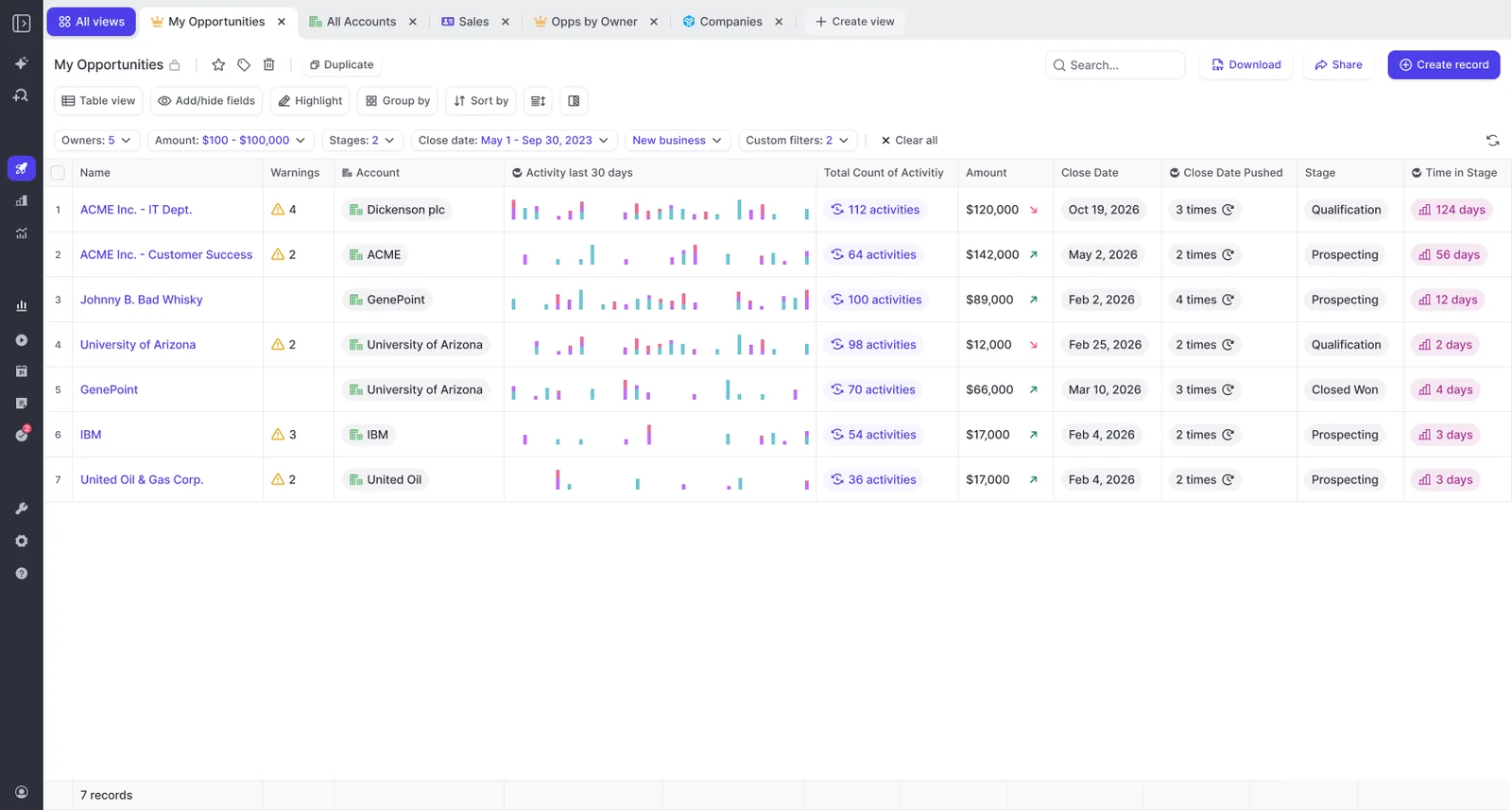
Two things make these numbers mean something. First, benchmarks from your own closed-won deals, so "late" is defined by how your deals actually behave. Second, history: Salesforce holds the value a deal has now, not the value it had three weeks ago, so movement has to come from snapshots. Weflow snapshots the pipeline every few hours for exactly that reason.
Step 5: Fill your existing qualification fields from call transcripts
Qualification detail is the one category no computation produces, and it's the one that's always empty. Across the Salesforce orgs we connect to, the methodology fields are almost always blank before anything is automated.
Not because reps don't care. Sometimes it's the field label itself.
"The methodology fields are empty because the field title is wrong, so the rep never asks the question that would fill it."
— Richard Harris, sales advisor, trainer, and founder of the Harris Consulting Group
The substance exists in the conversation. Weflow AI field updates map Salesforce fields to prompts that pull the values out of the transcript, then show the rep the current value beside the suggested one so they can accept, edit or reject each one and write them back in a click.
Three details decide whether this helps or repeats your last mess:
- It writes into your fields. Picklists, numbers, dates, multi-select, standard objects and custom objects. Not a scorecard in a vendor UI that nobody opens, and not a paragraph in a text field you can't chart.
- The admin decides which fields. Field selection sits in the Weflow admin console. Reps can't add fields or change the mapping, which matters when the CRM broke in the first place because everyone could change it.
- The rep sees current versus suggested before the write. You can also run fields fully automatically. Pick which ones are safe for that, and leave the fields reps write in prose on review. The first time a rep watches their own note vanish, they stop maintaining the field at all.
One caveat: this step needs recorded conversations. Call recording sits in Weflow Conversation Intelligence, not in the capture product.
Step 6: Keep enforcement to two or three validation rules
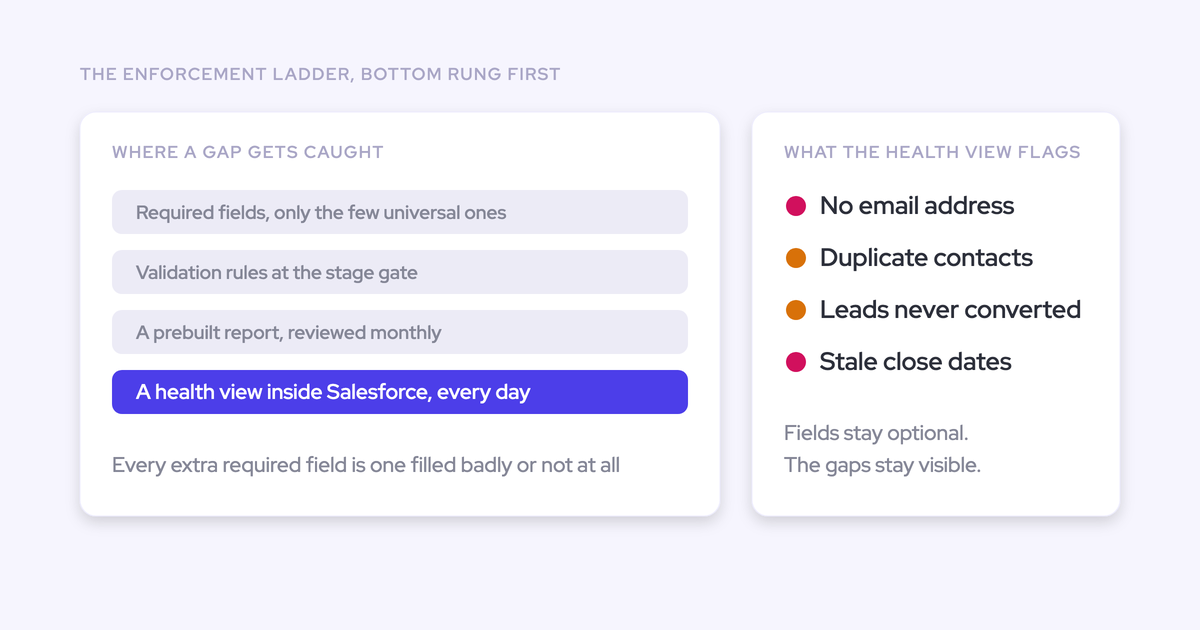
Enforcement isn't abolished. It gets demoted to a thin, deliberate layer, in this order:
- Required fields only for genuinely universal values, like an email address on a contact or lead.
- Validation rules and field dependencies tied to a stage, for the handful of things that must be true to advance. An opportunity can't enter procurement with no amount and no decision criteria.
- Warnings everywhere a hard block would be too rigid. Notify the rep or the manager, feed the deal review, don't stop the work.
"Start with two or three dependencies and validation rules, and if that leads to high quality data already, just stop there."
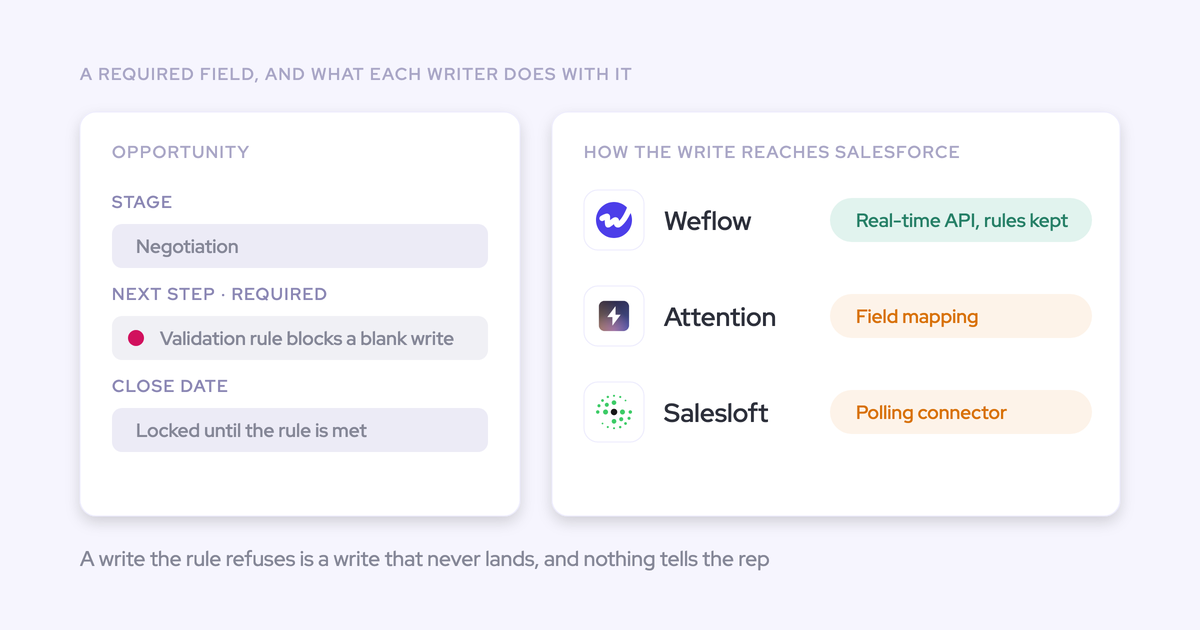
Every rule past the minimum is maintenance debt and a broken integration waiting to happen, because other tools write into the same objects. And renaming stages is cosmetic. Adding criteria a deal must satisfy to advance is the change that moves data quality.
How Weflow runs this method on standard Salesforce objects
Weflow is this method as a product, which is why steps 3 to 5 are executable rather than aspirational.
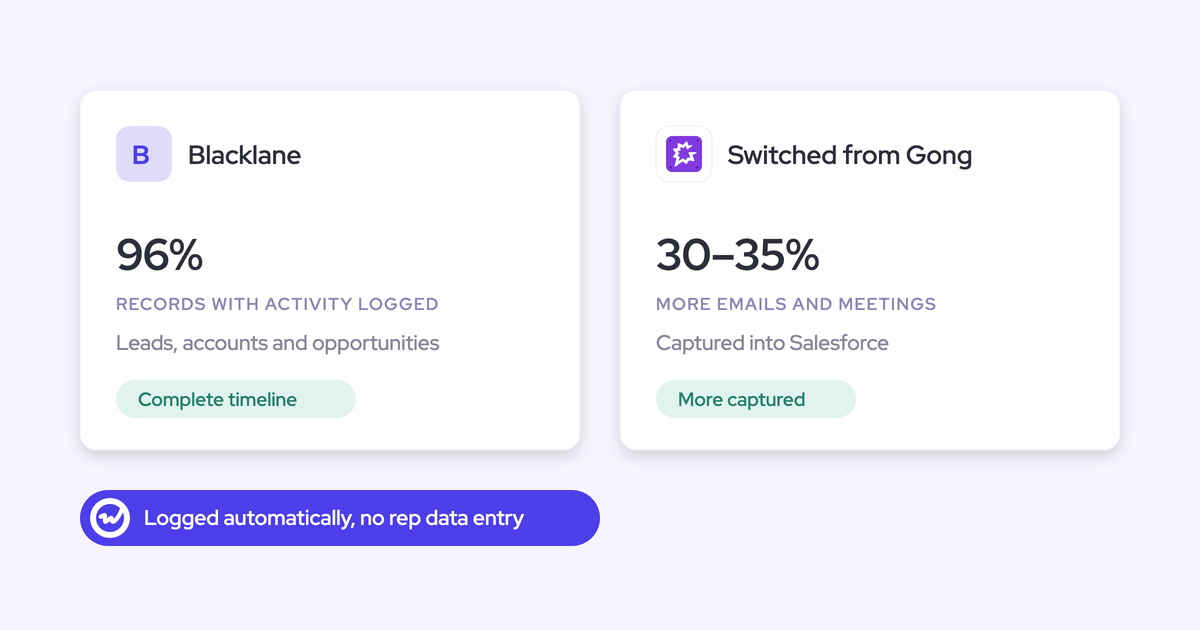
- Capture runs server-side into native Salesforce objects, permanently, with a target of 99% or more of activity landing in the CRM.
- The managed package footprint is one custom object and three custom fields for conversation data. It does not ship a package of rep-facing fields for you to inherit.
- Computed signals (days in stage, push count, days inactive, activity velocity, reply rate) arrive without a custom-field build.
- AI field updates write into the fields your reviews already read, controlled from the admin console, respecting field-level security, validation rules, field dependencies and role hierarchy.
- Sign-in is Salesforce authentication only, so there's no second identity to provision or deprovision.
- The Weflow Analytics package puts activity reports inside Salesforce and consumes no Salesforce API calls.
HolidayCheck ran this sequence and cut past-due opportunities by about 75%.
"The biggest win is data quality. We finally trust our Salesforce data. It's consistent, reliable, and actionable."
— Bastian Stosic, Head of Media Sales Operations at HolidayCheck
Now the limits, because you'll find them anyway and they're how you'll judge whether the rest is true:
- Weflow deal warnings and AI playbook scores are Weflow fields, not Salesforce fields. They're marked with a W in the interface. They don't appear in Salesforce dashboards or Power BI unless you build an agent to write the assessment into a Salesforce field you create.
- Forecast submissions, targets and roll-ups live in the Weflow app. Every other output is written back to Salesforce. Forecasting is the exception.
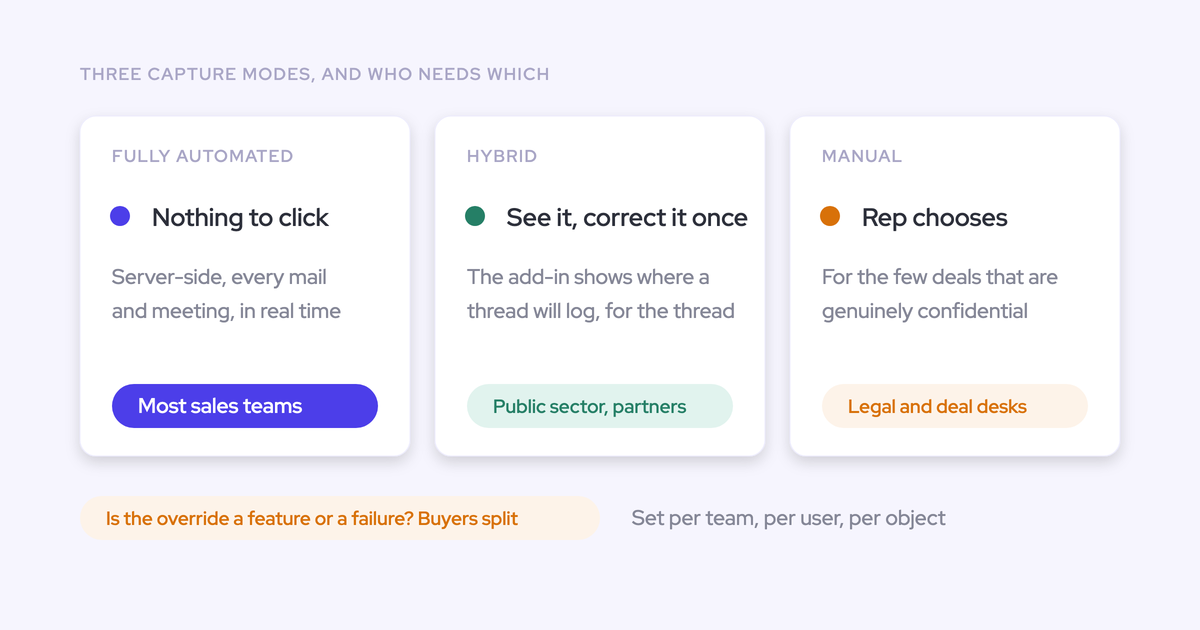
- Activity-to-opportunity mapping isn't magic when an account has several open deals. An email can be logged against many contacts but only one opportunity. The hybrid model lets reps correct the match. It isn't zero-touch.
- Salesforce only. If part of the group runs a different CRM, this does nothing there.
- Capture isn't recording. Step 5 needs Conversation Intelligence, and that's a separate product line item.
Common pitfalls when cutting fields and automating capture
| Pitfall | How to avoid it |
|---|---|
| The new tool ships its own field package, and you've rebuilt the sprawl with a new logo on it. | Ask what the managed package installs before you sign, and ask how much it can do with standard objects. |
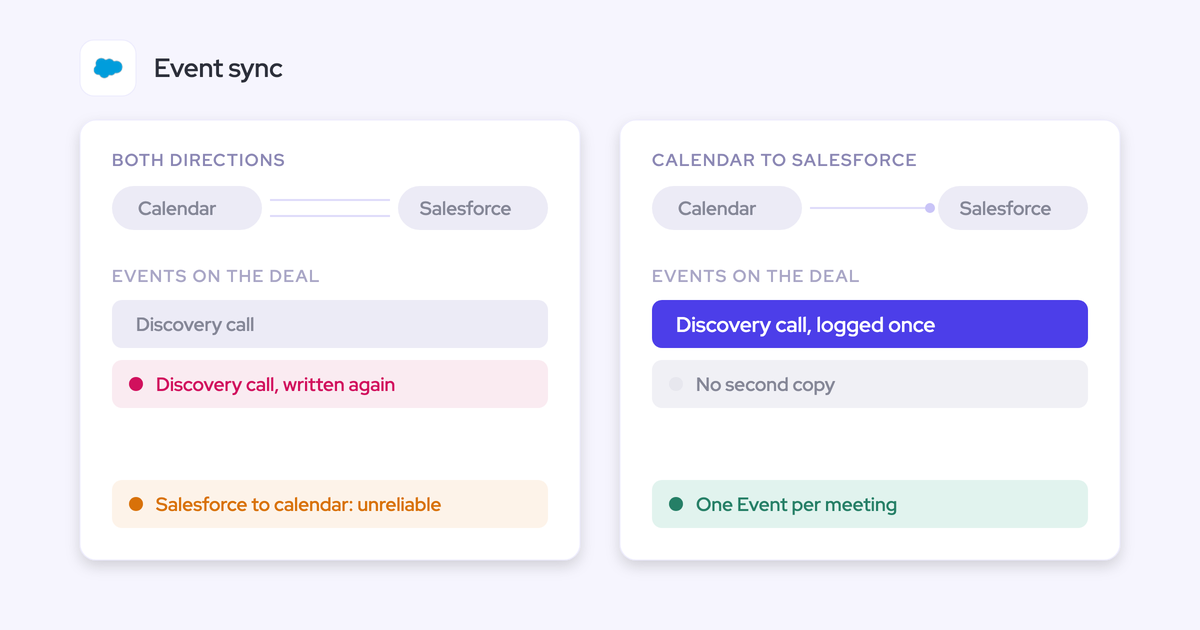
| Two tools write activity at once, so meeting and email counts double and nobody can reconcile the report. | Decide in writing which tool owns which activity. Weflow's compatibility mode holds its sync back about ten seconds and matches on record id so the same email isn't written twice; tracking patterns suppress a sequencer's bulk sends entirely. Also set Einstein event sync to one direction, or two-way sync loops and duplicates every meeting. |
| Machine writes blank what a rep typed after a call, and rep trust dies that afternoon. | Keep the current-versus-suggested review on any field reps write in prose. Reserve fully automatic writes for structured fields. |
| Everything gets switched on for everyone on day one, and the rollout gets judged on the parts nobody was ready for. | Capture and conversation intelligence first, because they take work away. Pipeline, analytics and forecasting in later waves. Run separate rep and manager sessions: talk ratio and hours-in-meetings views are exactly what makes the person being measured go cold. |
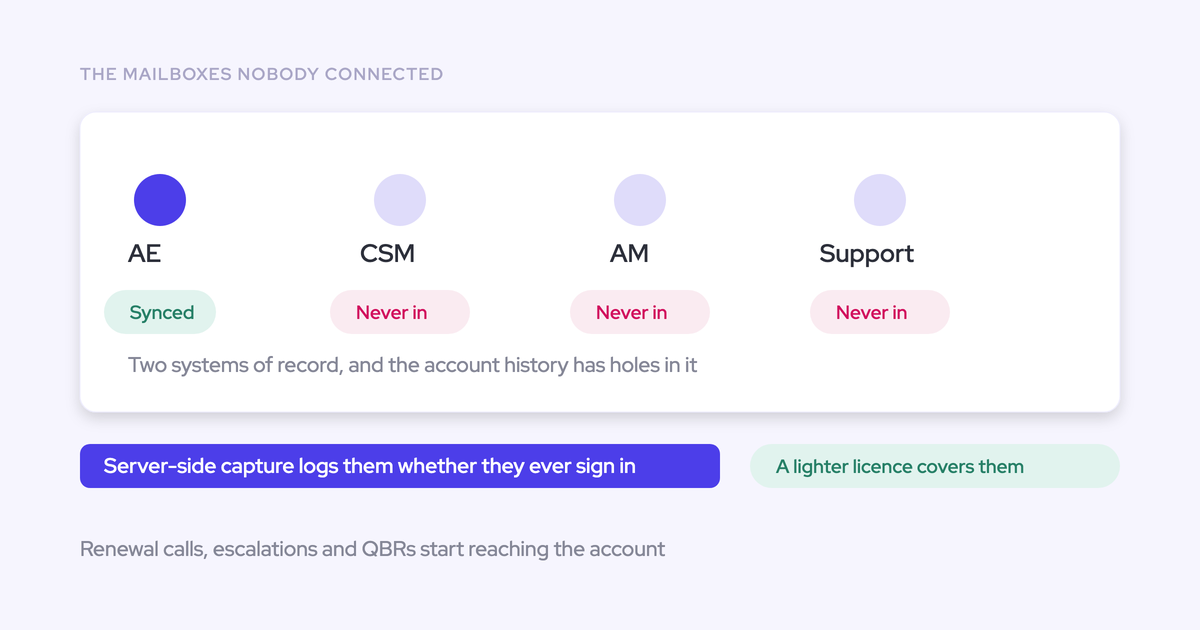
| Capture fails silently. A user sends from an address that doesn't match their CRM user record, and their activity simply never appears. | Treat coverage as an operational metric. Weflow's Activity Capture Health view flags duplicate accounts and contacts, non-converted leads, accounts sharing a website domain, and capture settings that aren't configured properly. |
| A junk value in an account's Website field quietly pulls every email from that domain onto one account, visible to anyone who can see it. | Clean the Website field before go-live, exclude domains you don't use with customers, and delete activity already written. |
And change how you open the conversation when a deal looks stale.
"I'm not gonna tell the rep they're seven days late. I ask whether the CRM missed something. And sometimes it does."
FAQ
How does automated capture know which opportunity an email belongs to?
Matching starts from the participants and the account, then picks the open opportunity, and an email can only be logged to one opportunity. When an account carries new business, a renewal and an upsell with the same contacts, no data in the email says which one it belongs to. That's why Weflow pairs automated capture with a browser and Outlook extension where reps see and change the mapping. Einstein Activity Capture leans on opportunity contact roles instead, and those are rarely maintained.
Does AI field writing overwrite what a rep already typed?
Weflow shows the rep the current Salesforce value beside the suggested value, per field, so they accept, edit or reject before anything is written. There's also a fully automatic mode. Choose per field: structured values are fine automatic, fields reps write in their own words stay on review.
Who decides which Salesforce fields get auto-populated?
The admin, in the Weflow admin console. Reps can't create fields or change which ones AI writes to, and the writes respect field-level security, validation rules, field dependencies and role hierarchy. For a team unwinding years of rep-created fields, that control model is the point.
Do reps have to work in a second tool outside Salesforce?
Captured activity, transcripts, summaries and field updates land on native Salesforce records, so reps can stay where they already are. The Weflow Activity Timeline is a Lightning component an admin drops onto the Account, Opportunity, Contact or Lead page, and Ask Weflow AI runs in the browser extension, including on Salesforce record pages. Forecast submissions are the exception: those happen in the Weflow app.
What does automated capture cost Salesforce API limits?
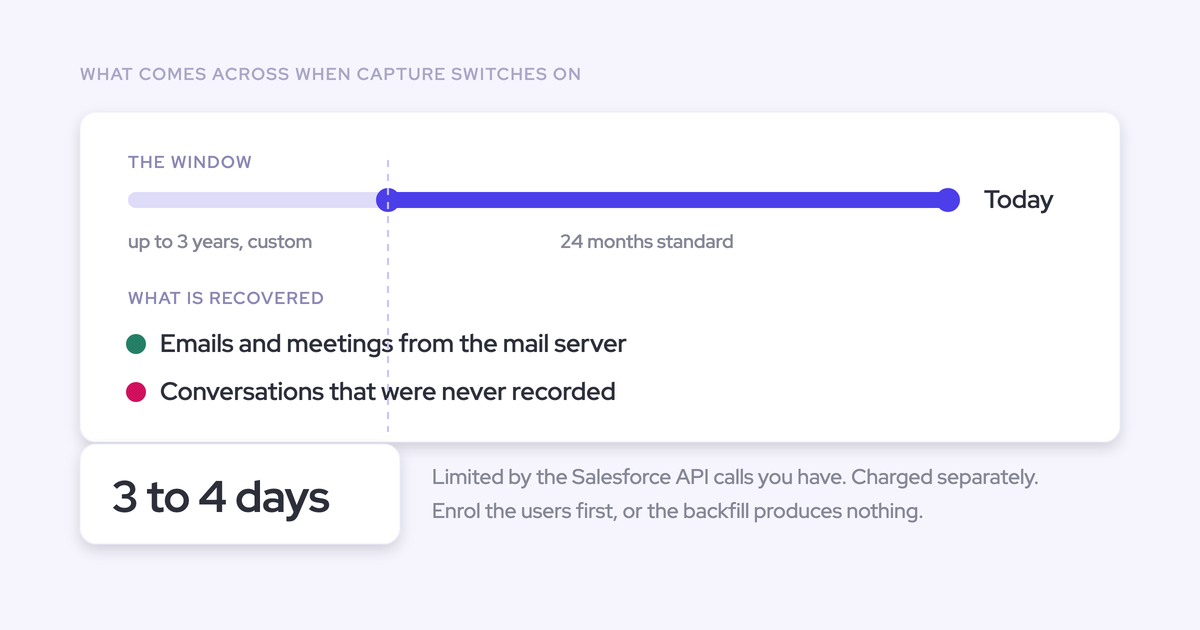
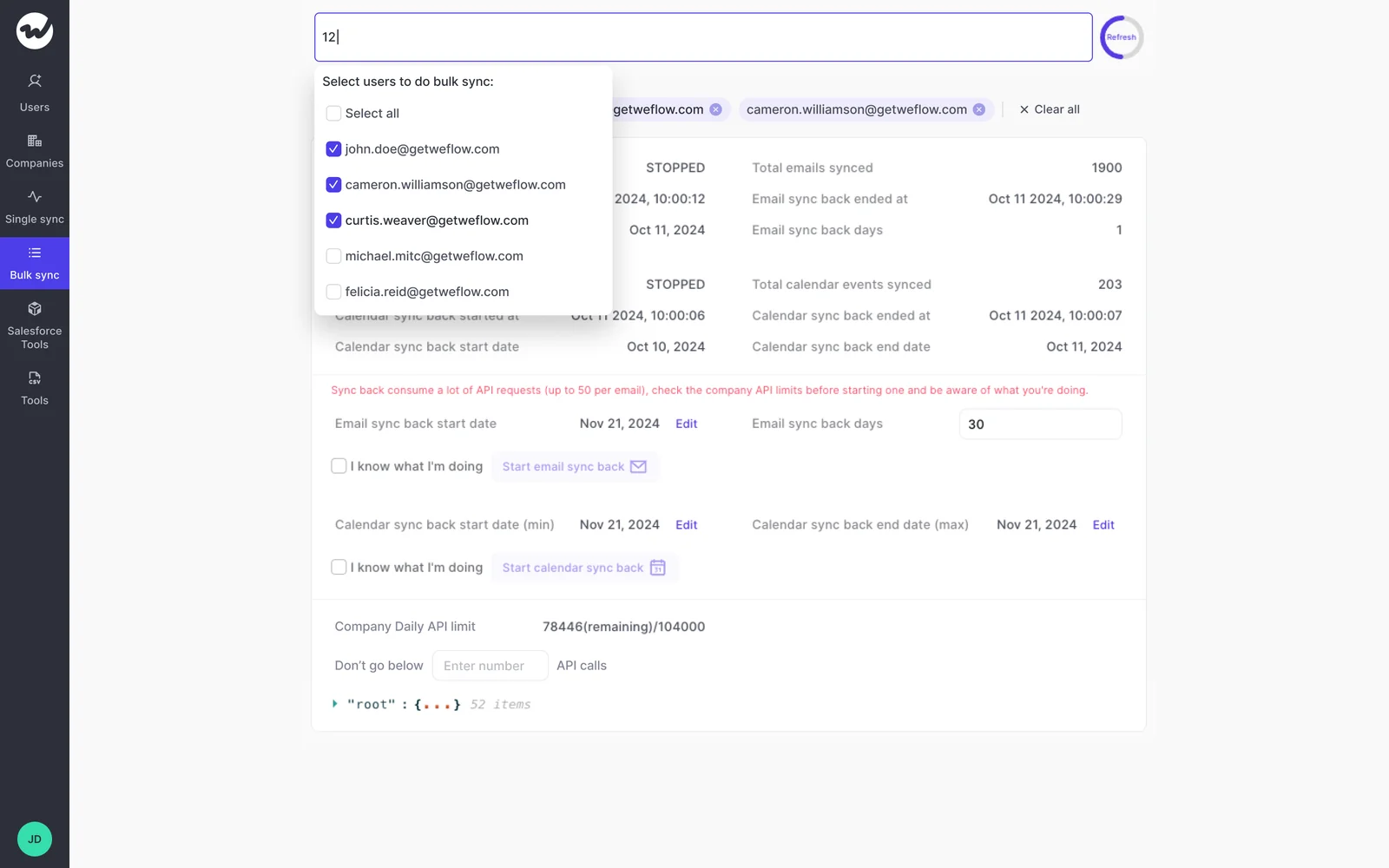
Day-to-day capture writes activity through the API, but activity reporting through the Weflow Analytics package runs inside Salesforce and consumes no API calls, which is what makes continuous reporting viable. The place limits genuinely bind is historical sync-back: 12 to 24 months of email and meetings takes three to four days and is capped by the API calls your org has spare, shared with every other integration.
How do I start small and prove this before buying?
Run a 14-day trial with implementation included, scoped to one team of five to ten people, on your own Salesforce and your own activity rather than a demo org. You can test the integration in a sandbox first, and a test group can be backfilled without licenses so day one shows real history. Capture and conversation intelligence prove out inside two weeks; forecasting needs closer to three months, because it only proves itself across enough cycles to compare predicted against actual. Paid contracts start at ten licenses.
If you want the audit checklist in one place while you work through steps 1 and 2, take the free Salesforce Data Hygiene Cheat Sheet and use it as the agenda for the first admin session.