
10 Salesforce Adoption Strategies to Improve CRM Usage
Learn 10 Salesforce adoption strategies to improve CRM usage, data quality, and forecast accuracy.




What is Salesforce adoption?
Salesforce adoption is the extent to which your revenue team consistently and correctly uses Salesforce as their system of record for pipeline, activity, and deal management. It's not just about logins—it's about whether reps update opportunities, log activities, and follow your sales process inside Salesforce rather than in spreadsheets, Slack, or their heads.
Adoption spans three dimensions:
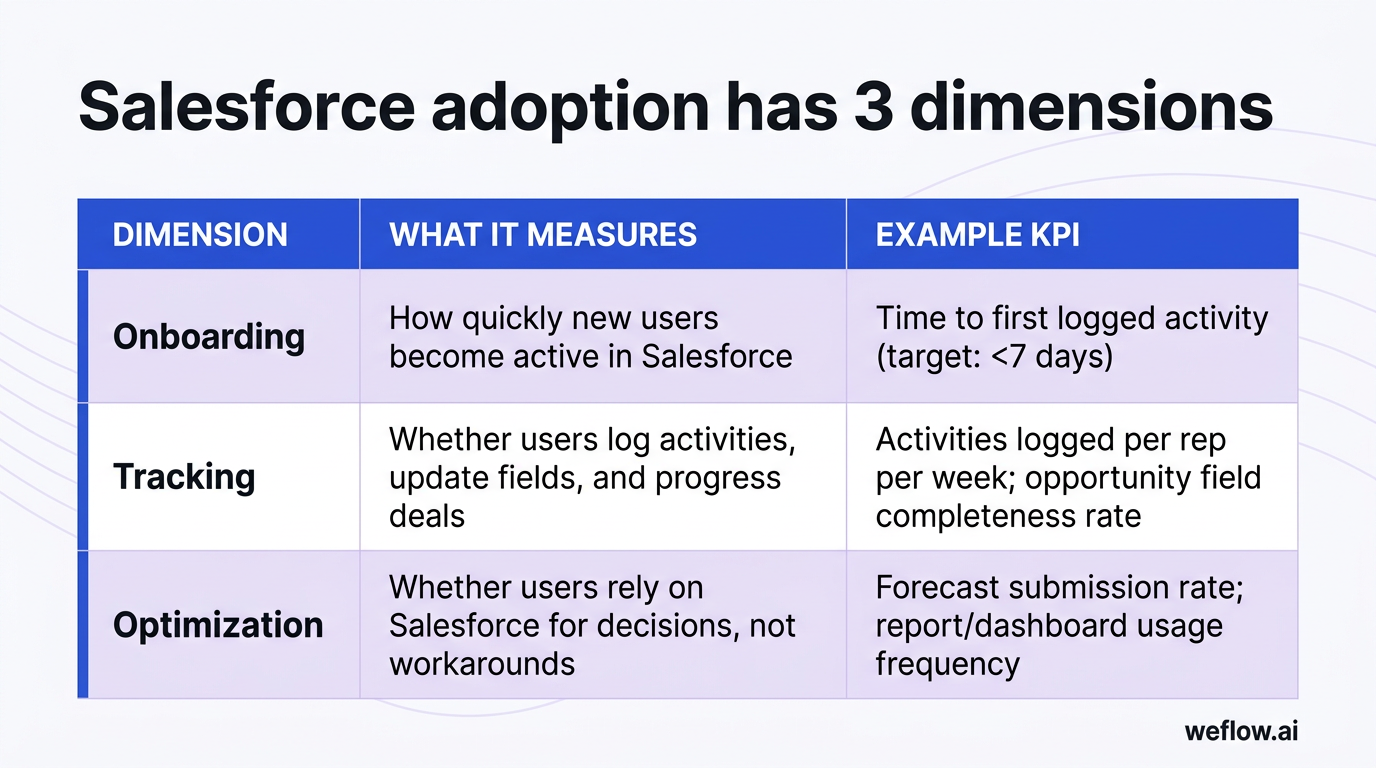
| Dimension | What it measures | Example KPI |
|---|---|---|
| Onboarding | How quickly new users become active in Salesforce | Time to first logged activity (target: <7 days) |
| Tracking | Whether users log activities, update fields, and progress deals | Activities logged per rep per week; opportunity field completeness rate |
| Optimization | Whether users rely on Salesforce for decisions, not workarounds | Forecast submission rate; report/dashboard usage frequency |
High adoption means your pipeline data reflects reality. Low adoption means your forecasts, reports, and board decks are built on guesswork.
Why Salesforce adoption directly impacts revenue and reporting accuracy
Salesforce adoption isn't a checkbox for your CRM project—it's a direct driver of revenue predictability and operational efficiency. When reps use Salesforce consistently, the downstream effects are measurable:
- Reduced manual data entry and admin burden: Reps who update Salesforce as part of their workflow spend less time on end-of-week data dumps. Organizations with high adoption report 5–10 hours saved per rep per month on CRM admin.
- Improved forecast accuracy: Forecast confidence depends on complete, current opportunity data. Teams with 90%+ adoption typically see forecast error rates below 10%, compared to 25–40% error rates at low-adoption orgs.
- Faster deal velocity: When stage progression and next steps live in Salesforce, managers spot stalled deals earlier. Pipeline inspection becomes proactive, not reactive.
- Better cross-team visibility: Marketing, CS, and finance all pull from Salesforce. Low adoption creates silos—SDRs don't see AE activity, CS doesn't see deal context, finance doesn't trust pipeline for capacity planning.
- Accurate attribution and ROI analysis: Campaign influence, lead source tracking, and activity attribution all break down when reps skip Salesforce. You can't measure what isn't recorded.
- Defensible board reporting: CROs presenting to boards need numbers they can stand behind. Low adoption means your pipeline coverage ratios and commit numbers are based on incomplete data.
The bottom line: every percentage point of adoption improvement compounds across forecasting, reporting, and revenue operations. It's not a "nice to have"—it's table stakes for running a predictable revenue org.
How to measure Salesforce adoption: KPIs and benchmarks
You can't improve what you don't measure. Here are the core adoption KPIs every RevOps team should track:
Login and engagement metrics
- Weekly active users (WAU): Percentage of licensed users who logged in at least once in the past 7 days. Target: 75%+ is acceptable, 90%+ is best-in-class.
- Daily active users (DAU): For sales roles, daily usage indicates Salesforce is part of the workflow, not an afterthought.
- Session duration and page views: Short sessions with few page views suggest reps are logging in to check a box, not to work.
Data creation and quality metrics
- Records created/updated per rep: Track Opportunities, Tasks, Events, and Contacts created per rep per week. Declining trends signal adoption decay.
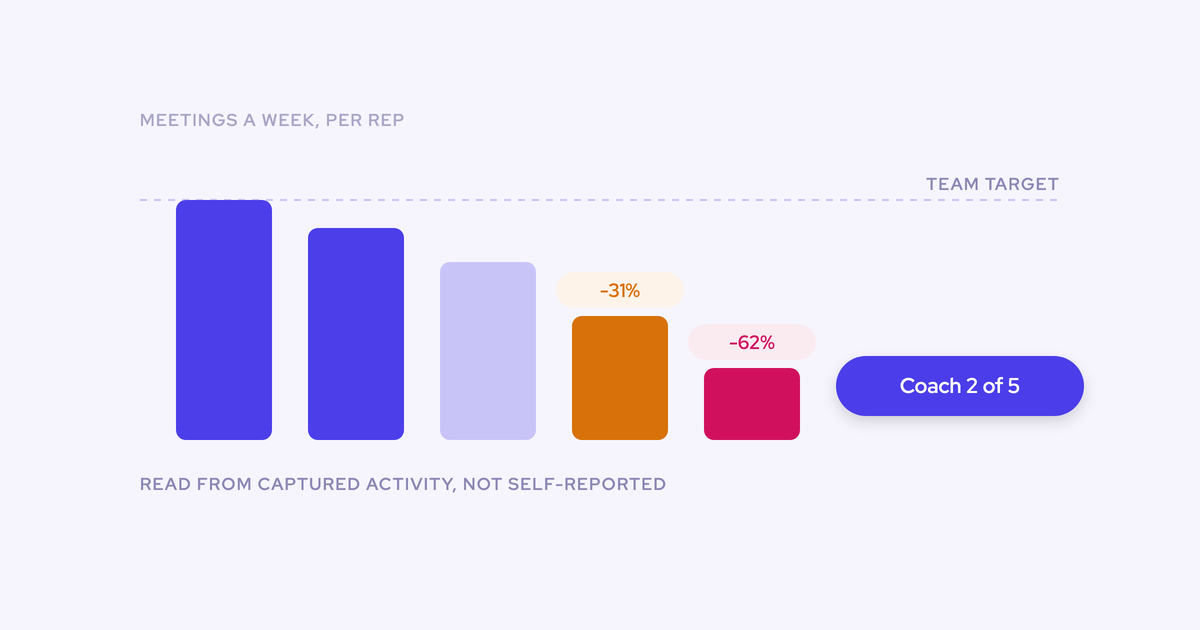
- Activity logging rate: Percentage of meetings and calls that result in logged activities. Compare against calendar data if you have activity capture tooling.
- Opportunity field completeness: Measure fill rates on required fields (Close Date, Amount, Stage, Next Steps, MEDDIC/MEDDPICC fields). Low completeness correlates directly with forecast inaccuracy.
Process compliance metrics
- Opportunity progression velocity: How quickly deals move through stages. Stalled deals often indicate reps aren't updating Salesforce—or don't know what criteria to meet.
- Forecast submission rate: Percentage of reps submitting forecasts on time. Missed submissions usually mean reps aren't in Salesforce enough to feel confident in their numbers.
- Validation rule failure rate: High failure rates suggest friction in the UI—reps are trying to save records but hitting walls.
Where to build your adoption dashboard
Salesforce's AppExchange offers free Adoption Dashboards packages (search "Salesforce Adoption Dashboard" in AppExchange). These packages include pre-built reports for login trends, record creation, and user activity. For more granular tracking, consider third-party tools like Whatfix Analytics, Pendo, or your activity capture platform's built-in adoption metrics.
Benchmarks to target:
| Metric | Acceptable | Best-in-class |
|---|---|---|
| Weekly active users | 75%+ | 90%+ |
| Opportunity field completeness | 80%+ | 95%+ |
| Activity logging rate | 60%+ | 85%+ |
| Forecast submission rate | 90%+ | 98%+ |
5 common Salesforce adoption challenges (and how to solve them)
Most adoption failures aren't about the technology—they're about workflow friction, trust, and incentives. Here are the five challenges we see most often, with concrete solutions:
| Challenge | Recommended solution |
|---|---|
| Non-intuitive UI creates friction: Reps face too many fields, confusing page layouts, and clicks that don't match their workflow. | Audit and simplify page layouts by role. Remove unused fields, use dynamic forms (Lightning), and create role-specific record types. Consider in-app guidance tools (WalkMe, Whatfix) for complex processes. |
| Reps don't update records consistently: Manual data entry feels like admin work, not selling. Reps prioritize closing deals over updating Salesforce. | Automate data capture where possible (activity capture, meeting sync, email logging). Reduce required fields to only what's necessary for pipeline visibility. Tie CRM hygiene to comp plans or leaderboards. |
| Shadow tooling undermines Salesforce: Reps track deals in spreadsheets, Notion, or Slack because it's faster or they don't trust Salesforce data. | Identify the shadow tools and understand why they exist. Usually, it's speed or missing features. Address root causes: faster UX, mobile access, and automation that makes Salesforce the easiest option. |
| Poor data quality creates a vicious cycle: Incomplete or inaccurate data erodes trust, so reps stop using Salesforce, which makes data worse. | Implement data governance: validation rules, duplicate management, scheduled data audits. Show reps clean data in action—accurate dashboards, reliable forecasts. Trust rebuilds over time. |
| Lack of executive buy-in: Leadership doesn't model Salesforce usage or hold teams accountable. Adoption becomes optional. | Get executive sponsors to run pipeline reviews from Salesforce dashboards, not exported spreadsheets. Make Salesforce the source of truth for board reporting. What leadership pays attention to, reps will too. |
How poor data quality kills Salesforce adoption
Data quality and adoption are locked in a feedback loop—and it can spiral in either direction.
The vicious cycle works like this:
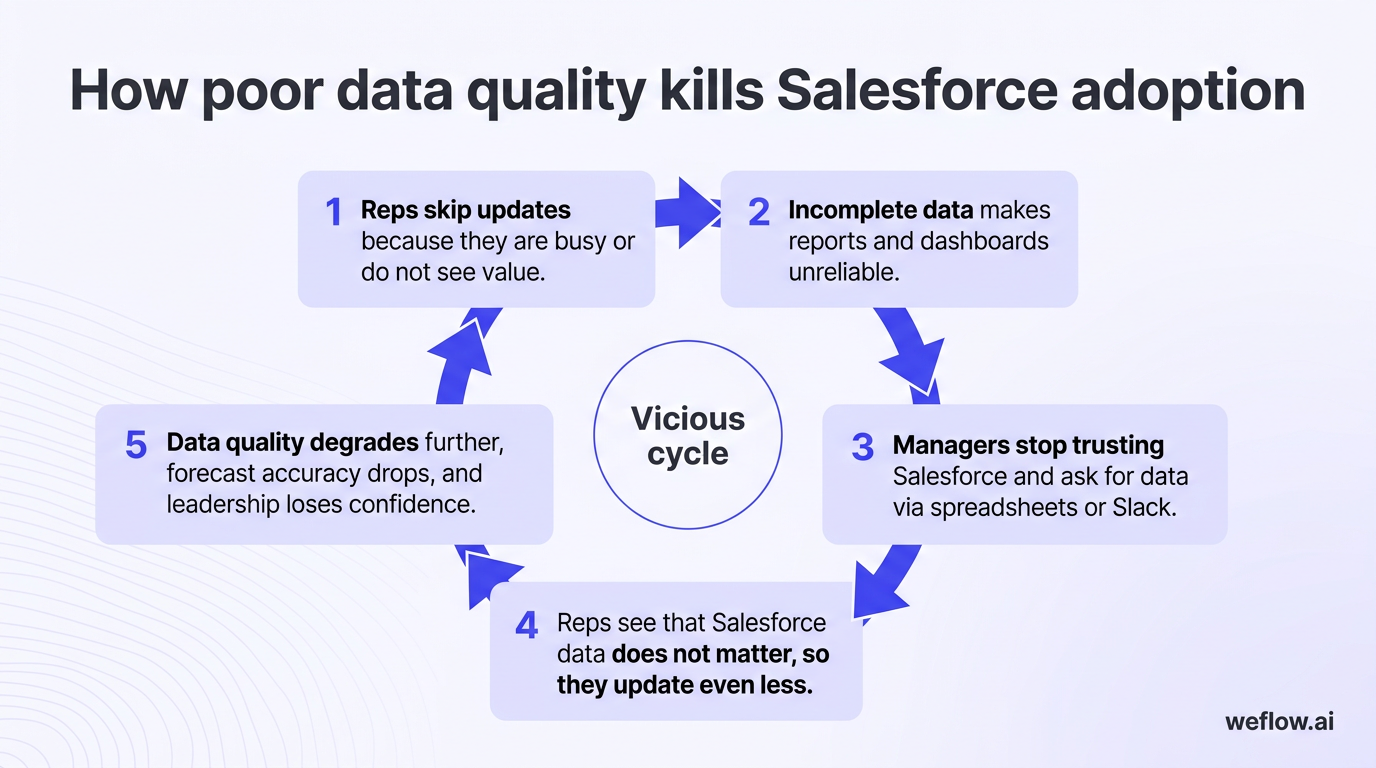
- Reps skip updates because they're busy or don't see value.
- Incomplete data makes reports and dashboards unreliable.
- Managers stop trusting Salesforce and ask for data via spreadsheets or Slack.
- Reps see that Salesforce data doesn't matter, so they update even less.
- Data quality degrades further, forecast accuracy drops, and leadership loses confidence.
Research suggests that approximately 95% of organizations report CRM data quality issues, ranging from duplicate records to missing contact information to outdated opportunity stages. The problem is widespread because CRM data depends on human input—and humans prioritize selling over data entry.
Breaking the cycle requires three things:
- Automation: Capture activity data automatically (emails, meetings, calls) so reps don't have to log it manually. Tools like Salesforce Einstein Activity Capture (EAC), Weflow, or similar activity capture platforms reduce the manual burden.
- Governance: Implement validation rules that enforce data quality at the point of entry. Use duplicate management rules. Schedule regular data audits (monthly or quarterly) to clean stale records.
- Visibility: Build dashboards that surface data quality metrics (field completeness, duplicate rate, stale opportunity percentage). When reps and managers see the metrics, accountability follows.
Data quality isn't a one-time cleanup—it's an ongoing discipline. But without it, adoption will always plateau.
10 proven Salesforce adoption strategies for 2026
These strategies are ordered from foundational (start here) to advanced (layer these on once basics are in place). Each one addresses a specific adoption barrier.
How to measure Salesforce adoption with dashboards and reports
Start by making adoption visible. Build or install an adoption dashboard that tracks weekly active users, records created per rep, activity logging rates, and forecast submission compliance. Salesforce's free Adoption Dashboard package on AppExchange is a solid starting point.
Share adoption metrics in weekly RevOps and sales leadership meetings. When adoption is measured and discussed, it becomes a priority. When it's invisible, it decays.
Quick wins:
- Install the Salesforce Adoption Dashboard package from AppExchange.
- Create a weekly adoption scorecard report and schedule it to sales leadership.
- Add adoption metrics to your RevOps KPI deck.
Why executive sponsorship is critical for Salesforce adoption
Adoption follows attention. If your CRO runs pipeline reviews from a spreadsheet instead of Salesforce, reps learn that Salesforce data doesn't matter. If the VP of Sales asks for deal updates via Slack, that's where reps will update deals.
Executive sponsors need to:
[banner type="download" url="https://www.weflow.ai/resources/cheat-sheets/32-salesforce-kpis" text="32 Salesforce KPIs Reference" subtitle="Know which metrics actually predict pipeline health, not just activity" button="Get the list"]
- Run forecast calls and pipeline reviews directly from Salesforce reports and dashboards.
- Ask "what does Salesforce say?" when reps give verbal updates.
- Hold managers accountable for their teams' adoption metrics.
This isn't about surveillance—it's about signal. When leadership treats Salesforce as the source of truth, the organization follows.
How to communicate Salesforce ROI to your team
Reps need to understand what's in it for them. "Better data for the company" isn't motivating. "Less time on admin, more time selling" is.
Frame Salesforce value in terms reps care about:
- "Your pipeline view shows exactly where you stand against quota—no more guessing."
- "Activity logging means your manager sees your work without you having to explain it."
- "Deal insights surface risk signals so you can save deals before they slip."
For managers, emphasize coaching efficiency: "Salesforce shows you which reps need help and on what—without waiting for 1:1s."
For executives, emphasize forecast confidence: "Pipeline coverage and commit accuracy you can present to the board without caveats."
Map your team's workflow before configuring Salesforce
Many adoption problems stem from a mismatch between how reps actually work and how Salesforce is configured. Before you add fields, validation rules, or automation, map the real workflow:
- Shadow 3–5 reps for a day. Watch how they manage deals, log activities, and prepare for calls.
- Identify where Salesforce fits naturally and where it creates friction.
- Document the "happy path"—the ideal workflow—and the workarounds reps actually use.
- Configure Salesforce to match the happy path, not an idealized process that doesn't reflect reality.
Salesforce should feel like the path of least resistance, not an obstacle. If reps have to fight the system, they'll find workarounds.
How to simplify the Salesforce UI for higher adoption
Complexity is the enemy of adoption. Every unnecessary field, tab, and click reduces the odds that reps will use Salesforce consistently. Simplify ruthlessly:
| Action | How to do it | Expected impact |
|---|---|---|
| Audit page layouts by role | Review Opportunity, Account, and Contact layouts. Remove fields that aren't used or aren't required for reporting. | Faster load times, less scroll fatigue, fewer abandoned updates. |
| Use dynamic forms (Lightning) | Show/hide fields based on record type, stage, or user role. Reps see only what's relevant. | Reduced cognitive load; reps know exactly what to fill in. |
| Create role-specific apps | Build separate Lightning apps for AEs, SDRs, and managers with only the tabs and components each role needs. | Faster navigation, clearer purpose for each role. |
| Reduce required fields | Require only fields essential for pipeline visibility (Stage, Close Date, Amount). Move "nice to have" fields to optional. | Lower friction on record saves; fewer validation rule failures. |
| Optimize for mobile | Configure the Salesforce mobile app with compact layouts and quick actions for on-the-go updates. | Reps update Salesforce between meetings, not at end of day. |
Salesforce training best practices: role-based onboarding that sticks
Generic Salesforce training doesn't work. A new SDR needs different training than a new VP of Sales. Role-based onboarding focuses on the specific workflows and screens each role uses daily.
Structure training by role:
- SDRs: Lead qualification, activity logging, handoff to AEs, using list views and reports.
- AEs: Opportunity management, stage progression criteria, forecasting, pipeline inspection.
- Sales managers: Dashboard navigation, pipeline reviews, forecast submission, coaching signals.
- RevOps/admins: Report building, automation (Flows), data governance, adoption tracking.
Training formats that work:
- Short videos (under 5 minutes) embedded in Salesforce via in-app guidance.
- Scenario-based exercises: "You just had a discovery call—log the activity, update the opportunity, and set next steps."
- Certification paths with quizzes and completion tracking.
- Office hours or Slack channels for ongoing questions.
Training isn't a one-time event. Reinforce with monthly tips, updates when processes change, and refresher sessions for underperforming teams.
Automate repetitive Salesforce tasks to reduce manual data entry
Manual data entry is the top adoption killer. Every minute a rep spends updating Salesforce is a minute not spent selling. Automation closes this gap.
What to automate:
- Activity capture: Sync emails, calendar events, and calls to Salesforce automatically. Salesforce Einstein Activity Capture (EAC) handles basics; third-party tools like Weflow, Scratchpad, or Rattle offer deeper automation with Salesforce field population.
- Field updates: Use Flows to auto-populate fields based on triggers (e.g., auto-set Close Date to 30 days out when Stage moves to Negotiation).
- Next-step reminders: Automate alerts when opportunities stall or next-step dates pass.
- MEDDIC/methodology compliance: Some activity capture tools can extract methodology fields from call transcripts and populate Salesforce automatically.
Weflow, for example, captures emails, meetings, and calls and writes them directly to Salesforce Task and Event objects—while also using AI to populate custom fields like MEDDIC criteria from conversation data. The goal: Salesforce updates itself so reps can focus on selling.
Use gamification and leaderboards to drive Salesforce usage
Gamification works because it makes adoption visible, competitive, and rewarding. When reps see their activity metrics alongside peers, behavior changes.
Effective gamification approaches:
- Activity leaderboards: Rank reps by activities logged, opportunities created, or pipeline generated—all pulled from Salesforce. Display on TV dashboards in the office or in Slack.
- Data quality scores: Score reps on opportunity field completeness, forecast accuracy, and stage hygiene. Publish weekly.
- Adoption badges: Award badges for milestones (first 100 activities logged, 30-day streak of daily updates).
- Incentives tied to CRM hygiene: Add data quality metrics to SPIFs or quarterly bonuses. When comp is on the line, behavior follows.
Platforms for gamification: LevelEleven (Ascent Cloud), Ambition, Spinify, and Hoopla integrate with Salesforce to pull data and display leaderboards. Salesforce's native dashboards can also power simple leaderboards without additional tooling.
[banner type="download" url="https://www.weflow.ai/resources/cheat-sheets/revops-reports-cheat-sheet" text="RevOps Reports And Dashboards Cheat Sheet" subtitle="Run pipeline reviews from Salesforce instead of exported spreadsheets" button="Get the cheat sheet"]
Use Einstein AI and Agentforce to reduce adoption friction
Salesforce's AI capabilities—Einstein and the newer Agentforce agents—can reduce the effort required to use Salesforce correctly.
Einstein features that help adoption:
- Einstein Activity Capture (EAC): Syncs emails and calendar events to Salesforce automatically. Reduces manual activity logging.
- Einstein Opportunity Scoring: Scores deals by likelihood to close. Reps focus on high-probability deals; managers spot risk earlier.
- Einstein Conversation Insights: Analyzes call recordings for keywords, objections, and next steps. Surfaces coaching signals without manual review.
Agentforce (2026 and beyond): Salesforce's agentic AI layer enables autonomous task completion—agents that can update records, create follow-up tasks, and surface insights based on conversation data. Early use cases include:
- Auto-populating opportunity fields from meeting transcripts.
- Generating call summaries and next steps.
- Alerting managers to deal risk based on activity patterns.
AI won't fix broken processes, but it can remove friction from good ones. Use Einstein and Agentforce to automate the tedious parts of Salesforce so reps can focus on the work that matters.
Digital adoption platforms (DAPs) for Salesforce: Whatfix, WalkMe, and alternatives
Digital adoption platforms (DAPs) overlay in-app guidance, walkthroughs, and tooltips on top of Salesforce. They're useful for onboarding new users, rolling out process changes, and guiding reps through complex workflows.
Top DAPs for Salesforce:
- WalkMe: Enterprise-grade DAP with deep Salesforce integration. Features include guided walkthroughs, smart tips, task automation, and analytics. Best for large orgs with complex processes and budget for a dedicated DAP.
- Whatfix: Mid-market and enterprise DAP with strong Salesforce support. Offers in-app guidance, self-help widgets, and adoption analytics. Often more affordable than WalkMe with similar capabilities.
- Pendo: Product analytics platform with in-app guidance features. Lighter-weight than WalkMe/Whatfix but effective for targeted guidance and NPS surveys within Salesforce.
- Seismic Learning (formerly Spekit): Contextual learning platform that embeds training content directly in Salesforce. Strong for just-in-time learning and onboarding. Acquired by Seismic in 2024.
When to invest in a DAP:
- You're rolling out a major Salesforce change (new process, new fields, new UI).
- Onboarding volume is high and self-serve training would reduce enablement team load.
- Adoption metrics show reps struggle with specific workflows.
- You need analytics on where users get stuck—not just whether they log in.
DAPs aren't a substitute for good Salesforce configuration, but they can bridge gaps during transitions and reinforce training over time.
Frequently asked questions
What is a good Salesforce adoption rate?
A good Salesforce adoption rate is 75%+ weekly active users across your licensed sales team. Best-in-class organizations achieve 90%+ weekly active usage. Beyond login rates, measure field completeness (target 80%+) and activity logging rates (target 60%+) to get a complete picture.
How do you measure Salesforce adoption?
Measure adoption through login frequency (weekly/daily active users), records created or updated per rep, activity logging rates, opportunity field completeness, and forecast submission compliance. Salesforce's free Adoption Dashboard package on AppExchange provides pre-built reports for these metrics.
Why do Salesforce implementations fail?
Salesforce implementations fail when the system doesn't match how reps actually work. Common causes include overly complex page layouts, too many required fields, lack of executive buy-in, insufficient training, and no automation to reduce manual data entry. Failure is usually a process problem, not a technology problem.
How long does it take to achieve full Salesforce adoption?
Most organizations see meaningful adoption improvements within 3–6 months of focused effort. Full adoption—where Salesforce is the default system for pipeline management, activity tracking, and forecasting—typically takes 6–12 months. Ongoing reinforcement is required to prevent decay.
What is a digital adoption platform (DAP) for Salesforce?
A digital adoption platform (DAP) is software that overlays in-app guidance, walkthroughs, and tooltips on Salesforce. DAPs like WalkMe, Whatfix, and Pendo help onboard new users, guide reps through complex processes, and track where users get stuck. They're most valuable for large orgs with frequent process changes.
How can AI improve Salesforce adoption?
AI reduces the manual effort required to keep Salesforce updated. Einstein Activity Capture syncs emails and meetings automatically. Conversation intelligence tools extract deal data from calls. Agentforce agents can auto-populate fields and generate next steps. Less manual work means reps are more likely to use Salesforce consistently.
What is the biggest barrier to Salesforce adoption?
Manual data entry is the biggest barrier. When reps have to log activities, update fields, and track next steps manually, they deprioritize Salesforce for selling activities. The solution is automation—capture activity data automatically and reduce required fields to only what's essential.
How do you get sales reps to use Salesforce?
Make Salesforce the path of least resistance: automate data entry, simplify page layouts, provide role-based training, and show reps what's in it for them (less admin, better quota visibility). Executive sponsorship matters—when leadership runs pipeline reviews from Salesforce, reps follow.
Next steps: your Salesforce adoption action plan
Improving Salesforce adoption isn't a single project—it's an ongoing discipline. Start with the highest-impact, lowest-effort strategies, then layer on more advanced approaches as your foundation matures.
| Strategy | Effort level |
|---|---|
| Install adoption dashboards and start measuring | Low |
| Get executive sponsor to run pipeline reviews from Salesforce | Low |
| Communicate Salesforce ROI in terms reps care about | Low |
| Audit and simplify page layouts by role | Medium |
| Implement role-based onboarding and training | Medium |
| Deploy activity capture automation (EAC or third-party) | Medium |
| Map workflows and reconfigure Salesforce to match | Medium |
| Build gamification and leaderboards | Medium |
| Enable Einstein AI features (Opportunity Scoring, Conversation Insights) | Medium |
| Evaluate and deploy a digital adoption platform | High |
Where to start: Install adoption dashboards this week. Identify your biggest adoption gap (is it logins, activity logging, or field completeness?). Pick the strategy that addresses that gap with the lowest effort, and execute. Revisit metrics monthly to track progress.
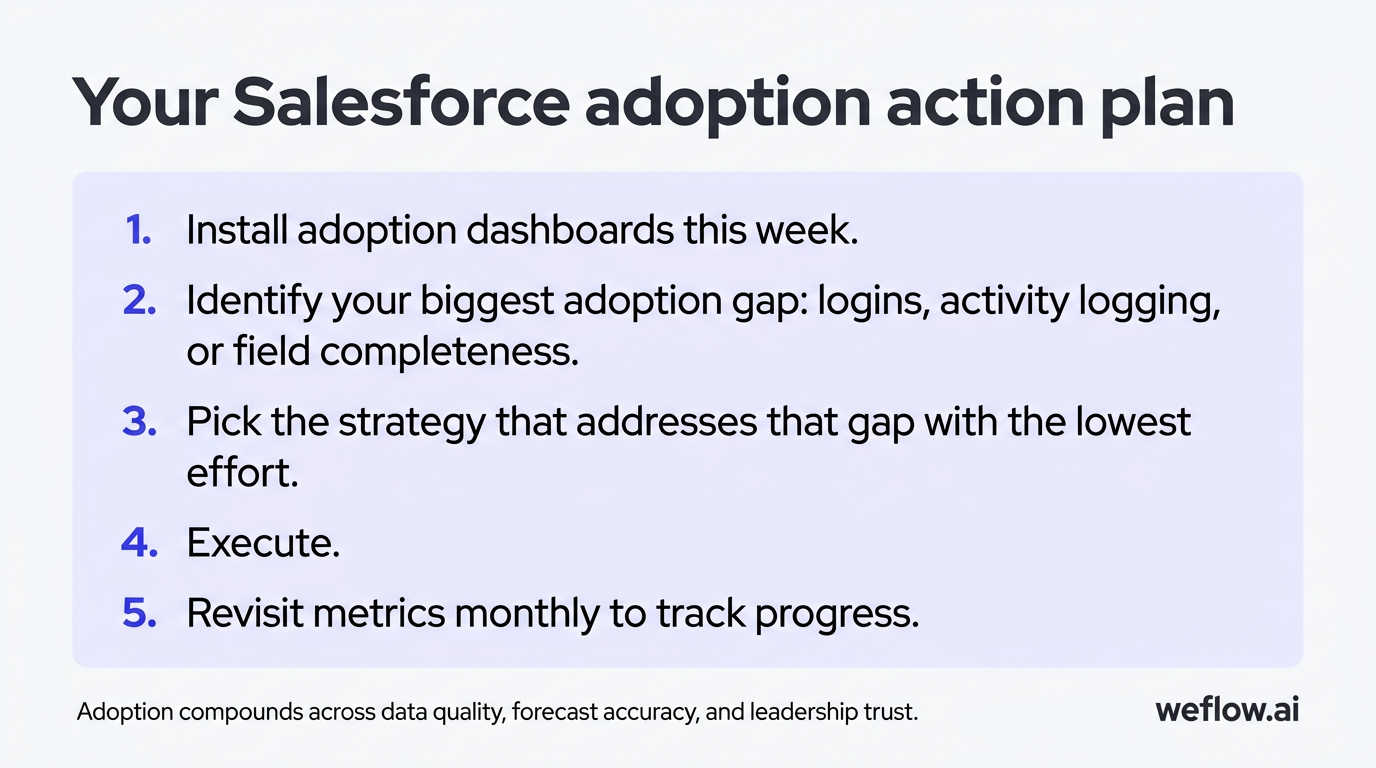
Salesforce adoption compounds. Every improvement in data quality improves forecast accuracy, which improves leadership trust, which reinforces rep behavior. The flywheel takes time to spin up—but once it does, the returns are measurable in revenue predictability, rep productivity, and operational confidence.

.webp)