Gong vs Salesforce Momentum: Conversation Intelligence and Forecasting Compared (2026)
Learn whether Salesforce Momentum can replace Gong for conversation intelligence and forecasting in 2026.



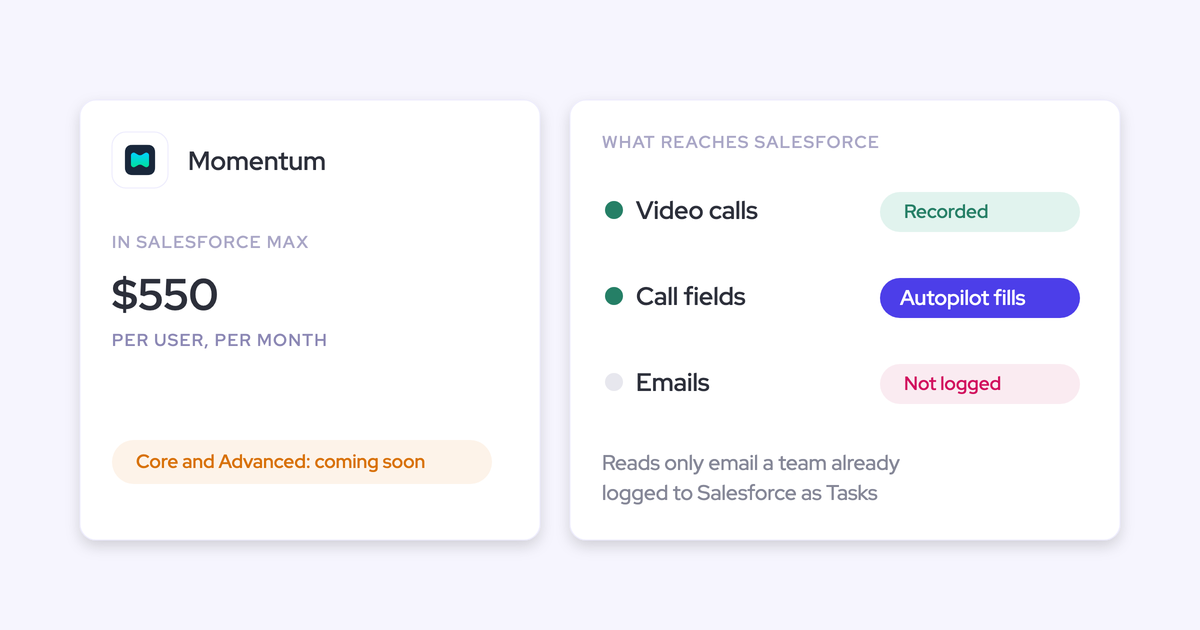
On 3 September 2026, Salesforce announced new sales editions that include Momentum. It's in Max today and marked "coming soon" for Core and Advanced. If you pay for Gong, someone in finance has probably already asked you: "Salesforce gives us this. Why are we paying Gong?"
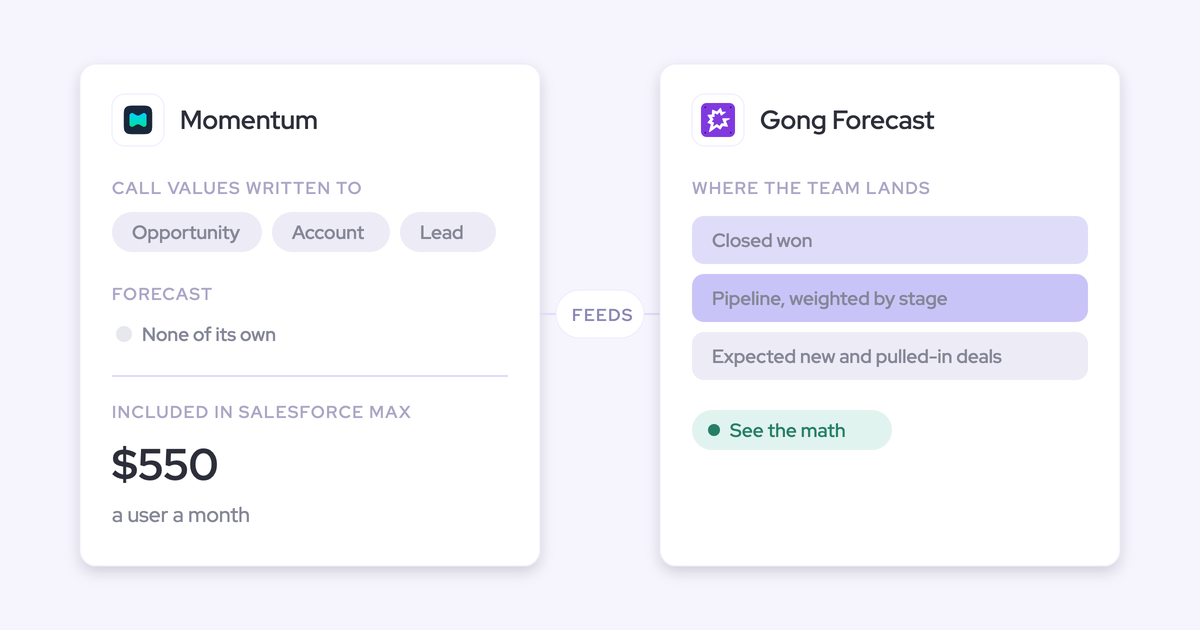
Here's the answer. Momentum can replace the half of Gong that writes conversations into Salesforce. It can't replace the half that runs your forecast. Momentum takes no forecast submissions, rolls nothing up and predicts nothing, and Salesforce positions it as feeding your forecasting tool. So your renewal gives you three outcomes: keep Gong, swap to Momentum and lose the forecast, or stack both and pay twice.
There's a fourth option. Weflow is the Revenue AI Orchestration platform for sales, customer success, and RevOps teams. We built it for Salesforce teams, and it covers both layers you're splitting: Weflow Conversation Intelligence + AI Field Updates on the conversation side, and a deal-by-deal forecast roll-up on the other. We'll name our own gap too: forecast submissions live in Weflow, not in a Salesforce field.
How Weflow, Gong and Momentum compare on ten capabilities
The three tools split hardest on forecasting, where Momentum offers nothing, and on how deep and how safe each one's writes into Salesforce are.
| Capability | Weflow | Gong | Momentum |
|---|---|---|---|
| Recording video meetings | Zoom, Teams, Meet, Webex; desktop app records without a bot | Eleven meeting platforms, about thirty dialers, live transcript in Zoom app | Zoom, Meet, Teams via CI add-on, or ingests Gong's recordings |
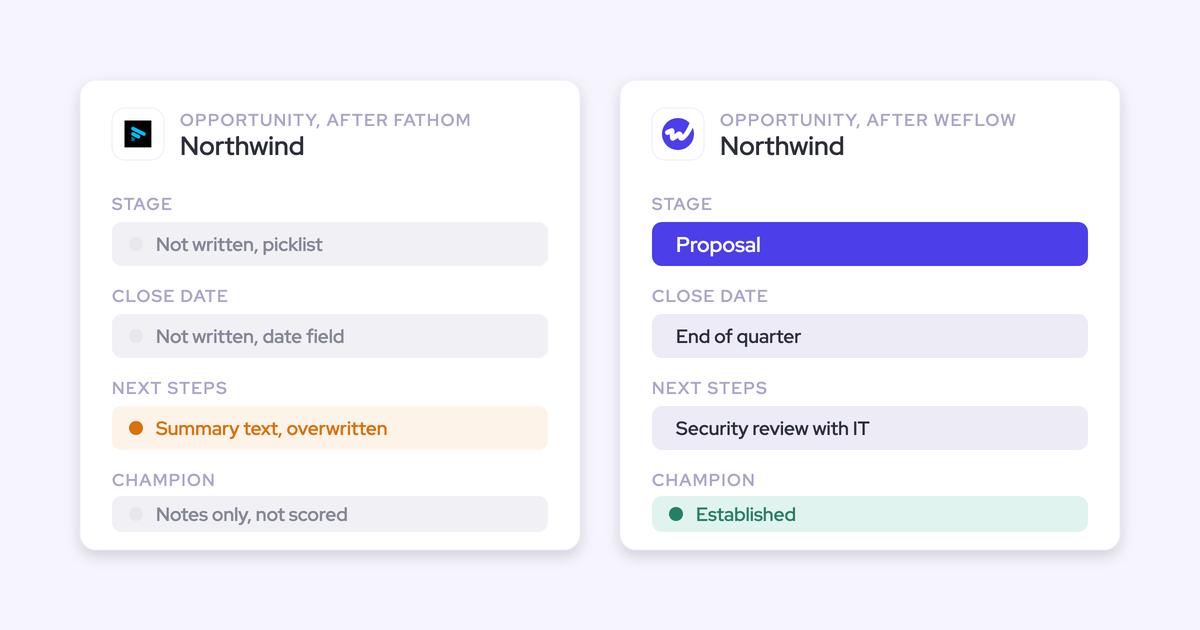
| CRM field updates from conversations | Every field type except lookups; auto or review per field; methodology fields append | Up to 20 admin-built extractors; existing fields only; overwrites earlier values | Auto, confirm or write-if-empty per field; append mode; Retropilot backfill |
| Coaching scorecards | Every call auto-scored on editable templates; per call, deal and rep | Configurable scorecards; needs paid Enable license and tuning | Every call scored 0 to 2 per competency, with written feedback |
| Deal risk warnings | 50+ signals plus your own AND/OR rules; not reportable in Salesforce | Eight fixed Gong-defined warnings; toggle and re-time only | Prompt-defined AI Signals and Salesforce record alerts to Slack |
| Forecast submissions and roll-ups | Baseline and best case per named deal; lives in Weflow, not Salesforce | Per-category submissions with notes; roll-up follows Salesforce hierarchy | None: no submissions, no roll-up |
| AI forecast prediction | Low, mid and high corridor from 50+ signals; needs six months' history | Projection with "See the math"; needs 400 opportunities, 150 won | None |
| Integrations | Salesforce, Google, Microsoft, Zoom, Slack, Outreach; no native warehouse connector | About 450 integrations and partner solutions | Five CI recorders, seven dialers, Slack or Teams, Gmail |
| Access from AI assistants (MCP) | Read-only MCP: transcripts behind a toggle, playbooks, forecast calls, rep metrics | Three record-scoped tools; insights only, no transcripts; credit-metered | No MCP of its own; Salesforce Hosted MCP reads what it wrote |
| Raw data access outside the tool | REST API bulk export in JSON or CSV; recordings to your storage | API capped at 10,000 calls a day; warehouse delivery needs Data Cloud | API off by default; capped at 100 requests per 15 minutes |
| Pricing | Published: $39 per product, bundles at $49, $59 and $79 per user | No published prices; Foundation plus applications plus pooled AI credits | Included in Max at $550; Core and Advanced coming soon |
Can Salesforce Momentum replace Gong at your renewal?
Partly. Momentum replaces Gong's conversation-to-Salesforce layer, and whether that's enough depends on two things: which Salesforce edition you're on, and whether Gong also runs your forecast.
Which Salesforce editions include Momentum today, and which don't
Momentum ships bundled today only in Max. Everything else is announced, an add-on, or requires a change of edition.
| Edition | Momentum status | What it means for a Gong renewal |
|---|---|---|
| Max ($550 per user per month) | Included today | You already hold it; the question is what fills the forecast |
| Advanced ($395 per user per month) | Announced, marked "coming soon" | You can't run it in production until it ships |
| Core ($195 per user per month) | Announced, marked "coming soon" | Same as Advanced; timing sits with Salesforce |
| Starter Suite and Pro Suite | Paid add-on, price only in a quote | It's a new line item, not a free swap |
| Legacy Enterprise and Unlimited | Not bundled; pricing unchanged | You reach bundled Momentum only by moving to a new edition |
Salesforce attaches its standard forward-looking disclaimers to the announcement, which means the buying decision runs on what's in market today. Momentum also still sells its own plans on momentum.io.
Momentum replaces Gong's conversation-to-Salesforce layer, not the forecast
Gong's contract bundles recording, field updates, coaching and often forecasting. Split those into layers and the swap looks like this.
| What Momentum covers | What it leaves uncovered |
|---|---|
| Recording or ingesting calls | Forecast submissions from reps and managers |
| Writing call data into Salesforce fields | A roll-up up the hierarchy |
| Per-call coaching scores | A predicted number beside the team's call |
| Slack signals and alerts | Forecast history and accuracy tracking |
Momentum positions itself as an orchestration layer that feeds a team's existing forecasting tool, such as Gong or Clari, rather than replacing it. That makes the forecast the hidden dependency in your renewal.
Reps don't adopt forecasting tools; leaders do. So whoever owns the forecast in your org decides whether a switch is survivable. If Gong Forecast is where your managers submit their numbers, swapping Gong for Momentum leaves those managers with nowhere to submit.
The four paths your Gong renewal actually gives you
Your renewal is really a choice between layers. Each of these four paths costs you something specific.
| Path | What you keep | What you lose |
|---|---|---|
| 1. Keep Gong at full price (one contract) | The deepest analytics, deal boards, integrations and your call archive | The price-to-value gap stays; field writes stay shallow; data stays in Gong's cloud |
| 2. Swap to Momentum (edition or add-on) | Conversation-to-Salesforce fields, coaching and Slack signals | Forecast submissions, roll-up and prediction, including Gong Forecast if you use it |
| 3. Stack Momentum on Gong (two contracts) | Gong's recorder and forecast, plus Momentum's field writes | The Gong budget line stays; a failed write means debugging across two vendors |
| 4. Replace both layers with Weflow (one contract) | Field writes, coaching, roll-up, AI projection, and data in your own org | Gong's breadth; the forecast number sits in Weflow, not a Salesforce field |
Stacking looks safe on paper. It also triggers the objection we hear from RevOps leaders' own executives before the proposal reaches procurement:
"I am not sure I want to deprecate one tool to bring on two. The optics of that are never going to look good."
We've also seen what stacking costs in practice. One team running Momentum on top of Clari Copilot has to check Salesforce, Clari and Momentum in turn whenever a write doesn't land. Two contracts means two places for the chain to break.
What Weflow does across conversation intelligence and forecasting
Weflow covers both layers with three modular products: Weflow Activity & Contact Capture, Weflow Conversation Intelligence and Weflow Deal Intelligence & Forecasting. Here's how each capability works, with the limits in the same place as the features.
How Weflow records meetings on Zoom, Teams, Meet and Webex
Our notetaker joins every external meeting on Zoom, Microsoft Teams, Google Meet and Webex automatically, from the calendar connection. Reps don't invite it, so coverage stays high.
A few setup conditions matter at rollout:
- Zoom needs local recording enabled by your Zoom admin, plus host approval.
- On Teams and Meet, someone has to admit the bot from the lobby. If nobody does, it leaves after about ten minutes, and the rep can send it back in from the Weflow calendar mid-call.
- Webex is off by default and gets switched on per workspace.
- A licensed user has to sign in to Weflow once before the notetaker joins their meetings.
The Weflow desktop app for Windows and macOS records without any bot in the call. It also records softphone calls running through the computer, such as Aircall or RingCentral, and we pull Outreach dialer calls in as recordings.
Two honest limits. We have no live in-call assistant, so every output arrives after the call. And our four meeting platforms are fewer than Gong's eleven.
How Weflow AI Field Updates write call data into Salesforce
Weflow AI Field Updates write call outcomes into Salesforce fields of every type except relationship lookups. This is the question you'll test in a trial: which fields does it write, who maps them, and can an admin see what it's about to change.
- Weflow writes picklists, number fields, date fields and multi-selects, not only free text.
- Before writing to a picklist, Weflow reads the field's allowed values, so it never writes a value the field won't accept.
- You set auto-write or review per field. A website can update itself while a champion field waits for the rep.
- Review shows the current value beside the suggested one, and the rep accepts, edits or rejects each.
- When a methodology field already has content, Weflow adds to it instead of replacing it, so your MEDDIC fields get richer across the deal.
- Weflow can write the opportunity Stage itself when the exit criteria in your prompt are met, and it respects your validation rules.
- Custom objects are in scope, with setup by Weflow support.
- You start from more than 250 pre-built prompts for MEDDIC, MEDDPICC, SPICED, BANT and your own methodology.

One limit: the review view shows what changed, not whether the value came from the call or from a web search. Web search is off by default, and you restrict a field to conversation data in its prompt.
Momentum is comparable here, and it's worth saying so. It also sets save behavior per field, appends with timestamps, and backfills new fields from past calls.
How Weflow scores every call against your sales methodology
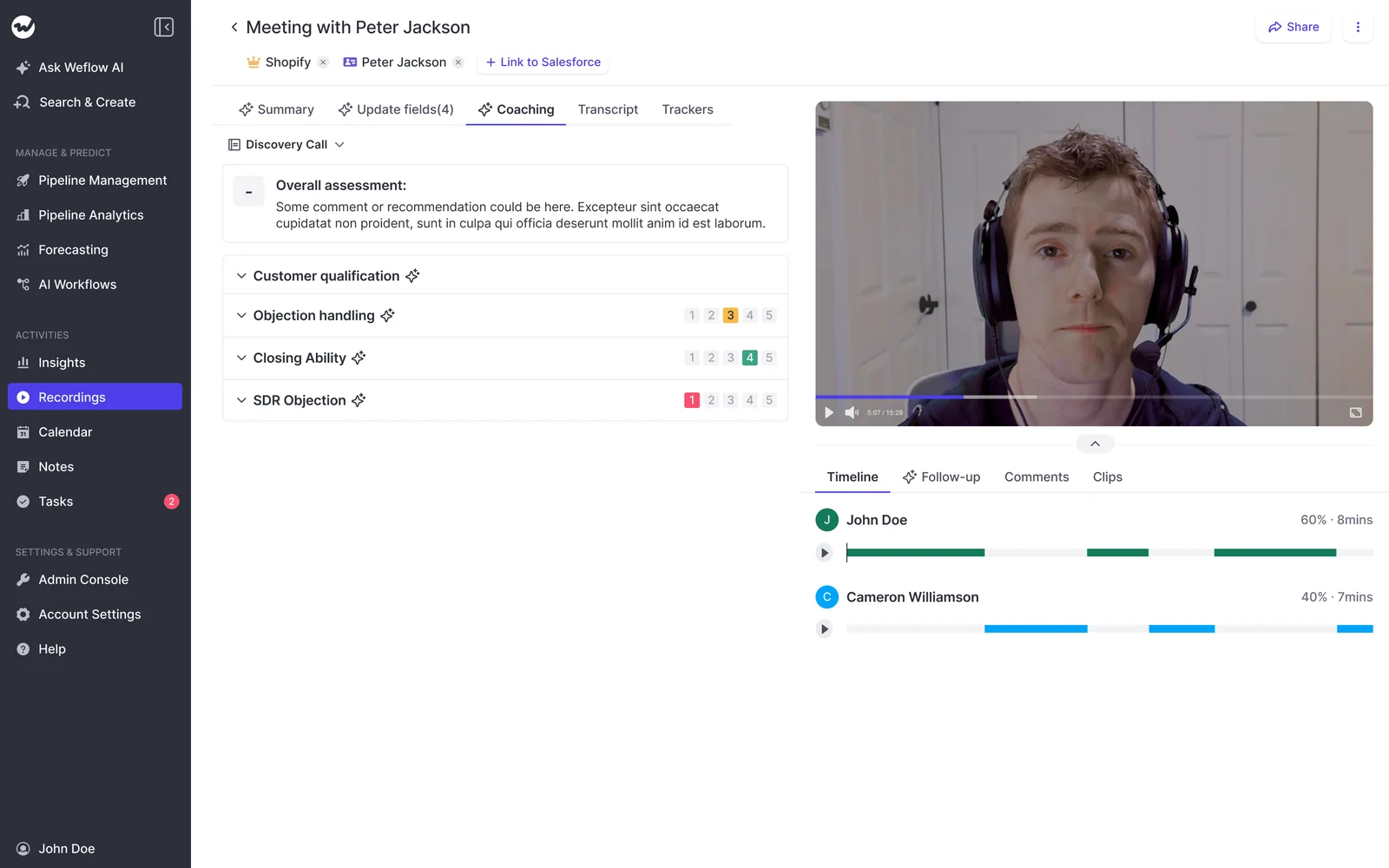
Weflow scores every recorded call automatically against coaching templates you can edit, including MEDDIC, MEDDPICC and Challenger. Managers can override any score.
Scoring runs at three levels: a single call, a whole opportunity, and a rep across every deal they've worked over months. The rep level is what turns coaching from anecdote into a trend, because a manager sees that a seller is strong on metrics and weak on decision process across twenty calls, not one.
How you build your own deal warnings in Weflow
In Weflow, you write deal warnings as AND/OR rules on any non-text opportunity field or on computed fields such as days inactive, days in stage and close-date push count. Weflow tracks those computed fields for you, so nobody builds custom fields to maintain them.
A team with a 60-day cycle might write: close date pushed more than twice AND no activity in 14 days AND only one contact on the deal. A team with a 12-month cycle would set different thresholds. The warnings also show up on the forecast submission screen, right when a rep picks which deals to commit.
Here's the limit. Warnings are Weflow fields, so you can't report on them in Salesforce dashboards or pull them into BI. The workaround today is an agent that writes the assessment into a Salesforce field you create.
How Weflow's roll-up, weighted and AI forecasts work together
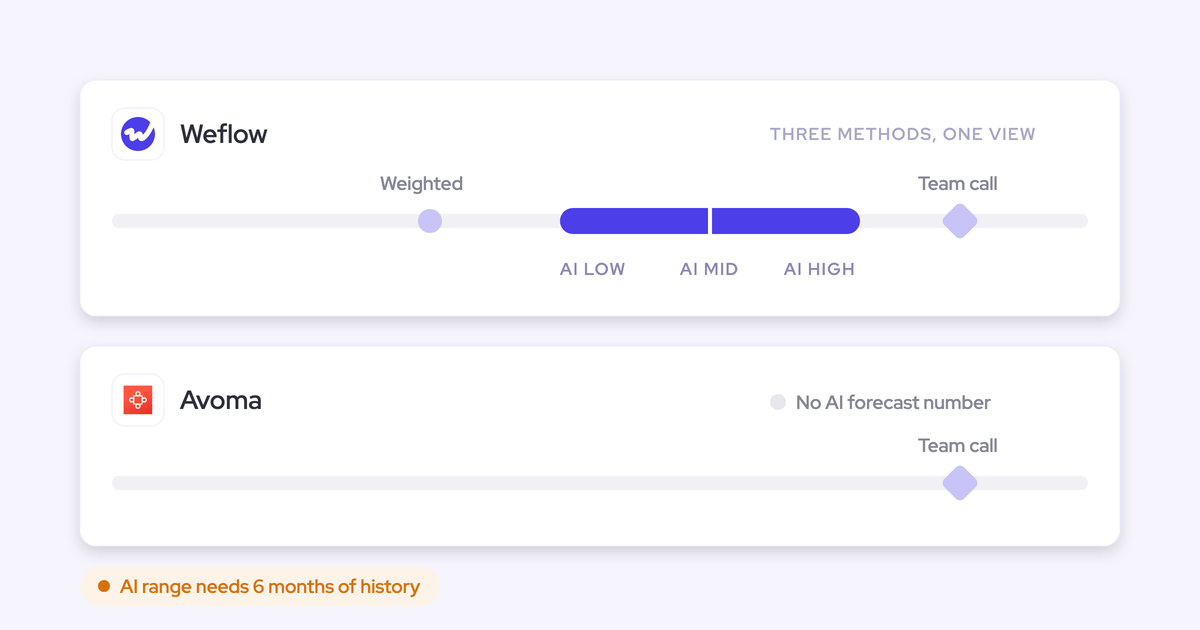
Weflow Deal Intelligence & Forecasting runs three forecast methods side by side, and the gaps between them are the agenda for your forecast call.
| Method | What it tells you |
|---|---|
| Roll-up | What your people believe. Reps submit a baseline and a best case tied to named opportunities; submissions roll up to manager, VP and executive. |
| Weighted forecast | What the pipeline mathematically supports, from stage win rates recalculated over a rolling 90 or 180 days instead of fixed Salesforce probabilities. |
| AI projection | What history predicts: a low, mid and high corridor from more than 50 deal signals and up to two years of history. |
Managers can override at the deal or total level, and each override is timestamped, attributed and logged with its rationale. We keep every version, so you can see whether a rep's call moved during the quarter or never moved at all. A manager submitting for the team picks the specific deals behind the number, whoever owns them.
"The AI prediction is not one number, it is actually a mid, high, and base case, so you have a corridor, because the reality is it is a corridor and a lot of things can happen."
— Janis Zech, Co-founder and CEO, Weflow
Gong also projects the quarter, and we'll credit that below. Where we differ is the corridor and the hierarchy: you configure Weflow's forecast hierarchy to match how your org actually reports, while Gong follows the Salesforce hierarchy.
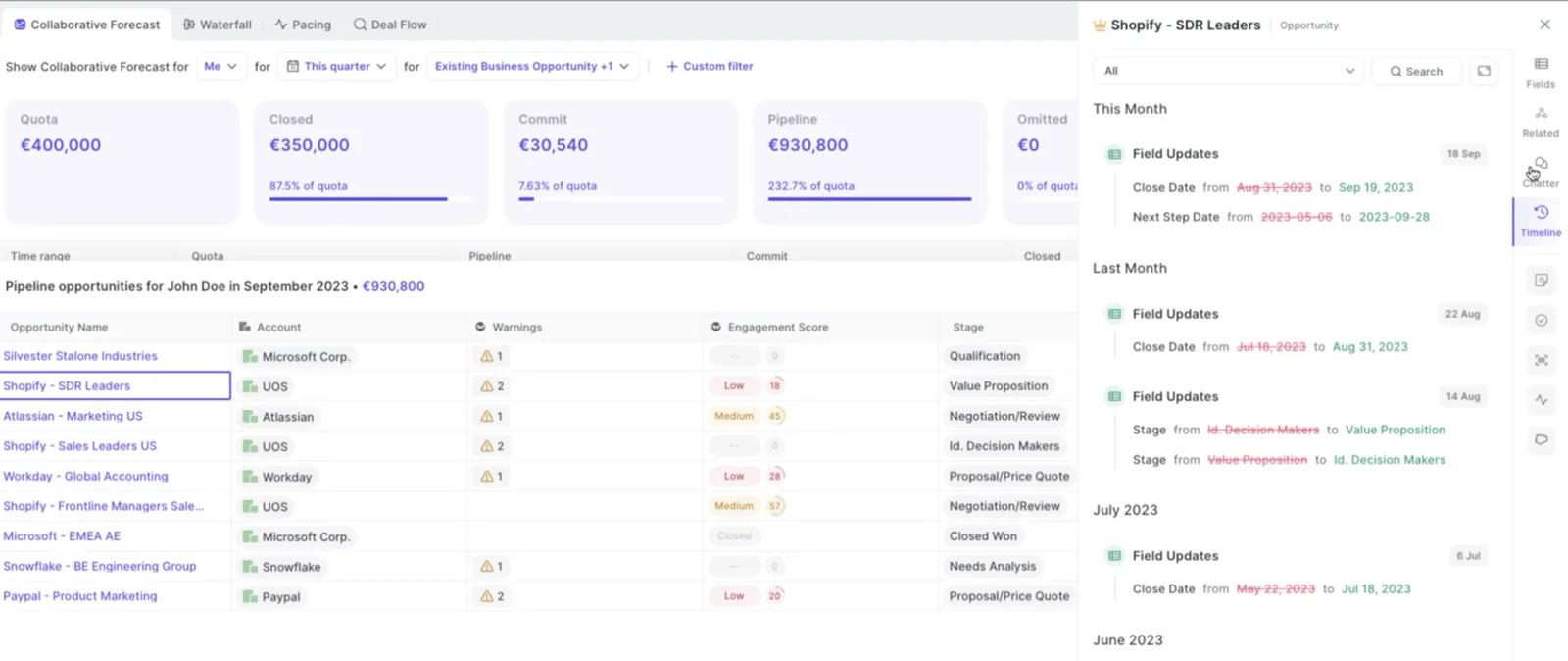
Now the gap. A forecast submitted in Weflow is not written to any Salesforce field. If your rule is "everything lands in Salesforce," the submitted number is the one piece of the process that lives only in Weflow. The weighted forecast and AI projection still work for you, because they run on CRM data with no rep input. Today you reach submitted forecast calls through our MCP connector, and API access is planned.
Two more limits: submissions happen in the web app, not from a phone, and forecasting fits booking-based revenue better than consumption revenue.
How Weflow opens transcripts and forecasts to your stack and AI assistants
Your transcripts and forecast data stay reachable after Gong, through two routes:
- MCP connector: Weflow's read-only connector gives Claude, ChatGPT and other assistants call summaries, playbooks, forecast calls and per-rep pipeline metrics. Full transcripts sit behind a separate admin toggle. Salesforce's own MCP can't see forecast calls or tracker hits, because they don't live in Salesforce.
- REST API: bulk exports of transcripts, metadata, scores and signals in JSON or CSV, into BI tools like Tableau and Looker or your warehouse. Recordings export to your own cloud storage.
- Native integrations: Salesforce, Gmail, Google Calendar, Outlook, Zoom, Teams, Meet, Slack and Outreach.
- What's missing: no native Snowflake, Databricks or BigQuery connector. The MCP per-rep breakdown caps at 25 owners per request, and saved deal board views aren't exposed.
What Gong does across conversation intelligence and forecasting
Gong invented the category and still has the deepest conversation analytics and the widest integration footprint. Its field write-back, warnings and AI access are narrower, and its forecast takes submissions per category rather than deal by deal.
How Gong records meetings and calls across platforms and dialers
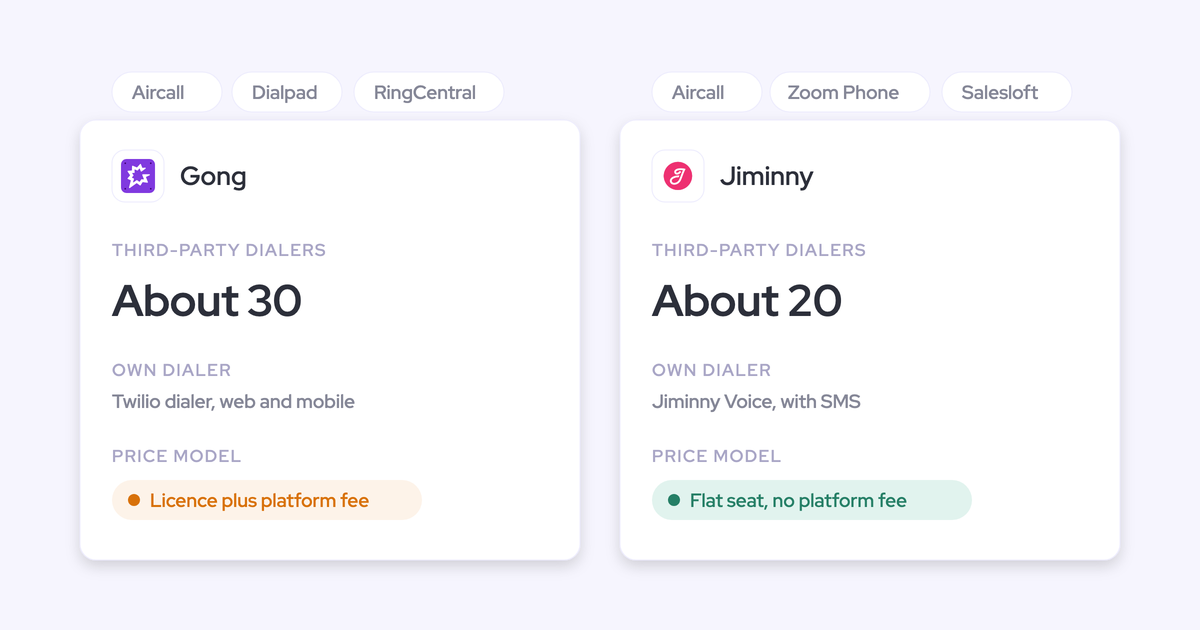
Gong records on Zoom, Google Meet, Microsoft Teams, Webex and seven other providers, including GoToMeeting, Amazon Chime and RingCentral. It imports calls from about thirty dialers such as Aircall, Dialpad, Five9 and Zoom Phone, and it has its own dialer.
Gong's Zoom app also gives reps a live transcript and a talk-ratio alert during the call. If your team relies on that, it's coverage you'd give up by switching to Weflow.
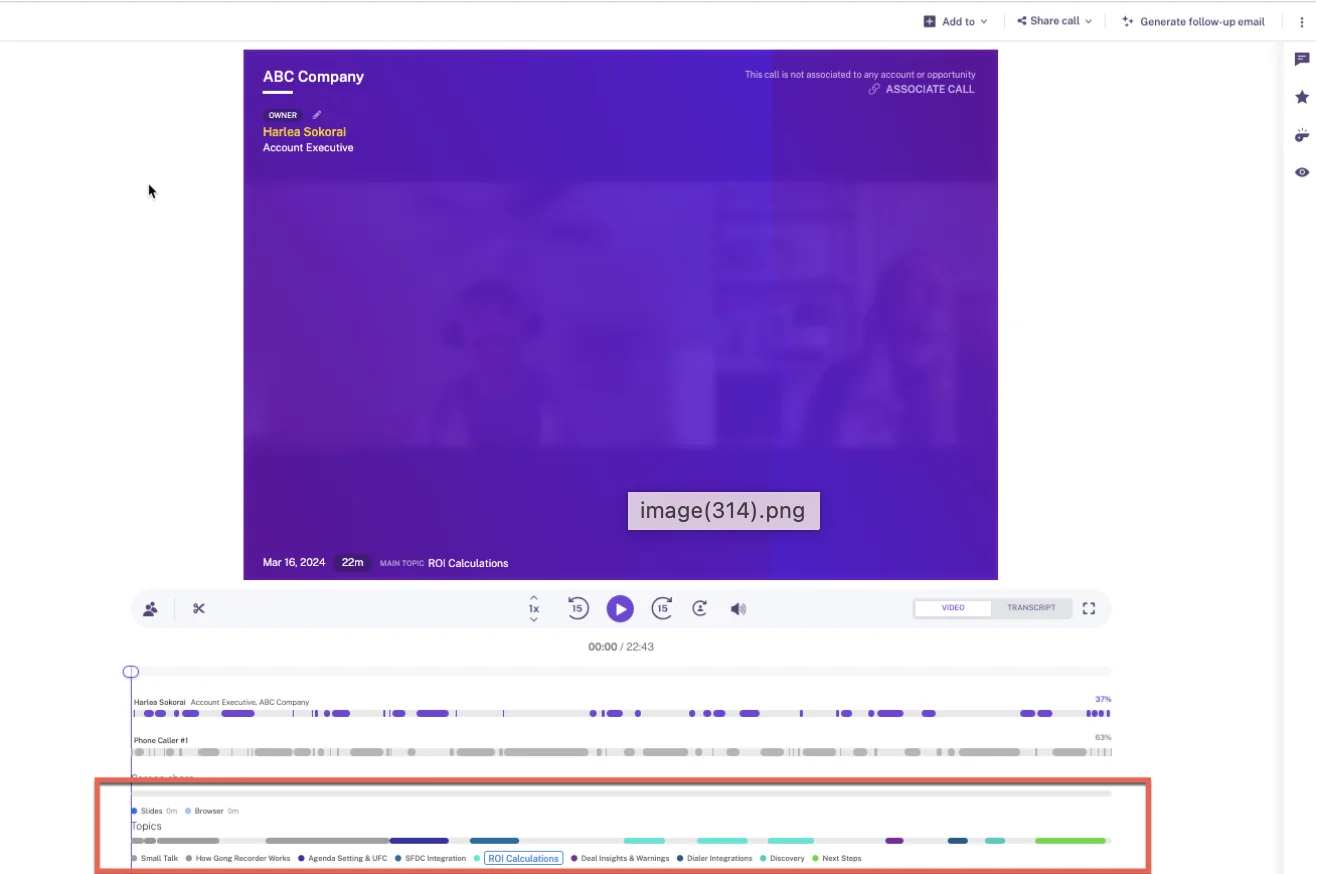
That's Gong's call page, with its topic track segmenting a recording. This depth of analysis on a single call is where Gong is strongest.
How Gong's AI Data Extractor writes call data into Salesforce
Gong's AI Data Extractor explains why so many Gong customers still have empty MEDDIC fields.
- A workspace can publish at most 20 extractors, and only a business admin can create them.
- Extractors write only into CRM fields that already exist and are imported into Gong.
- Each new answer overwrites the previous value, so early qualification gets replaced by the latest call.
- Gong's docs allow custom objects only where the record already exists with a one-to-one relationship; on switch calls, we hear it reaching standard objects only.
- Deal boards can also fill one text field, such as next steps, with AI suggestions.
How Gong scorecards score calls through the Enable license
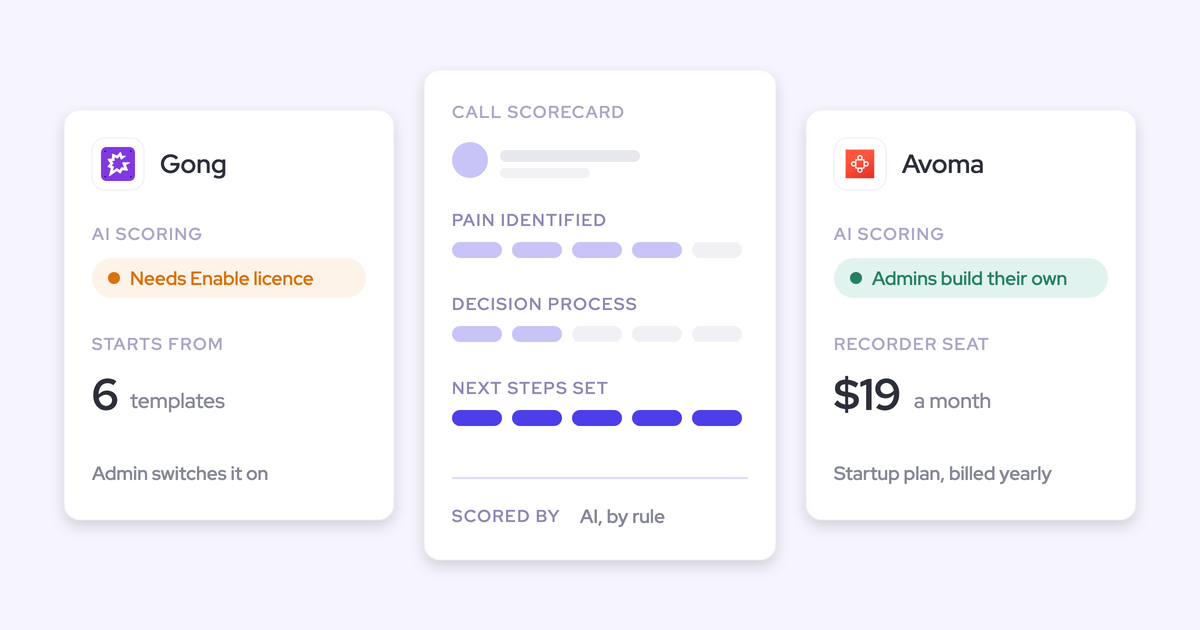
Gong's scorecards are configurable, start from six templates, and AI Call Reviewer can score them automatically. Coaching isn't in the base seat, though: it needs the paid Enable Essentials or Enable license, and a tech admin has to switch on automatic scoring company-wide.
The scorecards also take setup and tuning before managers trust them. Automatic review scores at most three team members per call, and it skips voicemails and calls under 100 words.
How Gong's eight fixed AI Deal Monitor warnings flag risk
Gong's AI Deal Monitor offers exactly eight warnings, all defined by Gong: no activity, ghosted, overdue, not enough contacts, no power, pricing not mentioned, red flag, and stalled in stage.
You can switch each on or off and change when it triggers, but you can't create a new one. A risk pattern specific to your motion, like a required partner sign-off, has no way to become a warning.
How Gong Forecast handles submissions and projects the quarter
Gong Forecast is a real forecasting product, and it deserves credit. Reps submit their number per forecast category with notes, managers navigate the hierarchy, and trend, pacing and accuracy reports all exist. The projection includes a "See the math" panel that shows every component.
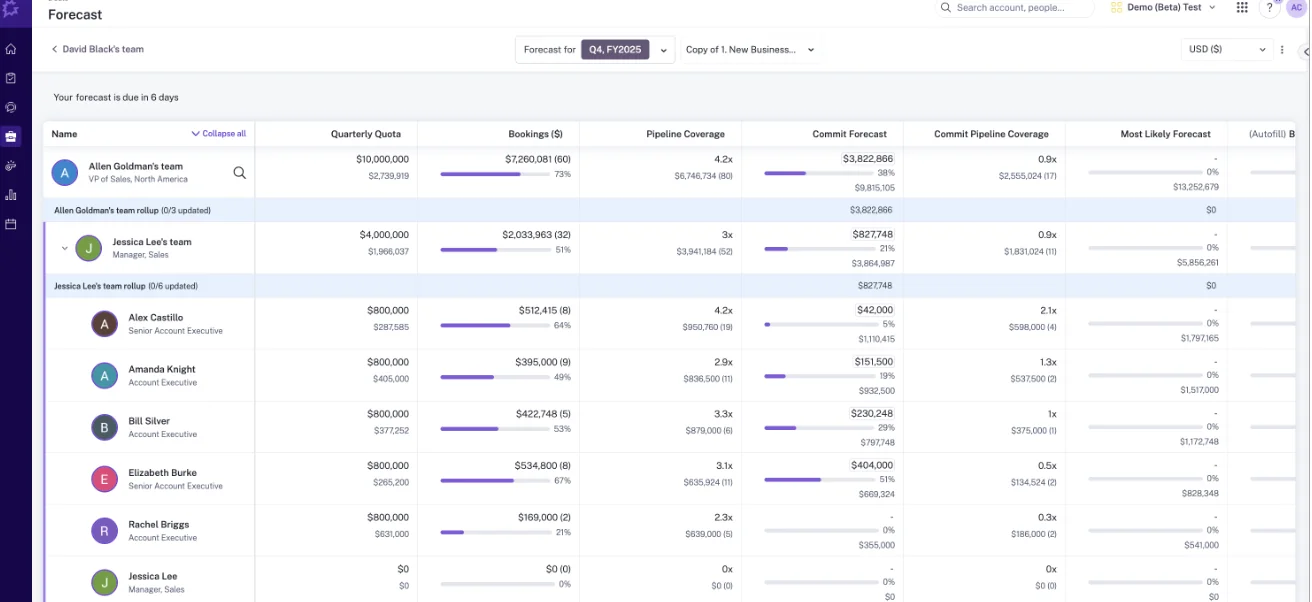
That's Gong's roll-up from VP down to individual reps. Compared with the Weflow forecast view above, the difference is what a submission is made of. Here are the limits:
- Submissions are per category, not tied deal by deal to named opportunities.
- The roll-up follows the Salesforce hierarchy, so teams with overlays or pods build placeholder structures to make it resolve.
- Reliable projections need at least 400 created opportunities with 150 closed-won across four quarters.
Some teams never get it to fit their structure:
"Our RevOps team spent too many hours building it out and trying to get it to work super well. So we ended up actually doing most forecasting back in spreadsheets."
— Chris Nethercote, Head of Sales at Weflow, former Gong enterprise customer
How Gong opens call data to your stack and AI assistants
Gong's integration marketplace is the largest here. Its AI access is narrower than its integration count suggests.
- Integrations: about 450 integrations and partner solutions across CRM, dialers, conferencing, BI and enrichment.
- MCP: three tools, each scoped to a single account, deal or contact. It returns AI insights, never raw transcripts, is read-only, and draws metered credits. Each user needs a paid Gong seat plus a paid tier of the AI tool.
- API: returns transcripts, trackers and scorecards, capped at 3 calls a second and 10,000 a day.
- Data Cloud: warehouse delivery to Snowflake, Databricks, BigQuery and Redshift is a separate purchase of about $5,000 a year.
What Salesforce Momentum does across conversation intelligence and forecasting
Salesforce owns Momentum and bought it to feed Agentforce, because an agent is only as good as the CRM under it. Salesforce now sells it through the new sales editions, and it's a strong conversation-to-Salesforce layer that can sit on top of Gong, with no forecast of its own.
How Momentum records calls or ingests them from Gong
Momentum works in two modes. With its Conversation Intelligence add-on, it records Zoom through Zoom's own cloud recording, and Google Meet and Teams through a bot. Or it ingests transcripts from Gong, Chorus, Clari Copilot, Attention and Salesloft Conversation Intelligence.
The ingest mode is what makes stacking possible: Gong keeps recording, and Momentum acts on the transcripts. All of Momentum's AI runs after the call, with no live in-call prompts.
How Momentum Autopilot writes call data into Salesforce fields
Momentum Autopilot is genuinely good at filling fields, and it's closer to Weflow here than Gong is.
- Each extraction has its own save behavior: write automatically, confirm after a human reviews it in Slack or the web app, or write only when the field is empty.
- Append mode timestamps each new entry, so a rep's own text survives.
- Retropilot re-reads a record's past conversations when a Salesforce event fires, and Autopilot Batch backfills a new field across past records.
- Extractions reach Opportunity, Account, Lead, Event and Contact fields, plus fields on objects reached from those.
- Momentum writes MEDDPICC and SPICED elements into their own Salesforce fields.
How the Momentum Coaching Agent scores every call
The Momentum Coaching Agent scores every recorded call per competency on a 0 to 2 scale, with written feedback and examples from the conversation. CRM conditions decide which competencies run on which calls, so discovery skills apply to early-stage deals and negotiation to late-stage ones.
A Coaching Analytics dashboard tracks each rep's trend, and you can push coaching scores into Salesforce fields for your own reports. Managers keep a real coaching surface.
How Momentum's AI Signals and Slack alerts flag deal risk
Momentum's AI Signals are prompt-defined detections that fire when a topic like churn risk or a competitor comes up on a call, routed by CRM conditions such as stage and ARR. Salesforce record alerts post to Slack when a record meets criteria you define, with buttons to update the record and reminders that repeat until the rep acts.
That's comparable to Weflow in flexibility. The difference is that it works call by call, with no per-deal score for likelihood to close.
Why Momentum has no forecast roll-up or AI prediction
Momentum takes no forecast submissions, rolls up nothing and predicts nothing. Its nearest features are Executive CRO Briefs, which summarize pipeline performance, and a Pipeline Change Agent, which alerts you to changes. Neither is a forecast.
Pipeline reporting means picking an existing Salesforce report and having Momentum post it into Slack on a schedule. If you choose Momentum, your forecast lands in one of three places:
- Native Salesforce forecasting, which works when your quarter rests on a handful of material deals.
- A separate forecasting tool, which puts you back at two contracts.
- Spreadsheets, rebuilt by hand every week.
How Momentum data reaches AI assistants through Salesforce
Momentum has no MCP server of its own. AI assistants read what Momentum wrote into Salesforce through Salesforce's Hosted MCP Server.
Momentum's own API is off by default, switched on per workspace through support, and capped at 100 requests per 15 minutes. It returns meetings, transcripts and recording links, but has no endpoint for summaries, Autopilot extractions or coaching scores. So the ceiling for your AI tooling is whatever actually landed in the CRM.
What Weflow, Gong and Momentum actually cost
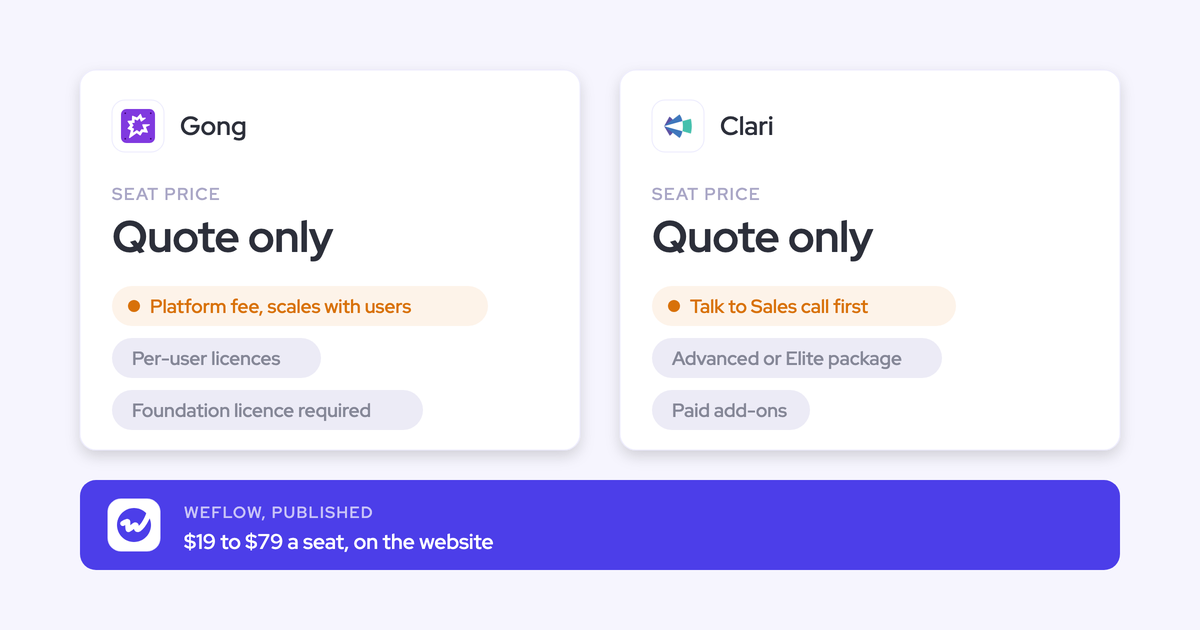
Weflow publishes seat prices with AI included. Gong publishes no prices and meters AI in credits. Momentum's cost depends on your Salesforce edition.
| Weflow | Gong | Momentum | |
|---|---|---|---|
| Pricing model | Per seat, per product or bundle | Per-user licenses plus a platform fee that scales with users | Bundled in Salesforce editions, add-on, or standalone |
| Published list prices | $19 to $39 per product; bundles $49, $59, $79 | None; every figure comes in a custom proposal | Max $550, Core $195, Advanced $395; standalone $69 and $99 |
| AI usage | Included in the seat; only Agent Builder is metered | 2,000 credits per paid seat a year, pooled company-wide | Agentforce for Sales from $125 per user on Core and Advanced |
| What costs extra | Agent Builder above the free 25 actions a month | Each application, top-up credits, Data Cloud | Add-on on Starter and Pro Suite; $30 CI add-on standalone |
| Terms | 12-month minimum, 10-user minimum, billed annually | Credits reset each contract year; top-ups expire | Billed annually |
Weflow pricing: published seats with AI included
Here's our list pricing, per user per month, billed annually:
- Weflow Activity & Contact Capture: $19
- Weflow Conversation Intelligence: $39
- Weflow Deal Intelligence & Forecasting: $39
- Revenue AI Foundation (Activity & Contact Capture + Conversation Intelligence): $49
- Revenue AI Business (Foundation + Deal Intelligence): $59
- Revenue AI Enterprise (all products, including Forecasting): $79
Every plan includes Ask Weflow AI Pro and the free tier of Agent Builder. Agent Builder is the only metered product: $299 a month for 500 agent actions, $999 for 2,500, and a custom Enterprise package. There's a 10-user minimum per product or bundle.
Revenue AI Business includes deal intelligence without forecasting; Revenue AI Enterprise adds the full forecasting layer. Different teams can sit on different plans, so most customers put reps on Foundation or Business and only the leaders who submit forecasts on Enterprise. Our packaging lets you expand into forecasting for roughly $10 more per user, rather than a separate forecasting contract.
At about 62 seats, Revenue AI Foundation lands around $36K a year and the full platform around $58K. Mixing plans brings those same 62 seats to roughly $45K. That's what "better AI at half the price" looks like in a business case: our read of Gong quotes is roughly twice ours for the same team.
Gong pricing: Foundation license, applications and metered AI credits
Gong's quote is the size it is because of how it stacks:
- Gong Foundation is a mandatory core license, and nothing else can be bought without it.
- Applications stack on top: Enable Essentials, Forecast Essentials, Gong Forecast, Gong Engage and Data Cloud.
- Seats are counted per application, so one person who needs deals functionality consumes a Foundation seat and a Forecast Essentials seat.
- AI runs on a pooled credit meter: a call over ten minutes costs one credit, a shorter call half a credit, each email a tenth.
- The same brief is free in the Gong interface and costs credits through the API or MCP.
- Data Cloud for warehouse delivery is a separate purchase.
"we love Gong but it's way too expensive · $93k a year for my little team"
Momentum pricing: bundled in Salesforce editions or sold standalone
Momentum is "free" only if you're on, or move to, an edition that bundles it. On Max at $550 per user per month, you already hold it. On Core at $195 or Advanced at $395, it's coming but not shipped. On Starter or Pro Suite, it's an add-on priced in a quote, and legacy Enterprise and Unlimited customers have to change edition.
On momentum.io, standalone plans run $69 for Business and $99 for Transformation, with Enterprise on quote and a $30 Conversation Intelligence add-on. If you stack Momentum on Gong, you pay the full Gong renewal plus the edition uplift or add-on.
How to move off Gong without losing recordings or forecast
A switch holds up when you plan three things separately: your history, your timing and your people.
What happens to your Gong recordings, transcripts and trackers
Gong keeps recorded calls and their transcripts for up to three years by default. Calls saved to its library are the exception and are kept indefinitely. So your Gong archive already has an edge, and the older part of it ages out on its own schedule.
When you move to Weflow, we carry your existing tracker set over, so keyword reporting on competitors and objections doesn't restart from zero. Momentum offers a migration service that moves historical recordings over a couple of days, plus Retropilot to backfill fields from them.
How to time the switch against your Gong renewal
- Map which Gong layers you actually use: conversation intelligence, Gong Forecast, and Engage or the dialer.
- Start the evaluation months ahead. Renewal decisions often need a final answer long before the contract end date.
- Factor in Gong's grandfathering rules. Headcount added as part of the renewal gets matching seats at no extra cost; seats added after it are paid for across every application they need.
- Trial two or three tools on your own Salesforce data, and test the field writes, not the transcript quality.
- Replace one layer first if you need to. Weflow runs on 12-month terms, and you can start with capture and conversation intelligence and add forecasting later.
How to move reps and managers who like Gong
RevOps decides on cost and data. Reps decide on feel.
"There's the RevOps side, where a more cost-effective option with better syncing and stronger data foundations is a no-brainer for us. But then there's the emotional, change-management side from the seller's experience."
KORE Wireless evaluated Gong, decided the value didn't justify its price compared to Weflow, and rolled Weflow out in five phases:
- Activity & Contact Capture
- Conversation Intelligence
- Coaching
- Deal Intelligence
- Forecasting
That order works because the rep-facing layers go first. Reps see their fields filling themselves before anyone asks them to submit a forecast, and forecasting lands last, on data the team already trusts. Managers who liked Gong's deal boards need a working board of their own early, because that attachment is real:
"the deal board specifically, the reason why I stuck with it was like the bubbles, like, you sort of get like addicted to the bubbles."
— Chris Nethercote, Head of Sales at Weflow, former Gong enterprise customer
When to choose Weflow, stay on Gong or pick Momentum
The right answer depends on where your forecast lives and whether your rule is that everything lands in Salesforce.
Choose Weflow if you need both layers on one platform
- You want deep field writes (picklists, numbers, dates, methodology fields that append) and a deal-by-deal forecast roll-up on one contract.
- You want published seat pricing with AI included, not a credit meter.
- You want your captured data in your own Salesforce org, usable by your reports, automations and AI.
- Weflow isn't the fit if your forecast number must live on a Salesforce object.
- It isn't the fit if your reps rely on a live in-call assistant.
- It's a weaker fit if you forecast consumption revenue rather than bookings.
Stay on Gong if its breadth clears the renewal price
- Your transcript archive feeds marketing, sales and customer success through deep integrations and dialers you depend on.
- You use the live transcript, the eleven meeting platforms and the deal boards daily.
- Your security review requires Gong's broader ISO certification set.
- The renewal price clears the value your team actually gets from it.
Pick Momentum if you're on Max and forecast few deals
- You're already on Max, so Momentum is in your license today.
- Your team works in Slack and wants field writes, coaching and alerts there.
- Your quarter rests on about ten material deals, a forecast native Salesforce forecasting can carry.
- You accept that forecasting, reporting and a second recorder live elsewhere.
See how Weflow captures activity, updates Salesforce fields from calls, and rolls up your forecast. Book a 30-minute demo.
Frequently asked questions about Gong, Momentum and Weflow
Does Weflow meet the same security bar as Gong?
Weflow is SOC 2 Type II certified and GDPR compliant, runs Zero Data Retention for AI processing, and never uses customer data to train AI models. ISO 27001 is in progress, not certified. Gong holds ISO 27001, 27017, 27018 and 27701 alongside SOC 2 Type II, so if your procurement mandates ISO 27001 today, Gong has it and we don't yet.
Where does Weflow store recordings, transcripts and Salesforce data?
Weflow writes all CRM data, including activities, contacts and Weflow fields synced to Salesforce, into your own Salesforce org. Recordings and transcripts sit in our AWS environment in the region you choose (Frankfurt, New York or Sydney), scoped to your tenant and encrypted at rest and in transit. We keep recordings for as long as you subscribe, and you can set them to delete after a fixed period or export the video to your own storage.
Does Weflow capture Outlook email and dialer calls?
Yes. Weflow Activity & Contact Capture syncs emails, meetings and contacts from Outlook or Google into Salesforce. The Weflow desktop app records softphone calls running through the computer, and we pull Outreach dialer calls in as recordings. Per our competitive intel, Momentum reads email only from Salesforce Tasks someone has already logged.
How much history does the Weflow AI forecast projection need?
Weflow's AI projection needs at least six months of Salesforce opportunity history. We import twelve months by default at install, the projection works from up to two years, and the first projection is ready within 48 to 72 hours. It doesn't yet adjust for ramping reps, so a new hire's deals are projected from very little history of their own.
What contract terms and minimums does Weflow require?
Weflow's standard contract is 12 months, with a minimum of 10 users per product or bundle, billed annually. You can't reduce seat count mid-term, but you can reassign seats when someone leaves. Bundle, volume and multi-year discounts apply.
Can marketing and customer success still reach transcripts after Gong?
Yes. An admin can switch on full transcript access in Weflow's MCP connector, so assistants like Claude and ChatGPT read transcripts directly, and the REST API bulk-exports them to your warehouse or BI tools. Weflow also runs separate summary and field-update templates per team, so customer success can write its own qualification structure to different Salesforce objects than sales. Unlimited view-only licenses let those teams review recordings without a paid seat.
Does Salesforce Momentum write to custom objects and lookup fields?
Momentum Autopilot writes to Opportunity, Account, Lead, Event and Contact fields, and to fields on other objects reached by navigating from those. For lookup fields pointing to Contacts, Autopilot suggests an external attendee from the call. Weflow writes every field type except lookups and reaches custom objects with setup by Weflow support.